
Table of Contents
A high-severity HivePress Authentication vulnerability can allow account takeover when Facebook access tokens are accepted without validating their intended application. Learn how CVE-2026-18056 works, which WordPress accounts face risk, why audience validation matters, and why administrators should update to version 1.1.5.
The HivePress Authentication vulnerability tracked as CVE-2026-18056 highlights an important lesson about social login security: confirming that a token exists and belongs to a real Facebook account does not automatically prove that the token should be trusted by your WordPress website. Authentication systems must verify not only who issued a token, but also whether that token was created for the application receiving it.
That distinction is at the heart of this vulnerability. HivePress Authentication versions up to and including 1.1.4 could accept Facebook authentication information without adequately confirming that the supplied access token belonged to the Facebook application configured for the WordPress website. The weakness has been classified as improper authentication under CWE-287 and received a CVSS 3.1 score of 7.5, rated High.
For WordPress administrators, the possible consequences deserve attention because authentication problems operate at a different level from many ordinary plugin vulnerabilities. A vulnerable authentication flow may affect the identity boundary itself. If WordPress incorrectly concludes that someone has proved ownership of an existing account, the permissions already assigned to that account become available through the authenticated session.
The issue does not mean that every website running HivePress Authentication has already been compromised. It also does not mean that knowing an administrator’s email address is enough to sign in. The published CVE description includes an important prerequisite: an attacker would need to obtain a valid Facebook access token associated with the targeted user’s Facebook identity. That condition raises the attack complexity considerably.
Nevertheless, sites using affected releases should not depend on attack complexity as a permanent defense. Authentication controls should fail safely even when a token is exposed, stolen, incorrectly issued, or presented outside its intended application context. HivePress Authentication 1.1.5 is now available, while the extension’s official WordPress.org page also says that the extension is no longer under active development and recommends considering a replacement for similar functionality.
What Is CVE-2026-18056
CVE-2026-18056 is an authentication bypass vulnerability affecting the HivePress Authentication extension for WordPress. According to the published vulnerability record, versions through 1.1.4 are affected. The problem concerns the extension’s Facebook authentication mechanism and the way it handled a supplied access token while attempting to identify a WordPress user.
HivePress Authentication is an extension designed for the broader HivePress ecosystem. Its purpose is straightforward: instead of requiring every visitor to create and remember another WordPress password, a website can allow users to authenticate through supported third-party services. Social login can improve convenience, especially for directory, classified, marketplace, community, and listing websites where visitors regularly create accounts.
Convenience, however, changes the trust model. With traditional WordPress authentication, WordPress evaluates credentials that it manages directly. With social authentication, the site delegates an important part of identity verification to an external identity provider. The WordPress application therefore needs a reliable way to determine whether the evidence returned from that provider genuinely applies to its own authentication flow.
The published CVE information describes a weakness in that verification boundary. The Facebook authenticator could resolve an identity using a supplied access token and trust returned identity information without performing the required application ID or audience validation. In particular, the advisory notes the absence of the appropriate token debugging verification and comparison against the Facebook application ID configured for HivePress Authentication.
That may sound like a small technical omission, but audience validation answers a fundamental security question: Was this token actually intended for my application?
A token may be cryptographically legitimate and still be inappropriate for a particular relying application. Authentication therefore cannot safely stop at “Facebook recognizes this token.” The receiving application needs to establish additional properties before it converts external identity information into a local authenticated WordPress session.
The CVE is categorized as CWE-287, Improper Authentication. Its published CVSS 3.1 vector gives it a score of 7.5, or High severity. The scoring reflects substantial potential confidentiality, integrity, and availability impact while also recognizing the higher attack complexity and required user interaction associated with obtaining the necessary victim token.
The most important practical detail is the affected version range. WordPress administrators running HivePress Authentication 1.1.4 or earlier should treat the installation as affected and move to the corrected release rather than attempting to judge safety only from whether Facebook login appears to function normally.
A login form can work perfectly from a user’s perspective while still making an unsafe trust decision behind the scenes. Security defects in authentication are often invisible during normal testing because legitimate users naturally provide legitimate credentials through the expected application. The weakness becomes visible only when the system receives valid identity material in an unexpected context.
Why authentication bypass deserves special attention
An ordinary display bug may damage presentation. A caching problem can reduce performance. An authentication bypass reaches a much more sensitive boundary because successful authentication determines who WordPress believes is operating an account.
WordPress authorization normally happens after authentication. Once the platform recognizes a user, capabilities attached to that account determine what the user can do. A subscriber has limited privileges, while an administrator can typically install plugins, modify configuration, manage users, publish content, and perform other highly privileged actions.
Consequently, authentication weaknesses can inherit the privileges of the account they expose. The vulnerable component does not necessarily need a separate “become administrator” function. If it incorrectly authenticates somebody as an existing administrator, WordPress itself can subsequently provide the permissions legitimately assigned to that administrator.
This distinction is essential when evaluating CVE-2026-18056. The issue is not simply “Facebook login behaves incorrectly.” The security concern is that the result of that external authentication process may be used to establish a local WordPress identity.
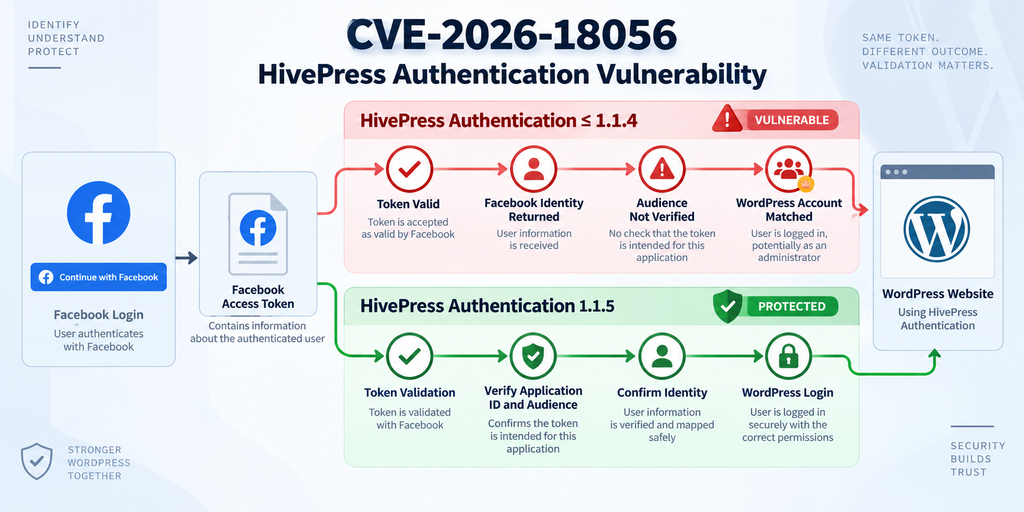
How Facebook Access Tokens Are Misvalidated
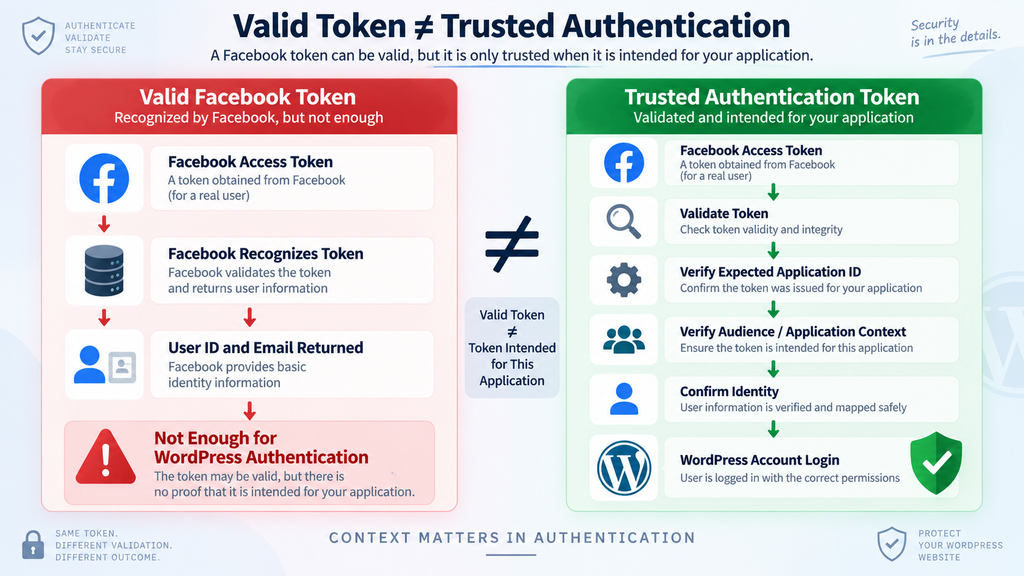
Understanding CVE-2026-18056 becomes easier when separating two questions that can look almost identical during implementation. The first is, “Is this a valid Facebook access token?” The second is, “Is this a valid Facebook access token intended for my application?” A secure social authentication system needs an appropriate answer to both.
Imagine a receptionist checking a visitor badge. The badge may be genuine, unexpired, and issued by a legitimate organization. Those facts still do not prove that the visitor has permission to enter this particular building. The receptionist must also check where the badge is valid. OAuth-style authentication has a comparable concept: identity evidence needs context.
The CVE description states that the affected Facebook authenticator forwarded supplied access-token information to Facebook’s Graph API and trusted returned identity data without adequately performing application ID or audience validation. Specifically, the published description identifies the missing token verification step and the lack of comparison between the token’s application identity and the Facebook application configured by the site.
This distinction matters because an external provider can legitimately recognize a token while the receiving WordPress application still has no basis for accepting that token within its own login flow. Authenticity and intended audience are related, but they are not interchangeable security properties.
A valid token is not automatically your token
Developers sometimes treat a successful response from an identity provider as the end of authentication. If the provider returns an ID and email address, the application may assume that the identity has been sufficiently verified.
That assumption can be dangerous.
A properly designed token-validation process asks more than whether the provider can decode or recognize the credential. Depending on the protocol and provider, the application should verify relevant properties such as issuer, intended application or audience, validity state, expiration, and other claims or metadata required by the provider’s documented authentication flow.
For HivePress Authentication, the CVE focuses specifically on application ID or audience validation. If the WordPress website is configured with a particular Facebook application, the authentication process needs to ensure that the presented credential belongs to the expected application context before using its identity information to establish a WordPress session.
The difference can be summarized simply:
Token validation asks whether the credential is real. Audience validation asks whether the credential is meant for you.
Both questions matter.
A passport provides another useful analogy. A passport can prove identity, but it does not automatically grant access to every restricted location. A concert ticket can be genuine but still belong to a different event. A hotel key card can be valid but assigned to another room.
Security credentials work similarly. Their validity is only one part of the decision.
Why the audience check changes the trust decision
The audience or application identifier binds authentication evidence to the service that expects to consume it. Without that binding, the relying application risks accepting credentials outside their intended context.
In the case described by CVE-2026-18056, the affected implementation could obtain Facebook identity information from a token and proceed without adequately establishing that the token belonged to the Facebook application configured by the HivePress-powered WordPress site.
This is why simply asking Facebook for identity information is not equivalent to completing secure authentication.
The corrected logic needs to reject a token when the expected application relationship cannot be established. Even a token that otherwise appears legitimate should not progress into local WordPress authentication when its application context does not match the site’s configured identity provider settings.
That approach follows a broader security principle: verify every important assumption at the boundary where trust changes.
Here, the trust boundary sits between Facebook’s identity system and WordPress. Facebook can provide information about a token, but HivePress Authentication remains responsible for deciding whether that information satisfies the requirements for signing somebody into the local site.
Identity resolution and authorization are separate layers
It is also useful to distinguish identity resolution from WordPress authorization. Learning that a Facebook account corresponds to a particular email address is an identity-related operation. Deciding that the person presenting the credential may access the WordPress account associated with that email is an authentication decision. Allowing that WordPress account to perform administrative actions is authorization.
These stages build on each other.
If the first trust decision is weak, every later authorization check may operate exactly as designed and still produce a dangerous result. WordPress might correctly determine that the authenticated account is an administrator. The underlying problem would be that the wrong person was allowed to become authenticated as that account.
This is one reason administrators should not dismiss authentication vulnerabilities because their WordPress roles and capabilities appear correctly configured. Strong authorization cannot compensate for a broken identity boundary.
What an Attacker Needs to Exploit the Vulnerability
The HivePress Authentication vulnerability is serious, but the published conditions are important. CVE-2026-18056 should not be described as a situation where any anonymous visitor can simply type an administrator’s email address and instantly receive administrator access.
The CVE record explicitly states an important prerequisite: exploitation requires obtaining the victim’s Facebook access token.
That requirement materially changes the risk model. A WordPress administrator’s public email address alone is not the required authentication material. Neither is knowing that the administrator has a Facebook account. The attacker needs access to valid token material associated with the targeted identity under the conditions described by the advisory.
This prerequisite is also reflected in the CVSS assessment. CVE-2026-18056 has a 7.5 High score rather than being treated as an effortless, universally exploitable login bypass. The published vector identifies high attack complexity and required user interaction while still assigning high potential impact to confidentiality, integrity, and availability.
Why the prerequisite does not make the flaw harmless
It may be tempting to conclude that a vulnerability requiring a victim’s token can be ignored because attackers should not possess that token in the first place. That would be the wrong security model.
Tokens are credentials and should certainly be protected. However, modern application security generally avoids relying on one credential property when additional validation is available and expected.
Defense in depth matters precisely because credentials can leak.
A token might become exposed through an unrelated application problem, insecure client environment, browser compromise, malicious extension, logging mistake, accidental disclosure, compromised third-party system, or another incident. The exact path is not the responsibility of HivePress Authentication to predict. Its responsibility is to reject credentials that do not satisfy its own authentication requirements.
Audience validation creates an additional boundary. It can prevent a token from being accepted merely because the external provider recognizes the underlying identity.
This is a central lesson from CVE-2026-18056: credential possession and credential suitability are different security questions.
Do not test the vulnerability against other users
Website owners investigating their installations should focus on defensive evidence rather than attempting to reproduce an account takeover. There is usually no operational reason to obtain another person’s token or experiment with authentication against real user accounts.
Instead, verify the installed plugin version, determine whether Facebook authentication was enabled, review administrator accounts, inspect authentication-related logs where available, and look for unexpected changes that occurred while an affected release was installed.
If a security assessment requires deeper testing, use a controlled staging environment with test accounts and credentials created specifically for that purpose. Production administrator accounts should not become test subjects for vulnerability reproduction.
Defensive verification gives administrators the information they need without increasing risk.
Exposure is not evidence of compromise
Another important distinction is the difference between vulnerability and compromise.
Running HivePress Authentication 1.1.4 or earlier means the installation falls within the published affected range. It does not prove that somebody exploited the weakness. Conversely, updating to 1.1.5 closes the known vulnerable condition but does not automatically prove that an older installation was never abused.
Administrators therefore need two parallel questions:
Was my site vulnerable?
and
Is there evidence that the vulnerability was actually used?
The plugin version answers much of the first question. The second requires investigation of accounts, sessions, logs, files, configuration, and other relevant security evidence.
Keeping those questions separate prevents both unnecessary panic and false reassurance.
Which WordPress Accounts Are at Risk
The most concerning aspect of CVE-2026-18056 is not that HivePress Authentication creates administrator accounts automatically. Rather, the published advisory describes the possibility of authenticating as an existing WordPress user when the required conditions are satisfied. That distinction determines which accounts deserve the closest attention.
According to the CVE description, existing WordPress accounts whose email addresses are associated with Facebook identities may be relevant to the affected authentication path. The advisory specifically notes that this can include administrator accounts when the attacker can obtain the victim’s required access token.
An administrator account naturally carries the highest potential impact because WordPress administrators usually possess broad capabilities. Depending on the site’s configuration, successful administrator access can permit changes to users, plugins, themes, content, settings, and other sensitive areas.
Editors, authors, vendors, listing managers, and other custom roles may also hold valuable permissions. HivePress websites often support directories, classified listings, marketplaces, service providers, or community-style functionality. Such sites may contain roles with capabilities that matter even when they are not traditional WordPress administrators.
Risk assessment should therefore consider both identity and privilege.
Start with administrator accounts
Review every account with the Administrator role. Confirm that each administrator is still required, belongs to the expected person, and uses an email address controlled by that person.
Old administrator accounts are particularly worth reviewing. A website may accumulate privileged users over several years. Developers, agencies, former staff, temporary contractors, or testing accounts can remain after their original purpose disappears.
Removing unnecessary privileged accounts reduces the number of identities that could become valuable targets during any authentication incident.
Also inspect recently created administrators and recent changes to existing accounts. An unexpected administrator deserves investigation regardless of whether it can immediately be linked to CVE-2026-18056.
Avoid deleting suspicious evidence immediately if you believe a compromise may have occurred. Record relevant details first, preserve available logs, and determine whether the account is part of a larger incident.
Review active sessions after an authentication incident
Updating a vulnerable plugin changes future authentication behavior, but administrators should also think about sessions that may already exist.
If there is credible evidence that an account was accessed improperly, invalidating active sessions can help prevent an already authenticated session from remaining useful after the vulnerability has been patched.
Changing credentials may also be appropriate when compromise is confirmed or strongly suspected. The scope should match the evidence. There is little benefit in performing random destructive changes without preserving information needed to understand the incident.
For administrator accounts, consider WordPress passwords, hosting credentials, SFTP or SSH credentials, database access, deployment systems, email accounts, and API credentials according to what the affected administrator could access.
Do not assume that changing a WordPress password alone addresses every consequence of an administrator-level compromise.
Look beyond the Users screen
If an attacker obtained administrator access, the WordPress Users screen may not contain the only evidence.
Administrators can often install or modify plugins, change themes, create scheduled tasks through installed software, alter site options, manipulate content, add redirects, or introduce code that survives after the original session ends.
A post-update review should therefore examine:
WordPress administrator accounts and roles; recently installed or modified plugins; active and inactive themes; must-use plugins; unexpected files in writable directories; scheduled WordPress tasks; configuration changes; unfamiliar redirects; security plugin alerts; hosting access logs; PHP error logs where relevant; and unexpected changes to SEO or advertising configuration.
The purpose is not to assume that compromise occurred. The purpose is to establish reasonable confidence that the website still matches its expected state.
File-integrity checks are particularly valuable for WordPress core. Official WordPress core files should match the expected release. Plugin and theme files should also come from trusted packages whenever possible.
Sites without Facebook login may have different exposure
Because CVE-2026-18056 concerns the Facebook authenticator, actual exposure depends on the relevant functionality and configuration being available.
A site that installed HivePress Authentication but never configured or exposed Facebook authentication may have a different practical attack surface from a site actively using Facebook social login. However, administrators should still update an affected installation rather than treating unused functionality as a permanent security control.
Configuration can change. Features can be enabled later. Old settings may remain in the database. Another administrator may not know why the plugin was left installed.
The cleaner approach is simple: if the extension is needed, run a corrected supported release. If it is not needed, remove it.
Unused authentication software should not remain installed indefinitely merely because nobody remembers whether it still serves a purpose.
Updating HivePress Authentication to Version 1.1.5

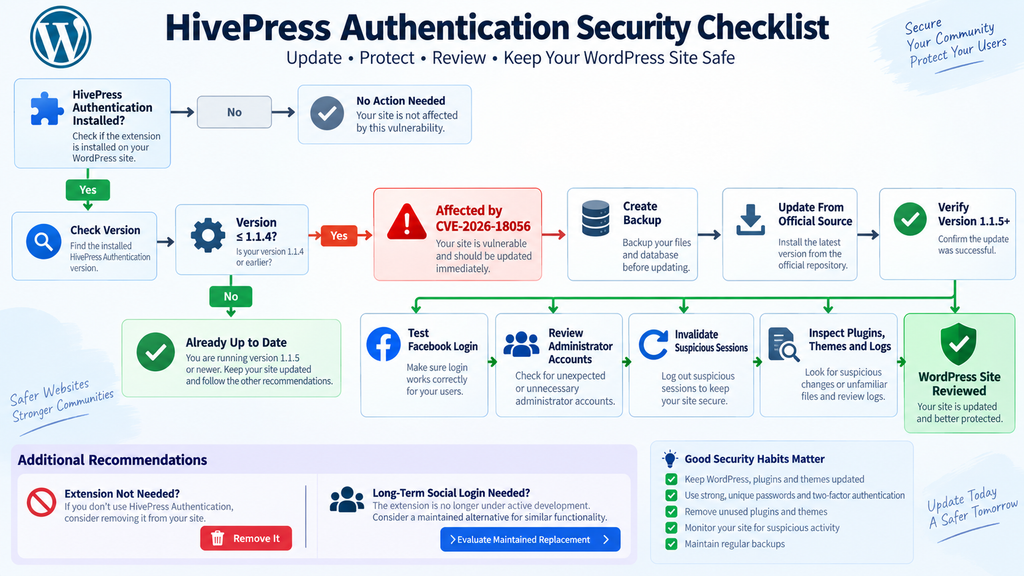
The immediate defensive action for websites running an affected version is to update HivePress Authentication to version 1.1.5 or later. WordPress.org currently lists version 1.1.5 as the available stable release, while the official repository identifies 1.1.5 as the stable tag.
Before updating a production website, create a current backup appropriate to your environment. A useful WordPress backup normally includes both the database and site files. Confirm that the backup can actually be restored rather than assuming that the existence of a backup job guarantees recoverability.
Next, open the WordPress administration area and inspect the installed version of HivePress Authentication. If the site is running version 1.1.4 or earlier, it falls within the affected range described by CVE-2026-18056.
Use the normal trusted WordPress update mechanism or obtain the extension only from an official source. Avoid downloading security updates from unofficial plugin mirrors, file-sharing websites, random repositories, or links supplied in unsolicited messages.
After installation, return to the Plugins screen and verify that the installed version is 1.1.5 or newer. Do not assume that clicking “Update” means the operation completed successfully.
Caching, filesystem permissions, interrupted requests, deployment processes, and managed-hosting restrictions can occasionally leave a site on an older version.
Test authentication after updating
Security updates involving authentication deserve functional testing because login systems are central to user access.
Use a normal test account rather than an administrator account whenever possible. Confirm that the expected social login workflow still works, that unsuccessful authentication fails safely, and that ordinary WordPress login remains available according to the site’s design.
Test logout as well.
If the site uses caching or a CDN, clear relevant caches after the update when appropriate. Authentication pages generally should not be aggressively cached, but each hosting configuration is different.
Check browser developer tools and server logs for unexpected errors during testing. A secure update is much more useful when administrators also confirm that legitimate users can still access the site.
Verify the installed code came from a trusted release
A version number displayed in WordPress is useful, but sites with signs of compromise deserve deeper verification.
Attackers with administrator or filesystem access can sometimes modify plugin files independently of the displayed metadata. If compromise is suspected, reinstalling a clean copy from the official source may provide stronger assurance than trusting an existing directory simply because its header reports the latest version.
WordPress core should receive the same treatment. Verify core integrity and replace suspicious files with known-good copies.
Do not overwrite evidence prematurely when performing a serious incident investigation. Preserve logs and suspicious files before cleaning them if they may be needed to establish what happened.
Review accounts after the patch
Updating fixes the vulnerable condition addressed by the release, but patching and incident review serve different purposes.
After updating, review privileged WordPress accounts. Confirm administrator names, email addresses, roles, creation history where available, and any recent unexpected changes.
If your security tooling records login events, examine the period during which an affected HivePress Authentication version was active. Look for unexpected sessions, unusual source locations, abnormal login times, or administrative activity that does not match legitimate usage.
Absence of a log entry is not definitive proof that nothing happened. Logging configurations vary widely, and many WordPress installations do not retain detailed historical authentication information.
The goal is to combine available evidence rather than depend on one indicator.
Check the rest of the WordPress stack
A vulnerable authentication extension should also prompt a broader maintenance check.
Update WordPress core to an appropriate supported release. Review all plugins and themes for outstanding security updates. Remove software that is no longer needed. Verify that administrator accounts use strong unique credentials.
Where appropriate, protect administrative accounts with multi-factor authentication independent of the social login mechanism. MFA is not a substitute for fixing vulnerable software, but it can provide another security layer against several forms of credential compromise.
Also review hosting and application logs if they are available. A WordPress security incident may leave evidence outside WordPress itself.
Replacing an Extension No Longer Under Active Development
Installing version 1.1.5 addresses the immediate vulnerable version problem, but WordPress administrators should also consider the longer-term status of the extension.
The official WordPress.org page for HivePress Authentication states that the extension is no longer in active development and recommends considering another solution when similar functionality is needed. The project’s GitHub description uses slightly different wording and describes the extension as being in maintenance mode while pointing users toward the newer social-login option.
Those statements do not mean version 1.1.5 should be avoided. On the contrary, an affected installation should be updated immediately. The maintenance status is a separate architectural consideration for administrators deciding what authentication system they want to depend on over the next several years.
Authentication extensions occupy a sensitive position in a WordPress stack. They connect the website to external identity providers whose APIs, security requirements, SDKs, token formats, and recommended validation procedures can evolve.
Software handling that boundary benefits from active maintenance.
Do not replace authentication software impulsively
Moving from one social-login implementation to another requires planning.
A replacement plugin may store provider identifiers differently. Existing users might have WordPress accounts connected to external identities through plugin-specific user metadata. Removing the old extension without understanding those mappings could create duplicate accounts, prevent users from signing in, or disconnect existing social identities.
Start by documenting the current environment.
Identify which authentication providers are enabled. Determine how many users rely on social login. Confirm whether those users also have usable WordPress passwords or another recovery path. Review custom redirects, registration behavior, membership logic, WooCommerce integration, HivePress-specific account behavior, and any code that depends on the existing authentication extension.
Then test the replacement on staging.
Authentication migrations should preserve account ownership. A returning user should not unexpectedly receive a new WordPress account merely because the identity mapping changed.
Evaluate a replacement as a security component
Do not choose a social-login extension solely by download count or visual appearance.
Review its maintenance history, compatibility with your WordPress version, update frequency, security track record, documentation, supported identity providers, account-linking behavior, and the way it validates tokens.
Also consider how the plugin behaves when an email address already exists in WordPress. Account linking is one of the most security-sensitive parts of social authentication.
A plugin should not casually equate possession of arbitrary external identity information with ownership of an existing privileged WordPress account.
For Facebook and other providers, the implementation should follow the provider’s current security documentation rather than relying on assumptions that were reasonable several years ago.
External authentication protocols evolve, and secure integrations need to evolve with them.
Maintain an emergency login path
Social authentication should not become the only practical way administrators can recover access to a WordPress site.
Keep a secure administrative recovery path that does not depend entirely on one third-party identity provider. If Facebook experiences an outage, changes an API, revokes an application, or the social-login plugin fails after an update, website administrators still need a safe way to manage WordPress.
That recovery mechanism should itself be strongly protected.
Use unique credentials, multi-factor authentication where available, limited administrator accounts, and appropriate hosting-level security controls.
Avoid creating multiple unnecessary “emergency” administrator accounts. Every privileged account increases the identity surface that needs protection.
Remove abandoned components after migration
Once a replacement has been tested and the migration is complete, remove the old extension rather than simply deactivating it indefinitely.
Deactivation generally prevents plugin code from executing through normal WordPress hooks, but unused software still creates maintenance clutter. Old files can confuse future administrators, complicate incident investigations, and accidentally return to service later.
Before deletion, document any settings or user metadata needed for rollback.
Keep backups according to your retention policy, but production WordPress installations should ideally contain only software that serves an active purpose.
A smaller software footprint is easier to understand, patch, monitor, and secure.
Why Audience Validation Matters Beyond HivePress
CVE-2026-18056 provides a useful case study for any WordPress developer implementing external authentication.
Modern authentication often involves multiple independent facts. A token can be syntactically correct. It can come from a legitimate provider. It can identify a real user. It can remain within its validity period. Yet it can still be unacceptable to a particular application.
The receiving application needs to validate the properties that establish the token’s suitability for its own context.
Audience is one of those properties.
The exact validation requirements vary by identity provider and protocol, so developers should follow current official provider documentation rather than copying an old integration example from a forum or tutorial.
Security-sensitive authentication code should also fail closed. When required information is missing, ambiguous, invalid, or inconsistent, the safer outcome is to reject authentication rather than guess.
Authentication requires context
A recurring mistake in authentication engineering is treating identity as a single Boolean value: valid or invalid.
Real authentication is contextual.
Who issued this credential? Who is it about? Which application was it issued for? Is it still valid? Has it expired or been revoked? Does the current flow satisfy the provider’s requirements? Can the local account safely be linked to the external identity?
Each answer contributes to the final trust decision.
CVE-2026-18056 demonstrates what can happen when one of those relationships is insufficiently checked.
This lesson applies beyond Facebook. Google, Microsoft, Apple, GitHub, enterprise identity systems, and other OAuth or OpenID Connect providers each define validation rules that relying applications need to respect.
Developers should never assume that because an API returned user information, authorization to create a local authenticated session automatically follows.
Social login moves security rather than eliminating it
Social login is sometimes described as a way to avoid password security problems. It can certainly reduce the number of passwords users manage, but it does not remove authentication risk.
Instead, some security responsibility moves to the integration between the WordPress site and the identity provider.
The site now depends on redirect handling, token validation, state protection, account linking, provider configuration, callback behavior, and secure storage of application credentials.
When implemented correctly, social authentication can be convenient and secure. When implemented incorrectly, the integration itself can become an authentication weakness.
WordPress site owners therefore need to treat social-login plugins as security-sensitive infrastructure rather than ordinary user-interface enhancements.
How to Review a HivePress Site After Updating
A practical security review can begin with a simple inventory. Record the HivePress Authentication version that was installed before the update, the date version 1.1.5 was installed, whether Facebook authentication was enabled, and which privileged users may have used Facebook-connected identities.
Next, inspect WordPress users.
Pay particular attention to administrators and any custom roles with powerful capabilities. Verify that each account is expected and still necessary. Review email addresses and recent role changes where logs or audit tools make that information available.
Then examine the website’s software state. Compare installed plugins and themes against your normal inventory. Look for unfamiliar components, unexpected recently modified files, unknown must-use plugins, or changes that cannot be explained by legitimate maintenance.
If you operate multiple HivePress websites, repeat the process on every installation rather than assuming that updating one domain protects the others.
Review available server evidence
Hosting logs can provide context that WordPress itself may not retain.
Depending on your server configuration, relevant sources can include web access logs, PHP logs, security plugin audit trails, WAF events, hosting control-panel records, and authentication logs.
Do not search only for one specific request pattern copied from an online proof of concept. Attack traffic changes, and blindly matching a single string can create false confidence.
Look instead for unexpected authentication activity and subsequent privileged actions.
If an administrator account appears to have authenticated from an unusual environment and then installed software, created users, or changed important settings, investigate the sequence as a whole.
Preserve evidence before cleaning a suspected compromise
When suspicious activity is discovered, avoid immediately deleting every unfamiliar file.
Create a secure backup or forensic copy of relevant logs and suspicious components first. Record timestamps, file paths, account details, and other evidence that may help reconstruct the incident.
Then contain the site according to the severity of the findings.
For a small personal WordPress site, this may involve maintenance mode, credential rotation, clean plugin reinstalls, and a complete integrity review. A business-critical installation may require assistance from the hosting provider or a professional incident-response specialist.
The appropriate response depends on the evidence and business impact.
Frequently Asked Questions
What is the HivePress Authentication vulnerability?
The HivePress Authentication vulnerability is CVE-2026-18056, an improper authentication issue affecting versions up to and including 1.1.4. It concerns Facebook authentication and insufficient application ID or audience validation when processing access tokens. The vulnerability has a CVSS 3.1 score of 7.5, rated High.
Which HivePress Authentication versions are vulnerable?
The published CVE lists HivePress Authentication versions through 1.1.4 as affected. Version 1.1.5 is currently available through the official WordPress plugin repository. Administrators running 1.1.4 or earlier should update rather than relying on configuration alone as a permanent mitigation.
Does CVE-2026-18056 allow anyone to become a WordPress administrator?
No. The published advisory identifies an important prerequisite: an attacker needs the victim’s Facebook access token. The vulnerability should therefore not be described as an automatic administrator takeover available merely by knowing an administrator’s email address.
Why is validating a Facebook token not enough?
A token can be recognized as valid by Facebook without necessarily being intended for the particular application receiving it. The application must perform the relevant validation required by Facebook, including confirming the expected application context. Validity proves one property; audience validation establishes another.
What does audience validation mean?
Audience or application validation confirms that authentication evidence was issued for the application that is attempting to consume it. In practical terms, a WordPress social-login integration should not accept a token solely because the identity provider recognizes it. It must confirm the token satisfies the provider’s requirements for that particular application.
Are administrator accounts the only accounts at risk?
No. Existing WordPress accounts relevant to the vulnerable authentication path can matter, although administrator accounts carry the greatest potential impact because of their privileges. Custom HivePress roles, editors, vendors, authors, or other privileged users may also deserve review depending on the website.
Should I update even if I do not actively use Facebook login?
If an affected HivePress Authentication release remains installed, updating is the safest approach. If the extension is genuinely unnecessary, consider removing it after confirming that no users or site functionality depend on it. Reducing unused software also simplifies future security maintenance.
Is HivePress Authentication 1.1.5 available?
Yes. The official WordPress.org plugin page currently lists version 1.1.5, and the project’s repository identifies 1.1.5 as the stable tag. Always obtain WordPress extensions and security updates from trusted official sources.
Should I replace HivePress Authentication after updating?
It is worth planning a migration if social login remains important to your site. WordPress.org states that HivePress Authentication is no longer in active development and recommends considering a replacement, while the project’s GitHub documentation describes it as being in maintenance mode. Update first, then evaluate migration carefully rather than removing an authentication system without understanding existing account mappings.
Does updating prove that my WordPress site was never compromised?
No. Updating addresses the vulnerable software condition going forward, but it does not establish what happened before the update. If the site ran an affected release with Facebook authentication available, review administrator accounts, sessions, plugins, themes, files, and available logs for unexpected activity.
The Security Lesson WordPress Owners Should Keep
CVE-2026-18056 illustrates a security principle that reaches far beyond one WordPress extension: authentication evidence must be verified in context.
A Facebook token being valid is not, by itself, the same as proving that the token is appropriate for the WordPress application receiving it. Secure authentication needs to establish both identity and the relationship between the credential and the application that intends to trust it.
For HivePress administrators, the immediate action is straightforward. Check the installed HivePress Authentication version and update installations running 1.1.4 or earlier to version 1.1.5 or a newer trusted release when available. Then review privileged accounts and available security evidence, particularly when Facebook authentication was enabled.
Longer term, consider the maintenance status of the extension. WordPress.org says HivePress Authentication is no longer in active development and points users toward a replacement. Authentication is too important to leave on forgotten software indefinitely.
Most importantly, do not confuse vulnerability exposure with confirmed compromise. An affected plugin version establishes that a weakness existed. It does not establish that somebody exploited it. A careful update followed by a proportionate security review provides a more useful response than either panic or complacency.
⚠️ Disclaimer and Source Hygiene
This article is provided for educational, defensive cybersecurity, and WordPress administration purposes. It does not provide instructions for obtaining access tokens, bypassing authentication, accessing accounts without authorization, or exploiting third-party websites.
Security information can change as vendors, CVE authorities, researchers, and maintainers publish new findings. Version information should therefore be confirmed against current official sources before making production decisions.
The technical explanation in this article is based on the published CVE record, vulnerability intelligence associated with CVE-2026-18056, the official HivePress Authentication WordPress.org listing, the project’s public source repository, and documentation referenced by the vulnerability record.
If you operate a business-critical, membership, marketplace, directory, or otherwise sensitive WordPress installation and discover evidence of unauthorized administrator access, consider consulting your hosting provider or a qualified WordPress security professional before destroying potential evidence.
🔔 For more tutorials like this, consider subscribing to our blog.
📩 Do you have questions or suggestions? Leave a comment or contact us!
🏷️ Tags: HivePress Authentication vulnerability, CVE-2026-18056, HivePress security, WordPress authentication vulnerability, Facebook access token, WordPress security, Facebook login security, OAuth token validation, WordPress administrator security, HivePress Authentication 1.1.5
📢 Hashtags: #HivePress, #WordPressSecurity, #CVE202618056, #WordPress, #CyberSecurity, #AuthenticationSecurity, #FacebookLogin, #OAuthSecurity, #WebsiteSecurity, #WordPressAdmin
📚 Sources and References
CVE-2026-18056 vulnerability record: The published record identifies HivePress Authentication versions up to and including 1.1.4 as affected, classifies the weakness as CWE-287 Improper Authentication, and records a CVSS 3.1 score of 7.5. It also documents the requirement for the victim’s Facebook access token and the missing application ID or audience validation.
Official HivePress Authentication WordPress.org page: The official plugin listing currently identifies version 1.1.5 and states that the extension is no longer in active development, recommending an alternative for similar functionality.
HivePress Authentication source repository: The public repository identifies 1.1.5 as the stable tag and describes the extension as being in maintenance mode.
WordPress.org HivePress development activity: The HivePress contributor profile records the release commit for version 1.1.5.
🕊️ Secondary Sources and Testimonials
Secondary vulnerability databases reproduce the core CVE description and consistently identify the issue as an authentication bypass related to insufficient validation of Facebook access tokens. These sources are useful for cross-checking affected versions, severity, and remediation information, but official vendor, WordPress.org, CVE, and primary security-advisory information should receive priority when making production security decisions.
No unverified user testimonials or claims of real-world compromise have been used as evidence in this article. At the time of research, the available material supports describing the vulnerability and its technical conditions, but exposure should not be presented as proof that a particular HivePress website has been attacked.
3 thoughts on “HivePress Authentication Vulnerability Exposes Admins”