
Table of Contents
A high-severity XSS vulnerability affects BoldGrid Post and Page Builder versions 1.27.14 and earlier. CVE-2026-100510 does not require attacker authentication, but victim interaction is required. Learn what the vulnerability means, which versions are affected, and how WordPress administrators can reduce their exposure.
WordPress page builders often become deeply integrated into a website. They may help create landing pages, service pages, blog layouts, and other important content. That convenience also makes security updates especially important when a vulnerability is discovered in one of these tools.
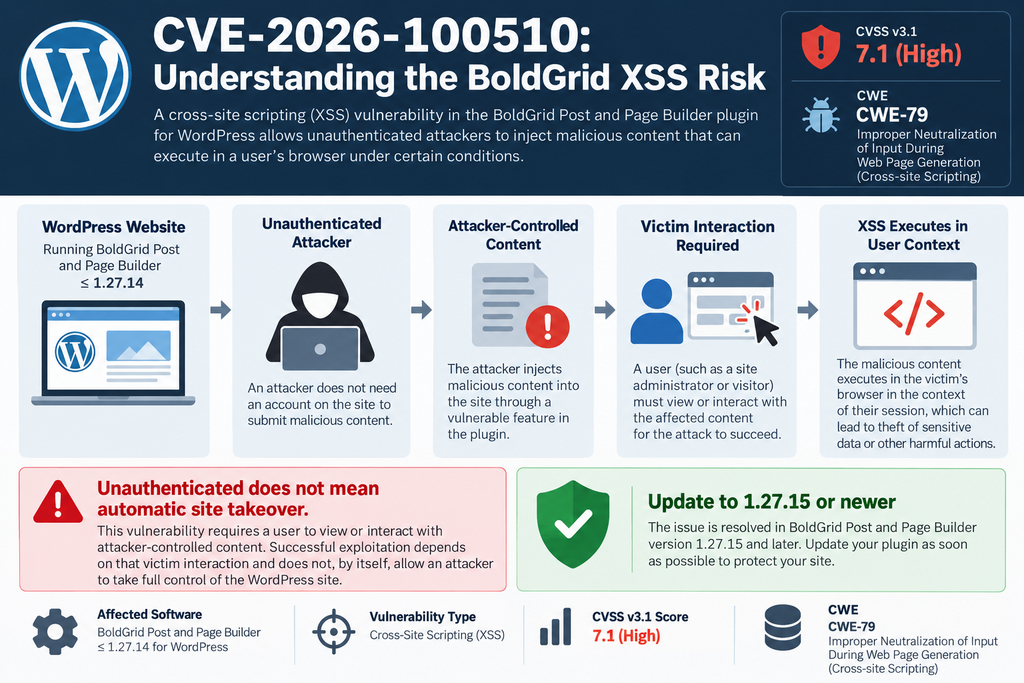
A recently disclosed BoldGrid Post and Page Builder vulnerability, tracked as CVE-2026-100510, affects installations running version 1.27.14 or earlier. The issue is classified as Cross-Site Scripting, commonly known as XSS. Public vulnerability data assigns it a CVSS 3.1 score of 7.1, rated High.
However, one detail deserves particular attention. The vulnerability is described as unauthenticated because an attacker does not need an authenticated WordPress account to attempt the attack. At the same time, the published CVSS vector specifies User Interaction Required. In practical terms, these two facts should be considered together rather than separately.
That distinction prevents an important misunderstanding. “Unauthenticated” does not automatically mean an attacker can silently take complete control of every vulnerable WordPress installation. The reported attack conditions require interaction from another user for the XSS to execute in the relevant context.
For website owners, the practical response remains straightforward. Check the installed BoldGrid Post and Page Builder version and update to version 1.27.15 or newer. Administrators should also review privileged accounts, active sessions, security logs, and normal WordPress security controls if they believe suspicious interaction may already have occurred.
What Is CVE-2026-100510
CVE-2026-100510 is a security identifier assigned to an XSS vulnerability affecting Post and Page Builder by BoldGrid. The public CVE record describes the problem as unauthenticated Cross-Site Scripting affecting versions through 1.27.14. The weakness is classified under CWE-79, which covers improper neutralization of input during web page generation.
Cross-Site Scripting occurs when untrusted data can reach a browser in a context where the browser interprets part of that data as executable content instead of harmless text. XSS problems vary significantly in their practical consequences. Their impact depends on where the unsafe content appears, who views or interacts with it, and what permissions that user has at the time.
The CVSS 3.1 vector published for CVE-2026-100510 is AV/AC/PR/UI/S/C/I/A, resulting in a base score of 7.1. That vector provides more useful context than the severity label alone. It identifies a network-accessible attack vector, low attack complexity, no privileges required for the attacker, and required user interaction.
The PR:N component is particularly relevant because it means the attacker does not need existing privileges. However, UI:R is equally important because it means another user must interact with attacker-controlled content or otherwise perform the action necessary for the XSS condition to execute.
Consequently, website owners should avoid interpreting “unauthenticated XSS” as synonymous with “automatic administrator takeover.” The vulnerability deserves prompt remediation, but accurate security communication should preserve the distinction between a remotely reachable weakness and an attack that automatically compromises a website without user involvement.
Public CVE information also describes the confidentiality, integrity, and availability impacts as Low individually, while the scope is marked Changed. Those characteristics contribute to the overall 7.1 CVSS rating.
Why XSS Matters in WordPress
WordPress administration relies heavily on browser-based interfaces. Administrators create posts, manage plugins, modify settings, moderate content, upload media, and perform many other sensitive operations through the browser. Therefore, unwanted script execution inside an authenticated administrative context can become more significant than the same script executing for an anonymous visitor.
The browser carries the current user’s authenticated relationship with WordPress. A script running in a privileged context may therefore attempt actions available within that context. What is actually possible depends on WordPress permissions, security controls, browser protections, plugin behavior, and the exact technical characteristics of the vulnerability.
This is why XSS should never be dismissed as merely a visual annoyance. At the same time, administrators should not assume that every XSS vulnerability automatically grants complete server control. Security impact must be evaluated according to the documented vulnerability and the privileges of the affected user.
For CVE-2026-100510, the safest practical interpretation is simple: an attacker does not require their own WordPress account, but the documented CVSS vector says user interaction is required. Updating eliminates the need to speculate about whether a particular administrator could eventually encounter malicious content.
CVSS 7.1 Does Not Mean Every Site Will Be Compromised
A CVSS score measures characteristics of a vulnerability. It does not represent the percentage chance that your individual website will be attacked. Likewise, a High severity rating does not prove that exploitation has occurred on a particular WordPress installation.
This distinction is useful when managing WordPress security alerts. CVSS helps administrators prioritize updates, but exposure depends on additional factors. These include whether the affected plugin is installed, whether an affected version is active, how the vulnerable functionality is exposed, and whether the required interaction occurs.
At disclosure time, CISA ADP enrichment associated with the record listed exploitation as none, automatable as no, and technical impact as partial. Those observations should not be treated as a reason to delay patching. Exploitation information can change, and absence of observed exploitation is not proof that exploitation is impossible.
The strongest response is therefore neither panic nor complacency. Confirm the installed version, apply the security update, verify that the update succeeded, and review the site if there are reasons to suspect previous malicious activity.
Which BoldGrid Versions Are Affected
The affected version range is one of the clearest parts of the CVE record. Post and Page Builder by BoldGrid versions up to and including 1.27.14 are listed as affected. Version 1.27.15 is listed as unaffected in the CVE data.
That boundary matters because administrators sometimes assume that being one release behind is harmless. Security releases are different. A small version-number change can contain important hardening that separates a vulnerable installation from a patched one.
The official WordPress.org plugin changelog for version 1.27.15 describes several security-related changes. These include hardened component widget previews in the editor, hardened upload and style file writes, constrained editor save persistence, and restricted GridBlock listing queries.
The public CVE record does not require administrators to determine which internal change corresponds to every part of CVE-2026-100510 before updating. The remediation guidance is much simpler: install the latest available release, with 1.27.15 identified as the minimum fixed version for this CVE.
How to Check Your Installed BoldGrid Version
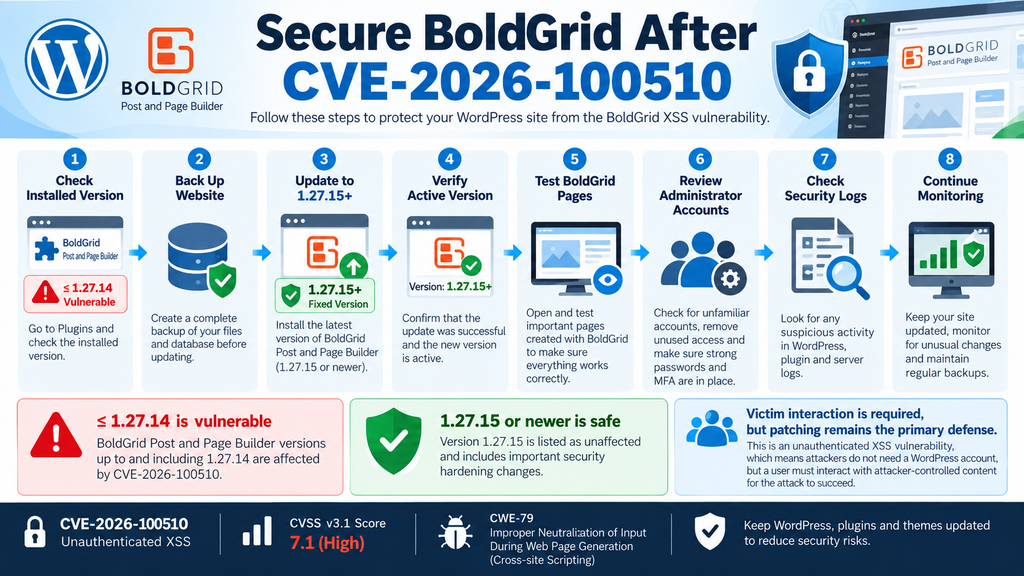
Log in to your WordPress administration area and open Plugins → Installed Plugins. Locate Post and Page Builder by BoldGrid – Visual Drag and Drop Editor and check the version displayed for the plugin.
If the installed version is 1.27.14 or earlier, the installation falls inside the affected range published for CVE-2026-100510. An update should therefore receive priority.
If WordPress reports version 1.27.15 or newer, the installation is outside the affected range currently documented for this CVE. Remember that this statement applies specifically to CVE-2026-100510. It does not guarantee that any piece of software will never contain another vulnerability.
Administrators managing many WordPress websites should perform the same inventory across every installation. Agencies sometimes update their primary website while overlooking staging systems, old client installations, development copies, or secondary domains.
Those forgotten installations can remain exposed even when the main production website is current.
Do Not Rely Only on Automatic Update Assumptions
Automatic plugin updates can reduce the time between a security release and deployment, but they should not replace verification. Updates can fail because of filesystem permissions, hosting problems, maintenance errors, disabled cron jobs, connectivity issues, or configuration differences.
After applying the update, return to the Plugins screen and confirm the active version. For managed environments, administrators can also use their normal WordPress management platform or WP-CLI inventory process to verify versions across multiple websites.
A backup before an update remains sensible, especially for business-critical websites. However, the existence of a backup should not become an excuse to postpone a known security update indefinitely.
It is also worth testing important BoldGrid pages after the update. Open several representative pages, inspect the editor, and verify that the front end displays correctly. Security and availability both matter, and a short post-update test can identify compatibility problems before visitors encounter them.
Why Version 1.27.15 Is Important
The WordPress.org changelog describes version 1.27.15 specifically as containing multiple security hardening changes. This makes the release more than a cosmetic or routine feature update.
According to the current CVE data, the affected range ends at 1.27.14 and the status changes to unaffected at 1.27.15. Therefore, administrators should treat 1.27.15 as the minimum acceptable version when addressing CVE-2026-100510.
Installing an even newer stable release is normally preferable when one is available, assuming compatibility requirements have been considered. Newer releases may include additional security fixes, bug fixes, and compatibility improvements released after the original patch.
The important principle is not to downgrade later to a vulnerable version. Restoring an old full-site backup can accidentally restore old plugin files as well. After any disaster recovery operation, administrators should recheck plugin versions before considering the restoration complete.
How Unauthenticated XSS Reaches the Victim
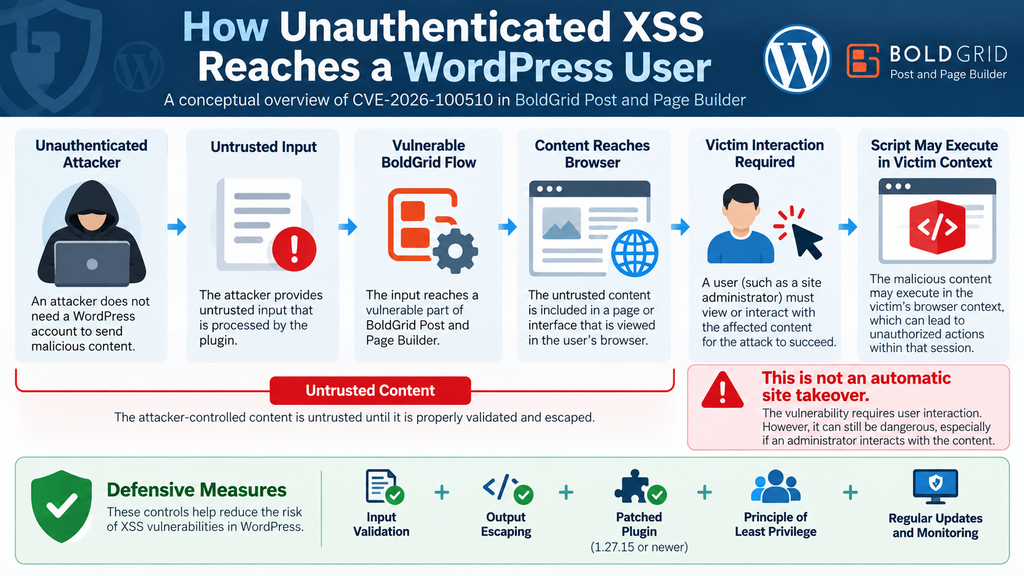
The phrase unauthenticated XSS can easily create the wrong mental picture. It tells us something important about the attacker: the attacker does not need an authenticated account for the vulnerability condition described by the CVE. It does not tell us that exploitation completes without anyone else interacting with attacker-controlled content.
For CVE-2026-100510, the CVSS vector contains UI:R, meaning User Interaction Required. Public vulnerability information therefore supports describing an attack chain in which an unauthenticated attacker prepares or supplies attacker-controlled content and a victim must interact with that content for the XSS condition to execute.
The currently available public CVE description is intentionally concise. It does not justify inventing a specific malicious request, URL structure, parameter, or payload. Responsible defensive guidance should not fill those gaps with speculation.
Instead, administrators can understand the risk conceptually. Untrusted input reaches a vulnerable application flow. A user interacts with content associated with that flow. If the vulnerable version fails to neutralize the input correctly before browser rendering, unwanted script execution may become possible.
This conceptual model is sufficient for deciding what to do: update the plugin and reduce the opportunities for privileged users to interact with untrusted material.
Victim Interaction Changes the Threat Model
A vulnerability requiring user interaction has a different threat model from a vulnerability that can be exploited automatically with a single remote request.
Consider a hypothetical server-side vulnerability that immediately performs an unauthorized privileged operation whenever a crafted request reaches the server. No administrator needs to click anything or view anything. That is fundamentally different from an XSS condition whose execution depends on a victim reaching attacker-influenced content.
CVE-2026-100510 belongs to the second general category according to its published CVSS vector. That does not make it harmless. Social engineering can sometimes persuade users to interact with content they would otherwise avoid, and administrators routinely work inside WordPress throughout the day.
Still, accuracy matters. Saying that every vulnerable BoldGrid website can be automatically taken over simply because an attacker visits it would go beyond the published evidence.
The more accurate message is that an unauthenticated attacker does not need their own WordPress account, while exploitation requires victim interaction.
Why Administrator Interaction Matters More
Not every WordPress user has the same permissions. A subscriber, contributor, editor, and administrator operate under different capability sets.
If unwanted JavaScript executes in a low-privilege browser context, the actions available through that session may be limited. If the same type of execution occurs while an administrator is authenticated, the surrounding security context is considerably more sensitive.
An administrator can normally manage plugins, users, settings, themes, and other important site functions. Consequently, administrators should be especially cautious about unexpected links, unusual previews, suspicious requests, and unfamiliar content while signed in to WordPress.
This does not mean CVE-2026-100510 automatically converts XSS into administrator takeover. Rather, it explains why defenders care about the privilege level of the interacting victim.
Security impact follows context.
Stored XSS and Persistent Risk
The CVE record associates the issue with CAPEC-592, Stored XSS. In general terms, stored XSS involves attacker-controlled content being persisted and later rendered to another user. This differs from purely reflected XSS, where malicious input typically returns immediately in a response.
Persistent content can be particularly important because the attacker and victim do not necessarily need to be present at the same time. A malicious value may be introduced first and encountered later when an authorized user accesses the relevant interface.
Administrators do not need to reproduce that behavior to protect their websites. Testing exploit payloads on a production WordPress installation can create unnecessary risk, contaminate logs, trigger security systems, or leave unsafe content behind.
Use the patched version instead. If deeper validation is required for professional security work, perform it in an isolated environment under an authorized testing process.
What an Attacker Can Do in an Administrator Session
When discussing XSS, it is important to separate potential browser-context consequences from claims about what has been demonstrated for one specific CVE.
JavaScript executing within an authenticated WordPress administration context can potentially interact with information and functionality accessible to that user through the browser. Depending on permissions and application protections, this may create opportunities for unauthorized actions or exposure of information available in the affected session.
An administrator session deserves particular attention because administrators hold powerful WordPress capabilities. However, the public description of CVE-2026-100510 should not be stretched into a claim that successful exploitation inevitably gives an attacker complete WordPress or server control.
Actual consequences depend on the vulnerable workflow, browser context, WordPress protections, user permissions, additional security controls, and what actions the application permits.
Session Context Is the Key Concept
Browsers continuously maintain context for authenticated web applications. When an administrator logs into WordPress, subsequent requests can be recognized as belonging to that authenticated session.
XSS becomes dangerous because malicious browser-side code may execute within a trusted site’s origin. The browser may therefore treat the code as belonging to the legitimate application rather than an unrelated external website.
WordPress includes security mechanisms designed to make sensitive operations harder to abuse. Nonces, capability checks, authentication requirements, input sanitization, and output escaping all contribute to this defense.
No single protection should be treated as a substitute for patching a vulnerable plugin. Security works best in layers.
A patched plugin removes the known vulnerable condition. WordPress authorization controls restrict actions. Strong administrator authentication reduces account compromise risk. Browser hygiene reduces exposure to malicious content. Monitoring can then help identify unusual behavior if another layer fails.
Possible Consequences Should Be Described Carefully
In a privileged browser context, XSS may potentially expose information visible to the user or initiate application actions available within that session. Security advisories therefore treat administrator-facing XSS seriously.
Nevertheless, phrases such as “instant full takeover,” “automatic administrator creation,” or “complete server compromise” should not be used unless the vulnerability research actually demonstrates those outcomes.
The published CVSS metrics for CVE-2026-100510 list confidentiality, integrity, and availability impact as Low, with Scope Changed. That information provides a more disciplined framework for discussing potential impact.
Website owners should respond to what is known rather than imagining the most dramatic theoretical scenario. Update promptly, review the environment, and investigate concrete indicators if suspicious behavior exists.
What to Review After Suspected Interaction
If an administrator believes they interacted with suspicious content while the vulnerable BoldGrid version was installed, a security review is reasonable.
Start with WordPress administrator accounts. Look for unfamiliar accounts, unexpected role changes, or changes to existing account email addresses. Review active sessions when possible and terminate sessions that are no longer needed.
Next, inspect recently installed or modified plugins and themes. Unexpected software changes deserve investigation, particularly when nobody on the legitimate administration team recognizes them.
Review important WordPress settings, scheduled tasks, hosting logs, security plugin alerts, and file modifications. The goal is not to assume compromise. Instead, look for evidence that distinguishes ordinary activity from unauthorized changes.
If strong evidence of compromise exists, preserve logs and relevant evidence before deleting suspicious files. Incident response becomes harder when useful forensic information disappears during an aggressive cleanup.
Credentials and Sessions
Changing passwords can be appropriate when there is credible evidence that privileged sessions or accounts may have been exposed. Use unique passwords rather than recycling credentials from other services.
Administrators should also invalidate unnecessary sessions and review other privileged accounts. If one administrator encountered suspicious content, it is useful to determine whether other team members interacted with the same material.
Multi-factor authentication adds another valuable security layer for WordPress administration where available. MFA does not repair XSS, but it can make separate credential-based attacks more difficult.
The central lesson is layered defense. Updating BoldGrid addresses the known plugin vulnerability. Strong authentication protects accounts. Limited privileges reduce damage from compromised users. Logging supports investigation. Backups support recovery.
No single measure replaces the others.
Updating BoldGrid to Version 1.27.15

The direct remediation for CVE-2026-100510 is to update Post and Page Builder by BoldGrid to version 1.27.15 or later. The CVE record explicitly identifies 1.27.15 as unaffected, while versions through 1.27.14 are affected.
Before updating an important production website, create or verify a recent backup. A useful backup should cover both the WordPress database and website files. Ideally, confirm that your backup system is actually completing successfully rather than relying on an old configuration.
Then open Dashboard → Plugins → Installed Plugins and locate Post and Page Builder by BoldGrid. If WordPress offers an update, install it and allow the process to finish without closing the page prematurely.
Afterward, verify the version manually.
Seeing a successful update message is useful, but confirming that the active plugin now reports 1.27.15 or later provides stronger assurance.
Test Important Pages After Updating
Security updates should be installed quickly, but a short functionality test remains worthwhile.
Open representative pages created with BoldGrid. Check desktop and mobile layouts, buttons, forms, images, columns, reusable sections, and any custom styling that depends on the builder.
Next, edit a test page or an existing non-critical page using the BoldGrid interface. Confirm that the editor loads correctly and that ordinary save and preview operations behave as expected.
Clear the relevant website cache if your hosting environment or caching plugin continues serving older generated assets. CDN caches may also need normal invalidation depending on your setup.
Avoid restoring the vulnerable plugin version merely because a visual issue appears after updating. Investigate the compatibility problem first. Rolling back to a known vulnerable release recreates the security exposure.
Verify the Update on Every Environment
Production is not the only environment that matters.
Development websites, staging copies, archived projects, subdomains, demonstration installations, and temporary migration copies can all contain vulnerable plugins. Some of these environments remain publicly accessible even when administrators assume nobody knows they exist.
Attackers do not need a website to appear in Google before automated discovery becomes possible. Therefore, maintain an inventory of active WordPress installations and update them consistently.
If a staging environment no longer serves a purpose, removing it can be safer than leaving an abandoned WordPress installation online indefinitely.
For agencies and administrators managing dozens of websites, centralized inventory tools can make version checks much easier. Whatever management method you use, verify the actual installed version rather than relying entirely on assumptions about update policies.
What Version 1.27.15 Changed
The public WordPress.org changelog lists several security updates in version 1.27.15. It states that component widget previews in the editor were hardened, upload and style file writes were hardened, editor save persistence was constrained, and GridBlock listing queries were restricted.
Those notes indicate broader security hardening within the release. Administrators do not need to reverse engineer the changes before installing the patch.
Security release notes often intentionally avoid providing unnecessary exploitation detail. That approach gives defenders enough information to update while limiting the value of immediately publishing a complete attack recipe.
From an operational perspective, the important facts remain straightforward: version 1.27.14 and earlier are inside the affected CVE range, while 1.27.15 is identified as unaffected.
Reducing XSS Risk in WordPress Administration
Updating BoldGrid addresses the known vulnerability, but XSS defense should be part of a wider WordPress security strategy. Administrators regularly work with links, previews, forms, comments, media, third-party integrations, and content supplied by other users.
The first defensive principle is simple: keep WordPress core, plugins, and themes current. Known vulnerabilities become more dangerous when security fixes exist but remain unapplied for weeks or months.
Remove software you no longer use. A deactivated plugin does not provide useful functionality, yet its files may remain on the server. Completely removing unnecessary extensions reduces code volume and simplifies maintenance.
Limit administrator accounts as well. Someone who only writes posts usually does not need full administrator privileges. WordPress roles exist partly to reduce unnecessary access.
Protect Administrator Accounts
Administrator accounts deserve stronger protection than ordinary public-facing accounts because their permissions affect the entire website.
Use long, unique passwords for every administrator. Avoid sharing one administrator login among several employees. Individual accounts make auditing easier because actions can be associated with specific users.
Enable multi-factor authentication when your security stack supports it. MFA primarily protects authentication rather than XSS itself, but layered controls matter when defending a WordPress installation.
Remove administrator accounts belonging to former employees, contractors, developers, or agencies when access is no longer necessary. An old account can remain forgotten for years while still retaining powerful permissions.
Periodically review the user list rather than waiting for a security incident to reveal unnecessary access.
Be Careful With Unexpected Content While Logged In
Because CVE-2026-100510 requires user interaction according to its CVSS vector, administrator behavior forms part of the broader risk picture.
Avoid opening suspicious links while actively signed into sensitive administration systems. Treat unexpected requests asking you to preview unusual content, inspect unfamiliar URLs, or perform unexplained administrative actions cautiously.
This recommendation should not create fear around normal WordPress use. Administrators need to click links and manage content every day. The goal is simply to recognize that privileged browser sessions deserve the same care as other sensitive systems.
Separate browser profiles can also help some professional administrators. For example, one browser profile can be reserved for website administration while another handles ordinary browsing, email links, and general web activity.
That separation is not a security guarantee, but it can reduce accidental mixing of privileged sessions with unrelated web activity.
Use Least Privilege
WordPress includes several standard roles because not everyone needs administrator capabilities.
Writers can often work as Authors or Contributors. Content managers may need Editor permissions. Developers and site owners may require Administrator access, but even those permissions should be reviewed periodically.
Least privilege reduces the number of highly sensitive sessions available at any given time. If browser-based exploitation occurs against a lower-privileged user, the surrounding WordPress capabilities may be more limited than those available to an administrator.
Plugin functionality can sometimes introduce additional capabilities or custom roles, so review the actual permissions used by your website rather than assuming every installation behaves identically.
For larger editorial teams, document who needs privileged access and why. Removing unnecessary administrator rights is one of the simplest security improvements available to WordPress owners.
Keep Reliable Backups
Backups do not prevent XSS. They provide recovery options when security incidents or failed updates damage a website.
Maintain backups independently from the live WordPress installation where practical. If the only backup exists inside the same compromised hosting account, an attacker or destructive failure may affect both the website and its recovery copy.
Test restoration periodically. A backup that has never been tested is only a promise until you know it can actually restore the website.
Keep enough historical versions to avoid a second common problem: discovering an incident after the newest backup already contains the unwanted changes.
After restoring an older backup, immediately reapply security updates. Otherwise, the restoration may bring vulnerable versions of BoldGrid or other plugins back into production.
Monitor for Unexpected Changes
Monitoring helps bridge the gap between prevention and response.
Watch for new administrator accounts, unexpected plugin installations, modified theme files, unfamiliar scheduled tasks, unusual authentication events, and unexplained changes to critical WordPress settings.
Hosting access logs and security plugin logs can provide additional context. However, a single unusual entry does not automatically prove compromise. Look for patterns and correlate events with legitimate administrative work.
File integrity monitoring can also identify unexpected changes in core or plugin files. WordPress core files and publicly distributed plugins have known reference versions, making unexplained modifications worth investigating.
Monitoring works best when somebody actually reviews alerts. Hundreds of ignored notifications provide little security value.
Treat Security Alerts as Priorities, Not Panic Signals
WordPress administrators encounter vulnerability reports frequently. The ecosystem contains thousands of plugins and themes, so new security findings appear regularly.
A useful response begins with four questions: Is the software installed? Is the installed version affected? Is a fixed version available? What conditions are required for exploitation?
For CVE-2026-100510, the answers are relatively clear. The affected product is Post and Page Builder by BoldGrid. Versions through 1.27.14 are affected. Version 1.27.15 is identified as unaffected. The attacker does not need privileges, but user interaction is required.
Those facts support prompt patching without exaggerated claims.
Security communication becomes more useful when it tells administrators what to verify and what action to take instead of simply announcing that a vulnerability is “dangerous.”
Frequently Asked Questions
What is the BoldGrid Post and Page Builder vulnerability?
The BoldGrid Post and Page Builder vulnerability, CVE-2026-100510, is a Cross-Site Scripting issue affecting Post and Page Builder by BoldGrid through version 1.27.14. The vulnerability is described as unauthenticated XSS and is classified under CWE-79.
Which BoldGrid versions are vulnerable?
Versions 1.27.14 and earlier are listed as affected. Version 1.27.15 is identified as unaffected in the CVE record. Administrators should update to 1.27.15 or a newer stable version.
Does an attacker need a WordPress account?
No. The published CVSS vector specifies Privileges Required: None, which is why the issue is described as unauthenticated. The attacker does not need an existing WordPress account to attempt the reported attack.
Does CVE-2026-100510 require victim interaction?
Yes. The CVSS 3.1 vector contains UI, meaning User Interaction Required. This is an important part of understanding the vulnerability accurately.
Can attackers automatically take over every vulnerable website?
The published information does not support describing CVE-2026-100510 as automatic site takeover. An attacker requires no privileges, but victim interaction is required. Potential consequences also depend on the affected user’s context and permissions.
What is the CVSS score?
CVE-2026-100510 has a published CVSS 3.1 base score of 7.1, categorized as High. Its vector is AV:N/AC:L/PR:N/UI:R/S:C/C:L/I:L/A:L.
Is BoldGrid version 1.27.15 safe from this CVE?
The current CVE data lists 1.27.15 as unaffected by CVE-2026-100510. That statement applies specifically to this vulnerability and should not be interpreted as a permanent guarantee that any software version can never have another security issue.
Should I deactivate BoldGrid instead of updating it?
If you actively use the plugin, updating to a fixed release is the normal remediation. If you no longer need BoldGrid, removing unnecessary software can reduce your attack surface. Always consider site functionality and backups before making production changes.
Should I change my WordPress administrator password?
A password change is not automatically required merely because a vulnerable version was installed. However, if there is credible evidence of suspicious interaction, unexpected account activity, or compromise, changing credentials and invalidating unnecessary sessions can be part of a broader incident response.
Should I test the vulnerability myself?
Production websites are not appropriate places for experimental exploit testing. Administrators generally gain more security value by updating to the patched version. Professional testing should be authorized and performed in an isolated environment using established security procedures.
A Practical Response Is Better Than Panic
CVE-2026-100510 deserves attention because it affects a WordPress page builder with a significant installed user base and carries a High CVSS rating. Fortunately, the defensive action is clear and accessible.
Post and Page Builder by BoldGrid installations running 1.27.14 or earlier should be updated to at least version 1.27.15. The update should then be verified, followed by basic functional testing of important BoldGrid pages.
The wording of the advisory also matters. This is an unauthenticated XSS vulnerability, but the published CVSS vector requires user interaction. Those facts are not contradictory. The attacker does not need their own authenticated WordPress account, while another user must interact with attacker-controlled content for the reported XSS condition to execute.
Administrators should therefore avoid both extremes. There is no reason to dismiss a High-severity XSS issue, particularly when privileged users could be involved. At the same time, there is no evidence-based reason to describe every vulnerable installation as automatically compromised.
Patch first. Verify the update. Review privileged access. Investigate actual evidence when it exists. Then continue normal WordPress security maintenance.
That approach provides better protection than either panic or complacency.
⚠️ Disclaimer and Source Hygiene
This article is provided for educational and informational purposes only.
🔔 For more tutorials like this, consider subscribing to our blog.
📩 Do you have questions or suggestions? Leave a comment or contact us!
🏷️ Tags: BoldGrid vulnerability, BoldGrid Post and Page Builder vulnerability, CVE-2026-100510, WordPress security, WordPress XSS, Cross-Site Scripting, BoldGrid security update, WordPress plugin vulnerability, BoldGrid 1.27.15, WordPress cybersecurity
📢 Hashtags: #WordPress, #WordPressSecurity, #BoldGrid, #CVE2026100510, #CyberSecurity, #XSS, #WebsiteSecurity, #WordPressPlugins, #SecurityUpdate, #WebSecurity
Sources and References
CVE-2026-100510 Record and Vulnerability Data
The CVE record identifies CVE-2026-100510 as an unauthenticated Cross-Site Scripting vulnerability in Post and Page Builder by BoldGrid. It lists versions through 1.27.14 as affected and changes the product status to unaffected at version 1.27.15. The record was published on September 30, 2026, and credits Intrudify through the Patchstack Bug Bounty Program.
The published CVSS 3.1 score is 7.1 High, with the vector AV:N/AC:L/PR:N/UI:R/S:C/C:L/I:L/A:L. The two particularly important metrics for understanding the attack model are PR:N, meaning no attacker privileges are required, and UI:R, meaning user interaction is required.
Primary vulnerability information should be checked through the CVE/NVD ecosystem and the Patchstack vulnerability record for CVE-2026-100510.
WordPress.org BoldGrid Plugin Repository
The official WordPress.org page for Post and Page Builder by BoldGrid – Visual Drag and Drop Editor provides the current plugin release and changelog.
Version 1.27.15 contains multiple security-related hardening changes covering component widget previews, upload and style file writes, editor save persistence, and GridBlock listing queries.
Administrators should use the official WordPress update mechanism or another trusted deployment process and verify the installed version after updating.
Secondary Sources and Testimonials
Independent vulnerability databases including Rapid7, Tenable, OpenCVE, and other CVE aggregators reproduce the core disclosure information for CVE-2026-100510. These sources consistently identify the affected product as BoldGrid Post and Page Builder, the affected range as version 1.27.14 and earlier, and the vulnerability class as Cross-Site Scripting.
Secondary databases are useful for comparing vulnerability metadata, but remediation decisions should prioritize the CVE record, the vulnerability-disclosure source, and the official WordPress plugin release information.
No anonymous testimonials, invented exploitation reports, or unverified claims of active compromise were used in this article. At the time this article was prepared, the available CISA ADP enrichment associated with the CVE described exploitation as “none,” automation as “no,” and technical impact as “partial.” These values represent the available record at that point in time and may change as new evidence becomes available.