
Table of Contents
A critical WPMobile.App vulnerability tracked as CVE-2026-94541 can expose WordPress password-reset URLs and enable administrator account takeover. Sites running version 11.82 or earlier should update immediately to 11.85 or newer and review accounts, sessions, password resets, and push notifications for suspicious activity.
Critical WPMobile.App Vulnerability Requires Immediate Attention
A critical security vulnerability in the WPMobile.App WordPress plugin can potentially allow an unauthenticated attacker to take over administrator accounts. The vulnerability is tracked as CVE-2026-94541 and carries a CVSS 3.1 score of 9.8 out of 10, placing it firmly in the critical severity category. The issue affects WPMobile.App versions up to and including 11.82. Wordfence describes the underlying weakness as missing authorization and states that exploitation does not require an existing WordPress account.
The danger comes from the way certain WordPress emails can interact with WPMobile.App’s mail-to-push functionality. When the vulnerable configuration is active, password-reset information can be mirrored into the plugin’s push queue. An attacker able to access that information could obtain a valid password-reset URL belonging to another WordPress user. If the targeted user is an administrator, successful use of that reset link could ultimately give the attacker control of a privileged WordPress account.
This is not simply a theoretical problem that administrators should postpone until their next maintenance window. Wordfence’s vulnerability record, updated on October 2, 2026, reports that its network blocked 131 attacks targeting this vulnerability during the previous 24 hours. That figure demonstrates observed attack attempts against the vulnerability. It does not prove that 131 websites were compromised, but it materially changes the urgency for administrators still using an affected version.
Vulnerability at a Glance
Plugin: WPMobile.App – Android and iOS App Builder
Plugin slug: wpappninja
CVE: CVE-2026-94541
Vulnerability: Missing Authorization / Account Takeover
Affected versions: 11.82 and earlier
Patched version: 11.85
CVSS score: 9.8 / 10
Severity: Critical
Authentication required: No
User interaction required: No
Primary risk: Password-reset URL exposure and account takeover
Important condition: The attack chain depends on the mail-to-push functionality being enabled
Recommended action: Update to WPMobile.App 11.85 or a newer patched release immediately
Active installations: 3,000+ according to the current WordPress.org listing
Observed activity: Wordfence reported 131 blocked attacks targeting the vulnerability in the previous 24 hours when its record was checked on October 2, 2026.
What Is CVE-2026-94541?
CVE-2026-94541 is an authorization vulnerability affecting the WPMobile.App plugin for WordPress. According to Wordfence Intelligence, the plugin does not correctly verify whether a requester is authorized to perform the relevant action. That missing authorization control can expose sensitive information stored or mirrored within the plugin’s push-notification workflow. The affected versions are all releases through 11.82 inclusive.
The vulnerability becomes particularly dangerous because the information involved can include WordPress password-reset URLs. Password-reset links are security-sensitive tokens. They exist specifically to let a legitimate user replace a forgotten password without providing the existing one. Consequently, anyone who obtains a valid reset URL may be able to complete the reset process as though they were the intended recipient, provided the link remains valid and has not already been invalidated.
Wordfence explains that the vulnerable attack chain can expose reset URLs for arbitrary users, including administrators. That makes the potential impact significantly greater than ordinary information disclosure. Instead of merely revealing a harmless setting or public account detail, the exposed data can become part of an authentication takeover process. Wordfence therefore assigns the issue a critical CVSS score of 9.8.
Why Missing Authorization Is So Dangerous
Authorization determines whether a user or request has permission to access a resource or perform an action. Authentication and authorization are related, but they are not identical. Authentication asks who the user is. Authorization determines what that user is allowed to do.
A secure WordPress component should not assume that knowing an endpoint, parameter, identifier, or internal workflow grants permission to access protected information. Sensitive operations need explicit permission checks. When those checks are missing or incomplete, functionality designed for legitimate site operations can unintentionally become accessible to unauthorized visitors.
In CVE-2026-94541, the consequences are especially serious because the affected workflow can intersect with password recovery. A password-reset URL effectively acts as a temporary authentication secret. Protecting that URL is therefore just as important as protecting other short-lived authentication credentials.
The Mail-to-Push Requirement Matters
The vulnerability should not be described as though every installation has exactly the same exposure. Wordfence specifically notes that the exploit chain requires the plugin’s mail-to-push feature to be enabled. The relevant configuration is identified as wpmobile_auto_mail=1. When active, outbound WordPress emails can be mirrored into the push-notification workflow.
This distinction is important for accurate security reporting. A site running an affected plugin version should still update immediately, even when administrators believe mail-to-push is disabled. However, determining whether that functionality was enabled during the exposure period can help incident responders understand the site’s historical risk.
Administrators should avoid treating a disabled feature as a permanent substitute for patching. Configuration can change, other weaknesses may exist, and future administrators may enable features without realizing an old vulnerable plugin remains installed. Updating to a patched version removes the known vulnerable condition much more reliably.
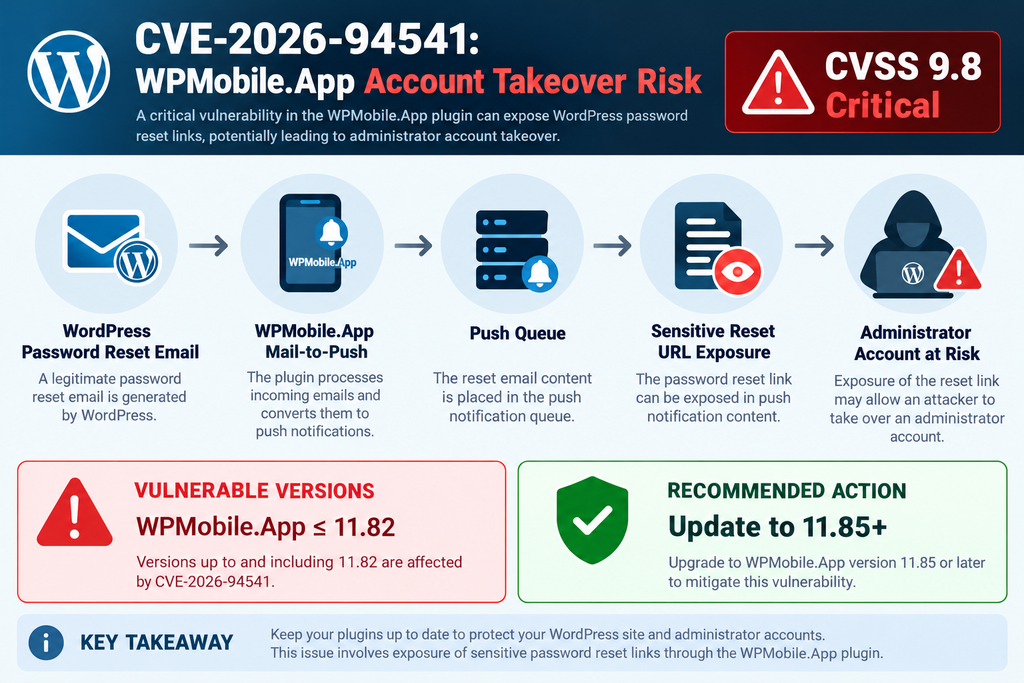
How the WPMobile.App Account Takeover Chain Works
Understanding the vulnerability does not require reproducing exploitation instructions. From a defensive perspective, the important issue is the relationship between WordPress password recovery and WPMobile.App’s push-notification functionality. WordPress normally sends password-reset information through email to the address associated with the requested account. That email contains a unique reset URL containing information that must remain private.
WPMobile.App provides functionality that can transform or mirror email information into push notifications. This can be useful for legitimate mobile-app workflows. However, Wordfence reports that the vulnerable implementation can place password-reset information into a push queue where insufficient authorization controls allow unauthorized access under affected conditions.
Once a valid password-reset URL has escaped its intended private delivery channel, the security model changes dramatically. An attacker does not necessarily need to guess the administrator’s password. Instead, the exposed recovery link can provide a path to setting a new password. This is why the issue can escalate from sensitive-data exposure to complete account takeover.
Why a Password-Reset Link Is Sensitive
People sometimes think of a password-reset URL as an ordinary website link. From a security perspective, it is much closer to a temporary credential. The URL is generated to prove that the person following the recovery process has access to the intended recovery channel.
If another person obtains that link before it expires or becomes invalid, the security boundary around the account may be weakened. The exact outcome depends on the application, token state, timing, and other controls, but administrators should always treat password-reset links as confidential authentication information.
This principle extends beyond WordPress. Password-reset links, one-time login URLs, email verification tokens, magic links, API credentials, session identifiers, and similar values should never appear in publicly accessible logs, analytics reports, notification feeds, caches, or endpoints without appropriate access controls.
Administrator Accounts Increase the Impact
A compromised Subscriber account and a compromised Administrator account do not have equivalent consequences. WordPress administrators normally have broad control over site configuration, plugins, themes, users, and content. Depending on the environment, that access can provide control over most of the WordPress application.
An attacker who successfully takes over an administrator account may therefore gain capabilities far beyond editing a profile. Potential consequences can include creating additional privileged users, changing site settings, modifying content, manipulating plugins, accessing information available through the dashboard, or establishing persistence.
For that reason, an administrator password-reset link should be considered highly sensitive. A vulnerability capable of exposing it deserves rapid remediation even when no compromise has yet been discovered.
Why CVE-2026-94541 Has a CVSS Score of 9.8
The CVSS 3.1 vector published by Wordfence is CVSS:3.1/AV/AC/PR/UI/S/C/I/A. In practical language, the assessment describes a remotely reachable vulnerability with low attack complexity, no privileges required, and no required interaction from the victim. Potential confidentiality, integrity, and availability impacts are all rated high.
Those characteristics explain the 9.8 Critical score. Vulnerabilities that require administrator access before exploitation generally present a different risk profile. Here, the relevant weakness is reachable without an authenticated WordPress account under the affected configuration. The potential endpoint of the attack chain is also severe because exposed reset URLs can lead to account takeover.
CVSS should not be interpreted as a guarantee that every vulnerable installation will be compromised. It measures characteristics and potential impact rather than predicting the future of an individual website. Configuration, security controls, feature usage, exposure, monitoring, and patch status all influence practical risk.
CVSS Does Not Replace Site-Specific Analysis
A WordPress administrator should use the score as one input rather than the only security signal. For example, a site running WPMobile.App 11.82 with mail-to-push enabled and administrator password-reset activity deserves particularly urgent investigation.
A site that previously used version 11.82 but upgraded before suspicious activity appeared has a different situation. Nevertheless, administrators should consider the historical exposure period rather than checking only the version currently installed.
The safest response combines patching with retrospective auditing. Updating closes the known vulnerability going forward. Reviewing accounts, sessions, password resets, email changes, and security logs helps determine whether something suspicious happened before the patch was applied.
Wordfence Has Already Observed Attack Attempts

The exploitation status deserves special attention because information can change quickly after public disclosure. When checked on October 2, 2026, the Wordfence Intelligence entry stated that Wordfence had blocked 131 attacks targeting CVE-2026-94541 during the previous 24 hours.
That observation means defenders should no longer describe the vulnerability simply as having no publicly observed attack activity. At the same time, accuracy matters. A blocked attack is not the same thing as a successful compromise. The Wordfence figure demonstrates attempted exploitation detected and blocked by its network, not 131 confirmed account takeovers.
The distinction is important because security reporting can easily become sensational. Administrators need enough urgency to act quickly, but they also need precise information. The defensible statement is that attacks targeting the vulnerability have been observed by Wordfence, while individual site owners still need to investigate their own environments for evidence of successful unauthorized activity.
Public Disclosure Can Change the Risk Quickly
Newly disclosed vulnerabilities often move through several stages. Researchers identify the flaw, the developer prepares remediation, vulnerability databases publish technical details, security products add detections, and attackers may begin scanning for exposed installations.
The timing can be compressed when the vulnerability is remotely reachable and affects authentication. Once defenders know that attempts are already occurring, delaying an available security update becomes increasingly difficult to justify.
This is particularly relevant for WordPress because automated scanners can search large numbers of websites rapidly. A website does not need to be famous or receive substantial traffic to be targeted by automated activity. Attackers can discover software characteristics through broad internet scanning rather than manually selecting each victim.
Which WPMobile.App Versions Are Vulnerable?
Wordfence identifies WPMobile.App 11.82 and all earlier versions as affected by CVE-2026-94541. Its vulnerability record identifies 11.85 as the patched version and recommends updating to 11.85 or a newer patched release. Patchstack independently lists versions through 11.82 as vulnerable and version 11.85 as patched.
The plugin’s official WordPress.org changelog provides useful context for the remediation process. Version 11.83 temporarily disabled mail-to-push while a proper fix was being prepared. Version 11.84 hardened how mail-to-push is triggered. Version 11.85 is the current release visible in the directory at the time of verification and contains an additional security change concerning an unauthenticated stored cross-site scripting issue.
For site owners, the practical recommendation is straightforward: do not stop at 11.83 or assume that 11.84 is the final target merely because those releases contain relevant changes. The vulnerability records from Wordfence and Patchstack identify 11.85 as the patched version for CVE-2026-94541. Install 11.85 or a newer patched release available from the legitimate plugin distribution channel.
More Than 3,000 Active Installations
The WordPress.org plugin directory currently reports 3,000+ active installations for WPMobile.App. The directory also describes the plugin as a solution for creating Android and iOS mobile applications connected to WordPress and highlights functionality such as automated push notifications.
An active-installation count does not tell us how many sites remain on vulnerable releases. Some installations may already have updated, some may not use the vulnerable feature, and others may have security controls that affect exposure.
Still, thousands of active installations make coordinated remediation important. Administrators, agencies, managed WordPress providers, developers, and security teams should check their inventories rather than waiting for an alert from an end user.
Update WPMobile.App to Version 11.85 or Later Immediately
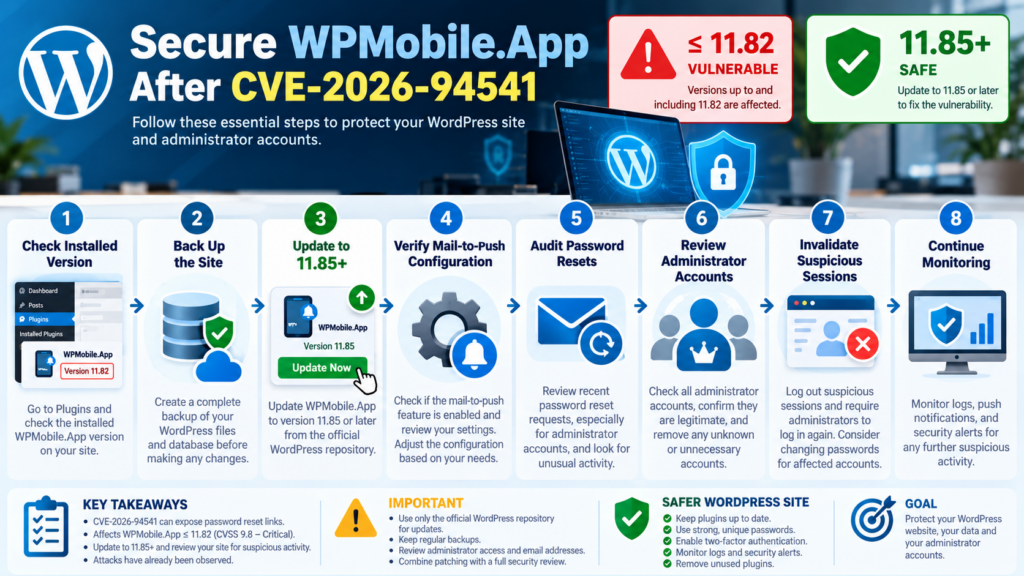
The first defensive action is to determine which version of WPMobile.App is installed. In the WordPress administration area, open the Plugins screen and locate WPMobile.App. If the installed version is 11.82 or earlier, treat the installation as affected by CVE-2026-94541.
Create an appropriate backup according to your normal change-management procedure, then install WPMobile.App 11.85 or a newer patched version from a trusted source. After the update, confirm that WordPress reports the expected plugin version and that the site and mobile-app functionality continue to operate normally. Wordfence explicitly identifies 11.85 as the remediation version.
Do not download replacement plugin packages from random websites or file-sharing services. Security incidents often create opportunities for unrelated malicious downloads. The official WordPress.org plugin directory should remain one of the primary references for the publicly distributed plugin and its changelog.
What If You Cannot Update Immediately?
If operational constraints prevent an immediate update, disabling the affected plugin is the safer temporary response when business requirements allow it. Administrators should pay particular attention to the mail-to-push functionality because Wordfence states that this feature is required for the described exploit chain.
Temporarily disabling a feature should not become a permanent substitute for applying the security update. A configuration-based workaround can reduce exposure under specific conditions, but patched software remains the preferred long-term state.
Organizations with staging environments can test version 11.85 there first, but a critical remotely reachable vulnerability should not sit unpatched for an unnecessarily long testing period. Use an expedited security-change procedure where appropriate.
Updating Is Only the First Step
Patching stops the known vulnerability from remaining exposed, but it does not automatically answer an equally important question: was the site accessed before the update? That is why administrators who ran an affected version should perform a focused security review.
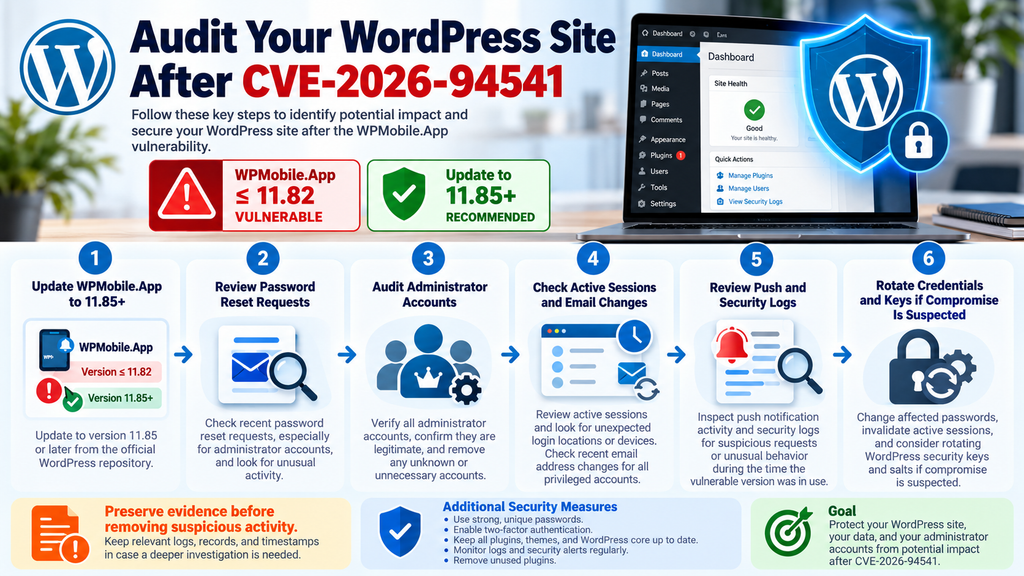
Start with password-reset activity. Look for reset requests involving administrator accounts, especially requests that administrators do not remember initiating. A legitimate password reset is not evidence of compromise, but an unexplained reset involving a privileged account deserves investigation.
Next, review all WordPress users with elevated permissions. Confirm that every Administrator account is expected. Check recently created accounts, role changes, profile modifications, and email-address changes. An attacker who temporarily obtained administrator access could attempt to create another route back into the website.
Review Active Sessions
WordPress sessions are another important area. If there is credible evidence that an administrator account may have been accessed by someone else, simply changing the password may not be enough for a complete incident response.
Invalidate active sessions for affected accounts and require users to authenticate again. Administrators should also change the relevant passwords using strong, unique credentials that are not reused on other services.
If the investigation identifies broader compromise, consider rotating WordPress security salts and keys according to a controlled incident-response process. Changing these values can invalidate authentication cookies, which can help remove unauthorized sessions.
Check Administrator Email Addresses
An attacker with privileged access may attempt to modify account recovery information. Review the email addresses associated with administrator accounts and verify that they still belong to the intended users.
Also inspect the site’s general administration email address and other security-sensitive settings. Unexpected changes can be important indicators, particularly when they coincide with suspicious password-reset activity.
Keep in mind that legitimate administrators, plugins, migrations, staging workflows, or account-management processes can also generate changes. Investigation should correlate multiple signals rather than declaring compromise from a single unexplained event.
Audit the Push Notification Queue and Related Activity
Because CVE-2026-94541 involves the relationship between mail-to-push functionality and the push queue, administrators should include that area in their review. Look for unusual push-notification activity during the period when the vulnerable plugin version was installed.
The goal is not to reproduce the vulnerability. Instead, defenders should establish whether unexpected requests, notifications, or sensitive workflows occurred. Compare activity timestamps with password-reset requests and administrator-account changes where logs permit.
If your hosting platform, WordPress security plugin, reverse proxy, CDN, or web application firewall maintains request logs, preserve relevant evidence before normal retention policies delete it. Historical logs can become extremely valuable if suspicious activity is discovered later.
Build a Timeline
A simple incident timeline can make an investigation much easier. Record when the vulnerable plugin version was installed, whether mail-to-push was enabled, when the plugin was updated, and whether any password resets occurred during that interval.
Add administrator logins, account changes, email-address modifications, plugin installations, security alerts, and unusual requests to the same timeline. Events that appear harmless individually can become meaningful when they happen within minutes of one another.
For example, an unexplained password-reset request followed by an administrator login from an unfamiliar environment and then a new privileged account would deserve much more attention than a single reset request by itself.
Review Every Administrator Account
Administrator accounts should be few, identifiable, and necessary. This incident provides a useful opportunity to review privileged access across the entire WordPress installation.
Open the Users section and identify every account with Administrator privileges. Confirm the owner and business purpose of each account. Remove or downgrade obsolete accounts after verifying that they are no longer required.
Pay special attention to accounts with unfamiliar usernames, recently changed email addresses, or creation dates that do not fit your administrative history. If an agency, freelancer, former employee, or developer previously required access, determine whether that access is still necessary.
Do Not Forget Other Privileged Roles
Administrator is the most obvious target, but other roles can matter depending on the site. WooCommerce stores, membership platforms, learning systems, community plugins, and custom applications may introduce additional privileged capabilities.
Review roles according to what they can actually do rather than relying only on their names. A custom role with plugin-management, user-management, order-management, or sensitive-data access may deserve similar scrutiny.
The principle of least privilege helps reduce future impact. Users should receive only the permissions necessary for their work, and temporary elevated access should be removed when the task ends.
Check for Unexpected Plugin or Theme Changes
A successful administrator takeover can potentially provide opportunities to modify the WordPress environment. Therefore, sites showing credible signs of compromise should review installed plugins and themes.
Look for unfamiliar extensions, unexpected activations, recently modified files, or components installed from unknown sources. Compare the current environment with known-good backups, deployment records, version-control history, or management-platform inventories when available.
Do not automatically delete suspicious files before preserving evidence if the incident could have legal, contractual, or business consequences. Removing malicious content quickly may be necessary to protect visitors, but retaining forensic information can also matter.
Verify WordPress Core
Administrators investigating a serious compromise should verify WordPress core files against legitimate distributions and review important configuration files for unauthorized modifications.
A plugin update alone cannot remove persistence created during an earlier successful compromise. If an attacker obtained administrator-level access, incident response needs to consider what could have happened during that access period.
For high-value or business-critical websites, professional incident-response assistance may be appropriate when compromise is suspected.
Rotate Passwords When Suspicious Activity Exists
Password rotation should be targeted and purposeful. If an administrator reset link may have been exposed or an account shows suspicious activity, replace that account’s password with a strong and unique credential.
Avoid reusing passwords from email, hosting, domain registration, social networks, or other WordPress websites. Password reuse turns one compromised credential into a wider security problem.
Administrators should also secure the email account connected to WordPress. Password recovery depends heavily on email security. An attacker with access to the administrator’s mailbox may bypass protections on the website itself.
Consider Two-Factor Authentication
Two-factor authentication can significantly strengthen administrative access. It adds another authentication requirement beyond the password.
However, 2FA should not be presented as a substitute for patching CVE-2026-94541. The vulnerability concerns sensitive password-reset information and authorization logic inside the plugin. The correct response remains updating the affected software.
Think of 2FA as one layer in a broader security model that includes patched software, unique passwords, least privilege, backups, monitoring, protected email accounts, and controlled administrative access.
Rotate WordPress Security Keys After Confirmed Compromise
WordPress uses authentication keys and salts as part of its cookie and session security. When there is strong evidence of unauthorized administrator access, rotating these values can help invalidate existing authentication cookies.
This action logs users out, so plan it carefully on production sites. Communicate with legitimate administrators and ensure that necessary credentials and recovery methods remain available.
Key rotation should be part of a broader response rather than the only action. Investigators still need to identify the original access path, patch the vulnerable plugin, remove unauthorized accounts or modifications, change affected passwords, and continue monitoring.
Backups Are Essential, but Restore Carefully
A clean backup can be extremely valuable during incident recovery. Nevertheless, restoring an old backup without understanding the compromise timeline can reintroduce the vulnerable plugin or other security problems.
Determine when the vulnerability existed and when suspicious activity began. A backup created during the exposure period may contain malicious changes. An older backup may contain WPMobile.App 11.82 or another affected version.
If restoration becomes necessary, update vulnerable components before returning the site to normal operation and verify the restored environment carefully.
Why Mobile Integration Plugins Need Strong Security Boundaries
Plugins connecting WordPress to mobile applications often handle more than visual presentation. They may interact with authentication, notifications, user profiles, APIs, device identifiers, push services, ecommerce events, and communication workflows.
That broad integration makes security boundaries especially important. Data that begins in one trusted context should not automatically become safe simply because another internal component processes it.
Email is a good example. A password-reset message is intended for a specific recipient. If software mirrors that message into another storage system, queue, log, or notification channel, the new destination must preserve equivalent confidentiality.
Convenience Features Can Cross Security Boundaries
Mail-to-push functionality illustrates a broader security lesson. Features designed for convenience can unintentionally connect systems with different security assumptions.
An email system may assume that message contents are private to the mailbox owner. A push-notification system may store, transform, preview, queue, or distribute data differently. Connecting those systems requires careful validation and authorization at every stage.
Developers should therefore classify sensitive information before forwarding it across services. Authentication secrets, reset tokens, financial information, personal data, and administrative links require particularly strict handling.
How Hosting Providers and Agencies Should Respond
Agencies managing multiple WordPress websites should search their software inventories for the wpappninja plugin rather than relying on memory. A centralized management platform, WP-CLI inventory, hosting dashboard, or asset-management system can make this process faster.
Identify every installation, record its version, and prioritize affected production sites. Sites running version 11.82 or earlier should move to 11.85 or a newer patched version as quickly as operationally possible.
Managed providers should also determine whether mail-to-push was enabled. That information can help prioritize retrospective investigation, although every affected installation should still be patched.
Communicate Clearly With Clients
Security communication should explain the facts without unnecessary alarm. Tell affected clients which plugin was vulnerable, which versions were affected, what action was taken, and whether the investigation found evidence of unauthorized activity.
Avoid telling a client that their website was hacked simply because a vulnerable version existed. Vulnerability exposure and confirmed compromise are different findings.
Likewise, do not claim there was no danger merely because nothing obvious appears on the homepage. Account takeover can leave subtle evidence, and attackers do not always deface websites.
How Website Owners Can Reduce Similar Risks
Keeping plugins updated remains one of the most practical WordPress security measures. However, automatic updates alone do not solve every security problem. Administrators also need visibility into which components are installed and whether unused software remains active.
Remove plugins that are no longer needed. Fewer active components mean fewer code paths to maintain and monitor. Before removing a plugin, confirm whether it stores data or provides functionality that requires a controlled migration.
Subscribe to trustworthy security advisories or use security tools that notify administrators about vulnerable software. The time between public disclosure and attack activity can be short for serious WordPress vulnerabilities.
Maintain a Reliable Update Process
A mature WordPress update process should include regular backups, staging where appropriate, security-priority updates, compatibility checks, and post-update verification.
Critical security fixes deserve a faster path than ordinary feature updates. Waiting weeks to test a critical remotely exploitable vulnerability can create more risk than the update itself.
Organizations should define who has authority to approve emergency WordPress security updates before an incident happens. Clear responsibility prevents unnecessary delays.
What the Official WPMobile.App Changelog Tells Us
The official WordPress.org changelog provides useful context around the remediation. Version 11.82 is described as fixing a sensitive-data exposure issue. Version 11.83 temporarily disabled mail-to-push while a proper fix was needed. Version 11.84 hardened how mail-to-push is triggered. Version 11.85 includes another security change concerning unauthenticated stored cross-site scripting.
This sequence illustrates why administrators should rely on the final patched-version guidance rather than assuming that the first security-related release mentioned in a changelog resolves every associated vulnerability.
Wordfence’s CVE-2026-94541 record specifically identifies 11.85 as patched and recommends version 11.85 or a newer patched release. Patchstack provides the same patched-version recommendation for this CVE.
Check the Installed Version After Updating
After completing the update, return to the Plugins screen and verify the installed version. Do not assume that clicking an update button guarantees success.
Updates can occasionally fail because of filesystem permissions, interrupted requests, deployment systems, disk-space problems, maintenance processes, or customized hosting configurations.
For managed environments, record the completed version in your asset inventory. That record becomes useful if another advisory appears later.
Indicators That Deserve Investigation
There is no single visible symptom that proves CVE-2026-94541 was successfully exploited. Instead, administrators should look for combinations of unexpected security events.
Unrecognized password-reset requests involving privileged users deserve attention. So do unexpected password changes, unfamiliar administrator sessions, new accounts, role escalations, unexplained email-address changes, unusual plugin installations, and modifications that administrators cannot account for.
Push-notification activity during the affected period should also be reviewed where relevant logs exist. Correlating events by timestamp can help separate ordinary activity from a possible incident.
Do Not Overinterpret Normal Activity
Security investigations need balance. WordPress websites generate many legitimate requests. Password resets happen. Administrators travel, IP addresses change, plugins update files, and hosting systems run automated tasks.
An unfamiliar event should trigger verification, not an immediate conclusion that the website was compromised.
Document what you find, correlate multiple signals, preserve logs, and escalate to a qualified incident-response professional when the evidence is unclear or the potential business impact is high.
What Not to Do After Learning About the Vulnerability
Do not leave WPMobile.App 11.82 active simply because the website appears normal. Visible operation does not indicate that a security flaw is harmless.
Do not search random websites for exploit demonstrations and run them against a production site. Testing security vulnerabilities without a controlled environment can damage data, trigger security systems, expose sensitive information, or create legal problems.
Do not install unofficial “patched” copies of the plugin from unknown sources. Use legitimate distribution channels and verify the resulting version.
Avoid Deleting Evidence Too Quickly
If suspicious activity is present, resist the urge to erase every unusual file or account before recording what happened. Evidence can help establish the timeline and scope of a compromise.
Capture relevant logs, account details, timestamps, file information, and alerts according to your organization’s incident-response procedures.
After evidence is preserved, remediation can proceed according to the site’s risk and operational requirements.
Why “No User Interaction” Matters
The CVSS vector for CVE-2026-94541 specifies UI, meaning user interaction is not required in the vulnerability assessment. The victim does not need to click a malicious attachment or approve a request for the vulnerable condition to be targeted.
That characteristic differentiates the issue from many phishing attacks. Traditional phishing often depends on convincing a person to perform an action. Here, the vulnerable application behavior itself creates the security exposure.
Automated attack attempts therefore become particularly relevant. Attackers can potentially scan for vulnerable installations without first building a social-engineering relationship with the administrator.
No Authentication Is Required
The CVSS vector also contains PR, indicating that privileges are not required. Wordfence describes the attacker as unauthenticated.
This characteristic significantly increases defensive urgency because an attacker does not first need a Subscriber, Customer, Contributor, or other WordPress account.
Sites that disable public registration are therefore not automatically protected from this vulnerability. Registration policy and the vulnerable authorization behavior address different security boundaries.
Protect Password Recovery as Part of WordPress Security
Administrators often focus heavily on login forms while paying less attention to password recovery. Yet recovery mechanisms are part of the authentication system and deserve equivalent protection.
A strong password cannot protect an account if an attacker can improperly obtain a valid recovery token. Likewise, rate limiting on /wp-login.php does not fix a vulnerability that exposes sensitive recovery information through another component.
Security reviews should therefore include password-reset workflows, email security, recovery addresses, session handling, privileged accounts, and plugins that process authentication-related messages.
Secure the Administrator’s Email Account
WordPress account security and email security are closely connected. If an administrator’s mailbox is compromised, password-reset messages may become accessible regardless of WordPress protections.
Use a strong, unique email password and enable multi-factor authentication where supported. Review recovery methods on the email account and remove obsolete devices or sessions.
For organizations, consider role-based administrative mailboxes or controlled identity-management processes rather than relying indefinitely on personal addresses.
A Practical Response Checklist for CVE-2026-94541
First, identify whether WPMobile.App is installed. Then determine its version. Any installation running 11.82 or earlier should be treated as affected and updated to 11.85 or a newer patched version.
Confirm whether mail-to-push was enabled during the exposure period. Review administrator password-reset activity, account changes, email-address changes, active sessions, privileged users, push-notification records, security logs, and unexpected plugin or theme modifications.
If suspicious activity suggests account compromise, invalidate active sessions, change affected passwords, secure connected email accounts, and consider rotating WordPress authentication keys and salts. Preserve relevant evidence and obtain professional incident-response assistance when the website handles sensitive or business-critical information.
Recommended Priority
This vulnerability should receive immediate attention because of its critical CVSS rating, unauthenticated attack characteristics, administrator-account takeover potential, and the attack attempts already reported by Wordfence.
The safest target state is not merely “mail-to-push disabled.” The target state is a supported, patched WPMobile.App release combined with a review of historical exposure.
Administrators who already run version 11.85 or newer should still verify that the update completed successfully and consider reviewing activity from the period when an affected version was active.
Frequently Asked Questions
What is CVE-2026-94541?
CVE-2026-94541 is a critical missing-authorization vulnerability affecting the WPMobile.App WordPress plugin. Under the affected configuration, an unauthenticated attacker may be able to obtain password-reset URLs mirrored into the push queue and use them to take over targeted accounts. Wordfence rates the vulnerability 9.8 Critical.
Which versions of WPMobile.App are vulnerable?
Wordfence identifies all versions up to and including 11.82 as affected. Version 11.85 is identified as patched. Administrators should update to 11.85 or a newer patched version rather than remaining on an older release.
Can an attacker target an Administrator account?
Yes. Wordfence states that the vulnerable behavior can expose password-reset URLs for arbitrary users, including administrators. If a valid administrator reset URL is obtained and successfully used, the attacker may be able to change the password and take over that account.
Does the attacker need an existing WordPress account?
No. The vulnerability is classified as unauthenticated. The CVSS vector specifies that no privileges are required. This means disabling public WordPress registration does not by itself mitigate CVE-2026-94541.
Does mail-to-push need to be enabled?
For the attack chain described by Wordfence, yes. Wordfence states that the mail-to-push feature must be enabled because it causes outbound password-reset emails, including reset information, to be mirrored into the push queue. Nevertheless, sites running affected versions should update rather than relying permanently on configuration alone.
Has exploitation been observed?
Wordfence reported on October 2, 2026 that it had blocked 131 attacks targeting the vulnerability during the previous 24 hours. This is evidence of observed attack attempts. It should not be interpreted as confirmation that 131 sites were successfully compromised.
What should I do if I use WPMobile.App 11.82?
Update immediately to 11.85 or a newer patched version. After updating, review password-reset activity, administrator accounts, active sessions, email-address changes, push activity, and relevant security logs. Investigate unexplained privileged-account activity rather than assuming that installing the patch retroactively removes evidence of earlier access.
What if I cannot update WPMobile.App immediately?
If updating is temporarily impossible, consider disabling the plugin and particularly the affected mail-to-push functionality until the patched version can be installed. This should be treated as a temporary risk-reduction measure rather than a replacement for updating.
Should I change every WordPress password?
Not every situation requires indiscriminate password rotation. However, passwords for accounts showing suspicious reset or login activity should be changed immediately. If compromise is confirmed or strongly suspected, invalidate sessions, rotate affected credentials, secure associated email accounts, and consider rotating WordPress authentication keys and salts.
Does updating to 11.85 prove my website was never compromised?
No. Updating fixes the known vulnerability going forward, but it cannot prove that nothing happened while an affected version was installed. Sites with historical exposure should perform a focused audit, especially if mail-to-push was enabled.
Keep the Patch and the Investigation Together
CVE-2026-94541 is a strong reminder that authentication security involves much more than protecting a login form. Password-reset information is itself sensitive authentication material, and any system that copies or transforms it must preserve strict access controls.
For WPMobile.App users, the immediate response is clear. Versions 11.82 and earlier are affected, while security databases identify 11.85 as the patched version. The vulnerability has a CVSS score of 9.8, requires no authenticated WordPress account according to the published assessment, and can lead to account takeover when the required mail-to-push condition is present.
The situation is more urgent because Wordfence has reported blocked attacks targeting the vulnerability. Updating should therefore be combined with a review of historical password resets, administrator accounts, sessions, email changes, and push-related activity. Patch first, investigate carefully, and continue monitoring afterward.
⚠️ Disclaimer and Source Hygiene
This article is provided for educational, defensive cybersecurity, and WordPress administration purposes. It does not provide exploitation instructions, malicious payloads, password-reset tokens, or guidance for gaining unauthorized access to websites.
Security conditions can change quickly after a vulnerability is disclosed. Plugin versions, exploitation activity, remediation guidance, and vulnerability records may be updated after publication. Always verify the latest information through authoritative vulnerability databases, the official WordPress plugin directory, your hosting provider, and qualified security professionals.
If you believe a website has been compromised, consider preserving relevant evidence before making extensive changes. Organizations handling sensitive information, customer data, ecommerce transactions, or business-critical services should consider obtaining professional incident-response assistance.
🔔 For more tutorials like this, consider subscribing to our blog.
📩 Do you have questions or suggestions? Leave a comment or contact us!
🏷️ Tags: WPMobile.App, CVE-2026-94541, WordPress security, WordPress vulnerability, administrator account takeover, WordPress plugin vulnerability, password reset security, mobile app security, WordPress cybersecurity, WPMobile.App vulnerability
📢 Hashtags: #WordPress, #WordPressSecurity, #WPMobileApp, #CVE202694541, #CyberSecurity, #WordPressVulnerability, #WebsiteSecurity, #PluginSecurity, #AccountSecurity, #SecurityUpdate
Sources and References
Wordfence Intelligence
The primary vulnerability record used for this article is the Wordfence Intelligence advisory for CVE-2026-94541. At the time of verification on October 2, 2026, Wordfence listed a 9.8 Critical CVSS score, affected versions through 11.82, patched version 11.85, and an unauthenticated account-takeover scenario involving password-reset URLs mirrored through mail-to-push. Wordfence also reported 131 blocked attacks targeting the vulnerability in the previous 24 hours.
Wordfence Intelligence – CVE-2026-94541
Official WordPress.org WPMobile.App Page
The official plugin directory provides the current WPMobile.App release information, active-installation figure, developer information, and changelog. The current listing reports 3,000+ active installations. Its recent changelog documents security-related changes around versions 11.82 through 11.85, including temporary disabling and subsequent hardening of mail-to-push.
Patchstack Vulnerability Database
Patchstack independently identifies CVE-2026-94541 as affecting WPMobile.App 11.82 and earlier, assigns it a CVSS score of 9.8, and identifies 11.85 as the patched version. Patchstack recommends updating to version 11.85 or later.
Patchstack – WPMobile.App CVE-2026-94541
CVE Record
The vulnerability is formally tracked as CVE-2026-94541. Wordfence is identified as the assigning source in current CVE-derived vulnerability data, with the weakness classified as CWE-862: Missing Authorization.
Official CVE-2026-94541 Record
Secondary Sources and Testimonials
Secondary vulnerability databases can provide useful corroboration, but they should not replace the primary vulnerability record or the official plugin changelog. Patchstack currently corroborates the affected-version range and patched version, while current CVE-derived records also reproduce the CVSS 3.1 characteristics and missing-authorization classification.
No anecdotal testimonials are used as evidence that a particular website was compromised. Likewise, blocked attack counts should not be presented as successful compromises. The article distinguishes vulnerability exposure, observed attack attempts, and confirmed compromise because each represents a different level of evidence.
1 thought on “WPMobile.App Flaw Allows Admin Account Takeover”