
Table of Contents
A critical JetFormBuilder vulnerability can allow unauthenticated attackers to create WordPress administrator accounts through unsafe form validation. Site owners running affected versions should update directly to the newest stable JetFormBuilder release and carefully audit users, forms, logs, and modified files for signs of compromise.
JetFormBuilder Demands Attention
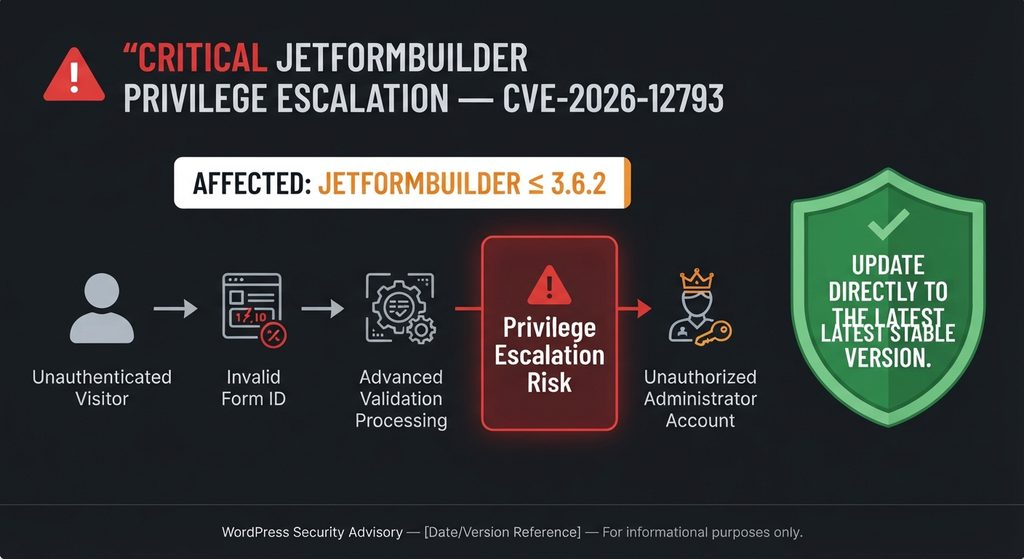
WordPress administrators using JetFormBuilder have another serious security issue to address. CVE-2026-12793 is a critical privilege-escalation vulnerability affecting JetFormBuilder versions up to and including 3.6.2. The vulnerability can potentially allow an unauthenticated visitor to create a new WordPress account with administrator-level privileges. That makes this considerably more dangerous than a flaw requiring an existing subscriber, editor, or administrator account. The published CVSS 3.1 score is 9.8 out of 10, reflecting the possibility of remote exploitation without authentication or user interaction.
The central problem involves how JetFormBuilder previously handled a submitted form identifier. According to the published CVE description, the plugin did not adequately verify that the supplied ID actually represented a legitimate JetFormBuilder form before processing its content. That content could subsequently reach the Advanced Validation server-side callback system. Under vulnerable conditions, this processing chain could be abused to create a new administrator-level WordPress user without first logging into the website.
This JetFormBuilder vulnerability therefore deserves urgent attention even if a website appears completely normal. An attacker who successfully creates an administrator account may not immediately deface the homepage or break visible functionality. Administrative access provides a much more valuable foothold. It may allow someone to install plugins, modify themes, create additional accounts, change settings, access private information, or establish persistence that remains after the original vulnerability has been patched.
The good news is that patched JetFormBuilder releases are available. However, administrators should not treat the earliest fixed release as their final destination. JetFormBuilder has received several additional security fixes since the affected 3.6.2 branch. The current upstream project lists version 3.6.5.3 and specifically describes additional server-side callback hardening in that release. Updating directly to the latest stable version available from the official source therefore provides broader protection than deliberately stopping at an older security release.
Why This Security Alert Matters
Privilege escalation vulnerabilities become especially serious when authentication is unnecessary. Many WordPress vulnerabilities require an attacker to obtain a subscriber, contributor, author, editor, or administrator account first. CVE-2026-12793 does not carry that prerequisite according to the published advisory. Its CVSS vector specifies network access, low attack complexity, no privileges required, and no user interaction.
JetFormBuilder also has a substantial installation base. Public vulnerability databases and the WordPress plugin directory report approximately 80,000 active installations. A vulnerability in a widely deployed form-processing component deserves attention because public forms naturally receive requests from anonymous visitors. Website owners should consequently think about exposure differently from vulnerabilities hidden behind wp-admin.
Most importantly, installing an update only answers one part of the incident-response question. A patched plugin prevents the vulnerable code path from being used in the same way going forward. It does not automatically prove that an older installation was never attacked. Administrators who operated an affected version should therefore combine patching with an account, form, file, and log review.
Immediate Actions for JetFormBuilder Site Owners
Administrators should first determine the exact JetFormBuilder version installed on every WordPress website they manage. Versions through 3.6.2 are listed as vulnerable to CVE-2026-12793. WPScan identifies 3.6.2.1 as the first release containing a fix for this privilege-escalation issue, while subsequent JetFormBuilder releases include additional security improvements.
Rather than updating only to that minimum fixed version, use the newest stable JetFormBuilder version offered through the trusted official update channel. At the time of this review, the upstream GitHub project lists 3.6.5.3 and notes further server-side callback security hardening. The public WordPress.org changelog for 3.6.5.2 also contains several security-related fixes involving validation callbacks, preset access, shortcode handling, email processing, and database interactions.
After updating, confirm that the new version is actually active. Then inspect WordPress administrator accounts, recent user registrations, JetFormBuilder forms, security logs, server access logs, recently modified PHP files, installed plugins, active themes, scheduled tasks, and other areas where persistence might be established.
What Is CVE-2026-12793
CVE-2026-12793 is an improper privilege-management vulnerability affecting the JetFormBuilder WordPress plugin. Published vulnerability information identifies JetFormBuilder versions up to and including 3.6.2 as affected. The issue received a CVSS 3.1 base score of 9.8, placing it in the critical category. The weakness is associated with CWE-269, Improper Privilege Management.
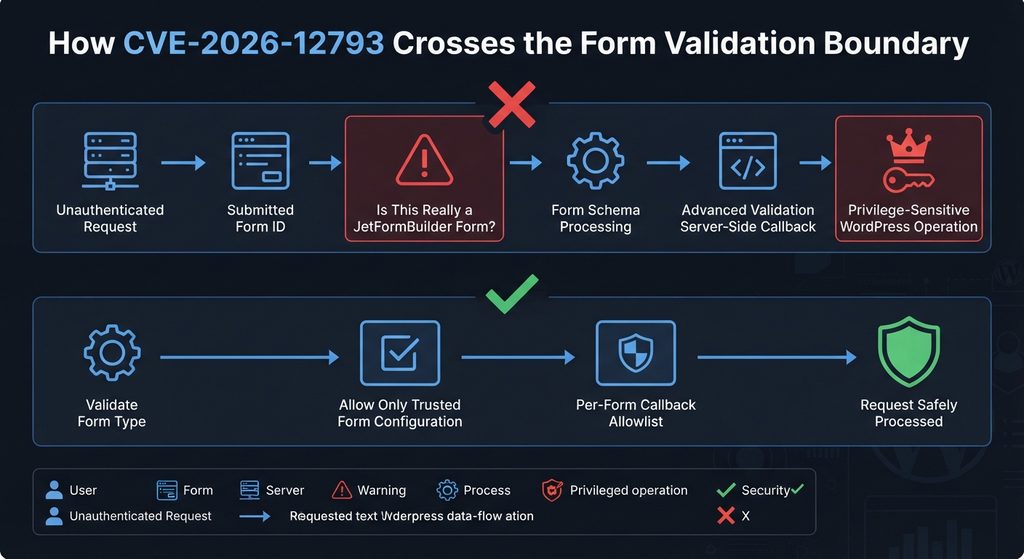
The vulnerability exists because the affected JetFormBuilder code could accept a submitted form identifier without sufficiently confirming that the referenced WordPress post was genuinely a JetFormBuilder form. The plugin could then parse content associated with that ID as though it represented a valid form schema. During this process, Advanced Validation server-side callback functionality could become reachable in an unintended context.
That distinction is important. The problem is not simply that an ordinary form field accepts an unexpected value. The security boundary breaks when data controlled through a public request influences which WordPress content the plugin treats as trusted form configuration. Once an invalid object crosses that boundary, later processing can inherit assumptions that are no longer valid.
CVE-2026-12793 Severity and Attack Requirements
The official CVE data assigns the vector AV:N/AC:L/PR:N/UI:N/S:U/C:H/I:H/A:H. In practical terms, the attack can originate over a network, requires low attack complexity, does not require an existing account, and does not depend on another user clicking a malicious link or approving an action. The confidentiality, integrity, and availability impacts are all rated high.
Those characteristics explain the 9.8 score. An attacker does not need to begin with legitimate WordPress privileges. Instead, successful exploitation can result in the creation of a new administrator-level account. Administrator access is effectively control over most ordinary WordPress management functions.
The issue was credited to security researcher daroo. Public timeline information indicates discovery in June 2026, followed by vendor notification and later public disclosure in September 2026.
Affected and Patched JetFormBuilder Versions
The affected range is straightforward: JetFormBuilder versions through 3.6.2 are vulnerable to CVE-2026-12793. Security databases identify 3.6.2.1 as the first patched release for this specific issue.
However, that does not mean administrators should intentionally install 3.6.2.1 today. JetFormBuilder received additional releases after that version, including further security changes. The upstream repository currently documents version 3.6.5.3, whose changelog includes additional hardening for server-side callbacks.
The practical recommendation is therefore simple: treat 3.6.2.1 as historical information about where this particular fix first appeared, not as the preferred upgrade target. Install the newest stable JetFormBuilder release available through an official, trusted distribution channel.
How an Invalid Form ID Reaches Advanced Validation
Understanding CVE-2026-12793 does not require publishing exploit code. The important security concept is the relationship between an incoming form identifier and the internal WordPress object that JetFormBuilder decides to trust.
WordPress stores many types of content as posts internally. Pages, posts, attachments, custom post types, and plugin-specific objects can all use entries in the posts database table. Plugins therefore need to verify more than whether a numeric ID exists. They must also establish that the referenced object belongs to the expected type and is valid for the operation being performed.
According to the CVE description, vulnerable JetFormBuilder releases did not sufficiently validate that a submitted form ID actually belonged to a JetFormBuilder form before parsing the referenced post content as a form schema. That missing trust check is the foundation of CVE-2026-12793.
Why Object-Type Validation Matters
Imagine a system designed to receive an identifier for a specific type of object. Finding an object with that number is only the first step. The application must also verify that the object is what the request claims it is.
If the application expects a JetFormBuilder form, it should reject an identifier that points somewhere else. Without that validation, downstream functions can process unexpected content while assuming that an earlier security check has already established its legitimacy.
This principle extends far beyond JetFormBuilder. Secure WordPress development frequently depends on validating object types, checking capabilities, verifying request authorization, sanitizing input, escaping output, and ensuring that sensitive callbacks cannot be selected arbitrarily.
CVE-2026-12793 demonstrates what can happen when an identifier crosses a trust boundary without enough contextual verification.
The Advanced Validation Connection
JetFormBuilder includes Advanced Validation functionality that allows forms to apply additional rules. Server-side validation is useful because security-sensitive decisions should not depend exclusively on checks performed in a visitor’s browser.
The problem arises when a server-side callback becomes reachable through configuration that was not actually obtained from a trusted form. According to the published vulnerability description, JetFormBuilder could parse the referenced post content as form schema and execute an Advanced Validation server-side callback.
In other words, the vulnerability combines two conditions. First, an incoming identifier could reference something that was not properly verified as a legitimate JetFormBuilder form. Second, that improperly trusted content could reach functionality capable of executing server-side validation behavior.
The security fix must therefore restore the trust boundary rather than merely filter one suspicious request pattern.
How the Updated Code Changes the Trust Decision
The current JetFormBuilder source shows a stronger check when the plugin sets the form ID. The form identifier is normalized to an integer and validated using JetFormBuilder’s form-validation logic. If the referenced object does not qualify as a valid form post, the resulting form ID becomes zero instead of being trusted for further processing.
That approach addresses an important part of the vulnerability class: an arbitrary WordPress object should not automatically inherit the trust associated with an actual JetFormBuilder form simply because its numerical ID was supplied in a request.
Later releases go further. The 3.6.5.2 changelog explicitly mentions securing Advanced Validation server-side callbacks with per-form allowlists. Version 3.6.5.3 adds another security change described as securing SSR callbacks with an administrator-managed registry.
Those later changes are another reason administrators should update to the latest stable release instead of stopping at the first build associated with the original CVE fix.
How Attackers Can Create Administrator Accounts
The most serious documented consequence of CVE-2026-12793 is administrator-account creation. The published CVE description explicitly states that unauthenticated attackers can create a new administrator-level user account through the vulnerable processing chain.
This changes the security impact dramatically. A vulnerability that only produces an error or reveals limited information can still matter, but unauthorized administrator creation gives an attacker a legitimate-looking route into the WordPress dashboard.
Once an unauthorized administrator exists, the original JetFormBuilder vulnerability may no longer be required. The attacker can potentially authenticate normally with the newly created account. This is why updating JetFormBuilder alone should not be treated as proof that an exposed site is clean.
Why Administrator Access Is So Dangerous
WordPress administrators normally have extensive control over a website. Depending on hosting restrictions, configuration, multisite status, installed security controls, and file permissions, an administrator may be able to install or activate plugins, change themes, modify site options, create users, reset other accounts, alter content, access plugin data, or introduce code through legitimate administrative features.
Attackers also value administrator accounts because they blend into ordinary WordPress authentication workflows. A malicious PHP file in an unusual directory might trigger a malware scanner. A valid administrator account can be less obvious unless administrators regularly review their user list and login activity.
For this reason, every site that ran an affected JetFormBuilder version should inspect its administrator accounts even if no visible damage has occurred.
Account Creation Can Become Persistent Access
Suppose an administrator patches JetFormBuilder after an unauthorized privileged account has already been created. The vulnerable entry point may disappear, but the malicious account can remain.
The same principle applies to other changes made after administrator access is obtained. A compromised administrator account might be used to create another account, install an unfamiliar plugin, modify an existing plugin, alter a theme, add a scheduled task, change site settings, or create another persistence mechanism.
Incident response must therefore distinguish between closing the vulnerability and removing the consequences of exploitation.
Updating closes the known vulnerable path. Investigation determines whether anything happened before that path was closed.
Do Not Publish or Test Exploit Payloads on Production Sites
Administrators do not need to reproduce CVE-2026-12793 to determine whether their website requires an update. Version information is enough to establish whether the vulnerable JetFormBuilder branch was installed.
Trying public proof-of-concept payloads against a production website can create unnecessary risk. Requests might modify data, trigger security systems, interfere with forms, or complicate later forensic analysis.
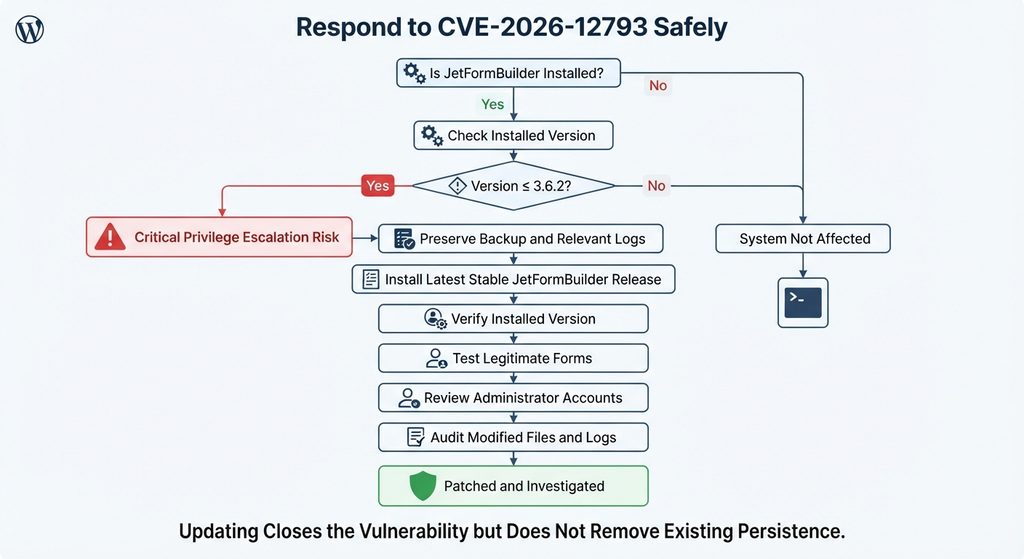
A safer workflow is to preserve relevant evidence, create a backup where appropriate, update the plugin, verify the installed version, and review the environment for indicators of unauthorized changes.
Evidence of Active Exploitation

CVE-2026-12793 deserves urgent remediation, but threat reporting must distinguish between a vulnerability that can be exploited, one that researchers expect attackers to target, and one with independently confirmed evidence of active exploitation.
As of September 16, 2026, the authoritative public sources reviewed for this article confirm the vulnerability, its critical severity, its unauthenticated attack requirements, and its administrator-account creation impact. However, they do not provide sufficient public evidence to state confidently that CVE-2026-12793 is already being actively exploited in the wild.
Patchstack classifies the issue as highly dangerous and says vulnerabilities of this type are expected to become exploited and can be attractive to mass-exploitation campaigns. That wording describes exploitation risk rather than confirmation that attacks have already been observed.
Why the Distinction Matters
Security reporting becomes less useful when “critical,” “exploitable,” and “actively exploited” are treated as interchangeable terms. They describe different conditions.
A critical vulnerability describes potential impact and exploitation characteristics. An exploitable vulnerability has a viable path through which an attacker can trigger the weakness. Active exploitation means credible evidence shows attackers are actually using the vulnerability against real systems.
CVE-2026-12793 clearly meets the first two descriptions based on the published advisory. Current public evidence reviewed here does not yet establish the third with enough confidence to present it as fact.
That does not reduce the urgency of patching.
Why Administrators Should Act Before Exploitation Is Confirmed
Waiting for mass exploitation is poor defensive strategy when a critical unauthenticated privilege-escalation vulnerability already has a patch.
Once vulnerability details become public, defenders and attackers can study the same changes. Automated scanners can eventually identify websites running outdated versions. Public WordPress sites are particularly easy to reach because their normal purpose is to accept internet traffic.
Patchstack rates CVE-2026-12793 as high priority and recommends immediate mitigation. The vulnerability requires no authenticated account according to the advisory, and the documented consequence can be administrator-level account creation.
Those facts are enough to justify urgent remediation without exaggerating the available evidence about attacks in the wild.
What Would Confirm Active Exploitation?
Reliable confirmation could come from a security vendor publishing observed attack telemetry, an incident-response company documenting compromised sites, the vendor reporting malicious activity, inclusion in a government exploited-vulnerability catalog, or another authoritative source providing evidence of real-world exploitation.
At the time of this article’s preparation, CVE-2026-12793 was not listed as present in the CISA Known Exploited Vulnerabilities catalog by the vulnerability intelligence source reviewed here.
That status can change quickly. Website administrators should therefore treat exploitation status as time-sensitive information rather than a permanent characteristic of the CVE.
Updating JetFormBuilder to the Latest Stable Version
The immediate remediation for an affected installation is to update JetFormBuilder. Versions through 3.6.2 are affected by CVE-2026-12793. Security databases identify 3.6.2.1 as the first patched release for this specific vulnerability.
Nevertheless, administrators should not interpret “patched in 3.6.2.1” as “install 3.6.2.1 and stop.” That release belongs to an older branch of the plugin’s security history. Several additional vulnerabilities and hardening changes have been addressed since then.
At the time of writing, the upstream JetFormBuilder repository lists version 3.6.5.3. Its changelog specifically includes a fix to secure SSR callbacks with an administrator-managed registry. Version 3.6.5.2 introduced per-form allowlists for Advanced Validation server-side callbacks alongside several other security fixes.
Why Updating Directly to the Latest Release Is Better
Security maintenance should generally move a production website onto the newest compatible stable release rather than the oldest version containing one particular fix.
JetFormBuilder provides a good example. Version 3.6.5.2 includes hardening for preset access, shortcode handling, Advanced Validation server-side callbacks, media previews, email handling, and database interactions. The next upstream version, 3.6.5.3, adds further server-side callback protection.
Stopping at 3.6.2.1 could close CVE-2026-12793 while leaving the website without later security improvements.
Administrators should therefore check the official WordPress update interface or another trusted official Crocoblock distribution channel and install the newest stable release offered for their environment.
Back Up Before Making Production Changes
Urgency does not eliminate the need for basic operational discipline. Create or verify a recent backup before performing major updates, particularly on websites where JetFormBuilder controls registrations, contact forms, payment-related workflows, bookings, account updates, or other business-critical processes.
A useful backup should cover both files and the WordPress database. If the website may already be compromised, avoid immediately overwriting every older backup. Historical copies can become valuable when determining when a suspicious account or file first appeared.
After updating, clear relevant WordPress, object, page, server, and CDN caches where appropriate. Then test important JetFormBuilder forms from the front end.
Verify the Installed Version After Updating
Do not assume an update succeeded simply because WordPress displayed an update notification.
Return to the Plugins screen and confirm the active JetFormBuilder version. Managed WordPress environments, staging systems, deployment pipelines, Composer-based installations, and custom update mechanisms can occasionally leave production running a different build than expected.
Administrators managing multiple websites should check each installation separately.
WP-CLI can also help administrators inventory plugin versions across servers they control. However, the objective is the same regardless of the management tool: establish the exact version that is running now and document when the vulnerable version was replaced.
Test Important Forms After the Security Update
Security fixes sometimes tighten validation behavior. Forms using complex callbacks, dynamic fields, account registration, user updates, integrations, conditional logic, or custom development deserve functional testing after the update.
Submit ordinary test entries through important public forms. Verify expected validation errors. Confirm successful submissions reach their intended destination. Check notifications, integrations, redirects, and form records where applicable.
Testing should focus on legitimate behavior rather than attempting to reproduce the vulnerability.
If a form breaks after the security update, investigate the configuration or contact the plugin developer. Downgrading to a known vulnerable version simply to restore functionality can reintroduce the security problem.
Auditing WordPress Accounts, Forms and Modified Files
Updating JetFormBuilder should be followed by an investigation if the website previously ran a vulnerable release. The depth of that investigation depends on the site’s importance, the sensitivity of its data, available logging, and how long the vulnerable version was publicly accessible.
Start with WordPress accounts because administrator creation is the documented impact of CVE-2026-12793.
Open the WordPress Users screen and filter for administrators. Identify every account and confirm that each one belongs to a known person, service, or legitimate operational process. Pay particular attention to recently created accounts, unfamiliar usernames, unexpected email addresses, accounts with unusual naming patterns, and old accounts that suddenly gained administrator privileges.
Review Administrator Accounts Carefully
Do not delete a suspicious administrator immediately if you believe a real compromise may have occurred and forensic evidence matters. First record relevant details, including the account name, registration information where available, role, and any corresponding login records.
Then remove or disable unauthorized access according to your incident-response process.
Check whether legitimate administrator accounts have also changed. An attacker with administrative access may alter an existing user’s email address, reset passwords, create application passwords, change roles, or establish another method of access.
After a confirmed compromise, rotate credentials for privileged users and review active sessions. WordPress salts, hosting credentials, database credentials, deployment credentials, API keys, and third-party integration secrets may also require rotation depending on the extent of the intrusion.
Inspect JetFormBuilder Forms
Next, inspect JetFormBuilder itself.
Review published forms, drafts, recently modified forms, and forms that perform security-sensitive actions. Give particular attention to forms that register users, update user information, authenticate users, interact with account metadata, or use Advanced Validation.
Compare configurations with known-good backups or staging copies when available.
Unexpected changes to validation callbacks, post-submit actions, user roles, dynamic values, notification destinations, redirects, or hidden fields deserve investigation.
A modified form does not automatically prove malicious activity. Administrators, developers, migrations, imports, and plugin updates can all produce legitimate changes. The goal is to identify changes that cannot be explained by normal website operations.
Examine Recently Modified WordPress Files
Administrator access can potentially lead to file modification, depending on WordPress configuration and server permissions. Therefore, review recently modified files in the WordPress installation.
Focus particularly on executable PHP files appearing in locations where PHP files are unusual, modifications to active themes, changes to existing plugins, unfamiliar plugins, altered must-use plugins, and unexpected files in WordPress core directories.
The uploads directory deserves attention because ordinary media uploads generally should not require executable PHP files.
However, timestamps alone are not proof of compromise. Updates legitimately replace many files and change modification times. Compare suspicious files with official packages or known-good backups before drawing conclusions.
Verify WordPress Core Integrity
WordPress core should match the official distribution for the installed version except for a small number of expected configuration files outside the core package.
Administrators comfortable with WP-CLI can use WordPress checksum functionality to identify unexpected differences in core files. Plugin and theme integrity can require separate comparison against trusted packages, depending on how those extensions were installed.
If unexpected executable files appear, preserve copies before deleting them when forensic investigation matters.
Avoid opening suspicious PHP files through a browser. Analyze them in an isolated environment or ask a qualified security professional to investigate them.
Review Plugins and Themes
Look for unfamiliar plugins, especially recently installed or activated ones. An attacker who obtains administrator privileges may install a legitimate-looking plugin containing malicious functionality or alter an existing extension.
Also review inactive plugins. A malicious extension does not need to remain visibly active forever if it has already created another persistence mechanism.
Check active and inactive themes as well. Compare important theme files against known-good versions when possible.
Pay special attention to changes in functions.php, custom plugin directories, must-use plugins, drop-ins, and other code that WordPress can load automatically.
Review Server and Security Logs
Logs can provide information that the WordPress dashboard cannot.
Check web server access logs, hosting security logs, WordPress security-plugin records, authentication histories, WAF events, and other available telemetry covering the period when the vulnerable JetFormBuilder version was installed.
Look for unusual form submission patterns followed by new user creation or administrator logins. Also investigate bursts of requests, repeated probing, unfamiliar administrative sessions, plugin installation activity, and file modifications occurring near suspicious authentication events.
Do not rely on a single IP address as definitive attribution. Attackers can use VPNs, proxies, compromised servers, residential networks, and other infrastructure. Logs are most useful when multiple events form a coherent timeline.
Review Scheduled Tasks and Persistence
A sophisticated attacker may try to preserve access beyond the original administrator account.
Review WordPress scheduled events, hosting cron jobs, must-use plugins, unfamiliar database options, unexpected administrator accounts, active sessions, application passwords, and server-level scheduled tasks where you have access.
This becomes especially important if you find evidence that an unauthorized administrator actually logged in.
Once administrative access has been confirmed, the investigation should no longer focus solely on JetFormBuilder. The website should be treated as potentially compromised until its integrity can be established.
Consider Restoring From a Known-Good Backup
For a confirmed compromise, cleaning individual suspicious files may not provide enough assurance.
A safer recovery strategy can involve rebuilding the site from trusted WordPress core files, verified plugin and theme packages, and a known-good backup created before the compromise. Database content must still be reviewed because administrator accounts, settings, posts, scheduled events, and malicious configuration can live in the database rather than the filesystem.
The appropriate recovery method depends on the site and available evidence. Business-critical websites, e-commerce stores, membership systems, and sites processing sensitive information may benefit from professional incident-response assistance.
Frequently Asked Questions
What is the JetFormBuilder vulnerability CVE-2026-12793?
CVE-2026-12793 is a critical privilege-escalation vulnerability in JetFormBuilder. The affected plugin could insufficiently validate a submitted form ID before processing referenced content as form configuration. Under vulnerable conditions, an unauthenticated attacker could create a new WordPress administrator-level account. The vulnerability carries a CVSS 3.1 score of 9.8.
Which JetFormBuilder versions are vulnerable?
Public advisories identify JetFormBuilder versions up to and including 3.6.2 as affected by CVE-2026-12793. WPScan and Patchstack identify version 3.6.2.1 as the first release containing the specific fix. Administrators should nevertheless install the newest stable JetFormBuilder version rather than deliberately stopping at this older minimum patched release.
Does an attacker need a WordPress account?
No. The published CVSS vector lists privileges required as none. CVE documentation describes the vulnerability as unauthenticated, meaning exploitation does not depend on the attacker already possessing a legitimate WordPress account.
Does exploitation require an administrator to click anything?
The published CVSS vector lists user interaction as none. Therefore, exploitation does not depend on an administrator or another legitimate user clicking a malicious link or manually approving the request.
Can CVE-2026-12793 create a WordPress administrator?
Yes. The official vulnerability description states that successful exploitation can allow an unauthenticated attacker to create a new administrator-level user account. That is the primary reason this vulnerability receives such a high severity rating.
Is CVE-2026-12793 confirmed to be actively exploited?
The public authoritative sources reviewed on September 16, 2026 confirm that the vulnerability is critical and exploitable, but they do not provide sufficient evidence to state that active exploitation in the wild has been independently confirmed. Patchstack describes exploitation as expected and recommends immediate remediation. Exploitation status may change, so administrators should not wait for confirmed attacks before updating.
Should I update only to JetFormBuilder 3.6.2.1?
No. Version 3.6.2.1 is important because it represents the first fix identified for CVE-2026-12793, but newer releases contain additional security improvements. The upstream project currently lists 3.6.5.3 with further server-side callback hardening. Install the newest stable version available from an official trusted source.
Is updating JetFormBuilder enough after exposure?
Updating closes the known vulnerable path, but it cannot automatically remove an administrator account or other persistence created before the patch. Websites that operated a vulnerable release should review users, administrator accounts, forms, plugins, themes, modified files, scheduled tasks, authentication activity, and relevant security logs.
What should I check first after updating?
Start by verifying the installed JetFormBuilder version. Then review all WordPress administrator accounts and identify any unfamiliar or recently created users. Continue with JetFormBuilder form configurations, recent plugin and theme changes, modified executable files, security logs, server access logs, and scheduled tasks.
Should I deactivate JetFormBuilder if I cannot update immediately?
If an affected plugin cannot be safely updated, reducing exposure by disabling it may be appropriate when doing so does not cause greater operational problems. However, deactivation is not a substitute for investigating previous exposure. Administrators should also consult their hosting provider, security provider, or developer when immediate remediation is difficult.
What WordPress Administrators Should Take Away
CVE-2026-12793 is the kind of WordPress vulnerability that deserves immediate attention because it combines public network access, no authentication requirement, low attack complexity, no required user interaction, and the possibility of administrator-level account creation. JetFormBuilder versions through 3.6.2 are affected, while patched versions are available.
The safest response is not simply to reach the oldest release carrying the initial fix. JetFormBuilder has received additional security improvements since 3.6.2.1. Administrators should move directly to the newest stable version offered by an official source, verify that the update succeeded, and test important forms afterward. The current upstream changelog documents additional server-side callback hardening through version 3.6.5.3.
Finally, remember that patching and incident response solve different problems. Updating protects the website against continued exploitation of the known vulnerable code. Auditing accounts, files, forms, logs, plugins, themes, and persistence mechanisms helps determine whether the website was affected before the update.
That distinction matters whenever a vulnerability can create administrator access. A website can be fully patched today and still contain an unauthorized account created yesterday.
⚠️ Disclaimer and Source Hygiene
This article is provided for educational, defensive, and informational purposes. Vulnerability information can change quickly as plugin developers, security researchers, CVE authorities, and threat-intelligence providers publish new findings. Always verify the current JetFormBuilder version and security guidance through authoritative sources before making production changes.
The technical details in this article are based on publicly available vulnerability records, JetFormBuilder’s official code and changelog information, WordPress.org plugin information, WPScan, Patchstack, and CVE-related security data. No exploit payloads or offensive reproduction instructions are provided. Website owners dealing with a suspected compromise should consider consulting their hosting provider, developer, or a qualified WordPress security professional.
🔔 For more tutorials like this, consider subscribing to our blog.
📩 Do you have questions or suggestions? Leave a comment or contact us!
🏷️ Tags: JetFormBuilder vulnerability, CVE-2026-12793, JetFormBuilder security, WordPress vulnerability, WordPress security, privilege escalation, WordPress administrator security, JetFormBuilder update, WordPress plugin security, website security
📢 Hashtags: #JetFormBuilder, #WordPressSecurity, #CVE202612793, #WordPress, #CyberSecurity, #PluginSecurity, #WebsiteSecurity, #WordPressVulnerability, #SecurityUpdate, #WordPressAdmin
Sources and References
WordPress.org JetFormBuilder Plugin Directory
The official WordPress.org JetFormBuilder listing provides plugin information, active installation figures, release details, requirements, and the public changelog. Recent releases document multiple security-related improvements, including hardening of Advanced Validation server-side callbacks.
JetFormBuilder Upstream Repository
The upstream JetFormBuilder repository provides current source code and changelog information. At the time of this article’s research, the project lists version 3.6.5.3 and describes its security change as securing SSR callbacks through an administrator-managed registry.
WPScan Vulnerability Database
WPScan identifies the unauthenticated privilege-escalation vulnerability affecting JetFormBuilder versions through 3.6.2, assigns it a critical 9.8 score, and identifies 3.6.2.1 as the first fixed version for this issue.
Patchstack Vulnerability Database
Patchstack identifies CVE-2026-12793 as a high-priority JetFormBuilder privilege-escalation vulnerability with a CVSS score of 9.8. Its advisory recommends immediate remediation and identifies versions through 3.6.2 as vulnerable and 3.6.2.1 as patched.
CVE and Vulnerability Intelligence Records
Published CVE intelligence describes CVE-2026-12793 as an unauthenticated privilege-escalation vulnerability caused by insufficient validation that a submitted form ID belongs to a legitimate JetFormBuilder form before referenced content reaches Advanced Validation processing. The published CVSS score is 9.8 and the associated weakness is CWE-269.
Secondary Sources and Testimonials
Secondary vulnerability intelligence sources consistently describe the core impact of CVE-2026-12793 as unauthenticated privilege escalation with the potential for administrator-account creation. These sources are useful for corroboration, but version decisions and incident-response actions should prioritize official plugin information, the CVE record, and established WordPress security databases.
No unverified user testimonials, fabricated compromise reports, or anonymous claims have been used as evidence of active exploitation. This is intentional. When reporting a newly disclosed critical vulnerability, distinguishing documented technical risk from confirmed real-world attacks provides WordPress administrators with more reliable information for making security decisions.
1 thought on “Critical JetFormBuilder Vulnerability Is Under Active Attack”