
Table of Contents
WordPress 7.1.2 fixes a critical unauthenticated path traversal vulnerability that can lead to remote code execution under specific theme and server conditions. Learn how CVE-2026-87902 works, why some cPanel environments deserve special attention, which themes may meet the prerequisites, and how administrators should respond.
WordPress 7.1.2 Security Update Requires Immediate Attention
WordPress administrators received another important security update on September 22, 2026. WordPress 7.1.2 addresses a critical vulnerability in Core involving page-template resolution. The issue allows an unauthenticated attacker, under specific conditions, to make WordPress resolve and include a readable local PHP file located outside the active theme directories. When additional server requirements are present, that local file inclusion can potentially develop into remote code execution.
The distinction between file inclusion and immediate remote code execution matters. A vulnerable WordPress version alone does not mean that anyone on the internet can automatically execute arbitrary PHP code on every installation. The attack requires a particular combination of WordPress behavior, theme directory structure, readable local PHP files, and server configuration. However, several of those conditions exist in ordinary hosting environments, which explains why WordPress classified the vulnerability as critical.
WordPress officially recommends updating immediately. The vulnerability has been assigned CVE-2026-87902 and is also documented as GHSA-7hp8-65ch-5whp. The GitHub security advisory gives it a CVSS 4.0 score of 9.2, placing it firmly in critical territory. Most importantly, exploitation does not require a WordPress account, authenticated session, administrator role, or interaction from a logged-in user.
For administrators using shared hosting, VPS platforms, WHM/cPanel, or custom PHP environments, the practical response is straightforward. Update WordPress first. Investigate the environment second. Trying to determine whether every exploitation prerequisite exists before applying the security update creates unnecessary exposure while a supported patch is already available.
Why This WordPress Vulnerability Deserves Attention
The vulnerability sits in WordPress Core rather than in an optional plugin. According to the official advisory, affected releases extend through numerous WordPress branches beginning with WordPress 4.7.0. WordPress therefore issued patched releases for supported and older affected branches as a security courtesy. WordPress 7.1 users should move to 7.1.2, while administrators intentionally maintaining older branches need the corresponding patched release for that branch.
Another important detail involves the attack surface. WordPress identifies this as an unauthenticated path traversal problem in page-template resolution. An attacker does not first need to compromise an editor account, steal an administrator password, or exploit a separate authentication weakness. The vulnerable processing happens while WordPress determines which PHP template should render a requested Page.
The good news is equally important. WordPress 7.1.2 changes the relevant template handling and adds stronger path restrictions. The official WordPress Trac changeset describes the change as restricting path traversal in locate_template(). WordPress also revised wp-includes/template.php, making the update small in scope but highly significant from a security perspective.
A Conditional RCE Is Still a Serious Security Problem
Security headlines can make the term RCE sound as though every affected website is immediately capable of executing arbitrary commands. CVE-2026-87902 needs more careful language. The official advisory describes it as path traversal leading to conditional remote code execution. That word, conditional, is essential.
First, the active parent or child theme must provide a compatible directory structure. Second, a useful PHP target must exist locally and be readable by the account running PHP. Additional requirements are necessary for known transitions from local file inclusion to code execution. Server restrictions can also interfere with exploitation.
Nevertheless, conditional does not mean theoretical or harmless. The advisory specifically identifies server environments where relevant conditions can occur. It mentions the official PHP Docker image and default cPanel configurations using PHP versions prior to PHP 8.5 in relation to the register_argc_argv condition used by the documented PEAR-based RCE transition.
That makes the WordPress 7.1.2 security update particularly relevant to hosting administrators. Many WordPress installations live on cPanel servers, and many production environments still run PHP versions below 8.5. Administrators should therefore avoid assuming that a conventional hosting stack automatically protects them.
What Is CVE-2026-87902
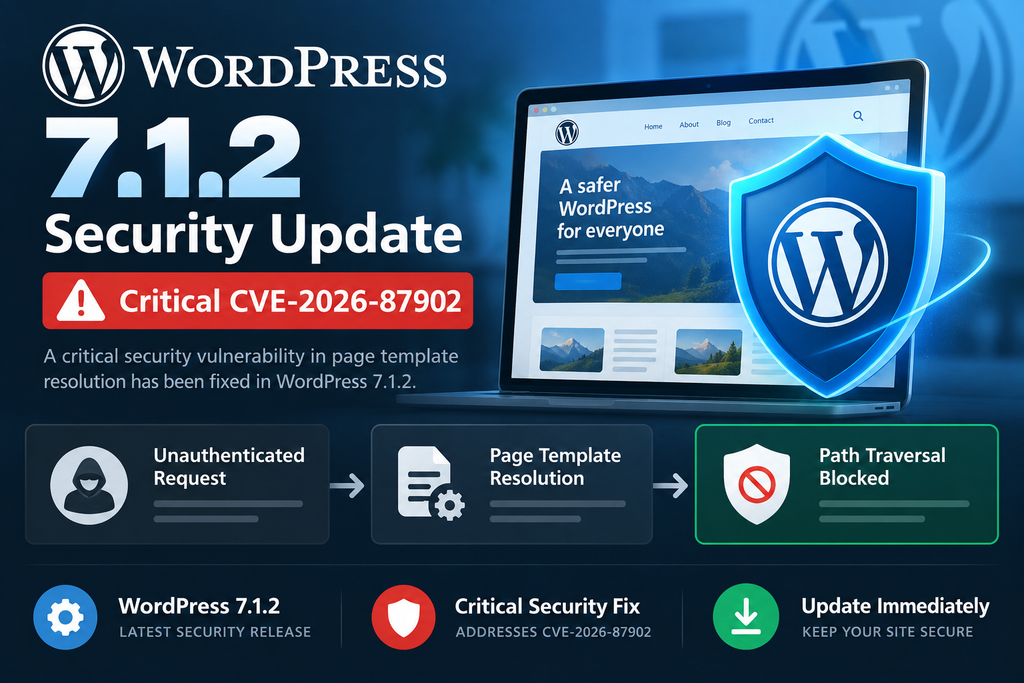
CVE-2026-87902 is an unauthenticated path traversal vulnerability affecting WordPress Core page-template resolution. WordPress describes the issue as allowing an attacker, under certain circumstances, to cause get_page_template() to include a chosen readable local PHP file outside the directories belonging to the active theme. When additional theme and server prerequisites align, that behavior can lead to remote code execution.
The vulnerability was responsibly disclosed by security researcher Robert Ressl. WordPress released the fix on September 22, 2026, as WordPress 7.1.2. The official WordPress release announcement emphasizes the critical severity and recommends that site owners update immediately rather than waiting for their normal maintenance schedule. Sites supporting automatic background updates may receive the update automatically, although administrators should still verify the installed version.
The vulnerability is unusual because it does not originate from a typical upload form, REST API permission mistake, SQL query, or administrator feature. Instead, it appears during a fundamental WordPress operation: deciding which theme template should render a Page.
Understanding WordPress Page Templates
A WordPress theme usually contains several PHP templates. Depending on the theme, files such as index.php, page.php, specialized page templates, and other template files determine how different requests appear. WordPress uses a template hierarchy and related functions to select the appropriate file.
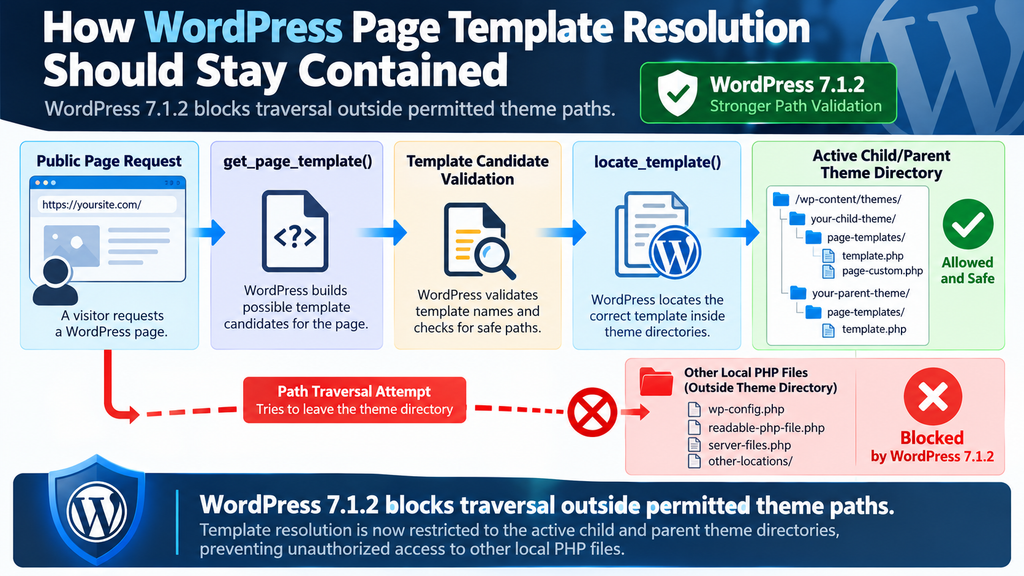
For Pages, get_page_template() participates in building candidate template names. WordPress then searches the active child and parent theme directories for an appropriate match. Normally, this process should remain confined to files that belong to the active theme.
That confinement is an important security boundary. A request for a Page should not allow an external visitor to influence template resolution in a way that escapes the intended theme directories and reaches arbitrary PHP files elsewhere on the filesystem.
CVE-2026-87902 exposed a situation where that boundary could be crossed. The vulnerable code handled a decoded page-name candidate without applying the same validation that administrators would expect from a path-sensitive operation.
Where the Validation Problem Appeared
The WordPress 7.1.2 patch shows the relevant change clearly. Before the security fix, WordPress decoded the page name and, when the decoded value differed from the original, added a corresponding candidate to the template list.
The corrected implementation adds validation to that decoded value. WordPress 7.1.2 also introduces additional checking around template paths so that template resolution does not simply trust a candidate containing traversal components. The official Trac changeset summarizes the objective directly: restrict path traversal in locate_template().
This layered approach is important. Rather than relying solely on one input check, the patch also strengthens the point where WordPress determines whether a resolved template path may actually be loaded.
Why Authentication Is Not Required
The vulnerable behavior occurs while WordPress processes a public request. Therefore, an attacker does not need to log in before reaching the affected template-resolution logic.
That characteristic increases the importance of patching internet-facing sites. Authentication often provides a useful security barrier because an attacker must first obtain valid credentials. CVE-2026-87902 does not depend on such access.
However, unauthenticated reachability should not be confused with universal exploitability. A request can reach vulnerable code while still failing to achieve useful file inclusion because the required theme structure, target file, filesystem permissions, or server configuration is absent.
Versions Affected by CVE-2026-87902
The official GitHub advisory lists affected WordPress branches from WordPress 4.7 through WordPress 7.1.1. WordPress 7.1.2 is the patched version for the current 7.1 branch. WordPress also produced security backports for older branches, including 7.0.6, 6.9.9, 6.8.10, 6.7.9, 6.6.9, 6.5.12, and corresponding patched releases extending back to WordPress 4.7.37.
Administrators should not interpret those backports as a recommendation to remain indefinitely on obsolete WordPress versions. WordPress documentation notes that only the latest WordPress release receives active support. The backports provide a security bridge for older installations, not a substitute for a sustainable update strategy.
If your dashboard reports WordPress 7.1 or 7.1.1, the simplest response is to update directly to 7.1.2.
How Page-Template Resolution Can Leave Theme Directories
To understand the security issue, imagine WordPress receiving a request for a normal Page. WordPress needs to determine which PHP file should render that request. It collects possible template names and passes them through its template-location process.
Under normal conditions, that process searches the active stylesheet and template directories. For a child theme, those locations can include both the child theme and its parent. The final PHP file should remain inside one of those trusted theme locations.
CVE-2026-87902 demonstrated that a specially manipulated page-name value could influence a decoded template candidate in a way that introduced directory traversal. Instead of remaining within the intended theme directory, resolution could potentially move upward through the filesystem and reach another readable PHP file.
Why Directory Traversal Changes the Security Boundary
Directory traversal vulnerabilities generally occur when an application constructs a filesystem path using input that can introduce parent-directory navigation or otherwise escape an expected root.
Consider a harmless conceptual example. An application expects to load something from:
/trusted/theme/templates/
If path handling allows navigation outside that directory, the effective destination may eventually point somewhere completely different.
The security problem is not simply that a filename looks strange. The problem is that the final resolved path no longer belongs to the trusted location the application intended to use.
WordPress templates contain executable PHP. Therefore, incorrectly allowing template resolution outside the active theme is more serious than accidentally reading an ordinary text or image file.
The Importance of the page- Theme Directory Condition
The official advisory documents an important prerequisite: the active parent or child theme needs a top-level directory whose name begins with page-. A common example is page-templates.
This condition exists because of how WordPress constructs Page template candidates. The attacker cannot simply begin from an arbitrary filesystem location. The generated candidate has a fixed Page-related prefix, so the active theme needs a compatible directory that lets the resulting path resolve far enough for traversal to become meaningful.
That considerably narrows the vulnerable configuration compared with a completely unrestricted local file inclusion flaw. At the same time, page-templates is hardly an exotic directory name in WordPress theme development.
The official security advisory identifies Twenty Twelve and Twenty Fourteen among the legacy WordPress themes meeting this structural condition. It also names third-party themes including Neve, Hestia, and Sydney as examples.
Why Theme Structure Matters More Than Theme Popularity
Administrators should not interpret the advisory as saying that every installation of those themes can immediately be compromised. Likewise, they should not assume that a theme is safe merely because its name does not appear in the advisory.
The technical question is structural: does the active parent or child theme contain a top-level directory beginning with page-?
A custom theme can satisfy the condition. A child theme can also change the situation. Conversely, another installation of WordPress may use a theme whose directory layout does not provide the required path structure.
This is why security assessment should focus on the actual files installed on the server rather than relying only on a list of theme names found in an article.
WordPress 7.1.2 Adds Stronger Containment
The WordPress patch does more than adjust one page-name condition. Changeset 63792 adds _wp_is_template_path_allowed(), a private Core function designed to determine whether a template discovered by locate_template() may be loaded.
The revised logic evaluates potentially suspicious paths and compares their real location against the permitted theme roots. This is a significant defensive improvement because it protects the final loading stage rather than depending exclusively on earlier filename construction.
In practical terms, WordPress 7.1.2 strengthens the rule that theme template resolution should remain within the active theme directories.
Why Updating Beats Trying to Block Individual Requests
Administrators may be tempted to solve the problem with a firewall expression, rewrite rule, or manually crafted request filter. Such controls can provide useful additional defense, but they should not replace the Core update.
Encoding and URL normalization can occur at several layers, including browsers, proxies, CDNs, web servers, PHP, and WordPress itself. A filter that recognizes one representation of traversal data may fail against another representation or may create false positives.
Updating Core removes the vulnerable behavior at the location where WordPress understands the template path. That is much more reliable than attempting to predict every suspicious URL pattern at the network edge.
Which Themes and Server Configurations May Be Exposed
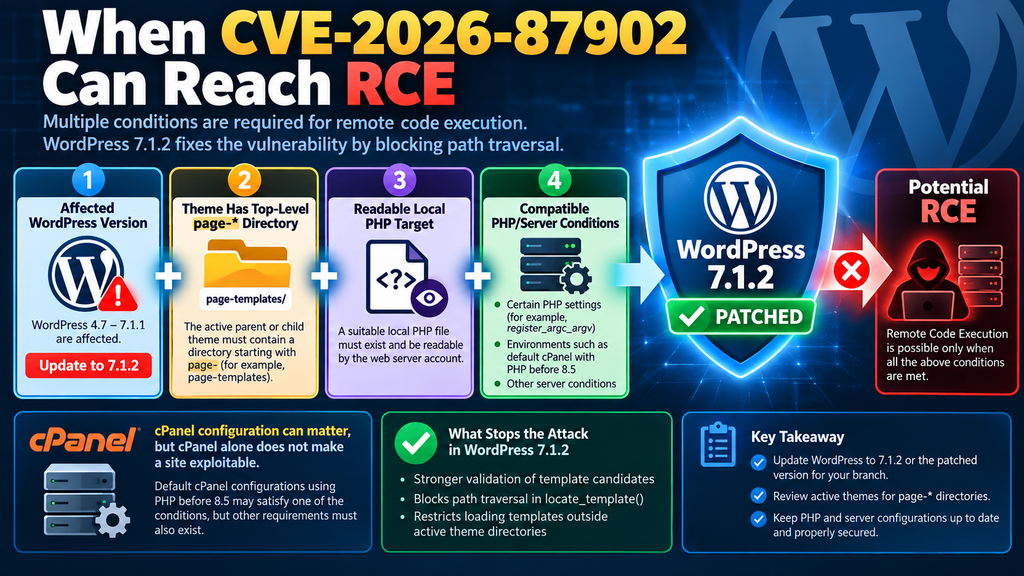
The most useful way to evaluate CVE-2026-87902 is to separate the vulnerability into prerequisites. A vulnerable WordPress Core version provides the first piece, but successful exploitation requires more.
For the file-inclusion stage described in the official advisory, the active child or parent theme must contain a top-level directory beginning with page-. A selected local PHP file must also exist and be readable by the web-server or PHP account.
For the documented transition to remote code execution, further server-side conditions are necessary. The WordPress GitHub advisory specifically discusses a PEAR-related route involving a readable pearcmd.php and PHP’s register_argc_argv setting.
Themes Explicitly Mentioned in the Advisory
The official advisory provides several examples of themes with a relevant top-level directory structure:
- Twenty Twelve
- Twenty Fourteen
- Neve
- Hestia
- Sydney
These names are useful for awareness, but they are examples rather than an exhaustive vulnerability list.
A custom theme with a page-templates directory can satisfy the same structural prerequisite. Another commercial or free theme may use a similar convention without appearing in the advisory.
Administrators should therefore inspect both the active parent theme and active child theme when evaluating exposure.
Child Themes Need Attention Too
Child themes complicate security reviews because WordPress template resolution can involve both the stylesheet directory and the parent template directory.
A website may appear to use a custom child theme while inheriting most of its functionality from a well-known parent theme. Looking only at the child theme folder can therefore produce an incomplete picture.
Likewise, developers sometimes add custom directories such as page-templates, page-layouts, or similarly named folders when building specialized Page templates. The relevant condition concerns the actual directory structure rather than who originally published the theme.
Updating WordPress Core remains the correct response regardless of the result.
Why cPanel Servers Deserve Special Attention
cPanel is widely used for WordPress hosting because it provides convenient management for domains, PHP versions, databases, files, cron jobs, email, SSL certificates, and backups.
That popularity makes the server prerequisite in the official advisory especially noteworthy.
The advisory states that the known PEAR-to-RCE transition can be used when register_argc_argv is enabled. It further notes that the default cPanel configuration is affected when PHP versions prior to PHP 8.5 are used. The official PHP Docker image is also specifically mentioned.
This does not mean that cPanel itself contains CVE-2026-87902. It does not. The vulnerability belongs to WordPress Core. cPanel is relevant because certain PHP defaults in that environment may satisfy one of the additional prerequisites that can turn local file inclusion into a more serious outcome.
PHP Version Alone Does Not Determine WordPress Exposure
A common mistake would be to conclude that upgrading PHP automatically fixes CVE-2026-87902.
It does not.
The vulnerability exists in WordPress template handling. The correct fix is a patched WordPress Core release. PHP configuration influences whether particular exploitation chains can succeed, but changing PHP versions should not be treated as a replacement for updating WordPress.
The same logic applies to disabling a PHP setting, removing a local utility, changing filesystem permissions, or adding open_basedir. Those measures can reduce particular attack opportunities, but they do not correct the vulnerable WordPress code.
A patched WordPress installation should therefore remain the first objective.
Checking the Installed WordPress Version
Administrators can confirm the version from Dashboard → Updates. On servers with WP-CLI, the installed version can also be checked with:
wp core version
For WordPress 7.1 installations, the expected secure version for this vulnerability is 7.1.2.
Administrators intentionally maintaining another branch should compare their installation against the patched version documented by the official advisory. WordPress 7.0, for example, received 7.0.6, while WordPress 6.9 received 6.9.9.
Do not assume that automatic updates completed successfully. Disk permissions, disabled background updates, version-control deployments, Composer workflows, hosting policies, or failed cron operations can prevent an expected update from reaching production.
Checking a cPanel or WHM Environment
On cPanel hosting, administrators should first identify which PHP version the affected domain actually uses. Servers can provide several PHP versions simultaneously, and individual domains may not use the system default.
WHM administrators can review MultiPHP Manager and the relevant PHP configuration. cPanel users may have similar controls depending on their hosting provider.
The security advisory’s mention of register_argc_argv is useful for understanding risk, but administrators should avoid spending hours tuning PHP before installing the WordPress patch.
The preferred order is:
- Back up the website and database if your operational process requires it.
- Update WordPress to the appropriate patched release.
- Confirm the new Core version.
- Test the front end and WordPress administration area.
- Review active parent and child themes.
- Examine PHP and filesystem configuration as additional hardening.
- Review logs for suspicious activity if the site was publicly exposed while vulnerable.
Shared Hosting Versus VPS Hosting
Shared-hosting customers may not control all relevant PHP settings. That limitation makes the Core update even more important.
A VPS administrator has more options. WHM, PHP configuration, filesystem permissions, security modules, WAF policies, and operating-system controls can all contribute to defense in depth.
However, more control also creates more responsibility. A self-managed VPS may preserve older PHP defaults or utilities for compatibility reasons. A configuration that worked safely enough yesterday can become relevant when a newly disclosed application vulnerability exposes a path toward those local components.
Therefore, administrators should treat WordPress, PHP, the web server, and operating-system permissions as interacting security layers rather than independent products.
When Path Traversal Can Become Remote Code Execution

Path traversal and remote code execution describe different stages of a possible attack.
Path traversal means the application can be manipulated into resolving a path outside its intended directory. Local file inclusion means the application subsequently loads a local file it should not have loaded. Remote code execution represents a more severe outcome where the attacker obtains a way to execute code in the context of the vulnerable application or server account.
CVE-2026-87902 can connect these stages, but the transition is conditional. WordPress deliberately uses that language in its advisory.
The Local PHP File Requirement
The attacker needs a suitable PHP file on the server that the PHP process can read. Arbitrary traversal to a nonexistent path accomplishes nothing.
Filesystem permissions therefore matter. A PHP-FPM pool running under a restricted account may see fewer files than another configuration. Additional restrictions such as open_basedir, container isolation, mandatory access controls, or carefully separated hosting accounts can further reduce accessible filesystem territory.
Nevertheless, filesystem hardening should be considered defense in depth. A WordPress template loader should still reject attempts to escape the theme directories, which is precisely what the WordPress 7.1.2 patch strengthens.
The PEAR-Related Condition
The official advisory identifies a known PEAR-related route as one way the local file inclusion could progress toward RCE. That route depends on a readable pearcmd.php and appropriate PHP behavior, including register_argc_argv being enabled.
For defensive purposes, administrators do not need to reproduce that chain against production systems. Doing so creates unnecessary risk and provides little benefit once the installed WordPress version can be verified directly.
Instead, determine whether the site was running an affected WordPress release, update it, and then review the server for indicators of unexpected modification.
Why register_argc_argv Matters
The register_argc_argv PHP configuration option determines whether certain command-line-style argument information becomes available through PHP variables.
Most WordPress administrators rarely think about this setting because ordinary WordPress operation does not revolve around it. In this vulnerability, however, the setting becomes relevant to the documented PEAR-based route from local inclusion to execution.
The GitHub advisory specifically notes that the setting is enabled in environments that include the official PHP Docker image and default cPanel configurations with PHP before 8.5.
Again, this is a server-side prerequisite for the described escalation route, not the root WordPress vulnerability itself.
Why cPanel Does Not Equal Compromised
Seeing cPanel mentioned in a critical security advisory can understandably alarm hosting administrators. The correct interpretation is more measured.
A cPanel server running a relevant PHP configuration may satisfy one prerequisite in a multi-step exploitation chain. The active WordPress theme must still satisfy its structural requirement. A suitable readable local PHP target must exist. The WordPress installation must also be running a vulnerable Core version.
Therefore:
cPanel + WordPress does not automatically mean RCE.
At the same time:
cPanel + vulnerable WordPress + compatible theme structure + relevant PHP/filesystem conditions can create a serious exposure.
That is why immediate patching remains appropriate even when the administrator has not confirmed every prerequisite.
How WordPress 7.1.2 Fixes the Vulnerability
WordPress 7.1.2 addresses the vulnerability in wp-includes/template.php. The official WordPress documentation identifies that file as the Core file revised by the security release.
The patch improves validation of the decoded page-name candidate and adds a containment check around template paths. WordPress Trac changeset 63792 describes the change as restricting path traversal in locate_template().
These changes attack the problem at two useful points: candidate construction and final path authorization.
Validating the Page Name
The vulnerable implementation could add a decoded page-name candidate without applying the required filename validation.
WordPress 7.1.2 applies validate_file() before accepting the relevant decoded value. This blocks path values that contain prohibited traversal behavior from proceeding normally through template selection.
Input validation is the first defensive layer.
However, WordPress did not stop there.
Checking the Final Template Location
The patch introduces _wp_is_template_path_allowed(). This function evaluates whether a discovered template may actually be loaded.
When potentially dangerous parent-directory elements are present, WordPress can resolve the real path and compare it with the active stylesheet and template locations.
That containment check is valuable because filesystem security should ultimately consider where a path resolves, not merely how its original string appears.
A path that appears to start inside a trusted directory can still become unsafe if traversal changes its final destination.
Defense in Depth Inside WordPress Core
The combination of validation and containment illustrates an important secure-development principle.
Applications should validate untrusted path components as early as possible. They should also enforce a security boundary immediately before performing a sensitive filesystem operation.
If one check misses an unusual representation, another control can still prevent the application from loading a file outside its trusted directory.
For WordPress users, none of this requires custom coding. Installing the patched Core release brings the protection into the platform.
How to Update WordPress Safely
The official WordPress recommendation is to update immediately. WordPress 7.1.2 can be installed through Dashboard → Updates → Update Now. Sites configured for supported automatic background updates may receive it automatically.
Before changing a production website, administrators with established backup procedures should ensure that a recent database and filesystem backup exists. A security update should not be unnecessarily delayed for a complex maintenance project, but having a recovery path remains sensible operational practice.
After updating, confirm that the dashboard displays WordPress 7.1.2.
Updating With WP-CLI
Administrators managing servers through SSH can use WP-CLI according to their normal deployment policy.
A standard Core update can be followed by:
wp core version
The result should report the expected patched version.
On managed deployments, verify the version on the actual production server rather than relying only on a development environment, repository tag, deployment dashboard, or local configuration file.
Do Not Modify Core Files Manually
Administrators sometimes attempt to copy individual patched functions into an older WordPress installation.
That approach is risky.
Official releases receive testing as a complete package. Manual Core modifications can introduce syntax errors, produce incomplete fixes, interfere with future updates, or make later security investigations harder.
Install the official patched release for your WordPress branch instead.
Clear Caches After Updating
After the update, clear relevant page caches, object caches, reverse-proxy caches, and CDN caches according to your normal maintenance workflow.
Caching is not the root of this vulnerability, and clearing a cache does not patch it. However, cache cleanup can help ensure consistent post-update behavior and simplify testing.
Check several public Pages, the homepage, login area, administrative dashboard, and any important custom Page templates.
What cPanel and WHM Administrators Should Review
Administrators responsible for multiple WordPress sites should treat this disclosure as an inventory problem as well as an update problem.
One cPanel server can host dozens or hundreds of WordPress installations. Updating the most visible site while forgetting development domains, staging installations, old customer accounts, or dormant subdomains leaves unnecessary attack surface.
Start by identifying every publicly reachable WordPress installation.
Check PHP Versions Per Domain
Do not assume every cPanel account uses the same PHP release.
MultiPHP environments can assign different PHP versions to different domains. One website may use PHP 8.4 while another remains on an older release for plugin compatibility.
Because the official advisory specifically discusses cPanel configurations with PHP versions below 8.5 in connection with the documented RCE prerequisite, knowing the actual PHP version for each domain is useful during risk assessment.
Still, update WordPress regardless of PHP version.
Review PHP Configuration as Hardening
After WordPress is patched, administrators can review unnecessary PHP features and filesystem access.
Security hardening should follow the principle of least privilege. PHP should access only what the hosted application legitimately requires. Hosting accounts should be separated appropriately, writable directories should be limited, and unnecessary utilities should not be exposed to the web application account.
Changes to PHP configuration can affect legitimate software, so test them before broad deployment.
Inspect Theme Structures
Review the active parent and child theme rather than every inactive theme first.
A top-level directory beginning with page-, particularly page-templates, matches the theme prerequisite described in the advisory.
Finding such a directory does not prove exploitation. It only means that one prerequisite existed.
That distinction matters when communicating with customers or site owners. Security investigations should rely on evidence rather than treating a compatible theme structure as proof of compromise.
Review Logs Without Overreacting
If the site was publicly accessible while running an affected version, reviewing web-server and application logs is reasonable.
Look for unusual requests, repeated malformed Page requests, unexpected PHP errors, unexplained file creation, strange administrative activity, and other anomalies around the vulnerable period.
However, logs can be incomplete. Reverse proxies, retention limits, rotation schedules, CDN layers, and hosting configurations may remove useful historical information.
Absence of suspicious log entries is therefore reassuring but not absolute proof that nothing happened.
How to Check for Signs of Compromise
Patching closes the known vulnerability, but administrators may reasonably ask whether an attacker used it before the update.
Begin with filesystem integrity. Look for PHP files that appeared recently in writable directories where PHP files are not normally created. Compare WordPress Core files against trusted release files and investigate unexplained modifications.
Also inspect administrator accounts, scheduled tasks, active plugins, must-use plugins, theme files, uploads, and server-level cron jobs.
WordPress Core Integrity
WP-CLI provides useful integrity-checking capabilities for administrators.
A Core checksum verification can help identify unexpected changes to official WordPress files. Remember that legitimate custom modifications to Core will also appear as differences, which is another reason administrators should avoid modifying WordPress Core directly.
Theme and plugin integrity requires additional context because not every commercial or custom package has public checksums.
Administrator Accounts
Review all users with administrator privileges.
An unfamiliar administrator account deserves investigation, especially if its creation date corresponds with suspicious activity.
Do not automatically delete evidence before understanding what happened. On a potentially compromised business website, preserving logs and filesystem information may help a hosting provider or security professional reconstruct the incident.
Scheduled Persistence
Attackers who achieve code execution often seek persistence so access survives the original vulnerability being patched.
Therefore, examine WordPress scheduled events, system cron jobs, must-use plugins, modified theme files, unexpected PHP files, and unusual configuration changes.
A clean Core update cannot remove every possible persistence mechanism if compromise occurred beforehand.
Why a Web Application Firewall Is Not Enough
A WAF can reduce exposure to many common web attacks, but it should not be treated as a substitute for WordPress 7.1.2.
Path traversal patterns can be encoded or normalized differently across the request-processing chain. Firewall vendors may develop signatures for known exploitation attempts, but application-level validation remains the authoritative fix.
The strongest arrangement combines patched software with sensible server hardening, least-privilege filesystem access, monitoring, backups, and perimeter filtering.
CDN Protection Has Similar Limits
A CDN can absorb traffic, filter requests, and hide some characteristics of an origin server. It cannot repair vulnerable PHP code sitting behind it.
Attackers may also discover origin addresses or find requests that pass normal CDN rules.
Keep the WordPress installation patched even when a strong CDN or managed WAF protects the site.
A Practical WordPress 7.1.2 Security Checklist
For administrators who need a concise response plan, prioritize the following actions:
- Confirm the installed WordPress version.
- Update WordPress 7.1 or 7.1.1 to WordPress 7.1.2 immediately.
- If maintaining an older branch, install its official patched security release.
- Verify that the update completed on the production server.
- Check the active parent and child theme for top-level
page-*directories. - On cPanel servers, identify the PHP version actually assigned to each domain.
- Review PHP and filesystem restrictions as additional hardening.
- Check Core integrity and unexpected PHP files if the site was publicly exposed.
- Review administrator accounts, scheduled tasks, MU plugins, and cron jobs.
- Monitor logs and security alerts after patching.
This order keeps the response practical. Patch first, verify second, investigate third.
Frequently Asked Questions
What is the WordPress 7.1.2 security update?
WordPress 7.1.2 is a security release published on September 22, 2026. It fixes a critical unauthenticated path traversal vulnerability in page-template resolution. Under specific theme and server conditions, the vulnerability can progress from local PHP file inclusion to remote code execution. WordPress recommends updating immediately.
What is CVE-2026-87902?
CVE-2026-87902 tracks an unauthenticated WordPress Core vulnerability affecting page-template resolution. An attacker can potentially influence WordPress into including a readable local PHP file outside the active theme directories when required conditions exist.
Is every WordPress website vulnerable to remote code execution?
No. A vulnerable Core version is necessary, but successful RCE depends on additional theme, filesystem, PHP, and server conditions. Nevertheless, administrators should patch immediately because several prerequisites can occur in ordinary hosting environments.
Does an attacker need a WordPress account?
No. The official advisory classifies the vulnerability as unauthenticated. An attacker does not need a subscriber, editor, administrator, or other WordPress account to reach the affected behavior.
Are cPanel WordPress websites affected?
They can be. cPanel itself is not the vulnerable software. However, the official advisory notes that default cPanel configurations using PHP before 8.5 can satisfy a PHP condition relevant to the documented PEAR-based RCE route. Other prerequisites must still exist.
Which WordPress themes may meet the theme prerequisite?
The official advisory names Twenty Twelve, Twenty Fourteen, Neve, Hestia, and Sydney as examples of themes containing a relevant top-level directory beginning with page-. Custom and other third-party themes can also meet the condition.
Does changing my theme fix CVE-2026-87902?
Changing the theme might remove one prerequisite, but it does not fix vulnerable WordPress Core code. Installing WordPress 7.1.2 or the appropriate patched release for your branch is the proper solution.
Does upgrading PHP fix the vulnerability?
No. PHP configuration affects particular exploitation conditions, but CVE-2026-87902 exists in WordPress Core. Update WordPress even if you also upgrade or harden PHP.
Should I disable register_argc_argv?
Administrators can review whether the setting is necessary as part of PHP hardening, especially because it is relevant to the documented escalation path. However, changing that setting is not a substitute for the WordPress security update and should be tested for application compatibility.
How can I confirm that my website is protected?
For the current WordPress 7.1 branch, confirm that the production site runs WordPress 7.1.2. You can check Dashboard → Updates or use wp core version through WP-CLI. Administrators maintaining older branches should use the corresponding patched version listed in the official advisory.
The Most Important Step Is Still the Simplest One
CVE-2026-87902 is a good example of why seemingly ordinary application logic can become a serious security boundary. WordPress was not dealing with passwords or file uploads when the vulnerability appeared. It was deciding which theme template should render a Page.
A weakness in that process allowed page-template resolution, under specific conditions, to leave the directories where theme templates belong. Once a PHP application can be influenced into loading a PHP file from an unintended location, the consequences depend heavily on the surrounding server environment.
That explains both sides of this vulnerability. Remote code execution is conditional, but the conditions are realistic enough for WordPress to classify the issue as critical. The official advisory specifically identifies common theme structures and relevant cPanel and Docker PHP environments rather than describing a purely academic configuration.
WordPress 7.1.2 fixes the underlying Core behavior. Administrators should install it immediately, confirm that production actually received the update, and then use the disclosure as an opportunity to review theme structure, PHP configuration, filesystem permissions, logs, and WordPress integrity.
For cPanel and WHM administrators, the lesson is particularly useful. Server hardening can reduce the impact of application vulnerabilities, but it cannot replace application updates. Likewise, a patched application benefits from sensible server isolation.
Keeping both layers healthy remains one of the most reliable ways to operate WordPress securely.
⚠️ Disclaimer and Source Hygiene
This article is intended for educational, defensive, and website-administration purposes. It explains the conditions and security impact of CVE-2026-87902 without providing operational exploitation instructions. Do not perform security testing against systems you do not own or have explicit authorization to test.
Server configurations vary considerably between hosting providers, cPanel installations, PHP versions, containers, themes, and custom WordPress deployments. If you believe a production website may have been compromised, consider preserving relevant logs and consulting your hosting provider or a qualified security professional before making extensive forensic changes.
Technical details in this article were checked against authoritative WordPress sources, including the official WordPress 7.1.2 release announcement, WordPress HelpHub documentation, the WordPress Core Trac changeset, and the official WordPress GitHub security advisory.
🔔 For more tutorials like this, consider subscribing to our blog.
📩 Do you have questions or suggestions? Leave a comment or contact us!
🏷️ Tags: WordPress 7.1.2, WordPress security, CVE-2026-87902, WordPress RCE, WordPress vulnerability, cPanel security, WordPress Core security, path traversal, WordPress themes, PHP security
📢 Hashtags: #WordPress, #WordPressSecurity, #CVE202687902, #CyberSecurity, #WordPressUpdate, #WebsiteSecurity, #cPanel, #PHP, #WebSecurity, #WordPressAdmin
📚 Sources and References
WordPress 7.1.2 Release – WordPress.org
The official WordPress security announcement confirms that WordPress 7.1.2 was released on September 22, 2026, specifically addressing a critical security vulnerability. WordPress recommends updating immediately and explains that an unauthenticated attacker can, under certain conditions, cause page-template resolution to include a readable local PHP file outside active theme directories.
Official WordPress 7.1.2 Release Announcement
WordPress 7.1.2 Documentation – WordPress.org
The official version documentation identifies the vulnerability as an unauthenticated path traversal issue in page-template resolution leading to conditional remote code execution. It also confirms that wp-includes/template.php was revised.
WordPress Security Advisory GHSA-7hp8-65ch-5whp
The official WordPress GitHub security advisory documents affected and patched versions, the theme-directory prerequisite, local PHP file requirement, cPanel/PHP considerations, and the conditional transition to RCE. It rates the issue Critical with a CVSS 4.0 score of 9.2.
Official WordPress Security Advisory
WordPress Core Changeset 63792
The official WordPress Core Trac changeset documents the patch in template.php and describes its purpose as restricting path traversal in locate_template().
WordPress Core Changeset 63792
🕊️ Secondary Sources and Technical Analysis
Patchstack Security Analysis
Patchstack independently analyzed the WordPress 7.1.2 security release and examined the affected get_page_template() behavior, the corrected validation, and the additional template-path containment introduced by WordPress 7.1.2.
Patchstack WordPress 7.1.2 Security Analysis
Secondary technical analysis can help administrators understand how a vulnerability operates, but remediation decisions should prioritize official WordPress releases, advisories, and patched source code. Because vulnerability research develops quickly after public disclosure, administrators should also watch for subsequent guidance from WordPress and their hosting provider.