
Table of Contents
Two Ultimate Member vulnerabilities can expose privacy-restricted profile fields and place administrator sessions at risk through stored XSS. Site owners running affected versions should update to version 2.14.0 or later, review registrations, audit member metadata, and verify that supposedly private information was not unintentionally exposed.
WordPress membership websites depend on trust. A visitor creates an account, provides personal information, chooses what should remain private, and reasonably expects the website to respect those choices. Administrators make a similar assumption when they open the WordPress dashboard: information displayed inside a trusted administrative interface should not contain hostile code waiting for them.
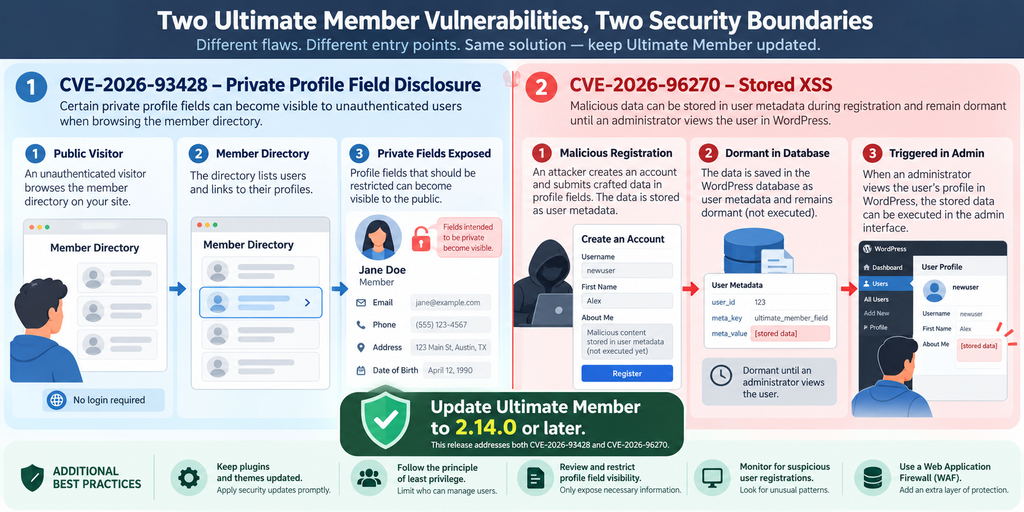
Two recently disclosed security issues in the Ultimate Member plugin show why both assumptions need technical enforcement rather than trust alone. CVE-2026-93428 concerns missing authorization that can expose privacy-restricted member profile fields. CVE-2026-96270 is an unauthenticated stored cross-site scripting vulnerability involving the form_id parameter. Both affect Ultimate Member versions up to and including 2.13.1, while version 2.14.0 contains fixes for the two issues.
These vulnerabilities are different, but examining them together is useful. One demonstrates what happens when an application confuses possession of a request token with permission to access information. The other demonstrates what can happen when untrusted registration data crosses from the public side of a website into an administrative interface without sufficient sanitization and output handling.
For administrators, the response should therefore extend beyond clicking the Update button. Updating is the first and most important action, but an affected website may also need a careful review of member fields, recent registrations, stored user metadata, access logs, administrator activity, and custom Ultimate Member integrations.
The goal of this guide is defensive. It explains what happened, why the vulnerabilities matter, what version should be installed, and how WordPress administrators can examine their websites without reproducing attack payloads or providing unnecessary exploitation instructions.
What Are CVE-2026-93428 and CVE-2026-96270
Ultimate Member is a popular WordPress membership plugin used to build registration forms, user profiles, member directories, login systems, restricted content areas, and community-style websites. That makes security particularly important because the plugin often processes information supplied by users and decides which parts of that information should be visible to other people.
The two vulnerabilities discussed here affect different parts of that trust model. CVE-2026-93428 is classified as CWE-862: Missing Authorization. The published CVE record gives it a CVSS 3.1 base score of 7.5, High. CVE-2026-96270 is classified as CWE-79: Cross-Site Scripting and has a CVSS 3.1 base score of 7.2, High.
For CVE-2026-93428, the problem concerns profile information that Ultimate Member administrators configured with privacy restrictions. The published advisory explains that an unauthenticated visitor could potentially obtain values from fields intended for an owner, logged-in members, or particular roles through the affected member-directory functionality.
That distinction matters. The vulnerability does not mean that every Ultimate Member field on every affected website automatically contained confidential information. The practical impact depends heavily on how a particular website configured its member fields and what information users entered into them.
Imagine a community website where the public profile contains a display name and avatar. Additional fields might store a private telephone number, internal membership identifier, personal notes, location details, or information intended only for logged-in members. If those fields were protected only by Ultimate Member’s affected privacy mechanism, administrators should consider whether their values may have been accessible contrary to the intended visibility settings.
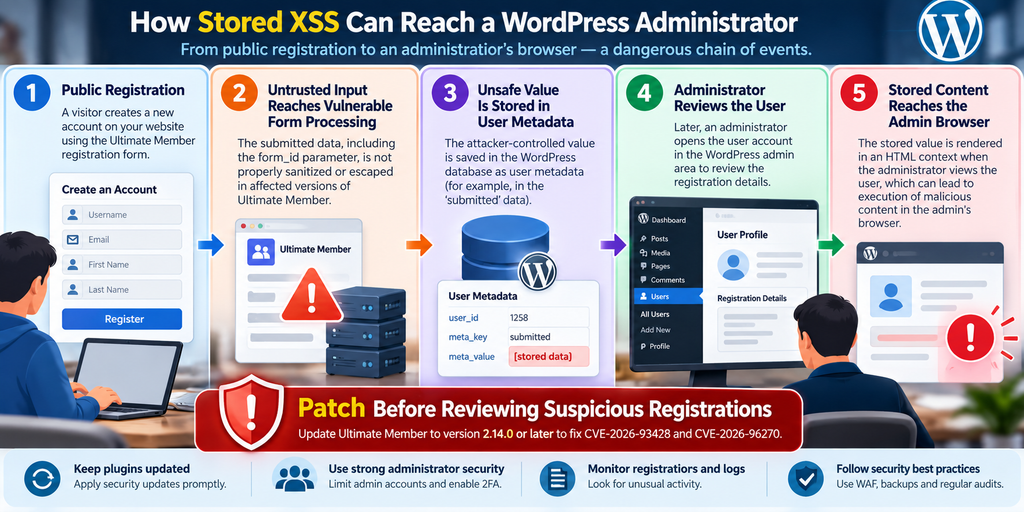
CVE-2026-96270 follows a very different path. According to the CVE description, Ultimate Member versions through 2.13.1 insufficiently sanitized and escaped the form_id value involved in registration processing. Attacker-controlled content could consequently be stored in the registering user’s submitted user metadata.
The important second stage occurs later. The published vulnerability description states that the stored content is triggered when an administrator opens the affected user record through the relevant Users interface in wp-admin, where the value can reach HTML rendering in an unsafe manner. This is why the vulnerability is described as stored XSS rather than reflected XSS.
In practical terms, an attacker does not necessarily need to convince the administrator to visit an obviously suspicious external page. The malicious content can be planted through the public-facing registration workflow and remain dormant until an administrator performs an ordinary administrative task involving the affected account.
That makes the administrative workflow part of the security boundary.
It is equally important not to exaggerate the published findings. Stored XSS running in an administrator’s browser context can be serious because JavaScript executes with the privileges and authenticated browser context available to that administrator. However, describing the issue as guaranteed administrator-account takeover would go beyond what should automatically be concluded from the vulnerability classification alone.
The safer interpretation is straightforward: successful exploitation can cause attacker-controlled JavaScript to execute in an administrator’s authenticated browser context. What that script could accomplish depends on the application state, WordPress protections, available actions, permissions, browser conditions, and other security controls.
Affected and Fixed Versions
The published CVE records identify Ultimate Member versions up to and including 2.13.1 as affected by these two vulnerabilities. Ultimate Member’s official 2.14.0 changelog explicitly identifies fixes for CVE-2026-93428 and CVE-2026-96270.
For CVE-2026-96270, the changelog states that sanitization was added for the form_id attribute during Ultimate Member form submission. For CVE-2026-93428, it states that field privacy was corrected when User Profile fields are displayed.
Therefore, administrators still running 2.13.1 or an earlier release should treat upgrading as a security action rather than an ordinary feature update.
Why These Vulnerabilities Matter Together
At first glance, private-data disclosure and stored XSS appear unrelated. One affects confidentiality while the other concerns unsafe content execution. Yet both illustrate the same architectural lesson: data must be checked at every trust boundary.
A value being marked private does not protect it unless the server performs an authorization decision before returning it. Likewise, information originating from a registration form does not become trustworthy simply because WordPress has stored it in the database.
This second lesson is especially important for developers.
Database content is not automatically safe content.
An attacker-controlled value can remain attacker-controlled after storage. When that value later appears in an administrative interface, it must still be handled according to its output context. Stored data should never receive automatic trust simply because it has moved from an HTTP request into user metadata.
How Private Profile Fields Become Public
A membership system often stores far more information than it displays publicly. That is normal. A public profile might show a person’s nickname, biography, and profile image while hiding an email address, telephone number, internal identifier, or another custom field.
Ultimate Member provides administrators with controls for determining who should see particular profile fields. Depending on configuration, information can be intended for the profile owner, members, particular roles, or other restricted audiences.
CVE-2026-93428 undermined that expectation because the affected member-directory request path did not adequately enforce whether the requester was actually authorized to receive privacy-restricted field values. The CVE description specifically identifies the publicly accessible wp_ajax_nopriv_um_get_members functionality and says restricted values could be exposed to unauthenticated visitors.
The key phrase is missing authorization.
An application can successfully identify a technically valid request while still failing to answer the more important security question: Should this requester be allowed to receive this particular information?
Suppose a community site has 5,000 members. Public visitors are supposed to see each member’s display name, avatar, profession, and public biography. Logged-in members may additionally see a business email address, while an internal membership field should only be visible to specific roles.
The application must evaluate those rules whenever data is requested.
It is not enough for the visual profile template to hide a field. It is not enough for CSS to hide it. It is not enough for JavaScript to omit it from the visible page. Most importantly, it is not enough for one normal profile-rendering path to apply the correct restriction if another AJAX or directory endpoint can return the same value without performing an equivalent authorization check.
Privacy Must Be Enforced Before Data Leaves the Server
A secure design prevents unauthorized information from entering the response in the first place.
Consider a field called “Private Contact Number.” The administrator marks it as visible only to the profile owner. When an anonymous visitor requests member information, the server should determine that the requester is anonymous, compare that state against the field’s privacy policy, and exclude the value.
That decision must happen server-side.
If the server instead sends the telephone number and relies on the browser to hide it, the information is not genuinely private. Anyone who can inspect the network response, page source, API output, or application state may be able to recover it.
The same principle applies to WordPress AJAX handlers, REST API routes, custom endpoints, shortcodes, member-directory filters, exports, widgets, and third-party integrations.
Every route that can retrieve sensitive data requires its own appropriate authorization enforcement.
What Information Could Be Affected?
The published CVE description says the affected behavior can involve profile fields configured as owner-only, members-only, or role-restricted.
That does not establish that a particular website exposed passwords, payment credentials, or every piece of user metadata. Administrators should avoid making unsupported assumptions in either direction.
Instead, examine the actual Ultimate Member configuration.
A hobby community that stores only public nicknames may have limited practical exposure. A professional association storing telephone numbers, secondary email addresses, internal membership details, business information, or custom application data could face a more meaningful confidentiality concern.
Context determines impact.
This is why administrators should build an inventory of Ultimate Member fields after updating. For every field, identify its purpose, expected audience, sensitivity, and whether the value is necessary to retain.
A field that serves no current business purpose creates unnecessary privacy risk.
Think Beyond the Visible Profile Page
One common security mistake is checking only what appears on screen.
An administrator might log out, open a member profile, confirm that a private telephone number is invisible, and conclude that the configuration works correctly. That test proves only that the standard page does not visibly render the field.
It does not prove that another application endpoint cannot return the underlying value.
Security testing should therefore examine the complete data flow. Ask where the information is stored, which Ultimate Member features consume it, which directory views use it, whether custom code retrieves it, and whether third-party integrations can expose it through another route.
You do not need to attack your own website to perform this review. Configuration analysis, authenticated versus unauthenticated functional testing, code review, logs, and normal browser developer tools can provide useful defensive evidence without reproducing malicious exploitation.
Treat Previously Private Values According to Their Sensitivity
After updating, determine what information existed in restricted fields while the vulnerable version was installed.
For ordinary low-sensitivity profile preferences, documentation and continued monitoring may be sufficient. If fields contained genuinely sensitive personal or business information, the response may require involvement from the website owner, security team, privacy officer, hosting provider, or legal adviser.
Do not automatically send alarming breach notifications based solely on the existence of a vulnerable plugin version. A vulnerability establishes a possible attack path, not proof that someone used it against your website.
Likewise, do not dismiss the issue simply because no obvious damage appears in WordPress.
Investigate proportionately and preserve useful evidence.
Why the Frontend Nonce Does Not Provide Authorization
CVE-2026-93428 also provides a useful WordPress development lesson about nonces.
The published description notes that the affected endpoint required an um-frontend-nonce, but that value was made available to unauthenticated visitors through localized frontend script data. As a result, an anonymous visitor could satisfy that request requirement.
This does not mean WordPress nonces are useless. It means developers must understand what a nonce proves and, equally importantly, what it does not prove.
A nonce is not automatically an authorization system.
Request Validation and Authorization Answer Different Questions
Imagine a receptionist giving every visitor entering a building a blue ticket. A visitor later presents that ticket at a desk.
The ticket can demonstrate that the person followed a particular workflow. It does not automatically prove that the person is authorized to enter the company’s private records room.
The same conceptual distinction applies here.
A request token can help establish that a request follows an expected application flow or protect against certain unwanted request scenarios. Authorization asks a different question: whether the current user has permission to perform an action or receive a resource.
Those checks should not be confused.
If an endpoint is intentionally accessible to anonymous visitors and its nonce is necessarily available to those visitors, possession of that nonce cannot by itself establish that the visitor should receive owner-only profile information.
The server still needs an authorization decision for the requested resource.
Authentication Is Also Different From Authorization
Authentication answers: Who are you?
Authorization answers: What are you allowed to do?
A logged-in subscriber is authenticated, but that does not mean the subscriber may edit plugins. An editor is authenticated, but that does not automatically permit the editor to change administrator accounts. Similarly, an anonymous visitor may legitimately use a public member directory while remaining unauthorized to view fields reserved for profile owners.
WordPress developers commonly implement authorization using capabilities, ownership checks, object-level permissions, plugin-specific privacy rules, or combinations of these controls.
The exact mechanism varies by feature.
The underlying rule does not: sensitive data should be returned only after the server has established that the requester is permitted to receive it.
Why This Matters for Custom WordPress Development
Website owners often extend Ultimate Member with custom snippets, child-theme code, custom REST routes, AJAX handlers, integrations, or third-party extensions.
Updating Ultimate Member fixes the known plugin vulnerabilities addressed by that release. It cannot automatically correct unrelated authorization mistakes in custom code.
Developers should therefore use this incident as an opportunity to review their own endpoints.
If custom functionality retrieves Ultimate Member metadata, ask whether the code checks only a nonce or also evaluates the current user’s permission to access the requested data.
For example, a custom AJAX feature might require a valid nonce before returning an internal profile note. If every logged-in user receives the same nonce but only administrators should see the note, nonce verification alone does not enforce the business rule.
The code still needs an administrator-level capability or another appropriate authorization check.
A Better Mental Model
A useful defensive model contains several separate layers.
First, validate that the request is structurally legitimate. Second, determine the identity or anonymous state of the requester. Third, evaluate whether that requester has permission for the requested action or object. Fourth, validate and sanitize incoming data. Fifth, escape information appropriately when it is rendered.
These layers complement one another.
None should be treated as a universal replacement for the others.
This approach is valuable far beyond Ultimate Member. The same reasoning applies to WooCommerce customer data, learning-management systems, support portals, directories, private posts, custom dashboards, and virtually any WordPress application that stores information for different audiences.
How a Malicious Registration Triggers Stored XSS
CVE-2026-96270 concerns stored cross-site scripting and deserves careful explanation because the attack flow differs from the familiar image of someone clicking a malicious link.
According to the published CVE description, Ultimate Member versions through 2.13.1 did not sufficiently sanitize and escape the form_id parameter involved in the vulnerable workflow. Attacker-controlled content could become stored in the registering user’s submitted user metadata.
At that point, nothing necessarily needs to happen immediately.
The dangerous value can remain stored.
Later, when an administrator opens the affected user record through the relevant Ultimate Member/WordPress administrative interface, the stored value reaches an HTML-rendering path. The advisory specifically describes execution when the administrator opens the affected user record in the wp-admin Users modal.
That delayed execution is what makes the vulnerability particularly interesting from a defensive perspective.
The Registration-to-Administrator Trust Boundary
A public registration form is intentionally designed to accept untrusted input.
Names, biographies, usernames, custom fields, social links, and other values originate outside the trusted administrative environment. Even when a field normally contains something simple, such as an identifier, the server must never assume that a remote client will respect the intended format.
Browsers are clients, not security boundaries.
An attacker can manipulate requests independently of what the visible form permits. Therefore, server-side validation and sanitization remain necessary even when the frontend presents a dropdown, hidden field, numeric field, or other constrained interface.
The second security boundary appears when stored information is displayed.
Suppose the website safely stores a user-submitted biography as plain text. If the administrative interface later inserts that value into an HTML context without suitable escaping, previously harmless-looking database content can become dangerous.
This is why secure WordPress development normally considers both input handling and output escaping.
Why Stored XSS Can Be More Concerning Than a Simple Popup
XSS is sometimes demonstrated using harmless browser popups. That demonstration can make the vulnerability sound cosmetic.
It is not.
JavaScript executing inside an authenticated administrative page may be able to interact with the page and make requests available to that authenticated browser context. The exact consequences depend on the environment and should be evaluated rather than assumed.
For that reason, administrators should treat a confirmed stored XSS issue affecting administrative workflows seriously.
At the same time, accuracy matters. The existence of CVE-2026-96270 does not prove that every vulnerable website was attacked, that every administrator session was compromised, or that every malicious registration would automatically result in complete site takeover.
The vulnerability creates an attack opportunity. Exploitation and resulting impact are separate questions requiring evidence.
Why Administrator Review Can Become the Trigger
This attack flow turns an ordinary moderation activity into the point at which stored data becomes active.
Imagine an administrator checking newly registered accounts each morning. Most records are legitimate. One account contains manipulated data stored through the vulnerable registration workflow.
The administrator does not need to visit an unfamiliar external domain. The person simply opens the user inside WordPress as part of routine work.
In the vulnerable scenario described by the CVE, that action can cause the unsafe stored value to reach the browser and execute.
This is sometimes described conceptually as a delayed or second-stage attack: the public action stores the dangerous data, while a later trusted administrative action triggers it.
What Administrators Should Avoid Before Updating
If you discover that a production site still runs Ultimate Member 2.13.1 or earlier, prioritize updating before conducting unnecessary manual exploration of suspicious new accounts.
Do not start opening questionable user records one after another simply to see whether something happens.
Create a backup according to your normal incident-response process, preserve relevant logs, update the plugin, clear applicable caches, and then continue the investigation from the patched environment whenever operationally possible.
If compromise is already suspected, consider involving a qualified WordPress security professional before making extensive changes that could destroy useful evidence.
Administrator Sessions Deserve Additional Protection
Stored XSS also demonstrates why administrators should minimize unnecessary exposure of privileged sessions.
Use unique administrator accounts rather than shared credentials. Remove administrators who no longer need access. Apply strong authentication. Keep browsers and operating systems updated. Avoid performing unrelated general browsing from a highly privileged WordPress session where practical.
Those practices do not replace patching.
They reduce the number of opportunities available when another application-layer flaw appears.
Updating Ultimate Member to Version 2.14.0

If your website uses Ultimate Member 2.13.1 or an earlier version, the primary remediation for these two vulnerabilities is straightforward: update to Ultimate Member 2.14.0 or a later supported release.
The official Ultimate Member changelog for version 2.14.0 lists both CVE-2026-96270 and CVE-2026-93428 among its security fixes. It says form_id sanitization was added for the form-submission issue and field privacy was corrected for the profile-field issue.
Version 2.14.0 was released on September 29, 2026, according to the official WordPress.org changelog.
Updating should still be performed methodically, especially on membership sites with customized forms, templates, extensions, and user workflows.
Step 1: Confirm the Installed Version
Open the WordPress administration area and inspect the Plugins screen. Locate Ultimate Member and record the currently installed version.
Do not rely only on memory or an old maintenance document.
If the site uses WP-CLI and you administer the server directly, you can also use normal plugin-management commands to inspect installed plugin versions. The goal is simply to establish reliable evidence of what is running.
If the installed version is 2.13.1 or earlier, treat the site as having been within the affected version range.
Also record approximately when the vulnerable version was installed. That information helps define the time period you may later examine in registration and web-server logs.
Step 2: Create an Appropriate Backup
Before updating a production membership site, create a backup that matches your normal recovery strategy.
For a dynamic membership website, database data is particularly important because user accounts, metadata, plugin configuration, and registrations may change frequently.
A useful backup should not merely exist. You should know where it is stored and how you would restore it.
Security updates should not be unnecessarily delayed for elaborate backup procedures, but having a recent recoverable copy gives you a safer route if a compatibility problem occurs during the upgrade.
Step 3: Review Customizations and Extensions
Ultimate Member installations can vary significantly.
One website may use the core plugin with a simple registration form. Another may include custom templates, premium extensions, custom profile fields, role logic, third-party integrations, and theme modifications.
Version 2.14.0 also lists templates requiring updates in its official changelog, including several Ultimate Member templates. Sites overriding plugin templates should therefore pay particular attention to compatibility after upgrading.
Document your overrides before the update.
If a developer copied an old Ultimate Member template into the theme years ago, that template can continue influencing output even after the plugin itself has been upgraded.
Step 4: Install Version 2.14.0 or Later
Use the normal WordPress update process from Dashboard → Plugins, or your established deployment workflow.
After the update finishes, verify the version rather than assuming the operation succeeded.
If your site uses a managed deployment system, staging workflow, Composer-based process, or WP-CLI, follow the same principle: confirm that production is actually running the patched release.
For these CVEs, the minimum fixed release identified by the available advisories is 2.14.0. If a newer supported version is available when you perform maintenance, evaluate and use the current supported release rather than intentionally downgrading to an older fixed version.
Step 5: Clear Relevant Caches
Caching does not normally determine whether PHP source code has been replaced correctly, but membership sites can have several cache layers that influence what administrators and visitors see.
Clear relevant page caches, object caches, CDN caches, and application caches according to your configuration.
Be careful with membership websites. Aggressive full-page caching of personalized account pages can itself create privacy problems if configured incorrectly.
After clearing the appropriate caches, test both public and authenticated behavior.
Step 6: Test Member Privacy
Create or use controlled test accounts rather than exposing real member information during testing.
Configure a test field with restricted visibility. View the profile while logged out. Then test it as another ordinary member and, where appropriate, as the profile owner.
The expected result should match the field’s configured privacy rule.
Repeat the test through member-directory features used by the website.
The purpose is not to reproduce CVE-2026-93428. The purpose is to confirm that your real configuration behaves correctly after the update.
Step 7: Test Registration and Administrative Review
Submit a normal registration using harmless test values.
Confirm that the account is created according to your configuration, emails behave correctly, moderation continues to work, and the administrator can inspect the new account without interface errors.
Also test any custom registration forms separately.
A site can have multiple Ultimate Member forms with different fields, roles, conditional behavior, or extensions. Testing only one form may miss a compatibility problem elsewhere.
Step 8: Verify Customized Templates
If your theme overrides Ultimate Member templates, compare them against the current plugin templates and review the vendor’s update guidance.
An outdated template does not automatically recreate either CVE discussed here. However, old overrides can interfere with fixes, output handling, new hooks, privacy behavior, or future maintenance.
Treat template overrides as code that requires lifecycle management.
Step 9: Check Security Controls Around Administrators
After applying the patch, review privileged accounts.
Look for unexpected administrators, recently created privileged users, unexplained changes to existing accounts, or security settings that have been weakened.
Do not interpret every unfamiliar entry as evidence of compromise. Larger WordPress sites often have legitimate service accounts, developers, temporary support accounts, and automation users.
Verify each account against your records.
If an account is unnecessary, remove or downgrade it according to your access-control policy.
Step 10: Document the Update
Record the old version, new version, update time, person performing the work, tests completed, anomalies discovered, and any follow-up actions.
This may feel excessive for a small website, but basic maintenance records become extremely valuable during a later security investigation.
Instead of wondering whether the vulnerable plugin was patched on Tuesday or Friday, you have a clear answer.
Auditing Member Fields, Registrations and User Metadata
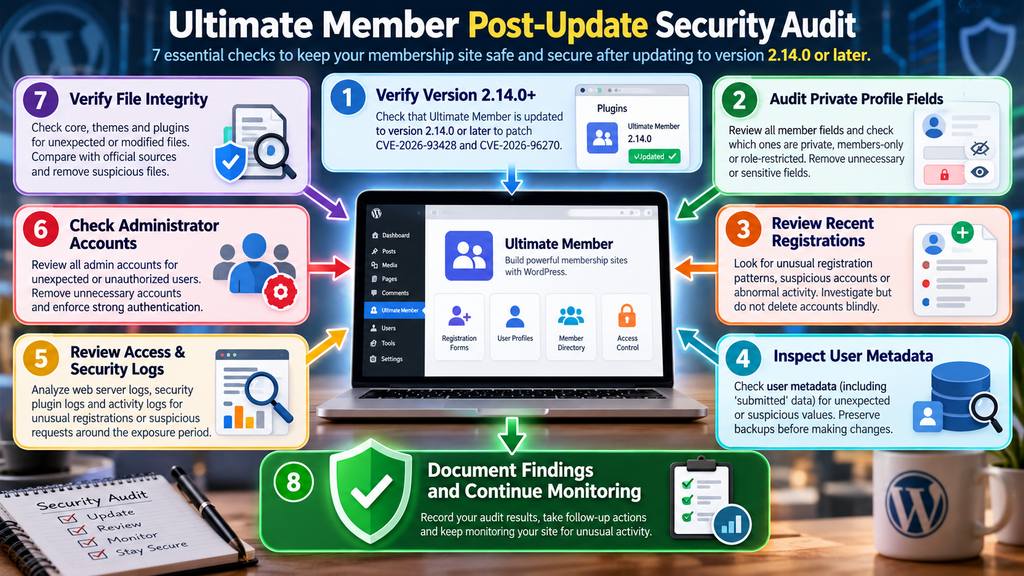
Updating closes the known vulnerable paths addressed by the patched version, but it cannot tell you what happened before the update.
That requires an audit.
The scope should be proportionate to the information stored by your website and the length of time it operated with an affected release.
A small community site storing public usernames requires a different response from a membership platform storing detailed private profile information.
Audit Your Ultimate Member Field Inventory
Start with the fields themselves.
Review every active registration and profile form. Identify which fields are public and which are configured with restricted visibility.
Pay special attention to owner-only, members-only, and role-restricted fields because those categories are explicitly relevant to CVE-2026-93428.
For each restricted field, ask four questions.
What information does this field contain? Who was supposed to see it? How sensitive is it? Do we still need to store it?
This exercise can uncover a broader privacy problem: websites frequently retain information long after its original purpose has disappeared.
If a field is unnecessary, consider whether it should be removed and whether historical values should be deleted according to your retention obligations.
Review Recent Registrations
Next, inspect registration activity from the relevant exposure window.
Look for unusual patterns rather than hunting blindly for one magical indicator.
Examples include bursts of registrations within seconds, disposable-looking accounts, strange field lengths, unexpected formatting, repeated failed attempts, registrations at unusual volumes, or accounts that were created but never used normally.
These signals do not prove malicious activity.
A marketing campaign can cause a sudden registration spike. Automated spam can create unusual accounts without attempting to exploit a vulnerability. Real users can enter odd-looking data.
The goal is to identify records that deserve deeper examination.
Be Careful When Reviewing Suspicious Accounts
Because CVE-2026-96270 involves an administrator viewing stored user information, investigation order matters.
Patch first whenever practical.
Do not knowingly use a vulnerable administrative interface to inspect suspicious records simply because you want to determine whether they are dangerous.
After updating, conduct the review from a patched system and keep your browser, WordPress core, plugins, theme, and extensions current.
For higher-risk investigations, a security professional may choose database-level or forensic methods that avoid rendering untrusted values in a browser interface.
Review User Metadata
The CVE description for CVE-2026-96270 states that the injected content could be stored in the registering user’s submitted usermeta.
That makes user metadata relevant to the post-update audit.
However, avoid deleting unfamiliar metadata in bulk.
WordPress plugins rely heavily on the usermeta system. Removing values without understanding their purpose can damage profiles, permissions, integrations, preferences, or membership workflows.
Instead, preserve a backup and examine anomalous records methodically.
If you are not comfortable analyzing serialized WordPress data, database structures, or plugin-specific metadata, involve someone with WordPress development or incident-response experience.
Review Web-Server and Security Logs
Logs can help answer questions that WordPress itself cannot.
Depending on your hosting configuration, useful evidence may exist in web-server access logs, reverse-proxy logs, CDN logs, WAF events, security-plugin records, hosting dashboards, authentication logs, and application monitoring platforms.
Define the time window based on when the affected Ultimate Member version was active.
Then look for unusual registration behavior, repeated requests involving membership functionality, abnormal request volumes, suspicious automation, and other anomalies around newly created users.
Log analysis is most useful when you know your site’s normal behavior.
A high-traffic membership site naturally produces many requests. A small association receiving ten registrations per month has a very different baseline.
Review Administrator Activity
Because stored XSS can execute in the context of an administrator reviewing a malicious record, examine privileged activity if you have reason to suspect exploitation.
Look for changes that do not match legitimate maintenance.
Examples might include unexpected administrator accounts, plugin installations nobody recognizes, modified security settings, unfamiliar scheduled tasks, unexpected theme or plugin files, or changes to sensitive configuration.
Again, these are investigative signals rather than proof.
WordPress websites change constantly. Automatic updates modify files. Caching plugins create files. Backup tools create archives. Security plugins write configuration data.
Compare findings with known administrative activity before drawing conclusions.
Review File Integrity
If your investigation raises meaningful concerns, compare WordPress core and plugin files with trusted distributions.
WP-CLI checksums can be useful for WordPress core and supported plugins obtained through official repositories.
Custom themes, premium plugins, MU plugins, and manually modified code require different baselines because public checksums may not exist.
Pay special attention to unexpected executable PHP files in upload directories, unfamiliar files inside active plugins or themes, and recent modifications that cannot be explained by legitimate updates.
Do not automatically delete evidence before documenting it.
Rotate Credentials When Evidence Justifies It
A vulnerable version alone does not prove password theft.
However, if your investigation indicates that privileged browser activity may have been abused, credential rotation becomes a reasonable incident-response step.
Prioritize WordPress administrator accounts, hosting control panels, SFTP or SSH credentials, deployment credentials, database access where appropriate, and API keys that may have been exposed.
Also review active sessions.
Forcing privileged users to authenticate again can reduce the usefulness of previously captured or abused sessions, depending on the incident.
Credential rotation should complement investigation and patching, not replace them.
Review Privacy Obligations
CVE-2026-93428 concerns potentially exposed profile information, so technical remediation may intersect with privacy obligations.
If your site stored personal information in affected fields and evidence suggests unauthorized access actually occurred, consult the appropriate privacy, legal, or security professional for your jurisdiction and organization.
Avoid declaring a confirmed personal-data breach merely because the plugin was vulnerable.
Exposure possibility and confirmed unauthorized access are different findings.
Your investigation should attempt to establish what data existed, who should have been allowed to access it, whether logs indicate unauthorized retrieval, how long the affected version was installed, and what evidence remains available.
Building Safer Ultimate Member Sites After the Patch
Security maintenance should not end when the immediate vulnerability disappears.
Membership websites combine public input, authenticated users, private information, account permissions, email workflows, administrator moderation, and sometimes payment or subscription systems. That combination creates many trust boundaries.
A strong maintenance process assumes that vulnerabilities will occasionally be discovered and focuses on limiting their potential impact.
Collect Less Sensitive Information
The simplest private field to protect is one you never collect.
Review registration forms periodically and remove fields that no longer serve a legitimate purpose.
A community site may have added home addresses during an old event-registration campaign, for example. If those addresses are no longer needed, continuing to store them creates privacy exposure without providing business value.
Data minimization reduces the consequences of future vulnerabilities.
Use the Lowest Necessary Visibility
Do not make fields public merely because public is the easiest configuration.
If information only needs to be visible to administrators, restrict it appropriately. If it only needs to be visible to the account owner, configure it accordingly.
Then test the restriction.
Configuration without verification is an assumption.
Keep Ultimate Member Extensions Updated
The core plugin may be only one part of the membership environment.
Review Ultimate Member extensions, third-party integrations, themes, custom snippets, and related plugins. An outdated extension can introduce its own vulnerabilities even when the core Ultimate Member plugin is current.
Create a regular maintenance schedule rather than waiting for security news to reach you through social media.
Reduce Administrator Accounts
Every administrator account expands the privileged attack surface.
Give users the lowest role that allows them to perform their job. A content writer rarely needs plugin installation privileges. A membership moderator may not require full administrator access.
Where possible, separate daily content work from high-privilege maintenance.
This principle is known as least privilege, and it remains one of the most practical ways to reduce security impact.
Keep Backups Separate From the Website
A backup stored only inside the same hosting account may not be sufficient during a serious compromise.
Use a backup strategy appropriate to the importance of the site. Maintain recoverable copies, protect access to them, and periodically test restoration.
A backup that has never been tested is an assumption, not a recovery plan.
Monitor Registration Behavior
Membership sites naturally attract automated registration attempts.
Spam protection, rate limiting, appropriate CAPTCHA or challenge mechanisms, email verification, moderation workflows, and web application firewalls can reduce unwanted automated activity.
None of these controls substitutes for secure application code.
Their value comes from defense in depth. When one layer fails, another layer may limit the attacker’s opportunities.
What Site Owners Should Do Right Now
The most important action is to establish whether Ultimate Member is installed and, if so, which version is active.
If you find version 2.13.1 or earlier, update to 2.14.0 or a newer supported release. The official changelog confirms that 2.14.0 includes fixes for both CVE-2026-93428 and CVE-2026-96270.
After updating, verify that member profiles, directories, registrations, login workflows, role assignments, custom fields, and privacy restrictions still operate as expected.
Then move from remediation to investigation.
Determine which private fields existed while the vulnerable release was active. Review registrations and relevant logs. Examine suspicious user metadata carefully. If there are credible indicators of exploitation, expand the investigation to privileged accounts, sessions, files, configuration, and external services connected to WordPress.
The key is proportionality.
Do not panic because a vulnerability existed. Do not ignore it because the website still appears normal.
Patch, verify, investigate, document, and monitor.
Frequently Asked Questions / Întrebări Frecvente
What is the Ultimate Member vulnerability disclosed in October 2026?
Two relevant vulnerabilities are CVE-2026-93428 and CVE-2026-96270. The first can expose privacy-restricted Ultimate Member profile fields because of missing authorization. The second is an unauthenticated stored XSS issue involving the form_id parameter and stored registration metadata. Both affect versions through 2.13.1.
Which Ultimate Member versions are affected?
The published CVE records identify versions up to and including 2.13.1 as affected by these two issues. Ultimate Member 2.14.0 contains fixes for both vulnerabilities. Administrators should use 2.14.0 or a newer supported release.
What does CVE-2026-93428 expose?
The vulnerability can allow unauthenticated access to profile-field values that should have been protected by Ultimate Member privacy rules, including fields configured for owners, members, or restricted roles. The actual information at risk depends on the fields configured on each website.
Does CVE-2026-93428 expose every WordPress user’s password?
That is not what the published advisory says. The issue concerns privacy-restricted Ultimate Member profile fields returned through affected member-directory functionality. Administrators should investigate what their own restricted fields contained instead of assuming unrelated credentials were automatically exposed.
Why does the Ultimate Member nonce not stop the disclosure?
The published CVE description explains that the relevant frontend nonce was made available to unauthenticated visitors. Therefore, possessing that value did not establish permission to view restricted member fields. Request validation and authorization are separate security decisions.
What is CVE-2026-96270?
CVE-2026-96270 is a stored cross-site scripting vulnerability affecting Ultimate Member through version 2.13.1. The issue involves insufficient handling of the form_id parameter during the vulnerable workflow, allowing attacker-controlled content to be stored in user metadata and later rendered unsafely in an administrator-facing context.
Does the administrator have to click a malicious external link?
The published attack flow does not depend on an administrator visiting an obvious attacker-controlled external page. The stored value can be triggered when an administrator opens the affected user record in the relevant wp-admin Users interface.
Does stored XSS automatically mean complete administrator takeover?
No automatic conclusion should be made. Stored XSS can be serious because attacker-controlled JavaScript may execute in an authenticated administrator’s browser context. However, the exact consequences depend on the site’s configuration, available actions, permissions, browser context, and other security controls.
Is updating to Ultimate Member 2.14.0 enough?
Updating is the essential remediation for the known vulnerabilities addressed by that release, but websites previously running affected versions should also consider a retrospective audit. Review sensitive fields, recent registrations, relevant user metadata, logs, administrator accounts, and other indicators appropriate to the site’s risk level.
Should I delete all recent Ultimate Member users?
No. Bulk deletion can destroy legitimate accounts and useful forensic evidence. Patch the plugin first, preserve appropriate backups and logs, and investigate suspicious registrations methodically. If you believe the website has been compromised, seek qualified incident-response assistance before making destructive changes.
From Emergency Patch to Better WordPress Security
The Ultimate Member vulnerabilities provide two valuable security lessons that extend well beyond a single plugin.
CVE-2026-93428 demonstrates why privacy settings need genuine server-side authorization. A nonce, hidden interface element, or frontend restriction cannot replace the decision about whether a requester is actually allowed to receive sensitive information.
CVE-2026-96270 demonstrates another fundamental principle: untrusted data does not become trustworthy simply because it has been saved to the WordPress database. Information collected through public registration can remain hostile when it later reaches an administrator-facing page.
Ultimate Member 2.14.0 addresses both reported issues, making the upgrade the clear first response for installations running affected versions.
Yet responsible maintenance should continue after the update.
Audit the fields that were supposed to remain private. Examine recent registrations. Review relevant user metadata and logs. Confirm administrator accounts and file integrity when the risk justifies it. Test member privacy from multiple user perspectives and document what you find.
Most importantly, separate vulnerability from compromise.
A vulnerable version tells you that an attack path existed. It does not prove someone used it. A careful administrator responds without either extreme: no panic, but no complacency.
Patch the weakness, verify the fix, investigate the exposure window, and use the incident to make the membership site more resilient.
⚠️ Disclaimer and Source Hygiene
This article is provided for educational and informational purposes only.
🔔 For more tutorials like this, consider subscribing to our blog.
📩 Do you have questions or suggestions? Leave a comment or contact us!
🏷️ Tags: Ultimate Member vulnerability, CVE-2026-93428, CVE-2026-96270, WordPress security, Ultimate Member security, stored XSS, profile data exposure, WordPress vulnerabilities, WordPress membership security, WordPress plugin security
📢 Hashtags: #WordPress, #WordPressSecurity, #UltimateMember, #CyberSecurity, #WebsiteSecurity, #CVE, #StoredXSS, #DataPrivacy, #PluginSecurity, #WebSecurity
Sources and References
Ultimate Member and WordPress.org
The official Ultimate Member changelog for version 2.14.0 documents fixes for CVE-2026-96270 and CVE-2026-93428. It describes additional sanitization for the form_id attribute and a correction to User Profile field privacy. The official plugin listing also identifies 2.14.0 as the security-fix release discussed throughout this article.
CVE-2026-93428
The CVE record describes a missing-authorization vulnerability affecting Ultimate Member through version 2.13.1. It documents potential unauthenticated access to privacy-restricted profile values and assigns a CVSS 3.1 base score of 7.5, High.
CVE-2026-96270
The CVE record describes unauthenticated stored cross-site scripting involving the form_id parameter. It documents storage of attacker-controlled content in user metadata and the administrator-side trigger condition. The CVSS 3.1 base score is 7.2, High.
WPScan Vulnerability Database
WPScan lists both newly disclosed Ultimate Member issues as fixed in version 2.14.0 and provides additional historical context about vulnerabilities affecting previous Ultimate Member releases.
Secondary Sources and Testimonials
Independent security databases provide useful confirmation and additional context. Rapid7 reproduces the published CVE descriptions and CVSS information for both the profile-field authorization issue and stored XSS vulnerability. OSV also records the CVE information and upstream references.
No unverifiable user testimonials or claims of real-world exploitation have been presented as fact in this article. A vulnerable software version demonstrates technical exposure, but it should not automatically be described as evidence that a particular WordPress website was compromised.