
Table of Contents
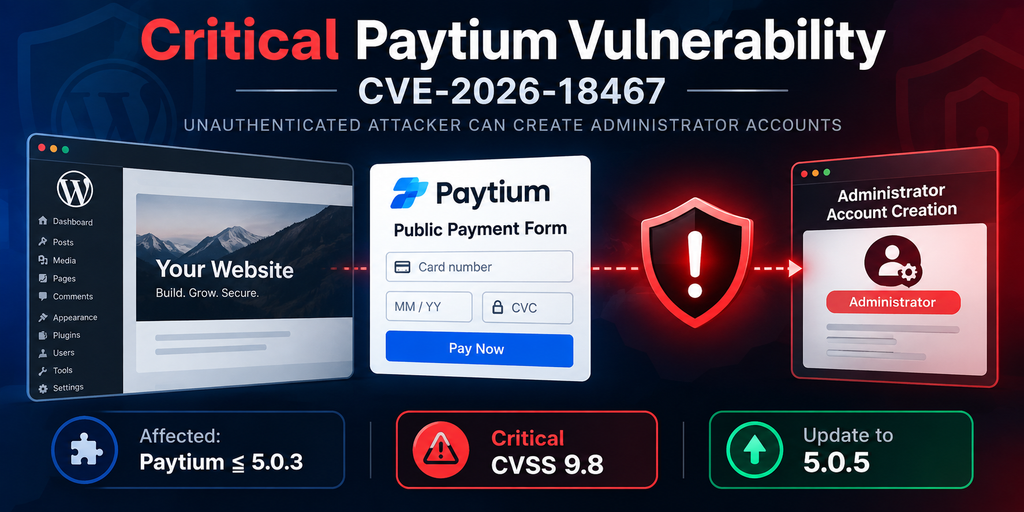
A critical Paytium vulnerability tracked as CVE-2026-18467 can allow unauthenticated attackers to create WordPress administrator accounts under specific payment-form conditions. Paytium 5.0.3 remains vulnerable despite an earlier security fix, making an update to the latest secure release and a careful site audit essential.
WordPress payment plugins sit in a particularly sensitive position. They accept information from visitors, communicate with payment services, store transaction metadata, and sometimes connect a completed payment with WordPress user creation. When those systems work correctly, they can automate memberships, registrations, donations, subscriptions, and paid access. When privilege information crosses the same workflow without adequate validation, however, a seemingly ordinary payment request can become a serious security problem.
That is the concern behind CVE-2026-18467, a critical privilege-escalation vulnerability affecting the Paytium: Mollie payment forms & donations plugin. Published on September 24, 2026, the issue affects Paytium versions up to and including 5.0.3. The CVE record describes a path through which unauthenticated input can influence the role assigned to a newly created WordPress account. The reported CVSS 3.1 base score is 9.8 out of 10, reflecting the potentially severe consequences of successful exploitation.
The important detail for administrators is that version 5.0.3 should not be treated as secure against this newer issue. That release addressed an earlier privilege-escalation weakness, but researchers later identified another path through the payment metadata workflow. Paytium subsequently addressed unauthenticated privilege escalation in version 5.0.4. Version 5.0.5, released on September 7, 2026, followed with a load-order fix for users of an older Mollie Library plugin. (paytium.nl)
This vulnerability also deserves careful explanation because the headline can make the attack sound more universal than it actually is. Available vulnerability information states that exploitation requires interaction with a publicly exposed Paytium payment form and completion of the resulting payment flow. In other words, simply installing Paytium 5.0.3 does not mean that an attacker automatically receives an administrator account by visiting the homepage. The site’s Paytium configuration and exposed payment workflow matter. (Fused.com)
This article explains the vulnerability from a defensive WordPress administrator’s perspective. It intentionally does not provide exploit payloads or instructions for compromising a website. Instead, the focus is on understanding the security boundary that failed, determining whether a site may be exposed, updating safely, and investigating WordPress users and payment activity for warning signs.
What Is CVE-2026-18467
CVE-2026-18467 is a privilege-escalation vulnerability in Paytium: Mollie payment forms & donations, a WordPress plugin designed to create payment and donation forms. According to the published CVE information, affected versions include every release up to and including 5.0.3. The vulnerability is categorized under improper privilege management because untrusted information can ultimately affect the role assigned to a newly created WordPress user.
The potential consequence is serious. WordPress administrators possess extensive capabilities by default. They can install and activate plugins, change themes, create and modify users, edit content, alter configuration through the dashboard, and perform many other privileged actions. Therefore, any vulnerability that allows an unauthenticated visitor to cause creation of an administrator account can potentially become a route to complete site compromise.
The published CVSS 3.1 score for CVE-2026-18467 is 9.8, classified as critical. Rapid7 lists the vector as network-accessible, low complexity, requiring no prior privileges and no user interaction, with high potential impact to confidentiality, integrity, and availability. The CVE was published on September 24, 2026.
There is an important qualification. Successful exploitation is not described as an arbitrary request that works against every WordPress installation running Paytium. Current vulnerability descriptions state that the attacker needs access to a publicly exposed Paytium shortcode payment form and must complete the associated payment workflow. This condition materially changes how administrators should evaluate exposure. (Stack Watch)
A WordPress site using an affected Paytium release should still update immediately. However, administrators investigating whether their site was realistically exposed should examine how Paytium forms were published and whether those forms participated in account-creation functionality. A plugin version tells you whether vulnerable code may exist. Configuration and site behavior help determine whether the vulnerable path was reachable.
Why This Vulnerability Matters to WordPress Administrators
Privilege escalation is especially dangerous because it attacks the authorization model rather than simply displaying information that should remain private. WordPress relies heavily on roles and capabilities to decide what each user can do. Subscribers, customers, authors, editors, and administrators are intentionally separated because their permissions differ dramatically.
An attacker who obtains administrator privileges effectively crosses that security boundary. The risk then expands beyond Paytium itself. Administrator access can potentially expose content, user records, settings, plugins, themes, API credentials visible within WordPress, and other sensitive areas available through the dashboard.
This is why administrators should treat unexpected administrator creation as an incident rather than merely deleting the suspicious account and continuing normally. Once an unauthorized administrator has successfully logged in, there is no guarantee that removing that account reverses everything performed while it existed.
A malicious administrator could potentially modify plugins, add another user, change settings, alter scheduled tasks, create persistent access, or modify files when the hosting environment permits it. For that reason, the correct response combines patching with investigation.
Why Version 5.0.3 Creates Confusion
Version 5.0.3 can easily cause confusion because it was itself a security-related release. The Paytium changelog states that 5.0.3 included a fix for a privilege-escalation issue involving a hidden role parameter. Older vulnerability databases consequently show an earlier Paytium privilege-escalation vulnerability as fixed in 5.0.3. (WPScan)
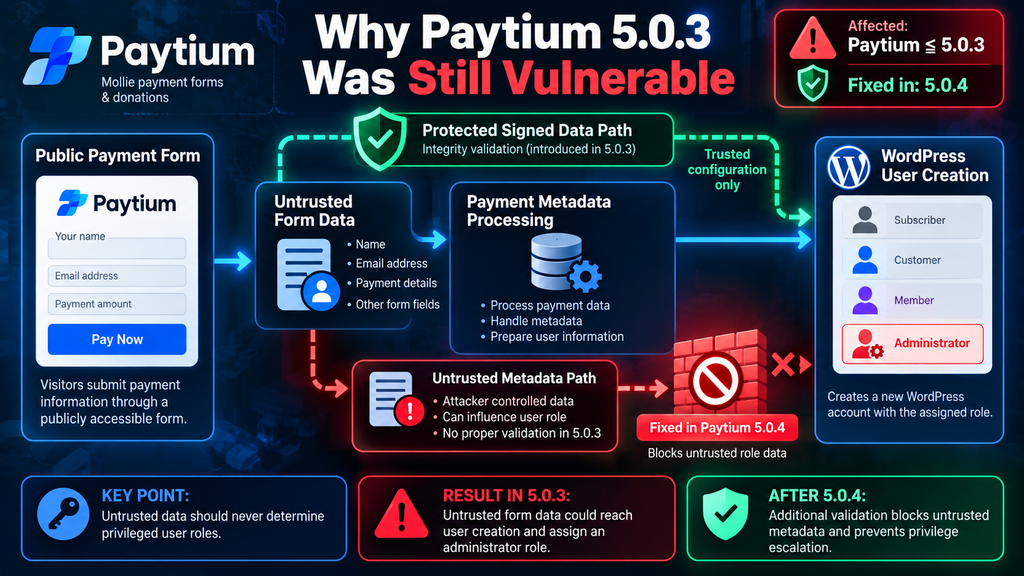
CVE-2026-18467 concerns a different remaining path. According to the newer disclosure, 5.0.3 added integrity checking around one source of user data, but another later stage in the payment metadata process could still accept untrusted role-related information. The result was that the earlier protection did not cover every route by which the relevant value could reach account creation.
This distinction explains why checking only whether a site has upgraded to 5.0.3 is insufficient. An administrator may remember installing a security update in June and reasonably assume the earlier problem was finished. The September disclosure changes that assessment.
Which Paytium Versions Are Vulnerable
The clearest rule for administrators is straightforward: Paytium versions up to and including 5.0.3 are affected by CVE-2026-18467. The published CVE record explicitly identifies 5.0.3 as affected. Version 5.0.4 contains the relevant security correction, while version 5.0.5 is a later release. (OpenCVE)
The official Paytium changelog is particularly useful here. Version 5.0.4, released September 2, 2026, states that it addresses security vulnerabilities and specifically lists a fix for unauthenticated privilege escalation involving user-role information submitted through Paytium form data. The developer recommends applying the update promptly. (paytium.nl)
Version 5.0.5, released September 7, addresses a load-order issue affecting users of older versions of the Mollie Library plugin. Although CVE-2026-18467 is described as fixed beginning with 5.0.4, administrators updating today should generally move to the latest compatible supported version rather than deliberately stopping at the minimum patched release. (paytium.nl)
Therefore, a site currently displaying Paytium 5.0.3 in Plugins → Installed Plugins requires action. The fact that 5.0.3 included an earlier security fix does not make it safe from CVE-2026-18467.
Paytium 5.0.2 and Earlier
Versions older than 5.0.3 present an even stronger reason to update because they may also overlap with previously disclosed Paytium security issues. WPScan, for example, records an earlier unauthenticated privilege-escalation issue as fixed in 5.0.3. A site still running 5.0.2 therefore should not attempt to solve the current problem through incremental assumptions about individual vulnerabilities. (WPScan)
The practical approach is to back up the website, confirm compatibility requirements, update Paytium to the current secure release, and test the site’s payment functionality afterward. Administrators should avoid treating vulnerability management as a process of updating only to the first version that fixes one CVE.
Security releases accumulate fixes. Remaining several versions behind can leave multiple known weaknesses present simultaneously.
Why 5.0.3 Is Not a Safe Stopping Point
Paytium 5.0.3 attempted to protect sensitive user data through integrity validation. The later vulnerability disclosure indicates that another processing path remained capable of introducing untrusted role-related metadata after that protected stage. In security engineering terms, protecting one input path is insufficient when another path can reach the same sensitive operation.
Think of the process as several roads leading to the same destination. A security checkpoint may completely protect one road. If another road joins the route after that checkpoint, an attacker may still reach the destination without passing through the intended validation.
That is essentially the defensive lesson from CVE-2026-18467. Security controls need to protect the final trust boundary, not simply one expected source of data.
The account role is security-sensitive information. Regardless of whether that role originated from a shortcode configuration, payment metadata, custom form field, API response, or another internal structure, WordPress should only accept an elevated role when the server can establish that the value came from a trusted configuration.
How to Check Your Installed Version
WordPress administrators can check the installed Paytium release through the dashboard. Open Plugins → Installed Plugins, locate Paytium: Mollie payment forms & donations, and inspect the displayed version.
If the version is 5.0.3 or older, consider the installation affected and update it. If the site already runs 5.0.4, the published information indicates that the specific CVE-2026-18467 issue has been corrected. However, because 5.0.5 is newer, administrators should evaluate and install the latest supported release after normal backup and compatibility checks. (paytium.nl)
Sites managed through WP-CLI, hosting dashboards, centralized WordPress management systems, or security platforms can also inventory plugin versions centrally. This approach becomes particularly useful for agencies or administrators maintaining many WordPress installations.
Do not forget staging sites, old subdomains, campaign websites, archived shops, and development installations. Publicly accessible forgotten WordPress instances can still represent security exposure even when they receive little legitimate traffic.
How the User Role Validation Is Bypassed
Understanding this vulnerability requires understanding the difference between trusted configuration and visitor-controlled input. WordPress roles should belong to the first category. A visitor may reasonably control an email address, name, donation amount within permitted rules, or another ordinary form field. They should never be able to determine whether their newly created account becomes a subscriber or administrator.
Paytium 5.0.3 introduced protection around a user-data structure by using WordPress hashing and comparison functions to verify its integrity. That change addressed an earlier weakness. The newer CVE disclosure reports that another filter involved in checkout metadata processing remained capable of copying submitted form information without equivalent integrity verification.
The security problem arises because role-related information from that later path could override the value produced through the protected path. Once persisted in payment metadata, the resulting role could later reach Paytium’s user-processing logic and ultimately influence the role supplied during WordPress account creation. (OpenCVE)
For defensive understanding, the important issue is not the specific parameter syntax. The important issue is trust propagation. Untrusted browser input was able to reach a security-sensitive role assignment after bypassing the protection intended to guarantee the integrity of that information.
Why Signing One Data Structure Was Not Enough
Digital integrity checks are valuable only when every security-sensitive route respects them. Imagine that a system signs a package before it enters a warehouse. Workers verify the seal before accepting the package. That process appears secure.
Now imagine that another conveyor belt joins the warehouse after the seal checkpoint. If items from the second belt can replace objects inside the accepted package, the original seal no longer guarantees the final contents.
A comparable logical issue occurred here. The protected data path existed, but another later processing stage could affect the resulting metadata. Consequently, validating the earlier structure alone did not guarantee that the final role value remained trustworthy.
Developers can draw a broader lesson from this incident. Authorization decisions should be based on server-controlled state whenever possible. Client-submitted data should not determine high-privilege roles simply because it passes through a payment or registration system.
Why Administrator Roles Need Stronger Controls
WordPress roles are not cosmetic labels. They represent collections of capabilities. An administrator generally has access to some of the most powerful operations available through WordPress.
Therefore, any plugin that creates users dynamically should apply strict rules to role assignment. The server should maintain an explicit list of acceptable roles for the relevant workflow. Privileged roles should require additional safeguards and should never be inferred from arbitrary request data.
Paytium 5.0.4 introduced changes around this area. Its changelog mentions a new setting under Paytium → Settings → Advanced for allowed user roles with administrator capabilities, alongside the privilege-escalation correction. (paytium.nl)
That change illustrates a stronger design principle. Privileged role assignment should come from an explicit administrator-controlled configuration rather than from information that an anonymous visitor can manipulate.
Public Forms Change the Risk
A form published on a public WordPress page is intentionally reachable without authentication. That is normal for payment forms. Customers need to submit payments, donors need to make donations, and visitors may need to purchase access without already having a WordPress account.
The security challenge comes from what happens after the form is submitted. Every field received from the browser must initially be considered untrusted. Hidden fields do not change that rule. A field invisible in the rendered page can still be manipulated at the HTTP request level.
That is why developers should never treat a hidden HTML field as a security boundary. Security must be enforced on the server through authorization, validation, integrity protection, and trusted configuration.
How an Attacker Can Obtain Administrator Access
The exploitation sequence matters because CVE-2026-18467 has prerequisites. According to the published vulnerability description, an attacker must interact with a publicly exposed Paytium payment form and complete the resulting payment workflow. The available disclosure does not establish a universal payment-free account-creation bypass. (Fused.com)
At a high level, the vulnerable workflow allows untrusted role-related information submitted through the payment process to reach the metadata later used for WordPress account creation. If the site is configured in a way that causes that workflow to create a user, the manipulated role can result in the newly created account receiving administrator privileges.
The attacker would then have an account associated with an email address they control. Published descriptions note that the ordinary WordPress lost-password process can subsequently be used to establish access to that account.
For security reasons, administrators do not need the functional payload or exact request structure to determine whether they are vulnerable. Version identification, form exposure, payment configuration, user creation behavior, and audit evidence provide the information needed for remediation.
The Public Payment Form Is an Important Condition
This prerequisite deserves special attention. The vulnerability description specifically references a publicly exposed Paytium shortcode form. A site may have Paytium installed without publishing the relevant form publicly. Another installation may use several public Paytium forms across donation, registration, membership, or payment pages.
Those sites do not necessarily have identical practical exposure.
Administrators should therefore inventory every location where Paytium forms appear. Search published pages, landing pages, membership pages, donation pages, event pages, and older campaign content. Do not assume that the only active payment form is the one linked from the current navigation menu.
Search engines, old backlinks, direct URLs, archived marketing campaigns, and external links can keep an old page reachable long after it disappears from the site’s main menus.
Payment Completion Is Also Relevant
Current reporting states that exploitation requires completion of the resulting payment flow. This point prevents an important misunderstanding: the vulnerability should not be described as a confirmed mechanism allowing anyone to create an administrator account simply by sending a single free registration request. (Fused.com)
That limitation does not make the issue minor. An attacker willing to complete a payment could potentially regard the transaction cost as trivial compared with the value of administrator access to a commercial WordPress site.
For incident investigation, the payment requirement may actually provide useful evidence. Administrators can correlate suspicious WordPress account creation times with Paytium records, Mollie transaction records, WordPress logs, emails, and server access logs.
An unexpected administrator account appearing shortly after an unusual transaction deserves immediate investigation.
From Account Creation to Site Takeover
Administrator creation and site takeover are technically separate stages. The vulnerability can create an account with elevated privileges. The attacker must then obtain authenticated access to that account.
The published description states that the standard WordPress password-reset process can be used for the attacker-controlled email address associated with the new account.
Once authenticated as an administrator, the security consequences expand significantly. Depending on the site’s configuration, installed plugins, hosting restrictions, and WordPress settings, an administrator may have broad control over users, content, plugins, themes, and configuration.
Administrators investigating possible exploitation should therefore avoid assuming that deleting one suspicious account completes remediation.
Why Password Resets Matter During Investigation
WordPress password resets generate useful investigative signals. Administrators should examine available transactional email logs, SMTP logs, security plugin logs, hosting logs, and other monitoring data for unexpected password-reset activity.
Look particularly closely at resets involving newly created accounts, unfamiliar administrator email addresses, or unusual timestamps corresponding with suspicious payments.
A legitimate new customer account followed by an expected password setup is normal. A previously unknown administrator account followed almost immediately by a password reset is very different.
Context is essential. Avoid deleting records before preserving evidence. Payment records, user creation timestamps, email logs, and access logs can help reconstruct the sequence of events.
Updating Paytium to Version 5.0.5

The primary remediation is simple: do not remain on Paytium 5.0.3 or earlier. The official changelog states that version 5.0.4 addresses unauthenticated privilege escalation, while version 5.0.5 is the later release available as of September 2026. (paytium.nl)
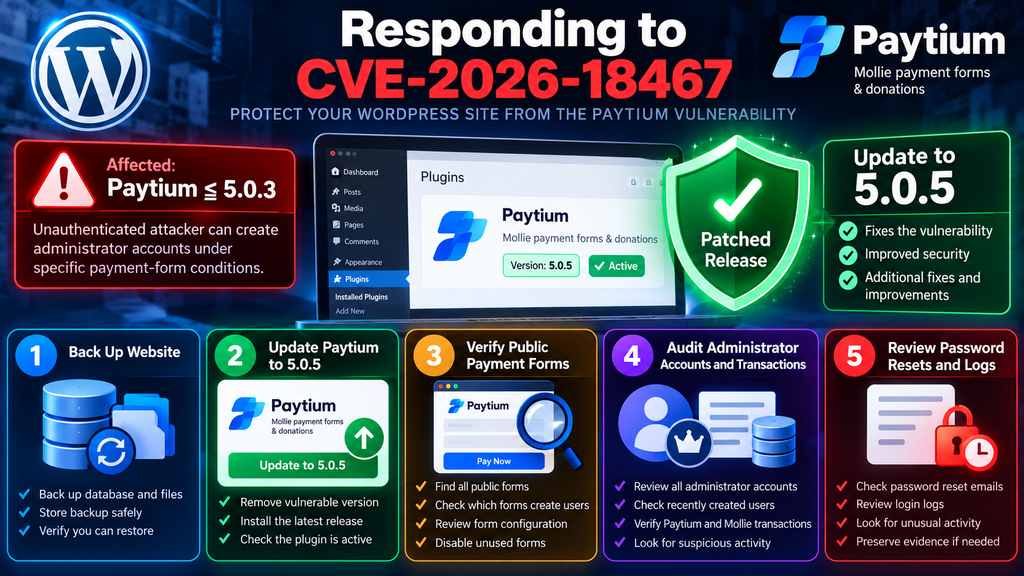
Before updating a production payment website, create a reliable backup of both the WordPress database and site files. A security update should be applied promptly, but a backup provides recovery options if an unrelated compatibility issue appears afterward.
Administrators using staging environments can test the update there first, provided this does not introduce an unreasonable delay. High-risk vulnerable production systems should not remain exposed for days while routine testing waits in a queue.
After updating, verify the version shown in the WordPress plugin screen. Do not assume the update completed merely because the update button was clicked. Caching, filesystem permissions, interrupted updates, managed-host restrictions, or deployment workflows can occasionally leave an older version in place.
Why Update to 5.0.5 Instead of Stopping at 5.0.4
Version 5.0.4 contains the documented security correction for CVE-2026-18467. Therefore, it represents the first fixed release according to the available vulnerability information. Version 5.0.5 subsequently fixed a load-order issue involving older Mollie Library plugin users. (paytium.nl)
For administrators updating now, 5.0.5 is the more logical destination when compatible with the site’s environment because it includes the 5.0.4 security changes plus the later maintenance correction.
This distinction is useful when reading vulnerability databases. A database may display “fixed in 5.0.4.” That statement identifies the first version containing the relevant security fix. It does not mean administrators should deliberately downgrade from 5.0.5 or ignore later supported releases.
Always verify the current official plugin release before acting because versions can change after an article is published.
Test the Payment Workflow After Updating
Payment plugins deserve functional testing after an update. Verify that important Paytium forms still render correctly and that expected payment methods remain available.
Check the complete customer workflow using an appropriate test environment or payment provider test mode where possible. Confirm redirects, confirmation pages, transaction status updates, notification emails, user creation, membership behavior, and any automation connected to successful payments.
The Paytium changelog notes compatibility work involving newer WordPress and PHP releases alongside its security improvements. Nevertheless, every WordPress site has its own combination of themes, plugins, custom code, caching layers, and payment integrations. (paytium.nl)
A successful plugin update is therefore only the first step. A successful payment test confirms that the business workflow still behaves correctly.
Review Allowed User Roles
Paytium 5.0.4 added a new setting location for roles with administrator capabilities under Paytium → Settings → Advanced. Administrators using role-based account creation should review that configuration carefully. (paytium.nl)
Apply the principle of least privilege. If customers only need subscriber, customer, member, or another limited role, there is normally no reason for the payment workflow to permit administrator-level capabilities.
Do not add privileged roles simply to solve an unrelated permissions problem. Instead, determine which specific capabilities the workflow genuinely requires.
The fewer systems capable of creating administrators, the smaller the site’s attack surface becomes.
What to Do If You Cannot Update Immediately
If operational constraints genuinely prevent an immediate update, reducing exposure becomes important. Consider temporarily disabling the affected Paytium functionality or restricting access to relevant payment pages until the secure version can be deployed.
This should be considered a temporary risk-reduction measure, not a substitute for patching.
Simply hiding a payment page from the navigation menu is not sufficient. Anyone with the direct URL may still reach it, and search engines or external websites may retain old links.
If a site must continue processing payments while remediation is prepared, consult the plugin developer, hosting provider, or qualified WordPress security professional for environment-specific guidance.
Auditing WordPress Users, Payments and Password Resets
Updating Paytium closes the known vulnerable path, but it does not answer a different question: was the vulnerability exploited before the update? That requires investigation.
Begin with WordPress administrator accounts. Open Users → All Users and filter or review users with administrator privileges. Every administrator should have a clear business reason to exist.
Look for unfamiliar usernames, unexpected email domains, recently created accounts, unusual display names, or accounts that nobody on the team recognizes. Compare the list with documented staff, developers, agencies, and service accounts.
Do not immediately assume every unfamiliar account is malicious. Old developer accounts and forgotten service accounts are common. However, each administrator should be attributable to a legitimate owner and purpose.
Review Recently Created Users
User creation time is valuable evidence, although WordPress does not always expose every useful forensic field prominently in the standard dashboard.
Security plugins, activity logging systems, database records, hosting logs, and backups may provide additional context. If you identify a suspicious administrator, record relevant details before making changes.
Correlate the account with Paytium payment activity around the same timestamp. The vulnerability’s dependence on the payment workflow means temporal correlation can be particularly useful.
A transaction followed by unexpected administrator creation and then a password reset represents a pattern that deserves immediate escalation.
Audit Paytium and Mollie Transactions
Review Paytium payment records and, where appropriate, corresponding transactions in the payment provider account.
Focus on transactions occurring during the period when the site ran an affected Paytium version. Pay particular attention to payments associated with unfamiliar customer details or unexpected account creation.
The objective is not to label every unusual transaction as an attack. Payment systems naturally contain failed payments, retries, abandoned checkouts, test transactions, refunds, and customer mistakes.
Instead, search for relationships between payment events and privileged WordPress account changes.
Preserve transaction identifiers and timestamps when suspicious activity is found. Those details can later help correlate application logs, server access logs, WordPress events, and email activity.
Examine Password Reset Activity
Because published vulnerability descriptions mention the ordinary lost-password workflow as the method by which the newly created account can be accessed, password-reset evidence is especially relevant.
If your site uses an SMTP plugin or transactional email service with logging enabled, review messages sent during the suspected period.
Search for password-reset messages involving unfamiliar users, especially administrator accounts created shortly before the reset request.
Hosting access logs may also reveal requests to WordPress login and password-reset endpoints. Security plugins can provide additional authentication history, including IP addresses and successful or failed login attempts.
No single log should be treated as definitive by itself. Combine evidence from several sources whenever possible.
Check for Changes Made by Suspicious Administrators
If evidence indicates that an unauthorized administrator successfully authenticated, expand the investigation beyond Paytium.
Review recently installed or activated plugins. Examine theme changes, administrator account modifications, new API credentials, unexpected scheduled tasks, unfamiliar snippets, modified WordPress files, and changes to security settings.
Compare files against trusted originals where possible. WordPress core checksums can help identify modified core files, while clean plugin packages from trusted sources can assist with plugin comparison.
Also examine wp-config.php, .htaccess, MU plugins, upload directories, and other locations where unexpected PHP or configuration changes could persist.
The precise investigation should reflect the hosting environment and available logs. High-value commercial sites may benefit from professional incident-response assistance.
Rotate Credentials When Compromise Is Suspected
If you find credible evidence of unauthorized administrator access, consider credentials potentially exposed according to what that account could access.
Reset WordPress administrator passwords and review application passwords. Rotate relevant API keys and secrets when exposure is plausible. Review database, SFTP, SSH, hosting panel, CDN, SMTP, and payment-related credentials based on the evidence and architecture.
Do not rotate credentials blindly without understanding dependencies. Some secrets are used by production integrations, and changing them without coordination can create outages.
However, retaining potentially exposed credentials after confirmed compromise can allow an attacker to return even after the vulnerable plugin has been patched.
Preserve Evidence Before Cleaning the Site
Incident response often becomes harder because administrators delete suspicious accounts, clear logs, remove files, and empty caches before preserving evidence.
Take a backup or forensic snapshot first when practical. Record suspicious usernames, email addresses, timestamps, transaction identifiers, IP addresses, filenames, and relevant log entries.
Then proceed with containment and cleanup.
Evidence can help determine whether the attacker merely created an account or actually used administrator access. That distinction affects the scope of remediation.
Frequently Asked Questions
What is the Paytium vulnerability CVE-2026-18467?
CVE-2026-18467 is a critical privilege-escalation vulnerability affecting Paytium: Mollie payment forms & donations for WordPress. Under the documented conditions, untrusted information in the payment workflow can influence the role assigned to a newly created WordPress account, potentially resulting in administrator privileges. (OpenCVE)
Is Paytium 5.0.3 vulnerable?
Yes. The published CVE record identifies versions up to and including 5.0.3 as affected by CVE-2026-18467. Although 5.0.3 fixed an earlier privilege-escalation issue, the newer vulnerability concerns a remaining route through payment metadata processing. (WPScan)
Which Paytium version fixes CVE-2026-18467?
Version 5.0.4 contains the documented fix for the unauthenticated privilege-escalation issue. Version 5.0.5 is a later release and should generally be preferred when updating a compatible installation today. (paytium.nl)
Does installing Paytium automatically make a site exploitable?
Not according to the currently published description. Exploitation requires a publicly exposed Paytium payment form and completion of the resulting payment flow. Actual exposure therefore depends on both the vulnerable plugin version and how Paytium is configured and used on the site. (Fused.com)
Can an attacker exploit the issue without a WordPress account?
The vulnerability is classified as unauthenticated privilege escalation. The attacker does not need an existing WordPress account before interacting with the vulnerable workflow.
Does the attacker need to complete a payment?
Current published descriptions state that exploitation requires completing the payment flow initiated through a publicly exposed Paytium form. Reporting does not establish a general payment-free signup bypass for CVE-2026-18467. (Fused.com)
Is updating Paytium enough after running 5.0.3?
Updating closes the known vulnerable path, but administrators should also investigate whether exploitation occurred before the update. Review administrator accounts, user creation, Paytium transactions, password-reset activity, login records, plugins, themes, and other security-relevant changes.
What should I do if I discover an unknown administrator?
Preserve relevant evidence and determine when the account was created and whether it logged in. Correlate its activity with payments and password resets. If unauthorized access appears likely, contain the account, update Paytium, rotate potentially exposed credentials, inspect the site for persistence, and consider professional incident-response assistance.
Should I delete Paytium completely?
Not necessarily. The official changelog documents a security correction beginning with version 5.0.4. Sites that need Paytium can update to a current secure release and verify their configuration. Temporary deactivation may be appropriate when an affected site cannot be updated promptly. (paytium.nl)
Why is CVE-2026-18467 considered critical?
The reported CVSS 3.1 score is 9.8 because successful exploitation can potentially give an unauthenticated attacker administrator-level access. Such access can have major consequences for the confidentiality, integrity, and availability of a WordPress website.
The Security Lesson WordPress Owners Should Keep
CVE-2026-18467 demonstrates why a security update should never be judged only by its version number or by the fact that an earlier vulnerability was already patched. Paytium 5.0.3 addressed an earlier privilege-escalation weakness, yet another route through the payment metadata workflow remained relevant enough to require a further security correction.
The immediate action is clear. WordPress administrators running Paytium 5.0.3 or earlier should update to the latest secure supported release, with 5.0.4 identified as the first version containing the documented correction and 5.0.5 representing the subsequent release available at the time of writing. (paytium.nl)
Patching should be accompanied by investigation. Review administrator accounts, payment records, account creation, password resets, authentication history, and security-sensitive site changes. Sites that exposed public Paytium forms during the vulnerable period deserve particular attention because public form availability and completion of the payment workflow are documented prerequisites for the reported attack path.
More broadly, the incident reinforces a basic WordPress security principle: a browser should never be trusted to decide its own privileges. Payment information can come from visitors. Account names can come from visitors. Email addresses can come from visitors. Administrator privileges must come only from trusted server-side authorization.
⚠️ Disclaimer and Source Hygiene
This article is provided for educational, defensive cybersecurity, and WordPress administration purposes. It does not provide functional exploitation payloads or instructions for compromising websites. Vulnerability information can change as vendors, CVE authorities, security researchers, and plugin developers publish additional findings.
The technical details in this article were cross-checked against the published CVE information, current vulnerability reporting, and the official Paytium changelog available at the time of writing. Website owners managing payment systems or investigating a suspected compromise should consider consulting a qualified WordPress security professional, hosting provider, or incident-response specialist.
Always create a reliable backup before modifying a production WordPress installation. When handling payments, also verify that updates and configuration changes do not interrupt transaction processing, callbacks, customer accounts, subscriptions, or other business-critical workflows.
🔔 For more tutorials like this, consider subscribing to our blog.
📩 Do you have questions or suggestions? Leave a comment or contact us!
🏷️ Tags: Paytium vulnerability, CVE-2026-18467, Paytium security, WordPress vulnerability, WordPress security, Paytium 5.0.5, privilege escalation, WordPress administrator security, Mollie payments, WordPress plugin security
📢 Hashtags: #Paytium, #WordPressSecurity, #CVE202618467, #WordPress, #CyberSecurity, #PluginSecurity, #WebsiteSecurity, #SecurityUpdate, #WordPressAdmin, #PaytiumVulnerability
Sources and References
Paytium Official Changelog: The Paytium developer’s changelog documents version 5.0.4 as addressing security vulnerabilities, including unauthenticated privilege escalation related to Paytium user-role form data. It also documents version 5.0.5 as the September 7, 2026 release containing a Mollie Library load-order correction. (paytium.nl)
CVE-2026-18467 Record: The published CVE information identifies Paytium versions through 5.0.3 as affected and describes the privilege-escalation path through payment metadata and WordPress user creation. (OpenCVE)
Rapid7 Vulnerability Database: Rapid7 reports CVE-2026-18467 with a CVSS 3.1 base score of 9.8 and describes the requirement for a publicly exposed Paytium form and completion of the payment workflow.
WPScan: WPScan provides useful historical context for the earlier Paytium privilege-escalation vulnerability that was fixed in version 5.0.3. This earlier issue should not be confused with CVE-2026-18467, which still affects 5.0.3. (WPScan)
Secondary Sources and Testimonials
Independent vulnerability tracking sources provide additional context for CVE-2026-18467 and generally align with the core technical description: Paytium 5.0.3 and earlier are affected, the weakness involves untrusted payment metadata influencing WordPress role assignment, and exploitation requires the relevant publicly accessible payment workflow. (Fused.com)
Where third-party vulnerability databases disagree or lag behind the newest disclosure, administrators should prioritize the current CVE record and official developer changelog. This is particularly important for Paytium because older vulnerability listings may correctly say that 5.0.3 fixed a previous privilege-escalation vulnerability while not yet reflecting that CVE-2026-18467 separately affects 5.0.3. (WPScan)
The strongest featured-image angle for this article would be “Paytium ≤ 5.0.3 → Public Payment Form → Critical Admin Creation Risk → Update 5.0.5”, with a WordPress dashboard and a large red CVSS 9.8 warning, without showing any exploitable parameters.
1 thought on “Critical Paytium Vulnerability Enables Admin Creation”