
Table of Contents
Google has expanded its VideoObject structured data guidance with clearer support for creators, authors, and video engagement statistics. This practical WordPress guide explains what changed, how to audit automatically generated video schema, which interaction types Google supports, and how to test your markup correctly.
Video content has become an important part of many WordPress websites. Tutorials, product demonstrations, interviews, courses, news reports, reviews, and embedded videos can all give visitors information that is difficult to communicate with text alone. Search engines also need to understand those videos correctly. That is where VideoObject structured data becomes especially useful.
On September 24, 2026, Google updated its VideoObject documentation to explicitly document the creator property, note support for author, and clarify which interaction types can be supplied through interactionStatistic. The change does not completely reinvent video schema. Instead, it gives publishers clearer ways to describe who created or published a video and how users interact with it.
For WordPress site owners, however, there is another important question. What is your website actually generating? Installing an SEO or schema plugin does not automatically mean every video page contains complete, accurate, and current structured data. Themes, video plugins, page builders, custom snippets, caching systems, and SEO plugins can all influence the final HTML sent to Google.
This guide focuses on that practical problem. We will examine Google’s September update, explain creator and interaction properties, and then walk through a sensible WordPress auditing workflow. The goal is not to add as many schema properties as possible. The goal is to make sure your markup accurately describes what visitors can really see and use on the page.
What Google Changed on September 24, 2026
Google recorded the change in its official Search documentation update log on September 24, 2026. According to that update, Google added the creator property to its VideoObject documentation, noted support for author, and updated the interactionStatistic guidance to document supported interaction types. Google explained that the purpose was to document support for creator and author information while clarifying the interactions that can be represented for videos.
This distinction matters because Schema.org contains many properties that can theoretically apply to a VideoObject, but Google Search does not necessarily document or use every Schema.org property in the same way. WordPress developers therefore need to distinguish between what Schema.org permits and what Google’s Search documentation explicitly recommends or supports.
The September update makes the relationship between the video and its creator easier to express. A publisher can identify a Person or an Organization responsible for creating or publishing the video. Google currently documents creator or author as a recommended VideoObject property rather than one of the fundamental required properties.
The change to interactionStatistic is equally practical. Instead of treating engagement as a vague numerical value, publishers can describe what a number actually represents. A count might describe watches, likes, comments, or shares. Google now documents supported interaction types for these different actions.
That makes structured data more descriptive. Imagine a video with 42,000 views, 1,400 likes, 310 comments, and 600 shares. Those numbers describe very different forms of engagement. Combining them into one unexplained value would lose useful context. Proper InteractionCounter objects can associate each legitimate number with the corresponding action.
For WordPress publishers, this is a good reason to audit existing video markup. An SEO plugin installed several years ago may generate VideoObject markup according to older assumptions. A custom PHP snippet might still use legacy properties. Another plugin could generate a second VideoObject graph that conflicts with the first one.
The update should therefore be viewed as an opportunity to inspect the final output of the site rather than immediately adding new code.
The Required VideoObject Foundation Still Matters
The new creator guidance does not replace the basic VideoObject properties. Google’s current documentation lists name, thumbnailUrl, and uploadDate as required VideoObject properties. Other information, including contentUrl, embedUrl, description, duration, creator information, engagement statistics, and geographic restrictions, can provide additional context where applicable.
This means a publisher should not focus on adding creator information while ignoring an incorrect thumbnail, missing upload date, or inaccurate video title. Structured data works as a description of the underlying content. Its individual properties need to make sense together.
The actual video should also be available on the page represented by the markup. Google specifically says VideoObject structured data should be added to a page where users can watch the video when applying its video guidelines. This principle becomes particularly important when WordPress templates automatically inject schema into pages that only link to a video rather than displaying it.
Why This Matters for WordPress Publishers
WordPress makes structured data convenient because plugins can create JSON-LD automatically. That convenience can also hide problems. A site owner may never look at the source code and therefore may not know which properties are being generated.
A video plugin might know the thumbnail and duration. An SEO plugin may know the post author. The theme may generate its own Article schema. A page builder could inject another JSON-LD block. Meanwhile, a custom snippet may add VideoObject schema separately. Each component can work correctly on its own while the final page contains duplication or contradictory information.
For this reason, the September 24 update is not simply something to read about. It provides a useful trigger for auditing real video pages on WordPress.
Using Creator and Author in VideoObject
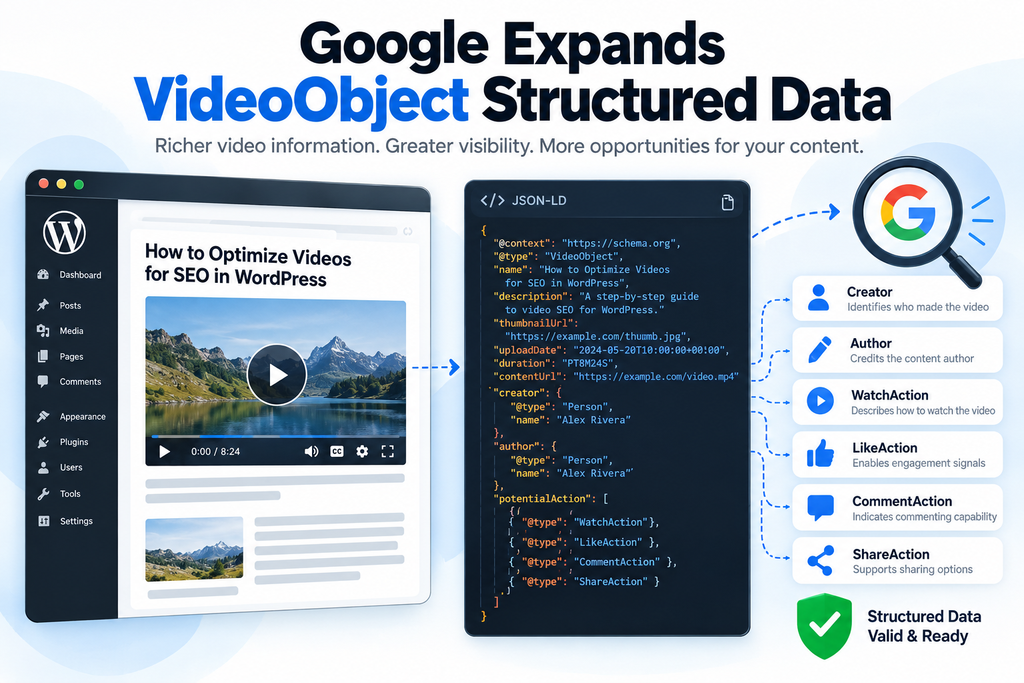
The creator addition is straightforward in concept. It identifies the person or organization that created or published the video. Google’s current VideoObject documentation says the value can be either a Person or an Organization. It also documents author as an alternative.
That distinction gives publishers flexibility. A personal tutorial website might identify an individual creator. A company publishing product demonstrations might identify the organization. A news publisher could associate a video with the organization or an appropriate person when that accurately represents authorship.
The important word is accurately. Structured data should describe the real content and entity relationships on the page. A site should not add famous people, companies, brands, or unrelated organizations merely because those names could make the markup appear more authoritative.
Creator as a Person
Suppose a WordPress tutorial is accompanied by an original video recorded by the article author. The VideoObject can identify that individual as the creator when this reflects the actual content.
A simplified JSON-LD fragment could look like this:
{
  "@type": "VideoObject",
  "name": "How to Configure WordPress Video Schema",
  "creator": {
    "@type": "Person",
    "name": "Jane Doe",
    "url": "https://example.com/author/jane-doe/"
  }
}
Google’s documentation says that when a creator or author is specified, the entity should provide name or alternateName. Google also documents a creator or author URL that uniquely identifies the person or organization, such as a profile page or homepage.
On WordPress, the author archive can sometimes serve this purpose when it is a genuine public profile page. However, blindly inserting an author archive URL is not always ideal. Some websites disable author archives, redirect them, noindex them, or use generic accounts such as “Admin.”
The URL should therefore be checked before being included.
Creator as an Organization
Many videos belong to a publisher rather than an individual. A software company may produce tutorials using different presenters while publishing everything under its brand. In that situation, an Organization can be appropriate.
A simplified representation might be:
{
  "@type": "VideoObject",
  "name": "Installing Our WordPress Plugin",
  "creator": {
    "@type": "Organization",
    "name": "Example Media",
    "url": "https://example.com/"
  }
}
The structured entity should match reality. If the website states that the video comes from the company, the schema can reinforce that relationship. If the visible page credits a specific independent creator instead, the structured data should not tell a conflicting story.
Consistency is particularly valuable on WordPress because author information may appear in several places. Article schema, ProfilePage schema, Organization schema, breadcrumbs, Open Graph metadata, visible bylines, and VideoObject markup can all describe related entities.
Should You Use Creator or Author?
Google now documents creator while also explicitly supporting author. That does not mean publishers need to insert both properties simply because both are available. The objective is accurate machine-readable information, not maximum property count.
Schema.org itself also exposes authorship and interaction information across CreativeWork-derived types, and its VideoObject examples demonstrate author information alongside interaction statistics.
If your WordPress plugin already outputs valid author information for the video, Google’s documentation now gives publishers clearer confirmation that this is supported. If you control a custom implementation and creator better describes the relationship, you can use it.
Avoid creating duplicate Person entities with slightly different names or URLs. For example, one graph should not describe “John Smith,” another “John A. Smith,” and another “Site Administrator” when all three are intended to represent the same creator.
Connect Structured Data to Visible Content
Schema should never become an invisible fictional layer added only for search engines. If a video visibly credits a creator, the structured data can represent that creator. If the site claims a video was created by an organization, visitors should be able to understand that relationship as well.
This approach makes maintenance easier. Editors can compare the visible page with the JSON-LD and quickly recognize inconsistencies.
It also reduces the chance that old metadata remains attached to a video after editorial changes. WordPress sites frequently reuse templates, duplicate posts, import content, and replace embeds. Schema generated from stale custom fields can survive those changes unless someone audits the final output.
Supported Video Interaction Types
The second major clarification concerns interactionStatistic. Schema.org defines this property as a way to represent interaction counts associated with creative works and other supported entities. It uses InteractionCounter, while the older interactionCount property has been superseded.
Google’s VideoObject documentation now clearly lists four supported interaction types: WatchAction for video watches, LikeAction for likes or upvotes, CommentAction for comments, and ShareAction for reshares.
This gives WordPress developers a much clearer model for engagement data.
WatchAction for Video Views
WatchAction represents the number of times the video has been watched. It is probably the most familiar video interaction metric.
A simplified example is:
{
  "@type": "InteractionCounter",
  "interactionType": {
    "@type": "WatchAction"
  },
  "userInteractionCount": 12500
}
The count must represent something real. A WordPress page-view counter should not automatically be treated as a video watch counter. A visitor can open an article without starting the embedded video.
This distinction is critical.
If your WordPress analytics system records 50,000 article views but your video player reports 18,000 video plays, WatchAction should not be populated with the article’s 50,000 page views. The schema is describing interaction with the video, not general traffic to the URL.
LikeAction for Likes and Upvotes
LikeAction represents likes or upvotes. This may be useful for websites that operate their own video platform or can reliably obtain legitimate engagement information from the video service.
The same accuracy principle applies. A WordPress post-like plugin might record likes for the article rather than likes for the video itself. Those numbers should not automatically become VideoObject engagement statistics.
Before mapping a WordPress database field to LikeAction, determine exactly what that field measures.
CommentAction for Comments
CommentAction can represent the number of comments associated with the video. Again, publishers need to distinguish video comments from general WordPress discussion.
An article containing a video could have 100 WordPress comments discussing the article as a whole. That does not necessarily mean the video has 100 comments.
The correct interpretation depends on the content model of the site. If the entire page is a dedicated watch page and its comment system is clearly attached to that video, the relationship may be reasonable. If the video is only one small element in a long article, treating every article comment as a video interaction could misrepresent the content.
ShareAction for Reshares
ShareAction describes reshares. This can be valuable when a video platform reliably tracks how often users share the video.
However, share buttons alone do not provide a share count. The existence of Facebook, email, or messaging buttons below a WordPress post does not prove that the content has been shared a certain number of times.
A publisher needs actual interaction data before supplying userInteractionCount.
Multiple Interaction Statistics
A VideoObject can describe multiple forms of engagement when the underlying data exists. Schema.org examples demonstrate arrays of InteractionCounter objects for different interaction types.
Conceptually, a video could therefore include separate counters for watches, likes, comments, and shares rather than trying to combine them.
For example:
"interactionStatistic": [
  {
    "@type": "InteractionCounter",
    "interactionType": {
      "@type": "WatchAction"
    },
    "userInteractionCount": 42000
  },
  {
    "@type": "InteractionCounter",
    "interactionType": {
      "@type": "LikeAction"
    },
    "userInteractionCount": 1800
  },
  {
    "@type": "InteractionCounter",
    "interactionType": {
      "@type": "CommentAction"
    },
    "userInteractionCount": 240
  },
  {
    "@type": "InteractionCounter",
    "interactionType": {
      "@type": "ShareAction"
    },
    "userInteractionCount": 510
  }
]
The important part is not the syntax alone. Every number should come from a reliable source and describe the actual video.
Do not manufacture engagement values. Do not copy a YouTube view count into your schema and then leave it permanently unchanged if your implementation cannot keep it reasonably accurate. Structured data should remain aligned with the content and information it describes.
Auditing Video Schema Generated by WordPress
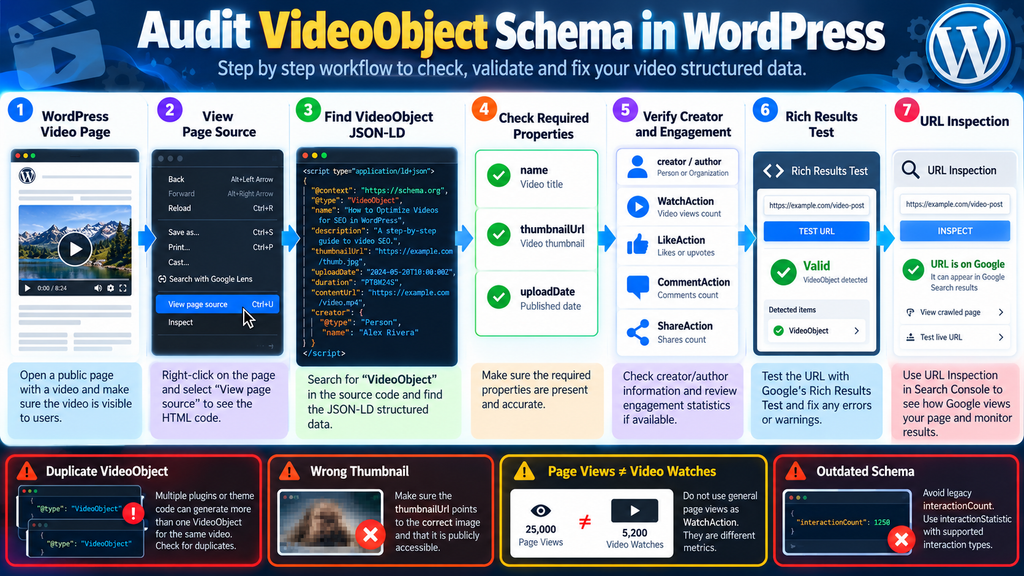
A WordPress audit should start with the final public page rather than the plugin settings screen. Settings show what a plugin intends to generate. The rendered page shows what search engines can actually receive.
Choose several representative video URLs. Include an older video, a recently published video, a page using your standard editor, and any page built with a different template or page builder. If your site hosts videos in several ways, test examples of each implementation.
A site might use YouTube embeds in posts, self-hosted MP4 files on landing pages, a dedicated video plugin for courses, and livestream embeds for events. Testing one URL cannot confirm that every template behaves correctly.
Find the Actual VideoObject Output
Open the public page and inspect its source. Search for VideoObject. JSON-LD commonly appears inside a script element using the application/ld+json type.
Do not stop after finding the first occurrence.
Search again and determine whether the page contains multiple VideoObject definitions. Duplicate schema can appear when an SEO plugin and a video plugin both generate markup. A custom theme may add another block.
Duplication is not automatically wrong because a page can legitimately contain multiple videos. The question is whether each VideoObject represents a real, distinct video or whether several systems are describing the same video differently.
A duplicate becomes especially confusing when one graph contains the correct thumbnail while another contains an old thumbnail, or when one object identifies a Person as creator while another assigns the Organization.
Check the Essential Properties First
Begin with the foundation. Google’s current documentation identifies name, thumbnailUrl, and uploadDate as required properties for VideoObject eligibility.
Compare name with the actual video title. Confirm that thumbnailUrl resolves to the intended image and can be fetched publicly. Check whether uploadDate represents when the video was first published rather than simply when the WordPress post was last modified.
That last point can expose a common automation problem. A plugin may map WordPress publication metadata directly into video schema even when an old video is embedded in a newly published article.
If a video was originally uploaded in 2024 but embedded in a WordPress article created in 2026, the article publication date is not automatically the video’s upload date.
Review contentUrl and embedUrl
Google recommends providing contentUrl when possible and describes it as an effective way for Google to fetch the actual video content. If that is unavailable, embedUrl can serve as an alternative. These properties have different meanings.
contentUrl should point to the actual video file bytes, not simply the WordPress article containing the player.
embedUrl should point to the player for that specific video. It should not be filled with the article permalink simply because the permalink contains an embedded player.
This distinction can be easy to miss in custom WordPress implementations.
Compare the Schema With the Visible Video
Now compare the machine-readable information with what visitors see.
Does the schema title describe the same video? Does the thumbnail match? Is the creator correct? Does the description describe the video rather than merely copying an unrelated article excerpt? Does the stated duration match the media?
The closer these values stay to the real content, the easier the markup becomes to maintain.
A WordPress database can contain years of revisions, attachment metadata, custom fields, imported values, and plugin-specific records. Never assume a property is correct merely because PHP successfully prints it into JSON-LD.
Audit Creator and Author
Next, search the VideoObject for creator and author.
If neither exists, that does not automatically mean the VideoObject is invalid. Google currently documents creator or author among recommended properties, while the fundamental required properties remain separate.
If creator information does exist, check its entity type, name, and URL.
A Person should be a real person associated with the video. An Organization should represent the actual publishing or creating organization. The URL should identify the entity and should not lead to a broken, private, or unrelated page.
This is also a good moment to inspect your broader schema graph. If your Article object references an author by an @id, while VideoObject creates an entirely separate Person with different information, your schema implementation may benefit from cleaner entity relationships.
Audit Interaction Statistics
Search for interactionStatistic.
Determine which action is being represented and where the numerical value comes from. For video engagement intended for Google’s documented VideoObject interactions, the currently documented types are WatchAction, LikeAction, CommentAction, and ShareAction.
Then check the source of each number.
If WatchAction is generated from a generic WordPress post-view counter, investigate whether that counter actually measures video watches. If CommentAction simply uses get_comments_number() on a long article containing one embedded video, consider whether those comments genuinely represent video engagement.
Structured data should not turn convenient database values into misleading claims.
Look for Legacy interactionCount
Schema.org states that interactionStatistic supersedes interactionCount, and Google has recommended interactionStatistic instead of the older property since 2019 while continuing to support the older form.
Older WordPress code may still output interactionCount. That is a useful signal that the implementation deserves review.
A custom snippet written years ago may still technically execute without PHP errors while using an outdated schema strategy. Updating WordPress core does not automatically update custom schema code stored in a child theme, MU plugin, Code Snippets entry, or bespoke plugin.
Check for Schema From Multiple Plugins
WordPress administrators often install several plugins that touch SEO.
One plugin may generate Article and Organization schema. Another handles videos. A third provides breadcrumbs. A theme adds its own microdata. This can work, but it can also create overlapping entity descriptions.
Temporarily reviewing plugin responsibilities can help. Determine which component owns VideoObject generation. Once you know the source, changes become safer.
Do not immediately disable production plugins simply to experiment. Use staging when possible, especially on sites that rely heavily on caching, page builders, ecommerce, or custom schema integrations.
Testing Video Markup With Google’s Tools

Manual source inspection tells you what WordPress generated. Testing tools help you understand whether that markup can be processed correctly and how Google sees the page.
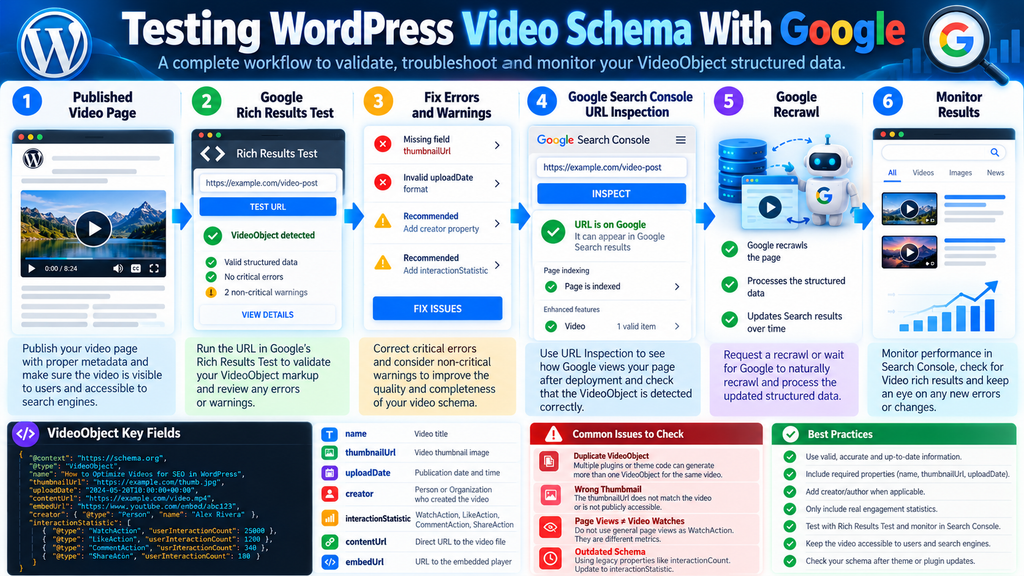
Google’s recommended workflow includes validating structured data with the Rich Results Test, deploying the markup, inspecting live URLs through Search Console, and monitoring structured data after Google has crawled the pages.
Each stage answers a different question. Treating them as interchangeable can create false confidence.
Start With the Rich Results Test
Google recommends validating structured data with the Rich Results Test and correcting critical errors. The documentation also suggests considering non-critical issues because they may improve the quality of the markup even when they are not required for eligibility.
Test the public URL when possible. This helps evaluate the actual page rather than a manually copied JSON-LD fragment.
Code testing is still useful during development. However, a perfect isolated code sample does not prove that the production WordPress page contains the same output.
Caching can serve older HTML. Conditional functions can behave differently by post type. Optimization plugins can alter markup. A CDN may serve stale content. Another plugin can inject additional schema after your custom code executes.
The public URL remains the real target.
Do Not Treat “Valid” as the End of the Audit
A syntax validator cannot determine whether every factual claim in your markup is true.
Imagine that the structured data is syntactically perfect but says a video has 500,000 watches when the number actually represents WordPress page views. The JSON can still be valid JSON-LD while the underlying data is misleading.
Likewise, a perfectly formatted creator object can identify the wrong person.
Technical validity and factual accuracy are different layers of quality.
Both matter.
Use URL Inspection After Deployment
After deploying structured data, Google recommends using URL Inspection to see how Google views the page. The page should be accessible to Google and not blocked by robots.txt, a noindex directive, or authentication requirements.
This step is especially useful after changing a WordPress template or schema plugin. A local test might show the new JSON-LD while Google still has an older crawled version.
Inspecting the live URL helps separate an implementation problem from a crawling or indexing delay.
Google also notes that crawling and re-indexing can take time. A schema change made today should not be expected to transform search appearance immediately.
Monitor Search Console After Template Changes
Template-wide changes deserve additional attention.
A developer may update one PHP function and instantly alter schema on thousands of WordPress URLs. That scalability is one of WordPress’s strengths, but it also increases the impact of mistakes.
Google recommends monitoring structured data after releasing new templates or updating code. An increase in invalid items can indicate that the new template has introduced a problem. A decrease in valid items without a corresponding rise in invalid items can indicate that structured data is no longer being generated.
This is why testing only one staging URL is not enough for a large website.
After deployment, check representative production URLs and watch Search Console as Google recrawls the affected pages.
Check Whether Google Can Access the Video
Structured data alone cannot compensate for inaccessible video resources.
Google’s VideoObject documentation recommends contentUrl where possible because it helps Google fetch the actual video content. The broader video guidance also requires publishers to consider video indexing requirements.
If a security configuration blocks crawlers from the media file, or if a tokenized URL expires immediately, perfect VideoObject JSON-LD cannot magically make that resource accessible.
The same principle applies to thumbnails. A thumbnail URL in JSON-LD is useful only when the image actually exists and can be fetched under appropriate conditions.
Test Mobile and Cached Output
WordPress sites sometimes produce different markup depending on device, caching layer, cookie state, or optimization system.
A server-side cache could preserve old JSON-LD after a plugin update. A JavaScript optimization tool might delay dynamically generated content. Separate mobile templates can introduce another variation.
Therefore, clear the relevant cache after changing structured data and test the public page again.
Do not assume clicking “Purge Cache” guarantees every layer has been refreshed. A site may have WordPress page cache, object cache, reverse proxy cache, CDN cache, and browser cache operating simultaneously.
Keep a Small Schema Audit Routine
You do not need to manually inspect every video every week. A representative sample can reveal many template-level problems.
Check a newly published video page after major plugin updates. Recheck after changing themes, schema plugins, video players, or caching systems. Test an older URL occasionally to ensure legacy posts still produce usable markup.
For sites publishing video frequently, this can become part of the normal editorial workflow rather than an emergency SEO repair task.
What the Update Does Not Guarantee
The September 24 update improves Google’s VideoObject documentation, but it should not be interpreted as a promise of higher rankings or guaranteed video-rich results.
Google explicitly states in its structured data troubleshooting guidance that using structured data does not guarantee that features consuming that markup will appear in search results.
That point deserves emphasis because structured data is often marketed as though adding one property will directly produce a visible SEO reward.
It does not work that way.
Creator Does Not Automatically Increase Rankings
Adding a creator to VideoObject gives Google clearer structured information about the person or organization associated with the video. The documentation update does not say that adding creator automatically increases rankings.
Publishers should therefore implement the property because it accurately describes their content, not because they expect an instant ranking boost.
A useful schema implementation makes content easier for machines to interpret. Ranking systems involve many other signals and processes.
Engagement Markup Does Not Manufacture Popularity
Adding WatchAction with a large number does not make a video genuinely popular.
Structured data should report existing information. It should not invent it.
The same applies to likes, comments, and shares. Artificially inflated numbers create misleading markup and undermine the basic purpose of structured data.
If your WordPress installation cannot obtain reliable video engagement counts, leaving optional engagement statistics out can be more responsible than filling them with unrelated values.
Schema Does Not Make a Weak Video Page Strong
A video page still needs useful content and a functional viewing experience.
A correct VideoObject cannot repair a broken player. It cannot make an inaccessible thumbnail load. It cannot replace a meaningful title. It cannot turn an unrelated embed into original content. It cannot solve every indexing problem.
Structured data describes content. It does not substitute for the content.
This is one reason Google’s documentation combines schema requirements with broader video indexing and Search guidelines.
Schema Cannot Force Google to Index a Video
Google can discover and understand videos through multiple signals. Adding structured data can help Google understand details and can make it easier to discover information about a video, but publishers still need crawlable pages and accessible resources. Google’s documentation describes VideoObject markup as a way to influence the information shown and help Google find video information, not as a command that forces indexing.
WordPress administrators should therefore investigate indexing problems separately.
Check robots directives, canonical URLs, page accessibility, media accessibility, internal linking, sitemaps, content quality, and the actual video implementation.
More Schema Is Not Always Better
There is a temptation to add every available Schema.org property.
That is rarely the best strategy.
A smaller VideoObject containing accurate, maintained information is more useful than a huge object filled with assumptions, placeholders, outdated URLs, and copied statistics.
Add properties when your site has the data and when the relationship is genuine.
This approach also makes debugging easier. When a property changes, you know where its value comes from.
A Practical WordPress VideoObject Audit Workflow
A reliable audit begins with one real public URL. Open a page where the video is an important part of the content and inspect the source for VideoObject. Identify which plugin, theme, or custom code produced the JSON-LD. Then compare its values against the visible video.
Start with the required foundation: name, thumbnailUrl, and uploadDate. After those values are correct, examine useful recommended information such as description, duration, content or embed URLs, creator information, and legitimate interaction statistics. Google’s current documentation separates required and recommended VideoObject properties, so this order keeps the audit focused on fundamentals.
Next, investigate duplication. If multiple VideoObject blocks describe the same video, identify why. It may be intentional graph composition, but it may also mean two WordPress components are competing to describe one media item.
Then verify the source of dynamic values. If the schema says a video has 25,000 watches, find the exact database field or external API producing that figure. If you cannot explain the number, do not assume it is correct.
Finally, run the public URL through Google’s testing workflow and inspect the deployed page through Search Console. After Google recrawls the URL, monitor for structured data or video-related changes.
What to Check After WordPress Plugin Updates
Plugin updates can modify schema without making obvious visual changes to the page.
After updating a major SEO, schema, or video plugin, compare at least one VideoObject page with its previous output when practical. Pay attention to property names, entity IDs, thumbnails, URLs, dates, and duplicated graph nodes.
This is particularly useful after a plugin announces support for new Google structured data recommendations.
Do not assume that a newly supported property should be enabled everywhere. The plugin may need additional profile information or video metadata before it can generate accurate output.
What to Check After Theme Changes
Themes can also affect structured data directly or indirectly.
A new theme may remove visible author information, alter thumbnail sizes, change video wrappers, replace template hooks, or add its own schema. Even if your SEO plugin remains unchanged, the final page can therefore behave differently.
Run another source inspection after changing themes.
Also test pages that use special templates. A standard post, landing page, archive, course page, and custom post type may not share the same schema logic.
What to Check on Embedded YouTube Videos
An embedded YouTube video does not automatically mean your WordPress page contains a complete VideoObject describing it.
Inspect the final page rather than assuming the embed itself solves every structured data requirement.
If your plugin generates VideoObject information from YouTube metadata, verify that the title, thumbnail, duration, upload date, creator, and URLs correspond to the actual embedded video.
Pay particular attention when editors replace an embed without updating associated custom fields. The page can display the new video while JSON-LD continues describing the old one.
Frequently Asked Questions
What changed in Google’s VideoObject documentation on September 24, 2026?
Google added documentation for the creator property, noted support for author, and clarified supported interaction types within interactionStatistic. The documented interaction types include WatchAction, LikeAction, CommentAction, and ShareAction.
Is creator now required for VideoObject structured data?
No. Google’s current documentation lists creator or author among recommended VideoObject properties. The required properties documented for VideoObject include name, thumbnailUrl, and uploadDate.
Can I use author instead of creator?
Yes. Google’s updated VideoObject documentation explicitly notes support for creator or author. The entity can be a Person or Organization when that representation accurately describes who created or published the video.
Which video interactions does Google support?
Google currently documents WatchAction for watches, LikeAction for likes or upvotes, CommentAction for comments, and ShareAction for reshares within VideoObject interaction statistics.
Can I use WordPress page views as WatchAction?
Only when the measurement genuinely represents video watches. A normal article page view is not automatically a video watch because a visitor can load the page without playing the video. Using unrelated page-view counts could misrepresent video engagement.
Should every WordPress video include interactionStatistic?
No. Engagement statistics should be supplied when applicable and when reliable data exists. Do not invent counts simply to make the VideoObject appear more complete.
How can I find VideoObject markup on WordPress?
Open a public video page, inspect its HTML source, and search for VideoObject. JSON-LD is commonly contained in an application/ld+json script. Check every occurrence because multiple WordPress plugins or the active theme may generate overlapping schema.
Which Google tool should I use to test VideoObject markup?
Google recommends validating structured data with the Rich Results Test. After deployment, use Search Console’s URL Inspection functionality to see how Google accesses the page and monitor relevant reports as Google recrawls the site.
Does valid VideoObject schema guarantee a rich result?
No. Google explicitly states that structured data does not guarantee that features using the markup will appear in Search. Valid markup establishes eligibility and helps Google understand content, but appearance remains dependent on Google’s systems and applicable guidelines.
Should I remove older interactionCount markup?
Schema.org says interactionStatistic supersedes interactionCount, while Google says it has recommended interactionStatistic since October 2019 and continues to support the older interactionCount. For new or maintained implementations, interactionStatistic is the documented modern approach.
Make Your Video Schema Accurate Before Making It Bigger
Google’s September 24, 2026 VideoObject documentation update gives video publishers clearer options for describing creators and audience engagement. For WordPress administrators, the most useful response is not to immediately add more JSON-LD. It is to examine what the website already generates.
Start with the real rendered page. Verify the required video properties. Check whether creator or author information reflects the actual person or organization. Make sure engagement numbers represent video interactions rather than convenient but unrelated WordPress statistics.
When WatchAction, LikeAction, CommentAction, or ShareAction is used, trace the number back to a reliable source. A machine-readable claim should remain just as trustworthy as a visible claim made in the article itself.
Then test the public URL. Use Google’s Rich Results Test during validation and Search Console after deployment. Recheck representative URLs after changing themes, SEO plugins, video plugins, templates, caching systems, or custom schema code. Google itself recommends testing structured data and monitoring it after significant template or code changes.
Most importantly, keep expectations realistic. VideoObject structured data can help Google understand information about a video, but it does not guarantee indexing, rankings, or a particular search appearance. Accurate markup, accessible video content, technically healthy pages, and useful content still need to work together.
For WordPress publishers, that is the practical lesson behind this update: do not chase schema properties simply because they are new. Use them when they accurately describe the video your visitors can actually watch.
⚠️ Disclaimer and Source Hygiene
This article is intended for educational and technical information purposes. Structured data requirements, supported properties, Search features, and Google’s documentation can change over time. Website owners should verify current requirements before making production-wide changes, especially when custom PHP, JavaScript, SEO plugins, video platforms, caching layers, or large template systems are involved.
The information in this guide was researched using authoritative documentation from Google Search Central and Schema.org available at the time of publication. Examples are simplified for educational purposes and should be adapted to the actual content and technical architecture of each website. Test significant WordPress changes on staging or a controlled group of URLs before deploying them site-wide.
🔔 For more tutorials like this, consider subscribing to our blog.
📩 Do you have questions or suggestions? Leave a comment or contact us!
🏷️ Tags: VideoObject structured data, Google structured data, WordPress video SEO, VideoObject schema, WordPress schema, Google video SEO, structured data audit, video schema markup, Google Search Console, WordPress SEO
📢 Hashtags: #VideoObject, #StructuredData, #WordPress, #WordPressSEO, #VideoSEO, #SchemaMarkup, #GoogleSEO, #TechnicalSEO, #SearchConsole, #SchemaOrg
📚 Sources and References
The primary source for this article is the Google Search Central documentation update published for September 24, 2026. Google states that it added the creator property, noted support for author, and updated the interactionStatistic documentation to clarify supported interaction types for VideoObject.
Google Search Documentation Updates
Google’s current VideoObject documentation provides the technical requirements and recommendations discussed throughout this guide. It documents required properties, creator and author support, interaction statistics, video URLs, Clip, SeekToAction, BroadcastEvent, testing guidance, and other video-related requirements.
Google VideoObject Structured Data Documentation
Schema.org provides the underlying VideoObject vocabulary and examples demonstrating authorship and interaction statistics. Its documentation also identifies interactionStatistic as an InteractionCounter-based property and notes that it supersedes interactionCount.
Schema.org VideoObject Documentation
Schema.org interactionStatistic Documentation
🕊️ Secondary Sources and Testimonials
No third-party testimonials were required to establish the technical claims in this article. The core September 24 change is documented directly by Google, while the underlying vocabulary is documented by Schema.org. Using primary documentation reduces the risk of repeating outdated interpretations from SEO blogs, social posts, or plugin marketing material.
WordPress publishers should nevertheless compare Google’s documentation with the documentation of the specific SEO or video plugin installed on their website. A plugin may support only part of the VideoObject specification, may require additional metadata, or may generate schema differently depending on the video provider and WordPress template being used.