
Table of Contents
A newly disclosed All in One SEO vulnerability can allow unauthenticated visitors to trigger registered WordPress shortcodes through crafted search requests. Learn which versions are affected, why AIOSEO breadcrumbs matter, what shortcode execution really means, and why updating to version 5.0.2.1 should be a priority.
What Is CVE-2026-100152
WordPress security warnings often arrive with alarming phrases such as “code execution,” “unauthenticated attack,” or “arbitrary execution.” Those terms deserve attention, but they also need context. CVE-2026-100152 is a vulnerability affecting the popular All in One SEO WordPress plugin. More specifically, the published advisory describes an unauthenticated arbitrary shortcode execution issue involving search queries and AIOSEO breadcrumbs. Versions up to and including 5.0.2 are listed as affected.
The vulnerability received a CVSS 3.1 base score of 6.5, placing it in the Medium severity category. Its published vector indicates that the attack can originate over the network, requires no authenticated account and needs no interaction from another user. However, an important environmental condition must also exist: AIOSEO breadcrumbs need to be rendered on the WordPress search results page. That detail makes the difference between understanding the actual exposure and assuming every AIOSEO installation is immediately exploitable in exactly the same way.
At the center of the issue is WordPress shortcode processing. According to the vulnerability description, a value influenced by a visitor could reach shortcode processing without adequate validation before do_shortcode() was used. In practical terms, a visitor who does not have a WordPress account may be able to make WordPress interpret shortcode-like content supplied through a search request. The vulnerability is therefore much more specific than the phrase “an attacker can execute anything on WordPress” might suggest.
Why the word “unauthenticated” matters
An authenticated vulnerability normally requires an attacker to obtain a WordPress account first. Depending on the flaw, that account may need Subscriber, Contributor, Author, Editor, or Administrator privileges. CVE-2026-100152 is different because the published description states that authentication is not required.
That lowers the barrier to attempting exploitation. A public WordPress search page can normally be reached by anyone on the internet. An attacker does not necessarily need to steal a password, create an account, bypass two-factor authentication, or gain access to /wp-admin/ before sending a malicious request.
Still, “unauthenticated” does not automatically mean “complete website takeover.” Authentication requirements describe one part of an attack path. They do not define everything an attacker can ultimately accomplish.
The final impact depends heavily on which shortcodes are registered on the affected WordPress installation and what those shortcodes are capable of doing.
Shortcode execution is not automatically PHP execution
This distinction is one of the most important points surrounding this vulnerability.
WordPress shortcodes are registered commands that plugins, themes, or custom code make available to WordPress. A shortcode may perform a harmless task, such as displaying the current year, inserting a gallery, showing a contact form, rendering a button, or displaying selected posts.
Other shortcodes can perform more sensitive operations.
A membership plugin could register a shortcode that retrieves user-related information. An e-commerce extension might expose product or account functions. A custom plugin might contain a shortcode that performs a database operation. Another plugin could register a shortcode that interacts with files, remote APIs, private content, or site configuration.
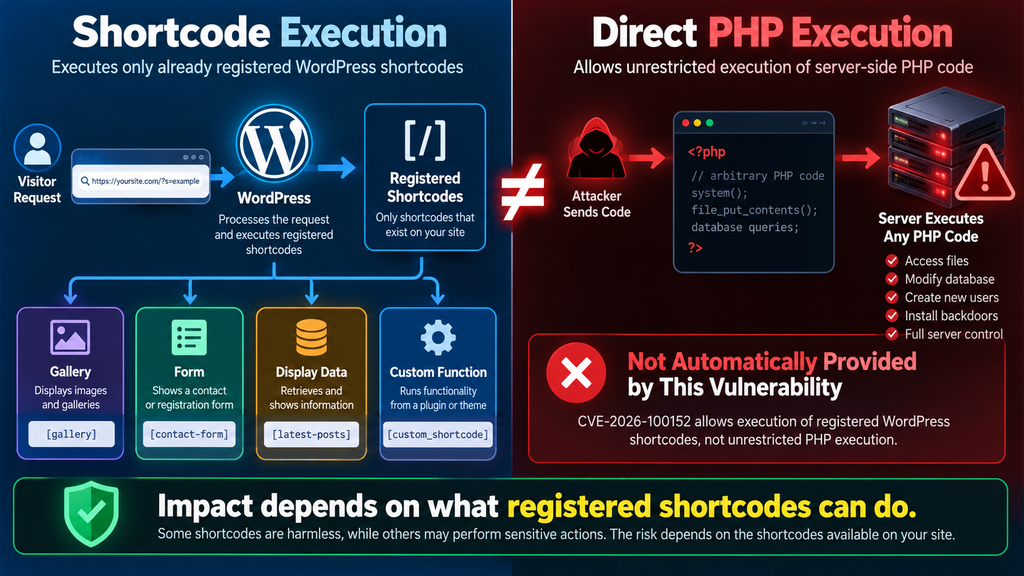
The vulnerability can potentially expose the functionality of registered shortcodes. It does not, by itself, mean an attacker receives a generic PHP interpreter where arbitrary PHP commands can simply be supplied and executed.
That difference matters enormously when assessing risk.
A site containing only simple presentation shortcodes may have a very different practical exposure from a site containing a poorly designed custom shortcode capable of performing privileged operations without its own permission checks.
Why security databases may use stronger terminology
CVE-2026-100152 is associated with CWE-94, “Improper Control of Generation of Code,” and some vulnerability databases categorize the issue broadly as code injection or arbitrary code execution. Patchstack, for example, describes the vulnerability within its Arbitrary Code Execution category.
That classification should not be ignored, but administrators should read the technical description alongside the category. The directly documented primitive is arbitrary execution of WordPress shortcodes registered on the affected site.
The consequences can become serious when a callable shortcode itself performs a dangerous action. Therefore, administrators should neither dismiss the vulnerability as “just a shortcode problem” nor describe it inaccurately as unrestricted PHP execution in every affected installation.
The safest interpretation sits between those two extremes: an unauthenticated visitor may reach shortcode functionality that the website developer did not intend to expose through a public search request.
A note about the CVE numbering
Administrators researching this issue may encounter another identifier: CVE-2026-19856.
This is not necessarily evidence of a second independent AIOSEO shortcode vulnerability that must be patched separately. Patchstack notes a possible CVE collision and states that CVE-2026-19856 describes the same issue as CVE-2026-100152. WPScan-related records similarly describe an unauthenticated arbitrary shortcode execution issue fixed in version 5.0.2.1.
For practical WordPress administration, the important point is straightforward: verify the installed AIOSEO version and move to the patched release rather than trying to treat the two identifiers as two unrelated remediation tasks.
Which AIOSEO Versions Are Vulnerable
The CVE record for CVE-2026-100152 identifies All in One SEO versions up to and including 5.0.2 as affected. WPScan also lists the shortcode vulnerability as fixed in 5.0.2.1.
That version boundary deserves attention because 5.0.2 itself is not the security fix for this specific vulnerability. If your WordPress dashboard reports AIOSEO 5.0.2, you should not assume that you are protected simply because the plugin appears recently updated.
The security release that matters here is 5.0.2.1.
The official WordPress.org changelog confirms that version 5.0.2.1 introduced improved security protections for shortcodes on search pages. This wording aligns directly with the behavior described in the vulnerability advisory.
How to check the installed version
The easiest method is available directly inside WordPress.
Open the WordPress administration dashboard and go to Plugins → Installed Plugins. Find All in One SEO and inspect the displayed version number.
If you see 5.0.2 or an older release, the installation falls within the affected range identified for CVE-2026-100152.
If you see 5.0.2.1 or a newer legitimate release, you have crossed the documented fixed-version boundary.
Administrators who manage WordPress through WP-CLI can also check the installed version from the command line. For example:
wp plugin get all-in-one-seo-pack --field=version
The command should return the version installed on that particular WordPress installation.
This can be especially useful for administrators managing several websites because checking each dashboard manually becomes inefficient.
Do not rely only on automatic updates
A site may have automatic plugin updates enabled and still deserve verification.
An automatic update can be delayed, disabled by hosting policies, interrupted by filesystem permissions, prevented by a maintenance issue, or intentionally restricted by a staging and deployment workflow. Managed websites may also pin plugin versions until an administrator approves them.
Therefore, “automatic updates are enabled” is not the same as “5.0.2.1 is installed.”
Verify the result.
After updating, reload the Installed Plugins screen or run the WP-CLI version check again. Confirm that the active installation reports 5.0.2.1 or later.
A practical exposure checklist
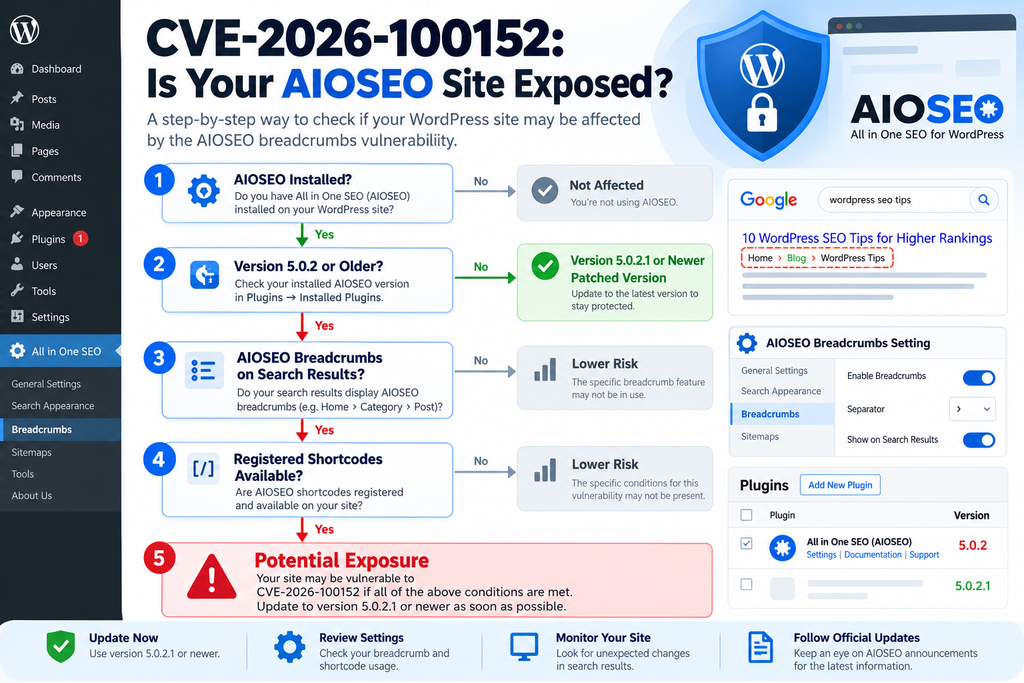
A vulnerable version is the first question, but it is not the only question. When evaluating CVE-2026-100152, administrators should determine:
- Is All in One SEO installed?
- Is the installed version 5.0.2 or older?
- Are AIOSEO breadcrumbs enabled?
- Are those breadcrumbs rendered on WordPress search result pages?
- Which shortcodes are registered by the active theme, plugins, and custom code?
- Do any registered shortcodes perform sensitive actions?
- Are unusual requests reaching WordPress search URLs?
- Has the site already been updated to 5.0.2.1 or later?
The first two questions establish whether the software version falls within the reported range. The next questions help determine how relevant the vulnerable execution path may be to the specific website.
None of these checks should be used as a reason to postpone the update. Even when you believe the vulnerable path is unreachable, installing the patched release removes unnecessary uncertainty.
Why Breadcrumbs on Search Pages Matter
Breadcrumbs usually look harmless. They are navigation elements showing where a visitor currently sits within a website hierarchy. A typical article might display something similar to “Home → WordPress → Security → Article.”
AIOSEO provides a Smart Breadcrumbs feature, and breadcrumbs can be integrated into WordPress through several mechanisms. The vulnerability advisory specifically says the vulnerable condition requires AIOSEO breadcrumbs to be rendered on the search results page through the plugin’s block, widget, shortcode, or template tag.
This requirement is important because it narrows the vulnerable execution path.
Merely installing AIOSEO does not mean every request to every page follows the same code path. WordPress loads different templates and components depending on whether someone visits a post, page, archive, category, search result, homepage, or another endpoint.
For this issue, search results and breadcrumb rendering intersect in a security-sensitive way.
How a normal WordPress search works
Imagine a visitor searches a WordPress website for:
wordpress security
WordPress processes that search term and generates a search results page. Depending on the theme and plugins, the search phrase may also appear in the page title, breadcrumb trail, heading, metadata, or another interface element.
Under normal circumstances, the search query is data. WordPress should treat it as text supplied by a visitor.
The security problem appears when visitor-controlled data reaches functionality that interprets special syntax rather than treating everything as ordinary text.
WordPress shortcodes use recognizable bracket-based syntax. When WordPress deliberately passes content through its shortcode processor, registered shortcode tags can be interpreted and their callbacks executed.
The CVE description says the affected AIOSEO path did not properly validate a value before do_shortcode() processing occurred. That creates the possibility that something intended to remain search-related input can instead reach shortcode execution.
Why breadcrumbs become part of the attack surface
Breadcrumbs often incorporate contextual information.
On a category archive, that may be the category name. On an article, it may be the post title. On a search results page, the breadcrumb system may need information connected to the current search.
That creates a boundary between external input and generated site output.
Whenever user-controlled input crosses such a boundary, developers need to decide what the application should allow. Should the value be displayed as plain text? Should HTML be permitted? Should shortcode syntax be recognized? Should a known subset of formatting be accepted?
A security issue can emerge when the answer becomes broader than intended.
CVE-2026-100152 demonstrates why seemingly minor presentation features deserve the same input-validation discipline as larger application components.
Example of a vulnerable configuration
Consider a fictional WordPress technology blog.
The administrator installs AIOSEO and places AIOSEO breadcrumbs inside the theme’s search template. Visitors searching the site see breadcrumbs above their results.
The website also contains several plugins that register their own shortcodes.
A normal visitor searches for a laptop model. Everything works as expected.
An attacker, however, deliberately manipulates the search input so it resembles syntax understood by WordPress’s shortcode system.
If the vulnerable AIOSEO version passes that attacker-controlled value into shortcode processing, WordPress may attempt to invoke a registered shortcode instead of treating the entire search phrase as ordinary text.
The key security failure is not that search exists. It is not that breadcrumbs are inherently dangerous. Shortcodes themselves are not inherently insecure either.
The dangerous combination is untrusted input reaching an execution mechanism without sufficient restriction.
What if your site does not show breadcrumbs on search pages?
According to the CVE description, the reported attack path requires AIOSEO breadcrumbs to be rendered on the search results page. If your site does not satisfy that condition, the specific path described by CVE-2026-100152 may not be reachable in the documented manner.
However, that is not a good reason to keep an affected plugin version.
Themes change. Widgets move. Templates get redesigned. Staging configurations reach production. Another administrator may enable breadcrumbs months later and forget that an old security advisory depended on that exact feature.
Updating is simpler and safer than permanently maintaining a configuration workaround.
What an Attacker Can Do With WordPress Shortcodes
Understanding the impact requires understanding what a WordPress shortcode actually does.
A shortcode is essentially a named interface connected to PHP code registered by WordPress, a plugin, a theme, or custom functionality. When WordPress encounters that shortcode in an appropriate context, it calls the associated callback.
The callback decides what happens next.
That means two shortcodes can have completely different security consequences.
One might simply return a copyright year. Another might retrieve private database information. A third might submit data to an external service. A badly designed custom shortcode could even perform administrative actions without checking whether the current visitor has permission.
Therefore, “arbitrary shortcode execution” describes the capability being exposed, but it does not guarantee one identical outcome across every WordPress website.
Example: a harmless display shortcode
Suppose a website registers a shortcode named conceptually as “current year.”
Its callback simply calculates the current year and returns text such as “2026.”
If an attacker somehow forces that shortcode to execute, the security impact from that shortcode alone may be negligible. The server performs an action that it already performs publicly throughout the website.
This illustrates why shortcode execution should not automatically be translated into “full server compromise.”
Example: a shortcode that exposes information
Now consider a membership plugin with a shortcode designed to display account-related information.
A secure implementation should check the current user’s authentication state and permissions before returning anything sensitive.
However, plugins vary widely in quality and design.
If a shortcode assumes it will only ever be placed on a protected page, it might rely too heavily on the surrounding page instead of performing its own authorization checks.
Unexpected shortcode execution can break that assumption.
The AIOSEO vulnerability can therefore become a bridge into functionality belonging to another plugin.
Example: a shortcode that changes data
The risk becomes more serious when a shortcode performs an action instead of merely displaying information.
Imagine custom WordPress code containing a shortcode originally created for an internal administration page. Its callback updates a record or triggers a maintenance operation.
If the developer never expected an unauthenticated visitor to invoke that shortcode, authorization may be weak or absent.
An arbitrary shortcode execution vulnerability can potentially make that design mistake reachable from an unintended location.
This is why administrators should evaluate their entire shortcode ecosystem, not only AIOSEO.
Why this still does not equal unrestricted PHP execution
A visitor exploiting shortcode execution does not automatically gain the ability to submit something like an arbitrary PHP script and ask WordPress to execute it.
The attacker is generally constrained to shortcodes that WordPress already knows about.
Those shortcodes exist because some installed component registered them.
Think of the distinction like entering a building.
Direct arbitrary PHP execution would resemble receiving keys to every room and being allowed to bring your own machinery inside.
Arbitrary shortcode execution is closer to unexpectedly gaining access to buttons already installed in the building.
Some buttons may only switch on a light. Others could operate something much more important.
The security impact depends on which buttons exist and what happens when someone presses them.
Chained impact is the real concern
WordPress security rarely exists in isolation.
A vulnerability that looks moderate on a clean installation may become much more useful when combined with another plugin’s unsafe functionality.
Suppose shortcode A exposes information. Shortcode B creates an object. Shortcode C calls an API. Shortcode D belongs to old custom code and lacks a capability check.
An attacker who can invoke registered shortcodes may explore which available callbacks produce useful results.
That is why CVSS scores provide guidance rather than a complete description of site-specific risk.
CVE-2026-100152 has a published CVSS 3.1 score of 6.5, with low attack complexity, no privileges required and no user interaction required. The published vector lists low confidentiality and integrity impacts with no availability impact.
Your individual WordPress installation may still deserve higher operational priority because its plugin stack can change what shortcode execution accomplishes.
Custom shortcodes deserve special attention
Many mature WordPress websites contain code written years ago.
A developer may have added snippets to functions.php, a child theme, a custom plugin, or a must-use plugin. Those snippets may register shortcodes that nobody remembers today.
This is especially common on websites that have gone through several redesigns.
An old shortcode may still be registered even though no published post currently uses it.
That matters because an attacker does not necessarily care whether editors actively use the shortcode. What matters is whether WordPress registers it and whether an unexpected execution path can reach it.
During the audit, therefore, administrators should search the codebase for shortcode registration rather than only searching posts for visible shortcode usage.
Updating All in One SEO to Version 5.0.2.1

The most important action is also the simplest: update All in One SEO.
The official WordPress.org plugin changelog lists version 5.0.2.1 and specifically states that the release improves security protections for shortcodes on search pages. Independent vulnerability records identify 5.0.2.1 as the patched version for the reported arbitrary shortcode execution issue.
Do not stop at 5.0.2.
For CVE-2026-100152, version 5.0.2 remains inside the affected range.
Step 1: Back up the site
Before changing production software, make sure a recent backup exists.
At minimum, preserve both the WordPress database and files needed to restore the site. Depending on your hosting environment, this may include wp-content, custom configuration files, themes, plugins, uploads, and server-specific configuration.
The purpose of the backup is not because the AIOSEO security update is expected to damage the site. Backups are simply good operational practice before production changes.
For example, imagine an unrelated plugin conflict appears immediately after the update. Without a backup, troubleshooting becomes stressful because you cannot easily separate the security update from other recent changes.
A current backup gives you a recovery point.
Step 2: Check the current AIOSEO version
Go to Plugins → Installed Plugins and locate All in One SEO.
Write down the installed version before changing anything.
If the version is 5.0.2 or earlier, treat it as affected according to the CVE record.
This small step also creates a useful incident record. If you later discover suspicious requests in yesterday’s access logs, you will know whether the vulnerable software was present at that time.
Administrators using WP-CLI can check with:
wp plugin get all-in-one-seo-pack --field=version
Document the result if the website belongs to a client, business, agency, or organization with formal security procedures.
Step 3: Update to 5.0.2.1 or newer
Use the normal WordPress update mechanism or your established deployment workflow.
From the WordPress dashboard, open the Plugins screen and install the available AIOSEO update.
WP-CLI users can normally update the plugin with:
wp plugin update all-in-one-seo-pack
Afterward, check the version again.
The important target is 5.0.2.1 or later.
The official WordPress.org listing confirms the 5.0.2.1 release and identifies its shortcode security improvement.
Step 4: Purge caches
A plugin update changes PHP files on the server, so a page cache does not normally determine which plugin code exists. Nevertheless, clearing relevant caches after a security update is sensible.
Depending on the website, this may include a WordPress caching plugin, server-side page cache, reverse proxy, CDN cache, object cache, or hosting platform cache.
The goal is to make sure visitors receive content produced by the current application state and that your post-update testing does not accidentally examine stale pages.
Do not confuse cache purging with remediation, however.
Clearing a cache does not fix CVE-2026-100152.
Updating the vulnerable plugin does.
Step 5: Test normal search functionality
Open the public website and perform several ordinary searches.
Try a common keyword, a phrase that returns several results, and a search that returns no results.
Check that the search page loads normally.
If AIOSEO breadcrumbs appear there, verify that they still display correctly. Test both desktop and mobile layouts if your theme uses different markup at different breakpoints.
A security update should be followed by functional testing because administrators need confidence that the protected path still works correctly for legitimate users.
Step 6: Check breadcrumbs
Navigate through posts, pages, archives, categories, and search results where AIOSEO breadcrumbs are expected.
Make sure navigation remains correct.
This test is especially relevant here because breadcrumbs are directly connected to the reported vulnerable condition.
If your theme contains custom AIOSEO integration, check that integration carefully. A developer may have inserted breadcrumbs through a template tag rather than through the WordPress block editor.
The vulnerability advisory explicitly recognizes multiple breadcrumb rendering methods, including blocks, widgets, shortcodes, and template tags.
Step 7: Confirm the final version
Never end a security update process with “the update button was clicked.”
Confirm the outcome.
Return to the plugin list and verify that the active AIOSEO installation reports 5.0.2.1 or later.
With WP-CLI, run the version query again.
If you manage multiple sites, repeat this confirmation individually. One successful update on one WordPress installation says nothing about another site hosted on the same server.
Step 8: Review the surrounding plugin stack
After closing the immediate AIOSEO issue, look at the wider environment.
Are other plugins outdated?
Are there abandoned plugins?
Do you have custom plugins that register shortcodes?
Does the child theme contain old shortcode callbacks?
Are inactive plugins still sitting on the filesystem?
Security maintenance works best as a system rather than a sequence of isolated emergency patches.
CVE-2026-100152 is a useful reminder that one plugin can expose functionality registered by another component. The security of a WordPress site therefore depends on interactions across the entire stack.
Auditing Search Requests and Registered Shortcodes
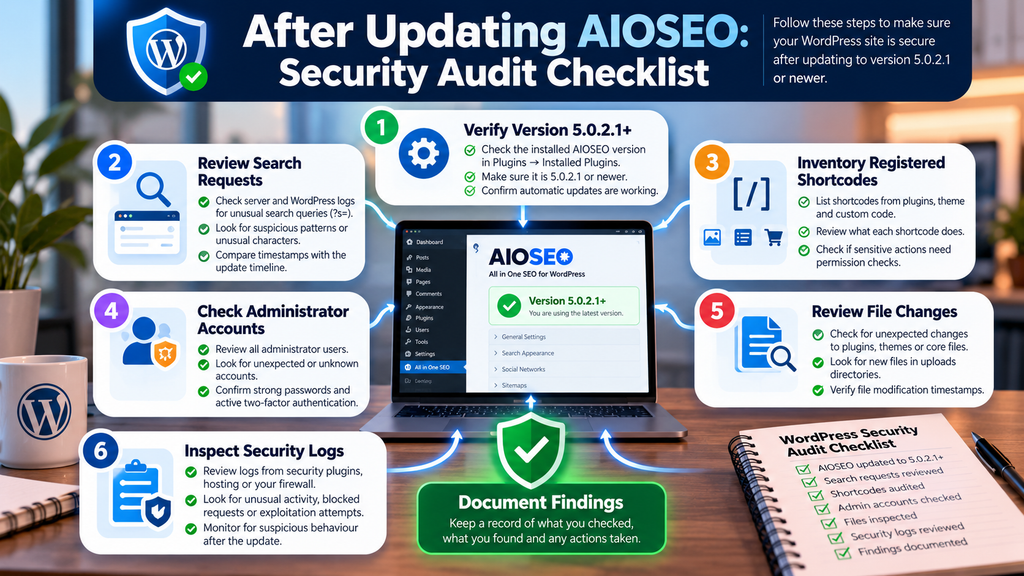
Updating closes the known vulnerable version, but administrators may still want to understand whether suspicious activity occurred before the update.
That requires two different investigations.
First, inspect requests reaching WordPress search functionality.
Second, inventory the shortcodes registered by your plugins, theme, child theme, and custom code.
Neither process proves exploitation by itself. Together, however, they provide much better context.
Review web server access logs
WordPress search requests commonly use the s query parameter.
A conventional search may appear conceptually as:
/?s=wordpress
Normal websites can receive thousands of such requests from visitors, bots, crawlers, search tools, and automated systems.
Therefore, the presence of ?s= in access logs is not suspicious by itself.
Look instead for unusual patterns.
Examples include abnormally encoded characters, repeated requests containing bracket-like structures, large bursts of searches from one source, unusual query lengths, or requests that clearly differ from ordinary human search behavior.
Be careful with interpretation. Security scanners and legitimate monitoring systems can generate strange requests too.
Logs provide evidence that something was requested. They do not automatically prove that a shortcode executed successfully.
Compare suspicious requests with the patch timeline
CVE-2026-100152 was published in early October 2026, while the vulnerability timeline indicates the vendor had been notified earlier. Once a vulnerability becomes public, automated scanning often becomes a practical concern because attackers and researchers can begin looking for exposed installations.
If you identify unusual search requests, compare their timestamps with your own update timeline.
Ask when AIOSEO 5.0.2.1 was installed.
Determine which AIOSEO version was active when the suspicious request arrived.
Check whether breadcrumbs were present on the search template at that time.
This produces a much stronger assessment than simply seeing an unusual URL and declaring the site compromised.
Inventory registered shortcodes
Administrators should also identify which shortcodes exist.
Developers can search plugin and theme code for WordPress’s add_shortcode() function.
For example, if a custom plugin contains shortcode registrations, each associated callback deserves review.
Ask what the callback does.
- Does it only return static content?
- Does it read the database?
- Does it expose information?
- Does it accept shortcode attributes?
- Does it modify posts or options?
- Does it create files?
- Does it send email?
- Does it call an external API?
- Does it perform a capability check?
- Does it verify a nonce when performing an action that requires one?
The answers determine how concerning unexpected shortcode execution could be.
Audit custom code before blaming third-party plugins
Custom WordPress code deserves particular attention because it may not receive automatic security updates.
Imagine that an agency built a custom shortcode five years ago. It was designed for a private page accessible only to staff.
The developer assumed the page itself would protect the shortcode, so the callback contains no independent authorization check.
Years later, the page is removed, but the custom plugin remains active.
The shortcode still exists.
A vulnerability that allows unexpected shortcode invocation can expose that forgotten callback.
The lesson is broader than AIOSEO: sensitive functions should enforce authorization at the function that performs the sensitive operation. Developers should not depend entirely on the location from which they expect the function to be called.
Review application and security logs
If the website uses a WordPress security plugin, hosting security platform, web application firewall, reverse proxy, or CDN security service, examine those logs as well.
Look for correlations.
A suspicious search request followed by unusual POST requests, authentication attempts, newly created users, changed plugin files, or unexpected administrative activity deserves more investigation than an isolated malformed search URL.
Likewise, inspect file modification timestamps where appropriate.
Unexpected PHP files inside upload directories can be concerning. Changes to active plugins or themes that were not part of a legitimate update also deserve attention.
However, avoid treating every modified file as proof of compromise. WordPress updates, plugin updates, caching systems, backup tools, optimization plugins, and deployment processes legitimately modify files.
Security investigation depends on context.
Check administrator accounts
Review Users → All Users and verify privileged accounts.
Make sure every Administrator account belongs to someone who should have that access.
Look for unexpected accounts, recently created administrators, unfamiliar email addresses, or unexplained role changes.
This is a general post-incident precaution rather than a claim that CVE-2026-100152 automatically creates administrators.
The documented vulnerability is arbitrary shortcode execution. Whether that could lead to account creation depends on additional functionality available on the affected website.
That distinction should remain clear.
Check for unexpected configuration changes
Review important WordPress settings and security controls.
Check whether plugins were unexpectedly activated or deactivated. Review recently installed plugins. Inspect critical configuration changes if you have auditing available.
For WooCommerce, membership, learning-management, community, or subscription websites, examine application-specific records too.
Again, the objective is not to assume compromise.
The objective is to establish whether there is evidence that suspicious requests produced persistent changes.
What to do if suspicious activity appears
If logs suggest successful exploitation, updating AIOSEO is necessary but may not be sufficient.
Preserve relevant logs before rotating or deleting them.
Create a backup or forensic snapshot of the affected environment when appropriate. Review WordPress core files, active plugins, themes, must-use plugins, administrator accounts, scheduled tasks, database changes, and server-level persistence.
Change credentials when there is evidence they may have been exposed.
If the site handles customer information, financial transactions, membership data, or other sensitive information, consider involving a qualified WordPress security professional or incident-response specialist.
The correct response depends on what actually happened, not merely on the presence of a vulnerable plugin version.
Why This Vulnerability Is a Useful WordPress Security Lesson
CVE-2026-100152 highlights a security principle that extends far beyond one SEO plugin: data and executable behavior should remain clearly separated.
A search phrase should normally remain a search phrase.
When externally controlled data enters a parser or execution system, developers need strict controls around that transition.
WordPress makes shortcodes easy to create, which is one reason the platform has such a flexible plugin ecosystem. Yet that convenience also means thousands of plugins and custom websites can register callbacks with radically different capabilities.
A vulnerability that unexpectedly reaches those callbacks inherits some of their risk.
Every plugin expands the application
WordPress administrators sometimes think about plugins as isolated boxes.
SEO belongs to the SEO plugin. Forms belong to the form plugin. Security belongs to the security plugin. E-commerce belongs to WooCommerce.
Technically, however, all active components participate in one PHP application.
They share WordPress hooks, filters, APIs, database access, HTTP requests, user capabilities, shortcodes, REST endpoints, scheduled tasks, and other platform mechanisms.
A vulnerability in one plugin can therefore expose a useful capability implemented by another.
That is why minimizing unnecessary plugins still matters.
Fewer active components do not guarantee security, but they reduce the amount of code and functionality exposed to unexpected interactions.
Permission checks should exist close to sensitive actions
Developers writing custom shortcodes should assume the shortcode might eventually be invoked from an unexpected context.
If a shortcode performs an operation that should only be available to administrators, the callback should verify the required capability.
If it changes data, appropriate authorization and request validation should exist.
If it exposes private information, the callback should determine whether the current user has permission to receive that information.
Do not rely solely on statements such as, “We only use this shortcode on a private page.”
The page may be private today. Another plugin may call the shortcode tomorrow. A template may change. A future vulnerability may expose an unexpected path.
Defensive checks belong close to the sensitive operation.
Security severity and update priority are different questions
Some administrators see “Medium” and postpone an update.
That can be a mistake.
CVSS helps standardize vulnerability characteristics, but administrators still need to consider their environment.
A Medium vulnerability in a plugin installed on millions of websites may attract significant scanning. A Medium issue that requires no authentication may deserve faster attention than a higher-scored vulnerability requiring a privileged account that your site never provides.
The correct question is not simply, “Is the score high?”
Ask instead, “Is my site affected, is the vulnerable path exposed, is a fix available, and what is the cost of updating?”
For CVE-2026-100152, the fix is available.
That makes the decision straightforward.
Update.
Frequently Asked Questions
What is the All in One SEO vulnerability CVE-2026-100152?
CVE-2026-100152 is an unauthenticated arbitrary shortcode execution vulnerability affecting All in One SEO versions up to and including 5.0.2. The reported issue involves insufficient validation before shortcode processing and requires AIOSEO breadcrumbs to be rendered on a WordPress search results page.
Which All in One SEO versions are vulnerable?
The published CVE record lists versions through 5.0.2 as affected. Version 5.0.2.1 contains the relevant security improvement, and WordPress.org’s changelog specifically mentions improved shortcode protections on search pages.
Is All in One SEO 5.0.2 safe from this vulnerability?
No. CVE-2026-100152 explicitly includes version 5.0.2 in the affected range. Administrators should update to 5.0.2.1 or a later legitimate release.
Does an attacker need a WordPress account?
No account is required for the attack described in the advisory. The CVSS vector specifies privileges required as “None,” which is one reason administrators should treat the update seriously even though the overall published severity is Medium.
Does CVE-2026-100152 allow arbitrary PHP execution?
The directly documented capability is arbitrary execution of registered WordPress shortcodes. That should not automatically be described as unrestricted PHP execution. The real impact depends on which shortcodes are registered and what their callbacks can do. Some security databases categorize the weakness broadly as code execution, but the technical attack primitive described by the CVE is shortcode execution.
Is every website running AIOSEO equally exposed?
No. The documented exploitation condition requires AIOSEO breadcrumbs to be rendered on the search results page through a supported breadcrumb integration method. Site configuration therefore matters. Nevertheless, affected installations should update rather than relying on the absence of that configuration as a permanent mitigation.
Why are WordPress search pages involved?
The vulnerability involves visitor-controlled search input and the processing path used when AIOSEO breadcrumbs are rendered on search results. Improper handling could allow shortcode syntax in that input to reach WordPress shortcode processing.
Should I disable WordPress search?
Updating AIOSEO to the patched version is the appropriate primary remediation. Disabling search may disrupt legitimate visitors and does not replace maintaining patched software. If an immediate update is temporarily impossible, reducing exposure may form part of a temporary mitigation strategy, but the plugin should still be updated as soon as possible.
What should I check after installing 5.0.2.1?
Verify the installed version, test normal searches, confirm breadcrumbs still work, purge relevant caches, review suspicious historical search requests, inventory sensitive custom shortcodes, and check security logs if the site was exposed while running a vulnerable version.
Why do some sources mention CVE-2026-19856?
A second identifier, CVE-2026-19856, has appeared for an issue describing the same AIOSEO shortcode vulnerability. Patchstack explicitly notes a possible CVE collision. Administrators should focus on the affected software range and remediation: upgrading AIOSEO to version 5.0.2.1 or later.
Întrebări Frecvente
Trebuie să mă panichez dacă folosesc All in One SEO?
Nu. The correct response is verification and remediation rather than panic. Check the installed version immediately. If it is 5.0.2 or older, update to 5.0.2.1 or a newer legitimate release. Then review the site’s breadcrumb configuration and logs if you need to assess historical exposure.
Este suficient doar să actualizez pluginul?
For most sites without evidence of exploitation, installing the patched release is the essential remediation. Sites that were exposed for a meaningful period, contain sensitive custom shortcodes, or show suspicious search traffic should perform additional log and integrity checks.
Trebuie să șterg AIOSEO?
There is no general requirement to remove AIOSEO because of this vulnerability. A security fix is available. Keeping plugins updated and auditing unusual activity is normally more appropriate than immediately removing a plugin solely because a patched vulnerability was disclosed.
The Practical Takeaway for WordPress Administrators
The most useful way to understand the All in One SEO vulnerability is neither to minimize it nor exaggerate it.
CVE-2026-100152 is a real unauthenticated security issue. It affects All in One SEO through version 5.0.2, involves WordPress shortcode execution through search input, and depends on AIOSEO breadcrumbs being rendered on search result pages. The published CVSS 3.1 score is 6.5, or Medium.
At the same time, “arbitrary shortcode execution” should not automatically be rewritten as “any visitor can execute arbitrary PHP and completely control every affected server.”
The documented primitive is narrower.
Its consequences depend on the shortcodes registered on a particular website and the capabilities those callbacks expose.
That nuance should not reduce the urgency of patching. In fact, it provides another reason to update quickly: most administrators do not have a complete mental inventory of every shortcode registered by every plugin, theme, MU plugin, and custom snippet on their site.
The simplest security decision is therefore the strongest one.
Update AIOSEO to 5.0.2.1 or later, verify the installed version, test search and breadcrumb functionality, and review unusual historical search traffic when appropriate.
Then take one additional lesson from the incident.
WordPress security is not only about protecting /wp-admin/. Public features such as search forms, breadcrumbs, blocks, widgets, REST endpoints, shortcodes, and template integrations can also become security boundaries when visitor-controlled data interacts with executable application functionality.
Keeping that boundary narrow is one of the foundations of a safer WordPress site.
⚠️ Disclaimer and Source Hygiene
This article is provided for educational, defensive, and website-administration purposes. It does not provide legal advice, guarantee that a website is secure, or replace a professional incident-response investigation.
Technical details were cross-checked against the published CVE information, WordPress.org’s official plugin listing and changelog, WPScan, Rapid7, Patchstack, and related vulnerability records available at the time of publication. Vulnerability records can be updated as researchers, vendors, and CVE authorities receive new information.
The article intentionally avoids publishing a working exploit payload. Site owners do not need a weaponized proof of concept to perform the recommended defensive actions: identify the installed version, update the plugin, inspect the relevant configuration, audit registered shortcodes, and review logs where appropriate.
🔔 For more tutorials like this, consider subscribing to our blog.
📩 Do you have questions or suggestions? Leave a comment or contact us!
🏷️ Tags: All in One SEO vulnerability, CVE-2026-100152, AIOSEO vulnerability, WordPress security, WordPress vulnerability, shortcode execution, AIOSEO 5.0.2.1, WordPress plugin security, AIOSEO security update, WordPress cybersecurity
📢 Hashtags: #WordPressSecurity, #AIOSEO, #WordPress, #CVE2026100152, #CyberSecurity, #WordPressVulnerability, #WebsiteSecurity, #PluginSecurity, #WordPressTips, #WebSecurity
📚 Sources and References
The primary technical record for CVE-2026-100152 identifies All in One SEO through version 5.0.2 as affected, describes the unauthenticated shortcode execution condition, identifies the AIOSEO breadcrumb requirement, and assigns a CVSS 3.1 score of 6.5.
The official All in One SEO listing on WordPress.org provides the current plugin information and changelog. Version 5.0.2.1 specifically records improved security protections for shortcodes on search pages.
WPScan All in One SEO vulnerability database identifies the arbitrary shortcode execution vulnerability as fixed in version 5.0.2.1.
Rapid7 CVE-2026-100152 record documents the affected versions, unauthenticated attack condition, breadcrumb requirement, and CVSS 3.1 assessment.
Patchstack All in One SEO vulnerability record lists version 5.0.2.1 as patched and also notes the apparent CVE collision involving CVE-2026-19856.
🕊️ Secondary Sources and Testimonials
Independent vulnerability databases consistently support the central defensive recommendation: affected All in One SEO installations should move beyond version 5.0.2 and install version 5.0.2.1 or a newer legitimate release.
Some databases use broader labels such as code injection or arbitrary code execution. For site owners, however, the most precise way to communicate the documented issue is unauthenticated arbitrary WordPress shortcode execution. That terminology makes it possible to explain the risk seriously without incorrectly promising that every vulnerable installation automatically provides unrestricted PHP execution.
No individual testimonials are used to establish technical claims in this article. Security conclusions are based primarily on published vulnerability records, the official plugin changelog, and established WordPress vulnerability databases rather than anecdotal reports.