
Table of Contents
A Kirki vulnerability affects versions 6.2.1 through 6.2.5 and can allow unauthenticated attackers to store JavaScript that executes when affected content is viewed. Learn why WordPress administrators should avoid treating 6.2.1 as a final security destination and update directly to Kirki 6.3.0.
Kirki has experienced an unusually busy sequence of security fixes across its recent releases. For WordPress administrators, this creates a practical problem. Finding one advisory that says a particular issue was fixed in version 6.2.1 does not necessarily mean 6.2.1 is the version you should install today.
The distinction matters because another Kirki vulnerability, CVE-2026-84219, affects versions beginning with 6.2.1 and continuing through the 6.2.x branch before 6.3.0. It is an unauthenticated stored cross-site scripting vulnerability involving HTML entity decoding. An attacker does not need a WordPress account to reach the vulnerable path under the conditions described by the advisory.
This creates a good example of why WordPress security decisions should consider the complete vulnerability timeline instead of a single CVE. Kirki 6.2.1 addressed several earlier security problems. However, later research identified vulnerabilities that remained in subsequent 6.2.x releases. The current WordPress.org release is 6.3.0, and its changelog specifically states that the release addresses all known security vulnerabilities.
For administrators running Kirki, the practical recommendation is therefore straightforward: back up the website, verify compatibility, and move to the current 6.3.0 release rather than intentionally stopping at an older intermediate version.
What Is CVE-2026-84219?
CVE-2026-84219 is a stored cross-site scripting vulnerability affecting Kirki versions from 6.2.1 up to, but not including, 6.3.0. The official CVE record describes a problem in how Kirki handles HTML entities while rendering content. Certain representations are not adequately neutralized before decoded content reaches the rendered page.
Stored XSS deserves particular attention because the malicious input does not necessarily disappear after the original request. Instead, attacker-controlled content can remain stored by the application. The browser later encounters that content during normal page rendering. If the application fails to sanitize or escape it correctly, the browser may interpret part of that content as executable JavaScript rather than harmless text.
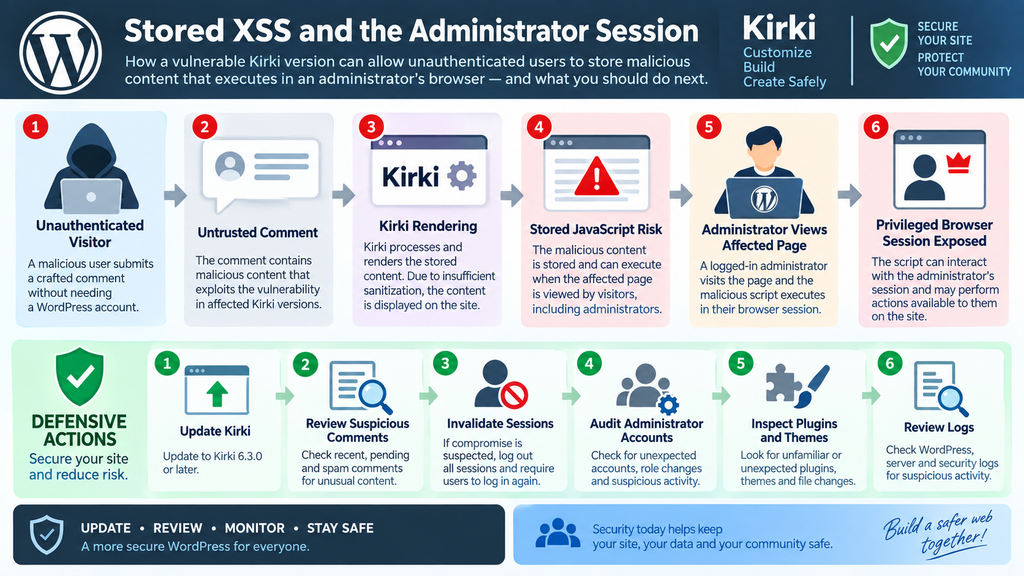
The CVE record specifically identifies comments as a path through which unauthenticated users may store JavaScript. When an affected page displays that content, the script can execute in the browser session of the visitor. That visitor could be an ordinary reader, an editor, or a logged-in WordPress administrator.
This vulnerability is classified under CWE-79, Improper Neutralization of Input During Web Page Generation, commonly known as cross-site scripting. CISA’s ADP enrichment attached a CVSS 3.1 score of 7.5, placing it in the High severity category. The record lists network reachability, no required privileges, required user interaction, and potentially high confidentiality, integrity, and availability impacts.
Why Stored XSS Is Different From a Temporary Browser Error
A normal JavaScript error generally affects functionality. It may break a button, animation, menu, or form, but it does not automatically indicate that an attacker controls the script. Stored XSS is fundamentally different because attacker-controlled input becomes part of content that the application later serves to other visitors.
That persistence changes the security model. The attacker may submit the content once and wait for another person to encounter it. The victim does not necessarily need to click an obviously suspicious external link. Simply loading affected content can provide the interaction required for the browser to process the stored payload.
The risk becomes more significant when privileged WordPress users routinely browse the front end while authenticated. Administrators often inspect comments, preview layouts, review published pages, or troubleshoot content without first logging out. A stored XSS issue can therefore cross the boundary between public content and a privileged browser session.
It is also important not to interpret XSS as automatic server takeover. JavaScript normally operates inside the browser security context. However, when that browser belongs to an authenticated administrator, actions available through the administrator’s active WordPress session can make the consequences much more serious.
The Kirki 6.2.x Security Timeline Matters
The Kirki vulnerability story cannot be understood correctly by looking at CVE-2026-84219 alone. Version 6.2.1 itself was released on August 6, 2026, and its changelog states that it addressed multiple security vulnerabilities, including XSS, arbitrary shortcode execution, path traversal, SSRF, and email relay issues.
That sounds reassuring when read in isolation. At that moment, an administrator using an older vulnerable release could reasonably see 6.2.1 as an important security update.
The problem is that security research continued.
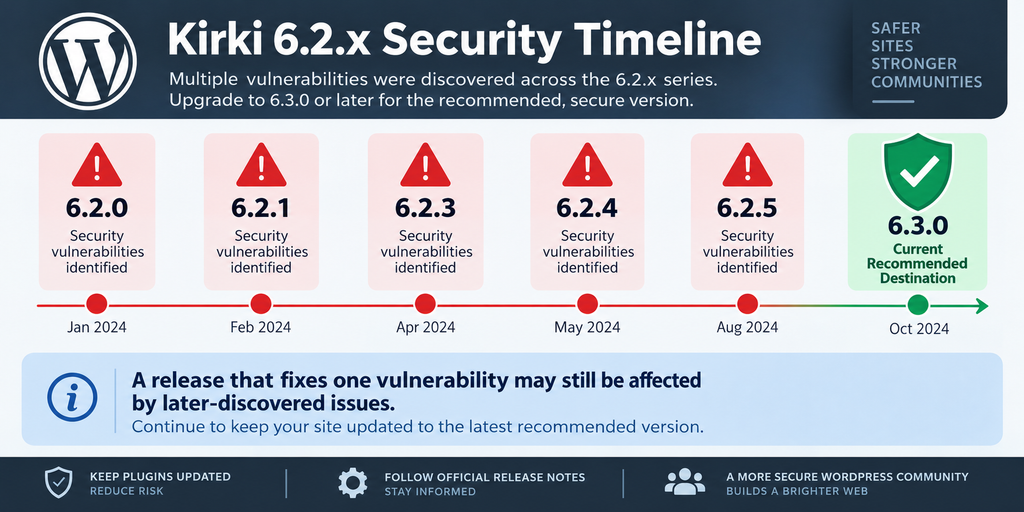
Kirki 6.2.3 arrived on August 14, followed by 6.2.4 on August 19 and 6.2.5 on August 25. The 6.2.4 changelog itself mentions security fixes related to XSS through attacker-injected object keys and the disabling of unauthorized POST API calls.
Then 6.3.0 arrived on September 2. Its changelog contains a particularly important statement for administrators evaluating the upgrade path: the release addressed all known security vulnerabilities.
This is why security advice ages quickly. A version that was an appropriate upgrade target in early August is not automatically the appropriate target in September.
Current Affected Version Range
The official CVE information identifies the affected range for CVE-2026-84219 as Kirki 6.2.1 through versions below 6.3.0. In practical terms, that includes the relevant 6.2.x releases through 6.2.5.
WPScan’s broader Kirki vulnerability listing also shows how densely packed the security activity became around this branch. Its current records include an unauthenticated stored XSS issue affecting versions below 6.2.5, along with additional issues whose fixed versions eventually converge on 6.3.0.
That history makes a version-only recommendation such as “update to 6.2.1” misleading when read today. It may correctly describe the fix for an earlier vulnerability while failing to account for vulnerabilities discovered afterward.
Security recommendations should always answer two separate questions: which release fixed the vulnerability being discussed, and which release is currently the appropriate secure destination?
Those answers are not always the same.
How JavaScript Can Be Injected Without Authentication
The most important characteristic of CVE-2026-84219 is that exploitation does not require the attacker to authenticate to WordPress first. The published description explains that affected Kirki versions do not adequately handle every form of HTML entity that can later be decoded during rendering.
HTML entities are normally useful and harmless. They provide a standardized way to represent characters inside HTML documents. Security problems appear when an application validates content in one representation but later transforms or decodes that content into another representation without applying equivalent security checks.
Conceptually, an application may believe it stored harmless encoded text. During a later rendering stage, however, that encoded representation may become browser-interpretable markup. If sanitization and output escaping do not account for that transformation, content that passed an earlier check can become dangerous after decoding.
The vulnerability record says this behavior can allow an unauthenticated user to store JavaScript in a comment. That content can then execute when someone visits a page where the affected comment is displayed.
No exploit string is necessary to understand the defensive lesson. Input validation must account for the final representation that reaches the browser, not only the representation originally received from the user.
Comments Create a Public Input Surface
WordPress comments are often intentionally public. Many websites allow visitors to submit a name, email address, website field, and comment without creating a WordPress account. Moderation settings determine whether that comment appears immediately or requires approval.
That makes comments a particularly important boundary for sanitization. Public input should always be treated as untrusted regardless of whether the visitor appears legitimate.
For the Kirki issue, the concern is not simply that a visitor can submit unusual text. The problem is the interaction between stored content and Kirki’s later rendering process. The CVE describes a situation where JavaScript can survive the storage and rendering path because not every relevant entity representation is neutralized correctly.
Administrators should therefore avoid assuming that requiring comment moderation completely solves the issue. Moderation can reduce exposure, but it is not a replacement for patching vulnerable software. A moderator could also be exposed while reviewing or rendering malicious content, depending on the affected workflow.
Updating removes reliance on administrators correctly recognizing every malicious input pattern.
Site-Wide Rendering Can Increase Exposure
The official description highlights an especially important configuration. If comments are incorporated into a header or footer created with Kirki, the stored JavaScript may run across pages where that global component appears.
That changes the possible exposure from a single content page to a much broader portion of the website.
Headers and footers are reusable components by design. Website owners place navigation, announcements, dynamic information, social elements, and other reusable content inside them because those elements need to appear consistently.
From a security perspective, global components amplify whatever content they render. Safe content gains convenient site-wide distribution. Unsafe stored content can gain the same distribution.
This does not mean every website running an affected Kirki release will execute malicious JavaScript on every page. The relevant vulnerable rendering path and attacker-controlled content still need to be present. However, administrators should treat global templates as higher-priority locations during a post-update audit.
The correct response is not to panic or delete every comment. Patch first, preserve useful evidence when compromise is suspected, and inspect the places where untrusted content could have been rendered.
What the Script Can Do in an Administrator Session
Cross-site scripting becomes especially concerning when the victim is logged into WordPress with administrative privileges. Browser-side JavaScript executes within the context of the affected website. Consequently, the script may interact with resources that the authenticated browser can access.
The CVE description explicitly notes that stored JavaScript can execute in the session of anyone viewing the affected content, including an administrator. CISA’s enrichment assesses potentially high impacts to confidentiality, integrity, and availability, although the exact real-world outcome depends on site configuration and what the injected script attempts to do.
Administrators should understand that this does not mean a successful exploit automatically obtains the administrator’s password. WordPress passwords are not normally exposed to arbitrary front-end JavaScript simply because a user is logged in.
The more relevant danger is session context.
A logged-in browser already has permission to perform actions that anonymous visitors cannot perform. Malicious same-origin script may attempt to abuse that privileged environment, access information available to the current user, manipulate displayed content, or initiate authorized actions through the victim’s session.
Administrator Privileges Increase the Potential Impact
WordPress administrators usually have broad control over a website. Depending on configuration, they can create or modify users, install or manage plugins, change themes, edit content, adjust settings, and perform other security-sensitive operations.
A script executing while such a user is authenticated therefore has a much more valuable context than the same script running for an anonymous visitor.
Security teams often describe this as privilege amplification through the victim. The original attacker may have no WordPress account at all. Instead, the attacker places persistent content somewhere the vulnerable application accepts it. The privileged user later supplies the valuable security context simply by viewing the affected page.
This is one reason stored XSS should not be dismissed as a cosmetic front-end problem.
At the same time, administrators should avoid overstating the vulnerability. The precise actions available to malicious JavaScript depend on WordPress security controls, nonces, endpoint permissions, browser restrictions, installed plugins, and the privileges of the victim.
A responsible incident assessment distinguishes between what is technically possible and what evidence shows actually happened.
Active Sessions Deserve Attention After Suspected Exploitation
If you discover suspicious stored content on a vulnerable Kirki installation and know that administrators viewed affected pages, treat the incident as more than a simple plugin update.
Updating closes the known vulnerable code path, but it does not automatically reverse actions that may already have occurred.
Review administrator accounts for unexpected additions or changes. Check recently installed or activated plugins. Inspect theme modifications, MU-plugins, scheduled tasks, unexpected redirects, and configuration changes. Server and application logs may also help establish when suspicious activity began.
Administrators with credible evidence of compromise should invalidate active sessions and rotate relevant credentials after securing and investigating the website. Password changes alone should not be the first and only response because an attacker may have established persistence elsewhere.
The objective is to restore trust in the entire WordPress installation rather than merely make the vulnerability scanner display a green status.
Why Version 6.2.1 Is Not the Recommended Destination
Kirki 6.2.1 occupies an unusual position in the security timeline. It is both a security update and part of the affected version range for a later vulnerability.
This apparent contradiction is normal in actively maintained software.
Version 6.2.1 fixed security issues known at the time of its release. The official changelog says the release addressed several vulnerabilities involving XSS, arbitrary shortcode execution, path traversal, server-side request forgery, and email relay behavior.
One earlier stored XSS issue, CVE-2026-16974, affected Kirki through 6.2.0 and was fixed in 6.2.1. That vulnerability involved insufficient sanitization and output escaping in the post_meta shortcode and required Contributor-level or greater access.
If you were responding specifically to CVE-2026-16974 when 6.2.1 was current, updating to 6.2.1 made sense.
Today, however, stopping there would leave the site inside the affected range of CVE-2026-84219.
A Fixed Version Is Not Necessarily the Latest Safe Version
This distinction is one of the most useful lessons from the Kirki vulnerability sequence.
Security databases commonly list a “fixed in” version for each individual vulnerability. Administrators may interpret that field as a universal recommendation. It is not.
Suppose vulnerability A affects versions through 6.2.0 and is fixed in 6.2.1. Later, researchers discover vulnerability B affecting versions 6.2.1 through 6.2.5. Both statements can simultaneously be correct:
Kirki 6.2.1 fixes vulnerability A.
Kirki 6.2.1 remains vulnerable to vulnerability B.
That is exactly why administrators should check the current vulnerability landscape before deliberately installing an intermediate release.
The same principle applies beyond Kirki. WordPress plugins can receive several coordinated or independently discovered security reports within days. A patch can close one vulnerable endpoint while unrelated research identifies another problem elsewhere in the codebase.
Always evaluate the current release, complete changelog, recent advisories, compatibility requirements, and all relevant vulnerability records before choosing the final destination.
The 6.2.x Branch Continued Receiving Security Fixes
Kirki’s release history demonstrates how quickly this changed. Version 6.2.1 appeared on August 6, followed by 6.2.2 on August 12, 6.2.3 on August 14, 6.2.4 on August 19, and 6.2.5 on August 25. Version 6.3.0 followed on September 2.
The 6.2.4 changelog explicitly mentions fixes for XSS involving attacker-injected object keys and unauthorized POST API calls. Yet the later CVE-2026-84219 record identifies releases below 6.3.0, beginning at 6.2.1, as affected by the HTML entity decoding XSS.
This is precisely why the editorial recommendation should not be “update to at least 6.2.1.”
That wording is historically correct for some older Kirki vulnerabilities but incomplete for a site being secured now.
The safer operational wording is: update to Kirki 6.3.0 or a later security-maintained release available when you perform the update.
As of this article’s publication context, WordPress.org lists 6.3.0 as the current release.
Kirki 6.3.0 Consolidates the Security Destination
Kirki 6.3.0 was released on September 2, 2026. In addition to new features and interface improvements, its official changelog includes the statement that all known security vulnerabilities were addressed.
WPScan also lists CVE-2026-84219 as fixed in 6.3.0. Its current Kirki vulnerability page shows other recently published issues whose fixes likewise point to 6.3.0, including unauthenticated disclosure of non-public post content and an Editor-level SQL injection issue.
That makes 6.3.0 a much more sensible destination than stepping through every intermediate security release.
WordPress administrators generally do not need to install 6.2.1, then 6.2.3, then 6.2.4, and finally 6.3.0 unless the vendor provides a specific migration requirement. The normal WordPress update mechanism replaces the installed plugin files with the selected current package while preserving relevant database content and configuration.
The important preparation is a recoverable backup and compatibility testing, not manually reproducing the historical release sequence.
Updating Safely to Kirki 6.3.0

Before updating Kirki, identify exactly how your website uses it. Kirki has historically served as a framework used by WordPress themes, while its newer releases have expanded into a freeform visual website builder. WordPress.org describes version 6.0.0 as the point where the Customizer framework and visual builder were unified.
That means the impact of an update may differ between websites. One site may have Kirki installed primarily because its theme relies on Customizer controls. Another may actively use newer builder features and dynamic components.
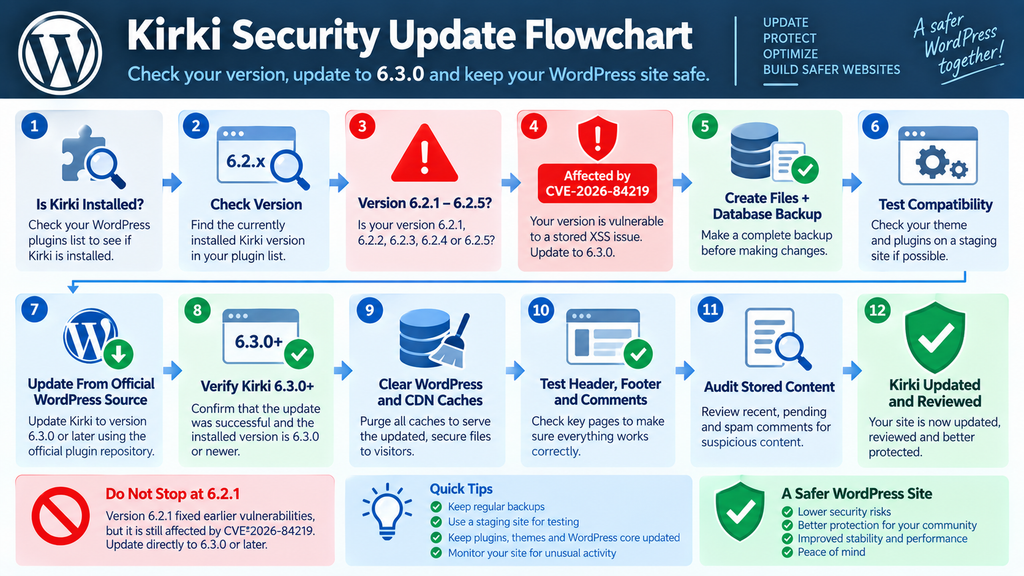
Start by checking Plugins → Installed Plugins in WordPress and confirming the installed Kirki version. If you manage WordPress through WP-CLI or a hosting dashboard, verify the version there as well.
Create a complete backup before proceeding. A useful backup should include both WordPress files and the database. More importantly, make sure you know how to restore it. A backup that has never been tested and cannot be restored quickly provides less protection than administrators often assume.
Security urgency should encourage efficient preparation, not reckless updating.
Test Theme and Plugin Compatibility
Kirki is widely used within the WordPress ecosystem. WordPress.org currently reports more than 500,000 active installations, which illustrates how many different theme and plugin combinations may depend on its functionality.
After creating a backup, review whether your active theme explicitly depends on Kirki. Check the theme developer’s current documentation when available, particularly if the theme bundles an older Kirki library or uses custom integrations.
A staging environment is ideal for important production websites. Clone the site, update Kirki to 6.3.0, clear caches, and test the pages that rely heavily on theme options or builder-generated layouts.
Check the header, footer, navigation, responsive layouts, Customizer-generated CSS, forms, dynamic content, typography, and any Kirki-specific components.
Do not delay a high-priority security update indefinitely because exhaustive testing feels safer. Instead, perform focused compatibility checks, maintain a rollback point, and deploy the update promptly.
Perform the Update From a Trusted Source
For standard installations, use the WordPress administration interface or another trusted update mechanism connected to the official plugin package.
The official WordPress.org listing currently identifies Kirki version 6.3.0 as the stable available release. It requires WordPress 5.9 or newer and PHP 7.4 or newer, and the listing reports compatibility testing through WordPress 7.1.
Avoid downloading “patched” ZIP archives from random websites, file-sharing services, forum attachments, or unofficial repositories. A security update is exactly the wrong moment to introduce unverified plugin code.
Once the update finishes, confirm the installed version rather than assuming the update completed successfully. WordPress may report an error when file permissions, disk space, network connectivity, or hosting restrictions interfere with an update.
The target should read 6.3.0 or a later official security-maintained release if a newer version becomes available after this article is published.
Clear Every Relevant Cache
After updating, clear the website’s application and page caches. If you use server-side full-page caching, purge it as well. Sites behind a CDN should invalidate the relevant cached pages according to the CDN configuration.
Browser caching can also make troubleshooting confusing. Test important pages in a clean browser session after the server-side caches have been cleared.
Cache clearing does not patch XSS and should never be presented as a vulnerability fix. Its purpose is to ensure that visitors receive output generated by the updated application rather than an older cached representation.
Pay particular attention to global components such as headers and footers because CVE-2026-84219 specifically highlights the potential for broader execution when comment-derived content is incorporated into these areas.
Finally, confirm that pages render normally and that legitimate comments still behave as expected.
A successful update should end with both security verification and functional verification.
Auditing Content for Injected Scripts
Updating Kirki fixes the vulnerable software path, but stored vulnerabilities introduce another question: what happened before the update?
A stored XSS vulnerability can leave attacker-controlled content in the database. Installing a patched plugin does not necessarily delete every previously submitted suspicious comment or other stored object. Administrators should therefore perform a targeted content review when the site ran an affected version while publicly reachable.
Begin with comments because the CVE description specifically identifies them as a storage mechanism for the vulnerable behavior. Review recently submitted comments, pending comments, spam, and content that appears structurally unusual.
Do not limit the review to comments that contain an obvious <script> tag. Modern XSS filtering problems can involve encoded or transformed markup, which is precisely why the underlying vulnerability concerns HTML entity decoding.
For defensive auditing, the goal is to identify content that does not belong rather than reproduce a working payload.
Preserve Evidence Before Deleting Suspicious Content
If a website shows credible signs of exploitation, preserve evidence before immediately deleting everything suspicious.
Record relevant timestamps, database identifiers, affected URLs, user accounts involved in reviewing the content, and available web server or application logs. Export suspicious comments or database records into a safe offline location where they cannot execute in a browser.
This evidence can help determine when the activity occurred and whether a privileged user may have encountered the malicious content.
For an ordinary personal blog with no suspicious indicators, a focused review may be sufficient. A business website handling customer accounts, payments, memberships, or sensitive information should apply a more formal incident-response process if compromise is suspected.
Avoid opening suspicious raw HTML files directly in a normal browser session while logged into WordPress. Analysis should happen in a controlled environment.
Most importantly, do not publish malicious samples in public troubleshooting posts. Defenders can understand and remediate the vulnerability without distributing working attack payloads.
Review Comments and Global Components
The CVE description provides an important clue for prioritizing the audit: comments rendered through a Kirki-built header or footer could cause stored content to appear more broadly across the website.
Start by identifying whether your Kirki layouts reference comments, comment-derived dynamic data, or reusable content that could include untrusted input.
Then inspect affected pages and global templates after the update.
Check the HTML generated on the front end for unexpected script elements, event-driven markup, unfamiliar external resources, unexplained redirects, or content that does not correspond to your legitimate design.
A visual inspection alone is not enough. Malicious behavior can remain invisible until a particular browser event occurs.
At the same time, avoid assuming every unfamiliar JavaScript file is malicious. WordPress themes, plugins, analytics services, advertising systems, consent tools, and performance plugins routinely add legitimate scripts.
Compare questionable resources against the expected components installed on your site before removing them.
Audit Administrator Accounts and Recent Changes
If an administrator loaded suspicious affected content before Kirki was updated, expand the audit beyond comments.
Review Users → All Users and verify every account with Administrator privileges. Look for accounts you do not recognize, unexpected email changes, unusual role changes, or recently created privileged users.
Next, review installed plugins and themes. Confirm that each component is expected and obtained from a trusted source. Pay particular attention to recently installed plugins or unfamiliar files that appeared during the suspected exposure period.
WordPress core integrity should also be checked. Administrators with WP-CLI access can use WordPress’s checksum functionality to compare core files against official packages. Plugin verification depends on the source and available checksums, so interpret results carefully.
Inspect MU-plugins separately because they do not behave exactly like ordinary plugins in the administration interface.
Finally, examine scheduled tasks and configuration changes if the evidence justifies a deeper investigation.
Review Logs Without Expecting a Perfect Answer
Server logs can provide useful context, but they rarely tell the entire story.
Access logs may help identify unusual requests around suspicious comment submissions. Security plugin logs may show blocked or accepted activity. Audit-log plugins can reveal administrator actions, while hosting-level logs may contain additional request information.
However, absence of evidence is not proof that exploitation never occurred.
Logs may have rotated. A CDN may hide some origin details. WordPress itself does not record every security-relevant action by default. Some attacks can resemble legitimate HTTP traffic.
Use logs together with database content, account history, filesystem changes, and known administrator activity.
If the investigation reveals no suspicious content or changes, document the review and continue monitoring. If evidence suggests that malicious JavaScript executed in an administrator session, escalate the response by invalidating sessions, rotating credentials, checking persistence mechanisms, and restoring clean components where necessary.
Understanding the Real Risk Without Overreacting
CVE-2026-84219 deserves attention because it combines stored XSS with an unauthenticated input path and potential exposure of privileged visitors. The assigned CISA ADP CVSS 3.1 score of 7.5 reflects that meaningful security impact.
However, a vulnerability being present does not prove that a specific WordPress site has already been compromised.
An affected Kirki version creates exposure. Exploitation requires attacker activity and the conditions necessary for the vulnerable content to be stored and rendered. Administrator impact additionally requires a privileged user to encounter the affected output.
This distinction matters when communicating with clients or website owners. Saying “your plugin version is vulnerable” is evidence-based. Saying “hackers already have your administrator account” without supporting evidence is not.
The correct response combines urgency with verification: update promptly, inspect relevant stored content, investigate indicators of compromise, and strengthen monitoring.
Do Not Depend on a WAF as the Primary Fix
A web application firewall can reduce exposure to many common attack patterns. Hosting security systems and WordPress security plugins may also detect suspicious requests.
Those controls are useful layers, but they should not replace the Kirki update.
Encoding and decoding vulnerabilities illustrate why signature-based filtering is imperfect. Multiple representations of similar input can make detection difficult, and legitimate application behavior can transform content after it passes an earlier security layer.
The authoritative fix belongs in the vulnerable application itself.
Keep your firewall enabled. Maintain sensible comment controls. Use least privilege for WordPress accounts. Protect administrator sessions. However, consider those measures complementary defenses.
For CVE-2026-84219, the important software boundary is 6.3.0.
Automatic Updates Can Reduce the Exposure Window
WordPress administrators may also consider enabling automatic updates for trusted plugins where the operational risk is acceptable.
Automatic updates are not suitable for every production environment. Large WooCommerce stores, membership platforms, complex custom themes, and business-critical websites may require staged testing before deployment.
Still, leaving security-sensitive plugins several versions behind creates its own risk.
A balanced approach works well: maintain reliable backups, use staging for complex websites, monitor security advisories, and establish a fast path for urgent security releases.
The Kirki 6.2.x timeline demonstrates why this matters. Several releases appeared within weeks, and the security picture evolved as additional research became public.
The longer an administrator waits between reviews, the more likely an old “safe version” recommendation becomes outdated.
Frequently Asked Questions
What is the current Kirki vulnerability discussed here?
The primary issue discussed in this article is CVE-2026-84219, an unauthenticated stored cross-site scripting vulnerability involving HTML entity decoding in Kirki. The official record identifies Kirki versions beginning with 6.2.1 and below 6.3.0 as affected.
Which Kirki versions are affected by CVE-2026-84219?
The published CVE record identifies versions 6.2.1 through versions below 6.3.0 as affected. In the released 6.2.x sequence, this includes versions through 6.2.5. Kirki 6.3.0 is outside the affected range.
Does an attacker need a WordPress account?
No authentication is required for the vulnerability described by CVE-2026-84219. The published advisory explains that an unauthenticated user can store JavaScript through affected comment handling under the relevant conditions.
Why should I not update only to Kirki 6.2.1?
Version 6.2.1 fixed earlier vulnerabilities, including issues affecting 6.2.0 and older versions. However, CVE-2026-84219 specifically includes 6.2.1 in its affected range. Therefore, 6.2.1 is historically important as a patch but is not the recommended final destination today.
Is Kirki 6.3.0 the recommended version?
As of the current official WordPress.org information, Kirki 6.3.0 is the available stable release. Its changelog states that it addresses all known security vulnerabilities. Administrators should always check for an even newer official release before updating.
Does updating remove malicious comments automatically?
Do not assume so. Updating patches vulnerable application behavior, but stored content may remain in the WordPress database. Sites that were publicly accessible while running an affected version should review comments and other relevant content for suspicious entries.
Should I change my WordPress administrator password?
A password change is reasonable when there is evidence of compromise, but it should be part of a wider response. If suspicious XSS content was rendered to administrators, review privileged accounts, invalidate active sessions, inspect plugins and themes, check logs, and investigate persistence before considering the incident resolved.
Is every site running Kirki 6.2.x already hacked?
No. Running an affected version means the website may be vulnerable; it does not prove successful exploitation. Determine exposure by checking the installed version, public input paths, suspicious stored content, logs, account changes, and other indicators.
Can disabling comments protect an affected site?
Disabling public comments may reduce the relevant attack surface, but it should not replace the security update. The preferred remediation is to update Kirki to 6.3.0 or a later secure release and then audit stored content when appropriate.
Should I delete Kirki completely?
Not necessarily. If your active theme or website design depends on Kirki, removing it may break functionality. Updating is normally the appropriate response. If Kirki is unused, removing unnecessary software can reduce the site’s long-term attack surface.
The Important Lesson From Kirki’s 6.2.x Security Cycle
The most useful lesson from this Kirki vulnerability is larger than one CVE. Security versions exist within a timeline.
Kirki 6.2.1 was an important security release because it corrected multiple earlier vulnerabilities. That does not make it a safe destination forever. Subsequent research identified additional problems affecting the 6.2.x branch, including CVE-2026-84219. The current CVE record places versions from 6.2.1 up to 6.3.0 in the affected range.
Kirki 6.3.0 therefore provides the logical destination for administrators responding today. Its official changelog states that all known security vulnerabilities were addressed, and WordPress.org currently distributes 6.3.0 as the stable release.
Back up the website, update from a trusted source, verify the installed version, clear caches, test critical layouts, and inspect stored content. If suspicious content is discovered, expand the investigation to administrator sessions, users, plugins, themes, logs, and other possible persistence points.
That approach is far more reliable than chasing individual historical patch versions one CVE at a time.
⚠️ Disclaimer and Source Hygiene
This article is provided for educational and defensive WordPress security purposes. It does not include working exploit payloads or instructions intended to facilitate unauthorized access. Vulnerability information can change as researchers, vendors, CVE authorities, and security databases update their findings.
Always verify the latest Kirki release and current security advisories before making production changes. Create a tested backup before updating important websites. For business-critical systems or sites showing evidence of compromise, consider consulting a qualified WordPress security professional or incident-response specialist.
The technical claims in this article were cross-checked against the published CVE record, WPScan-derived vulnerability information, the official Kirki release history, and the WordPress.org plugin changelog.
🔔 For more tutorials like this, consider subscribing to our blog.
📩 Do you have questions or suggestions? Leave a comment or contact us!
🏷️ Tags: Kirki vulnerability, Kirki XSS, CVE-2026-84219, Kirki 6.3.0, WordPress security, WordPress vulnerability, stored XSS, WordPress plugin security, Kirki update, WordPress security update
📢 Hashtags: #Kirki, #WordPressSecurity, #WordPress, #CyberSecurity, #StoredXSS, #XSS, #WordPressVulnerability, #PluginSecurity, #WebsiteSecurity, #CVE202684219
Sources and References
WordPress.org – Kirki Plugin and Changelog
The official WordPress.org Kirki listing confirms version 6.3.0 as the current release and states in the 6.3.0 changelog that all known security vulnerabilities were addressed. It also documents the security fixes included in earlier 6.2.x releases.
Official Kirki WordPress Plugin Page
Kirki Official Release History
Kirki’s official release page documents the rapid 6.2.x release sequence: 6.2.1 on August 6, 6.2.2 on August 12, 6.2.3 on August 14, 6.2.4 on August 19, 6.2.5 on August 25, and 6.3.0 on September 2, 2026.
CVE-2026-84219
The published CVE record identifies Kirki 6.2.1 through versions below 6.3.0 as vulnerable to unauthenticated stored XSS through HTML entity decoding. It describes JavaScript stored through comments and execution when affected content is viewed, including by administrators.
WPScan Vulnerability Database
WPScan’s Kirki security listing provides the broader vulnerability history and shows why administrators should consider the complete set of recent advisories rather than selecting an intermediate version based on one older CVE.
Secondary Sources and Testimonials
Secondary security databases and vulnerability trackers provide useful cross-checking, but they should not replace the official plugin changelog and primary CVE information. Current independent records likewise identify CVE-2026-84219 as a High-severity stored XSS issue affecting Kirki 6.2.1 through 6.2.5 and identify 6.3.0 as the safe version boundary.
Kirki support has also recently advised users reporting a separate 6.2.x security alert to move to the latest 6.3.0 release rather than remain on an intermediate version. In that support response, the team stated that 6.3.0 was not affected by the reported issue.
Because security databases can update records after publication, administrators should always verify the latest vendor release and current vulnerability status immediately before applying remediation.
4 thoughts on “Kirki XSS: Why Updating Directly to 6.3.0 Is Recommended”