
Table of Contents
A serious MStore API vulnerability can allow attackers to forge Firebase authentication tokens and impersonate WordPress users. The flaw highlights why checking JWT claims is not enough: servers must cryptographically verify token signatures before trusting phone authentication or creating authenticated WordPress sessions.
The MStore API vulnerability tracked as CVE-2026-16030 exposes an important authentication lesson that extends far beyond one WordPress plugin. A JSON Web Token can contain perfectly reasonable information and still be completely untrustworthy if the server has not proved who signed it.
That distinction matters because MStore API integrates WordPress with mobile applications and supports Firebase-based phone authentication. In affected versions, the plugin did not correctly verify the cryptographic signature of the token used during phone login. An unauthenticated attacker who knew the phone number associated with a WordPress account could potentially forge a token that the vulnerable authentication process accepted.
The consequences could be severe. The vulnerable login process could potentially authenticate the attacker as the WordPress user associated with that phone number. According to the published security advisory, this could include an Administrator account.
This is not simply a case of malformed JWT data slipping through a filter. The central security failure involves the difference between reading information contained inside a token and cryptographically proving that the token came from Firebase.
For WordPress administrators running MStore API, the practical response is straightforward. Update immediately to the latest available release, verify that the installed version is at least 4.21.0, review accounts associated with phone authentication, inspect recent administrative activity, and treat unexplained logins or account changes seriously.
What Is CVE-2026-16030
CVE-2026-16030 is an authentication vulnerability affecting the MStore API WordPress plugin before version 4.21.0. The issue concerns the Firebase token used by the plugin’s phone-based authentication functionality. Published vulnerability information states that the plugin did not correctly verify the cryptographic signature of that token.
The vulnerability has been classified under CWE-287, Improper Authentication. The published CVSS 3.1 score is 8.1, rated High. The attack requires no existing WordPress privileges and no interaction from the targeted user. However, published assessments give the vulnerability high attack complexity rather than describing exploitation as universally trivial.
That distinction is worth preserving. Security reporting becomes less useful when every authentication vulnerability is described as an effortless one-click takeover. CVE-2026-16030 is serious because it can break a critical trust boundary. The weakness can allow an unauthenticated party to become an authenticated WordPress user when the required conditions are satisfied.
The vulnerable component is specifically connected to Firebase phone authentication. Therefore, simply having MStore API installed does not automatically mean that every account has already been compromised. Exposure depends on the vulnerable version, the authentication configuration, phone-account associations, and whether an attacker possesses information needed to target an account.
What makes the vulnerability especially concerning is the potential privilege level of the account being impersonated. If the phone number belongs to a customer account, an attacker may obtain that customer’s access. If it maps to a privileged WordPress account, the security impact can become dramatically larger.
An Administrator session can provide access to sensitive WordPress functions, configuration, users, content, plugins, themes, and potentially other functionality available through the site. Consequently, administrators should treat a vulnerable installation as an authentication incident requiring both patching and investigation.
The WordPress.org changelog provides additional confirmation about the nature of the correction. MStore API 4.21.0 lists security improvements for Firebase JWT signature verification, audience validation, and key caching. It also mentions a correction to Firebase phone-login account matching after the JWT changes.
This makes version 4.21.0 the important security boundary for CVE-2026-16030. However, administrators should not deliberately stop at that version when a newer stable release is available. MStore API has received additional security fixes since 4.21.0, so installing the latest stable version is the safer operational choice.
Why This MStore API Vulnerability Matters
Authentication sits close to the center of a WordPress site’s security model. Many vulnerabilities require an attacker to authenticate first. A broken authentication mechanism can remove that barrier and effectively give an outsider the identity of a legitimate user.
Phone authentication may also create a false sense of security because users naturally associate SMS verification and Firebase with a trusted authentication provider. Firebase can securely authenticate users, but the receiving application must still correctly validate the evidence Firebase provides.
A WordPress plugin cannot safely assume that a token is genuine simply because its structure resembles a Firebase JWT. The backend needs to establish authenticity cryptographically before using information inside that token to select a WordPress account.
That difference is the key to understanding CVE-2026-16030.
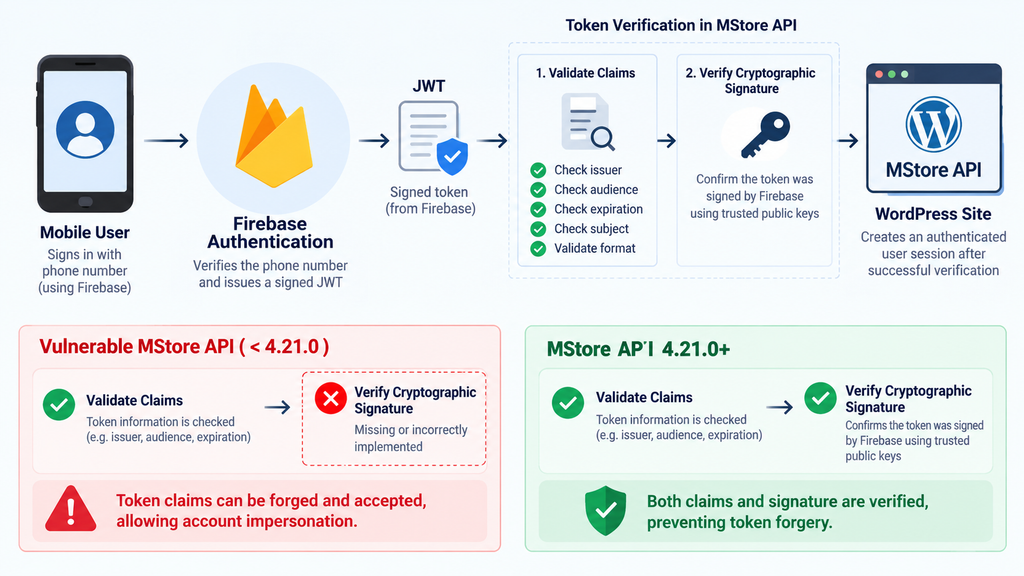
How Firebase Phone Authentication Should Verify JWTs
A JWT is commonly represented as three encoded sections. Those sections contain a header, payload, and signature. The header describes information such as the signing algorithm and key identifier. The payload contains claims describing the authenticated subject and other properties. The signature provides the cryptographic evidence needed to establish authenticity.
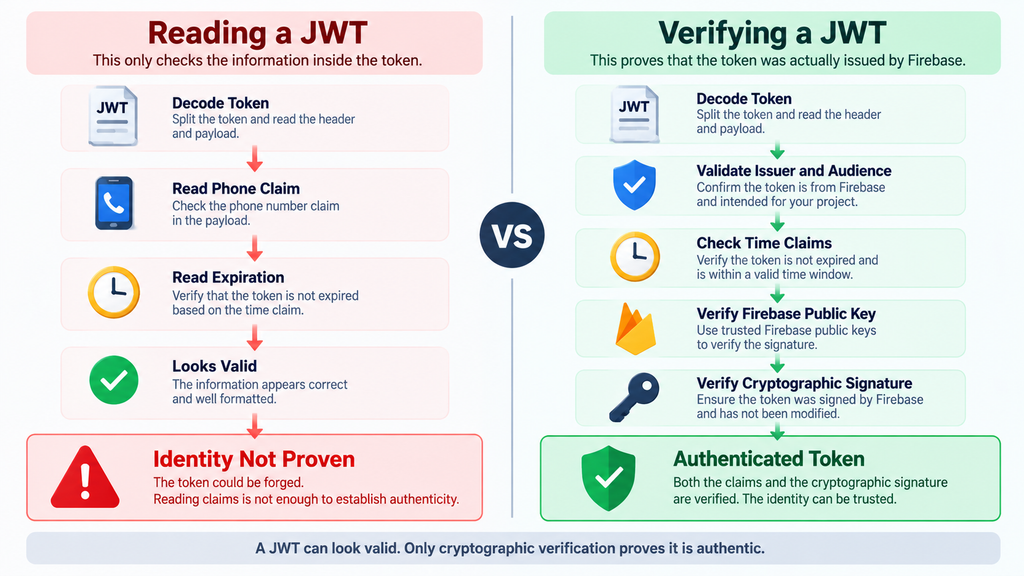
This structure creates an important security rule: decoding a JWT is not the same as verifying a JWT.
Anyone who possesses a JWT can generally decode its non-secret header and payload. Likewise, an attacker can construct data that resembles legitimate JWT claims. What the attacker should not be able to do is create a valid Firebase signature without access to the corresponding private signing key.
Firebase’s official documentation explains that backend verification must examine both token information and the signature. For Firebase ID tokens, the expected signing algorithm is RS256, while the token’s key identifier must correspond to an appropriate Firebase public signing key.
The backend must also verify important payload properties. These include the expiration time, issue time, audience, issuer, subject, and authentication time. The audience must correspond to the intended Firebase project, while the issuer must identify the appropriate Firebase Secure Token service for that project.
After those checks, the backend must verify that the token was actually signed using the private key corresponding to the trusted public key. Only after successful cryptographic verification should the backend rely on the token’s authenticated identity.
This process establishes two different things. Claim validation asks whether the token says sensible things. Signature verification asks whether a trusted authority actually signed those things.
Both matter.
Imagine receiving an identification card containing a valid-looking name, date, and photograph. Reading those fields tells you what the card claims. It does not establish that a legitimate government issued the card. Authenticity requires another verification mechanism.
JWT authentication follows the same principle.
The Role of Firebase Public Keys
Firebase signs legitimate ID tokens using private cryptographic keys. A backend can use corresponding public keys to verify those signatures without obtaining the private signing keys themselves.
The public key cannot normally be used to generate a legitimate Firebase signature. Instead, it provides the backend with a mechanism for checking whether a signature was generated by the trusted private key.
Firebase rotates signing keys, which means applications also need sensible key retrieval and caching behavior. The MStore API 4.21.0 changelog specifically mentions JWT signature validation, audience validation, and key caching. These are closely related parts of a reliable verification process.
Key caching is not merely a performance detail. A production application should know which signing keys it trusts, refresh them appropriately, and avoid falling back to unsafe authentication behavior if key retrieval encounters a problem.
The correct failure mode for authentication is generally to reject an unverifiable token rather than silently treating unverified data as trustworthy.
Audience and Issuer Validation
A cryptographically valid signature alone does not answer every authentication question. The backend also needs to establish that the token was created for the application or Firebase project expecting it.
That is where claims such as aud and iss become important.
The audience identifies the intended recipient or project context. The issuer identifies the authority that issued the token. A backend should not accept a legitimately signed token intended for an unrelated application simply because the cryptographic signature itself can be validated.
Therefore, secure token authentication combines multiple checks. The server verifies authenticity, destination, issuer, validity period, and the authenticated subject before establishing an application session.
CVE-2026-16030 demonstrates what can happen when that trust chain is incomplete.
Why Claim Validation Is Not Enough
A JWT payload is encoded, not inherently protected from being created or modified by an attacker. This point is sometimes misunderstood because JWT strings look complex. Their encoded appearance does not make the claims trustworthy.
Suppose a backend decodes a token and finds a phone number. It then checks that the phone number follows the expected format. Perhaps it verifies an expiration timestamp, confirms that a few expected fields exist, and searches WordPress for an account associated with that number.
Those checks may determine whether the data is internally consistent. They do not prove that Firebase supplied the data.
An attacker capable of constructing an unsigned or incorrectly signed token may also be capable of supplying plausible claims. If the backend trusts those claims before validating the cryptographic signature, the authentication decision has effectively moved from Firebase to the attacker.
That is the central editorial lesson behind the MStore API vulnerability.
Information validation asks: “Does this token contain values that look acceptable?”
Cryptographic validation asks: “Can we prove that the trusted authentication authority signed this exact token?”
A secure authentication flow needs the second answer before trusting the first.
A Valid-Looking Token Can Still Be Fake
Consider a token claiming that a particular phone number successfully authenticated. The phone number may exist. It may belong to a real WordPress account. The timestamps may look reasonable. Other expected fields may also be present.
None of that proves Firebase authenticated the person presenting the token.
If signature verification succeeds against the correct trusted key, the server gains cryptographic evidence that the signed data originated from the expected authority and has not been altered after signing.
Without that proof, claims should be treated as attacker-controlled input.
This is particularly important when the next application action has security consequences. Mapping an external identity to a WordPress user and creating an authenticated session is one of those actions.
Once the application says, in effect, “this token belongs to user X,” WordPress may grant everything associated with user X’s role. The authentication layer therefore becomes responsible for protecting every privilege behind that account.
Parsing Is Not Authentication
Developers frequently need to decode tokens for debugging, logging, routing, or preliminary processing. There is nothing inherently unsafe about parsing JWT data.
The danger begins when parsed data becomes authoritative before verification finishes.
A backend may need to read the header to identify which public key should be used. It may inspect fields as part of the verification process. However, those values remain untrusted until the complete verification procedure succeeds.
Secure code should maintain that distinction clearly. A parsed token is data. A successfully verified token can become authenticated identity evidence.
This distinction applies beyond Firebase. OAuth integrations, OpenID Connect implementations, API gateways, mobile authentication systems, passwordless login mechanisms, and custom single sign-on systems all depend on similar trust boundaries.
That makes CVE-2026-16030 a useful case study for WordPress developers as well as site administrators.
Signature Verification Protects the Trust Boundary
The signature binds the token’s protected content to a cryptographic key. If someone modifies signed information, normal signature verification should fail. If someone creates a new token without possessing the trusted private key, they should not be able to generate a signature that validates against the corresponding public key.
This allows an application to reject fabricated identity assertions.
The backend must still implement verification correctly. It should enforce the expected algorithm, select trusted keys safely, verify the signature, validate the issuer and audience, enforce time-related claims, and reject unexpected or unverifiable states.
Skipping one of these steps can weaken the overall authentication model.
The MStore API 4.21.0 security notes are particularly relevant because they mention both signature and audience validation. That indicates the correction addressed more than merely checking whether a JWT contained a particular phone-related claim.
Which WordPress Accounts Can Be Impersonated
Published information about CVE-2026-16030 states that an unauthenticated attacker who knows a registered user’s phone number may be able to forge a token and take over that user’s account. Importantly, the advisory explicitly notes that Administrator accounts can be affected.
That does not mean every WordPress Administrator automatically becomes exploitable simply because MStore API is installed. The vulnerable path depends on Firebase phone authentication and account matching. Administrators need to determine which WordPress accounts participate in that authentication workflow.
Start by identifying whether Firebase phone authentication is enabled and actively used by the site or connected mobile application. Then determine how phone identities are associated with WordPress users.
Pay particular attention to privileged users.
Administrator, Shop Manager, vendor-management, editorial, membership-management, and other elevated accounts deserve closer inspection. The exact significance of each role depends on the plugins and business functions installed on the website.
An ordinary WooCommerce customer account can still contain personal information, addresses, order history, downloads, stored account preferences, or access to membership content. Therefore, customer impersonation should not be dismissed simply because the affected account lacks administrative privileges.
However, Administrator impersonation creates the most obvious site-wide risk.
Why Administrator Phone Numbers Need Immediate Attention
If an Administrator account is reachable through the vulnerable phone authentication process, successful impersonation can move the incident beyond account privacy and into potential site compromise.
An authenticated Administrator may be able to modify users, alter settings, install or activate plugins, change themes, edit content, create additional privileged accounts, and access data exposed through other administrative components.
Capabilities vary depending on WordPress configuration, hosting restrictions, multisite settings, security plugins, and filesystem permissions. Still, administrators should assume that unauthorized Administrator access is a major security event.
Do not rely only on changing the affected user’s phone number after patching. If an attacker previously obtained a valid WordPress session, correcting the phone association may not automatically invalidate every existing authenticated session.
Incident response should therefore include session invalidation and credential review where appropriate.
Customer Accounts Also Matter
WooCommerce and membership sites often contain far more customer accounts than administrator accounts. An attacker targeting known phone numbers could potentially focus on individual users rather than the site owner.
Customer account access may expose order history, names, addresses, contact information, account-specific content, or other data depending on the site’s configuration.
The exact information available varies from site to site, so administrators should avoid making assumptions based solely on the standard Subscriber or Customer role.
Plugins frequently extend WordPress user accounts with additional metadata and capabilities. A user with a seemingly low WordPress role may still have access to valuable application-specific information.
Review the actual permissions and data accessible through the website and connected mobile application.
Do Not Assume Password Changes Solve Everything
This vulnerability concerns an alternate authentication path rather than conventional password guessing. Consequently, changing a WordPress password alone does not fix the vulnerable Firebase token verification logic.
The plugin must be patched.
Password rotation can still form part of incident response when compromise is suspected, especially for privileged users. However, it should complement the software update rather than replace it.
Similarly, strong passwords do not compensate for broken token authentication. A 30-character Administrator password provides little protection if another authentication mechanism can incorrectly create a session for that same Administrator without requiring the password.
This is why security reviews should examine every route that can establish identity: passwords, social login, magic links, API keys, application passwords, SSO, Firebase, SMS authentication, and custom mobile APIs.
Updating MStore API

The direct remediation for CVE-2026-16030 is to move away from vulnerable MStore API versions. WPScan identifies versions below 4.21.0 as affected and version 4.21.0 as containing the fix.
The official WordPress.org changelog supports that assessment. Version 4.21.0 includes a security entry describing fixes to Firebase JWT signature verification, audience validation, and key caching. It also contains a related correction for Firebase phone-login account matching.
Administrators should currently install the latest stable MStore API release, rather than intentionally remaining on 4.21.0. Newer releases contain additional fixes unrelated to CVE-2026-16030.
At the time this article was researched, WordPress.org listed MStore API 4.21.3. Because plugin versions can change quickly, check the current stable release before updating.
Back Up Before the Security Update
Create a reliable backup before modifying production software. The backup should cover both the WordPress database and relevant files.
A security update should not be postponed unnecessarily because of routine backup procedures, but having a recoverable snapshot remains sensible operational practice.
After creating the backup, update MStore API through the normal WordPress administration interface or your established deployment workflow. Avoid downloading replacement plugin packages from unofficial websites.
Once the update finishes, confirm the actual installed version. Do not assume the update succeeded merely because WordPress displayed an update notification or because an automated process was scheduled.
Sites with deployment systems, staging environments, filesystem restrictions, or caching layers sometimes remain on unexpected versions.
Test Firebase Phone Login After Updating
Because the security correction affects Firebase JWT handling and phone-login account matching, legitimate authentication should be tested after installation.
Use a controlled test account rather than experimenting with a production Administrator account. Confirm that a normal Firebase phone-authentication flow completes correctly and maps the user to the intended WordPress account.
Also test expected failure conditions. Invalid, expired, or otherwise unacceptable authentication attempts should fail safely rather than creating a WordPress session.
Site owners do not need to reproduce the vulnerability or attempt token forgery to verify remediation. Confirming the patched plugin version and testing normal authentication behavior is safer and usually sufficient for routine remediation.
Consider Temporarily Disabling the Feature
If an affected site cannot immediately install a secure release, reducing exposure to the vulnerable authentication mechanism may be appropriate until the update can be completed.
The exact mitigation depends on how the site uses MStore API and Firebase. Administrators should avoid making undocumented code modifications to production authentication logic unless they understand the consequences.
Temporarily disabling the affected integration or plugin can be preferable to leaving known vulnerable authentication exposed. However, doing so may interrupt mobile application functionality or customer access.
For business-critical installations, coordinate the change with the site’s developer, hosting provider, or security professional.
Patch First, Investigate Second – but Do Both
There is sometimes a temptation to spend hours reviewing logs before installing the security update. Unless evidence preservation requires a different response, leaving a known vulnerable authentication mechanism online while investigating can unnecessarily extend the exposure window.
Preserve relevant logs, take a backup or forensic snapshot if appropriate, and then close the vulnerable path quickly.
After patching, continue the investigation.
Updating answers the question, “Can this vulnerability still be used against this installation?” It does not answer, “Was this vulnerability already used?”
Those are separate questions and both matter.
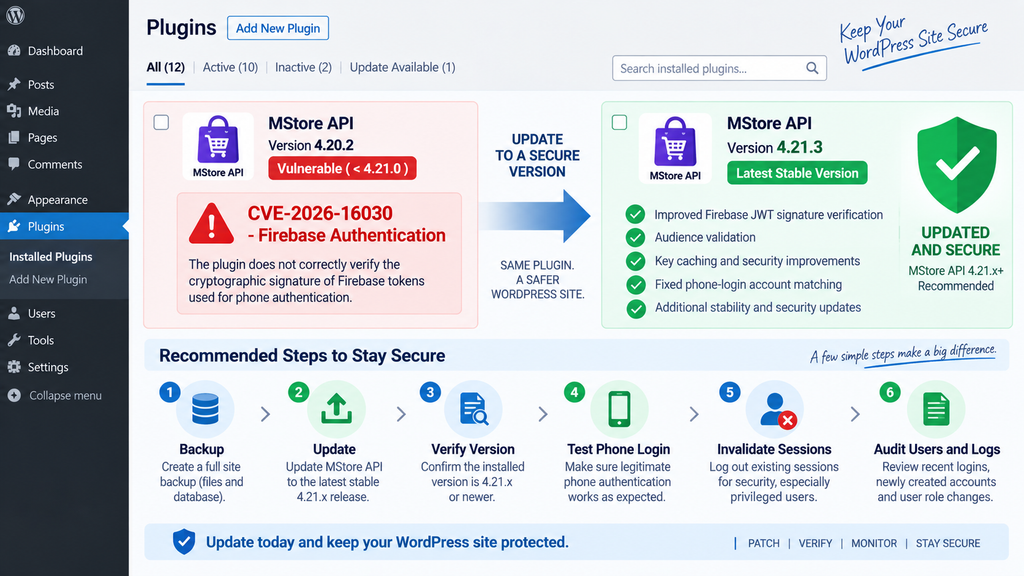
Auditing Phone Logins and Recently Created Accounts
Installing the update should be followed by a focused security review, especially if Firebase phone authentication was enabled while a vulnerable MStore API version was publicly accessible.
Begin with WordPress users rather than trying to reproduce the attack.
Review Administrator accounts first. Compare the current list with a known-good list from before the exposure period. Look for unfamiliar administrators, unexpected email changes, altered display names, unusual role assignments, or accounts created without a clear business reason.
Next, inspect other privileged roles. WooCommerce stores may have Shop Managers. Marketplace installations may include vendor or seller roles. Membership, learning-management, booking, support, and editorial plugins can introduce their own powerful roles.
An attacker does not necessarily need the literal WordPress Administrator role to cause significant harm.
Review Recently Created WordPress Users
Account creation deserves attention even though the central CVE-2026-16030 issue concerns account impersonation.
A compromised privileged session can potentially be used to establish persistence by creating another user. That means the original authentication event may disappear from immediate attention while a newly created privileged account remains available.
Review users created during the period when the vulnerable MStore API version was installed. Investigate unfamiliar accounts, especially those holding elevated capabilities.
Compare account creation dates with legitimate business events. A new Administrator created during maintenance may be perfectly normal. An Administrator created at an unusual time with no corresponding maintenance activity deserves investigation.
Do not delete suspicious accounts immediately if a serious compromise is suspected and forensic evidence matters. Record relevant information first and follow an incident-response process appropriate to the site’s risk level.
Examine Role Changes
Existing accounts can also be modified.
Look for customers, subscribers, contributors, or other users that unexpectedly gained elevated privileges. Depending on the site’s plugins, examine custom roles and application-specific permissions as well.
A security review should focus on authorization changes that cannot be explained by normal administration.
If your logging solution records user-role modifications, compare those events against known administrator activity. Security audit plugins, hosting dashboards, centralized logging systems, and external monitoring platforms may provide useful evidence.
Remember that the absence of a log entry does not prove an event never happened. Logging coverage differs widely between WordPress installations.
Review Authentication Activity
Inspect available WordPress security logs, web server logs, reverse-proxy records, CDN logs, application logs, and authentication audit trails.
Look for unusual successful authentication events involving privileged users, especially when the timing, IP region, device pattern, or activity does not match normal behavior.
Do not treat an unfamiliar IP address as automatic proof of compromise. Mobile networks, VPN services, changing residential addresses, corporate proxies, and privacy services can all change legitimate connection information.
Instead, correlate multiple signals.
An unusual login followed immediately by creation of an Administrator, installation of a plugin, configuration changes, or account modifications carries more weight than an unfamiliar IP address by itself.
Check What Happened After Suspicious Logins
Authentication is only the entry point. The more important forensic question is often what the authenticated user did next.
Review plugin installations and activations. Inspect recently modified theme or plugin files where possible. Check changes to administrator users, WordPress settings, scheduled tasks, API credentials, payment settings, webhooks, and other sensitive configuration.
WooCommerce stores should pay additional attention to payment-related configuration and orders. MStore API 4.21.0 included several security corrections beyond the Firebase issue, while later releases added additional hardening.
A site running an older MStore API release may therefore require a broader review than CVE-2026-16030 alone would suggest.
Invalidate Existing Sessions
If unauthorized authentication may have occurred, invalidate existing sessions for affected users.
For privileged accounts, requiring fresh authentication after remediation can reduce the risk that an old unauthorized session remains usable.
Changing passwords may also be appropriate when compromise is suspected. Rotate API credentials, application passwords, integration secrets, or other sensitive credentials if evidence indicates they may have been exposed through privileged access.
Do not rotate Firebase or other production keys randomly without understanding their function. Unplanned key changes can break applications while failing to address the actual security issue.
The priority is to patch the vulnerable verification process, remove unauthorized access, invalidate questionable sessions, and rotate secrets that may realistically have been exposed.
Check for Persistence
Account takeover can be temporary, but attackers sometimes attempt to make access persistent.
Inspect Administrator accounts, active plugins, must-use plugins, themes, scheduled WordPress tasks, unusual files in writable directories, and hosting-level changes when justified by the evidence.
Also review application integrations that can provide future access. New API credentials, unexpected application passwords, altered webhook destinations, and unauthorized administrative email changes can all matter.
Avoid deleting files merely because they look unfamiliar. WordPress installations often contain legitimate plugin, cache, backup, optimization, and hosting files that site owners do not recognize.
When uncertain, compare the site against clean vendor packages and known-good backups or involve a qualified security professional.
Frequently Asked Questions
What is the MStore API vulnerability?
The MStore API vulnerability discussed here is CVE-2026-16030, an authentication issue affecting versions before 4.21.0. The plugin did not correctly verify the cryptographic signature of the Firebase token used during phone-based login. Under the required conditions, this could allow an unauthenticated attacker to impersonate an existing WordPress user.
Is CVE-2026-13447 the correct identifier?
No. Current authoritative vulnerability information associates the described MStore API Firebase JWT signature-verification issue with CVE-2026-16030. Site owners should use that identifier when checking vulnerability databases, security products, hosting alerts, or remediation documentation.
Which MStore API versions are vulnerable?
Published advisories identify MStore API versions earlier than 4.21.0 as affected by CVE-2026-16030. Version 4.21.0 introduced the relevant Firebase JWT security fixes. Administrators should install the newest stable release available rather than stopping at the minimum patched version.
Can an attacker impersonate a WordPress Administrator?
Yes, potentially. The published advisory specifically states that the vulnerable authentication process can lead to takeover of an account associated with a known registered phone number, including an Administrator account. Actual exposure depends on the site’s Firebase phone-authentication configuration and account mapping.
Does an attacker need the Administrator password?
The vulnerability concerns Firebase phone authentication rather than conventional password authentication. Therefore, a strong WordPress password alone does not correct the vulnerable token-validation path. Updating MStore API is essential.
Why is decoding a JWT not enough?
Decoding reveals what the token claims. It does not prove who created or signed the token. A backend must cryptographically verify the JWT signature using trusted signing information and validate relevant claims before using the token as evidence of an authenticated identity.
What should Firebase token verification check?
Firebase documentation describes verification of the signature along with important token properties such as the signing algorithm, key identifier, expiration, issue time, audience, issuer, subject, and authentication time. The precise requirements depend on the Firebase token type and implementation.
Is MStore API 4.21.0 safe from CVE-2026-16030?
Version 4.21.0 contains the fix identified for this vulnerability. However, newer MStore API versions have subsequently been released with additional security changes. Administrators should therefore use the latest stable release compatible with their environment.
Should I investigate the site after updating?
Yes, particularly if Firebase phone authentication was enabled while a vulnerable version was publicly accessible. Review privileged accounts, recently created users, role changes, authentication activity, plugin changes, sensitive settings, and other indicators appropriate to your site.
Does updating prove that my site was never compromised?
No. Updating closes the known vulnerable path going forward, but it cannot establish what happened before the update. If the vulnerable configuration was exposed, review available logs and account activity for evidence of unauthorized access.
The Security Lesson WordPress Owners Should Keep
The MStore API vulnerability is a strong reminder that authentication security depends on proof, not appearance. A JWT can contain the right phone number, the right timestamps, and convincing claims while still being untrustworthy.
A backend should only treat those claims as authenticated identity after completing the required cryptographic verification. With Firebase ID tokens, that means verifying the signature using trusted Firebase signing keys and validating properties such as audience, issuer, expiration, and subject according to Firebase’s documented requirements.
For MStore API users, the immediate action is simpler: upgrade to the latest stable version. Version 4.21.0 introduced the fix for CVE-2026-16030, while subsequent releases provide additional security improvements.
After patching, review the accounts that could use Firebase phone authentication. Give particular attention to Administrators and other privileged roles, but do not ignore customer accounts. Examine recent account creation, role changes, suspicious logins, and sensitive administrative actions.
Most importantly, remember the distinction exposed by this vulnerability: reading a token tells an application what the token says; cryptographic verification tells the application whether it has a reason to believe it.
That difference can determine whether a mobile login becomes a secure authentication mechanism or an account-takeover path.
⚠️ Disclaimer and Source Hygiene
This article is provided for educational, defensive, and WordPress security-awareness purposes. It does not provide instructions for exploiting CVE-2026-16030, forging authentication tokens, or accessing accounts without authorization.
Security information can change as researchers, vendors, vulnerability databases, and software developers publish new findings. Plugin versions also change frequently. Administrators should verify the current MStore API release and review the latest vendor and vulnerability-database information before making production decisions.
The technical explanation in this article is based on publicly available vulnerability information, the official MStore API changelog, WPScan vulnerability data, the National Vulnerability Database, and official Firebase documentation. When handling a suspected compromise, consider consulting your hosting provider or a qualified WordPress security professional.
🔔 For more tutorials like this, consider subscribing to our blog.
📩 Do you have questions or suggestions? Leave a comment or contact us!
🏷️ Tags: MStore API vulnerability, CVE-2026-16030, MStore API, Firebase JWT, Firebase authentication, WordPress security, JWT signature verification, WordPress vulnerability, account takeover, Firebase phone authentication
📢 Hashtags: #MStoreAPI, #WordPressSecurity, #CVE202616030, #Firebase, #JWT, #CyberSecurity, #WordPress, #WebsiteSecurity, #AuthenticationSecurity, #WordPressVulnerability
Sources and References
National Vulnerability Database
The National Vulnerability Database record for CVE-2026-16030 describes MStore API versions before 4.21.0 as incorrectly verifying the cryptographic signature of tokens used for phone authentication. It states that an unauthenticated attacker who knows a registered user’s phone number can potentially forge a token and take over that user’s account, including an Administrator account.
WPScan Vulnerability Database
WPScan lists the issue as “MStore API < 4.21.0 – Unauthenticated Account Takeover via Firebase Phone Authentication.” It identifies 4.21.0 as the fixed release and classifies the issue as an authentication bypass.
WPScan – MStore API Firebase Phone Authentication Vulnerability
Official MStore API WordPress.org Changelog
The official plugin changelog documents security corrections in MStore API 4.21.0 covering Firebase JWT signature verification, audience validation, and key caching. It also records a Firebase phone-login account-matching correction associated with the JWT changes.
Firebase Authentication Documentation
Firebase’s official documentation explains how backend applications should verify ID tokens. Verification includes checking the JWT header and payload requirements and cryptographically verifying the signature against Firebase’s trusted public signing keys.
Secondary Sources and Testimonials
Independent vulnerability tracking reinforces the same remediation boundary. Security databases tracking MStore API identify the Firebase phone-authentication issue among the plugin’s recent security vulnerabilities and point administrators toward the patched 4.21.x branch.
Because vulnerability records may receive additional analysis after initial publication, administrators should prioritize the official plugin changelog, Firebase authentication documentation, WPScan advisory, and NVD record when validating technical details.
No unverified user testimonials or unsupported exploitation claims have been used to determine whether a particular WordPress installation was compromised.
HivePress Authentication Vulnerability
A high-severity HivePress Authentication vulnerability can allow account takeover when Facebook access tokens are accepted…
1 thought on “MStore API Vulnerability Allows Firebase JWT Forgery”