
Table of Contents
A critical Divi Ajax Filter vulnerability can allow unauthenticated attackers to include server-side PHP files when custom loop templates are enabled. Learn how CVE-2026-11613 works, why local file inclusion is different from direct remote code execution, and what WordPress administrators should check after updating.
WordPress site owners using Divi Ajax Filter should check their plugin version and loop configuration after the disclosure of CVE-2026-11613. The security issue affects Divi Ajax Filter versions up to and including 5.1.2 and has received a critical CVSS 3.1 score of 9.8. The vulnerability involves local file inclusion, commonly shortened to LFI, rather than a straightforward arbitrary remote-code-upload mechanism.
That distinction matters. A vulnerability that can make PHP include an existing local file does not automatically give an attacker the ability to upload any program they want. However, the security boundary becomes much more dangerous when an attacker can influence which PHP file the server loads. If another weakness, legitimate feature, or previous compromise provides a usable PHP file on the server, local file inclusion may become a path toward code execution.
The vulnerability also has an important configuration requirement. According to the published CVE information, exploitation requires the affected loop configuration to use a custom template. Sites using vulnerable plugin versions therefore deserve an immediate update, but administrators should also understand whether their configuration actually exposed the vulnerable functionality.
What Is CVE-2026-11613
CVE-2026-11613 is a critical local file inclusion vulnerability affecting the Divi Ajax Filter WordPress plugin developed by Divi Engine. Published vulnerability information identifies versions through 5.1.2 as affected. The flaw is associated with improper control of a filename used by PHP when loading server-side resources and is classified under CWE-98.
The vulnerability is particularly important because an attacker does not need an authenticated WordPress account to reach the vulnerable condition. The published CVSS vector assigns it a score of 9.8 Critical, with network accessibility, low attack complexity, no privileges required, and no user interaction required. Those characteristics justify treating an affected and exposed installation as a high-priority security issue rather than postponing the update until routine maintenance.
However, the CVE description contains an equally important limitation. The vulnerable behavior is exploitable when the relevant loop-template configuration is set to use a custom template. This means administrators should avoid interpreting the CVSS score as proof that every installation running 5.1.2 was equally exposed. Version and configuration both matter when determining practical risk.
Divi Engine addressed the issue in version 5.1.3, released on August 11, 2026. Its official changelog states that custom loop templates are now restricted to the child theme templates folder, specifically identifying the change as the security fix for CVE-2026-11613. The vendor has subsequently released newer versions, so administrators should normally install the latest stable release available to their site rather than intentionally stopping at the first patched build.
Why the Vulnerability Is Rated Critical
PHP applications commonly divide large applications into reusable files. A program can load another PHP file when it needs a template, component, configuration, or piece of application logic. This is normal behavior when the application itself controls the location being loaded.
The security problem begins when untrusted input can influence that location without sufficiently strict validation. Instead of choosing only from known and approved templates, vulnerable code may potentially be directed toward another local PHP file. PHP can then process that file within the application context.
For a WordPress installation, this is more serious than simply viewing an unexpected image or text document. PHP files contain executable server-side instructions. Loading an unintended PHP file may invoke functionality that developers never expected to become accessible through the affected request path.
Still, it is important to describe the vulnerability accurately. CVE-2026-11613 is fundamentally an LFI vulnerability with potential code-execution consequences. It should not be described as though Divi Ajax Filter simply provides an unrestricted public PHP uploader.
Affected and Patched Versions
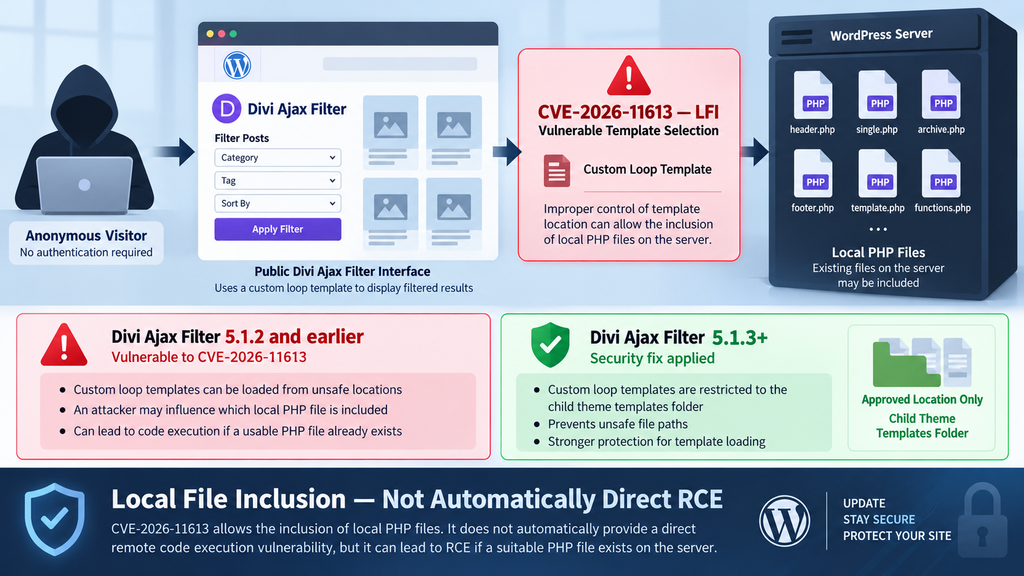
The published CVE record identifies Divi Ajax Filter 5.1.2 and earlier as vulnerable. Divi Engine’s changelog places the security correction in 5.1.3. The changelog states that this release restricts custom loop templates to the child theme templates directory, preventing unsafe paths from being used.
Administrators who discover an affected version should update promptly. At the time of this article, the vendor’s changelog lists versions newer than 5.1.3, including the 5.2.x branch. Consequently, 5.1.3 should be viewed as the minimum version containing the documented CVE fix rather than a recommendation to downgrade or remain permanently on that release.
Why Custom Loop Templates Are Required
One of the most useful facts for administrators investigating the Divi Ajax Filter vulnerability is that exploitation depends on a specific template configuration. According to the CVE description, the vulnerable condition requires the loop-template setting to use custom-template.
This requirement significantly improves the accuracy of an exposure assessment. A WordPress administrator should not look only at the plugin list, see version 5.1.2, and assume successful exploitation was definitely possible. The vulnerable version establishes that vulnerable code was present. The custom-template configuration determines whether the particular vulnerable path described by the CVE was available.
Custom loops are a legitimate and useful part of sophisticated Divi websites. They allow designers to control how posts, products, directories, and other content appear when visitors filter results. Divi Ajax Filter’s documentation describes custom layouts and Loop Builder functionality as normal components of building filtered result interfaces.
The vulnerability does not mean custom templates are inherently unsafe. Instead, the issue concerns how an affected plugin version handled the location of the custom template it was asked to load.
Check Configuration as Well as Version
Begin an exposure assessment by determining whether Divi Ajax Filter is installed directly or provided through another Divi Engine product or site configuration. Then record the installed version before performing the update. This gives you useful information if you later need to investigate historical activity.
Next, identify pages, product archives, directories, search interfaces, and other public locations using Ajax Filter functionality. Pay particular attention to implementations built around custom loop templates.
This inventory has value beyond CVE-2026-11613. Complex WordPress websites often retain old layouts long after they disappear from the main navigation. A landing page may still be publicly reachable even when nobody remembers that it contains an old filtering interface.
Administrators should therefore search templates and site configuration rather than checking only the homepage. Review archived designs, WooCommerce layouts, directory pages, custom post type archives, and other areas where Ajax-powered loops may have been implemented.
Do Not Leave the Site Vulnerable Because the Condition Seems Absent
If your initial review suggests that the site does not use the required custom-template configuration, that reduces the exposure to this specific vulnerability. It does not provide a good reason to keep an affected plugin version installed.
Configurations change. Old layouts can remain accessible. Staging designs may accidentally reach production, and another administrator may enable a feature months later without remembering an old security advisory.
Updating removes that uncertainty. It also ensures that the server benefits from subsequent bug fixes and security improvements released after the original vulnerable build.
The vendor’s fix provides a stronger design boundary by restricting custom loop template loading to the intended child-theme template location. That approach addresses the dangerous assumption at the file-selection stage instead of relying solely on administrators never exposing the vulnerable configuration.
How Local File Inclusion Works
Local File Inclusion is a class of application security problem in which an attacker can influence which existing local file an application loads. The word “local” is essential. It refers to a file that the server can already access rather than code automatically downloaded from an attacker’s remote computer.
Consider a normal template system. A WordPress plugin might have several approved presentation templates and select one based on an internal setting. The application expects the chosen value to correspond to one of those trusted templates.
If the application accepts an unsafe path from an untrusted request and passes it into PHP file-loading functionality without sufficiently restricting its destination, that trust boundary breaks. An attacker may attempt to make the application reference a different server-side file.
CVE-2026-11613 concerns this type of unsafe template selection. The published description identifies the custom_loop_template functionality as the affected input and explains that arbitrary PHP files already present on the server may be included under the vulnerable configuration.
For defensive purposes, administrators do not need to reproduce this behavior against their production website. Updating, reviewing configuration, checking logs, and investigating suspicious filesystem changes provide useful security evidence without attempting to exploit the vulnerability.
LFI Is Not the Same as Uploading a Web Shell
The distinction between LFI and direct arbitrary file upload is especially important when discussing this vulnerability.
With a direct unrestricted upload vulnerability, an attacker may be able to supply a new malicious executable file to the server. The vulnerability itself provides the mechanism that introduces the attacker’s code.
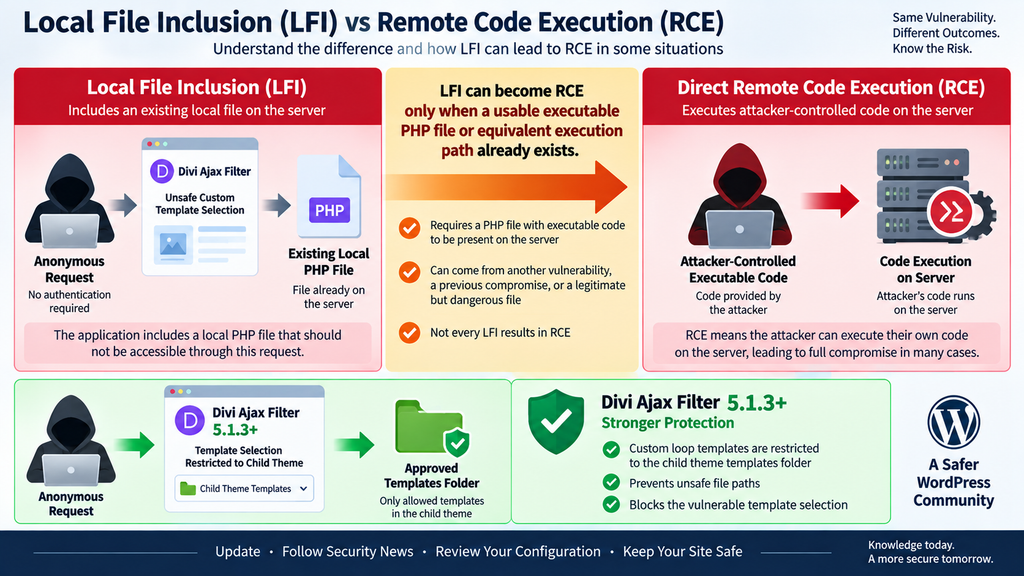
With LFI, the vulnerable mechanism instead selects a local file for inclusion. The attacker needs a useful file to exist somewhere accessible to the vulnerable PHP process.
That file could be legitimate application code whose behavior becomes dangerous when invoked unexpectedly. In more severe attack chains, it could be a PHP file placed on the server through a completely separate weakness or earlier compromise.
Therefore, saying “LFI can lead to RCE” is accurate in the right context. Saying “LFI always equals RCE” is not.
Why PHP Files Matter
PHP’s server-side execution model makes inclusion vulnerabilities particularly sensitive. When PHP includes a PHP file, the server may interpret the instructions in that file instead of treating its contents as ordinary text.
That means an attacker who can influence an include operation may be able to reach application behavior that was supposed to remain internal.
The security consequences depend heavily on what files exist, what the PHP process can access, and what those files do when loaded. Two WordPress installations running the same vulnerable plugin version could therefore have different practical outcomes.
One might expose an unintended file without providing a useful path toward further compromise. Another site that already contains an attacker-controlled PHP file could face a much more serious situation.
When LFI Becomes Remote Code Execution
Remote Code Execution describes a security outcome where an attacker can cause their chosen code or commands to execute on a remote system. It is one of the most serious outcomes in web application security because successful code execution may allow extensive control over the affected application or hosting environment.
CVE-2026-11613 creates an important potential bridge toward that outcome because the affected functionality can cause PHP files to be included. The CVE description specifically notes code-execution consequences in situations where PHP files can be uploaded and subsequently included.
The important phrase is “in cases where.” The vulnerability does not need to provide both stages itself. An attacker may combine weaknesses or environmental conditions.
Imagine a hypothetical WordPress server that already contains an unauthorized PHP file because of a previous compromise. An LFI flaw that can reach that file may provide a way to execute it through a publicly accessible request.
That creates an attack chain:
Existing PHP file → unsafe local inclusion → PHP execution
The LFI provides the inclusion stage. The pre-existing file provides the executable content. Together, the security impact can resemble direct RCE even though the original vulnerability was not itself an unrestricted upload mechanism.
Existing Files Change the Risk
This is why administrators investigating CVE-2026-11613 should not stop after updating the plugin.
Check whether unexpected PHP files appeared during the period when the vulnerable version was installed. Pay particular attention to directories that normally contain media, cache data, generated files, temporary content, or other resources that should not normally require executable PHP scripts.
The presence of a suspicious PHP file does not prove that CVE-2026-11613 created it. In fact, this CVE is not described as an arbitrary upload vulnerability. Such a file could indicate another vulnerable plugin, stolen credentials, compromised hosting access, an earlier intrusion, or an intentionally installed administrative tool.
However, a suspicious executable file combined with historical requests targeting Ajax Filter functionality deserves a deeper incident investigation.
A Security Chain Can Be More Dangerous Than One Vulnerability
Real WordPress compromises often involve multiple weaknesses rather than one perfect vulnerability that performs every stage of an attack.
A weak file-upload control may place a file somewhere on the server. An LFI vulnerability may then reach it. Another flaw may expose credentials, while an outdated administrator password may provide persistence.
Defenders should therefore investigate the site as a system. Do not assume that patching the vulnerability automatically reverses activity that may have happened before the update.
Review administrator accounts, active plugins, must-use plugins, scheduled tasks, recently modified theme files, unexpected executable files, hosting access, and server logs when evidence suggests that exploitation may have occurred.
At the same time, avoid treating every affected installation as compromised without evidence. Vulnerability exposure and confirmed compromise are different security states.
Updating Divi Ajax Filter

The most important corrective action is straightforward: update Divi Ajax Filter to a patched release immediately.
Divi Engine documents the CVE-2026-11613 correction in version 5.1.3, released on August 11, 2026. The security entry explains that custom loop templates now load only from the child theme templates folder, blocking unsafe file paths.
Because newer releases have subsequently become available, administrators should install the latest stable version compatible with their environment. The official changelog lists releases beyond 5.1.3, so there is normally no benefit in intentionally remaining on the minimum patched version when a supported newer build is available.
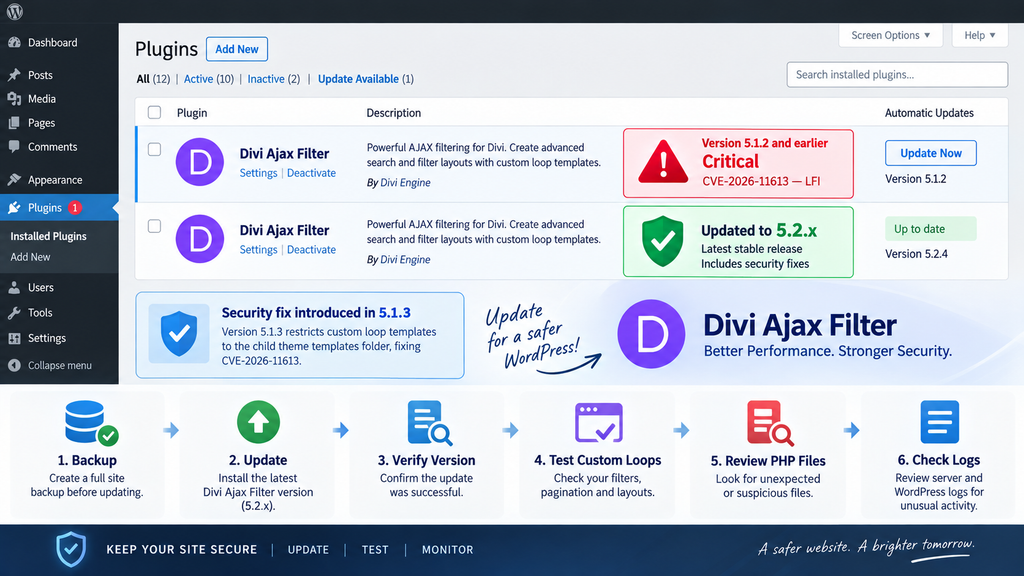
Before updating a production site, create a reliable backup of the WordPress files and database. This is particularly important for Divi websites with customized loops because template and rendering behavior can be tightly integrated with the site’s visual design.
After the update, clear relevant WordPress, server, CDN, and browser caches. Then test public filters, pagination, Load More functionality, WooCommerce archives, custom post type listings, and any pages using custom loop layouts.
Verify the Installed Version
Do not assume an update succeeded simply because WordPress displayed a completion message. Return to the Plugins screen or your trusted deployment system and verify the installed version.
Sites using a centralized management platform should also confirm that the correct production environment received the update. It is surprisingly easy to update staging while leaving production untouched.
If Divi Ajax Filter functionality is bundled or integrated with another Divi Engine product in your particular setup, verify the effective code version rather than relying only on the name of one plugin entry.
The Divi Ajax Filter changelog itself contains references to environments where Ajax Filter code can coexist with or be bundled by other Divi Engine products. That makes version verification especially worthwhile on complex Divi installations.
Test Custom Loop Templates After Patching
The security fix deliberately restricts where custom loop templates can load from. A custom implementation that relied on an unusual template location may therefore require adjustment after patching.
Do not work around the restriction by restoring unsafe arbitrary-path behavior. Move legitimate templates into supported locations or follow current Divi Engine documentation instead.
Testing should include both the initial page load and AJAX interactions. A page can appear normal initially while displaying different behavior after visitors apply filters or use pagination.
Divi Engine’s documentation specifically notes that custom loop layouts may behave differently after AJAX updates and recommends testing filtering, Load More, and pagination behavior.
Reviewing Logs for Malicious Template Paths
Updating closes the known vulnerable behavior, but logs can help determine whether someone attempted to interact with it before remediation.
Start with web server access logs covering the period during which Divi Ajax Filter 5.1.2 or an earlier release was active. If possible, preserve an original copy before filtering or rotating the logs. Evidence becomes more useful when timestamps and original request records remain intact.
Look for unusual requests associated with pages and application routes that use Ajax Filter functionality. The goal is not simply to find large numbers of AJAX requests. AJAX traffic is normal for a filtering plugin. Instead, identify requests whose template-related values differ from what your legitimate site normally sends.
A normal baseline is extremely useful. Visit an affected page after patching, use several filters, and observe the general structure of legitimate server logs. You can then compare historical traffic against known normal behavior without reproducing the vulnerability.
Indicators That Deserve Investigation
Requests referencing unexpected template locations deserve attention. Repeated requests that appear to manipulate template selection, unusual bursts from the same source, or references inconsistent with the site’s legitimate custom templates can justify deeper analysis.
Do not treat a suspicious request as proof of successful exploitation. Automated vulnerability scanners routinely probe WordPress sites for known weaknesses, including sites that never installed the targeted plugin.
The distinction between an attempt and a successful compromise matters.
An HTTP request may show that someone tested the site. Filesystem changes, application behavior, authentication events, new accounts, unexpected PHP processes, or other correlated evidence can provide stronger indications of actual impact.
Check your web server logs, WordPress security logs, hosting control-panel logs, CDN or web application firewall events, and authentication records where available. Correlating several sources can reveal activity that would be invisible in a single log.
Review the Filesystem Too
Because CVE-2026-11613 can become more dangerous when a useful PHP file already exists, filesystem inspection should accompany log analysis on higher-risk installations.
Establish which directories should legitimately contain PHP files. WordPress core, themes, and plugins naturally contain many PHP files, so searching for the extension alone creates too much noise.
Instead, focus on unexpected locations, recently created files, recently modified files, unfamiliar plugin directories, altered theme components, and executable files appearing in directories intended primarily for generated or uploaded content.
Compare WordPress core files against known-good checksums where possible. Reinstall trusted plugin and theme packages if integrity cannot be established confidently.
If you discover unexplained executable files, preserve evidence before deleting everything. Record filenames, timestamps, hashes, relevant logs, and affected accounts when incident response may be necessary.
Review WordPress Administrator Accounts
A server-side compromise can have consequences beyond the original vulnerable component. Review all WordPress users with Administrator privileges and verify that each account is expected.
Check recently created users, email-address changes, password-reset activity, application passwords, and other authentication changes supported by your logging environment.
Also review plugins and themes installed during the exposure period. An unauthorized administrator may establish persistence by installing a legitimate-looking plugin rather than modifying WordPress core directly.
Rotate sensitive credentials if evidence indicates actual compromise. Depending on the scope, this may include WordPress administrator passwords, hosting credentials, database credentials, API keys, deployment credentials, and WordPress security salts.
Avoid unnecessary credential rotation based only on the existence of a vulnerable plugin. Use evidence and risk assessment to determine the appropriate incident-response scope.
Frequently Asked Questions
What is the Divi Ajax Filter vulnerability?
The Divi Ajax Filter vulnerability tracked as CVE-2026-11613 is an unauthenticated local file inclusion issue affecting versions through 5.1.2. Under the vulnerable custom-template configuration, an attacker may influence which local PHP file the application includes.
Which versions of Divi Ajax Filter are vulnerable?
Published CVE information identifies Divi Ajax Filter versions up to and including 5.1.2 as affected. Divi Engine documents the security correction in version 5.1.3. Administrators should preferably install the latest stable release available rather than stopping at the minimum fixed version.
Does CVE-2026-11613 affect every Divi Ajax Filter site?
Not under the exact condition documented in the CVE. Exploitation requires the relevant loop-template configuration to use a custom template. Sites should still update even if administrators believe that configuration was never used.
Is local file inclusion the same as remote code execution?
No. LFI lets an attacker influence the inclusion of a file already accessible to the server. RCE means attacker-controlled code executes remotely. An LFI vulnerability can sometimes become part of an RCE chain, but the two concepts should not be treated as identical.
Can CVE-2026-11613 execute PHP files?
The CVE description states that the vulnerability can allow arbitrary PHP files on the server to be included and executed under the vulnerable conditions. The practical impact depends on what suitable PHP files are available and accessible.
Does this vulnerability upload malicious PHP files?
The published CVE describes a local file inclusion vulnerability, not an unrestricted arbitrary-file-upload vulnerability. An attacker-controlled PHP file may come from another vulnerability, an earlier compromise, or another mechanism. That distinction is important when investigating an affected server.
What version fixed CVE-2026-11613?
Divi Engine identifies 5.1.3, released August 11, 2026, as the release containing the security correction. The fix restricts custom loop templates to the child theme templates folder.
Should I update if I do not use custom loop templates?
Yes. Even when the documented vulnerable configuration is absent, keeping a known vulnerable release creates unnecessary future risk. Updating also avoids relying on configuration assumptions that may change later.
What should I check after updating?
Verify the installed version, test filtering and custom loops, review historical web requests, inspect unexpected PHP files, check administrator accounts, and investigate unexplained changes that occurred while the vulnerable version was installed.
Does a suspicious request prove my WordPress site was hacked?
No. Internet-facing WordPress sites receive automated vulnerability probes regularly. A suspicious request proves activity reached your server, not necessarily that exploitation succeeded. Correlate request logs with filesystem, authentication, account, and application evidence before concluding that the site was compromised.
A Patch Is Only the First Part of the Response
CVE-2026-11613 deserves prompt attention because it crosses an important trust boundary between public input and server-side PHP file loading. Divi Ajax Filter versions through 5.1.2 contain the vulnerable behavior, while Divi Engine documents the corrective restriction beginning with version 5.1.3.
The most important technical point is that local file inclusion and direct remote code execution are not the same thing. LFI concerns the unsafe inclusion of files already accessible to the server. It can become dramatically more dangerous when a suitable PHP file exists, potentially turning the inclusion primitive into a route for code execution.
For administrators, the response should therefore combine patching with verification. Update to the latest stable Divi Ajax Filter release, identify whether custom loop templates were used, test the site after remediation, and review historical logs when the vulnerable configuration was publicly exposed.
Sites showing suspicious template requests, unexplained PHP files, unexpected administrator changes, or other compromise indicators deserve a broader incident investigation. Sites without such evidence should still retain logs and complete the update rather than assuming that configuration alone will provide permanent protection.
⚠️ Disclaimer and Source Hygiene
This article is intended for defensive WordPress security awareness, vulnerability management, and incident-response planning. It does not provide exploitation instructions, malicious payloads, or step-by-step procedures for compromising affected websites.
Vulnerability details were cross-checked against the published CVE information and the official Divi Engine changelog. Security advisories can change as vendors and researchers publish new findings. Always verify the latest vendor release before making production changes, maintain tested backups, and consult a qualified WordPress or cybersecurity professional when compromise is suspected.
🔔 For more tutorials like this, consider subscribing to our blog.
📩 Do you have questions or suggestions? Leave a comment or contact us!
🏷️ Tags: Divi Ajax Filter vulnerability, CVE-2026-11613, Divi Ajax Filter, WordPress vulnerability, WordPress security, local file inclusion, LFI vulnerability, PHP security, Divi security, WordPress plugin security
📢 Hashtags: #DiviAjaxFilter, #CVE202611613, #WordPressSecurity, #WordPress, #CyberSecurity, #Divi, #LocalFileInclusion, #LFI, #PluginSecurity, #WebsiteSecurity
📚 Sources and References
Divi Engine – Divi Ajax Filter Changelog: The official vendor changelog documents the CVE-2026-11613 security correction in version 5.1.3 and states that custom loop templates are restricted to the child theme templates folder.
Divi Ajax Filter Changelog – Divi Engine
CVE-2026-11613 / CVE Record: Published vulnerability information identifies Divi Ajax Filter through version 5.1.2 as affected, describes the custom-template requirement, and assigns a CVSS 3.1 base score of 9.8.
Divi Ajax Filter Documentation: Official documentation provides additional context about Archive Loop, Loop Builder, custom layouts, AJAX filtering, and post-update testing.
Official Divi Ajax Filter Documentation
🕊️ Secondary Sources and Testimonials
Secondary vulnerability databases including Tenable and OpenCVE independently reflect the published CVE description, affected version range, critical severity, and the requirement involving custom loop templates. These sources are useful for corroboration, while the CVE record and vendor changelog remain the primary references for remediation decisions.
2 thoughts on “Divi Ajax Filter Vulnerability Can Execute PHP Files”