
Table of Contents
A high-severity Gravity Forms vulnerability can allow unauthenticated arbitrary file uploads when public forms use multi-file upload fields. CVE-2026-19513 affects versions through 3.0.2, with NGINX servers facing greater remote code execution risk because Gravity Forms relies partly on Apache .htaccess protections.
What Is CVE-2026-19513
CVE-2026-19513 is a high-severity security vulnerability affecting the Gravity Forms plugin for WordPress. The issue involves the plugin’s multi-file upload functionality and can allow an unauthenticated visitor to place a file under a dangerous filename inside a temporary Gravity Forms upload directory. The vulnerability does not automatically affect every website running Gravity Forms. A specific configuration must exist before the vulnerable upload path becomes reachable. Most importantly, a publicly accessible form must contain a File Upload field configured with the Multiple Files option enabled.
The vulnerability affects Gravity Forms versions up to and including 3.0.2. Its published CVSS 3.1 score is 8.1 out of 10, placing it in the High severity category. The associated weakness is CWE-434, commonly described as unrestricted upload of a file with a dangerous type. Gravity Forms released version 3.0.3 on August 20, 2026, and its official changelog lists security enhancements among the changes included in that release. Site administrators using an affected configuration should therefore treat upgrading as a priority.
Unlike vulnerabilities that require an attacker to sign in as a subscriber, editor, or administrator, CVE-2026-19513 can be reached without WordPress authentication when the required public form configuration exists. That distinction matters because public forms are intentionally designed to accept requests from anonymous visitors. Contact forms, application forms, document submission forms, support forms, and similar workflows frequently need to accept data from people who do not have WordPress accounts.
However, describing CVE-2026-19513 simply as an “unauthenticated arbitrary file upload vulnerability” can make the exposure sound broader than it actually is. The attack does not apply merely because Gravity Forms is installed. It also does not mean that every single File Upload field creates the vulnerable condition. The important distinction is the use of the multi-file upload workflow, which handles uploads differently because large or multiple files can be processed through temporary chunks.
That technical detail explains why administrators should audit their form configurations instead of relying only on the plugin list. Two websites can run exactly the same vulnerable Gravity Forms version while having significantly different exposure. One may contain only newsletter and contact forms with text fields. Another may publish a recruitment form that accepts several documents from anonymous visitors. The second configuration deserves considerably more attention.
The vulnerability was assigned CVE-2026-19513 after researchers identified insufficient validation inside the multi-file upload process. According to the published CVE description, the weakness exists in the GFAsyncUpload::upload() functionality. Public form-state information and upload chunk continuation information were not separated strongly enough during validation. Under the vulnerable conditions, information available through a legitimate public form could consequently be reused in a way the upload process should not accept.
This distinction is especially important when assessing real-world risk. A vulnerable software version tells administrators that remediation is necessary. Configuration determines how easily the affected functionality can be reached. Server architecture then influences what an attacker-written file could potentially accomplish.
For CVE-2026-19513, those three questions should be considered separately:
Is the installed Gravity Forms version affected?
Versions through 3.0.2 should be considered affected.
Does a public form expose a File Upload field with Multiple Files enabled?
If yes, the vulnerable workflow may be externally reachable.
Does the web server prevent executable content inside the temporary upload directory?
The answer strongly influences the potential impact.
This last question produces one of the most important details surrounding the Gravity Forms vulnerability. Gravity Forms normally creates an .htaccess file intended to protect its upload location. Apache-based configurations commonly honor these directory-level rules. NGINX does not interpret .htaccess files, meaning administrators must enforce equivalent restrictions in the NGINX configuration itself.
The result is an unusual security situation where the same application vulnerability can have different practical consequences depending on the server processing requests. A dangerous file being written to disk is already a security failure. Whether that file can subsequently execute as server-side code is another question.
Administrators should therefore avoid treating “the file uploaded successfully” and “remote code execution occurred” as identical events. They are related but separate stages. Understanding that distinction leads to a more accurate investigation and helps avoid both unnecessary panic and dangerous underestimation.
Why the Vulnerability Matters to WordPress Administrators
File upload vulnerabilities receive significant attention because they cross an important security boundary. A normal form submission should allow a visitor to provide only the content explicitly permitted by the form owner. If the form accepts images, for example, the application should validate those images and control how they are stored. Visitors should not be able to influence storage behavior in a way that creates executable or active content.
CVE-2026-19513 undermines part of that expected boundary in the affected multi-file upload workflow. The published vulnerability information describes a scenario where an attacker can use a valid PNG or PDF polyglot while influencing the temporary filename. A polyglot file is structured so that it can satisfy more than one interpretation. This matters because content validation alone does not necessarily make a file harmless if the web server later handles its filename or extension differently.
For defensive purposes, administrators do not need to reproduce the exploit to determine whether they are exposed. Version checks, form configuration reviews, server configuration checks, filesystem inspection, and log analysis provide safer ways to assess the environment.
How the Chunk Upload Validation Fails
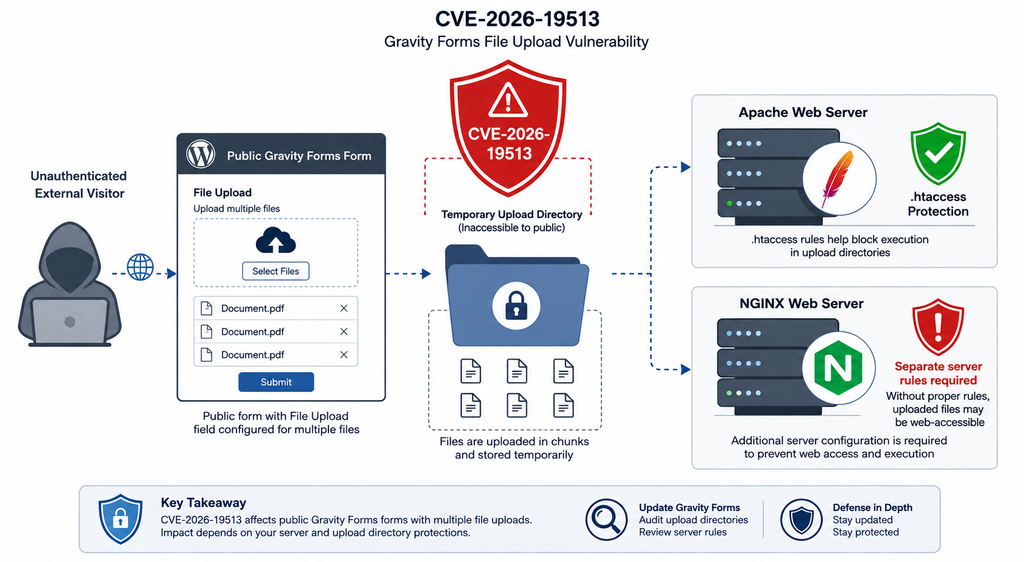
Modern upload systems often process large files in smaller pieces called chunks. Instead of sending an entire file in one large HTTP request, the browser can divide it into multiple portions. The server receives those portions, temporarily stores them, and eventually reconstructs the complete upload. This approach improves reliability and allows applications to handle files that might otherwise exceed individual request limits.
Gravity Forms supports this type of workflow for its multi-file upload functionality. The problem addressed by CVE-2026-19513 is not the concept of chunked uploading itself. Chunking is a normal and widely used technique. The weakness concerns how the vulnerable Gravity Forms versions distinguish and validate information associated with different stages of the upload process.
According to the published CVE description, insufficient validation occurs within GFAsyncUpload::upload(). In affected versions, public form-state URL hashes can be reused as chunk continuation hashes. At the same time, attacker-controlled temporary filenames can be accepted before the filename has been appropriately sanitized.
Those two behaviors become dangerous when combined.
A public form needs enough information to operate for visitors who are not authenticated. That is normal. The server still needs a mechanism for determining whether a request belongs to a legitimate form workflow. Upload chunks similarly need state information so the application can associate incoming pieces with the correct temporary upload operation.
Security problems can appear when tokens or hashes intended for one purpose are accepted in another security context. A value being cryptographically valid does not automatically mean it should authorize every operation that uses the same underlying mechanism. Applications must also validate what the value represents and where it is allowed to be used.
In CVE-2026-19513, the published technical description identifies this separation problem as a central component of the vulnerability. A legitimate value associated with public form state could be accepted where Gravity Forms expected information associated with chunk continuation.
The second part involves temporary filenames.
Temporary upload directories are not merely storage conveniences. They form part of the security boundary between an incoming untrusted file and the application’s final managed file. A secure workflow should control filenames, extensions, paths, permissions, and content handling throughout the entire upload lifecycle.
Validation performed only at the final stage can be insufficient if an attacker can influence an earlier temporary storage stage. A dangerous filename written into a web-accessible location may already create a problem before the application’s normal finalization process has an opportunity to rename, reject, or sanitize it.
That principle is important beyond this particular Gravity Forms vulnerability. Developers should treat temporary upload storage as hostile territory. Temporary files should ideally live outside directly accessible web paths, use server-generated filenames, receive restrictive permissions, and never inherit executable behavior from the surrounding web server.
Why Multi-File Uploads Are the Key Condition
Gravity Forms includes different upload behaviors. The vulnerable condition described for CVE-2026-19513 specifically requires a File Upload field with Multiple Files enabled. This option activates the workflow that supports asynchronous or chunk-oriented handling needed for multiple files.
A normal single-file upload field should therefore not automatically be classified as exposed to this exact CVE simply because it accepts files. Administrators should inspect the actual configuration instead of searching only for forms containing the words “File Upload.”
Open the Gravity Forms editor and identify every File Upload field. Then determine whether Enable Multi-File Upload or the equivalent Multiple Files option is active. Next, determine where the form appears and who can access it.
A multi-file field on a private administrator-only page represents a different attack surface from the same field on a public page indexed by search engines. The published vulnerability specifically concerns unauthenticated exploitation through publicly reachable forms.
Examples of forms that deserve immediate attention include public job application forms accepting several documents, customer support forms allowing multiple attachments, event submission forms accepting multiple images, property listing forms, membership applications, quotation request forms, and community contribution forms.
These are legitimate uses of Gravity Forms. Their existence does not mean the site has been compromised. They simply match the functionality administrators need to examine when responding to CVE-2026-19513.
Temporary Storage Changes the Security Equation
A common misconception is that an uploaded file becomes relevant only after the form submission succeeds. Multi-file workflows make that assumption unsafe.
Files may need temporary storage before the visitor submits the final form. Otherwise, a user who uploads several large documents could lose everything if another field fails validation or if the form spans multiple pages.
Temporary storage therefore exists for legitimate usability reasons. However, anything placed inside a web-accessible directory needs appropriate server-side controls.
CVE-2026-19513 demonstrates why those controls should be layered. Application-level validation should stop dangerous filenames. Filesystem permissions should limit what the web-server process can do. Web-server configuration should prevent scripts from executing in upload directories. Access controls should reduce direct browsing. Monitoring should identify unexpected files.
If one layer fails, another can still prevent the worst outcome.
That layered approach also explains the Apache and NGINX impact difference. Gravity Forms can create an .htaccess protection file, but that protection only matters when the web server actually interprets .htaccess.
Which Gravity Forms Sites Are Vulnerable
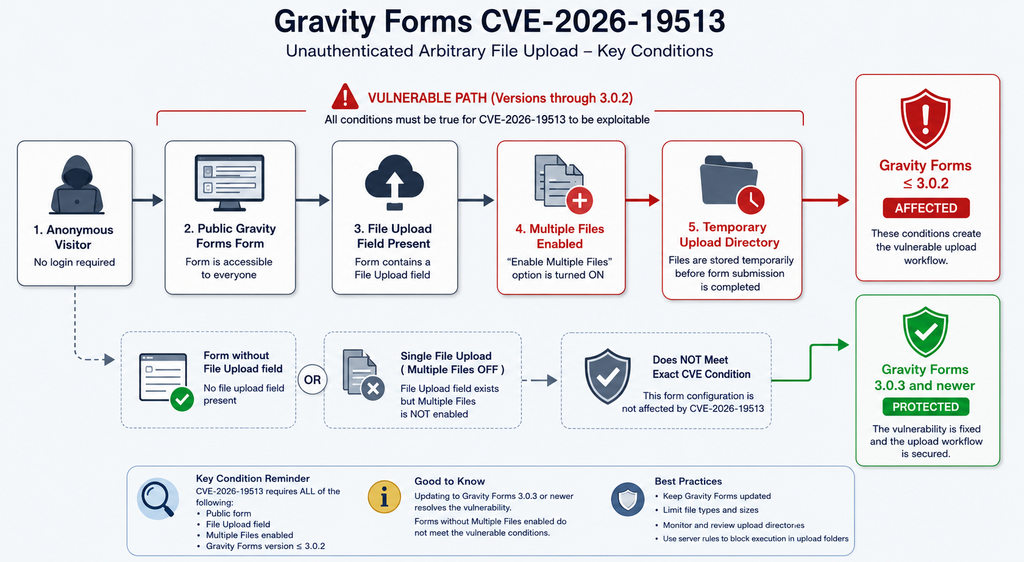
The most useful way to evaluate CVE-2026-19513 is to work through a short set of exposure conditions. A WordPress installation should receive immediate attention when it is running Gravity Forms 3.0.2 or earlier, publishes a form that unauthenticated visitors can reach, and that form contains a File Upload field configured to accept multiple files.
All three conditions matter.
The first is the software version. The published CVE identifies all Gravity Forms versions through 3.0.2 as affected. Gravity Forms 3.0.3 was released on August 20, 2026, and the official changelog includes security enhancements. Administrators should update rather than attempting to decide that their current configuration makes patching unnecessary.
Configuration can change later. A form that does not use multi-file uploads today might receive that field next month. Updating removes dependence on someone remembering the vulnerability every time a form changes.
The second condition is public accessibility. Gravity Forms is commonly used precisely because it makes public data collection easy. A form may be embedded in a WordPress page, post, template, landing page, or other front-end location.
Do not assume a form is private merely because it is not linked from the main navigation. Search engines, old links, XML sitemaps, marketing campaigns, archived pages, browser histories, and external websites may still expose its URL.
The third condition is the File Upload field’s configuration. Multiple Files must be enabled for the vulnerable chunk workflow described in CVE-2026-19513.
A Practical Exposure Checklist
Administrators can begin with the installed plugin version. In WordPress, open the Plugins screen and verify the Gravity Forms version. Sites running 3.0.2 or earlier should be updated to 3.0.3 or a newer supported release.
Next, open Forms and review each active form. Do not limit the audit to forms receiving submissions today. Old forms may still be published somewhere.
Inspect every File Upload field and determine whether multiple uploads are enabled. Record the form name, form ID, public URL, accepted file types, maximum file size, and whether anonymous visitors can access it.
Then review the server environment.
Apache users should confirm that the expected upload-directory protections actually exist and are being honored. The presence of an .htaccess file is helpful, but administrators should not blindly assume it is effective. Apache can be configured to restrict or disable .htaccess overrides.
NGINX users should assume that .htaccess provides no protection, because NGINX does not process those files. Equivalent restrictions need to exist in the NGINX configuration or elsewhere in the hosting stack.
Managed WordPress hosting may add another security layer. Some providers globally block PHP execution from upload directories, isolate PHP handlers, use a reverse proxy, or implement Web Application Firewall rules. These protections can reduce impact, but they should complement the Gravity Forms update rather than replace it.
Sites That Do Not Match the Exact Condition
Suppose a site runs Gravity Forms 3.0.2 but contains only simple contact forms with Name, Email, Subject, and Message fields. That site runs an affected software version, but it does not expose the specific multi-file upload condition described for CVE-2026-19513.
Another site may contain a File Upload field that accepts one PDF. If Multiple Files is disabled, it does not match the published vulnerable configuration for this CVE.
A third website might use a multi-file upload form only behind a strong authentication requirement. That configuration changes the unauthenticated exposure described by the CVE.
None of these situations justify leaving an outdated version installed. They simply demonstrate why vulnerability exposure and vulnerability impact should be described precisely.
Security reporting becomes less useful when every installation is presented as equally exploitable. Accurate configuration analysis helps administrators prioritize emergency work while still applying the vendor’s security update everywhere.
What About File Extension Restrictions?
Administrators may wonder whether allowing only PNG, JPG, or PDF files eliminates the problem. The published CVE description specifically notes the possibility of files that satisfy legitimate content validation while being stored under an attacker-influenced .php or .html filename.
This is why security controls need to validate both the file and its storage destination.
Checking only MIME information does not answer how the web server will interpret the final filename. Checking only the extension does not prove the file content is safe. Strong upload security validates multiple properties and prevents the upload directory from executing active content regardless of what reaches it.
File extension restrictions remain valuable and should stay as narrow as the business workflow permits. A résumé form that needs PDFs should not accept dozens of unrelated formats. An image submission form should not accept arbitrary archives.
However, administrators should not use extension restrictions as a substitute for updating Gravity Forms.
Why NGINX Servers Face a Higher RCE Risk
The difference between Apache and NGINX is one of the most important parts of CVE-2026-19513. It also illustrates why vulnerability severity cannot always be understood from the WordPress plugin alone.
Gravity Forms places an .htaccess file in its protected upload area as part of its defensive controls. On an appropriately configured Apache server, .htaccess can apply directory-specific restrictions. Those restrictions can prevent an uploaded PHP file from being executed even if the application mistakenly allows that file to be written.
This does not make the underlying upload vulnerability harmless. It means another security layer can interrupt the attack chain before server-side code execution.
NGINX works differently.
NGINX does not read .htaccess files. Putting an .htaccess file inside a directory served by NGINX does nothing unless another Apache component in the architecture processes the request later. Pure NGINX configurations must define equivalent security rules in their own server configuration.
Consequently, a WordPress site migrated from Apache to NGINX can lose protections that developers assumed were enforced through .htaccess.
This issue is not unique to Gravity Forms. WordPress plugins have historically used .htaccess to protect backup directories, logs, private downloads, temporary files, cache directories, and other sensitive locations. Administrators running NGINX should never assume those plugin-created files protect the equivalent directory.
From Arbitrary File Placement to Remote Code Execution
Arbitrary file upload and remote code execution are related but not synonymous.
The first stage occurs when an attacker can cause a dangerous file to be written somewhere the application should not allow. The second stage requires the server to interpret that file as executable code.
If an attacker-influenced .php file exists inside a directory but the web server refuses to execute PHP there, the direct PHP remote code execution chain is interrupted.
If NGINX routes .php requests from that directory to PHP-FPM without an appropriate restriction, the impact can become much more severe. The uploaded file may then be processed as server-side PHP.
That possibility explains the higher RCE concern on NGINX and other servers that do not honor the Gravity Forms .htaccess protection.
Administrators should verify their actual configuration rather than assuming every NGINX server is automatically exploitable. Some hosting providers already deny PHP execution inside WordPress upload directories. Others use containerization, security modules, reverse proxies, or customized PHP-FPM routing.
The correct question is therefore not simply “Do I use NGINX?”
Ask instead:
Can a PHP file located in the Gravity Forms temporary upload directory be executed through an HTTP request?
That is the security property that matters.
Apache Is Not Automatically Safe
The existence of .htaccess should not create false confidence for Apache administrators.
Apache must be configured to permit the relevant .htaccess directives. If AllowOverride settings prevent them from applying, the expected protection may not exist. Custom hosting configurations can also alter how PHP handlers behave.
Furthermore, CVE-2026-19513 can involve attacker-written .html content. Even where PHP execution is blocked, active HTML content hosted under the site’s own origin can create another security concern.
The published CVE description warns that attacker-written HTML can result in stored same-origin cross-site scripting if a victim visits the generated file URL.
Same-origin content deserves attention because browsers associate it with the legitimate WordPress domain. A malicious document served from the same origin may operate in a more trusted browser context than content hosted on an unrelated attacker-controlled domain.
For this reason, administrators should patch affected Gravity Forms installations even when Apache successfully blocks PHP execution.
Defense in Depth for Upload Directories
A secure WordPress server should ideally prevent PHP execution from directories intended only for user-generated media and temporary files.
That protection can reduce the consequences of future vulnerabilities in plugins, themes, custom forms, import tools, media processors, and other components.
On Apache, this may involve server-level configuration in addition to directory-specific protections. On NGINX, administrators should implement explicit location rules appropriate to their hosting design. Managed-hosting customers should ask their provider whether PHP execution is blocked inside WordPress upload and temporary directories.
Avoid copying random NGINX configuration snippets directly into production. PHP routing varies considerably between servers. An incorrect regular expression or location block can break legitimate WordPress functionality or create a different security problem.
The safest approach is to use your hosting provider’s documented configuration or have an experienced server administrator verify the rule.
Updating Gravity Forms to Version 3.0.3

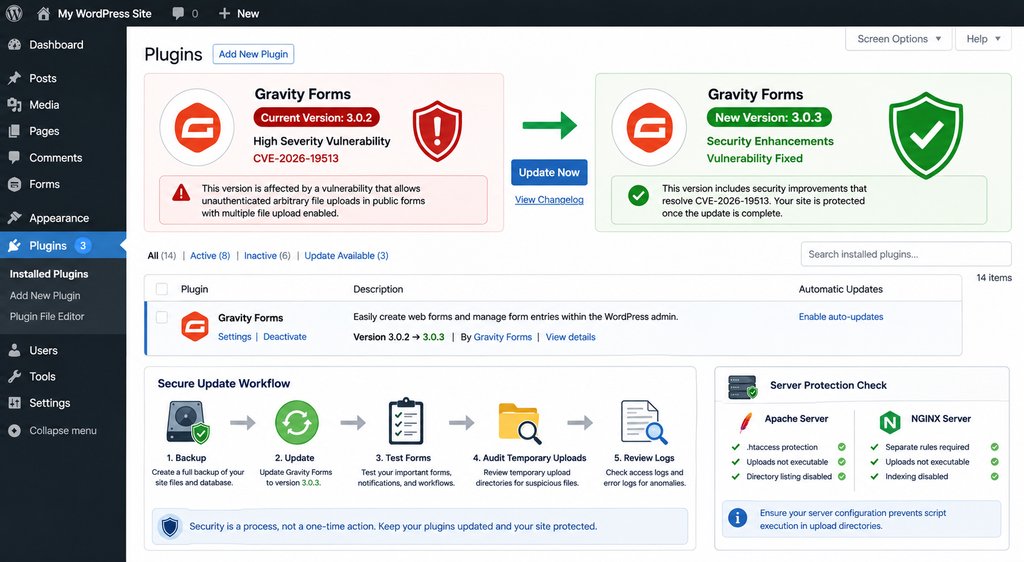
Updating Gravity Forms is the primary remediation for CVE-2026-19513. Version 3.0.3 was released on August 20, 2026, and Gravity Forms lists security enhancements in the official changelog for that release.
Administrators running 3.0.2 or an earlier version should update to 3.0.3 or a newer supported release as soon as practical.
Before updating a production site, create a current backup of the WordPress database and website files. This is standard operational practice, especially on websites where Gravity Forms powers important business processes such as payments, registrations, quotations, customer support, applications, or lead generation.
A backup should not become an excuse to delay a security update. Its purpose is to provide a recovery path if the upgrade creates an unexpected compatibility problem.
After creating the backup, open the WordPress Plugins area and perform the Gravity Forms update through the normal licensed update mechanism. Administrators who manage Gravity Forms manually can obtain the current package through their Gravity Forms account.
Once the update completes, confirm the installed version rather than assuming the update succeeded.
Caching can occasionally make administrative information confusing, particularly on heavily optimized WordPress environments. Verify the actual plugin version shown by WordPress and, where appropriate, confirm it through your deployment or management system.
Test Important Forms After the Update
Security updates should be followed by functional testing.
Start with the forms that matter most to the business. Submit a normal test entry and confirm that required-field validation works. Test notifications, confirmations, conditional logic, payment integrations, CRM feeds, webhooks, and file uploads where applicable.
For multi-file forms, upload only harmless test files of the types your form is designed to accept. Confirm that the expected number of files can be uploaded and that they appear correctly in the resulting entry.
If the form spans multiple pages, test the complete workflow.
Sites using custom Gravity Forms hooks, filters, JavaScript modifications, or add-ons deserve additional attention. The goal is to confirm that security remediation has not interrupted legitimate submission behavior.
Do not roll back to a vulnerable release merely because a custom integration fails. Investigate the compatibility issue or temporarily disable the affected public multi-file form while obtaining support.
What to Do If You Cannot Update Immediately
If an emergency compatibility issue prevents an immediate upgrade, reduce exposure while resolving the problem.
Identify public forms containing File Upload fields with Multiple Files enabled. Temporarily disable the affected form, remove public access, or replace the multi-file field with a workflow that does not use the vulnerable functionality.
At the server level, confirm that script execution is disabled inside the Gravity Forms temporary upload location.
These measures are temporary risk reduction, not permanent replacements for the security update.
A Web Application Firewall may also block suspicious traffic patterns, especially as security vendors add signatures for newly disclosed vulnerabilities. However, WAF protection should be treated as another defensive layer rather than proof that the vulnerable plugin can remain unpatched.
Enable Responsible Update Practices
Gravity Forms is a business-critical plugin on many websites, so administrators sometimes disable automatic updates because they worry about compatibility. That approach can create a different risk when a security release appears.
A better strategy is to combine reliable backups, staging tests, update monitoring, and rapid deployment procedures.
Organizations managing many WordPress installations should inventory Gravity Forms versions centrally. A security advisory should not require manually logging into dozens of dashboards just to discover which sites use an affected version.
Version visibility is one of the simplest improvements a WordPress maintenance operation can make.
Auditing Temporary Upload Directories for Malicious Files
Installing Gravity Forms 3.0.3 fixes the vulnerable software path, but an update cannot automatically prove that an older vulnerable installation was never abused.
Administrators who exposed a public multi-file upload form while running Gravity Forms 3.0.2 or earlier should perform a post-update security review.
Start with the temporary upload locations used by Gravity Forms. The objective is not simply to find PHP files. Look for unexpected file types, suspicious filenames, recently created files that do not correspond with legitimate submissions, unusual HTML documents, and files that remain in temporary storage longer than expected.
Be careful when deleting files manually. Production forms may have legitimate temporary uploads associated with active submissions. Take a backup or preserve suspicious samples in a safe, non-web-accessible quarantine location before removing them if investigation is required.
File timestamps can help establish a timeline, but they are not perfect forensic evidence. Depending on how a file was created, copied, restored, or manipulated, filesystem metadata may not tell the complete story.
Correlate filesystem findings with web-server access logs whenever possible.
Review Apache and NGINX Access Logs
Search logs for requests targeting Gravity Forms temporary upload locations and for direct requests to unusual .php or .html files inside those locations.
A normal Gravity Forms workflow has recognizable patterns. Unexpected direct requests to a temporary filename may deserve investigation, particularly when they occur shortly after an upload-related request.
Do not focus exclusively on successful HTTP 200 responses. Redirects, forbidden responses, server errors, and repeated probes can all help reconstruct what happened.
On NGINX, pay particular attention to whether suspicious PHP requests were passed to PHP-FPM. Application logs and PHP-FPM logs may provide additional evidence.
On Apache, verify whether access to potentially dangerous files was denied by the expected directory protection.
Security teams should preserve relevant logs before rotating or cleaning them. Newly disclosed vulnerabilities often prompt administrators to investigate days or weeks of historical activity, but short retention periods can remove exactly the evidence they need.
Inspect WordPress for Secondary Indicators
If evidence suggests that server-side code may have executed, the investigation should expand beyond Gravity Forms.
Check WordPress administrator accounts for unexpected users or privilege changes. Review installed plugins and themes for unfamiliar additions. Inspect wp-config.php, active theme files, MU plugins, scheduled tasks, and writable directories for unexplained modifications.
Compare WordPress core files against trusted checksums where possible.
Review recently modified PHP files, but remember that modification time alone does not prove malicious activity. Plugin updates, cache systems, deployment tools, translation updates, backups, and legitimate administrators can all change files.
Database inspection may also be necessary. Attackers who obtain code execution can potentially create persistent administrator accounts, inject options, alter scheduled tasks, or modify content.
A clean temporary upload directory therefore does not guarantee that a previously compromised website is clean.
Do Not Rely Only on a Malware Scanner
WordPress malware scanners are useful, but no scanner can guarantee that a site is uncompromised.
Signature-based tools are strongest when they recognize known malicious files. New or customized code may not match existing signatures. Attackers can also hide persistence in database records, scheduled jobs, legitimate-looking plugins, modified configuration files, or external services.
Use scanning as one part of the investigation.
The strongest review combines plugin version verification, filesystem inspection, web-server logs, PHP logs, WordPress user audits, integrity checks, database review, and server configuration analysis.
If there is credible evidence of remote code execution, consider the entire WordPress environment potentially compromised until investigated properly.
Rotate Credentials When Compromise Is Suspected
If investigation confirms or strongly suggests unauthorized code execution, changing only the WordPress administrator password may be insufficient.
An attacker with server-side execution could potentially access database credentials stored in wp-config.php and other secrets available to the PHP process. Depending on the hosting architecture, additional application credentials may also be exposed.
Credential rotation should be planned according to the environment and the evidence discovered.
For a business-critical website, involve the hosting provider or an experienced incident-response professional rather than making random changes that could destroy forensic evidence.
The goal is not simply to make the warning disappear. It is to establish what happened, remove persistence, close the original entry point, rotate exposed credentials where appropriate, and verify that the environment can be trusted again.
Frequently Asked Questions
What is the Gravity Forms vulnerability CVE-2026-19513?
CVE-2026-19513 is an arbitrary file upload vulnerability affecting Gravity Forms versions through 3.0.2. It involves insufficient validation in the multi-file upload chunk workflow. Under the required conditions, an unauthenticated attacker may be able to place a file under a dangerous filename inside the Gravity Forms temporary upload directory.
Which Gravity Forms versions are affected?
The published CVE identifies versions up to and including Gravity Forms 3.0.2 as affected. Gravity Forms 3.0.3 was released on August 20, 2026 and includes security enhancements. Administrators should install 3.0.3 or a newer supported version.
Is every website using Gravity Forms vulnerable?
No. The exact unauthenticated attack condition requires a publicly accessible form containing a File Upload field with Multiple Files enabled. A website running an affected version should still update even when it does not currently expose this configuration.
Does a normal single-file upload field trigger CVE-2026-19513?
The published vulnerability description specifically identifies a File Upload field configured with Multiple Files enabled. Administrators should therefore distinguish single-file forms from the affected multi-file workflow when evaluating exposure.
Does an attacker need a WordPress account?
Not when the vulnerable functionality is exposed through a public form. CVE-2026-19513 is classified as an unauthenticated vulnerability, which makes publicly reachable multi-file forms particularly important to audit.
Why is NGINX more concerning?
Gravity Forms uses an .htaccess file as one layer of protection for its upload directory. Apache can honor .htaccess restrictions when configured appropriately. NGINX does not process .htaccess files, so equivalent restrictions must exist in the NGINX configuration. Without them, executable PHP files in the affected location can present a greater RCE risk.
Is Apache completely protected?
No. Apache may reduce the remote code execution risk when the Gravity Forms .htaccess protections are present and effective, but administrators still need to patch the plugin. The vulnerability can still allow dangerous file placement, and attacker-controlled HTML may create a same-origin cross-site scripting risk.
Is updating to Gravity Forms 3.0.3 enough?
Updating closes the known vulnerable software path, but administrators with previously exposed public multi-file forms should also inspect temporary upload locations and relevant logs. An update does not prove that exploitation did not occur before the patch was installed.
Should I disable file uploads completely?
Usually that is unnecessary after installing a fixed Gravity Forms version and maintaining proper server protections. If you cannot update immediately, temporarily disabling affected public multi-file uploads can reduce exposure while you resolve the upgrade problem.
What should I do if I find a suspicious PHP or HTML file?
Do not execute or open the file through your website. Preserve evidence if necessary, quarantine the file outside the public web root, review access and PHP logs, and investigate the wider WordPress installation for persistence. For important production systems, involve your hosting provider or a qualified security professional.
The Important Takeaway for Gravity Forms Administrators
CVE-2026-19513 deserves attention because it combines three security characteristics that administrators should take seriously: public accessibility, file uploads, and the possibility of dangerous server-side handling. Yet the exact conditions matter. The vulnerability is not equivalent to saying that every Gravity Forms installation can immediately be taken over by an anonymous visitor.
The critical exposure involves Gravity Forms 3.0.2 or earlier, a publicly accessible form, and a File Upload field with Multiple Files enabled. That combination reaches the vulnerable chunk upload workflow.
Server configuration then determines how far the impact can progress.
Apache installations may benefit from the .htaccess protection Gravity Forms places in the upload directory, provided Apache is configured to honor it. NGINX ignores .htaccess, making explicit web-server restrictions especially important. Where PHP execution is possible inside the temporary directory, arbitrary file placement can escalate toward remote code execution.
The correct response is straightforward: update Gravity Forms to 3.0.3 or newer, identify public multi-file upload forms, verify server-side execution restrictions, inspect temporary upload directories, and review historical logs when the vulnerable configuration was exposed.
WordPress security works best when administrators avoid relying on one defensive layer. A patched plugin, restrictive upload policy, non-executable upload directories, reliable logging, backups, and regular integrity checks complement one another.
That approach does more than address CVE-2026-19513. It also reduces the impact of the next file upload vulnerability that may appear in WordPress, a plugin, a theme, or custom application code.
⚠️ Disclaimer and Source Hygiene
This article is provided for educational, defensive, and WordPress administration purposes. It does not provide instructions for exploiting CVE-2026-19513. Technical details have intentionally been presented from a defensive perspective so administrators can identify affected configurations, update Gravity Forms, verify server protections, and investigate possible compromise.
Security behavior can vary according to Gravity Forms version, WordPress configuration, Apache or NGINX settings, PHP-FPM configuration, hosting architecture, reverse proxies, Web Application Firewalls, and additional security software. Do not assume that a specific server is protected or compromised solely because it uses Apache or NGINX.
For production systems, consult official Gravity Forms documentation, your hosting provider, or a qualified WordPress security professional when you are uncertain about server-level protections. Information in this article is based on publicly available vulnerability records and authoritative vendor documentation available at the time of publication.
🔔 For more tutorials like this, consider subscribing to our blog.
📩 Do you have questions or suggestions? Leave a comment or contact us!
🏷️ Tags: Gravity Forms vulnerability, CVE-2026-19513, Gravity Forms security, WordPress vulnerability, arbitrary file upload, WordPress security, Gravity Forms 3.0.3, NGINX WordPress security, Apache WordPress security, WordPress file upload security
📢 Hashtags: #GravityForms, #WordPressSecurity, #CVE202619513, #WordPress, #CyberSecurity, #WebsiteSecurity, #WordPressVulnerability, #GravityFormsSecurity, #NGINX, #WebSecurity
Sources and References
Gravity Forms Changelog – Official Gravity Forms Documentation
The official changelog confirms Gravity Forms 3.0.3 was released on August 20, 2026 and lists security enhancements among the changes included in the release.
CVE-2026-19513 – Wordfence CNA / CVE Record
The published vulnerability record identifies Gravity Forms versions through 3.0.2 as affected and describes insufficient multi-file upload chunk-state validation, the public multi-file form requirement, dangerous temporary filename handling, and the differing impact where .htaccess protections are not honored.
Gravity Forms Security Whitepaper – Official Documentation
Gravity Forms’ security documentation provides additional background about the vendor’s security practices, responsible disclosure process, and historical file-upload protections.
Secondary Sources and Testimonials
Independent vulnerability databases tracking CVE-2026-19513 classify the issue as a high-severity unrestricted file upload vulnerability and reproduce the affected-version and configuration details from the CNA record. Secondary reporting should be used to complement, rather than replace, the original CVE record and official Gravity Forms documentation.
When evaluating future updates to this vulnerability, prioritize the Gravity Forms changelog and documentation, the CVE record, and the original security advisory. Details from third-party vulnerability aggregators can be useful for cross-checking information, but administrators should verify remediation guidance against authoritative sources before changing a production WordPress environment.
Sign in with a Subscriber account to vote.
1 thought on “Gravity Forms Vulnerability Allows Arbitrary File Upload”