
Table of Contents
A critical WPLP Cookie Consent vulnerability allows unauthenticated attackers to upload arbitrary files to vulnerable WordPress websites. Site owners running version 4.4.1 or earlier should update to 4.4.2 immediately, then inspect uploads, administrator accounts, access logs, and other areas for signs of compromise.
WordPress administrators using WPLP Cookie Consent have an urgent security issue to address. A newly disclosed vulnerability, tracked as CVE-2026-75865, affects the popular WPLP Cookie Consent plugin and can allow an unauthenticated attacker to upload arbitrary files to a vulnerable WordPress server.
The vulnerability is particularly serious because an attacker does not need an existing WordPress account. No administrator session is required, and successful exploitation does not depend on convincing an administrator to click a malicious link. The published CVE record gives the issue a CVSS 3.1 score of 9.8 out of 10, placing it firmly in the Critical category.
The affected plugin is officially named WPLP Cookie Consent – Cookie Banner & Consent Management for GDPR, CCPA & Google Consent Mode. Its WordPress plugin slug is gdpr-cookie-consent. According to the vulnerability record, versions through 4.4.1 are affected. Version 4.4.2 contains security and validation improvements and is the version WordPress administrators should install immediately.
This is not a vulnerability where updating the plugin should automatically end the investigation. Arbitrary file upload vulnerabilities deserve additional attention because a malicious file may remain on the server after the vulnerable plugin has been patched. A site that was successfully exploited before the update could therefore remain compromised.
For that reason, the response should have two parts. First, close the vulnerability by installing WPLP Cookie Consent 4.4.2 or later. Second, inspect the WordPress installation for unexpected uploaded files, unfamiliar administrator accounts, unusual REST API requests, modified PHP files, and other indicators that exploitation may already have occurred.
What Is CVE-2026-75865
CVE-2026-75865 is an unauthenticated arbitrary file upload vulnerability affecting WPLP Cookie Consent. The vulnerability was published on September 1, 2026, and the CVE record identifies Wordfence as the assigning organization. The issue is classified under CWE-434: Unrestricted Upload of File with Dangerous Type.
According to the published vulnerability description, the problem exists because of missing file-type validation in the plugin’s saas_upload_logo() functionality combined with an authorization bypass affecting WPLP connector REST endpoints. Together, those weaknesses can allow an attacker who is not logged into WordPress to place arbitrary files on the affected server.
That combination explains the unusually high severity rating. The CVSS 3.1 vector is listed as AV:N/AC:L/PR:N/UI:N/S:U/C:H/I:H/A:H, resulting in a 9.8 Critical score. In practical terms, the vulnerability can be reached across a network, requires low attack complexity, requires no privileges, and requires no interaction from the victim.
The official vulnerability data identifies all versions through 4.4.1 as affected. WPScan likewise lists the vulnerability as an unauthenticated arbitrary file upload through the plugin’s upload-logo REST endpoint and identifies 4.4.2 as the fixed version.
This distinction matters when auditing WordPress installations. A site running WPLP Cookie Consent 4.4.1 should not be considered safe simply because the plugin appears current from an earlier maintenance cycle. Version 4.4.2 is the important security boundary for this specific vulnerability.
The plugin also has a substantial installed base. WordPress.org currently reports more than 10,000 active installations, meaning a vulnerability of this type can quickly attract automated scanning once technical information becomes publicly available.
Why an Arbitrary File Upload Is So Dangerous
WordPress normally applies strict controls to uploaded content. Media uploads are intended for legitimate files such as images, documents, audio, and video. WordPress and properly designed plugins validate extensions, MIME types, user permissions, nonces, and other request properties before accepting sensitive uploads.
A vulnerable upload mechanism can break that security boundary. Instead of accepting only the expected logo or image format, a poorly validated endpoint may accept content that should never be written to a public web directory.
The immediate security problem is therefore not merely that somebody can place an unwanted image on the website. The real concern is that a dangerous server-side file could potentially reach a location where the web server can access or execute it.
That distinction turns an apparently simple upload bug into a possible site-compromise path. The CVE description explicitly states that arbitrary uploads on affected servers may make remote code execution possible.
Remote code execution can give an attacker significantly more control than ordinary WordPress content manipulation. Depending on server configuration and filesystem permissions, successful execution could potentially be followed by persistence mechanisms, creation of unauthorized users, modification of existing files, access to configuration data, database manipulation, or deployment of additional malware.
Not every successful arbitrary upload automatically results in remote code execution. Server configuration matters. A server that prevents PHP or other executable scripts from running inside upload directories introduces an important additional barrier. However, administrators should never rely on that protection instead of applying the plugin update.
Which WordPress Sites Need Immediate Attention
Any public WordPress installation running WPLP Cookie Consent 4.4.1 or earlier should be treated as potentially exposed until it is updated and reviewed.
You can identify the plugin from the WordPress administration area by opening Plugins → Installed Plugins and looking for WPLP Cookie Consent. The plugin may also be recognized by its directory slug:
gdpr-cookie-consent
Administrators managing several websites should check every installation separately. It is common for a plugin to be updated on a primary website while remaining outdated on a staging installation, secondary domain, development copy, old campaign website, or forgotten subdomain.
These less-visible WordPress installations are particularly important during security incidents. Attackers and automated scanners do not care whether a site receives substantial traffic. If DNS points to a public server and vulnerable code is accessible, the installation can still become a target.
The safest assumption is therefore simple: if WPLP Cookie Consent 4.4.1 or an earlier release was publicly accessible, update it and perform at least a basic compromise review.
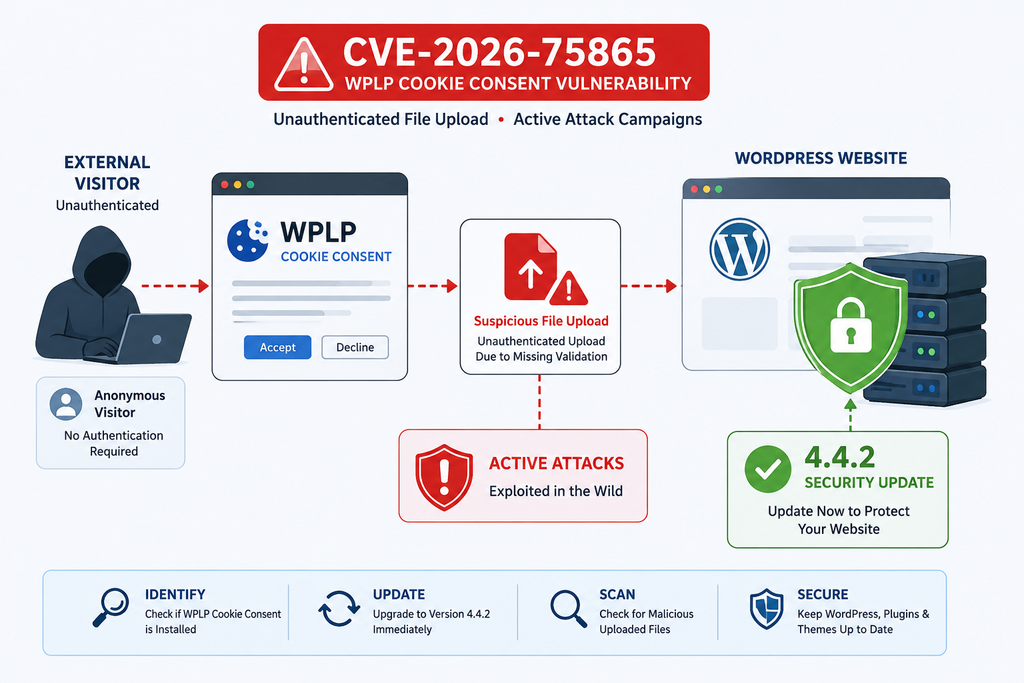
How the Unauthenticated File Upload Works
The central problem behind CVE-2026-75865 involves functionality intended to handle a logo upload. Upload functionality is normal in a cookie-consent plugin because website owners may want their branding displayed inside a cookie banner or related interface.
A legitimate upload workflow should enforce several security controls before data reaches the filesystem. It should determine whether the requester has permission to perform the action, verify the request, validate the expected file type, reject dangerous extensions, and ensure that the final file cannot unexpectedly become executable server-side content.
According to the CVE description, WPLP Cookie Consent failed in two important areas. The saas_upload_logo() function lacked adequate file-type validation, while an authorization bypass affected the WPLP connector REST endpoints.
Those weaknesses become much more serious when combined.
Weak file validation alone may still be protected by strong authorization. An upload feature available only to trusted administrators has a smaller attack surface, although inadequate validation would still be a security defect.
An authorization weakness alone can also have limited impact if the exposed function only performs harmless operations.
Here, however, the security boundaries intersect. An unauthorized remote request can potentially reach upload functionality that does not adequately restrict the type of content being written. That is why the resulting vulnerability is classified as an unauthenticated arbitrary file upload rather than merely an administrative validation issue.
Why Authentication Changes the Risk So Much
Many WordPress vulnerabilities require an attacker to possess a valid account. Sometimes Subscriber privileges are enough. Other vulnerabilities require Editor or Administrator access.
CVE-2026-75865 is different. The published CVSS vector specifies PR:N, meaning privileges are not required. It also specifies UI:N, meaning successful exploitation does not inherently require victim interaction.
That dramatically increases the practical exposure of a public website.
A remote scanner can probe websites without first obtaining credentials. An attacker does not necessarily need to compromise a password, bypass multi-factor authentication, steal a session cookie, or persuade an administrator to perform an action.
This is also why changing administrator passwords alone is not an adequate mitigation. Strong passwords remain essential, but they do not repair an authorization bypass inside a vulnerable REST endpoint.
Likewise, changing the WordPress login URL would not address the root problem. The vulnerable functionality is associated with REST API behavior rather than the ordinary wp-login.php authentication screen.
The correct first-line remediation is the security update.
What the Vulnerable Workflow Looks Like
At a high level, the vulnerable workflow can be understood without reproducing an exploit.
A remote request reaches the WordPress REST API. The plugin’s connector functionality processes that request. Because authorization controls are insufficient, a request that should not be trusted can reach sensitive plugin functionality.
The upload handler then processes supplied file content. Because the affected versions lack adequate file-type validation in the relevant function, the application can write a file that should have been rejected.
Once a file reaches the server, the impact depends on where it is stored, what type of content it contains, how the server treats that location, and whether the attacker can subsequently request or execute the file.
This article deliberately avoids providing a functional exploit request, malicious payload, executable example, or step-by-step offensive procedure. WordPress administrators do not need those details to determine exposure, patch the plugin, or perform a defensive investigation.
REST API Traffic Deserves Attention
Because the vulnerable functionality is associated with WPLP connector REST endpoints, web-server logs become valuable during incident review.
Administrators should look for unexpected requests involving the plugin’s REST namespace, particularly requests occurring before the update to 4.4.2. A cluster of unusual POST requests followed shortly by requests for unfamiliar files inside wp-content/uploads/ deserves investigation.
A single REST API request is not proof that a website was compromised. WordPress itself relies heavily on the REST API, and many plugins legitimately communicate through it.
Context matters.
Look at the request method, timestamps, source, user agent, response status, requested path, and subsequent activity. Several related events occurring seconds apart can reveal far more than one isolated log entry.
Server logs should therefore be preserved before cleanup begins. Deleting suspicious files immediately may remove evidence that helps determine what happened.
Suggested Defensive Checks
Administrators can start with WordPress itself. Confirm the plugin version, inspect recently created users, review installed plugins, check unexpected themes, and examine the Media Library for uploads that nobody recognizes.
Then move to the filesystem.
Pay particular attention to wp-content/uploads/, because ordinary WordPress uploads usually live there. Unexpected executable extensions, unusual double extensions, PHP files inside media directories, recently modified files with misleading image names, or files created at unusual times deserve careful examination.
Do not execute suspicious files to test them.
If you are unsure what a file does, preserve a copy in a safe quarantine location and use a reputable malware scanner or security professional to analyze it.
When Arbitrary Upload Becomes Remote Code Execution
An arbitrary file upload vulnerability and remote code execution are related, but they are not identical.
The first capability allows an attacker to place content on the server. Remote code execution occurs when attacker-controlled server-side code can actually run. Whether the transition happens depends partly on the server environment.
The CVE description uses appropriately careful language: arbitrary file upload may make remote code execution possible. That wording is important because server configurations vary.
For example, a hosting environment may prevent PHP execution from the WordPress uploads directory. In that configuration, uploading a PHP file does not automatically mean the server will execute it when requested through the web.
Another server may be configured differently. If executable content can run from the upload location, the consequences can become much more serious.
Once arbitrary code executes under the web server’s account, an attacker may gain access to whatever resources that account can reach. On a typical WordPress installation, that can include important application files and configuration information.
Why wp-config.php Matters
One of the most sensitive WordPress files is wp-config.php.
It normally contains database connection information and authentication salts. If an attacker gains sufficient server-side access to read this file, the incident can move beyond a malicious upload and into broader application compromise.
Database access creates additional risks because WordPress stores users, options, posts, plugin settings, and other application data there.
An attacker who establishes persistence may attempt to create or modify administrator accounts, inject content, alter options, install additional components, or maintain access after the original vulnerability is patched.
For that reason, updating WPLP Cookie Consent after successful exploitation does not necessarily remove an attacker who has already established another access method.
Persistence Is the Real Post-Exploitation Concern
Security incidents become difficult when attackers create persistence.
A malicious uploaded file might be only the first stage. After obtaining code execution, an attacker could theoretically modify an existing WordPress file, create another hidden file, add a scheduled task, introduce an unauthorized administrator, modify an MU plugin, or place code somewhere administrators rarely inspect.
That is why post-update verification matters.
If logs or malware scanners indicate that an executable file was successfully uploaded and accessed, treat the event as a potential server compromise rather than a simple plugin problem.
The appropriate response may include rotating WordPress administrator passwords, changing database credentials, regenerating WordPress authentication salts, rotating hosting and SFTP credentials, reviewing SSH access where applicable, replacing WordPress core files with verified copies, reinstalling plugins from trusted sources, and checking the database for unauthorized changes.
Those actions should be performed carefully. On an important production website, preserving forensic evidence before rebuilding or cleaning the installation may be valuable.
Block Script Execution in Upload Directories
A useful defense-in-depth measure is preventing server-side scripts from executing inside directories intended only for media.
The exact configuration depends on the web server and hosting environment. Apache, Nginx, LiteSpeed, OpenLiteSpeed, managed WordPress platforms, and shared hosting providers may require different approaches.
IONIX specifically recommends preventing execution of uploaded scripts as a general hardening measure when responding to CVE-2026-75865. It also recommends monitoring for unexpected POST requests to the relevant REST functionality and watching upload directories for unusual extensions.
This control should complement normal WordPress security rather than replace it.
If an upload vulnerability exists, the application still needs to be patched. Blocking script execution can reduce the consequences of a successful upload, but it does not make the vulnerable plugin safe.
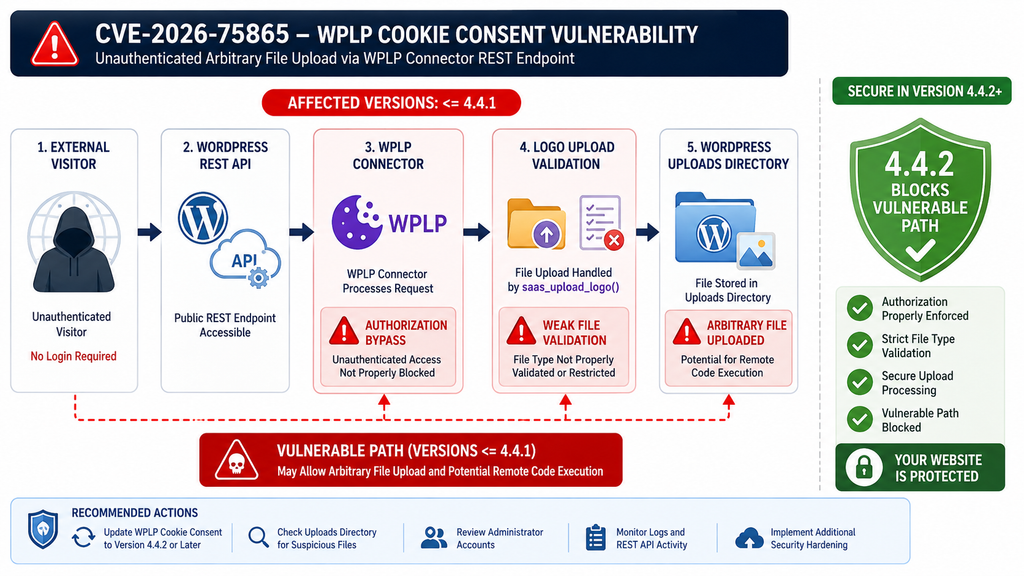
Evidence of Active Exploitation Attempts
The official CVE record establishes the technical vulnerability, affected versions, and critical severity. Evidence concerning active exploitation should be evaluated separately because public attack reports do not automatically carry the same evidentiary weight as a CVE record.
As of September 1, 2026, a detailed public report posted by a WordPress administrator describes what the author says was an automated exploitation attempt against WPLP Cookie Consent 4.4.1 on August 26. According to that account, the activity progressed from WordPress REST reconnaissance to WPLP REST requests and then to the creation of a suspicious PHP file inside the uploads directory.
The report states that execution of the uploaded file was blocked by a server-level rule preventing PHP execution inside wp-content/uploads. The author also published a timeline and indicators observed during the incident.
This community report is significant because it describes behavior consistent with the vulnerability’s documented technical characteristics. However, it should still be treated as community-supplied incident evidence, not as proof that every vulnerable WPLP installation is currently being attacked or that every observed scan belongs to the same campaign.
The safer operational conclusion is straightforward: administrators should not wait for stronger evidence of widespread exploitation before patching a critical unauthenticated upload vulnerability.
Why Automated Exploitation Is Plausible
WordPress is an attractive target for automated vulnerability scanning because installations share predictable structures.
Plugin directories commonly reveal plugin names. Public REST endpoints may provide additional information. Once vulnerability details become known, attackers can automate discovery and probing across large numbers of domains.
CVE-2026-75865 is especially concerning in this context because exploitation does not inherently require valid credentials or victim interaction. The official CVSS assessment confirms both characteristics.
That means the defensive window can become short after disclosure.
Website owners sometimes assume that a small blog is unlikely to be attacked because nobody knows about it. Automated scanners make that assumption unsafe. Bots do not need to know who owns the site, what it publishes, or how much traffic it receives.
They can simply search for exposed software.
A small WordPress installation can therefore face essentially the same automated probe as a much larger website if both expose the same vulnerable plugin functionality.
What to Look for in Access Logs
Begin with requests associated with the WordPress REST API around the period when the vulnerable plugin was installed and accessible.
Unexpected POST activity involving WPLP-specific REST paths deserves attention. The vulnerability is associated with connector functionality and the upload-logo endpoint, so relevant endpoint names appearing unexpectedly in access logs can help narrow the investigation.
Next, look for requests to unfamiliar files in wp-content/uploads.
Timing is important. A suspicious REST request followed seconds later by a request to a newly created file can be more meaningful than either event viewed separately.
Pay attention to successful HTTP responses as well as blocked ones.
A 403 Forbidden response can indicate that a security control stopped an attempted action. A 200 OK response may indicate that a resource was reachable, although the status code alone does not prove malicious code executed.
Correlate web logs with filesystem timestamps, malware scanner alerts, WordPress audit logs, WAF events, and hosting security notifications whenever possible.
Do Not Depend on a Single Indicator
Attackers can change filenames, request patterns, IP addresses, user agents, and payloads quickly.
Therefore, searching only for one published filename or one IP address is not enough.
Behavior-based investigation is more resilient.
Look for PHP files in places where PHP files normally should not exist. Search for recent changes to plugins and themes. Compare administrator accounts with your known user list. Review scheduled tasks. Examine MU plugins. Inspect the root directory for unfamiliar files.
Also check whether security plugins were unexpectedly disabled.
A successful attacker may attempt to remove evidence or weaken defenses after establishing access.
Check Administrator Accounts
Open Users → All Users and filter or inspect users with the Administrator role.
Every administrator should have a clear reason to exist.
Pay attention to unfamiliar usernames, unusual email addresses, accounts that resemble legitimate administrators, and accounts whose registration timing corresponds with suspicious server activity.
Do not assume an older creation timestamp automatically makes an account legitimate. Database values can potentially be manipulated after a deeper compromise.
If an administrator account cannot be explained, preserve evidence and investigate before simply deleting it.
Review Security and Hosting Alerts
Many hosting platforms scan WordPress files automatically. Review recent alerts even if they were previously dismissed as false positives.
Look for detections involving web shells, obfuscated PHP, unexpected executable files, modified WordPress core files, suspicious scheduled jobs, or unknown scripts in writable directories.
Security plugins may provide additional context.
A firewall could have recorded requests involving the vulnerable REST endpoints. File-integrity monitoring may reveal when suspicious content first appeared. Login monitoring can show whether an unknown administrator subsequently authenticated.
Together, these records can establish a timeline.
That timeline is valuable because it helps answer the most important question after patching: Was the website merely vulnerable, or was it actually compromised?
Updating WPLP Cookie Consent to Version 4.4.2

Updating WPLP Cookie Consent should be the immediate priority.
WPScan lists versions before 4.4.2 as vulnerable to the unauthenticated arbitrary file upload issue and identifies 4.4.2 as the fixed version. The current WordPress.org plugin listing also shows version 4.4.2 and describes security and validation improvements in its changelog.
Before updating, create a backup if your normal maintenance workflow allows you to do so without significantly delaying remediation. A current backup can help with recovery and forensic comparison.
Do not postpone a critical security update for days merely to wait for a routine maintenance window.
From WordPress, open:
Dashboard → Plugins → Installed Plugins
Find WPLP Cookie Consent – Cookie Banner & Consent Management for GDPR, CCPA & Google Consent Mode.
Check the installed version.
If the site is running 4.4.1 or earlier, update immediately to 4.4.2 or a later security release if one has subsequently become available.
After updating, refresh the Plugins screen and confirm that the new version is actually installed.
Verify the Update Instead of Assuming It Worked
WordPress updates occasionally fail because of filesystem permissions, connection interruptions, disk-space problems, caching, or hosting restrictions.
Therefore, clicking the Update button is not enough.
Verify the displayed version after completion. If you manage WordPress through WP-CLI or another management platform, verify the installed version there as well.
The objective is simple: no production website should remain on WPLP Cookie Consent 4.4.1 or earlier.
Administrators responsible for multiple installations should produce an inventory rather than relying on memory.
List every production site, staging site, development installation, subdomain, and old WordPress copy that may contain the plugin.
Check each one.
What If Version 4.4.2 Cannot Be Installed Immediately?
If an operational problem genuinely prevents the security update, consider temporarily disabling the affected plugin until the site can be patched.
IONIX also recommends restricting or disabling public access to the affected plugin REST functionality at the server or WAF layer when immediate patching is impossible.
Such measures should be temporary.
Custom WAF rules can produce unexpected behavior if implemented incorrectly, especially when they broadly block WordPress REST traffic. Modern WordPress installations and plugins frequently depend on REST functionality.
Do not block the entire WordPress REST API blindly.
A targeted mitigation applied by an experienced administrator or hosting provider is safer than a broad rule copied from an unrelated website.
The preferred solution remains installing the fixed plugin release.
Update Does Not Equal Cleanup
This point deserves emphasis.
Updating to WPLP Cookie Consent 4.4.2 closes the known vulnerable path, but the update cannot guarantee that files uploaded before the patch disappear.
Imagine a vulnerable site was attacked yesterday. A malicious file was written to wp-content/uploads/. Today, the administrator updates the plugin.
The vulnerable upload endpoint may now be fixed, but yesterday’s file could still exist.
If that file created another persistence mechanism, simply deleting the original upload might also be insufficient.
This is why administrators who ran an affected version should combine patching with a post-update review.
The depth of that review should reflect the available evidence.
A site with no suspicious activity may receive a focused audit. A site with confirmed malicious uploads, unexplained administrator accounts, modified core files, or successful execution attempts deserves a full incident-response process.
Confirm Cookie Consent Still Works
Security updates should also be followed by functional testing.
Visit the front end in a private browser session and verify that the cookie banner still appears as expected. Test consent choices and preference controls. If the site uses Google Consent Mode, analytics integration, script blocking, geolocation features, or customized banner designs, verify those functions.
Check the browser console for unexpected JavaScript errors.
Then clear relevant caches if necessary.
A security update should not be rolled back casually because of a visual issue. If something appears broken, investigate the configuration, clear caches, contact the plugin developer, or temporarily adjust the affected feature while keeping the secure release installed.
Rolling back to a known vulnerable version restores the security problem.
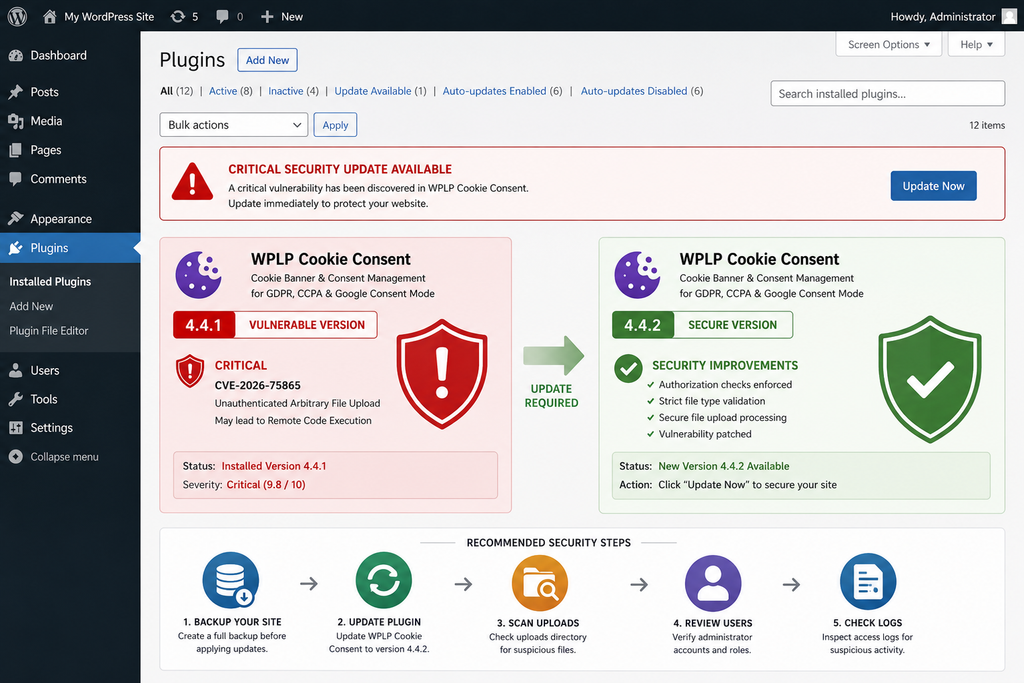
Searching WordPress for Malicious Uploaded Files
After installing WPLP Cookie Consent 4.4.2, the next task is determining whether the vulnerable upload functionality may have been abused before the patch.
Start with wp-content/uploads/.
This directory normally contains media uploaded through WordPress and plugins. Its internal structure often uses year and month folders, although individual configurations can differ.
Images, PDFs, videos, documents, generated thumbnails, cached assets, and plugin-created data can all legitimately appear there.
Executable PHP files are much more suspicious.
A .php file appearing inside a standard WordPress media directory deserves investigation unless you can positively identify a legitimate reason for it.
Search for Unexpected Executable Extensions
Administrators with hosting file-manager access can inspect upload directories manually.
Those with SSH access can use trusted system-administration tools to identify files by extension and modification time. The goal is defensive inventory, not execution.
Look for extensions such as:
.php.phtml.phar.php5.php7
Also pay attention to filenames using multiple extensions.
A filename that visually resembles an image but ends in an executable extension should receive immediate attention.
Do not assume a file is safe merely because its name contains .jpg, .png, or another image extension somewhere in the filename.
Likewise, do not assume every unusual file is malware.
Plugins can generate legitimate files in uploads directories. Establish the origin before deletion whenever possible.
Sort Files by Modification Time
Modification timestamps can make a large filesystem investigation much easier.
Identify the period during which WPLP Cookie Consent 4.4.1 or earlier was publicly installed. Then examine files created or modified during that period, especially around suspicious log events.
A file created seconds after an unusual REST API POST is more interesting than an old file that has existed for years.
Remember that timestamps are evidence, not absolute truth.
An attacker with sufficient server access may alter timestamps. Backup restorations and migration tools can also change them.
Use timestamps as one signal among several.
Compare WordPress Core Against Clean Copies
WordPress core should contain predictable files.
If you suspect compromise, compare the installation against an official clean WordPress package matching the installed version.
WP-CLI can help administrators verify core checksums where appropriate. A checksum mismatch deserves investigation, although localized files and legitimate modifications should be considered.
Core files should generally not be manually customized.
Unexpected changes to files such as wp-settings.php, wp-load.php, index.php, or files under wp-admin and wp-includes can indicate compromise.
Reinstalling clean WordPress core files is often safer than attempting to manually remove suspicious fragments from modified core code.
Reinstall Plugins From Trusted Sources
Plugins deserve similar treatment.
If a plugin directory contains unexpected PHP files or code modifications, replacing the entire plugin with a clean copy from its trusted distribution source can be safer than editing individual files.
Be careful with plugins containing custom modifications.
Document those changes first.
For WPLP Cookie Consent specifically, verify that the installation corresponds to the current secure release rather than leaving remnants from an incomplete update.
The official WordPress.org listing is the appropriate reference point for the publicly distributed plugin.
Inspect Themes and MU Plugins
Attackers who gain execution may look for persistent locations that survive normal plugin updates.
Inspect active and inactive themes for unexpected PHP files or recently modified templates.
Pay special attention to functions.php, but do not stop there. Malicious code can be placed in less obvious files.
Also inspect:
wp-content/mu-plugins/
MU plugins load automatically and do not behave exactly like ordinary plugins in the WordPress Plugins interface. This makes the directory useful for legitimate site administration, but it also means unfamiliar files there deserve careful review.
If you intentionally use MU plugins, compare the directory against your known deployment or backup.
Check wp-config.php and Root Files
Review the WordPress root directory.
Look for files you do not recognize, unexpected PHP scripts, recently modified configuration files, and suspicious changes to .htaccess where Apache is used.
Examine wp-config.php carefully.
Do not publish its contents or copy sensitive credentials into public malware-analysis services.
If the file contains unfamiliar includes, encoded code, remote references, or unexpected logic, treat the installation as potentially compromised.
A normal wp-config.php may contain custom constants and hosting-specific configuration, so unfamiliar code is not automatically malicious. Compare it with a known-good backup when possible.
Review Scheduled Tasks
Persistence can also involve scheduled execution.
WordPress uses WP-Cron for legitimate scheduled jobs such as publishing scheduled posts, plugin maintenance, email tasks, cleanup, and background processing.
Review cron events for unfamiliar callbacks.
Server-level cron jobs should also be inspected if you have access.
A scheduled command referencing an unknown PHP file, temporary directory, hidden script, or unfamiliar external resource deserves immediate investigation.
Again, do not delete evidence before documenting it when a real compromise is suspected.
Search for Unexpected Administrator Users
Filesystem review should happen alongside account review.
Open the WordPress Users screen and identify every administrator.
If WP-CLI is available, administrators can also use it to inventory accounts and roles from the command line.
Compare the results with your expected team.
Remove unauthorized access only after gathering enough information to understand the incident. Then reset credentials for legitimate privileged users.
If compromise is confirmed, assume passwords or session material may have been exposed and rotate them accordingly.
Rotate Secrets After Confirmed Code Execution
If evidence shows that an attacker achieved server-side execution, credential rotation becomes much more important.
- Change WordPress administrator passwords.
- Rotate hosting control-panel credentials where appropriate.
- Rotate SFTP or FTP credentials.
- Review SSH keys.
- Change database credentials if exposure is plausible.
- Regenerate WordPress authentication salts.
- Review API keys stored in WordPress configuration or plugin settings.
- Revoke unknown application passwords.
- Check external services connected to WordPress.
- The objective is to invalidate credentials an attacker might have collected during the compromise.
Do not perform indiscriminate credential changes without recording what was changed. A documented response is easier to verify later.
Check the Database
A clean filesystem does not guarantee a clean WordPress database.
Review administrator users, active plugins, site URLs, important WordPress options, scheduled tasks, widgets, injected scripts, and other settings that could provide persistence.
Search posts and pages for unexpected JavaScript or spam content if the site showed visible symptoms.
Inspect recently modified content.
SEO spam attacks sometimes hide links or pages that normal visitors rarely notice. Search engines may discover them before administrators do.
Google Search Console can therefore provide useful secondary evidence. Unexpected indexed URLs, strange search queries, sudden security warnings, or unexplained pages can indicate that a compromise affected public content.
Examine Backups Carefully
Backups are extremely valuable during incident response because they provide historical comparison.
However, restoring the newest backup blindly can reintroduce the vulnerability or malware.
Determine when suspicious activity began.
A backup created after compromise may contain the same malicious files you are trying to remove. A backup created before compromise may still contain WPLP Cookie Consent 4.4.1 and therefore require an immediate update after restoration.
The safest recovery process combines a known-good backup with current security updates and credential rotation.
After restoration, verify the site again.
Use Malware Scanning as One Layer
A reputable WordPress or hosting malware scanner can help identify known web shells, suspicious PHP, obfuscated code, and modified files.
Scanning is valuable, but a clean scan should not be treated as mathematical proof that the website is uncompromised.
Attackers can modify existing legitimate files, use previously unknown code, manipulate the database, or create persistence that signature-based scanners do not recognize.
Combine malware scanning with logs, filesystem comparison, account review, integrity checks, and configuration inspection.
The more independent signals agree, the more confidence you can have in the result.
Frequently Asked Questions
What is the WPLP Cookie Consent vulnerability?
The WPLP Cookie Consent vulnerability tracked as CVE-2026-75865 is an unauthenticated arbitrary file upload issue. It results from inadequate file-type validation combined with an authorization bypass affecting WPLP connector REST functionality. The vulnerability can potentially lead to remote code execution.
Which WPLP Cookie Consent versions are vulnerable?
Published vulnerability information identifies versions through 4.4.1 as affected. WPScan lists 4.4.2 as the fixed version. Administrators should install 4.4.2 or any later security release available from the official plugin distribution.
Does an attacker need a WordPress account?
No. CVE-2026-75865 is classified as an unauthenticated vulnerability. The CVSS vector specifies that no privileges are required and no user interaction is required for the vulnerable condition.
How serious is CVE-2026-75865?
The vulnerability has a CVSS 3.1 score of 9.8, which is Critical. Its potential impact includes arbitrary file upload and possible remote code execution, depending on server configuration and the circumstances of successful exploitation.
Is WPLP Cookie Consent being actively attacked?
A detailed public community report posted around disclosure describes an automated exploitation attempt against a site running WPLP Cookie Consent 4.4.1. That report is useful evidence of exploitation attempts, but it should be distinguished from the official CVE record. Administrators should patch immediately rather than waiting for broader campaign confirmation.
Is updating to version 4.4.2 enough?
Updating closes the known vulnerable path, but it cannot guarantee that a site was not compromised earlier. Administrators who ran an affected release should also inspect uploaded files, users, logs, plugins, themes, MU plugins, scheduled tasks, and important configuration files.
Where should I search for malicious uploaded files?
Begin with wp-content/uploads/. Look for unexpected executable files, suspicious multiple extensions, unusual recently created files, and items that correlate with abnormal REST API activity. Never execute a suspicious file simply to determine what it does.
Should PHP execution be disabled inside wp-content/uploads?
Preventing server-side script execution in media upload directories can provide useful defense in depth. The correct configuration depends on the hosting platform and web server. It should complement plugin updates and normal security controls rather than replace them.
Should I change all passwords after updating?
If you find evidence of successful code execution or broader compromise, credential rotation is strongly recommended. Review WordPress administrator passwords, hosting access, SFTP or FTP credentials, SSH access, database credentials, WordPress salts, application passwords, and relevant API keys.
What should I do if I find a suspicious PHP file?
Do not open it through a browser or execute it. Preserve relevant logs and evidence, quarantine the file safely, determine when it appeared, and investigate related activity. If execution appears to have occurred, treat the incident as a potential full WordPress compromise and consider professional incident-response assistance.
Why This Update Should Not Wait
CVE-2026-75865 combines several characteristics that WordPress administrators should take seriously: remote accessibility, no authentication requirement, low attack complexity, arbitrary file upload, and the possibility of remote code execution.
The good news is that the immediate remediation is straightforward. Update WPLP Cookie Consent to version 4.4.2 or later.
The more important lesson is what happens afterward.
A patched plugin stops the known vulnerable workflow, but security response cannot always stop at the Update button. If an attacker reached the website while it was vulnerable, malicious files or another persistence mechanism could remain after the plugin itself becomes secure.
Inspect wp-content/uploads/. Review administrator accounts. Examine REST and web-server logs. Check themes, plugins, MU plugins, scheduled jobs, WordPress core integrity, and important configuration files.
If you find evidence that an uploaded executable was successfully accessed, escalate the response. Preserve evidence, rotate credentials, replace compromised components with verified copies, and consider rebuilding from a known-good backup.
For administrators managing many WordPress installations, this incident is also a reminder that plugin inventory matters. A forgotten staging site or quiet subdomain can expose the same vulnerable code as a high-traffic production website.
Patch first, verify second, investigate anything unusual, and keep defense-in-depth protections in place even after the immediate vulnerability has been resolved.
⚠️ Disclaimer and Source Hygiene
This article is provided for educational, defensive, and WordPress security-awareness purposes. It does not provide a functional exploit, malicious payload, executable code, or instructions intended to compromise third-party websites.
Security conditions can change quickly after a vulnerability is disclosed. Plugin versions, exploitation evidence, vendor guidance, CVE information, and mitigation recommendations may be updated after publication. Always verify the latest plugin release and current security advisories before making production changes.
The technical vulnerability details in this article were cross-checked against the CVE record, Wordfence vulnerability information, WPScan, the official WordPress.org plugin listing, and additional security research. Reports concerning observed exploitation attempts are identified separately as community evidence rather than presented as equivalent to an official CVE determination.
If you discover evidence of a genuine server compromise and are not experienced with incident response, consider consulting your hosting provider or a qualified WordPress security professional before deleting evidence or rebuilding the installation.
🔔 For more tutorials like this, consider subscribing to our blog.
📩 Do you have questions or suggestions? Leave a comment or contact us!
🏷️ Tags: WPLP Cookie Consent vulnerability, CVE-2026-75865, WordPress vulnerability, WordPress security, WPLP Cookie Consent, arbitrary file upload, WordPress malware, remote code execution, WordPress plugin security, WordPress security update
📢 Hashtags: #WordPressSecurity, #WordPress, #CVE202675865, #WPLPCookieConsent, #CyberSecurity, #WordPressVulnerability, #WebsiteSecurity, #Malware, #PluginSecurity, #InfoSec
📚 Sources and References
Wordfence Threat Intelligence: CVE-2026-75865 is documented as a critical unauthenticated arbitrary file upload vulnerability affecting WPLP Cookie Consent through version 4.4.1. The vulnerability is associated with inadequate file validation and authorization controls around the affected upload functionality.
WPScan Vulnerability Database: WPScan lists WPLP Cookie Consent versions below 4.4.2 as affected by the unauthenticated arbitrary file upload vulnerability and identifies version 4.4.2 as the fixed release.
Official WordPress.org Plugin Directory: The current WPLP Cookie Consent listing shows version 4.4.2, more than 10,000 active installations, and security and validation improvements in the 4.4.2 changelog.
CVE/OpenCVE Record: The published CVE-2026-75865 record documents the affected versions, CWE-434 classification, CVSS 9.8 severity, network attack vector, absence of required privileges, and potential for arbitrary uploads to result in remote code execution.
IONIX Threat Center: Additional defensive guidance recommends immediate updating, monitoring relevant REST requests, checking upload directories for unexpected files, and preventing execution of scripts from upload directories as a defense-in-depth measure.
🕊️ Secondary Sources and Testimonials
A detailed community incident report published around the time of disclosure describes an automated attack against a WordPress installation running WPLP Cookie Consent 4.4.1. The administrator reported suspicious REST activity followed by an arbitrary file upload and attempted access to the resulting file. According to the report, a server rule preventing PHP execution in the uploads directory blocked the attempted execution.
Community reports can provide useful early-warning information, especially during the first hours or days after vulnerability disclosure. However, individual reports should not be treated as definitive proof of the scale, attribution, or uniform behavior of an exploitation campaign. For vulnerability scope and affected versions, administrators should prioritize the CVE record, Wordfence, WPScan, and the official plugin distribution information.
The practical response does not depend on proving that a particular campaign is widespread. CVE-2026-75865 is independently documented as a critical unauthenticated arbitrary file upload vulnerability with potential remote-code-execution consequences. That alone justifies immediate patching and a careful post-update security review.
Sign in with a Subscriber account to vote.
1 thought on “Critical WPLP Cookie Consent Vulnerability Under Attack”