
Table of Contents
A critical ACPT vulnerability can allow unauthenticated attackers to modify existing WordPress user accounts through exposed public forms. Learn which ACPT Premium versions are affected, how to identify vulnerable user forms, update safely to version 2.0.67, and audit administrator accounts for suspicious email or password changes.
The newly disclosed ACPT vulnerability tracked as CVE-2026-15354 deserves immediate attention from WordPress administrators who use ACPT Premium to build front-end user forms. The flaw affects ACPT Premium versions up to and including 2.0.66 and has received a CVSS 3.1 score of 9.8 out of 10, placing it firmly in the Critical category.
The vulnerability is particularly serious because exploitation does not necessarily require an existing WordPress account. Under the vulnerable configuration, an anonymous visitor interacting with a public ACPT user form may be able to cause an existing WordPress user record to be updated. That existing user could potentially be an administrator.
This does not mean every WordPress installation running ACPT Premium is equally exposed. Successful exploitation requires an important condition: the site must expose an ACPT user form that accepts submissions from unauthenticated visitors. Administrators should therefore treat both the installed plugin version and the site’s actual form configuration as part of the risk assessment.
Updating is the first priority, but it should not be the final step. Because the weakness can affect existing WordPress users, administrators running a vulnerable version should also inspect privileged accounts after updating. Unexpected email changes, unexplained password resets, unfamiliar administrators, and unusual login activity deserve careful investigation.
Security priority: If your website runs ACPT Premium 2.0.66 or earlier and publishes user forms that anonymous visitors can submit, update to ACPT Premium 2.0.67 or a newer secure release immediately. Then audit administrator accounts rather than assuming that installing the patch proves the site was never compromised.
What Is CVE-2026-15354
CVE-2026-15354 is an improper privilege management vulnerability affecting the Premium edition of ACPT for WordPress. According to the published CVE information, all versions through 2.0.66 are affected. The weakness has been classified under CWE-269: Improper Privilege Management and carries a CVSS 3.1 base score of 9.8 Critical.
The problem exists in ACPT’s form-submission logic. A vulnerable public form could allow data controlled by the submitting visitor to influence which existing WordPress user is updated. The affected process eventually interacts with WordPress’s wp_update_user() functionality without the authorization protection required for such a sensitive operation.
That distinction matters. Creating a normal low-privilege user account is very different from modifying an existing account. WordPress user records can contain highly security-sensitive information. If the targeted record belongs to an administrator, unauthorized changes to credentials can lead directly to loss of administrative control.
Published vulnerability information specifically states that an attacker could potentially overwrite a WordPress user’s email address and password, including those belonging to an administrator. No prior authentication is required when the vulnerable public-form condition exists.
ACPT addressed the issue in version 2.0.67, released on August 18, 2026. The vendor’s changelog describes a security fix for a form-submission issue that could allow a public form to overwrite the wrong record. The release also contains several other security improvements, making the update particularly important for installations still running older builds.
Why a CVSS 9.8 Rating Matters
A 9.8 CVSS score reflects the potential consequences of successful exploitation rather than simply the existence of a programming mistake. The published CVSS vector describes a network-accessible vulnerability with low attack complexity, no privileges required, no user interaction required, and potentially high impact to confidentiality, integrity, and availability.
Administrator takeover is especially dangerous in WordPress because administrators normally have extensive control over the site. They can install plugins, modify settings, manage users, alter content, and often execute actions that indirectly affect files or application behavior.
For that reason, CVE-2026-15354 should not be handled like a cosmetic bug. Websites meeting the vulnerable form condition should consider the incident-response question as well as the patching question: Was the vulnerable functionality exposed while an affected version was active?
That question determines how far the post-update audit should go.
The Exact Exposure Condition
The vulnerability requires more than simply having ACPT Premium installed. Published CVE information says successful exploitation requires a public ACPT user form that permits anonymous submissions.
A website using ACPT only for administrative custom post type management, for example, does not automatically have the same exposure as a website publishing anonymous front-end user forms. Likewise, a form restricted to authenticated and appropriately authorized users changes the threat model considerably.
Site owners should therefore avoid two opposite mistakes. Do not assume that every ACPT installation has already been compromised. At the same time, do not assume that an apparently quiet website is safe simply because no obvious malicious administrator account has appeared.
The correct response is configuration-based verification followed by an account audit.
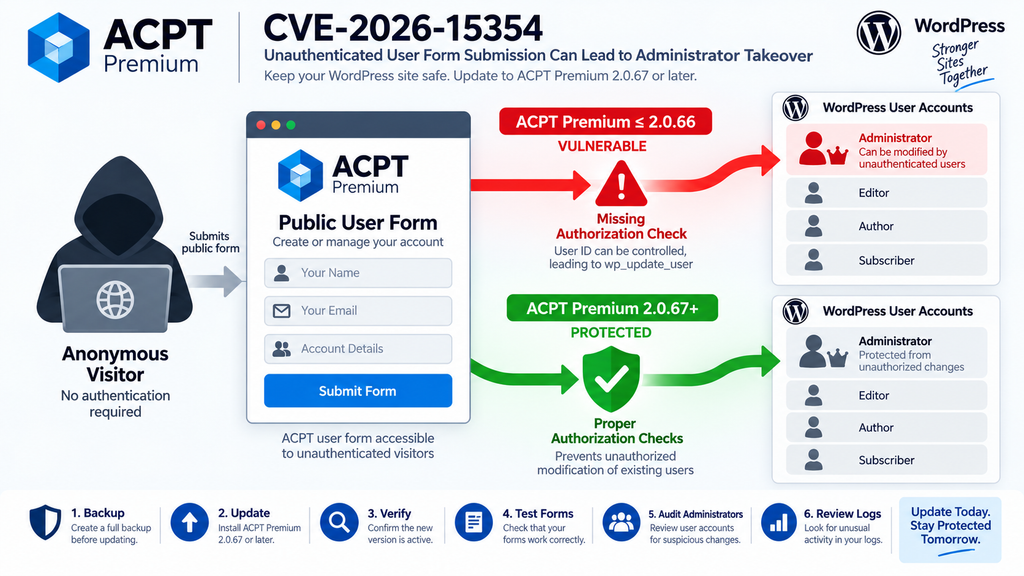
Which Public ACPT Forms Are Vulnerable
The most useful first question for administrators is not simply, “Do I have ACPT installed?” Instead, ask, “Does my site expose an ACPT user form to visitors who are not logged in?”
CVE-2026-15354 specifically concerns public user-form submissions. Therefore, the highest-priority forms to identify are those intended to create or manage WordPress users from the front end while accepting submissions from anonymous visitors. These forms may appear on registration pages, membership areas, account creation workflows, directories, community websites, customer portals, or custom onboarding pages.
ACPT provides considerably broader functionality than user registration alone. A site might use the plugin for custom post types, taxonomies, meta fields, relationships, or other structured content features without publishing the specific type of anonymous user form required for this vulnerability.
That difference should shape the audit.
Start With Every Front-End ACPT Form
Administrators should create an inventory of pages containing ACPT forms and determine what each form does. Do not limit the search to pages called “Register” or “Create Account.” Forms can be embedded inside landing pages, account portals, templates, membership pages, or older pages that administrators have forgotten.
Check published pages, reusable templates, custom layouts, and any other location where ACPT-generated forms may appear. Staging copies and abandoned landing pages should also be considered if they remain reachable from the public internet.
Next, open the relevant pages in a private or incognito browser session while completely logged out of WordPress. This provides a simple defensive test: can an anonymous visitor reach and submit the form?
A visible form is not automatically proof of vulnerability, but an anonymously accessible user form running on ACPT Premium 2.0.66 or earlier should receive immediate attention.
Registration Workflows Deserve Special Attention
Public registration is a normal WordPress feature for many websites. Membership communities, directories, educational platforms, marketplaces, and customer portals often need visitors to create accounts.
The danger in CVE-2026-15354 comes from the boundary between creating a new user and updating an existing user. Those actions should have very different authorization requirements.
A visitor legitimately creating their own account should never gain the ability to select another existing WordPress user’s record for modification. In a secure implementation, server-side authorization must prevent untrusted form data from turning an account-creation workflow into an arbitrary account-update workflow.
Version 2.0.67 introduces stronger checks around this process. ACPT’s changelog confirms that the release fixes a public form issue capable of overwriting the wrong record.
Do Not Rely Only on Whether the Form Is Linked
An old registration page can remain publicly reachable even after its navigation link has been removed. Search engines, browser history, external links, XML sitemaps, archived pages, and automated scanners can still discover URLs.
Consequently, administrators should inspect the actual WordPress content and ACPT configuration instead of checking only the site’s menus.
Review forms created for previous campaigns, temporary registrations, test projects, demonstrations, employee onboarding, customer portals, and discontinued membership features. If an unused public user form remains accessible, remove or restrict it.
This housekeeping remains useful even after patching because unnecessary public forms increase the site’s attack surface.
How User IDs Reach wp_update_user
Understanding CVE-2026-15354 does not require reproducing an exploit. The defensive concept is straightforward: untrusted form data was able to influence the identity of the WordPress object being updated without a sufficient authorization decision being enforced first.
According to the CVE description, the vulnerable submit() function allowed unauthenticated form submissions to control the target user ID before the plugin called WordPress’s wp_update_user() function.
wp_update_user() itself is a legitimate WordPress function. Plugins and themes can use it for normal account-management operations. The security problem arises when application logic allows an unauthorized visitor to determine which account is passed into that update operation.
The critical security boundary therefore sits before the WordPress account update occurs.
Input Validation and Authorization Are Different
This vulnerability is also a useful reminder that sanitization and authorization solve different problems. Sanitizing a numeric identifier may ensure that it looks like a valid number. It does not establish that the current visitor has permission to modify the user represented by that number.
Authorization asks a different question: Is this requester allowed to perform this action against this specific account?
Sensitive account operations should answer that question server-side. A browser, hidden field, JavaScript control, or submitted form value should never be treated as proof of permission by itself.
That principle becomes especially important for administrator accounts because a credential modification can transfer effective ownership of the website.
From Public Submission to Account Takeover
At a high level, the vulnerable flow can be understood as several trust boundaries. An anonymous visitor reaches a public ACPT user form. The form sends information to ACPT’s submission handler. Vulnerable versions could allow submission data to influence an existing user’s identity. The handler could then pass account information into the WordPress user-update process without the required authorization protection.
If the existing user is an administrator and sensitive account fields are changed, the legitimate administrator may lose access while an unauthorized person gains control.
The important defensive lesson is not the mechanics of constructing such a request. It is recognizing that client-controlled identifiers must never establish authorization to modify existing users.
ACPT 2.0.67 corrected this class of form-submission behavior by adding stronger permission controls around updates.
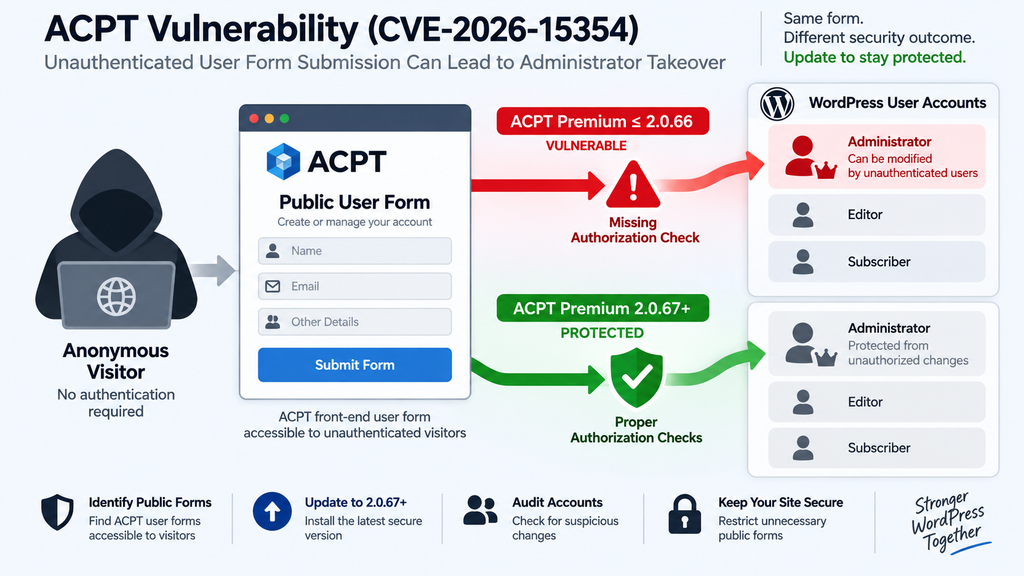
Updating ACPT Premium to Version 2.0.67
The primary remediation for CVE-2026-15354 is straightforward: installations running ACPT Premium 2.0.66 or earlier should upgrade to version 2.0.67 or a later secure release.
ACPT officially lists version 2.0.67 in its changelog with a release date of August 18, 2026. Among several improvements, the release includes a security fix for a public form submission issue that could overwrite the wrong record. It also strengthens REST API authentication and addresses other security-related problems.
Before updating a production WordPress website, create a reliable backup of the database and site files. The backup is primarily a recovery measure in case the upgrade causes compatibility problems. It should not be considered a substitute for updating.
After creating the backup, install ACPT Premium 2.0.67 or the latest trusted version supplied through the vendor’s normal distribution channel.
Verify the Installed Version
Do not stop when WordPress reports that the update completed successfully. Open the Plugins screen and verify the version actually running.
Caching, failed file operations, permissions problems, deployment systems, staging-to-production workflows, and manually managed plugin installations can occasionally leave unexpected versions active.
Administrators managing multiple WordPress installations should check every production and internet-accessible staging site separately.
A forgotten staging website running the same vulnerable forms can still represent a security risk, particularly if it shares users, credentials, backups, databases, API keys, or infrastructure with production.
Test Important ACPT Forms After Updating
Security updates can modify validation or authorization behavior. Test legitimate workflows after installing version 2.0.67.
Check registration forms, logged-in profile forms, custom content forms, email notifications, redirects, required fields, file fields, conditional fields, and integrations that depend on ACPT submissions.
Perform tests using accounts with realistic privilege levels. A form intended for subscribers should work for subscribers without unexpectedly becoming available to anonymous visitors.
Testing both positive and negative cases is valuable. Confirm that authorized actions still work, then verify that logged-out visitors cannot perform actions that should require authentication.
Clear Relevant Caches
After updating, clear applicable page caches, server caches, CDN caches, and persistent application caches where appropriate.
A WordPress plugin’s PHP security fix takes effect on the server when the updated code runs, so clearing a page cache is not the mechanism that patches the vulnerability. However, cache clearing can prevent outdated front-end forms or scripts from creating confusing behavior during verification.
If the website uses Cloudflare or another CDN, avoid unnecessary full-cache purges when targeted invalidation is sufficient. The objective is simply to ensure that testing reflects the current application state.
Keep the Update From Being Rolled Back
Sites managed through deployment pipelines should confirm that the next deployment will not restore ACPT 2.0.66 from an old repository, archive, server image, or staging copy.
This problem is easy to overlook on manually maintained WordPress installations. An administrator patches production, then later deploys an older staging copy containing the vulnerable plugin version.
Record the required minimum version in deployment documentation and update any source packages or templates used to build new sites.
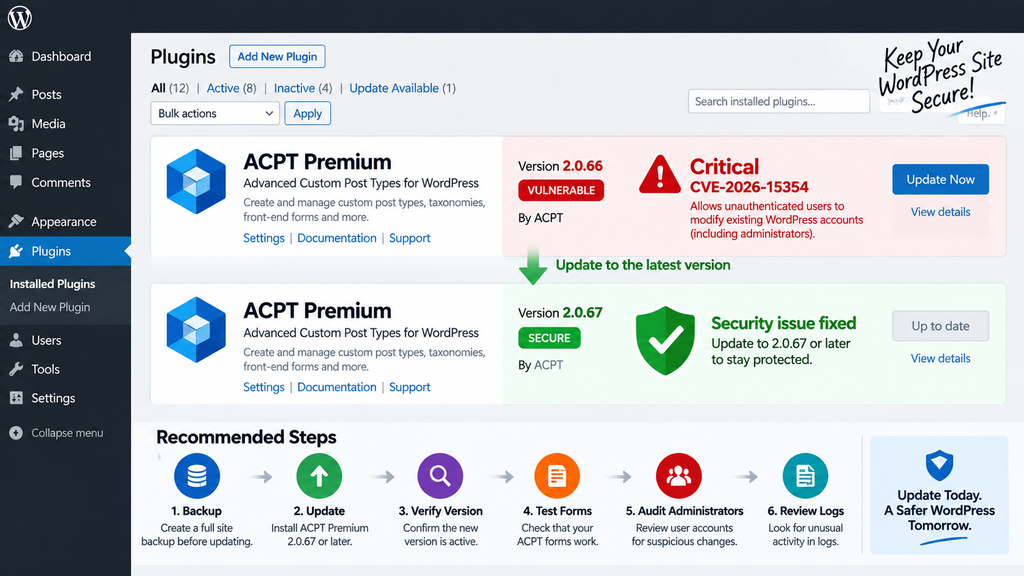
Auditing Administrator Email and Password Changes

Installing ACPT 2.0.67 closes the known vulnerable behavior, but an update cannot retroactively determine whether an exposed site was previously abused.
That is why sites that had anonymous ACPT user forms available while running version 2.0.66 or earlier should perform a post-update account audit. Published vulnerability information states that exploitation could allow an attacker to change an existing user’s email address and password.
Start with Users → All Users in the WordPress dashboard and identify every account holding the Administrator role.
Do not focus exclusively on newly created administrators. CVE-2026-15354 is particularly concerning because an attacker may modify an existing account. A familiar username therefore does not guarantee that the account is unchanged.
Verify Every Administrator Email Address
Compare the current email address of each administrator against the address you expect.
Unexpected changes deserve immediate investigation. This is especially important for primary administrators, site owners, agency accounts, hosting administrators, and accounts capable of installing plugins or editing configuration.
If reliable historical backups or activity logs exist, compare older account data against the current state. The goal is to identify changes that cannot be explained by legitimate administrative activity.
Do not automatically assume every difference proves compromise. Administrators legitimately update email addresses. Treat unexplained differences as investigation leads rather than conclusions.
Treat Unexpected Password Behavior Seriously
WordPress does not expose existing passwords in readable form, so administrators cannot simply compare the current password with an old one in the dashboard.
Instead, look for surrounding evidence. An administrator unexpectedly losing access, receiving a password-change notification they did not initiate, finding their email changed, or seeing unfamiliar sessions can indicate account tampering.
For sites that clearly met the vulnerable conditions, resetting privileged credentials after updating may be a sensible precaution. Use unique, strong passwords and avoid reusing credentials from other websites.
Where available, enable multi-factor authentication for administrator accounts. MFA does not replace patching, but it adds another defensive layer against several forms of credential abuse.
Review Recently Added Administrators Too
Although this vulnerability centers on unauthorized modification of existing users, a comprehensive incident review should still inspect newly created privileged accounts.
Attackers who obtain administrator access through one account can potentially create another administrator to preserve access. That secondary account may remain even after the original administrator recovers their credentials.
Look for unfamiliar usernames, unexpected email domains, suspicious display names, unusual registration dates, and accounts that nobody responsible for the site recognizes.
Verify each privileged account with the person or organization that should own it.
Inspect Active Sessions
If account compromise is suspected, terminate existing WordPress sessions for affected privileged users after changing credentials.
Changing a password is important, but incident response should aim to invalidate potentially unauthorized access rather than simply restoring the administrator’s ability to log in.
Administrators should also review application passwords, API credentials, integration tokens, and other persistent authentication mechanisms where relevant.
An attacker with temporary administrator access may attempt to establish another way back into the site.
Review Plugin and Theme Changes
Administrator takeover can lead to actions far beyond user-account modification. Review recently installed or activated plugins, unexpected theme modifications, new administrator users, modified configuration, suspicious scheduled tasks, and unfamiliar code.
Check whether security plugins were disabled or settings were changed. Review redirects, injected scripts, unknown files, altered templates, and modifications to important WordPress options.
Server and WordPress activity logs can help establish a timeline. Compare suspicious events with ACPT form submissions, account changes, password notifications, and administrator login activity.
Do Not Delete Evidence Too Early
When compromise appears possible, avoid immediately deleting every suspicious file or log entry before preserving useful evidence.
Take a backup or forensic copy where appropriate. Record timestamps, affected usernames, file locations, suspicious login events, and changes observed during the investigation.
This information can help determine how access occurred, what was modified, and whether remediation has actually removed the attacker’s persistence.
For high-value commercial websites or incidents involving sensitive customer information, consider involving an experienced WordPress security professional or incident-response provider.
Emergency Mitigation for Public User Forms
Updating to ACPT Premium 2.0.67 or later is the preferred remediation. However, an administrator may occasionally need a temporary defensive measure while preparing or testing the update.
The safest temporary response is to remove public access to affected ACPT user forms.
Disable the vulnerable user-form functionality, unpublish the relevant page, restrict it to trusted authenticated users, or place the affected workflow behind appropriate access controls until the plugin can be updated.
Do not treat hiding a navigation link as a security control. A page can remain reachable directly even when no menu points to it.
Authentication Is More Useful Than Obscurity
If a public form is not currently required, disable it entirely.
If the workflow must remain available to staff, restrict access through proper authentication and authorization rather than relying on an obscure URL.
This approach directly addresses the exploitation condition described for CVE-2026-15354: an unauthenticated visitor should not be able to submit the affected public user form.
However, temporary restrictions should not become an excuse to postpone the security update. Version 2.0.67 contains multiple security improvements beyond this single CVE.
A WAF Is an Additional Layer, Not the Patch
A web application firewall may help detect or block suspicious traffic, but it should not be considered an equivalent replacement for correcting vulnerable application logic.
Generic firewall rules may miss application-specific manipulation. Aggressive rules may also interfere with legitimate registration workflows.
Use WAF protection as an additional defensive layer while keeping the plugin patched and unnecessary forms restricted.
Reassess Whether Anonymous Registration Is Necessary
This incident provides a useful opportunity to reconsider each public user-creation workflow.
Some websites genuinely need anonymous registration. Others maintain registration forms that were created years ago and no longer serve a business purpose.
Removing unnecessary account-creation functionality reduces attack surface, spam, maintenance work, and the number of security-sensitive entry points administrators must monitor.
For forms that must remain public, use the minimum privileges necessary for newly created users and keep registration workflows separated from privileged account-management operations.
A Practical ACPT Security Checklist
Administrators who discover an affected ACPT installation can use a straightforward sequence. First, determine the installed version and identify every publicly reachable ACPT user form. If ACPT Premium 2.0.66 or earlier is active, install version 2.0.67 or a newer trusted release as soon as possible.
Next, verify that the upgrade actually succeeded and test legitimate form workflows. Then audit all WordPress administrator accounts, paying particular attention to email addresses, unexplained password events, unfamiliar administrators, and suspicious active sessions.
Review logs and recent administrative changes if the site exposed anonymous user forms during the vulnerable period.
Finally, reduce unnecessary exposure. Remove obsolete forms, restrict workflows that do not need anonymous access, maintain reliable backups, enable stronger administrator authentication, and keep WordPress components updated.
The key principle is simple: patch first, then verify what happened before the patch.
Frequently Asked Questions
What is the ACPT vulnerability CVE-2026-15354?
CVE-2026-15354 is a critical privilege-escalation vulnerability affecting ACPT Premium versions through 2.0.66. Missing authorization in the form-submission process could allow an unauthenticated public form submission to influence which existing WordPress user gets updated. The issue has a CVSS 3.1 score of 9.8.
Which ACPT versions are vulnerable?
Published CVE information identifies ACPT Premium versions up to and including 2.0.66 as affected. Version 2.0.67 contains the relevant public-form security correction. Administrators should install 2.0.67 or a newer trusted release rather than remaining on an affected build.
Does every website using ACPT have this vulnerability exposed?
No. Successful exploitation requires a public ACPT user form that accepts anonymous submissions. Sites should still update affected versions, but actual exposure depends on configuration. Administrators should identify whether any front-end user forms were publicly accessible while a vulnerable version was installed.
Can the vulnerability affect an administrator account?
Yes. The CVE description states that vulnerable behavior can allow the email address and password of an existing WordPress user to be overwritten, including an administrator. That potential for administrator account takeover is a major reason the vulnerability received a Critical severity rating.
Does an attacker need a WordPress account?
The vulnerable scenario described in CVE-2026-15354 does not require prior authentication when a qualifying public ACPT user form accepts anonymous submissions. That makes identifying publicly accessible user forms particularly important during the site’s exposure assessment.
Is updating to ACPT Premium 2.0.67 enough?
Updating addresses the vulnerable code, but sites that previously exposed affected public user forms should also audit their WordPress accounts. A security update prevents future exploitation of the corrected weakness; it does not prove that an earlier vulnerable installation was never abused.
What should I check after updating ACPT?
Verify administrator email addresses, investigate unexplained password changes, inspect unfamiliar privileged accounts, review active sessions, and examine recent administrative changes. If logs are available, correlate suspicious account activity with the period during which the vulnerable ACPT version was active.
Should I reset administrator passwords?
For a site that clearly exposed the vulnerable form condition, rotating privileged credentials can be a reasonable precaution as part of a broader audit. Do not rely on password changes alone. Check administrator email addresses, sessions, additional accounts, application passwords, plugins, themes, and other possible persistence mechanisms.
Can I temporarily disable public ACPT forms instead of updating?
Restricting or disabling anonymous user forms can reduce immediate exposure when an update cannot be installed instantly. However, it should be treated as temporary mitigation. Updating to a fixed ACPT release remains the appropriate long-term remediation.
Is CVE-2026-15354 known to be actively exploited?
The CVE publication confirms that the vulnerability is remotely exploitable under the required configuration, but the sources reviewed for this article do not establish widespread active exploitation in the wild as of September 4, 2026. Site owners should therefore avoid claiming confirmed compromise solely because an affected version was installed. The severity and takeover potential still justify immediate remediation and auditing.
Secure the Accounts, Not Just the Plugin
CVE-2026-15354 illustrates why WordPress security does not end when an update button turns into an “updated successfully” message. ACPT Premium versions through 2.0.66 could expose a dangerous authorization weakness when a public user form accepted anonymous submissions, potentially allowing an existing WordPress account to be modified.
ACPT Premium 2.0.67 addresses the vulnerable public-form behavior, so upgrading should be the immediate priority. The vendor’s August 18 release also contains additional security improvements, strengthening the case for moving away from older versions promptly.
After updating, focus on the accounts that matter most. Verify administrator email addresses, investigate unexplained password activity, remove unknown privileged users, invalidate suspicious sessions, and review logs when available.
Most importantly, identify whether your website actually exposed the vulnerable condition. A careful assessment separates evidence from speculation and helps administrators respond proportionately while still treating a CVSS 9.8 vulnerability with the urgency it deserves.
⚠️ Disclaimer and Source Hygiene
This article is provided for defensive cybersecurity awareness, WordPress administration, and educational purposes. It intentionally avoids exploit payloads, weaponized requests, credentials, or step-by-step instructions for compromising vulnerable websites.
Security conditions can change quickly as vendors, researchers, hosting companies, and vulnerability databases publish new information. Verify your installed ACPT version and consult current vendor guidance before making production changes. If you suspect that administrator credentials or website files were compromised, consider consulting a qualified WordPress security or incident-response professional.
Technical statements in this article were cross-checked against the ACPT vendor changelog and published CVE information attributed to Wordfence and the CVE/NVD ecosystem. Where public evidence does not establish active exploitation, this article does not present exploitation as confirmed.
🔔 For more tutorials like this, consider subscribing to our blog.
📩 Do you have questions or suggestions? Leave a comment or contact us!
🏷️ Tags: ACPT vulnerability, CVE-2026-15354, ACPT Premium, WordPress security, WordPress vulnerability, administrator takeover, privilege escalation, WordPress user security, ACPT 2.0.67, WordPress plugin security
📢 Hashtags: #ACPT, #WordPressSecurity, #CVE202615354, #WordPress, #CyberSecurity, #PluginSecurity, #WordPressVulnerability, #WebsiteSecurity, #SecurityUpdate, #WordPressAdmin
📚 Sources and References
ACPT Official Changelog – ACPT lists version 2.0.67 as released on August 18, 2026. The release includes a security correction for a public form submission issue that could overwrite the wrong record, together with additional security hardening.
CVE-2026-15354 / Wordfence CNA Data – The published CVE record identifies ACPT Premium through version 2.0.66 as affected, describes the missing authorization before wp_update_user(), identifies the anonymous public-user-form requirement, and assigns a CVSS 3.1 score of 9.8 Critical.
Tenable CVE Database – Independent vulnerability database coverage reproduces the affected-version range, takeover impact, and CVSS 9.8 severity information derived from MITRE/NVD sources.
Official vendor resource: ACPT Changelog
🕊️ Secondary Sources and Testimonials
Secondary vulnerability databases reviewed during preparation consistently describe CVE-2026-15354 as an unauthenticated privilege-escalation issue affecting ACPT Premium through version 2.0.66 when the required public-form configuration exists.
Secondary sources should complement rather than replace primary vendor and CVE information. Vulnerability intelligence can change after initial disclosure as researchers confirm exploitation, refine affected configurations, or publish additional indicators of compromise.
No anonymous forum claims or unverified testimonials were used as evidence that CVE-2026-15354 is being actively exploited. As of the research performed for this article on September 4, 2026, the responsible approach is to describe the vulnerability as critical and potentially capable of administrator takeover under the required conditions, while distinguishing that risk from confirmed evidence of widespread exploitation.
1 thought on “ACPT Vulnerability Allows Administrator Takeover”