
Table of Contents
A critical GiveWP vulnerability tracked as CVE-2026-82222 can allow unauthenticated attackers to reach remote code execution through unsafe PHP object deserialization. Learn how the attack chain works, which donation forms may be exposed, why the POP chain matters, and how to secure WordPress immediately.
Critical GiveWP Vulnerability Allows Unauthenticated Remote Code Execution
A newly disclosed GiveWP vulnerability deserves immediate attention from WordPress administrators who use the popular donation and fundraising plugin. Tracked as CVE-2026-82222, the security issue can lead to unauthenticated PHP Object Injection and, under vulnerable conditions, remote code execution on the server hosting WordPress.
The severity comes from the combination of several weaknesses rather than one isolated programming mistake. An attacker may be able to move through GiveWP’s donor registration and donation-processing workflow, introduce attacker-controlled serialized data, have that data stored by the application, and later reach code that reconstructs PHP objects. Once an appropriate chain of PHP classes becomes available, object injection can potentially become code execution.
Patchstack assigned the vulnerability a CVSS score of 10.0, its maximum severity rating, and identifies GiveWP versions through 4.16.7.1 as affected. GiveWP 4.16.7.2 is the patched release. The official WordPress.org changelog describes the August 27, 2026 update as adding additional hardening for serialized data handling in the donation flow.
This distinction matters because administrators should not assume that disabling normal WordPress user registration automatically removes the risk. The vulnerable path described by researchers involves GiveWP’s own application logic. In certain affected configurations, an attacker can interact with donor functionality without already possessing a privileged WordPress account.
The issue is particularly important because GiveWP is not a small experimental plugin. WordPress.org currently lists more than 100,000 active installations. Organizations use it for charities, fundraising campaigns, nonprofits, community projects, religious organizations, membership initiatives, and other sites that accept donations online.
For administrators, the priority is therefore straightforward: update first, then investigate. Updating removes the known vulnerable path, while an investigation helps determine whether anything suspicious occurred before the patch was installed.
This article explains the complete vulnerability chain at a defensive level. It deliberately avoids publishing working serialized payloads, exploit requests, shell commands, or instructions that would make exploitation easier. The goal is to help WordPress administrators understand what happened and know exactly where to look when securing an affected website.
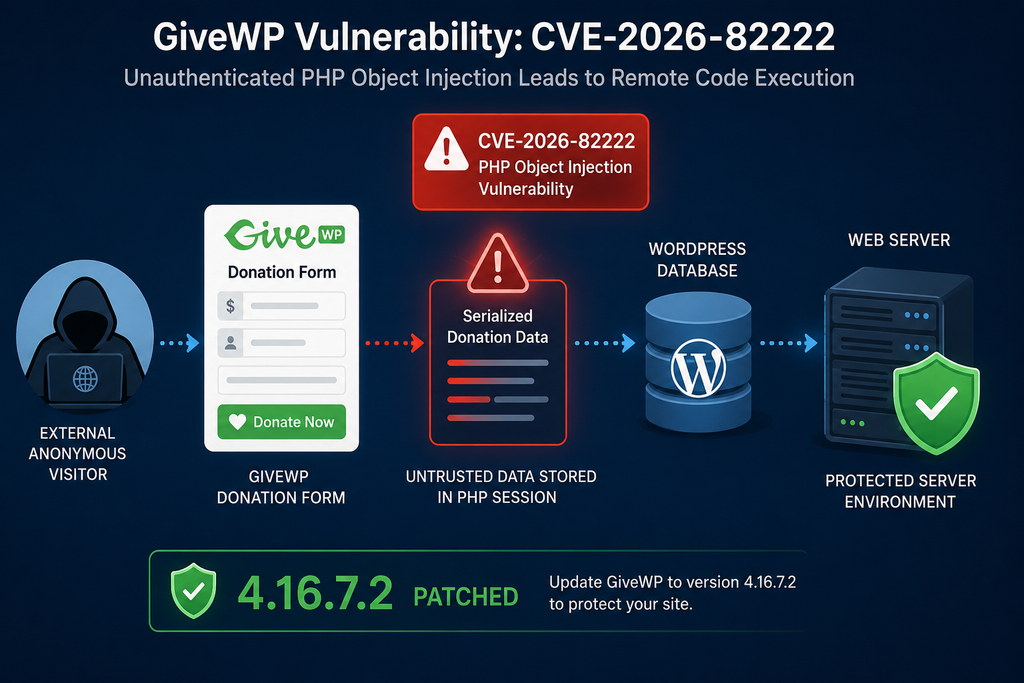
What Is CVE-2026-82222
CVE-2026-82222 is a critical security vulnerability involving unsafe handling of serialized PHP data in GiveWP. The vulnerability is classified as a remote code execution issue because successful exploitation can ultimately allow an attacker to cause commands or code to execute within the environment hosting the vulnerable WordPress installation.
The problem centers on PHP Object Injection, which belongs to a broader family of insecure deserialization vulnerabilities. PHP applications can serialize data so complex values can be represented as strings and stored or transferred. Later, the application can deserialize that representation to reconstruct the original values.
Serialization itself is not automatically dangerous. Many legitimate PHP applications have historically used serialization for configuration values, cached information, sessions, database records, and other structured data. WordPress also contains legitimate serialization functionality.
The danger appears when an application allows an untrusted person to influence serialized data and later passes that data into an unsafe deserialization process.
PHP objects are more powerful than simple strings, numbers, or arrays. An object represents an instance of a PHP class. Classes can contain methods that perform actions when an object is created, destroyed, converted, restored, or otherwise manipulated.
Consequently, deserializing an attacker-controlled object can sometimes trigger behavior that developers never intended to expose to external users.
Why PHP Object Injection Is Different From Normal Input Injection
Traditional input-validation problems often focus on dangerous characters inside a form field. Developers may sanitize HTML, escape SQL values, restrict file extensions, or validate email addresses. PHP Object Injection operates at another layer.
The attacker is interested in influencing the structure of data that PHP later interprets as an object.
If the application expects ordinary serialized information but accepts an object representation instead, PHP may instantiate a class that already exists in the application’s runtime. That object can then interact with methods defined by WordPress, a plugin, a theme, or a bundled third-party library.
This does not automatically mean every PHP Object Injection vulnerability produces remote code execution. A useful class or combination of classes must usually be available.
That requirement leads directly to the concept of a POP chain.
Understanding POP Chains Without Exploit Code
POP stands for Property-Oriented Programming. Security researchers use the term to describe a chain of existing object behaviors that can be connected together to produce an unintended result.
The important point is that an attacker does not necessarily need to upload a new malicious PHP class.
Instead, the attacker attempts to abuse classes already loaded by the application.
Imagine a fictional application containing three legitimate classes. One processes an object during cleanup, another interacts with a file or callback, and a third can eventually invoke sensitive functionality. Individually, none was designed as an exploit.
If their properties and methods can be connected in a specific way, however, one class may trigger another until the final sensitive operation becomes reachable.
That sequence is the POP chain.
In a vulnerable WordPress environment, the risk therefore depends on two major pieces coming together. First, attacker-controlled serialized objects must reach deserialization. Second, loaded PHP classes must provide a usable sequence of operations.
CVE-2026-82222 is particularly serious because researchers reported that GiveWP’s environment provided the ingredients necessary for the vulnerability to progress beyond theoretical object injection.
Severity and Affected Versions
Patchstack’s vulnerability database identifies the issue as affecting GiveWP 4.16.7.1 and earlier, with 4.16.7.2 listed as the patched version. The advisory gives the vulnerability a CVSS score of 10 and states that no authenticated privilege is required.
The official GiveWP changelog provides additional confirmation. Version 4.16.7.2 was released on August 27, 2026, with a security change described as additional hardening for serialized data handling during the donation flow.
Administrators should therefore treat any installation running 4.16.7.1 or an earlier release as requiring immediate attention.
That does not mean every vulnerable-version installation was necessarily compromised. Vulnerability, reachability, exploitation, and confirmed compromise are four different concepts.
A vulnerable version contains the affected code. A reachable configuration provides a path to that code. Exploitation means somebody actually sent requests designed to abuse the weakness. Compromise means those attempts succeeded and affected the website or server.
Keeping these distinctions clear prevents unnecessary panic while still treating the update as urgent.
How PHP Object Injection Reaches the Donation Session
The most interesting aspect of this GiveWP vulnerability is the journey taken by attacker-controlled data. Looking only at the final deserialization operation can hide the larger security problem.
The reported attack path is better understood as a sequence of trust transitions.
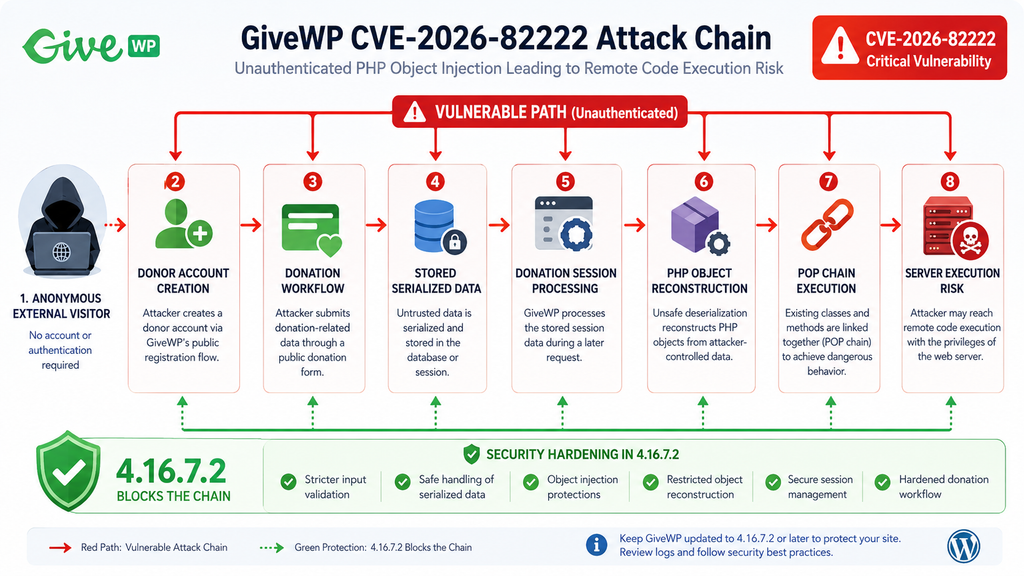
At a high level, the chain can be represented defensively as:
Unauthenticated visitor → GiveWP donor functionality → attacker-controlled data → donation-related storage/session state → unsafe deserialization → PHP object reconstruction → existing POP chain → server-side execution
Each transition matters.
Step 1: The Attacker Starts Without a Privileged Account
The vulnerability is described as unauthenticated because exploitation does not require the attacker to begin with an administrator, editor, author, subscriber, or other privileged WordPress account.
That makes the attack surface substantially larger.
An authenticated vulnerability might require credentials to be stolen first. An unauthenticated vulnerability can potentially be tested remotely against public WordPress websites by anyone capable of reaching the affected endpoint.
This characteristic also makes rapid patching more important.
Step 2: GiveWP’s Donor Functionality Creates an Application-Level Entry Point
A critical lesson from the disclosure is that WordPress administrators should not treat the global WordPress registration setting as the only account-creation boundary.
Plugins can implement their own registration and account-management workflows.
GiveWP needs donor functionality because legitimate donors may need to interact with donations, receipts, accounts, payment information, or donation history. Those features create application-specific authentication and registration logic.
Researchers noted that GiveWP exposed its own account-creation path in the relevant vulnerability chain. This means a site owner could believe registration was effectively closed because normal WordPress registration had been disabled while GiveWP functionality still offered another route through the application.
This is an important general WordPress security lesson.
Plugins can expand the authentication surface independently of WordPress core.
WooCommerce creates customer accounts. Membership plugins create members. Learning-management systems create students. Forum plugins create forum users. Donation platforms create donors.
Security audits must therefore examine plugin-specific registration workflows instead of checking only the familiar WordPress setting.
Step 3: Controlled Data Enters the Donation Workflow
Once an attacker can reach the relevant GiveWP workflow, the next objective is to place specially structured data where the plugin expects legitimate donation-related information.
The precise exploit payload is unnecessary for understanding the vulnerability and is intentionally omitted here.
From a defensive perspective, what matters is that data originating from an untrusted request could travel deeper into the donation-processing logic than it should.
Secure applications maintain a clear distinction between untrusted external data and trusted internal state.
CVE-2026-82222 demonstrates what can happen when that distinction weakens.
Step 4: Serialized Data Becomes Stored State
One reason stored vulnerabilities can be difficult to recognize is that the dangerous input and the dangerous operation do not always happen during the same HTTP request.
Data can arrive first and become stored.
Later, another part of the application retrieves that information.
This separation is important when investigating logs because administrators should not search only for one dramatic request immediately followed by visible server activity.
A suspicious request may prepare data. A later legitimate-looking application action may retrieve and process it.
- This creates a two-stage trust problem.
- The first stage asks, “Should this data have been accepted?”
- The second asks, “Should stored data automatically be trusted when it is read back?”
- The safe answer to the second question is no.
Database storage does not magically make untrusted input safe.
Step 5: Donation Session Processing Reaches Deserialization
The critical transition occurs when stored or session-related serialized data reaches code capable of reconstructing PHP values.
This is where the object-injection condition becomes dangerous.
A secure implementation dealing with externally influenced serialized information must ensure that unexpected objects cannot be instantiated. Validation needs to protect the data at the point of entry and again at the point where the application interprets it.
Patchstack’s analysis highlighted serialized-data handling as a central part of the vulnerability. GiveWP’s 4.16.7.2 changelog likewise confirms that the security release adds hardening specifically around serialized data in the donation flow.
Step 6: PHP Reconstructs an Object
If unsafe serialized data reaches PHP deserialization without effective restrictions, PHP may attempt to recreate objects represented by that data.
At this point, the problem moves beyond ordinary form validation.
The attacker is no longer merely influencing the content of a donor field. The application’s PHP runtime may be interacting with object structures chosen by an external party.
Whether this becomes remote code execution now depends heavily on the classes available in memory.
That is where the GiveWP POP chain becomes important.
Step 7: Existing Classes Provide a Path Toward Dangerous Behavior
A PHP Object Injection issue with no useful classes might have limited impact.
A PHP Object Injection issue inside an application with a usable gadget chain can become much more severe.
The reported GiveWP environment contained a chain that could ultimately reach command execution. Rather than introducing completely new executable code at the first stage, the attacker could abuse existing class behavior.
This is why reducing unnecessary production dependencies can improve security.
Every library loaded into an application expands functionality. In some circumstances, it also expands the collection of classes that might become useful if another vulnerability allows object injection.
Step 8: Remote Code Execution Becomes Possible
The final security boundary is crossed when the object chain reaches functionality capable of executing commands or equivalent server-side operations.
At that point, the impact is no longer confined to GiveWP donor data.
Remote code execution can potentially expose the entire WordPress installation and anything accessible to the PHP process.
Depending on hosting permissions and server configuration, a successful attacker may attempt to modify WordPress files, plant persistent backdoors, create administrator accounts, alter plugins, access configuration data, steal database credentials, change scheduled tasks, redirect visitors, inject spam, or use the compromised website as infrastructure for additional attacks.
The exact post-exploitation possibilities vary substantially by server.
This is why updating the plugin is only the first response when administrators suspect the site was exposed before the patch.
Why GiveWP Contains a Usable POP Chain
Understanding the POP-chain component helps explain why CVE-2026-82222 received such a severe rating.
PHP Object Injection is often described as if object injection and remote code execution were identical. They are not.
Object injection gives an attacker influence over objects reconstructed by PHP. To turn that capability into a more powerful action, the application generally needs classes containing useful methods that can be manipulated into performing unintended operations.
PHP Classes Become Gadgets
Security researchers commonly call individual useful behaviors gadgets.
A gadget might perform a seemingly harmless operation such as processing a callback, cleaning up an object, formatting data, accessing a resource, or handling a temporary file.
The original developer did not create it as an attack feature.
Its danger appears only when an attacker can control object properties and cause the application to invoke that behavior in an unexpected context.
Several gadgets can sometimes be connected.
One object triggers a second object. The second reaches a third behavior. Eventually, the chain reaches a sensitive operation.
That is the essence of property-oriented programming exploitation.
Why Dependencies Matter
Modern WordPress plugins rarely consist entirely of code written from scratch by one developer.
They often use Composer packages and other third-party PHP libraries. These dependencies solve real development problems and generally improve maintainability. However, they also introduce additional classes into the application’s environment.
Those classes can matter during object-injection research.
A dependency does not need to contain a conventional vulnerability to participate in a POP chain. Its normal behavior may become dangerous only because another flaw lets an attacker construct objects with controlled properties.
Patchstack’s analysis of CVE-2026-82222 specifically points to the presence of classes that make the object-injection path useful for reaching code execution.
This highlights a valuable software-development principle: production applications should avoid shipping unnecessary development tooling and dependencies.
Reducing the number of unnecessary classes reduces complexity and can reduce the available attack surface.
Magic Methods Can Change the Risk
PHP supports special methods commonly called magic methods.
These methods can run during particular object lifecycle events. Examples include operations related to object construction, destruction, restoration, string conversion, property access, or method handling.
Magic methods are useful programming features. They are not vulnerabilities by themselves.
However, they matter greatly in object-injection scenarios because PHP may invoke certain behavior automatically as an injected object moves through its lifecycle.
A security researcher therefore examines the classes available to the application and asks whether controlled properties can make one of those methods reach another useful method.
If enough pieces align, a chain emerges.
Why “Safe Unserialize” Functions Require Careful Design
Developers sometimes create wrapper functions intended to make PHP deserialization safer.
The name of a function does not guarantee that every dangerous data type has actually been eliminated.
A secure sanitizer must understand the serialization format correctly, reject structures it cannot safely process, and prevent PHP objects from being reconstructed from untrusted data.
Patchstack’s technical analysis identifies GiveWP’s handling of supposedly safe unserialization as an important part of the vulnerability chain. The report explains that the relevant handling could allow a malicious object to survive processing and continue through storage.
This provides another general lesson for WordPress development.
Security wrappers should be treated as security boundaries and tested accordingly.
Developers should create adversarial tests for arrays, nested structures, malformed values, unexpected types, objects, deeply nested input, and other edge cases. A sanitizer that works only for expected input is not necessarily secure against intentionally hostile input.
Defense in Depth Is Better Than One Filter
The strongest fix for a vulnerability chain does not depend on a single check.
Defense in depth means breaking the attack at several independent stages.
For example, an application can validate input before storing it, restrict the types that may enter session data, avoid unnecessary serialization, prevent object reconstruction, remove unneeded dependencies, verify authorization around account operations, and validate data again before sensitive use.
This approach matters because a single future regression is less likely to restore the entire exploit chain.
Patchstack reported that GiveWP 4.16.7.2 addresses the chain at multiple layers.
For administrators, however, the implementation details do not change the immediate recommendation.
Install the fixed release or a newer security-supported release.
Which Donation Forms Are Exposed

Determining exposure requires more nuance than checking whether GiveWP is active.
The vulnerable version remains the first and most important signal, but the reachability of the demonstrated attack path can vary according to the plugin version and the types of donation forms stored on the website.
GiveWP 4.16.5.1 and Earlier
According to the published technical analysis, older affected GiveWP installations can present a relatively direct attack surface under ordinary conditions.
A site with a published donation form and an active payment gateway may provide enough application functionality for the relevant vulnerable workflow to become reachable.
This makes older installations especially important to update.
Administrators should not assume that test mode protects them. Likewise, normal WordPress user registration does not need to be enabled for the broader donor-account issue to deserve attention.
If the site ran GiveWP 4.16.5.1 or an earlier vulnerable release while publicly accessible, treat the installation as historically exposed and perform a post-update review.
GiveWP 4.16.6 Through 4.16.7.1
GiveWP 4.16.6 introduced several security changes, including additional validation when handling serialized data during the donation process. However, CVE-2026-82222 was ultimately patched in 4.16.7.2, and Patchstack lists releases through 4.16.7.1 as vulnerable.
The reachability conditions for these later vulnerable releases can differ from older versions.
Researchers reported that a clean configuration relying exclusively on newer Visual Form Builder forms may not expose the demonstrated path in exactly the same way. However, the presence of older or otherwise differently configured GiveWP form records can change that conclusion.
This is why administrators should not inspect only visible published forms.
Legacy Donation Forms Matter
A WordPress site may have existed for years.
During that time, administrators may have created donation forms using older GiveWP versions, migrated form structures, imported backups, duplicated forms, switched builders, or changed campaign configurations.
Old database records can survive long after the visible frontend changes.
Consequently, a website that appears to use only modern donation forms today may still contain legacy form records.
Those records deserve review after patching.
Draft Forms Can Matter
A draft is not publicly displayed like a published donation form, but its underlying WordPress post and metadata still exist in the database.
Security reachability does not always follow the same rules as visual frontend reachability.
If vulnerable application code searches or interacts with stored form objects independently of whether visitors can see them directly, a draft can still influence application behavior.
Therefore, administrators auditing CVE-2026-82222 should inventory draft GiveWP forms rather than reviewing only published donation pages.
Trashed Forms Should Not Be Ignored
The WordPress Trash can create another false sense of removal.
Moving a post to Trash generally does not immediately erase the database record. WordPress keeps trashed content temporarily so administrators can restore it.
For ordinary content management, this is convenient.
For vulnerability investigation, it means “trashed” and “deleted from the database” are not equivalent.
Old GiveWP donation forms sitting in Trash should be included in the inventory.
Imported and Restored Forms Need Review
Backups can reintroduce historical application state.
Suppose a site owner created donation forms years ago, later migrated to newer forms, and then restored part of an older database during troubleshooting. Historical GiveWP metadata may return even though the administrator never intentionally recreated the old form.
Similarly, staging-to-production migrations can copy legacy records between environments.
Administrators should therefore consider the site’s migration history when evaluating exposure.
Do Not Use Configuration as a Substitute for Patching
It may be tempting to determine that a specific website probably does not satisfy the known reachability conditions and postpone the update.
That is not the recommended response.
Configuration analysis is useful for incident investigation and prioritization, but 4.16.7.2 or later remains the appropriate remediation for affected GiveWP installations.
Security researchers often document one reliable route through vulnerable code. Other variations may later emerge.
Patching removes the need to rely on assumptions about reachability.
A Practical Exposure Matrix
For administrators, the situation can be summarized defensively:
GiveWP 4.16.5.1 or earlier: Consider the site at significant risk if donation functionality was publicly accessible. Update immediately and investigate historical activity.
GiveWP 4.16.6 through 4.16.7.1: Still considered vulnerable. Inventory Visual Form Builder, legacy, draft, trashed, imported, migrated, and restored forms. Update regardless of apparent reachability.
GiveWP 4.16.7.2 or later: Contains the security changes addressing the disclosed object-injection chain. Continue normal monitoring and keep GiveWP updated.
This approach avoids both extremes: assuming every vulnerable installation was compromised or assuming an apparently modern form configuration makes patching unnecessary.
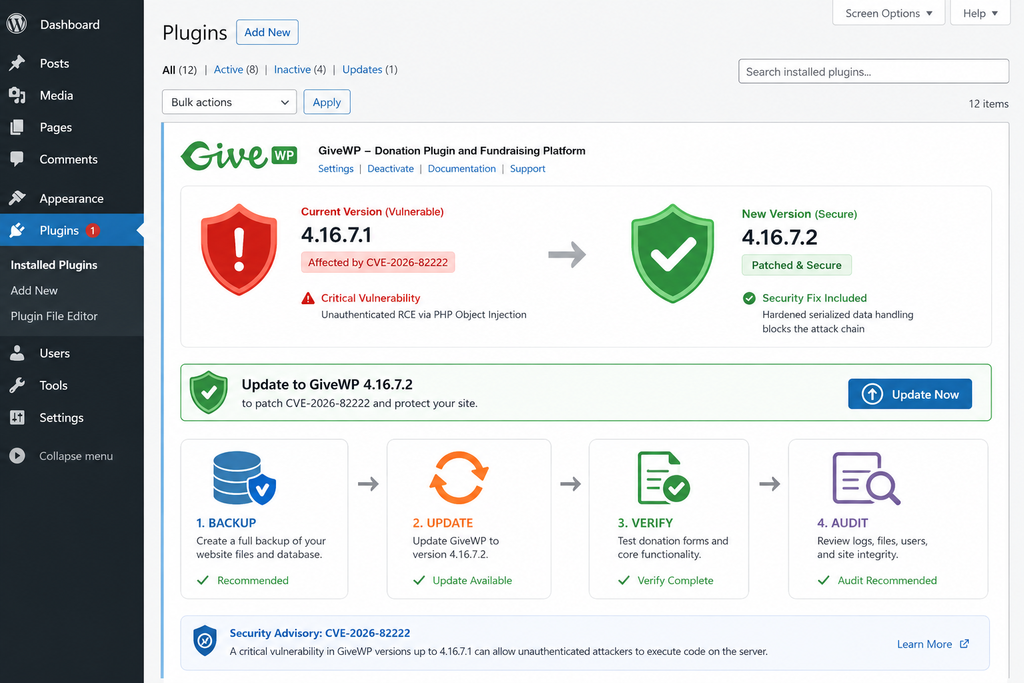
Updating GiveWP to Version 4.16.7.2
The most important response to the GiveWP vulnerability is upgrading the plugin.
WordPress.org lists GiveWP 4.16.7.2 as the release containing additional security hardening for serialized data handling in the donation flow. Patchstack identifies the same release as the patched version for CVE-2026-82222.
Do not intentionally remain on 4.16.7.1 because a website appears unaffected.
Back Up Before Updating
For a production donation website, create a reliable backup before performing plugin maintenance.
The backup should ideally include both WordPress files and the database.
GiveWP stores important fundraising information in WordPress-related database structures. Donation sites may also depend on gateway integrations, recurring donation add-ons, custom templates, webhooks, email notifications, and other components.
A backup gives administrators a recovery point if an unrelated compatibility problem appears during maintenance.
However, a backup is not a reason to delay the security update.
For a critical unauthenticated RCE vulnerability, administrators should keep the maintenance window as short as practical.
Verify the Installed Version
Open the WordPress administration dashboard and navigate to the plugin management screen.
Find GiveWP and verify its installed version.
If the website runs 4.16.7.1 or an earlier release, it falls within the affected range reported by Patchstack.
Update to 4.16.7.2 or later.
If WordPress does not offer the expected update, refresh the plugin update information and verify that the installation comes from a legitimate source. Managed WordPress platforms may also control updates through a hosting dashboard.
Avoid downloading security updates from unofficial mirrors or random file-sharing websites.
Update Add-Ons and Dependencies
GiveWP installations often use additional extensions.
After updating the core GiveWP plugin, review installed GiveWP add-ons and confirm they are compatible with the current release.
Security maintenance works best when the entire application stack remains supported.
An updated core plugin combined with obsolete extensions can leave other unrelated weaknesses behind.
Clear Relevant Caches
After updating, clear caches that could interfere with frontend testing.
Depending on the site, this may include page cache, object cache, CDN cache, server cache, and optimization-plugin caches.
Caching does not normally cause an old PHP plugin file to continue executing after replacement, but stale frontend assets or pages can make post-update verification confusing.
Test the donation process after clearing the appropriate caches.
Test Donation Forms
Visit representative donation forms from a normal visitor session.
Check that forms load correctly and that expected fields remain available.
If the organization uses multiple payment gateways, test each important workflow according to its normal testing procedures.
Also verify confirmation pages, donor emails, donor dashboard functionality, recurring donations where applicable, and any custom GiveWP integrations.
For payment systems, use supported sandbox or test mechanisms whenever possible rather than generating unnecessary real transactions.
Verify the Plugin Version Again
After the update, confirm that WordPress actually reports GiveWP 4.16.7.2 or a later fixed release.
This sounds trivial, but it catches failed updates, deployment inconsistencies, and multi-server environments where one application node may still contain an older plugin copy.
Organizations using staging and production environments should check both independently.
Avoid Downgrading to a Vulnerable Version
A compatibility problem after a security update can create pressure to roll back immediately.
For CVE-2026-82222, returning to 4.16.7.1 or an earlier release reintroduces the known security exposure.
If the patched release causes a functional problem, contact GiveWP support or the hosting provider and seek a secure workaround rather than leaving a public production donation site on a known vulnerable version.
Security and functionality both matter, but a CVSS 10 unauthenticated RCE issue deserves special caution when considering rollback.
Temporary Mitigation When Immediate Updating Is Impossible
Occasionally, administrators cannot update instantly because of deployment controls, change-management rules, or a severe compatibility issue.
In that situation, reducing public exposure can be useful as a temporary measure.
A web application firewall with an appropriate vendor rule may provide additional protection. Patchstack states that it issued mitigation for customers while affected sites update.
Administrators can also consider temporarily disabling affected functionality when business requirements allow.
However, WAF rules and temporary restrictions should not become permanent substitutes for installing the vendor’s security fix.
The goal remains GiveWP 4.16.7.2 or later.
WordPress Compromise Investigation Checklist
Installing the patched GiveWP version closes the reported vulnerability, but it cannot reverse actions that may have happened before the update.
Sites that were publicly accessible while running an affected GiveWP release should therefore consider a compromise investigation, especially when the vulnerable version remained installed after public disclosure.
The investigation should focus on evidence rather than assumptions.
Confirm the Exposure Window
Start by establishing a timeline.
Determine when the affected GiveWP version was installed and when the site upgraded to 4.16.7.2 or later.
Also determine whether the donation pages were publicly accessible during that period.
Check deployment records, WordPress update logs, hosting snapshots, backup timestamps, maintenance records, and plugin file modification times.
A clear exposure window makes every later log search more effective.
Review WordPress Administrator Accounts
Open the WordPress Users screen and inspect administrator accounts carefully.
Look for accounts that nobody recognizes.
Pay attention to recently created users, unusual usernames, unfamiliar email addresses, unexpected role changes, and legitimate accounts that suddenly received administrator privileges.
Do not delete evidence immediately if compromise is suspected.
Record relevant information first so the investigation maintains a useful timeline.
Review Other WordPress Users
Attackers do not always create an obvious administrator account.
A lower-privileged account can be created first and elevated later. Existing accounts can also be modified.
Review subscribers, customers, donors, contributors, authors, editors, and custom roles when the site uses them.
Compare user creation dates against the exposure window.
Examine Recently Modified PHP Files
File changes are one of the most important indicators after potential remote code execution.
Compare WordPress core files against official checksums where practical.
Review plugins and themes for unexpected modifications.
Pay particular attention to recently changed PHP files inside writable locations, unfamiliar files in plugin directories, modified theme functions, unexpected files near WordPress core, and PHP files appearing where the application normally stores only media or cache data.
The objective is not to search for one famous malware filename.
Attackers can choose arbitrary names.
Focus on unexpected changes.
Inspect the Uploads Directory
The WordPress uploads directory normally contains images, documents, and other media.
A PHP executable unexpectedly appearing there deserves investigation.
Some legitimate plugins may create unusual files, so context matters. Do not automatically delete everything unfamiliar.
Check file type, creation time, modification time, ownership, permissions, and whether the file belongs to a known plugin workflow.
Check wp-config.php
The wp-config.php file contains critical WordPress configuration.
Review it for unexpected includes, unfamiliar code, altered database configuration, strange constants, injected redirects, or code placed before or after the normal configuration.
Keep in mind that hosting providers and security plugins sometimes legitimately add configuration directives.
Compare the current file against a known-good backup whenever possible.
Inspect Active Plugins
Look for plugins nobody intentionally installed.
An attacker with server-level code execution may add a normal-looking plugin to maintain persistence.
Check both active and inactive plugins.
Compare directory creation and modification timestamps with the vulnerability exposure period.
Pay special attention to plugins with generic names designed to blend into an administration screen.
Inspect Must-Use Plugins
Must-use plugins deserve separate attention because they do not behave like ordinary plugins in the WordPress dashboard.
Review the wp-content/mu-plugins directory.
If your site intentionally uses custom MU plugins, compare the current files against your trusted repository or backup.
An unexpected file in this directory can provide persistent execution without requiring ordinary plugin activation.
Review Themes
Check active and inactive theme directories.
Attackers sometimes modify a theme file because WordPress loads theme PHP automatically during normal requests.
Compare the active theme and child theme with known-good versions.
For custom themes, version control provides the strongest reference.
Review Scheduled Tasks
Persistence can also use scheduled execution.
Inspect WordPress cron events and server-level cron jobs.
Look for unfamiliar scheduled hooks, scripts, PHP commands, downloaded files, or commands pointing to strange locations.
On managed hosting, ask the provider to review account-level scheduled tasks if you do not have direct access.
Inspect Web Server Logs
Apache, Nginx, reverse proxy, CDN, and WAF logs can provide valuable evidence.
Focus searches on the confirmed exposure window.
Look for unusual bursts of requests toward GiveWP-related functionality, repeated registration attempts, abnormal request sizes, suspicious sequences from the same source, unusual POST activity, and requests followed by unexpected server behavior.
Avoid relying on a single IP address as proof.
Attackers frequently use proxies, compromised infrastructure, cloud hosts, and rotating addresses.
Correlate Requests With File Changes
A timeline becomes much more useful when multiple evidence sources agree.
For example, suppose logs show unusual GiveWP activity at 14:05 and a previously nonexistent PHP file appears at 14:06.
That correlation deserves immediate investigation.
Likewise, a suspicious user account created shortly after abnormal donation requests provides stronger evidence than either event considered alone.
Incident response is fundamentally about correlation.
Review Database Changes
Inspect unexpected changes to important WordPress options and user metadata.
Administrator roles, plugin activation state, site URLs, scheduled events, widget content, injected scripts, and other persistent settings can live in the database.
If the organization maintains regular database backups, compare suspicious records against an earlier known-good snapshot.
Check for Injected JavaScript
WordPress compromises frequently aim at visitors rather than administrators.
Attackers may inject JavaScript that redirects visitors, displays fake CAPTCHA pages, steals information, or loads content from external domains.
Review theme templates, widgets, custom HTML blocks, header/footer injection plugins, advertising areas, database options, and modified JavaScript files.
Inspect the rendered frontend from a clean browser session.
Review .htaccess and Server Configuration
On Apache environments, inspect .htaccess for unfamiliar rewrite rules, redirects, PHP handlers, access exceptions, or hidden configuration.
Nginx users should review site configuration when they control it.
Hosting-level configuration may require assistance from the provider.
Unexpected redirects are particularly important because attackers sometimes redirect only search-engine visitors or mobile devices, making the compromise difficult for administrators to reproduce.
Check Database Credentials and Security Keys
If there is credible evidence that arbitrary server-side code executed, assume sensitive application configuration may have been readable.
WordPress database credentials stored in wp-config.php may therefore require rotation.
WordPress authentication salts and keys should also be refreshed as part of a confirmed compromise response because doing so invalidates existing login cookies.
Coordinate credential changes carefully to avoid breaking production services.
Change Administrative Passwords
For a confirmed or strongly suspected compromise, reset passwords for WordPress administrators.
Also consider hosting control-panel accounts, SFTP/SSH accounts, database management accounts, deployment credentials, and other systems that may have been exposed according to the actual server permissions.
Use unique passwords and multi-factor authentication wherever supported.
Review Payment Integration Secrets
Donation websites deserve additional caution because they integrate with payment systems.
A GiveWP vulnerability does not automatically mean payment-provider credentials were stolen.
However, confirmed server-level execution may give an attacker access to secrets stored in configuration files, environment variables, database settings, or plugin options.
Review the payment integrations actually used by the site and follow the provider’s credential-rotation guidance when exposure is plausible.
Do not rotate production payment secrets blindly without understanding how the integration will be affected.
Check External Monitoring
Review alerts from Cloudflare, a WAF, hosting security tools, malware scanners, uptime monitors, CDN services, and server monitoring platforms.
An alert that seemed unimportant several days earlier may become meaningful after establishing the CVE exposure timeline.
Preserve relevant logs before retention periods expire.
Ask the Hosting Provider for Help
Shared and managed WordPress hosting customers may not have access to every useful log.
Hosting providers can sometimes inspect process activity, malware detections, filesystem changes, account logs, cron jobs, outgoing connections, and server-level events that WordPress itself cannot record.
When contacting support, provide the exact CVE number: CVE-2026-82222.
Also provide the approximate period during which the vulnerable GiveWP version was active.
Restore Carefully
If compromise is confirmed, restoring a clean backup can be useful, but the backup date matters.
A backup created after compromise may contain the attacker’s persistence mechanism.
A very old backup may remove legitimate donations, users, content, and configuration changes.
Incident recovery often requires combining a known-good codebase with carefully preserved legitimate database information rather than blindly restoring the entire site.
Donation records deserve particular care.
Do Not Assume a Clean Malware Scan Proves Safety
Automated malware scanners are valuable, but they have limits.
A scanner may detect known signatures while missing a custom backdoor, database persistence, stolen credentials, or a modified legitimate file.
Use scanning as one source of evidence.
Combine it with file-integrity checking, account review, database analysis, log inspection, cron inspection, and credential assessment.
Preserve Evidence Before Major Cleanup
When a serious compromise is possible, preserve relevant evidence before deleting suspicious files.
Create a protected copy of logs, suspicious files, timestamps, user information, and other indicators needed for later investigation.
Never keep malicious files in a publicly accessible location.
Professional incident responders can help when the website handles significant donation volume, sensitive personal information, or regulatory obligations.
Frequently Asked Questions
What is the GiveWP vulnerability CVE-2026-82222?
CVE-2026-82222 is a critical GiveWP security vulnerability involving PHP Object Injection through unsafe handling of serialized data. Under vulnerable conditions, an unauthenticated attacker can move through the donation workflow and eventually reach a usable PHP object chain capable of remote code execution. The patched GiveWP release is version 4.16.7.2.
How severe is CVE-2026-82222?
Patchstack assigns CVE-2026-82222 a CVSS score of 10.0, the maximum score on the CVSS 3.1 scale used in its advisory. The high severity reflects the possibility of unauthenticated remote code execution and the resulting impact on confidentiality, integrity, and availability.
Which GiveWP versions are vulnerable?
Patchstack lists GiveWP versions through 4.16.7.1 as vulnerable and 4.16.7.2 as patched. Administrators should update to 4.16.7.2 or a newer supported release rather than relying on configuration-specific assumptions.
Does the attacker need a WordPress administrator account?
No. The vulnerability is classified as unauthenticated. The reported chain does not require the attacker to begin with administrator privileges. This significantly increases the urgency because public websites can expose the vulnerable functionality to remote visitors.
Am I safe if WordPress user registration is disabled?
Do not rely on that setting as protection against this vulnerability. GiveWP implements donor-related account functionality independently of normal WordPress registration. Plugin-specific registration and authentication workflows can create application entry points even when general WordPress registration is disabled.
Does every vulnerable GiveWP installation get hacked automatically?
No. Running a vulnerable version means the affected code is present, not that compromise definitely occurred. Exploitation also depends on reachability and attacker activity. Nevertheless, administrators should patch immediately and investigate when the site was publicly exposed while running a vulnerable version.
What is PHP Object Injection?
PHP Object Injection occurs when attacker-controlled serialized data is deserialized in a way that allows PHP objects to be reconstructed. If suitable classes are available, their existing methods may sometimes be combined into a POP chain that produces unintended behavior.
What is a POP chain?
A POP chain, or Property-Oriented Programming chain, is a sequence of existing PHP class behaviors that can be manipulated after object injection. The attacker abuses legitimate methods already present in the application rather than necessarily uploading a new class at the initial stage.
Is updating GiveWP enough?
Updating to 4.16.7.2 or later fixes the reported vulnerability path, but an update cannot remove changes made by an attacker before the patch. Sites with meaningful historical exposure should review accounts, files, scheduled tasks, database changes, logs, plugins, themes, configuration files, and credentials.
Should I deactivate GiveWP?
If you can update immediately to a patched release, updating is the preferred solution. If an update genuinely cannot be performed immediately, temporarily disabling exposed functionality or using an appropriate security mitigation may reduce risk. These measures should remain temporary and should not replace the vendor security update.
What WordPress Administrators Should Take Away
CVE-2026-82222 demonstrates why vulnerabilities involving deserialization deserve special attention. The dangerous action does not necessarily begin with an obvious command-execution request. Instead, attacker-controlled information can cross several application boundaries before the final security impact becomes visible.
In this case, the defensive model starts with public donor functionality, continues through attacker-controlled serialized information and donation-related state, reaches PHP object reconstruction, and then encounters a usable POP chain. When those pieces align, an application-level data-handling problem can become server-level remote code execution.
The incident also provides a broader lesson about WordPress security. Disabling WordPress registration does not automatically disable registration features created by plugins. A modern WordPress installation is an ecosystem, and every plugin can introduce its own authentication, API, upload, payment, account, and session boundaries.
For GiveWP administrators, the practical response remains clear. Confirm the installed version, upgrade to GiveWP 4.16.7.2 or later, verify the update, inventory old donation forms, and investigate the website if it was exposed while vulnerable.
Sites with confirmed indicators of compromise should treat the event as a server security incident rather than merely a plugin update. Preserve evidence, investigate persistence, rotate credentials when justified, validate payment integrations, and obtain professional incident-response assistance when the organization’s risk warrants it.
Keeping WordPress secure rarely depends on one perfect security product. Reliable protection comes from prompt updates, minimal privileges, supported software, careful dependency management, backups, logging, file-integrity monitoring, multi-factor authentication, and a response plan that administrators can actually follow when a critical vulnerability appears.
⚠️ Disclaimer and Source Hygiene
This article is provided for educational, defensive, and WordPress security-awareness purposes. It intentionally does not provide working exploitation payloads, serialized malicious objects, shell commands, or instructions designed to compromise vulnerable GiveWP installations. Security conditions can change quickly as vendors publish new versions, researchers discover additional attack paths, and hosting providers deploy mitigations. Always verify the latest GiveWP release and security guidance before making production decisions. The technical information in this article is based primarily on the public Patchstack disclosure, the Patchstack vulnerability database entry, and the official GiveWP changelog published through WordPress.org. Website owners handling sensitive donor information, payment integrations, or evidence of compromise should consider consulting a qualified WordPress security specialist, hosting provider, incident-response professional, or relevant legal/privacy professional.
🔔 For more tutorials like this, consider subscribing to our blog.
📩 Do you have questions or suggestions? Leave a comment or contact us!
🏷️ Tags: GiveWP vulnerability, CVE-2026-82222, GiveWP security, WordPress vulnerability, WordPress security, PHP Object Injection, remote code execution, GiveWP RCE, WordPress plugin security, GiveWP 4.16.7.2
📢 Hashtags: #GiveWP, #WordPressSecurity, #CVE202682222, #WordPress, #CyberSecurity, #PHPObjectInjection, #RemoteCodeExecution, #WordPressVulnerability, #WebsiteSecurity, #GiveWPSecurity
📚 Sources and References
Patchstack Security Research
Patchstack’s technical disclosure, published August 28, 2026, documents CVE-2026-82222 and explains the PHP Object Injection path, unsafe serialized-data handling, POP-chain conditions, disclosure timeline, and remediation.
The vulnerability was reported to Patchstack on July 28, 2026. Patchstack states that it confirmed the issue and contacted the vendor on the same day. Several patch attempts followed before GiveWP 4.16.7.2 was released on August 27, 2026. The detailed public advisory followed on August 28.
Patchstack Vulnerability Database
Patchstack lists GiveWP through version 4.16.7.1 as vulnerable to CVE-2026-82222 and identifies version 4.16.7.2 as patched. Its database entry classifies the issue as unauthenticated remote code execution and assigns a CVSS severity score of 10.
Official WordPress.org GiveWP Changelog
The official WordPress.org plugin directory lists GiveWP 4.16.7.2 and states that the August 27, 2026 release adds additional hardening for serialized data handling in the donation flow. WordPress.org also reports more than 100,000 active GiveWP installations.
GiveWP Security Release Timeline
GiveWP’s recent changelog shows several security-focused releases during August 2026. Version 4.16.6 added validation related to serialized donation data and other security improvements. Version 4.16.7 hardened donor-account email access authentication and checkout login validation. Version 4.16.7.2 then added further hardening for serialized data handling.
🕊️ Secondary Sources and Testimonials
Secondary coverage should be used to complement, rather than replace, the original vulnerability disclosure and vendor changelog. When evaluating reports about CVE-2026-82222, prioritize the exact affected version, patched version, publication date, and technical conditions documented by the security researcher and plugin vendor.
Administrators should also remember that public comments, forum discussions, scanner results, and individual user experiences cannot prove whether a specific WordPress installation was compromised. Site-specific conclusions require evidence from the affected environment, including logs, files, database records, users, scheduled tasks, backups, hosting information, and other forensic indicators.
For the current remediation decision, the essential fact is straightforward: GiveWP installations running 4.16.7.1 or earlier should be upgraded to 4.16.7.2 or a later secure release immediately.
Sign in with a Subscriber account to vote.
2 thoughts on “Critical GiveWP Vulnerability Enables Unauthenticated RCE”