
Table of Contents
A serious Events Manager vulnerability allows authenticated WordPress users, including Subscribers, to reach a vulnerable SQL query through REST API search parameters. Discover which Free and Pro versions are affected, why public registration increases exposure, and how to update, investigate suspicious activity, and protect your website.
What Is the Events Manager Vulnerability?
The recently disclosed Events Manager vulnerability highlights an important security concern for WordPress websites that allow visitors to create accounts. On October 7, 2026, the Events Manager development team announced a security update addressing an authenticated SQL injection flaw. The issue affects the plugin’s REST API search functionality and can be reached by users with very limited permissions. Unlike vulnerabilities that require administrator access, this weakness can be triggered by an authenticated account with the basic Subscriber role. That distinction matters because many WordPress websites offer public registration for event bookings, membership features, newsletters, or community participation.
Events Manager is a WordPress plugin designed to organize events, calendars, bookings, tickets, and related activities. Website owners use it to publish schedules, manage attendance, and provide visitors with convenient registration options. Those features often require interaction between the website, its users, and the underlying database. When developers introduce new ways to access that information, such as REST API endpoints, older validation routines may behave differently than expected. This is exactly the kind of situation described in the developer’s security announcement. A previously existing date-validation weakness became exploitable through a newer API interface, exposing affected websites to SQL injection attempts.
The good news is that the developers responded quickly and released Events Manager 7.4.7. The update addresses the vulnerable search handling in the Free plugin, including the underlying issue relevant to Pro installations. Events Manager Pro 3.9.5 also provides additional protection for its own date-related search functionality. However, applying an update should not be the only step for administrators who suspect suspicious activity. Reviewing registration settings, existing user accounts, and relevant server logs can help identify whether an affected installation received unusual requests before the security fix was installed.
Understanding the Real Security Risk
SQL injection occurs when an application allows external input to influence the structure of a database query in an unsafe way. WordPress websites store substantial information in their databases, including posts, settings, user records, and plugin-specific data. A successful injection can potentially expose information or interfere with database operations, depending on the vulnerable query and the privileges assigned to the database account. However, the existence of an SQL injection vulnerability does not automatically establish that attackers can obtain administrator credentials, modify every table, or take complete control of a website. Those outcomes require additional technical conditions and should not be presented as confirmed consequences of this specific flaw.
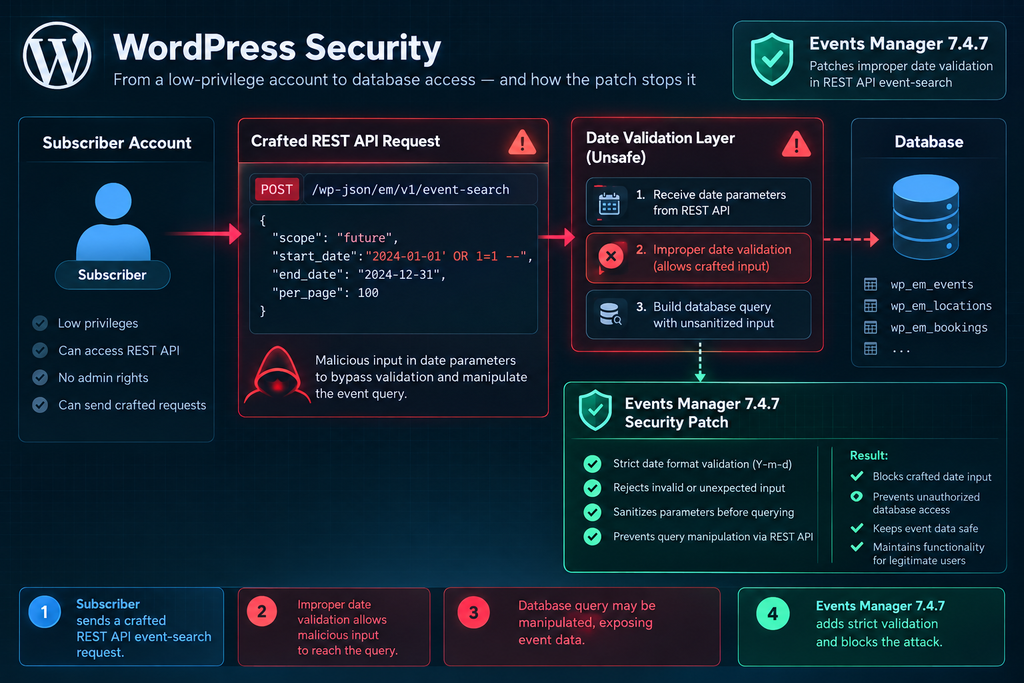
In the Events Manager case, the central concern is that authenticated users could supply specially crafted event-search parameters that bypassed the intended date validation. The vulnerable data could then influence a database query. This creates a potential attack surface for individuals who have no legitimate reason to manage events or bookings. For administrators, the practical response is straightforward: update the affected plugin, evaluate how easily outsiders can obtain accounts, and preserve useful security evidence. A website may appear to function normally even when malicious requests have reached an application endpoint.
Which Events Manager Free and Pro Versions Are Affected?
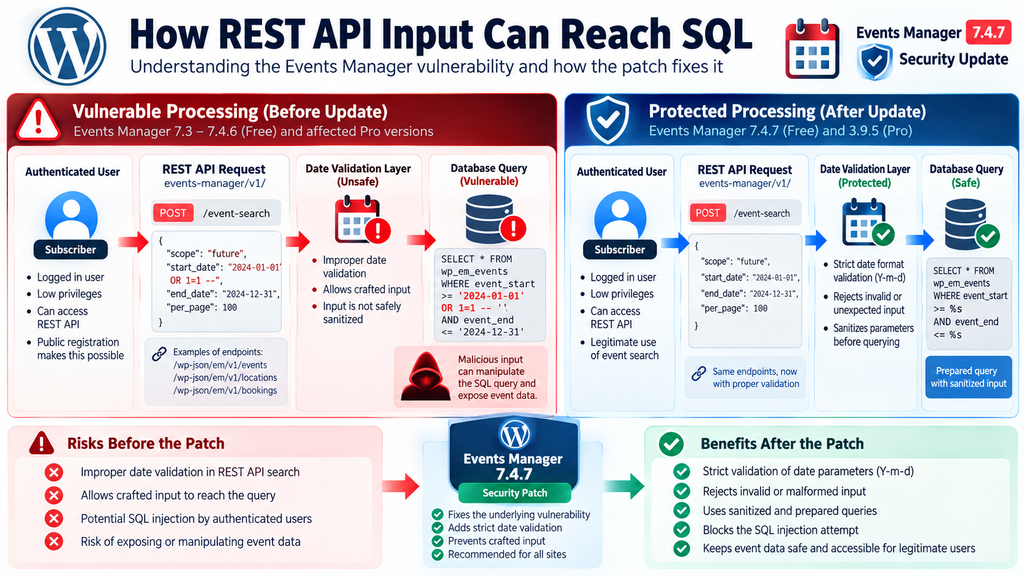
According to the official developer announcement, Events Manager Free versions 7.3 through 7.4.6 contain the vulnerable functionality. Version 7.4.7 introduces the security correction. The developers explain that the problem had remained undetected since the introduction of the REST API in version 7.3. Therefore, administrators should not assume that a website is protected simply because it runs a relatively recent release from the 7.4 series. Any installation within the identified range requires attention. This includes websites where Events Manager is active but administrators rarely use its REST API features directly.
Affected and Fixed Versions
| Component | Affected versions or exposure | Recommended update |
|---|---|---|
| Events Manager Free | 7.3–7.4.6 | 7.4.7 or later |
| Events Manager Pro | Additional REST route introduced in 3.8.1, requiring booking-management permission | 3.9.5 or later |
| Free and Pro together | Underlying vulnerability exists in affected Free versions | Update both components |
The most important detail is that Events Manager 7.4.7 fixes the underlying vulnerability even when an older Pro version remains installed. Nevertheless, the developer recommends updating Pro to 3.9.5 because it adds its own protection instead of relying entirely on the Free component’s correction. That distinction matters for administrators who manage several WordPress installations with different combinations of Free and Pro packages. Keeping both components current reduces security uncertainty and helps avoid compatibility issues associated with older releases. The official WordPress.org changelog confirms that 7.4.7 fixes authenticated SQL injection in REST API event and booking searches.
Why Free and Pro Have Different Attack Routes
WordPress plugins frequently extend one another through shared functions, hooks, classes, and API endpoints. Events Manager Pro builds additional booking and event-management capabilities on top of the core plugin. This architecture allows both editions to reuse existing logic, but it can also mean that a weakness in a shared function becomes reachable through more than one route. In this incident, the Free REST API provided a low-privilege path into the vulnerable date-search handling. Pro offered another path involving booking-management permissions. The distinction is not simply whether a website purchased a commercial license; it concerns which authenticated operations can reach the unsafe query construction.
Administrators should avoid assuming that Pro users face no risk because the additional Pro route has stronger permission requirements. A site using both editions still relies on the core Events Manager plugin. If the Free component remains vulnerable, installing or maintaining Pro does not automatically remove the Subscriber-accessible route. Likewise, upgrading only the Free plugin resolves the documented underlying issue, but leaving Pro outdated means missing its additional hardening improvements. The safer maintenance strategy is to update both editions, verify their active versions, and test essential event and booking functions after installation.
How a REST API Parameter Reaches an SQL Query
The technical explanation begins with the WordPress REST API. A REST API allows software to communicate with a WordPress installation through structured HTTP requests. Developers use these interfaces to connect editors, booking systems, mobile applications, and other services to website data. Events Manager introduced its REST API in version 7.3, including endpoints for events, locations, bookings, and tickets under the events-manager/v1/ namespace. These endpoints help applications retrieve and manage event information without depending entirely on traditional WordPress administration screens.
Event searches often accept parameters that narrow results according to dates, categories, locations, or booking conditions. A normal search might ask the database to return events occurring during a selected week. The application receives the search criteria, validates them, builds a database query, and returns the matching events. Problems arise when input validation fails to enforce the expected structure. In the disclosed Events Manager issue, older code responsible for validating event-search dates did not adequately handle certain inputs arriving through the REST API. The developers state that the regular front-end search did not expose the code in the same harmful way.
The Difference Between a Normal Search and an Unsafe Search
A normal event-search request should treat the supplied date as data rather than as part of SQL instructions. For example, a visitor might request events occurring after October 1, 2026. The application should confirm that the supplied value follows an acceptable date format and then pass it into a properly constructed query. This separation helps prevent external input from changing the meaning of database operations. The important security principle is that user-controlled values must never be trusted merely because they arrive through a documented API endpoint or originate from an authenticated WordPress session.
The vulnerable implementation allowed a specially constructed request to bypass the date-validation logic and reach the database query. In general, SQL injection can happen when application code builds a query using input that has not been safely constrained or parameterized. The Events Manager developers specifically identify a difference in how the REST API passes search parameters compared with the traditional front-end search. This difference exposed older validation code to a situation it did not handle safely. The result was an authenticated SQL injection vulnerability, rather than a simple display problem or harmless malformed search request.
Why Authentication Does Not Make Input Safe
Developers sometimes assume that requests from logged-in users present less risk than requests from anonymous visitors. Authentication identifies an account, but it does not establish that every action performed by that account is trustworthy. A legitimate user may submit malformed information accidentally, while a malicious user can deliberately construct unusual requests. A compromised account can also send requests that the account owner never intended. Therefore, API input validation must remain strict regardless of whether the requester is a Subscriber, Contributor, Author, Editor, or Administrator.
This principle becomes especially important when REST API handlers share functions with other parts of a plugin. One interface might enforce a particular input format before calling a search function, while another interface might pass values differently. If the underlying function assumes that every caller has already validated the input, a new integration can introduce an unexpected security gap. Developers should validate values at appropriate boundaries and use parameterized database queries wherever applicable. Site owners cannot usually repair these problems through WordPress settings alone, which is why installing the official Events Manager patch is essential.
A Simplified Illustration of the Data Flow
Authenticated WordPress UserSubscriber account can access the affected Free route
Events Manager REST APIReceives event or booking search parameters
Vulnerable Date ValidationSpecially crafted input could bypass the intended checks
Database QueryUnsafe input could influence SQL processingConceptual explanation of the disclosed vulnerability, not a reproduction of exploit instructions.
This diagram illustrates why the problem deserves attention even though the REST API is not normally visible to everyday visitors. A vulnerable endpoint does not need a prominent button or menu link to receive requests. Software can interact directly with API routes, provided the request satisfies the relevant authentication and authorization conditions. The developer’s fix addresses the vulnerable input handling rather than depending on administrators to hide event pages or disable public calendars. That approach matters because security should remain effective when websites use the API for legitimate applications.
Why a Subscriber Account Is Enough to Exploit the Vulnerability
The Subscriber role is the lowest standard user role in WordPress. Subscribers can generally sign in, manage limited profile information, and access features that plugins make available to registered users. They cannot normally install plugins, change site settings, edit other users’ posts, or manage the WordPress database. For that reason, administrators may view Subscriber accounts as relatively low risk. However, a vulnerability that allows low-privilege users to reach unsafe database operations changes the security picture. The Events Manager disclosure confirms that the affected Free REST API route could be exploited by any authenticated user, including a basic Subscriber.
This is particularly important for websites that allow public registration. An event organizer might permit visitors to create accounts so they can reserve tickets, track bookings, or manage attendance details. A community website might offer membership registration for discussion features or personalized calendars. In those environments, an outsider may be able to obtain a legitimate Subscriber account without contacting an administrator. If the registration process is open and the vulnerable plugin is installed, the authentication requirement becomes a much smaller obstacle than it would be on a private website with carefully controlled accounts.
Public Registration Changes the Threat Model
Consider a fictional community center that uses WordPress to advertise local workshops. Visitors can create accounts to register for events, and newly registered users receive the Subscriber role. The website administrator maintains the event calendar but does not regularly review the user list. Before the security update, a malicious individual could potentially register an account and reach the vulnerable REST API search functionality. The account would not need administrator privileges to satisfy the documented authentication requirement. This example does not mean that every public registration system was attacked, but it demonstrates why low-privilege SQL injection deserves urgent attention.
Now consider a private business website that uses Events Manager only for internal staff scheduling. Public registration is disabled, and administrators create accounts manually. That website still needs the update because existing accounts may be compromised or misused. However, the immediate exposure differs from a public membership platform where unknown individuals can register freely. The presence of public registration therefore affects the ease of obtaining an eligible account, not whether the vulnerability exists. Both environments require patching, but administrators may prioritize additional registration and account reviews differently.
What About WordPress Sites Without Public Registration?
Disabling public registration can reduce the number of people who can create new accounts, but it does not eliminate the underlying SQL injection vulnerability. Existing Subscribers may still access affected functionality. Other plugins might provide their own registration mechanisms, and some sites create customer or attendee accounts through booking integrations. In addition, an attacker who has obtained valid credentials through phishing, password reuse, or another security incident may already possess an authenticated session. Therefore, registration restrictions are a supporting defense rather than a replacement for the Events Manager 7.4.7 security update.
Administrators should also recognize that the WordPress Subscriber role is not always the only low-privilege role present on a website. WooCommerce stores, membership plugins, and learning-management systems may create custom roles with different capabilities. Whether a particular custom role can reach a protected route depends on the endpoint’s permission checks and the role’s effective capabilities. The official disclosure establishes that ordinary Subscriber access is sufficient for the affected Free route. It does not establish that every custom role has identical permissions. Website owners should inspect their registration and role configurations rather than relying solely on familiar role names.
Why the Pro Route Has a Different Permission Requirement
The Events Manager Pro-specific REST API route introduced in version 3.8.1 required permission to manage bookings. This is a meaningful difference from the Subscriber-accessible route in the Free component. A booking manager typically has responsibilities that ordinary attendees do not possess, such as reviewing reservations or performing administrative booking tasks. The Pro route therefore had a narrower permission requirement. Nevertheless, users with booking-management capabilities could potentially reach the same underlying vulnerable logic before the core fix. The developer’s announcement explicitly identifies this second route and explains why Pro 3.9.5 adds its own protection.
For website owners, the lesson extends beyond this particular plugin. A security assessment should distinguish between authentication and authorization. Authentication answers whether the requester is logged in. Authorization determines whether the requester has permission to perform a specific operation. A plugin can correctly require login while still exposing a sensitive function to accounts that should never reach it. The Events Manager case illustrates how an apparently modest requirement, such as being authenticated, may provide little practical protection on a website that encourages public account creation.
Updating to Events Manager 7.4.7 Safely

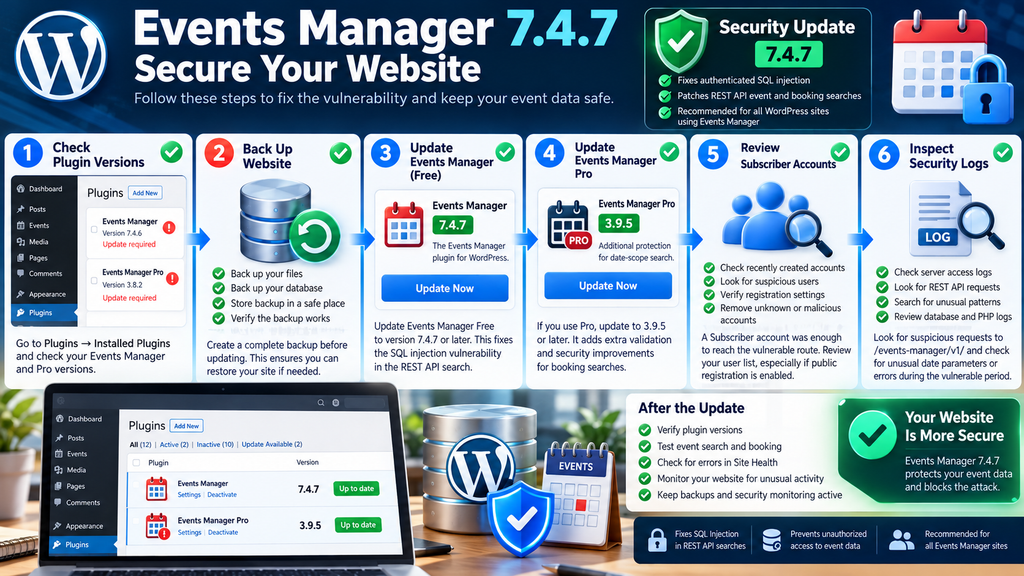
The primary remediation is to update Events Manager Free to version 7.4.7 or a later release that includes the fix. The developer confirmed that this update closes the documented vulnerability regardless of whether the website uses Events Manager Pro. Administrators running Pro should also install version 3.9.5 or later. These versions address the underlying REST API SQL injection issue and strengthen the Pro date-scope search handling. The official announcement was published on October 7, 2026, and the developers stated that they released the fix within 24 hours of receiving the report.
Before updating, website owners should create a reliable backup of both files and database content. This is especially important for event-booking platforms that process reservations, attendee information, and payment-related records. A backup provides a recovery option if an unrelated compatibility problem occurs during the update. It does not replace the patch, and administrators should avoid delaying a security update unnecessarily while arranging a perfect maintenance window. For a busy website, the practical approach is to prepare a backup promptly, apply the update, and verify the most important workflows immediately afterward.
Step 1: Check the Installed Plugin Version
Sign in to the WordPress administration dashboard and navigate to Plugins → Installed Plugins. Locate Events Manager and inspect its version number. If the installation reports a version from 7.3 through 7.4.6, it falls within the affected range described by the developer. If Events Manager Pro is installed, check its version separately because the Free and Pro packages have independent release numbers. Do not assume that updating one package automatically updates the other. On multisite installations, review the plugin’s network activation and update status as well as the sites where its features are used.
Administrators managing multiple WordPress installations should document the versions found on each site. A small maintenance record can include the website name, plugin version before updating, update date, version after updating, and any testing observations. This simple practice helps identify installations that were overlooked or could not complete the update. It also provides useful context if unusual activity appears in server logs. When a vulnerability involves authenticated accounts, knowing the exact period during which a website ran an affected version can help narrow the scope of a later investigation.
Step 2: Create and Verify a Backup
Use a trusted backup solution, your hosting control panel, or a server-level backup process to save the website files and database. Make sure the backup includes Events Manager data, WordPress user records, plugin settings, and any custom booking-related tables. Store the backup somewhere protected from ordinary website access. A backup saved only inside a publicly accessible directory may create a separate security risk if the server exposes it incorrectly. Ideally, the backup should be stored in a private location with access controls and a retention policy appropriate for the website.
Verification matters as much as backup creation. Check that the backup process completed without errors and that the resulting archive or database export is available. For critical booking systems, periodically test restoration in a separate environment. This gives administrators confidence that they can recover event and attendee information if an update or unrelated server problem causes disruption. When handling real customer data, the restoration environment should also be secured appropriately. Avoid copying sensitive booking records to publicly accessible staging websites or development servers with weak authentication.
Step 3: Install Events Manager 7.4.7
Open the Installed Plugins screen and use the available update option for Events Manager. If the security release does not appear immediately, check the official plugin listing and the developer’s distribution instructions. The October 7 announcement noted that WordPress.org’s release-processing queue temporarily delayed availability, and the developer described alternative ways to obtain the patched version. These included downloading the official ZIP package and replacing the installed plugin through the WordPress plugin upload interface.
If you install the update manually, obtain the ZIP file from a legitimate source and confirm that it corresponds to the intended plugin. In WordPress, open Plugins → Add New Plugin → Upload Plugin, select the package, and follow the installation prompts. WordPress may offer to replace the existing plugin with the uploaded version. Verify the package name and version before confirming. Avoid deleting the existing plugin as a routine first step because removal may affect plugin data or configuration, depending on the plugin’s uninstall behavior. The safer approach is to use the supported replacement or update mechanism.
Step 4: Update Events Manager Pro
If your website uses Events Manager Pro, update it to version 3.9.5 or later through the official developer distribution channel. The Pro update provides additional hardening for coupon date-scope searches. Although Events Manager Free 7.4.7 already fixes the underlying vulnerability, maintaining the updated Pro component reduces reliance on a single protective layer. This is particularly important when a website uses booking management, coupons, or other premium functionality.
After updating, verify that both plugins remain active and compatible. Open the Events Manager settings and inspect any warnings. Test a normal event search, create or edit a test event where appropriate, and confirm that the booking interface still behaves as expected. If the website accepts paid bookings, use an approved test environment or payment sandbox rather than creating unnecessary live transactions. For websites with external integrations, check that connected applications can still communicate with the expected API endpoints. A successful update should address the security flaw while preserving legitimate event-management operations.
Step 5: Verify the Update and Website Functionality
Return to the Installed Plugins screen and confirm the active version numbers. Check that Events Manager reports 7.4.7 or later and that Pro, when present, reports 3.9.5 or later. Then visit the public event calendar and test common visitor actions. These may include browsing upcoming events, filtering by date, opening an event detail page, and completing a test booking. The exact tests depend on how the website uses the plugin. A small community calendar needs a different verification process from a ticketing website with multiple booking options and payment integrations.
Also inspect the WordPress Site Health screen and any available PHP error logs. Plugin updates sometimes reveal unrelated compatibility issues involving themes, custom code, or third-party integrations. If errors appear, document them before making additional changes. Avoid reverting to a vulnerable Events Manager release merely to restore a nonessential feature. Instead, contact the developer or investigate the compatibility issue in a staging environment. Keeping the patched version active should remain the priority unless a separate, carefully evaluated recovery plan is required.
Checking User Accounts and Logs for SQL Injection Attempts
Installing the patch closes the documented vulnerability, but it does not establish whether suspicious requests occurred before the update. Administrators who operated an affected version should consider reviewing available security records. This is particularly relevant for websites with public registration, large numbers of Subscriber accounts, or recent unexplained database errors. The objective is not to assume that the website was compromised. Instead, the investigation should determine whether available evidence suggests unusual authentication activity, suspicious REST API requests, or unexpected changes to application behavior.
Start with the WordPress user list. Open Users → All Users and review accounts created during the period when the website was running an affected version. Look for unfamiliar usernames, unusual email patterns, unexpected role assignments, and accounts created in large groups over a short period. These observations do not prove malicious behavior, but they can identify records worth investigating. If public registration is part of the website’s normal operation, compare suspicious accounts against legitimate event registrations or membership records before taking action. Removing accounts without verification could disrupt real customers or erase useful evidence.
Review Subscriber Accounts Carefully
A basic Subscriber account was sufficient to reach the affected Free REST API route. Therefore, account review should not focus exclusively on Administrators and Editors. Examine recently created Subscribers, particularly those with no apparent relationship to legitimate website activity. Where reliable audit logs exist, compare account creation times with login events and subsequent requests. Some websites use membership plugins or custom registration systems that record additional metadata. Those records may help distinguish ordinary attendee registration from unusual automated activity.
Avoid treating unfamiliar names, foreign IP addresses, or unusual email domains as automatic proof of an attack. Legitimate visitors may travel, use VPN services, or register with unfamiliar providers. Instead, evaluate several indicators together, such as repeated authentication attempts, rapid account creation, unusual API traffic, and application errors occurring around the same time. If an account appears compromised, follow a documented incident-response process. This may involve disabling access temporarily, preserving relevant logs, resetting credentials, and notifying the account owner when appropriate.
Inspect REST API Requests in Server Logs
The Events Manager REST API uses the events-manager/v1/ namespace, making it a useful starting point for reviewing relevant request records. Depending on server configuration, API requests may appear in Apache, Nginx, hosting-panel, CDN, or web application firewall logs. Administrators should search for unusual traffic targeting Events Manager endpoints during the vulnerable period. Particular attention may be warranted when requests involve event searches, booking searches, or malformed date-related parameters. The developer’s announcement identifies these areas as relevant to the SQL injection flaw.
grep -F 'events-manager/v1/' /path/to/access.logThis command is a starting point rather than a complete detection rule. It searches for the API namespace in a specified log file, but it does not automatically identify exploitation. Replace the example path with the actual location of your server access log. Depending on how the server handles WordPress REST requests, relevant traffic may also appear through query-string routes rather than the usual permalink structure. Administrators should inspect both formats where applicable. If logs are rotated or compressed, older records may require separate review.
What Suspicious Requests Might Look Like
Unusual requests may include unexpected parameter structures, malformed date values, repeated errors, or patterns that differ significantly from normal event-search activity. Some SQL injection attempts contain recognizable database syntax, but sophisticated requests may not match simple keyword searches. Conversely, a legitimate request can contain unusual characters without being malicious. This is why security investigations should avoid relying on a single string or one isolated HTTP status code. A more reliable assessment considers the request path, timestamp, authenticated user, response behavior, related errors, and surrounding activity.
When reviewing logs, preserve original evidence before filtering or modifying it. Record the time zone used by each logging system so events can be correlated accurately. For example, WordPress may display local time while server logs use UTC. A difference of one or two hours can complicate an investigation if timestamps are compared without adjustment. Administrators should also consider whether a reverse proxy or CDN changes the visible client IP address. The apparent source IP in an origin-server log may represent a proxy rather than the original visitor.
Check Database and PHP Error Logs
SQL injection attempts sometimes produce database errors when malformed input reaches a query. WordPress or PHP logs may contain database warnings, unexpected SQL syntax errors, or stack traces involving plugin functions. These records can provide useful investigative clues, although the absence of errors does not prove that no attempt occurred. Some malicious requests may fail silently, while others may execute without generating an obvious error. Logging configuration, application behavior, and error-handling routines all influence what investigators can observe.
Review relevant records around periods of unusual API traffic. If an error identifies Events Manager functions or date-search processing, document the timestamp and correlate it with web requests. Avoid publishing full database errors or sensitive log entries in public support forums. Such records may expose file paths, database table names, user information, or other internal details. When requesting help from a hosting provider or security professional, share the necessary evidence through a protected channel. A controlled investigation is more useful than publicly distributing potentially sensitive diagnostic information.
Preserve Evidence Before Cleaning a Potentially Compromised Site
If the available evidence suggests exploitation, preserve relevant logs and create a protected snapshot before making extensive changes. A backup taken after a suspected incident may contain compromised data, so it should not automatically be treated as a clean recovery point. Compare the current installation with trusted backups and known-good plugin files where possible. Review unexpected administrator accounts, recently installed plugins, modified configuration files, and unusual scheduled tasks. These checks are precautionary incident-response measures, not evidence that this particular Events Manager vulnerability necessarily provides those capabilities.
For serious incidents, professional assistance may be appropriate. A qualified WordPress security specialist can examine logs, identify affected data, evaluate whether database records were accessed or modified, and recommend proportionate remediation. Websites that process personal information may also have legal or contractual obligations if a confirmed incident involves personal data. The applicable requirements depend on jurisdiction, data type, and the facts established during the investigation. Administrators should avoid making public breach claims before they have reliable evidence.
How to Reduce Future WordPress Plugin Vulnerability Risks
The Events Manager vulnerability illustrates a broader lesson about WordPress security: plugin permissions, API validation, and account registration settings must work together. Updating software remains essential, but secure website administration also requires visibility into who can access the site and how plugins expose functionality. Websites with public registration should review whether registration is genuinely necessary and whether newly created accounts receive appropriate permissions. Administrators should avoid granting additional capabilities simply to make a booking or membership feature work. Each role should have only the permissions required for its intended purpose.
A reliable update process also reduces the period during which known vulnerabilities remain exploitable. Administrators can enable automatic updates for selected trusted plugins, monitor official security announcements, and maintain a staging environment for testing changes that affect critical booking operations. However, automatic updates should not be treated as a guarantee that every security fix will install immediately or that compatibility problems are impossible. Periodic verification remains valuable. For high-traffic event websites, administrators may choose to monitor security releases actively and apply urgent fixes promptly after reviewing the developer’s guidance.
Strengthen Public Registration Security
Public registration is not inherently unsafe. Many legitimate WordPress websites depend on it for bookings, memberships, and customer interactions. The goal is to reduce unnecessary exposure while preserving a convenient experience for visitors. Administrators should verify that the default registration role has minimal permissions, use reasonable anti-abuse protections, and monitor unusual account creation patterns. Email verification can help discourage disposable or automated registrations, although it does not prevent a determined attacker from creating a valid account. Strong authentication practices and sensible rate limits provide additional layers of protection.
Registration controls should also be compatible with the website’s privacy and accessibility requirements. Excessive verification challenges can frustrate legitimate visitors or create barriers for people using assistive technologies. A practical security design balances risk reduction with usability. For example, a small private event website might disable open registration entirely, while a public ticketing platform may need to retain it and strengthen monitoring instead. The correct choice depends on the business model, user expectations, and available administrative resources.
Protect the REST API Without Breaking Legitimate Features
Some administrators respond to REST API vulnerabilities by attempting to disable the entire WordPress REST API. This can create unexpected problems because the block editor, plugins, mobile applications, and external integrations may depend on REST endpoints. In the Events Manager case, the appropriate remediation is the official patched plugin version. Blocking all REST requests is neither a precise correction nor a reliable substitute for safe query handling. If temporary access restrictions are necessary during an incident, they should be narrowly targeted and tested against the website’s legitimate functionality.
A web application firewall can provide useful additional protection by detecting some malicious request patterns. However, firewall rules are not guaranteed to recognize every SQL injection technique. Administrators should view a WAF as one defensive layer alongside secure application code, timely updates, account controls, and monitoring. Where hosting providers offer managed security services, confirm that the rules are current and that relevant logs are retained long enough for investigation. These measures can improve visibility and reduce exposure, but they cannot retroactively prove that an unpatched website was never attacked.
Maintain a Practical WordPress Security Routine
Security maintenance works best when it becomes a regular administrative habit rather than a reaction to alarming headlines. A weekly review can cover plugin updates, unusual user accounts, failed login patterns, backup status, and major changes in website behavior. More frequent monitoring may be appropriate for sites that process payments or manage large numbers of registrations. Administrators should also keep WordPress core, themes, PHP, and server components supported and updated. An otherwise secure plugin cannot compensate for serious weaknesses elsewhere in the environment.
Documenting changes makes future troubleshooting easier. Record when important plugins were updated, which versions were installed, and whether any unexpected behavior followed. Maintain an inventory of active plugins and remove software that is no longer required, following the developer’s data-retention and uninstall guidance. Review custom integrations when major API changes occur, especially when they pass external input into database-related functions. A small amount of consistent maintenance can reduce the confusion and urgency that often accompany a newly disclosed vulnerability.
Frequently Asked Questions
1. What is the Events Manager vulnerability?
The Events Manager vulnerability is an authenticated SQL injection flaw affecting REST API event and booking searches. It involves unsafe handling of specially crafted date-search parameters. The developers released Events Manager 7.4.7 to correct the issue. Because a basic Subscriber account can reach the affected Free route, websites that allow public registration deserve particular attention.
2. Which Events Manager versions are vulnerable?
According to the official announcement, Events Manager Free versions 7.3 through 7.4.6 are affected. Version 7.4.7 contains the fix. Events Manager Pro also had an additional route introduced in version 3.8.1, and Pro 3.9.5 adds further hardening. Administrators should update both components when Pro is installed.
3. Can a Subscriber exploit the vulnerability?
Yes. The developer confirms that the affected Free REST API route requires authentication but can be reached by a basic Subscriber account. This makes public registration relevant because an outsider may be able to create a qualifying account. Exploitation still requires a crafted request and the presence of the vulnerable plugin version.
4. Does the vulnerability affect Events Manager Pro?
Yes, Pro installations can be exposed through the affected Free component. Pro also introduced an additional REST API route that requires booking-management permission. Updating Events Manager Free to 7.4.7 closes the underlying flaw, while Pro 3.9.5 adds its own protective validation.
5. Is disabling public registration enough?
No. Disabling public registration may make it harder for outsiders to obtain new accounts, but existing authenticated users can still present a risk. Other registration mechanisms or compromised credentials may also provide access. Installing the official security update is necessary to address the underlying vulnerability.
6. Can attackers steal information through this SQL injection?
SQL injection vulnerabilities can potentially expose or alter database information, depending on the vulnerable query and database privileges. However, the official Events Manager announcement does not establish that every form of database extraction or modification is possible. Administrators should investigate suspicious activity without assuming unverified consequences.
7. Has the Events Manager vulnerability been actively exploited?
The developer’s October 7 announcement confirms disclosure and remediation but does not establish a verified widespread exploitation campaign. Affected administrators should still patch promptly and review relevant logs. A publicly disclosed vulnerability can attract attention even when confirmed exploitation has not been documented.
8. How can I check whether my website was targeted?
Review server access logs, REST API requests, authentication records, and relevant database errors from the period when the vulnerable version was active. Search for unusual requests involving Events Manager event or booking searches. Remember that suspicious requests do not automatically prove successful exploitation, and clean-looking logs cannot guarantee that no attack occurred.
9. Do I need to update both Free and Pro?
If both components are installed, updating both is recommended. Events Manager 7.4.7 fixes the underlying SQL injection vulnerability, while Events Manager Pro 3.9.5 adds independent hardening for its date-scope search handling. Keeping both updated provides better long-term maintenance and security consistency.
10. Will updating Events Manager delete my events or bookings?
A normal plugin update is intended to preserve existing website data, but administrators should always create a verified backup before making important changes. After updating, test event listings, booking forms, calendars, and relevant integrations. If unexpected problems occur, investigate them without immediately returning to a vulnerable plugin version.
A Safer Path Forward for Events Manager Websites
The Events Manager vulnerability demonstrates why seemingly limited WordPress accounts can become important security considerations. The disclosed SQL injection flaw did not require administrator access through the affected Free REST API route. A basic Subscriber account was enough to satisfy its authentication requirement, creating additional concern for websites that allow visitors to register freely. The issue originated in older date-validation code that became reachable through REST API search handling introduced in version 7.3. Understanding this interaction helps explain why a routine event-search feature could create a meaningful database security risk.
Fortunately, the developers released Events Manager 7.4.7 quickly and provided clear guidance for affected installations. Websites using Events Manager Pro should also update to version 3.9.5 or later. Beyond installing the patches, administrators can improve their security posture by reviewing registration settings, checking low-privilege accounts, preserving relevant logs, and maintaining reliable backups. The objective is not to treat every unfamiliar request as an attack, but to make informed decisions based on documented vulnerabilities and available evidence. Timely updates and consistent monitoring remain among the most practical ways to protect WordPress event-management websites.
Core Web Vitals: Metrics, Examples, and Opt Tips
⚠️ Disclaimer and Source Hygiene
This article is provided for educational and informational purposes only. It is not a substitute for a professional security assessment, digital forensic investigation, or legal advice. Vulnerability details and affected versions are based primarily on the official Events Manager developer announcement published October 7, 2026, and the WordPress.org plugin changelog. Additional context is drawn from established WordPress security resources. Readers should verify the latest available plugin releases before applying updates, as version numbers and security guidance may change. No claim of confirmed widespread exploitation or specific data theft is made without supporting evidence.
Sources and References
Primary Sources
1. Events Manager – Official Security Announcement, October 7, 2026. Documents the SQL injection issue, affected Free versions, Subscriber access, Pro-specific route, and recommended fixes. Read the official Events Manager 7.4.7 security announcement.
2. WordPress.org – Events Manager Plugin Changelog. Confirms the Events Manager 7.4.7 security correction for authenticated SQL injection in REST API event and booking searches. View the Events Manager plugin and changelog.
3. Events Manager – Official Plugin Development and Release Information. Provides context for the introduction of REST API functionality in version 7.3 and later maintenance releases. Visit the Events Manager developer blog.
Secondary Sources and Security Research
4. Patchstack – Events Manager Vulnerability Database. Provides historical vulnerability disclosures and security context for the plugin. The newly announced 7.4.7 issue should be verified against the primary developer announcement where database listings have not yet caught up. Explore Patchstack Events Manager vulnerability records.
5. WordPress Developer Resources – REST API Handbook. Explains REST API architecture, authentication, endpoint development, and permission handling. Read the WordPress REST API Handbook.
6. OWASP – SQL Injection Prevention Cheat Sheet. Offers technical guidance on safer query construction, parameterization, and input handling. Read OWASP SQL injection prevention guidance.
Secondary Sources and Testimonials
No independently verified victim testimonials or confirmed exploitation case studies were identified in the sources used for this article. The discussion of public registration, Subscriber access, and security-log investigation reflects the documented vulnerability and established defensive practices rather than unverified reports of individual website compromises.
Sign in with a Subscriber account to vote.