
Table of Contents
Learn how to install a free WordPress MU-plugin error scanner that checks PHP syntax, detects fatal errors, reviews debug logs, and displays results inside your Dashboard. This detailed tutorial includes real examples, complete PHP source code, automatic daily scanning, installation instructions, and a downloadable plugin.
WordPress MU-Plugin Error Scanner: Complete Guide
WordPress gives us enormous freedom to customize how a website works. We can improve performance, add security features, change login behavior, automate maintenance, and create functionality that ordinary plugins do not provide. Must-Use plugins, commonly called MU-plugins, are particularly useful because WordPress loads them automatically.
However, this convenience comes with a risk. A single PHP mistake inside an MU-plugin can disrupt important website functions or prevent WordPress from loading correctly. When that happens, the administrator may lose access to the Dashboard and need to repair files directly through the hosting server.
The WordPress MU-Plugin Error Scanner helps website owners identify problems earlier. It checks PHP files without executing their contents, examines relevant debug-log messages, records certain fatal errors, and displays useful diagnostic information in a dedicated Dashboard widget. It also supports automatic daily scans and a manual scan button.
This tutorial explains how the scanner works, how to install it safely, how to interpret its results, and how to troubleshoot common problems. You will also find the complete PHP source code and a downloadable version that can be installed without purchasing a commercial plugin.
What Are WordPress MU-Plugins and Why Do They Matter?
MU-plugins are special WordPress plugins stored inside the wp-content/mu-plugins/ directory. Unlike conventional plugins, they load automatically and do not require activation from the Plugins screen. This makes them particularly useful for important site-specific functionality that should remain available regardless of normal plugin management.
For example, a website administrator might use MU-plugins to configure security headers, customize login redirects, manage SEO metadata, integrate server caching, or add internal monitoring features. A developer maintaining several websites might also use them to keep shared functionality separate from themes and conventional plugins.
WordPress loads top-level PHP files in the MU-plugin directory automatically. Subdirectories are not loaded automatically, but a top-level loader can include PHP modules stored inside them. This distinction matters because the scanner covered here checks PHP files recursively, including modules that WordPress might not directly load.
How MU-Plugins Differ from Regular Plugins
| Feature | Regular plugin | MU-plugin |
|---|---|---|
| Activation | Manual | Automatic |
| Deactivation through normal plugin controls | Yes | No |
| Default directory | plugins/ | mu-plugins/ |
| Automatic update support | Common | Not provided by default |
| Nested PHP modules | Through plugin code | Through a loader |
| Typical purpose | General functionality | Essential custom functionality |
A custom MU-plugin can be an excellent engineering choice, but it also deserves careful maintenance. Because it loads early, a fatal error can interfere with WordPress before the usual administration tools become available.
Why PHP Errors in MU-Plugins Can Be Dangerous
Imagine that you manage a WordPress website with several custom modules. One controls caching, another handles authentication, and a third manages SEO output. Everything works correctly until you edit the authentication module and accidentally remove a closing bracket.
PHP may report a parse error when WordPress attempts to load the file. Depending on the location of the error and how the file is loaded, the website may display a critical error message or return an HTTP 500 response. Visitors might not be able to open pages, and administrators might be unable to sign in.
Another common situation involves PHP version changes. A hosting provider upgrades PHP, and older custom code begins producing warnings, deprecation notices, or fatal compatibility errors. The code may still have valid syntax, which is why syntax checking alone cannot provide a complete diagnosis.
The scanner addresses these issues through several complementary checks. It cannot guarantee that a website will never fail, but it makes certain problems easier to identify and investigate.
Common Problems Worth Monitoring
A missing semicolon or unmatched bracket is a syntax problem. An undefined function, incorrect argument type, or unexpected database result is generally a runtime problem. A deprecated PHP feature may produce a notice without immediately breaking the website.
These distinctions matter because not every error requires the same response. A parse error in a loaded MU-plugin may need immediate correction. A recurring warning might allow time for investigation. A deprecation notice may signal that code should be updated before the next PHP upgrade.
How the WordPress MU-Plugin Error Scanner Works
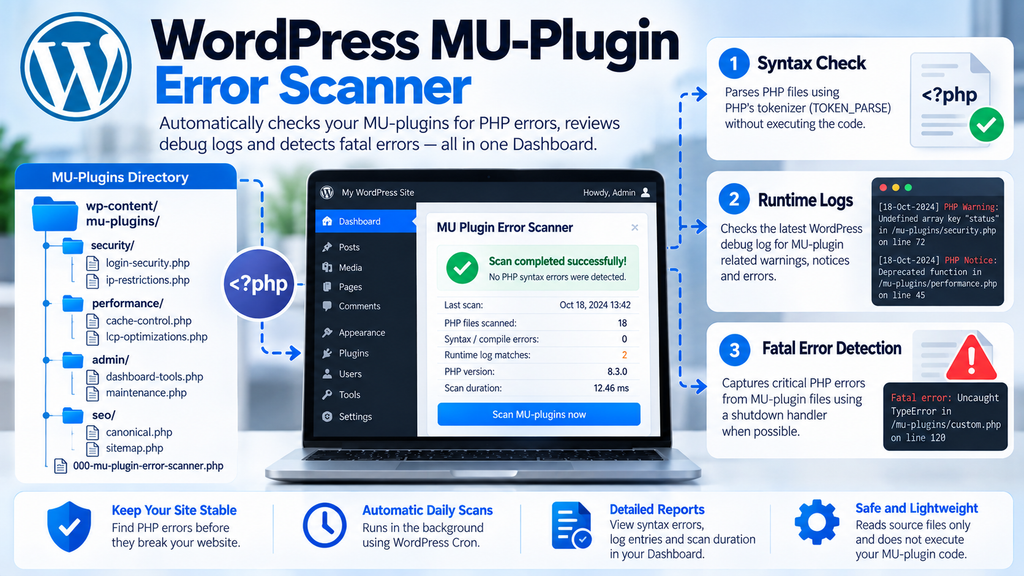
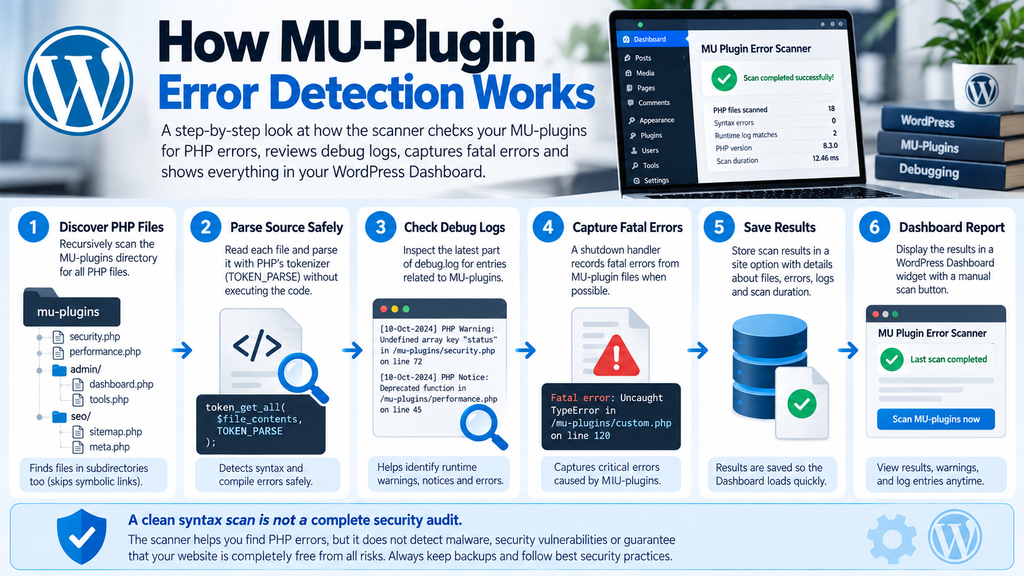
The scanner is a lightweight Must-Use plugin written in PHP. It registers its functionality when WordPress loads, schedules a daily inspection, and makes the results available through the administration Dashboard.
Its main advantage is the way it examines PHP source files. Instead of including each file and potentially running its functionality again, it reads the file contents and uses PHP’s tokenizer with the TOKEN_PARSE flag. This can identify many parsing problems without intentionally executing the scanned plugin code.
The scanner also includes a shutdown handler. If a qualifying fatal error occurs in an MU-plugin after the scanner has initialized, the handler attempts to save details about the error. Separately, the scanner reads a limited portion of the configured WordPress debug log and searches for entries referencing MU-plugin paths.
The Automatic Scanning Workflow
MU-plugin PHP filesRecursive directory discovery
PHP source parsingChecks syntax without including files
Debug logRecent MU-plugin messages
Fatal errorsLast captured failure
WordPress Dashboard reportResults, warnings, timing, and manual scan
The daily scan runs through WordPress’s scheduling system. When it finishes, the scanner stores the results in a site option. Opening the Dashboard then retrieves those saved results instead of launching another complete scan.
This separation is important for performance. Ordinary visitors do not trigger a recursive PHP scan on every page request, and administrators can review the latest results without repeatedly reading the entire MU-plugin directory.
Preparing WordPress Before Installing the Scanner

Before adding a new MU-plugin, confirm that you can recover your website if something goes wrong. Even carefully written PHP can behave differently across hosting environments, PHP versions, and existing custom code.
Start by creating a reliable backup of the website files and database. If your hosting account provides staging, install and test the scanner there first. You should also know how to reach the MU-plugin directory through cPanel File Manager, SFTP, or SSH without relying on the WordPress Dashboard.
The supplied implementation requires PHP 7.4 or later. A supported, maintained PHP version is preferable for a production website. The scanner itself does not need an external API account, commercial license, or third-party service.
Step 1: Find the MU-Plugin Directory
Open your hosting file manager and navigate to the WordPress installation directory. In a common cPanel setup, WordPress is located under public_html, although your installation may use a different document root.
Locate:
wp-content/mu-plugins/If the mu-plugins directory does not exist, create it inside wp-content. Do not create it inside the normal plugins directory because WordPress treats those two locations differently.
Step 2: Choose the Scanner Filename
Create a file named:
000-mu-plugin-error-scanner.phpThe full relative path becomes:
wp-content/mu-plugins/000-mu-plugin-error-scanner.phpThe 000- prefix is intentional. WordPress normally loads top-level MU-plugin PHP files alphabetically, so this name helps the scanner initialize before many other custom MU-plugins.
Loading early increases the opportunity for its shutdown handler to capture errors that occur later in the request. It does not guarantee that every fatal error can be recorded, particularly when the scanner itself cannot load.
Step 3: Verify Your Recovery Access
Before saving the PHP file, confirm that you can rename or delete it through your hosting file manager. This simple preparation can save considerable time if the installation causes an unexpected conflict.
If the website becomes inaccessible immediately after installing the scanner, you can temporarily rename the file to something that does not end in .php, then investigate the problem.
Download the WordPress MU-Plugin Error Scanner
The complete scanner is available as a free ZIP package containing the original PHP implementation, version 1.0.0. The PHP source has been checked with php -l, and no syntax errors were reported in that check.
MU Plugin Error Scanner v1.0.0
ZIP archive · PHP source included · Free
PHP syntax validated
Download MU Plugin Error Scanner v1.0.0The ZIP contains 000-mu-plugin-error-scanner.php. Extract the PHP file into wp-content/mu-plugins/. This is not a conventional WordPress plugin installation ZIP.
How to Install the Downloaded ZIP
Download the archive to your computer and extract its contents. You will find a PHP file named 000-mu-plugin-error-scanner.php. Connect to your hosting account, open the WordPress installation, and upload this file directly into wp-content/mu-plugins/.
Do not use Plugins → Add New → Upload Plugin for this package. That interface installs conventional plugins in the normal plugin directory, whereas this scanner is designed to load as a Must-Use plugin. If you upload the ZIP using cPanel File Manager, extract it and confirm that the PHP file is directly inside mu-plugins, not inside an extra nested folder.
Once the file is in place, visit WordPress Dashboard → Home. The scanner should initialize automatically, provided WordPress loads successfully and your account has the required administrator capability.
Complete PHP Source Code: MU Plugin Error Scanner v1.0.0
The complete PHP implementation is included below. It contains the recursive file scanner, daily scheduling, debug-log inspection, fatal-error capture, Dashboard widget, scan locking, and administrator-protected manual scan.
The complete source is 1,080 lines long. To avoid introducing copying errors in such a large PHP file, use the exact, syntax-checked source provided here:
View or download the complete PHP source code:
Filename: 000-mu-plugin-error-scanner.php
<?php
/**
 * Plugin Name: MU Plugin Error Scanner
 * Description: Daily PHP error scanning and Dashboard reporting for WordPress MU-plugins.
 * Version: 1.0.0
 * Requires PHP: 7.4
 */

// wp-content/mu-plugins/000-mu-plugin-error-scanner.php

if ( ! defined( 'ABSPATH' ) ) {
	exit;
}

final class MU_Plugin_Error_Scanner {

	private const CRON_HOOK        = 'mu_plugin_error_scanner_daily';
	private const RESULTS_OPTION   = 'mu_plugin_error_scanner_results';
	private const LAST_FATAL_OPTION = 'mu_plugin_error_scanner_last_fatal';
	private const LOCK_KEY         = 'mu_plugin_error_scanner_lock';

	private const MANUAL_ACTION = 'mu_plugin_error_scanner_scan';
	private const NONCE_ACTION  = 'mu_plugin_error_scanner_scan_now';

	private const LOG_MAX_BYTES   = 1048576;
	private const LOG_MAX_ENTRIES = 30;

	/**
	 * Register scanner functionality.
	 *
	 * @return void
	 */
	public static function boot() {
		register_shutdown_function( array( self::class, 'capture_fatal_error' ) );

		add_action( 'init', array( self::class, 'ensure_daily_scan' ) );
		add_action( self::CRON_HOOK, array( self::class, 'run_scheduled_scan' ) );

		add_action(
			'wp_dashboard_setup',
			array( self::class, 'register_dashboard_widget' )
		);

		add_action(
			'admin_post_' . self::MANUAL_ACTION,
			array( self::class, 'handle_manual_scan' )
		);
	}

	/**
	 * Schedule the automatic daily scan.
	 *
	 * @return void
	 */
	public static function ensure_daily_scan() {
		if ( is_multisite() && ! is_main_site() ) {
			return;
		}

		if ( false !== wp_next_scheduled( self::CRON_HOOK ) ) {
			return;
		}

		wp_schedule_event(
			time() + ( 5 * MINUTE_IN_SECONDS ),
			'daily',
			self::CRON_HOOK
		);
	}

	/**
	 * Execute the scheduled scan.
	 *
	 * @return void
	 */
	public static function run_scheduled_scan() {
		self::scan_and_store();
	}

	/**
	 * Run a scan and persist its results.
	 *
	 * @return array|WP_Error
	 */
	private static function scan_and_store() {
		if ( get_site_transient( self::LOCK_KEY ) ) {
			return new WP_Error(
				'mu_scanner_busy',
				'An MU-plugin scan is already running.'
			);
		}

		set_site_transient(
			self::LOCK_KEY,
			1,
			5 * MINUTE_IN_SECONDS
		);

		try {
			$results = self::perform_scan();

			update_site_option(
				self::RESULTS_OPTION,
				$results
			);

			return $results;
		} catch ( Throwable $exception ) {
			return new WP_Error(
				'mu_scanner_failed',
				$exception->getMessage()
			);
		} finally {
			delete_site_transient( self::LOCK_KEY );
		}
	}

	/**
	 * Perform the PHP and log scans.
	 *
	 * @return array
	 */
	private static function perform_scan() {
		$started_at = microtime( true );

		$files         = array();
		$warnings      = array();
		$syntax_errors = array();

		if ( ! defined( 'WPMU_PLUGIN_DIR' ) || ! is_dir( WPMU_PLUGIN_DIR ) ) {
			$warnings[] = 'The WordPress MU-plugin directory could not be found.';
		} else {
			self::collect_php_files(
				WPMU_PLUGIN_DIR,
				$files,
				$warnings
			);
		}

		sort( $files, SORT_STRING );

		foreach ( $files as $file ) {
			$error = self::lint_php_file( $file );

			if ( null !== $error ) {
				$syntax_errors[] = $error;
			}
		}

		$runtime_log = self::scan_runtime_log();

		$duration = round(
			( microtime( true ) - $started_at ) * 1000,
			2
		);

		return array(
			'completed_at'  => time(),
			'php_version'   => PHP_VERSION,
			'files_scanned' => count( $files ),
			'syntax_errors' => $syntax_errors,
			'warnings'      => $warnings,
			'runtime_log'   => $runtime_log,
			'duration_ms'   => $duration,
		);
	}

	/**
	 * Recursively collect PHP files.
	 *
	 * @param string $directory Directory to inspect.
	 * @param array  $files     Collected PHP files.
	 * @param array  $warnings  Collection warnings.
	 * @return void
	 */
	private static function collect_php_files(
		$directory,
		array &$files,
		array &$warnings
	) {
		$entries = @scandir( $directory );

		if ( false === $entries ) {
			$warnings[] = sprintf(
				'Unable to read directory: %s',
				self::display_path( $directory )
			);

			return;
		}

		foreach ( $entries as $entry ) {
			if ( '.' === $entry || '..' === $entry ) {
				continue;
			}

			$path = $directory . DIRECTORY_SEPARATOR . $entry;

			if ( is_dir( $path ) ) {
				if ( is_link( $path ) ) {
					continue;
				}

				self::collect_php_files(
					$path,
					$files,
					$warnings
				);

				continue;
			}

			if ( ! is_file( $path ) ) {
				continue;
			}

			if ( 'php' !== strtolower( pathinfo( $path, PATHINFO_EXTENSION ) ) ) {
				continue;
			}

			$files[] = $path;
		}
	}

	/**
	 * Parse a PHP file without executing it.
	 *
	 * @param string $file Absolute PHP file path.
	 * @return array|null
	 */
	private static function lint_php_file( $file ) {
		$contents = @file_get_contents( $file );

		if ( false === $contents ) {
			return array(
				'file'    => self::display_path( $file ),
				'line'    => 0,
				'message' => 'File could not be read.',
				'type'    => 'read_error',
			);
		}

		set_error_handler(
			static function ( $severity, $message, $source_file, $source_line ) {
				throw new ErrorException(
					$message,
					0,
					$severity,
					$source_file,
					$source_line
				);
			}
		);

		try {
			token_get_all(
				$contents,
				TOKEN_PARSE
			);

			return null;
		} catch ( Throwable $exception ) {
			return array(
				'file'    => self::display_path( $file ),
				'line'    => self::extract_error_line( $exception ),
				'message' => self::clean_error_message(
					$exception->getMessage()
				),
				'type'    => get_class( $exception ),
			);
		} finally {
			restore_error_handler();
		}
	}

	/**
	 * Extract a useful source line from a parser exception.
	 *
	 * @param Throwable $exception Parser exception.
	 * @return int
	 */
	private static function extract_error_line( Throwable $exception ) {
		$message = $exception->getMessage();

		if (
			preg_match(
				'/\bon line\s+([0-9]+)\b/i',
				$message,
				$matches
			)
		) {
			return (int) $matches[1];
		}

		if ( $exception instanceof ErrorException ) {
			return 0;
		}

		return max(
			0,
			(int) $exception->getLine()
		);
	}

	/**
	 * Remove parser noise from an error message.
	 *
	 * @param string $message Error message.
	 * @return string
	 */
	private static function clean_error_message( $message ) {
		$message = preg_replace(
			'/\s+in\s+on line\s+[0-9]+\s*$/i',
			'',
			$message
		);

		return trim( (string) $message );
	}

	/**
	 * Inspect the configured WordPress debug log.
	 *
	 * @return array
	 */
	private static function scan_runtime_log() {
		$result = array(
			'status'  => 'disabled',
			'message' => 'WP_DEBUG_LOG is not enabled.',
			'entries' => array(),
		);

		if ( ! defined( 'WP_DEBUG_LOG' ) || ! WP_DEBUG_LOG ) {
			return $result;
		}

		$log_file = self::get_debug_log_path();

		if ( ! $log_file ) {
			$result['status']  = 'unavailable';
			$result['message'] = 'The debug log path could not be determined.';

			return $result;
		}

		if ( ! is_file( $log_file ) ) {
			$result['status']  = 'missing';
			$result['message'] = 'The configured debug log does not exist yet.';

			return $result;
		}

		if ( ! is_readable( $log_file ) ) {
			$result['status']  = 'unreadable';
			$result['message'] = 'The configured debug log is not readable.';

			return $result;
		}

		$lines = self::read_log_tail(
			$log_file,
			self::LOG_MAX_BYTES
		);

		$matches = array();

		foreach ( $lines as $line ) {
			if ( ! self::log_line_mentions_mu_plugins( $line ) ) {
				continue;
			}

			$line = trim( $line );

			if ( '' === $line ) {
				continue;
			}

			if ( strlen( $line ) > 1500 ) {
				$line = substr( $line, 0, 1500 ) . '…';
			}

			$matches[] = $line;
		}

		$matches = array_values(
			array_unique( $matches )
		);

		if ( count( $matches ) > self::LOG_MAX_ENTRIES ) {
			$matches = array_slice(
				$matches,
				-self::LOG_MAX_ENTRIES
			);
		}

		$result['status']  = 'ok';
		$result['message'] = empty( $matches )
			? 'No MU-plugin references were found in the latest debug log data.'
			: sprintf(
				'%d MU-plugin-related log entries found.',
				count( $matches )
			);

		$result['entries'] = $matches;

		return $result;
	}

	/**
	 * Determine the WordPress debug log path.
	 *
	 * @return string|null
	 */
	private static function get_debug_log_path() {
		if ( true === WP_DEBUG_LOG || '1' === WP_DEBUG_LOG ) {
			return WP_CONTENT_DIR . DIRECTORY_SEPARATOR . 'debug.log';
		}

		if ( is_string( WP_DEBUG_LOG ) && '' !== trim( WP_DEBUG_LOG ) ) {
			return WP_DEBUG_LOG;
		}

		return null;
	}

	/**
	 * Read only the latest portion of a potentially large log file.
	 *
	 * @param string $file      Log file.
	 * @param int    $max_bytes Maximum bytes to inspect.
	 * @return array
	 */
	private static function read_log_tail( $file, $max_bytes ) {
		$handle = @fopen( $file, 'rb' );

		if ( false === $handle ) {
			return array();
		}

		$size = @filesize( $file );

		if ( false !== $size && $size > $max_bytes ) {
			$offset = $size - $max_bytes;

			if ( 0 === fseek( $handle, $offset, SEEK_SET ) ) {
				fgets( $handle );
			}
		}

		$lines = array();

		while ( false !== ( $line = fgets( $handle ) ) ) {
			$lines[] = $line;
		}

		fclose( $handle );

		return $lines;
	}

	/**
	 * Check whether a log line references the MU-plugin directory.
	 *
	 * @param string $line Log line.
	 * @return bool
	 */
	private static function log_line_mentions_mu_plugins( $line ) {
		$normalized_line = wp_normalize_path( $line );

		if ( defined( 'WPMU_PLUGIN_DIR' ) ) {
			$mu_directory = wp_normalize_path(
				WPMU_PLUGIN_DIR
			);

			if (
				false !== strpos(
					$normalized_line,
					$mu_directory
				)
			) {
				return true;
			}
		}

		return false !== strpos(
			$normalized_line,
			'/mu-plugins/'
		);
	}

	/**
	 * Capture fatal errors occurring inside the MU-plugin directory.
	 *
	 * @return void
	 */
	public static function capture_fatal_error() {
		$error = error_get_last();

		if ( ! is_array( $error ) ) {
			return;
		}

		$fatal_types = array(
			E_ERROR,
			E_PARSE,
			E_CORE_ERROR,
			E_COMPILE_ERROR,
			E_USER_ERROR,
		);

		if ( ! in_array( $error['type'], $fatal_types, true ) ) {
			return;
		}

		if (
			empty( $error['file'] ) ||
			! self::is_mu_plugin_path( $error['file'] )
		) {
			return;
		}

		if ( ! function_exists( 'update_site_option' ) ) {
			return;
		}

		update_site_option(
			self::LAST_FATAL_OPTION,
			array(
				'timestamp' => time(),
				'file'      => self::display_path( $error['file'] ),
				'line'      => isset( $error['line'] )
					? (int) $error['line']
					: 0,
				'message'   => isset( $error['message'] )
					? (string) $error['message']
					: 'Unknown fatal PHP error.',
			)
		);
	}

	/**
	 * Check whether a file belongs to the MU-plugin directory.
	 *
	 * @param string $file File path.
	 * @return bool
	 */
	private static function is_mu_plugin_path( $file ) {
		if ( ! defined( 'WPMU_PLUGIN_DIR' ) ) {
			return false;
		}

		$file = wp_normalize_path( $file );

		$mu_directory = trailingslashit(
			wp_normalize_path( WPMU_PLUGIN_DIR )
		);

		return 0 === strpos(
			$file,
			$mu_directory
		);
	}

	/**
	 * Convert an absolute MU-plugin path to a readable relative path.
	 *
	 * @param string $path File or directory path.
	 * @return string
	 */
	private static function display_path( $path ) {
		$normalized_path = wp_normalize_path( $path );

		if ( ! defined( 'WPMU_PLUGIN_DIR' ) ) {
			return basename( $normalized_path );
		}

		$mu_directory = trailingslashit(
			wp_normalize_path( WPMU_PLUGIN_DIR )
		);

		if (
			0 === strpos(
				$normalized_path,
				$mu_directory
			)
		) {
			return 'mu-plugins/' . ltrim(
				substr(
					$normalized_path,
					strlen( $mu_directory )
				),
				'/'
			);
		}

		return $normalized_path;
	}

	/**
	 * Register the WordPress Dashboard widget.
	 *
	 * @return void
	 */
	public static function register_dashboard_widget() {
		if ( ! current_user_can( 'manage_options' ) ) {
			return;
		}

		wp_add_dashboard_widget(
			'mu_plugin_error_scanner',
			'MU Plugin Error Scanner',
			array( self::class, 'render_dashboard_widget' )
		);
	}

	/**
	 * Render the Dashboard scan results.
	 *
	 * @return void
	 */
	public static function render_dashboard_widget() {
		$results    = get_site_option( self::RESULTS_OPTION, array() );
		$last_fatal = get_site_option( self::LAST_FATAL_OPTION, array() );

		$scan_status = isset( $_GET['mu_scan'] )
			? sanitize_key( wp_unslash( $_GET['mu_scan'] ) )
			: '';

		if ( 'complete' === $scan_status ) {
			echo '<div class="notice notice-success inline"><p>';
			echo esc_html( 'MU-plugin scan completed.' );
			echo '</p></div>';
		} elseif ( 'busy' === $scan_status ) {
			echo '<div class="notice notice-warning inline"><p>';
			echo esc_html( 'A scan is already running.' );
			echo '</p></div>';
		} elseif ( 'failed' === $scan_status ) {
			echo '<div class="notice notice-error inline"><p>';
			echo esc_html( 'The MU-plugin scan could not be completed.' );
			echo '</p></div>';
		}

		if (
			defined( 'DISABLE_WP_CRON' ) &&
			DISABLE_WP_CRON
		) {
			echo '<div class="notice notice-warning inline"><p>';
			echo esc_html(
				'WP-Cron is disabled. Automatic daily scans require your server cron to call WordPress cron.'
			);
			echo '</p></div>';
		}

		self::render_last_fatal( $last_fatal );

		if ( empty( $results ) ) {
			echo '<p>';
			echo esc_html(
				'No scheduled scan has completed yet.'
			);
			echo '</p>';

			self::render_scan_button();

			return;
		}

		$syntax_errors = isset( $results['syntax_errors'] )
			&& is_array( $results['syntax_errors'] )
			? $results['syntax_errors']
			: array();

		$runtime_log = isset( $results['runtime_log'] )
			&& is_array( $results['runtime_log'] )
			? $results['runtime_log']
			: array();

		$runtime_entries = isset( $runtime_log['entries'] )
			&& is_array( $runtime_log['entries'] )
			? $runtime_log['entries']
			: array();

		$completed_at = isset( $results['completed_at'] )
			? (int) $results['completed_at']
			: 0;

		$files_scanned = isset( $results['files_scanned'] )
			? (int) $results['files_scanned']
			: 0;

		$duration = isset( $results['duration_ms'] )
			? (float) $results['duration_ms']
			: 0;

		$php_version = isset( $results['php_version'] )
			? (string) $results['php_version']
			: '';

		echo '<table class="widefat striped" style="margin-bottom:12px">';
		echo '<tbody>';

		self::render_summary_row(
			'Last scan',
			$completed_at
				? wp_date(
					'Y-m-d H:i:s T',
					$completed_at,
					wp_timezone()
				)
				: 'Unknown'
		);

		self::render_summary_row(
			'PHP files scanned',
			(string) $files_scanned
		);

		self::render_summary_row(
			'Syntax / compile errors',
			(string) count( $syntax_errors )
		);

		self::render_summary_row(
			'Runtime log matches',
			(string) count( $runtime_entries )
		);

		self::render_summary_row(
			'PHP version',
			$php_version
		);

		self::render_summary_row(
			'Scan duration',
			number_format( $duration, 2 ) . ' ms'
		);

		echo '</tbody>';
		echo '</table>';

		if ( empty( $syntax_errors ) ) {
			echo '<div class="notice notice-success inline"><p>';
			echo '<strong>';
			echo esc_html( 'PHP syntax scan passed.' );
			echo '</strong> ';
			echo esc_html(
				'No parse or compile errors were detected.'
			);
			echo '</p></div>';
		} else {
			echo '<div class="notice notice-error inline"><p>';
			echo '<strong>';
			echo esc_html(
				sprintf(
					'%d PHP syntax error(s) detected.',
					count( $syntax_errors )
				)
			);
			echo '</strong>';
			echo '</p></div>';

			echo '<ol>';

			foreach ( $syntax_errors as $error ) {
				$file = isset( $error['file'] )
					? (string) $error['file']
					: 'Unknown file';

				$line = isset( $error['line'] )
					? (int) $error['line']
					: 0;

				$message = isset( $error['message'] )
					? (string) $error['message']
					: 'Unknown error';

				echo '<li style="margin-bottom:10px">';

				echo '<code>';
				echo esc_html( $file );

				if ( $line > 0 ) {
					echo esc_html(
						':' . $line
					);
				}

				echo '</code>';

				echo '<br>';

				echo esc_html( $message );

				echo '</li>';
			}

			echo '</ol>';
		}

		self::render_runtime_log( $runtime_log );
		self::render_warnings( $results );
		self::render_next_scan();
		self::render_scan_button();
	}

	/**
	 * Render the most recently captured fatal error.
	 *
	 * @param array $fatal Fatal error data.
	 * @return void
	 */
	private static function render_last_fatal( array $fatal ) {
		if ( empty( $fatal ) ) {
			return;
		}

		$timestamp = isset( $fatal['timestamp'] )
			? (int) $fatal['timestamp']
			: 0;

		$file = isset( $fatal['file'] )
			? (string) $fatal['file']
			: 'Unknown file';

		$line = isset( $fatal['line'] )
			? (int) $fatal['line']
			: 0;

		$message = isset( $fatal['message'] )
			? (string) $fatal['message']
			: 'Unknown fatal error';

		echo '<div class="notice notice-error inline">';
		echo '<p><strong>';
		echo esc_html( 'Last captured MU-plugin fatal error' );
		echo '</strong></p>';

		if ( $timestamp ) {
			echo '<p>';
			echo esc_html(
				wp_date(
					'Y-m-d H:i:s T',
					$timestamp,
					wp_timezone()
				)
			);
			echo '</p>';
		}

		echo '<p><code>';
		echo esc_html( $file );

		if ( $line > 0 ) {
			echo esc_html(
				':' . $line
			);
		}

		echo '</code><br>';
		echo esc_html( $message );
		echo '</p>';

		echo '</div>';
	}

	/**
	 * Render a summary table row.
	 *
	 * @param string $label Label.
	 * @param string $value Value.
	 * @return void
	 */
	private static function render_summary_row( $label, $value ) {
		echo '<tr>';
		echo '<th scope="row" style="width:50%">';
		echo esc_html( $label );
		echo '</th>';

		echo '<td>';
		echo esc_html( $value );
		echo '</td>';
		echo '</tr>';
	}

	/**
	 * Render WordPress debug-log matches.
	 *
	 * @param array $runtime_log Runtime log data.
	 * @return void
	 */
	private static function render_runtime_log( array $runtime_log ) {
		if ( empty( $runtime_log ) ) {
			return;
		}

		$message = isset( $runtime_log['message'] )
			? (string) $runtime_log['message']
			: '';

		$entries = isset( $runtime_log['entries'] )
			&& is_array( $runtime_log['entries'] )
			? $runtime_log['entries']
			: array();

		echo '<hr>';
		echo '<h3>';
		echo esc_html( 'Runtime debug log' );
		echo '</h3>';

		if ( $message ) {
			echo '<p>';
			echo esc_html( $message );
			echo '</p>';
		}

		if ( empty( $entries ) ) {
			return;
		}

		echo '<details>';
		echo '<summary>';
		echo esc_html(
			sprintf(
				'Show %d runtime log entries',
				count( $entries )
			)
		);
		echo '</summary>';

		echo '<div style="max-height:300px;overflow:auto;margin-top:10px">';

		foreach ( $entries as $entry ) {
			echo '<pre style="white-space:pre-wrap;word-break:break-word;background:#f6f7f7;padding:8px">';
			echo esc_html( $entry );
			echo '</pre>';
		}

		echo '</div>';
		echo '</details>';
	}

	/**
	 * Render scanner warnings.
	 *
	 * @param array $results Scan results.
	 * @return void
	 */
	private static function render_warnings( array $results ) {
		if (
			empty( $results['warnings'] ) ||
			! is_array( $results['warnings'] )
		) {
			return;
		}

		echo '<div class="notice notice-warning inline">';
		echo '<p><strong>';
		echo esc_html( 'Scanner warnings:' );
		echo '</strong></p>';

		echo '<ul style="list-style:disc;padding-left:20px">';

		foreach ( $results['warnings'] as $warning ) {
			echo '<li>';
			echo esc_html( $warning );
			echo '</li>';
		}

		echo '</ul>';
		echo '</div>';
	}

	/**
	 * Render the next scheduled scan time.
	 *
	 * @return void
	 */
	private static function render_next_scan() {
		if ( is_multisite() && ! is_main_site() ) {
			return;
		}

		$next_scan = wp_next_scheduled(
			self::CRON_HOOK
		);

		if ( ! $next_scan ) {
			return;
		}

		echo '<p>';
		echo '<strong>';
		echo esc_html( 'Next automatic scan: ' );
		echo '</strong>';

		echo esc_html(
			wp_date(
				'Y-m-d H:i:s T',
				$next_scan,
				wp_timezone()
			)
		);

		echo '</p>';
	}

	/**
	 * Render the manual scan form.
	 *
	 * @return void
	 */
	private static function render_scan_button() {
		echo '<form method="post" action="';
		echo esc_url(
			admin_url( 'admin-post.php' )
		);
		echo '">';

		echo '<input type="hidden" name="action" value="';
		echo esc_attr( self::MANUAL_ACTION );
		echo '">';

		wp_nonce_field(
			self::NONCE_ACTION
		);

		submit_button(
			'Scan MU-plugins now',
			'secondary',
			'submit',
			false
		);

		echo '</form>';
	}

	/**
	 * Handle the manual Dashboard scan request.
	 *
	 * @return void
	 */
	public static function handle_manual_scan() {
		if ( ! current_user_can( 'manage_options' ) ) {
			wp_die(
				esc_html(
					'You do not have permission to run this scan.'
				),
				esc_html( 'Permission denied' ),
				array(
					'response' => 403,
				)
			);
		}

		check_admin_referer(
			self::NONCE_ACTION
		);

		$result = self::scan_and_store();

		$status = 'complete';

		if ( is_wp_error( $result ) ) {
			$status = 'mu_scanner_busy' === $result->get_error_code()
				? 'busy'
				: 'failed';
		}

		$redirect_url = add_query_arg(
			'mu_scan',
			$status,
			admin_url( 'index.php' )
		);

		wp_safe_redirect( $redirect_url );
		exit;
	}
}

MU_Plugin_Error_Scanner::boot();
Download the ready-to-extract ZIP package
The source includes these major methods and their supporting helpers:
| PHP method | Purpose |
|---|---|
boot() | Registers scanner hooks and shutdown handler |
ensure_daily_scan() | Schedules automatic daily scans |
scan_and_store() | Controls scanning and saves results |
perform_scan() | Coordinates syntax and log checks |
collect_php_files() | Finds PHP files recursively |
lint_php_file() | Parses PHP source without executing it |
scan_runtime_log() | Inspects recent MU-plugin log messages |
capture_fatal_error() | Attempts to record fatal errors |
register_dashboard_widget() | Adds the Dashboard widget |
handle_manual_scan() | Processes protected manual scan requests |
How to Run Your First MU-Plugin Scan
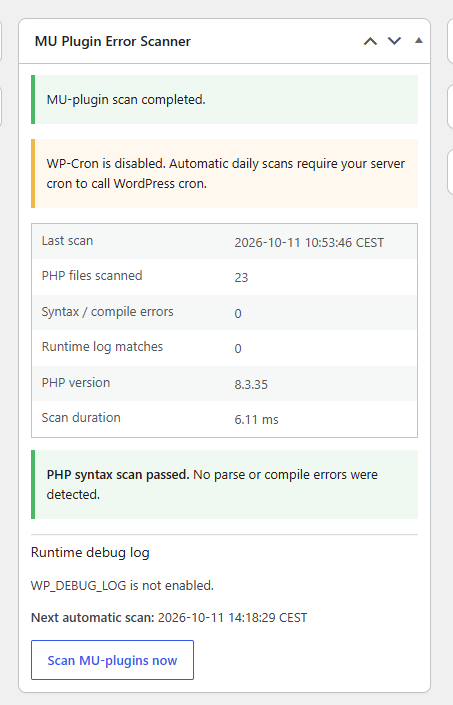
After installation, open the WordPress Dashboard and locate MU Plugin Error Scanner. If the automatic scan has not yet run, the widget will explain that no scheduled results are available. Click Scan MU-plugins now to begin the first inspection.
The scanner will discover PHP files beneath the MU-plugin directory, read their contents, and check them using PHP’s parser-aware tokenizer. It will also inspect the configured debug log when logging is enabled. Once the operation finishes, the results are saved and the Dashboard reloads with the latest report.
For example, a successful report might show the following illustrative values:
MU Plugin Error Scanner

Last scan:              2026-10-10 13:35 CEST
PHP files scanned:      24
Syntax / compile errors: 0
Runtime log matches:     0
PHP version:             8.3.x
Scan duration:           15.42 ms

PHP syntax scan passed.
No parse or compile errors were detected.
These numbers are examples, not results from a live website. Your actual report depends on your PHP version, file count, filesystem performance, and available debug-log entries.
What to Do When the Scanner Finds an Error
Suppose the scanner identifies a problem in mu-plugins/seo/custom-meta.php near line 82. Open the file through your editor or hosting file manager, then inspect the reported line and surrounding statements. A missing closing bracket or quote earlier in the file can cause PHP to report an error several lines later.
Before changing production code, save a copy of the original file. Correct the syntax, verify it with php -l where available, and rerun the scanner. If the report becomes clear, test the feature controlled by that MU-plugin. A clean syntax scan alone does not prove that the feature works correctly.
How to Test the Scanner Without Breaking WordPress
A safe test should take place on a staging website rather than a production installation. Create a subdirectory called scanner-test inside mu-plugins and add a file named broken-example.php. Because WordPress does not automatically load nested PHP files, the scanner can inspect this file without WordPress directly executing it, provided no custom loader includes that directory.
For a deliberate test, use the following malformed PHP:
<?php
function scanner_example() {
    echo "Testing the scanner"
}
The missing semicolon makes this source invalid PHP. Run the scanner and check whether the test file appears in the error report. After confirming detection, delete the test file and run another scan.
This demonstrates the parser’s behavior without intentionally damaging a production MU-plugin. Do not place malformed test code directly in the top-level MU-plugin directory on a live website.
How to Enable WordPress Debug Logging
PHP syntax validation works independently of WordPress debug logging. However, the scanner can provide more diagnostic information when a debug log is available.
For a controlled diagnostic environment, open wp-config.php and configure debugging before the line that tells WordPress to stop editing the configuration file.
define( 'WP_DEBUG', true );
define( 'WP_DEBUG_LOG', true );
define( 'WP_DEBUG_DISPLAY', false );

@ini_set( 'display_errors', 0 );
This configuration enables WordPress debugging and directs messages to a log rather than displaying them publicly. The standard log path is generally wp-content/debug.log.
On a production website, protect the log from public access and use logging only under an appropriate monitoring and retention policy. Logs can contain sensitive information, and enabling debugging indefinitely is not always desirable.
Understanding Runtime Log Results
The scanner examines only the latest portion of the configured log, with a maximum read size of approximately 1 MB. It searches for entries referencing the MU-plugin directory and retains up to 30 matching entries.
A warning might look like this:
PHP Warning: Undefined array key "enabled"
in /wp-content/mu-plugins/security.php
on line 42
This message suggests that code tried to access an array key that was not available. The correct fix depends on the surrounding logic. For example, code may need to check whether the key exists before using it.
A fatal error is more serious because it may stop the current request. The scanner attempts to preserve information about certain fatal errors through its shutdown handler, but it cannot capture failures that prevent the scanner from initializing.
Configuring Automatic Daily Scanning
The scanner uses WordPress’s built-in scheduling system. When WordPress initializes, the scanner checks whether its daily event already exists. If not, it schedules the first run approximately five minutes later and registers a daily recurrence.
This avoids creating a new scheduled event on every request. The event itself triggers the scan, while the Dashboard normally displays previously stored results.
However, WordPress Cron is traffic-driven by default. An event becomes eligible at its scheduled time, but it may not execute until WordPress receives a subsequent request. On a low-traffic website, that can introduce delays.
What If WP-Cron Is Disabled?
Some managed hosting environments and VPS configurations use:
define( 'DISABLE_WP_CRON', true );This can be a legitimate performance choice when a real server cron job replaces the default request-triggered behavior. The scanner detects this setting and warns administrators that automatic scans require server cron to invoke WordPress cron.
For example, a server administrator might configure a recurring WP-CLI command:
*/5 * * * * /usr/local/bin/wp cron event run --due-now --path=/path/to/wordpress --quietThis is an illustrative command. The actual executable path, PHP environment, operating-system user, and WordPress installation path must match your server. Avoid configuring a duplicate cron runner when your hosting system already provides one.
Security Features Built into the Scanner
The manual scan button is restricted to users who have the manage_options capability. It also uses WordPress nonce verification to protect the administrative action against unintended requests. Both checks matter because a nonce is not a substitute for authorization.
The scanner escapes diagnostic information before displaying it in the Dashboard. This helps prevent filenames and log messages from being interpreted as HTML when rendered.
It also uses a temporary scan lock. If a scan is already running, another request normally receives a busy response instead of launching a duplicate scan. The lock expires after five minutes, and the scanner attempts to remove it when processing finishes.
These protections make the implementation more suitable for administration use, although the code should still be tested against the specific hosting environment before production deployment.
Important Limitations of the MU-Plugin Error Scanner
This tool is a diagnostic assistant, not a complete security audit. It does not inspect vulnerability databases, detect malware signatures, identify every unsafe SQL query, or guarantee compatibility with every WordPress plugin and PHP extension.
It also does not execute every possible runtime code path. A PHP file can pass syntax validation and still fail when a particular WordPress hook runs, a database query returns unexpected data, or a third-party service becomes unavailable.
Another limitation concerns critical startup failures. If WordPress cannot load, its Dashboard cannot display the scanner’s report. A separate server-level PHP lint process is more reliable for monitoring source files when WordPress itself is unavailable.
Finally, the original scanner uses a lightweight transient-based lock and keeps only the latest stored scan report. It is not a historical monitoring database or a fully atomic job queue.
Three Useful Improvements for a Future Version
Email Notifications for New Errors
A future version could compare the latest results against the previous scan and send an email only when a new error appears. For example, a newly introduced syntax error in a custom security module could trigger an administrator notification.
To avoid excessive alerts, the scanner should identify errors using a stable fingerprint based on filename, line number, message, and error type. Repeated reports of the same unchanged error should not produce an email every day.
Historical Scan Reports
The current implementation stores the latest scan results. A history feature could preserve selected reports and display trends over time. Administrators could then see when an error first appeared, whether it returned after an update, and how the number of scanned files changed.
Historical data would require a retention policy. Otherwise, repeated reports and long debug messages could gradually increase database storage.
Independent Server-Level Scanning
A separate command-line scanner could use PHP’s lint mode to check files even when WordPress cannot start. This would complement the Dashboard scanner rather than replace it.
For example:
php -l /path/to/wordpress/wp-content/mu-plugins/example.phpThe command checks PHP syntax without executing the file. An independent cron script could repeat this process for the MU-plugin directory and send an alert when it detects a problem.
Frequently Asked Questions
Is the WordPress MU-Plugin Error Scanner free?
Yes. The supplied version 1.0.0 is available as a free PHP file and ZIP download in this tutorial. It does not require a license key, subscription, or paid API service.
Do I need to activate the scanner?
No. WordPress automatically loads top-level PHP files placed inside the wp-content/mu-plugins/ directory. Once the scanner file is correctly installed, it initializes automatically.
Can the scanner damage my website?
The source-checking routine reads PHP files rather than executing them, which reduces risk. Nevertheless, every custom MU-plugin introduces code into the WordPress startup process. Test it on staging and maintain recovery access.
Does it support PHP 8.3?
The supplied implementation uses PHP features compatible with PHP 7.4 and later, and its source passed a PHP syntax check in the preparation environment. Runtime compatibility should still be verified on your own PHP and WordPress installation.
Can it scan PHP files inside subdirectories?
Yes. The scanner recursively discovers PHP files beneath the MU-plugin directory. It intentionally skips symbolic-link directories to avoid following unexpected directory paths.
Will it detect every fatal PHP error?
No. It attempts to capture certain fatal errors when its shutdown handler has already been registered. Errors occurring before initialization, outside the monitored directory, or under conditions that prevent normal error persistence may not be recorded.
Does it work without debug.log?
Yes. PHP syntax scanning works without WordPress debug logging. The runtime-log section will report that logging is disabled or unavailable.
How often does the automatic scan run?
The scanner registers a daily WordPress Cron event. Actual execution depends on how WP-Cron is triggered by the website or hosting server.
Can subscribers run manual scans?
Not through the supplied Dashboard interface. The manual scan requires the manage_options capability and a valid WordPress nonce.
Can this replace a security scanner?
No. It checks PHP parsing and surfaces selected error information. It does not perform malware analysis, CVE matching, complete static analysis, or comprehensive WordPress security testing.
Also read: Critical Hummingbird Vulnerability
Keeping Your MU-Plugins Reliable Over Time
A reliable WordPress installation depends on more than simply keeping plugins updated. Custom code also needs regular attention, especially when that code runs automatically on every request.
The MU-Plugin Error Scanner provides a practical way to identify syntax problems, inspect relevant PHP logs, and review certain fatal errors from one convenient Dashboard widget. Its daily scheduling reduces manual effort, while the immediate scan button helps developers check changes after editing custom files.
The strongest maintenance workflow combines this scanner with tested backups, staging, PHP linting, runtime testing, version control, and server-level monitoring. A clean report is encouraging, but it should always be interpreted as one part of a broader website health assessment.
⚠️ Disclaimer and Source Hygiene
This tutorial is provided for educational and website administration purposes. Custom PHP code should be tested in a staging environment before installation on a production website. Always create a backup and confirm that you have independent server access.
The scanner source is based on the PHP implementation supplied for this tutorial. The technical explanations are supported by official PHP and WordPress documentation. The source was syntax-checked, but a successful syntax check is not equivalent to comprehensive runtime, compatibility, or security testing.
For critical production systems, consult an experienced WordPress developer or server administrator before introducing new MU-plugin functionality.
Sources
Sources and References
The following official documentation provides additional technical context for the implementation.
- WordPress Must-Use Plugins – How MU-plugins load and differ from regular plugins.
- PHP token_get_all() – PHP tokenization and
TOKEN_PARSE. - WordPress wp_schedule_event() – Scheduling recurring events.
- WordPress Dashboard Widgets – Registering Dashboard widgets.
- WordPress Nonces – Protecting administrative requests.
- WordPress Debugging – Configuring debugging and logs.
- PHP error_get_last() – Reading the last PHP error.
Secondary Sources and Testimonials
The primary technical reference for this tutorial is the original MU Plugin Error Scanner v1.0.0 source provided with the article. The descriptions of its behavior are based on that implementation, not on invented performance benchmarks or customer testimonials.
No independent customer testimonials or production reliability statistics have been established for this version. Readers should validate the tool in their own WordPress environment before relying on it for ongoing monitoring.
Sign in with a Subscriber account to vote.