
Table of Contents
A critical Ultimate Multisite vulnerability allows attackers to bypass WordPress authentication through certain checkout configurations, potentially exposing Network Super Administrator accounts. Learn how CVE-2026-103646 works, why an earlier security update failed to eliminate the risk, and how to update your plugin, investigate suspicious sessions, and protect your network.
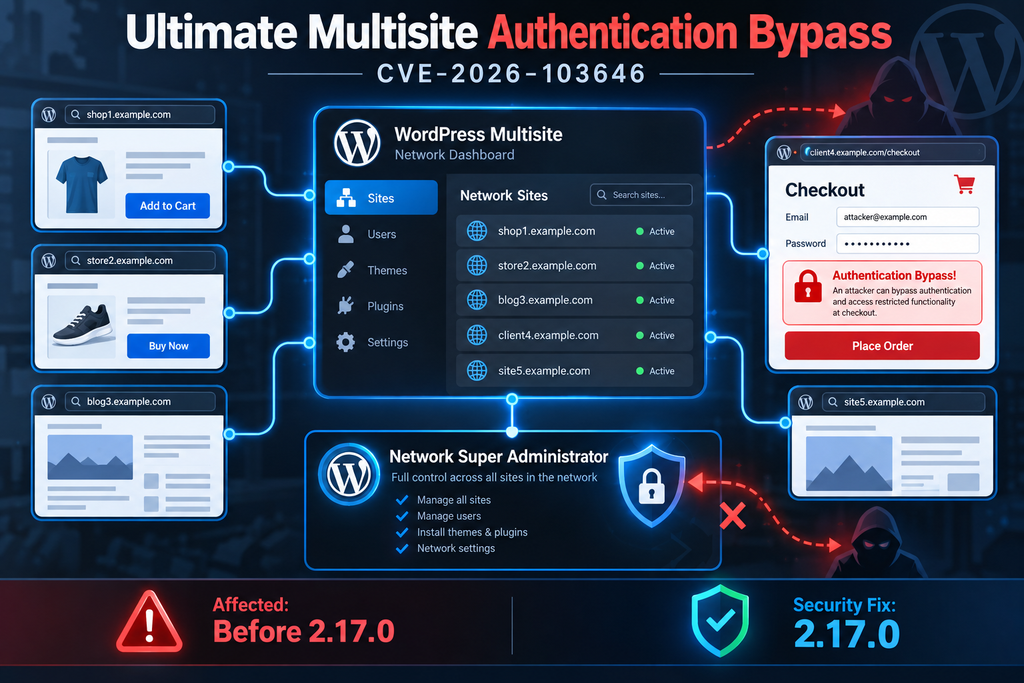
The Ultimate Multisite vulnerability, tracked as CVE-2026-103646, raises a serious security concern for WordPress administrators who manage multiple websites through a single network. Unlike a typical plugin vulnerability affecting one website, this authentication bypass can potentially expose accounts with administrative control over an entire WordPress Multisite installation. The issue involves checkout account matching, inconsistent email normalization, and an authentication process that may trust information submitted by an unauthenticated visitor. The vulnerability was publicly disclosed on October 8, 2026, and affects Ultimate Multisite versions earlier than 2.17.0.
For organizations using WordPress Multisite to host client websites, membership platforms, or subscription-based services, the implications deserve immediate attention. A Network Super Administrator has significantly broader privileges than an administrator on an individual website. If an attacker gains access to such an account, they may be able to modify network settings, manage plugins, access multiple websites, and interfere with customer operations. Fortunately, exploitation requires specific conditions, and an updated plugin version is available. This guide explains those conditions, provides practical verification steps, and outlines how to investigate possible unauthorized access without exposing your network to unnecessary risks.
SECURITY ADVISORY AT A GLANCE
| Vulnerability | Authentication bypass |
| CVE identifier | CVE-2026-103646 |
| Severity | Critical – CVSS 9.8 |
| Affected versions | Earlier than 2.17.0 |
| Fixed version | 2.17.0 or later |
| Authentication required | No |
| Potential impact | Account takeover, including Network Super Admins |
| Previous related fix | 2.15.1 – insufficient |
Based on the published CVE record and WPScan advisory. A critical rating describes potential severity, not proof that a particular website has been compromised.
What Is CVE-2026-103646
Understanding the Ultimate Multisite Authentication Bypass
CVE-2026-103646 is an improper authentication vulnerability in the Ultimate Multisite WordPress plugin. Ultimate Multisite helps website owners build and manage website-as-a-service platforms using WordPress Multisite. A platform operator can offer websites to customers, manage subscriptions, and handle account registration through a centralized system. These capabilities make the checkout process especially important because it connects public registration forms with actual WordPress user accounts. When that connection is not securely verified, an ordinary checkout action can become a route into an existing account.
The published advisory identifies a problem involving the email_address parameter. Under certain conditions, the plugin can associate a logged-out checkout session with an existing WordPress account based on the submitted email address. More importantly, it may authenticate that visitor as the existing account holder without requiring appropriate proof of identity. The flaw is classified as CWE-287, Improper Authentication. This means the application does not adequately establish that a person is authorized to use the identity being assigned to their session.
Why Network Super Administrators Are Particularly Important
WordPress Multisite has a permission model that differs from a standard WordPress installation. A regular site administrator typically manages content, settings, and users within a particular website. A Network Super Administrator has authority across the network, including capabilities associated with network-wide configuration and plugin management. This distinction matters because a compromised network-level account can affect more than one website. An attacker who successfully impersonates a Super Administrator may gain access to administrative functions that ordinary customers should never reach.
Imagine a company operating 40 customer websites under one WordPress Multisite installation. Each customer manages their own content, while a small technical team maintains the network. If an attacker impersonates a regular customer, the damage may initially remain limited to that customer’s permissions. However, impersonating a Network Super Administrator can potentially expose the entire platform. The attacker could attempt to modify network settings, create additional privileged users, or introduce malicious code through permitted administrative features. These are potential consequences of privileged access, not evidence that every exploitation attempt automatically performs them.
Does This Vulnerability Affect Every WordPress Website?
No. This vulnerability specifically concerns installations using affected versions of Ultimate Multisite. It is not a general authentication vulnerability in WordPress core, and it does not mean every WordPress Multisite installation is exposed. The published attack conditions also depend on the checkout configuration and whether the targeted account already has an Ultimate Multisite customer record. Websites without the plugin are not affected by this particular issue. Websites running the vulnerable plugin still need to evaluate their configuration, because the existence of the plugin alone does not establish that the reported attack path is exploitable.
How Checkout Email Matching Bypasses Authentication
How Legitimate Customer Registration Should Work
A website-as-a-service platform needs a convenient registration process. A visitor chooses a subscription plan, enters an email address, provides any required information, and completes checkout. The system then creates or links a customer profile to a WordPress account. Some platforms allow customers to choose their own passwords, while others generate passwords automatically or use email-based account activation. Both approaches can be implemented securely, provided the application verifies identity before authenticating a visitor as an existing account holder. The important distinction is that an email address identifies an account, but does not prove that the visitor controls it.
Consider a customer registering with customer@example.com. If that email belongs to a new customer, the platform may create a WordPress user and initiate a secure onboarding process. If the email already belongs to an existing WordPress user, the platform should require that user to authenticate before linking the checkout to the account. A password, an appropriately protected login session, or another secure verification mechanism can establish ownership. Simply matching the submitted email address to an existing user record is not enough, because email addresses are frequently public or discoverable.
Where the Vulnerable Checkout Logic Goes Wrong
The reported Ultimate Multisite vulnerability involves two related weaknesses. First, the checkout process can link a logged-out visitor to an existing WordPress account without adequate authentication. Second, the duplicate-account validation and the customer lookup do not normalize submitted email addresses consistently. These operations should agree on how an email address is represented and compared. When they use different rules, an input that passes one check may behave differently during another lookup. This inconsistency can undermine protections intended to prevent checkout from being associated with the wrong account.
For a safe conceptual example, imagine an application comparing a customer identifier in two different formats. One validation routine checks the identifier using one set of formatting rules, while another database lookup uses a different representation. The first routine may fail to recognize an existing account, even though the later lookup identifies it. If the application then creates an authenticated session for that existing user without confirming ownership, the visitor may receive permissions they never earned. This example illustrates the security principle; it is not a reproduction of the specific exploit or its undisclosed normalization technique.
Why Knowing an Email Address Must Never Be Enough
An email address is not a secret authentication credential. Company websites often publish staff addresses, business directories may list contact information, and email addresses can appear in public documents or previous data breaches. Therefore, a login system must not assume that someone who knows an address is its legitimate owner. In the reported scenario, an attacker does not need to know the target account’s password if the vulnerable checkout flow assigns an authenticated session based on the email association. This is why the problem is described as an authentication bypass rather than a password-cracking vulnerability.
The difference also affects incident response. Changing an account password is useful after suspected compromise, but it does not repair a checkout flow that improperly creates authenticated sessions. Similarly, enabling two-factor authentication is valuable, but it cannot be assumed to block every route that bypasses the normal login process. The primary remedy is to correct the vulnerable plugin behavior. Administrators should also investigate whether unauthorized sessions were created while the vulnerable version was active.
A Simplified View of the Security Failure
Vulnerable authentication flow – conceptual illustration
Logged-out visitorSubmits a checkout email address
Email validation and customer lookupInconsistent normalization creates a mismatch
Missing identity verificationExisting account may be linked without proper authentication
Potential unauthorized WordPress sessionAccount permissions may include Network Super Admin privileges
This diagram explains the reported weakness at a defensive level. It is not an exploit procedure.
Which Checkout Configurations Are Vulnerable
The Three Conditions That Matter
The published CVE description identifies specific prerequisites for exploitation. The installation must use an affected Ultimate Multisite version, the checkout form must be configured without a password field so that passwords are generated automatically, and the targeted existing WordPress account must not already have an Ultimate Multisite customer record. These conditions are important because they prevent administrators from treating every installation as equally exposed. However, they should not be interpreted as a reason to postpone the update. Even if the currently visible configuration appears safe, settings can change and administrators may overlook alternate checkout flows.
For example, a platform may allow customers to register through a simplified checkout page that requests only an email address and billing information. That setup could meet the relevant checkout condition if it relies on automatic password generation. Another platform might display a password field and require customers to create credentials during registration. The reported attack condition does not describe that second configuration in the same way. Nevertheless, administrators should verify the actual behavior rather than relying on assumptions about a page’s appearance. Custom templates, third-party integrations, and previously configured checkout forms can complicate the review.
How to Inspect Checkout Settings Safely
Start by logging into WordPress with a trusted Network Super Administrator account. Open the network administration area and locate the Ultimate Multisite settings. Find the registration, checkout, or account-creation options available in your installed version. Look for settings related to password fields, automatic password generation, customer creation, and account linking. Exact menu labels can differ between releases, so use the documentation corresponding to your installed version. Record the current configuration before making changes, especially on a production platform with active subscriptions.
Next, inspect the public checkout pages from a logged-out browser session without submitting another person’s email address. Check whether the registration form displays a password field and whether it explains how customers receive their credentials. If you operate multiple plans or checkout templates, review each relevant variation. Also check whether custom development has changed the standard registration process. This visual review can help identify configurations that require closer attention, but it cannot establish whether the underlying authentication code is secure. Updating to the fixed release remains essential.
How to Check Whether an Account Has a Customer Record
The existence of a WordPress user does not necessarily mean the same person has an Ultimate Multisite customer record. WordPress user accounts and plugin-specific customer records can represent different objects. For this vulnerability, that distinction is central: the published conditions specify a target WordPress account without an existing customer record in the plugin. Administrators should therefore review both the network user list and the customer management interface, rather than assuming that every user has a corresponding customer profile.
Use the plugin’s customer interface or documented administrative tools to examine account associations. Focus on privileged users and unexpected records created around suspicious checkout activity. Do not create artificial customer records for administrators as an improvised security fix. Such changes may interfere with billing, subscriptions, or internal account relationships. If records appear inconsistent, preserve the relevant evidence and consult the plugin developer or a qualified WordPress security professional before making database modifications. The reliable fix is the corrected plugin release, not manually manipulating account associations.
Why the Previous Security Fix Is Insufficient
The Relationship Between CVE-2026-75957 and CVE-2026-103646
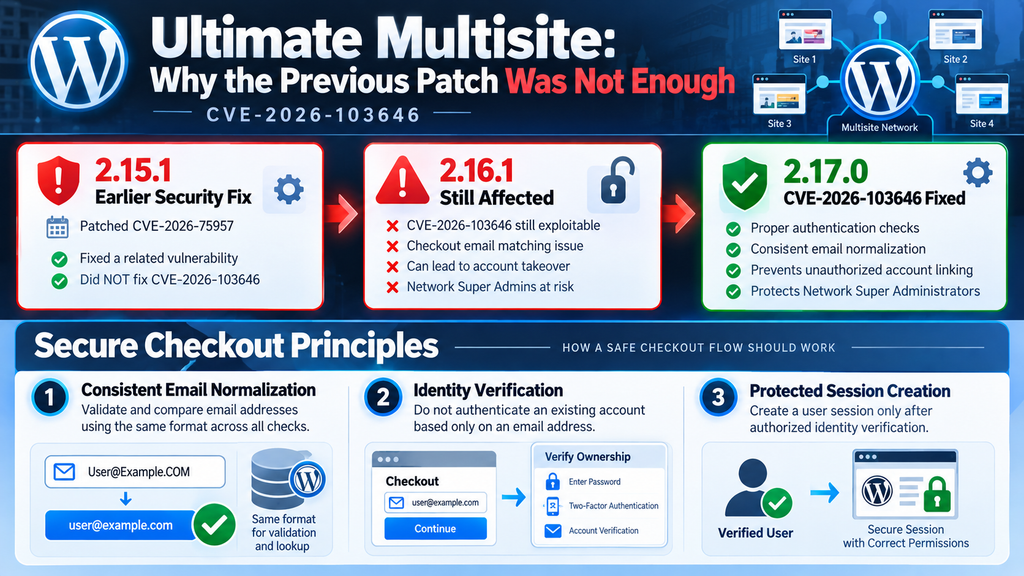
One of the most important details in this advisory is the relationship between the newly reported issue and an earlier security fix. Ultimate Multisite version 2.15.1 addressed a related vulnerability identified as CVE-2026-75957. However, the official description of CVE-2026-103646 explicitly states that the earlier fix did not eliminate this authentication bypass. The issue remained exploitable under the documented conditions through version 2.16.1. Consequently, administrators who updated to 2.15.1 or another release below 2.17.0 should not assume their checkout authentication flow is protected against this newly documented vulnerability.
This situation illustrates a broader challenge in application security. A patch may address one identified weakness while leaving another related path unresolved. Authentication systems frequently involve several components, including input validation, user lookup, customer creation, session management, and account linking. Correcting a problem in one component does not automatically guarantee that every related component enforces the same security rules. Developers must evaluate the entire trust boundary, particularly when a public registration form can interact with existing privileged accounts.
Why Updating Only to Version 2.15.1 Is Not Enough
Suppose an administrator previously received an alert about CVE-2026-75957 and updated Ultimate Multisite to version 2.15.1. After confirming that the update completed successfully, they may have considered the issue resolved. That conclusion may have been reasonable for the earlier advisory, but it does not cover the newly identified bypass. The later CVE documents an additional path involving checkout email handling and existing account authentication. Because versions through 2.16.1 remain within the affected range, a previously updated website may still need immediate attention.
Administrators should evaluate security updates against specific CVE identifiers and affected version ranges, not merely against a general label such as “security patched.” An update history showing that a plugin was patched last month does not prove protection from a vulnerability disclosed this week. The most useful evidence is the installed version, the official affected-version range, and confirmation that the installed release includes the relevant fix. For CVE-2026-103646, that means verifying Ultimate Multisite 2.17.0 or later.
What a Complete Authentication Fix Must Achieve
A secure solution must ensure that checkout cannot authenticate a visitor as an existing account holder without sufficient proof of identity. It should also use consistent, well-defined email normalization across validation and lookup operations. These requirements address different parts of the problem. Consistent normalization helps prevent mismatched account comparisons, while proper authentication prevents a public checkout form from granting access based only on a submitted identifier. Both principles matter because validation consistency alone does not establish identity.
From a defensive engineering perspective, the application should separate customer registration from authentication of existing users. If checkout encounters an existing WordPress account, it should follow a verified login or account-linking process. Session creation should occur only after authorization has been established. These are security design principles rather than a claim about the exact internal changes made in version 2.17.0. Administrators can confirm the published fixed version through the vulnerability record, but detailed implementation claims should be supported by a reviewed vendor patch or changelog.
Updating Ultimate Multisite

Step 1: Identify Your Installed Plugin Version
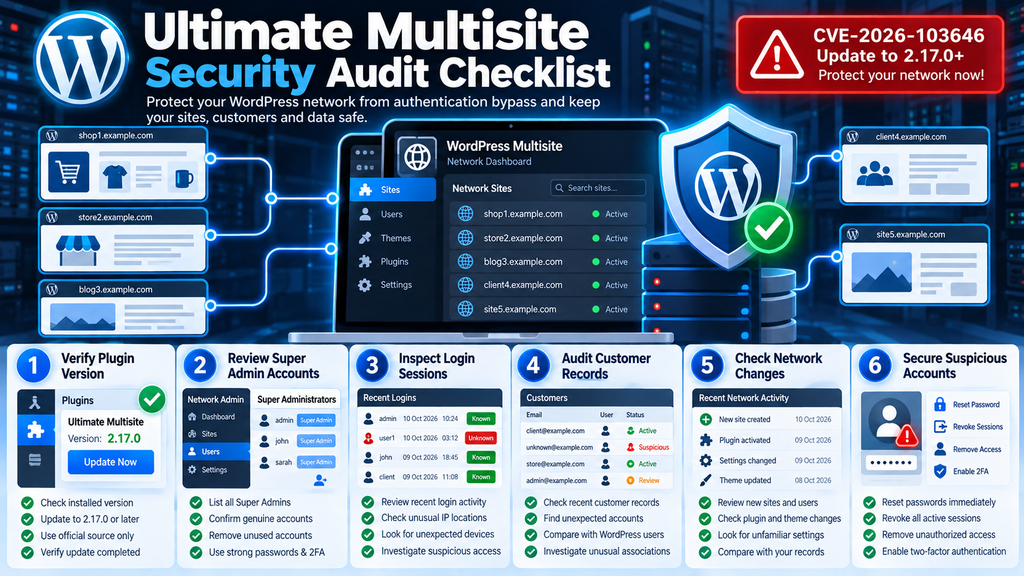
Before changing anything, confirm which version of Ultimate Multisite is installed. Log into your WordPress network administration dashboard using an authorized administrator account. Navigate to Network Admin → Plugins and locate Ultimate Multisite in the plugin list. Check the version displayed beside the plugin name. If the version is earlier than 2.17.0, it falls within the affected range identified by CVE-2026-103646. Do not rely only on whether WordPress displays an available update. An outdated update cache, a custom deployment system, or a restricted hosting environment can sometimes prevent the dashboard from showing the latest available release.
For administrators with SSH access, WP-CLI provides another way to verify the installed version. Open a terminal, connect to your hosting server, and navigate to the WordPress installation directory. Run the following command to display installed plugins, their versions, and available updates. This command only reads plugin information and does not modify your website. The official WP-CLI documentation confirms that plugin listing supports version and update fields, making it useful for routine security audits.
wp plugin list \
  --fields=name,status,version,update,update_version \
  --format=table
Look for the entry named ultimate-multisite. If it reports version 2.16.1, for example, the installation needs an update. If it reports 2.17.0 or later, the documented authentication bypass has been addressed according to the published advisory. However, version verification does not establish whether a compromise occurred before the update. That requires a separate investigation. Also remember that the plugin’s activation status matters. An inactive plugin generally does not execute its ordinary functionality, although unused vulnerable software should still be removed or maintained appropriately.
Step 2: Create a Complete Multisite Backup
Before updating, create a backup that includes the WordPress database, plugin files, themes, uploads, and relevant configuration files. WordPress Multisite stores information for multiple websites in a shared installation, so a complete backup must account for the entire network rather than only the main website. Depending on your hosting environment, you can use a managed backup service, a cPanel backup, a trusted backup plugin with Multisite support, or a server-level backup procedure. Store the backup outside the public web directory and protect it against unauthorized access.
A backup is especially important for platforms handling subscriptions and customer registrations. An update may change internal authentication behavior, and administrators need a reliable recovery point if an unrelated compatibility problem appears. For example, a checkout customization developed for an older release might need adjustment after the security update. Test the backup’s recoverability whenever possible. A backup file that has never been validated should not be treated as a guaranteed recovery solution. If suspicious activity is already suspected, preserve forensic copies before modifying the environment.
Step 3: Update to the Latest Supported Release
The minimum version identified as fixing CVE-2026-103646 is 2.17.0. However, the official WordPress.org changelog also lists version 2.17.2, released October 6, 2026, which includes an additional security correction involving unauthorized local file access through checkout template rendering. Therefore, administrators updating on October 11, 2026, should prefer 2.17.2 or a newer supported release, rather than deliberately stopping at 2.17.0. This provides the relevant authentication fix and subsequent published corrections.
To update through the WordPress dashboard, open Network Admin, select Plugins, and locate Ultimate Multisite. If an update is available, review the release information and start the update. Wait until WordPress confirms completion before opening other administrative pages. If your installation uses a deployment pipeline, hosting control panel, or managed WordPress service, follow the update method appropriate for that environment. Avoid uploading plugin packages from unofficial download websites, because modified distributions may contain unwanted code or outdated components.
Administrators using WP-CLI can update the plugin with:
wp plugin update ultimate-multisiteAfter the update completes, verify the installed version:
wp plugin get ultimate-multisite \
  --field=version
The first command requests the latest available plugin update from the configured update source. The second reads the installed version. Do not assume that the first command necessarily installed the required release if it returned an error or if the update source was unavailable. Check the actual result and compare it with the official release information. For environments that use Composer or another deployment system, update the dependency through that system rather than allowing separate mechanisms to overwrite each other’s changes.
Step 4: Verify Checkout and Customer Authentication
After updating, test the most important user journeys on a staging environment or through controlled production checks. Start with a new test customer account that you own. Open the public registration page in a private browser window, choose a test subscription plan, and follow the expected checkout process. Confirm that account creation behaves normally, customer records are associated correctly, and the user receives only the permissions intended for that customer. Use a test payment method or sandbox integration when payment processing is involved, so the test does not create unintended financial transactions.
Next, test the existing-customer experience using another account you control. Sign out completely and return to the checkout or registration page. Confirm that the application does not grant access to an existing account simply because its email address was entered. If the platform requires an existing customer to authenticate before continuing, verify that the authentication process works as intended. Do not test this using a real customer’s identity without authorization. Also check subscription renewals, password recovery, account linking, and cross-domain checkout behavior where those features are enabled.
Step 5: Check the Network After Updating
Once the plugin update and functional tests are complete, review the network’s administrative state. Confirm that legitimate Super Administrators can still access Network Admin and that ordinary customers cannot access network-level management functions. Check whether new users, customer profiles, memberships, or websites appeared unexpectedly. If your platform automatically creates websites after successful checkout, verify that legitimate site provisioning continues to work. Review the WordPress debug log and server error log for new failures introduced by the update, while remembering that an empty debug log is not evidence that the network is secure.
For high-traffic platforms, consider monitoring checkout errors and authentication anomalies during the first 24 to 48 hours after deployment. Watch for unusual account-linking behavior, failed registrations, and unexpected changes in customer support requests. If you discover a problem, preserve the relevant logs and determine whether it represents a compatibility issue or possible security incident. Do not automatically restore an older vulnerable plugin version as a troubleshooting shortcut. If a rollback becomes unavoidable, isolate the affected checkout functionality until a safe solution is available.
Auditing Network Super Admin Sessions and Customers
Step 1: Review Every Network Super Administrator
The first task after updating is to establish which accounts currently have network-wide privileges. In WordPress Multisite, open Network Admin → Users and review the accounts with Super Administrator access. Compare them against your organization’s approved administrator list. Every privileged account should have a clear business purpose and an identifiable owner. Old employee accounts, unused contractor accounts, and unexpected administrative users deserve particular attention. A privileged account that nobody recognizes is a serious warning sign, although it does not automatically prove exploitation of this vulnerability.
WP-CLI includes a dedicated command for listing Super Administrators. Run it from the WordPress installation directory:
wp super-admin listThis command returns the usernames currently holding Super Administrator capabilities. For example, the output might contain two known administrator accounts. Compare the result with your documented access list and investigate any discrepancy. If an unauthorized account is discovered, preserve relevant evidence before changing its privileges. The official WP-CLI documentation also supports adding and removing Super Administrator permissions, but such actions should only follow proper verification and incident-response procedures.
Step 2: Inspect Privileged Sessions and Login Activity
A successful authentication bypass may create a session that appears to belong to a legitimate user. This makes session auditing more challenging than simply looking for failed password attempts. Review available authentication logs, security plugin records, reverse-proxy logs, and web server access logs. Look for privileged sessions originating from unfamiliar IP addresses, unusual geographical locations, unexpected devices, or times when the account owner was not working. Correlate these events with checkout requests and account creation activity wherever your logging system provides sufficient detail.
WordPress core does not provide a comprehensive historical login audit in every installation. If you did not previously enable detailed logging, some evidence may be unavailable. Security plugins and hosting providers may offer additional session histories, but their capabilities differ. Avoid presenting missing logs as proof that no suspicious activity occurred. Instead, document which sources were checked, their retention periods, and any visibility limitations. If a security plugin records session creation events, compare those records with known administrator activity during the period when the vulnerable version was installed.
Step 3: Search Server Logs for Suspicious Checkout Activity
Server access logs can help identify unusual requests to registration and checkout pages. Administrators should look for repeated requests, unexpected response patterns, and suspicious activity around the timestamps of privileged account sessions. The following example searches an existing Apache access log for requests containing the word checkout. It does not execute requests against the website and does not alter any server data.
grep -i 'checkout' /var/log/httpd/access_logThe actual log location depends on the hosting environment. Apache installations managed through cPanel may store domain-specific logs elsewhere, while Nginx servers and managed hosting platforms use different paths. Replace the example path with the correct log location for your server. Remember that a request containing the word checkout is not inherently malicious. Legitimate customers may generate many such requests, particularly during subscription renewals or failed payment attempts.
To narrow the investigation, compare timestamps, source IP addresses, request paths, and available application events. If your logging system captures request parameters, handle them carefully because they may contain customer information. Avoid collecting payment details, passwords, session cookies, or other sensitive values in diagnostic exports. The published CVE description identifies the email_address parameter, but it does not establish a universal endpoint or log signature that can reliably detect exploitation. Therefore, searches based on a single parameter or URL should be treated as supporting evidence, not a complete detection method.
Step 4: Review Customer Records and Account Associations
Open the Ultimate Multisite customer management interface and examine recent customer records. Pay particular attention to records created during the period when an affected plugin version was active. Compare their creation times with WordPress user registration dates, checkout activity, and administrative session records. Unexpected links between customer profiles and existing privileged accounts deserve investigation. A customer record associated with a Network Super Administrator may be legitimate in some environments, but it should have a clear explanation and supporting history.
For example, suppose an administrator account existed long before the platform introduced customer subscriptions. If a customer record suddenly appears for that account during an unusual checkout event, the association should be reviewed. Check whether the administrator intentionally created the record, whether an authorized internal process performed the action, or whether suspicious requests occurred around the same time. Do not delete the record immediately. Preserve relevant information first, because deleting suspicious objects can destroy evidence needed to understand what happened.
Step 5: Examine Unexpected Network Changes
If an attacker successfully accessed a Network Super Administrator account, the potential consequences extend beyond the original checkout. Review network-wide plugin installations, theme changes, new websites, modified users, and changes to important settings. Compare current files with trusted deployment records or clean backups. Investigate unfamiliar plugins, recently modified PHP files, unexpected scheduled tasks, and changes to security settings. These checks are especially important when logs indicate privileged activity from an unknown source.
For platforms with many websites, prioritize changes that affect the entire network. A new network-activated plugin, an unexpected Super Administrator, or an unfamiliar configuration change may present a broader risk than an ordinary content edit on a single customer website. However, not every recent change is malicious. WordPress updates, legitimate maintenance, and customer provisioning can generate activity that looks unusual without context. Correlate evidence before taking disruptive action, and preserve a record of your findings.
Step 6: Revoke Suspicious Sessions and Secure Accounts
If you have credible evidence of unauthorized access, contain the incident before returning the platform to normal operation. Restrict affected checkout functionality if the vulnerable version is still present, update the plugin, and revoke suspicious sessions through supported WordPress or security-plugin controls. Change credentials for affected accounts, review two-factor authentication settings, and investigate whether unauthorized users or persistent access mechanisms were added. Depending on the incident, rotating WordPress authentication salts can invalidate existing authentication cookies network-wide, but this will also sign out legitimate users and should be coordinated carefully.
A password change alone is not sufficient when the original weakness bypasses password verification. The application must be patched, and any attacker-created sessions or persistence mechanisms must be addressed. If server-level access may have been obtained, expand the investigation to hosting credentials, deployment keys, database access, and relevant infrastructure. For customer-facing platforms, involve the appropriate security, legal, and privacy teams when evidence suggests customer information was accessed. The scope of notification obligations depends on the applicable laws, the nature of the data, and the findings of the investigation.
Additional Security Measures for WordPress Multisite Networks
Separate Administrative Accounts From Customer Accounts
One practical way to reduce unnecessary risk is to keep highly privileged administrative identities separate from ordinary customer activities. Network Super Administrators should not routinely use their privileged accounts for subscription checkout, content publishing, or everyday browsing. Instead, administrators can maintain dedicated accounts for network management and separate lower-privilege accounts for ordinary tasks. This does not eliminate an authentication vulnerability, but it reduces opportunities for accidental privilege exposure and makes unusual account activity easier to identify.
Organizations should also limit the number of Network Super Administrators. Every additional privileged account increases the number of identities that require protection, monitoring, and periodic review. Use ordinary site administrator roles whenever network-wide authority is unnecessary. Document account ownership, remove obsolete privileges promptly, and require secure authentication for administrative access. These measures strengthen the network’s overall security posture even after the specific Ultimate Multisite vulnerability has been corrected.
Protect Administrative Access With Multiple Security Layers
Strong passwords, multifactor authentication, HTTPS, and trusted security monitoring remain important for WordPress Multisite. However, administrators should understand that these controls serve different purposes. Multifactor authentication protects supported login flows, while secure application code prevents unauthorized session creation through alternative routes. A web application firewall may help identify suspicious traffic, but it should not be treated as a guaranteed solution for an application-level authentication flaw. Security works best when each layer addresses a specific category of risk.
For larger networks, consider restricting access to particularly sensitive administrative interfaces through additional access controls where operationally practical. This might involve a trusted identity provider, a VPN, or conditional access policies. Test these controls carefully because customer-facing platforms often require public registration and checkout functionality. Blocking legitimate customers from accessing checkout is not an acceptable long-term substitute for fixing vulnerable authentication logic. The goal is to protect privileged operations without disrupting normal customer access.
Build a Reliable Plugin Security Update Process
Security maintenance should follow a repeatable process rather than depend on occasional dashboard checks. Maintain an inventory of installed plugins, record their versions, monitor relevant advisories, and establish a clear update procedure. Test significant releases on staging where possible, but prioritize critical security updates according to the risk they present. After deployment, verify the installed version and review the most important user workflows. This combination reduces both security exposure and the chance of introducing avoidable operational problems.
For Ultimate Multisite, the distinction between versions 2.15.1, 2.16.1, and 2.17.0 demonstrates why vulnerability tracking must be specific. A general statement that a plugin received a security update is not enough. Administrators need to know which vulnerability was addressed, which versions remain affected, and whether later releases introduce additional corrections. Maintaining this information in a simple change log can make future audits faster and more reliable.
Frequently Asked Questions
1. What is the Ultimate Multisite vulnerability CVE-2026-103646?
CVE-2026-103646 is an authentication bypass affecting Ultimate Multisite versions earlier than 2.17.0. Under specific checkout conditions, an unauthenticated visitor may be logged into an existing WordPress account through improper email-based account matching. The potential target includes Network Super Administrator accounts.
2. Which Ultimate Multisite versions are vulnerable?
The published advisory identifies versions before 2.17.0 as affected. This includes version 2.15.1 and versions through 2.16.1, despite the earlier security fix. Administrators should update to the latest supported release, preferably at least 2.17.2 as of October 11, 2026.
3. Can an attacker become a WordPress Network Super Administrator?
Potentially, yes. If the attacker can trigger the vulnerable checkout flow and the targeted Super Administrator account meets the documented conditions, the resulting session may inherit that account’s privileges. This does not mean every Super Administrator account is automatically exploitable.
4. Does the attacker need to know the administrator’s password?
No password knowledge is required for the reported bypass. The issue concerns improper authentication through checkout email matching. However, the attacker must satisfy the vulnerability’s specific prerequisites, including the relevant checkout configuration and customer-record condition.
5. Does two-factor authentication completely prevent this attack?
Not necessarily. Two-factor authentication protects authentication flows that enforce it correctly. An application flaw that creates a session outside the expected login process may undermine that protection. Administrators should maintain multifactor authentication while also applying the plugin security update.
6. Why did version 2.15.1 not solve the problem?
Version 2.15.1 addressed an earlier related vulnerability, CVE-2026-75957. The subsequently published CVE-2026-103646 describes an authentication bypass that remained possible through version 2.16.1. The later issue requires the fix introduced in version 2.17.0.
7. Is WordPress core affected by this vulnerability?
No. The advisory concerns the Ultimate Multisite plugin rather than WordPress core. A WordPress Multisite installation without the affected plugin is not vulnerable to this specific flaw merely because Multisite is enabled.
8. How can I check whether my network was compromised?
Review privileged user accounts, authentication logs, checkout activity, customer records, and unexpected network changes. Compare suspicious events with legitimate administrator activity. A forensic investigation may be necessary if reliable evidence of unauthorized access appears.
9. Should I deactivate Ultimate Multisite immediately?
Updating to a fixed supported version is the preferred response. If you cannot update promptly, temporarily restricting the affected checkout functionality may reduce exposure. Consider deactivation only after evaluating operational dependencies, because it may disrupt customer registrations, subscriptions, or website provisioning.
10. Is updating to version 2.17.0 enough?
Version 2.17.0 is identified as fixing CVE-2026-103646. However, later releases contain additional fixes. Version 2.17.2 also addresses a separate checkout-related security issue, so using the latest supported release is preferable to remaining on the minimum fixed version.
A Safer Future for Your WordPress Multisite Network
The Ultimate Multisite vulnerability demonstrates how a seemingly ordinary checkout process can create serious security consequences when account identity is not verified correctly. An email address should identify a user, not authenticate that user. When validation rules and account lookup behavior disagree, and the application trusts the resulting association, a public registration feature can become an unexpected route into an existing WordPress account. In a Multisite environment, that risk becomes particularly significant when Network Super Administrator privileges are involved.
The most important response is straightforward: identify affected installations, update Ultimate Multisite to a supported fixed version, and verify that checkout authentication behaves correctly. Administrators should also review privileged sessions, customer associations, and unexpected network changes from the period when vulnerable software was active. The earlier version 2.15.1 security fix does not resolve CVE-2026-103646, making precise version verification essential. By combining timely patching with careful auditing and stronger account management, WordPress network operators can reduce exposure and maintain greater confidence in the security of their customer platforms.
⚠️ Disclaimer and Source Hygiene
This article is provided for educational, defensive cybersecurity, and WordPress administration purposes. It is not a substitute for a professional security assessment, incident-response investigation, or legal advice. Vulnerability details are based on publicly available CVE records, WPScan-related disclosures, official WordPress plugin release information, and WordPress developer documentation available at the time of writing. Plugin releases, security recommendations, and vulnerability assessments may change. Always verify current information with authoritative sources before applying changes to a production environment. The examples in this article are intended for authorized administrative use only and do not establish that a particular website has been compromised.
Sources and References
The following resources support the vulnerability details, affected-version information, recommended update, and administrative commands discussed in this article.
1. CVE Program – CVE-2026-103646. Official vulnerability record published October 8, 2026, including the affected version range, exploitation prerequisites, and relationship to the earlier security fix. View official CVE record.
2. WPScan – Ultimate Multisite Authentication Bypass. Vulnerability research and disclosure credited to Erwan LR, coordinated by WPScan. View WPScan advisory.
3. WordPress.org – Ultimate Multisite Plugin. Official plugin page and changelog, including the security hardening in version 2.17.0 and subsequent corrections in version 2.17.2. View Ultimate Multisite plugin.
4. WordPress Developer Resources – WP-CLI Super Admin Commands. Official documentation for listing and managing network Super Administrator accounts. Read WP-CLI Super Admin documentation.
5. WordPress Developer Resources – WP-CLI Plugin Commands. Official guidance for inspecting plugin versions, activation status, and available updates. Read WP-CLI plugin documentation.
6. MITRE – CWE-287: Improper Authentication. Security weakness classification describing failures to verify claimed identities correctly. Read CWE-287 documentation.
Secondary Sources and Testimonials
Independent vulnerability databases provide additional context for the published advisory, including severity assessments, affected releases, and recommended remediation. These secondary references are useful for cross-checking information, but they should not replace the official CVE record or plugin release notes.
- Fused – CVE-2026-103646 security summary.
- OpenCVE – Vulnerability details and history.
- CVEFeed – Vulnerability scoring and tracking.
No independently verified administrator testimonials or confirmed real-world compromise case studies were established from the sources reviewed for this article. The scenarios presented are explanatory examples, not reports of specific customer incidents.
Sign in with a Subscriber account to vote.