
Table of Contents
Learn what Core Web Vitals are, why they matter for SEO and user experience, and how to improve them. This comprehensive guide explains each metric with practical examples, optimization techniques, common issues, and tools that help website owners achieve better performance and search visibility.
Understanding Core Web Vitals
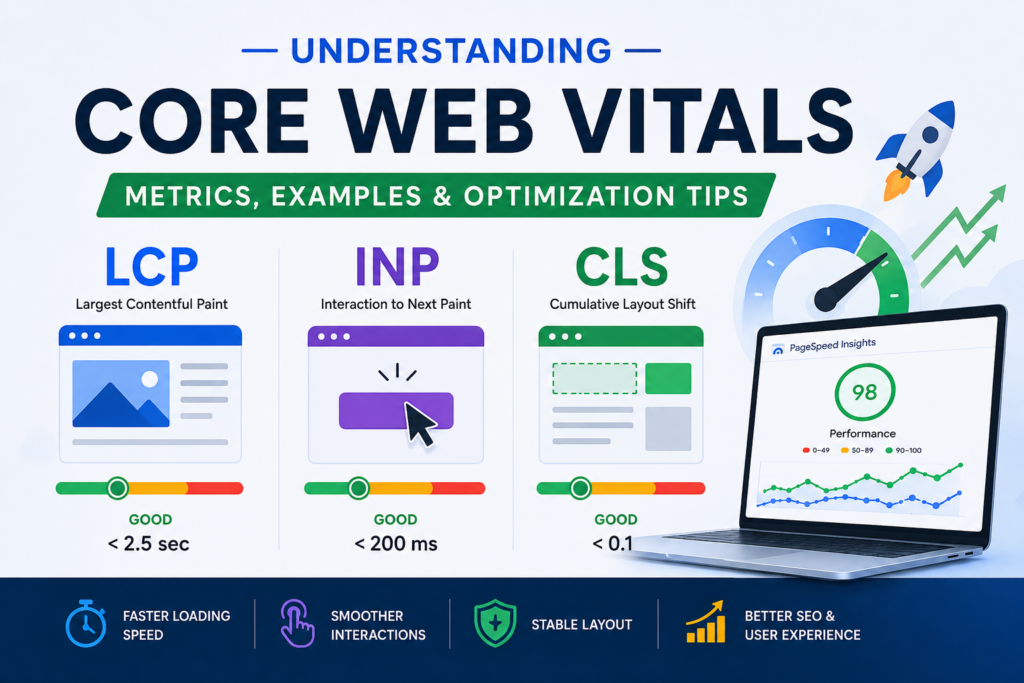
Core Web Vitals are a set of performance metrics introduced by Google to measure real-world user experience on websites. These metrics focus on how quickly a page loads, how responsive it is to user interactions, and how visually stable it remains during loading.
Google developed Core Web Vitals to help website owners understand whether visitors are enjoying a smooth and efficient browsing experience.
Today, website speed and usability are more important than ever. Users expect pages to load almost instantly. When a website feels slow or unstable, visitors often leave before engaging with the content.
Why Core Web Vitals Matter
Core Web Vitals are not just technical measurements. They directly impact user satisfaction and can influence search engine rankings.
A website with strong Core Web Vitals often experiences:
- Better user engagement
- Lower bounce rates
- Increased conversions
- Improved SEO performance
- Higher customer satisfaction
When visitors enjoy using a website, they are more likely to stay longer, read more content, and complete desired actions.
The Three Core Web Vitals Metrics
Google currently measures three primary Core Web Vitals:
Largest Contentful Paint (LCP)
Largest Contentful Paint measures loading performance. Specifically, it records how long it takes for the largest visible content element to appear on the screen.
The largest element could be:
- A featured image
- A hero banner
- A large heading
- A prominent video thumbnail
LCP Performance Thresholds
| Score | Result |
|---|---|
| Under 2.5 seconds | Good |
| 2.5 to 4 seconds | Needs Improvement |
| Over 4 seconds | Poor |
LCP Example
Imagine an online store homepage displaying a large promotional image.
If the image appears within 2 seconds, visitors can immediately see the main content.
However, if the image takes 5 seconds to load, users may assume the website is broken or slow and leave before the page finishes loading.
How to Improve LCP
Several optimizations can improve Largest Contentful Paint:
- Upgrade to faster hosting
- Enable page caching
- Compress large images
- Use modern image formats such as WebP
- Implement a Content Delivery Network (CDN)
- Minimize render-blocking resources
- Optimize server response times
Interaction to Next Paint (INP)
Interaction to Next Paint measures responsiveness.
This metric evaluates how quickly a webpage reacts when users interact with it.
Examples of interactions include:
- Clicking buttons
- Opening menus
- Typing in forms
- Adding products to a shopping cart
Google replaced First Input Delay (FID) with INP because it provides a more accurate picture of overall page responsiveness.
INP Performance Thresholds
| Score | Result |
|---|---|
| Under 200ms | Good |
| 200ms to 500ms | Needs Improvement |
| Above 500ms | Poor |
INP Example
A visitor clicks a “Buy Now” button.
If the website responds instantly, the experience feels smooth and professional.
If there is a noticeable delay before anything happens, users may click multiple times or become frustrated.
Common Causes of Poor INP
Several factors can negatively affect responsiveness:
- Excessive JavaScript
- Heavy page builders
- Large third-party scripts
- Tracking tools
- Poorly optimized plugins
How to Improve INP
Website owners can improve INP by:
- Reducing JavaScript execution
- Removing unused code
- Deferring non-critical scripts
- Using lightweight themes
- Limiting third-party services
- Optimizing WordPress plugins
Cumulative Layout Shift (CLS)
Cumulative Layout Shift measures visual stability.
This metric identifies unexpected movements of page elements while the page loads.
Users dislike situations where content suddenly shifts position while they are trying to interact with the page.
CLS Performance Thresholds
| Score | Result |
|---|---|
| Under 0.1 | Good |
| 0.1 to 0.25 | Needs Improvement |
| Above 0.25 | Poor |
CLS Example
A visitor attempts to click a navigation link.
Just before the click occurs, an advertisement loads above the menu and pushes the content downward.
As a result, the user clicks the wrong element.
This is a classic example of poor CLS.
Common Causes of Layout Shifts
Visual instability often occurs because of:
- Images without dimensions
- Advertisements loading dynamically
- Embedded content without reserved space
- Custom fonts causing reflows
- Content injected after page load
How to Improve CLS
Effective solutions include:
- Defining image dimensions
- Reserving space for advertisements
- Specifying video container sizes
- Optimizing font loading
- Avoiding content insertion above existing elements
Practical Core Web Vitals Examples
Example 1: Blog Website
A WordPress blog has:
- LCP: 1.8 seconds
- INP: 150ms
- CLS: 0.04
Result:
- Fast loading
- Smooth navigation
- Stable content layout
Users enjoy a positive experience.
Example 2: E-Commerce Store
An online store has:
- LCP: 5.1 seconds
- INP: 700ms
- CLS: 0.32
Result:
- Slow product loading
- Delayed button responses
- Layout shifts during browsing
Many potential customers leave before making a purchase.
How Core Web Vitals Affect SEO

Google uses page experience signals as part of its ranking systems.
While content quality remains the most important ranking factor, Core Web Vitals can provide a competitive advantage when multiple pages offer similar information.
Benefits for SEO include:
- Better user engagement
- Improved crawl efficiency
- Reduced bounce rates
- Enhanced page experience
A website with strong Core Web Vitals is more likely to retain visitors and perform well in search results.
Core Web Vitals and WordPress
WordPress itself is capable of excellent performance.
However, website speed issues usually come from:
- Poor hosting providers
- Bloated themes
- Excessive plugins
- Unoptimized images
- Heavy page builders
With proper optimization, WordPress websites can easily achieve excellent Core Web Vitals scores.
Best WordPress Plugins for Improving Core Web Vitals
WP Rocket
WP Rocket is one of the most popular performance plugins.
Key features include:
- Page caching
- Lazy loading
- File optimization
- Database cleanup
Many websites experience significant LCP improvements after proper WP Rocket configuration.
LiteSpeed Cache
LiteSpeed Cache is an excellent option for websites running on LiteSpeed servers.
Features include:
- Advanced caching
- Image optimization
- CSS optimization
- CDN integration
Perfmatters
Perfmatters focuses on reducing unnecessary WordPress features.
Examples include:
- Disabling emojis
- Removing unused scripts
- Disabling embeds
These optimizations can significantly improve responsiveness.
FlyingPress
FlyingPress has become a popular solution for performance-focused WordPress websites.
Benefits include:
- Smart caching
- Lazy rendering
- JavaScript optimization
- CSS optimization
Tools to Measure Core Web Vitals
Google PageSpeed Insights
PageSpeed Insights is Google’s official testing tool.
It provides:
- Core Web Vitals scores
- Performance recommendations
- Mobile analysis
- Desktop analysis
Google Search Console
Search Console includes a dedicated Core Web Vitals report.
Advantages include:
- Real-world user data
- Site-wide issue detection
- Mobile performance reports
- Desktop performance reports
Lighthouse
Lighthouse is built directly into Google Chrome.
It provides detailed audits covering:
- Performance
- Accessibility
- SEO
- Best practices
GTmetrix
GTmetrix offers detailed performance diagnostics.
Features include:
- Waterfall analysis
- Resource monitoring
- Speed recommendations
Common Core Web Vitals Problems
Large Images
Oversized images remain one of the most common causes of slow loading pages.
Solution
- Compress images
- Use WebP format
- Resize images before uploading
Too Many Plugins
Every plugin may add additional CSS, JavaScript, or database queries.
Solution
- Remove unused plugins
- Consolidate functionality
- Audit plugin performance regularly
Poor Hosting
Slow hosting often increases server response times.
Solution
Choose quality hosting that provides:
- SSD or NVMe storage
- Modern PHP versions
- Server-level caching
- Reliable infrastructure
Heavy Themes
Some WordPress themes prioritize visual effects over performance.
Solution
Use lightweight themes such as:
- GeneratePress
- Astra
- Kadence
- Blocksy
Core Web Vitals Optimization Checklist
Loading Speed Improvements
- Enable caching
- Optimize images
- Use a CDN
- Minify CSS
- Minify JavaScript
- Upgrade hosting
Responsiveness Improvements
- Reduce JavaScript execution
- Delay non-essential scripts
- Remove unused plugins
- Optimize database performance
Visual Stability Improvements
- Define image dimensions
- Reserve ad space
- Optimize fonts
- Avoid layout shifts
Mobile Optimization for Core Web Vitals
Mobile users often experience slower internet connections and less powerful devices.
Because of this, mobile performance should always be a priority.
Best practices include:
- Using responsive images
- Reducing page weight
- Avoiding intrusive popups
- Simplifying layouts
- Optimizing mobile navigation
Many websites perform well on desktop but fail Core Web Vitals tests on mobile devices.
Advanced Optimization Techniques
Use a Content Delivery Network (CDN)
A CDN stores copies of website files across multiple geographic locations.
Benefits include:
- Faster loading times
- Lower latency
- Improved LCP scores
Popular CDN providers include:
- Cloudflare
- Bunny CDN
- KeyCDN
Enable Object Caching
Object caching reduces repetitive database queries.
It is especially beneficial for:
- WooCommerce stores
- Membership websites
- High-traffic websites
Optimize Font Delivery
Fonts can contribute to layout shifts and slower rendering.
Recommended practices:
- Host fonts locally
- Limit font variations
- Use font-display: swap
Reduce Third-Party Scripts
External services often introduce performance bottlenecks.
Examples include:
- Advertising networks
- Analytics tools
- Live chat widgets
- Social media embeds
Regularly review and remove unnecessary scripts.
Frequently Asked Questions
What are Core Web Vitals?
Core Web Vitals are performance metrics that measure loading speed, responsiveness, and visual stability.
Why are Core Web Vitals important?
They help improve user experience and can influence search engine rankings.
What is a good LCP score?
A good Largest Contentful Paint score is under 2.5 seconds.
What is a good INP score?
A good Interaction to Next Paint score is below 200 milliseconds.
What is a good CLS score?
A good Cumulative Layout Shift score is below 0.1.
Which tool should I use to test Core Web Vitals?
Google PageSpeed Insights is the most popular and recommended option.
Can WordPress pass Core Web Vitals tests?
Yes. Properly optimized WordPress websites can achieve excellent scores.
Does hosting affect Core Web Vitals?
Yes. Hosting quality significantly impacts loading speed and responsiveness.
Do plugins improve Core Web Vitals?
Performance plugins can help when configured correctly.
How often should I monitor Core Web Vitals?
Monitor them monthly and after making major website changes.
Building a Faster and Better Website
Core Web Vitals provide a practical way to measure user experience and website performance. They focus on the factors that matter most to visitors: speed, responsiveness, and stability.
By understanding LCP, INP, and CLS, website owners can identify weaknesses and implement targeted improvements. Whether you manage a blog, business website, or eCommerce store, optimizing Core Web Vitals can lead to better user satisfaction, increased conversions, and stronger SEO performance.
Investing in website performance today helps create a faster, more reliable experience for every visitor tomorrow.
⚠️ Disclaimer and Source Hygiene
This article is for educational and informational purposes only. Website performance results may vary depending on hosting, themes, plugins, server configurations, and visitor locations. Always test changes in a staging environment before applying them to a live website. Information presented here is based on research from authoritative sources including Google Search Central, Google PageSpeed Insights documentation, Lighthouse documentation, and recognized WordPress performance experts.
🔔 For more tutorials like this, consider subscribing to our blog.
📩 Do you have questions or suggestions? Leave a comment or contact us!
🏷️ Tags: Core Web Vitals, WordPress Performance, SEO Optimization, LCP, INP, CLS, Website Speed, Google Ranking Factors, PageSpeed Insights, WordPress SEO
📢 Hashtags: #CoreWebVitals, #WordPressSEO, #WebsiteSpeed, #PageSpeedInsights, #TechnicalSEO, #WordPressPerformance, #GoogleSEO, #LCP, #INP, #CLS
Sources and References
- Google Search Central
- Google PageSpeed Insights Documentation
- Google Lighthouse Documentation
- Chrome Developers Web Performance Guides
- Web.dev Core Web Vitals Documentation
- WordPress Performance Team Resources
Secondary Sources and Testimonials
- Case studies from WP Rocket
- LiteSpeed Cache documentation
- Cloudflare performance reports
- GTmetrix optimization guides
- WordPress community performance benchmarks