
Table of Contents
A serious GeoDirectory vulnerability allows unauthenticated attackers to include local PHP files on affected WordPress websites. Discover how CVE-2026-104899 works, why a publicly accessible nonce offers insufficient protection, when local file inclusion becomes remote code execution, and how to update, investigate, and secure your website.
Article status: Security advisory based on publicly available vulnerability records, published October 10, 2026.
The discovery of a serious vulnerability in a popular WordPress plugin is always concerning. However, some security flaws deserve closer attention because their consequences can extend beyond a single plugin. The recently disclosed GeoDirectory vulnerability, tracked as CVE-2026-104899, belongs to that category. It affects how the plugin handles certain file-related operations and could allow an unauthenticated attacker to include PHP files already present on the server.
The important distinction is that local file inclusion does not automatically mean an attacker can upload new malicious code or take complete control of a website. The outcome depends on which files can be reached, what those files contain, and whether the attacker can influence their contents. Understanding that difference helps WordPress administrators respond appropriately without exaggerating the threat or overlooking its potentially serious consequences.
This guide explains the technical problem in accessible language, identifies the affected versions, and provides practical instructions for updating GeoDirectory. It also covers reviewing server requests, inspecting uploaded files, and investigating possible unauthorized modifications. The goal is to help website owners protect their installations while preserving the evidence needed for a reliable security investigation.
Security advisory at a glance
| Vulnerability | CVE-2026-104899 |
| Plugin | GeoDirectory |
| Severity | High – CVSS 8.1 |
| Affected versions | 2.8.187 and earlier |
| Fixed version | 2.8.188 |
| Authentication | Not required |
| Weakness | Local File Inclusion (LFI) |
| Potential impact | Execution of accessible PHP files; conditional RCE |
Version information and severity are supported by the CVE record and WPScan’s plugin advisory.
What Is CVE-2026-104899?
CVE-2026-104899 is a high-severity security vulnerability affecting the GeoDirectory plugin. GeoDirectory helps website owners create business directories, local listings, classified advertisements, and location-based content. A restaurant directory, for example, might use it to display business descriptions, opening hours, addresses, maps, and customer reviews. These features make the plugin useful, but they also introduce additional functionality that must handle public input securely.
According to the published vulnerability description, GeoDirectory versions up to and including 2.8.187 contain an unauthenticated Local File Inclusion weakness. The problem involves insufficient restrictions on a parameter used during file selection. An attacker may be able to manipulate that input and cause the application to load a local PHP file that was not intended for the requested operation. Version 2.8.188 addresses this issue.
Why this vulnerability deserves immediate attention
The vulnerability has a CVSS 3.1 score of 8.1, classified as High. Its network-based attack surface and lack of authentication requirements make it particularly important for publicly accessible WordPress websites. The score also reflects significant potential effects on confidentiality, integrity, and availability. However, the complexity rating is high, meaning successful exploitation depends on additional technical conditions rather than every vulnerable installation being automatically compromised.
Consider a business directory with thousands of public listings. Its visitors may never need to create accounts or access the WordPress dashboard. Nevertheless, a vulnerable publicly reachable function could expose the server to malicious requests. This is why administrators should not assume that disabling public registration, protecting the login page, or using strong administrator passwords will resolve this specific issue.
What the vulnerability does not automatically prove
A vulnerability report identifies a weakness and its possible impact. It does not establish that every website running an affected version has already been attacked. It also does not prove that attackers can create arbitrary PHP files through GeoDirectory itself. Those are separate questions that require evidence from the site’s configuration, file system, logs, and installed extensions.
For instance, a server might contain PHP files that are accessible through the vulnerable inclusion mechanism but do not perform useful actions when included unexpectedly. Another installation might contain a previously uploaded malicious PHP file, creating a much more dangerous situation. Both sites could run the same vulnerable plugin version, yet their practical exposure to code execution would differ.

How the design_type Parameter Is Exploited
To understand the GeoDirectory vulnerability, it helps to know how WordPress plugins normally select files. Many plugins maintain different templates, layouts, or components for displaying content. Instead of writing every page from scratch, they reuse PHP files that generate specific elements. This approach improves maintainability and keeps complex applications organized. Problems arise when externally supplied values can influence which server-side file gets included without strict validation.
The vulnerability advisory identifies the design_type parameter as the relevant input. In an unsafe implementation, a value intended to represent a supported design choice may instead influence a filesystem path. If the application accepts unexpected path information, it can select a PHP file outside the intended template location. The precise impact depends on the surrounding code and the server’s available files.
How legitimate template selection should work
Imagine a directory website that offers two presentation styles for its business listings: a compact view and a detailed view. The application should recognize only those supported choices and map them internally to trusted template files. Visitors may request a different display style, but they should never be allowed to choose an arbitrary filesystem path.
A secure design treats user input as a selection identifier rather than a filename. The application checks whether the requested identifier appears in an approved list. If it does, the server loads the corresponding trusted template. If it does not, the application rejects the request or uses a safe default. This prevents unexpected file references from becoming part of the inclusion operation.
A simplified safe PHP example
The following example demonstrates a general secure pattern. It is illustrative code, not a reproduction of GeoDirectory’s patch or a replacement for the official update.
$allowed_templates = [
    'compact'  => __DIR__ . '/templates/compact.php',
    'detailed' => __DIR__ . '/templates/detailed.php',
];

$design_type = isset($_GET['design_type'])
    && is_string($_GET['design_type'])
    ? $_GET['design_type']
    : '';

if (!array_key_exists($design_type, $allowed_templates)) {
    http_response_code(400);
    exit('Invalid design type');
}

$template = $allowed_templates[$design_type];

if (!is_file($template)) {
    http_response_code(500);
    exit('Template unavailable');
}

require $template;
In this example, the visitor can select a supported design but cannot directly provide the PHP filename. The application determines the path from a fixed internal mapping. The file existence check also avoids loading a missing template. Importantly, this example assumes that the approved template files themselves are trusted. Administrators must still protect those files against unauthorized modifications and ensure that no other vulnerable code path bypasses the validation.
Why input sanitization alone is insufficient
Developers sometimes assume that removing unusual characters from an input value solves every file-handling problem. Unfortunately, secure file inclusion requires more than basic string cleaning. The application must verify that the requested resource is permitted, not merely that its name looks acceptable. Otherwise, an attacker may still influence which legitimate-looking file is selected.
An allowlist is generally safer because it defines exactly which choices the application supports. Filesystem boundary checks can provide additional protection when dynamic paths are genuinely necessary. For WordPress administrators, the practical lesson is straightforward: do not attempt to repair this vulnerability with a few untested string replacements in a plugin file. Installing the official patched release is the safer and more maintainable response.
Why the Public Nonce Does Not Stop Attackers
WordPress uses nonces to help verify that certain requests originate from expected application workflows. They are commonly associated with administrative forms, AJAX actions, and operations that change website data. However, a nonce is not the same as a password, an authenticated session, or a user permission check. Its effectiveness depends on how the application creates, distributes, and validates it.
The CVE description explains that the required GeoDirectory nonce is exposed through a JavaScript configuration object on public frontend pages. As a result, anonymous visitors can obtain the value needed for the affected operation. The nonce therefore does not provide a meaningful authentication barrier against this particular vulnerability.
What a WordPress nonce actually verifies
A nonce helps protect against certain unwanted request scenarios, particularly cross-site request forgery. In WordPress, nonce verification is generally tied to an action and a time window. Depending on the context, it may also be associated with a user session. Nevertheless, WordPress nonces are not single-use secrets and should not be treated as proof that someone has permission to perform a sensitive operation.
For example, a logged-in administrator might submit a form to update website settings. The application can verify the nonce to confirm that the request belongs to the expected workflow. It must still check whether the current user has the necessary capability. Without that separate authorization check, a valid nonce alone cannot establish that the operation should be permitted.
Why publicly available nonces change the security picture
Some frontend features legitimately require nonces that anonymous visitors can access. This is not automatically a vulnerability. A public directory search, for example, may need to send asynchronous requests without forcing visitors to sign in. The problem appears when a public nonce is treated as the only meaningful protection for a dangerous operation.
In the GeoDirectory case, the published advisory indicates that the nonce is available to anonymous users. Consequently, possession of that value does not distinguish a trusted administrator from an ordinary visitor. If the server then performs a sensitive file inclusion without sufficient path restrictions, nonce validation cannot compensate for the missing authorization or input validation.
Nonce validation and permission checks serve different purposes
A secure WordPress feature should separate request integrity from authorization. Nonce verification addresses whether a request follows an expected workflow. Capability checks establish whether the current user may perform the operation. Input validation determines whether the requested action and its parameters are acceptable. These controls work together, but none should be assumed to replace the others.
For a public search feature, the application may intentionally allow anonymous access. In that situation, the file-selection logic must remain safe even when every visitor can obtain the relevant nonce. Administrators should understand this distinction because adding a nonce to an endpoint does not automatically make the endpoint private or secure.
When Local File Inclusion Becomes RCE

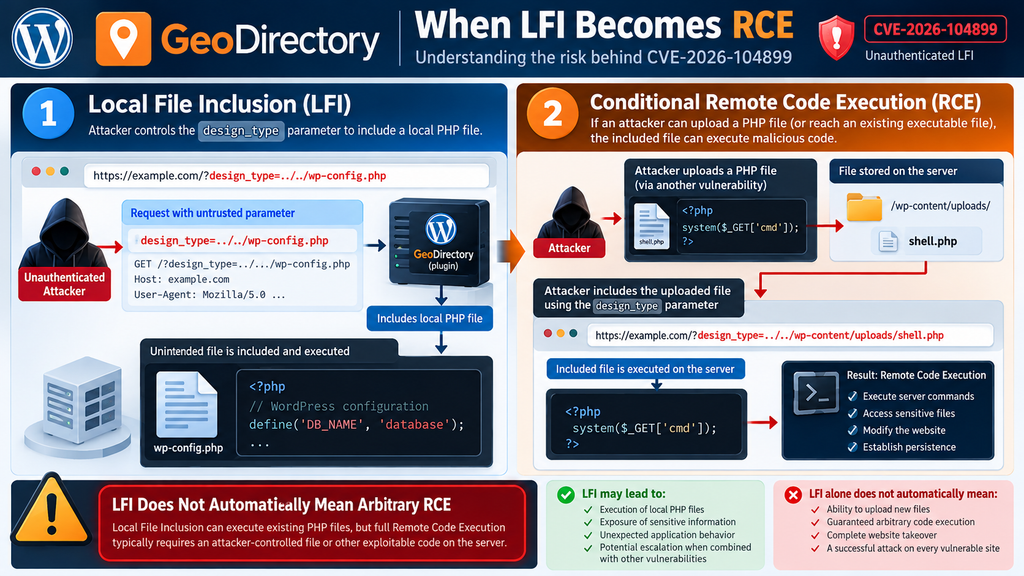
One of the most important aspects of CVE-2026-104899 is the difference between Local File Inclusion and Remote Code Execution. These terms are closely related in some PHP vulnerabilities, but they do not describe identical outcomes. Local File Inclusion means an application can be influenced to include a file from its own server. Remote Code Execution means an attacker can cause the server to execute code under conditions the attacker controls.
The GeoDirectory advisory states that the vulnerability can include and execute local PHP files. It also identifies code execution as a possible outcome when an attacker can upload PHP files and subsequently include them. That distinction matters because the vulnerable parameter alone does not necessarily provide a method for writing arbitrary PHP content to disk.
The difference between LFI and arbitrary code execution
When PHP includes another PHP file, the server normally processes the included file as PHP code. That means inclusion is more powerful than simply displaying the contents of a text document. However, executing an existing PHP file does not automatically mean an attacker can run any instructions they choose. The included file might contain legitimate functions, configuration logic, or code that expects a particular application context.
Arbitrary code execution becomes more plausible when an attacker can control the contents of an included file or reach an existing file with exploitable behavior. For example, an independently vulnerable upload mechanism might allow an attacker to place executable PHP content somewhere on the server. If the LFI weakness can subsequently include that file, the combined weaknesses may produce a much more serious outcome.
Understanding the possible attack chain
- Conceptual progression from LFI to RCE
- 1. Publicly accessible vulnerable functionality
- The attacker does not need a WordPress account.
- 2. Untrusted file selection
- The application may include an unintended local PHP file.
- 3. Reachable executable PHP content
- The file exists and is reachable through the vulnerable inclusion logic.
- 4. Conditional code execution
- Attacker-controlled code or exploitable existing behavior may lead to RCE.
- 1. Publicly accessible vulnerable functionality
Conceptual explanation only. Not every vulnerable website will satisfy all conditions.
Scenario one: The server contains only trusted PHP files
Consider a directory website that uses GeoDirectory alongside a small collection of well-maintained plugins. Its upload directories do not contain executable PHP files, and the attacker has no separate method of writing malicious PHP content. The LFI vulnerability remains a serious problem because it may expose unexpected application behavior or sensitive information. However, the absence of an attacker-controlled PHP file can limit the routes to arbitrary code execution.
This does not make the vulnerable installation safe. Existing files may have unintended side effects when included, and the security impact cannot be determined solely by checking the uploads directory. The administrator should still update immediately and inspect the environment. The correct conclusion is that arbitrary code execution has not been established, not that the vulnerability has no practical consequences.
Scenario two: An attacker-controlled PHP file already exists
Now imagine that a different vulnerability previously allowed an attacker to upload a PHP file to the website. The file may be located in an uploads directory, an abandoned plugin folder, or another writable location. If the vulnerable GeoDirectory inclusion mechanism can reach and execute that file, the attacker may gain the ability to execute the code it contains.
This scenario demonstrates why security incidents often involve multiple weaknesses. An unsafe upload feature creates one opportunity, while an LFI flaw can provide another. Together, they may bypass defenses that would otherwise limit either weakness individually. A proper investigation must therefore examine the complete website rather than focusing exclusively on the GeoDirectory plugin folder.
Scenario three: A previously compromised website
A website that already contains a malicious PHP backdoor may be especially vulnerable to further exploitation. An attacker who knows or discovers the file’s location could potentially use an inclusion weakness to activate its functionality. Depending on the backdoor and server permissions, this might support unauthorized database access, file modifications, or persistence mechanisms.
This is one reason why updating GeoDirectory does not automatically remove an existing compromise. The update closes the known vulnerable path, but it does not necessarily delete malicious files introduced earlier. Administrators who find credible evidence of exploitation should investigate the entire installation, rotate relevant credentials, and consider restoring trusted files from verified sources.
LFI vs RCE Infographic
Updating GeoDirectory to a Safe Version
The most effective way to address CVE-2026-104899 is to update GeoDirectory to a patched version. The vulnerability was fixed in version 2.8.188, released on October 2, 2026. However, administrators should not stop at that minimum version if a newer stable release is available. The official WordPress plugin directory lists version 2.8.191, which includes additional security improvements related to stored cross-site scripting.
Updating is generally straightforward, but directory websites often contain custom layouts, paid extensions, and complex listing configurations. An unexpected compatibility problem could disrupt search results, business profiles, or submission forms. A short preparation process reduces that risk. For websites showing signs of compromise, preserve relevant evidence before modifying the installation, then prioritize containment and patching.
Step 1: Check your installed GeoDirectory version
Open your WordPress administration dashboard and navigate to Plugins → Installed Plugins. Find GeoDirectory in the plugin list and inspect its installed version number. If the version is 2.8.187 or earlier, the installation falls within the affected range. Version 2.8.188 fixes this particular LFI issue, while a later stable release is preferable for receiving additional fixes.
For example, a website running GeoDirectory 2.8.185 should be treated as vulnerable even if the plugin appears to work perfectly. Security weaknesses rarely produce visible errors during normal browsing. Conversely, seeing version 2.8.191 confirms that the installed version is beyond the vulnerable range, but it does not establish whether the site was exploited before updating.
Step 2: Create a complete backup
Before changing a production WordPress installation, create a backup containing both the database and website files. The database stores listings, user accounts, plugin settings, and other structured information. The filesystem contains plugins, themes, media uploads, and custom PHP code. Saving only one component may leave you without everything needed for a reliable restoration.
If you use cPanel, open its backup interface or your hosting provider’s backup manager. Create a full account backup where supported, or export the website files and database separately. Store the backup outside the publicly accessible website directory. If possible, verify that the archive can be opened and that the database export contains the expected tables. A backup that has never been checked should not be assumed to be recoverable.
Step 3: Update the plugin through WordPress
Return to Plugins → Installed Plugins and locate GeoDirectory. If an update notification appears, review the version and select Update now. Wait until WordPress reports that the operation has completed. Avoid refreshing the page repeatedly while the update is running, especially on websites with slower hosting or numerous installed extensions.
Afterward, inspect the version again to confirm that the update succeeded. If the update option is unavailable, check Dashboard → Updates and consult the official plugin page. Avoid downloading unofficial modified ZIP archives or replacing individual plugin files with code found in forums. A legitimate release from the developer is more reliable than an unverified manual patch.
Step 4: Update GeoDirectory using WP-CLI
Administrators with SSH access can perform the same operation using WP-CLI. This is useful when maintaining multiple WordPress installations or when the dashboard is temporarily inaccessible. Run the command from the correct WordPress installation directory, using the appropriate system account and permissions.
First, check the installed version:
wp plugin get geodirectory --field=version
Then update GeoDirectory:
wp plugin update geodirectory
Finally, verify the result:
wp plugin get geodirectory --field=version
For example, if the first command reports 2.8.187 and the final command reports 2.8.191, the installation has moved beyond the affected version range. The exact available release may differ when the command runs. WP-CLI reports the version installed on your system, so administrators should read its output rather than assuming the update completed successfully.
Step 5: Test important website functionality
Once the update finishes, open the public website in a private browser window. Test several business listings, search results, location filters, category pages, and any public submission forms. If your website uses maps, reviews, or premium GeoDirectory extensions, include those features in the test. A successful plugin update message does not guarantee that every custom integration behaves as expected.
For example, a restaurant directory might display its homepage correctly while its location filter fails because of an unrelated compatibility issue. Testing representative user journeys can reveal such problems quickly. If you discover an error, record its symptoms and investigate the relevant logs. Avoid immediately restoring a vulnerable plugin version to production, because doing so could reopen the security weakness.
Step 6: Verify additional GeoDirectory extensions
GeoDirectory installations sometimes use extra components for pricing, advanced search, location management, or business reviews. These extensions may depend on particular core plugin versions. After updating the main plugin, check the compatibility and update status of every related extension through its legitimate distribution channel.
An extension that is several releases behind may create compatibility problems even when the GeoDirectory core is secure. Administrators should also check whether the website contains custom snippets that interact with GeoDirectory’s templates or widgets. Review those integrations on staging before making further production changes. This approach reduces unexpected disruptions without sacrificing the security improvements introduced by the patched core release.
Also read: Links Must Have Discernible Text
Auditing Requests, Uploads and Modified Files
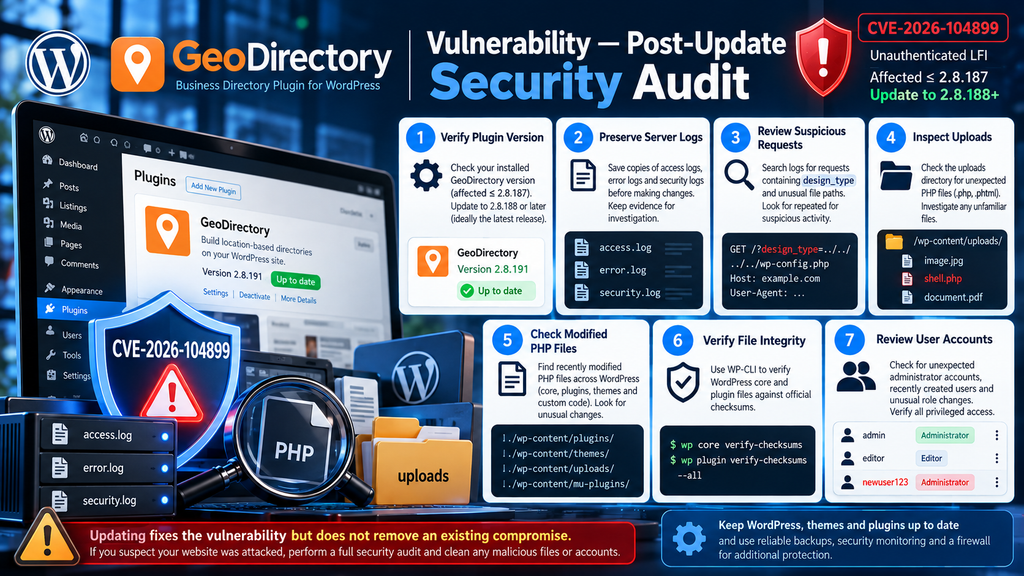
Installing a patched version closes the known vulnerability, but it does not answer every security question. If a website remained vulnerable while the issue was publicly known, administrators may want to investigate whether suspicious requests reached the server. The purpose of an audit is to distinguish ordinary website activity from possible exploitation attempts and identify any evidence of unauthorized changes.
A reliable investigation examines several sources together: web server access logs, error logs, uploaded files, modified PHP files, user accounts, and security plugin alerts. No single indicator provides a complete picture. An unusual request might have been blocked, while a malicious file could have arrived through an unrelated weakness. Preserving context is essential before making conclusions.
Step 1: Preserve the available security evidence
Start by identifying where your hosting environment stores access logs, PHP error logs, and security alerts. In cPanel, these may be available through Metrics, Errors, Raw Access, or the hosting provider’s logging interface. On managed servers, administrators may also have direct access to Apache, Nginx, PHP-FPM, and web application firewall logs.
Before cleaning suspicious files or rotating log storage, preserve copies of the relevant evidence. Record the current time, server timezone, WordPress version, GeoDirectory version, and the date the plugin was updated. For example, if a website was patched on October 11, review an appropriate period before and after that date. The exact investigation window should reflect the available logs and any suspicious activity already observed.
Step 2: Search access logs for suspicious parameter usage
Because the advisory identifies design_type as the relevant parameter, administrators can begin by searching server access logs for requests containing that name. A match does not automatically prove exploitation. Legitimate plugin operations may also use design-related parameters, and web application firewalls can record requests that never reached the vulnerable application code.
The following command performs a basic read-only search against a selected log file:
grep -inE 'design_type|designtype' /path/to/access.log
Replace /path/to/access.log with the actual path to your web server’s access log. The command searches for either spelling because some advisory summaries use different naming conventions. It prints matching lines with line numbers, making manual review easier. This command does not modify website files or attempt to exploit the vulnerability.
Step 3: Review the context of suspicious requests
When you find a potentially relevant log entry, examine its timestamp, request method, source IP address, HTTP status, and surrounding activity. Pay attention to unusual file references, encoded path separators, repeated failed requests, or patterns suggesting an attempt to reach unexpected server files. Some requests may be harmless probes or automated vulnerability scans.
For example, several unusual requests from one source within a few seconds may justify closer examination. However, a successful HTTP 200 response does not prove that PHP code was executed. Likewise, an HTTP 403 response might indicate that a firewall blocked the request before it reached WordPress. Correlate the access log with application errors, firewall events, and filesystem changes before determining whether an intrusion occurred.
Step 4: Inspect uploads for unexpected PHP files
WordPress normally stores images, documents, and other media in wp-content/uploads. Executable PHP files in this location deserve attention, particularly when the website does not intentionally use a workflow that requires them. Their presence may indicate an unsafe upload feature, a previous compromise, or a legitimate application component that needs verification.
Administrators with shell access can list PHP files under the uploads directory:
find wp-content/uploads -type f \
  \( -iname '*.php' -o -iname '*.phtml' \
  -o -iname '*.php5' \) -print
Run this command from the WordPress installation directory. It only lists matching files and does not delete or execute them. Review every unexpected result carefully. A filename alone is not enough to determine whether a file is malicious, so compare its contents, ownership, modification time, and origin with known legitimate application behavior.
Step 5: Find recently modified PHP files
An attacker who obtains write access may modify an existing PHP file instead of creating a new one. Consequently, an uploads-only scan can miss important evidence. Review recently changed PHP files across the installation, including plugins, themes, and custom code. This can reveal modifications that deserve further investigation.
For example, the following command lists PHP files modified during the previous seven days:
find . -type f -name '*.php' -mtime -7 -print
This command is a starting point, not proof of compromise. Legitimate updates also modify PHP files, and attackers may manipulate timestamps. Compare suspicious files against trusted release packages or a known-good backup. Pay special attention to unexpected modifications in WordPress core directories, unfamiliar plugin folders, and PHP files placed in locations that normally contain only media.
Step 6: Verify WordPress core integrity
WP-CLI provides a useful way to compare WordPress core files against official checksums. This can identify unexpected changes to files that should match the installed WordPress release. Run the verification from the correct WordPress directory, preferably after preserving evidence if a compromise is suspected.
wp core verify-checksums
If the command reports unexpected changes, investigate them individually. Some differences may result from legitimate customizations, but modifying WordPress core files is generally discouraged. The checksum operation does not inspect every plugin, theme, or uploaded file. Therefore, a successful result means the checked core files match their expected checksums, not that the entire website is free of malicious code.
Step 7: Verify installed plugin files
WP-CLI can also check supported plugins against published WordPress.org checksums. This is especially useful for identifying unexpected changes in plugins distributed through the official repository. It should be combined with manual verification for premium or custom extensions, which may not have checksums available through the same service.
wp plugin verify-checksums --all
Review the output carefully. A checksum mismatch may indicate an unauthorized modification, a development customization, or a packaging difference. Missing checksum information does not automatically imply malicious activity. For suspicious files, compare them with a trusted copy of the exact release. Do not overwrite potential evidence before documenting it if an active security incident is being investigated.
Step 8: Review user accounts and administrator privileges
File inclusion vulnerabilities can sometimes contribute to broader compromise, especially when combined with other weaknesses. Administrators should therefore review WordPress accounts for unexpected privilege changes, newly created administrators, or unfamiliar email addresses. This is particularly important when security logs suggest unauthorized access or unexplained configuration changes.
Open Users → All Users in the WordPress dashboard and filter by Administrator. Check whether each privileged account belongs to a recognized person or service. If an unfamiliar account appears, preserve its details and investigate its creation history before taking corrective action. Also review hosting control panel users, SSH access, and relevant application credentials. A WordPress account audit alone cannot establish whether the underlying server remains secure.
Step 9: Examine scheduled tasks and persistence mechanisms
Some compromises survive ordinary plugin updates because malicious code is stored elsewhere. Depending on the attack, persistence may involve a modified plugin, an unexpected must-use plugin, a scheduled task, or an unauthorized server configuration change. These mechanisms are not specific evidence of GeoDirectory exploitation, but they are important during a broader incident investigation.
Inspect the wp-content/mu-plugins directory and compare its contents with your known customizations. Review WordPress scheduled events and relevant system cron jobs. On servers with several websites, determine whether the suspicious files or tasks affect only one installation or multiple accounts. Avoid deleting unfamiliar files automatically, especially when legitimate custom plugins or maintenance scripts are part of the hosting environment.
Step 10: Apply additional protection after patching
After updating and investigating the website, review the controls that reduce the impact of future vulnerabilities. Keep WordPress core, themes, and plugins current. Restrict write permissions, remove abandoned extensions, and prevent untrusted users from uploading executable server-side code. A properly configured web application firewall can provide additional protection against suspicious file-path requests.
However, a firewall should be considered an additional defensive layer rather than a replacement for the official patch. Rules that block unusual parameter values may help reduce exposure, but they can miss unexpected attack variations. Administrators should also maintain tested backups, monitor important file changes, and review security alerts regularly. A strong security process depends on several independent controls working together.
Security Audit Checklist
Frequently Asked Questions
1. What is the GeoDirectory vulnerability CVE-2026-104899?
It is a high-severity Local File Inclusion vulnerability affecting GeoDirectory versions 2.8.187 and earlier. The weakness involves insufficient validation of a file-selection parameter and may allow unauthenticated attackers to include unintended local PHP files. Depending on the accessible files and additional conditions, this can create a risk of code execution.
2. Which GeoDirectory versions are affected?
Versions up to and including 2.8.187 are affected. The vulnerability was fixed in version 2.8.188. Website administrators should install the latest compatible stable version available from the official developer rather than remaining on the minimum patched release indefinitely.
3. Can attackers exploit this vulnerability without logging in?
Yes. The published advisory identifies the issue as unauthenticated. The nonce required by the affected functionality is available to anonymous visitors through public frontend JavaScript. Therefore, an attacker does not need an existing WordPress user account to attempt exploitation.
4. Does Local File Inclusion automatically mean Remote Code Execution?
No. LFI allows an application to include unintended local files, while arbitrary RCE requires the attacker to cause code of their choosing to execute. Including PHP files can execute their existing code, but the ability to run attacker-controlled instructions depends on additional conditions, such as access to a controllable PHP file.
5. Is GeoDirectory 2.8.188 safe to use?
Version 2.8.188 addresses CVE-2026-104899. However, later releases include additional security improvements, so administrators should use the latest compatible stable version. No software release can guarantee protection against every possible vulnerability.
6. Can a WordPress security plugin prevent exploitation?
A security plugin or web application firewall may detect and block some suspicious requests, but protection depends on its rules and configuration. It should not be treated as a substitute for updating GeoDirectory. The official patched release directly addresses the known vulnerability.
7. How can I check whether my website was attacked?
Review web server access logs, firewall events, unexpected PHP files, recently modified files, and administrator account activity. Search for suspicious use of the relevant parameter and correlate findings with timestamps and application behavior. An unusual request alone does not prove that exploitation succeeded.
8. Should I delete every PHP file found in wp-content/uploads?
No. Unexpected PHP files in uploads deserve investigation, but automatic deletion can destroy evidence or disrupt legitimate software. First identify each file’s origin, purpose, contents, and modification history. Preserve suspicious files securely and consult a qualified professional when compromise is suspected.
9. Is updating GeoDirectory enough after a successful attack?
Not necessarily. Updating closes the known vulnerability, but it does not automatically remove malicious files, unauthorized accounts, or persistence mechanisms introduced before the update. A confirmed compromise requires a broader incident response, including containment, investigation, cleanup, credential rotation, and verification.
10. Should I disable GeoDirectory if I cannot update immediately?
If you cannot apply the security update promptly, temporarily disabling the plugin may reduce exposure while you investigate compatibility or maintenance issues. Consider the operational impact on directory functionality. A firewall can provide temporary additional protection, but leaving an affected version publicly accessible is not a reliable long-term solution.
Also read: Optimize Largest Contentful Paint
A Security Fix Worth Acting On Today
The GeoDirectory vulnerability demonstrates why file-handling weaknesses deserve serious attention in WordPress applications. A seemingly ordinary parameter can become dangerous when it influences server-side file inclusion without adequate restrictions. CVE-2026-104899 is particularly concerning because the affected functionality can be reached without authentication, and the publicly available nonce does not establish meaningful access control.
At the same time, accurate risk assessment matters. Local File Inclusion is not automatically equivalent to arbitrary Remote Code Execution. The most damaging outcomes depend on the files that can be included and whether an attacker can influence executable content. Website owners should recognize the potential severity without assuming that every affected installation has already been compromised.
The practical response is clear: update GeoDirectory to a patched release, verify that important directory functions continue working, and review relevant security evidence when exposure is suspected. A complete response also includes inspecting uploads, checking file integrity, reviewing privileged accounts, and maintaining reliable backups. These measures help address the immediate issue while strengthening the website against future security incidents.
⚠️ Disclaimer and Source Hygiene
This article is provided for educational, informational, and defensive cybersecurity purposes. The vulnerability details are based on publicly available CVE records, security advisories, and official plugin release information reviewed on October 11, 2026. The technical examples are intended for authorized website administration and safe investigation. They do not constitute proof that any specific website has been exploited.
Security conditions, plugin versions, and remediation guidance may change. Always consult the plugin developer’s latest documentation and qualified cybersecurity professionals when dealing with a suspected compromise. Commands should be reviewed and tested in an appropriate environment before use. Neither updating software nor running an individual security scan guarantees that a website is free from compromise.
📚 Sources and References
The following references provide the technical foundation for this article. Official project resources and vulnerability records take priority over commentary or secondary summaries.
- National Vulnerability Database (NVD) – CVE-2026-104899 vulnerability record. Reference for the published vulnerability identifier, affected versions, and reported impact.
- Wordfence Threat Intelligence – GeoDirectory LFI vulnerability advisory. Security intelligence and vulnerability classification.
- WordPress.org Plugin Directory – GeoDirectory official plugin page. Official plugin information, release history, and installation guidance.
- WPScan Vulnerability Database – GeoDirectory security vulnerabilities. Affected version range, fixed release, and related plugin advisories.
- AyeCode GitHub – GeoDirectory version 2.8.188 source changes. Developer-side patch reference.
- WordPress Plugin Trac – GeoDirectory security-related changeset. Source-level record of the affected component’s changes.
- WordPress Developer Resources – WordPress Nonces documentation. Official guidance explaining nonce behavior and security limitations.
- WP-CLI Documentation – WordPress plugin management commands. Official command-line plugin management reference.
🕊️ Secondary Sources and Testimonials
Secondary technical sources: SecAlerts CVE-2026-104899 and Tenable CVE-2026-104899 provide supporting vulnerability descriptions and severity information. These sources help cross-check the published advisory but do not replace official developer documentation.
Community experiences: The official GeoDirectory plugin page contains user reviews discussing the plugin’s functionality, customization, and support. Such testimonials may help readers understand the plugin’s everyday use, but they should not be interpreted as evidence that a specific security vulnerability has or has not been exploited.
Editorial verification note: The available advisories establish the affected version range and the existence of a patch. They do not establish that every affected installation has been compromised. The distinction between possible code execution and confirmed arbitrary RCE remains essential when evaluating this issue.
Sign in with a Subscriber account to vote.