
Table of Contents
The WordPress 7.1.3 security update addresses seven security issues affecting comments, user permissions, WXR exports, and embedded content. Discover how private comments could become exposed, why old Imgur oEmbed cache records deserve attention, and what administrators should verify after installing this important WordPress security release.
WordPress security updates often arrive without much excitement. There is no dramatic redesign, no new editor to explore, and usually no obvious difference when visitors open your website. Yet some of the most important improvements happen behind the scenes, where WordPress controls access to private information, processes database queries, and decides which actions registered users can perform. The WordPress 7.1.3 security update is one of those releases that deserves careful attention, especially for websites that accept comments, publish content through multiple authors, or embed media from external services.
The release addresses seven security problems across different parts of WordPress Core. Two areas are particularly important for website owners: the possibility of exposing comments associated with private or unpublished posts, and the handling of Imgur embed content that may already exist in WordPress’s oEmbed cache. These issues illustrate a common security challenge. Installing a patch fixes vulnerable application behavior, but it does not necessarily erase information that was previously exposed or remove every cached record created before the update.
This guide explains the security issues in practical terms, identifies which risks involve unauthenticated visitors or lower-privileged accounts, and provides a structured checklist for verifying your website after updating. It also explains why administrators should avoid deleting database records blindly, how to investigate suspicious cached embeds safely, and when a deeper security review may be necessary.
WordPress Automation Tools: Save Time and Scale
What Is Included in WordPress 7.1.3?
Seven Security Corrections Across WordPress Core
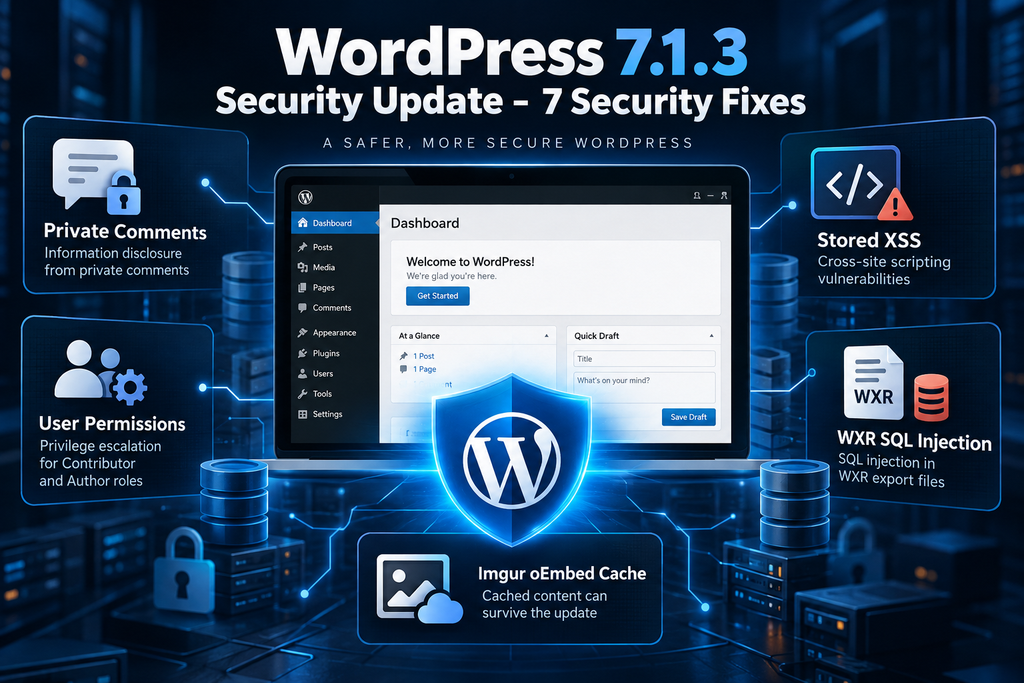
WordPress 7.1.3 was released on October 6, 2026, as a maintenance and security update. According to the official release announcement, it includes seven security fixes alongside four maintenance fixes. The security corrections address several different weaknesses, including stored cross-site scripting, denial of service, second-order SQL injection, unauthorized sticky-post changes, private comment disclosure, unsafe Imgur embeds, and unexpected dynamic hook behavior. Although these issues were fixed in the same release, they do not all have the same severity, prerequisites, or practical consequences.
The most useful way to understand the update is to examine the trust boundaries involved. Some features accept input from visitors who are not logged in, while others process data created by registered users. Administrative operations, such as exporting content, may also work with information that originated from less-trusted sources. The security update strengthens these boundaries, reducing the possibility that information, permissions, or application behavior can be manipulated outside their intended limits. Official WordPress release announcement.
Overview of the Seven Security Issues
| Security issue | Potential impact |
|---|---|
| Stored XSS in comment moderation | Malicious scripts may execute in a moderator’s browser |
| Denial of service in HTTP URL handling | Excessive processing or service disruption |
| Second-order SQL injection in WXR exports | Stored values may influence later database queries |
| Author sticky-post permission weakness | Unauthorized changes to featured post placement |
| Private comment disclosure | Comments on protected posts may become accessible |
| Imgur oEmbed XSS | Unsafe embedded content and retained cached responses |
| Dynamic hook parameter forgery | Unexpected hook execution or application behavior |
These are distinct issues rather than seven examples of the same vulnerability. A stored XSS weakness may require someone to view malicious content, while a disclosure issue can potentially expose information through an accessible retrieval path. A permission flaw involving Authors has different requirements from a vulnerability involving public requests. Understanding these differences prevents unnecessary panic and helps administrators concentrate on the features their websites actually use.
Why Installing the Update Is Only the First Step
Updating WordPress Core is essential because it replaces vulnerable logic with corrected code. However, a software update does not automatically prove that a website was never exposed before the patch. It also does not guarantee that every previously stored record has been deleted. This distinction matters when the affected feature involves comments, exports, or third-party embed content. Administrators may need to inspect historical data, review relevant logs, and verify whether old cached responses are still being used.
A practical maintenance process should therefore combine three activities: installing the official update, checking whether the affected features behave correctly, and reviewing any existing data that could require additional attention. For a small personal blog, these checks may take only a short time. A large publishing website with multiple contributors, thousands of comments, and extensive caching may require a more structured review. The objective is not to assume compromise, but to identify meaningful exposure and confirm that the website continues operating safely.
Vulnerabilities Accessible Without Authentication
How Private Comments Could Become Exposed
One of the most concerning issues addressed in WordPress 7.1.3 involves comments associated with private or unpublished posts. WordPress normally restricts access to protected content according to post visibility and user permissions. However, the vulnerable comment retrieval behavior could expose approved comments through certain access paths, even when the related post was not available to the visitor. The distinction is important because the problem did not necessarily expose the complete article. Instead, it could reveal information contained in comments that administrators expected to remain inaccessible.
Imagine a company blog where an internal announcement was originally published, received several comments, and was later changed to private. The administrator might reasonably believe that both the article and its discussion were no longer available to the public. If comments could still be retrieved through an affected feed, however, visitors might obtain information that the site owner intended to protect. Depending on the discussion, this could include names, business decisions, contact details, or other contextual information. The actual consequences depend on the content of the comments and whether anyone accessed them before the update.
Why Private Comment Exposure Matters
Private comments can contain information that is more sensitive than the article itself. A post might contain a general project announcement, while the comments discuss specific people, deadlines, or operational details. On membership websites, users may assume that comments remain restricted to the same audience as the protected content. A failure to enforce that relationship can undermine confidentiality even when the main post remains inaccessible. This is why comment visibility should be considered part of the website’s broader access-control system.
After installing WordPress 7.1.3, administrators should review private and unpublished posts that contain comments. They should also verify that protected discussions are not accessible to logged-out visitors through ordinary feeds or other public retrieval mechanisms. If sensitive information may have been exposed, a deeper investigation may be justified. Updating the software corrects the affected Core behavior, but it cannot recover information that was previously copied by an unauthorized party. That historical limitation should guide any incident-response decision.
Stored XSS in the Comments Administration Screen
Another issue involves stored cross-site scripting, commonly abbreviated as XSS, in the WordPress Comments administration interface. Stored XSS occurs when malicious content is saved and later displayed in a browser without sufficient protection. In an affected workflow, an attacker-controlled comment could potentially cause JavaScript to execute when a privileged user reviews the content. The risk is different from ordinary comment spam because the malicious behavior may occur inside the administrative interface rather than on a public article page.
Comment moderation does not automatically eliminate this risk. Even when WordPress holds comments for approval, administrators may still open the moderation screen to inspect them. If the interface processes untrusted content incorrectly, a pending comment can become an attack surface. WordPress 7.1.3 addresses the reported Core weakness. Administrators should update before reviewing suspicious pending comments, maintain appropriate moderation settings, and investigate unexpected dashboard behavior when supported by evidence. The presence of an unusual comment alone does not prove that malicious code executed.
The Denial-of-Service Issue in HTTP URL Processing
WordPress 7.1.3 also corrects a denial-of-service weakness involving WP_Http::make_absolute_url(). This Core method helps resolve URLs, a routine task performed by web applications when processing links and HTTP-related information. Under vulnerable conditions, unexpected input can create excessive processing demands. Depending on how an affected operation is reached, repeated requests could potentially contribute to degraded performance or service disruption. Unlike information disclosure or XSS, a denial-of-service issue primarily threatens availability.
The official security description identifies the affected method, but administrators should not assume that every WordPress installation exposes an identical unauthenticated attack path. The practical risk depends on how the vulnerable operation is invoked and what surrounding controls are present. The recommended response is to install the corrected release and monitor unusual resource consumption or repeated application errors. Website owners should avoid treating normal traffic spikes as evidence of exploitation without additional supporting information.
Contributor and Author Security Risks
Understanding WordPress User Permissions
WordPress uses a role-based permission system to control what registered users can do. Contributors can generally create and edit their own drafts, while Authors can publish and manage their own posts. Editors receive broader content-management permissions, and Administrators can configure the website itself. These distinctions are particularly important for news websites, community publications, and blogs that accept guest writers. Without effective permission checks, a user with limited responsibilities may be able to influence parts of the website that should remain under editorial control.
A security weakness does not need to grant full Administrator access to cause problems. Sometimes, changing a single content property can affect how information appears to visitors. The WordPress 7.1.3 release demonstrates this through a vulnerability involving sticky posts. It also addresses dynamic hook behavior that could cause unintended actions under particular circumstances. Neither issue should automatically be described as complete privilege escalation, but both show why WordPress must enforce permissions consistently across administrative screens, APIs, and internal operations.
The Author Sticky-Post Permission Weakness
Sticky posts are designed to remain prominent in certain WordPress article listings. Publishers use them to highlight announcements, important updates, or featured content. On a multi-author website, however, the decision to feature an article may belong to an Editor rather than the person who wrote it. WordPress 7.1.3 corrects a weakness that allowed Author-role users to change sticky-post status without satisfying the intended permission requirements. The Core change strengthens authorization checks in the relevant REST API workflow.
Consider an editorial website where ten Authors publish articles but only two Editors decide which stories receive homepage prominence. If an Author can unexpectedly mark a post as sticky, the site’s editorial policy can be bypassed. This may not expose passwords or create a new Administrator account, but it can still affect publishing priorities, visitor attention, and the credibility of the editorial process. After updating, administrators should verify that sticky-post management follows their intended role permissions, especially when custom publishing interfaces or REST API integrations are involved.
Are Contributor Accounts Directly Affected?
The official WordPress 7.1.3 announcement specifically identifies the sticky-post weakness as involving Author-role users. It does not establish that Contributors can exploit the same flaw on a standard installation. This distinction matters because security articles sometimes group all lower-privileged accounts together, creating the impression that every registered user has identical capabilities. In reality, WordPress roles differ, and individual plugins can further customize those permissions. A Contributor account should therefore be evaluated according to its actual capabilities rather than assumptions about the role name.
Even so, Contributor accounts remain relevant to a complete security audit. Websites that allow public registration, guest submissions, or community publishing often accumulate accounts that are no longer needed. Custom role-management plugins may also grant additional permissions over time. Administrators should review those changes and verify that each account can perform only its assigned tasks. This is a preventive recommendation, not a claim that WordPress 7.1.3 contains a confirmed Contributor-specific privilege escalation.
Dynamic Hook Parameter Forgery
Another security correction concerns the dynamic WordPress hook naming pattern {status}_{type}. Hooks allow WordPress Core, themes, and plugins to respond when particular events occur. For example, a developer might register a callback that runs when a post changes status. Dynamic hook names can be useful because they allow different behavior depending on the type of content or the transition involved. However, these mechanisms must handle unexpected values carefully to avoid collisions with other registered actions.
The reported weakness involved forgeable parameters that could influence dynamic action names. Under affected conditions, unexpected combinations of status and type values could produce an unintended hook collision. The Core correction restricts the relevant behavior to registered statuses and post types. For website owners, the practical lesson is that custom plugin callbacks should not assume that a hook invocation automatically proves an operation is authorized. Sensitive callbacks should independently verify permissions, object types, and expected input values before modifying content or settings.
Reviewing Permissions Without Disrupting Your Website
A safe permissions review begins with an inventory of existing accounts. Open Users → All Users and identify Administrators, Editors, Authors, Contributors, and Subscribers. Check whether each account still belongs to someone who needs access. Former employees, inactive guest writers, and abandoned test accounts should receive particular attention. Before deleting accounts, consider whether their published content must be reassigned to another user. WordPress provides account-deletion options, but administrators should understand the consequences before making changes.
For more detailed testing, create temporary accounts in a staging environment. Assign the standard Author and Contributor roles, then verify the publishing actions each account can perform. Test relevant custom dashboards, front-end submission forms, and editorial integrations. Avoid changing production capabilities simply because a plugin displays an unfamiliar permission name. Document intentional exceptions and remove only permissions that are unnecessary. This approach helps preserve legitimate publishing workflows while reducing opportunities for unauthorized content changes.
How the WXR Export Vulnerability Works
What Is a WordPress WXR Export?
WordPress eXtended RSS, commonly known as WXR, is the XML-based format used by WordPress to export website content. Administrators can access this feature through Tools → Export and select the content they want to download. Depending on the selected options, an export can contain posts, pages, comments, categories, tags, custom fields, and other associated information. WXR files are commonly used when migrating a website, transferring articles between installations, or preserving structured content before major changes.
Creating an export requires WordPress to retrieve information from its database and assemble it into an XML document. Although the administrator initiates the operation, some of the stored information may originally have come from less-trusted sources. Comments, submitted content, imported records, and metadata can all contain values created outside the administrator’s direct control. The security challenge is ensuring that those stored values cannot unexpectedly change the database queries used during the export process. WordPress 7.1.3 addresses precisely this type of trust-boundary problem.
Understanding Second-Order SQL Injection
SQL injection occurs when improperly handled input influences the structure or behavior of a database query. In a conventional example, the vulnerable application processes malicious input immediately. Second-order SQL injection is different because the problematic value is stored first and only becomes dangerous during a later operation. The initial action may appear completely normal, making the relationship between the original input and the eventual database query harder to identify.
Imagine a hypothetical application that accepts an unexpected identifier and stores it as part of a content record. Nothing unusual happens when the record is created. Several days later, an administrator runs an export that retrieves the identifier and uses it to build a database query. If the export assumes that the stored identifier is trustworthy, the value may influence the query in an unintended way. This example illustrates the general concept rather than providing a reproduction of the WordPress vulnerability. The central lesson is that previously stored data still requires validation.
What WordPress 7.1.3 Changes in the Export Process
The WordPress Core security changes address the WXR issue by ensuring that relevant post identifiers are handled as integers when constructing export queries. An identifier that should represent a numeric post ID must not be treated as unrestricted SQL input. Enforcing the expected data type helps prevent stored values from altering the meaning of the database operation. The correction is narrow and practical, but it addresses an important principle that applies throughout WordPress development: internal database values should not automatically be considered safe for every future use.
The official release credits Anthropic with reporting the second-order SQL injection issue. However, the public announcement does not establish that every Contributor or Author can independently exploit it on a default WordPress installation. The exact prerequisites depend on the affected data path and export workflow. Administrators should therefore avoid claiming that the vulnerability automatically provides complete database access. Installing the patch, reviewing suspicious export activity, and checking custom export integrations are more useful responses than assuming the worst possible outcome.
Why Administrative Exports Can Still Be Security-Sensitive
An administrator may be fully authorized to export content, but the data being exported can include values supplied by users with much lower privileges. This creates a subtle security boundary. The export operation itself is legitimate, while some of the information processed during that operation may not be trustworthy. If a system fails to preserve that distinction, an ordinary administrative task can become an unexpected entry point for malicious behavior.
The same principle applies to other features that process stored content. Scheduled reports, database migrations, bulk editing tools, and third-party integrations may all retrieve information originally submitted by visitors or registered users. Developers should validate data according to how it will be used, not simply according to where it was retrieved. A value stored safely as text may still be inappropriate when used as a numeric identifier, file path, or query component. WordPress 7.1.3 provides a useful example of why these distinctions matter.
How to Review Recent WordPress Exports
Administrators should begin by determining whether any WXR exports were generated before the security update. If the website has an activity log, check which account initiated the operation and whether it was expected. Review relevant server or database errors where logs are available. An unusual error does not automatically indicate SQL injection, but repeated unexplained failures around export operations may justify closer investigation. Preserve relevant evidence if there is a credible reason to suspect malicious activity.
Exported files also deserve secure handling because they may contain information that should not be publicly accessible. Avoid leaving WXR archives inside unprotected directories, especially when they contain private content or comments. Store important exports in an access-controlled location and remove unnecessary copies after completing a migration. If the website uses a custom export plugin, verify that the developer follows secure query practices and supports the installed WordPress version. The Core patch does not automatically correct vulnerabilities in independent third-party export implementations.
Why the oEmbed Cache Must Be Cleaned

How WordPress oEmbed Works
WordPress oEmbed allows website owners to display supported external media by inserting a compatible URL into a post. Instead of manually writing complex embed code, the author can rely on WordPress to retrieve information from the external provider and generate the appropriate presentation. This functionality has made it easier to include videos, images, and other media in articles. To improve efficiency, WordPress can store the resulting embed information in its database so the same external request does not need to be repeated every time a page loads.
Caching is useful for performance, but it also creates a security consideration. If a provider’s embed response contains unsafe content, a cached copy may remain after the original integration changes. WordPress 7.1.3 addresses an XSS issue involving Imgur embeds. The Core security changes remove built-in Imgur oEmbed provider support, which prevents WordPress from continuing to use that provider integration in the affected manner. However, the removal of provider support does not automatically establish that every previously cached response has disappeared from the database.
Why Imgur Embeds Were a Security Concern
Cross-site scripting involving embedded content can occur when externally supplied HTML or related data reaches a browser without appropriate protection. The precise consequences depend on the rendering context and available browser protections. In general, XSS can allow malicious JavaScript to run in a context where users expect ordinary website content. This is especially concerning when an administrator or another privileged user encounters the affected content while authenticated.
The WordPress 7.1.3 announcement identifies Imgur embeds as vulnerable to XSS. It does not mean that every Imgur image is malicious or that every WordPress post containing an Imgur URL has been compromised. The vulnerability concerns how the affected integration handles content. The official correction removes the built-in provider support, reducing exposure through that mechanism. Website owners should review older Imgur embeds, particularly on sites where authors frequently inserted external images or where content was imported from other publishing platforms.
Why Cached Imgur Content Can Survive the Update
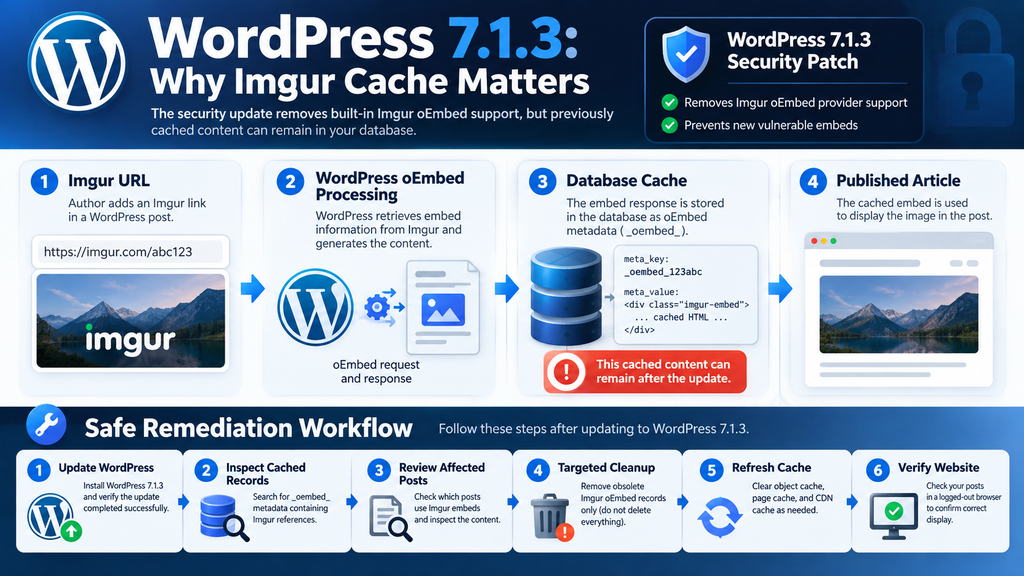
WordPress Core updates primarily change application files and code. They do not normally erase every post metadata record created by older versions. WordPress commonly stores oEmbed cache data in post metadata using keys that begin with _oembed_. Those records can contain previously retrieved information associated with embedded media. If an old Imgur response was stored before the update, the metadata may still exist afterward, even though the vulnerable provider integration has been removed.
This distinction is essential for understanding residual risk. A patched WordPress installation may no longer generate the same unsafe response through the original integration, but historical data can remain available to themes, plugins, or other rendering paths. Whether a particular cached entry remains dangerous depends on its contents and how it is used. Administrators should not assume that every remaining Imgur record is malicious. Equally, they should not assume that installing the update automatically cleans all historical embed data. A targeted inspection provides a more reliable answer.
How to Find Imgur oEmbed Cache Records
Administrators with authorized database access can inspect oEmbed metadata through phpMyAdmin or another trusted database management tool. Before running any query, confirm the actual WordPress database table prefix. The default table is often named wp_postmeta, but many installations use a customized prefix. A read-only query can identify metadata records containing references to Imgur without changing website content. This is preferable to deleting records immediately because it allows administrators to understand what exists before deciding whether cleanup is necessary.
The following SQL query searches for oEmbed metadata associated with Imgur. It displays the metadata identifier, associated post identifier, metadata key, and a shortened preview of the stored value. Replace wp_postmeta with the correct table name for your installation. The query is intended for investigation only and does not modify database records.
SELECT
    meta_id,
    post_id,
    meta_key,
    LEFT(meta_value, 300) AS cached_content
FROM wp_postmeta
WHERE meta_key LIKE '\_oembed\_%'
  AND meta_value LIKE '%imgur%'
ORDER BY post_id, meta_id;
A matching result indicates that an oEmbed metadata value contains a reference to Imgur. It does not prove that the record contains executable JavaScript, that the original vulnerability was exploited, or that the entry is currently rendered to visitors. Administrators should inspect the associated post and determine whether the cached information remains relevant. If the website contains a large number of posts, consider limiting the query results or performing the inspection during a maintenance period.
Why Deleting Every oEmbed Cache Entry Is a Bad Idea
It may be tempting to remove every _oembed_ record and allow WordPress to rebuild its cache. However, this approach can affect legitimate embedded media from unrelated providers. It may also increase external requests when popular posts regenerate their cached embeds. On a large website, unnecessary cache invalidation can create additional server load and make it harder to identify which records were actually relevant to the security issue.
A safer process begins with a verified backup and a list of confirmed Imgur-related records. Administrators should inspect the associated posts, determine whether the embeds are still required, and decide whether to replace them with ordinary links or locally hosted images where appropriate. If removal is justified, delete only the identified obsolete records through a controlled procedure. Test the process in staging before modifying production data. This preserves unrelated content and reduces the risk of accidental damage.
Understanding the Different WordPress Cache Layers
WordPress websites often use several caching systems simultaneously. The database may contain oEmbed metadata, while a persistent object cache stores frequently accessed database results. A page cache may retain generated HTML, and a content delivery network can preserve copies of public pages. These layers serve different purposes and may require separate invalidation steps. Clearing the browser cache, for example, does not remove an unsafe metadata record from the WordPress database.
After a targeted oEmbed cleanup, administrators should refresh the relevant caching layers according to their website configuration. If the site uses Redis object caching, ensure that affected cached objects are invalidated through the supported cache mechanism. If a page cache or CDN is active, refresh the pages containing the modified embeds. Avoid repeatedly flushing every cache without a clear reason, especially on busy production websites. Once the necessary caches have been refreshed, test the affected pages in a logged-out browser session to confirm what visitors actually receive.
A Realistic Example of an Old Imgur Embed
Imagine a technology blog that published hundreds of tutorials between 2022 and 2025. Several articles include Imgur images inserted through WordPress’s embed functionality. During normal operation, WordPress retrieved embed information and stored the responses in post metadata. The administrator later installs WordPress 7.1.3, correcting the vulnerable Core integration. The update completes successfully, and the dashboard reports the new version. However, the database may still contain older Imgur-related oEmbed records.
The administrator searches for those records and identifies several affected posts. Instead of deleting all cached embeds, they review the articles individually. Some images can be replaced with locally hosted copies where permission allows, while others can be converted into ordinary external links. After making the necessary changes, the administrator removes confirmed obsolete metadata, refreshes relevant caches, and checks the public pages. This approach addresses the residual content carefully without assuming that every historical Imgur embed represents an active compromise.
Recommended Security Checks After Updating
Step 1: Back Up Your Website Before Making Changes
A reliable backup should be the starting point for every WordPress security update. It should include the complete database, themes, plugins, uploaded media, and custom files. This matters because an update may reveal compatibility problems that were not apparent beforehand. A backup gives administrators a recovery option if the website experiences an unexpected error. However, simply seeing a successful backup notification is not enough. Important backups should be verified and, where practical, tested in a separate environment.
For example, a website using custom login pages, membership functionality, and several must-use plugins may require more extensive testing than a standard WordPress installation. Administrators should know which files belong to their custom functionality and ensure those files are included in the backup. Store at least one backup outside the live website’s public directory. If the hosting provider offers snapshots, confirm their retention period and restoration procedure before relying on them.
Step 2: Install WordPress 7.1.3 Through the Dashboard
Open the WordPress administration dashboard and navigate to Dashboard → Updates. Check the currently installed WordPress version and confirm whether version 7.1.3 is available. If the website has not yet been updated, use the official update mechanism after creating a verified backup. WordPress recommends installing this security release immediately. Websites configured for automatic background updates may already have received it, but administrators should confirm the result rather than assuming that every automatic update completes successfully.
After the installation finishes, reload the dashboard and visit several important pages. Check the homepage, individual articles, comment forms, and any custom account or membership interfaces. If the website uses custom PHP code, verify that no new warnings or fatal errors appear in the server logs. A successful update should not be judged solely by the version number. The website must also continue performing its intended functions.
Step 3: Verify the WordPress Core Version With WP-CLI
Administrators with SSH access can verify the installed WordPress version using WP-CLI. Open a terminal, navigate to the correct WordPress installation directory, and execute the version command. This provides a quick way to confirm the installed Core version without opening the dashboard. On servers hosting multiple WordPress installations, run the command separately for each website. Make sure the command executes under the appropriate hosting account rather than unnecessarily using root privileges.
wp core versionThe expected result for an installation updated to WordPress 7.1.3 is:
7.1.3Administrators can also verify the integrity of WordPress Core files against official checksums. This is particularly useful when investigating unexpected modifications or confirming that an update installed correctly.
wp core verify-checksumsA successful checksum verification supports the integrity of the checked Core files. It does not establish that the entire website is free from malicious code, because plugins, themes, uploaded files, and database content require separate examination. If the command reports unexpected modifications, investigate them before replacing files or assuming compromise.
Step 4: Review Private Comments and Protected Posts
The private-comment disclosure issue makes comment visibility one of the most important post-update checks. Begin by identifying posts that are private, unpublished, or previously public but later restricted. Review whether these posts contain comments and whether any discussion includes information that should remain confidential. Particular attention should be given to membership content, internal announcements, and discussions containing personal or business details.
For a safe functional test, create a harmless test post and attach a test comment through an authorized workflow. Change the post’s visibility and verify that a logged-out visitor cannot access its protected comments through ordinary public interfaces. Avoid using real confidential information during testing. If there is a credible reason to suspect historical disclosure, preserve relevant access logs and investigate the circumstances before making conclusions. A patched website prevents the affected behavior going forward, but it cannot establish whether someone accessed information before the update.
Step 5: Inspect Comment Moderation and Pending Submissions
The stored XSS correction makes comment moderation another important area to review. After updating, open the Comments administration screen and inspect recent pending submissions. Look for unusual HTML, unexpected links, or suspicious content that may warrant further examination. Do not assume that every unusual comment contains an exploit. Ordinary spam frequently includes strange formatting and links, so administrators should assess the available evidence rather than treating every suspicious-looking submission as proof of compromise.
If a comment appears deliberately crafted to manipulate browser behavior, avoid copying it into another interface that might render HTML unsafely. Preserve relevant information through a safe inspection method and consult a security professional if necessary. Review whether unexpected administrative activity occurred around the same time. Maintaining moderation controls, limiting unnecessary administrative accounts, and keeping WordPress updated are all useful protective measures, but they serve different purposes and should be used together.
Step 6: Audit Author and Contributor Accounts
Navigate to Users → All Users and review the website’s registered accounts. Identify Authors, Contributors, Editors, and Administrators who no longer require access. Remove unnecessary accounts carefully, ensuring that published content is preserved or reassigned where appropriate. If the website allows public registration, confirm that newly registered users receive the intended default role. A standard Subscriber account should not unexpectedly receive publishing or administrative capabilities.
Next, test the editorial permissions that matter most to your website. Authors should be able to perform their assigned publishing tasks without changing properties reserved for higher-privileged users. Where sticky-post control is restricted, verify that the restriction works through both the WordPress interface and relevant custom integrations. Websites using role-management plugins should review effective capabilities rather than relying only on displayed role names. Perform detailed permission tests on staging whenever possible.
Step 7: Review WXR Exports and Database Activity
Open Tools → Export and confirm that the standard export interface remains functional after updating. If the website recently generated WXR files, review whether those operations were expected. Administrators with activity logging can check which account initiated each export. Where database logs are available, examine unusual errors or repeated failures associated with export operations. These observations can provide useful context, although an error message alone does not prove exploitation.
Custom export tools should also be reviewed because the WordPress Core patch does not automatically correct insecure database queries in third-party code. Developers should validate identifiers and use properly prepared queries. Export archives should be stored securely and removed from public directories when they are no longer needed. A WXR file may contain information that should not be openly accessible, even when the export itself was generated through a legitimate administrative operation.
Step 8: Inspect Imgur oEmbed Metadata
Search the website’s posts for Imgur URLs and identify articles containing embedded Imgur content. Review how those posts display after installing WordPress 7.1.3. If an embed no longer renders correctly, determine whether it should be replaced with a supported alternative or an ordinary link. Next, inspect relevant oEmbed metadata through a read-only database query. The objective is to identify existing records before deciding whether any cleanup is necessary.
If obsolete records require removal, create a fresh backup and document the affected metadata identifiers. Test the proposed cleanup on staging, especially when the website contains many posts. Remove only confirmed records rather than deleting every oEmbed cache entry. Afterward, refresh the appropriate caching layers and verify the affected pages in a logged-out browser. This process reduces unnecessary changes while addressing historical content that may have survived the Core update.
Step 9: Check Server Logs and Security Monitoring
Review recent web server errors, PHP errors, and security alerts after updating. Look for unusual patterns involving comment feeds, administrative interfaces, or export operations when those areas are relevant to the website. Repeated requests, unexpected errors, or sudden changes in resource consumption may justify investigation. However, these observations have many possible explanations, including legitimate traffic, scheduled tasks, and plugin compatibility issues.
If the website uses a web application firewall, inspect relevant alerts without assuming that every blocked request represents an attempted exploitation of WordPress 7.1.3 vulnerabilities. Similarly, an absence of alerts does not prove that no suspicious activity occurred. Logs provide evidence only for events they were configured to record and retain. Where an incident is suspected, preserve useful records before making extensive changes to the website.
Step 10: Verify the Website After Clearing Relevant Caches
Once the update and targeted checks are complete, test the website as an ordinary visitor. Open the homepage, several articles, category archives, and important account pages. Check whether images, embedded media, navigation menus, and forms behave normally. If the website uses Redis object caching, a page-cache plugin, or a CDN, refresh only the relevant cache layers according to their documented procedures. Unnecessary full-cache purges can increase server load without providing additional security benefits.
Mobile testing is equally important because themes and plugins sometimes render content differently across devices. Check that comment forms remain functional, protected content stays restricted, and older articles display correctly. Record any issues discovered and compare them with the website’s behavior before the update. A short maintenance report can be valuable when managing several WordPress installations because it provides a clear history of completed checks and unresolved concerns.
WordPress 7.1.3 Security Checklist
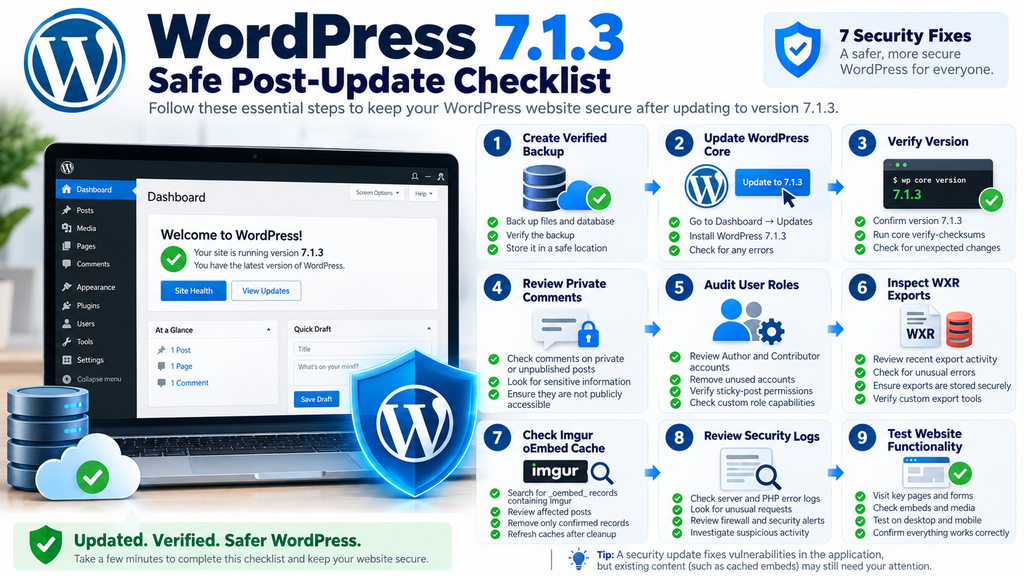
Your verification progress 0 of 10 completed. Create and verify a full website backup. Confirm WordPress Core is updated to 7.1.3. Verify Core checksumsReview private and unpublished commentsInspect pending comment moderation. Audit Author and Contributor permissionsReview recent WXR exportsInspect historical Imgur oEmbed metadataRefresh relevant cache layers. Check logs and test website functionality
Reset Copy checklist. This interactive checklist helps track manual verification. Selecting an item does not change your website.
Frequently Asked Questions
1. What is the WordPress 7.1.3 security update?
WordPress 7.1.3 is a maintenance and security release published on October 6, 2026. It contains seven security corrections and four bug fixes. The security issues involve comments, HTTP URL processing, WXR exports, user permissions, Imgur embeds, and dynamic hook behavior. WordPress recommends updating immediately because the release corrects vulnerabilities in Core functionality.
2. Is WordPress 7.1.3 an important security update?
Yes. The release addresses weaknesses that could affect confidentiality, website availability, and permission enforcement. However, the seven vulnerabilities have different prerequisites and potential consequences. Some concern publicly accessible features, while others involve specific administrative workflows or registered users. Website owners should install the update promptly and review the features relevant to their installations.
3. Can private WordPress comments become visible without authentication?
The release fixes a weakness that could disclose approved comments associated with private or unpublished posts. The problem involved comment retrieval rather than unrestricted access to the complete protected article. Updating corrects the affected Core behavior. Administrators should still review sensitive discussions and investigate historical exposure when there is a credible reason for concern.
4. Does WordPress 7.1.3 fix a SQL injection vulnerability?
Yes. The release addresses a second-order SQL injection issue in the WordPress WXR export process. The Core correction ensures that relevant post identifiers are treated as integers when constructing export queries. The vulnerability should not be interpreted as proof that every registered user could directly access the database. Its practical exploitation requirements depend on the affected workflow.
5. Are Contributor and Author accounts affected?
The official release identifies a sticky-post permission weakness involving Author-role users. It does not establish that standard Contributor accounts can exploit the same issue. Administrators should nevertheless review lower-privileged accounts, especially on websites using custom roles or publishing integrations. Effective permissions may differ from WordPress defaults when plugins modify capabilities.
6. Why are Imgur embeds a security concern?
WordPress 7.1.3 corrects an XSS issue involving Imgur embeds by removing built-in Imgur oEmbed provider support. The concern involves how embedded content can be processed and displayed, not the assumption that every Imgur image is malicious. Administrators should inspect existing Imgur embeds and verify whether older cached responses remain relevant to their websites.
7. Can Imgur oEmbed cache entries survive the update?
Yes, previously stored oEmbed metadata may remain in the database after WordPress Core is updated. Removing provider support does not necessarily delete historical cached records. The presence of an old record does not automatically mean it remains exploitable. A targeted inspection helps determine whether cleanup is appropriate.
8. Should I delete all WordPress oEmbed cache records?
Generally, no. Broad deletion can affect legitimate embedded content and cause unnecessary regeneration of cached responses. Administrators should identify relevant Imgur records, inspect their associated posts, and remove only confirmed obsolete entries when justified. Always create a verified backup before modifying database records.
9. How can I verify that WordPress 7.1.3 is installed?
Open Dashboard → Updates and check the installed WordPress version. Administrators with SSH access can also run wp core version through WP-CLI. The command wp core verify-checksums can help confirm Core file integrity. After verifying the installation, test essential website functions and review any unexpected errors.
10. Do older WordPress versions receive these security fixes?
WordPress announced security backports for eligible older branches, extending through the WordPress 4.7 branch where necessary. Backport availability can vary, and the official project emphasizes that only the latest WordPress release is actively supported. Administrators should prefer the current stable version whenever their hosting environment and website compatibility allow.
Building a Safer WordPress Website After 7.1.3
The WordPress 7.1.3 security update illustrates why effective website protection involves more than preventing unauthorized logins. A website can expose information through comment retrieval, process unsafe content inside administrative interfaces, or mishandle stored values during legitimate database operations. Permission checks also matter because lower-privileged users should not be able to influence editorial decisions outside their assigned responsibilities. These weaknesses affect different parts of WordPress, but they share a common lesson: every feature that handles information or performs an action must enforce the appropriate security boundaries.
Two areas deserve particular attention after this release. Private comments should remain protected by the visibility rules of their associated posts, and historical Imgur oEmbed records should not be assumed safe or automatically removed without inspection. Installing WordPress 7.1.3 addresses the reported Core vulnerabilities, while targeted verification helps administrators understand their own website’s exposure. A consistent process involving backups, updates, permission reviews, cache inspections, and functional testing provides a dependable foundation for long-term WordPress security.
⚠️ Disclaimer and Source Hygiene
This article is provided for educational and informational purposes. It summarizes the WordPress 7.1.3 security release using official WordPress documentation, public Core changes, and established application-security principles. The examples are illustrative and should not be interpreted as confirmed exploitation incidents. The practical impact of any vulnerability depends on the affected website, its configuration, available permissions, and surrounding security controls.
Website owners should create verified backups before updating software or modifying database records. Database queries and administrative commands should be reviewed by someone familiar with the relevant hosting environment. If a website may have been compromised or sensitive information may have been exposed, consult a qualified WordPress security professional. Official security advisories and technical documentation should be checked for subsequent corrections or clarifications.
📚 Sources and References
Official WordPress Release Announcement
WordPress.org – WordPress 7.1.3 Maintenance and Security Release
Published October 6, 2026. This primary source confirms the seven security fixes, four maintenance fixes, reporting credits, update recommendation, and security backport policy. Read the official WordPress 7.1.3 announcement.
WordPress Core Technical Changes
WordPress Core Trac – Changeset 64143
This official changeset documents the security backports to WordPress 6.8, including integer validation in WXR exports, strengthened sticky-post permissions, comment visibility corrections, dynamic hook restrictions, Imgur oEmbed removal, and HTTP URL handling improvements. Review WordPress Core Changeset 64143.
Official WordPress Release Archive
WordPress.org – Release Archive
The official archive confirms WordPress version history and provides information about available release packages.
View the official WordPress release archive.
WordPress Core Backport Details
WordPress Core Trac – Changeset 64145
Documents the corresponding security backport changes for the WordPress 6.6 branch. Review WordPress 6.6 security backports.
🕊️ Secondary Sources and Testimonials
Independent Research and Responsible Disclosure
The official WordPress announcement credits security researchers and organizations for responsibly reporting the vulnerabilities, including Trail of Bits, Anthropic, Patchstack researcher Ananda Dhakal, Zhengyu Liu, Jingcheng Yang, Gavin Zhong, and members of the WordPress Security Team. Their findings contributed to the coordinated release of the security corrections.
The technical explanations in this article are based primarily on the official release and publicly available Core changes. No independently verified exploitation testimonials or confirmed website compromises are presented. The hypothetical examples are intended to explain how security boundaries can fail and how administrators can evaluate the risks responsibly.
Sign in with a Subscriber account to vote.