
Table of Contents
A reported critical ComboBlocks vulnerability has raised urgent concerns for WordPress administrators. Learn what is currently known about the reported hook-injection risk, how to verify your installed version, safely obtain the patched release, investigate suspicious activity, and protect your website when automatic updates are delayed.
WordPress security incidents become especially difficult when administrators know a patched version should exist but cannot yet see it inside the normal Plugins screen. That situation can create an uncomfortable gap between learning about a serious vulnerability and actually deploying the update.
The reported ComboBlocks vulnerability deserves particular attention because the security concern involves unauthenticated interaction with WordPress hook-related functionality. Unlike a minor administrative bug, a flaw that can potentially expose application behavior to requests from unauthenticated visitors deserves prompt investigation.
However, administrators should also avoid acting on incomplete technical information. Public vulnerability records for ComboBlocks contain several documented security issues across different releases, including stored cross-site scripting, authorization problems, information exposure, privilege escalation, and object-injection vulnerabilities. Security advisories therefore need to be matched carefully to the correct CVE and plugin version.
At the time of writing, publicly searchable authoritative sources do not consistently corroborate every detail currently circulating about CVE-2024-11080, the reported hook-injection behavior, and ComboBlocks 2.3.33. Administrators should consequently verify the advisory against the vendor, WordPress.org, and established vulnerability databases before relying on a single report.
That uncertainty does not mean doing nothing. If your website uses ComboBlocks, now is a good time to identify the installed version, create a backup, inspect security logs, verify administrator accounts, and determine whether a newer trusted release is available.
The goal should be simple: patch quickly when a verified security update exists, while treating possible compromise as a separate issue that an update alone cannot solve.
Security priority: If you run an affected ComboBlocks release, do not assume that installing an update automatically proves the website is clean. Patch the vulnerability first, then perform a focused security review.
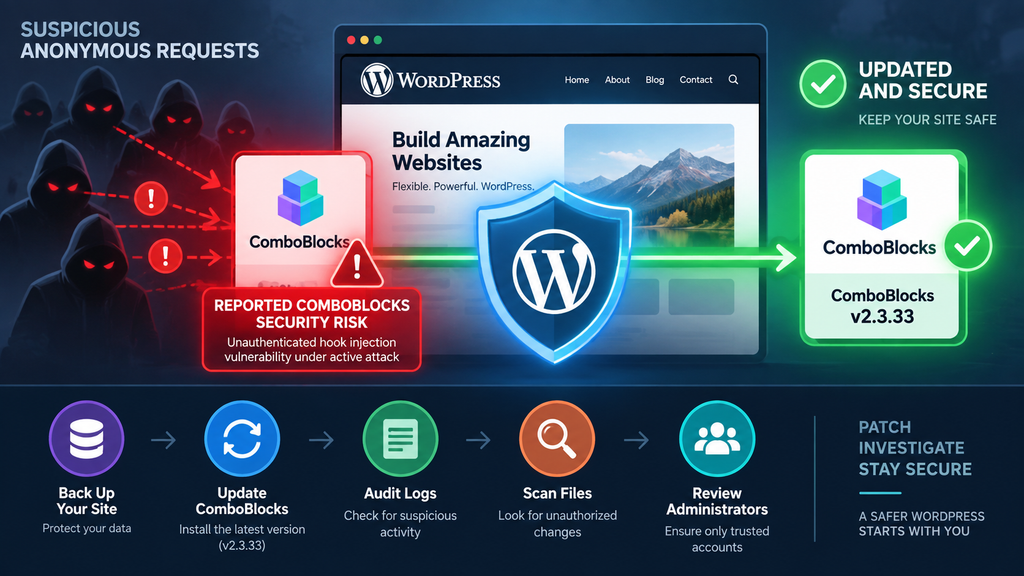
What Is CVE-2024-11080
CVE identifiers provide a standardized way to track publicly disclosed security vulnerabilities. They help hosting companies, security products, developers, and website administrators identify the same flaw without depending entirely on different product names or advisory titles. That makes accurate CVE attribution particularly important.
CVE-2024-11080 has been associated in some reports with a serious security issue affecting ComboBlocks. The reported concern centers on insufficient protection around functionality capable of interacting with WordPress hooks. If such functionality becomes accessible without appropriate authorization, the security implications can be substantial because hooks form a fundamental part of how WordPress executes plugin and theme behavior.
There is an important verification issue, however. At publication time, authoritative public sources searchable for ComboBlocks do not consistently corroborate the combination of CVE-2024-11080, the reported hook-injection mechanism, and version 2.3.33 as the security fix. Administrators should therefore avoid treating unverified technical details as established facts.
This distinction matters because ComboBlocks has had other confirmed vulnerabilities. Public security records document previous issues affecting the plugin, including stored cross-site scripting and an unauthenticated privilege-escalation vulnerability in earlier versions. Those are separate security issues and should not be confused with the reported hook-injection problem.
Why a WordPress Hook Issue Can Be Serious
WordPress depends heavily on actions and filters. Plugins register functions against hooks so WordPress can perform tasks when particular events occur. This architecture powers everything from page rendering and authentication to content processing and administrative functionality.
A hook is not inherently dangerous. In fact, hooks are one of the most important features of the WordPress development model. The security problem appears when untrusted external input can influence which hooks or callbacks execute without sufficient validation, authorization, or strict allowlisting.
An attacker should never be able to turn a public request into arbitrary access to privileged application behavior. Plugin developers therefore need to enforce clear boundaries between functionality intended for visitors and internal functionality intended only for trusted code or authenticated administrators.
This is why reports involving unauthenticated hook injection deserve investigation even before a website owner sees obvious symptoms.
Do Not Confuse This With Every ComboBlocks Vulnerability
ComboBlocks has existed across many versions, and several unrelated security findings have been published over time. A warning mentioning the plugin name alone does not prove that every ComboBlocks installation has the same vulnerability.
For example, public Wordfence records document stored cross-site scripting vulnerabilities affecting older releases. Other records document an unauthenticated privilege-escalation issue affecting versions 2.2.85 through 2.3.3. These findings have their own CVE identifiers, affected ranges, and patches.
Administrators should therefore record four details whenever responding to a vulnerability alert: the exact plugin name, installed version, CVE identifier, and patched version stated by the authoritative advisory.
Mixing information from different vulnerabilities can lead to unnecessary panic or, worse, a false belief that an exposed installation has already been fixed.
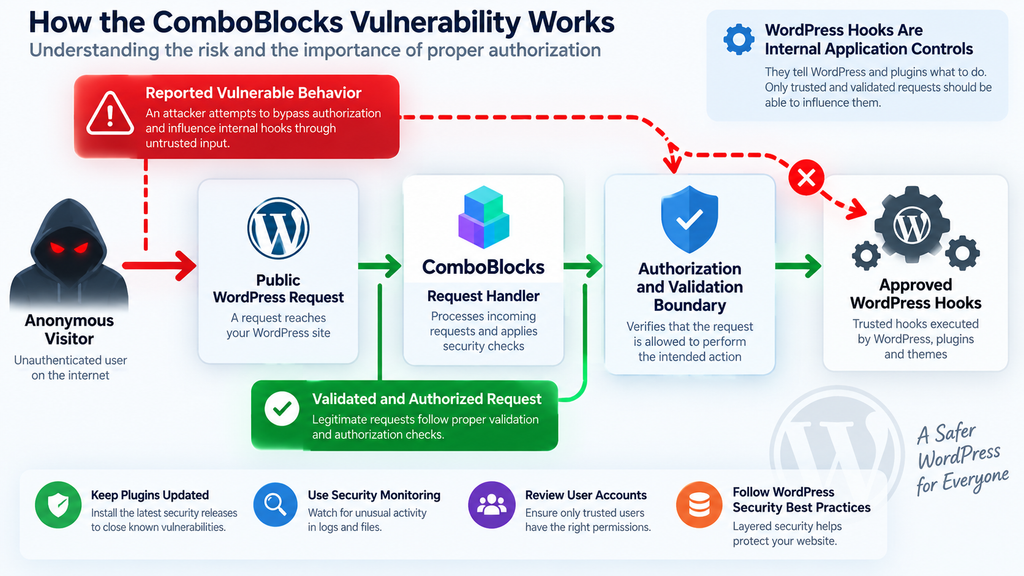
How Unauthenticated Hook Injection Works
WordPress uses hooks as internal connection points between WordPress core, plugins, and themes. Developers attach functions to actions when they want something to happen at a particular stage. They use filters when they want to modify information before WordPress continues processing it.
Normally, visitors never receive unrestricted control over this system. A public request may trigger predefined WordPress functionality, but the application decides what code executes. Security controls should prevent the visitor from freely selecting privileged internal behavior.
A reported hook-injection vulnerability changes that trust relationship when attacker-controlled input can improperly influence internal hook execution. The danger depends heavily on which callbacks are reachable and what those callbacks can do.
For defensive purposes, website owners do not need exploit instructions to understand the problem. Imagine a building where visitors can press a reception bell. That is expected behavior. The security failure occurs if the same public button can somehow activate internal controls that were designed only for authorized employees.
Authentication Is the Critical Boundary
An unauthenticated vulnerability means an attacker may not need a WordPress account before attempting to reach the vulnerable functionality. That characteristic can dramatically increase exposure because every internet-accessible installation becomes a potential target.
Attackers can automate scanning across large numbers of websites. They do not necessarily need to know whether a particular company uses ComboBlocks before beginning. Automated requests can identify sites, probe exposed functionality, and move quickly between targets.
Consequently, administrators should not judge risk based only on website popularity. A small personal blog can receive automated malicious traffic just as easily as a commercial website because internet scanning is inexpensive and highly automated.
The correct response is to reduce exposure, install the verified security release, and investigate suspicious activity rather than waiting for visible damage.
Why We Are Not Publishing Exploit Requests
A defensive security guide does not need to reproduce operational exploit requests, callback names, malicious parameters, or weaponized examples. Those details provide little additional value to ordinary WordPress administrators while making abuse easier.
Website owners should focus instead on observable evidence. Review unusual POST activity, repeated requests toward plugin-related functionality, unexpected PHP files, recently created administrator accounts, modified plugins, scheduled tasks, and unexplained database changes.
Security teams can also compare traffic against firewall detections and verified indicators supplied by trusted security vendors.
That approach helps defenders investigate a possible compromise without turning a remediation guide into an exploitation manual.
Which ComboBlocks Versions Are Vulnerable
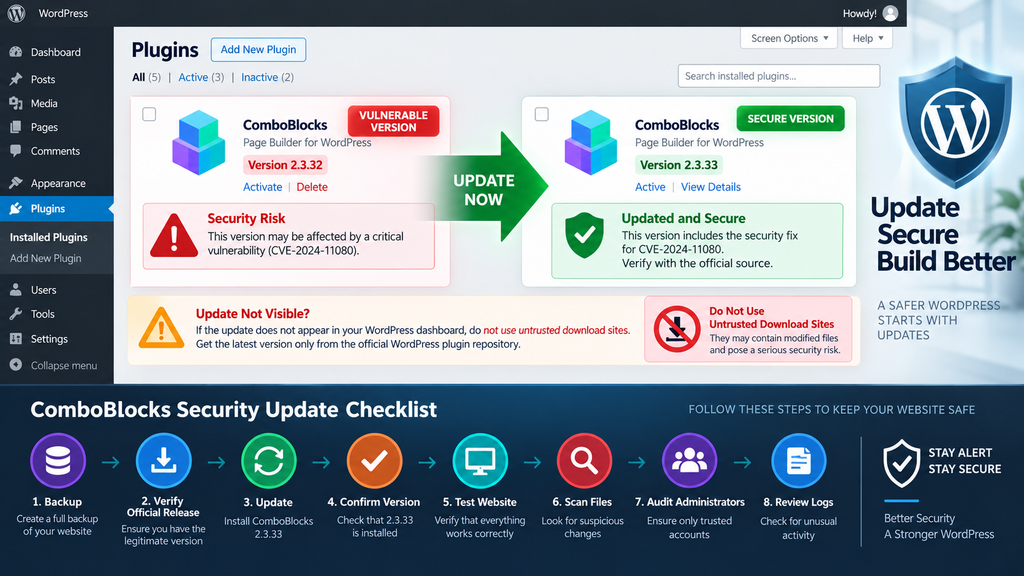
Version identification should be the first practical step for every administrator investigating the ComboBlocks vulnerability. Do not rely on memory or assume that automatic updates have kept every WordPress installation current.
Open Plugins → Installed Plugins in WordPress and locate ComboBlocks, which has also been distributed under names associated with Post Grid and Gutenberg blocks. Record the exact version displayed by WordPress before making changes.
Administrators with command-line access can also obtain installed plugin information through WP-CLI. This is particularly useful when maintaining many WordPress installations because version checks can be performed without opening each dashboard individually.
Whatever method you choose, keep a record of the version discovered during the investigation. That information becomes useful later when reviewing logs and establishing the period during which the website may have been exposed.
Why Version Numbers Need Careful Verification
Public vulnerability databases show that ComboBlocks has experienced several security fixes over its lifetime. For example, Wordfence documents a stored XSS issue fixed in version 2.2.87 and another Accordion-related XSS issue addressed in a subsequent release.
Other ComboBlocks security findings have affected later branches. This history demonstrates why the phrase “ComboBlocks is vulnerable” is not precise enough for incident response.
The exact version determines which known weaknesses may apply.
The reported hook-injection issue discussed here is said to be addressed by version 2.3.33. However, because that specific mapping is not consistently reflected across authoritative public records currently available, administrators should independently verify the release before manually installing any package.
Never download a supposed security update from an unknown mirror simply because its version number looks correct.
What If WordPress Does Not Show the Update?
WordPress update availability is not always instantaneous. Repository synchronization, caching, metadata refreshes, staged releases, hosting controls, and other infrastructure factors can affect when an update becomes visible.
First, refresh Dashboard → Updates and check again. Then verify the plugin’s official WordPress.org listing or the developer’s official distribution channel.
If the developer confirms that a patched release exists but WordPress still does not offer it automatically, obtain the package only through an official and verifiable source.
A delay in the dashboard is not a reason to install ZIP files from third-party download websites.
If no verified patched package can be obtained, temporarily disabling the affected plugin may be the safer choice when the website can function without it. For high-risk production environments, discuss temporary mitigation with the hosting or security provider.
Evidence of Active Exploitation
A vulnerability and an exploited vulnerability are not the same thing. Vulnerability disclosure establishes that a weakness exists. Active exploitation means attackers have actually started using that weakness against websites in real-world conditions.
Claims of active exploitation deserve strong evidence. Security researchers may observe malicious requests across protected websites, identify recurring attack infrastructure, recover malware from compromised installations, or detect consistent exploitation patterns in firewall telemetry.
For the reported ComboBlocks issue discussed here, administrators should verify current exploitation claims against a dated advisory from a recognized security provider. Public information changes quickly, and threat activity observed today may be very different from activity recorded when an initial disclosure appeared.
Even so, waiting for a successful compromise is never a sensible way to confirm risk.
Warning Signs Worth Investigating
One of the first places to inspect is the WordPress Users screen. Look for unfamiliar administrator accounts, unexpected changes to existing accounts, or privilege changes that nobody on the team remembers authorizing.
Next, examine recently modified files. Unexpected PHP files inside uploads directories deserve attention because normal media uploads generally should not introduce executable PHP. Modified plugin files, altered theme files, unfamiliar must-use plugins, and unexpected files near WordPress core should also be investigated.
Database changes matter as well. Attackers sometimes create persistence through options, scheduled events, injected content, or manipulated user metadata rather than leaving an obvious standalone malware file.
Server access logs can provide another piece of the timeline. Repeated requests to unusual WordPress routes, bursts of POST requests, unfamiliar user agents, and concentrated traffic around the suspected exploitation period may justify deeper investigation.
None of these signals alone proves that CVE-2024-11080 was exploited. They are indicators that deserve analysis.
Updating Does Not Remove Existing Persistence
This principle is crucial during any WordPress incident.
A security update changes vulnerable application code. It does not automatically remove malicious administrator accounts, backdoors, altered scheduled tasks, injected database entries, compromised credentials, or files created before the update.
Imagine repairing a broken lock after someone has already entered a building. The new lock prevents the same entry method from working again, but it does not tell you whether someone remains inside.
Treat patching and compromise assessment as two connected but separate jobs.
After updating, perform a security scan, compare files with trusted originals, review administrators, inspect logs, examine scheduled tasks, and rotate credentials if there is credible evidence that sensitive access may have been exposed.
Updating ComboBlocks to Version 2.3.33

If the developer or a trusted vulnerability advisory confirms ComboBlocks 2.3.33 as the corrected release for the issue affecting your installation, updating should become the immediate priority.
Create a fresh backup first. The backup should cover both the WordPress database and website files. Store it somewhere that is not dependent entirely on the same WordPress installation.
Then check Dashboard → Updates and Plugins → Installed Plugins. If WordPress offers the verified patched version, use the standard update mechanism and confirm that the installation completes successfully.
Afterward, reload the Plugins page and verify the version number. Do not assume that clicking the update button guarantees success. File-permission errors, interrupted requests, hosting limits, or deployment systems can occasionally prevent an update from finishing correctly.
When Version 2.3.33 Does Not Appear Automatically
This is where administrators need to remain careful.
If a security advisory says a corrected version exists but WordPress does not show it, confirm the information through the plugin’s official distribution channel. Repository metadata can sometimes lag behind a release announcement, while caches may delay what an individual installation displays.
Do not search the general web for “ComboBlocks 2.3.33 download” and install the first ZIP archive you find. Unofficial plugin archives create an entirely separate supply-chain risk.
When a verified official package is available, experienced administrators can use WordPress’s plugin upload/replacement workflow or their normal deployment system to install it. Back up the website first and confirm that the downloaded package genuinely comes from the trusted project source.
If you cannot verify the package, waiting with the vulnerable functionality publicly exposed is also undesirable. Temporarily deactivate the plugin where operationally possible and consult the developer, hosting provider, or security vendor.
Verify the Website After Updating
A successful version change is only the first checkpoint.
Open pages that rely on ComboBlocks and verify that grids, blocks, forms, filters, popups, or other components continue functioning correctly. Clear page caches, persistent object caches, CDN caches, and generated assets where appropriate.
Then run a fresh malware and integrity scan.
Check WordPress administrator accounts and compare them against the expected team list. Review plugins and themes for anything unfamiliar. Examine recently modified files and verify that WordPress core matches official checksums where practical.
Finally, preserve relevant logs instead of immediately deleting them. If suspicious activity appears later, those records may help establish when the incident began and what the attacker attempted.
Auditing WordPress After Suspicious Hook Calls
Finding suspicious requests in server or firewall logs should trigger investigation, not immediate assumptions. Automated scanners regularly send malicious-looking requests that fail. A blocked attack does not automatically mean the website was compromised.
Start by preserving the evidence. Save relevant web server, firewall, CDN, authentication, and WordPress security logs before normal log rotation removes them.
Establish a timeline around the earliest suspicious request. Then look for events that occurred immediately afterward. New administrator creation, plugin installation, file modification, password changes, scheduled tasks, and unexpected outbound activity become much more meaningful when they line up chronologically.
Avoid deleting suspicious files before documenting them if you are investigating a serious compromise. Their timestamps, locations, hashes, and contents may help determine what happened.
Review Administrator Accounts and Capabilities
Navigate to Users → All Users and filter for administrators. Every account should have a known owner and legitimate reason for possessing administrator privileges.
Do not stop at obviously strange usernames. A sophisticated compromise may modify an existing account instead of creating a conspicuous new one.
Check account creation dates where records are available, recent password changes, email-address changes, privilege modifications, and unexpected application passwords.
Sites using membership, WooCommerce, learning-management, community, or custom-role plugins need additional care because roles and capabilities can be modified outside the default WordPress interface.
If you identify an unauthorized administrator, treat the website as compromised rather than simply deleting that account and moving on.
Inspect WordPress Files
Compare WordPress core files against known-good originals. WP-CLI checksum verification is particularly useful for identifying modifications to files distributed with WordPress core.
Plugins should also be compared with trusted releases whenever possible. Unexpected modifications inside an official plugin can indicate malware, although legitimate customizations can also produce differences.
Pay special attention to locations attackers commonly abuse for persistence. The uploads directory should not normally contain arbitrary executable PHP. The must-use plugins directory deserves inspection because MU plugins load automatically. Active theme files also require attention because injected PHP can execute through normal page requests.
Do not forget the web root. Unexpected files placed alongside wp-config.php, wp-login.php, or other familiar WordPress files can be easy to overlook.
Review WP-Cron and Scheduled Actions
Persistence does not always require a suspicious file that executes continuously. Attackers can sometimes abuse scheduled mechanisms to restore malicious changes after administrators remove them.
Review WordPress cron events for unfamiliar callbacks and unusual schedules. WooCommerce websites should also inspect Scheduled Actions because legitimate stores can contain many thousands of scheduled tasks.
Context matters. Do not delete a cron event simply because its name looks unfamiliar. Identify which plugin or theme owns it first.
A security investigation should distinguish unfamiliar legitimate behavior from genuinely unauthorized behavior. Blind cleanup can break production functionality while leaving the actual compromise untouched.
Examine the Database
WordPress stores far more than posts in its database. Configuration settings, active plugins, user capabilities, widget content, scheduled information, transients, and plugin-specific data can all become relevant during incident response.
Inspect suspicious recently changed options, unexpected administrator metadata, unknown active plugins, and unexplained content injections.
Be particularly cautious with serialized values. Editing serialized WordPress data manually can corrupt values when string lengths change.
Database investigation is therefore an area where backups and professional assistance become especially valuable.
Review Server and Firewall Logs
Access logs help answer three questions: when suspicious activity started, what parts of the website were targeted, and what happened afterward.
Search the suspected time window rather than trying to read an enormous log from beginning to end. Compare suspicious requests with file timestamps, administrator changes, security alerts, and other events.
A Web Application Firewall can provide useful context because it may classify known attack patterns before requests reach WordPress.
However, a firewall should complement patching rather than replace it. Vulnerable software should still be updated even when a WAF appears to block known exploitation attempts.
Rotate Credentials When Compromise Is Credible
If the investigation reveals credible evidence of unauthorized access, credential rotation should form part of containment.
Change WordPress administrator passwords and hosting control-panel credentials. Review SFTP, SSH, database, deployment, CDN, and other privileged credentials according to the scope of the incident.
Regenerating WordPress security salts can invalidate existing sessions, which is useful when unauthorized sessions may remain active.
Do not perform credential changes from a workstation that you reasonably suspect may itself be compromised. In a serious incident, the security of the administrator’s computer is part of the trust chain.
Frequently Asked Questions
Is CVE-2024-11080 confirmed as a ComboBlocks vulnerability?
Some current reports associate this identifier with ComboBlocks and a hook-related security issue. However, authoritative public vulnerability sources searchable at the time of writing do not consistently corroborate that exact mapping. Verify the CVE against the developer and established vulnerability databases before publishing highly specific technical claims.
Is ComboBlocks 2.3.33 the patched version?
Version 2.3.33 has been cited as the corrected release in reports about this issue. Because authoritative public records do not currently provide consistent confirmation of that mapping, verify the release through the official ComboBlocks distribution channel before manually installing it.
What should I do if version 2.3.33 does not appear in WordPress?
Refresh WordPress update information and check the official plugin source. If the verified release still does not appear, contact the developer or hosting provider. Never install a security update from an unknown third-party plugin download website.
Should I deactivate ComboBlocks while waiting?
If your installed version is confirmed vulnerable and no trusted patched release is currently obtainable, temporary deactivation can reduce exposure when your website can operate without the plugin. Test the impact first because pages depending on ComboBlocks may lose functionality.
Does updating ComboBlocks prove my website is clean?
No. Updating closes the vulnerable code path addressed by the patch. It cannot automatically remove persistence or unauthorized changes created before the update.
What should I check after seeing suspicious requests?
Preserve logs and review administrator accounts, recently modified files, plugins, themes, uploads, MU plugins, WordPress cron events, database changes, and security scanner results.
Does a malicious request in my log mean WordPress was hacked?
Not necessarily. Logs frequently contain automated probes that fail or are blocked. Investigate whether the suspicious request was followed by successful changes or other indicators of compromise.
Should PHP files exist inside wp-content/uploads?
Some specialized plugins can create unusual directory structures, so context is important. However, unexpected executable PHP files inside normal media-upload locations deserve immediate investigation.
Is a WordPress firewall enough protection?
No. A WAF can block many malicious requests and provide valuable logs, but it should not replace installing security patches. Keep WordPress core, plugins, and themes updated.
What should I do if I confirm a compromise?
Contain the website, preserve evidence, patch the vulnerable software, identify and remove persistence, audit accounts, rotate affected credentials, verify clean files or backups, rescan the environment, and monitor closely afterward. Consider professional incident-response assistance for business-critical websites.
A Patch Is Only the Beginning
The ComboBlocks vulnerability highlights a broader WordPress security lesson. A vulnerability can become especially challenging when disclosure, exploitation reports, repository metadata, and update availability do not all arrive at exactly the same time.
Website owners should respond methodically rather than panic. Determine the installed version, verify the vulnerability information, create a backup, obtain patches only from trusted sources, and reduce exposure if a verified update cannot immediately be installed.
Most importantly, separate patching from incident response. Installing ComboBlocks 2.3.33, if confirmed as the appropriate security release, addresses the vulnerable software. It does not establish whether someone previously exploited the weakness.
Review logs, administrators, WordPress files, uploads, MU plugins, cron events, database changes, and security alerts after any credible exploitation attempt. If you find evidence of unauthorized modification, treat the situation as a compromise and perform a complete cleanup rather than relying on the update alone.
Careful verification is equally important. ComboBlocks has multiple documented vulnerabilities, so CVE numbers, affected versions, and fixes should never be mixed between unrelated advisories.
⚠️ Disclaimer and Source Hygiene
This article provides defensive WordPress security information for website owners and administrators. It does not provide exploitation instructions, malicious payloads, or operational attack procedures.
Security information can change quickly as vendors, CVE authorities, WordPress.org, and security researchers publish new findings. Verify the affected version and patched release against current authoritative sources before making production changes.
The specific association between CVE-2024-11080, ComboBlocks hook injection, and version 2.3.33 should be independently verified because currently searchable authoritative records do not consistently corroborate all three details.
Always create tested backups before modifying a production website. If you discover evidence of compromise or manage a business-critical installation, consider consulting your hosting provider or a qualified WordPress security professional.
🔔 For more tutorials like this, consider subscribing to our blog.
📩 Do you have questions or suggestions? Leave a comment or contact us!
🏷️ Tags: ComboBlocks vulnerability, CVE-2024-11080, ComboBlocks security, WordPress vulnerability, WordPress security, ComboBlocks 2.3.33, WordPress plugin security, WordPress malware scan, WordPress incident response, WordPress security update
📢 Hashtags: #ComboBlocks, #WordPressSecurity, #WordPress, #CyberSecurity, #WordPressVulnerability, #WebsiteSecurity, #PluginSecurity, #WordPressUpdates, #MalwareProtection, #WebSecurity
Sources and References
Wordfence Intelligence
Wordfence’s public vulnerability database documents multiple historical security vulnerabilities affecting the plugin distributed under the Post Grid/ComboBlocks family. These records are useful for distinguishing individual vulnerabilities by CVE, affected version, severity, and patched release.
The database documents, among other findings, stored cross-site scripting vulnerabilities affecting earlier ComboBlocks versions and other security findings affecting later releases.
WordPress.org
The official WordPress.org plugin repository should be one of the primary places administrators use to verify currently distributed plugin releases, changelog information, and available updates.
For security updates, administrators should prefer the normal WordPress update mechanism or another verified official distribution channel rather than third-party ZIP archives.
CVE and Vulnerability Databases
CVE identifiers should be verified against authoritative vulnerability records before technical details from separate advisories are combined. This is particularly important when a plugin has experienced multiple vulnerabilities over several versions.
Secondary Sources and Testimonials
Security-vendor research, hosting-provider alerts, firewall telemetry, and reports from affected website administrators can provide valuable secondary evidence of exploitation.
However, anecdotal reports should not replace technical verification. An administrator seeing an unusual request cannot determine from that request alone whether exploitation succeeded.
Likewise, finding an unfamiliar file does not automatically establish which vulnerability created it. Incident responders should correlate server logs, file timestamps, user changes, database activity, firewall events, and the website’s historical plugin versions before attributing a compromise to a particular CVE.
The safest approach is evidence-based: verify the vulnerability, patch from a trusted source, preserve logs, investigate the website, remove unauthorized persistence if discovered, rotate affected credentials, and continue monitoring after recovery.
2 thoughts on “Critical ComboBlocks Vulnerability Is Under Active Attack”