
Table of Contents
A critical Super Forms vulnerability is being actively exploited against WordPress websites. CVE-2026-14894 allows unauthenticated arbitrary file uploads that can lead to remote code execution. Site owners should update Super Forms immediately and inspect their WordPress installation for suspicious PHP files, backdoors, and unexpected changes.
WordPress administrators using Super Forms should treat CVE-2026-14894 as an immediate security issue rather than another vulnerability to place on an update list. The flaw affects Super Forms – Drag & Drop Form Builder versions up to and including 6.3.313. Security researchers classify the vulnerability as critical because an attacker does not need an authenticated WordPress account to reach the vulnerable functionality. More importantly, exploitation has moved beyond theoretical risk. Security monitoring has identified real attacks against WordPress websites running vulnerable versions of the plugin.
The vulnerability allows an unauthenticated attacker to abuse the plugin’s form-processing functionality to upload files that should never be accepted by a WordPress form. If the server permits those files to execute, an arbitrary upload can become remote code execution. That distinction matters. Updating the plugin closes the known vulnerable path, but an update cannot automatically remove a backdoor that an attacker uploaded before the patch was installed. Administrators who operated Super Forms 6.3.313 or earlier should therefore perform two separate tasks: patch the plugin and investigate whether the website was already compromised.
The urgency increased substantially after reports of active exploitation appeared. According to reporting based on Wordfence telemetry, exploitation was observed beginning July 14, 2026, shortly after public disclosure, and the Wordfence Firewall has blocked more than 250,000 exploit attempts targeting the vulnerability. The affected plugin was estimated to have roughly 13,000 active installations. Those numbers demonstrate why administrators should not assume that a small or low-traffic website is unlikely to receive malicious requests. Automated campaigns commonly scan large numbers of WordPress websites without caring how popular each individual site is.
For administrators, the safest response is straightforward. Confirm whether Super Forms is installed, identify the installed version, update to version 6.3.314 or a later secure release, and then investigate the filesystem and administrative environment. Particular attention should be paid to unexpected executable files in directories that normally contain media or generated content. Server and security logs can also help establish whether suspicious requests or unexpected file changes occurred while the vulnerable plugin version was installed.
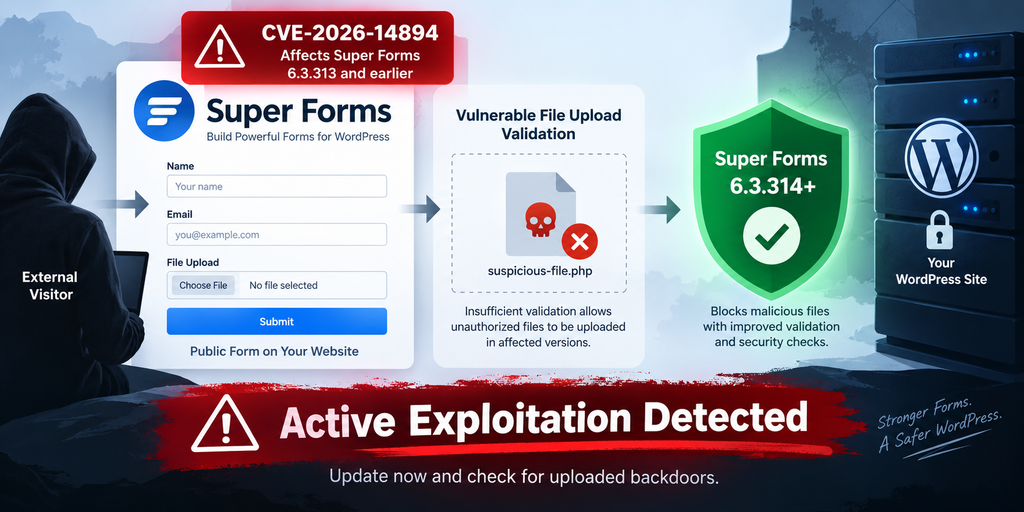
What Is CVE-2026-14894
CVE-2026-14894 is an unrestricted file-upload vulnerability affecting the Super Forms – Drag & Drop Form Builder plugin for WordPress. The official CVE information identifies Super Forms versions through 6.3.313 as affected. Version 6.3.314 contains the security correction. The vulnerability has a CVSS 3.1 score of 9.8 out of 10 in the NVD record, placing it firmly in the critical category. The associated weakness is CWE-434, Unrestricted Upload of File with Dangerous Type.
The problem exists in the plugin’s form-submission functionality. According to the vulnerability description, the affected implementation lacked sufficient file-type validation and did not require an appropriate WordPress capability check before processing the vulnerable operation. That combination created a dangerous situation. A public-facing form handler could process data supplied by somebody who did not have a WordPress account, while the server-side checks were not strong enough to guarantee that only safe file types reached storage.
A normal WordPress form may accept documents, photographs, PDFs, or other files depending on its configuration. Secure upload handling must verify what a file actually contains rather than trusting information supplied by the browser. Filename extensions, MIME declarations, and client-controlled metadata alone cannot provide a sufficient security boundary. Server-side validation must decide whether the submitted file type is permitted and where that file may safely be stored.
CVE-2026-14894 became especially serious because the vulnerable operation was accessible through unauthenticated AJAX functionality. WordPress plugins frequently use AJAX actions to provide interactive features without reloading an entire page. There is nothing inherently insecure about that architecture. However, any action exposed to unauthenticated visitors must enforce its own authorization, validation, and security controls. Public accessibility dramatically increases risk when one of those controls fails.
The CVE description states that the affected submit_form functionality lacked both adequate file-type validation and a capability check. A session nonce existed as a barrier, but that nonce did not provide meaningful authorization because another public plugin function could provide the necessary session context to an unauthenticated visitor. Therefore, the vulnerability should not be interpreted as requiring an attacker to steal an administrator nonce or compromise a legitimate user account first.
This distinction is essential for risk assessment. Some WordPress vulnerabilities require an administrator to click a malicious link. Others require a Subscriber, Contributor, Author, or Editor account. CVE-2026-14894 falls into a much more dangerous category because the documented attack path does not require normal WordPress authentication. A remote visitor can potentially reach the vulnerable workflow directly.
The CVSS vector reinforces that assessment. The vulnerability is network-accessible, requires low attack complexity, requires no privileges, and requires no user interaction. Its potential impact includes confidentiality, integrity, and availability. In practical terms, successful remote code execution could allow an attacker to move beyond a single form submission and interact with the compromised hosting environment under the permissions available to the web server.
That does not mean every exploitation attempt automatically produces complete server takeover. Hosting configuration, filesystem permissions, PHP execution rules, security software, and other controls can affect the final outcome. However, administrators should not rely on those variables as a substitute for patching. The vulnerability creates a route for attacker-controlled files to reach the server, which is enough to justify immediate remediation.
There is another reason administrators should take this CVE seriously. Super Forms has previously had security issues, including an older arbitrary file-upload vulnerability. The current CVE is a separate vulnerability and should not be confused with historical flaws. When reviewing security alerts or scanner results, verify that the finding specifically references CVE-2026-14894 and the affected 6.3.313-or-earlier version range.
Administrators who no longer actively use Super Forms should not leave an outdated copy installed merely because its forms are not currently visible. If a plugin is unnecessary, removing it reduces the site’s attack surface. If the plugin remains necessary, keep it on a supported and patched release and include it in normal vulnerability monitoring.
How Attackers Obtain the Required Nonce
One detail that can initially make CVE-2026-14894 appear less dangerous is the presence of a nonce. WordPress nonces are commonly used to help protect actions from unwanted or forged requests. However, a nonce should not be treated as authentication or authorization by itself. Its security value depends on how it is generated, who can obtain it, what action it protects, and what additional permission checks occur on the server.
In the vulnerable Super Forms workflow, the nonce requirement did not stop unauthenticated exploitation. The official vulnerability description explains that a separate unauthenticated plugin endpoint could establish the required session context and provide a valid nonce to a public visitor. Therefore, an attacker did not need to compromise an administrator session, steal cookies, or persuade a logged-in user to visit a malicious page.
From a defensive perspective, this is the important point: the nonce was obtainable through functionality available to visitors who were not logged into WordPress. Once the expected session state existed, the vulnerable form-submission functionality could be reached without a normal WordPress privilege check.
This situation illustrates an important WordPress development principle. A nonce verifies request context and intent in certain workflows, but it should not replace current_user_can() or another appropriate authorization mechanism when an operation requires privileges. Developers also need strict server-side validation for file operations regardless of whether a nonce is present.
For administrators, there is no practical benefit in trying to hide the affected AJAX functionality or relying on obscurity. Attackers operating automated scanners can identify vulnerable software and reproduce public attack paths at scale. The correct defense is to remove the vulnerable code by updating Super Forms.
A web application firewall can provide another defensive layer. It may recognize known malicious request patterns and block them before WordPress processes the request. However, WAF protection should remain a supplementary control. Rules can miss modified attacks, configuration can vary between websites, and a site may have been attacked before a relevant rule was deployed.
Wordfence reported releasing a firewall rule for its Premium, Care, and Response users on July 14, 2026. Free users reportedly received that protection on August 13 after the normal delay. This protection is useful, but administrators should still verify the Super Forms version installed on their site rather than assuming a firewall makes the vulnerable plugin safe to leave unchanged.
Security teams should also avoid interpreting the presence of nonce-related requests in isolation as proof of compromise. Legitimate Super Forms activity can create expected requests. A stronger investigation correlates multiple signals: vulnerable plugin exposure, unusual form activity, suspicious file creation, requests to newly created files, modified WordPress code, unknown administrator accounts, and unexpected outbound connections.
The objective is not simply to identify whether somebody attempted exploitation. Internet-facing WordPress sites routinely receive automated probes. The more important question is whether any attempt succeeded and left persistent access behind.
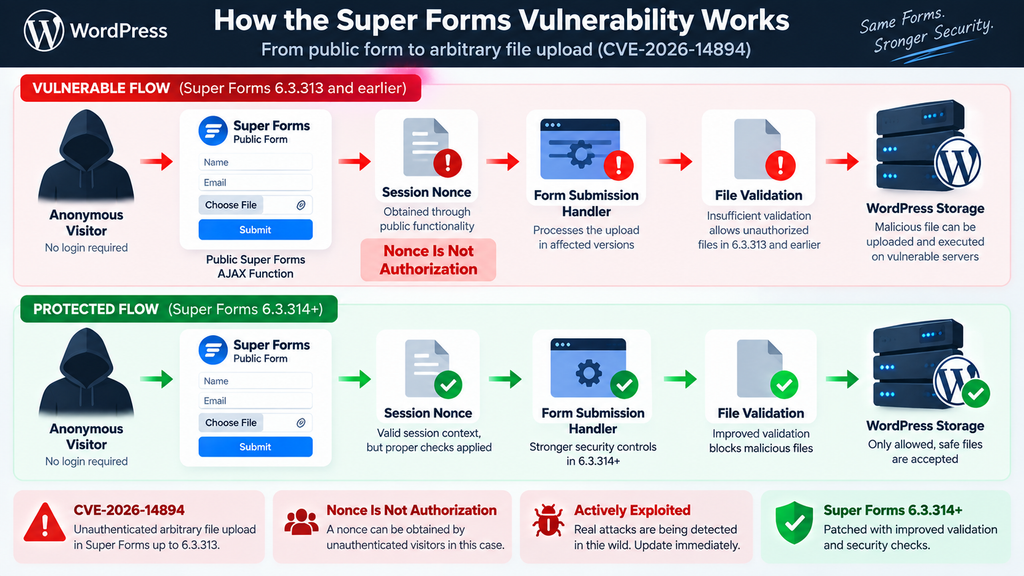
How Arbitrary File Upload Leads to RCE
An arbitrary file upload vulnerability becomes especially dangerous when the attacker can place executable content somewhere the web server will process it. WordPress normally stores uploaded media under wp-content/uploads, although plugins can create their own directories and temporary storage locations. Images and documents stored there are generally harmless because the server serves them as static files. Executable server-side content creates a very different risk.
Imagine a legitimate contact form that accepts an image. A visitor submits a JPEG, the server validates the file, assigns a safe filename, stores it in an appropriate directory, and records the submission. That is the expected workflow. Now imagine that the validation stage fails to distinguish an allowed image from attacker-controlled executable content. The attacker may be able to place a dangerous file on the server.
The upload itself is only one part of the security problem. Remote code execution becomes possible when the hosting environment subsequently interprets the uploaded content as executable code. The exact behavior depends on the web server, PHP configuration, filesystem location, and security restrictions. For that reason, vulnerability advisories often describe arbitrary upload as potentially leading to RCE rather than claiming every environment will behave identically. NVD specifically notes that executable files may be uploaded, making remote code execution possible.
Once an attacker gains code execution within a WordPress environment, the consequences can extend well beyond the vulnerable plugin. Malicious code running with the web server’s permissions may read WordPress configuration information, inspect database credentials available to the application, modify PHP files, create persistence mechanisms, inject spam, alter pages, redirect visitors, or attempt to create unauthorized WordPress accounts.
A compromised site may continue to look completely normal from the front end. This is why visual inspection is not enough. Sophisticated backdoors are often designed to remain quiet until the attacker sends a particular request. Others hide among legitimate WordPress files or use innocent-looking names. Attackers may also alter existing files instead of creating obviously suspicious new ones.
Persistence is particularly important when responding to CVE-2026-14894. Updating Super Forms prevents the known vulnerable code from being exploited again, but it does not reverse actions already performed by an attacker. If malicious PHP was uploaded yesterday and the plugin is patched today, that malicious file may still be accessible tomorrow.
Attackers can also use an initial foothold to create secondary persistence. For example, a compromise may lead to unauthorized administrator accounts, modified plugins, altered themes, injected scheduled tasks, modified .htaccess rules, unfamiliar must-use plugins, or changes inside writable directories. Therefore, searching only for one uploaded file can provide false reassurance.
A proper incident review should examine the broader WordPress installation. Compare WordPress core files with clean copies from the official release. Review plugin and theme directories for unexpected modifications. Inspect wp-content/uploads and other writable locations for executable extensions or unusual files. Check wp-content/mu-plugins because must-use plugins load automatically and can be overlooked during normal plugin review.
Administrators should also review the WordPress Users screen for unfamiliar Administrator accounts. Existing accounts deserve attention too. Attackers sometimes modify legitimate users instead of creating obvious new ones. Check recent password resets, email-address changes, role changes, and unexplained login activity where logging is available.
Database integrity also matters. Malicious JavaScript, redirects, spam links, and injected options can survive even after malicious filesystem content is removed. Review unexpected changes to important site settings and inspect security scanner findings rather than assuming the compromise was limited to the initial upload.
Hosting accounts containing multiple WordPress installations deserve extra attention. If several sites share the same account and permissions allow cross-site writes, compromise of one application can potentially threaten neighboring installations. Investigators should determine the boundaries of the hosting account before declaring remediation complete.
Backups provide another useful reference. Comparing the current filesystem with a known-good backup from before the vulnerable exposure can reveal new or modified files. However, restoring an old backup without patching Super Forms first can simply restore the vulnerable version and reopen the attack path.
The safest sequence is containment, patching, investigation, cleanup, credential rotation when compromise is suspected, and continued monitoring. Each stage addresses a different part of the incident.
Evidence of Active Exploitation
CVE-2026-14894 is no longer a vulnerability administrators should evaluate solely by its theoretical severity score. Reports published in early September 2026 indicate that attackers have been actively targeting vulnerable Super Forms installations in the wild. Wordfence-linked reporting states that exploitation activity began on July 14, 2026, only days after disclosure.
The scale is notable. Wordfence telemetry reportedly recorded more than 250,000 blocked exploit attempts against the vulnerability. The figure represents blocked attempts rather than 250,000 successfully compromised websites, which is an important distinction. Nevertheless, it demonstrates substantial automated interest in the flaw and shows why administrators cannot safely assume their website is too obscure to attract attackers.
Mass exploitation changes the response calculation. Before public exploitation begins, administrators sometimes prioritize vulnerabilities based on site configuration and exposure. Once attackers automate exploitation, every internet-accessible installation running the affected software becomes a potential target.
Automated attacks are inexpensive for attackers. A bot can scan large address ranges, fingerprint WordPress installations, test for known vulnerable components, and move on quickly when a target does not respond as expected. This process does not require an attacker to know the website’s owner or even understand its content.
The exploitation timeline is also relevant during forensic review. Administrators should not restrict log searches to September simply because widespread reporting appeared then. If the vulnerable Super Forms version was present in July or August, investigation should cover that earlier exposure period as well. Reports place observed exploitation as early as July 14.
A site that updated in August may therefore have closed the vulnerability while still retaining an artifact uploaded during July. This is one reason vulnerability scanners and update dashboards cannot provide a complete incident verdict. They can confirm that vulnerable software is no longer present, but they generally cannot prove that the website was never compromised.
Security logs should be reviewed for unusual requests involving Super Forms and for subsequent access to unfamiliar files. Investigators should pay attention to clusters of activity rather than isolated requests. A suspicious form-related request followed shortly afterward by access to a newly created PHP file would deserve substantially more attention than a generic bot request that received an error.
Filesystem timestamps can also help build a timeline. Newly created PHP files appearing during the vulnerable period should be investigated. Timestamps are not perfect forensic evidence because they can be altered, copied, or affected by deployment processes, but they provide useful leads when combined with logs.
Unexpected modifications to index.php, theme functions, plugin files, .htaccess, wp-config.php, or files inside writable directories deserve investigation. Administrators should distinguish legitimate changes caused by WordPress updates, plugin updates, cache regeneration, backups, and optimization tools from changes that have no known administrative explanation.
Outbound behavior can provide another signal. Compromised websites sometimes generate spam, make unfamiliar remote requests, redirect visitors, or contact external infrastructure. Hosting-provider alerts about unusual CPU usage, outbound mail, malware, or account suspension should not be dismissed as unrelated if the site operated a vulnerable Super Forms release.
Search-engine symptoms may appear as well. Unexpected indexed pages, pharmaceutical spam, gambling spam, foreign-language doorway pages, or strange titles in Google results can indicate a broader WordPress compromise. Those symptoms are not specific to CVE-2026-14894, but they can help reveal that an initial foothold led to additional malicious modifications.
Administrators using a security plugin should review historical detections rather than only running a new scan. Previous alerts about modified files or suspicious uploads may provide evidence that predates the Super Forms update.
Server-level security logs can be even more valuable. Hosting control panels, WAF services, reverse proxies, and CDN providers may retain requests that WordPress itself never recorded. Retention periods vary, so administrators investigating an older exposure should export useful logs before they expire.
If clear compromise indicators appear, treat the website as an incident rather than simply a vulnerable plugin installation. Preserve relevant evidence before deleting suspicious files, especially on commercial or business-critical websites where understanding the compromise timeline may matter.
Updating Super Forms to Version 6.3.314

The primary remediation for CVE-2026-14894 is updating Super Forms to version 6.3.314 or a later secure version. Multiple vulnerability databases identify 6.3.314 as the patched release, while versions up to and including 6.3.313 are affected.
Before updating a production website, create a reliable backup of the database and filesystem. A backup should not become an excuse to delay a critical security update, but it provides a recovery point if compatibility problems occur. Verify that the backup can actually be restored and is stored somewhere an attacker who compromises the website cannot easily overwrite.
Open the WordPress Plugins screen and locate Super Forms – Drag & Drop Form Builder. Check the displayed version rather than assuming automatic updates have already handled the problem. If the version is 6.3.313 or earlier, the site should be considered exposed to CVE-2026-14894 until a patched version is installed.
Update to version 6.3.314 or, preferably, the newest stable secure version available from the legitimate plugin distribution channel. Installing a later supported release is generally preferable when additional maintenance and security fixes have been published since 6.3.314.
After the update completes, verify the version again. Do not rely solely on a successful-update notification. Caching, filesystem permission problems, failed deployments, or unusual hosting configurations can occasionally leave software in an unexpected state.
Test important forms after updating. Confirm that contact forms, upload fields, email notifications, conditional logic, payment integrations, and other Super Forms features used by the website continue to operate correctly. Functional testing matters because administrators sometimes roll back security updates after discovering a compatibility issue. Rolling back to a vulnerable version would restore the known security risk.
If immediate updating is impossible because of a compatibility problem, disabling and removing the vulnerable plugin is safer than leaving a known critical vulnerability publicly accessible. Administrators should coordinate with their developer or hosting provider to restore necessary form functionality using a secure configuration.
A WAF can provide temporary defense, but it should not replace the plugin update. Patchstack, for example, identifies the vulnerability as known to be exploited and recommends updating to 6.3.314 or later.
Once the update is installed, clear relevant caches where appropriate. This step is primarily operational rather than a vulnerability fix. The critical change occurs in the server-side plugin code. Still, clearing application or opcode caches may help ensure the hosting environment is consistently executing the updated code.
Next, record the remediation time. This timestamp becomes useful during log analysis. Investigators can divide activity into pre-patch and post-patch periods and identify suspicious events that occurred while the vulnerable version was present.
Do not stop after confirming the new version. If the site ran 6.3.313 or earlier after July 14, the reported start of observed exploitation, a compromise review is strongly justified. Even sites protected by a WAF benefit from verification because security controls reduce risk rather than creating absolute certainty.
Administrators managing many WordPress websites should search their fleet for the Super Forms plugin slug and installed version. Central management platforms, WP-CLI inventory systems, hosting dashboards, or vulnerability scanners can help identify forgotten installations. Staging sites and old subdomains should be included because they are often less carefully maintained while remaining publicly accessible.
Remove abandoned copies of the plugin. A deactivated plugin does not execute normally through WordPress, but keeping unnecessary software on a production server adds clutter and can complicate incident response. Removing unused code also makes future inventory and integrity checks easier.
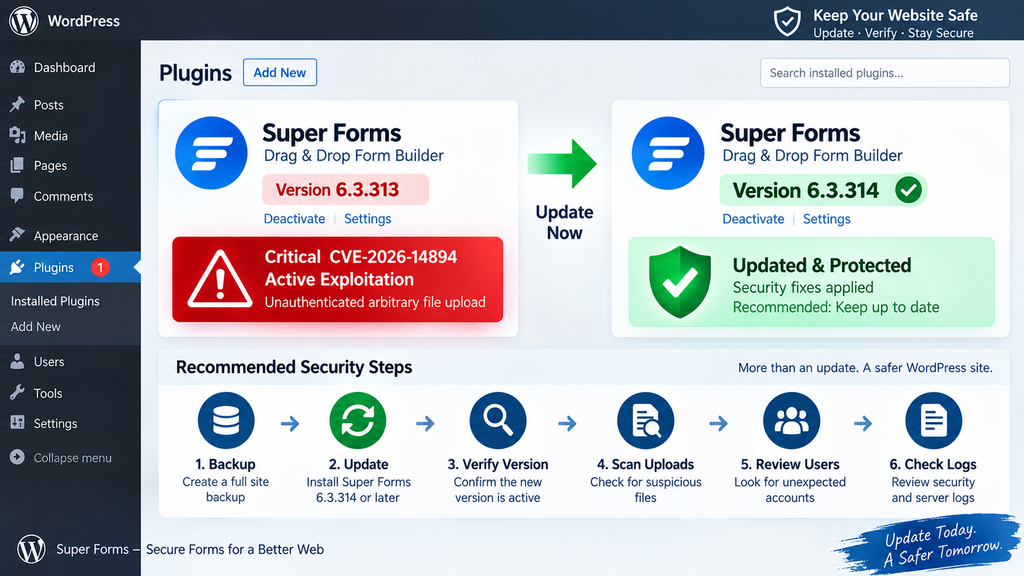
Searching WordPress for Uploaded Backdoors
Updating Super Forms closes the known vulnerability, but incident response must answer a different question: did an attacker upload anything before the update? Administrators who ran an affected release during the exploitation period should inspect their WordPress installation for unexpected executable files and other persistence mechanisms.
Start with a complete backup or forensic copy when compromise is genuinely suspected. Deleting suspicious files immediately can destroy information that would help establish what happened. Business-critical sites may benefit from assistance from a WordPress security specialist, hosting provider, or incident-response professional before cleanup begins.
The WordPress uploads area deserves particular attention because it is designed to be writable. Normal WordPress media directories mostly contain images, PDFs, videos, audio files, and documents. PHP files appearing unexpectedly in media-oriented directories deserve investigation. However, do not automatically delete every unusual file without determining whether a legitimate plugin created it.
Look beyond the standard uploads directory. Plugins can create their own storage, cache, temporary, export, backup, or generated-file directories. The correct investigation therefore examines the entire writable area associated with the WordPress installation rather than relying on a single folder.
Review files created or modified during the period when the vulnerable Super Forms release was installed. Compare those timestamps with WordPress updates, plugin deployments, theme changes, backup operations, and other legitimate administrative activity. Unexplained executable files appearing during the exposure window should receive priority.
Integrity checking is extremely useful. WordPress core files can be compared against known-good official versions. Many security tools can identify core modifications automatically. Plugin and theme files can also be compared with clean copies when their source packages are available.
Do not assume that a backdoor must have an obvious filename such as backdoor.php. Attackers commonly prefer names that resemble legitimate WordPress, cache, image, or plugin files. Conversely, unusual filenames are not proof of malware. Context, content, creation time, ownership, and request history should all contribute to the decision.
Inspect wp-content/mu-plugins carefully. Must-use plugins load automatically and do not behave exactly like ordinary plugins in the WordPress administration interface. An unfamiliar file in this directory deserves explanation.
The active theme should also be reviewed. Theme files such as functions.php execute as part of normal WordPress operation and therefore provide an attractive persistence location after compromise. Compare theme code against a known clean copy whenever possible.
Standard plugin directories need the same treatment. An attacker who gains execution may modify an existing plugin instead of leaving the original uploaded file as the only persistence mechanism. Reinstalling legitimate plugins from trusted sources can sometimes provide a cleaner remediation path than manually editing suspicious code.
Review the WordPress Users screen next. Identify every account with Administrator privileges and confirm that each one is legitimate. Check other privileged roles as well. Unexpected account creation, role elevation, email-address changes, or password resets can indicate activity following initial compromise.
Inspect scheduled tasks where practical. WordPress cron events are used legitimately by many plugins, but an unfamiliar scheduled action can provide persistence or trigger unwanted behavior. Server-level cron jobs should also be checked when the administrator has hosting access.
Review .htaccess, web-server configuration, and PHP configuration for unexplained changes. Attackers sometimes alter request handling or execution rules. Because these files are also legitimately modified by caching, security, redirect, and optimization plugins, compare suspicious changes with known administrative activity.
The database should not be ignored. Search for unexpected site URLs, injected scripts, unfamiliar administrator data, suspicious options, modified widgets, and unexplained content. A filesystem cleanup alone may leave malicious database content intact.
Access logs can help determine whether suspicious files were actually requested. If an unknown PHP file appeared during the vulnerable period and external clients subsequently requested it, the probability of compromise becomes much higher. Preserve relevant log entries before retention policies remove them.
Security-plugin logs and WAF records can provide additional context. A blocked attempt does not equal a compromise, while an allowed suspicious request followed by a filesystem change deserves investigation. Correlating several independent signals produces a more reliable conclusion than relying on one scanner alert.
If malware is confirmed, rotate credentials after the environment has been cleaned. This may include WordPress administrator passwords, hosting control-panel credentials, SFTP or SSH credentials, database passwords, and relevant API secrets. WordPress authentication salts should also be regenerated so existing login sessions are invalidated.
Credential rotation should occur at the correct point in the response. Changing passwords while an active backdoor remains on the server can expose the new credentials or allow the attacker to regain access immediately.
Review other websites hosted under the same account. Shared hosting permissions can sometimes allow a compromise to spread between applications. A clean primary WordPress installation provides little reassurance if another site in the same account still contains attacker-controlled code.
After cleanup, continue monitoring. Watch for new files, unexpected administrator creation, modified plugins, outbound spam, unusual redirects, unexplained traffic, and repeated security alerts. Persistence sometimes becomes visible only after the obvious malicious file has been removed.
For sites with no evidence of compromise, the process still has value. It establishes a clean baseline after the vulnerability and confirms that the response went beyond simply pressing the Update button.
A Practical Response Checklist for Super Forms Site Owners
The fastest safe response begins with determining whether Super Forms is installed and whether the website ever ran version 6.3.313 or earlier. If the answer is yes, update immediately to 6.3.314 or a later secure version. Sites that cannot update should disable the affected plugin until a secure release can be installed.
Next, determine the exposure window. Check backups, deployment records, update logs, or management dashboards to establish when the vulnerable version was installed and when the patched version replaced it. If exposure overlapped with the period of reported exploitation beginning July 14, 2026, perform a deeper compromise review.
Search writable directories for unexpected executable files. Review recently modified WordPress files and compare core, plugin, and theme code against trusted originals. Examine Administrator accounts, scheduled jobs, must-use plugins, configuration files, and database changes.
Then correlate suspicious findings with available access logs. Look for requests associated with unusual form activity and subsequent access to unexpected files. Do not publish attacker IP addresses as definitive indicators without context because compromised systems, proxies, and rotating infrastructure can make IP-based attribution unreliable.
If a compromise is confirmed, preserve evidence, remove malicious persistence, reinstall affected components from trusted sources, rotate credentials, regenerate authentication salts, and verify neighboring websites on the same hosting account.
Finally, keep monitoring after remediation. A successful cleanup should produce a stable environment with no unexplained file changes, unknown privileged users, unexpected redirects, or recurring malware detections.
Why Updating Alone May Not Be Enough
Software updates solve vulnerable-code problems. They do not automatically solve historical compromises. This distinction is one of the most important lessons from an actively exploited arbitrary file-upload vulnerability.
Suppose a website ran Super Forms 6.3.313 during July. An attacker exploited the upload weakness and placed a persistent file on the server. The administrator updates to 6.3.314 in September. The original vulnerable upload route is now closed, but the previously uploaded file can remain untouched because it exists outside the updated plugin code.
The same principle applies if the attacker used the initial access to modify another plugin, create an administrator, alter a theme, or inject database content. Updating Super Forms does not know which unrelated changes were legitimate and which were malicious, so the update cannot safely reverse them.
This is why administrators should separate vulnerability remediation from compromise remediation. The first asks, “Is the vulnerable code still present?” The second asks, “What happened while the vulnerable code was present?”
A vulnerability scanner can answer much of the first question. File integrity monitoring, logs, malware scanning, user auditing, and forensic review help answer the second.
This approach avoids two dangerous extremes. One is panic, where every vulnerable installation is automatically declared compromised. The other is complacency, where updating is assumed to prove the site was never compromised. Neither conclusion is justified without evidence.
The appropriate response is evidence-based. Patch immediately because exploitation is confirmed. Then investigate proportionally based on exposure, available telemetry, the site’s importance, and any suspicious indicators.
Frequently Asked Questions
What is the Super Forms vulnerability CVE-2026-14894?
CVE-2026-14894 is a critical arbitrary file-upload vulnerability in Super Forms – Drag & Drop Form Builder for WordPress. It affects versions up to and including 6.3.313. Insufficient file validation and missing authorization controls can allow unauthenticated attackers to place dangerous files on vulnerable servers.
Which Super Forms versions are vulnerable?
Super Forms versions through 6.3.313 are identified as vulnerable. Version 6.3.314 contains the security fix. Administrators should preferably install the newest stable secure release available rather than intentionally remaining on an older release once newer supported versions exist.
Is CVE-2026-14894 being actively exploited?
Yes. Security reporting published in September 2026 states that exploitation was observed beginning July 14, 2026. Wordfence telemetry reportedly blocked more than 250,000 attempts targeting the vulnerability. A blocked attempt does not mean a site was compromised, but the activity confirms that attackers are actively interested in the flaw.
Does an attacker need a WordPress account?
The vulnerability is classified as unauthenticated. The documented vulnerable workflow does not require an attacker to possess a normal WordPress user account before reaching the affected functionality. This significantly increases the risk compared with vulnerabilities that require Subscriber, Editor, or Administrator access.
Does the Super Forms nonce prevent exploitation?
Not in the affected versions. The CVE description explains that the required session nonce could be obtained through functionality accessible to unauthenticated visitors. A nonce should also not be considered a substitute for authorization and strict server-side validation.
Can the vulnerability lead to remote code execution?
Yes, under conditions where an uploaded attacker-controlled file can be executed by the server. NVD describes the flaw as allowing files that may be executable to be uploaded, making remote code execution possible. Hosting configuration and filesystem execution policies can influence the final impact.
Is updating Super Forms enough?
Updating is essential, but administrators who operated a vulnerable release should also investigate for compromise. An attacker may have uploaded a persistent backdoor before the update. Installing 6.3.314 closes the known vulnerability but does not automatically remove unrelated malicious files already present on the server.
Where should I search for suspicious files?
Review WordPress writable directories, especially upload and plugin-created storage locations, for unexpected executable files. Also inspect themes, plugins, must-use plugins, configuration files, scheduled tasks, and other areas that could have been modified after an initial compromise. Compare suspicious files with clean, trusted copies whenever possible.
Should I delete Super Forms if I do not use it?
Yes. If Super Forms is no longer required, removing the plugin reduces unnecessary attack surface. If you still depend on it, keep it updated to a supported secure version and monitor future security advisories.
What should I do if I find a backdoor?
Treat the website as compromised. Preserve useful evidence, contact your hosting provider or a qualified WordPress security professional if necessary, identify and remove all persistence, reinstall affected software from trusted sources, review users and databases, and rotate relevant credentials after the environment is clean.
The Security Lesson WordPress Owners Should Take Away
CVE-2026-14894 demonstrates how quickly a plugin vulnerability can move from disclosure to widespread automated attack activity. Super Forms versions through 6.3.313 contain a critical arbitrary file-upload weakness, and version 6.3.314 provides the documented fix. Reports of active exploitation mean administrators should prioritize remediation rather than waiting for a routine maintenance window.
The most important action is to update. The second is to verify. Websites that ran the vulnerable version during the exploitation period deserve a filesystem and account review even if they now report a secure plugin version. An update proves that the known vulnerable code has been replaced; it does not prove that nothing happened before replacement.
WordPress security works best as a layered process. Timely updates reduce exposure. A WAF can block known attack patterns. Strong permissions can limit consequences. File integrity monitoring can reveal unexpected modifications. Backups provide recovery options, while access logs help reconstruct suspicious activity.
No single layer is perfect. Together, however, these controls make exploitation harder to achieve, easier to detect, and less damaging when something goes wrong.
For Super Forms users, the immediate priority is clear: confirm the installed version, move to 6.3.314 or later, and inspect previously exposed installations for uploaded backdoors and other unauthorized changes.
⚠️ Disclaimer and Source Hygiene
This article is provided for educational, defensive cybersecurity, and WordPress administration purposes. It does not provide exploit payloads, weaponized requests, malicious code, or instructions for compromising websites. Technical behavior can vary according to WordPress configuration, hosting architecture, PHP settings, server permissions, security controls, and plugin versions.
Security information in this article is based on authoritative vulnerability records and reputable security research available at the time of publication, including NVD, WPScan, Patchstack, Rapid7, and reporting associated with Wordfence telemetry. Vulnerability records can be updated as researchers learn more about exploitation or affected configurations. Administrators should verify the latest vendor and security advisories before making production decisions.
If you believe a website has already been compromised, consider consulting your hosting provider or a qualified WordPress security professional. Business-critical incidents may require professional forensic investigation rather than routine malware cleanup.
🔔 For more tutorials like this, consider subscribing to our blog.
📩 Do you have questions or suggestions? Leave a comment or contact us!
🏷️ Tags: Super Forms vulnerability, CVE-2026-14894, WordPress vulnerability, Super Forms security, WordPress security, arbitrary file upload, WordPress malware, WordPress backdoor, remote code execution, WordPress plugin security
📢 Hashtags: #SuperForms, #WordPressSecurity, #CVE202614894, #WordPress, #CyberSecurity, #WordPressVulnerability, #WebsiteSecurity, #WordPressMalware, #PluginSecurity, #WebSecurity
Sources and References
National Vulnerability Database (NVD): CVE-2026-14894 is documented as a critical unrestricted file-upload vulnerability affecting Super Forms through version 6.3.313. The NVD record assigns a CVSS 3.1 score of 9.8 and identifies CWE-434 as the associated weakness.
WPScan Vulnerability Database: WPScan identifies Super Forms versions below 6.3.314 as affected and lists version 6.3.314 as the fixed release.
Patchstack: Patchstack identifies versions through 6.3.313 as vulnerable, version 6.3.314 as patched, and marks the vulnerability as known to be exploited.
Rapid7 Vulnerability Database: Rapid7 rates CVE-2026-14894 as critical with a CVSS 3.1 score of 9.8 and recommends updating Super Forms to 6.3.314 or a newer patched release.
Wordfence-related exploitation reporting: Reporting published September 3, 2026 states that exploitation was observed beginning July 14 and that the Wordfence Firewall had blocked more than 250,000 exploit attempts targeting the vulnerability.
Secondary Sources and Testimonials
Independent vulnerability databases and security services broadly agree on the central defensive facts surrounding CVE-2026-14894: Super Forms 6.3.313 and earlier are affected, the weakness involves unauthenticated arbitrary file upload, successful exploitation can potentially result in remote code execution, and administrators should update to version 6.3.314 or later.
The active-exploitation reports make post-update verification especially important. Administrators should therefore view the plugin update as the beginning of incident verification rather than the final step whenever a website remained exposed during the known attack period.
1 thought on “Critical Super Forms Vulnerability Is Under Active Attack”