
Table of Contents
A critical Amelia WordPress vulnerability can allow an unauthenticated attacker to progress from a customer context to Amelia Manager privileges and ultimately compromise a WordPress administrator account. Learn which Premium versions are affected, how the escalation chain works, how to update safely, and what accounts administrators should audit.
The Amelia booking plugin sits at an important boundary on many WordPress websites. Visitors can interact with public booking forms, while employees, managers, and administrators use increasingly privileged interfaces behind the scenes. When the security controls separating those roles fail, a feature designed to simplify appointment management can become a path toward much broader WordPress access.
That is the concern behind CVE-2026-9055, a critical privilege-escalation vulnerability affecting Amelia Premium. The vulnerability received a CVSS 3.1 score of 9.8 out of 10, reflecting the potential for remote exploitation without prior privileges or user interaction. The published vulnerability record identifies Amelia Premium versions 8.0 through 9.6.2 as affected.
What makes this issue especially important is the escalation chain. An attacker does not need to jump directly from an anonymous visitor to WordPress administrator. Instead, the weakness can allow privileges to increase in stages. A customer context can become an Amelia Manager context, and that newly obtained position can then become a route toward compromising an existing WordPress administrator account.
For site owners, the practical response is straightforward: identify the installed Amelia version, update immediately if necessary, and then investigate whether suspicious accounts or role changes appeared before the update. Installing a security patch closes the vulnerable path, but it cannot automatically reverse changes made during an earlier compromise.
What Is CVE-2026-9055
CVE-2026-9055 is a privilege-management vulnerability affecting the Premium edition of Booking for Appointments and Events Calendar – Amelia for WordPress. The published CVE record classifies the underlying weakness as CWE-269: Improper Privilege Management. In practical terms, Amelia did not sufficiently enforce the privilege boundary around information involved in customer account updates.
The security problem centers on insufficient validation of an attacker-controlled customer type. A normal booking customer should remain within the permissions associated with customers. The vulnerable workflow, however, could allow that role information to be manipulated so the customer becomes recognized as an Amelia Manager.
This distinction matters because an Amelia Manager is not simply another booking customer. Managers exist to help businesses operate appointments, employees, services, and other Amelia resources. Their position therefore carries considerably more trust than the public customer role.
The vulnerability becomes more serious because Amelia can associate its internal users and entities with WordPress users. Under the vulnerable conditions described in the CVE, the privilege change could result in creation of a WordPress user carrying the wpamelia-manager role.
At that stage, the attacker has crossed an important security boundary. The attack began from an unauthenticated position but has produced an authenticated WordPress account associated with Amelia Manager privileges.
The published vulnerability description explains that the escalation does not necessarily stop there. A second part of the vulnerable workflow can be abused to associate a provider entity with an existing WordPress administrator user ID. That relationship can ultimately result in the administrator’s password being overwritten.
The consequence is therefore much more serious than unauthorized access to appointments or customer information. Successful exploitation may lead to control of an existing WordPress administrator account.
A WordPress administrator normally has extensive control over a standard site. Depending on configuration, that may include installing plugins, changing themes, modifying users, editing site settings, accessing stored information, and introducing persistent changes. This potential impact explains why CVE-2026-9055 received a critical severity rating.
The CVSS vector published with the vulnerability is CVSS:3.1/AV:N/AC:L/PR:N/UI:N/S:U/C:H/I:H/A:H. Most WordPress administrators do not need to interpret every component. The important points are that the vulnerability is remotely reachable, has low attack complexity, requires no initial privileges, and does not require a legitimate administrator to interact with the attacker.
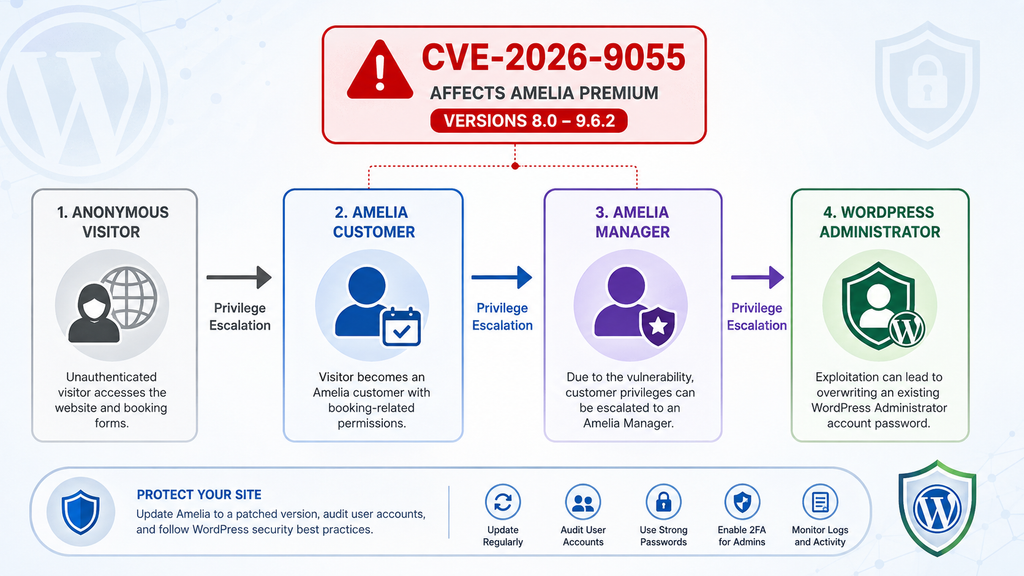
Which Amelia Premium Versions Are Affected
The affected version range is particularly important because Amelia exists in different distribution and version tracks. According to the CVE record, the vulnerable product is Amelia Premium from version 8.0 through version 9.6.2, inclusive.
That means installations running 8.0, later 8.x releases, 9.x releases before the security correction, and 9.6.2 should be considered vulnerable. Administrators should not assume that a relatively recent 9.x installation is automatically protected.
The first version outside the affected range is Amelia 9.6.3, released on July 7, 2026. Amelia’s official changelog describes 9.6.3 as containing bug fixes and security fixes and strongly recommends updating. The public CVE information identifies versions through 9.6.2 as affected, making 9.6.3 the minimum safe baseline for this specific vulnerability.
However, WordPress administrators should normally avoid updating only to the oldest patched release when newer supported releases are available. Amelia has continued receiving updates since 9.6.3.
At the time of this article, the official Amelia changelog lists version 9.8.1, released August 26, 2026. That release also includes security fixes, bug fixes, and stability improvements. Unless compatibility requirements dictate otherwise, administrators should therefore move to the latest stable release supplied through their legitimate Amelia installation and license.
Before updating, open WordPress Dashboard → Plugins and identify the installed Amelia version. Do not rely on memory, an old maintenance report, or the date when the site was last updated. Check the version currently running on the production website.
Sites maintained through staging environments deserve the same attention. A production site may have been updated while an older staging or development copy remains online and accessible from the internet. If that environment contains real WordPress users or production database copies, compromise can still create serious problems.
Administrators managing several WordPress installations should inventory all of them. Agencies sometimes maintain Amelia on customer sites with different licenses and update schedules. One neglected installation can remain vulnerable even when every other customer site has already been patched.
Backups are also important, but a backup is not a substitute for updating. A recent backup gives administrators a recovery point if an update causes an unexpected compatibility problem. It does not prevent exploitation while the vulnerable plugin remains active.
A sensible maintenance sequence is to create or verify a current backup, confirm that it can be restored, update Amelia, clear relevant application caches, and test critical booking workflows. Administrators should verify public booking forms, employee functions, payment integrations, notifications, and customer panels where applicable.
Most importantly, do not interpret a successful update as proof that the site was never compromised. If Amelia 8.0–9.6.2 was exposed publicly, the installation should receive a short post-update security audit.
Premium and Free Version Numbers Should Not Be Confused
The CVE specifically describes the Premium 8.x–9.6.2 version range. This distinction prevents administrators from incorrectly matching unrelated version numbers simply because the plugin name looks similar.
Always verify the exact edition and version installed on the website. Security decisions should be based on the affected product information in the vulnerability advisory rather than assumptions based only on a plugin’s display name.
This practice is useful beyond Amelia. WordPress products frequently have free, premium, agency, or bundled editions with different release numbers. A CVE may apply to one track without automatically applying to every edition carrying the same brand.
For CVE-2026-9055, administrators running Amelia Premium should treat any installation from 8.0 through 9.6.2 as requiring immediate attention.
How an Attacker Obtains the Manager Role
Understanding CVE-2026-9055 becomes easier when the vulnerability is viewed as a chain of broken trust boundaries rather than a single dramatic jump to administrator.
The first boundary separates an ordinary Amelia customer from an Amelia Manager. Customers need access to booking-related functionality. Managers need broader operational capabilities. Those two roles should therefore remain strictly separated by server-side authorization rules.
According to the published CVE description, insufficient validation occurs around an attacker-controlled type parameter in the customer update workflow. Under vulnerable conditions, that value can cause a customer to be treated as a manager rather than remaining within the expected customer role.
The security lesson is important. Applications cannot rely on a browser or front-end interface to decide which role values a user may submit. Even if the normal booking interface never presents a “manager” option to customers, the server must independently validate every authorization-sensitive value it receives.
Client-side restrictions improve usability, but they are not security boundaries. Attackers can construct requests independently of the normal user interface. Server-side code must therefore ask a fundamental question before applying any role change: is this authenticated identity actually authorized to request this new role?
In CVE-2026-9055, the answer could effectively be bypassed in the affected workflow.
The published description also identifies the externalId relationship as important. Under the vulnerable conditions, an external identifier value could cause Amelia to create a corresponding WordPress user with the wpamelia-manager role.
This is the moment when the problem moves beyond an internal booking-system privilege issue. The attacker can transition from an Amelia customer context into a real WordPress user context associated with Amelia Manager permissions.
That account provides the bridge required for the next stage.
From a defensive perspective, administrators do not need to reproduce the vulnerable request to understand the risk. The important investigation question is whether unexpected WordPress users with the Amelia Manager role appeared while a vulnerable plugin version was installed.
Review Users → All Users and inspect accounts carefully. Look for unfamiliar usernames, unexpected email addresses, recently created accounts, and users carrying Amelia-related roles that nobody on the team recognizes.
Do not automatically delete suspicious accounts before documenting them. If compromise is suspected, preserving timestamps, usernames, email addresses, database information, and relevant server logs may help reconstruct what happened.
The same principle applies to Amelia’s internal managers and employees. Compare the current list with the people who genuinely require access to the booking system.
Why the Intermediate Manager Stage Matters
The intermediate stage is one of the most instructive parts of this vulnerability. Many site owners focus almost exclusively on direct administrator-account creation. As a result, a lower privileged account can appear less dangerous.
CVE-2026-9055 demonstrates why that assumption can fail.
An intermediate role may have access to functions that become dangerous when combined with another weakness. Security researchers often describe this as an attack chain. One flaw creates the conditions needed to reach another privileged operation.
A manager account might not initially look equivalent to an administrator. Yet if that manager can influence the relationship between Amelia entities and WordPress users, the account can become a stepping stone toward a much more powerful identity.
Administrators investigating a suspected compromise should therefore review the complete role hierarchy rather than searching only for newly created administrator accounts.
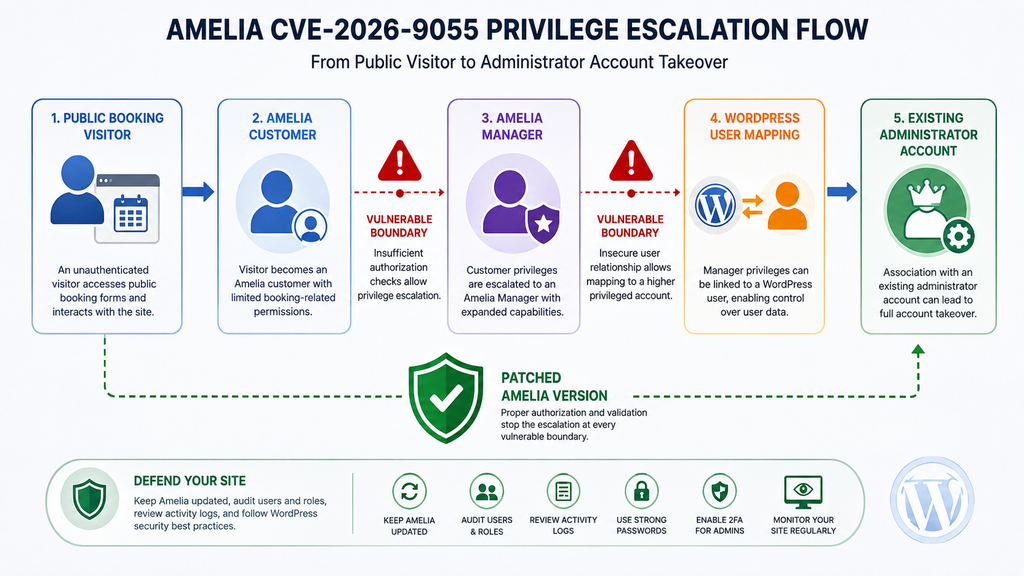
How an Administrator Password Can Be Overwritten
Obtaining Amelia Manager privileges is serious, but CVE-2026-9055 becomes critical because the published attack chain can continue toward an existing WordPress administrator.
The vulnerability description states that after reaching manager privileges, an attacker can create a provider entity associated with an administrator user ID. The vulnerable relationship between the provider and WordPress user can then allow the password belonging to that administrator account to be overwritten.
This is a crucial distinction. An attacker does not necessarily need to create a conspicuous new account named “administrator” or assign a fresh account the standard Administrator role.
Instead, the compromise can involve an administrator account that already belongs on the website.
That can make detection harder. A quick glance at Users → All Users might show the same number of administrators the owner expects. Every username may appear familiar. Yet one legitimate administrator’s password may no longer be under the legitimate owner’s exclusive control.
This is why auditing only newly created administrators is insufficient after exposure to this vulnerability.
Site owners should verify every existing administrator account. Confirm that each administrator still belongs to a known person or service. Check whether passwords were unexpectedly changed, whether users experienced unexplained login failures, and whether unusual sessions appeared around the suspected exposure period.
If compromise cannot be confidently ruled out, reset administrator passwords after patching Amelia. Use unique, strong passwords and avoid reusing credentials from other websites.
WordPress session invalidation is equally important. Changing a password helps protect future authentication, but administrators investigating an incident should also terminate existing sessions so previously authenticated sessions cannot remain active unnecessarily.
Administrators can use WordPress profile controls to log out other sessions. Security plugins or centralized identity systems may provide additional session-management options.
The next step is reviewing what an attacker could have changed after obtaining administrator access.
Check installed plugins for unfamiliar additions. Examine whether legitimate plugins were unexpectedly deactivated or replaced. Review themes and active theme files for unauthorized modifications. Inspect administrator accounts, application passwords, scheduled tasks, and other persistence mechanisms supported by the site’s environment.
Also check whether the site’s security plugin was disabled, reconfigured, or removed. An attacker who gains administrator privileges may try to reduce visibility before making additional changes.
Server-side investigation should extend beyond the WordPress Users screen. Review web server access logs, authentication logs where available, security-plugin events, hosting control-panel activity, and file modification timestamps.
Database backups can help establish a timeline. Comparing a known-clean database snapshot with the current database may reveal unexpected users, role changes, or altered account relationships.
Why Password Replacement Is More Dangerous Than a New Account
A new administrator account is often relatively easy to notice. Security plugins may generate alerts when a privileged user is created, and an unfamiliar username stands out during a manual audit.
Taking over an existing account can be quieter.
The username already exists. The Administrator role is expected. The account may even use a familiar email address. Unless the legitimate administrator notices a login problem or security monitoring detects the underlying change, the account can appear normal during a superficial inspection.
This is why incident response should focus on account integrity rather than simply account quantity.
Ask whether every privileged account is still controlled by the person who is supposed to control it. That question is much more useful than asking whether the administrator list looks familiar.
Treat Successful Administrator Access as Full Site Compromise
If evidence indicates that an unauthorized party obtained administrator access, do not limit remediation to deleting one manager account.
WordPress administrator privileges can provide extensive control over a normal installation. Depending on server configuration and plugin capabilities, an administrator may be able to install executable plugin code, modify existing components, create users, alter settings, inject scripts, redirect visitors, or establish another persistence mechanism.
A confirmed administrator takeover should therefore trigger a broader incident-response process.
Restore from a known-clean backup when appropriate, rotate relevant credentials, verify WordPress core integrity, reinstall trusted plugins and themes from authoritative sources if necessary, inspect uploads and writable directories, review scheduled jobs, and investigate hosting-level access.
Database credentials and hosting credentials may also require rotation if evidence suggests they were exposed or accessible during the compromise.
Do not assume that removing the visible account responsible for the initial escalation removes every change made afterward.
Updating Amelia to a Patched Version

The most urgent defensive action is to remove the vulnerable Amelia version from service.
CVE-2026-9055 affects Amelia Premium 8.0 through 9.6.2. Amelia 9.6.3, released July 7, 2026, falls outside that vulnerable range and its official changelog identifies a security fix.
However, 9.6.3 should be treated as the minimum patched baseline rather than the preferred destination for a new update.
Amelia has released newer versions since then. At the time of writing, the official changelog lists Amelia 9.8.1, released August 26, 2026. That release includes additional security fixes and carries the vendor’s recommendation to update immediately.
Administrators should therefore install the latest stable Amelia version available through their legitimate update channel, assuming it is compatible with the site’s environment.
Before changing production, verify that a recent backup exists. A good backup should include both WordPress files and the database because Amelia configuration, customers, appointments, users, and related information can involve database records.
For business-critical booking sites, test the upgrade on staging when practical. Confirm that booking forms load correctly and that customers can complete normal workflows.
Payment-enabled installations deserve extra testing. Verify Stripe, WooCommerce, Mollie, Square, or other configured payment workflows according to the services your site uses. Never test live payment behavior carelessly on a production environment.
Employee and customer panels should also be tested. Confirm that legitimate managers and employees can still sign in and access only the functions they need.
After the update, clear relevant page, object, CDN, and browser caches where appropriate. Caching normally does not determine whether PHP plugin code has been updated, but clearing stale assets can prevent old front-end JavaScript or CSS from creating confusing behavior during testing.
Then return to Plugins and verify the actual installed Amelia version.
Do not assume that clicking “Update” guarantees success. File-permission problems, license issues, timeouts, deployment tools, or managed-hosting restrictions can occasionally leave an installation on an older release.
What to Do If Amelia Cannot Be Updated Immediately
Leaving a known critical privilege-escalation vulnerability publicly reachable is not a good long-term workaround.
If a production site cannot immediately install the patched release because of compatibility concerns, administrators should prioritize reducing exposure while preparing the update. Depending on the website, that may mean temporarily disabling the affected plugin or restricting access to the site until testing is complete.
The correct choice depends on business requirements. A medical practice, salon, consultant, event business, or other appointment-based service may rely heavily on online booking. Nevertheless, operational inconvenience should be weighed against the potential impact of WordPress administrator compromise.
A short maintenance period is generally easier to recover from than a full security incident.
Avoid relying solely on a web application firewall as a permanent substitute for patching. WAF rules can provide useful additional protection, but application-level vulnerabilities should ultimately be fixed in the affected software.
Update WordPress and Other Components Too
While responding to CVE-2026-9055, use the opportunity to check the broader WordPress installation.
Update WordPress core to an appropriate supported release. Review every installed plugin and theme. Remove abandoned extensions that are no longer needed instead of merely leaving them inactive.
An attacker who reaches administrator privileges may look for additional weaknesses or persistence opportunities. Reducing the number of outdated components decreases the site’s overall attack surface.
Security works best as layers. Updating Amelia closes this specific vulnerability, while maintaining the rest of WordPress reduces the number of alternative paths available to an attacker.
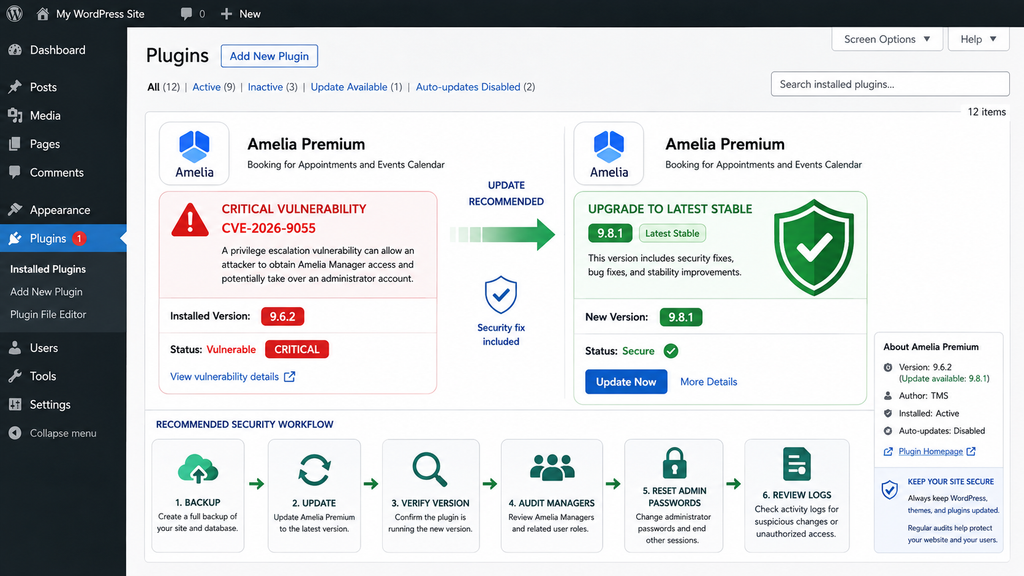
Auditing WordPress and Amelia Manager Accounts
Updating Amelia addresses the vulnerable code path, but the security process should continue with an account audit.
Start with WordPress Dashboard → Users → All Users. Filter or review accounts by role and identify every Administrator. Each administrator should correspond to a person, organization, integration, or maintenance process that the site owner recognizes.
Pay special attention to accounts that appeared recently. An unexpected creation date around the period when a vulnerable Amelia version was online deserves investigation.
Next, identify users carrying Amelia-related roles, particularly wpamelia-manager. Compare those accounts against the business’s actual staff list.
A manager should have a clear operational reason to exist. If nobody can explain who owns an account or why it requires manager privileges, treat it as suspicious until proven otherwise.
Then inspect Amelia’s own employee, manager, customer, and provider relationships through the plugin’s administrative interface. Look for unfamiliar staff entries, unexpected email addresses, duplicated personnel, strange provider associations, or records connected to WordPress users that should not be connected.
The key question is whether the current relationship between Amelia entities and WordPress accounts matches the site’s legitimate business structure.
For a small business with three employees, this review may take only a few minutes. Larger organizations should compare Amelia records against an authoritative employee or contractor list.
Reset Administrator Credentials When Exposure Cannot Be Ruled Out
Because CVE-2026-9055 can culminate in an administrator password overwrite, resetting privileged credentials is a sensible precaution when a vulnerable installation was publicly accessible and administrators cannot confidently rule out exploitation.
Generate new, unique passwords for every WordPress administrator. Do not simply add one character to the old password or reuse credentials from hosting, email, or another WordPress site.
Enable two-factor authentication for privileged accounts where possible. Two-factor authentication should not be considered a substitute for patching, but it significantly improves account security against many credential-based threats.
Invalidate existing sessions after password changes. This prevents forgotten browser sessions or potentially unauthorized sessions from remaining active.
Also review WordPress Application Passwords if the site uses them. Remove credentials that are no longer required and investigate unfamiliar entries.
Hosting, SFTP, SSH, database, CDN, and DNS credentials should be considered separately. CVE-2026-9055 does not automatically mean those credentials were exposed. However, confirmed administrator compromise may justify broader credential rotation depending on what the attacker could access afterward.
Review Logs for Suspicious Account Activity
Logs can provide context that the current WordPress dashboard cannot.
Start with your security plugin if it maintains an activity log. Look for new users, role changes, password changes, plugin installations, plugin activation or deactivation, theme modifications, settings changes, and unusual administrator logins.
Next, examine hosting or web server access logs for activity during the period when the vulnerable Amelia version was installed.
You do not need to search only for a known malicious IP address. Attackers can use many sources, and no universal IP list can prove whether a particular site was exploited.
Instead, correlate unusual requests with account events. A suspicious sequence followed by creation of an Amelia Manager, an administrator password change, or an unexpected login deserves closer examination.
Keep timestamps in mind. WordPress, PHP, the operating system, security plugins, and CDN services may record times using different time zones.
Normalize timestamps before drawing conclusions.
Check WordPress Files for Persistence
If no evidence of administrator compromise exists, a normal account and log audit may be sufficient after patching. If administrator takeover is suspected or confirmed, inspect the filesystem more thoroughly.
Verify WordPress core files against trusted originals. Unexpected modifications to core PHP files should be investigated.
Review plugins and themes. Remove abandoned copies, unused uploadable ZIP packages, and extensions obtained from untrusted sources.
Look carefully at recently modified PHP files in writable areas. WordPress’s uploads directory normally contains media and other application-generated content rather than arbitrary executable PHP scripts.
The presence of unexpected PHP files in an uploads location deserves investigation, although legitimate plugins can sometimes create unusual files. Context matters.
Scheduled WordPress tasks should also be reviewed. Attackers sometimes use scheduled mechanisms to restore deleted changes or trigger unwanted code later.
Server cron jobs require separate inspection if the incident appears broader than WordPress itself.
Check for Unexpected Changes to Site Behavior
Technical audits should be combined with normal observation.
Open the website in a private browser session. Test several pages from desktop and mobile devices. Search results and direct URLs can behave differently when malicious redirects are conditional.
Watch for unexplained redirects, new advertisements, injected scripts, unfamiliar pop-ups, browser warnings, or pages that behave differently for logged-out visitors.
Check outgoing email activity where logs are available. A compromised WordPress administrator may install tools capable of generating spam or phishing messages.
Review SEO behavior as well. Search-engine spam can introduce hidden pages, altered titles, sitemap entries, or redirects that administrators do not immediately see from the homepage.
Security incidents do not always announce themselves through a visible defacement.
A Practical Amelia CVE-2026-9055 Response Checklist
Administrators who discover Amelia Premium 8.0–9.6.2 should approach the problem in a deliberate order.
First, document the current plugin version and preserve relevant logs before making major changes. This gives you a record of the environment if investigation becomes necessary.
Create or verify a current backup, but avoid overwriting the only known-clean historical backup. Keeping several restore points can be valuable when the exact compromise date is unknown.
Update Amelia to the latest stable patched version available from the official vendor channel. Verify the installed version afterward rather than assuming the update completed.
Audit WordPress Administrator accounts and Amelia Manager accounts. Investigate anything unfamiliar.
Review Amelia providers, employees, and their relationships with WordPress users. The published vulnerability specifically makes those relationships relevant to the escalation chain.
Reset administrator passwords and terminate active sessions if the vulnerable site was exposed and exploitation cannot confidently be excluded.
Review security logs, WordPress activity logs, and server access logs. Search for suspicious account creation, password changes, role changes, plugin installation, and unusual administrative activity.
If compromise is confirmed, expand the investigation beyond Amelia. Treat unauthorized WordPress administrator access as a potentially complete WordPress compromise.
Finally, continue monitoring the website after remediation. Watch account activity, file changes, outgoing mail, traffic anomalies, and security alerts for signs of persistence.
Frequently Asked Questions
What is the Amelia WordPress vulnerability CVE-2026-9055?
CVE-2026-9055 is a critical privilege-escalation vulnerability affecting Amelia Premium for WordPress. Insufficient validation in a customer-related workflow can allow privileges to progress from a customer context to Amelia Manager and eventually toward control of an existing WordPress administrator account. The vulnerability has a CVSS 3.1 score of 9.8.
Which Amelia versions are vulnerable?
The published CVE record identifies Amelia Premium versions 8.0 through 9.6.2, inclusive, as affected. Administrators running any version within that range should update immediately.
Which Amelia version fixes CVE-2026-9055?
Version 9.6.3 is the first release outside the affected range and includes a security fix according to Amelia’s official changelog. Because newer releases are available, administrators should generally update to the latest stable Amelia version rather than stopping at the minimum patched release.
Is Amelia 9.8.1 affected by CVE-2026-9055?
No. The published affected range ends at 9.6.2. Amelia 9.8.1 is therefore outside the vulnerable range for CVE-2026-9055. The official changelog also identifies 9.8.1 as containing additional security fixes.
Does an attacker need a WordPress Administrator account first?
No. The CVE is classified as requiring no prior privileges. The significance of the vulnerability is precisely that the attack can begin without an existing privileged WordPress account and then move through the vulnerable Amelia role-management workflow.
Why is the Amelia Manager role important?
The Amelia Manager role represents an intermediate trust level between a normal booking customer and WordPress administration. CVE-2026-9055 demonstrates how access to an intermediate role can become dangerous when another privileged workflow trusts that role too broadly.
Does updating Amelia remove an attacker who already compromised WordPress?
No. Updating closes the known vulnerable path, but it does not automatically reverse actions performed before the update. Administrators should audit users, Amelia Managers, provider relationships, passwords, sessions, plugins, files, and logs after patching an exposed installation.
Should WordPress administrator passwords be changed?
If the site ran a vulnerable Amelia Premium version and exploitation cannot confidently be ruled out, changing administrator passwords is a reasonable defensive step. Administrators should also terminate existing sessions and enable two-factor authentication where practical.
What should I look for after updating Amelia?
Look for unfamiliar Amelia Manager accounts, unexpected WordPress users, unexplained administrator password changes, suspicious provider-to-user relationships, new plugins, altered themes, unusual PHP files, unexpected scheduled tasks, and abnormal administrative activity in logs.
Is deleting a suspicious Amelia Manager enough?
Not if the account may have progressed to administrator access. Once unauthorized WordPress administrator access is suspected, investigate the entire site for persistence and unauthorized changes. Removing the initial account does not guarantee that everything the attacker changed has also been removed.
Why This Vulnerability Deserves Immediate Attention
CVE-2026-9055 illustrates why privilege boundaries matter so much in modern WordPress plugins. Amelia is not merely displaying a booking calendar. It manages customers, employees, managers, providers, appointments, payments, and relationships with WordPress users. Each relationship introduces a boundary that must be enforced correctly.
The critical weakness allowed those boundaries to be crossed in sequence. A customer could reach the manager level, and manager-level capabilities could then provide a route toward an existing WordPress administrator account. That chain transforms what might initially appear to be a booking-plugin authorization problem into a potential full-site compromise.
Administrators running Amelia Premium 8.0 through 9.6.2 should update without delay. Amelia 9.6.3 represents the minimum patched baseline for this CVE, while the vendor has since released newer versions. Installing the latest stable supported version provides the better long-term approach.
Patching is only half of the response. Sites that were exposed while vulnerable should audit WordPress administrators, Amelia Managers, providers, sessions, passwords, logs, plugins, themes, and relevant filesystem changes.
The most useful principle is simple: after a vulnerability capable of administrator takeover, verify not only that the vulnerable code has disappeared, but also that control of every privileged account still belongs to the right person.
⚠️ Disclaimer and Source Hygiene
This article is provided for educational, defensive, and WordPress security-awareness purposes. It does not provide exploit payloads, attack requests, credentials, or instructions intended to facilitate unauthorized access. Technical details have been limited to the information necessary for administrators to understand the privilege-escalation chain and protect affected websites.
Vulnerability information can change as vendors, CVE authorities, security researchers, and infrastructure providers publish additional findings. Always verify the installed plugin version against the latest vendor changelog and authoritative vulnerability records before making security decisions. For a confirmed compromise, consider consulting an experienced WordPress security professional or incident-response specialist.
🔔 For more tutorials like this, consider subscribing to our blog.
📩 Do you have questions or suggestions? Leave a comment or contact us!
🏷️ Tags: Amelia WordPress vulnerability, CVE-2026-9055, Amelia vulnerability, WordPress security, Amelia Premium, WordPress privilege escalation, WordPress administrator takeover, Amelia Manager, WordPress plugin vulnerability, WordPress security update
📢 Hashtags: #WordPress, #WordPressSecurity, #Amelia, #CVE20269055, #CyberSecurity, #PluginSecurity, #WordPressVulnerability, #WebsiteSecurity, #SecurityUpdate, #WordPressAdmin
Sources and References
CVE-2026-9055 / CVE Record: The published vulnerability record identifies Amelia Premium versions 8.0 through 9.6.2 as affected, classifies the weakness as CWE-269 Improper Privilege Management, and assigns a CVSS 3.1 score of 9.8. It describes the escalation path from customer privileges to an Amelia Manager WordPress user and then toward an existing administrator account.
Amelia Official Changelog: The vendor’s official release history identifies Amelia 9.6.3, released July 7, 2026, as containing a security fix. It also documents subsequent releases, including version 9.8.1 on August 26, 2026, which contains additional security fixes.
Wordfence Threat Intelligence: Wordfence is listed as the CVE assigning organization and provides vulnerability intelligence associated with CVE-2026-9055.
Secondary Sources and Testimonials
Secondary vulnerability databases and security-monitoring services independently reproduce the affected version range and critical severity. These sources can provide useful additional context, but remediation decisions should prioritize the CVE record, the security research credited by the CNA, and Amelia’s official release information.
No unverified user testimonials have been used as evidence for the vulnerability or its technical impact.