
Table of Contents
A critical Elementor Pro vulnerability is being actively exploited against WordPress websites using public forms with optional file upload fields. Learn which configurations are exposed, how CVE-2026-32475 bypasses upload validation, what compromise indicators to check, and why updating Elementor Pro immediately is essential.
WordPress administrators using Elementor Pro should treat CVE-2026-32475 as an urgent security issue rather than another vulnerability to place on an eventual maintenance list. The flaw affects Elementor Pro versions up to and including 4.2.1 and can allow an unauthenticated visitor to upload a dangerous file through a vulnerable Form widget. Under the right configuration, that file may become executable on the server and potentially give an attacker control of the affected WordPress installation. The patched Elementor Pro version is 4.2.2 or later.
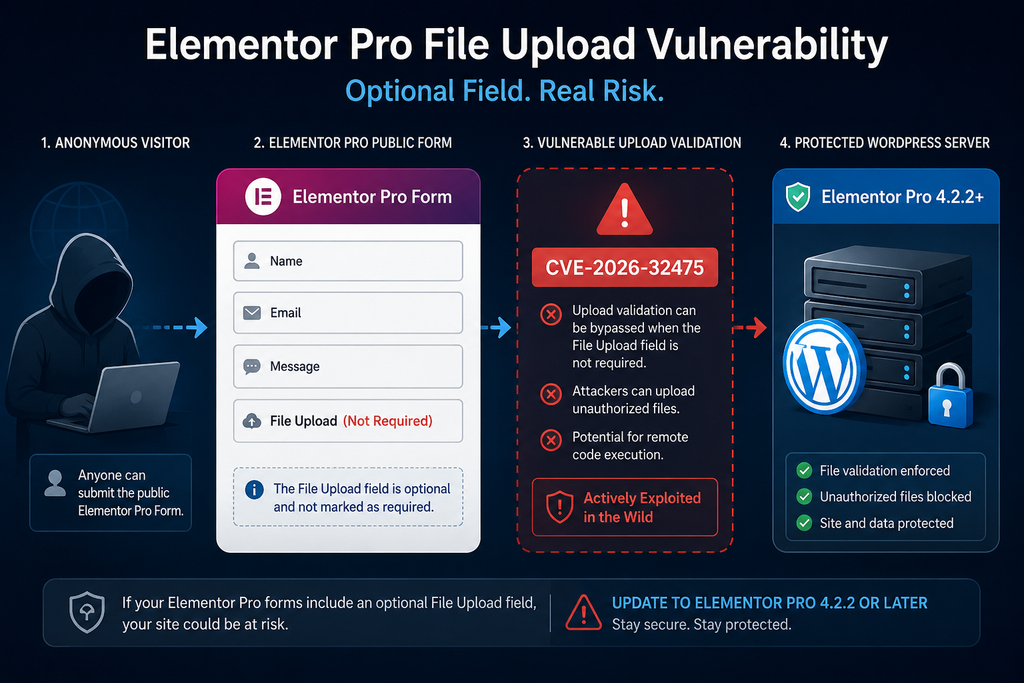
The most important detail is that installing Elementor Pro alone does not automatically make every website exploitable. A specific form configuration creates the vulnerable attack surface. A published Elementor Pro Form widget must contain a File Upload field, and that upload field must not be configured as required. This condition matters because the vulnerability involves inconsistent handling of an empty file entry during upload validation and subsequent file processing.
That distinction gives administrators a practical way to prioritize their response. First, determine whether the website ran Elementor Pro 4.2.1 or an earlier version. Next, identify public forms containing optional File Upload fields. Then update Elementor Pro immediately and inspect the relevant upload locations for unexpected executable files. Because exploitation has already been observed in the wild, simply installing the patch should not be considered the end of the investigation.
Security researchers have reported significant exploitation activity since public disclosure. Wordfence reported that its firewall had blocked more than 190,000 exploit attempts targeting this vulnerability, with attacks beginning on August 19, 2026, the same day the vulnerability became public. That activity changes the appropriate response from routine patch management to active incident triage for websites that match the vulnerable configuration.
What Is CVE-2026-32475
CVE-2026-32475 is a critical unrestricted file upload vulnerability affecting the Elementor Pro WordPress plugin. The vulnerability has been categorized under CWE-434, Unrestricted Upload of File with Dangerous Type. According to the published CVE information, Elementor Pro versions through 4.2.1 are affected, while version 4.2.2 contains the security correction. The vulnerability received a CVSS 3.1 score of 9.0 from the assigning authority, placing it firmly in the critical severity range.
The risk comes from Elementor Pro’s Forms functionality rather than ordinary page-building operations. Elementor Pro allows website owners to create sophisticated public forms without installing a separate form plugin. These forms can include text fields, email fields, selections, checkboxes, messages, and File Upload fields. Upload functionality is particularly sensitive because it accepts data from an external visitor and writes a file to the WordPress server.
Normally, a File Upload field must enforce strict controls over what can reach the filesystem. An uploaded image or document should be validated before Elementor moves it into its final location. Dangerous executable extensions should never reach a web-accessible directory where the server might interpret them as code. CVE-2026-32475 creates a situation in which the validation stage and file-processing stage can disagree about which submitted file entries need to be examined.
This discrepancy is especially serious because exploitation does not require a WordPress account. The CVE’s attack vector is network-based, privileges are not required, and user interaction is not required. An attacker therefore does not need to compromise an administrator password before attempting the vulnerable upload workflow. A public form can provide the necessary entry point when its configuration satisfies the vulnerability’s conditions.
Successful exploitation can have consequences far beyond an unwanted file appearing in the uploads directory. If executable server-side code is uploaded and the server permits execution from that location, an attacker may be able to run code with the privileges available to the PHP process. From there, the incident could potentially affect WordPress files, configuration information, database access, administrator accounts, content, plugins, themes, and other resources accessible to that hosting account.
The severity also explains why administrators should distinguish prevention from remediation. Updating Elementor Pro prevents the vulnerable code path from remaining available. However, an update cannot automatically remove a malicious file that was successfully uploaded before the patch. A site that previously exposed a vulnerable form therefore deserves a filesystem and log review even after the plugin reports the safe version.
Which Elementor Pro Forms Are Vulnerable
The vulnerable configuration deserves special attention because it prevents administrators from making two opposite mistakes. One mistake is assuming every installation of Elementor Pro was directly exploitable. The other is assuming a site was safe simply because its forms appeared to restrict normal visitors to images or documents. The actual exposure depends on both the installed Elementor Pro version and the structure of published forms.
Security research describing CVE-2026-32475 identifies a public Elementor Pro Form widget containing at least one File Upload field that is not marked as required as the important attack condition. In practical terms, a contact form containing only Name, Email, Subject, and Message fields does not expose this specific file-upload path. A recruitment form containing an optional résumé attachment field, however, deserves immediate attention if it was available while a vulnerable Elementor Pro version was installed.
Support forms are another common example. Businesses often allow customers to attach screenshots, invoices, diagnostic documents, or other evidence while making the attachment optional. The form may appear harmless because the visitor can submit it without attaching anything. Ironically, that optional state is central to the vulnerable processing condition. Administrators should therefore search specifically for upload fields where the Required option was disabled.
Job application forms deserve similar scrutiny. A company may create an Elementor form asking for contact information, experience, and a résumé. Some implementations make the résumé mandatory, while others allow applicants to submit a profile link instead. If the upload field remained optional, the form could match the vulnerable configuration when used with an affected Elementor Pro release.
Other examples include quotation requests, customer-service forms, warranty claims, event registrations, design briefs, document-submission pages, membership applications, and frontend contact forms that accept attachments. Administrators should not rely on the form’s name when assessing exposure. The relevant question is whether the published form contained the Elementor Pro File Upload field and whether that field was optional.
Visibility also matters. A vulnerable form published on an ordinary page creates a straightforward public attack surface. However, administrators should also inspect forms embedded in landing pages, templates, popups, old campaign pages, and content that may no longer appear in the site’s main navigation. Search engines, archived links, backlinks, old advertisements, and automated scanners can continue finding pages that a site owner considers forgotten.
Removing a link from the menu does not make a form private. Likewise, changing a page’s visual design does not remove the underlying Form widget. During the audit, administrators should inspect Elementor templates and saved content rather than reviewing only pages they personally remember using.
The safest response is still to update Elementor Pro regardless of whether an exposed form is immediately found. Configuration-based mitigation can reduce risk temporarily, but it should not replace the vendor’s security fix. Websites evolve. Editors can duplicate old templates, restore revisions, import layouts, or publish forms that an administrator overlooked during a manual inspection.
Administrators managing multiple WordPress installations should also avoid assuming identical configurations across the fleet. One site may use Elementor Pro purely for Theme Builder functionality, while another may run several public forms with uploads. Inventory each installation separately and prioritize any site that combined Elementor Pro 4.2.1 or earlier with publicly accessible optional File Upload fields.
A practical triage order is therefore straightforward: confirm the plugin version, identify public Elementor forms, locate File Upload fields, determine whether those fields were optional, establish how long the vulnerable configuration was online, update the plugin, and then investigate whether suspicious files or requests appeared during that exposure period.
How File Validation Is Bypassed
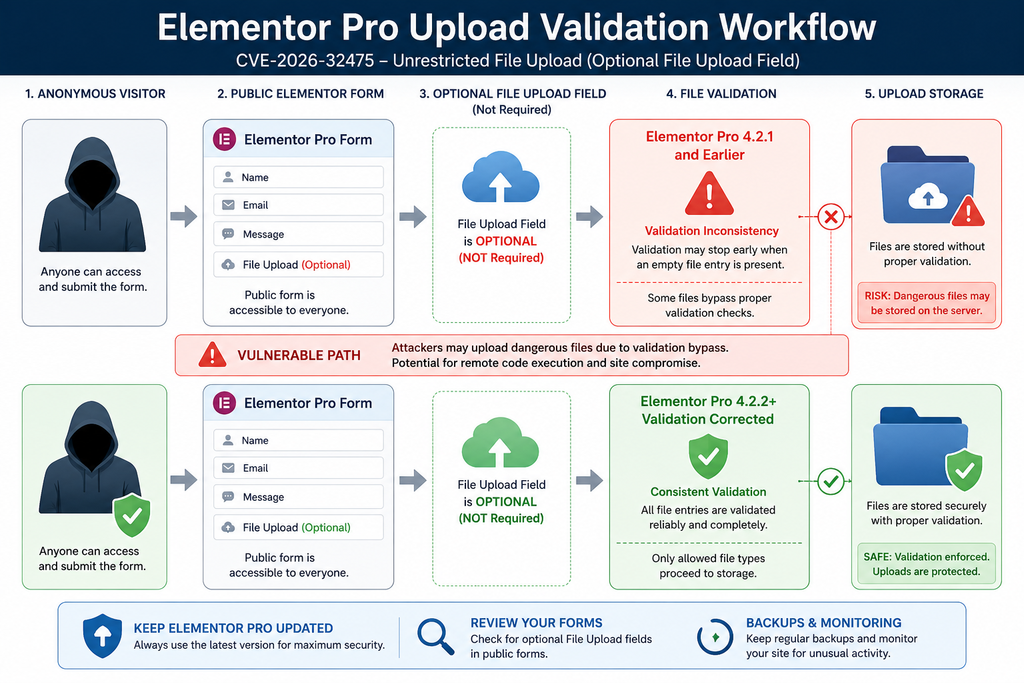
The technical cause of CVE-2026-32475 is useful for defenders because it explains why the optional upload condition matters. Elementor Pro’s vulnerable upload workflow used separate processing stages for validating uploaded entries and moving accepted entries to storage. Those stages did not treat an empty upload entry in exactly the same way. That difference created a validation gap.
According to Patchstack’s technical analysis, the vulnerable logic processes uploaded files in separate loops. One stage checks file extensions, while another stage handles moving uploaded files. When the validation stage encounters a particular empty-file condition, processing can stop before later entries receive the expected checks. The later file-processing logic, however, does not necessarily stop at the same point.
The result is a classic validation-versus-processing mismatch. Security decisions are made using one interpretation of submitted data, while the code responsible for writing files uses another interpretation. A dangerous file can therefore reach the processing stage without having passed through the security check that administrators expect to protect the upload field.
This is why the issue should not be understood simply as “Elementor allows PHP uploads.” Under ordinary operation, the plugin contains restrictions intended to prevent dangerous file types. The vulnerability provides a path around those restrictions because the validator and the subsequent file-moving operation do not maintain the same view of the submitted upload entries.
From a defensive perspective, that distinction is important. Adding another extension to a form’s allowed-file configuration would not address the underlying flaw. The security problem exists in the processing logic itself. Administrators need the corrected plugin code rather than relying solely on form configuration as a permanent defense.
Patchstack reported that the correction in Elementor Pro 4.2.2 brings the relevant processing behavior into agreement and adds protection closer to the point where a file is moved. Elementor’s official Pro changelog for version 4.2.2 also lists improved code security enforcement in the Form widget. That makes upgrading the correct remediation rather than trying to reproduce the vulnerability or manually alter plugin files.
Administrators should never modify Elementor Pro’s plugin code themselves as a substitute for the official update. Custom edits can be overwritten, may introduce compatibility problems, and can create uncertainty about whether the complete vendor fix is present. They also complicate future incident analysis because file-integrity tools may no longer distinguish legitimate modifications from suspicious changes.
Server-level defense remains valuable as an additional layer. Upload directories generally should not execute PHP or other server-side scripts unless the application explicitly requires that behavior. A correctly configured web server can therefore reduce the impact of certain upload vulnerabilities. However, server configuration varies across Apache, NGINX, LiteSpeed, managed hosting platforms, containers, and shared environments.
A Web Application Firewall can provide another layer of protection. Wordfence, for example, states that its built-in malicious file upload protection blocks attempts targeting this vulnerability. It also recommends enabling its option that disables code execution in the uploads directory. Such controls are useful, especially during mass exploitation, but administrators should still install the fixed Elementor Pro version.
Defense in depth works because no single control has to carry the entire security burden. Elementor Pro should validate uploads correctly. WordPress should remain updated. The web server should minimize execution opportunities in writable directories. A firewall can reject suspicious requests. File monitoring can identify unexpected changes. Backups provide a recovery path when preventive controls fail.
Evidence of Active Exploitation
The phrase “under active attack” is justified by observed exploitation rather than by the theoretical severity of the vulnerability alone. Wordfence reported on September 2, 2026 that its firewall had already blocked more than 190,000 attempts targeting the Elementor Pro vulnerability. According to its telemetry, attackers began targeting websites on August 19, the same day public disclosure occurred.
That timing should influence how administrators investigate potentially exposed sites. When exploitation begins immediately after disclosure, the window between public technical information and widespread scanning can become extremely short. A website that remained vulnerable for only several days after a patch became available may still have received automated probes.
Mass WordPress attacks also do not require an attacker to know in advance that a specific website contains the vulnerable form. Automated infrastructure can discover WordPress sites, fingerprint technologies, crawl pages, identify forms, and send large volumes of requests. Consequently, a small website with modest traffic should not assume that obscurity provides meaningful protection.
The most concrete compromise indicator is an unexpected executable file inside an Elementor form upload location. Patchstack specifically advises administrators to review wp-content/uploads/elementor/forms/ and pay particular attention to files ending in .php. Administrators should compare everything found there with the file types their legitimate forms were designed to accept.
A PHP file in a directory intended for résumés, screenshots, PDFs, or ordinary user attachments deserves immediate investigation. Legitimate business workflows rarely need visitors to upload server-executable PHP code. Other unusual executable or script-like extensions should also receive scrutiny according to the site’s server configuration.
Do not rely exclusively on filenames that appear obviously malicious. Attackers often choose short, generic, random, or innocent-looking names. The important question is whether the file belongs in that location and whether its type matches the expected business purpose of the form.
Modification timestamps can help build an incident timeline. A suspicious file created during the period when Elementor Pro 4.2.1 or earlier was active deserves greater attention, particularly if the timestamp aligns with unusual web requests or security alerts. Timestamps alone are not proof, however, because filesystem metadata can be altered or changed during backups, migrations, restorations, or administrative operations.
Web server access logs provide another valuable source of evidence. Administrators should review requests to pages containing Elementor forms during the vulnerable period and look for unusual bursts of submissions, repeated POST requests, unexpected upload activity, and subsequent requests to files inside Elementor’s form upload directories.
A particularly important pattern is an upload-related request followed shortly afterward by direct access to a newly created executable file. That sequence can indicate that someone first placed a file on the server and then attempted to invoke it through the web. Security teams should correlate timestamps across web access logs, firewall logs, WordPress security logs, hosting control panels, and filesystem changes.
HTTP status codes can add context. A successful response does not prove exploitation, and an error response does not always prove failure. Still, repeated requests to unusual .php files under an uploads directory are abnormal enough to investigate regardless of the response code.
Administrators should also inspect WordPress user accounts. A successful server compromise can be followed by creation of an unauthorized administrator account, modification of an existing user’s privileges, or installation of persistence mechanisms. Review administrator and editor accounts for names, email addresses, creation dates, or role changes that cannot be explained.
Plugin and theme directories deserve attention as well. Once code execution is achieved, an attacker does not have to leave the original uploaded file as the only malicious artifact. Additional files can be placed in plugins, themes, mu-plugins, the WordPress root, temporary directories, or writable cache locations.
The wp-config.php file should be checked for unexpected modifications. Core WordPress files should be compared against known-good copies. Administrators using WP-CLI can use WordPress core checksum verification as one component of a broader integrity review. Plugin integrity should also be verified where reliable checksums or clean vendor packages are available.
Scheduled tasks represent another possible persistence mechanism. Review WordPress cron events and server-level cron jobs for unfamiliar entries. Unexpected scheduled commands, PHP files, or recurring callbacks should be investigated rather than deleted without documentation, because they may help establish what happened.
Database inspection can also reveal suspicious changes. Check active plugins, administrator accounts, options, unexpected redirects, injected scripts, modified home or site URLs, and unfamiliar content. A compromised site may appear visually normal while malicious code redirects only selected visitors, search-engine crawlers, or mobile traffic.
Security plugins can help identify modified files, malicious patterns, or unauthorized administrator accounts, but automated scanning should not be treated as absolute proof that a website is clean. Sophisticated malware can hide from signatures, and some legitimate custom code can trigger false positives. Combine automated scanning with filesystem, account, log, and configuration review.
If there is credible evidence of compromise, preserve evidence before aggressively cleaning the server. Record suspicious filenames, hashes, timestamps, logs, user changes, and relevant configuration. Take a backup or forensic snapshot when practical. This information can help determine the initial entry point and whether persistence remains elsewhere.
After containment, rotate credentials that may have been exposed. Depending on the incident, that may include WordPress administrator passwords, hosting credentials, SFTP or SSH credentials, database passwords, API keys, application passwords, and other secrets stored in configuration files. WordPress salts can also be rotated to invalidate existing authenticated sessions.
The key principle is simple: patching answers the question “Can this specific vulnerable path still be used?” It does not answer “Was this server already compromised?” For websites that exposed the vulnerable configuration while attacks were circulating, both questions need separate answers.
Updating Elementor Pro to Version 4.2.2

Updating Elementor Pro is the primary remediation for CVE-2026-32475. The official Elementor Pro changelog lists version 4.2.2 as released on August 19, 2026 and includes improved code security enforcement in the Form widget. Security advisories identify 4.2.2 as the first version containing the relevant fix.
Administrators should preferably install the latest stable Elementor Pro version available rather than deliberately stopping at 4.2.2 if a newer supported release exists. The security requirement is 4.2.2 or later. Newer releases may contain additional security corrections, compatibility fixes, and bug fixes that were published after the original CVE remediation.
Before updating a production site, create a reliable backup of both the database and files. A backup is especially important on Elementor-powered websites because plugin updates can interact with templates, custom widgets, integrations, caching layers, and theme code. Confirm that the backup can actually be restored rather than relying only on a dashboard message stating that a backup exists.
Next, verify the currently installed Elementor Pro version in the WordPress Plugins screen. Do not confuse Elementor Pro with the free Elementor plugin. The vulnerability discussed here concerns Elementor Pro. A site commonly has both plugins installed, and their version numbers can differ.
If Elementor Pro shows version 4.2.1 or earlier, treat the installation as outdated for this vulnerability. Install the current update through the normal licensed Elementor update mechanism. Sites where automatic updates are disabled, licenses are disconnected, or staging-to-production workflows are used may require additional administrative attention.
After updating, return to the Plugins screen and verify the actual installed version. Do not assume that clicking Update guarantees success. File permissions, PHP errors, interrupted requests, storage limits, deployment tools, or hosting restrictions can occasionally prevent an update from completing.
Clear relevant caches after the update if the website uses page caching, object caching, CDN caching, or server-side caching. This is primarily a functional step rather than the security fix itself. Then test important Elementor pages and forms to confirm that normal visitor workflows still operate as expected.
Administrators should specifically test legitimate File Upload fields. Use harmless test documents that match the form’s intended file types. Confirm that submissions work, notifications arrive when expected, and uploaded files appear only where they should. Avoid testing the vulnerability itself against a production website.
If immediate updating is genuinely impossible, disabling the affected forms or Elementor Pro can reduce exposure while maintenance is arranged. Making an optional upload field required may change the precise vulnerable condition described by researchers, but configuration changes should be considered temporary risk reduction rather than a replacement for the security patch.
A WAF can provide additional protection during the transition. However, firewall rules can be disabled, misconfigured, bypassed by architectural changes, or removed during migration. The plugin must still be updated because the application itself should enforce the correct security boundary.
For Wordfence users, the vendor reports that its malicious file upload protection blocks attempts against this vulnerability. Wordfence also specifically recommends enabling the option designed to disable code execution in the uploads directory. This is a useful hardening measure beyond CVE-2026-32475 because writable upload directories are recurring targets across WordPress vulnerabilities.
Server administrators can consider equivalent execution restrictions at the web-server level. The exact configuration depends on the hosting stack and should be tested carefully. Managed WordPress customers who cannot modify Apache, NGINX, or LiteSpeed rules should ask their hosting provider whether PHP execution is blocked in appropriate upload locations.
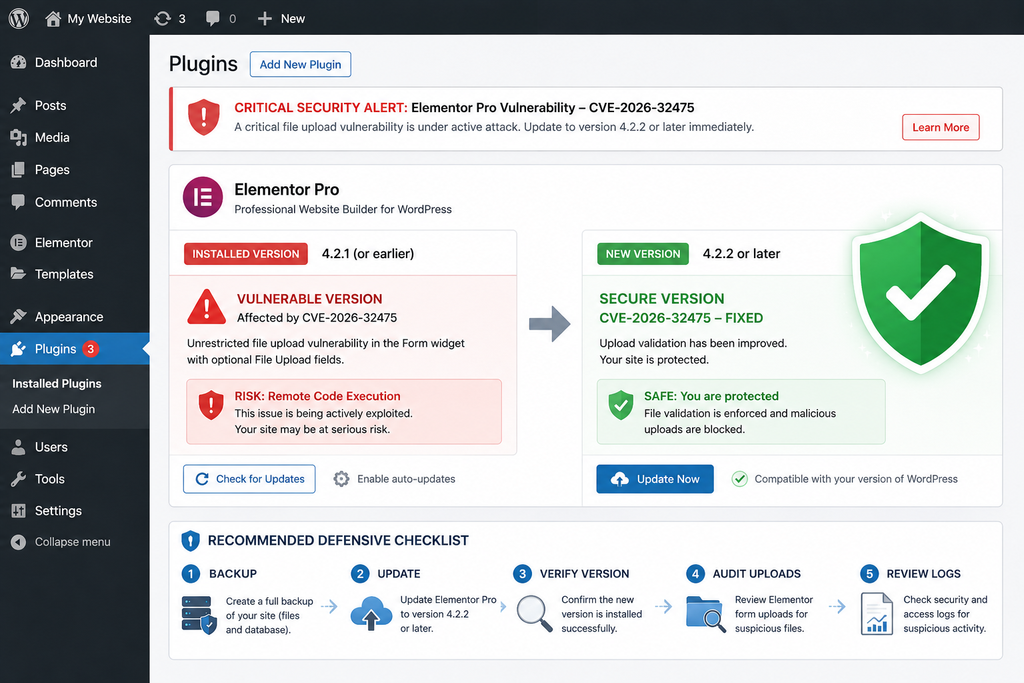
The update process should end with an audit, not simply a green update notification. Review the Elementor form upload directory, inspect recent security alerts, check administrator accounts, and evaluate relevant logs. If the site had a public optional File Upload field while running an affected version, assume that the exposure deserves investigation even when no visible damage is apparent.
Searching Elementor Uploads for Malicious PHP Files
The filesystem review should begin with the directory identified in the vulnerability research: wp-content/uploads/elementor/forms/. This location may contain legitimate files submitted through Elementor forms, so administrators should not automatically delete everything inside it. Instead, establish what file types the site’s forms legitimately accept and investigate anything outside that expected profile.
PHP files deserve immediate attention. If a recruitment form accepts PDF and DOCX résumés, a .php file has no legitimate business reason to exist in that upload directory. Likewise, a support form intended for JPG and PNG screenshots should not produce executable server-side scripts.
Administrators with hosting file-manager access can browse the directory manually. Sort files by modification date and compare suspicious timestamps with the period when the site was running Elementor Pro 4.2.1 or earlier. Pay attention to files created around August 19, 2026 and afterward, because active exploitation was reported beginning on the disclosure date.
Command-line administrators can perform a defensive search for PHP files without executing them. From the WordPress installation directory, a command such as the following lists PHP files located under Elementor’s form uploads:
find wp-content/uploads/elementor/forms/ -type f -iname "*.php" -print
This is a defensive filesystem inspection command. It does not exploit the vulnerability and does not modify files. If the directory does not exist, that fact alone should not be treated as definitive proof that the site was never exposed, because configurations, cleanup processes, migrations, or previous content changes can affect what remains on disk.
Administrators may also search the broader uploads tree for executable PHP files:
find wp-content/uploads/ -type f -iname "*.php" -print
The broader search can identify artifacts unrelated to Elementor as well. Some plugins or custom systems may legitimately create PHP-related files in unusual locations, although executable PHP inside ordinary user-upload directories should generally be uncommon. Investigate context before deleting anything.
When a suspicious file appears, avoid opening it through a browser. Directly requesting an unknown PHP file can execute it. Instead, inspect it through a safe text editor, security scanner, isolated environment, or hosting security tool that does not execute the code.
Record the complete path, modification time, ownership, permissions, and cryptographic hash before removal when incident investigation matters. A SHA-256 hash can help correlate the file with malware intelligence or determine whether identical copies exist elsewhere on the server.
Search for additional files created or modified around the same time. A successful initial upload may have acted only as a temporary loader. The attacker could subsequently write a second backdoor into a plugin, theme, root directory, mu-plugins, or another writable location and then remove the original artifact.
WordPress core integrity is another useful check. Where WP-CLI is available, administrators can use:
wp core verify-checksums
A successful checksum verification helps establish that standard WordPress core files match official versions, but it does not verify every part of the installation. It does not prove that themes, premium plugins, uploads, wp-config.php, custom files, or database content are clean.
Review wp-content/mu-plugins/ carefully because must-use plugins load automatically and may not appear in the normal Plugins interface in the same way as ordinary plugins. An unfamiliar PHP file in this directory should be investigated against known site configuration and deployment records.
Check ordinary plugin directories for files that do not belong to installed packages. Premium plugins may require comparison with a fresh copy downloaded from the legitimate vendor because public WordPress.org checksums are not always available for commercial software.
Theme directories should receive similar treatment. Attackers sometimes add code to functions.php, create deceptively named PHP files, or alter templates. Compare active and inactive themes with trusted copies where possible.
The WordPress root also deserves inspection. Unexpected PHP files with names similar to legitimate WordPress files can be easy to overlook. Compare the installation against a clean WordPress package and investigate files that do not belong to core or to known administrative tooling.
Log review should accompany the filesystem search. Look for requests targeting any suspicious file discovered during inspection. If an unknown PHP file appeared at 14:32 and web logs show direct requests to the same file seconds later, that correlation substantially increases the likelihood of malicious activity.
Security teams should also examine outbound connections where hosting telemetry makes them available. A compromised PHP process may contact external infrastructure, retrieve additional components, or transmit data. Unexpected outbound traffic around the suspected compromise time can provide further evidence.
If compromise is confirmed, cleaning individual files may not provide enough assurance for a high-value website. A more reliable recovery approach can involve rebuilding from known-good WordPress core files, clean plugin and theme packages, and a verified backup while carefully preserving legitimate content. Credentials and secrets should be rotated as part of the recovery process.
Database review remains essential because filesystem cleanup does not reverse malicious database modifications. Search for unauthorized administrator accounts, injected JavaScript, altered plugin settings, malicious scheduled events, redirects, unfamiliar options, and content modifications.
After recovery, monitor the site closely. Watch for recreated files, new administrator accounts, unexpected scheduled tasks, unusual outbound traffic, or repeated requests to previously discovered backdoor paths. Recurrence may indicate that another persistence mechanism remains active.
The most important operational lesson from CVE-2026-32475 is that an upload vulnerability can cross the boundary between a WordPress plugin bug and a full server incident. The correct response therefore combines patching, filesystem inspection, log analysis, account review, integrity checking, and credential management.
Practical Elementor Pro Vulnerability Response Checklist
Start by confirming whether Elementor Pro is installed and identifying its exact version. Any version through 4.2.1 falls within the published affected range. Update to 4.2.2 or later immediately, preferably to the latest stable supported release.
Next, identify every published Elementor Pro form that contains a File Upload field. Pay special attention to upload fields that are not marked Required. Include ordinary pages, landing pages, popups, templates, archived campaign pages, and other content that may still be reachable publicly.
Determine when those forms were accessible while a vulnerable Elementor Pro version was installed. This exposure window helps narrow log and filesystem analysis. Active exploitation was observed beginning August 19, 2026, but administrators should investigate the full relevant period rather than assuming activity occurred only on one day.
Review wp-content/uploads/elementor/forms/ for unexpected PHP files and other executable content. Expand the search to the broader uploads directory when appropriate. Do not execute suspicious files through the browser.
Correlate suspicious files with web server logs. Look for unusual POST activity against Elementor forms, repeated submissions, unexpected upload patterns, and direct requests to files inside upload directories.
Check WordPress administrator accounts, installed plugins, themes, must-use plugins, scheduled events, configuration files, and core integrity. Investigate unexplained changes rather than focusing only on the original Elementor upload directory.
If compromise appears likely, preserve relevant evidence, isolate the site where practical, restore or rebuild from trusted sources, rotate credentials and application secrets, and continue monitoring after recovery.
Finally, add longer-term defensive controls. Keep Elementor Pro and WordPress components updated, minimize unnecessary public upload functionality, restrict executable code in upload directories, maintain a WAF where appropriate, use file-integrity monitoring, and keep tested off-site backups.
Frequently Asked Questions
Is CVE-2026-32475 a critical Elementor Pro vulnerability?
Yes. CVE-2026-32475 is an unrestricted upload of a dangerous file type vulnerability affecting Elementor Pro through version 4.2.1. The published CVSS 3.1 score is 9.0, which places it in the critical severity category. Successful exploitation may lead to remote code execution and potentially complete compromise of the affected WordPress website.
Is every website running Elementor Pro vulnerable?
The affected plugin versions contain the vulnerable code, but successful exploitation requires a particular form configuration. Published research identifies a public Elementor Pro Form widget containing at least one File Upload field that is not configured as required. Regardless of configuration, administrators using affected versions should update immediately.
Why does the File Upload field need to be optional?
The vulnerability involves inconsistent handling of an empty file entry between validation and later file processing. An optional upload field allows the relevant empty-file condition to arise in the vulnerable workflow. This can cause validation to stop while subsequent processing continues differently.
Which Elementor Pro versions are affected?
Published vulnerability information identifies Elementor Pro versions up to and including 4.2.1 as affected. Version 4.2.2 contains the fix. Administrators should install version 4.2.2 or later, preferably the newest stable release currently available from Elementor.
Is the Elementor Pro vulnerability being actively exploited?
Yes. Wordfence reported active exploitation beginning on August 19, 2026, the same day public disclosure occurred. By September 2, Wordfence said its firewall had blocked more than 190,000 exploit attempts targeting the vulnerability.
Where should I look for suspicious uploaded files?
Patchstack recommends reviewing wp-content/uploads/elementor/forms/, particularly for unexpected .php files. Administrators should also inspect the broader uploads tree and other writable WordPress locations if compromise is suspected.
Does updating Elementor Pro remove previously uploaded malware?
No. Updating closes the vulnerable application path, but it does not guarantee removal of files uploaded before the update. Sites that exposed vulnerable forms should perform a post-update security review.
Can a firewall protect against CVE-2026-32475?
A properly configured Web Application Firewall can provide an additional layer of protection. Wordfence states that its malicious file upload protection blocks exploitation attempts targeting this vulnerability. Nevertheless, a WAF should complement rather than replace the Elementor Pro update.
What should I do if I discover an unknown PHP file?
Do not open the file through a browser. Preserve its path, timestamps, hash, and relevant logs when possible, then investigate the wider WordPress installation for additional persistence. If compromise is confirmed, consider rebuilding from trusted files and rotating credentials rather than simply deleting the first suspicious file.
Should I remove all Elementor File Upload fields?
Not necessarily. File uploads are legitimate functionality for many websites. The immediate requirement is to run Elementor Pro 4.2.2 or later. Administrators should also keep upload functionality limited to forms that genuinely need it and apply server, firewall, monitoring, and file-type restrictions as additional safeguards.
What WordPress Administrators Should Do Now
CVE-2026-32475 deserves immediate attention because it combines several characteristics that increase operational risk: remote accessibility, no authentication requirement, dangerous file upload capability, potential code execution, widespread Elementor Pro deployment, and confirmed attack activity.
The optional File Upload field is the most useful configuration detail for administrators assessing historical exposure. A site running Elementor Pro 4.2.1 with no File Upload fields does not present the same attack surface as a site running a public job application form with an optional attachment field. That difference can help prioritize incident response across multiple websites.
However, configuration analysis should never delay patching. Elementor Pro 4.2.2 or later is the security baseline for this issue. The vendor has corrected the vulnerable Form widget behavior, and remaining on an affected release leaves unnecessary risk.
For sites that previously matched the vulnerable configuration, the job continues after updating. Inspect Elementor form uploads, search for unexpected executable files, review web logs, check administrator accounts, verify WordPress integrity, examine plugins and themes, and investigate unusual scheduled tasks.
Active exploitation means absence of visible defacement is not sufficient evidence that a website is clean. Modern compromises can remain quiet. Attackers may create hidden persistence, redirect only selected visitors, inject code into database content, or leave a backdoor for later use.
A disciplined response is therefore more valuable than panic: update first, establish exposure, inspect the evidence, contain anything suspicious, recover from trusted sources when necessary, rotate affected credentials, and improve monitoring afterward.
⚠️ Disclaimer and Source Hygiene
This article is provided for defensive WordPress security awareness and educational purposes. It does not replace professional incident-response, hosting, legal, or cybersecurity advice. Administrators handling a confirmed or suspected compromise should consider involving their hosting provider or a qualified security professional, particularly when sensitive customer or business data may have been exposed.
Technical information in this article was cross-checked against the published CVE record, Patchstack’s technical analysis, Elementor’s official Pro changelog, Wordfence reporting, WPScan vulnerability information, CERT advisories, and other established security references. Vulnerability intelligence can change as researchers, vendors, and incident-response teams publish new findings.
🔔 For more tutorials like this, consider subscribing to our blog.
📩 Do you have questions or suggestions? Leave a comment or contact us!
🏷️ Tags: Elementor Pro vulnerability, CVE-2026-32475, Elementor security, WordPress security, Elementor Pro 4.2.2, WordPress vulnerability, Elementor Forms vulnerability, arbitrary file upload, WordPress malware, WordPress security update
📢 Hashtags: #ElementorPro, #WordPressSecurity, #CVE202632475, #Elementor, #WordPress, #CyberSecurity, #WebsiteSecurity, #WordPressVulnerability, #SecurityUpdate, #WordPressAdmin
Sources and References
Elementor – Elementor Pro Changelog: Official release information confirms that Elementor Pro 4.2.2 was released on August 19, 2026 and included improved code security enforcement in the Form widget.
Patchstack – Critical Unauthenticated File Upload to RCE in Elementor Pro Plugin: Primary technical analysis of CVE-2026-32475, including the affected Form widget, validation-processing mismatch, vulnerable versions, attack surface, remediation, and recommended inspection of Elementor form upload directories.
CVE / Patchstack CNA Record – CVE-2026-32475: Identifies Elementor Pro through version 4.2.1 as affected, version 4.2.2 as unaffected, CWE-434 as the weakness category, and a CVSS 3.1 base score of 9.0.
WPScan – Elementor Pro Vulnerabilities: Lists the issue as an unauthenticated arbitrary file upload through an Upload Field array validation bypass and identifies Elementor Pro 4.2.2 as the fixed version.
CERT-In – CIVN-2026-0419: Government cybersecurity advisory classifying the Elementor Pro vulnerability as critical and recommending an upgrade to version 4.2.2 or later.
Secondary Sources and Testimonials
Wordfence reported on September 2, 2026 that attackers were actively exploiting the vulnerability and that its firewall had blocked more than 190,000 exploit attempts. Its telemetry indicated that attacks began on August 19, the date of public disclosure.
F5 Labs also described CVE-2026-32475 as a critical Elementor Pro file-upload flaw capable of leading to unauthenticated remote code execution and recommended upgrading Elementor Pro, auditing upload locations for unauthorized PHP files, and applying additional WAF protection.
The Elementor Pro vulnerability demonstrates why WordPress administrators should treat public upload functionality as a high-trust boundary. A form can look simple to a visitor while interacting directly with one of the most sensitive operations a web application performs: accepting an external file and writing it to the server.
1 thought on “Critical Elementor Pro Vulnerability Is Under Active Attack”