
Table of Contents
The s2Member vulnerability CVE-2026-19804 can expose WordPress sites to remote code execution when PayPal Checkout and specific Signup Tracking Codes configurations are used. Learn which versions are affected, how the vulnerable chain works, what administrators should audit, and how to secure an installation safely.
s2Member Vulnerability CVE-2026-19804 Explained
A newly disclosed security issue in the popular WordPress membership plugin s2Member deserves immediate attention from administrators who use PayPal Checkout. Tracked as CVE-2026-19804, the vulnerability involves a dangerous interaction between PayPal return processing, a site-specific verification value, user-controlled registration data, and s2Member’s customizable Signup Tracking Codes system. Under the required conditions, that combination can lead to remote code execution on the WordPress server. The CVE record identifies s2Member versions through 260814 as affected. WPScan lists 260829 as the version containing the fix.
The important detail is that simply having s2Member installed does not automatically mean every website can be compromised through this exact path. The disclosed attack chain depends on particular configuration conditions. Most importantly, the site must use a Signup Tracking Codes template in which the %%first_name%% replacement value reaches executable template processing. PayPal Checkout also plays an important role because the vulnerability report describes a verification value being exposed through a Checkout-related response. Administrators should therefore treat configuration review as an important part of remediation rather than assuming that checking the plugin version alone completes the investigation.
This article explains the vulnerability from a defensive WordPress administrator’s perspective. It intentionally does not provide exploit payloads, malicious requests, or instructions for bypassing payment verification. Instead, the goal is to help site owners identify vulnerable versions, determine whether the dangerous template configuration exists, update s2Member, and inspect their WordPress installation for unexpected changes.
Why This s2Member Security Issue Matters
Remote code execution, commonly shortened to RCE, belongs to one of the most serious categories of web application vulnerabilities. Unlike a visual website problem or a minor information disclosure, successful code execution can potentially allow unauthorized commands or PHP instructions to run within the permissions available to the compromised web application.
That can affect much more than the membership plugin itself. WordPress normally has write access to several locations under wp-content, and a compromised application may potentially modify plugins, themes, uploads, configuration-related data, scheduled tasks, or database content depending on server permissions. An attacker who obtains sufficient application-level control may also attempt to establish persistence so that simply fixing the original vulnerable component does not necessarily remove everything introduced during a compromise.
For that reason, administrators running an affected s2Member release should approach CVE-2026-19804 as both an update problem and an incident-review problem. Updating closes the known vulnerable path. An audit helps determine whether anything suspicious happened before the update.
The Vulnerability Is Configuration Dependent
One of the most useful facts for administrators is that the published description identifies specific prerequisites. According to the CVE record, exploitation requires a Signup Tracking Codes template containing the %%first_name%% placeholder and access to the relevant verification value associated with the PayPal processing path.
That distinction matters during triage. A site running s2Member 260814 should still update immediately, even if administrators believe their configuration is not exploitable. However, when deciding what to investigate first, administrators can determine whether PayPal Checkout is enabled and whether Signup Tracking Codes use the affected replacement value.
Do not interpret the absence of that exact configuration as permission to remain on an outdated release. Plugin updates often contain several security improvements, and configuration can change later. The safest long-term state is a supported, patched version with unnecessary dynamic code features removed or minimized.
What Is CVE-2026-19804?
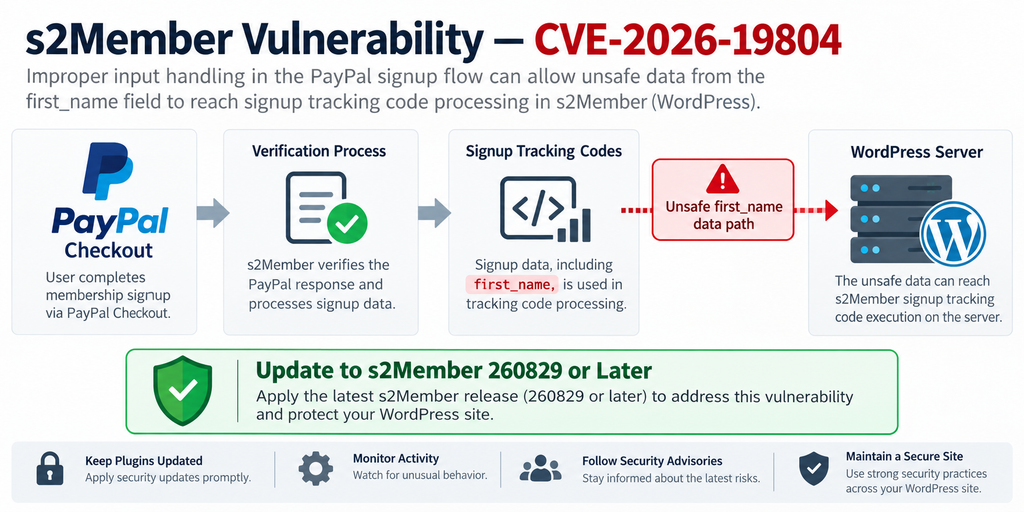
CVE-2026-19804 is a code-injection vulnerability affecting the s2Member WordPress membership plugin. The public CVE record describes insufficient sanitization involving the first_name value before that data can be substituted into an evaluated Signup Tracking Codes template. The vulnerability has been classified under CWE-94: Improper Control of Generation of Code, a category associated with situations where external input can influence executable code.
The CVE was published on September 25, 2026, and identifies Wordfence as the assigning organization. Its description states that versions through 260814 are vulnerable. The record also explains that successful exploitation depends on more than submitting an unusual first name. A relevant Signup Tracking Codes template must contain the affected first-name replacement placeholder, and the attacker must satisfy the verification requirements involved in the vulnerable processing path.
This second condition is particularly important. Payment integrations normally distinguish legitimate gateway notifications and return data from arbitrary requests arriving from the public internet. The vulnerability becomes considerably more serious because the published advisory describes a site-global proxy verification value being exposed in a PayPal Checkout AJAX response. That weakness can undermine an important trust boundary in the affected workflow.
Understanding the Attack Chain Without Exploit Code
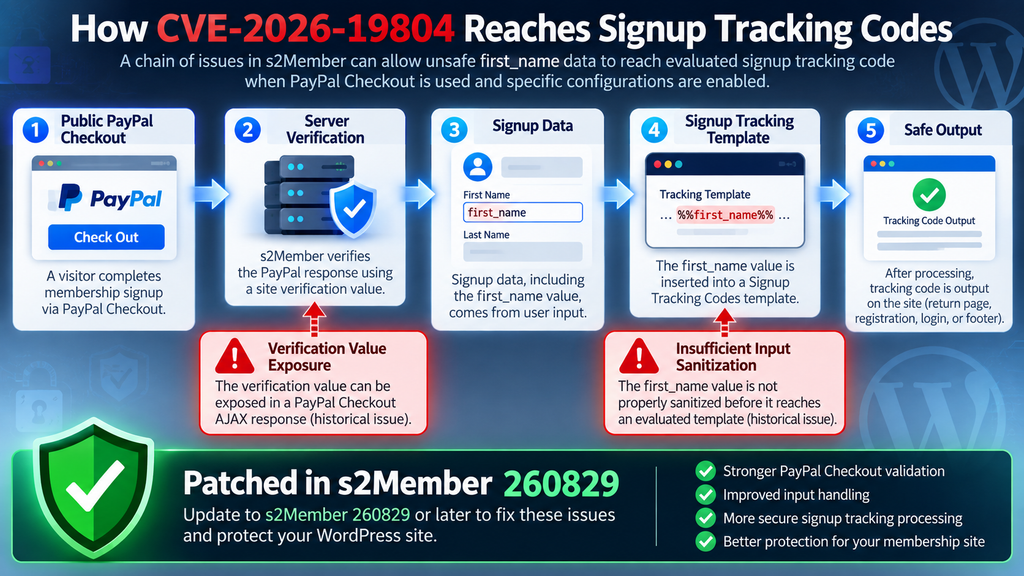
A useful defensive model consists of several stages. First, a public-facing PayPal Checkout workflow exposes information that should not help an untrusted visitor satisfy an internal verification mechanism. Second, attacker-controlled profile information can reach the payment or signup processing workflow. Third, the site has a Signup Tracking Codes template containing a replacement token for the customer’s first name. Finally, the affected s2Member version substitutes insufficiently sanitized content into a context capable of evaluating code.
None of those pieces should independently turn ordinary profile data into server-side instructions. A first name should always remain data. It should never acquire the ability to alter executable PHP behavior simply because an administrator placed a supported replacement variable inside a tracking template.
That is the central security failure behind CVE-2026-19804. Multiple features that appear reasonable when viewed separately create a dangerous path when combined.
Why Signup Tracking Codes Are Important
s2Member’s documentation describes Signup Tracking Codes as code that can be displayed or processed after a new paying member signs up through a payment gateway. Depending on the workflow, tracking information may appear on a return or thank-you page, the registration form, a login-related location, or the site’s theme footer.
Historically, this functionality has been useful for analytics, advertising conversion tracking, affiliate systems, and other integrations. Site owners may customize these templates and insert dynamic information through replacement values.
Dynamic templates become security-sensitive when user-controlled values are inserted into a context capable of executing server-side code. A secure design must preserve the distinction between content and instructions regardless of what a visitor submits.
Severity and Practical Risk
The CVE record currently shows a CVSS 3.1 score of 8.8, High, while WPScan categorizes its corresponding s2Member issue as critical and lists version 260829 as fixed. Differences between vulnerability databases can occur because scoring assumptions, authentication interpretation, or publication timing differ. Administrators should focus on the concrete technical impact and remediation rather than relying on a single numeric score.
The possibility of server-side code execution justifies urgent patching. At the same time, responsible risk communication requires noting that the disclosed chain has configuration prerequisites. Not every s2Member installation necessarily exposes the same path.
The correct response is therefore neither panic nor complacency. Update promptly, identify whether the vulnerable configuration existed, and investigate affected sites for signs of unexpected modification.
Which s2Member Versions Are Vulnerable?
The published CVE record identifies all s2Member versions up to and including 260814 as affected by CVE-2026-19804. Version 260814 was released on August 14, 2026. The official release announcement for that version included several security-related improvements, but it predates the fix associated with this newly disclosed vulnerability.
WPScan’s vulnerability database reports the issue as fixed in s2Member 260829. Therefore, WordPress administrators running 260814 or anything older should move to 260829 or a later supported release. If an even newer s2Member version is available when you perform the update, use the latest stable release unless compatibility requirements dictate otherwise.
The official s2Member changelog for 260829 also documents strengthened PayPal Checkout return validation and payment-flow integrity. That release contains broader PayPal Checkout reliability and security work alongside other changes.
How to Check the Installed s2Member Version
Administrators can check the plugin version through the standard WordPress Plugins screen. Open the Dashboard, visit the installed plugins area, locate s2Member, and review the displayed version. The same information may also be available through WordPress management tools or WP-CLI in environments where command-line access is available.
If the version is 260814 or older, treat the installation as affected from a vulnerability-management perspective. Do not delay the update simply because PayPal is disabled today. Historical configurations matter during incident review, and future administrators could enable functionality without realizing that the installed plugin contains an old security flaw.
Sites using s2Member Pro should also verify compatibility between the Framework and Pro components. The official changelog notes that the Pro updater includes version compatibility handling and may recommend updating the Framework before installing a newer Pro release.
Why Version 260814 Is Not Sufficient
Version numbers can create confusion when an earlier release already contains security improvements. The August 14 release, for example, introduced stronger input validation in several s2Member areas and improved handling of serialized data. Those changes are valuable, but they do not mean 260814 addresses CVE-2026-19804.
Security maintenance is cumulative. A release can fix several vulnerabilities while another flaw remains undiscovered. Once a new issue becomes public, the minimum safe version changes.
For this vulnerability, administrators should use 260829 or later as the practical baseline based on the currently published security information.
Sites Not Using PayPal Checkout
A WordPress site using s2Member exclusively for another membership workflow may not satisfy the complete attack chain described in CVE-2026-19804. Likewise, a site without a Signup Tracking Codes template containing the affected first-name replacement token may lack a required condition.
However, this should change the depth and priority of forensic investigation rather than the decision to update. Leaving a vulnerable plugin installed because a particular feature appears unused creates unnecessary technical debt.
Configuration changes, restored backups, imported settings, staging copies, and forgotten membership pages can also make assumptions unreliable. Updating provides a far stronger security boundary than relying on administrators to remember that a dangerous feature must never be enabled.
How the PayPal Verification Key Is Exposed
The published vulnerability description identifies another part of the chain: a site-global proxy verification key associated with the affected PayPal processing workflow. According to the CVE record, this value can be exposed in plaintext through the JSON response of a PayPal Checkout AJAX request on an affected site.
From a security architecture perspective, this matters because verification mechanisms exist to establish trust. A server should be able to distinguish legitimate payment-related data from arbitrary input. When information that helps satisfy that verification process is disclosed to an untrusted client, the protection can lose its intended security value.
Administrators do not need to reproduce the disclosure to respond correctly. Doing so on a production site can introduce unnecessary risk and may expose sensitive values in logs, screenshots, browser histories, or shared debugging sessions. Instead, update s2Member and review the historical configuration to determine whether PayPal Checkout was active while a vulnerable version was installed.
PayPal Checkout Arrived in s2Member During 2026
The modern PayPal Checkout integration was introduced in s2Member version 260127. The official changelog describes support for PayPal’s REST APIs, Smart Buttons, and webhook event handling, with the feature available through the plugin’s PayPal options.
Subsequent releases continued improving that integration. Version 260215 hardened webhook environment inference, cancellation redirects, token handling, REST responses, and other PayPal Checkout behavior. Later versions introduced further reliability improvements around cancellations, subscription handling, payment recovery, and return validation.
That history is useful during an audit because a site administrator may remember using PayPal for years while forgetting when the newer Checkout implementation was enabled. The relevant question is not simply, “Does this website accept PayPal?” It is whether the affected s2Member PayPal Checkout workflow was configured during the period when a vulnerable plugin version was running.
Verification Values Should Remain Trustworthy
Payment integrations involve multiple trust boundaries. Browser data is untrusted. Customer profile data is untrusted. Public AJAX responses are visible to clients. Gateway notifications require strong validation. Server-side secrets and verification material should never become interchangeable with public request data.
PayPal’s own developer security guidance recommends protecting sensitive transaction information, using secure transport, performing regular security reviews, and maintaining payment integrations carefully.
CVE-2026-19804 demonstrates why those principles matter beyond payment card information. A value does not need to be a credit-card number or account password to become security-sensitive. If possession of a value helps a request pass an important server-side verification step, exposing it can become part of a larger attack chain.
Do Not Treat Key Rotation as the Only Fix
When administrators hear that a verification key may be exposed, their first instinct may be to rotate or regenerate it. Credential rotation can be useful after suspected exposure, but it must not replace the plugin update.
If the vulnerable application continues disclosing the replacement value or continues processing dangerous data incorrectly, changing a secret merely resets the problem temporarily. The underlying software behavior must be corrected.
Update s2Member first, verify the resulting configuration, and then review whether any related credentials or verification values should be regenerated according to current s2Member documentation and your payment configuration.
When the first_name Variable Can Lead to Code Execution

The first_name field sounds harmless. On a normal membership site, it contains ordinary profile information such as “John,” “Maria,” or another customer name. The security problem arises when application logic treats the value as something other than plain data.
According to the CVE description, the affected s2Member processing path applies insufficient sanitization before the first-name value can be substituted into an evaluated Signup Tracking Codes template. Specifically, the public record explains that the relevant escaping process removes certain regular-expression backreferences but does not provide the protection required against executable PHP content in this context.
For security reasons, this article will not provide a working malicious value. Administrators do not need one to understand the vulnerability. The important concept is simple: untrusted profile data must never become executable server-side code.
The Critical %%first_name%% Placeholder
The CVE description states that successful exploitation requires the administrator to have configured a Signup Tracking Codes template containing the %%first_name%% placeholder.
That gives administrators a useful configuration indicator to investigate. Open the s2Member administration area and review the Signup Tracking Codes configuration. Determine whether the affected replacement token is present now and, where backups or configuration histories are available, whether it existed previously.
Do not intentionally submit malicious PHP to test the field. Production exploitation testing can create files, corrupt output, trigger security controls, or leave artifacts that later become difficult to distinguish from a genuine compromise.
The safer approach is configuration inspection followed by updating the plugin.
Why a First Name Is Considered Untrusted Input
A common development mistake is assuming that fields with innocent labels contain innocent values. Security controls cannot rely on labels. A browser can send arbitrary data unless the server independently validates it.
This applies to names, addresses, search boxes, HTTP headers, hidden form fields, cookies, payment metadata, URL parameters, and virtually every other value originating outside the trusted application.
A secure application decides what characters and formats make sense, validates the data on the server, and escapes it appropriately for the context where it will be displayed or processed. HTML output, URLs, database queries, JavaScript, shell commands, and executable PHP contexts all have different security requirements.
CVE-2026-19804 is particularly dangerous because the affected destination is associated with executable template processing rather than ordinary text display.
Why Sanitization Must Match the Destination
Security functions are not interchangeable. Removing one dangerous syntax does not guarantee that a value is safe everywhere else.
For example, sanitization intended to remove special replacement references from a regular expression does not automatically make a value safe for PHP evaluation. Likewise, HTML escaping does not make arbitrary input safe for a database query, and SQL escaping does not make the same value safe for JavaScript.
Developers call this context-sensitive escaping and validation. The application must understand where data is going and apply controls appropriate to that destination.
For administrators, the practical lesson is that custom tracking templates containing dynamic user fields deserve extra scrutiny, especially when older plugins allow executable snippets.
Signup Tracking Codes Can Appear in Several Locations
Official s2Member documentation says Signup Tracking Codes can be processed after a payment and may appear on a return page, registration form, login-related output, or the WordPress theme footer depending on the membership workflow.
This behavior explains why the feature can be easy to forget. A tracking configuration may have been created years earlier for analytics or conversion reporting and then left untouched.
A current administrator may never have created the code personally. It might have been configured by a developer, marketing agency, previous site owner, or analytics consultant.
Therefore, do not assume the site lacks Signup Tracking Codes merely because you do not remember adding them. Verify the configuration directly.
Identifying Sites That Use Signup Tracking Codes
The fastest defensive assessment starts inside WordPress. Determine whether s2Member is installed, record its current version, and identify whether PayPal Checkout is or was enabled. Next, inspect s2Member’s tracking configuration and specifically review Signup Tracking Codes.
The CVE prerequisite gives the audit a clear focus: look for templates containing the %%first_name%% replacement token. If that token exists in a Signup Tracking Codes configuration on a vulnerable release, the site matches an important condition described by the advisory.
Take a configuration backup or screenshot for your incident records before changing anything if you suspect compromise. Do not publish those screenshots if they contain payment configuration details, URLs with sensitive parameters, customer information, internal identifiers, or other secrets.
Review Old Backups When the Current Configuration Looks Clean
A clean configuration today does not prove that the site was never exposed. Someone may have changed the template recently. A plugin update or migration may also have altered settings.
If the website handles important memberships or paid accounts, compare recent database backups when practical. The objective is not to restore an old vulnerable site publicly. Instead, inspect historical configuration safely in an isolated environment.
This can help establish when PayPal Checkout was enabled, when the tracking template changed, and whether the vulnerable placeholder existed during the affected period.
Historical information can significantly improve incident response because it turns a vague question into a timeline.
Check Staging and Development Copies Too
Production is not the only place where vulnerable WordPress plugins matter. Staging websites often contain almost identical databases, membership configurations, user records, and API settings.
Unfortunately, staging environments sometimes receive fewer updates than production. They may also have weaker authentication or remain accessible from the internet.
Search your hosting account for additional WordPress installations. Review development subdomains, old migrations, temporary copies, and forgotten staging sites. If s2Member exists there, update or remove it as appropriate.
A forgotten clone running an affected version can become a weak point even after the main site has been patched.
Updating s2Member to a Safe Version
The primary remediation for the s2Member vulnerability is straightforward: update to version 260829 or later. The public CVE identifies releases through 260814 as vulnerable, while WPScan records 260829 as the fixed version.
Before updating an important membership website, create a verified backup of both files and the database. Payment and membership plugins often contain configuration that directly affects customer access, recurring subscriptions, checkout behavior, and account expiration. A backup provides a recovery path if an unrelated compatibility problem occurs during maintenance.
After creating the backup, install the latest stable s2Member Framework version. If you use s2Member Pro, verify the corresponding Pro component and follow the plugin developer’s compatibility guidance.
Do Not Downgrade Back to 260814
Sometimes a plugin update causes a layout or integration issue, and administrators solve the immediate problem by restoring the previous version. That is dangerous when the previous release contains a known RCE vulnerability.
If a newer s2Member version causes a compatibility issue, investigate the compatibility problem rather than permanently reverting to 260814 or an older vulnerable release.
Use a staging environment when possible. Reproduce the membership workflow, test PayPal checkout, confirm registration, check emails, and verify account access without exposing production to a known security flaw.
Security updates occasionally require extra testing, but known RCE exposure should carry substantial weight when choosing how to respond.
Verify PayPal Checkout After Updating
Security maintenance should not end when WordPress displays “Update successful.” Test the business workflow afterward.
Confirm that membership checkout loads normally, legitimate PayPal transactions can complete, return pages behave as expected, new member access is assigned correctly, and subscription-related events continue processing.
The official s2Member changelog shows that PayPal Checkout has received extensive development during 2026, including improvements to order validation, payment capture, retries, return validation, subscription processing, webhook handling, and recovery from interrupted payments.
Testing is therefore particularly valuable for sites that depend heavily on customized payment behavior.
Remove Unnecessary Tracking Logic
Updating removes the known vulnerability, but administrators should also ask whether legacy tracking code is still necessary.
Old analytics integrations often remain long after the service they supported has been removed. Marketing scripts may reference abandoned accounts, outdated conversion systems, or custom PHP that nobody maintains.
Every unnecessary dynamic component increases complexity. Removing unused tracking templates makes the website easier to audit and reduces the number of places where customer-controlled data interacts with custom code.
If tracking is still required, prefer modern integrations that treat user values as data and avoid executable server-side templates whenever possible.
Auditing WordPress Templates, Files, and Accounts
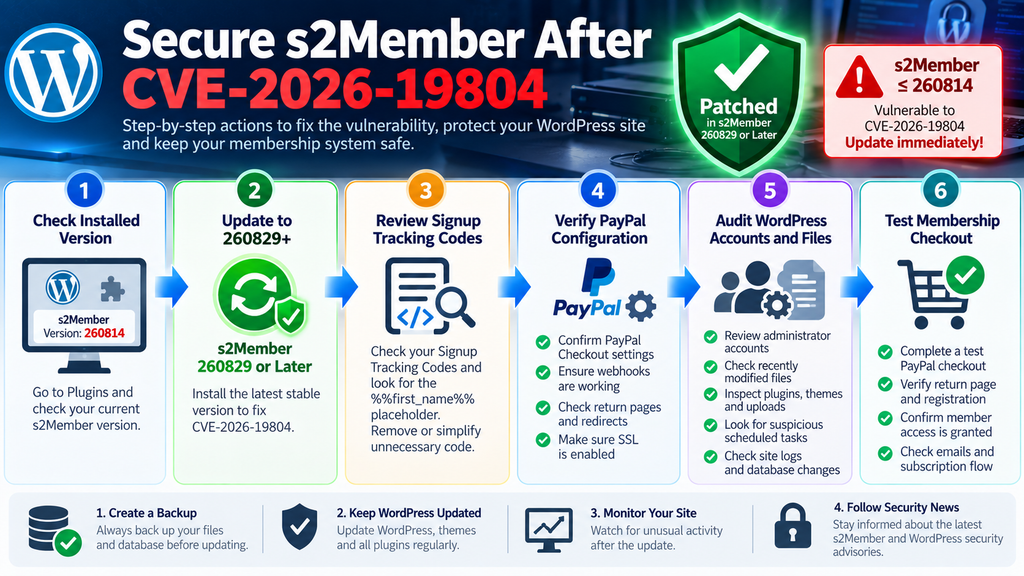
Updating closes the known vulnerable path, but administrators of potentially exposed sites should perform an additional security review. This is especially important when the affected version was publicly accessible with PayPal Checkout enabled and the relevant Signup Tracking Codes configuration present.
Begin with WordPress administrator accounts. Review every user with Administrator privileges and confirm that each account belongs to a known person or service. Pay attention to recently created accounts, unexpected email addresses, changed display names, or administrators that should have been removed.
Do the same for other privileged roles. A compromised site does not always reveal itself through an obvious new administrator. Existing accounts can be modified, and capabilities can be manipulated independently of the role label displayed in the WordPress interface.
Inspect Recently Modified WordPress Files
Next, review recent file modifications. Pay particular attention to executable PHP files appearing in locations where you do not expect them.
Compare WordPress core, plugins, and themes against trusted originals whenever possible. Reinstalling clean copies of WordPress core and publicly available plugins can sometimes provide more confidence than manually reading thousands of files.
Custom plugins and child themes require more care because no public original may exist. Compare them with known-good backups or your version-control repository.
Unexpected modifications do not automatically prove malicious activity. Plugin updates, caching systems, optimization tools, backup plugins, and legitimate administrators can modify files. The goal is to identify changes that lack a reasonable explanation.
Review wp-content Carefully
The wp-content directory deserves special attention because WordPress applications commonly have write access there.
Inspect plugins, themes, must-use plugins, and upload directories. Look for unexpected PHP files, unusually named directories, duplicate plugin files, or code that appeared recently without a corresponding legitimate deployment.
The uploads directory normally contains media and generated content rather than arbitrary executable application code. Hosting configurations vary, but unexpected PHP in an uploads location deserves investigation.
Also inspect mu-plugins. Must-use plugins load automatically and do not behave exactly like ordinary plugins in the WordPress Plugins interface. Attackers sometimes favor persistence mechanisms that administrators are less likely to notice.
Review wp-config.php and Server-Level Configuration
Check wp-config.php against a known-good copy. Look for unexplained includes, unfamiliar code before or after the normal WordPress configuration, or unexpected changes to database and security settings.
Depending on your hosting environment, also inspect .htaccess, PHP configuration overrides, scheduled tasks, hosting control-panel cron jobs, and other files capable of changing request behavior.
A WordPress compromise can extend beyond the plugin directory. Once arbitrary code execution occurs, the original vulnerability becomes only the entry point. Persistence may be stored elsewhere.
This is why patching and compromise assessment are separate activities.
Examine WordPress Scheduled Events
WordPress WP-Cron performs legitimate background work for plugins, themes, and WordPress itself. However, unexpected scheduled hooks can also provide persistence.
Review cron events when a compromise is suspected and compare unfamiliar entries with installed plugin documentation. Do not delete hooks blindly because payment, membership, backup, security, and email plugins often depend on scheduled events.
s2Member itself uses scheduled processing for membership expiration and other operations, so the presence of s2Member-related cron events is not automatically suspicious.
Focus on unexplained callbacks, recently introduced code, or scheduled activity connected to files you cannot identify.
Check Database Content and Options
Not all malicious persistence lives in files. WordPress stores substantial configuration inside the database.
Review suspicious administrator accounts, active plugin settings, unusual site URLs, unexpected option values, and unfamiliar code stored by plugins that legitimately support custom snippets.
If your site uses a code-snippet plugin, inspect it carefully. A malicious PHP snippet stored in the database may execute without creating an obvious standalone file.
Again, context matters. Many legitimate plugins store serialized or encoded data. Encoded content alone is not proof of compromise.
Review Logs Before They Rotate
Logs can provide valuable historical evidence, but many hosting platforms retain them for only a limited period.
Preserve relevant web-server access logs, PHP error logs, WordPress security logs, s2Member logs, hosting audit records, and reverse-proxy logs before normal rotation removes them.
Look for unusual requests around membership and payment endpoints, repeated errors, unexplained administrative logins, unexpected file access, and changes occurring shortly after suspicious requests.
Do not publicly post complete payment logs. They may contain personal information, transaction identifiers, email addresses, IP addresses, or sensitive integration data.
Audit PayPal Activity Separately
WordPress investigation should be accompanied by a review of the corresponding PayPal account when suspicious activity exists.
Look for unauthorized account changes, unexpected transactions, altered webhook configuration, unfamiliar API activity, or other anomalies relevant to the integration.
PayPal recommends promptly changing credentials and reporting suspicious activity when an account itself appears compromised.
Remember that a WordPress plugin vulnerability does not automatically mean the PayPal account was compromised. Treat these as separate questions and investigate evidence rather than assuming one implies the other.
A Practical Defensive Response to the s2Member Vulnerability
For most administrators, the response can be organized around a few clear priorities: preserve a backup, update the vulnerable plugin, identify whether the dangerous configuration existed, test payment functionality, and inspect the website for unexpected changes.
Sites that never enabled PayPal Checkout or never configured the relevant Signup Tracking Codes template may have a substantially different exposure profile from a site that satisfied every published prerequisite. Nevertheless, both should update.
The difference appears primarily in the investigation that follows. A website matching the full configuration described in the CVE deserves deeper historical review.
Prioritize Sites Handling Real Membership Payments
If you maintain several WordPress installations, start with internet-facing production sites processing real memberships.
Those sites combine valuable customer accounts, payment workflows, and persistent user access. They are therefore more consequential than an offline development copy.
After production is patched, continue through staging, testing, archived installations, and forgotten subdomains. Security inventories often reveal old copies that nobody remembered were publicly reachable.
Removing abandoned WordPress installations entirely is usually safer than maintaining software that no longer serves a business purpose.
Preserve Evidence Before Major Cleanup
If you discover strong indicators of compromise, avoid immediately deleting everything suspicious without recording it.
Preserve backups, logs, file timestamps, account information, and relevant hosting records. Evidence can help determine what happened and whether the compromise extended beyond WordPress.
For an important commercial website, consider involving your hosting provider or an experienced WordPress security professional. Server-level logs and filesystem information may reveal activity that WordPress itself cannot show.
If customer or personal data may have been accessed, organizations should also evaluate their legal and regulatory responsibilities with qualified professionals.
Hardening s2Member After the Immediate Update
Once the emergency update and audit are complete, reduce future exposure by simplifying the membership environment.
Remove unused plugins and themes. Keep WordPress core current. Update s2Member promptly. Limit administrator accounts. Require strong authentication for privileged users. Restrict filesystem permissions according to your hosting architecture.
Avoid placing executable PHP inside tracking and analytics configurations when a non-executable alternative exists. A tracking system should generally record an event rather than become another server-side application layer.
These measures will not make vulnerabilities impossible, but they reduce the number of paths available when a future software defect appears.
Keep Payment Integrations Narrow
Payment integrations deserve stricter controls than ordinary content features because they connect public forms, customer identities, external APIs, webhooks, and account privileges.
Only enable gateways you actually use. Remove obsolete API integrations. Review webhook destinations periodically. Protect credentials. Keep checkout pages under HTTPS.
Official s2Member documentation has long recommended SSL for pages containing payment buttons and Pro-Forms.
Modern HTTPS is only one layer of payment security, but it remains essential for protecting traffic between customers and the website.
Minimize Sensitive Logging
Debugging payment systems can produce detailed logs. Those logs are useful during troubleshooting but can also become sensitive assets.
Review what your configuration records, where logs are stored, how long they remain available, and who can access them.
s2Member’s documentation notes that it generally does not retain billing or credit-card information as ordinary membership data, although logging settings can affect what information is recorded during gateway interactions.
Disable unnecessary debugging after troubleshooting is complete and protect retained logs appropriately.
Frequently Asked Questions
What is the s2Member vulnerability CVE-2026-19804?
CVE-2026-19804 is a remote code execution vulnerability affecting the s2Member WordPress membership plugin. The disclosed chain involves insufficient handling of the first_name value when it reaches certain Signup Tracking Codes processing, combined with a PayPal Checkout verification weakness. Under the required configuration conditions, untrusted input can reach a context capable of server-side code execution.
Which s2Member versions are affected?
The published CVE record states that s2Member versions up to and including 260814 are affected. WPScan lists 260829 as the version in which the vulnerability is fixed. Administrators should therefore install 260829 or, preferably, the latest stable version available.
Is every WordPress site running s2Member exploitable?
Not necessarily through this exact vulnerability chain. The published description requires specific conditions, including a Signup Tracking Codes template containing the affected %%first_name%% placeholder and the PayPal-related verification condition described by the advisory. However, every installation running an affected version should still be updated.
Does the vulnerability require PayPal Checkout?
The disclosed CVE-2026-19804 chain specifically involves s2Member’s PayPal Checkout processing and a verification value described as exposed through a PayPal Checkout AJAX response. Therefore, whether the affected PayPal Checkout workflow was enabled is an important part of determining practical exposure.
What are s2Member Signup Tracking Codes?
Signup Tracking Codes are customizable tracking content processed after new paying-member signup events. s2Member documentation explains that they may appear on return pages, registration pages, login-related output, or theme footer output depending on the workflow. They have traditionally been used for analytics and conversion tracking.
Should I remove the %%first_name%% placeholder?
Removing an affected legacy tracking configuration can reduce exposure, but it is not a substitute for updating s2Member. Install version 260829 or later first. Then review whether the tracking template and its dynamic values are still necessary.
Is updating s2Member enough after possible exposure?
Updating fixes the known vulnerable software path, but a site that may already have been compromised should also be audited. Review administrator accounts, plugin and theme files, must-use plugins, uploads, wp-config.php, scheduled tasks, database content, access logs, and payment-related activity.
Should I change my PayPal password?
CVE-2026-19804 does not by itself prove that your PayPal account password was exposed. However, if your investigation finds suspicious PayPal activity or evidence that the account itself was accessed without authorization, follow PayPal’s security guidance and secure the account immediately.
Can I safely stay on s2Member 260814 if I do not use Signup Tracking Codes?
Staying on a version known to be affected is not recommended. Configuration can change, other security improvements may exist in newer releases, and future administrators may enable features without knowing about the old vulnerability. Upgrade to 260829 or later.
How can I determine whether my site was actually attacked?
There is rarely one definitive WordPress indicator. Review server logs, security-plugin events, file modification history, privileged user accounts, scheduled tasks, database changes, s2Member logs, and hosting records. If the website matched the vulnerable configuration and handles important data, consider a professional incident-response review.
What WordPress Administrators Should Remember
CVE-2026-19804 is a strong example of how several individually ordinary features can form a dangerous security chain. A customer first-name field, a tracking template, a payment return mechanism, and a verification value may appear unrelated. When trust boundaries between them fail, however, ordinary profile data can potentially reach executable server-side processing.
The immediate response is clear. WordPress administrators running s2Member 260814 or older should update to 260829 or a later stable version. Sites using PayPal Checkout should then inspect Signup Tracking Codes and determine whether the affected %%first_name%% placeholder existed. Installations matching the disclosed prerequisites deserve a deeper audit of files, accounts, logs, scheduled tasks, and database content.
Most importantly, do not stop at deleting a placeholder or changing a verification value. Security vulnerabilities should be corrected at their source. Patch the plugin, simplify unnecessary dynamic tracking code, protect payment integrations, and investigate suspicious changes when evidence warrants it.
⚠️ Disclaimer and Source Hygiene
This article is provided for educational, defensive cybersecurity, WordPress administration, and vulnerability-remediation purposes. It intentionally avoids exploit payloads, malicious PHP examples, verification-key extraction instructions, and step-by-step exploitation procedures.
Technical information was checked against the CVE record, current vulnerability databases, official s2Member documentation and changelog information, WordPress-related security references, and PayPal security guidance available at the time of publication. Vulnerability information can change as vendors and researchers publish additional findings.
Always create a verified backup before modifying a production WordPress installation. For suspected compromises involving customer information, payment systems, or business-critical infrastructure, consider consulting a qualified WordPress security professional, hosting provider, incident-response specialist, or appropriate legal professional.
🔔 For more tutorials like this, consider subscribing to our blog.
📩 Do you have questions or suggestions? Leave a comment or contact us!
🏷️ Tags: s2Member vulnerability, CVE-2026-19804, s2Member security, WordPress vulnerability, WordPress security, PayPal Checkout security, remote code execution, s2Member PayPal, Signup Tracking Codes, WordPress malware audit
📢 Hashtags: #s2Member, #WordPressSecurity, #CVE202619804, #WordPress, #CyberSecurity, #PayPalSecurity, #WebsiteSecurity, #RemoteCodeExecution, #WordPressTips, #SecurityUpdate
Sources and References
CVE-2026-19804 Vulnerability Record
The CVE information published on September 25, 2026 identifies s2Member versions through 260814 as affected and describes the relationship between the first_name parameter, Signup Tracking Codes, PayPal proxy verification, and remote code execution.
WPScan s2Member Vulnerability Database
WPScan’s current s2Member security listing identifies the corresponding remote code execution issue and reports 260829 as the fixed version.
Official s2Member Changelog
The official changelog documents the introduction and continuing development of PayPal Checkout and records strengthened PayPal Checkout return validation and payment-flow integrity in version 260829.
s2Member Version 260814 Release Information
The official August 14, 2026 release announcement documents s2Member 260814 and the security improvements included in that release, establishing the context for the last version identified as affected by CVE-2026-19804.
Official s2Member Signup Tracking Documentation
s2Member’s technical documentation explains how Signup Tracking Codes are processed and the locations where they can be displayed after membership registration and payment workflows.
PayPal Security Guidance
PayPal’s developer security guidance recommends protecting sensitive information, using secure communication, limiting exposure, and regularly reviewing payment integrations.
Secondary Sources and Testimonials
Secondary vulnerability databases can provide useful confirmation, scoring information, and simplified remediation guidance, but they should be interpreted alongside the CVE record and vendor information. At publication time, public sources agree on the central issue: older s2Member releases contain a dangerous code-execution path involving specific PayPal Checkout and Signup Tracking Codes conditions.
Security scores can differ between databases because scoring assumptions may vary. For administrators, the most important actionable facts are the affected-version range, the configuration prerequisites, the availability of a patched release, and the potential impact of successful server-side code execution.
No anonymous testimonials or unverifiable claims have been included in this article. Security recommendations are based on documented vulnerability information and defensive WordPress administration practices rather than anecdotal reports.
1 thought on “s2Member Vulnerability: PayPal Checkout RCE Explained”