
Table of Contents
A high-severity Eventin vulnerability can give administrator-equivalent capabilities back to WordPress user ID 1 after the account has been demoted. Learn how CVE-2026-75983 affects capability checks, which configurations face the greatest risk, and why Eventin administrators should update and audit the original account.
The latest Eventin vulnerability is unusual because it can turn a WordPress security decision into the condition that makes privilege escalation possible. CVE-2026-75983 affects Eventin – Event Calendar, Tickets, Registration, Booking & WooCommerce through version 4.1.23. The flaw involves WordPress capability handling and the account assigned user ID 1. Security records classify the issue as improper privilege management under CWE-269, with a CVSS 3.1 score of 7.5, rated High.
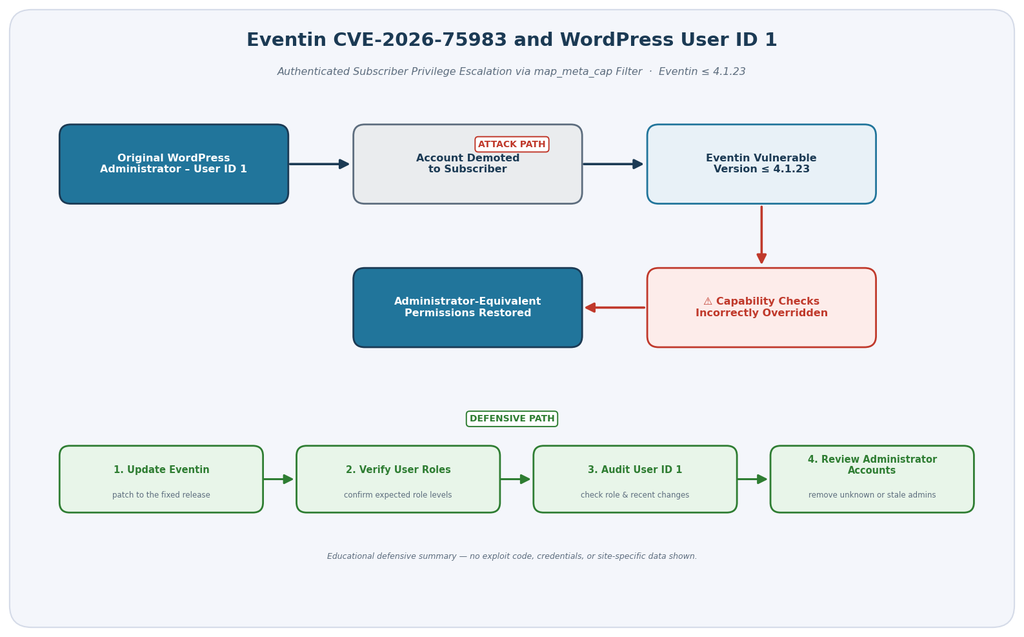
Unlike many WordPress privilege-escalation vulnerabilities, this issue does not simply allow any Subscriber to become an Administrator. A very specific condition matters. The authenticated account must be WordPress user ID 1. The vulnerability becomes particularly important when that original account has previously been demoted from Administrator to a lower role as part of a security-hardening strategy. In that situation, Eventin’s capability handling can effectively undermine the demotion.
That detail creates an unexpected lesson for WordPress administrators. User ID 1 is not inherently a security vulnerability, and changing its role does not provide a universal security boundary. What matters is how WordPress core, themes, plugins, authentication controls, and custom permission filters interpret that account. CVE-2026-75983 demonstrates why authorization should always depend on capabilities and appropriate object-level permissions rather than assumptions tied to a numeric user ID.
What Is CVE-2026-75983
CVE-2026-75983 is an authenticated privilege-escalation vulnerability affecting the Eventin WordPress plugin through version 4.1.23. The issue was published on September 15, 2026, with Wordfence identified as the assigning CNA. The published CVSS 3.1 score is 7.5 out of 10, placing the vulnerability in the High severity category. Its weakness classification is CWE-269, Improper Privilege Management.
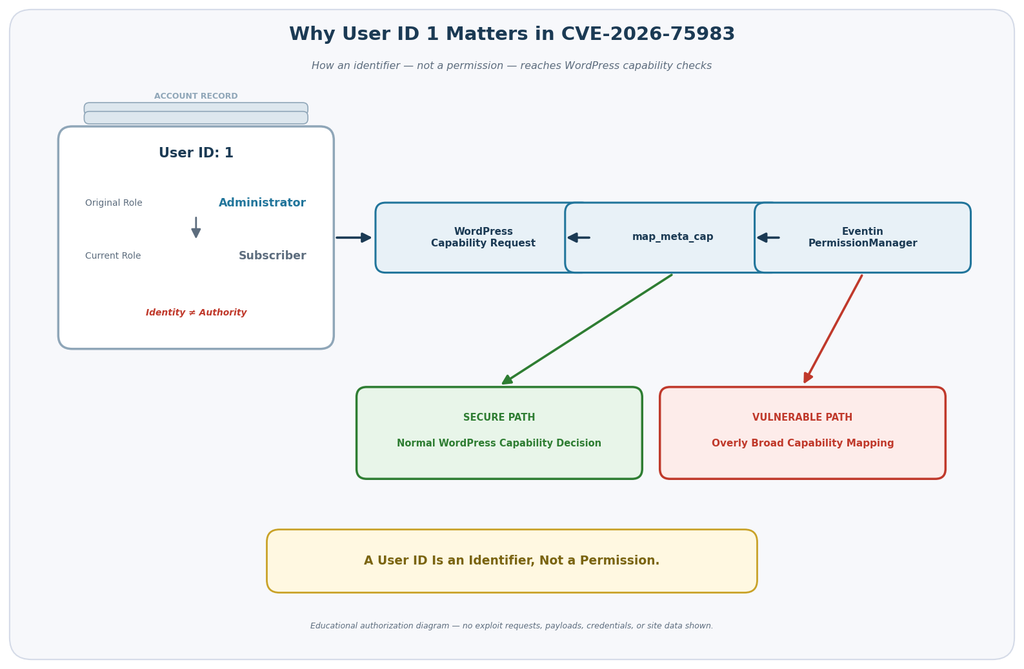
The vulnerable behavior involves Eventin’s PermissionManager::manage_permissions() function and WordPress core’s map_meta_cap filter. According to the CVE description, Eventin registered its permission-management function with this filter and treated user ID 1 differently from other accounts. When WordPress evaluated capabilities for that user, the vulnerable logic could return the primitive capability exist instead of preserving the normal capability mapping.
That distinction is important. WordPress normally asks whether a user has capabilities appropriate to a requested operation. Administrative actions may depend on capabilities such as manage_options, while account management and software administration depend on other capabilities. WordPress uses its roles and capabilities system to determine whether the current user should be allowed to perform those operations.
CVE-2026-75983 interferes with that expected authorization process for one specific account. The published vulnerability description states that the affected Eventin code could effectively allow user ID 1 to pass capability checks even when the account’s assigned WordPress role should not grant those permissions. Security advisories specifically identify sensitive capabilities including manage_options, promote_users, edit_plugins, edit_themes, and update_core.
Why This Eventin Vulnerability Is Unusual
Most privilege-escalation warnings immediately make site owners think about public registration. For example, an administrator may worry that any newly registered Subscriber could exploit a vulnerable endpoint and promote the account. CVE-2026-75983 has a narrower prerequisite.
The attacker needs authenticated access to the account represented by user ID 1. A random Subscriber account with another user ID does not satisfy the specific condition described by this CVE. This limitation is also reflected in the vulnerability’s CVSS vector, where attack complexity is rated High and privileges required are rated Low.
However, the narrower prerequisite should not make administrators ignore the vulnerability. If user ID 1 has been intentionally demoted and remains accessible, the account may appear harmless during an ordinary user audit. An administrator could look at the Users screen, see Subscriber beside that account, and reasonably assume it cannot perform administrative actions.
That assumption is exactly where the Eventin vulnerability becomes dangerous. A displayed role and the effective authorization decisions made by WordPress are not necessarily the same thing when vulnerable code interferes with capability mapping.
The Risk Is About Effective Permissions
WordPress security is ultimately enforced by permission checks rather than the visual label shown beside an account. Administrator, Editor, Author, Contributor, and Subscriber roles are convenient collections of capabilities. Plugins can also add custom roles and capabilities for specialized workflows.
When code hooks into WordPress’s capability system, it must preserve that security model carefully. A permission filter designed for one plugin should not turn into a universal authorization override for unrelated WordPress operations.
The CVE description says Eventin’s vulnerable permission callback was not sufficiently scoped to plugin-specific capabilities. Instead, the behavior associated with user ID 1 could affect every capability being evaluated. That broad scope explains why the potential consequences extend far beyond event creation or ticket management.
If administrator-equivalent checks become available to a supposedly low-privilege account, the security impact can reach settings, plugins, themes, user management, updates, and other privileged areas. On installations where built-in plugin or theme file editing remains enabled, privileged access can also increase the risk of server-side code execution. The exact available actions still depend on the site’s WordPress configuration and other security controls.
Why WordPress User ID 1 Is Special
WordPress assigns a numeric database ID to every user account. On a conventional new installation, the first account created during setup receives user ID 1. Because WordPress setup normally creates an administrative account first, ID 1 is commonly associated with the site’s original Administrator.
The number itself does not magically give an account administrative rights. WordPress normally relies on roles and capabilities. An account can therefore be changed from Administrator to another role even though its numeric database ID remains 1. That distinction is central to understanding CVE-2026-75983.
Imagine that a site begins with an account whose database ID is 1 and whose role is Administrator. Later, the site owner creates another Administrator account and demotes the original account to Subscriber. From WordPress core’s normal role perspective, the old account should now have only Subscriber-level permissions.
With vulnerable Eventin versions, however, the numeric identity of that account becomes unexpectedly important. The vulnerability description states that the plugin’s capability callback checks for user ID 1 and returns an authorization result that can cause capability checks to succeed.
Demoting ID 1 Can Create the Relevant Condition
Some WordPress hardening guides have historically suggested changing, deleting, or demoting the original Administrator account. The idea usually comes from reducing predictable information available to attackers.
That practice should never replace stronger controls such as unique passwords, multifactor authentication, limited administrator accounts, timely updates, secure hosting, rate limiting, and careful access management. User IDs are database identifiers rather than passwords.
CVE-2026-75983 makes the demotion scenario particularly interesting. If ID 1 remains an Administrator, the vulnerable permission logic does not create a meaningful privilege increase because that account already has administrative capabilities. The CVE description explicitly notes that no incremental privilege gain occurs in the normal configuration where user ID 1 remains an Administrator.
If the account has been demoted, the situation changes. WordPress believes the account should have fewer privileges, while the vulnerable Eventin permission filter may cause sensitive capability checks to succeed anyway.
In other words, the security-relevant condition is not simply:
“Does user ID 1 exist?”
The more useful question is:
“Does user ID 1 exist as a non-administrator account, and is that account able to authenticate while an affected Eventin version is active?”
That is a much more accurate way to evaluate exposure.
Role Labels Are Not the Whole Story
This vulnerability also illustrates why WordPress administrators should distinguish between roles and capabilities. A role such as Subscriber is a convenient way of assigning a set of capabilities. Security decisions inside WordPress are commonly made by checking capabilities rather than asking only for a role name.
For example, a plugin should ask whether the current user has the capability required for a sensitive operation. WordPress then maps that request through its authorization system. Plugins can participate in this process, but doing so creates a security-sensitive responsibility.
If a plugin returns an overly broad capability result, the account’s displayed role may no longer describe what the account can actually accomplish.
Therefore, an audit of CVE-2026-75983 should not stop after checking that user ID 1 says “Subscriber.” That is precisely the configuration where further investigation matters.
Which Eventin Configurations Are Exposed
The published CVE record identifies Eventin versions up to and including 4.1.23 as affected. Therefore, installations still running 4.1.23 or an earlier affected release should be treated as requiring attention. Multiple vulnerability databases currently list 4.1.24 as the release addressing the issue.
The official WordPress.org listing confirms that Eventin 4.1.24 was released on September 10, 2026. Its public changelog includes several security-hardening changes, including work around checkout, payment verification, and speaker creation. However, the public changelog does not explicitly name CVE-2026-75983 or describe the user-ID-1 capability issue in that entry.
That difference is worth documenting rather than hiding. WPScan currently lists the privilege-escalation vulnerability as fixed in 4.1.24, while the official CVE affected range ends at 4.1.23. At the same time, at least one security tracker has noted that Eventin’s public changelog does not explicitly tie 4.1.24 to this particular CVE.
For administrators, the practical response is straightforward: do not remain on 4.1.23 or earlier. Install the latest vendor-supported Eventin release available to you and verify the installed version afterward. Administrators operating high-risk sites may also want to confirm remediation with the vendor or their security provider when the public release notes do not explicitly document a particular CVE.
The Most Relevant Exposure Scenario
The most important configuration combines several conditions.
First, an affected Eventin version is installed and active. Second, WordPress user ID 1 still exists. Third, that account has been demoted from Administrator to a lower-privilege role. Finally, someone can authenticate as that account.
All of these details matter because the vulnerability does not create an arbitrary new user ID 1. Nor does the CVE description say that every Subscriber automatically gains administrative powers.
Instead, the vulnerable permission behavior specifically applies when WordPress evaluates the account whose ID equals 1.
That means a site where user ID 1 was deleted years ago presents a different exposure profile from a site where the account still exists as an active Subscriber. Similarly, a default installation where ID 1 remains an Administrator does not receive an additional privilege increase from the behavior described in this CVE, although the vulnerable plugin version should still be updated.
Public Registration Is Not the Primary Requirement
Administrators should also avoid confusing this issue with vulnerabilities that depend on open user registration.
Allowing visitors to register Subscriber accounts may increase the general attack surface of a WordPress installation, but CVE-2026-75983 requires the relevant account to be user ID 1. A newly created public account normally receives a different numeric ID.
Therefore, simply disabling “Anyone can register” does not repair the vulnerable capability logic.
Likewise, changing the default new-user role does not address the underlying issue. Those settings may be appropriate parts of a broader security policy, but they should not be presented as patches for CVE-2026-75983.
The correct remediation starts with removing the vulnerable plugin version from service through an appropriate update or vendor-supported fix.
Multisite and Customized Permission Environments
Sites using customized role-management plugins, membership systems, multisite configurations, marketplace extensions, or custom permission code deserve additional attention after the update.
WordPress authorization can become complex when several plugins filter capabilities. One component may create a custom role, another may map capabilities, while a third adds frontend account management. The resulting effective permissions are not always obvious from the role label alone.
Eventin itself supports extensive event-management workflows and integrations. Its WordPress.org listing currently reports more than 10,000 active installations and compatibility with modern WordPress releases.
For a busy event website, multiple people may have access to dashboards, event management, bookings, attendee data, or commerce functions. That makes a clean permission audit particularly valuable.
Administrators should document which accounts are supposed to have administrative access, which accounts manage events, which accounts handle orders or attendees, and which accounts require only basic frontend access.
Any unexpected difference between intended access and effective access deserves investigation.
Deleted and Dormant Accounts
A dormant account can be easy to overlook because nobody uses it during ordinary operations. However, inactivity does not automatically make an account harmless.
If the original user ID 1 account remains in WordPress with a valid authentication path, its current role and security status should be reviewed. Check whether the account is still needed, whether its email address belongs to an authorized person, and whether its credentials and authentication protections meet current policy.
Do not delete accounts impulsively on a production website without understanding content ownership and application dependencies. WordPress may ask you to reassign content when deleting a user, and plugins can associate records with user IDs.
The safer approach is to understand what the account owns first, preserve a backup, document the current configuration, and then make a deliberate access-control decision.
How Capability Checks Are Bypassed
To understand why this Eventin vulnerability can have such broad consequences, it helps to look at WordPress authorization conceptually rather than focusing on exploit instructions.
WordPress uses capabilities to answer questions such as whether a user can edit content, manage settings, install software, modify another account, or perform other privileged operations. Plugins normally use WordPress APIs to ask those questions instead of building independent authorization systems.
Some capabilities are mapped dynamically. WordPress provides the map_meta_cap mechanism so a requested capability can be translated into the primitive capabilities needed for a particular user and context.
This mechanism is powerful because plugins can participate in authorization decisions. It is also sensitive because an incorrect result can influence access far beyond the original feature.
According to the CVE record, Eventin’s vulnerable PermissionManager::manage_permissions() callback was attached to map_meta_cap. When the evaluated user ID equaled 1, the function could return the primitive exist capability without limiting that behavior to specific Eventin capabilities.
Why exist Changes the Result
The issue is not simply that Eventin added a capability. The security problem comes from replacing the expected capability mapping with a primitive capability that the account can satisfy.
When that replacement occurs broadly, WordPress can reach an authorization result very different from the one implied by the account’s assigned role.
A Subscriber may be intended to read content and manage a small amount of personal account information. That account should not normally receive permissions associated with site configuration, plugin editing, theme editing, user promotion, or core updates.
Yet the CVE description identifies checks such as manage_options, edit_plugins, edit_themes, promote_users, and update_core among the capabilities that could be affected for user ID 1.
The underlying lesson is broader than Eventin. Capability filters must remain narrowly scoped. A plugin that needs special handling for an Eventin-specific action should modify only the relevant authorization decision and should preserve WordPress’s result for unrelated capabilities.
Why the Vulnerability Can Reach Beyond Eventin
A common misunderstanding is that a vulnerable event plugin should only expose events.
That assumption is not always correct.
If a flaw occurs inside an event-management REST endpoint, its immediate impact may indeed be limited to event data. But CVE-2026-75983 affects a general WordPress capability-mapping mechanism. Therefore, the consequences can extend into WordPress core and other administrative functionality that depends on capability checks.
This is why the vulnerability is classified as privilege escalation rather than merely unauthorized event modification.
Once an account is treated as satisfying administrator-level checks, the security boundary around other WordPress operations may weaken. The actual impact still depends on the installation. Security constants, hosting restrictions, disabled file editors, external authentication, web application firewalls, and other controls can reduce particular attack paths.
Those controls should be viewed as defense in depth rather than replacements for updating the vulnerable plugin.
Why Authentication Still Matters
CVE-2026-75983 is described as an authenticated vulnerability. An external visitor who has no access to user ID 1 does not automatically become that account merely because Eventin is installed.
This requirement matters when evaluating actual exposure.
An administrator should therefore investigate the security state of ID 1 rather than assuming every anonymous visitor can immediately exploit the flaw. Questions worth answering include whether the account can still log in, whether it belongs to a current authorized user, and whether there have been unexplained sessions or account changes.
Credential security remains important. Strong unique passwords and multifactor authentication can reduce the chance that an unauthorized person gains access to a valid account.
However, credentials cannot repair incorrect authorization logic. If a legitimate low-privilege user controls ID 1, that user could potentially receive permissions the site owner never intended to grant.
The Potential Site-Takeover Impact
The CVE’s confidentiality, integrity, and availability impacts are each rated High in the published CVSS assessment. That reflects what administrator-equivalent authorization can mean for a WordPress site.
Administrative control may expose configuration, user management, content, extensions, and other sensitive functions. If WordPress file editors are available, privileged theme or plugin modification can potentially lead to code execution. Security advisories therefore describe full site takeover as a possible outcome under the required conditions.
Administrators should avoid interpreting this as evidence that their site has already been compromised.
A vulnerability describes a condition that can be abused. Compromise requires an attacker to meet the relevant prerequisites and actually exploit the weakness.
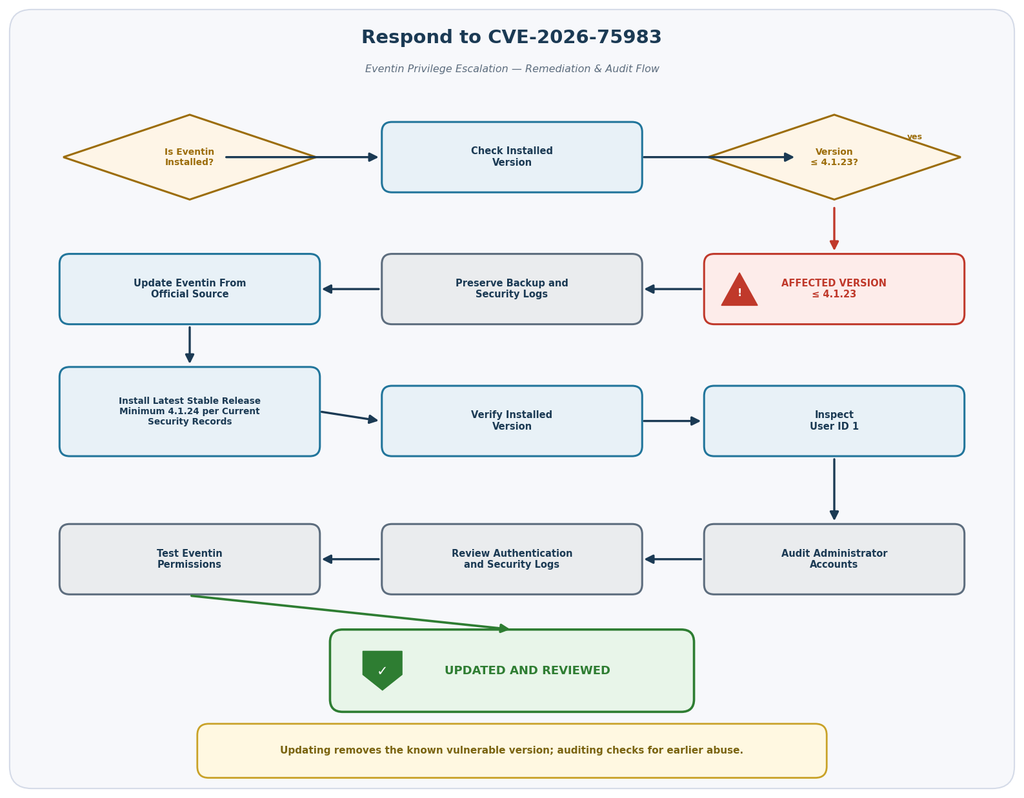
That distinction matters during incident response. Updating removes the known vulnerable condition, while an audit helps determine whether anything suspicious happened before remediation.
Updating Eventin to Version 4.1.24

Sites running Eventin 4.1.23 or earlier should move away from the affected version. WPScan currently identifies 4.1.24 as the fixed release for the authenticated privilege-escalation issue, and the official CVE affected range ends at 4.1.23. Eventin 4.1.24 is also available through the official WordPress plugin directory.
Before updating a production event website, create or verify a recent backup. Event-management systems may contain registrations, bookings, attendee information, ticket data, settings, and integrations that are operationally important. A backup gives you a recovery point if an unrelated compatibility issue appears during deployment.
Next, confirm the version actually installed on the site. Do not rely solely on an old maintenance spreadsheet or memory. Check the WordPress Plugins screen or your trusted site-management tooling.
If the installation reports 4.1.23 or an older version, update from an official or trusted vendor source. Avoid downloading replacement plugin archives from random third-party websites.
After installation, confirm that WordPress reports the intended new version.
Do Not Stop at the Version Number
A successful update is an important remediation step, but it does not answer every security question.
If the vulnerable configuration existed before the update, review the relevant account and administrative activity. This principle applies to most serious WordPress vulnerabilities: patching closes the known vulnerable path, while auditing helps determine whether the path was previously abused.
Start with user ID 1. Confirm its intended owner and role. Then review all Administrator accounts.
Look for accounts you do not recognize, unexplained role changes, unexpected profile modifications, unusual administrative activity, or newly installed extensions that nobody on the team authorized.
Check your security logs, hosting logs, authentication history, and other available monitoring data. What you can review depends on your hosting environment and the logging that was enabled before the incident.
Check Eventin Functionality After Updating
Security updates should be followed by functional testing, especially on websites where events generate revenue.
Create or use a safe test event. Verify that authorized event managers can perform the tasks their roles require. Confirm that ordinary Subscribers cannot access administrative functions they should not have.
Test registration and ticket workflows where applicable. If your site uses WooCommerce or another payment integration alongside Eventin, verify the normal checkout process without conducting unnecessary live transactions.
Also review scheduled events, recurring events, attendee management, ticket capacity, email notifications, and integrations important to your organization.
The goal is to confirm two things at once: the vulnerable release is gone, and legitimate operations continue to work.
Keep the Latest Stable Release in View
Version 4.1.24 should be treated as the minimum version discussed in relation to this CVE based on current vulnerability records, not as a permanent target forever.
If Eventin publishes a newer stable security release, administrators should evaluate and deploy that newer supported version rather than intentionally remaining on 4.1.24 indefinitely.
The plugin has received several security-related changes across recent releases. WordPress.org records security hardening in versions 4.1.20 through 4.1.24, including improvements to REST API permissions, object-level permission checks, protected event access, API responses, checkout, payment verification, and speaker creation.
That recent history makes disciplined update management particularly important.
For administrators responsible for multiple WordPress websites, consider maintaining an extension inventory containing the site, plugin name, installed version, latest available version, update date, and person responsible for verification.
A simple inventory can turn an emergency search into a manageable maintenance process.
Auditing the Original Administrator Account
After updating Eventin, inspect the account associated with WordPress user ID 1. This audit is particularly important when the account was intentionally demoted from Administrator.
Start by determining whether the account is still needed. Identify the legitimate owner and its intended role. Check whether the account should be capable of logging in at all.
If ID 1 belongs to a former employee, contractor, developer, agency, or administrator who no longer requires access, follow your organization’s normal account-removal or access-revocation procedure.
Do not make destructive database changes simply because the account number is 1. User IDs can be referenced by content, metadata, plugins, audit systems, and integrations. A controlled WordPress-level process is safer than casually deleting database rows.
Review Every Administrator
The audit should expand beyond user ID 1.
Open the WordPress Users area and review every account currently holding the Administrator role. Make sure each administrator belongs to a person or service that still requires that level of access.
Unexpected Administrator accounts deserve immediate investigation. However, not every unfamiliar account is malicious. Managed hosting, development agencies, maintenance services, or migration processes sometimes create legitimate administrative users.
Document the account before removing it if its origin is uncertain.
Look for recently changed roles as well. If your logging solution records user-management activity, review promotions, demotions, new-user creation, password changes, email changes, and administrative logins during the period when the vulnerable Eventin version was installed.
Review Authentication Security
An authenticated privilege-escalation vulnerability makes account security especially relevant.
Reset credentials when there is a reasonable possibility that an affected account has been exposed. Use long, unique passwords generated by a password manager rather than passwords reused across websites.
Enable multifactor authentication for privileged accounts where your environment supports it. MFA cannot fix vulnerable authorization code, but it provides an additional barrier against stolen passwords.
Remove old sessions after a suspected account compromise. A password change alone may not address every active session depending on the authentication environment and security tooling in use.
Also verify that administrative email addresses remain under the control of authorized people. Account recovery mechanisms deserve the same protection as passwords because an attacker who controls the recovery channel may regain access later.
Look for Unexpected Extension Changes
Administrator-equivalent capabilities can affect plugins and themes, so extension integrity belongs in the audit.
Review installed plugins and themes. Look for components that your team did not install or that appeared during the exposure period.
Check whether expected security plugins remain active and properly configured. An attacker with sufficient privileges may try to disable monitoring or security controls.
Where practical, compare plugin and theme files against known-good packages from trusted sources. File-integrity monitoring can make this process easier if it was enabled before the incident.
Do not delete unfamiliar files blindly on a production server. Some may belong to legitimate custom development, caching systems, backups, payment integrations, or hosting tools.
Preserve evidence first if compromise is suspected.
Review WordPress and Hosting Logs
Logs can provide context that the WordPress dashboard cannot.
Depending on your setup, useful records may include authentication logs, web server access logs, security-plugin events, hosting activity logs, file-change monitoring, administrative audit trails, and application logs.
Look for behavior inconsistent with normal operations. Examples include unexpected administrative logins, unexplained user-role changes, plugin installations, theme modifications, account creation, or configuration changes.
Be careful when drawing conclusions from a single log entry. Internet-facing WordPress websites receive automated scanning and failed login attempts constantly. Those events do not prove successful exploitation.
Build a timeline instead.
Identify when the affected Eventin version was installed, when user ID 1 was demoted, whether that account remained accessible, when the update occurred, and whether suspicious privileged activity happened inside that window.
If You Find Evidence of Compromise
A site showing genuine signs of unauthorized administrator access requires more than a routine plugin update.
Preserve available logs and backups before making major changes. Rotate relevant credentials. Review WordPress administrator accounts, hosting access, database credentials, SFTP or SSH access, API credentials, payment integrations, and other secrets according to the scope of the incident.
Inspect the site for unauthorized code or persistent access mechanisms. If you do not have incident-response experience, involve your hosting provider or a qualified WordPress security professional.
Restoring a backup can be useful, but only when you understand when the compromise occurred. Restoring a backup created after unauthorized access began can restore the attacker’s persistence along with the website.
Similarly, restoring an old clean backup without addressing the vulnerable Eventin version can recreate the original exposure.
The recovery process should therefore combine clean files and data, patched software, credential rotation, permission review, and monitoring.
Frequently Asked Questions
What is the Eventin vulnerability CVE-2026-75983?
CVE-2026-75983 is a privilege-escalation vulnerability affecting Eventin through version 4.1.23. The issue involves Eventin’s interaction with WordPress’s map_meta_cap capability system. Under the specific condition where the evaluated account is user ID 1, vulnerable code can cause capability checks to succeed even if that account has been demoted to a lower WordPress role. The vulnerability carries a published CVSS 3.1 score of 7.5, rated High.
Which Eventin versions are affected?
The official CVE affected range includes Eventin versions up to and including 4.1.23. WPScan and several current vulnerability databases identify 4.1.24 as the fixed release. Administrators should install the latest stable vendor-supported version rather than remaining on an affected release.
Is Eventin 4.1.24 available?
Yes. The official WordPress.org plugin directory lists Eventin 4.1.24, released September 10, 2026. The release includes several security-hardening changes. Its public changelog does not explicitly name CVE-2026-75983, so administrators requiring formal remediation confirmation should also follow vendor and vulnerability-database updates.
Does every Subscriber become an Administrator?
No. The published vulnerability specifically concerns capability checks for the account whose WordPress user ID is 1. It does not state that every Subscriber account receives administrator-equivalent permissions. This distinction is essential when assessing actual exposure.
Why is a demoted user ID 1 more important?
If user ID 1 remains an Administrator, it already possesses administrative capabilities, so the vulnerable behavior does not create an incremental privilege increase. If ID 1 has been demoted to Subscriber or another lower role, the Eventin vulnerability can undermine that restriction by causing capability checks to succeed.
Should I promote user ID 1 back to Administrator?
Do not change roles merely to work around vulnerable software. Update Eventin and then configure every account according to the access it legitimately requires. The principle of least privilege remains important. An account that does not need Administrator permissions should not receive them simply because its numeric ID is 1.
Should I delete user ID 1?
Not automatically. The account may own posts or other records, and plugins may associate data with its numeric ID. First identify the account, its content, its purpose, and any dependencies. If it is no longer needed, use a controlled removal process and correctly reassign necessary content.
Does disabling public registration fix CVE-2026-75983?
No. Public registration is not the underlying cause. The vulnerability involves capability mapping for user ID 1. Disabling registration may reduce other security risks, but it does not repair Eventin’s affected permission logic.
Is updating Eventin enough?
Updating removes the known vulnerable version, but sites that previously met the vulnerable conditions should also perform an audit. Review user ID 1, all Administrator accounts, authentication activity, extension changes, relevant logs, and other indicators of unexpected privileged activity.
Does CVE-2026-75983 mean my website was hacked?
No. The existence of a vulnerability does not prove exploitation. The attacker would need to satisfy the vulnerability’s prerequisites, including authenticated control of user ID 1. An audit can help determine whether suspicious activity occurred while the vulnerable configuration was present.
The Bigger Lesson Behind This Eventin Security Issue
CVE-2026-75983 stands out because the dangerous condition can emerge from something that initially looks like sensible hardening: demoting the original Administrator account.
The lesson is not that administrators should keep user ID 1 permanently privileged. Nor is the lesson that user ID 1 must always be deleted.
The more important lesson is that WordPress authorization should depend on properly scoped roles, capabilities, and contextual permission checks rather than special trust attached to a numeric user identifier.
Eventin’s affected permission handling demonstrates how a plugin can unintentionally alter assumptions made elsewhere in WordPress. A Subscriber label is meaningful only when the underlying capability system continues enforcing Subscriber-level access.
Site owners running Eventin 4.1.23 or earlier should update to the latest stable release and verify the installed version. Current vulnerability records identify 4.1.24 as the remediation boundary, while the official CVE affected range ends at 4.1.23.
After updating, inspect user ID 1 and the rest of the administrative account list. Review relevant logs when available and investigate unexpected privilege changes rather than assuming the software update alone proves that nothing happened earlier.
That combination patching, verification, account review, and sensible monitoring is much stronger than relying on a single WordPress hardening trick.
⚠️ Disclaimer and Source Hygiene
This article is provided for educational, defensive, and informational purposes. It is not a substitute for professional cybersecurity, legal, hosting, or incident-response advice. Vulnerability information can change as vendors, CVE authorities, and security researchers publish new findings, corrections, patches, or revised severity assessments.
The technical details in this article were checked against the current CVE record, WordPress.org plugin information, Eventin’s public changelog, WPScan vulnerability data, and security databases reporting CVE-2026-75983. The CVE currently identifies Eventin through 4.1.23 as affected. WPScan and several security trackers identify 4.1.24 as fixed, while Eventin’s public 4.1.24 changelog describes security hardening without explicitly naming this CVE. Administrators should therefore use the latest stable vendor-supported Eventin version and follow subsequent vendor or security-advisory updates.
🔔 For more tutorials like this, consider subscribing to our blog.
📩 Do you have questions or suggestions? Leave a comment or contact us!
🏷️ Tags: Eventin vulnerability, CVE-2026-75983, Eventin security, WordPress vulnerability, WordPress security, Eventin plugin, WordPress user ID 1, privilege escalation, WordPress administrator security, WordPress plugin security
📢 Hashtags: #Eventin, #WordPressSecurity, #CVE202675983, #WordPress, #CyberSecurity, #PluginSecurity, #WebsiteSecurity, #PrivilegeEscalation, #WordPressAdmin, #SecurityUpdate
Sources and References
CVE-2026-75983 / CVE record: The published vulnerability record identifies Eventin versions through 4.1.23 as affected, describes the map_meta_cap permission issue affecting user ID 1, assigns CWE-269, and documents the administrator-equivalent privilege impact.
WordPress.org Eventin plugin listing: The official plugin directory confirms Eventin 4.1.24, its September 10, 2026 release, current plugin requirements, active installation count, and the vendor’s published release notes.
WPScan Eventin vulnerability database: WPScan lists CVE-2026-75983 as an authenticated Subscriber+ privilege-escalation vulnerability and currently identifies version 4.1.24 as fixed.
Eventin official changelog: ThemeWinter’s release history confirms the Free 4.1.24 release and documents security hardening included in that update, although the public entry does not explicitly identify CVE-2026-75983 by number.
Wordfence/CNA-derived vulnerability information: Current security records attribute the CVE to Wordfence and document a CVSS 3.1 score of 7.5 with High confidentiality, integrity, and availability impact.
Secondary Sources and Testimonials
Independent vulnerability databases broadly reproduce the same core technical finding: Eventin through 4.1.23 can improperly alter WordPress capability mapping when the evaluated account has user ID 1. These sources are useful for cross-checking affected ranges and severity, but primary CVE, vendor, WordPress.org, and established vulnerability-database information should take priority when remediation guidance changes.
One current security tracker has raised an important documentation caveat: although version 4.1.24 is available and multiple databases identify it as the remediation release, Eventin’s public 4.1.24 changelog does not explicitly name the user-ID-1 capability issue. That does not change the CVE’s affected range of through 4.1.23, but it is useful context for administrators who require explicit vendor confirmation for security-change management.
2 thoughts on “Eventin Vulnerability Restores Admin Power to User ID 1”