
Table of Contents
A MotoPress Hotel Booking vulnerability can expose premium installations using Stripe to stored XSS when webhook signature verification is not properly configured. Learn how CVE-2026-90650 works, why the Stripe signing secret matters, which installations are affected, and what administrators should check now.
MotoPress Hotel Booking Vulnerability and Stripe Security
WordPress hotel and vacation-rental websites often depend on payment automation. A guest completes a reservation, Stripe processes the transaction, and the booking system receives information about what happened. Most of this communication takes place quietly in the background. For administrators, that automation is convenient because successful payments, failed transactions, refunds, and related events can update booking records without requiring someone to manually check every transaction. However, automated communication also creates an important security boundary. A WordPress plugin must be able to determine whether a message claiming to come from Stripe actually originated from Stripe.
CVE-2026-90650 highlights why that boundary matters. The reported MotoPress Hotel Booking vulnerability affects a Stripe webhook processing path in the premium edition of the plugin. According to the published CVE record, versions through 6.2.4 are affected by stored cross-site scripting involving data received through a Stripe webhook event. The vulnerability has been assigned CVE-2026-90650 and a CVSS 3.1 base score of 7.2, categorized as High severity. The published description identifies insufficient sanitization and output escaping as central parts of the problem.
The most important detail is not simply that Stripe is involved. The critical security distinction is whether the Stripe webhook signing secret has been configured. According to the CVE description, the premium webhook listener performs signature verification when a signing secret is configured. If that secret is absent, the affected listener can accept an event without the cryptographic verification that would normally establish its authenticity. This creates a path where attacker-controlled information may enter a payment record and later appear in the WordPress administration interface.
This article focuses on defensive understanding rather than exploitation. Site owners do not need payloads, proof-of-concept requests, or attack instructions to respond effectively. They need to understand whether their installation contains the affected premium component, whether Stripe is enabled, whether the webhook signing secret is configured correctly, and whether existing payment logs deserve additional review. Those questions provide a practical way to evaluate exposure while avoiding unnecessary experimentation on a production booking website.
What Is CVE-2026-90650
CVE-2026-90650 is a stored cross-site scripting vulnerability reported in MotoPress Hotel Booking for WordPress. The published CVE record describes versions up to and including 6.2.4 as affected. The issue involves the Stripe webhook event object and specifically data that can ultimately be written into a payment log. Stored XSS differs from a reflected XSS issue because malicious or unsafe content can persist inside an application before it is displayed later. In this case, the security concern becomes especially significant because the stored information can eventually be viewed from a privileged WordPress administrative context.
The vulnerability does not mean that every MotoPress Hotel Booking website can automatically be compromised simply because the plugin is installed. Several conditions matter. The vulnerable path is associated with the premium Stripe webhook integration. The published disclosure also says an attacker would need information connected to a valid existing Stripe payment so that a forged event could be associated with a payment record. Most importantly, the reported attack path depends on the webhook signing secret not being configured, because a correctly configured secret enables cryptographic verification of incoming webhook messages.
That distinction matters when assessing risk. Security advisories sometimes reduce a vulnerability to a plugin name and affected version range. Administrators then assume that every installation carrying that version has exactly the same exposure. Real-world WordPress security is usually more contextual. Features, editions, integrations, configuration choices, account privileges, and external services can change whether a vulnerable code path is reachable. CVE-2026-90650 is a good example because Stripe configuration and the difference between premium and Lite installations materially affect the analysis.
Why Stored XSS Is Important in an Administrator Context
Cross-site scripting allows untrusted content to be interpreted as active browser content rather than harmless text. Stored XSS becomes particularly concerning when the unsafe value persists and is later rendered inside an administrative page. An administrator may not need to click a suspicious external link or intentionally interact with obviously malicious content. Simply opening the affected record could potentially cause the browser to process content that should have been safely escaped.
The CVE description explains that attacker-controlled information associated with a Stripe webhook event can be written into the payment log and later rendered without sufficient escaping. The dangerous transition therefore occurs across two different stages. First, untrusted data enters the application and becomes stored. Later, WordPress displays that stored information to someone reviewing the payment. The security problem is not only the initial acceptance of the data. It is also the failure to ensure that stored data remains harmless when displayed.
WordPress administrators should understand this distinction because payment logs often appear trustworthy. A payment record looks like internal operational information rather than user-generated content. Yet data can arrive from APIs, webhook events, form fields, synchronization services, or other external systems. Developers should therefore treat external values as untrusted until they have passed the appropriate validation. Output must also be escaped for the context where it is displayed. Authentication of the sender and safe output handling solve different security problems, and robust systems normally need both.
CVSS Severity and Practical Context
The CVE record lists a CVSS 3.1 base score of 7.2, placing CVE-2026-90650 in the High severity category. Its published vector reflects network accessibility, no required WordPress privileges, and a changed security scope. However, a CVSS score should not be interpreted as proof that every affected website faces identical immediate risk. Configuration still matters. A premium site using the vulnerable Stripe path without a signing secret is in a different situation from a site that does not use that path at all.
CISA’s enrichment data attached to the CVE record listed exploitation as “none” at the time reflected in the published record. That should not be interpreted as a guarantee that exploitation cannot occur or will not emerge later. It only describes the status represented by that data at that point in time. Administrators should therefore base remediation on confirmed vulnerability conditions rather than waiting for reports of widespread attacks.
For a hotel, rental business, or booking operator, the practical priority is straightforward. Identify the edition and version installed, determine whether Stripe is active, verify the webhook configuration, preserve useful evidence if compromise is suspected, and follow vendor remediation guidance as it becomes available. Security work is usually most effective when administrators respond to verified conditions instead of reacting only to a severity number.
The Two Security Failures Behind the Reported Path
CVE-2026-90650 is particularly useful for understanding layered web application security because two defensive boundaries are involved. The first concerns authenticity. When an application receives a Stripe webhook, it should establish that the message genuinely came from Stripe. The webhook signing secret supports that process. Without authentication of the incoming event, an application may process data supplied by an unauthorized sender.
The second boundary concerns how data is handled after it enters the application. Even authenticated external data should not automatically be treated as safe HTML. Values displayed in an administrative interface need appropriate output escaping. The CVE description identifies insufficient sanitization and output escaping around the Stripe webhook event object data. Consequently, fixing only one defensive layer should not be viewed as a universal substitute for correcting the underlying application handling.
For administrators, however, configuring the signing secret is an important immediate control because the disclosed path depends on unsigned forged events being accepted when that secret is absent. For developers, the lesson is broader: authenticate incoming webhooks, validate expected structures and values, and escape dynamic output at the point where it is rendered.
Why Stripe Webhook Signatures Matter
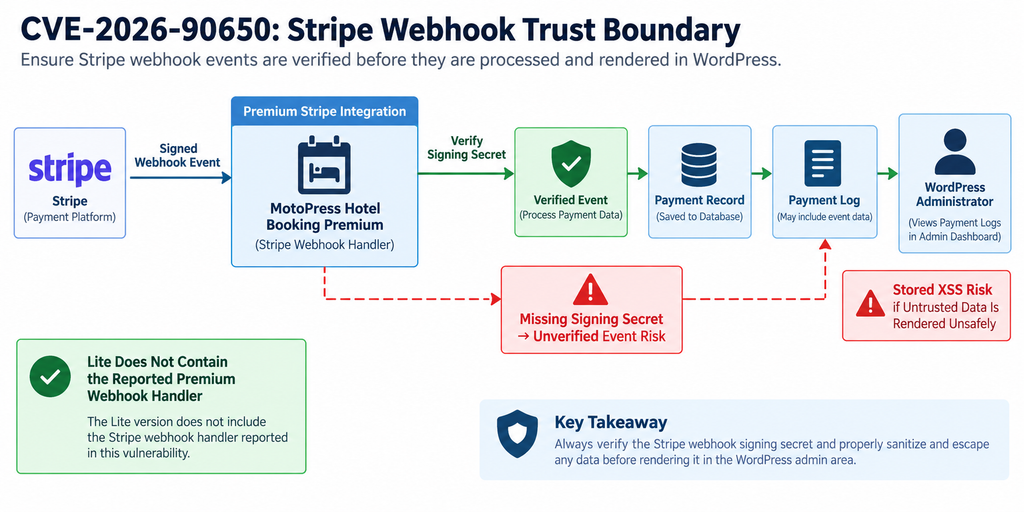
A webhook is essentially a server-to-server notification. Instead of a WordPress website repeatedly asking Stripe whether something changed, Stripe can send an event to a designated endpoint when an important payment event occurs. This architecture is efficient and widely used across payment platforms. However, the endpoint is accessible over the internet because Stripe needs to reach it. Internet accessibility means the receiving application needs a reliable method for distinguishing genuine Stripe messages from requests created by someone else.
That is where webhook signatures become important. A signing secret is associated with the configured webhook endpoint. When Stripe sends an event, the receiving application can use the secret as part of the verification process. The objective is not to hide the endpoint URL. An endpoint may eventually be discovered, logged, indexed accidentally, or inferred. Security should instead depend on verification that a received event is authentic.
MotoPress documentation instructs administrators to configure Stripe under Accommodation → Settings → Payment gateways → Stripe. Its documentation also includes webhook configuration and a field for the webhook secret. MotoPress explains that the endpoint URL becomes available when Stripe is enabled and provides instructions for configuring the corresponding endpoint in Stripe.
A Signing Secret Is Different From a Stripe API Secret Key
Administrators should not confuse the webhook signing secret with the Stripe secret API key. They serve different purposes. The Stripe API credentials allow an application to communicate with Stripe’s API under the permissions associated with those credentials. The webhook signing secret is associated with verifying events delivered to a webhook endpoint.
This distinction is important during configuration. Copying an API secret key into a webhook-secret field is not equivalent to configuring the correct endpoint signing secret. Likewise, finding that Stripe payments work successfully does not automatically prove that webhook signature verification has been configured correctly. Checkout functionality and webhook authentication are related to the same payment ecosystem, but they represent different technical operations.
MotoPress’s own Stripe configuration documentation reflects this separation. It instructs users to configure Stripe public and secret keys and separately describes webhook settings. That separation is useful when auditing a site. An administrator should verify each credential according to its intended role instead of assuming that a successful payment confirms every part of the integration.
Why an Endpoint URL Is Not a Security Credential
Some administrators assume that a complicated webhook URL is secure because nobody should know it. That assumption is fragile. URLs can appear in server logs, debugging information, backups, browser history, configuration exports, monitoring systems, screenshots, or support conversations. A secure webhook implementation should not depend primarily on secrecy of the endpoint address.
Signature verification provides a stronger boundary. The receiver can evaluate whether the event carries a valid signature corresponding to the expected signing secret. An arbitrary internet request reaching the endpoint should therefore fail authentication rather than being trusted simply because it reached the correct URL.
CVE-2026-90650 demonstrates why this distinction matters. According to the published record, the premium listener verifies the Stripe webhook signature when a signing secret has been configured. The disclosure says the secret can be empty, and in that state the reported vulnerable path may accept a forged event without the expected cryptographic verification.
Authentication and Escaping Solve Different Problems
It is tempting to think that configuring the signing secret completely solves every aspect of the vulnerability. That is too broad a conclusion. Webhook authentication and output escaping protect different layers.
Signature verification answers a question similar to: “Did this event come from the trusted service associated with this endpoint?” Output escaping answers another question: “Can this value safely be displayed in this HTML context without the browser treating it as executable markup or script?”
A strong application performs both operations. Even authenticated API data should be handled defensively because external systems can contain unexpected values, integration bugs can occur, and future code changes may expose previously harmless assumptions. Conversely, perfect escaping does not replace webhook authentication because an application still should not allow unauthorized parties to generate fake payment events.
For CVE-2026-90650, configuring the correct signing secret can close the disclosed unsigned-event route described in the advisory. Nevertheless, site owners should still install an official vendor correction when one is confirmed because the application itself should safely handle and render external data.
Webhook Verification Should Fail Safely
Security-sensitive integrations should generally fail closed. If authenticity cannot be established, the application should reject the event rather than processing it as trustworthy. Optional security controls can create problems when administrators do not realize that leaving a field empty changes the security model.
This issue is particularly relevant to WordPress because plugins often prioritize easy setup. Optional configuration reduces friction, but payment integrations deserve careful defaults. A hotel operator may enable Stripe, test a booking successfully, and reasonably assume the integration is complete. If webhook authentication requires an additional manual step, that requirement needs to be clearly understood.
The practical lesson is simple. Whenever a WordPress plugin integrates with payment-provider webhooks, administrators should review not only API credentials but also webhook authentication settings. They should verify the endpoint in the payment provider’s dashboard, confirm the expected signing secret is configured on the WordPress side, and test the integration using legitimate provider tools rather than arbitrary requests.
Which MotoPress Installations Are Vulnerable
The phrase “MotoPress Hotel Booking vulnerability” can create unnecessary confusion unless the premium-versus-Lite distinction is made explicit. According to the published CVE record, the vulnerable Stripe webhook handler is part of the premium Stripe gateway integration and is not present in the Lite plugin directory. That means the reported premium webhook path should not automatically be attributed to MotoPress Hotel Booking Lite simply because the two editions share other code.
This distinction is one of the most important facts in CVE-2026-90650. Vulnerability databases sometimes reference files from a public Lite repository because those files help document shared behavior or related code. A reference to a Lite source file does not necessarily prove that the complete vulnerable execution path exists in Lite. Security analysis needs to consider the actual component responsible for processing the affected webhook.
The CVE description explicitly addresses this issue. It states that the vulnerable webhook-listener.php handler belongs to the premium Stripe gateway integration and is not present in the Lite plugin directory. Therefore, administrators should identify the installed edition before deciding that a site has the reported Stripe webhook exposure.
Premium MotoPress Hotel Booking
Premium MotoPress Hotel Booking installations deserve immediate attention when they fall within the affected version range and use the relevant Stripe integration. The CVE lists versions through 6.2.4 as affected. The reported path becomes especially relevant when Stripe is enabled and the webhook signing secret has not been configured.
Administrators can start by checking the installed plugin version in WordPress and comparing it with the vendor’s current release information. They should then open the MotoPress payment gateway settings and inspect the Stripe configuration. The goal is not merely to confirm that Stripe payments work. The administrator needs to determine whether webhook verification has actually been configured.
MotoPress documentation places Stripe configuration under Accommodation → Settings → Payment gateways → Stripe and describes webhook setup separately from the API keys. This is the area administrators should review when determining whether the signing secret has been configured.
A premium installation within the affected range should not be dismissed as safe simply because there have been no obvious payment problems. Stored XSS can remain dormant until a privileged user opens the affected record. Likewise, a website can process normal Stripe payments while still having an incomplete webhook-authentication configuration.
MotoPress Hotel Booking Lite
The Lite edition requires a more precise explanation. MotoPress Hotel Booking Lite exists as a separate WordPress.org package, and its public listing provides version information and changelog details. However, the CVE description says the vulnerable premium Stripe webhook listener is absent from the Lite plugin directory.
Therefore, site owners should not label a Lite-only installation vulnerable to this specific premium Stripe webhook path merely because a matching version number appears in an advisory. That would overstate the evidence. Shared classes or payment-related code may appear in both products, but a vulnerability depends on a reachable execution path, not merely on individual filenames or similar code fragments.
This is also why security reporting should avoid headlines suggesting that every MotoPress Hotel Booking installation is equally exposed. CVE-2026-90650 concerns a specific workflow. Premium installations using the relevant Stripe webhook functionality require the closest attention.
Lite users should still keep the plugin updated. Updates can include unrelated security corrections, compatibility improvements, and bug fixes. The fact that the disclosed premium webhook handler is absent from Lite does not mean that an old Lite installation should remain unpatched indefinitely.
Stripe Must Be Part of the Relevant Workflow
An installation that does not use Stripe does not expose the same Stripe webhook processing workflow described in CVE-2026-90650. That does not change the affected-version designation for the software package, but it changes practical exposure to this particular route.
For example, a hotel website might use offline payments, bank transfers, PayPal, another supported gateway, or manual booking confirmation. If the affected Stripe webhook listener is not being used, the disclosed attack chain cannot simply be assumed to operate in the same way.
Administrators should still update vulnerable software because configurations change. A gateway disabled today may be enabled later. Old settings may remain in a database, staging copies may have different configurations, and staff may activate functionality without realizing that a security advisory applies.
A good inventory therefore records both software versions and active features. Knowing “MotoPress Hotel Booking 6.2.4 is installed” is useful. Knowing “premium 6.2.4 is installed, Stripe is enabled, webhooks are configured, and a signing secret is present” provides much more actionable security information.
The Missing Signing Secret Is a Key Condition
The webhook signing secret is central to the reported attack path. The CVE description explains that signature verification occurs when the secret is configured. The reported forged-event scenario depends on that secret being absent.
This does not mean administrators should classify an affected plugin version as permanently safe just because a secret is currently configured. Configuration provides an important mitigation for the disclosed path, while a vendor code correction addresses the software defect more directly.
Administrators should therefore think in layers. First, reduce immediate exposure by correctly configuring webhook authentication. Second, install a confirmed patched release when available. Third, review historical data because changing a setting today cannot retroactively remove suspicious content that may already have been stored.
Existing Payment Records Still Matter
Suppose an administrator discovers that the signing secret was missing and configures it immediately. Future unsigned forged events may then be rejected according to the disclosed behavior. However, that configuration change does not automatically sanitize data already stored in payment logs.
This is an important incident-response principle. Preventing a vulnerability from being exploited again is different from determining whether it was exploited previously. If the site operated with the affected premium configuration, administrators should consider reviewing payment records and relevant logs for anomalies.
Avoid casually opening suspicious records with a privileged browser session if there is reason to believe malicious content may already be stored. A hosting provider, security professional, or developer can help inspect data safely if compromise is suspected. Preserving a database backup and relevant logs before making major changes can also help with later investigation.
How a Forged Event Reaches the Payment Log

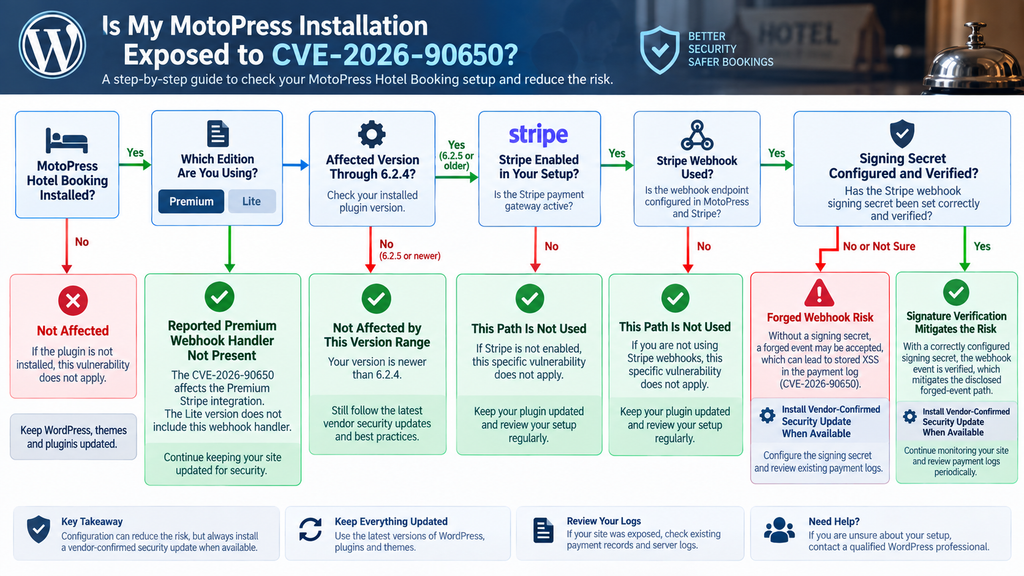
Understanding the vulnerability does not require reproducing an exploit. A defensive data-flow model is enough. A normal Stripe workflow starts when Stripe sends a legitimate event to the configured webhook endpoint. The MotoPress integration receives the event, validates it, identifies the associated payment, processes the relevant information, and records details that administrators can later review.
The security boundary appears immediately after the event reaches WordPress. The plugin needs to decide whether the event should be trusted. If the correct webhook signing secret exists, signature verification can establish whether the incoming event corresponds to Stripe’s authenticated delivery process. According to the CVE description, the affected premium listener performs that verification when the secret is configured.
When the signing secret is missing, the reported behavior changes. The disclosure says a forged event may be accepted without cryptographic signature verification. An unauthorized sender can therefore introduce event data into a workflow intended for Stripe-generated notifications, provided the other conditions described in the advisory are met.
The Event Still Needs to Reach a Relevant Payment
The vulnerability should not be described as an unrestricted anonymous ability to write arbitrary content into every payment record. The published description includes an additional prerequisite. An attacker needs information corresponding to a valid Stripe PaymentIntent associated with an existing payment so that the forged event can be routed to the relevant payment record.
That requirement adds context but does not eliminate the vulnerability. Security controls should not depend on attackers being unable to learn identifiers that may exist across payment workflows, logs, integrations, browser activity, or other systems. The stronger defense is to authenticate the webhook itself and safely handle every value that enters the application.
For site owners, this prerequisite also means that security assessment should remain evidence-based. Do not assume that every payment has been compromised simply because the signing secret was missing. Conversely, do not assume that a missing secret is harmless because the additional identifier requirement exists. Treat it as a configuration requiring remediation and evaluate historical evidence according to the site’s risk.
From External Event Data to Stored Log Data
The next stage is storage. The CVE description identifies the Stripe webhook event object’s id as the affected value. In the reported workflow, attacker-controlled data can be written into the payment log. The important security concept is that data has crossed from an untrusted external request into persistent application storage.
Persistence changes the nature of the issue. The unsafe value no longer needs to remain connected to the original request. It can wait inside the database until someone later opens the affected payment information. That is the defining characteristic that makes stored XSS particularly dangerous in administrative interfaces.
A secure implementation should ensure that data follows strict expectations when it enters the system and is correctly escaped when it leaves storage for display. Identifiers generally have predictable formats and should not be treated as arbitrary presentation markup. Meanwhile, HTML output should encode dynamic values according to their display context.
The Administrator Becomes the Rendering Context
The final stage occurs when a privileged user views the affected payment information. The published CVE description says the stored value can later be rendered without sufficient escaping. At that point, the browser may interpret maliciously crafted content as active content rather than ordinary text.
This is why the title of this vulnerability often emphasizes administrators. The initial request does not require a WordPress administrator account, but the stored data becomes particularly dangerous when it is displayed to someone who is already authenticated with elevated permissions.
A browser session belonging to a WordPress administrator can perform actions that an anonymous visitor cannot. Consequently, XSS inside an administrative origin can have consequences beyond visual page manipulation. The exact impact depends on browser protections, WordPress controls, session state, available privileges, and the actions reachable from that context.
Administrators should not interpret this as evidence that a successful exploit automatically produces complete server takeover. That would go beyond the confirmed facts. The safer description is that stored XSS can execute browser-side content in the context of the affected origin when a privileged user views the injected page, potentially exposing actions available to that session.
Why Sanitization Alone Is Not the Entire Story
WordPress security discussions often use “sanitize everything” as a universal phrase. In practice, secure handling depends on context. Validation asks whether input matches the expected type or structure. Sanitization transforms input into an acceptable form. Escaping ensures that output is represented safely in the destination context.
For an external payment identifier, strict validation can be valuable because the application generally expects a specific kind of value. When that value is displayed in HTML, output escaping remains important. If it appears in an attribute, URL, JavaScript context, or another destination, the correct escaping strategy may differ.
Webhook authentication sits alongside these controls rather than replacing them. Authentication determines whether the sender is trusted. Validation determines whether the data matches expectations. Escaping helps ensure the browser displays it as data instead of interpreting it as executable content.
CVE-2026-90650 is therefore a useful case study in defense in depth. A missing signing secret weakens the authenticity boundary, while insufficient output handling creates the stored XSS consequence described in the CVE.
What Administrators Should Review After Exposure
If a premium site operated within the affected range while Stripe webhooks were active and the signing secret was missing, administrators should consider the period of exposure rather than only the site’s current configuration.
Start by preserving useful evidence. A fresh backup of the database and files can provide a recovery point, although it should not overwrite older backups that may be useful for comparison. Relevant web-server logs, security-plugin logs, reverse-proxy records, and payment-related records may help establish whether unusual webhook activity occurred.
Next, review the Stripe endpoint configuration and WordPress payment records. Compare expected transactions with the records visible in the booking system. Look for unexplained events, unusual payment-log entries, unexpected administrative actions, or activity that does not correspond to legitimate booking operations.
If suspicious stored content is found, consider involving someone experienced in WordPress incident response before opening affected records repeatedly through a privileged browser. The goal is to investigate without unnecessarily triggering potentially unsafe stored content or destroying evidence.
Updating MotoPress Hotel Booking
Updating should be part of the response to CVE-2026-90650, but administrators need to distinguish between “a newer version exists” and “the vendor has explicitly confirmed that this CVE is fixed in that version.” Those statements are not interchangeable.
The CVE record published on September 15, 2026 identifies MotoPress Hotel Booking versions through 6.2.4 as affected. At the same time, public release information can change rapidly following disclosure. Administrators should therefore check the official MotoPress release notes and their licensed premium update channel before taking action.
At the time this article was prepared, the available official changelog information should not be used to invent a fixed version for CVE-2026-90650. A newer release number by itself is not enough to prove that the premium webhook authentication and payment-log XSS issue has been corrected. Administrators should look for explicit vendor confirmation, a security note, or release information clearly connecting a release to the vulnerability.
Do Not Delay the Configuration Mitigation
The absence of a clearly confirmed fixed version does not mean administrators should wait passively. The published vulnerability details identify a concrete defensive measure: configure the correct Stripe webhook signing secret so the listener can verify event authenticity.
This mitigation directly addresses a major condition required by the disclosed forged-event path. Administrators using the affected premium Stripe integration should therefore review the webhook configuration immediately.
If Stripe is not needed temporarily and a secure configuration cannot be established, disabling the affected payment workflow may reduce exposure while the site owner waits for vendor guidance. Such a decision has business consequences because guests may no longer be able to pay through that gateway, so it should be planned carefully.
A payment integration should not be left in an uncertain state simply because reservations are still arriving successfully. Functional checkout testing does not prove that webhook authentication is operating correctly.
Back Up Before a Major Plugin Update
MotoPress has introduced substantial Hotel Booking changes during the 6.x release series, including changes to the booking calendar, Stripe integration, payment authorization, REST API functionality, and database behavior. For example, MotoPress’s release information for version 6.0.0 warned that the update required a database upgrade and recommended creating a backup before updating.
That history makes a controlled update process especially important for production booking websites. Before installing a major or security-related update, create or verify a current database and file backup. Confirm that the backup can actually be restored. If possible, test the update on a staging environment that mirrors the production configuration.
Testing should include more than opening the homepage. Check accommodation search, availability, checkout, payment initiation, confirmation pages, emails, booking records, taxes, fees, deposits, payment requests, and any connected MotoPress add-ons. If Stripe is used, test the legitimate webhook workflow through Stripe’s supported tools and verify that events arrive and are processed as expected.
Verify the Version After Updating
WordPress sometimes gives administrators a false sense of completion after an update button has been clicked. Confirm the installed version afterward. Caching, failed filesystem writes, deployment workflows, multiple servers, or licensing problems can occasionally produce situations where the expected code is not actually running everywhere.
Check the plugin version in WordPress and compare it with the vendor’s official release information. Premium users should ensure their MotoPress license is active because MotoPress states that license activation is required for automatic plugin updates.
If the website uses deployment automation, multiple production nodes, or a managed hosting platform, verify that every relevant instance received the update. A single outdated server behind a load balancer can preserve exposure even when another server has been patched.
After updating, clear application caches when appropriate and test the booking workflow. Avoid clearing forensic logs or deleting historical records if compromise is suspected. Performance cleanup and security evidence preservation have different priorities.
Updating Does Not Automatically Remove Previously Stored Content
A patch changes how future requests are handled. It does not necessarily remove unsafe data already stored before the patch.
This distinction is essential for stored XSS vulnerabilities. If an attacker previously managed to place malicious content into a payment log, updating the plugin may prevent the same route from being used again while leaving the historical database value untouched.
Administrators with meaningful exposure should therefore separate remediation into two tracks. The first closes the vulnerability by applying the vendor correction and securing webhook authentication. The second investigates whether unsafe content or unauthorized activity already exists.
If the site shows signs of compromise, changing WordPress administrator passwords and invalidating sessions may be appropriate as part of a broader incident-response process. Stripe credentials and other sensitive secrets should also be evaluated according to what evidence indicates may have been exposed. Do not rotate credentials blindly without documenting the current state, because doing so can complicate both integrations and forensic analysis.
Premium and Lite Updates Should Not Be Confused
Another potential source of confusion is version numbering across premium and Lite distributions. Administrators should verify the package actually installed on their website rather than assuming that a WordPress.org Lite release represents the remediation state of the premium component.
The WordPress.org listing for MotoPress Hotel Booking Lite can show its own current version and public changelog. The vulnerability record, however, explicitly identifies the affected webhook handler as belonging to the premium Stripe integration.
Premium users should therefore rely on the premium vendor distribution and official security guidance when determining whether their affected code has been replaced. Lite users can continue following WordPress.org updates but should not infer that the premium-only webhook handler exists in their installation simply from a shared version number.
Configuring and Verifying the Stripe Signing Secret
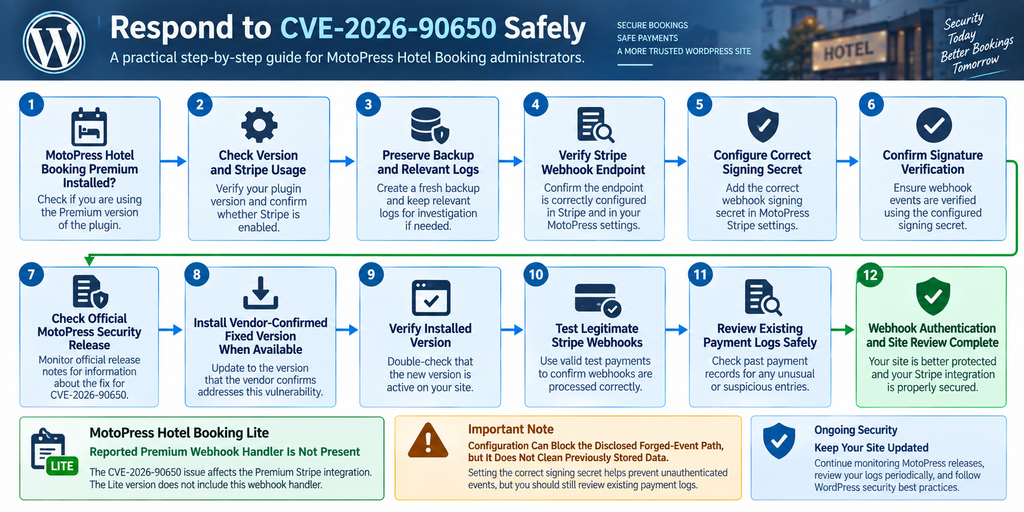
The signing secret deserves special attention because it is the clearest configuration-level control identified in the CVE disclosure. MotoPress documentation describes Stripe settings inside Accommodation → Settings → Payment gateways → Stripe and includes webhook configuration as part of the Stripe setup.
Before changing anything, document the existing configuration. Record the plugin edition and version, whether Stripe is enabled, whether Sandbox mode is active, and whether the webhook-secret field is populated. Do not copy actual secrets into tickets, screenshots, chat conversations, public documentation, or unsecured notes.
Next, open the corresponding webhook endpoint in Stripe. Confirm that the endpoint URL matches the endpoint generated for the correct WordPress site and environment. Production and test environments should not be mixed. A staging site’s secret should not be assumed to match production, and test-mode credentials should not be treated as live-mode credentials.
Use the Secret for the Correct Endpoint
Webhook secrets are associated with endpoint configuration. An administrator managing several WordPress properties can easily copy the wrong value when similar endpoints exist.
This mistake can cause legitimate events to fail verification. It can also create a false sense of security if the WordPress field is populated but does not contain the secret expected for the endpoint delivering events.
For that reason, “the field is not empty” is not enough. The configuration should be functionally verified. The website needs the correct signing secret for the corresponding Stripe endpoint and environment.
MotoPress documentation instructs users to obtain the webhook secret from the endpoint configuration and place it in the plugin’s Stripe webhook settings. Administrators should follow the current vendor interface because Stripe and plugin dashboards can evolve over time.
Save the Secret Without Exposing It
A signing secret should be treated as sensitive authentication material. Avoid pasting it into public support forums, screenshots, analytics tools, WordPress posts, source repositories, or ordinary email messages.
If a secret has been exposed, use Stripe’s supported secret-management process to replace or rotate it and update the WordPress configuration accordingly. Plan the transition carefully so legitimate webhook delivery is not interrupted.
WordPress administrators should also limit access to payment gateway settings. The fewer accounts that can view or modify payment configuration, the smaller the opportunity for accidental disclosure or unauthorized changes.
Security logging can help here. Changes to administrator accounts, plugin settings, payment integrations, and authentication configuration deserve attention on commerce-oriented WordPress websites.
Test Legitimate Webhook Delivery
After configuring the signing secret, verify the integration through legitimate Stripe mechanisms. The goal is to establish that authentic events continue to reach MotoPress and are accepted while invalid events cannot bypass signature verification.
Avoid testing by sending homemade malicious payloads to a production website. Such experimentation can damage booking data, create false payment records, trigger emails, interfere with accounting, or accidentally reproduce the vulnerable behavior administrators are trying to prevent.
Instead, use supported test or sandbox functionality where available. MotoPress documentation explains that Sandbox mode can be enabled for test payments and notes that test API keys should be used in that environment.
After a legitimate test transaction, inspect the corresponding booking and payment status. Verify that expected events were processed, confirmation behavior remains correct, and no unexpected errors appear in the site’s logs.
Confirm the Entire Payment Lifecycle
A webhook can pass authentication while another part of the payment workflow remains broken. Testing should therefore cover the complete lifecycle relevant to the property.
Create a test reservation using the appropriate test environment. Verify checkout, payment authorization or capture behavior, booking creation, payment status, confirmation emails, and any expected post-payment automation. If refunds are part of the business workflow, verify them through supported test procedures as well.
MotoPress expanded its Stripe functionality in version 6.0.0, including support for managing payment methods through Stripe and payment authorization workflows. Sites using those features should include them in regression testing after security-related changes.
Properties using add-ons such as Payment Request or Accommodation-Based Payments should verify compatibility too. A booking website often contains several connected components, and changing the core booking plugin can affect more than the primary checkout page.
Review Failed Webhook Events
After enabling signature verification, failed webhook events deserve investigation. Some failures may be harmless configuration errors. Others can indicate outdated endpoints, wrong secrets, duplicate environments, or requests that did not originate from the expected Stripe delivery process.
Do not assume that every rejected request is an attack. Automated scanners, stale integrations, misconfigured staging sites, monitoring services, and old Stripe endpoints can all generate confusing traffic.
At the same time, a sudden pattern of unusual requests after a public vulnerability disclosure deserves attention. Preserve logs long enough to establish what occurred. Compare server timestamps with Stripe’s legitimate event history and the payment records stored in WordPress.
The goal is to build evidence rather than guess. Good incident response separates known legitimate events, known configuration errors, unexplained requests, and confirmed malicious activity.
Do Not Put the Signing Secret in Source Code
Administrators sometimes solve configuration problems by hardcoding credentials into theme files, custom plugins, snippets, or deployment scripts. That can create a new security problem.
Use the configuration mechanism supported by MotoPress and follow appropriate secret-management practices for the environment. If custom infrastructure is involved, restrict access to configuration files and deployment variables according to least-privilege principles.
Never publish a real signing secret in a tutorial, GitHub repository, screenshot, support ticket, or diagnostic output. Security articles should use placeholders and conceptual diagrams instead of real credentials.
If a secret is accidentally exposed publicly, treat it as compromised and follow the payment provider’s current rotation guidance rather than simply deleting the screenshot or post.
Recheck the Configuration After Migration
WordPress migrations deserve special attention. Moving a booking site from staging to production, changing domains, restoring backups, cloning the website, or rebuilding the server can leave webhook endpoints and secrets out of sync.
A cloned database may contain a webhook secret belonging to another environment. Stripe may still be delivering events to an older endpoint. A restored backup may reintroduce an outdated configuration.
After any significant migration, verify the Stripe endpoint URL, signing secret, API mode, plugin version, and payment workflow again. Do not assume that because ordinary pages load correctly, external integrations also survived the migration correctly.
This is especially important for booking websites because payment failures can remain invisible until a real customer tries to reserve a room.
Frequently Asked Questions
What is the MotoPress Hotel Booking vulnerability CVE-2026-90650?
CVE-2026-90650 is a stored cross-site scripting vulnerability affecting the reported premium Stripe webhook integration in MotoPress Hotel Booking versions through 6.2.4. According to the published CVE description, an unverified forged Stripe event can introduce attacker-controlled data into a payment log when the webhook signing secret is not configured. That stored data can later be rendered unsafely when an administrator views the affected payment.
Does CVE-2026-90650 affect MotoPress Hotel Booking Lite?
The published CVE description says the vulnerable webhook-listener.php handler belongs to the premium Stripe gateway integration and is not present in the Lite plugin directory. Therefore, the reported premium webhook attack path should not automatically be attributed to a Lite-only installation. Lite users should still keep their plugin updated for general security and maintenance reasons.
Which versions are affected?
The CVE record identifies MotoPress Hotel Booking versions up to and including 6.2.4 as affected. Administrators should check current official MotoPress security information because release status can change quickly following public disclosure. Do not assume that a version is confirmed safe for this specific CVE unless the vendor or another authoritative source clearly documents the correction.
Does an attacker need a WordPress account?
The published CVE describes the vulnerability as unauthenticated, meaning the reported initial webhook interaction does not require a WordPress user account. However, additional conditions exist. The disclosure indicates that the relevant premium Stripe path must be present, the signing secret must be absent for the forged-event route, and the attacker needs information associated with a valid existing Stripe payment.
What is the Stripe webhook signing secret?
The webhook signing secret is authentication material used to verify that an incoming webhook event is genuinely associated with Stripe’s delivery process for the configured endpoint. It is different from the Stripe secret API key. MotoPress provides separate configuration for Stripe credentials and webhook settings.
Am I safe if the signing secret is configured?
A correctly configured signing secret mitigates the forged unsigned webhook path described in CVE-2026-90650 because the listener can verify event authenticity. However, administrators should still install a vendor-confirmed correction when available. They should also remember that configuring the secret now does not automatically remove suspicious data that may have been stored previously.
Does updating remove malicious payment-log entries?
Not necessarily. A software update can prevent future exploitation while leaving previously stored database values intact. If a site operated under the vulnerable conditions before remediation, administrators should consider reviewing historical payment records and relevant logs. If suspicious content exists, a qualified WordPress security professional can help inspect it safely.
Should I disable Stripe completely?
That depends on the site’s configuration and operational requirements. Correctly configuring the webhook signing secret addresses an important condition in the disclosed attack path. If administrators cannot verify the configuration or apply appropriate remediation, temporarily disabling the affected integration may reduce exposure, but it can also prevent customers from completing Stripe payments. Any decision should account for both security and business continuity.
Is knowing the webhook URL enough to exploit the vulnerability?
The published disclosure describes additional prerequisites beyond simply reaching an endpoint. Most notably, the attacker needs information associated with a valid Stripe PaymentIntent for an existing payment, and the reported forged-event path depends on the webhook signing secret being absent. Administrators should nevertheless avoid relying on endpoint secrecy as a security control.
How can I check whether my Stripe webhook is configured?
Review the Stripe settings under Accommodation → Settings → Payment gateways → Stripe in MotoPress Hotel Booking and compare the configuration with the corresponding webhook endpoint in Stripe. Confirm that the correct endpoint signing secret is configured for the correct environment. Then use supported test functionality to verify legitimate event processing. MotoPress provides official documentation covering its Stripe and webhook configuration.
What WordPress Hotel Operators Should Take Away
CVE-2026-90650 demonstrates why payment security involves more than keeping API keys private. A webhook endpoint creates a direct communication channel between an external payment provider and WordPress. That channel needs authentication, strict data handling, and safe rendering at every stage.
For MotoPress Hotel Booking administrators, the premium-versus-Lite distinction is crucial. The published CVE specifically identifies a premium Stripe webhook handler that is absent from the Lite plugin directory. Premium sites running an affected version should determine whether Stripe is active and whether the correct webhook signing secret has been configured.
The signing secret is equally important. According to the disclosed behavior, configuring it enables signature verification and mitigates the unsigned forged-event route. Nevertheless, configuration should complement rather than replace an official software correction. Continue checking MotoPress release information and install a vendor-confirmed security update when one is clearly identified.
Finally, remediation should account for history. Closing an entry point today does not prove that nothing happened yesterday. Sites that operated with the affected premium Stripe configuration should preserve useful evidence and consider reviewing payment logs and administrative activity. A measured response verify, configure, update, test, and investigate when justified is more effective than either panic or complacency.
⚠️ Disclaimer and Source Hygiene
This article is provided for educational, defensive cybersecurity, WordPress administration, and website-maintenance purposes. It does not provide exploit payloads or instructions for attacking MotoPress, Stripe, WordPress websites, or third-party systems. Vulnerability information can change quickly after disclosure. Version numbers, remediation guidance, vendor statements, and
vulnerability-database records may be updated after publication. Always verify the latest information with MotoPress, the authoritative CVE record, WordPress.org where applicable, Stripe documentation, and established security sources before making production changes.
Create verified backups before modifying a live booking website. If you believe a production site has already been compromised, consider consulting a qualified WordPress security professional, hosting provider, or incident-response specialist before deleting logs or modifying suspicious database records.
🔔 For more tutorials like this, consider subscribing to our blog.
📩 Do you have questions or suggestions? Leave a comment or contact us!
🏷️ Tags: MotoPress Hotel Booking vulnerability, CVE-2026-90650, MotoPress security, WordPress vulnerability, Stripe webhook security, stored XSS, WordPress hotel booking, Stripe signing secret, WordPress security, Hotel Booking plugin
📢 Hashtags: #MotoPress, #WordPressSecurity, #CVE202690650, #WordPress, #CyberSecurity, #StripeSecurity, #StoredXSS, #WebsiteSecurity, #HotelBooking, #WordPressPlugins
Sources and References
CVE Record and Security Disclosure
The CVE record for CVE-2026-90650 provides the affected version range, vulnerability description, premium Stripe webhook context, CVSS information, and the distinction between the premium webhook handler and the Lite distribution.
MotoPress Stripe Documentation
MotoPress’s official Stripe documentation explains where administrators configure Stripe inside Hotel Booking, how webhook settings are added, and how the webhook endpoint and secret are configured.
MotoPress Hotel Booking Release Information
The official MotoPress Hotel Booking product and changelog pages provide current release information and historical security, Stripe, payment, and compatibility changes. Administrators should check these sources for vendor-confirmed remediation information before treating a particular release as the definitive fix for CVE-2026-90650.
WordPress.org MotoPress Hotel Booking Lite
The WordPress.org plugin listing provides information about the separately distributed MotoPress Hotel Booking Lite package. It is useful when confirming the installed Lite version, but the CVE record specifically states that the vulnerable premium Stripe webhook handler is not present in the Lite plugin directory.
Secondary Sources and Testimonials
Independent vulnerability reporting can provide useful context, particularly when it carefully distinguishes confirmed technical facts from assumptions about affected editions. Secondary reporting on CVE-2026-90650 describes the same premium Stripe webhook condition, the role of the missing signing secret, and the stored payment-log XSS path.
Secondary sources should not replace vendor guidance or the authoritative CVE record. They are most useful for cross-checking technical interpretation and identifying details that administrators may want to verify independently. For this vulnerability, the safest editorial approach is to avoid declaring a release fully patched until reliable information explicitly confirms remediation of CVE-2026-90650.
Because vulnerability information evolves after coordinated disclosure, this article intentionally avoids presenting unverified claims of active exploitation or an unsupported “safe version.” Administrators should continue monitoring authoritative sources for updated remediation information.
1 thought on “MotoPress Hotel Booking Stripe XSS Vulnerability”