
Table of Contents
A Really Simple Security vulnerability can reset completed email two-factor authentication, potentially allowing an attacker who already knows a WordPress user’s password to bypass the additional login barrier. Site owners should update the plugin, verify administrator 2FA status, review sessions, and investigate unexpected authentication changes.
The security value of two-factor authentication comes from a simple idea: knowing a password should not be enough to access an important account. Even if a password leaks through phishing, credential reuse, malware, or another breach, the second authentication step can still stop an attacker.
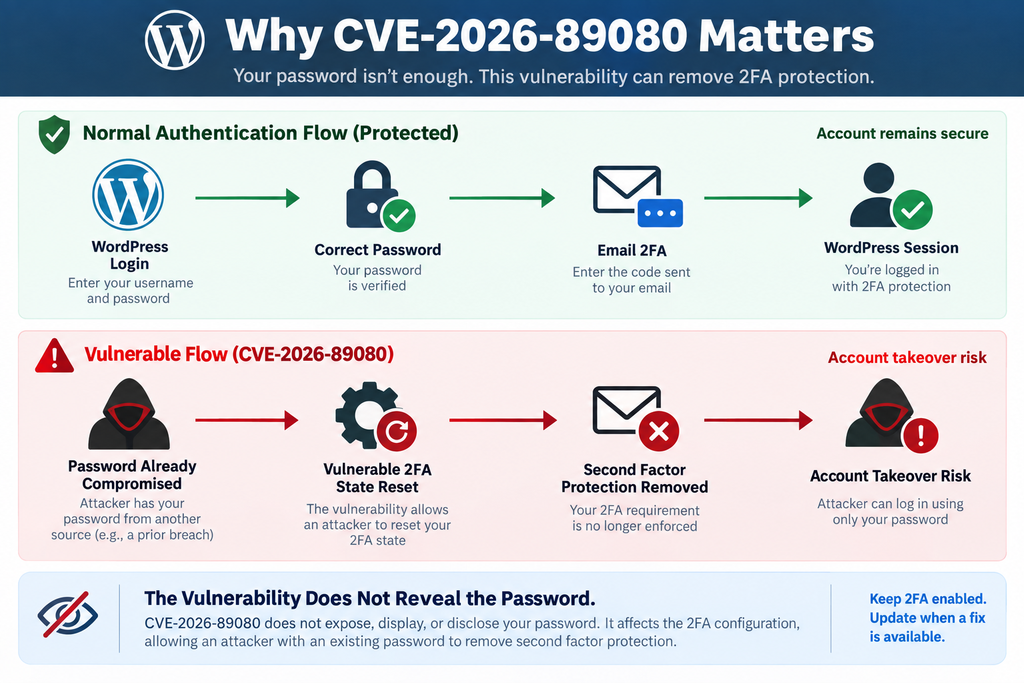
A recently disclosed Really Simple Security vulnerability weakens that protection under specific conditions. Tracked as CVE-2026-89080, the flaw affects the handling of completed email two-factor authentication enrollment. An unauthenticated request could reset that completed state on vulnerable versions. An attacker who already knows the victim’s password could then potentially get past the second-factor barrier and obtain the user’s WordPress session.
That distinction matters. The vulnerability does not mean that Really Simple Security exposes WordPress passwords. It does not magically reveal an administrator password to an anonymous visitor. Instead, it can become dangerous after another security boundary has already failed. If an attacker has obtained a valid password, the vulnerable 2FA workflow may no longer provide the extra protection administrators expected.
For WordPress owners, this is a useful reminder that authentication security works as a chain. Password security, two-factor authentication, session management, plugin updates, account monitoring, and recovery procedures all support one another. When one link becomes weaker, defenders should examine the entire authentication chain rather than simply installing a patch and assuming the incident is finished.
What Is CVE-2026-89080
CVE-2026-89080 is a high-severity authentication vulnerability affecting the Really Simple Security WordPress plugin. The issue has been classified as CWE-287, or Improper Authentication. According to the published CVE information, affected releases begin with version 9.5.10.1 and extend through versions earlier than 9.8.1. Version 9.8.1 contains the relevant correction. The vulnerability received a CVSS 3.1 base score of 7.5, placing it in the High severity category.
The central problem involves completed email two-factor authentication enrollment. A vulnerable installation did not adequately prevent an unauthenticated request from resetting that state. Consequently, an account that previously had active email 2FA could be moved into a state where the additional authentication barrier was no longer operating as intended.
That wording can sound more complicated than the practical risk. Imagine a WordPress administrator with a strong password and email 2FA enabled. Under normal circumstances, stealing only the password should not provide complete access. The attacker would still face the email verification step. CVE-2026-89080 creates a route through which that second barrier may be removed on an affected installation.
However, the password remains an important prerequisite. The vulnerability should not be described as a direct password disclosure bug. It also should not be presented as though every anonymous visitor can immediately become a WordPress administrator. The attacker needs the credentials of the targeted account before bypassing the second factor becomes useful.
This makes the vulnerability especially relevant to credential-stuffing and password-compromise scenarios. WordPress administrators often enable 2FA precisely because they recognize that passwords can eventually leak. If the second layer can be reset independently, a password compromise that would normally be contained may instead develop into a successful account takeover.
The published CVE information also indicates that exploitation does not require user interaction. A site owner does not need to click a malicious link or approve an unexpected request for the underlying weakness to matter. Nevertheless, the attacker still needs the targeted account’s password to turn the 2FA reset into a useful login path.
WPScan lists the vulnerability as an unauthenticated 2FA bypass through email provider state demotion and identifies 9.8.1 as the fixed release. Really Simple Security’s own WordPress.org changelog for 9.8.1 also notes a security correction that prevents a bug from incorrectly changing the 2FA status from active to open.
The scale of the plugin makes careful communication important. Really Simple Security has millions of active installations, but that does not mean millions of sites were compromised. A vulnerable version indicates exposure to a flaw, not evidence that exploitation occurred. Administrators should respond promptly without turning a security advisory into an unsupported compromise claim.
Why This Really Simple Security Vulnerability Matters
The most important security concept behind CVE-2026-89080 is defense in depth. Two-factor authentication exists because security teams assume passwords are imperfect. People reuse passwords. Browsers and devices can become compromised. Credentials appear in unrelated breaches. Phishing campaigns can capture convincing login details.
With properly enforced 2FA, a stolen password is often insufficient. The attacker reaches the next authentication checkpoint and cannot complete it. That extra checkpoint gives administrators time to notice suspicious activity, reset credentials, or block the source of the attack.
CVE-2026-89080 can interfere with that safety net. Instead of attacking the password itself, the flaw affects the state that tells the security system the account has completed email 2FA enrollment. If that state can be reset without proper authentication, an attacker with a previously stolen password may have a path around the expected second-factor challenge.
This is why describing the issue simply as “a login bypass” can be misleading. It is more accurate to think of it as a second-factor protection bypass that becomes particularly serious when combined with password compromise. The difference helps WordPress owners understand both the immediate risk and the appropriate response.
A patched site closes the known vulnerable path. However, if credentials were already compromised, updating the plugin does not automatically make those credentials secret again. Administrators should therefore treat remediation as two connected tasks: patch the vulnerable component and verify the integrity of accounts and active sessions.
How Email Two-Factor Authentication Is Reset
Email two-factor authentication adds another verification step after the normal username and password check. Although implementation details vary, the system needs to maintain information about whether a user has configured the authentication method and whether that method is currently active. That state becomes part of the security decision made during login.
CVE-2026-89080 concerns the integrity of this state. According to the CVE description, vulnerable versions of Really Simple Security did not prevent an unauthenticated request from resetting an account’s completed email two-factor enrollment. In practical terms, an account that should have remained protected could have its completed enrollment state altered unexpectedly.
This distinction between authentication credentials and authentication state is important. A password is a credential. The email verification code represents another authentication factor or challenge. Meanwhile, the plugin must also remember that a particular user is enrolled and should be required to complete that additional challenge.
If an attacker can interfere with the enrollment state, the attacker does not necessarily need to defeat the cryptography or guess a temporary code. Instead, the attack targets the logic that determines whether the additional verification should be required in the first place.
That is a different security problem from intercepting email. There is no need to assume the victim’s mailbox has been compromised simply because CVE-2026-89080 is present. Likewise, administrators should not conclude that the vulnerability exposes verification codes. The published issue concerns resetting completed email 2FA enrollment, not reading the contents of a user’s mailbox.
The distinction is useful when investigating a potentially affected site. An administrator may find no suspicious email access and still need to examine WordPress authentication state. Conversely, seeing the vulnerable plugin version does not prove that a particular user’s 2FA configuration was actually changed.
Active 2FA Versus an Open Authentication State
Really Simple Security’s changelog provides useful context. Version 9.8.1 includes a security change designed to prevent a bug that incorrectly changed the 2FA status from active to open. That short changelog entry describes an important boundary: an account that has completed 2FA setup should not unexpectedly lose that enforcement.
Think of the active state as a security instruction attached to the account. After the password is accepted, WordPress and the security plugin know that authentication is not finished. The user still needs to complete the configured second step. Only then should the application create a fully authenticated session.
If the status changes to an open state when it should remain active, that sequence can break. The password may effectively become sufficient again. For an attacker who already possesses that password, the difference between “active” and “open” can determine whether the attack stops at the 2FA screen or reaches the WordPress dashboard.
For an administrator account, the consequences can be substantial. A successful administrator session may allow changes to plugins, themes, users, settings, content, integrations, and other sensitive areas depending on the site’s configuration. The vulnerability therefore deserves attention even though it does not independently steal the password.
The safest defensive approach is to avoid experimenting with the vulnerable behavior on a production site. Administrators do not need exploit requests or proof-of-concept instructions to protect their installations. Version verification, patching, account review, session invalidation when appropriate, and log analysis provide a safer path.
Why a State-Management Bug Can Become an Authentication Problem
Authentication systems rely on more than secret values. They rely on trustworthy state transitions. A user may move from unenrolled to enrolled, from pending verification to verified, or from a grace period to mandatory 2FA enforcement. Every transition needs appropriate authorization.
If an untrusted request can force a sensitive transition, the security model can fail even when passwords and verification codes remain secret. This principle applies beyond WordPress. Password-reset systems, account recovery workflows, remembered devices, API tokens, and multi-factor enrollment all depend on carefully protected state changes.
CVE-2026-89080 demonstrates why security plugins must protect administrative state just as carefully as they protect credentials. Changing whether 2FA applies to an account can have consequences comparable to changing an authentication secret.
For site owners, the practical lesson is straightforward. Do not evaluate 2FA security only by asking whether codes are difficult to guess. Also consider who can enroll a method, disable it, reset it, extend grace periods, or change the status that controls enforcement.
What an Attacker Needs Before Exploitation
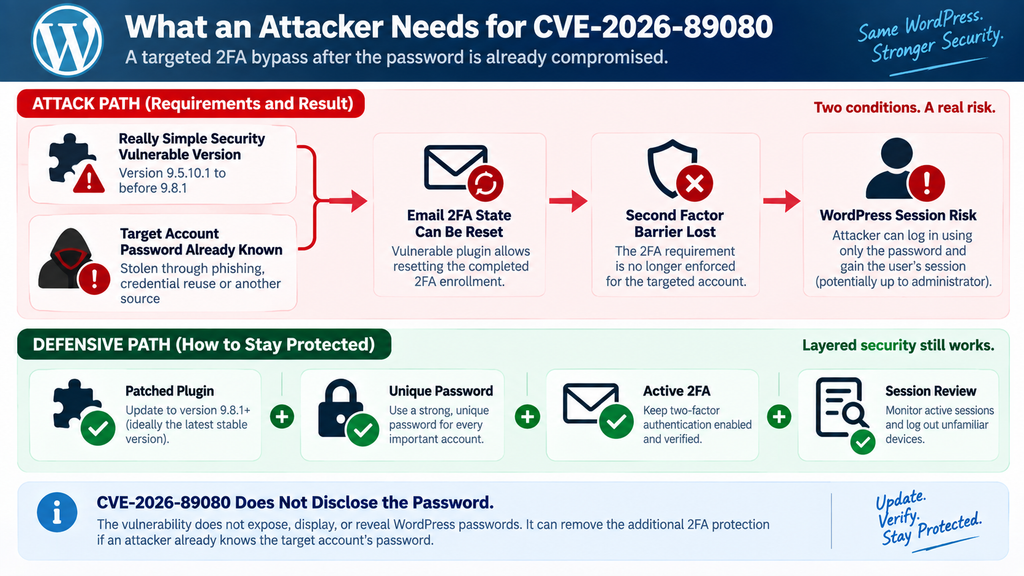
The most important prerequisite is already knowing the targeted user’s valid password. The official CVE description explicitly frames the impact around an attacker who already knows the account password. Without that credential, resetting the email 2FA state does not automatically provide a successful WordPress login.
This detail should appear prominently in any responsible explanation of the Really Simple Security vulnerability. Security headlines can easily create the impression that CVE-2026-89080 lets an anonymous visitor bypass every login requirement. That interpretation overstates the published finding.
The vulnerability instead changes what happens after a password has been compromised. Normally, email 2FA should preserve another obstacle. The attacker enters the stolen credentials but still needs the second factor. On a vulnerable installation, the flaw could allow the attacker to remove that extra barrier and then use the password to obtain the victim’s session.
Passwords can become known through many routes unrelated to Really Simple Security. Credential reuse remains a common example. A user may reuse the same password on another service that later suffers a breach. Phishing is another possibility, as are compromised devices, malicious browser extensions, insecure password storage, or unauthorized access to backups.
None of those scenarios should be attributed automatically to the plugin. CVE-2026-89080 does not need to be the mechanism that steals the password. Instead, it can magnify the consequences of a password compromise that happened elsewhere.
The Vulnerability Does Not Reveal WordPress Passwords
This point deserves emphasis because it determines how site owners should communicate the incident. CVE-2026-89080 is not described as a database extraction vulnerability or a plaintext password disclosure flaw. The published issue concerns email 2FA enrollment state.
An attacker therefore needs another route to obtain a valid password. Once that prerequisite exists, the attacker can potentially benefit from the 2FA weakness. This creates what security professionals often describe as a chained attack: one weakness or compromise supplies the prerequisite for another.
Defense in depth exists to interrupt chains like this. Even if a phishing attack captures an administrator password, 2FA should ideally stop the login. Even if a session is stolen, session expiration and account monitoring can limit its useful life. Even if a vulnerable plugin is present, strong surrounding controls may reduce practical exposure.
The Really Simple Security vulnerability is important because it weakens one of those layers. It does not mean every other layer has disappeared.
Why Credential Reuse Increases the Practical Risk
WordPress administrators should use unique passwords for every important service. A password manager can make this much easier because people do not need to memorize dozens of unrelated credentials.
When passwords are reused, an unrelated breach can become a WordPress security incident. Attackers commonly test known username and password combinations against other services. Two-factor authentication is one of the strongest defenses against that pattern because the reused password alone should not complete authentication.
A vulnerability that weakens 2FA therefore makes password hygiene even more important. Administrators running an affected Really Simple Security version should not only update the plugin. They should also consider whether privileged account passwords are unique and whether any reason exists to suspect previous credential exposure.
Where compromise is plausible, changing the password is appropriate. Simply enabling 2FA again while continuing to use a known or suspected stolen password leaves unnecessary risk.
No User Interaction Does Not Mean No Prerequisites
The CVSS information indicates that user interaction is not required. That means exploitation of the vulnerable condition does not depend on convincing the victim to click a link, open a file, or approve a prompt.
However, “no user interaction” should not be confused with “no prerequisites.” The published description still requires the attacker to know the targeted account password before the 2FA bypass can lead to that user’s authenticated session.
Understanding this difference helps administrators prioritize accurately. The issue deserves a prompt update because it affects authentication and can reach highly privileged accounts. At the same time, responsible reporting should avoid unsupported claims that any visitor can instantly become an administrator.
Which WordPress Accounts Are at Risk
The accounts that deserve the most attention are users with email two-factor authentication configured through affected versions of Really Simple Security, especially when those users have significant WordPress privileges. The published vulnerability can potentially affect a user’s session up to administrator level when the attacker already knows the corresponding password.
Administrator accounts naturally carry the greatest potential impact. A WordPress administrator can normally perform extensive site management. Depending on configuration and hosting restrictions, that can include installing or changing plugins, modifying users, changing site settings, editing content, and accessing sensitive administrative information.
Editors and other privileged roles should not be ignored. An editor account may not control plugins, but unauthorized access could still permit content manipulation, publication changes, malicious links, or damage to editorial operations. WooCommerce and membership sites may also have custom roles with access to sensitive customer or operational data.
The right response is therefore role-aware rather than administrator-only. Start with administrators because they represent the highest impact, then review other accounts that use email 2FA or hold meaningful privileges.
Administrator Accounts Need Priority
An administrator password should already be unique, long, and stored securely. Two-factor authentication provides another important barrier. When a vulnerability affects that barrier, administrator accounts move to the top of the remediation list.
After updating Really Simple Security, verify that each expected administrator still has the correct 2FA status. Look for unexpected changes rather than assuming that installing the update automatically restores every previous account state.
Next, inspect the WordPress Users screen for accounts you do not recognize. Pay attention to newly created administrators, unexpected role changes, modified email addresses, and accounts that should have been removed previously.
If there is credible evidence that an administrator password may have been compromised, reset it. Do not reuse a previous password or a variation of it. A password manager can generate a new unique value without creating another credential that needs to be memorized.
Administrators should also review active sessions. WordPress sessions created before remediation can matter because patching a vulnerability does not necessarily terminate an already authenticated attacker. Destroying other sessions forces those sessions to authenticate again using the corrected security controls.
Sites With Multiple Administrators Need a Complete Inventory
Multi-author and business WordPress installations can have more privileged accounts than the owner remembers. Developers, agencies, former employees, temporary contractors, marketing teams, and hosting support staff may all have received administrator access at some point.
A vulnerability review is an excellent opportunity to clean up this inventory. Every administrator account should have a current business or operational reason to exist. Dormant privileged accounts create unnecessary authentication surfaces.
Do not simply count administrators. Identify who owns each account and whether the access level remains appropriate. If a user only needs to publish articles, administrator privileges are excessive. WordPress role separation reduces the impact of credential compromise.
For accounts that must remain privileged, verify 2FA configuration after updating. Where practical, document who completed the check and when. A simple audit record can become valuable later if suspicious activity appears.
What About Subscribers and Customers?
Lower-privileged accounts generally create less direct administrative impact, but they should not be treated as irrelevant. The actual consequence depends on what the account can access.
A standard subscriber may have little authority on a conventional blog. On a membership platform, however, an account could contain private information, paid content, profile data, or access to community features. WooCommerce customer accounts can include order history and personal account information.
The published CVE specifically notes that the resulting session can correspond to the targeted user, potentially up to administrator. In other words, the impact follows the privileges and data available to that account.
This is why remediation should begin with high-value roles but eventually consider the full set of users protected by the affected email 2FA workflow.
Multisite Requires Extra Attention
WordPress Multisite environments deserve careful account review because the relationship between users, roles, sites, and network privileges can be more complex. A single account may participate in multiple sites and hold different permissions across the network.
Network administrators should identify which users have the highest privileges and verify their authentication configuration first. They should also check whether Really Simple Security is network activated or configured differently across individual sites.
Do not assume that checking one site’s dashboard represents the complete network. Review the plugin deployment and authentication configuration at the level where they are actually managed.
Updating Really Simple Security to Version 9.8.1

Version 9.8.1 is the key remediation milestone for CVE-2026-89080. WPScan identifies the vulnerability as fixed in 9.8.1, while the Really Simple Security changelog notes that this release prevents a bug that could incorrectly change 2FA status from active to open.
However, WordPress administrators should interpret “fixed in 9.8.1” as a minimum security boundary, not a recommendation to downgrade or remain permanently on that exact release. Security plugins continue to receive fixes, and newer stable versions may address additional vulnerabilities discovered afterward.
At the time of this article’s preparation, Really Simple Security has already received releases after 9.8.1. Version 9.8.2 included additional security-related changes, and version 9.8.3 included further security fixes. Therefore, administrators updating today should generally install the latest stable version available from the official WordPress source, provided it is compatible with their environment.
This distinction is especially important in security reporting. Saying “update to 9.8.1” accurately identifies the version that fixes CVE-2026-89080. Saying “install the latest stable version, which must be 9.8.1 or newer” provides better operational advice.
Check the Installed Version Before Making Changes
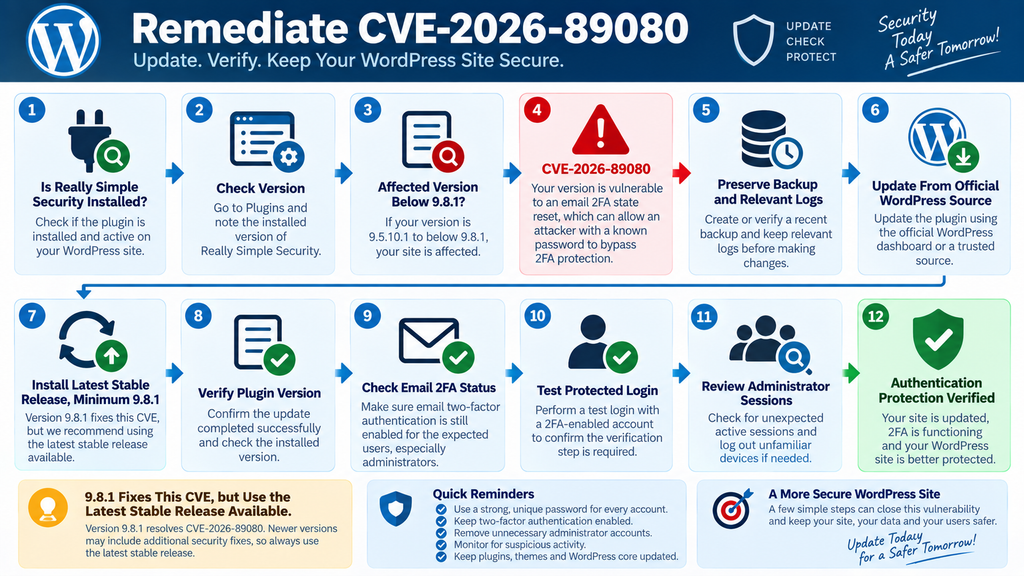
Begin by confirming that Really Simple Security is installed and identifying the current version. In the WordPress dashboard, open the Plugins screen and locate Really Simple Security. Record the version before updating, particularly if the site is being investigated for suspicious activity.
If the installation is older than 9.8.1 and falls within the affected range, prioritize remediation. Sites already running 9.8.1 or later have the fix associated with CVE-2026-89080, although newer releases may contain additional unrelated security corrections.
On production sites, verify that a recent backup exists before changing plugins. A backup is not a substitute for patching, but it provides a recovery path if an unexpected compatibility issue appears.
For high-value sites, preserving relevant logs before making major changes can also help. Updating software may alter files and operational records. If there are signs of compromise, evidence preservation should be considered alongside remediation.
Update From a Trusted WordPress Source
Use the normal WordPress update mechanism or another trusted administrative deployment process. Avoid downloading plugin archives from unofficial mirrors, file-sharing sites, or unknown repositories.
After the update completes, return to the Plugins screen and confirm the installed version. Do not rely only on the success message. Verification takes seconds and removes uncertainty.
If caching layers are present, clear the appropriate WordPress, server, and CDN caches according to the site’s normal maintenance procedure. Authentication functionality itself should not depend on a stale front-end cache, but clearing relevant caches can prevent confusing behavior during post-update testing.
Next, test a controlled login using a legitimate account. Confirm that email 2FA behaves as expected and that the site does not unexpectedly allow the password alone to complete authentication for a user that should require the second factor.
Why You Should Not Stop at 9.8.1 Today
Version 9.8.1 is historically important because it fixes CVE-2026-89080. Yet security maintenance should follow the current stable release rather than treating a CVE’s first fixed version as a permanent target.
The plugin changelog shows that additional releases followed 9.8.1. Version 9.8.2 addressed further 2FA-related behavior and other issues. Version 9.8.3 subsequently added more security corrections, including another 2FA-related XML-RPC authentication fix.
Consequently, a site running an older affected version should normally move to the latest stable version rather than intentionally installing 9.8.1 and stopping there. Compatibility testing remains sensible for business-critical installations, but delaying a security plugin update indefinitely also carries risk.
Administrators managing staging environments can test the current release there first, verify login flows, check custom authentication integrations, and then deploy the same version to production.
Verify More Than the Version Number
A successful plugin update is only the first checkpoint. Verify that the security configuration remains correct afterward.
Check whether 2FA remains enabled for the roles that should require it. Confirm that administrator accounts show the expected authentication status. Test an actual login with a controlled account. Review any grace-period settings and make sure users are not unexpectedly placed into an unenforced state.
Sites using custom login URLs, WooCommerce authentication, XML-RPC integrations, single sign-on, or other authentication modifications deserve additional testing. A security control that works on the default WordPress login page should also behave correctly across the legitimate authentication routes the site actually uses.
The goal is not simply to make the dashboard display a newer version number. The goal is to restore confidence that the authentication policy is functioning as intended.
Auditing 2FA Status and Administrator Sessions
Updating Really Simple Security closes the known vulnerable behavior in the corrected release, but remediation should not end there. A security update changes the software currently running. It cannot automatically prove that nothing happened before the update.
Start by reviewing the 2FA state of every administrator account. Determine which accounts are expected to use two-factor authentication and verify that those accounts still show the correct status. An unexpected change deserves investigation, especially if the account was previously known to have completed enrollment.
Document unusual findings before changing them when practical. A screenshot, timestamp, or administrative note can help establish what was observed during the investigation. Avoid collecting unnecessary sensitive information, but preserve enough context to reconstruct events if further evidence appears.
After checking administrators, expand the review to other privileged users. Editors, shop managers, membership managers, developers, and custom roles may have meaningful access even if they cannot install plugins.
Review Active WordPress Sessions
An authenticated WordPress session can remain valuable to an attacker even after the original vulnerability has been patched. This is why session review belongs in the remediation process.
For sensitive administrator accounts, consider invalidating other active sessions after updating and verifying 2FA. WordPress provides account-level session controls that can force other devices to authenticate again.
This step becomes especially important if logs show suspicious login activity or if an administrator password may have been exposed. Change the password first where compromise is suspected, ensure 2FA is correctly configured, and invalidate existing sessions so previously authenticated devices cannot simply continue using an established session.
Users should understand that this may sign them out of legitimate browsers and devices. That inconvenience is usually acceptable during a security incident involving privileged authentication.
Audit Administrator Accounts
Open the WordPress Users area and examine all accounts with administrator privileges. Look for accounts that were recently created, accounts with unfamiliar names, unexpected email changes, and users whose roles have been elevated.
Compare the list against your known administrators rather than relying on whether a username “looks legitimate.” Attackers who obtain administrator access may choose ordinary-looking names precisely to avoid attention.
Also inspect accounts belonging to former employees, previous agencies, freelancers, or developers. Even when those accounts have nothing to do with CVE-2026-89080, removing unnecessary privileged access improves the site’s overall security posture.
If an unexpected administrator is discovered, do not treat deletion as the entire cleanup process. Determine when the account appeared and investigate what actions occurred while it existed.
Examine Authentication and Server Logs
Logs can help answer questions that a plugin version number cannot. Depending on your hosting environment and security configuration, review available authentication events, web server access logs, security plugin records, hosting activity, and administrative audit trails.
Look for patterns rather than trying to reproduce the vulnerability. Suspicious successful logins, unexpected account changes, unusual administrative activity, or access at times when the legitimate administrator was unavailable may justify deeper investigation.
Be careful when interpreting IP addresses. Modern users move between mobile networks, VPNs, offices, homes, and changing ISP addresses. An unfamiliar IP address is an investigation clue, not automatic proof of an attack.
Likewise, an absence of obvious log entries does not prove that exploitation never occurred. Logging configurations differ, records expire, and some environments capture more authentication detail than others.
Check for Changes After Suspicious Administrator Access
If evidence suggests that an administrator account was compromised, the scope of the investigation becomes broader than Really Simple Security.
Review installed plugins and themes for unexpected additions. Check administrator users again. Inspect critical configuration changes. Review scheduled tasks where appropriate. Examine content for unauthorized modifications, redirects, injected links, or other anomalies.
File-integrity monitoring can help identify unexpected changes, particularly when clean reference copies of WordPress core and known plugin releases are available. Hosting security tools may provide additional information about modified files or suspicious processes.
Do not assume that resetting a password automatically reverses actions performed during a compromised session. An attacker with administrator privileges may have created another access route before the original account was secured.
Rotate Credentials When Evidence Justifies It
Credential rotation should be proportionate to the evidence. If a specific administrator password is known or reasonably suspected to have been compromised, change it immediately to a unique value.
If investigation shows broader compromise, other credentials may also require rotation. The exact scope depends on what access the attacker obtained and what secrets were exposed.
Avoid changing every credential blindly before preserving useful evidence on a serious incident. On the other hand, do not delay critical account protection simply to perform a perfect forensic investigation. Business-critical sites may need professional incident-response assistance to balance containment, evidence preservation, and recovery.
Recheck 2FA After Cleanup
Once account and session remediation is complete, perform another controlled authentication test. Use an account that should require email 2FA and confirm that the expected verification step appears.
Verify that protected roles cannot silently bypass the requirement through an alternate legitimate login method. Sites with WooCommerce, XML-RPC, mobile applications, single sign-on, or custom authentication integrations should test the routes they actively use.
Finally, record the plugin version, audit date, affected accounts reviewed, sessions invalidated, and any password resets performed. A small maintenance record provides useful context during future security reviews.
Frequently Asked Questions
What is the Really Simple Security vulnerability CVE-2026-89080?
CVE-2026-89080 is an improper authentication vulnerability affecting the email two-factor authentication workflow in Really Simple Security. On affected versions, an unauthenticated request could reset completed email 2FA enrollment. An attacker who already knows the targeted user’s password could potentially bypass the additional factor and obtain that user’s WordPress session.
Does CVE-2026-89080 reveal my WordPress password?
No. The published vulnerability description does not state that passwords are disclosed. The attacker must already know the targeted account’s valid password before the 2FA bypass becomes useful. This is a crucial distinction when assessing the actual risk.
Can an attacker become an administrator without knowing a password?
CVE-2026-89080 should not be described that way. The published advisory states that the attacker already needs the account password. If the targeted credentials belong to an administrator and the second factor is successfully bypassed, the resulting session could carry administrator privileges.
Which versions of Really Simple Security are affected?
The published CVE data identifies versions beginning with 9.5.10.1 and earlier than 9.8.1 as affected. WPScan lists version 9.8.1 as fixing this vulnerability. Administrators should generally install the latest stable release available rather than intentionally stopping at the minimum fixed version.
Is Really Simple Security 9.8.1 safe from CVE-2026-89080?
Version 9.8.1 contains the correction associated with this specific CVE. However, later plugin versions have already been released with additional security fixes. Therefore, the preferred approach is to run the latest stable version supported by your WordPress environment.
Should I reset administrator passwords after updating?
If there is evidence or a reasonable suspicion that an administrator password was compromised, reset it to a new unique password. Updating the plugin does not make a previously stolen password secret again. Also verify 2FA and invalidate existing sessions when compromise is suspected.
Should I log administrators out after installing the security update?
For a routine update with no signs of compromise, administrators can follow their normal security policy. If there is evidence of suspicious authentication activity or possible credential exposure, invalidating other sessions is a sensible containment step because it forces devices to authenticate again.
Does having a vulnerable version prove my site was hacked?
No. Vulnerability exposure and confirmed exploitation are different things. Running an affected version means the vulnerable condition existed. It does not prove that an attacker discovered it, possessed a valid password, exploited the issue, or obtained an account session.
What should I audit after updating Really Simple Security?
Check administrator and other privileged accounts, verify expected 2FA status, review active sessions, examine suspicious authentication events, and investigate unexpected user or configuration changes. If compromise is suspected, expand the review to plugins, themes, files, content, credentials, and other persistence opportunities.
Is email 2FA still worth using?
Yes. Two-factor authentication remains an important defense against password compromise. This vulnerability demonstrates why the software enforcing 2FA must also stay updated. A security control is most effective when its implementation, configuration, recovery process, and surrounding authentication system are all maintained properly.
The Security Lesson WordPress Owners Should Keep
CVE-2026-89080 is serious because it attacks the purpose of two-factor authentication rather than because it reveals a password. A stolen password should ideally represent only one defeated layer. The second factor exists to prevent that single compromise from immediately becoming a successful account takeover.
On vulnerable Really Simple Security installations, completed email 2FA enrollment could be reset through an unauthenticated request. If an attacker already possessed the targeted user’s password, that weakness could remove the additional authentication barrier and potentially provide the user’s WordPress session, including an administrator session when administrator credentials were targeted.
The appropriate response is therefore broader than clicking Update. Bring Really Simple Security to the latest stable release, with 9.8.1 representing the minimum version that fixes CVE-2026-89080. Then verify that administrator 2FA remains active, inspect privileged accounts, review sessions, and investigate authentication activity where logs are available.
Most importantly, preserve the layered security model. Use unique passwords, keep 2FA enabled, maintain plugins promptly, minimize administrator accounts, monitor authentication activity, and keep reliable backups. No single security control is perfect. WordPress becomes considerably harder to compromise when several independent controls remain healthy at the same time.
⚠️ Disclaimer and Source Hygiene
This article is provided for educational, defensive, and WordPress administration purposes. It does not provide exploit instructions and should not be treated as a substitute for professional cybersecurity, forensic, legal, or hosting advice. If you believe a production website has been compromised, consider working with a qualified WordPress security or incident-response professional.
Technical details were cross-checked against the published CVE record, WPScan vulnerability information, and the official Really Simple Security changelog on WordPress.org. Vulnerability information can change as researchers, vendors, and security organizations publish additional findings. Always verify the latest plugin release and current vendor guidance before performing remediation on a production environment.
🔔 For more tutorials like this, consider subscribing to our blog.
📩 Do you have questions or suggestions? Leave a comment or contact us!
🏷️ Tags: Really Simple Security vulnerability, CVE-2026-89080, Really Simple Security, WordPress security, WordPress 2FA, email two-factor authentication, WordPress vulnerability, 2FA bypass, WordPress administrator security, WordPress plugin security
📢 Hashtags: #ReallySimpleSecurity, #CVE202689080, #WordPressSecurity, #WordPress, #2FA, #CyberSecurity, #WordPressVulnerability, #PluginSecurity, #WebsiteSecurity, #WordPressAdmin
📚 Sources and References
WPScan Vulnerability Database
WPScan lists Really Simple Security versions below 9.8.1 as affected by an unauthenticated 2FA bypass through email provider state demotion. It identifies 9.8.1 as the fixed version and assigns the issue a CVSS score of 7.5 (High).
CVE-2026-89080 Record
The published CVE record describes the issue as CWE-287: Improper Authentication. It states that an unauthenticated request could reset completed email two-factor enrollment and that an attacker must already know the account password to bypass the second factor and obtain the user’s session.
Really Simple Security WordPress.org Changelog
The official plugin changelog for version 9.8.1 states that the release prevents unexpected deletion of the login nonce, prevents a bug that incorrectly changes 2FA status from active to open, and prevents XML-RPC logins without 2FA for users configured to use it.
Because Really Simple Security has continued to receive updates after 9.8.1, administrators should consult the official WordPress.org plugin page and install the latest stable compatible version rather than treating 9.8.1 as a permanent update target.
🕊️ Secondary Sources and Testimonials
Secondary vulnerability databases and security catalogs generally reproduce the central findings from the authoritative CVE and WPScan information: the vulnerability affects email 2FA state, exploitation becomes useful when the attacker already possesses a valid password, and version 9.8.1 establishes the remediation boundary for CVE-2026-89080.
No anecdotal claims of individual site compromise are required to understand the risk, and this article intentionally avoids presenting unverified testimonials as evidence of exploitation. Administrators should distinguish confirmed technical vulnerability data from reports that merely identify a vulnerable plugin version.
The safest operational conclusion remains straightforward: update Really Simple Security to the latest stable version, confirm that required users still have 2FA correctly enforced, review privileged sessions, and investigate suspicious account activity when evidence warrants it.
1 thought on “Really Simple Security Vulnerability Can Bypass Email 2FA”