
Table of Contents
A critical Unlimited Elements vulnerability allows unauthenticated attackers to target the WordPress database through SQL injection. Sites using affected Unlimited Elements for Elementor versions should update immediately, review suspicious requests, and understand that this security flaw affects the extension rather than the Elementor page builder itself.
Unlimited Elements Vulnerability Puts Elementor Sites on Alert
A newly disclosed security issue deserves immediate attention from WordPress administrators who use Unlimited Elements for Elementor. Tracked as CVE-2026-18561, the vulnerability involves unauthenticated SQL injection and affects Unlimited Elements for Elementor through version 2.0.16. The important word here is “unauthenticated.” An attacker does not need a normal WordPress account before attempting to reach the vulnerable functionality. That significantly increases the potential exposure compared with vulnerabilities limited to trusted administrators, editors, or contributors.
There is also an important distinction that should be made from the beginning. This is not an Elementor core vulnerability. Elementor may be installed on a website that also uses Unlimited Elements, but the vulnerable code belongs to the separate Unlimited Elements for Elementor plugin. Website owners should therefore avoid interpreting security warnings about CVE-2026-18561 as evidence that every Elementor installation is vulnerable. The first question is much simpler: is Unlimited Elements installed, and if so, which version is running?
According to the published Patchstack advisory, Unlimited Elements for Elementor versions through 2.0.16 are affected, while 2.0.17 contains the security fix. Patchstack classifies the issue as high priority and assigns it a CVSS score of 9.3. The advisory also warns that vulnerabilities of this type may attract automated exploitation attempts because attackers can scan large numbers of public WordPress websites without first obtaining user credentials.
For administrators, the correct response is therefore practical rather than alarmist. Check the installed version, create an appropriate backup, update the plugin, clear relevant caches, confirm that the site still functions normally, and then review logs for suspicious requests that may have occurred before the update. Updating closes the known vulnerability, but an update cannot tell you whether someone previously attempted to exploit it.
Why the Elementor Name Can Cause Confusion
WordPress security alerts often include the name of a larger product because an affected extension integrates with that product. Unlimited Elements is designed to extend Elementor with additional widgets, templates, functionality, and design features. However, it remains a separate WordPress plugin with its own PHP code, database operations, update cycle, and security history.
That distinction matters when communicating with clients or other administrators. Saying that “Elementor has an unauthenticated SQL injection vulnerability” would incorrectly broaden the scope of CVE-2026-18561. A website running Elementor without the vulnerable Unlimited Elements plugin is not affected by this particular flaw simply because Elementor is present.
Likewise, updating Elementor alone does not remediate CVE-2026-18561. Administrators must specifically identify Unlimited Elements for Elementor in the Plugins screen and verify its version. If Unlimited Elements is active on production, version information should be checked directly rather than assumed from automatic update settings or previous maintenance work.
Why Unauthenticated SQL Injection Deserves Priority
SQL injection affects the boundary between application input and database queries. WordPress stores a large amount of important site information in its database. Depending on the installation, this can include user records, configuration values, post content, WooCommerce information, plugin settings, metadata, and other application data.
A properly designed database operation separates user-controlled values from the structure of the SQL command. WordPress provides established database APIs and prepared-query mechanisms for this reason. When external input can influence query syntax in an unsafe way, an attacker may gain the ability to change how the database interprets a request.
CVE-2026-18561 becomes especially concerning because the published advisory lists the required privilege as unauthenticated. In practical terms, administrators should treat an affected public website as potentially reachable by arbitrary Internet visitors until the plugin has been patched.
Immediate Action for WordPress Administrators
Administrators running Unlimited Elements should first determine the exact installed version. If it is 2.0.16 or earlier, it falls within the affected range reported for CVE-2026-18561. The recommended remediation is to update to 2.0.17 or a later stable release from a trusted source.
Do not postpone the update simply because the website is small, has little traffic, or does not contain obvious confidential information. Automated scanners generally do not care how popular a website is. They can search broad ranges of WordPress installations for recognizable vulnerable behavior.
After updating, continue with a basic security review. Look at web server, security plugin, CDN, WAF, and hosting logs where available. Check for unusual bursts of requests, unexpected query patterns, unfamiliar user accounts, unexplained configuration changes, and other anomalies around the period when the vulnerable version was installed.
What Is CVE-2026-18561
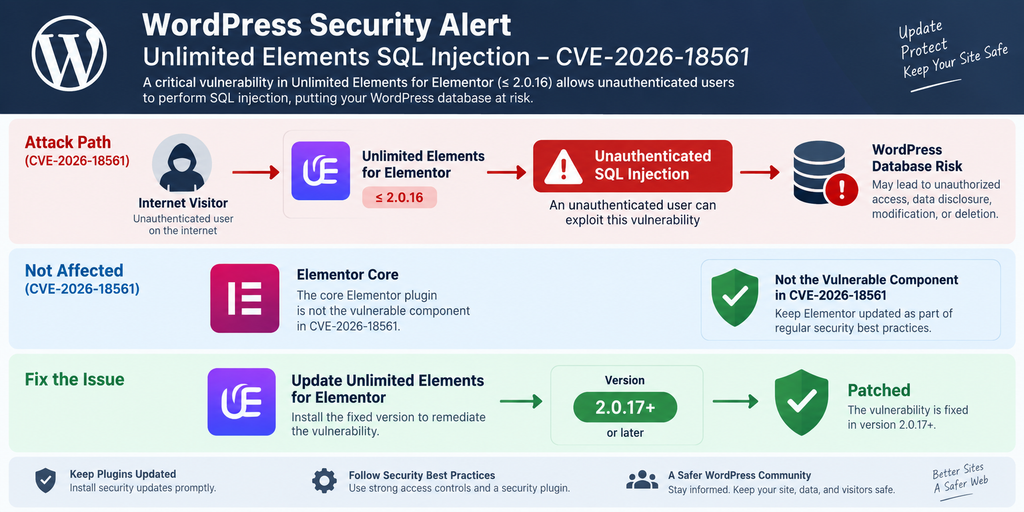
CVE-2026-18561 identifies an SQL injection vulnerability reported in the Unlimited Elements for Elementor WordPress plugin. Public vulnerability information describes the issue as remotely reachable without authentication in affected versions. The vulnerability was publicly listed in September 2026, with version 2.0.17 identified as the patched release.
Patchstack lists the vulnerability with a CVSS score of 9.3 and labels it high priority. That rating reflects the potentially serious consequences of allowing untrusted input to affect database queries combined with the lack of an authentication requirement. Administrators should use the severity score as a prioritization signal rather than trying to calculate the practical risk solely from their website’s popularity.
The flaw illustrates an important WordPress security principle. A site can have a fully updated WordPress core and still remain exposed through a vulnerable extension. WordPress security therefore depends on the entire software stack: core, plugins, themes, custom code, server configuration, authentication controls, and third-party integrations.
CVE-2026-18561 Is an Unlimited Elements Issue
Elementor users should pay particular attention to the product naming. Unlimited Elements for Elementor integrates closely with Elementor, but it is independently developed software. CVE-2026-18561 should not be presented as a vulnerability in Elementor core.
This distinction also affects remediation. Updating Elementor does not replace the vulnerable Unlimited Elements code. The Unlimited Elements plugin itself must be upgraded to the fixed version.
A useful inventory check is therefore straightforward. Open the WordPress Plugins screen and search for Unlimited Elements. Confirm whether it is installed, whether it is active, and which version is present. Administrators who manage sites through centralized tools should verify the actual reported version from each site rather than relying only on an update dashboard that may contain stale information.
Understanding SQL Injection Without Exploit Details
A database query normally combines instructions with values. For example, an application may ask the database to find a particular record that matches a safe identifier. The application should treat the supplied value as data and prevent it from becoming part of the SQL command structure.
SQL injection occurs when that separation fails. An unsafe value can influence how the database interprets the query itself. Depending on the vulnerable operation and database permissions, consequences can range from information disclosure to more significant manipulation.
Secure WordPress development typically relies on strict validation, sanitization appropriate to the context, and prepared SQL queries. Prepared queries are particularly important because they keep query structure separate from supplied values rather than attempting to make arbitrary input safe through simple string handling.
For security reasons, administrators do not need working SQL payloads to understand or mitigate CVE-2026-18561. Knowing the affected component, vulnerable versions, authentication requirement, patched version, and appropriate incident-response steps is enough to protect a normal WordPress installation.
Why Public Reachability Changes the Risk
A vulnerability requiring Administrator access presents a very different threat model from one available to an anonymous visitor. If an attacker must already control an administrator account, other security controls stand between the Internet and the vulnerable functionality.
Unauthenticated vulnerabilities remove that barrier. A remote system can potentially send requests without completing WordPress login. This makes automated scanning much easier and increases the importance of patch speed.
Public WordPress sites are continuously exposed to automated requests. Many are ordinary search crawlers and services. Others probe common login paths, old plugins, exposed files, outdated APIs, and known vulnerabilities. Administrators should therefore assume that publicly disclosed, remotely reachable vulnerabilities may eventually receive unwanted attention even when there is no evidence that their specific site has been targeted.
Which Unlimited Elements Versions Are Vulnerable
The published affected range for CVE-2026-18561 is Unlimited Elements for Elementor version 2.0.16 and earlier. Version 2.0.17 is identified as the patched release. Any site within the vulnerable range should be updated as soon as practical.
Administrators should not confuse this vulnerability with earlier Unlimited Elements security issues. The plugin has had other advisories with different CVE identifiers, affected versions, parameters, authentication requirements, and patches. Security information from an older advisory should not be automatically applied to CVE-2026-18561.
That point is particularly relevant because SQL injection vulnerabilities have previously been reported in Unlimited Elements. For example, older advisories involved different input paths and, in some cases, required an authenticated Contributor-level account. CVE-2026-18561 is important because its published privilege requirement is unauthenticated.
Vulnerable Range at a Glance
For CVE-2026-18561, the practical version check is simple:
Unlimited Elements ≤ 2.0.16 – Vulnerable
Unlimited Elements 2.0.17 – Security fix available
Later stable versions – Preferred when officially available and compatible
Administrators should generally install the latest stable release offered through the official update channel rather than deliberately stopping at the minimum fixed release. Later releases can contain additional security fixes, compatibility improvements, and maintenance changes.
Before updating a business-critical website, create a usable backup according to the site’s normal maintenance policy. A backup should cover both files and the database when possible. This is primarily a recovery precaution for compatibility problems; it should not become an excuse to delay a critical security update for an extended period.
Do Not Check Only Elementor
A common mistake is opening the Plugins screen, seeing that Elementor itself is current, and assuming the warning has been resolved. That does not address this vulnerability.
Look specifically for Unlimited Elements for Elementor. If a management dashboard abbreviates plugin names, confirm the plugin slug or open the site directly. Large WordPress environments may contain several Elementor extensions with similar names.
Elementor, Elementor Pro, Unlimited Elements, Essential Addons, Premium Addons, and other Elementor-related extensions are separate software packages. A vulnerability assigned to one does not automatically apply to the others.
What If Unlimited Elements Is Installed but Deactivated?
A deactivated plugin usually does not execute through the normal WordPress plugin-loading process, which substantially changes exposure. However, old and unnecessary plugin files should not be left on production systems indefinitely.
If Unlimited Elements is not required, removing it is cleaner than keeping an outdated copy. If it may be needed later, obtain a current version when it is actually required rather than preserving vulnerable code for convenience.
Administrators should also check staging environments, old clones, forgotten subdomains, and development copies that remain reachable from the Internet. A production site may be fully patched while an abandoned staging copy still exposes an older plugin version.
Multisite and Managed WordPress Environments
WordPress Multisite administrators should verify plugin deployment across the entire network. A network-installed plugin can affect multiple sites even when usage differs between individual sites.
Agencies and freelancers should perform the same check across client installations. Centralized WordPress management systems can help identify outdated versions quickly, but verification should continue until each affected installation reports a patched release.
Documentation also matters. Record the update date, previous version, new version, and any relevant security observations. That information becomes valuable if suspicious activity is discovered later.
How the addontype Parameter Reaches the SQL Query
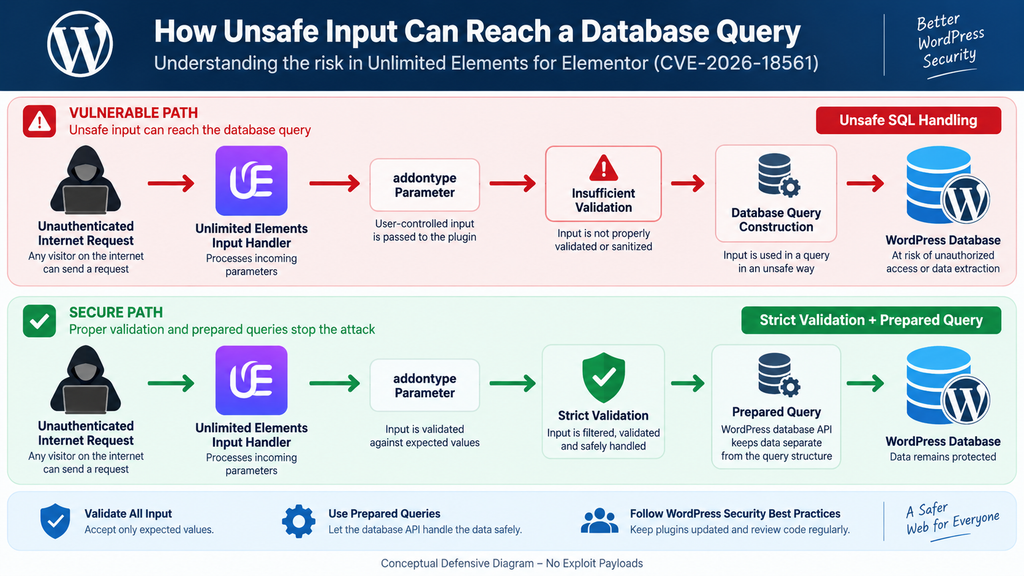
At the technical level, the security concern centers on the handling of an addontype value as data moves through Unlimited Elements and reaches database-related logic. The important security question is not simply whether a parameter exists. Applications legitimately pass thousands of values into database operations every day. The issue is whether untrusted input remains safely separated from the structure of the resulting SQL statement.
Unlimited Elements stores information about its addons and widget types in database-backed structures. The plugin code works with fields that include addon names, aliases, categories, configuration information, and an addontype value. Database lookup routines can therefore use addon type information when identifying the appropriate records.
In a secure implementation, values entering such database operations must be handled using safe query construction. The database should understand the supplied value only as data. It should never be able to reinterpret part of that value as SQL syntax.
The Unsafe Data Flow in Simple Terms
A useful defensive way to visualize the problem is:
Public request → plugin input → addontype value → internal processing → database lookup → SQL query
Every arrow in that sequence represents a trust boundary. The application must decide what type of data it expects, validate it appropriately, and use a database API that keeps supplied values separate from SQL instructions.
If unsafe input reaches query construction without sufficient protection, the final database operation can behave differently from what the developer intended. That is the core concept behind SQL injection.
This article intentionally does not provide a working request, SQL payload, endpoint recipe, or exploitation sequence. Those details are unnecessary for administrators who need to determine exposure and remediate their sites.
Why Sanitization Alone Is Not the Whole Solution
Developers sometimes think SQL injection prevention means removing suspicious characters from input. That approach is fragile because database syntax is complex and context matters.
Prepared statements provide a stronger architectural defense. They allow the developer to define the query separately and pass values through placeholders. WordPress provides $wpdb->prepare() for this purpose when custom SQL queries are necessary.
Input validation should still happen. If a parameter accepts only a known set of addon types, the application can reject unexpected values before database processing. However, validation and prepared queries serve different roles. Good security often uses both rather than relying on one transformation function.
Why WordPress Database APIs Matter
WordPress offers APIs that reduce the need for developers to construct raw SQL strings manually. When custom queries are unavoidable, the $wpdb database abstraction includes mechanisms for safer query preparation.
The underlying principle is simple: data should remain data.
That principle applies to strings, numeric identifiers, search terms, sort options, addon types, category IDs, and other values. Developers should avoid building SQL commands by concatenating raw request data into query strings.
For site owners, there is no need to patch the plugin code manually unless the developer specifically provides an emergency procedure. Installing the official fixed release is safer because a manual edit can be overwritten, introduce compatibility problems, or fail to cover every relevant code path.
What Information Can Be Extracted From WordPress

The main security concern with SQL injection is unauthorized interaction with information stored in the database. WordPress relies heavily on its database, which means a successful SQL injection flaw can potentially expose data that would never normally be available to an anonymous visitor.
The exact information accessible through a particular vulnerability depends on the affected query, database permissions, WordPress configuration, installed plugins, table structure, and technical limitations of the vulnerable code path. Administrators should therefore avoid claims that every vulnerable site automatically exposes every database record.
Nevertheless, database confidentiality should be taken seriously. A standard WordPress database contains enough operational information that unauthorized read access can create meaningful security and privacy concerns.
WordPress User Information
WordPress normally stores account information in its user-related tables. Depending on configuration and installed plugins, records can include usernames, email addresses, display names, profile metadata, role-related information, and password hashes.
WordPress does not normally store account passwords as readable plain text. Passwords are represented using one-way password hashes. That distinction is important because a database disclosure does not automatically reveal a user’s original password.
However, password hashes are still sensitive security information. If there is credible evidence that account-related database information was accessed, administrators should treat the incident seriously. Password resets, session invalidation, administrator account review, and investigation of authentication logs may be appropriate.
WordPress Options and Configuration Data
The WordPress options table can contain a wide range of settings. Core configuration, plugin options, theme settings, scheduled-task information, integration configuration, cached values, and other operational data may appear there.
Some plugins also store API-related settings or integration tokens in the database. Storage practices vary considerably between products. For that reason, an administrator investigating confirmed database exposure should review the site’s integrations rather than assuming only normal WordPress content was involved.
Sensitive credentials that may have been exposed should be rotated according to the relevant provider’s procedures. Simply updating Unlimited Elements would close the known injection path, but it would not invalidate a credential that had already been obtained.
Posts, Pages, and Custom Post Types
WordPress stores posts, pages, revisions, attachments, menu items, and many custom post types in database tables. Some of this information is public by design, while other records may be drafts, private content, internal notes, or data used by plugins.
A database-level disclosure can bypass the normal distinction between what WordPress publishes publicly and what it stores internally. Therefore, site owners should not assume that a mostly public blog has nothing worth protecting.
Draft articles, unpublished business information, private pages, form-related records, and plugin-specific content can still matter.
WooCommerce and Membership Sites
The consequences can be more significant on websites that use WordPress as a business platform. WooCommerce, membership plugins, learning management systems, booking tools, CRM extensions, and form plugins can add substantial amounts of application data to the database.
The exact schema varies by plugin and version. Some information may live in custom tables, while other information is stored through standard WordPress posts, metadata, users, or options.
If an affected WordPress installation handles customers or members, administrators should include those systems in their incident review. Do not assume that CVE-2026-18561 automatically proves customer information was stolen. Exposure and confirmed compromise are different things. Evidence should guide the response.
Database Credentials and wp-config.php
WordPress database connection credentials are normally defined in wp-config.php, which is a filesystem configuration file rather than a normal WordPress database record. Therefore, an SQL injection vulnerability should not automatically be described as direct access to wp-config.php.
This distinction is useful when assessing risk accurately. SQL injection targets database operations. File-read vulnerabilities target filesystem content. Remote code execution presents another threat model again.
Security reporting becomes more useful when these categories remain separate. CVE-2026-18561 is an SQL injection issue, so the primary concern is unauthorized database interaction rather than assuming every server file is directly readable.
Data Exposure Is Not the Same as Full Site Takeover
A serious vulnerability does not justify exaggerating its capabilities. SQL injection can be highly dangerous, but the actual impact depends on what database operations the vulnerable path permits and what an attacker can accomplish through them.
Administrators should therefore avoid two extremes. The first is dismissing the vulnerability because no obvious changes are visible. The second is assuming that the existence of a vulnerable version proves that the server was completely compromised.
Instead, investigate evidence. Review requests, accounts, configuration, database changes, security alerts, file integrity, and hosting telemetry where available. A measured incident-response process provides more reliable answers than assumptions.
Updating to the Patched Version
The primary remediation for CVE-2026-18561 is to update Unlimited Elements for Elementor to version 2.0.17 or later. Patchstack identifies 2.0.17 as the patched version and recommends immediate remediation for affected installations.
Start by confirming that the WordPress site has a recent backup. For an important production site, the backup should ideally include both database content and WordPress files. Confirm that the backup system has actually completed rather than relying solely on the fact that a backup plugin is installed.
Next, update Unlimited Elements through a trusted distribution channel. Avoid downloading replacement ZIP files from unknown mirrors or unofficial websites. A security emergency is precisely the wrong time to introduce software from an unverified source.
Recommended Update Sequence
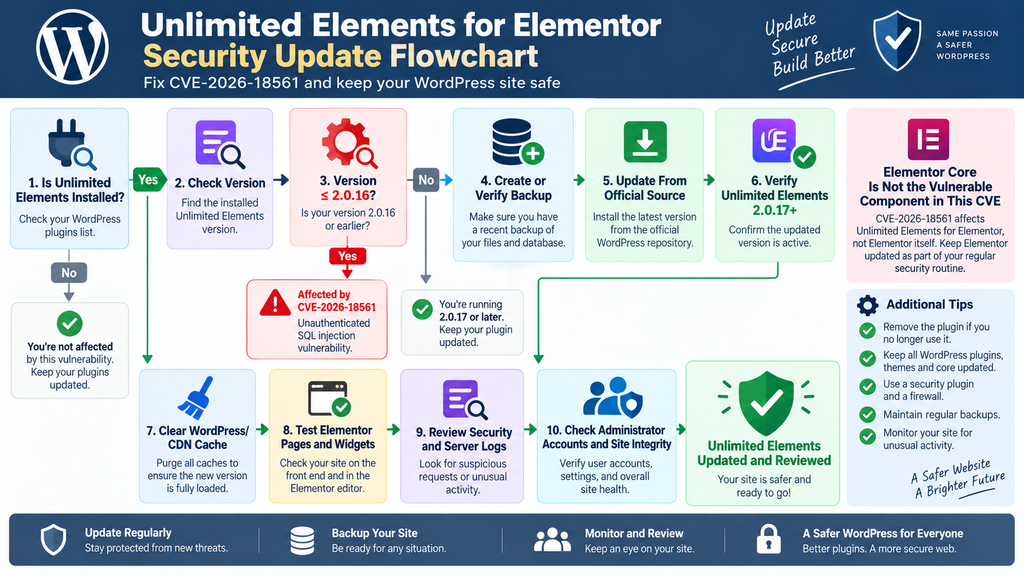
A sensible maintenance sequence is:
Check Unlimited Elements version → Create or verify backup → Update Unlimited Elements → Confirm version 2.0.17 or later → Clear caches → Test Elementor pages → Review logs → Check site integrity
The sequence does not need to become complicated. The goal is to remove the vulnerable version quickly while preserving enough information to investigate if necessary.
After installation, return to the Plugins screen and verify the displayed version. Do not assume an update succeeded simply because WordPress displayed an update progress message.
Clear WordPress and Server Caches
After the plugin update, clear relevant WordPress caches. Sites may use page caching, object caching, server-level caching, CDN caching, or combinations of these systems.
Cache clearing is primarily useful for ensuring that visitors and administrators receive current application assets and output after an update. It is not a substitute for patching the vulnerable PHP code.
If the site uses Redis or another persistent object cache, follow the normal maintenance procedure rather than deleting data indiscriminately. Similarly, CDN cache purging should target website content and should not be confused with security remediation at the origin server.
Test Elementor Pages After Updating
Because Unlimited Elements extends Elementor functionality, inspect representative pages that use its widgets after the update. Check the front end on desktop and mobile, then open important pages in the Elementor editor if appropriate.
Pay attention to widgets, dynamic content, forms, filters, layouts, sliders, menus, templates, and other Unlimited Elements features actively used by the site.
A security update should not be rolled back casually because of a visual problem. If compatibility trouble appears, investigate the conflict or contact the plugin developer. Returning production to a known vulnerable version can restore the security exposure.
Remove the Plugin If You No Longer Need It
Plugin inventory is part of WordPress security. Every installed extension adds code that administrators must maintain.
If Unlimited Elements is no longer used, consider removing it after confirming that doing so will not break active pages or templates. Deactivation can be useful during testing, but unnecessary plugin files do not need to remain permanently on a production server.
Before deletion, check whether the plugin supplies widgets currently embedded in Elementor layouts. Removing a required addon package may leave missing widgets or incomplete designs.
Update Other WordPress Components Too
CVE-2026-18561 should also serve as a reminder to review the broader update state. Check WordPress core, Elementor, Elementor Pro if installed, themes, and other plugins independently.
Do not assume that fixing Unlimited Elements resolves unrelated vulnerabilities elsewhere on the website.
Likewise, avoid indiscriminate bulk updates on a complex production site without appropriate backups and testing. Prioritize known security fixes, but maintain a controlled update process that lets you identify compatibility issues.
Checking Logs for SQL Injection Attempts
Updating closes the known vulnerable path, but administrators should also ask whether suspicious requests reached the website while an affected version was installed. Log analysis helps answer that question.
Useful evidence can exist in several places. Web server access logs may record incoming requests. A hosting dashboard may retain security events. A CDN or web application firewall may record blocked requests. WordPress security plugins can also preserve alerts, request information, login activity, or firewall events.
Retention periods vary. Some hosting environments keep access logs only briefly, so administrators should preserve relevant evidence before it disappears if they suspect an incident.
Establish the Exposure Window
Start by determining when the vulnerable Unlimited Elements version was installed and when the site was upgraded to 2.0.17 or later.
That gives you an investigation window.
If the site had version 2.0.16 for several weeks, examine available logs from that period. If the plugin was installed only recently, the window may be much smaller.
Also record when CVE-2026-18561 became public. Public disclosure can increase scanning activity because vulnerability information becomes easier for attackers and automated systems to discover.
Look for Unusual Request Patterns
Administrators do not need to manually decode every SQL expression in their access logs. Start with behavioral indicators.
Look for unusual concentrations of requests against WordPress AJAX or plugin-related functionality. Repeated requests from the same source, rapidly changing parameters, abnormal request lengths, strange encoding, unexpected error responses, and bursts of requests within seconds can deserve investigation.
A single unusual request is not proof of exploitation. Security scanners, monitoring systems, broken crawlers, and legitimate applications can generate odd-looking traffic. Context matters.
Likewise, the absence of an obvious malicious string does not guarantee that no attempt occurred. Attackers can encode or vary requests in many ways. This is why server logs should be combined with other evidence.
Review HTTP Status Codes and Timing
HTTP response codes can provide useful context. A large number of similar requests returning successful responses may deserve more attention than requests consistently rejected by a WAF.
Server errors can also matter. Database-related failures, repeated 500 responses, or unusual application warnings around suspicious requests may provide clues.
Response timing is another potential signal. Some SQL injection techniques attempt to infer database behavior through response differences. Administrators do not need to reproduce such techniques. Instead, they can look for abnormal request sequences or timing patterns and escalate suspicious findings to a security professional.
Check WAF and Security Plugin Events
A web application firewall may already classify suspicious requests as SQL injection. Review events around the relevant dates and look for repeated blocks against the affected website.
However, a WAF should be treated as an additional layer rather than proof that the site was safe while running vulnerable code.
Rules vary between providers. Attackers can modify techniques, and generic SQL injection detection may not understand every application-specific vulnerability. The official plugin update remains the primary remediation.
If a firewall offers a dedicated virtual patch for CVE-2026-18561, it can provide useful temporary protection while administrators complete the update. It should not become a permanent excuse to leave version 2.0.16 installed.
Review WordPress Administrator Accounts
If suspicious activity is found, inspect WordPress accounts. Look for unfamiliar administrators, unexpected role changes, unusual email changes, or recently created accounts that nobody recognizes.
Also review active sessions where your security tooling provides that capability. If there is credible evidence of compromise, invalidate sessions and reset relevant credentials.
Use unique passwords and enable multi-factor authentication for privileged accounts where practical. MFA does not patch SQL injection, but it strengthens the broader security posture if account information has been exposed or another attack path is attempted.
Inspect Important Configuration Changes
Check whether important WordPress settings changed unexpectedly during the exposure window. Pay particular attention to site URLs, administrator email settings, registration behavior, default roles, plugin activation, theme changes, scheduled tasks, and security settings.
Unexpected configuration changes can indicate that an incident went beyond simple scanning.
Again, do not assume every configuration anomaly is connected to CVE-2026-18561. WordPress sites change constantly through administrators, plugins, cron tasks, hosting automation, and integrations. Build a timeline before drawing conclusions.
Check File Integrity When Compromise Is Suspected
SQL injection is a database vulnerability, but an incident investigation should not stop at the database if there is credible evidence that the website was compromised.
Compare WordPress core files against known-good versions. Review recently modified PHP files in plugins, themes, MU-plugins, and writable directories. Investigate unexpected files or code modifications.
Do not delete suspicious evidence immediately if the site handles important business or personal information. Preserve a copy for investigation when possible.
A professional incident responder may need timestamps, access logs, database snapshots, security events, and suspicious files to determine what actually happened.
Rotate Credentials Based on Evidence
If investigation indicates that sensitive credentials or tokens stored in the WordPress database may have been exposed, rotate them through their official providers.
Potential examples can include third-party API credentials, integration tokens, SMTP credentials, or application-specific secrets stored by plugins. Whether these exist depends entirely on the website.
Database credentials stored in wp-config.php should not automatically be assumed compromised solely because an SQL injection vulnerability existed. Broader compromise evidence, however, may justify rotating database and hosting credentials as part of incident containment.
Do Not Treat an Update as a Forensic Cleanup
Updating from 2.0.16 to 2.0.17 removes the known vulnerable code path. It does not reverse actions that may have happened before the update.
This distinction is important for every serious WordPress vulnerability.
Patch first. Investigate second. Recover if necessary. Harden afterward.
For most sites with no suspicious evidence, the process may end after updating, testing, and reviewing available logs. Sites showing clear indicators of compromise should receive a deeper investigation.
Practical Security Checklist for Unlimited Elements Users
Start with version identification. Confirm whether Unlimited Elements for Elementor is actually installed and whether the version is within the affected range. If it is version 2.0.16 or earlier, prioritize the update.
After patching, verify that version 2.0.17 or later is active. Test Elementor pages that depend on Unlimited Elements. Clear relevant caches and check both front-end output and editing functionality.
Then establish how long the vulnerable release was present. Preserve available server, CDN, WAF, and security-plugin logs. Review unusual requests and correlate them with account, configuration, database, and file changes.
If No Suspicious Activity Is Found
A clean log review is reassuring, but it should not lead to complacency. Continue normal WordPress maintenance and keep the plugin current.
Enable update notifications and use a vulnerability-monitoring service if appropriate for the importance of the website. Maintain reliable backups and periodically test restoration procedures.
Reduce plugin inventory where possible. Fewer unnecessary components mean fewer update obligations and a smaller attack surface.
If Suspicious Activity Is Found
Preserve evidence before making broad cleanup changes. Record timestamps, affected URLs, source addresses if available, user-account changes, security alerts, and relevant server events.
Change privileged WordPress credentials and invalidate active sessions when compromise is credible. Rotate exposed integration credentials and review administrator accounts.
For important commercial websites, consider involving the hosting provider or a qualified WordPress security professional. Incident response can become complex when database access, user information, third-party integrations, and server-level changes overlap.
Frequently Asked Questions
Is Elementor vulnerable to CVE-2026-18561?
No. CVE-2026-18561 is assigned to Unlimited Elements for Elementor, which is a separate extension that integrates with Elementor. The vulnerability should not be described as an Elementor core SQL injection vulnerability.
Which Unlimited Elements versions are affected?
Published vulnerability information identifies Unlimited Elements for Elementor 2.0.16 and earlier as affected by CVE-2026-18561.
Which version fixes the vulnerability?
Version 2.0.17 is identified as the patched release. Administrators should install 2.0.17 or a newer stable version from a trusted official source.
Does an attacker need a WordPress account?
The published advisory lists the required privilege as unauthenticated. Therefore, an attacker does not need to log into a normal WordPress account before attempting to reach the vulnerable functionality.
What is the CVSS score for CVE-2026-18561?
Patchstack assigns CVE-2026-18561 a CVSS score of 9.3 and marks the vulnerability as high priority.
Can SQL injection expose WordPress data?
Potentially, yes. SQL injection can allow unauthorized interaction with database queries. The precise information accessible depends on the vulnerable operation, database permissions, WordPress configuration, and other technical conditions.
Should I change all passwords after updating?
Not automatically. Updating should happen immediately, followed by a review of available logs and security evidence. If there are credible indicators that sensitive account information was exposed or the site was compromised, credential resets and session invalidation become appropriate.
Does a firewall replace the Unlimited Elements update?
No. A WAF can provide an additional defensive layer and may block known malicious patterns, but the vulnerable plugin should still be updated to version 2.0.17 or later.
What should I do if I no longer use Unlimited Elements?
After checking that active Elementor pages do not depend on its widgets or features, consider removing the plugin rather than leaving unnecessary code installed.
Should I inspect logs after updating?
Yes, particularly on important sites. Updating fixes the known vulnerability but does not determine whether exploitation was attempted before the patch. Web server, WAF, CDN, hosting, and security-plugin logs can provide useful evidence.
The Key Takeaway for Elementor Site Owners
CVE-2026-18561 is a serious reminder that WordPress security extends beyond WordPress core and the primary page builder. A site may run the latest Elementor release while still being exposed because an Elementor extension contains vulnerable code.
For this incident, the affected component is Unlimited Elements for Elementor, not Elementor itself. Versions through 2.0.16 fall within the published vulnerable range, while 2.0.17 provides the security fix. Because the vulnerability is reported as unauthenticated SQL injection, administrators should prioritize the update rather than waiting for routine maintenance.
The strongest response combines patching with verification. Update Unlimited Elements, confirm the new version, test the website, clear appropriate caches, and examine available logs. If suspicious evidence appears, broaden the investigation to user accounts, WordPress settings, integration credentials, database activity, and file integrity.
Most importantly, do not confuse “patched” with “investigated.” A patch prevents the known vulnerable code from remaining exposed. A log and integrity review helps determine what happened before that patch was installed.
⚠️ Disclaimer and Source Hygiene
This article is provided for educational, defensive, and WordPress administration purposes. It does not provide exploitation payloads or instructions for attacking vulnerable websites. Vulnerability details, affected versions, severity ratings, and remediation information can change as researchers, vendors, CVE authorities, and security companies publish additional findings.
Website administrators should verify security information against current advisories before making decisions for production systems. Organizations handling sensitive, regulated, financial, customer, or business-critical information should consult their hosting provider, developer, security team, legal adviser, or qualified cybersecurity professional when evidence of compromise exists.
The technical information in this article is based on publicly available vulnerability research and authoritative or specialist security sources. Where different vulnerability databases publish different scores or classifications, the original advisory and latest vendor guidance should receive priority.
🔔 For more tutorials like this, consider subscribing to our blog.
📩 Do you have questions or suggestions? Leave a comment or contact us!
🏷️ Tags: Unlimited Elements vulnerability, CVE-2026-18561, Unlimited Elements for Elementor, WordPress SQL injection, Elementor security, WordPress vulnerability, WordPress security, SQL injection, WordPress plugin security, Unlimited Elements update
📢 Hashtags: #UnlimitedElements, #CVE202618561, #WordPressSecurity, #WordPress, #Elementor, #SQLInjection, #CyberSecurity, #PluginSecurity, #WebsiteSecurity, #WordPressUpdates
Sources and References
Patchstack Vulnerability Database – CVE-2026-18561: Primary security advisory used for the affected range, patched version, SQL injection classification, unauthenticated privilege requirement, CVSS rating, publication date, and remediation recommendation.
WPScan Vulnerability Database – Unlimited Elements for Elementor: Useful for reviewing the wider vulnerability history of the plugin and distinguishing CVE-2026-18561 from earlier Unlimited Elements security issues.
WordPress Plugin Ecosystem Documentation: WordPress database and plugin development practices provide the underlying defensive guidance for safe database access, plugin maintenance, updates, backups, and security reviews.
OWASP Injection Guidance: General secure-development principles regarding injection vulnerabilities support the recommendation to separate untrusted values from executable database query structure.
Secondary Sources and Testimonials
Secondary vulnerability databases and security-monitoring services can provide useful confirmation, additional timelines, and detection information. However, administrators should distinguish confirmed technical facts from automated severity interpretations or speculative exploitation claims.
At the time of writing, the key actionable facts remain straightforward: CVE-2026-18561 affects Unlimited Elements for Elementor through version 2.0.16, the vulnerability is reported as unauthenticated SQL injection, and version 2.0.17 contains the fix. Administrators should prioritize updating and then review available security evidence rather than relying on assumptions about whether their site was targeted.
1 thought on “Unlimited Elements Vulnerability: Critical SQL Injection”