
Table of Contents
A high-severity UsersWP vulnerability can allow authenticated Subscriber-level users to delete files from a WordPress server. CVE-2026-19991 affects UsersWP through version 1.2.70 and may expose critical files, including wp-config.php, making publicly accessible registration especially important to review.
The UsersWP vulnerability tracked as CVE-2026-19991 creates an unusual WordPress security problem. An attacker does not need Administrator privileges, access to the hosting control panel, or direct filesystem credentials. According to published vulnerability information, an authenticated account with the ordinary Subscriber role may be enough to reach the vulnerable file-removal functionality. That makes the issue particularly relevant to community sites, membership websites, directories, and other WordPress installations where visitors can create their own accounts.
The vulnerability affects UsersWP versions up to and including 1.2.70. Security tracking information lists UsersWP 1.2.71 as the patched version, so administrators running an affected release should update without unnecessary delay. CVE-2026-19991 carries a CVSS 3.1 score of 8.1, placing it in the High severity category.
What makes the vulnerability more serious than an ordinary broken profile feature is the potential reach of file deletion. A successful attacker may be able to make the plugin operate on files outside the directory where user uploads would normally be expected. Critical WordPress files can therefore become targets. The reported impact includes the possibility of deleting wp-config.php, one of the most important files in a standard WordPress installation.
Deleting wp-config.php does not automatically give an attacker the database password or magically provide Administrator access. The practical danger is different. Removing the file can prevent WordPress from loading its database configuration and other essential settings. A functioning website may suddenly become unavailable or behave like an incomplete WordPress installation.
For site owners, that distinction matters. CVE-2026-19991 should primarily be viewed as an integrity and availability threat caused by arbitrary file deletion, rather than a direct arbitrary-file-reading vulnerability. The CVSS information associated with the vulnerability reflects high integrity and availability impact while assigning no confidentiality impact.
Public registration can increase the practical exposure. If a website allows anyone to create a Subscriber account, the authentication requirement becomes a much smaller barrier. A site owner should therefore evaluate not only the installed UsersWP version but also how easily an unknown visitor can obtain the minimum role required to interact with the vulnerable functionality.
What Is CVE-2026-19991?
CVE-2026-19991 is a high-severity arbitrary file deletion vulnerability affecting the UsersWP – Front-end login form, User Registration, User Profile & Members Directory plugin for WP. Published security information identifies UsersWP versions through 1.2.70 as affected. Patchstack lists 1.2.71 as the patched version and assigns the vulnerability a CVSS score of 8.1.
UsersWP is designed to move common account functions onto the front end of a WordPress website. It provides registration forms, login forms, user profiles, account editing, password functions, directories, and custom profile fields. These capabilities are useful because visitors can interact with accounts without entering the traditional WordPress administration interface. The official WordPress plugin description also highlights multiple registration forms and customizable profile fields.
That front-end functionality creates a security boundary that plugins must handle carefully. A profile form may accept harmless information such as a display name or biography. However, a file field interacts with the filesystem. Any feature that creates, moves, replaces, or removes files needs much stronger validation because an incorrect path can point somewhere completely different from the intended uploads location.
CVE-2026-19991 concerns the plugin’s file-removal handling. Published technical descriptions identify the upload_file_remove() AJAX handler as part of the vulnerable path. The important defensive takeaway is not the exact request needed to trigger the bug. Site owners need to understand that data associated with a user-controlled file field could ultimately influence which filesystem path the plugin attempted to remove.
The issue is especially notable because UsersWP had already addressed an earlier arbitrary file deletion vulnerability, CVE-2026-13492, affecting versions through 1.2.65. Version 1.2.66 included enhanced validation for file deletion. However, CVE-2026-19991 represents a separate path-validation problem reported against versions through 1.2.70. Administrators should therefore not assume that installing 1.2.66 alone protects against the newer issue.
This distinction is important when reviewing old security reports. CVE-2026-13492 was published in July 2026 and concerned versions through 1.2.65. CVE-2026-19991 was published later and extends the affected range through 1.2.70. A security scan that says a site was previously updated beyond 1.2.65 does not prove that it is safe from the newer vulnerability.
Why the 8.1 Severity Rating Matters
A CVSS score does not tell the entire story of a WordPress vulnerability, but it gives administrators a useful baseline. CVE-2026-19991 is rated 8.1 High. The vulnerability requires authenticated access, which prevents it from being classified exactly like a completely unauthenticated attack. However, the required privilege level is only Subscriber.
That requirement can be significant on a private corporate site where administrators manually create every account. It is much less reassuring on a public community website that lets anyone register. In the second scenario, authentication may only require creating an account through a normal registration page.
The impact also differs from vulnerabilities that merely reveal a harmless setting or alter a cosmetic profile field. Arbitrary file deletion can interfere with the underlying WordPress installation. Deleting the wrong PHP, configuration, plugin, theme, or application file can cause immediate errors or prevent parts of the website from loading.
Administrators should therefore treat the vulnerability as a filesystem integrity problem. Updating UsersWP closes the known vulnerable behavior, but an update cannot automatically restore files that may already have disappeared. That is why the post-update integrity review later in this guide is just as important as installing the patched plugin.
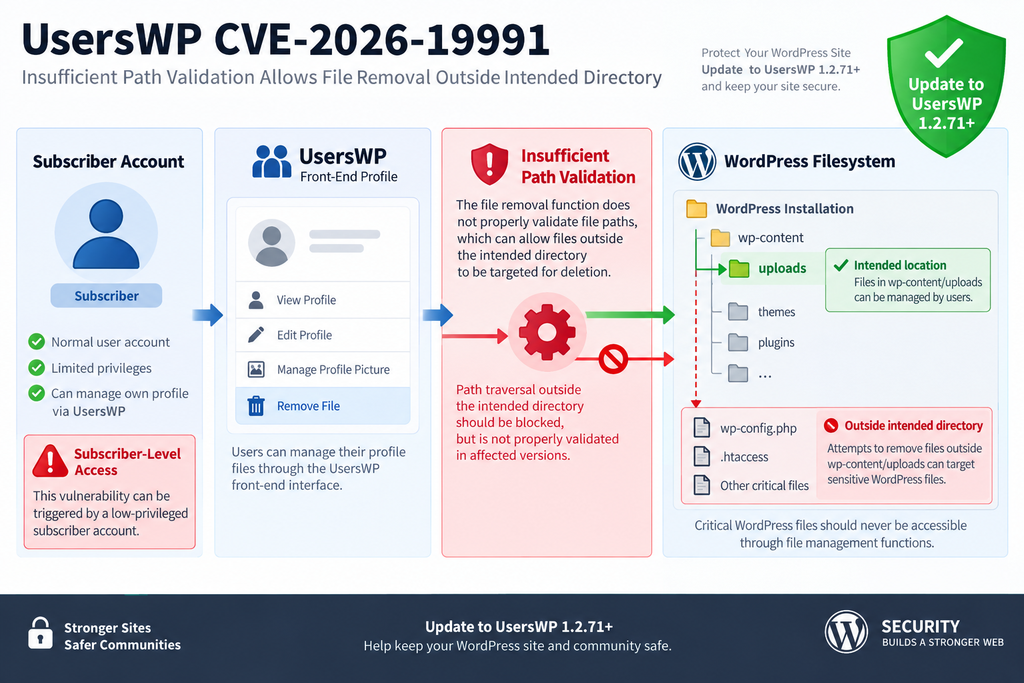
How File Path Validation Is Bypassed
File handling becomes dangerous when an application treats a user-controlled value as though it were already a trustworthy filesystem location. A secure application should determine exactly where a file is allowed to exist, normalize the requested path, and verify that the final destination remains inside the permitted directory before any destructive filesystem operation occurs.
CVE-2026-19991 demonstrates why checking the original value is not always enough. Published technical analysis indicates that UsersWP performed validation but later transformed the stored value when deriving a relative file location. The resulting normalized value could therefore differ in a security-relevant way from the value that had previously passed validation.
This is an important concept for WordPress developers. Security validation needs to apply to the value that will actually reach the dangerous operation. Checking an earlier representation may provide little protection if another helper function later decodes, replaces, concatenates, or otherwise transforms that value.
The vulnerable flow involved account file fields and the plugin’s file-removal functionality. According to the published description, the plugin could store a value associated with a file form field even when a normal uploaded file was not supplied. The value then passed through validation and could later be handled by the removal process.
For defensive purposes, there is no reason for administrators to reproduce the path manipulation. Attempting to test the issue against a production website can delete important data and create an outage. Version verification, updating, filesystem integrity checks, backups, and log review provide much safer ways to respond.
Why Simple String Checks Can Fail
A filename can look harmless during one stage of processing and become dangerous after transformation. This problem is not unique to WordPress. It appears across web applications whenever one layer validates data while another layer interprets it differently.
Consider the general security principle rather than the exploit mechanics. An application may receive a URL, path, encoded value, or stored metadata string. It checks that input against one set of rules. A later function removes a prefix or converts the value into a local path. If the application never checks the final canonical destination, its original validation may no longer represent what the filesystem actually receives.
Secure file deletion should therefore operate on a known base directory and a canonical destination. The application should verify that the final resolved path remains inside the expected directory. It should also reject unexpected path structures rather than trying to clean dangerous input into something acceptable.
WordPress developers should be especially careful when profile fields reference media. A profile avatar, verification document, banner, or custom attachment may start as a web URL but eventually map to a local file. URLs and filesystem paths are not interchangeable security objects. Converting between them requires explicit boundaries.
CVE-2026-19991 is a useful reminder that sanitization and authorization solve different problems. Sanitization attempts to make input safe for a particular context. Authorization determines whether a user is allowed to perform an operation. Path validation determines whether the resulting filesystem destination is acceptable. A secure file-removal feature needs all of these protections working together.
The Difference Between Validation and Canonicalization
Path canonicalization means resolving a path into a consistent form before making a security decision about it. This matters because multiple textual representations may ultimately refer to locations outside the directory an application intends to manage.
A robust design starts from the permitted directory rather than trusting a path supplied by a browser. After normalization, the application should compare the final location against the expected boundary. If the resolved destination leaves that boundary, deletion should stop.
The same principle applies even when an application previously used WordPress validation functions. A validation function must match the exact threat model and the final representation of the data. Passing one check does not guarantee that later transformations preserve the same security properties.
Site administrators do not need to audit the UsersWP source manually to protect their websites. Installing a patched release is the practical remediation. However, understanding the flaw explains why a Subscriber account becomes relevant and why ordinary WordPress role permissions alone do not eliminate the risk.
Why a Subscriber Account Is Enough
WordPress Subscribers normally have very little authority. In a standard installation, they can manage their own profile and read content available to them. They cannot install plugins, edit themes, modify core files, manage other users, or access most administrative functions.
That limited role can create a false sense of security when a vulnerable plugin exposes a privileged operation through a front-end feature. WordPress capabilities protect core actions, but plugins must enforce their own authorization boundaries correctly. A plugin can accidentally make a dangerous operation reachable by users who would never receive equivalent filesystem privileges from WordPress itself.
CVE-2026-19991 is reported as requiring Subscriber-level access or higher. Patchstack explicitly lists the required privilege as Subscriber, while other published vulnerability information likewise describes the issue as authenticated Subscriber+ arbitrary file deletion.
The attacker therefore does not need to become an Editor or Administrator first. That dramatically changes the risk calculation for websites designed around user accounts.
A WooCommerce store may create Customer accounts. A community website may allow registration. A directory may encourage visitors to build profiles. A membership site may have hundreds or thousands of low-privilege accounts. Depending on configuration and role handling, these environments deserve particular attention because untrusted users are already part of the application’s normal operating model.
Public Registration Changes the Threat Model
A vulnerability that requires a Subscriber account may initially sound difficult to exploit. On a closed WordPress installation, it can be. If only employees receive accounts and every user is known, the authentication requirement provides a meaningful obstacle.
Public registration changes that situation. UsersWP itself is built around front-end registration, login, profiles, directories, and account management. The official plugin page describes multiple registration forms and the ability to assign roles through those forms.
If an affected website exposes a registration form that grants an attacker the necessary low-privilege account, the attacker may be able to satisfy the authentication requirement without compromising an existing password. Registration becomes part of the attack surface.
This does not mean every website using UsersWP is automatically exploitable. Configuration matters. Registration may be disabled, manually approved, restricted, protected by additional controls, or assigned differently. Other security layers can also affect practical exploitation.
However, administrators should not dismiss the issue merely because it is described as “authenticated.” In WordPress security reports, the difference between Administrator+, Editor+, Author+, Contributor+, and Subscriber+ is substantial. Subscriber is near the bottom of the standard capability hierarchy.
Sites That Deserve Priority Review
Public communities should receive immediate attention because account creation is an expected feature rather than an exception. Membership websites, social directories, alumni portals, classified platforms, customer communities, contributor networks, and sites using public profile forms should also verify their UsersWP version promptly.
A second category includes websites where registration is technically enabled but rarely used. Administrators sometimes forget that an old registration page remains publicly reachable. The absence of recent legitimate registrations does not mean an attacker cannot create one.
Staging sites can also be overlooked. A staging installation may contain production-like configuration files, copied databases, API configuration, or backups. If it is internet-accessible and uses the same vulnerable plugin, its lower visibility does not make the filesystem unimportant.
Finally, administrators managing multiple WordPress installations should search across all sites rather than checking only the primary domain. Plugins frequently remain active on forgotten subdomains, development environments, campaign sites, and old community portals.
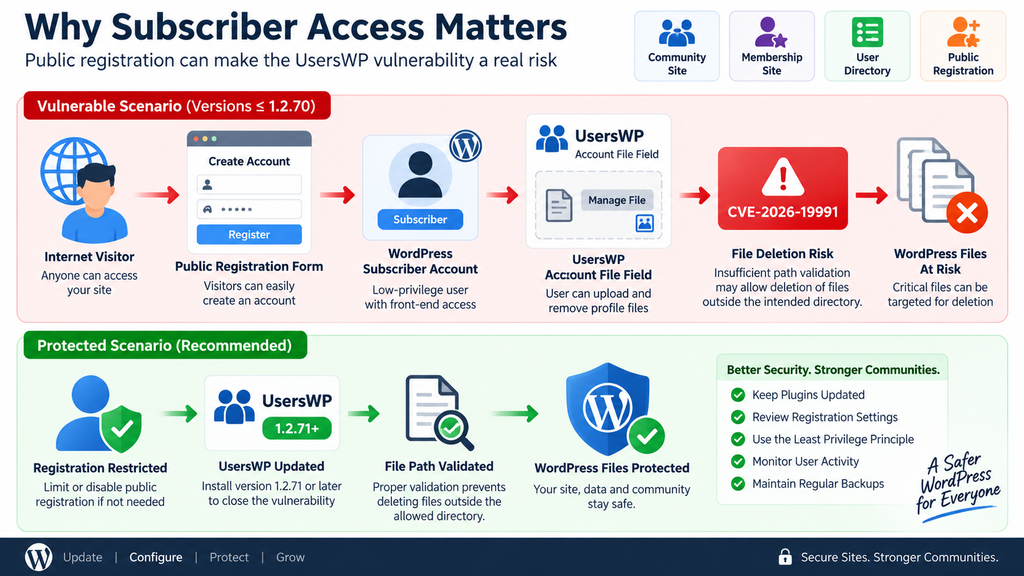
Which WordPress Files Are Exposed?
The most important file mentioned in connection with this vulnerability is wp-config.php. Published descriptions of CVE-2026-19991 specifically identify the possibility of deleting critical WordPress files, while the broader vulnerability class allows deletion beyond the location where uploaded user files should normally be managed.
A standard wp-config.php file tells WordPress how to connect to its database and contains other important configuration constants. WordPress expects this configuration during startup. If the file disappears, the application can no longer operate normally.
The practical result may be immediate site failure. Visitors might encounter an error, an unexpected setup state, or a site that no longer loads correctly. Administrators may initially interpret the incident as a hosting failure, broken update, corrupted installation, or database outage.
That is why monitoring only malware detections is not enough. Arbitrary deletion can cause serious damage without leaving a conventional malicious PHP backdoor behind.
What Happens If wp-config.php Is Deleted?
Deleting wp-config.php primarily damages availability and configuration integrity. WordPress loses the configuration it needs to communicate with the existing database and initialize the site normally.
The database itself does not automatically disappear. Posts, pages, comments, users, settings, and other content stored in MySQL or MariaDB can remain intact. However, WordPress needs valid configuration information to connect to that database.
This distinction can make recovery easier when good backups exist. Restoring a known-good wp-config.php may reconnect the application to the existing database. Yet administrators should not immediately restore the file and consider the incident finished.
If a critical configuration file vanished unexpectedly, determine why. Verify the UsersWP version, preserve relevant logs, review recent account activity, check filesystem changes, and investigate whether other files are missing. An unexplained deletion should be treated as a potential security incident until evidence suggests otherwise.
The good news is that this vulnerability is about file deletion, not automatically about reading the deleted file. The published CVSS assessment lists confidentiality impact as none while integrity and availability are high. Administrators should avoid overstating the issue by claiming that CVE-2026-19991 itself directly exposes database credentials to an attacker.
WordPress Core Files
Core WordPress files are another concern. WordPress depends on many PHP files under its root directory, wp-admin, and wp-includes. Removing a required file can generate fatal errors, break REST API behavior, damage administration screens, or prevent WordPress from bootstrapping.
Not every deleted core file creates the same symptom. Some files are loaded on nearly every request, while others support particular administration screens or features. As a result, a damaged site can appear partly functional.
This partial failure can complicate diagnosis. The homepage might load from a cache while wp-admin fails. A CDN may continue serving static content even though the origin application is broken. Cached pages can therefore hide filesystem damage for a while.
After patching UsersWP, administrators should verify WordPress core integrity rather than relying solely on a quick homepage test. WordPress CLI provides checksum verification for core files, and a clean core package can also be used as a trusted comparison source.
Plugin and Theme Files
Plugins and themes consist of executable PHP, JavaScript, CSS, templates, language files, and other resources. Removing one important PHP file can deactivate functionality or trigger a fatal error. Removing a less frequently used component may create a problem that appears only when a visitor reaches a specific page.
Premium plugins and custom themes require special attention because their files may not be covered by public WordPress.org checksum mechanisms. Administrators should compare them against trusted installation packages, deployment repositories, or known-good backups.
Do not assume that an active plugin shown in wp-admin is complete. WordPress can recognize a plugin while individual files inside its directory are missing. The same applies to themes.
Custom code deserves equal attention. Child themes, MU-plugins, custom integration files, and manually deployed application components may be unique to the site. If those files disappear and no version-controlled copy exists, recovery becomes more difficult.
Uploads and User Content
The WordPress uploads directory normally contains media rather than application configuration. Losing images, documents, PDFs, and other uploaded assets can still create major operational damage.
A website may depend on uploads for product documentation, invoices, member files, downloadable resources, profile images, or editorial content. Missing media can create broken pages even when WordPress itself continues running.
Backups should therefore cover both the database and filesystem. A database-only backup cannot restore an image or PHP file that has been deleted. Conversely, a filesystem backup without the database cannot fully reconstruct a dynamic WordPress site.
This vulnerability provides a useful reminder that WordPress disaster recovery requires both layers.
Configuration and Custom Application Files
WordPress installations often contain more than standard core files. Hosting environments may add configuration files, security rules, caching components, deployment files, custom scripts, or integration code.
The exact reach of a deletion vulnerability depends on filesystem permissions and server configuration. PHP cannot normally delete a file that the web server process has no permission to modify. Therefore, the practical scope may differ from one host to another.
Administrators should not interpret “arbitrary file deletion” as guaranteed access to every file on the entire physical server. The vulnerable application remains constrained by the permissions available to the PHP process and the hosting environment.
Even with that limitation, WordPress application files are often writable because updates, uploads, caching, or management tools need filesystem access. A path-validation failure can therefore have serious consequences inside the site’s accessible filesystem.
Updating UsersWP to a Safe Version

The first remediation step is straightforward: update UsersWP to version 1.2.71 or later. Patchstack identifies 1.2.71 as the patched release for CVE-2026-19991 and lists versions through 1.2.70 as vulnerable.
Do not confuse this threshold with the earlier UsersWP file deletion vulnerability. CVE-2026-13492 affected versions through 1.2.65 and was addressed in 1.2.66. CVE-2026-19991 is newer and affects versions through 1.2.70. Consequently, a site running 1.2.66, 1.2.67, 1.2.68, 1.2.69, or 1.2.70 should not be considered protected against the newer CVE merely because it contains the earlier security fix.
Before updating, create a reliable backup if your workflow allows it. The backup should include the WordPress database and filesystem. However, if you suspect active compromise, preserve evidence before overwriting logs or replacing large parts of the installation.
Use the official WordPress update mechanism or another trusted deployment channel. Avoid downloading a “patched” ZIP file from an unknown mirror, forum, file-sharing service, or unofficial security site.
Verify the Version After Updating
Clicking an Update button is not the same as proving the update completed successfully. Return to the Plugins screen and verify the installed UsersWP version after the process finishes.
Sites managed through WP-CLI can also verify installed plugin information from the command line. Managed hosting dashboards may provide their own inventory. Whichever method you use, the goal is the same: confirm that the live installation is no longer running 1.2.70 or an earlier vulnerable release.
If the update does not appear, investigate why. WordPress may have disabled automatic updates, file permissions may prevent installation, a deployment system may lock plugin changes, or a management platform may be controlling the codebase.
Do not solve an unavailable update by obtaining the plugin from an untrusted source. Verify the current official release through the plugin’s trusted distribution channel.
Review Public Registration
Updating closes the known vulnerability, but the incident is also a good opportunity to review account policy. Ask whether the website actually needs public registration.
If registration serves no business or community purpose, disable it. Removing unnecessary account creation reduces attack surface beyond this single vulnerability.
If public registration is essential, keep it. A membership website should not sacrifice core functionality simply because accounts create additional security responsibilities. Instead, apply appropriate controls such as email verification, anti-abuse protections, strong authentication for privileged roles, monitoring, and regular plugin updates.
Review which role new users receive. Public registration should never grant more capability than required. Subscriber or another carefully designed low-privilege role is normally preferable to roles that can publish or modify site content.
Remember, however, that CVE-2026-19991 demonstrates why least privilege is not a complete defense. A Subscriber role can still become dangerous when vulnerable plugin code exposes a filesystem operation.
Invalidate Suspicious Sessions When Necessary
If logs show suspicious account activity, consider invalidating sessions for affected users and resetting credentials where appropriate. This is especially relevant if you discover unknown accounts, unexpected profile changes, or unexplained filesystem damage.
Do not force every user to reset a password without evidence or a clear incident-response reason. Arbitrary file deletion does not itself prove that passwords were stolen.
Administrators should instead base escalation on findings. If investigation uncovers broader compromise, credential rotation may become necessary. If no evidence of compromise exists and the site was simply running a vulnerable version, updating and performing integrity checks may be sufficient.
This evidence-based approach avoids unnecessary disruption while still treating a high-severity vulnerability seriously.
Keep Other UsersWP Security Updates in Mind
UsersWP has received several security-related fixes during 2026. WPScan lists multiple vulnerabilities affecting different versions, while the official plugin changelog shows security fixes across recent releases.
That history strengthens the case for running a current release rather than updating only to the minimum version that fixes one CVE. At the time of the sources reviewed for this article, security trackers identify 1.2.71 as the fix for CVE-2026-19991. Administrators should still install the latest stable version available from the official source when reading this article later.
Version numbers in security articles age quickly. The phrase “1.2.71 or later” describes the remediation threshold for this vulnerability, not a permanent recommendation to remain on 1.2.71 forever.
Checking File Integrity After the Update
Installing the patched UsersWP release prevents continued exposure to the known vulnerability, but it does not answer a crucial question: Was anything deleted before the update?
That question matters because software updates normally replace plugin code. They do not reconstruct unrelated WordPress core files, restore wp-config.php, repair a custom theme, or recover deleted uploads.
Begin with the most important operational check. Confirm that wp-config.php exists and that WordPress can connect to the expected database. Do not publish or copy the contents of wp-config.php into online scanners, support forums, AI prompts, or public tickets. The file can contain database credentials, authentication salts, and environment-specific configuration.
Next, verify core WordPress files against trusted checksums. Core integrity checking is one of the fastest ways to identify missing or unexpectedly modified files in a standard WordPress installation.
Verify WordPress Core
WP-CLI provides a useful integrity workflow for administrators with shell access. WordPress core checksum verification compares local files with known checksums for the installed WordPress release.
A successful result increases confidence that standard core files have not been deleted or altered. A failed result deserves investigation.
Checksum warnings do not automatically prove exploitation. Hosting providers, security tools, localization packages, manual modifications, or incomplete updates can create differences. The purpose of integrity checking is to identify anomalies that need explanation.
If core files are missing, compare the installation with a clean package matching the installed WordPress version. Preserve evidence first if you suspect a security incident.
Avoid blindly overwriting the entire site before determining what changed. Rapid replacement can restore availability but may also destroy timestamps, logs, or other evidence useful for understanding the incident.
Verify wp-config.php Carefully
If the site loads normally, wp-config.php is obviously present somewhere WordPress can use it. Still, verify that the configuration is the expected known-good version.
Compare it with a secure backup or configuration-management copy. Look for unexplained changes, missing custom constants, altered database settings, or unexpected includes.
Never use a public text comparison service for this task. Configuration files can contain secrets. Perform comparisons locally or through trusted administrative systems.
If wp-config.php is missing, restore it from a trusted backup. Then inspect logs and filesystem history before assuming the incident is resolved. A missing configuration file on a site that recently ran a vulnerable UsersWP version is a strong reason to investigate further.
Check Plugins and Themes
For WordPress.org plugins and themes, trusted packages provide a useful comparison point. Security scanners may also detect missing or altered files.
Premium components require their original vendor packages or a known-good deployment repository. Custom plugins and themes should ideally live in version control, which makes unexpected deletions much easier to identify.
Check MU-plugins as well. Must-use plugins are often forgotten because they do not behave exactly like ordinary plugins in the administration interface. They may contain important security, caching, authentication, or site-specific functionality.
Child themes deserve similar attention. A parent theme can remain intact while a missing child-theme function silently removes custom behavior.
Compare Against Backups
A recent known-good backup can provide one of the clearest views of what changed. Compare directory structures and important application files rather than restoring everything immediately.
File modification timestamps can provide clues, although timestamps alone are not definitive evidence. Deployments, plugin updates, caching, backup tools, and server maintenance can all change them.
If a backup contains a file that is unexpectedly absent from production, determine whether the deletion was legitimate. Developers may have intentionally removed obsolete components during an update.
The goal is not to label every difference malicious. It is to account for meaningful differences.
Backups should also be stored outside the same writable web root whenever possible. A backup that lives inside an application directory can be exposed to the same failures or compromises affecting the production filesystem.
Review User Accounts
Because CVE-2026-19991 requires authentication, account history becomes relevant to the investigation. Review recently created users, especially during the period when the site was running an affected UsersWP version.
Look for accounts that do not correspond to legitimate registrations. Pay attention to unusual bursts of new Subscriber accounts, disposable-looking addresses, unexpected profile activity, or accounts created immediately before filesystem problems began.
Do not delete suspicious accounts before preserving the information you may need for investigation. Record relevant timestamps and identifiers first.
If public registration is normal for the website, a new Subscriber account by itself proves nothing. Compare account creation with other signals, such as UsersWP actions, web server logs, security alerts, and file deletion timestamps.
Correlation is more useful than any single indicator.
Review Web Server and Security Logs
Logs may help determine whether the vulnerable UsersWP functionality received unusual requests before the site was patched.
Focus on the affected period. Start from the date the vulnerable version was installed and continue through the time the patched release was deployed.
You do not need to publish suspicious requests to analyze the incident. Preserve logs privately and use trusted security tools or qualified professionals if deeper investigation is necessary.
Check web server access logs, application security logs, WordPress security plugin events, hosting activity records, and relevant account events. Managed WordPress providers may retain additional audit information unavailable inside WordPress itself.
Log retention varies significantly between hosts. If an incident is suspected, preserve available logs quickly before automated rotation removes older records.
Check for Secondary Damage
CVE-2026-19991 is an arbitrary file deletion vulnerability. That description should guide the investigation, but administrators should still look for secondary consequences.
For example, deleting a security plugin file could weaken another defense. Removing a configuration component could cause a site to enter an unexpected state. Deleting theme or plugin files might expose error messages or disable protective functionality.
However, avoid assuming capabilities that the vulnerability report does not establish. File deletion is not automatically arbitrary file upload, remote code execution, database extraction, or credential theft.
Accurate incident response separates confirmed vulnerability capabilities from possible downstream consequences. That prevents both complacency and unnecessary panic.
Restore From Trusted Sources
If files are missing, restore WordPress core from official WordPress packages or a verified clean source. Restore plugins and themes from their official distributions or trusted backups.
For custom code, use your version-control repository or a backup known to predate the incident.
Media files may require restoration from filesystem backups or object storage. Database content generally does not restore missing files stored under wp-content/uploads.
After restoration, clear relevant caches and test the website thoroughly. Check front-end pages, wp-admin, login, registration, account editing, media, scheduled tasks, forms, email delivery, and other business-critical functions.
A green homepage is not enough to prove complete recovery.
Understanding the Real Impact of Deleting wp-config.php
The phrase “delete wp-config.php” sounds dramatic, but understanding the actual outcome helps administrators respond correctly.
wp-config.php is a bridge between the WordPress application and its environment. It commonly defines database connection information, authentication keys and salts, table prefix information, debugging options, memory-related constants, environment controls, and custom settings.
Without the expected configuration, WordPress cannot initialize in its normal state. Availability can therefore be lost even though the database and most application files remain untouched.
This is a destructive attack because it removes something the application needs. It is not the same as an attacker downloading wp-config.php and reading its contents.
That difference is reflected in the published CVSS characteristics for CVE-2026-19991, which identify high integrity and availability impact but no confidentiality impact.
Availability Can Be Business-Critical
For a hobby blog, several hours of downtime may be inconvenient. For an online community, membership platform, directory, support portal, or commercial website, the same outage can interrupt registrations, customer activity, advertising revenue, leads, and staff workflows.
Search engines may also encounter errors while the site is unavailable. A short outage does not normally destroy SEO performance, but extended or repeated server failures are undesirable.
Cached pages can complicate the picture. Visitors may continue seeing an apparently healthy homepage through a CDN while uncached pages and wp-admin are unavailable.
Administrators should therefore test the origin application directly during recovery rather than trusting only cached public pages.
File Deletion Is Not Automatically Data Deletion
WordPress stores most textual content in the database. Deleting wp-config.php does not erase posts, pages, comments, or users from the database.
Similarly, deleting a core PHP file does not automatically remove database content.
That distinction is valuable during recovery. If the database remains intact and reliable backups exist for application files, administrators may be able to restore service without reconstructing the entire website.
Uploads are different because many media assets exist as physical files. If an uploaded file is deleted and no backup or external copy exists, the database attachment record cannot recreate the original binary file.
A complete backup strategy therefore remains essential.
UsersWP Vulnerability Risk for Public Registration Sites
Public registration is the editorial angle that deserves the most attention with CVE-2026-19991. Many WordPress administrators mentally divide users into two groups: trusted administrators and harmless Subscribers. That model is too simple when plugins add front-end account features.
Subscribers are intentionally unprivileged inside WordPress core. Yet they still interact with plugin code. If a plugin performs a sensitive operation based on profile data without maintaining a strict security boundary, the low WordPress role does not neutralize the vulnerable function.
A public registration site should assume that any capability reachable by a normal account may eventually be exercised by an untrusted person.
That is not an argument against registration. It is an argument for treating front-end account functionality as part of the site’s security perimeter.
Registration Should Be Intentional
Check WordPress and UsersWP settings and confirm that every active registration form serves a current purpose.
Old forms sometimes survive redesigns. A membership campaign may end while its registration shortcode remains on an unlinked page. A staging site may inherit production registration settings. A forgotten subdomain may still accept accounts.
Search your website from the perspective of a logged-out visitor. Identify every route that can create an account.
Then document which role each registration workflow assigns and whether approval is automatic or manual.
This simple inventory improves security far beyond CVE-2026-19991 because future Subscriber-level vulnerabilities become easier to assess.
Low Privilege Does Not Mean Zero Risk
Least privilege remains one of the strongest security principles in WordPress. Users should receive only the capabilities they need.
Yet least privilege works only when application code respects those capabilities. A vulnerability can create an unintended bridge from a low-privilege operation to a sensitive backend action.
CVE-2026-19991 illustrates that principle clearly. The user does not need the WordPress capability normally associated with editing server files. Instead, vulnerable plugin logic can expose a different route to a destructive filesystem operation.
Administrators should therefore read the “Privileges Required” field in vulnerability advisories carefully. Subscriber-level vulnerabilities often deserve faster action on public-registration sites than their authentication requirement initially suggests.
A Safer UsersWP Response Plan
Start by identifying every WordPress installation where UsersWP is active. Check production, staging, development, regional sites, subdomains, and older community installations.
Record the installed version. Any installation running UsersWP 1.2.70 or earlier falls within the affected range reported for CVE-2026-19991. Update it to 1.2.71 or a later stable release obtained from a trusted official source.
After updating, verify the installed version rather than assuming deployment succeeded.
Then inspect the site for signs of missing files. Confirm wp-config.php integrity, verify WordPress core, compare plugins and themes with trusted copies, review custom files, and check recent backups.
Finally, review user registrations and relevant logs covering the vulnerable period. Public-registration sites should prioritize this step because obtaining a Subscriber account may have been part of normal site functionality.
This sequence addresses both sides of the problem: closing the vulnerability and determining whether the vulnerable period produced actual damage.
Frequently Asked Questions
What is the UsersWP vulnerability CVE-2026-19991?
CVE-2026-19991 is an authenticated arbitrary file deletion vulnerability in the UsersWP WordPress plugin. Published security information identifies versions through 1.2.70 as vulnerable. A Subscriber-level authenticated user may be able to abuse affected file-handling functionality, creating a risk to WordPress files accessible to the PHP process.
Which UsersWP versions are vulnerable?
UsersWP versions 1.2.70 and earlier are listed as affected by CVE-2026-19991. Patchstack identifies 1.2.71 as the patched version. Administrators should install 1.2.71 or a later stable release from the official distribution source.
Is CVE-2026-19991 the same as CVE-2026-13492?
No. They are separate UsersWP arbitrary file deletion vulnerabilities. CVE-2026-13492 affected versions through 1.2.65 and was addressed in 1.2.66. CVE-2026-19991 affects versions through 1.2.70 and is reported as patched in 1.2.71.
Can a Subscriber exploit the UsersWP vulnerability?
The published advisory classifies the required privilege as Subscriber. Therefore, an attacker does not need Administrator access to meet the reported privilege requirement. This is particularly important on websites where public registration allows visitors to obtain low-privilege accounts.
Why is public registration important?
Public registration can make the authentication requirement easier for an attacker to satisfy. If an unknown visitor can legitimately create the required low-privilege account, “authenticated” does not necessarily mean “trusted.” Site configuration still determines the practical exposure.
Can the vulnerability delete wp-config.php?
Published technical information identifies critical WordPress files, including wp-config.php, as potentially reachable by the arbitrary file deletion behavior. The actual filesystem scope still depends on server permissions and configuration.
Does deleting wp-config.php expose the database password?
Not by itself. CVE-2026-19991 is described as arbitrary file deletion, not arbitrary file reading. Its published CVSS assessment assigns no confidentiality impact but high integrity and availability impact. Deleting wp-config.php can break WordPress without giving the attacker its contents.
Is updating UsersWP enough?
Updating is necessary, but administrators should also check filesystem integrity. A security update prevents continued exploitation of the known flaw but does not automatically restore files that might already have been deleted.
What should I check after updating UsersWP?
Verify wp-config.php, WordPress core files, plugins, themes, MU-plugins, custom code, and important uploads. Compare the filesystem with trusted backups where possible. Public-registration sites should also review recently created accounts and relevant server or security logs.
Should I disable UsersWP?
Not necessarily. If you need the plugin and have updated to a patched stable release, removing it solely because a vulnerability was reported may not be necessary. If UsersWP is no longer needed, however, removing unused software is good WordPress security practice.
Protecting the Site Beyond This Single Update
CVE-2026-19991 demonstrates why WordPress security cannot depend entirely on Administrator account protection. Plugins expand what ordinary users can do, and each front-end form becomes application code that must correctly validate input, authorize actions, and protect sensitive resources.
For UsersWP administrators, the immediate priority is clear: installations running version 1.2.70 or earlier should move to 1.2.71 or a later trusted stable release. Public-registration websites deserve additional attention because obtaining a Subscriber-level account may require little more than completing the site’s intended registration process.
The second priority is verification. Updating software closes a known door, but it does not tell you whether someone walked through that door earlier. Check WordPress core integrity, configuration files, plugins, themes, custom code, uploads, accounts, and available logs.
Most importantly, keep the impact in perspective. CVE-2026-19991 is serious because it threatens file integrity and website availability. The reported vulnerability does not need to be exaggerated into credential theft or automatic remote code execution to justify rapid remediation. Arbitrary deletion of a file as important as wp-config.php is already a strong reason to update and investigate.
⚠️ Disclaimer and Source Hygiene
This article is provided for educational, defensive, and WordPress administration purposes. Vulnerability information can change as researchers, vendors, CVE authorities, and security companies publish new findings. Always verify the current UsersWP release and remediation guidance through authoritative or trusted sources before making production changes.
Do not attempt to reproduce arbitrary file deletion behavior on a live website. Destructive vulnerability testing can remove important files and cause downtime. If you believe a production site was compromised, preserve logs and backups before making extensive changes and consider consulting your hosting provider, WordPress security specialist, or qualified incident-response professional.
The technical discussion intentionally focuses on defensive impact and remediation rather than providing exploit payloads or step-by-step instructions for abusing the vulnerability.
🔔 For more tutorials like this, consider subscribing to our blog.
📩 Do you have questions or suggestions? Leave a comment or contact us!
🏷️ Tags: UsersWP vulnerability, CVE-2026-19991, UsersWP security, WordPress security, arbitrary file deletion, WordPress Subscriber security, wp-config.php, WordPress vulnerability, WordPress plugin security, public registration security
📢 Hashtags: #UsersWP, #WordPressSecurity, #CVE202619991, #WordPress, #CyberSecurity, #PluginSecurity, #WebsiteSecurity, #WPConfig, #WordPressVulnerability, #SecurityUpdate
Sources and References
The primary vulnerability details used for this article were cross-checked against current security reporting for CVE-2026-19991. Patchstack lists UsersWP versions through 1.2.70 as vulnerable, version 1.2.71 as patched, Subscriber as the required privilege level, and CVSS 8.1.
Additional technical information was reviewed against current CVE-linked reporting describing the UsersWP file-removal path and the integrity and availability impact of CVE-2026-19991.
The official WordPress.org UsersWP listing was consulted for plugin functionality and recent release history. UsersWP provides front-end registration, login, user profiles, account management, directories, and customizable registration forms.
The earlier CVE-2026-13492 record was reviewed separately to avoid confusing the previous UsersWP arbitrary file deletion issue with CVE-2026-19991. CVE-2026-13492 affected versions through 1.2.65, whereas the newer CVE-2026-19991 reaches version 1.2.70.
Reference navigation: UsersWP on WordPress.org · CVE-2026-19991 Patchstack advisory · UsersWP vulnerability history on WPScan
Secondary Sources and Testimonials
Secondary security databases can help administrators compare severity ratings, affected versions, publication timelines, and remediation information. However, third-party vulnerability databases should complement rather than replace the plugin vendor, official WordPress distribution channel, CVE records, and established security advisories.
At the time this article was prepared, independent security tracking consistently described CVE-2026-19991 as a high-severity UsersWP arbitrary file deletion issue requiring Subscriber-level authentication. Patchstack lists the vulnerability as high priority, while other current CVE tracking reports identify the affected range as UsersWP through 1.2.70.
No unverified claims of successful exploitation have been presented here as fact. Administrators should distinguish between a vulnerability being technically exploitable, security vendors expecting exploitation, and confirmed evidence that a particular WordPress installation has actually been attacked.