
Table of Contents
Google’s Indexing API is not a shortcut for getting every WordPress post into Search. Learn which pages are officially eligible, why ordinary articles should rely on XML sitemaps and internal links, and how to audit plugins that promise instant Google indexing.
Google indexing can be frustrating. You publish a carefully researched WordPress article, check Google Search Console the next morning, and discover that the URL still has not appeared in Search. When this happens repeatedly, a plugin promising “instant indexing” can sound like exactly what you need.
That promise deserves careful scrutiny.
Google provides an official Indexing API, but its purpose is much narrower than many WordPress users assume. According to Google’s documentation, the API is designed for pages containing JobPosting structured data or livestream pages containing BroadcastEvent inside a VideoObject. It is not documented as a general submission system for ordinary WordPress posts, product reviews, tutorials, category archives, landing pages, or other standard website content.
This distinction matters because WordPress site owners increasingly encounter plugins, scripts, SEO services, and tutorials that present the Google Indexing API as a universal fast-indexing tool. Some automatically submit every newly published URL. Others advertise API submission as if a successful response means Google has accepted the page into its search index.
Those claims confuse several separate processes.
Google can discover a URL without crawling it immediately. It can crawl a URL without indexing it. It can index a URL without ranking it prominently. Likewise, an API request can be accepted without providing any guarantee that the submitted page will appear in Search.
For most WordPress publishers, the correct indexing strategy remains much less dramatic: maintain a clean XML sitemap, make important pages internally discoverable, provide crawlable links, avoid conflicting robots directives, use sensible canonical URLs, publish useful content, and monitor indexing through Google Search Console.
Understanding that difference is the foundation of a safe Google Indexing API WordPress strategy.
What Google Clarified on September 11 and Why It Still Matters in 2026
There is an important date distinction worth making before discussing the warning itself. Google’s Search documentation changelog records the major Indexing API spam-detection clarification under September 11, 2024, not September 11, 2026. Google’s current September 2026 documentation updates do not list a new September 11 Indexing API announcement at the time of writing.
That older clarification remains highly relevant in 2026 because the current Indexing API documentation continues to contain the same central restriction and anti-abuse message. Google states that submissions through the API undergo spam detection and warns against attempts to abuse the service or bypass its usage quotas.
The clarification was important because a growing SEO ecosystem had started treating the API as something broader than its documented purpose. Developers discovered that requests could sometimes be sent for URLs outside the supported page types. That technical possibility encouraged scripts and plugins claiming they could push virtually any page into Google.
A server accepting a request, however, does not redefine the intended purpose of an API.
Google’s current documentation describes the Indexing API as a mechanism for notifying Google when eligible pages are added, updated, or removed. The supported use cases are unusually time-sensitive. A job vacancy might disappear after several days. A livestream may matter for only a few hours. Waiting for normal discovery and recrawling can therefore create a genuine freshness problem.
A standard WordPress tutorial has a very different lifecycle. An article about configuring Redis, optimizing WordPress, choosing a theme, or fixing Core Web Vitals may remain useful for months or years. Normal crawling and sitemap discovery are appropriate for that type of content.
This is where some “instant indexing” marketing becomes misleading. The existence of a Google API does not mean Google provides an official universal push-to-index endpoint.
Site owners should also distinguish a notification from an indexing decision. The API can tell Google that an eligible URL changed. Google still controls crawling, processing, indexing, canonicalization, and search visibility.
Google makes the same general principle clear elsewhere in Search Central documentation: neither sitemap submission nor a crawl request guarantees indexing. Search systems evaluate pages independently before deciding whether and how they should appear.
That principle should shape every WordPress indexing strategy.
The Warning Is About More Than a Daily Number
Quota abuse is sometimes described as nothing more than sending too many API requests. The issue is broader. Google specifically warns that attempts to abuse the Indexing API, including using multiple accounts or other techniques to exceed usage quotas, can result in access being revoked.
That warning changes how WordPress administrators should evaluate automation.
Imagine a plugin advertising automatic submission of every post, page, tag, product, category, attachment, and custom post type. A site with thousands of URLs could generate a significant stream of API notifications. If those URLs are ordinary content rather than supported job or livestream pages, increasing the number of service accounts does not solve the underlying eligibility problem.
It only adds more automation to a workflow that does not match Google’s documented use case.
A safer question is therefore not, “How many URLs can this plugin submit?”
Ask instead, “Why should these URLs be submitted through this API at all?”
That single question can expose the difference between a legitimate integration and an indexing shortcut built around behavior Google never intended for ordinary articles.
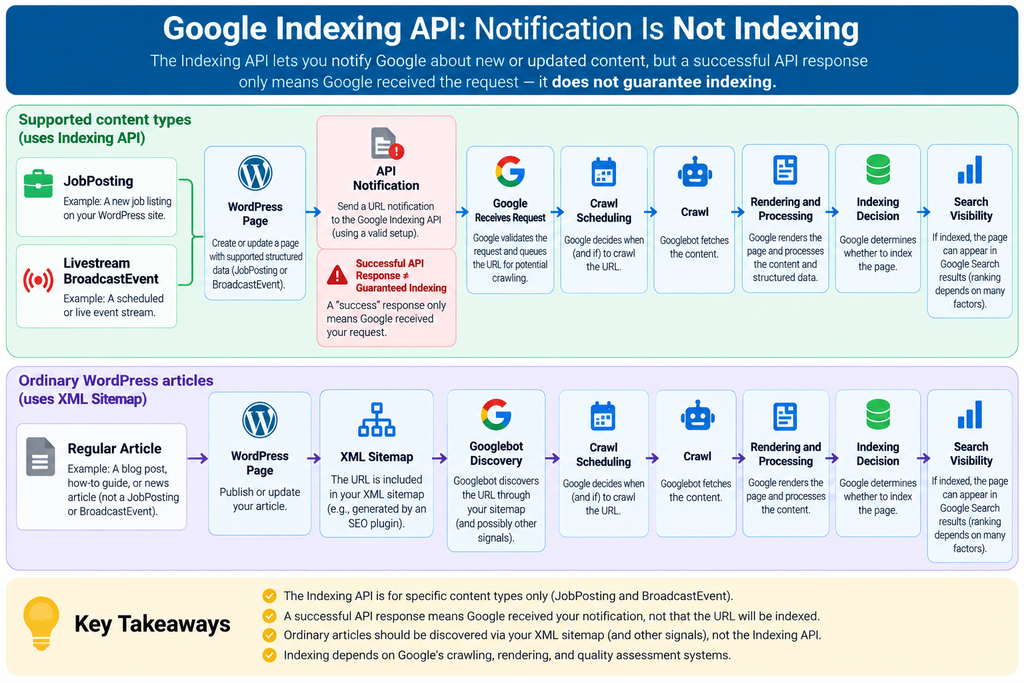
Successful Submission Does Not Mean Successful Indexing
This distinction deserves special attention because plugin dashboards can create false confidence.
An API may return a successful HTTP response because Google received and processed the notification request. A WordPress plugin can then display a green check mark, “Submitted,” “Success,” or a similar status.
None of those labels necessarily means that Google indexed the URL.
The real indexing state should be checked through Google Search Console and Google’s own indexing information. Even there, indexing can change over time as Google recrawls a page, selects a different canonical, discovers duplication, or reevaluates the content.
A green API response should therefore never become the primary SEO KPI for a WordPress publisher.
Organic impressions, valid indexed pages, crawl health, useful content, internal discovery, canonical consistency, and actual Search Console data matter much more.
Which Pages Are Eligible for the Indexing API
Google’s documented eligibility rule is remarkably narrow. The Indexing API can be used for pages containing JobPosting structured data and livestream pages containing BroadcastEvent embedded inside a VideoObject.
That means a WordPress installation can legitimately use the API, but only when its content actually fits one of those supported purposes.
A recruitment website built on WordPress is an obvious example. If the site publishes genuine job vacancies using valid JobPosting structured data, quickly informing Google when a vacancy opens, changes, or closes makes practical sense.
The same applies to a WordPress site centered on scheduled livestreams. When a page represents a genuine livestream and implements the required video and broadcast structured data correctly, freshness can be critical.
These are not arbitrary examples.
Both content types have short useful lifespans. An expired job listing should disappear promptly. A scheduled livestream needs timely discovery before the event begins. The Indexing API gives eligible publishers a direct notification mechanism suited to that lifecycle.
Eligible Content Must Be Genuine
Adding structured data to an ordinary article does not transform that article into an eligible page.
This is an important safeguard for WordPress users tempted by tutorials suggesting that they can add JobPosting schema to regular posts solely to qualify for faster submission. Structured data should describe the visible content and real purpose of the page.
A WordPress tutorial is not a job vacancy because a plugin inserts job schema into its source code. Likewise, a normal embedded video is not automatically a livestream event.
Trying to reshape markup around an API restriction reverses the correct SEO process.
The page should determine the structured data. Structured data should not be invented merely to gain access to a search feature.
For a legitimate recruitment website, the workflow makes sense naturally. The site publishes a vacancy, provides accurate job information, includes appropriate structured data, and notifies Google. When the position expires, the website updates or removes the page and can notify Google again.
There is no need to manufacture eligibility.
What About WooCommerce Products?
WooCommerce products are one of the most common sources of confusion.
Product pages can change frequently. Prices move, inventory changes, new products appear, and old products disappear. From a website owner’s perspective, it may seem logical that Google’s Indexing API should handle these updates.
However, logical similarity does not equal documented eligibility.
A WooCommerce product is not a JobPosting. It is not automatically a livestream BroadcastEvent either. Standard ecommerce URLs should therefore use the discovery and indexing systems appropriate to ecommerce and ordinary web content.
That includes XML sitemaps, crawlable internal links, correct canonicalization, useful product content, appropriate product structured data, and relevant Google merchant systems when applicable.
The same reasoning applies to WordPress news articles, affiliate reviews, recipes, local service pages, documentation, portfolio pages, forum threads, category pages, and ordinary blog posts.
What About News Websites?
News publishers understandably care about speed. A breaking story that appears in Search two days late may have lost most of its value.
That still does not make a normal news article eligible for the Indexing API.
Publishers should use Google’s documented systems for news discovery, including technically sound websites, appropriate sitemaps, crawlable architecture, accurate publication information, and other supported Search features.
If the news page contains a genuine qualifying livestream, the livestream component may create a relevant Indexing API use case. The eligibility comes from the supported content type, not simply because the publisher wants faster indexing.
This distinction prevents an important SEO mistake: treating urgency as eligibility.
Many pages are urgent from the publisher’s perspective. Google’s public Indexing API nevertheless has a specific documented scope.
Why Regular WordPress Posts Should Use Sitemaps
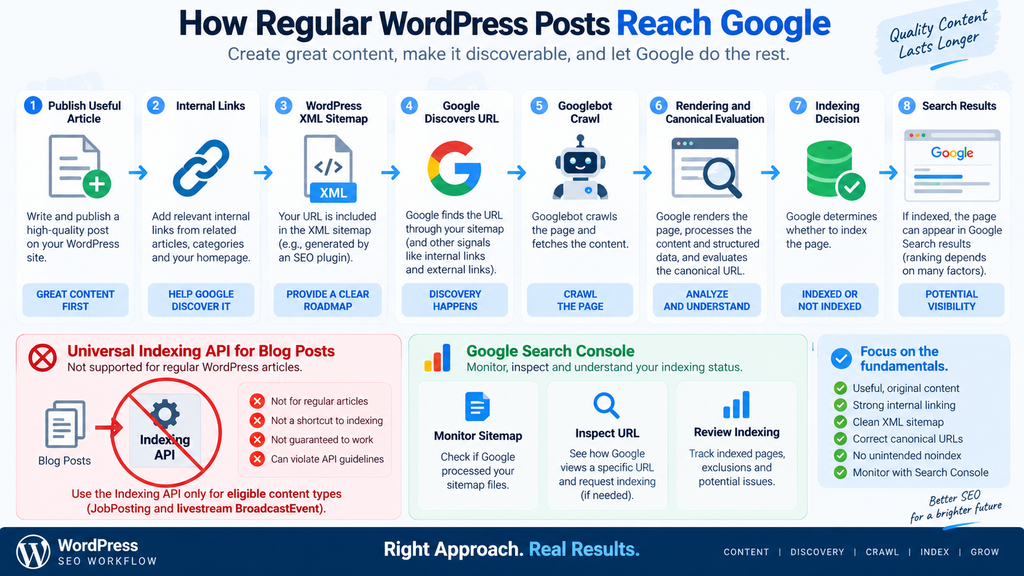
For ordinary WordPress publishing, XML sitemaps remain one of the cleanest ways to help search engines discover new and updated URLs.
Google describes a sitemap as a file that provides information about pages, videos, images, and other files on a website. It helps search engines understand which URLs the publisher considers important and can include information about meaningful updates.
Modern WordPress installations can generate XML sitemaps automatically. Many established SEO plugins also provide enhanced sitemap functionality. A publisher normally does not need to invent a complicated API submission system simply to tell Google that a new article exists.
A sitemap is especially useful on a large website, a new site with few external links, or a website containing content that may not be discovered quickly through normal navigation.
However, there is another important limitation.
Submitting a URL in a sitemap does not guarantee indexing.
Google explicitly describes sitemap submission as a hint. Google can use the file for discovery and crawling, but its systems still decide whether individual URLs should enter the index.
That means replacing an API obsession with a sitemap obsession will not fix deeper indexing problems either.
Discovery Starts With Website Architecture
A healthy WordPress site should not depend on a single technical submission mechanism.
Suppose you publish a new article called “How to Reduce WordPress Database Size.” The post appears in your XML sitemap immediately, but nothing on your website links to it. It is absent from the homepage, category archives, related-post sections, navigation, and contextual links.
Google may still discover it through the sitemap. Yet the weak internal architecture sends fewer signals about how the page fits into the website.
Now imagine the same article appears in its relevant category, receives contextual links from two older database tutorials, appears in a recent-posts section, and is included in a clean XML sitemap.
That creates multiple discovery routes.
Good internal linking also helps visitors. A person reading an article about cleaning WordPress transients may naturally benefit from a related guide about database optimization. Search-friendly architecture and user-friendly architecture often overlap.
Use Accurate lastmod Information
Sitemaps can also communicate when pages were meaningfully updated.
This does not mean changing timestamps every day to make old articles appear fresh. Google recommends that lastmod represent the last significant modification to the page.
A substantial rewrite, important factual correction, major structured-data change, or meaningful link update may justify a changed modification date. Automatically refreshing thousands of dates without changing the underlying content provides little value.
WordPress publishers should therefore inspect how their sitemap generator handles modified dates.
A reliable sitemap should represent the website accurately rather than trying to create artificial freshness signals.
Search Console Complements the Sitemap
Google Search Console provides the visibility that an XML file alone cannot provide.
The Sitemaps report can show whether Google successfully processed submitted sitemap files. URL Inspection can help investigate individual URLs. Page indexing reports can reveal broader patterns involving crawled, discovered, duplicate, redirected, blocked, or otherwise excluded URLs.
For a small number of important URLs, Google also provides the ability to request indexing through URL Inspection.
Even that request is not an instant-indexing button.
Google says crawling can take from days to weeks and notes that repeatedly requesting a recrawl for the same URL will not make crawling happen faster.
This should immediately make WordPress administrators suspicious of products promising guaranteed indexing in seconds.
Google itself does not offer such a guarantee through its standard Search Console tools.
Sitemaps Cannot Repair Weak Content
Technical SEO can make a strong page discoverable. It cannot force Google to consider the page worth indexing.
If hundreds of WordPress URLs remain unindexed, examine the pages themselves.
Thin tag archives, nearly empty author pages, duplicate attachment URLs, repetitive AI-generated posts, copied manufacturer descriptions, doorway-like location pages, and low-value programmatic pages can create a very different indexing problem from simple discovery failure.
Before installing another indexing plugin, determine whether Google can crawl the page and whether the page deserves to exist as a standalone search result.
That question is often more productive than searching for another submission method.
How Google Detects API Spam and Quota Abuse
Google does not publicly document every signal used to identify Indexing API abuse, and responsible guidance should not speculate about techniques for bypassing those controls.
What Google does say is sufficient for WordPress administrators to make sensible decisions: Indexing API submissions undergo spam detection, and attempts to abuse the service can result in access being revoked.
Google specifically mentions attempts involving multiple accounts or other methods designed to exceed usage quotas.
That is significant because quota workarounds have historically appeared in scripts, SEO discussions, and indexing tools. A developer may view several projects or service accounts as a convenient scaling method. Google’s warning makes clear that deliberately using such methods to circumvent limits is not an acceptable solution.
The correct response to a quota limitation is to verify the use case, review the documentation, and follow Google’s process where additional approved capacity is genuinely needed.
It is not to construct an account-rotation system.
Quotas Are Not an SEO Target
A quota represents an operational limit, not a publishing objective.
WordPress users sometimes approach indexing tools with the mentality that every available request should be consumed. If a system permits a certain number of notifications, they assume sending the maximum number will increase search visibility.
That assumption has no sound basis.
For an eligible job platform, API notifications should correspond to genuine lifecycle events. A new job is published. An existing vacancy receives a meaningful update. A position closes and its URL needs appropriate handling.
The requests have a business reason.
Sending the same unchanged URL repeatedly does not make the content more useful. Neither does pushing unrelated blog posts merely because unused API capacity remains.
The same principle applies outside the Indexing API. Google says that repeatedly requesting recrawling for an individual URL does not make it get crawled faster.
More requests do not automatically equal more SEO value.
Spam Detection Changes the Risk Calculation
A questionable indexing plugin can create risk without producing meaningful benefits.
Consider a WordPress administrator who gives a plugin access to a Google Cloud service account. The plugin then submits hundreds of unsupported URLs while its dashboard reports successful requests.
The owner may believe indexing improved because the technical calls succeeded. In reality, those requests may provide no indexing guarantee, fall outside the documented API use case, and expose credentials to an unnecessary WordPress component.
This is why the security side of indexing plugins deserves as much attention as the SEO side.
Service-account credentials are sensitive. WordPress databases, configuration files, plugin settings, backups, debugging logs, staging copies, and support exports can all become potential exposure points when credentials are stored carelessly.
Adding a Google credential to WordPress should therefore require a clear benefit.
If the website only publishes ordinary articles, the first question is whether the integration needs to exist at all.
Google Search Spam Policies Still Apply
The Indexing API does not provide an alternative route around Google Search policies.
Pages still need to comply with the same broader requirements and spam policies that apply to Google Search. Sending a URL through an official API does not grant special ranking treatment or exempt the content from evaluation.
This matters in an era of large-scale automated publishing.
A website could generate thousands of pages, submit them aggressively, and still fail to earn meaningful organic visibility if the content offers little value. Technical submission does not convert weak content into strong content.
Google’s Search Essentials emphasize helpful, reliable, people-first content, crawlable links, and other fundamental practices.
Those principles remain more important than trying to find a faster submission button.
Auditing WordPress Indexing Plugins

Not every WordPress plugin mentioning “instant indexing” is automatically unsafe or deceptive.
Some plugins integrate with services that have legitimate APIs for different search engines. Others provide Indexing API functionality specifically for supported Google content types. A well-designed tool may also clearly explain the limitations rather than promising universal Google indexing.
The problem begins when marketing claims become broader than the underlying service.
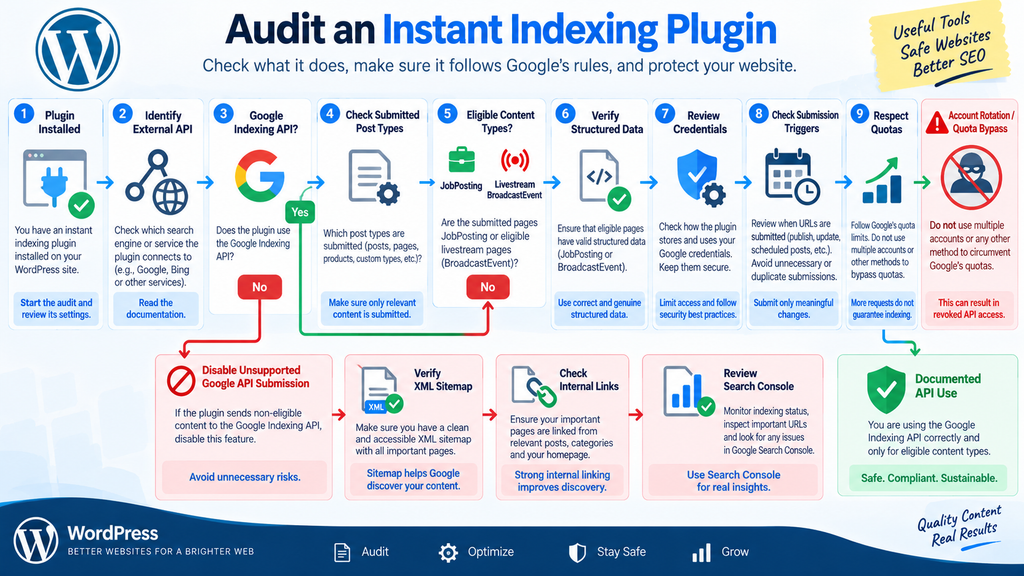
Before installing or keeping an indexing plugin, identify exactly what it does.
Open the plugin documentation and determine which external services receive your URLs. Check whether it uses Google’s Indexing API, another search engine’s supported submission API, Search Console functionality, sitemap notifications, or a proprietary third-party indexing service.
Those mechanisms are not interchangeable.
A plugin called “Instant Indexing” may perform several different operations depending on its configuration. The name alone tells you very little about what happens after you click Submit.
Check the Claim Before the Code
Start with the marketing language.
Be cautious when a plugin promises that it can “guarantee Google indexing,” “index any page instantly,” “force Google to index URLs,” or achieve similar outcomes.
Google itself does not guarantee that a normal URL will be indexed simply because a crawl or discovery mechanism has been used.
A responsible plugin should distinguish submission from indexing.
Phrases such as “notify a supported API,” “submit eligible URLs,” or “help search engines discover updates” are much more technically realistic than guaranteed-indexing claims.
Also look for documentation explaining eligibility. If a Google Indexing API integration never mentions JobPosting or BroadcastEvent, investigate further before enabling automatic submissions.
Determine Which Post Types Are Submitted
Automatic submission rules deserve careful review.
Some WordPress sites contain dozens of public and semi-public URL types: posts, pages, products, categories, tags, author archives, media pages, custom post types, search pages, feeds, paginated archives, and plugin-generated endpoints.
A plugin should not blindly submit everything merely because WordPress exposes a URL.
For a legitimate Indexing API integration, eligible content should be narrowly selected.
If you operate a job website, for example, the plugin might target only the custom post type representing actual vacancies. Regular blog articles about career advice should remain outside that workflow unless they independently satisfy the supported requirements.
This separation also reduces unnecessary API traffic.
Review Google Cloud Credentials
If a plugin requires Google service-account credentials, treat them like security-sensitive secrets.
Determine where the plugin stores them. Review who can access its settings. Avoid sharing credential files through public support forums, screenshots, unsecured email threads, or downloadable backups.
Delete credentials that are no longer needed and rotate them if you believe they were exposed.
A plugin that requires powerful credentials should also come from a source you trust. Check maintenance activity, developer reputation, update history, security practices, and whether the feature provides enough value to justify the access you grant.
Installing a plugin only to make ordinary blog posts “index faster” may not justify adding another credential-bearing component to WordPress.
Inspect Automatic Submission Triggers
Next, determine when the plugin sends requests.
Does it submit only when a post is first published? Does every minor edit trigger another notification? Does scheduled publishing generate duplicate requests? What happens during bulk editing? Does changing an SEO description trigger submission? Are imported posts automatically sent?
These details matter on active sites.
A harmless-looking automation can create a surprisingly large number of requests if every WordPress save operation triggers an external API call.
Autosaves and revisions should also be considered. A properly designed integration should avoid treating every internal WordPress event as a meaningful public content update.
For eligible pages, API notifications should correspond to meaningful changes.
Look for Quota-Circumvention Features
Any feature explicitly designed to rotate accounts, projects, or credentials for the purpose of bypassing Google API quotas deserves particular caution.
Google’s documentation specifically warns against attempts to exceed quotas through multiple accounts or other methods.
That makes “unlimited Google Indexing API submissions” a questionable selling point when the unlimited capacity comes from quota circumvention.
A site owner should not need to reverse-engineer Google’s enforcement to decide whether such a feature is sensible. If a tool advertises bypassing a documented restriction, that is already enough reason to reconsider the workflow.
Measure Outcomes in Search Console
An indexing plugin should be evaluated with real outcomes, not dashboard counters.
Suppose the plugin reports 2,000 successful submissions during a month. That number sounds impressive, but it says very little about SEO performance.
Compare it with Search Console.
How many important pages became indexed? Did crawl activity improve? Are new articles receiving impressions? Are important URLs internally linked? Are canonical URLs correct? Do excluded pages share a recognizable quality or technical problem?
If removing the plugin makes no meaningful difference to discovery or indexing, you may be maintaining unnecessary complexity.
WordPress performance and security often improve when administrators remove components that provide no measurable value.
Audit Before Deleting
Do not uninstall a plugin blindly if it performs several SEO functions.
First determine whether it also generates sitemaps, controls robots directives, adds structured data, manages redirects, or provides another feature your website depends on.
Create a backup, document the configuration, and identify replacement functionality where necessary.
Then remove only what you have confirmed is unnecessary.
This method is safer than replacing one SEO plugin with another simply because the second one has stronger marketing.
A Safe WordPress Indexing Workflow
A safe indexing workflow starts before you press Publish.
First, decide whether the page should be indexable. Not every WordPress URL belongs in Google Search. Administrative pages, internal search results, thin utility pages, private content, duplicate archives, and other low-value URLs may require different treatment.
For content intended for Search, confirm that the final URL is stable and returns an appropriate successful response. Make sure you have not accidentally applied a noindex directive.
Check the canonical URL as well. A page that declares another URL as canonical may be crawled while Google ultimately chooses a different version for indexing.
Robots configuration deserves attention too. Remember that robots.txt primarily controls crawling. It is not the correct general mechanism for guaranteeing that a web page stays out of Google Search.
Once these foundations are correct, indexing becomes much easier to diagnose.
Step 1: Publish a Page Worth Discovering
Start with the content.
The article should answer a genuine search need and provide enough original value to justify its own URL. A WordPress site publishing hundreds of near-identical pages should not expect an API to solve the resulting indexing difficulties.
Use a descriptive SEO title and clear headings. Provide useful examples where appropriate. Add relevant images, diagrams, tables, or original observations when they improve understanding.
Avoid padding an article merely to reach an arbitrary word count.
Depth should come from usefulness rather than repetition.
Step 2: Make the URL Crawlable
Check the technical response after publishing.
The page should load normally for users and search crawlers. Important content should not depend on broken scripts or inaccessible resources. Confirm that your SEO plugin has not accidentally marked the page noindex.
Inspect the canonical tag.
If the new article points canonically to another page, Google receives a strong signal that the other URL represents the preferred version.
Also verify redirects. A URL submitted through a sitemap that immediately redirects elsewhere creates unnecessary noise.
Technical consistency makes discovery signals easier for search engines to interpret.
Step 3: Add Contextual Internal Links
Do not leave new posts isolated.
Find several older pages where a link to the new article would genuinely help readers. Add descriptive anchor text that explains what the visitor will find.
Internal links give Googlebot additional discovery paths and help establish relationships between topics.
Category and archive pages can help too, but contextual links inside relevant articles often provide stronger semantic context.
This process becomes especially important on large WordPress websites where older content can sit many clicks away from the homepage.
Step 4: Verify XML Sitemap Inclusion
Confirm that the canonical URL appears in the appropriate XML sitemap.
For a normal article, this might be a post sitemap. WooCommerce products may use a product sitemap. Custom post types may have their own files depending on the SEO configuration.
Open the sitemap and verify the URL rather than assuming the plugin added it correctly.
Then make sure the sitemap itself can be accessed and processed.
For large websites, sitemap index files can organize multiple sitemap files. Google supports up to 50,000 URLs or 50 MB uncompressed per individual sitemap, so very large sites should divide their URLs appropriately.
Most normal WordPress sites never approach those limits, but clean organization remains useful.
Step 5: Submit the Sitemap Through Search Console
Google Search Console allows site owners to submit sitemaps and review processing information.
You generally do not need to resubmit the entire sitemap manually after every article. Once Google knows the sitemap location, it can revisit it.
The objective is not to create constant submission activity.
The objective is to provide Google with a stable, accurate discovery source.
This is a much healthier model than treating every WordPress publication as an emergency requiring multiple API calls.
Step 6: Use URL Inspection Selectively
For particularly important new or substantially updated URLs, Search Console’s URL Inspection tool can help verify Google’s view of the page and, where appropriate, request indexing.
Use it selectively.
Google explicitly warns that repeated recrawl requests for the same URL do not make crawling faster. Clicking Request Indexing ten times is therefore not an optimization strategy.
If the page repeatedly fails to become indexed, investigate the reason instead.
Check crawl accessibility, canonicalization, content quality, duplication, internal linking, server reliability, and broader site patterns.
Step 7: Reserve the Indexing API for Eligible Content
If your WordPress website publishes genuine job postings or supported livestream pages, the Indexing API can become part of the workflow.
Keep that integration isolated to eligible content.
Validate the structured data. Ensure API notifications correspond to real publication, update, and removal events. Protect Google Cloud credentials. Monitor quotas rather than circumventing them.
Maintain a sitemap as well.
Google specifically recommends sitemap coverage even for websites using the Indexing API. The API solves a specialized freshness problem; it does not replace the broader crawl architecture of the website.
Step 8: Monitor What Happens After Publication
Indexing is not a one-time checkbox.
Review Search Console periodically rather than checking every article every few minutes. Look for patterns across groups of URLs.
If one page remains unindexed, it may be an isolated issue. If 70% of a new content section remains unindexed, investigate templates, internal links, canonicals, quality, crawl behavior, and sitemap configuration at the section level.
Patterns are usually more informative than individual URLs.
Also remember that Search Console reporting is not necessarily instantaneous. Avoid making major configuration changes solely because a newly published article does not appear immediately.
Step 9: Keep the WordPress Stack Simple
SEO plugins should reduce work, not create unexplained dependencies.
If your site already produces accurate XML sitemaps, correct canonical tags, suitable robots directives, and useful structured data, adding three more indexing plugins may provide little benefit.
Every plugin also adds code that must be maintained, updated, secured, and tested.
Use tools because they solve a defined problem.
Do not install them simply because their dashboards provide another green indicator.
For ordinary WordPress publishers, a clean website with strong content, sensible internal linking, reliable sitemaps, and Search Console monitoring is usually a much better long-term indexing strategy than aggressive API submission.
Common Google Indexing API WordPress Myths
The first myth is that Google provides an API for instantly indexing any WordPress URL. It does not. Google’s public Indexing API has a narrow documented scope centered on qualifying job posting and livestream content.
The second myth is that receiving a successful API response means the URL entered Google’s index. A successful notification and a successful indexing decision are different events.
Another common claim suggests that using more service accounts creates a legitimate path to unlimited submissions. Google specifically warns against attempts to abuse quotas through multiple accounts or other methods.
Finally, some publishers believe sitemaps are obsolete because APIs are more modern. That misunderstands the tools. Google continues to document sitemaps as an important discovery mechanism and recommends them even alongside the Indexing API for eligible websites.
Modern does not automatically mean appropriate.
The right tool depends on the content and the documented purpose of the system.
Frequently Asked Questions
Can I use the Google Indexing API for normal WordPress posts?
Google’s documented Indexing API scope does not include ordinary blog posts. It is intended for pages with JobPosting structured data or qualifying livestream pages using BroadcastEvent inside VideoObject. Normal WordPress articles should rely on crawlable links, XML sitemaps, Search Console, and sound technical SEO.
Does the Google Indexing API guarantee indexing?
No. An API notification tells Google about an eligible URL or change. It does not guarantee that Google will index the page, rank it, or display it for a particular search query. Crawling, indexing, and ranking remain separate processes controlled by Google’s systems.
Can an instant indexing plugin force Google to index my article?
No WordPress plugin can legitimately guarantee that Google will index an ordinary article. Plugins can provide technical functions such as sitemap generation, URL submission to supported services, structured data, and Search Console integrations. Google still makes the final indexing decision.
Should I uninstall every WordPress instant indexing plugin?
Not automatically. First determine what the plugin actually does. Some plugins support legitimate APIs from different search engines or correctly limit Google Indexing API submissions to eligible content. Audit its services, credentials, submission rules, and claims before deciding whether to remove it.
Is an XML sitemap enough to guarantee indexing?
No. Google says sitemap submission is a hint and does not guarantee crawling or indexing. A sitemap helps discovery. The page still needs to be crawlable, technically consistent, useful, and suitable for inclusion in Search.
Should I request indexing every time I update a post?
Usually not. Google can discover meaningful changes through normal recrawling, internal links, and updated sitemap information. URL Inspection can be useful for a small number of important pages, but Google says repeated recrawl requests do not make a URL get crawled faster.
Are WooCommerce products eligible for the Google Indexing API?
Standard WooCommerce product pages are not among the two page types documented for Google’s Indexing API. Ecommerce publishers should focus on product sitemaps, crawlable internal links, accurate canonical URLs, appropriate product structured data, and relevant merchant features.
Can I create multiple Google accounts to get more Indexing API quota?
Google explicitly warns that attempts to abuse the Indexing API, including using multiple accounts or other methods to exceed usage quotas, may result in API access being revoked. Follow the documented quota and approval process instead of attempting to bypass limits.
Why is my WordPress post discovered but not indexed?
There is no single explanation. Possible factors include crawl scheduling, duplication, canonicalization, low-value or repetitive content, weak internal linking, technical problems, server issues, or Google deciding not to index the page. Use Search Console and URL Inspection to investigate the specific URL and broader site patterns.
What is the safest indexing setup for a normal WordPress blog?
Use stable crawlable URLs, correct canonical tags, accurate XML sitemaps, useful internal links, sensible robots directives, strong original content, and Google Search Console monitoring. Reserve specialized APIs for the content types and purposes Google officially documents.
The Better Strategy Is Sustainable Discovery
The attraction of instant indexing is understandable. WordPress makes publishing immediate, so waiting for a search engine can feel outdated. A button that promises to send every new article directly into Google seems like an obvious upgrade.
The reality is more nuanced.
Google’s Indexing API solves a specific freshness problem for specific types of content. It should not be confused with a universal indexing pipeline for WordPress.
For ordinary posts, the fundamentals remain remarkably durable: publish something useful, make the URL accessible, link to it from relevant pages, include it in an accurate XML sitemap, maintain clean canonical signals, and monitor Google Search Console.
When indexing problems appear, investigate the reason rather than increasing submission volume.
That approach may feel less exciting than an “instant indexing” button, but it produces a healthier WordPress site. It also avoids unnecessary API dependencies, sensitive credentials, questionable quota workarounds, and misleading success counters.
Most importantly, it aligns the website with how Google actually documents crawling and indexing.
The safest Google Indexing API WordPress strategy is therefore simple: use the API where Google says it belongs, and use normal Search discovery systems everywhere else.
⚠️ Disclaimer and Source Hygiene
This article provides general WordPress, SEO, and technical information and should not be interpreted as a guarantee of Google indexing, rankings, traffic, or search visibility. Search systems, API requirements, quotas, documentation, and WordPress plugins can change over time. Site owners should review current official documentation before making important production changes.
The September 11 Indexing API spam-detection clarification referenced in this article appears in Google’s official documentation history under September 11, 2024. At the time this article was researched in September 2026, Google’s current Indexing API documentation continued to state the narrow eligibility requirements and anti-abuse warning. Claims about eligibility, sitemaps, recrawl requests, spam detection, and quotas should always be checked against current Google Search Central documentation.
Back up WordPress before changing SEO plugins, structured data systems, sitemap configurations, or integrations that store Google Cloud credentials. For complex SEO, security, or development issues, consult an appropriately qualified professional.
🔔 For more tutorials like this, consider subscribing to our blog.
📩 Do you have questions or suggestions? Leave a comment or contact us!
🏷️ Tags: Google Indexing API WordPress, Google Indexing API, WordPress indexing, Google indexing, WordPress SEO, XML sitemap, Google Search Console, instant indexing plugin, Google API quota, technical SEO
📢 Hashtags:
Sources and References
Google Search Central – Indexing API Quickstart: Primary technical source for the Indexing API’s supported content types, notification functionality, spam detection warning, onboarding quota, and guidance about continuing to use sitemaps for complete site coverage.
Google Search Central – Search Documentation Updates: Primary source for verifying the date of Google’s Indexing API spam-detection clarification and distinguishing the September 11, 2024 update from current September 2026 documentation changes.
Google Search Central – Build and Submit a Sitemap: Primary source for XML sitemap requirements, canonical URL guidance, sitemap limits, lastmod recommendations, and Google’s statement that sitemap submission is a hint rather than an indexing guarantee.
Google Search Central – Ask Google to Recrawl Your Website: Primary source for Google’s guidance on URL Inspection, recrawl requests, sitemap submission for larger groups of URLs, and the warning that repeated requests do not accelerate crawling.
Google Search Central – Google Search Essentials: Primary reference for Google’s technical requirements, spam policies, crawlable links, and people-first content principles.
Google Search Central – Spam Policies for Google Web Search: Primary reference for Google’s broader policies concerning attempts to manipulate Search systems and unauthorized machine-generated traffic.
Google Search Central – Crawling and Indexing Documentation: Primary reference for understanding discovery, crawling, indexing controls, sitemaps, and related technical SEO systems.
Secondary Sources and Testimonials
Independent SEO discussions have repeatedly highlighted the same practical misunderstanding addressed in this article: an Indexing API notification should not be treated as proof that a URL has entered Google’s index.
Search Engine Land revisited this issue in 2026 when discussing the Indexing API for job postings. Its analysis emphasized the difference between notifying Google, Google crawling a URL, and Google actually indexing that URL. This distinction closely matches Google’s own documentation and is particularly useful when evaluating WordPress plugins that display “successful submission” messages.
Community discussions around the Indexing API have also shown why eligibility matters. WordPress publishers and developers may observe successful technical requests for unsupported page types, but a technically accepted request should never be interpreted as Google expanding the official scope of the API.
For production decisions, Google Search Central documentation should remain the primary authority. Third-party SEO articles, plugin documentation, testimonials, community posts, and experiments can provide useful context, but they should not override Google’s documented API requirements.