
Table of Contents
A high-severity Event Tickets vulnerability can let unauthenticated attackers replace Stripe merchant credentials and redirect future ticket payments. WordPress event organizers should update immediately, verify the connected Stripe account, reconcile recent ticket revenue, and investigate unexpected OAuth or payment configuration changes.
The Event Tickets vulnerability tracked as CVE-2026-3174 deserves immediate attention from WordPress administrators who sell tickets online. Unlike many plugin security problems that mainly threaten website files or user information, this flaw can directly interfere with the payment path between a ticket buyer and the organization running the event.
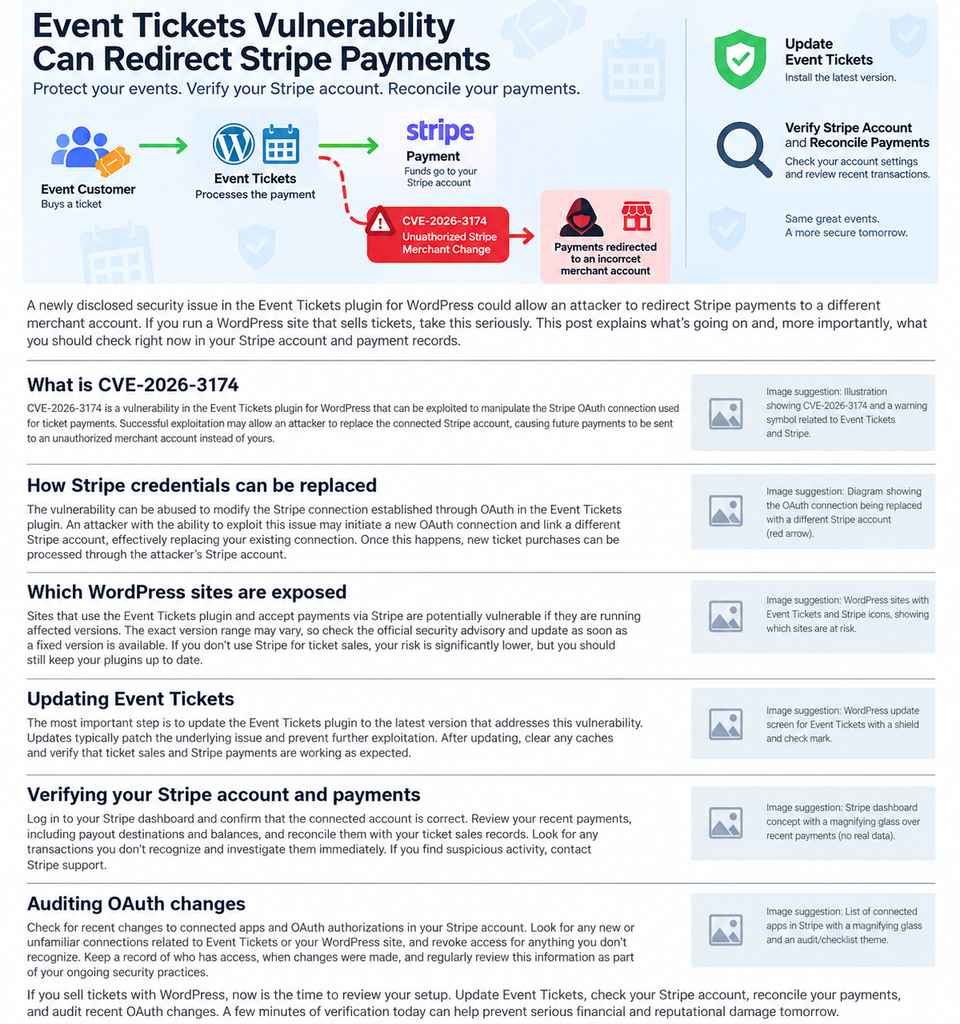
Event Tickets and Registration versions up to and including 5.27.4 are affected. According to the published CVE record, the weakness involves missing authorization around the Stripe OAuth return process. An unauthenticated attacker could potentially replace stored Stripe merchant information, including access tokens, publishable keys, and the connected account identifier. Future ticket payments could then be processed through a different Stripe account.
For event organizers, simply updating WordPress should not be treated as the end of the incident-response process. If a vulnerable version was online while Stripe payments were enabled, administrators should also confirm that Event Tickets still points to the correct Stripe account. They should compare WordPress ticket orders with Stripe transactions, payouts, refunds, and bank deposits.
That financial verification matters because a website could continue operating normally from a visitor’s perspective. Tickets may appear available, checkout pages may load, and customers may even receive payment confirmations. However, the merchant receiving the payment is the detail administrators need to verify.
The vulnerability was published as CVE-2026-3174 on September 8, 2026, with a CVSS 3.1 score of 7.5, High. The weakness is classified as CWE-862: Missing Authorization. The published vector indicates that exploitation can occur over the network without authentication or user interaction.
A security fix was introduced in Event Tickets 5.27.4.1. Administrators should not deliberately stop at that historical release, however. WordPress.org currently lists Event Tickets 5.29.4, released September 3, 2026, as the current version. Sites running older installations should therefore update to the latest stable version compatible with their environment after taking an appropriate backup.
The rest of this guide explains what CVE-2026-3174 means, why Stripe account verification is so important, which WordPress sites need attention, and how organizers can reconcile ticket revenue after applying the security update.
What Is CVE-2026-3174?
CVE-2026-3174 is a security vulnerability affecting the Event Tickets and Registration WordPress plugin. The issue relates to authorization controls in the Stripe OAuth connection process used by Tickets Commerce. A normal payment integration needs to ensure that only an appropriately authorized administrator can change which merchant account receives payments.
According to the CVE description, the vulnerable implementation lacked an adequate capability check around the Stripe OAuth return endpoint. In versions through 5.27.4, this could allow an unauthenticated party to modify information associated with the site’s Stripe merchant connection.
That distinction is important. The vulnerability does not need to provide an attacker with a traditional WordPress administrator dashboard before causing financial harm. The published CVSS vector lists privileges required as none and user interaction as none. In practical terms, an attacker would not necessarily need an existing WordPress account or an administrator to click a malicious link for the underlying weakness to become relevant.
The official vulnerability description identifies several pieces of merchant information that could be affected: Stripe access tokens, publishable keys, and the account ID associated with the integration. These values help Event Tickets identify and communicate with the merchant account that processes payments.
Replacing those details could alter where subsequent payment processing occurs.
For a ticket seller, this creates an unusual security situation. The WordPress installation itself may continue to look healthy. Pages can remain available. Event listings can continue displaying correctly. Ticket inventory can still appear on the website. The problem exists deeper in the transaction chain.
That is why CVE-2026-3174 should be treated as both a WordPress security issue and a financial reconciliation issue.
Administrators should avoid assuming that the absence of obvious malware, administrator-account changes, or website defacement means there was no impact. Those are useful things to check during a broader security audit, but they are not sufficient to determine whether ticket revenue reached the intended merchant account.
The CVE received a 7.5 High CVSS score. Its published technical impact focuses primarily on integrity rather than confidentiality or availability. In simpler language, the core concern is unauthorized modification of important payment configuration rather than simply reading information or crashing the site.
Patchstack likewise identifies the vulnerability as a broken-access-control issue affecting Event Tickets through version 5.27.4 and lists 5.27.4.1 as the patched version.
Why This Vulnerability Is Different From a Typical WordPress Bug
Many WordPress security advisories focus on cross-site scripting, information disclosure, SQL injection, or arbitrary file uploads. Each category can be serious, but CVE-2026-3174 creates a particularly direct business risk because it affects a component connected to payments.
Consider a small conference selling several hundred tickets, a theatre collecting bookings for multiple performances, or a community organization selling admission to a fundraising event. Their WordPress website may process dozens or hundreds of transactions during a short sales period.
A payment-routing problem lasting even a few hours can therefore become financially significant.
This is also why administrators should not measure exposure only by website traffic. A relatively small website may process high-value event transactions. Conversely, a large editorial website using Event Tickets only for free RSVPs may have less direct payment exposure.
The important question is not simply, “How popular is this WordPress site?”
A better question is, “Was an affected Event Tickets version connected to Stripe while ticket sales were active?”
If the answer is yes, the site deserves prompt review.
How Stripe Credentials Can Be Replaced
Stripe integrations depend on a relationship between the WordPress application and the merchant’s Stripe account. Event Tickets uses this relationship so Tickets Commerce can process payments while associating transactions with the appropriate merchant.
OAuth is commonly used to establish or authorize integrations between services. During a legitimate connection process, an administrator starts from the WordPress dashboard, completes the required authorization with Stripe, and returns to the website with the connection appropriately established.
Security controls around that return process matter because the website must distinguish between an authorized administrator completing a legitimate connection and an arbitrary external request attempting to change sensitive configuration.
CVE-2026-3174 concerns a missing capability check in that workflow.
The CVE record says an unauthenticated attacker could overwrite the site’s Stripe merchant credentials. Specifically, the published description mentions access tokens, publishable keys, and the Stripe account ID.
Those values are important because they define the payment relationship used by the plugin. If the stored merchant identity changes, subsequent ticket payments may no longer be associated with the account the event organizer expects.
Administrators do not need to reproduce the vulnerability to determine whether they are safe. Attempting to test exploitation against a production ticketing system adds unnecessary risk. The safer approach is to patch the plugin and verify the business state directly.
Start with the current Event Tickets configuration. Confirm that the Stripe connection shown in WordPress corresponds to the organization’s actual Stripe account. Then open Stripe independently rather than relying exclusively on information displayed inside WordPress.
Verify the merchant or business identity, recent payment history, balance activity, and payouts.
Next, compare those figures with completed ticket orders from WordPress.
The goal is simple: every successful paid ticket order should have a corresponding legitimate payment record or an understood reason why it does not.
Why the Payment Destination Matters More Than the Checkout Screen
A checkout page can look perfectly normal while an integration behind it is misconfigured.
That is one reason payment-related vulnerabilities require additional operational checks. Website owners naturally focus on what visitors see. They test whether the ticket button works, whether the Stripe form loads, whether confirmation emails arrive, and whether the order appears inside WordPress.
Those are useful tests, but they do not independently prove that the correct merchant ultimately received the money.
A better post-update test follows the entire transaction.
Create a controlled test ticket if your operating procedures allow it. Use a low-value ticket or a staging method supported by your payment workflow. Confirm that the transaction appears in the intended Stripe account. Verify the amount, fees, currency, and payment status.
If a live payment is used, follow your normal accounting procedure for that test transaction.
Do not rely only on a successful checkout message.
For organizations with accounting staff, event managers, or external bookkeepers, involve the person who normally reconciles Stripe settlements. They may recognize discrepancies that a WordPress administrator would overlook.
Look for Business-Level Indicators
Potential warning signs include ticket orders that appear paid in WordPress but cannot be located in the expected Stripe account, an unexpected gap in payment volume, payouts that are lower than expected, or a change in the Stripe account associated with the ticketing system.
However, a discrepancy does not automatically prove exploitation.
Payment failures, refunds, chargebacks, delayed settlement, currency conversion, test-mode transactions, plugin bugs, caching problems, or bookkeeping timing can also create differences.
That is why reconciliation should be systematic.
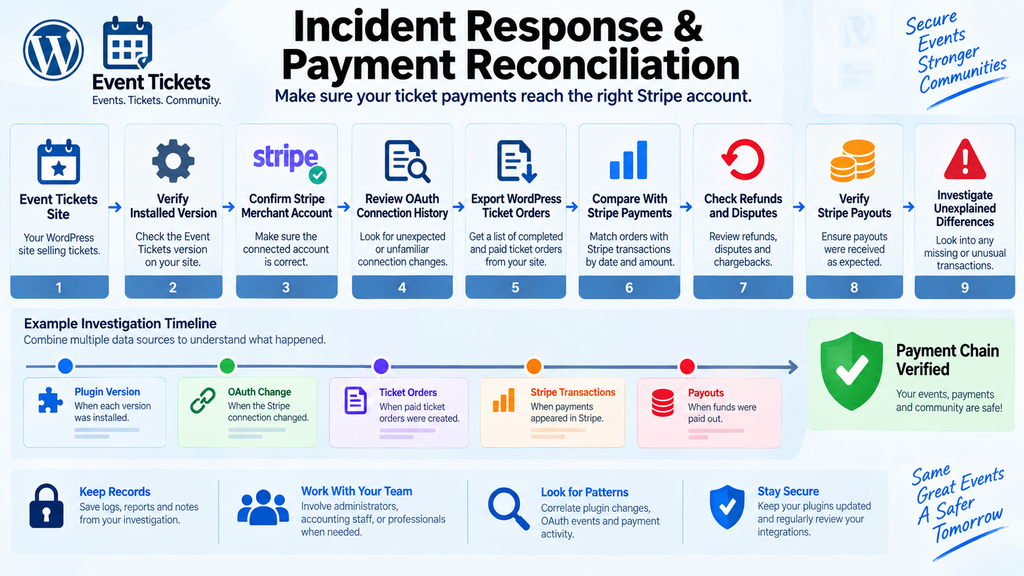
Start with a known time range. Export or review completed Event Tickets orders. Compare them against Stripe payments using transaction dates, amounts, currencies, and customer references where appropriate.
Mark every mismatch for investigation.
Do not immediately assume the worst, but do not dismiss unexplained discrepancies either.
Which WordPress Sites Are Exposed?
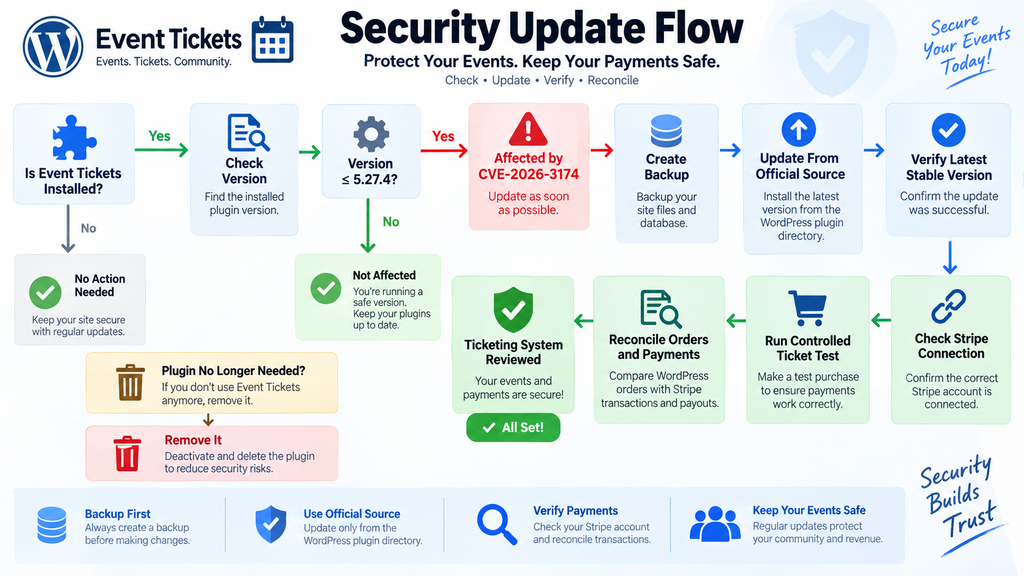
The published affected range for CVE-2026-3174 includes Event Tickets and Registration versions up to and including 5.27.4. Version 5.27.4.1 contains the security fix associated with strengthened Stripe token verification.
Therefore, any WordPress administrator running Event Tickets should first check the installed plugin version.
In WordPress, open the Plugins screen and locate Event Tickets. If the installation is 5.27.4 or earlier, treat it as affected. Update it after creating a suitable backup and verifying compatibility requirements.
However, vulnerability exposure and financial impact are not exactly the same thing.
A WordPress site may have the affected plugin installed while using Event Tickets only for free registrations or RSVP management. Another site may process every ticket through Stripe.
The second site deserves greater payment-specific scrutiny.
Organizations that should prioritize the investigation include conferences, festivals, training providers, theatres, music venues, sports organizations, museums, charities, clubs, churches, community groups, tourism operators, and businesses that sell event admission directly through WordPress.
The same priority applies to freelancers and agencies managing client event websites.
Sites Using Stripe Require the Closest Review
If Stripe was connected through Tickets Commerce while an affected plugin version was running, administrators should perform the complete verification process described in this article.
That means checking both security configuration and actual financial records.
Do not consider the investigation complete merely because the Stripe connection currently looks correct. If the site had a vulnerable version online during active sales, examine transactions from the relevant exposure period.
An attacker who changed merchant details and later lost access after an update could still have affected earlier payments.
Likewise, reinstalling the correct Stripe connection today cannot retroactively confirm where yesterday’s transactions went.
Historical payment reconciliation provides that evidence.
Sites Without Stripe
If the plugin was installed but Stripe was never connected, the specific payment-redirection impact described in CVE-2026-3174 may not apply in the same way.
Administrators should still update.
Security patches should not be postponed simply because a vulnerable function is believed to be unused. Configurations change, old settings may remain stored, and future administrators may enable features without realizing that an outdated plugin contains a known vulnerability.
Removing unnecessary plugins is another sensible option.
If Event Tickets is no longer required, deactivate and delete it rather than leaving an unused ticketing system installed indefinitely.
WordPress security becomes easier when the application contains fewer unnecessary components.
Check More Than One WordPress Installation
Organizations sometimes maintain multiple copies of an event website without realizing that all of them require security attention.
Look for production sites, staging environments, old event microsites, archived conference websites, development copies, and subdomains.
An old site that still contains the plugin may remain publicly accessible.
Agencies should search their managed portfolio rather than waiting for individual clients to report the issue.
Multisite operators should also identify where Event Tickets is installed or active and determine whether individual sites connect to separate Stripe accounts.
Keeping an inventory of WordPress plugins across managed sites makes situations like this much easier to handle.
Do Not Judge Risk Only by Plugin Activity
A deactivated vulnerable plugin generally has a different immediate attack surface from an active one, but it should still be updated or removed. Old plugin files create unnecessary maintenance burden and can later be reactivated accidentally.
The safest long-term approach is straightforward.
Keep required software current. Remove software that is no longer needed. Maintain backups. Monitor security disclosures. Document payment integrations and ownership of connected merchant accounts.
That basic discipline reduces both technical and accounting confusion when a security advisory appears.
Updating Event Tickets
The immediate remediation for CVE-2026-3174 is to update Event Tickets.
Patchstack identifies 5.27.4.1 as the patched release for this vulnerability. The WordPress.org changelog describes version 5.27.4.1, released March 2, 2026, as strengthening Stripe token verification.
However, 5.27.4.1 is no longer the current release.
As of September 8, 2026, WordPress.org lists Event Tickets 5.29.4 as the current version. It was released September 3, 2026. WordPress.org also shows more than 90,000 active installations for the plugin.
For most administrators, the appropriate action is therefore to update to the latest stable supported release rather than manually installing an old security patch.
Before updating a business-critical ticketing site, create a backup containing the WordPress database and site files. If your hosting platform provides snapshots or restore points, confirm that a usable restore point exists.
Then perform the plugin update through a trusted source.
Avoid downloading “patched” plugin copies from unknown third-party websites.
After the update, clear relevant application caches and CDN caches where appropriate. Payment and checkout pages should generally not be treated like ordinary static content, so administrators should also make sure aggressive caching is not interfering with transaction flows.
WordPress.org notes that Event Tickets 5.29.4 includes a fix designed to prevent Tickets Commerce cart-to-checkout redirects and checkout pages from being stored by full-page or edge caches.
Confirm the Installed Version
Do not assume an update succeeded because WordPress displayed a completion message.
Return to the Plugins screen and verify the installed version.
Managed WordPress environments, deployment pipelines, Composer-based installations, file-permission restrictions, or automatic rollback systems can occasionally leave software at a different version than expected.
If an agency deploys plugins from a repository, make sure the secure version is also committed or included in the deployment configuration. Otherwise, the next deployment could unintentionally restore an outdated copy.
Administrators with multiple servers should repeat this check on each relevant environment.
Test Ticket Sales After Updating
A ticketing plugin touches business-critical workflows, so post-update testing is necessary.
Open an event with active ticket sales. Confirm that ticket inventory loads correctly. Test quantity controls, the cart, checkout, attendee details, confirmation messages, and order creation.
Then verify Stripe.
The WordPress.org changelog for recent Event Tickets versions contains several payment and checkout fixes in addition to security improvements. Version 5.29.3, for example, addressed a Stripe checkout condition where a payment could be taken while the buyer remained on an endless spinner and no order completed.
That history reinforces the importance of testing the complete purchase lifecycle rather than merely confirming that the plugin activates without a PHP error.
Verifying the Stripe Account and Payments

Updating closes the known vulnerable path, but financial verification answers a different question: Did the correct Stripe account receive the ticket revenue?
For an event organizer, this is arguably the most important post-update question.
Begin by opening Stripe independently through your normal administrative process. Do not use a link from an unexpected email or security alert. Navigate through your established Stripe login procedure and confirm the organization or merchant account currently in use.
Then compare it with the account Event Tickets reports as connected.
The organization name, operating entity, account identity, payment activity, and payout destination should all make sense for your business.
If your team operates multiple Stripe accounts, be especially careful.
A venue could have separate accounts for different brands. An agency may manage integrations for multiple clients. A nonprofit might have replaced an older Stripe account after restructuring. Simply seeing a familiar business name is not always enough.
Use your internal records to establish exactly which merchant account should receive ticket sales from the affected WordPress site.
Reconcile WordPress Orders Against Stripe Transactions
Choose a defined time range and collect completed ticket orders from WordPress.
For each order, identify the transaction date, gross amount, currency, ticket quantity, status, and any available payment reference that legitimately helps you match it with Stripe.
Then review the corresponding Stripe transactions.
The totals should reconcile after accounting for valid refunds, disputes, cancelled transactions, payment failures, fees, and other known adjustments.
If WordPress shows €10,000 in successful ticket orders during a sales period, your accounting review should be able to explain where that €10,000 appears in Stripe.
The exact Stripe balance or bank payout will not necessarily equal gross WordPress sales because fees, refunds, reserves, timing, and other factors may alter the final amount.
Therefore, compare transactions before relying solely on bank deposits.
Review Stripe Payouts
After confirming payment records, inspect payouts.
Stripe may collect several transactions before transferring funds to the organization’s bank account. Payout schedules vary by account, country, risk profile, currency, and business configuration.
Map ticket transactions to expected payouts.
Confirm that payouts went to the bank destination recognized by the organization.
Again, unexplained differences need investigation but do not automatically prove malicious activity.
Accounting systems can introduce timing differences. Weekends, bank holidays, disputes, failed payouts, and refunds can all change the apparent total.
The goal is to obtain an understandable chain from ticket order → Stripe payment → Stripe balance activity → legitimate payout.
Pay Special Attention to the Exposure Window
Determine when the site ran Event Tickets 5.27.4 or an earlier vulnerable version.
Your backup history, deployment records, plugin update logs, hosting snapshots, security-management platform, WordPress activity logs, or agency maintenance records may help establish the timeline.
Then identify when the secure version was installed.
That interval becomes your primary financial review window.
If exact update dates are unavailable, use a wider range rather than an artificially narrow one. Missing a few legitimate transactions in an audit is usually less desirable than reviewing several additional days.
CVE-2026-3174 was publicly disclosed in September 2026, but vulnerability exposure depends on the presence of affected code, not only the disclosure date.
Therefore, administrators should avoid assuming that reviewing transactions only after the publication date is always sufficient.
Check Refunds and Disputes Separately
Refunds and disputes deserve their own review because they can make revenue reconciliation confusing.
A refunded ticket may remain represented in WordPress order history while its corresponding Stripe transaction shows a different net outcome.
Likewise, chargebacks may appear after the original purchase date.
Create categories for successful payments, refunds, partially refunded orders, disputes, cancelled orders, test orders, and payment failures.
Clear categorization reduces false alarms.
It also creates better accounting evidence if the organization later needs to explain a discrepancy to management, an accountant, a payment provider, an insurer, or another authorized professional.
What to Do if Payments Are Missing
If completed WordPress orders cannot be matched to the organization’s legitimate Stripe account, escalate the investigation.
Preserve evidence before making unnecessary configuration changes.
Record the relevant order identifiers, dates, transaction values, plugin version history, Stripe account information visible to authorized administrators, WordPress activity logs, and server or security logs that may be relevant.
Do not publish sensitive merchant credentials or customer information while documenting the incident.
Contact Stripe through official support channels if you believe payment routing or account authorization may have been altered.
Depending on the financial value involved and your organization’s policies, you may also need to involve accounting staff, management, legal counsel, cyber-insurance contacts, or an incident-response professional.
The appropriate response depends on the evidence and jurisdiction.
Verify New Payments After the Fix
Once the plugin is patched and the correct Stripe account has been confirmed, verify that new transactions follow the expected path.
A controlled purchase can provide useful confirmation.
After completing the transaction, verify that the order exists in WordPress and that Stripe records the payment under the intended merchant account.
If the transaction is intentionally refunded afterward, make sure that refund also appears correctly.
This test cannot prove that no earlier malicious activity occurred, but it can confirm that the current configuration is functioning as expected.
Auditing OAuth Changes
OAuth-related security reviews can become unnecessarily technical. For most WordPress event organizers, the objective is not to reverse-engineer the plugin or reproduce the vulnerable request.
The objective is to determine whether the payment connection changed unexpectedly.
Start with administrative history.
Ask who originally connected Stripe to Event Tickets, when that happened, whether the connection was intentionally refreshed, and whether any maintenance work required reconnecting the account.
Organizations frequently discover that a configuration change they initially considered suspicious was actually made by a developer, agency, accountant, or site administrator.
Document legitimate changes before interpreting logs.
Then review available WordPress activity logs, hosting records, reverse-proxy logs, security-plugin events, administrator login history, and deployment records.
Look for unusual activity near the time the Stripe configuration appears to have changed.
Avoid relying on a single log source.
Web server logs may show requests but not explain administrator intent. WordPress activity logs may show configuration changes but lack network-level context. Stripe provides its own account and integration information.
Combining those sources produces a stronger timeline.
Look for Unexpected Reconnection Events
A Stripe account should not normally reconnect itself without a reason.
If records indicate the Stripe integration changed during a period when no administrator intended to modify it, treat that as significant.
Ask the team whether someone performed troubleshooting, changed payment settings, migrated the website, cloned production to staging, restored a database backup, or reauthorized Stripe.
Those legitimate actions can explain connection changes.
If nobody recognizes the event, preserve the associated records and continue investigating.
Correlate OAuth Changes With Payment Behavior
Configuration evidence becomes more meaningful when compared with transaction evidence.
Suppose the Stripe connection changed at 14:00 and ticket payments stopped appearing in the legitimate Stripe account shortly afterward.
That correlation deserves urgent attention.
By contrast, if an OAuth connection was legitimately refreshed during scheduled maintenance and every transaction continued reaching the correct merchant account, the event may have a harmless explanation.
Building a timeline prevents investigators from treating every isolated log entry as proof of compromise.
A practical timeline can contain:
- Event Tickets version changes.
- WordPress administrator logins.
- Stripe connection or reconnection events.
- Ticket orders.
- Stripe payments.
- Refunds.
- Payouts.
- Maintenance windows.
- Website migrations.
- Database restores.
- Security alerts.
The more clearly these records align, the easier it becomes to identify anomalies.
Review Administrator Accounts Too
CVE-2026-3174 is specifically about missing authorization around the Stripe merchant configuration. The published vulnerability description does not say that exploitation automatically creates a WordPress administrator account.
Nevertheless, reviewing privileged accounts remains a sensible incident-response precaution.
Open the WordPress Users screen and confirm that every Administrator account is recognized.
Remove or suspend unexplained accounts according to your organization’s procedures.
Check whether administrator email addresses, authentication methods, or roles changed unexpectedly.
If compromise is suspected beyond the Stripe configuration issue, rotate relevant credentials and invalidate sessions as part of a broader response.
Do not automatically reset every customer password simply because the CVE exists. Security measures should correspond to the evidence available.
Preserve Logs Before They Rotate
Some hosting providers retain access logs for only a limited period.
WordPress security plugins may also purge old events automatically.
If the site was exposed and financial discrepancies exist, preserve relevant records quickly.
Export logs through supported administrative methods or ask the hosting provider to retain the relevant period.
Avoid editing original evidence whenever possible.
Create working copies for analysis and keep the originals available for comparison.
For a serious financial incident, a professional forensic review may require server-level evidence that the average WordPress administrator does not normally collect.
A Practical Response Plan for Event Organizers
Event organizers do not need to become cybersecurity specialists to respond responsibly to CVE-2026-3174. They do, however, need to separate three distinct tasks: remediation, verification, and investigation.
Remediation means removing the known vulnerable condition. Update Event Tickets to the latest stable release from a trusted source.
Verification means confirming that the intended Stripe account is connected and that current payments reach that account.
Investigation means examining historical transactions and available logs to determine whether anything changed or any revenue was misdirected during the exposure period.
Skipping any of these stages leaves an unanswered question.
Updating without payment verification proves only that the software is newer.
Checking Stripe without updating leaves the vulnerable code in place.
Reviewing logs without reconciling transactions may miss the business impact.
A complete response connects all three.
Document What You Find
Create a small internal incident record even if the investigation finds no evidence of misuse.
Record the affected website, previous plugin version, updated version, update date, Stripe account verified, transaction period reviewed, number of orders checked, discrepancies identified, and people involved in the review.
This does not need to become a complicated forensic report for every small organization.
A short documented record creates accountability and prevents the same questions from being repeated later.
It can also help if the organization receives a customer complaint weeks after the initial security alert.
Communicate Carefully With Customers
Do not send alarming messages to all ticket buyers based only on the existence of the vulnerability.
First establish what actually happened.
If the investigation confirms a payment problem or another security incident, follow the organization’s legal, contractual, and regulatory obligations with appropriate professional advice.
Communication should be factual.
Avoid claims that cannot be supported by evidence.
Likewise, avoid telling customers that no impact occurred merely because the website continued working.
Financial records and logs should support that conclusion.
Frequently Asked Questions
What is the Event Tickets vulnerability CVE-2026-3174?
CVE-2026-3174 is a high-severity missing-authorization vulnerability affecting Event Tickets and Registration versions up to and including 5.27.4. It can allow an unauthenticated attacker to overwrite Stripe merchant information used by the WordPress plugin.
Can CVE-2026-3174 redirect Stripe ticket payments?
Yes. The published CVE description says an attacker could overwrite Stripe access tokens, publishable keys, and the account ID, potentially diverting subsequent payment processing to another Stripe account.
Does an attacker need a WordPress account?
The published CVSS information lists privileges required as none. The vulnerability is described as exploitable by an unauthenticated attacker, so an existing WordPress account is not required for the affected operation.
Which Event Tickets versions are vulnerable?
Versions through 5.27.4 are listed as affected by CVE-2026-3174. Patchstack identifies 5.27.4.1 as the patched release.
What Event Tickets version should I install now?
Use the latest stable release available from the official WordPress source and compatible with your website. As of September 8, 2026, WordPress.org lists Event Tickets 5.29.4 as the current release.
Is updating the plugin enough?
Updating addresses the vulnerable software, but sites that accepted Stripe ticket payments while affected should also verify the connected Stripe account and reconcile WordPress orders against Stripe transactions and payouts.
How can I tell whether ticket payments were redirected?
Compare completed paid ticket orders in WordPress with payment records in the organization’s legitimate Stripe account. Investigate successful WordPress orders that cannot be matched with corresponding Stripe transactions.
Should I disconnect Stripe immediately?
That depends on the situation. If the plugin has been updated and the connection has been independently verified, disconnecting it may not be necessary. If the account identity is uncertain or unexplained payment discrepancies exist, stop or limit ticket sales according to your incident-response procedure while the configuration is investigated.
Should I check my WordPress administrator accounts?
Yes, as a precaution during a broader security review. However, CVE-2026-3174 is specifically documented as a Stripe merchant-configuration authorization problem. An unexplained administrator account would represent additional evidence that should be investigated separately.
What should I do if Stripe payments are missing?
Preserve relevant records, document affected transactions, verify the correct Stripe account, review OAuth and WordPress activity, and contact Stripe through official channels. For significant losses or evidence of compromise, involve appropriate security, accounting, legal, insurance, or other qualified professionals.
Protect the Entire Payment Chain, Not Just WordPress
CVE-2026-3174 shows why WordPress security and business operations cannot always be separated.
The immediate technical response is clear: Event Tickets installations running 5.27.4 or earlier should be updated. Version 5.27.4.1 addressed the vulnerability, while the official WordPress.org directory currently lists version 5.29.4 as the latest release.
For organizations selling tickets through Stripe, however, the most valuable work begins after the update.
Verify which Stripe merchant account Event Tickets is using. Compare WordPress orders with Stripe payments. Review refunds and disputes. Confirm payouts. Audit OAuth connection history and administrator activity. Establish a timeline for the period during which the vulnerable plugin was present.
That approach gives organizers much stronger assurance than simply seeing a green “updated” message in WordPress.
Security software protects code.
Reconciliation protects revenue.
For a ticket-selling organization, both matter.
⚠️ Disclaimer and Source Hygiene
This article is provided for general WordPress security and educational purposes. It does not constitute legal, financial, accounting, forensic, or professional cybersecurity advice. Website owners should evaluate their own environment and consult qualified professionals when an incident involves suspected financial loss, unauthorized account activity, personal information, contractual obligations, or regulatory requirements.
Technical details in this article were cross-checked against the published CVE record, Wordfence-supplied vulnerability information, Patchstack’s vulnerability database, and the official WordPress.org Event Tickets changelog. Security information can change as vendors publish new releases or researchers provide additional evidence, so administrators should always verify current plugin versions and official advisories before taking action.
🔔 For more tutorials like this, consider subscribing to our blog.
📩 Do you have questions or suggestions? Leave a comment or contact us!
🏷️ Tags: Event Tickets vulnerability, CVE-2026-3174, Event Tickets security, WordPress vulnerability, Stripe WordPress security, Stripe payment security, WordPress ticketing, Event Tickets update, Stripe OAuth security, WordPress security
📢 Hashtags: #EventTickets, #CVE20263174, #WordPressSecurity, #WordPress, #StripeSecurity, #CyberSecurity, #PluginSecurity, #TicketSales, #WebsiteSecurity, #WordPressUpdates
Sources and References
CVE-2026-3174 Record
The published CVE record identifies Event Tickets and Registration versions through 5.27.4 as affected by a missing-authorization vulnerability involving the Stripe OAuth return workflow. It assigns CVSS 3.1 score 7.5 High and CWE-862 Missing Authorization.
Patchstack Vulnerability Database
Patchstack lists Event Tickets versions up to and including 5.27.4 as vulnerable and identifies 5.27.4.1 as the patched version for CVE-2026-3174.
WordPress.org Event Tickets Plugin Directory
The official WordPress.org plugin directory currently lists Event Tickets 5.29.4, released September 3, 2026. Its changelog also records the March 2, 2026 release of version 5.27.4.1 with strengthened Stripe token verification.
Wordfence / CVE Source Information
The CVE record credits Wordfence as the assigning organization and references its vulnerability intelligence entry alongside the relevant WordPress plugin source changes. The published description states that unauthorized modification could affect Stripe access tokens, publishable keys, and the merchant account ID.
Secondary Sources and Testimonials
Secondary vulnerability databases reviewed for consistency also describe CVE-2026-3174 as a high-severity missing-authorization issue affecting Event Tickets through version 5.27.4. These sources are useful for corroboration, but version and remediation decisions should prioritize the CVE record, the plugin vendor’s official distribution channel, and reputable vulnerability intelligence providers.
No unverified claims of exploitation, anonymous testimonials, or unsupported incident reports have been presented as fact in this article. At the time of writing, the strongest published evidence supports the vulnerability’s technical capability to alter Stripe merchant credentials. Site owners should determine actual impact through their own Stripe, WordPress, server, and accounting records.