
Table of Contents
Google Search Console AI performance reports are now available worldwide. Learn how WordPress site owners can measure visibility across AI Overviews, AI Mode, and Discover, interpret impressions and page data, compare countries and devices, and establish a practical baseline for tracking AI search visibility.
Google Search is changing quickly, and website owners finally have a clearer way to measure one of the biggest changes happening inside search results. Google has expanded its dedicated generative AI performance reporting in Search Console to websites worldwide, giving publishers a new view of how their pages appear within Google’s AI-powered experiences.
For WordPress site owners, this is an important development. Until now, measuring visibility inside AI-generated search experiences often depended on manual searches, third-party monitoring tools, or assumptions based on ordinary Search Console traffic. The new Search Console AI performance reports provide first-party visibility data directly from Google.
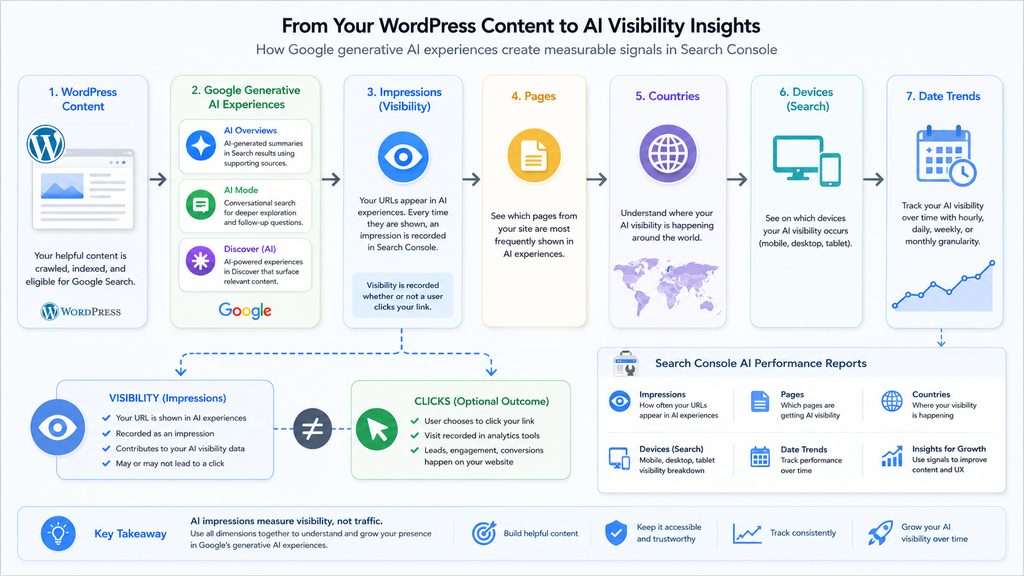
The reports focus on generative AI experiences across Search and Discover. They can show impressions, pages, countries, devices for Search, and performance over time. That creates a useful starting point for publishers who want to understand whether their WordPress content is becoming visible beyond traditional blue-link search results.
However, these reports should not be treated like another keyword-ranking tracker. They answer a different question. Instead of telling you exactly where a page ranks for a particular keyword, they help answer something broader: Is Google using or displaying my website within its generative AI experiences, and where is that visibility occurring?
For WordPress publishers, bloggers, businesses, and SEO professionals, learning to interpret that distinction will be essential.
What Changed on August 31, 2026
Google originally announced its Search Generative AI performance reports on June 3, 2026. At launch, the feature was available only to a subset of websites while Google tested the reporting system and gathered feedback from site owners.
That limitation changed on August 31, 2026. Google updated its announcement to confirm that the generative AI insights had been rolled out to websites worldwide. In practical terms, this transforms the feature from a limited experiment into a reporting tool that WordPress publishers everywhere should begin checking as part of their normal Search Console workflow.
The reports introduce dedicated views for generative AI visibility rather than forcing publishers to interpret AI exposure entirely through the conventional Performance report. Google says AI-related data continues to contribute to overall performance reporting, but the dedicated AI views make this particular type of visibility easier to examine separately.
That distinction matters. A page might continue receiving ordinary Google Search impressions while simultaneously appearing as a supporting source within an AI-powered experience. Looking only at total Search performance can hide that second layer of exposure.
The worldwide rollout therefore gives publishers a new analytical dimension. Instead of evaluating only clicks, impressions, positions, and queries from conventional search reporting, website owners can begin tracking whether their pages are being surfaced within Google’s generative systems.
For WordPress websites that publish informational content, tutorials, reviews, news, technical documentation, guides, or detailed answers, this information can become particularly useful. These types of pages often address the complex questions for which generative search experiences are designed.
The timing is also important. AI Overviews and AI Mode are increasingly integrated into how Google answers complicated questions. Measuring exposure separately gives publishers an opportunity to establish historical data now rather than trying to reconstruct it later.
Where to Look in Search Console
Website owners should open the relevant verified property in Google Search Console and examine the Performance area for the dedicated generative AI reporting views. The exact amount of information available can vary because a site needs sufficient qualifying visibility before meaningful data can appear.
Do not assume something is technically wrong simply because a new or small WordPress website shows little information. A site with limited AI exposure naturally has less data for Google to report.
The better approach is to treat August and September 2026 as the beginning of a new measurement period. Record what you see now, then compare it with future weeks and months.
That first snapshot becomes your baseline.
Which Google AI Features Are Included
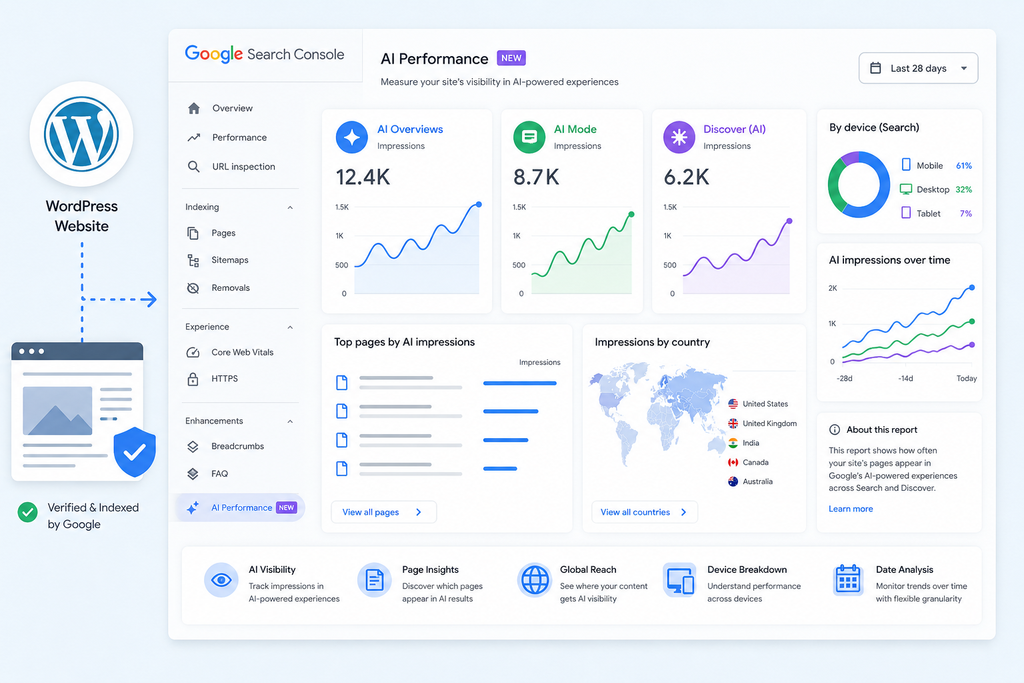
The most important step when reading the new reports is understanding what Google means by generative AI visibility. The reporting covers generative AI experiences within Google Search as well as generative AI features appearing through Discover.
For Search, two of the most important experiences are AI Overviews and AI Mode. Although both use generative AI, they do not necessarily behave identically or select exactly the same supporting pages.
AI Overviews are designed to provide a summarized response when Google determines that an AI-generated overview adds useful information beyond conventional search results. These summaries can contain supporting links that allow users to explore the underlying websites.
AI Mode is built for more exploratory interactions. Users can ask detailed questions, compare options, investigate complicated subjects, and continue with follow-up questions. That changes the search journey from a single query-and-results-page interaction into something closer to an ongoing research session.
Google explains that AI Overviews and AI Mode can use a technique it calls query fan-out. Instead of relying only on the user’s original wording, Google’s systems can perform multiple related searches across subtopics and data sources while constructing an answer.
For publishers, this creates an interesting consequence. A WordPress article may become useful to an AI-generated response even when it would not have been the obvious result for the user’s original wording.
Imagine a WordPress tutorial about reducing Largest Contentful Paint by optimizing featured images. A user might ask Google a much broader question about why their WordPress website feels slow.
An AI system can explore related concepts such as image dimensions, server response time, caching, render-blocking resources, lazy loading, and LCP. Your article could potentially become relevant during one of those related searches.
This is one reason traditional keyword thinking alone may not fully describe generative search visibility.
AI Overviews
AI Overviews provide synthesized information directly within Google Search while linking users to supporting websites. Google says they are generally shown when its systems determine that the experience provides additional value beyond conventional Search.
For publishers, appearing there represents visibility rather than automatically representing a visit. A URL can contribute to an AI experience without producing the same user behavior associated with a traditional search result.
That makes impressions particularly important.
AI Mode
AI Mode supports more complicated research, reasoning, comparisons, and follow-up questions. Users can explore a topic through a sequence of interactions rather than repeatedly returning to a traditional results page.
This may expand the range of pages Google considers relevant because one user interaction can branch into several related information needs.
A narrowly focused WordPress article can therefore become useful inside a broader research journey. Publishers should think beyond individual keywords and consider whether each article thoroughly answers a recognizable question or subtopic.
Generative AI in Discover
The reports also cover generative AI features in Discover. This is especially relevant to publishers because Discover already operates differently from conventional keyword-driven Search.
Users generally do not type a query before seeing Discover content. Google selects material based on interests and other contextual signals.
Adding generative AI experiences makes Discover another surface where publishers should measure visibility separately from conventional search behavior.
The practical lesson is simple: Google AI visibility is not one single placement. It represents exposure across several evolving experiences.
Understanding AI Impressions and Pages
The central metric currently available in the new reporting is impressions. Google describes this as how often URLs from your website appeared in generative AI features across Search and Discover.
That sounds familiar because impressions have always been fundamental to Search Console. However, the context is different enough that publishers should avoid interpreting AI impressions exactly like ordinary ranking impressions.
An AI impression indicates visibility. It tells you that Google surfaced a URL from your website within an eligible generative experience. It does not automatically tell you how prominently users noticed that source, why Google selected it, or whether a user meaningfully engaged with the citation.
This makes impressions best suited to trend analysis.
For example, suppose your WordPress website records 600 AI impressions during one week and 1,200 several weeks later. That does not prove your rankings doubled. It does indicate that Google’s generative experiences surfaced your URLs substantially more often during the later period.
The next question should be: Which pages produced that visibility?
Fortunately, the reporting includes page-level information. Website owners can identify URLs that appeared within AI experiences.
This may become one of the most valuable parts of the report.
Look for Page Patterns Instead of Isolated Winners
Avoid opening the report, finding your most visible URL, and immediately rewriting every other article to resemble it.
Start by looking for patterns.
Perhaps your detailed tutorials receive more AI visibility than short news posts. Maybe comparison articles perform strongly. Alternatively, troubleshooting pages, definitions, product guides, or long-form educational articles might repeatedly appear.
Those patterns are more useful than any single URL.
A WordPress site with hundreds or thousands of posts should consider grouping visible pages into content types. You might separate them into categories such as tutorials, reviews, news, troubleshooting guides, opinion pieces, evergreen resources, and product comparisons.
Then compare which groups consistently generate AI impressions.
This turns the report from an interesting dashboard into a content-planning tool.
Do Not Confuse Impressions With Traffic
This distinction deserves emphasis.
An AI impression is not the same as a click.
A page can gain substantially more generative AI visibility without experiencing a corresponding increase in sessions. Users may receive enough information from the AI response itself, or they may select another supporting link.
At the same time, AI visibility can introduce your website to audiences that might never have encountered it through conventional rankings.
Therefore, the goal should not be maximizing impressions at any cost. Instead, evaluate AI impressions alongside meaningful website outcomes.
Compare visible pages against organic sessions, engaged sessions, newsletter subscriptions, comments, affiliate interactions, leads, sales, or whatever conversions matter to your site.
Visibility tells you that Google surfaced the content.
Your analytics tell you what happened afterward.
Comparing Countries, Devices, and Dates
Raw impression totals provide only the beginning of the analysis. The new reports become considerably more useful when you examine how visibility changes across countries, devices, and time periods.
Google provides country-level visibility information, allowing publishers to see where their URLs appear within generative AI experiences.
For international WordPress websites, this can reveal patterns that ordinary global totals would hide.
Imagine that your website publishes content in English but attracts readers from the United States, United Kingdom, Canada, Australia, Belgium, and India. A rising overall AI impression count does not tell you which audience is driving that growth.
Country segmentation can.
You might discover that a particular tutorial performs unusually well in the United States while another group of articles receives more exposure in European markets.
That information can influence editorial decisions without requiring you to chase every regional fluctuation.
Use Country Data to Find Real Opportunities
Do not automatically translate an entire WordPress website because one country suddenly produces more AI impressions.
Instead, investigate the pattern.
Check whether multiple pages are gaining exposure there. Review conventional Search Console data for the same country. Look at Analytics traffic and engagement. Determine whether the audience aligns with the subject of your website.
If several independent signals point in the same direction, the opportunity becomes more credible.
Country-level AI visibility may also reveal markets where your website has exposure but limited traffic. That difference can raise useful questions about titles, page introductions, language, regional relevance, or how effectively your content encourages users to continue from Google’s AI interface to your website.
Device Data Can Reveal Search Behavior
Google also provides device information for Search results.
This allows publishers to examine whether AI visibility is occurring primarily on mobile, desktop, or other reported device categories.
For most WordPress publishers, this should reinforce an existing principle: mobile experience remains extremely important.
A page may contain excellent information but still create a poor experience after the user clicks through. Intrusive overlays, unstable layouts, oversized advertising, slow images, difficult navigation, or tiny typography can undermine the value of the visit.
AI visibility does not replace user experience.
It increases the importance of delivering on the expectation created by the Google result.
Dates Turn a Snapshot Into a Trend
The reporting includes time-based analysis with hourly, daily, weekly, and monthly granularity.
This is where a baseline becomes powerful.
One day’s AI impressions rarely tell you enough to make a meaningful SEO decision. Generative search experiences can change, user demand fluctuates, new content gets indexed, existing pages are refreshed, and Google continuously adjusts its systems.
Weekly and monthly comparisons provide more context.
For example, compare the most recent 28 days with the previous 28 days. Then identify whether increases come from many URLs or only one unusually successful article.
Next, compare countries.
After that, inspect device distribution.
This layered approach prevents you from treating one number as the complete story.
Watch Trends Around Content Updates
Whenever you substantially improve an important WordPress article, record the date.
You can use a simple spreadsheet, editorial calendar, analytics annotation system, or internal SEO log.
Record changes such as:
- major content refreshes;
- title changes;
- new sections;
- rewritten introductions;
- improved internal linking;
- new original images;
- added video;
- factual updates;
- structured data corrections;
- page-experience improvements.
Then observe AI visibility during the following weeks.
Correlation does not prove causation. Still, maintaining an accurate change log makes long-term analysis dramatically more useful.
Creating a WordPress AI Visibility Baseline

The worldwide availability of the reports creates a rare opportunity: WordPress site owners can begin measuring generative AI visibility before years of historical assumptions accumulate around it.
A baseline is simply a documented starting point.
You are not trying to determine whether your website has “good” or “bad” AI visibility on day one. There is no universal impression target that every WordPress website should achieve.
A specialist website publishing 40 highly technical tutorials cannot reasonably be compared with a major publisher producing hundreds of articles each week.
Instead, compare your website against itself.
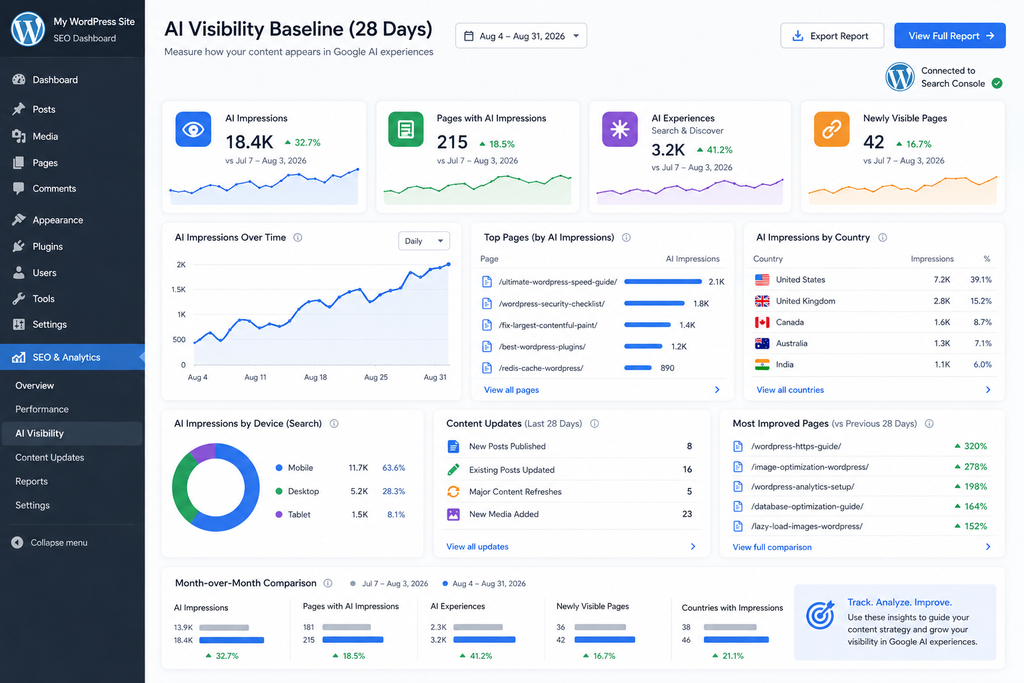
Start with a fixed measurement window. A 28-day period is practical because it smooths some short-term volatility while remaining recent enough to identify meaningful changes.
Record total AI impressions for that period.
Next, identify the pages receiving visibility. Rather than recording every URL on a large website, begin with your strongest pages and any unexpected URLs that stand out.
Then record your most important countries and device distribution where available.
Finally, repeat the same process at consistent intervals.
A Simple Monthly Baseline
For each monthly review, record:
Reporting period:
The exact start and end dates.
Total AI impressions:
Your site’s overall generative AI visibility during the period.
Top visible pages:
The WordPress URLs appearing most frequently.
Newly visible pages:
Pages that were absent or insignificant in the previous period but now generate measurable visibility.
Declining pages:
Previously visible pages showing a sustained decrease.
Leading countries:
Markets where generative AI exposure is strongest.
Device distribution:
Especially useful for Search visibility.
Major site changes:
Updates, migrations, redesigns, plugin changes, content refreshes, indexing problems, or technical SEO modifications.
Conventional organic performance:
Clicks, impressions, landing-page traffic, and conversions from your existing analytics workflow.
This takes relatively little time once the process becomes routine.
More importantly, it creates your own historical dataset.
Segment WordPress Content by Purpose
WordPress makes content segmentation relatively easy because posts already contain useful organizational information.
Categories, tags, post types, authors, publication dates, and URL structures can help you understand which content families attract AI visibility.
Suppose a WordPress security website contains these categories:
WordPress vulnerabilities, plugin tutorials, performance optimization, hosting, SEO, WooCommerce, and troubleshooting.
If most generative AI visibility repeatedly comes from troubleshooting and vulnerability articles, that tells you something meaningful about how your information is being surfaced.
However, do not immediately abandon categories showing lower visibility.
Different content serves different purposes.
A commercial landing page may generate fewer AI impressions while producing more revenue. A news article might have a short visibility window. An evergreen tutorial may accumulate exposure for years.
The correct measurement depends on the purpose of the page.
Compare AI Visibility With Normal Search Performance
Your AI baseline becomes more valuable when paired with conventional Search Console data.
Consider four simplified scenarios.
A page with rising normal impressions and rising AI impressions may be gaining overall search visibility.
A page with stable traditional performance but rising AI impressions may be expanding into generative experiences without losing its existing Search presence.
A page with falling conventional visibility but rising AI exposure requires closer examination. User behavior or result presentation may be changing.
Finally, a page declining across both datasets may need a content, indexing, technical, or competitive review.
These are diagnostic patterns, not guaranteed explanations.
The important point is that AI reporting should complement your existing SEO analysis rather than replace it.
Keep WordPress Technically Accessible
Google’s guidance remains reassuringly familiar.
There are no special technical requirements that WordPress publishers must implement specifically to appear as supporting links in AI Overviews or AI Mode beyond normal Search eligibility.
Pages need to be indexed and eligible to appear in Google Search with snippets.
That means familiar SEO fundamentals remain important: crawlability, indexability, internal linking, useful textual content, good page experience, appropriate images and video, and accurate structured data.
Google also explicitly says publishers do not need a special AI file or unique schema markup simply to become eligible for these features.
That is an important point because the growth of generative search has created plenty of speculative optimization advice.
For most WordPress administrators, improving the fundamentals is still a better investment than installing another plugin that promises mysterious “AI SEO” advantages.
Publish Content Worth Using as a Source
Technical eligibility only gets a page into consideration. Content still needs to be useful.
Google’s current guidance emphasizes helpful, reliable, people-first material and continues to recommend established SEO practices for its AI features.
For a WordPress publisher, that means articles should contribute something meaningful.
Original testing can help. First-hand experience can help. Clear explanations, accurate screenshots, useful comparisons, expert observations, original photography, carefully researched facts, and practical examples can all make a page more valuable.
Rewriting information already available on hundreds of websites provides less differentiation.
Generative systems can summarize commodity information easily. Publishers therefore have a stronger reason to create material that contains details worth referencing.
What the Reports Do Not Reveal About Rankings
The new reporting is valuable partly because it provides information publishers previously lacked. However, understanding what the reports do not tell you is equally important.
The biggest mistake would be treating AI impressions as a new version of keyword rankings.
They are not.
Generative AI responses are constructed differently from a conventional ordered results page. Google explains that AI Overviews and AI Mode can use query fan-out, where multiple searches explore related subtopics and information sources.
As a result, the relationship between one user query and one supporting URL can be much less direct than the traditional model of “keyword → ranking position → click.”
A URL might contribute to one part of a broader AI-generated answer.
Another page may support a different part.
The set of links can also vary because Google says AI Mode and AI Overviews may use different models and techniques.
Therefore, seeing a page accumulate AI impressions does not establish that it holds a fixed “AI ranking.”
You Cannot Reconstruct the Exact Prompt From an Impression
One of the most tempting questions is also one of the hardest to answer:
What exactly did the user ask when my page appeared?
The dedicated AI performance data is not designed as a complete prompt-level reporting system.
You should resist trying to reverse-engineer exact prompts from page visibility alone.
A WordPress article about Redis object caching, for example, might surface during questions about WordPress speed, WooCommerce database performance, hosting configuration, slow admin dashboards, caching strategies, or several related subjects.
Query fan-out makes that relationship even more complicated.
The page tells you what content gained exposure, but not the entire reasoning path that caused Google’s system to use or display it.
Impressions Do Not Tell You Why Google Selected a Page
Another limitation concerns causation.
Suppose you improve a WordPress article and its AI impressions rise two weeks later.
It is reasonable to investigate whether your changes contributed.
It is not reasonable to claim automatically that a particular heading, schema property, plugin, or sentence caused the increase.
Many variables can change simultaneously.
Search demand changes. Competitors update their content. Google recrawls pages. AI experiences evolve. New documents enter the index. Google’s models and retrieval systems change.
Treat the reports as observational evidence.
Use them to form hypotheses, not manufacture certainty.
There Is No Special AI SEO Shortcut
Google’s documentation makes an especially useful point for publishers concerned about the emerging market around “GEO,” “AEO,” and similar labels.
The fundamentals of SEO remain relevant to AI Overviews and AI Mode.
Google states that there are no additional requirements to appear in these features and no special schema.org structured data is required.
That does not mean publishers should ignore generative search.
It means the sensible response is improving the substance and accessibility of the website rather than chasing unsupported technical tricks.
For WordPress, that usually means keeping the site crawlable, maintaining clean internal linking, publishing useful content, ensuring important information exists as accessible text, optimizing page experience, using quality media where appropriate, and keeping structured data consistent with visible content.
Do Not Optimize Only for AI Impressions
A high AI impression count can be encouraging, but your website exists for users.
If AI visibility grows while revenue, subscriptions, engagement, or meaningful visits collapse, impressions alone cannot define success.
Conversely, modest AI exposure can still be valuable if it reaches highly relevant users.
The goal should be useful visibility.
Ask whether Google is surfacing the right pages. Check whether those pages accurately represent your expertise. Ensure visitors arriving from Search receive a fast, trustworthy, easy-to-navigate experience.
This broader view keeps AI reporting connected to actual business and publishing goals.
A Practical Monthly Workflow for WordPress Publishers
Once the initial curiosity around the new reports passes, consistency will matter more than checking them every day.
Choose one date each month for your AI visibility review.
Open Search Console and record the previous 28 days. Compare that period with the preceding 28 days whenever the interface and available data allow a useful comparison.
Begin with total impressions, then move to pages.
Identify which URLs gained visibility and which lost it. Pay particular attention to pages showing sustained movement rather than tiny fluctuations.
Next, compare countries and devices.
After that, open your ordinary Search performance data and Analytics platform. Look for corresponding changes in organic traffic and engagement.
Finally, review your editorial log.
Did you publish a major new guide? Refresh an old tutorial? Improve internal links? Change your theme? Migrate hosting? Modify caching? Remove content? Update your SEO plugin?
Document those events.
After six months, those notes become far more valuable than vague memories about when something changed.
Avoid Daily Overreaction
Generative search is evolving rapidly.
That makes daily fluctuations particularly easy to misinterpret.
A sudden increase does not necessarily mean you discovered an AI optimization secret. A sudden decline does not automatically mean Google stopped trusting your website.
Look for sustained patterns.
Weekly and monthly trends generally provide a more useful foundation for editorial decisions than repeatedly refreshing a dashboard.
This is especially important for smaller WordPress sites, where relatively small changes in absolute impression counts can produce dramatic percentage movements.
Use AI Visibility to Generate Editorial Questions
The reports should create questions rather than automatic conclusions.
Why is this article visible while a closely related article is not?
Why is one country producing substantially more exposure?
Are recently updated articles appearing more frequently?
Do detailed tutorials outperform short posts?
Are pages containing original screenshots or research appearing more often?
Does stronger internal linking correlate with broader visibility?
These questions can guide useful experiments.
Change one meaningful element at a time when possible, document what you changed, and monitor the result over a reasonable period.
That approach is slower than chasing SEO hacks, but it produces much more reliable knowledge about your own website.
Frequently Asked Questions
Are Search Console AI performance reports available worldwide?
Yes. Google updated its announcement to state that the generative AI performance insights were rolled out to websites worldwide as of August 31, 2026. The reports initially launched to a limited group of websites in June before expanding globally.
What do Search Console AI performance reports measure?
They provide dedicated visibility information for generative AI experiences. Available dimensions include impressions, pages, countries, devices for Search results, and dates with several levels of time granularity.
Do the reports include AI Overviews?
Yes. Google specifically identifies AI Overviews as one of the generative AI experiences covered by its Search reporting.
Is AI Mode included?
Yes. AI Mode is also part of Google’s generative AI Search visibility reporting.
Does the reporting include Discover?
Yes. Google provides dedicated generative AI reporting covering Search and Discover, including AI experiences within Discover.
Can I see which WordPress pages appear in AI features?
Yes. The Pages dimension allows site owners to identify URLs that appeared within generative AI experiences. This is useful for determining which articles or landing pages are gaining AI visibility.
Can I see the exact prompts that caused my page to appear?
The dedicated report should not be treated as a prompt-tracking system. It is primarily designed around visibility dimensions such as impressions, pages, countries, devices, and dates rather than exposing a complete record of user prompts.
Do AI impressions mean visitors clicked my website?
No. An impression measures visibility, not a guaranteed visit. Always compare Search Console visibility with traffic and engagement data when evaluating the practical impact on your WordPress website.
Do I need special WordPress schema for AI Overviews?
Google says there is no special schema.org structured data required specifically for appearing in AI Overviews or AI Mode. Existing SEO fundamentals, Search eligibility, useful content, and accurate structured data remain relevant.
Should AI impressions replace traditional SEO metrics?
No. They should complement existing metrics. Continue monitoring conventional Search clicks, impressions, landing-page traffic, conversions, engagement, indexing, Core Web Vitals, and other metrics relevant to your website.
A New Visibility Metric Worth Tracking
The worldwide arrival of Search Console AI performance reports gives WordPress publishers something they have needed since generative search began reshaping Google’s results: first-party evidence of whether their content is actually appearing inside Google’s AI experiences.
The reports are not perfect, and they do not reveal every detail publishers might want. They do not transform generative search into a simple keyword-ranking table. Nor do they explain every reason why one page receives exposure while another does not.
Their value comes from something more practical.
They establish visibility.
WordPress publishers can now identify pages appearing within generative AI experiences, measure impressions, compare countries, examine devices for Search, and monitor those signals over time.
The smartest first move is not to redesign your SEO strategy overnight.
Create a baseline.
Record your current 28-day performance. Identify visible pages. Note countries and devices. Compare AI exposure with conventional organic performance. Then repeat the process every month.
Over time, your own historical data will become more useful than generalized claims about what supposedly works for AI search.
Google’s guidance also reinforces an important principle: traditional SEO fundamentals remain relevant. WordPress sites still need accessible pages, sensible internal linking, useful textual information, good page experience, appropriate media, accurate structured data, and genuinely valuable content.
Generative search changes how information can be discovered.
It does not remove the need to create information worth discovering.
⚠️ Disclaimer and Source Hygiene
This article is provided for informational and educational purposes and should not be considered a guarantee of rankings, traffic, AI visibility, revenue, or other search performance outcomes. Google Search and its generative AI features evolve continuously, and reporting interfaces, metrics, eligibility rules, and documentation can change.
The information in this guide was researched using authoritative Google documentation and current Search Central materials available in September 2026. Where practical recommendations go beyond Google’s explicit documentation, they should be understood as analytical guidance rather than confirmed ranking factors. Website owners should verify important implementation decisions against current official documentation and consult qualified SEO, development, analytics, or legal professionals when appropriate.
🔔 For more tutorials like this, consider subscribing to our blog.
📩 Do you have questions or suggestions? Leave a comment or contact us!
🏷️ Tags: Google Search Console, Search Console AI performance reports, AI Overviews, Google AI Mode, Google Discover, WordPress SEO, AI search visibility, generative AI SEO, Search Console impressions, WordPress analytics
📢 Hashtags: #GoogleSearchConsole, #WordPressSEO, #AIOverviews, #AIMode, #GoogleDiscover, #SearchConsole, #AISearch, #WordPress, #SEO, #GenerativeAI
Sources and References
Google Search Central – Introducing Search Generative AI Performance Reports in Search Console
Google’s official announcement explains the dedicated generative AI reports for Search and Discover. It confirms that the reports include impressions, pages, countries, devices for Search, and date-based analysis. Google updated the announcement to confirm worldwide availability as of August 31, 2026.
Google Search Central – AI Features and Your Website
Google’s official documentation explains how AI Overviews and AI Mode work from a website owner’s perspective. It describes query fan-out, Search eligibility requirements, measurement in Search Console, and the continued importance of established SEO practices.
Google – New Opportunities, Control and Insights for Website Owners
Google’s announcement describes its broader approach to generative AI visibility, publisher controls, Search Console insights, and the expansion of those capabilities to website owners globally.
Google Search Central – Generative AI Optimization Guidance
Google’s current guidance emphasizes original, useful, non-commodity content while explaining that normal SEO fundamentals remain relevant to generative AI experiences.
Secondary Sources and Testimonials
Independent SEO publications began reporting the worldwide availability immediately after Google’s August 31 update. Their coverage largely reinforces Google’s announcement that the dedicated generative AI performance reporting is now globally accessible and focuses on impressions, pages, countries, devices, and date-based trends.
Secondary reporting can provide useful screenshots, industry reactions, and practical observations about how publishers are seeing the feature appear in their accounts. However, Google’s Search Central documentation should remain the primary reference whenever there is a disagreement about definitions, eligibility, reporting methodology, or feature availability.
As publishers collect several months of data, real-world experience will provide additional context about how AI visibility relates to conventional organic traffic. Until then, claims about specific AI ranking factors, guaranteed optimization methods, or universal impression benchmarks should be treated cautiously.
Sign in with a Subscriber account to vote.
2 thoughts on “Google Search Console AI Performance Reports Go Global”