
Table of Contents
Learn the real difference between free and premium WordPress plugins. Discover features, security, support, updates, performance, and which option is best for your website goals in this complete beginner-friendly guide.
Understanding WordPress Plugins
WordPress plugins are tools that add extra features and functionality to your website. They help transform a simple WordPress installation into a powerful website without coding knowledge.
Whether you want to create a contact form, improve SEO, add security, optimize speed, or build an online store, plugins make everything easier.
There are thousands of plugins available in the WordPress ecosystem. Some are completely free, while others require payment. This creates an important question for many beginners: Should you use free plugins or premium plugins? The answer depends on your website goals, budget, and long-term needs. This guide explains the differences between WordPress free and premium plugins in detail so you can make smarter decisions for your website.
What Are Free WordPress Plugins?
Free plugins are WordPress extensions available at no cost. Most of them can be downloaded directly from the official WordPress Plugin Directory.
Developers create free plugins for different reasons:
- Community contribution
- Brand visibility
- Upselling premium versions
- Portfolio building
- Open-source support
Many free plugins are excellent and widely trusted.
Popular examples include:
- Yoast SEO
- Contact Form 7
- LiteSpeed Cache
- WP Super Cache
- Elementor Free
- WooCommerce
These plugins offer useful features without charging users.
What Are Premium WordPress Plugins?
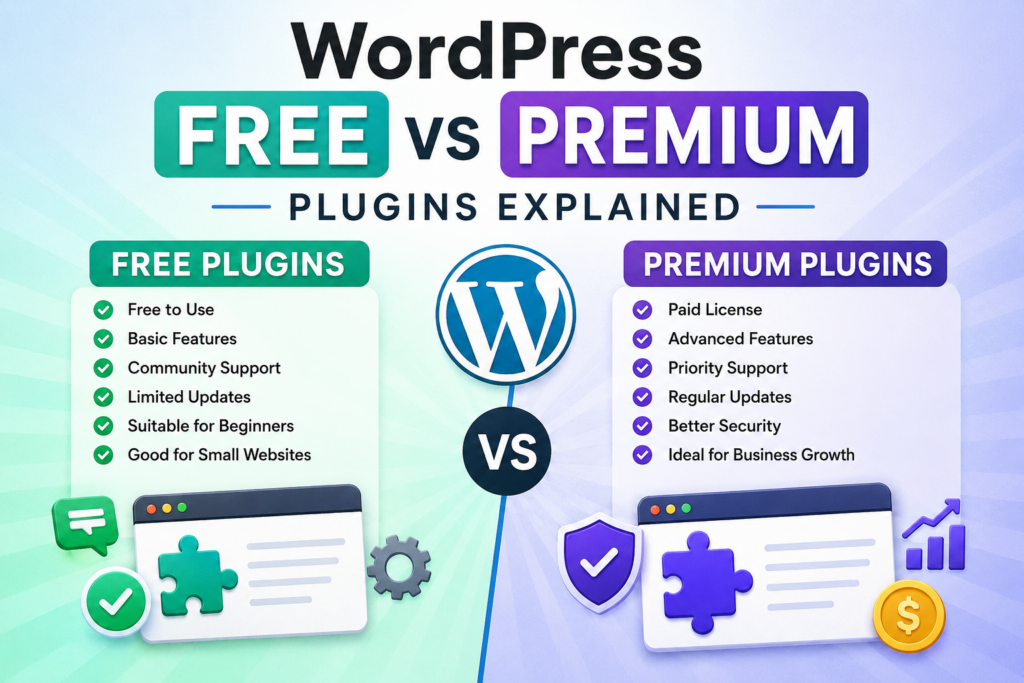
Premium plugins are paid WordPress plugins that usually include advanced features, dedicated support, and frequent updates.
You can purchase them from:
- Official developer websites
- WordPress marketplaces
- SaaS platforms
- Theme/plugin clubs
Premium plugins often focus on businesses, professionals, and advanced users who need more functionality and reliability.
Examples include:
- Elementor Pro
- WP Rocket
- Rank Math Pro
- Gravity Forms
- Advanced Custom Fields Pro
- Perfmatters
Most premium plugins offer yearly licenses or lifetime deals.
Main Difference Between Free and Premium Plugins
The biggest difference is not simply the price.
The real difference is usually:
- Features
- Support quality
- Update frequency
- Scalability
- Security maintenance
- Professional tools
- Automation capabilities
Free plugins handle basic needs. Premium plugins usually target advanced requirements and business use cases.
However, free does not always mean bad, and premium does not automatically mean better.
Understanding each area is important.
Features Comparison

Free Plugins Usually Offer Basic Features
Free plugins often provide core functionality.
For example:
- Basic SEO optimization
- Simple page builder tools
- Basic forms
- Standard caching
- Essential security scans
This is enough for many personal websites and blogs.
However, limitations often exist.
Some advanced features may be locked behind a premium upgrade.
Examples:
- Advanced analytics
- AI tools
- Dynamic content
- Advanced automation
- Priority performance optimization
- Cloud integrations
Premium Plugins Offer Advanced Functionality
Premium plugins usually unlock more powerful tools.
Examples include:
- Advanced customization
- Marketing integrations
- WooCommerce enhancements
- Advanced caching
- Database optimization
- Automation workflows
- Premium templates
- Dynamic conditions
- Advanced SEO schema
- Real-time backups
These features help businesses grow faster and operate more efficiently.
Support Differences
Free Plugin Support
Support for free plugins is often limited.
Most developers provide support through:
- WordPress.org forums
- Documentation
- Community discussions
- GitHub issues
Response times vary greatly.
Some free plugins receive excellent support. Others may remain unanswered for weeks.
Because support is free, there is no guaranteed response.
Premium Plugin Support
Premium plugins typically include professional support.
This may include:
- Email support
- Ticket systems
- Live chat
- Priority troubleshooting
- Dedicated account managers
- Setup assistance
Fast support becomes very important when your website generates income.
If your website breaks during a sale or traffic spike, premium support can save time and money.
Security and Reliability
Are Free Plugins Safe?
Many free plugins are completely safe.
The official WordPress Plugin Directory has security guidelines and reviews.
However, risks still exist.
Some free plugins:
- Stop receiving updates
- Become abandoned
- Have poor coding practices
- Contain vulnerabilities
- Conflict with themes or other plugins
Before installing any free plugin, check:
- Last update date
- Active installations
- Reviews
- Developer reputation
- Compatibility with current WordPress version
Premium Plugins Usually Receive Better Maintenance
Premium plugins often have dedicated development teams.
Because users pay for them, developers have financial motivation to:
- Release updates quickly
- Fix vulnerabilities
- Improve compatibility
- Add new features
- Maintain long-term support
This generally improves reliability.
Still, not all premium plugins are trustworthy.
Always buy from reputable developers.
Update Frequency
Free Plugins
Update schedules vary.
Some free plugins update regularly. Others may remain inactive for months or years.
Inactive plugins can create:
- Security risks
- Compatibility problems
- PHP conflicts
- Broken layouts
Premium Plugins
Premium plugins usually update more consistently.
Developers actively maintain products because customers expect ongoing improvements.
Frequent updates often include:
- Security patches
- Performance improvements
- New integrations
- UI improvements
- Bug fixes
For business websites, this consistency matters.
Performance Impact
Free Plugins Can Be Lightweight
Some free plugins are optimized extremely well.
Simple plugins often load faster because they contain fewer features.
Examples include:
- Lightweight cache plugins
- Minimal contact forms
- Simple optimization tools
This can improve site speed.
Premium Plugins May Offer Better Optimization
Premium plugins sometimes include advanced performance engineering.
Examples:
- Lazy loading
- Asset optimization
- CDN integration
- Database cleanup
- Script control
- Smart caching
While some premium plugins are heavy, many are highly optimized.
Performance depends more on coding quality than price.
Customization Options
Free Plugins Have Limited Flexibility
Many free plugins restrict advanced customization.
You may encounter limitations such as:
- Limited styling options
- Basic templates
- Fewer integrations
- No dynamic settings
- Restricted modules
This is often intentional to encourage premium upgrades.
Premium Plugins Unlock Full Control
Premium plugins usually provide:
- Advanced styling
- Developer APIs
- Custom hooks
- White-label options
- Advanced conditions
- Integration systems
- Custom workflows
This flexibility is important for agencies and advanced users.
User Experience and Interface
Free Plugins
Free plugins often prioritize functionality over design.
Some interfaces look outdated or confusing.
Documentation quality also varies.
Premium Plugins
Premium developers invest more in user experience.
You often get:
- Modern interfaces
- Setup wizards
- Video tutorials
- Better onboarding
- Advanced dashboards
This helps beginners learn faster.
Compatibility With Other Plugins
Free Plugins May Cause Conflicts
Because many free plugins are developed independently, compatibility testing may be limited.
Conflicts can happen with:
- Themes
- PHP versions
- WooCommerce
- Cache plugins
- Page builders
Premium Plugins Usually Prioritize Compatibility
Premium developers often test compatibility extensively.
Especially with:
- WooCommerce
- Elementor
- Gutenberg
- WPML
- Rank Math
- Popular themes
This reduces website issues.
Examples of Free vs Premium Plugin Differences
Elementor Free vs Elementor Pro
Elementor Free Includes
- Basic drag-and-drop builder
- Basic widgets
- Responsive editing
- Basic templates
Elementor Pro Adds
- Theme builder
- WooCommerce builder
- Popup builder
- Dynamic content
- Forms
- Motion effects
- Marketing integrations
Elementor Free works well for simple websites.
Elementor Pro targets professional website builders.
Yoast SEO Free vs Premium
Yoast Free Features
- Basic SEO analysis
- XML sitemaps
- Meta descriptions
- Readability analysis
Yoast Premium Features
- Internal linking suggestions
- Redirect manager
- Multiple keyword optimization
- AI suggestions
- Advanced schema tools
Many blogs succeed using only the free version.
Large websites often benefit from premium features.
WP Rocket vs Free Cache Plugins
WP Rocket is premium-only.
Free alternatives include:
- LiteSpeed Cache
- WP Super Cache
- W3 Total Cache
WP Rocket simplifies optimization with beginner-friendly settings.
Free plugins can achieve similar performance but may require more technical knowledge.
Cost Comparison
Free Plugins Cost Nothing Initially
This is ideal for:
- Beginners
- Hobby websites
- Small blogs
- Testing environments
However, hidden costs may appear later through:
- Missing features
- Performance problems
- Security risks
- Extra troubleshooting time
Premium Plugins Require Investment
Premium plugins usually cost:
- $20 to $300 yearly
- One-time lifetime licenses
- Subscription plans
For businesses, this investment may generate better returns through:
- Faster websites
- Better conversions
- Improved SEO
- Better security
- Reduced downtime
When Free Plugins Are the Better Choice
Free plugins are perfect when:
- You have a small budget
- Your website is new
- You only need basic features
- You want to learn WordPress
- Your traffic is low
- You are testing ideas
Many successful websites use mostly free plugins.
You do not always need premium tools immediately.
When Premium Plugins Are Worth It
Premium plugins become valuable when:
- Your website generates revenue
- You need professional support
- Downtime affects business
- Advanced automation is required
- Performance optimization matters
- You run WooCommerce stores
- You manage client websites
Premium tools can save significant time.
Time savings alone often justify the cost.
Common Mistakes Beginners Make
Installing Too Many Free Plugins
Some beginners install dozens of free plugins without considering quality.
This creates problems like:
- Slow websites
- Security vulnerabilities
- Plugin conflicts
- Database bloat
Quality matters more than quantity.
Buying Premium Plugins Too Early
Many beginners spend money unnecessarily.
Before buying premium plugins, ask:
- Do I truly need advanced features?
- Can a free alternative work?
- Will this improve my website goals?
- Is the developer reputable?
Not every premium upgrade is necessary.
Downloading Nulled Premium Plugins
This is one of the biggest mistakes.
Nulled plugins are pirated versions of premium plugins.
They often contain:
- Malware
- Hidden backlinks
- Spam injections
- Security vulnerabilities
- Tracking scripts
Using nulled plugins can destroy your website.
Always avoid them.
How to Choose the Right Plugin
Check Reviews
Look at:
- User ratings
- Real experiences
- Support quality
- Complaints
Reviews reveal important details.
Check Update Frequency
Avoid plugins abandoned for long periods.
Regular updates improve:
- Security
- Compatibility
- Stability
Research the Developer
Reputable developers matter.
Look for:
- Professional websites
- Documentation
- Active support
- Community reputation
Test Plugins Safely
Use staging websites before installing plugins on live websites.
This prevents accidental downtime.
Best Practices for Plugin Management
Keep Plugins Updated
Outdated plugins create vulnerabilities.
Always update:
- WordPress core
- Themes
- Plugins
Delete Unused Plugins
Inactive plugins can still create risks.
Remove anything unnecessary.
Limit Plugin Quantity
Fewer high-quality plugins are better than many poorly coded plugins.
Backup Before Major Changes
Always create backups before:
- Installing plugins
- Updating plugins
- Deleting plugins
This protects your website.
Free Plugins That Are Surprisingly Powerful
Some free plugins perform exceptionally well.
Examples include:
LiteSpeed Cache
Advanced caching and optimization for free.
Rank Math Free
Excellent SEO tools without high costs.
WooCommerce
Complete eCommerce functionality.
Wordfence Free
Strong security protection.
UpdraftPlus Free
Reliable backups. These plugins prove that free does not mean weak.
Premium Plugins That Many Professionals Use
WP Rocket
Easy speed optimization.
Perfmatters
Advanced performance tuning.
Elementor Pro
Professional page building.
Advanced Custom Fields Pro
Developer-focused customization.
Gravity Forms
Advanced form building.
These tools save time and improve workflows.
Do Premium Plugins Improve SEO?
Not automatically.
Premium plugins can provide advanced SEO tools, but content quality remains the biggest ranking factor.
Premium SEO features may help with:
- Schema markup
- Automation
- Internal linking
- Redirect management
- AI optimization
- Analytics
However, poor content will still struggle to rank.
Do Free Plugins Slow Down WordPress?
Not necessarily.
Plugin quality matters more than whether it is free or premium.
A poorly coded premium plugin can slow your website more than a lightweight free plugin.
Always focus on:
- Optimization
- Developer reputation
- Performance testing
Can You Build a Professional Website Using Free Plugins Only?
Yes, absolutely.
Many websites operate successfully using mostly free tools.
A professional setup may include:
- WordPress
- Astra theme
- Elementor Free
- LiteSpeed Cache
- Rank Math Free
- WPForms Lite
This combination can create impressive websites.
However, premium upgrades may improve scalability and efficiency later.
How Agencies Use Premium Plugins
Web agencies often purchase premium plugin licenses because they:
- Save development time
- Improve client workflows
- Offer white-label solutions
- Reduce troubleshooting
- Provide advanced customization
For agencies, time efficiency matters greatly.
Subscription vs Lifetime Premium Plugins
Subscription Plugins
Advantages:
- Continuous updates
- Active support
- Ongoing improvements
Disadvantages:
- Recurring yearly costs
Lifetime Licenses
Advantages:
- One-time payment
- Long-term savings
Disadvantages:
- Higher upfront cost
- Some developers stop support later
Both models can work well.
Should Beginners Buy Premium Plugins?
Usually, beginners should start with free plugins first.
This helps them:
- Learn WordPress
- Understand their needs
- Avoid overspending
Once experience grows, premium upgrades become easier to justify.
The Future of WordPress Plugins
The plugin ecosystem continues evolving rapidly.
Trends include:
- AI integration
- Automation tools
- Cloud services
- Better security
- Performance-focused architecture
- Headless WordPress compatibility
Premium plugins often adopt innovations faster.
However, many free plugins continue improving as well.
Frequently Asked Questions
Are free WordPress plugins safe?
Yes, many are safe, especially those from the official WordPress Plugin Directory. Always check reviews, updates, and developer reputation before installation.
Why do developers offer free plugins?
Developers may offer free plugins to build reputation, grow audiences, or encourage users to upgrade to premium versions.
Do premium plugins improve website speed?
Some premium plugins improve speed through advanced optimization features. However, coding quality matters more than price alone.
Can I use only free plugins on my website?
Yes. Many websites operate successfully using free plugins only.
Are premium plugins worth the money?
They can be worth it for businesses, WooCommerce stores, agencies, and websites needing advanced features or professional support.
What are nulled plugins?
Nulled plugins are pirated premium plugins. They often contain malware and should always be avoided.
How many plugins should I install?
There is no exact limit. Focus on quality rather than quantity.
Do inactive plugins affect security?
Yes. Inactive plugins can still contain vulnerabilities. Delete unused plugins completely.
Can free plugins become premium later?
Yes. Many plugins start free and later introduce premium plans with advanced features.
Should beginners start with premium plugins?
Usually not. Beginners should first learn WordPress using free plugins before investing in premium tools.
Choosing the Right Plugins
Choosing between free and premium WordPress plugins depends on your goals, budget, and website needs.
Free plugins are excellent for beginners, bloggers, and small websites. They provide powerful features without financial risk. Premium plugins become valuable when your website grows and requires advanced functionality, dedicated support, better scalability, and professional workflows.
The smartest approach is balance. Start simple. Use trusted free plugins first. Upgrade only when premium features genuinely improve your website or business operations.
Always prioritize:
- Security
- Performance
- Developer reputation
- Update frequency
- Long-term reliability
A carefully selected plugin stack will keep your WordPress website fast, secure, and scalable.
⚠️ Disclaimer and Source Hygiene
This article is for informational and educational purposes only. Plugin features, pricing, and availability may change over time. Always research plugins carefully and consult professional developers or security experts when managing critical websites. Information in this article is based on research from authoritative WordPress resources and developer documentation.
🔔 For more tutorials like this, consider subscribing to our blog.
📩 Do you have questions or suggestions? Leave a comment or contact us!
🏷️ Tags: WordPress plugins, free vs premium plugins, WordPress plugin guide, premium WordPress plugins, free WordPress plugins, WordPress SEO plugins, WordPress optimization, WordPress security plugins, WordPress beginners, WordPress tutorial
📢 Hashtags: #WordPress #WordPressPlugins #WPBeginner #WebDevelopment #SEO #WooCommerce #Blogging #WordPressTips #WebsiteOptimization #DigitalMarketing
📚 Sources and References
- WordPress.org Plugin Directory
- Elementor Documentation
- Yoast SEO Documentation
- WP Rocket Documentation
- WooCommerce Official Website
- Rank Math Documentation
- Wordfence Security Resources
- LiteSpeed Cache Documentation
🕊️ Secondary Sources and Testimonials
- WordPress developer communities
- Website optimization case studies
- SEO expert recommendations
- Hosting provider documentation
- User reviews from WordPress.org and Trustpilot