
Table of Contents
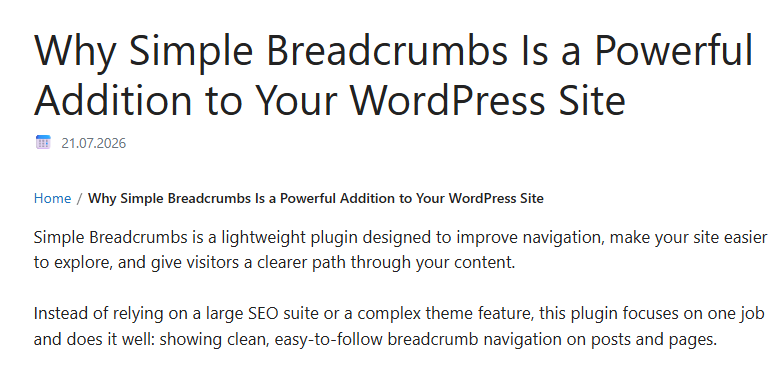
Simple Breadcrumbs is a lightweight plugin designed to improve navigation, make your site easier to explore, and give visitors a clearer path through your content.
Instead of relying on a large SEO suite or a complex theme feature, this plugin focuses on one job and does it well: showing clean, easy-to-follow breadcrumb navigation on posts and pages.
What This Plugin Does
Simple Breadcrumbs adds a breadcrumb trail to your WordPress site so visitors can instantly see where they are and move back to broader sections of your website.
It includes:
- automatic breadcrumb display on posts and pages
- a shortcode for manual placement
- support for parent and child pages
- blog page support for posts
- clean default styling
- lightweight code with no unnecessary extras
Why It Matters
Breadcrumbs improve usability by helping people understand your site structure at a glance. This is especially useful on websites with many pages, blog articles, services, or nested content.
With Simple Breadcrumbs, visitors can:
- move back to the homepage quickly
- jump to parent pages without using the main menu
- understand the relationship between pages
- browse content with less confusion
That means a smoother user experience and a more professional-looking website.
The Power of Keeping It Simple
Many breadcrumb tools are bundled into large plugins with features you may never use. Simple Breadcrumbs is different.
It is built for website owners who want:
- a fast and focused solution
- easy installation
- minimal setup
- flexible placement with a shortcode
- a clean breadcrumb trail without complexity
Because it is simple, it is easy to maintain, easy to understand, and easy to customize later.
<?php
/**
 * Plugin Name: Simple Breadcrumbs
 * Description: Adds simple breadcrumb navigation with a shortcode and automatic display on posts/pages.
 * Version: 1.0.0
 * Author: Wpzone
 * License: GPL2+
 */

if (!defined('ABSPATH')) {
    exit;
}

final class Simple_Breadcrumbs_Plugin
{
    public function __construct()
    {
        add_shortcode('simple_breadcrumbs', [$this, 'render_shortcode']);
        add_filter('the_content', [$this, 'prepend_to_content']);
        add_action('wp_enqueue_scripts', [$this, 'enqueue_styles']);
    }

    public function enqueue_styles(): void
    {
        $css = '
            .simple-breadcrumbs {
                margin: 0 0 1rem;
                font-size: 14px;
                line-height: 1.5;
            }
            .simple-breadcrumbs ol {
                list-style: none;
                padding: 0;
                margin: 0;
                display: flex;
                flex-wrap: wrap;
                gap: 0.35rem;
            }
            .simple-breadcrumbs li {
                display: inline-flex;
                align-items: center;
            }
            .simple-breadcrumbs li+li:before {
                content: "/";
                margin-right: 0.35rem;
                opacity: 0.7;
            }
            .simple-breadcrumbs a {
                text-decoration: none;
            }
            .simple-breadcrumbs [aria-current="page"] {
                font-weight: 600;
            }
        ';

        wp_register_style('simple-breadcrumbs-inline', false);
        wp_enqueue_style('simple-breadcrumbs-inline');
        wp_add_inline_style('simple-breadcrumbs-inline', $css);
    }

    public function render_shortcode(): string
    {
        return $this->get_breadcrumbs_html();
    }

    public function prepend_to_content(string $content): string
    {
        if (is_admin() || !is_main_query() || !in_the_loop()) {
            return $content;
        }

        if (!is_singular(['post', 'page'])) {
            return $content;
        }

        return $this->get_breadcrumbs_html() . $content;
    }

    private function get_breadcrumbs_html(): string
    {
        $items = $this->get_breadcrumb_items();

        if (count($items) < 2) {
            return '';
        }

        $html = '<nav class="simple-breadcrumbs" aria-label="Breadcrumb">';
        $html .= '<ol>';

        $last_index = count($items) - 1;

        foreach ($items as $index => $item) {
            $title = esc_html($item['title']);

            if ($index === $last_index) {
                $html .= '<li><span aria-current="page">' . $title . '</span></li>';
                continue;
            }

            $url = esc_url($item['url']);
            $html .= '<li><a href="' . $url . '">' . $title . '</a></li>';
        }

        $html .= '</ol>';
        $html .= '</nav>';

        return $html;
    }

    private function get_breadcrumb_items(): array
    {
        $items = [
            [
                'title' => 'Home',
                'url' => home_url('/'),
            ],
        ];

        if (is_front_page()) {
            return $items;
        }

        if (is_home()) {
            $items[] = [
                'title' => get_the_title((int) get_option('page_for_posts')) ?: 'Blog',
                'url' => get_permalink((int) get_option('page_for_posts')) ?: home_url('/'),
            ];
            return $items;
        }

        if (is_singular('post')) {
            $posts_page_id = (int) get_option('page_for_posts');

            if ($posts_page_id > 0) {
                $items[] = [
                    'title' => get_the_title($posts_page_id) ?: 'Blog',
                    'url' => get_permalink($posts_page_id) ?: home_url('/'),
                ];
            }

            $items[] = [
                'title' => get_the_title() ?: 'Post',
                'url' => get_permalink() ?: home_url('/'),
            ];

            return $items;
        }

        if (is_page()) {
            global $post;

            if (!$post instanceof WP_Post) {
                return $items;
            }

            $parent_ids = array_reverse(get_post_ancestors($post));

            foreach ($parent_ids as $parent_id) {
                $items[] = [
                    'title' => get_the_title($parent_id),
                    'url' => get_permalink($parent_id),
                ];
            }

            $items[] = [
                'title' => get_the_title($post) ?: 'Page',
                'url' => get_permalink($post) ?: home_url('/'),
            ];

            return $items;
        }

        if (is_category() || is_tag() || is_tax()) {
            $items[] = [
                'title' => single_term_title('', false) ?: 'Archive',
                'url' => '',
            ];
            return $items;
        }

        if (is_archive()) {
            $items[] = [
                'title' => post_type_archive_title('', false) ?: 'Archive',
                'url' => '',
            ];
            return $items;
        }

        if (is_search()) {
            $items[] = [
                'title' => 'Search results',
                'url' => '',
            ];
            return $items;
        }

        if (is_404()) {
            $items[] = [
                'title' => '404',
                'url' => '',
            ];
            return $items;
        }

        return $items;
    }
}

new Simple_Breadcrumbs_Plugin();Installation
Installing Simple Breadcrumbs is quick.
Manual installation
- Create a folder named
simple-breadcrumbsinsidewp-content/plugins/ - Save the plugin file as
simple-breadcrumbs.php - Upload the folder to your WordPress site
- Go to Plugins in your WordPress dashboard
- Activate Simple Breadcrumbs
After activation
Once activated, the plugin automatically displays breadcrumbs above post and page content.
Usage

You can use the plugin in two ways.
Automatic display
The breadcrumb trail is added automatically above the content on posts and pages.
Shortcode
You can also place breadcrumbs manually anywhere on your site with this shortcode:
This is useful if you want to show breadcrumbs in a custom template, a block, or a page builder section.
Settings and Setup
This version of Simple Breadcrumbs does not include a separate settings page in the WordPress admin area.
That means there is nothing extra to configure after activation. The plugin works immediately with its default behavior.
Current behavior includes:
- showing breadcrumbs on posts and pages automatically
- supporting the shortcode for manual placement
- displaying parent pages in hierarchical page structures
- showing the blog page before post titles when available
This makes setup fast and beginner-friendly.
Who This Plugin Is Best For
Simple Breadcrumbs is a great fit for:
- business websites
- blogs
- service websites
- portfolio websites
- small custom WordPress builds
- developers who want a simple breadcrumb base to extend
Simple Breadcrumbs
Simple Breadcrumbs gives your WordPress site a cleaner navigation experience without adding unnecessary complexity.
It is small, practical, and useful from the moment it is activated. If you want a breadcrumb plugin that is easy to install, easy to use, and easy to build on, Simple Breadcrumbs is a strong choice.
⚠️ Disclaimer and Source Hygiene
Simple Breadcrumbs is a basic custom WordPress plugin created for simple breadcrumb navigation. It is provided as-is and may require testing before use on a live website. Compatibility can vary depending on your theme, plugins, custom code, and WordPress version.
Always back up your website before installing or modifying any plugin. This plugin should be tested in a staging environment first to make sure it works correctly with your setup.
This plugin is intended for basic use and may need additional customization for advanced breadcrumb structures, custom post types, SEO schema, or theme-specific layouts.
🔔 For more tutorials like this, consider subscribing to our blog.
📩 Do you have questions or suggestions? Leave a comment or contact us!
🏷️ Tags: WordPress plugin, breadcrumb navigation, WordPress breadcrumbs, simple breadcrumbs, website navigation, WordPress development, WordPress customization, shortcode plugin, lightweight plugin, user experience, site structure, plugin installation, WordPress tutorial, navigation plugin, custom WordPress plugin
📢 Hashtags: #WordPress #WordPressPlugin #Breadcrumbs #WebsiteNavigation #WordPressDevelopment #WPDeveloper #CustomPlugin #WebDesign #UserExperience #SiteStructure #WordPressTips #PluginDevelopment #Shortcode #Blogging #WebDevelopment