
Table of Contents
Starting a WordPress blog is easy, but building one that lasts requires planning. Learn what to know before choosing hosting, buying a domain, installing plugins, publishing content, handling security, and expecting traffic, so you can avoid expensive mistakes and build your blog on a stronger foundation.
What to Know Before Starting a WordPress Blog
Starting a WordPress blog looks remarkably simple from the outside. Buy a domain, choose hosting, install WordPress, select a theme, and publish your first article. Technically, you can complete those steps in an afternoon. Building a blog that you still enjoy running a year later is a very different challenge.
Many beginners discover this difference only after spending money. They buy hosting they do not need, install dozens of plugins, change themes repeatedly, and publish articles without a clear direction. Several months later, the website has become harder to maintain while traffic remains disappointing.
The better approach is to make a few important decisions before installing anything. You do not need to become a developer, SEO expert, designer, or server administrator first. However, understanding how the major pieces fit together can prevent many problems later.
This guide explains what I would want a new WordPress user to understand before starting. We will look at domains, hosting, WordPress itself, themes, plugins, security, backups, performance, SEO, content planning, Search Console, monetization, maintenance, and realistic expectations.
The goal is not to create the perfect website before publishing your first post. That website does not exist. Instead, the goal is to start with a foundation that can grow without forcing you to rebuild everything six months later.
Decide Why You Are Starting the Blog First
Before choosing a domain or comparing hosting companies, answer one deceptively simple question: why are you creating this website?
Someone building a personal journal needs a very different setup from someone planning an affiliate website. A local business has different priorities from a technology publication. Likewise, a blogger hoping to earn advertising revenue eventually needs to think about content depth, navigation, trust, traffic, and user experience from the beginning.
Your answer does not need to include a complicated business plan. You simply need enough direction to make consistent decisions. Write down the primary subject, the type of reader you want to help, and what you hope the website will achieve after one year.
That small exercise affects almost everything that follows. It influences your domain name, categories, design, content strategy, hosting requirements, and even the plugins you might eventually need.
Choose a Subject You Can Still Write About Next Year
A niche can help readers and search engines understand what your website is about. However, beginners sometimes interpret “choose a niche” as “find the narrowest possible keyword.”
That can create another problem. After publishing twenty articles, there may be nowhere useful left to go.
Think in terms of a subject with several natural branches. A WordPress website, for example, could cover performance, security, plugins, themes, hosting, SEO, troubleshooting, and tutorials. Those subjects are related enough to make sense together while providing room for hundreds of useful articles.
Ask yourself whether you can realistically imagine writing 50 high-quality posts around your chosen subject. If the answer is difficult, reconsider the scope before purchasing the domain.
Know Who You Are Writing For
“Everyone” is rarely a useful target audience.
Imagine two WordPress tutorials about caching. One is written for server administrators. The other is written for someone who installed WordPress yesterday. Both could be accurate, but the vocabulary, screenshots, explanations, and recommended actions should be completely different.
Deciding who your reader is makes writing easier. It also prevents the common mistake of creating content that assumes too much knowledge while simultaneously explaining basic concepts that experienced readers already understand.
You can expand your audience later. At the beginning, clarity is more useful than trying to satisfy every possible visitor.
Understand WordPress.com and WordPress.org Before Paying
One of the first sources of confusion for beginners is the existence of WordPress.com and WordPress.org. The names are similar, but the experience can be quite different.
When people talk about creating a self-hosted WordPress website, they generally mean the open-source WordPress software available through WordPress.org. You obtain hosting separately and install WordPress on that server. Many hosting providers automate the installation, so you usually do not need to upload the software manually.
This approach gives you significant control over themes, plugins, files, databases, optimization, advertising, and other parts of the website. That flexibility is one reason WordPress is used for everything from small blogs to much larger publishing and business projects.
WordPress.com, meanwhile, is a hosted service with different plans and included features. It can be convenient, but you should understand the plan limitations and features before assuming it works exactly like a self-hosted WordPress installation.
For this guide, when I refer to starting a WordPress blog, I am primarily talking about a self-hosted WordPress installation.
Official WordPress download and installation resources
Your Domain Name Matters More Than It First Appears
A domain becomes part of your website’s identity. Changing a theme later is relatively easy. Moving to another hosting company is also possible. Replacing an established domain is more disruptive because existing links, search visibility, branding, email addresses, and returning visitors may already depend on it.
Therefore, avoid choosing a domain only because it sounds clever today. Consider whether it will still make sense if the site expands.
A very narrow domain can become restrictive. Imagine registering a name entirely focused on one particular plugin and later wanting to cover WordPress hosting, security, and SEO. The original name could make the broader content feel out of place.
Short, memorable, readable names usually age better.
Avoid Making the Domain Too Complicated
Try saying your proposed domain aloud without spelling it. Would another person understand it?
Hyphens, unusual abbreviations, confusing spellings, and unnecessary numbers can make a domain harder to remember. They can also make word-of-mouth promotion unnecessarily difficult.
You should also check the history of a previously registered domain before buying it. A cheap or recently available domain is not automatically a clean domain. Previous use can matter.
Finally, remember that your domain and hosting do not necessarily need to come from the same company. Keeping them separate can sometimes make future hosting changes easier, although using one provider can simplify management for beginners.
Hosting Is More Than Disk Space and a Low Introductory Price

Hosting is where your WordPress files and database live. It directly affects availability, administration, backups, and potentially performance.
Beginners often compare hosting plans using only two numbers: price and storage. Those numbers tell you surprisingly little about the experience you will have once the site is running.
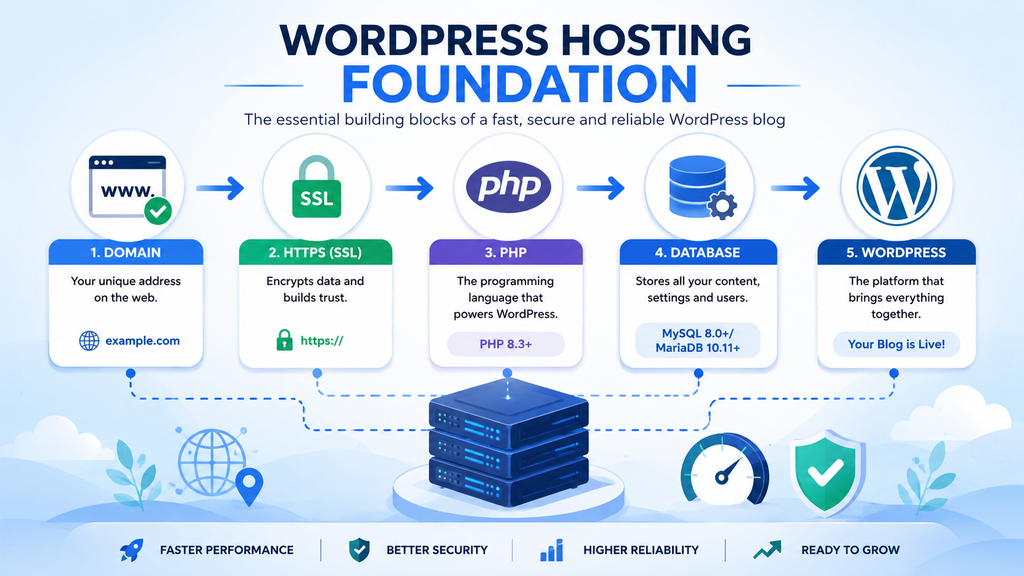
Look at resource limits, backup policies, support quality, server locations, PHP management, SSL support, database access, staging options, caching, security features, and what happens when the introductory billing period ends.
A plan advertised for a few euros per month can become considerably more expensive at renewal. That does not automatically make it bad hosting. It simply means you should calculate the real annual cost rather than basing your decision on the promotional headline.
Check Current WordPress Server Requirements
This is one area where old tutorials can quickly become misleading.
At the time this article was updated, WordPress.org recommends PHP 8.3 or greater, MariaDB 10.11 or greater or MySQL 8.0 or greater, and HTTPS support as a modern baseline. WordPress also recommends Apache or Nginx, although other compatible server environments can work.
Do not choose a hosting company simply because it says “WordPress compatible.” Check what versions and technologies are actually available.
Modern PHP and database support matter because your blog will not remain frozen on launch day. WordPress, themes, and plugins continue evolving. Starting on outdated infrastructure can create unnecessary performance, compatibility, and security problems.
Cheap Hosting Can Be Fine, but Know What You Are Buying
A new blog receiving almost no traffic rarely needs an expensive dedicated server. Starting small can be sensible.
The problem begins when “cheap” becomes the only requirement.
Low-cost shared hosting may impose CPU, memory, process, inode, database, or other resource limits. Those limits matter much more than an advertisement promising enormous disk space.
You should also determine whether backups are included and how restoration works. A provider saying “daily backups” sounds reassuring, but important details remain. How many copies are retained? Can you restore them yourself? Are files and databases included? Does restoration cost extra?
Support also deserves attention. When everything works, hosting support seems unimportant. When your website suddenly returns an HTTP 500 error after an update, good support becomes much more valuable.
Choose enough hosting for the website you expect to have during the next year. You can upgrade when real traffic justifies it.
Calculate the Real First-Year Cost Before You Begin
WordPress itself is open-source software, but running a serious WordPress blog is not necessarily free.
At minimum, you normally need a domain and hosting. You may also decide to pay for a premium theme, backup storage, security services, email, image tools, premium plugins, or a CDN. Most of these are optional, especially at the beginning.
The mistake is buying everything immediately.
New bloggers sometimes purchase an expensive theme bundle, SEO software, page builder, security package, optimization plugin, email service, and several lifetime licenses before publishing ten articles. They are investing in infrastructure for traffic they do not yet have.
Start with necessities. Add paid tools when you can identify the specific problem they solve.
A useful question before every purchase is: What happens if I don’t buy this today?
If you cannot give a concrete answer, you probably do not need it yet.
Start With a Simple WordPress Theme
Themes control much of your website’s presentation. Choosing one can become an unexpectedly large distraction.
It is easy to spend several days comparing demos because polished demo sites look impressive. Remember that demos often contain carefully selected photography, professionally written copy, custom layouts, and content specifically designed for that template.
Your empty website will not automatically look like the demo.
For a blog, prioritize readability, responsive design, accessibility, speed, compatibility, regular maintenance, and straightforward customization. Your readers primarily came for the content. The theme should make that content easier to consume.
Resist the Urge to Redesign Every Week
One of the most productive decisions a new blogger can make is accepting a design that is “good enough.”
Your first version will not be your final version. That is normal.
Constantly changing fonts, header layouts, colors, sidebar positions, archive templates, and button styles creates the feeling of working without actually creating more useful content.
Set up a clean header, readable typography, sensible content width, navigation, footer, mobile layout, and essential pages. Then publish.
After real visitors arrive, analytics and feedback can help you make better design decisions than guessing before launch.
You Probably Need Fewer Plugins Than You Think
Plugins are one of WordPress’s greatest advantages. They can add contact forms, caching, SEO tools, backups, security features, e-commerce, redirects, analytics integrations, and thousands of other capabilities.
They can also become a source of unnecessary complexity.
There is no universal number of plugins that makes a WordPress site slow or insecure. Ten poorly designed plugins can create more trouble than thirty carefully maintained ones. What matters is what each plugin does, how well it is maintained, how it interacts with other components, and whether you actually need it.
Before installing a plugin, ask three questions. Does WordPress or your hosting already provide this feature? Do you genuinely need it? Is the plugin actively maintained by a trustworthy source?
WordPress’s own security guidance recommends keeping plugins updated and removing plugins you do not use.
Create a Minimal Plugin Stack
Instead of installing every plugin recommended by a YouTube video, build your stack around functions.
You may need an SEO solution. You may need backups if the hosting solution is insufficient. Caching or performance optimization may be appropriate depending on your server. A security solution can also be useful depending on your environment.
Additional functionality should come later.
Avoid installing multiple plugins that perform the same job unless you have a specific technical reason. Two caching systems, several SEO plugins, or multiple security plugins can create overlapping settings and unexpected conflicts.
Also delete plugins that you decide not to use. Deactivating a plugin and forgetting about it is not the same as removing unnecessary software from your installation.
Security Should Begin on Day One
A small website is not invisible simply because it has little traffic.
Automated systems continuously scan websites for known vulnerabilities, weak credentials, outdated software, and exposed services. An attacker does not need to personally know that your blog exists.
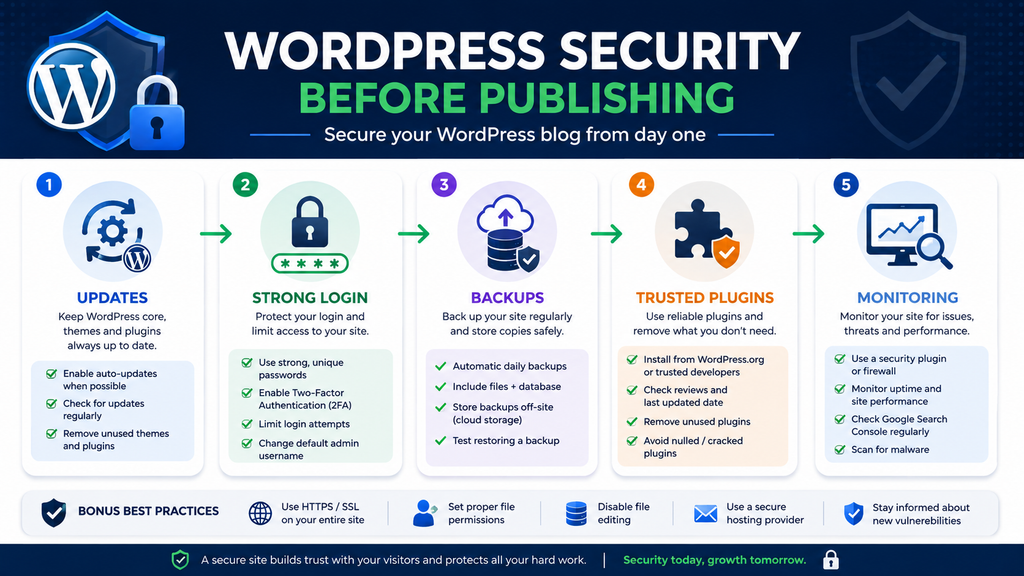
Your first security layer is surprisingly boring: keep WordPress, themes, and plugins updated. WordPress’s official administration guidance identifies keeping core, installed plugins, and themes updated as one of the most important security practices.
Use unique passwords, protect your hosting account, secure administrator access, and enable two-factor authentication where practical. Remove unused themes and plugins, and install software from trusted sources.
Avoid nulled premium plugins and themes. Saving a license fee is not worth introducing code from an unknown source into the same application that controls your website.
Backups Are Part of Security
A backup is not merely something you need before moving servers.
Updates can fail. Files can become corrupted. Human mistakes happen. Websites can be compromised. Databases can develop problems.
Your backup strategy should cover both the database and website files. WordPress documentation explains that a complete site consists of the database plus WordPress files, plugins, themes, uploads, and other components.
More importantly, a backup should be restorable.
Having hundreds of backup archives is useless if none can successfully rebuild the website. Learn how restoration works before an emergency occurs.
Ideally, maintain a copy independently from the same server hosting the live site. If the server itself becomes unavailable, a backup stored exclusively on that server may not help you.
Performance Is Easier to Protect Than to Repair
A fresh WordPress installation can be relatively lightweight. Complexity usually accumulates.
A page builder adds features. Then an animation plugin arrives. A marketing script follows. Later you add advertising, analytics, social widgets, custom fonts, popups, related posts, and several third-party integrations.
Eventually, the browser must download and process far more resources than it did on launch day.
This is why performance should be treated as a budget rather than an emergency repair project.
Every new feature has a cost. That does not mean you should never use scripts or visual effects. It means the benefit should justify the additional work required from the browser and server.
Images Deserve Attention From Your First Article
Large images are one of the easiest ways to make a new blog unnecessarily heavy.
Uploading a photograph straight from a modern phone or camera can add several megabytes to a page even though the image is displayed at a fraction of its original dimensions.
Resize images appropriately before or during upload, use efficient formats where suitable, compress them sensibly, and avoid loading enormous originals when a smaller version is sufficient.
Also pay attention to the main image visible when a page first loads. Performance optimization is not simply about obtaining a perfect score in a testing tool. It is about giving real visitors a responsive and stable experience.
If you establish good image habits from the first ten posts, you will avoid having to repair hundreds of media files later.
Build the Site Structure Before Publishing 100 Posts
Categories seem unimportant when you have three articles. They become much harder to reorganize when you have three hundred.
Before publishing heavily, sketch a simple hierarchy.
Suppose your site covers WordPress. Your primary categories might include Tutorials, Security, Performance, SEO, Plugins, and Hosting. Individual articles can then fit naturally into those sections.
Avoid creating a new category for every article. A category with one post often adds little organizational value.
Tags deserve similar restraint. Creating dozens of near-duplicate tags can generate archives that offer little value to visitors.
Your navigation should also reflect the most important parts of the site rather than every possible destination.
Good architecture helps humans discover related information and makes internal linking much more natural.
Create Essential Pages Before You Think About Monetization
A blog should feel like a real publication rather than an anonymous collection of posts.
Create an About page explaining what the website covers and who it serves. Provide a practical way for readers to contact you. Add appropriate privacy information and other legal or disclosure pages required for your activities and jurisdiction.
If you plan to use affiliate links, advertising, analytics, newsletters, or other services that process data, research the applicable disclosure and privacy requirements.
Do not copy a random privacy policy from another website and assume it applies to yours.
Requirements vary depending on location, audience, services, data collection, and business model. When necessary, obtain professional legal guidance.
These pages also have a human purpose. A reader discovering your website for the first time should be able to understand who is behind it, why it exists, and how to reach you.
SEO Starts Before You Install an SEO Plugin
Installing an SEO plugin does not create an SEO strategy.
Plugins can help manage titles, meta descriptions, canonical URLs, XML sitemaps, schema settings, and other technical elements. Those features are useful, but they cannot decide what deserves to be published.
Search optimization begins with understanding what a reader needs.
If someone searches “how to speed up WordPress,” repeating that phrase twenty times will not make a weak article useful. The page should identify the common causes of poor performance, explain how to diagnose them, provide safe solutions, and help the reader verify whether those changes worked.
That is much harder than filling out a focus-keyphrase field. It is also much more valuable.
Do Not Write for a Green SEO Score
SEO plugins often provide visual indicators for content optimization. Treat those indicators as guidance rather than a writing target.
An article can receive excellent plugin scores and still be generic. Another can fail several automated checks while providing exactly what readers need.
Write naturally. Use descriptive headings. Answer the main question early enough. Cover relevant supporting questions where they add value. Link to genuinely useful related content.
Most importantly, contribute something worth indexing.
That may be original testing, clearer instructions, firsthand experience, useful screenshots, a troubleshooting process, data, comparisons, or simply an unusually complete explanation.
The objective is not to convince an SEO plugin that the article is good. The objective is to satisfy the person who opened it.
Think About Google Indexing Before You Need Google Traffic
Publishing a WordPress post does not guarantee that Google will immediately index it.
Search engines first need to discover and crawl URLs. They then decide what enters and remains in their indexes. Technical accessibility matters, but accessibility alone does not guarantee indexing.
Set up your sitemap correctly and connect the website to Google Search Console. Search Console gives you visibility into how Google sees URLs and can help identify indexing problems.
However, avoid falling into the trap of repeatedly requesting indexing while ignoring the page itself.
If Google can crawl an article but repeatedly chooses not to index it, examine the content, duplication, internal links, site quality, canonical configuration, and whether the page contributes enough independent value.
A technical button cannot compensate for a website filled with interchangeable articles.
Internal Linking Should Be Part of Writing
Internal links are easiest to add while you are writing rather than months later.
When publishing an article about WordPress caching, link naturally to your relevant guides about hosting, object caching, Core Web Vitals, or troubleshooting if those pages help the reader.
Then consider the opposite direction. Older related pages may also need links pointing toward your new article.
This creates connected topic clusters rather than isolated posts.
Avoid forcing exact-match anchor text everywhere. Internal links should make sense within the sentence and accurately describe what the reader will find after clicking.
As your blog grows, periodically audit older posts. New content creates internal-linking opportunities that did not exist when those articles were originally published.
Your First 10 Articles Matter More Than Your First Logo
A new website has no established library. Your first articles therefore shape its direction disproportionately.
Instead of publishing ten unrelated topics, choose one core subject and build a useful collection around it.
For example, a beginner WordPress site could start with articles about installing WordPress, choosing hosting, configuring essential settings, selecting a theme, securing administrator access, creating backups, improving performance, understanding plugins, setting up Search Console, and troubleshooting common errors.
Those articles naturally support one another.
Readers arriving through one guide have legitimate reasons to explore another. You also begin developing topical depth instead of scattering effort across unrelated subjects.
The logo can be improved later. A library of genuinely useful content takes much longer to build.
Create a 90-Day Content Plan Instead of Chasing Daily Ideas
Blogging becomes exhausting when every publishing day begins with the question, “What should I write today?”
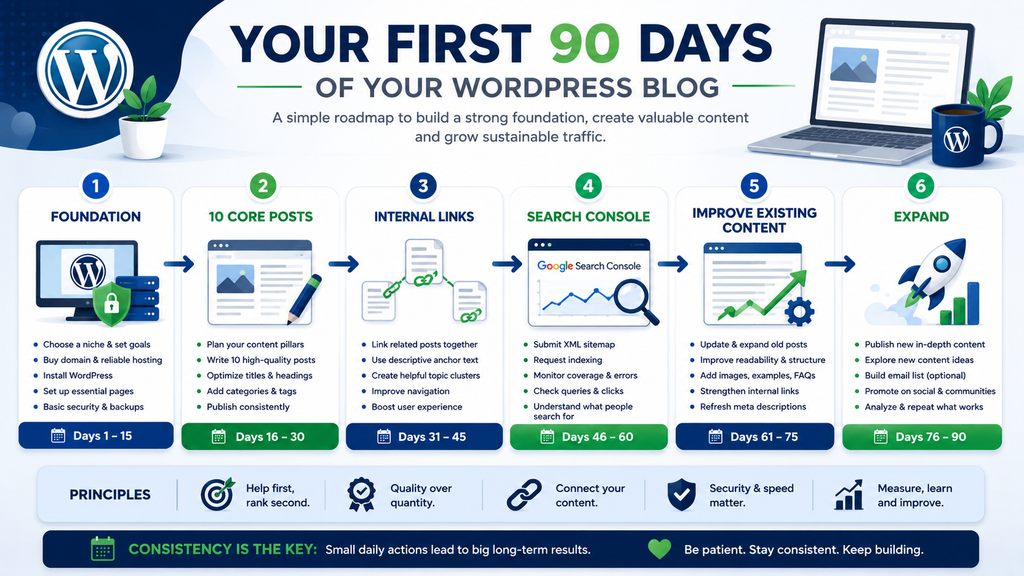
Create a simple 90-day plan.
You do not need ninety articles. Choose a sustainable publishing frequency and identify the subjects beforehand. Two excellent articles per week can be more realistic than promising yourself one article every day and quitting after three weeks.
Divide topics into clusters. Research what readers actually struggle with. Look at support forums, Search Console once data becomes available, comments, documentation, product changes, and problems you personally encounter.
Leave room for timely content as well. WordPress changes. Plugins release important updates. Security issues emerge. Search features evolve.
A plan should give you direction without preventing you from covering something genuinely important.
Do Not Expect Traffic to Arrive on a Schedule
This may be the most important expectation to set before starting.
A technically perfect WordPress installation does not automatically receive visitors. Neither does publishing fifty posts.
Search visibility develops unevenly. Some pages may gain impressions relatively quickly. Others may take much longer. Some may never attract meaningful search traffic because the subject has little demand, the competition is stronger, or another page satisfies the query better.
That uncertainty is part of publishing.
Avoid measuring the success of a three-month-old blog using the traffic of a website that has published consistently for ten years.
Instead, watch leading indicators. Is your content library improving? Are pages being crawled? Are impressions appearing? Are visitors reading related articles? Are you finding topics where your experience can add something competitors do not provide?
Traffic matters, but early progress is broader than a visitor counter.
Do Not Publish Hundreds of Weak Articles Just to Look Established
More URLs do not automatically create a stronger website.
Publishing at scale can be useful when every page serves a genuine purpose. Publishing hundreds of thin, repetitive articles simply creates hundreds of pages that need maintenance.
This becomes especially relevant with AI-assisted publishing. Modern tools can dramatically accelerate research, outlining, editing, and drafting. That can be valuable. However, the ability to produce twenty articles in the time previously required for two does not mean publishing twenty is automatically the right decision.
Review every article as an editor.
Does it answer a real question? Is anything missing? Are claims accurate? Does the article repeat what is already available everywhere else? Can you add examples, testing, screenshots, firsthand observations, or clearer instructions?
Use tools to improve your work, not to remove judgment from publishing.
Monetization Should Follow Value, Not Replace It
Advertising, affiliate links, sponsored content, digital products, memberships, and services can all generate revenue from a WordPress website.
However, monetization works much better when there is something worth monetizing.
A website overloaded with advertising before it has an audience can damage the reading experience. Likewise, recommending products purely because they offer attractive commissions can damage trust.
Think about monetization early enough that your business model makes sense, but do not allow it to dictate every sentence.
If advertising is your long-term goal, create a clean site with substantial original content, transparent navigation, appropriate policy pages, and a good user experience.
If affiliate marketing is your goal, recommend products because they genuinely fit the reader’s problem and disclose commercial relationships appropriately.
Trust is much harder to rebuild than traffic.
Learn Basic WordPress Maintenance
Launching the blog is the beginning of maintenance, not the end.
WordPress core evolves. Plugins receive updates. Themes change. PHP versions eventually reach end of life. Links break. Content becomes outdated. Backups need verification. Security issues appear.
Schedule regular maintenance.
Check updates, backups, security notices, broken functionality, forms, performance, Search Console reports, and important pages. Review old articles and update information when necessary.
WordPress supports automatic updates for plugins and themes, but the official documentation also recommends maintaining regular automatic backups so you can recover if an update causes problems.
Maintenance does not need to consume your week. A consistent routine is usually far easier than waiting until several years of neglected problems accumulate.
Keep Ownership of Important Accounts
This sounds obvious until a website grows.
Use accounts you control for the domain registrar, hosting, Search Console, analytics, email services, CDN, payment systems, and other important infrastructure.
If someone helps build your website, they can receive appropriate access without becoming the sole owner of critical accounts.
Keep recovery information current and store credentials securely. Enable two-factor authentication where appropriate.
Also document essential services. If you return to the website six months later, you should know where the domain is registered, where DNS is managed, which company hosts the site, where backups are stored, and which paid subscriptions need renewal.
A simple private record can save enormous frustration later.
Know When You Actually Need a Developer
One attraction of WordPress is that you can accomplish a great deal without writing code.
That does not mean every problem should be solved with another plugin.
As your website grows, you may eventually need custom functionality, server optimization, database troubleshooting, security investigation, complex migrations, custom theme work, or integration with external systems.
At that point, professional help can be cheaper than spending several days experimenting on a production website.
Learn enough to understand your system and make informed decisions. You do not need to personally become the expert responsible for every layer.
The same principle applies to legal, tax, accounting, and specialized security questions. Knowing when to ask an expert is part of running a serious website.
Mistakes I Would Avoid on a New WordPress Blog
If I were starting another WordPress blog today, I would avoid several habits that look productive but usually create unnecessary work.
I would not buy ten premium tools before publishing. I would not install plugins just because they appear on a “must-have” list. I would not spend a week designing the homepage while the blog remained empty.
I would also avoid creating dozens of categories and tags, changing permalink structures after publishing heavily, ignoring backups, using weak administrator credentials, and postponing Search Console setup until I needed it.
Most importantly, I would not publish content merely to increase the post count.
A website with thirty articles that genuinely solve problems can have a much stronger foundation than a website with three hundred articles written only to target keywords.
A Practical Pre-Launch WordPress Checklist
Before announcing your new blog, work through the basics.
Make sure the domain resolves correctly and HTTPS works throughout the website. Confirm that your preferred URL structure is established before publishing heavily.
Check the website on desktop and mobile. Test navigation, contact forms, search, category archives, important policy pages, and your 404 page.
Verify that backups are working and understand how you would restore one.
Update WordPress, your theme, and plugins. Delete software you are not using.
Create your essential pages and primary navigation. Make sure search engines are not accidentally discouraged from indexing the site through WordPress’s visibility settings.
Set up Search Console and your preferred analytics solution if you need one. Verify your sitemap.
Finally, read your first articles as a visitor rather than an administrator. Check images, headings, links, spelling, mobile readability, and whether each article actually delivers what its title promises.
Then publish.
You can improve almost everything later.
Frequently Asked Questions
Is WordPress still worth using for a new blog?
Yes. WordPress remains a flexible publishing platform that can support a small personal blog as well as much more complex websites. Whether it is the best choice depends on how much control you want and how comfortable you are managing hosting, updates, security, and maintenance.
How much money do I need to start a WordPress blog?
There is no universal amount. A basic self-hosted blog mainly requires a domain and hosting, while premium themes, plugins, email services, backup storage, and other tools are optional. Calculate renewal costs rather than looking only at introductory prices.
Do I need coding skills to start WordPress?
No. Most basic WordPress administration can be handled through the dashboard and hosting interface. Basic knowledge of HTML, CSS, PHP, databases, and server administration becomes useful as you tackle more advanced customization or troubleshooting, but it is not required to publish your first blog.
How many plugins should a WordPress blog have?
There is no ideal number. Use the smallest collection that provides the functionality you genuinely need. Quality, maintenance, compatibility, and purpose matter more than the raw plugin count. Delete plugins you no longer use and keep active software updated.
Should I buy a premium WordPress theme immediately?
Not necessarily. A well-maintained free theme may be enough for a new blog. Consider paying for a theme when premium functionality, support, or customization will solve a specific need rather than purchasing one because a demo looks impressive.
How many posts should I publish before launching?
There is no required number. Having several useful articles gives first-time visitors something to explore, but quality matters more than reaching an arbitrary launch target. A focused collection of five to ten strong articles can provide an excellent starting point.
How long does it take Google to index a new WordPress blog?
There is no guaranteed timeline. Google must discover and crawl URLs before deciding whether to index them, and not every crawled page is necessarily indexed. A technically accessible site, useful original content, internal links, and a valid sitemap provide a much better foundation than repeatedly requesting indexing.
Do I need Google Search Console?
You can run WordPress without it, but Search Console is extremely useful if organic Google traffic matters to you. It can provide information about indexing, search visibility, queries, pages, and technical issues that would otherwise be difficult to see.
Can I make money from a new WordPress blog?
Potentially, yes, but revenue should not be assumed. Advertising, affiliate marketing, services, memberships, sponsorships, and digital products are possible models. Results depend on audience, content, traffic, niche, trust, execution, and many other factors.
What is the biggest mistake new WordPress bloggers make?
Trying to solve future problems before creating present value is a major one. Beginners often spend heavily on tools, design, plugins, and optimization while neglecting the difficult part: consistently publishing useful content that gives readers a reason to return.
Build the Foundation Before Chasing Growth
Starting a WordPress blog is easier than ever. Building one that remains useful, secure, maintainable, and worth visiting still requires patience.
Get the fundamentals right first. Choose a domain that gives you room to grow. Buy appropriate hosting rather than the largest plan. Keep your theme simple. Install plugins because you need them, not because somebody included them in a checklist.
Protect the site with updates and recoverable backups. Think about performance before adding unnecessary features. Build a logical content structure and start internal linking early.
Above all, focus on the reason the website exists: the reader.
You do not need 100 posts before your blog matters. You do not need an expensive server. You do not need twenty premium plugins. You certainly do not need a perfect design.
You need a stable foundation and content that helps someone do something better, faster, safer, or with greater understanding.
Build that first. Growth has somewhere to stand afterward.
⚠️ Disclaimer and Source Hygiene
This article provides general educational information about starting and managing a WordPress website. Hosting configurations, WordPress requirements, security practices, search systems, legal obligations, advertising requirements, and third-party services can change over time.
Technical recommendations in this guide were checked against authoritative WordPress documentation available when the article was updated. Always verify current requirements before changing a production website. For legal, financial, security, or business matters requiring professional judgment, consult an appropriately qualified professional.
🔔 For more tutorials like this, consider subscribing to our blog.
📩 Do you have questions or suggestions? Leave a comment or contact us!
🏷️ Tags: wordpress blogging, start a blog, wordpress guide, blogging tips, seo basics, blog setup, online business, content strategy, blog monetization, beginner blogging
📢 Hashtags: #WordPressBlog #StartBlogging #BloggingTips #SEOGuide #OnlineBusiness #ContentCreation #DigitalMarketing #MakeMoneyOnline #BlogSetup #WebsiteTips
📚 Sources and References
- WordPress.org Official Documentation
- Google Search Central SEO Guidelines
- HubSpot Blogging Resources
- Neil Patel Digital Marketing Blog
- Moz SEO Learning Center
The technical recommendations in this article prioritize first-party documentation rather than promotional hosting or affiliate sources.
WordPress.org Requirements – Current recommended PHP, database, HTTPS, and server requirements.
WordPress Advanced Administration: Before You Install – Official preparation and server guidance for WordPress installations.
WordPress Hardening Guide – Official guidance covering updates, trusted plugins, backups, access, and WordPress security practices.
WordPress Backup Documentation – Official guidance covering WordPress files, databases, backup sets, and restoration.
WordPress Plugin and Theme Auto-Updates – Documentation about maintaining plugins and themes and preparing backups for automatic updates.
🕊️ Secondary Sources and Testimonials
- Experienced bloggers’ case studies
- Industry expert insights
- Online marketing communities and forums
This guide intentionally relies primarily on official WordPress technical documentation for factual platform requirements. Practical recommendations about content planning, plugin restraint, site organization, maintenance, and publishing workflow are editorial guidance intended to help new WordPress users avoid common operational problems.