
Table of Contents
Learn how to create a clear and compliant privacy policy for your WordPress website. This guide explains what to include, why it matters, and how to protect user data while meeting legal requirements like GDPR and global privacy standards.
Understanding the Importance of a Privacy Policy
What Is a Privacy Policy?
A privacy policy is a legal document that explains how your website collects, uses, stores, and protects user data. It informs visitors about their rights and your responsibilities regarding personal information.
Why Every WordPress Website Needs One
Every website that collects user data must have a privacy policy. This includes blogs, eCommerce sites, and portfolios. Even basic tools like contact forms or analytics collect user information.
Legal Requirements Across Different Regions
Privacy laws vary worldwide, but many share similar principles. GDPR in Europe, CCPA in California, and other regulations require transparency and user consent.
Building Trust with Your Visitors
A well-written privacy policy builds credibility. Visitors feel safer sharing their information when they understand how it will be used.
Types of Data Your Website May Collect
Personal Information
This includes names, email addresses, phone numbers, and any data users submit through forms.
Technical Data
Websites often collect IP addresses, browser types, device information, and operating systems.
Behavioral Data
Tracking tools monitor how users interact with your site. This includes pages visited, time spent, and clicks.
Cookies and Tracking Technologies
Cookies store small pieces of data in a user’s browser. They help improve user experience but must be disclosed.
How WordPress Websites Collect Data
Contact Forms
Plugins like Contact Form 7 or WPForms collect personal data submitted by users.
Comments Section
WordPress collects user names, email addresses, and IP addresses when visitors leave comments.
Analytics Tools
Google Analytics and similar tools track user behavior and traffic sources.
Plugins and Third-Party Services
Many plugins collect data for functionality. Examples include security plugins, SEO tools, and marketing integrations.
How to Use Collected Data Responsibly
Improving User Experience
Data helps you understand visitor behavior and optimize your website.
Communication and Marketing
Emails collected can be used for newsletters or updates, but only with user consent.
Security and Fraud Prevention
Tracking IP addresses and login activity helps protect your website from threats.
Legal Compliance
Using data responsibly ensures compliance with global regulations.
Data Storage and Protection Methods

Secure Hosting Environment
Choose a reliable hosting provider that offers SSL certificates and strong security measures.
Encryption Practices
Sensitive data should be encrypted both in transit and at rest.
Access Control
Limit access to data only to authorized personnel.
Regular Backups
Frequent backups protect data from loss or cyberattacks.
User Rights and Data Control
Right to Access
Users can request access to their personal data.
Right to Correction
Users can request corrections to inaccurate information.
Right to Deletion
Users can ask for their data to be deleted.
Right to Withdraw Consent
Users can opt out of data collection at any time.
Cookies Policy Explained
What Are Cookies?
Cookies are small files stored on a user’s device to improve functionality and personalization.
Types of Cookies
- Essential cookies
- Performance cookies
- Functional cookies
- Advertising cookies
Managing Cookies
Users can disable cookies through browser settings.
Third-Party Services and Data Sharing
When Data Is Shared
Data may be shared with analytics providers, payment processors, or marketing tools.
Ensuring Third-Party Compliance
Only work with services that comply with privacy regulations.
Examples of Common Third Parties
- Google Analytics
- Mailchimp
- Stripe or PayPal
How to Create a Privacy Policy in WordPress
Using Built-in WordPress Tools
WordPress provides a default privacy policy generator in settings.
Customizing Your Policy
You should tailor the policy based on your plugins and services.
Using Privacy Policy Generators
Online tools can help create legally compliant policies.
Adding the Page to Your Website
Place the privacy policy link in your footer for easy access.
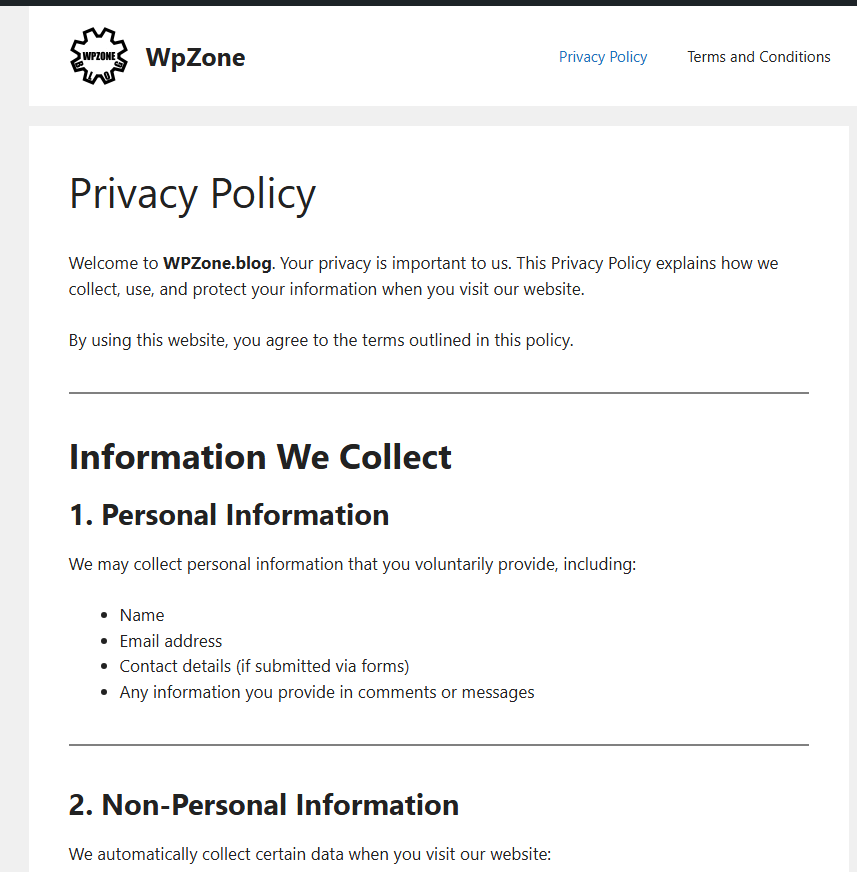
Sample Privacy Policy Template
Introduction
We value your privacy and are committed to protecting your personal data.
Information We Collect
We may collect personal and technical data when you use our website.
How We Use Information
Data is used to improve services, communicate, and ensure security.
Data Protection
We implement security measures to protect your data.
Your Rights
You have rights to access, modify, or delete your data.
Contact Information
For privacy concerns, contact us via email.
Best Practices for Maintaining Your Privacy Policy
Keep It Updated
Review your policy regularly when adding new features or plugins.
Be Transparent
Clearly explain what data you collect and why.
Use Simple Language
Avoid legal jargon. Make it easy for users to understand.
Ensure Accessibility
Make sure the policy is easy to find on your website.
Common Mistakes to Avoid
Copy-Pasting Without Customization
Every website is different. Customize your policy accordingly.
Ignoring Legal Requirements
Failing to comply can lead to penalties.
Hiding the Policy
Users should easily find your privacy policy.
Not Updating Changes
Outdated policies can cause legal issues.
Frequently Asked Questions
What is a privacy policy?
A privacy policy explains how a website collects, uses, and protects user data.
Is a privacy policy legally required?
Yes, if your website collects any personal data.
Where should I place my privacy policy?
Typically in the website footer and during account registration.
Do blogs need a privacy policy?
Yes, especially if they use analytics or collect emails.
What is GDPR?
A European regulation that protects user data and privacy.
Can I use a free privacy policy generator?
Yes, but always review and customize it.
How often should I update my policy?
Whenever you change how you collect or use data.
Do cookies require consent?
Yes, especially under GDPR and similar laws.
What happens if I don’t have a privacy policy?
You risk fines and loss of user trust.
Can users request their data to be deleted?
Yes, most regulations give users this right.
Protecting User Privacy
A privacy policy is more than a legal requirement. It reflects your commitment to transparency and user trust. By clearly explaining how data is handled, you create a safer and more professional online presence.
⚠️ Disclaimer and Source Hygiene
This article is based on publicly available information, including official reports, post-event interviews, and media coverage. It is provided for informational and entertainment purposes only and should not be considered medical, legal, or professional advice. Any opinions mentioned belong to the individuals quoted or are part of general journalistic analysis. Details such as results, injuries, and future developments may change and are subject to official confirmation.
🔔 For more tutorials like this, consider subscribing to our blog.
📩 Do you have questions or suggestions? Leave a comment or contact us!
🏷️ Tags: privacy policy wordpress, wordpress privacy page, gdpr compliance wordpress, website privacy policy, wordpress legal pages, data protection wordpress, cookies policy wordpress, wordpress security, user data protection, wordpress guide
📢 Hashtags: #PrivacyPolicy #WordPressGuide #GDPR #WebsiteSecurity #DataProtection #BloggingTips #WordPressTips #OnlinePrivacy #WebDevelopment #DigitalSafety
📚 Sources and References
- GDPR Official Documentation
- WordPress.org Privacy Guidelines
- European Commission Data Protection Resources
🕊️ Secondary Sources and Testimonials
- Legal blogs on website compliance
- Developer forums discussing WordPress privacy best practices
- User feedback on trust and transparency in websites