
Table of Contents
The “More than 4 preconnect connections” warning means your website prepares too many external network connections before confirming they are needed. Learn how to inspect the network dependency tree, remove unnecessary resource hints, optimize WordPress plugins, and preserve only connections that improve real loading performance.
Understanding the Network Dependency Tree Warning
Website performance tools often present warnings that sound more serious than they actually are.
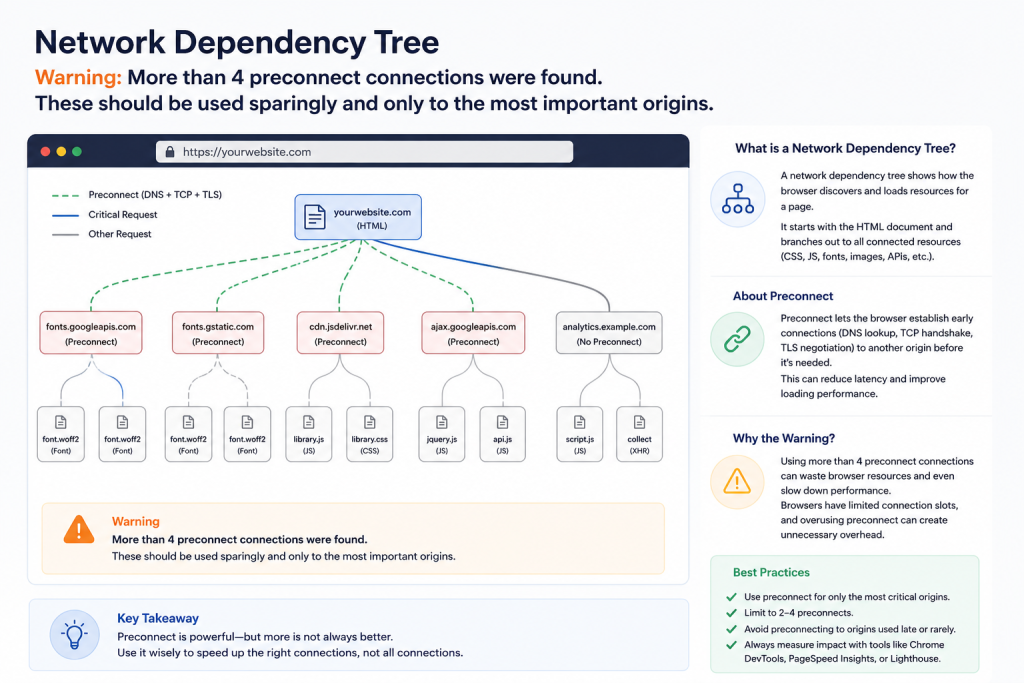
One example appears inside the Network Dependency Tree insight in Chrome DevTools, PageSpeed Insights, or Lighthouse:
More than 4 preconnect connections were found. These should be used sparingly and only to the most important origins.
This warning does not necessarily mean your website is broken. It also does not mean every preconnect tag must be removed. Instead, Chrome is telling you that the page may be preparing too many network connections before the browser knows whether those connections will actually be useful.

A correctly configured preconnect hint can improve loading speed.
An unnecessary preconnect hint may consume networking resources without providing a measurable benefit.
The goal is therefore not to eliminate preconnect completely. The goal is to keep only the most valuable connections.
For most WordPress websites, two to four carefully selected preconnect origins are usually enough.
The best candidates commonly include:
- A critical font provider.
- A separate content delivery network.
- A server hosting an essential above-the-fold resource.
- A required third-party service used immediately during page loading.
Analytics systems, advertising networks, social widgets, video embeds, tracking scripts, chat tools, and optional plugins usually should not all receive immediate preconnect priority.
What the Network Dependency Tree Represents
A browser does not download every website file at the same moment.
It begins with the main HTML document.
After receiving that document, it discovers additional resources such as:
- CSS stylesheets.
- JavaScript files.
- Fonts.
- Images.
- Advertising scripts.
- Analytics scripts.
- Embedded videos.
- Social media widgets.
- API requests.
- Cookie consent resources.
- Content delivery network files.
Some resources lead to additional requests.
For example, the HTML document may load a stylesheet. That stylesheet may then request a font. A JavaScript file may load another JavaScript library. An advertising script may connect to several advertising and measurement domains.
The resulting structure forms a dependency tree.
A simplified dependency tree might look like this:
Main HTML document
├── Main stylesheet
│   ├── Local font
│   └── Background image
├── Theme JavaScript
│   └── Slider library
├── Google Fonts stylesheet
│   └── Font files
├── Google Analytics
│   └── Measurement request
└── Advertising script
    ├── Ad delivery server
    ├── Measurement server
    └── Consent service
Every additional level can introduce waiting time.
Chrome’s Network Dependency Tree insight helps identify long request chains, unnecessary dependencies, late-discovered resources, and inefficient connection hints.
Chrome describes the purpose of this insight as reducing the length of critical request chains, reducing resource sizes, and delaying resources that are not needed immediately.
What Preconnect Means
A preconnect is a resource hint added to a page.
It usually appears inside the document’s <head> section:
<link rel="preconnect" href="https://example.com">
This instruction tells the browser:
This page expects to request something from this origin soon. Begin preparing the network connection now.
Without preconnect, the browser normally waits until it discovers an actual resource request.
At that point, it may need to complete several steps:
- Resolve the domain through DNS.
- Establish a TCP connection.
- Perform a TLS negotiation for HTTPS.
- Prepare the connection for the resource request.
- Request and download the resource.
Preconnect starts some of that work earlier.
The W3C Resource Hints specification describes preconnect as a signal that an origin will be used to fetch required resources. It allows the browser to begin DNS resolution, connection establishment, and optional TLS negotiation before the resource request occurs.
This early preparation can reduce latency, especially when:
- The origin is located far from the visitor.
- TLS negotiation takes time.
- The visitor uses a mobile connection.
- A critical font comes from another domain.
- A hero image comes from an external CDN.
- An essential script is hosted by a third party.
However, the browser must dedicate resources to preparing that connection.
That is why preconnect should remain selective.
What an Origin Means
An origin is not simply a domain name.
In browser networking, an origin normally includes:
- The protocol.
- The hostname.
- The port.
These addresses represent different origins:
https://example.com
http://example.com
https://cdn.example.com
https://example.com:8443
Even when two addresses belong to the same company, the browser may treat them as separate origins.
A typical WordPress website could communicate with origins such as:
https://wpzone.blog
https://fonts.googleapis.com
https://fonts.gstatic.com
https://www.googletagmanager.com
https://pagead2.googlesyndication.com
https://googleads.g.doubleclick.net
https://www.google-analytics.com
https://connect.facebook.net
https://www.youtube.com
If the page contains a preconnect hint for each service, Chrome may report more than four preconnect connections.
Why Chrome Warns About More Than Four Preconnects

Preconnect is stronger than a simple DNS lookup.
It can cause the browser to prepare a full connection before an actual resource request exists.
That preparation may include:
- DNS resolution.
- TCP handshake activity.
- TLS certificate negotiation.
- Socket allocation.
- Connection state management.
- Radio activity on mobile devices.
- Additional data transfer.
Each prepared connection competes for browser and network resources.
When too many preconnect hints appear, several problems may occur.
Important Connections May Lose Priority
The browser must process multiple hints.
When an optional advertising, social, analytics, or video origin appears before a critical CDN origin, the less important connection may be prepared first.
The critical origin may then receive little or no benefit from its own preconnect instruction.
Some Connections May Never Be Used
- A page may preconnect to a video provider even though the visitor never starts the video.
- It may preconnect to a social network even though the share widget remains below the fold.
- It may prepare an advertising connection even when consent has not been granted.
- It may connect to a plugin vendor even though that plugin feature does not appear on the current page.
- In these situations, the connection preparation becomes wasted work.
Mobile Connections Have Limited Resources
Mobile visitors may use:
- Slower processors.
- Unstable connections.
- High-latency networks.
- Data-saving modes.
- Limited battery power.
Opening several unnecessary secure connections can create more overhead for these users.
Excessive Hints Can Compete with Real Requests
The browser may already need to download:
- The page stylesheet.
- The logo.
- The featured image.
- The primary JavaScript bundle.
- Critical fonts.
Too many speculative connections may compete with these confirmed resources.
Hints Can Become Stale
Themes, plugins, performance tools, and manually inserted snippets may continue generating old preconnect tags after a service has been removed. The result is a connection hint to a domain that the page no longer uses.
Web.dev warns that excessive preconnect hints can still consume resources, including bandwidth associated with TLS certificate processing. It recommends using them carefully.
MDN also explains that preconnecting to many third-party domains can become counterproductive. It recommends reserving preconnect for the most critical origins and using DNS prefetch for less important ones.
Is More Than Four a Strict Browser Limit?
No.
The warning does not mean browsers refuse to process a fifth preconnect.
It also does not establish four as a universal technical limit for every website.
The number should be treated as a performance guideline.
A website may occasionally have a valid reason to use five connections. Another website may perform best with only one.
The correct number depends on:
- Which resources are critical.
- Where those resources are hosted.
- How quickly the browser discovers them.
- Whether the connections are reused.
- Whether the origins are used on every page.
- Whether the resources affect above-the-fold rendering.
- Whether testing shows a measurable improvement.
The message encourages prioritization rather than blind deletion.
Is This Warning Affecting the Lighthouse Score?
The warning may appear as an insight or diagnostic rather than a direct scoring audit.
Chrome began moving Lighthouse performance recommendations toward an insights-based presentation, with related findings displayed under Insights and unchanged audits remaining under Diagnostics. Therefore, the warning may not reduce your score through a simple fixed-point penalty.
However, the underlying behavior can influence performance metrics indirectly.
Possible effects include:
- Slower Largest Contentful Paint.
- Delayed critical requests.
- Increased network contention.
- More third-party activity.
- Higher page loading overhead.
- Delayed font or image delivery.
- Reduced performance on slow mobile connections.
Removing unnecessary preconnect hints does not guarantee a higher score.
A successful optimization should improve the actual loading sequence, not simply remove a warning.
How Preconnect Can Improve WordPress Performance
WordPress pages often depend on external services.
A properly selected preconnect can reduce the time required to access an essential origin.
External Fonts
Suppose a website loads Google Fonts through:
https://fonts.googleapis.com
The stylesheet then references font files from:
https://fonts.gstatic.com
A connection to the font file origin can be useful when those fonts appear above the fold.
External Content Delivery Network
A website may serve its logo, hero image, CSS, or JavaScript from:
https://cdn.example.com
If those assets are essential, preconnecting to the CDN can help.
Critical Third-Party Script
A business may use an external service that is genuinely required for the first visible interface.
Examples could include:
- A checkout system.
- An authentication provider.
- A required application API.
- A critical personalization service.
Preconnect may help when the service must respond immediately.
Cross-Origin Hero Media
A hero image or poster may come from an external media origin.
If that image becomes the Largest Contentful Paint element, preparing its origin early may improve the result.
Web.dev notes that preconnect can help when you know the origin that will be required, even when the exact resource URL is not yet known.
When Preconnect Does Not Help
Preconnect provides little value in several situations.
Same-Origin Resources
A preconnect to your own primary domain is usually unnecessary.
The browser must already connect to that origin to retrieve the HTML document.
MDN states that preconnect does not benefit same-origin requests because the connection is already open.
An unnecessary example would be:
<link rel="preconnect" href="https://yourwebsite.com">
When the current page is already loaded from https://yourwebsite.com, this hint generally adds no useful preparation.
Resources Loaded Much Later
A preconnect is most valuable when the real request follows shortly afterward.
A connection prepared at the beginning of the page may close before a resource is requested several seconds later.
For late interactions, connecting early may waste work.
Optional Widgets
A social feed, map, chat box, or video embed located far below the fold may not need immediate connection preparation.
Lazy loading or interaction-based loading usually makes more sense.
Conditional Resources
Some origins are only used after:
- Cookie consent.
- Login.
- A button click.
- Product selection.
- Video playback.
- Form interaction.
- Opening a modal.
Preconnecting before the condition occurs may provide no value.
Unused Plugin Domains
A plugin can add a resource hint globally even when its feature appears only on one page.
This is a common WordPress problem.
Preconnect Versus DNS Prefetch
Preconnect and DNS prefetch are related, but they are not identical.
Preconnect
Example:
<link rel="preconnect" href="https://cdn.example.com">
Preconnect may prepare:
- DNS resolution.
- TCP connection.
- TLS negotiation.
It performs more work and may save more time.
However, it also has a higher cost when the origin is not used.
DNS Prefetch
Example:
<link rel="dns-prefetch" href="//cdn.example.com">
DNS prefetch asks the browser to resolve the domain name early.
It does not necessarily create the full TCP and TLS connection.
Therefore, DNS prefetch is lighter.
Which One Should You Choose?
Use preconnect when:
- The origin is important.
- The request will happen very early.
- The resource affects initial rendering.
- You have evidence that connection setup is causing delay.
- The origin is used consistently.
Use DNS prefetch when:
- The origin is likely to be used.
- The request is not immediately critical.
- You want a lighter hint.
- The resource is below the fold.
- The origin belongs to analytics, advertising, media, or an optional integration.
Avoid both when:
- The origin is not used.
- The request occurs only after user interaction.
- The plugin or service no longer exists.
- The domain is already the page’s own origin.
- Testing shows no performance benefit.
Preconnect Versus Preload
These two hints solve different problems.
Preconnect Targets an Origin
<link rel="preconnect" href="https://cdn.example.com">
This tells the browser where a future request will go.
It does not identify the exact file.
Preload Targets a Specific Resource
<link
    rel="preload"
    href="/fonts/site-font.woff2"
    as="font"
    type="font/woff2"
    crossorigin
>
This tells the browser exactly which resource should be fetched early.
MDN describes preload as a method for declaring resources that will be needed very soon, allowing the browser to start loading them before its regular rendering process discovers them.
Choosing Between Them
Use preconnect when you know the external origin but not the final resource.
Use preload when you know the exact critical resource.
For example:
- External API with changing URLs: preconnect may fit.
- Exact locally hosted font: preload may fit.
- Exact hero image: preload or fetch priority may fit.
- Optional analytics endpoint: neither may be necessary.
Do not replace every preconnect with preload.
Excessive preload instructions can create their own performance problems by forcing the browser to download too many resources early.
Preconnect Versus Prefetch
Prefetch is usually designed for future navigation or later use.
Example:
<link rel="prefetch" href="/next-page.css">
A browser may fetch the resource with lower priority because it could be needed later.
Preconnect prepares a connection. Prefetch requests a resource. The two instructions should not be treated as interchangeable.
Preconnect Versus Fetch Priority
Fetch Priority helps communicate the relative importance of a specific request.
An example for a critical image is:
<img
    src="/images/hero.webp"
    alt="WordPress performance dashboard"
    width="1200"
    height="630"
    fetchpriority="high"
>
This does not prepare a separate origin by itself. Instead, it helps the browser prioritize the image request.
For a same-origin hero image, fetchpriority="high" may be more appropriate than adding a same-origin preconnect.
Why WordPress Websites Often Generate Too Many Preconnects
WordPress creates pages from many independent components.
Each component may add its own optimization hint. The final page can contain duplicate or excessive instructions even when every developer intended to improve performance.
WordPress Core
WordPress includes resource hint support.
It can output DNS prefetch, preconnect, prefetch, and prerender relationships through its resource hint system.
WordPress added core support for resource hints in WordPress 4.6, while WordPress 4.7 expanded attribute handling for those hints.
Themes
A theme may add preconnect hints for:
- Google Fonts.
- Adobe Fonts.
- Theme asset servers.
- Icon libraries.
- External JavaScript libraries.
Performance Plugins
Optimization plugins may automatically add hints after scanning the page.
Problems appear when two plugins optimize the same origin.
Font Plugins
A font plugin can add connections to both the stylesheet origin and the font file origin.
A theme may add the same hints again.
Google Services
Google-related plugins can introduce origins for:
- Google Fonts.
- Google Analytics.
- Google Tag Manager.
- Google Ads.
- AdSense.
- Google Maps.
- YouTube.
- reCAPTCHA.
These services do not all need preconnect priority.
Advertising Plugins
Advertising tools may insert connection hints for ad delivery, measurement, consent, and reporting origins.
Advertising networks also create additional connections dynamically.
Cookie Consent Systems
Some consent management platforms prepare connections to vendor domains before consent status is fully resolved.
Social Media Plugins
Share buttons, embedded feeds, tracking pixels, and social login tools may add hints for Facebook, X, Instagram, LinkedIn, Pinterest, or TikTok.
Video and Map Embeds
YouTube, Vimeo, and Google Maps may add several external origins.
A static preview image or facade can often delay these connections until interaction.
Custom Code
A developer may manually add preconnect tags inside:
header.php.functions.php.- A child theme.
- A GeneratePress Element.
- A code snippets plugin.
- A must-use plugin.
- A custom optimization plugin.
- A tag manager container.
- Cloudflare settings.
Manual hints may remain after the original optimization is no longer needed.
How to Find Every Preconnect Connection
Before changing WordPress code, create an accurate inventory.
Inspect the Page Source
Open the affected page in Chrome.
Right-click and select:
View page source
Search for:
rel="preconnect"
Also search for:
rel='preconnect'
Record every origin.
A page might contain:
<link rel="preconnect" href="https://fonts.googleapis.com">
<link rel="preconnect" href="https://fonts.gstatic.com" crossorigin>
<link rel="preconnect" href="https://www.googletagmanager.com">
<link rel="preconnect" href="https://pagead2.googlesyndication.com">
<link rel="preconnect" href="https://googleads.g.doubleclick.net">
<link rel="preconnect" href="https://www.youtube.com">
This page has six preconnect hints.
However, the source alone does not reveal which hints are valuable.
Use Chrome DevTools Elements
- Open DevTools and select the Elements panel.
- Expand the
<head>element. - Search for
preconnect. - This method can reveal hints inserted dynamically through JavaScript.
Use the Network Panel
- Open Chrome DevTools.
- Select Network.
- Enable Disable cache while DevTools remains open.
- Reload the page.
- Review the Domain, Initiator, Priority, and Waterfall information.
Ask these questions for every preconnected origin:
- Was the origin actually used?
- How soon was its first request?
- Did it deliver a critical resource?
- Did the connection finish before the real request?
- Was the connection used for an above-the-fold asset?
- Did another origin deserve higher priority?
Use the Performance Panel
- Open DevTools.
- Select Performance.
- Start a page-load recording.
- Reload the page.
- Open the Insights section.
- Review the Network Dependency Tree.
Recent versions of Chrome DevTools show used and unused preconnected origins inside this insight. Chrome announced this expanded preconnected-origin information for the Network Dependency Tree in Chrome 138.
Run Lighthouse
Open DevTools. Select Lighthouse.
Choose:
- Mobile.
- Performance.
- Clear storage when appropriate.
Run the analysis.
Repeat the test several times because network and server conditions vary.
Test PageSpeed Insights
Test the public URL through PageSpeed Insights.
Compare:
- Mobile laboratory data.
- Desktop laboratory data.
- Available field data.
- Largest Contentful Paint.
- First Contentful Paint.
- Total Blocking Time.
- Network dependency findings.
Do not judge an optimization from a single score.
How to Decide Which Preconnects to Keep
A useful decision process should focus on timing and importance.
Keep Origins Used Almost Immediately
A strong candidate receives an important request shortly after the HTML begins loading.
Examples include:
- A font required for the visible heading.
- A CDN delivering the hero image.
- A server delivering the primary stylesheet.
- A critical external application API.
Keep Origins Supporting the Largest Contentful Paint Element
Identify the LCP element.
It may be:
- A hero image.
- A featured image.
- A large heading.
- A banner.
- A content image.
- A video poster.
Determine which origin provides its required assets.
That origin deserves stronger consideration than an analytics or social media origin.
Keep Only Origins Used on the Current Page Type
- A WooCommerce checkout page may need a payment provider.
- A normal blog article does not.
- A contact page may need reCAPTCHA.
- A homepage without a form may not.
- Resource hints should follow page context whenever possible.
Remove Unused Origins
An unused preconnect offers no download benefit. Remove it.
Downgrade Secondary Origins
Replace lower-priority preconnects with DNS prefetch when early DNS resolution remains useful.
Delay Interaction-Based Services
Maps, videos, chat tools, and social widgets can often load after interaction.
Compare Before and After Results
Keep an origin only when it offers a plausible or measurable benefit.
A Practical Four-Origin Priority Model
A useful starting model is to divide external origins into four priority levels.
Priority One: Critical Visual Resources
These origins deliver resources required to display the first screen.
Examples:
- Hero image CDN.
- Critical font file server.
- Main stylesheet CDN.
These are the strongest preconnect candidates.
Priority Two: Critical Functionality
These origins provide essential functionality used immediately.
Examples:
- Authentication API.
- Required application API.
- Checkout provider on checkout pages.
Use preconnect only on relevant pages.
Priority Three: Secondary Page Features
These origins support features that appear after the main content.
Examples:
- Video player.
- Map.
- Comments service.
- Social share scripts.
- Chat widget.
Prefer DNS prefetch, lazy loading, or interaction-based loading.
Priority Four: Measurement and Advertising
These origins support:
- Analytics.
- Advertising.
- Conversion measurement.
- Retargeting.
- Heatmaps.
They may be important for the business, but they are not usually responsible for rendering the visible page.
Do not automatically give every measurement endpoint preconnect priority.
Basic HTML Fix
Suppose your site currently outputs:
<link rel="preconnect" href="https://fonts.googleapis.com">
<link rel="preconnect" href="https://fonts.gstatic.com" crossorigin>
<link rel="preconnect" href="https://www.googletagmanager.com">
<link rel="preconnect" href="https://www.google-analytics.com">
<link rel="preconnect" href="https://pagead2.googlesyndication.com">
<link rel="preconnect" href="https://www.youtube.com">
A more selective setup might be:
<link rel="preconnect" href="https://fonts.gstatic.com" crossorigin>
<link rel="dns-prefetch" href="//www.googletagmanager.com">
<link rel="dns-prefetch" href="//pagead2.googlesyndication.com">
The YouTube hint can be removed when no video appears above the fold.
The Google Analytics origin may not need a separate hint when Tag Manager controls the request.
The Google Fonts stylesheet origin may or may not need preconnect, depending on how fonts are loaded.
The correct final setup depends on the real page waterfall.
Understanding the Crossorigin Attribute
Cross-origin fonts often require CORS-compatible requests.
A common hint is:
<link rel="preconnect" href="https://fonts.gstatic.com" crossorigin>
The crossorigin attribute tells the browser to prepare a connection compatible with a cross-origin request mode.
MDN documents crossorigin as an attribute used by elements such as <link>, <script>, <img>, and media elements to control cross-origin request behavior.
A mismatch can reduce connection reuse.
For example, the browser might prepare an anonymous CORS connection but later request the resource using a different credential mode.
Do not add crossorigin randomly.
Use it when the actual resource request requires it, especially for cross-origin fonts.
Removing Hard-Coded Preconnect Tags from a Theme
Check your active theme and child theme for:
preconnect
dns-prefetch
wp_resource_hints
wp_head
Common files include:
header.php
functions.php
inc/performance.php
inc/enqueue.php
template-parts/header.php
A hard-coded line may look like:
<link rel="preconnect" href="https://fonts.gstatic.com" crossorigin>
Remove only the unnecessary line.
Do not edit the parent theme directly because an update may overwrite the change. Use a child theme or a custom plugin.
Filtering WordPress Resource Hints
WordPress provides the wp_resource_hints filter.
You can inspect and modify resource hints through a child theme or custom plugin.
A basic example is:
<?php
/**
 * Filter WordPress resource hints.
 *
 * Add this code to a child theme functions.php file
 * or, preferably, a small custom plugin.
 */

add_filter(
    'wp_resource_hints',
    function (array $urls, string $relation_type): array {
        if ($relation_type !== 'preconnect') {
            return $urls;
        }

        $blocked_origins = array(
            'https://www.youtube.com',
            'https://connect.facebook.net',
            'https://www.google-analytics.com',
        );

        return array_values(
            array_filter(
                $urls,
                static function ($url) use ($blocked_origins): bool {
                    $href = is_array($url)
                        ? (string) ($url['href'] ?? '')
                        : (string) $url;

                    return !in_array($href, $blocked_origins, true);
                }
            )
        );
    },
    10,
    2
);
This code removes selected origins from WordPress-generated preconnect output.
It does not necessarily remove tags printed directly by a plugin or theme.
Removing Duplicate Preconnect Entries Safely
Plugins may provide the same origin in different formats.
For example:
'https://fonts.gstatic.com'
and:
array(
    'href'        => 'https://fonts.gstatic.com',
    'crossorigin' => 'anonymous',
)
A duplicate-removal filter can normalize the origin:
<?php
/**
 * Remove duplicate WordPress resource hints.
 */

add_filter(
    'wp_resource_hints',
    function (array $urls, string $relation_type): array {
        if (!in_array($relation_type, array('preconnect', 'dns-prefetch'), true)) {
            return $urls;
        }

        $seen   = array();
        $result = array();

        foreach ($urls as $url) {
            $href = is_array($url)
                ? (string) ($url['href'] ?? '')
                : (string) $url;

            $href = untrailingslashit(trim($href));

            if ($href === '' || isset($seen[$href])) {
                continue;
            }

            $seen[$href] = true;
            $result[]    = $url;
        }

        return $result;
    },
    20,
    2
);
Test carefully after adding this code.
Two hints with the same origin but different credential modes may not always be true duplicates.
Keeping Only Approved Preconnect Origins
A strict allowlist gives you stronger control.
<?php
/**
 * Allow only approved WordPress preconnect origins.
 */

add_filter(
    'wp_resource_hints',
    function (array $urls, string $relation_type): array {
        if ($relation_type !== 'preconnect') {
            return $urls;
        }

        $allowed_origins = array(
            'https://fonts.gstatic.com',
            'https://cdn.example.com',
        );

        return array_values(
            array_filter(
                $urls,
                static function ($url) use ($allowed_origins): bool {
                    $href = is_array($url)
                        ? (string) ($url['href'] ?? '')
                        : (string) $url;

                    return in_array(
                        untrailingslashit($href),
                        array_map('untrailingslashit', $allowed_origins),
                        true
                    );
                }
            )
        );
    },
    100,
    2
);
Replace https://cdn.example.com with your actual CDN origin.
Do not copy an example origin into production without changing it.
Converting Removed Preconnects to DNS Prefetch
You may want to keep lighter DNS hints for secondary services.
<?php
/**
 * Keep critical origins as preconnect and add secondary
 * origins as DNS prefetch hints.
 */

add_filter(
    'wp_resource_hints',
    function (array $urls, string $relation_type): array {
        if ($relation_type === 'preconnect') {
            $allowed = array(
                'https://fonts.gstatic.com',
                'https://cdn.example.com',
            );

            $urls = array_values(
                array_filter(
                    $urls,
                    static function ($url) use ($allowed): bool {
                        $href = is_array($url)
                            ? (string) ($url['href'] ?? '')
                            : (string) $url;

                        return in_array(
                            untrailingslashit($href),
                            array_map('untrailingslashit', $allowed),
                            true
                        );
                    }
                )
            );
        }

        if ($relation_type === 'dns-prefetch') {
            $secondary_origins = array(
                '//www.googletagmanager.com',
                '//pagead2.googlesyndication.com',
                '//www.youtube.com',
            );

            $urls = array_merge($urls, $secondary_origins);
            $urls = array_values(array_unique($urls, SORT_REGULAR));
        }

        return $urls;
    },
    100,
    2
);
This approach gives full preconnect treatment to the most critical origins while limiting other services to DNS resolution.
Adding Page-Specific Preconnect Hints
Global resource hints are often wasteful.
A better solution is to add hints only where they are required.
Example for a Contact Page
Suppose reCAPTCHA appears only on the contact page.
<?php
add_filter(
    'wp_resource_hints',
    function (array $urls, string $relation_type): array {
        if ($relation_type !== 'preconnect') {
            return $urls;
        }

        if (is_page('contact')) {
            $urls[] = array(
                'href'        => 'https://www.google.com',
                'crossorigin' => 'anonymous',
            );
        }

        return $urls;
    },
    10,
    2
);
Only add the hint when testing confirms that it helps the form.
Example for WooCommerce Checkout
<?php
add_filter(
    'wp_resource_hints',
    function (array $urls, string $relation_type): array {
        if (
            $relation_type === 'preconnect' &&
            function_exists('is_checkout') &&
            is_checkout()
        ) {
            $urls[] = 'https://payment-provider.example';
        }

        return $urls;
    },
    10,
    2
);
Replace the example origin with the actual payment provider origin.
Example for Posts Containing YouTube Embeds
<?php
add_filter(
    'wp_resource_hints',
    function (array $urls, string $relation_type): array {
        if (
            $relation_type !== 'dns-prefetch' ||
            !is_singular('post')
        ) {
            return $urls;
        }

        $post = get_post();

        if (
            $post instanceof WP_Post &&
            (
                has_block('core/embed', $post) ||
                str_contains($post->post_content, 'youtube.com') ||
                str_contains($post->post_content, 'youtu.be')
            )
        ) {
            $urls[] = '//www.youtube.com';
            $urls[] = '//i.ytimg.com';
        }

        return array_values(array_unique($urls, SORT_REGULAR));
    },
    10,
    2
);
A facade-based YouTube embed may be even more efficient because it postpones the player until interaction.
Creating a Small Must-Use Plugin
A must-use plugin can manage resource hints without depending on the active theme.
Create this file:
wp-content/mu-plugins/wp-resource-hints.php
Add:
<?php
/**
 * Plugin Name: WpZone Resource Hints Manager
 * Description: Limits WordPress preconnect origins and adds lightweight DNS prefetch hints.
 * Version: 1.0.0
 * Author: WpZone
 */

declare(strict_types=1);

if (!defined('ABSPATH')) {
    exit;
}

/**
 * Normalize an origin for comparison.
 */
function wp_normalize_resource_origin(string $origin): string
{
    return untrailingslashit(trim($origin));
}

/**
 * Read the href from a WordPress resource hint.
 *
 * @param mixed $hint Resource hint value.
 */
function wp_resource_hint_href($hint): string
{
    if (is_array($hint)) {
        return isset($hint['href'])
            ? wp_normalize_resource_origin((string) $hint['href'])
            : '';
    }

    return wp_normalize_resource_origin((string) $hint);
}

/**
 * Manage WordPress-generated resource hints.
 */
add_filter(
    'wp_resource_hints',
    static function (array $urls, string $relation_type): array {
        $critical_preconnects = array(
            'https://fonts.gstatic.com',
        );

        $secondary_dns_hints = array(
            '//www.googletagmanager.com',
            '//pagead2.googlesyndication.com',
        );

        if ($relation_type === 'preconnect') {
            $urls = array_values(
                array_filter(
                    $urls,
                    static function ($hint) use ($critical_preconnects): bool {
                        return in_array(
                            wp_resource_hint_href($hint),
                            array_map(
                                'wp_normalize_resource_origin',
                                $critical_preconnects
                            ),
                            true
                        );
                    }
                )
            );
        }

        if ($relation_type === 'dns-prefetch') {
            foreach ($secondary_dns_hints as $origin) {
                if (!in_array($origin, $urls, true)) {
                    $urls[] = $origin;
                }
            }
        }

        return $urls;
    },
    100,
    2
);
This code affects hints generated through the WordPress API.
It cannot guarantee removal of hints hard-coded by third-party plugins.
Removing Directly Printed Preconnect Tags
Some plugins print raw HTML through wp_head.
The wp_resource_hints filter will not control those tags.
The safest solution is to identify the plugin callback and remove that callback.
A conceptual example is:
<?php
add_action(
    'init',
    static function (): void {
        remove_action(
            'wp_head',
            'plugin_function_that_prints_preconnects'
        );
    },
    20
);
You need the real callback name.
Do not guess it on a production website.
Search the plugin files for:
rel="preconnect"
wp_head
preconnect
A plugin update may change the callback.
Document your customization so you can review it after updates.
Output Buffering as a Last Resort
Some administrators use output buffering to remove raw tags.
For example:
<?php
/**
 * Last-resort example.
 * Direct callback removal is preferable.
 */

add_action(
    'template_redirect',
    static function (): void {
        if (is_admin() || wp_doing_ajax() || is_feed()) {
            return;
        }

        ob_start(
            static function (string $html): string {
                $patterns = array(
                    '#<link[^>]+rel=["']preconnect["'][^>]+href=["']https://www.youtube.com/?["'][^>]*>#i',
                    '#<link[^>]+href=["']https://www.youtube.com/?["'][^>]+rel=["']preconnect["'][^>]*>#i',
                );

                return (string) preg_replace($patterns, '', $html);
            }
        );
    }
);
This method has disadvantages:
- It processes the complete HTML response.
- It can increase complexity.
- Regular expressions may miss alternate markup.
- It can conflict with caching or streaming.
- A plugin update may change the output.
- It can remove legitimate markup when written carelessly.
Use it only when no cleaner integration exists.
GeneratePress-Specific Places to Check
GeneratePress itself is lightweight, but custom Elements often contain performance code.
Check:
- Appearance → Elements.
- Hook Elements using
wp_head. - Site Header hooks.
- Before Header hooks.
- Custom HTML blocks.
- Child theme
functions.php. - Child theme
header.php. - Code Snippets plugin.
- Must-use plugins.
- Custom performance plugins.
Search for:
<link rel="preconnect"
A GeneratePress Hook Element may contain several hints copied from an old tutorial.
Remove hints individually rather than deleting the whole Element.
Google Fonts Optimization
Google Fonts commonly introduce two origins:
https://fonts.googleapis.com
https://fonts.gstatic.com
The first normally provides CSS.
The second provides font files.
A common setup is:
<link rel="preconnect" href="https://fonts.gstatic.com" crossorigin>
Whether you also need a preconnect to fonts.googleapis.com depends on the implementation.
Better Option: Host Fonts Locally
Locally hosted fonts can reduce third-party connections.
Benefits may include:
- Fewer external origins.
- More predictable caching.
- Greater control over font files.
- Reduced dependency on an external provider.
- Simpler privacy management.
Local hosting does not automatically make fonts fast.
You still need to:
- Use WOFF2.
- Load only required weights.
- Remove unused styles.
- Configure long cache lifetimes.
- Preload only critical files.
- Use an appropriate
font-displayvalue. - Avoid loading duplicate font families.
Avoid Preloading Every Font
A website may use regular, medium, semibold, bold, and italic files.
Preloading all of them can harm performance.
Preload only the file needed for the initial viewport.
AdSense and Advertising Connections
Advertising systems can communicate with several origins.
A WordPress administrator may see domains related to:
- Ad script delivery.
- Ad auctions.
- Measurement.
- Consent.
- Reporting.
- Creative delivery.
Do not manually preconnect to every domain seen in the Network panel.
Dynamic advertising systems may choose different endpoints based on:
- Visitor location.
- Consent status.
- Ad inventory.
- Browser settings.
- Auction results.
- Campaign configuration.
A manually maintained list can become excessive and inaccurate.
A reasonable strategy is:
- Load the official AdSense script according to the supported implementation.
- Avoid adding speculative preconnect hints for every downstream ad domain.
- Keep ad code out of the critical rendering path where possible.
- Reserve layout space to prevent layout shifts.
- Avoid duplicate AdSense script loading.
- Use consent controls required for your audience.
- Test performance with and without individual manual hints.
The warning does not mean AdSense must be removed.
It means connection priority should remain disciplined.
Google Analytics and Tag Manager Connections
Many sites add preconnect for both:
https://www.googletagmanager.com
https://www.google-analytics.com
This may be unnecessary when:
- Analytics loads after consent.
- Tag Manager already loads the analytics library.
- Measurement is delayed.
- The page’s visible content does not depend on analytics.
- The browser discovers the analytics request quickly enough.
Analytics is valuable for reporting, but it is rarely required to display the first screen.
DNS prefetch may be enough.
In some cases, no manual hint is needed.
YouTube Connections
A standard YouTube embed may connect to multiple YouTube and Google-related origins.
Preconnecting to them globally is inefficient when only a small percentage of pages contain videos.
Better approaches include:
- Add hints only on pages with videos.
- Use
youtube-nocookie.comwhen appropriate. - Replace the player with a lightweight facade.
- Load the iframe after a click.
- Use a local thumbnail.
- Lazy-load below-the-fold embeds.
Avoid globally preconnecting to YouTube simply because one article contains a video.
Social Media Connections
Social media plugins can add connections to large scripts and tracking services.
A simple share link usually does not require the platform’s JavaScript SDK.
Instead of loading a full social script, use a normal link:
<a
    href="https://www.facebook.com/sharer/sharer.php?u=https%3A%2F%2Fexample.com"
    target="_blank"
    rel="noopener noreferrer"
>
    Share on Facebook
</a>
This keeps the social platform out of the initial page load.
A direct share link also avoids an unnecessary global preconnect.
Chat and Support Widgets
Chat widgets are often useful but rarely critical to first paint.
Consider loading them:
- After user interaction.
- After several seconds.
- After the load event.
- After consent.
- When the chat button enters the viewport.
Removing a chat preconnect may be more effective when combined with delayed script loading.
Cookie Consent Plugins
A poorly optimized consent plugin can add its own external domains before the visitor makes a choice.
Prefer a consent system that:
- Uses local CSS and JavaScript where practical.
- Avoids blocking the title and main content.
- Delays non-essential vendors.
- Does not duplicate Tag Manager.
- Does not inject unnecessary resource hints.
- Remains compatible with caching.
Never remove required consent functionality simply to improve a performance report.
Compliance and user choice remain more important than a cosmetic audit result.
Cloudflare and CDN Considerations
A CDN may host resources under:
https://cdn.example.com
A preconnect can be useful when critical assets come from that origin.
However, if Cloudflare serves your website and static assets from the same hostname, the browser already uses the primary connection.
A same-origin preconnect remains unnecessary.
Also review:
- Cloudflare Early Hints.
- WordPress optimization plugins.
- Theme-generated hints.
- HTTP
Linkheaders. - HTML
<link>elements.
The same origin may be hinted in both an HTTP header and the HTML document.
Inspect response headers in DevTools to identify duplicates.
HTTP Link Headers
Resource hints do not have to appear inside HTML.
A server can send them through an HTTP header:
Link: <https://cdn.example.com>; rel=preconnect
Therefore, searching the HTML source may not reveal every hint.
Check:
- Chrome DevTools.
- Network panel.
- Main document request.
- Response Headers.
Linkheader.
A CDN, server plugin, hosting platform, or optimization service may generate the header.
Early Hints and Duplicate Connections
Servers may send HTTP 103 Early Hints before the final response.
These hints can include preconnect or preload instructions.
MDN’s HTTP 103 documentation shows that Early Hints may communicate preconnect instructions and that CORS-compatible and non-CORS requests can require different connection preparation.
When Early Hints and HTML markup contain the same resource hint, review whether duplication occurs.
Do not disable Early Hints without testing.
They may improve critical asset discovery when configured correctly.
Critical Request Chains
The Network Dependency Tree warning may appear beside long critical request chains.
An example is:
HTML
└── theme.css
    └── font.css
        └── font.woff2
The browser cannot discover the font until it downloads and parses multiple files.
A preconnect may reduce the font origin’s connection setup time, but it does not eliminate the discovery chain.
A stronger fix could include:
- Hosting the font locally.
- Removing CSS imports.
- Combining necessary font declarations.
- Preloading the exact critical font.
- Reducing unused font weights.
- Using a system font.
Do not use preconnect as a substitute for fixing a poor dependency structure.
CSS Import Chains
Avoid patterns such as:
@import url("fonts.css");
@import url("components.css");
The browser must download and parse the parent stylesheet before discovering imported files.
Use normal stylesheet links or combine critical styles appropriately.
A flatter loading structure can reduce dependency depth.
JavaScript Dependency Chains
A script may load another script, which then requests configuration or API data.
Example:
HTML
└── plugin.js
    └── vendor.js
        └── API request
A preconnect to the API may help slightly.
However, better improvements may include:
- Removing the plugin.
- Loading it conditionally.
- Bundling required modules.
- Deferring non-essential code.
- Reducing script execution.
- Avoiding duplicate libraries.
Image Dependency Chains
A hero image declared in CSS can be discovered later than an image declared in HTML.
Instead of:
.hero {
    background-image: url("/images/hero.webp");
}
consider using semantic HTML when appropriate:
<img
    src="/images/hero.webp"
    alt="WordPress performance optimization"
    width="1200"
    height="630"
    fetchpriority="high"
>
This can improve discovery and prioritization.
The best solution depends on the design and accessibility requirements.
Common Mistakes
Removing Every Preconnect
This can slow down a genuinely critical third-party origin.
Keeping Every Automatically Added Hint
Plugins do not always understand your page’s real priority order.
Adding Preconnect for Same-Origin Files
The primary connection already exists.
Preconnecting to Every Domain in the Network Panel
Many network requests occur too late or too conditionally to justify an early connection.
Replacing Every Hint with Preload
Preload downloads files and can create greater competition.
Optimizing Only the Desktop Test
The warning matters more on slow mobile devices.
Ignoring HTTP Headers
Some hints come from the server rather than HTML.
Editing a Parent Theme
A theme update can erase the fix.
Using Output Buffering First
Directly controlling the responsible callback is safer.
Chasing a Perfect Score
A clean report does not guarantee a faster website.
A Safe WordPress Optimization Workflow
Step 1: Create a Backup
Back up:
- WordPress files.
- Database.
- Custom plugins.
- Must-use plugins.
- Child theme.
- GeneratePress Elements.
Step 2: Test a Single URL
Start with the homepage or the page producing the warning.
Do not assume every template has the same origins.
Step 3: Record the Existing Results
Save:
- Lighthouse screenshots.
- LCP.
- FCP.
- Total Blocking Time.
- Number of requests.
- Preconnected origins.
- Unused preconnected origins.
- Network waterfall.
Step 4: Create an Origin Inventory
Use a table such as:
| Origin | First Request | Critical | Preconnect Used | Recommended Action |
|---|---|---|---|---|
| Font CDN | Early | Yes | Yes | Keep |
| Tag Manager | Early | No | Possibly | DNS prefetch |
| YouTube | Late | No | No | Remove |
| Social SDK | Late | No | No | Remove |
| Hero CDN | Early | Yes | Yes | Keep |
Step 5: Find the Source
Determine whether each hint comes from:
- WordPress Core.
- Theme.
- Child theme.
- Plugin.
- GeneratePress Element.
- MU plugin.
- CDN header.
- Hosting optimization.
- Tag Manager.
- Inline JavaScript.
Step 6: Remove One Hint at a Time
Small changes make results easier to interpret.
Step 7: Purge Every Cache Layer
Clear:
- WordPress page cache.
- Object cache when relevant.
- Server cache.
- CDN cache.
- Browser cache.
- Optimization plugin cache.
Step 8: Retest Several Times
Run at least three comparable tests.
Step 9: Compare the Waterfall
Confirm that critical resources did not become slower.
Step 10: Monitor Real Visitors
Laboratory tests simulate page loads.
Field data reflects actual visitors.
Use available Core Web Vitals data to evaluate long-term impact.
Example Optimization Scenario
Imagine a WordPress homepage with seven preconnects:
fonts.googleapis.com
fonts.gstatic.com
www.googletagmanager.com
www.google-analytics.com
pagead2.googlesyndication.com
www.youtube.com
connect.facebook.net
The page uses:
- Google Fonts in the visible header.
- Google Tag Manager after consent.
- AdSense below the first article.
- No YouTube video.
- No Facebook widget.
A sensible action plan could be:
Keep
fonts.gstatic.com
This origin serves the visible font files.
Test or Remove
fonts.googleapis.com
Its value depends on how quickly the stylesheet request occurs.
Change to DNS Prefetch or Leave Unhinted
www.googletagmanager.com
pagead2.googlesyndication.com
These services matter, but they do not render the main content.
Remove
www.google-analytics.com
www.youtube.com
connect.facebook.net
Analytics may already load through Tag Manager.
YouTube is unused.
Facebook is unused.
The final page may use one preconnect and two DNS-prefetch hints.
That configuration is simpler and more intentional.
How to Confirm a Preconnect Was Used
Chrome DevTools can help determine whether a prepared connection delivered value.
Look for:
- The first real request to the origin.
- Connection start timing.
- DNS duration.
- Initial connection duration.
- SSL duration.
- Reused connection information.
- The gap between preparation and use.
- An unused-preconnect label in performance insights.
A useful preconnect should complete before the important request needs it.
When the request begins before the connection preparation completes, the benefit may be limited.
When the origin receives no request, the preconnect was wasted.
Does HTTP/2 Remove the Need for Preconnect?
No.
HTTP/2 improves multiplexing after a connection exists.
The browser may still need to complete:
- DNS resolution.
- TCP setup.
- TLS negotiation.
Preconnect can still reduce this setup delay for an external origin.
However, HTTP/2 can reduce the need for multiple separate hostnames.
Splitting assets across many domains was once used to increase parallel downloads under older HTTP limits.
That strategy may be counterproductive on modern connections because every additional hostname can require separate setup.
Does HTTP/3 Change the Recommendation?
HTTP/3 uses QUIC rather than traditional TCP, but connection establishment still has a cost.
The browser still needs to:
- Resolve the hostname.
- Negotiate a secure connection.
- Manage connection state.
Preconnect can remain useful.
The same principle applies: keep it for critical origins and avoid speculative overuse.
Privacy and Security Considerations
A preconnect may contact a third-party server before the visitor interacts with the related feature.
Even when it does not request a full content resource, it can still reveal network-level information such as the visitor’s IP address to that origin.
Consider this behavior when using:
- Advertising platforms.
- Social networks.
- Video providers.
- Maps.
- Analytics systems.
- External font providers.
Technical performance decisions should align with your privacy policy and consent implementation.
Consult a qualified privacy or legal professional for requirements applying to your website and audience.
Performance Budget for Third-Party Origins
A practical performance budget can reduce dependency growth.
For example:
- Maximum four initial preconnect origins.
- Maximum two critical external origins.
- No global YouTube connection.
- No global social SDK.
- No third-party font when local hosting works.
- No plugin-generated hint without documented purpose.
- No new third-party service without a performance review.
The exact budget can differ, but documenting a limit prevents uncontrolled expansion.
Checklist for Fixing the Warning
Audit Checklist
- Identify every preconnect hint.
- Check HTTP
Linkheaders. - Check Early Hints.
- Review the Network Dependency Tree.
- Find unused preconnected origins.
- Identify the LCP resource origin.
- Review mobile tests.
- Review page-specific differences.
WordPress Checklist
- Check
functions.php. - Check
header.php. - Check GeneratePress Elements.
- Check must-use plugins.
- Check Code Snippets.
- Check optimization plugins.
- Check font plugins.
- Check analytics plugins.
- Check AdSense plugins.
- Check cookie consent tools.
- Search plugin code for
preconnect. - Search for
wp_resource_hints.
Optimization Checklist
- Remove unused origins.
- Remove same-origin hints.
- Remove duplicates.
- Keep critical origins first.
- Convert secondary origins to DNS prefetch.
- Add page-specific conditions.
- Host fonts locally when practical.
- Lazy-load videos and maps.
- Delay chat and social widgets.
- Reduce dependency chain depth.
- Retest after cache purging.
Frequently Asked Questions
What does “More than 4 preconnect connections were found” mean?
It means Chrome detected more than four origins receiving early connection preparation. Chrome recommends limiting preconnect to the most important external origins because every prepared connection consumes networking resources.
Is the warning a serious WordPress error?
No. It is a performance recommendation rather than a WordPress functionality error. Your website can continue working normally. However, reviewing the hints may reduce unnecessary network activity and improve loading priority.
Should I remove all preconnect tags?
No. Keep preconnect hints that prepare critical external origins used early in the page load. Remove unused, duplicated, same-origin, late, or optional connections.
How many preconnects should a WordPress site use?
There is no universal limit. Chrome’s warning encourages keeping the number small. Many blogs need between zero and four, but the correct number depends on the page’s critical resources.
Is DNS prefetch better than preconnect?
Neither is universally better. Preconnect performs more connection setup and may save more time. DNS prefetch performs less work and is often more appropriate for secondary origins.
Does preconnect download the external file?
No. It prepares the connection to the origin. Preload or a normal resource request downloads a specific file.
Should I preconnect to my own WordPress domain?
Usually not. The browser already connected to your domain to download the page’s HTML document. Same-origin preconnect generally provides no benefit.
Should I add preconnect for every AdSense domain?
No. Advertising platforms can use several dynamic origins. Preconnecting to every observed advertising domain may create waste and compete with critical content.
Can a plugin add preconnect without showing it in settings?
Yes. A plugin may generate resource hints through WordPress filters, print them through wp_head, inject them with JavaScript, or add them through response headers.
Will removing preconnect improve my PageSpeed score?
It might, but improvement is not guaranteed. The real goal is better resource prioritization and loading behavior. Compare multiple tests and inspect actual Core Web Vitals.
Building a Faster and Cleaner Connection Strategy
The “More than 4 preconnect connections” warning is not an instruction to remove every optimization hint.
It is an invitation to prioritize.
A good WordPress configuration prepares only the external origins that directly help the first visible content or essential immediate functionality.
Every remaining service should use a lighter hint, load later, or wait for user interaction.
Begin by auditing the page rather than changing code blindly.
Identify the source of each hint.
Keep the origins connected to critical fonts, images, styles, or application services.
Remove duplicates, same-origin entries, unused domains, and global hints for features that appear only on selected pages.
After every change, clear all cache layers and compare several tests.
The best result is not simply a Lighthouse report without warnings.
The best result is a website that loads important content quickly, avoids unnecessary third-party work, remains stable, and provides a better experience for real visitors.
⚠️ Disclaimer and Source Hygiene
This article provides general WordPress and website performance information. Configuration results can vary according to the active theme, plugins, hosting platform, CDN, advertising setup, browser behavior, and visitor network conditions.
Create a complete backup before modifying PHP files, must-use plugins, caching settings, CDN headers, or resource-loading behavior. Test changes on a staging website whenever possible.
For complex server, privacy, legal, advertising, or consent requirements, consult an appropriately qualified professional.
Technical explanations in this guide are based on documentation from Chrome for Developers, Web.dev, MDN Web Docs, WordPress Core resources, and the W3C Resource Hints specification. Browser behavior and auditing interfaces may change over time.
🔔 For more tutorials like this, consider subscribing to our blog.
📩 Do you have questions or suggestions? Leave a comment or contact us!
🏷️ Tags: network dependency tree, preconnect connections, WordPress performance, Lighthouse warning, Chrome DevTools, resource hints, Core Web Vitals, PageSpeed optimization, dns prefetch, WordPress speed optimization
📢 Hashtags: #WordPress, #WordPressPerformance, #PageSpeed, #Lighthouse, #ChromeDevTools, #CoreWebVitals, #WebPerformance, #Preconnect, #WebsiteOptimization, #WordPressTutorial
Sources and References
Chrome for Developers: Network Dependency Tree
Chrome’s Network Dependency Tree documentation explains how long request chains, large resources, and unnecessary loading can delay page rendering.
Chrome for Developers: Preconnect to Required Origins
Chrome’s Lighthouse guidance explains that preconnect and dns-prefetch can establish early connections to important third-party origins.
Chrome DevTools: Preconnected Origins
Chrome’s DevTools documentation describes the addition of used and unused preconnected origins to the Network Dependency Tree insight.
Web.dev: Preconnect and DNS Prefetch
Web.dev explains the performance purpose of early connections and warns that excessive preconnect hints can consume resources.
Web.dev: Resource Hints
Web.dev’s performance learning material explains how resource hints help browsers load and prioritize website resources.
MDN Web Docs: Preconnect
MDN explains that preconnect benefits cross-origin requests, does not benefit same-origin resources, and should remain limited to critical connections.
MDN Web Docs: DNS Prefetch
MDN recommends using preconnect for the most important origins and DNS prefetch for secondary domains.
W3C Resource Hints Specification
The W3C specification defines preconnect as a resource hint that can initiate DNS resolution, connection establishment, and TLS negotiation before a resource is requested.
WordPress Core Resource Hints
WordPress Core documentation describes WordPress support for resource hints and the attributes available for managing them.
Secondary Sources and Testimonials
Website performance experiences vary because no two WordPress installations use the same combination of hosting, caching, themes, plugins, advertisements, fonts, analytics, and third-party integrations.
Community case studies can provide useful ideas, but they should not replace direct testing. Always verify a proposed optimization through Chrome DevTools, Lighthouse, PageSpeed Insights, server monitoring, and available field data from real visitors.