
Table of Contents
Google updated its guidance for AI-generated web content on October 1, 2026, placing stronger emphasis on manual fact-checking, accuracy, metadata review, and transparency. Here is what the latest Google AI content guidelines mean for WordPress publishers and how to build a safer AI-assisted editorial workflow.
What Google Changed on October 1, 2026
Artificial intelligence has become part of everyday publishing. WordPress site owners now use AI for research, outlines, drafts, title ideas, image descriptions, translations, summaries, and many other editorial tasks. Google has not responded by declaring AI-generated content unacceptable. Instead, its latest guidance focuses much more strongly on what happens between generating content and pressing the Publish button.
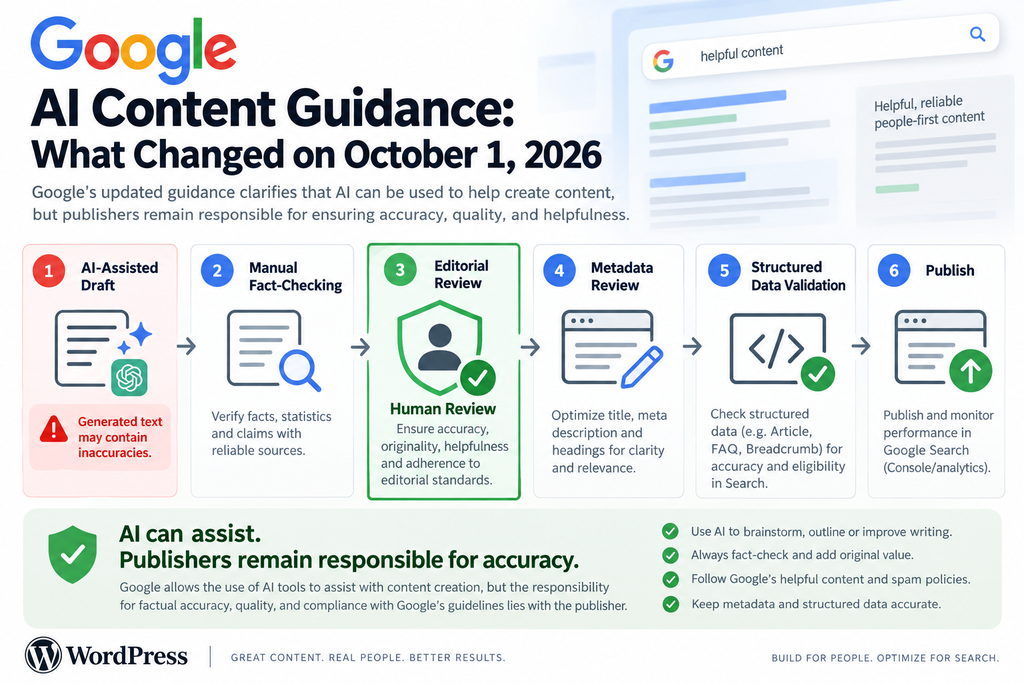
On October 1, 2026, Google Search Central recorded an update to its guidance about using generative AI content on websites. Google said the documentation was updated with information from its Search Quality Rater Guidelines. It also explained that the change brought the public documentation into alignment with presentations used at Google developer events. That distinction matters because this was a documented guidance update rather than an announcement that all AI-assisted pages would suddenly be penalized.
The most important addition concerns human verification. Google’s updated documentation explains that generative models predict likely sequences of words rather than simply retrieving verified facts. As a result, generated material can contain inaccurate information. Google consequently describes manual fact-checking and review of AI-generated content for accuracy and trustworthiness before publication as critical.
For a WordPress publisher, that sentence changes the practical editorial process. Generating a polished draft is no longer the end of the workflow. It should be the beginning of a review stage in which a human editor checks claims, dates, names, statistics, links, quotations, technical instructions, sources, and context.
Google also specifically extends this review principle beyond the visible article. Publishers should examine SEO titles, title elements, meta descriptions, structured data, and image alternative text. An article can therefore contain accurate body copy while still creating problems if an automated system produces misleading metadata or inaccurate schema.
This is especially relevant to WordPress because automation can operate in several layers at once. An AI tool may draft the article, an SEO plugin may generate metadata, another plugin may build structured data, and an image tool may generate alt text. Each individual component can look reasonable while the complete page contains inconsistencies.
The practical lesson from the updated Google AI content guidelines is simple: automation can assist production, but publication still requires editorial responsibility. The person or organization operating the website remains responsible for what appears on the finished page.
What the Update Does Not Say
Google did not announce that every article created with generative AI violates its policies. Its existing guidance has consistently focused on usefulness, quality, originality, relevance, and the purpose behind content creation. AI is a production method. The quality and purpose of the finished material remain central.
This distinction prevents a common SEO misunderstanding. A publisher should not divide the web into “human content equals good” and “AI content equals bad.” Humans can produce inaccurate, copied, or search-engine-first pages. AI-assisted workflows can also produce useful material when knowledgeable people research, verify, edit, improve, and take responsibility for the final publication.
Google’s guidance explicitly recognizes that generative AI can be useful for researching topics and adding structure to original material. The problem appears when automation becomes a shortcut for publishing large quantities of pages without meaningful added value.
For WordPress publishers, therefore, the safest question is not simply, “Did AI write this?” A better question is, “What did we do after AI became involved?”
A Documentation Update, Not a Reason to Panic
SEO news can quickly become exaggerated. A documentation change sometimes turns into headlines suggesting that Google has launched an entirely new penalty or banned a particular publishing technique. The October 1 update deserves attention, but publishers should read it in the context Google provides.
Google’s Search Central update log states that the generative AI guidance was updated with information from the Search Quality Rater Guidelines. Google says the reason was to synchronize its documentation with material presented at developer events.
That context does not make the update unimportant. In fact, the stronger wording around manual review gives publishers a clearer standard to follow. However, it should encourage better editorial controls rather than panic-driven deletion of every page that has ever involved AI.
A WordPress site with useful articles should focus on improving its workflow. Verify factual statements, add original value, identify responsible authors, check metadata, validate schema, review images, and ensure each page serves a genuine reader need.
When AI Content Becomes Scaled Content Abuse
The phrase “AI-generated content” should not automatically be treated as a synonym for spam. Google’s spam policies use a much more specific concept: scaled content abuse.
Google describes scaled content abuse as generating many pages primarily to manipulate search rankings rather than help users. Such pages commonly contain large amounts of unoriginal material that offers little or no useful value. The method used to create those pages is not the defining factor.
That final point deserves emphasis. A scaled-content problem can involve generative AI, traditional automation, scraped information, outsourced writing, or even manually produced pages. Google is concerned with the purpose, scale, originality, and value of the content rather than merely the software used to create it.
One example listed in Google’s spam documentation involves using generative AI or similar tools to create many pages without adding value for users. Other examples include combining material from existing pages without meaningful additional value, generating numerous keyword-focused pages that make little sense to readers, and creating multiple sites to conceal the scaled nature of an operation.
This means that publishing five AI-assisted articles is not automatically safe, while publishing five thousand is automatically spam. Volume alone does not establish the violation. The editorial purpose and usefulness of those pages matter.
The Dangerous WordPress Automation Pattern
Consider a WordPress site configured to discover thousands of keywords automatically. A system generates an article for each keyword, creates the title and description, selects an image, adds internal links, assigns categories, and immediately publishes every draft.
Technically, the workflow may be impressive. Editorially, however, it contains a major weakness: nobody has determined whether each page is accurate, original, necessary, or genuinely useful.
Imagine that the system finds 500 slightly different searches about fixing a WordPress database. It then publishes 500 pages that repeat nearly identical instructions with slightly modified headings. The pages may look optimized individually, but collectively they provide little additional value.
That is exactly the type of strategy publishers should reconsider.
Automation becomes much safer when it assists an editorial process rather than replacing one. AI might identify questions, organize research notes, suggest an outline, or prepare a first draft. A human editor can then decide whether the article deserves to exist.
That decision is surprisingly powerful. Sometimes the correct editorial action is not to publish another page. Updating an existing guide may serve readers better.
Scale Is Not the Same as Productivity
A productive publication can publish frequently without creating scaled content abuse. News organizations, documentation websites, ecommerce platforms, sports websites, and large educational sites naturally produce substantial amounts of content.
The difference is purpose and value.
If each page exists because users need the information and the publisher applies appropriate editorial controls, high output alone does not make the content abusive. Conversely, a smaller website can still create poor search-engine-first content if it repeatedly publishes pages primarily to capture keyword variations.
WordPress makes scaling extremely easy. Plugins, REST APIs, WP-CLI, scheduled actions, feeds, AI APIs, and custom scripts can create posts almost instantly. That technical ability should not determine the editorial strategy.
A useful rule is to separate generation capacity from publication capacity. Your automation may be capable of generating 1,000 drafts per day. Your editorial team may only be capable of responsibly verifying ten. In that situation, ten is closer to the real publication capacity.
Add Something the Generated Draft Did Not Know
Human review should contribute more than correcting spelling.
Editors can add first-hand testing, screenshots, measurements, original examples, practical warnings, personal experience, comparisons, interviews, locally relevant information, updated documentation, or technical verification.
For a WordPress tutorial, this might mean installing the plugin on a test site and checking whether the instructions actually work. For an SEO article, it could mean opening the current Google documentation rather than trusting an AI model’s memory of older guidance.
For a security article, it may involve checking the official advisory, affected versions, patched versions, vulnerability identifiers, publication dates, and developer recommendations.
This added work changes the nature of the content. The AI output becomes raw editorial material rather than the finished product.
Why Human Fact-Checking Is Required
The strongest practical message in Google’s October 2026 update is the emphasis on manual fact-checking. Google explains that generative models predict likely sequences of words and may therefore produce inaccuracies, commonly called hallucinations.
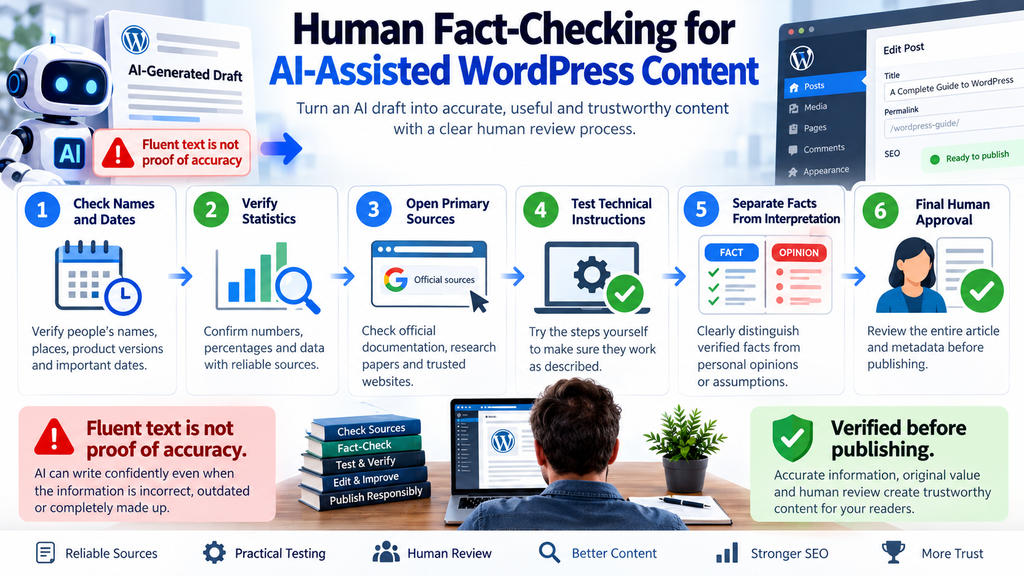
These errors are particularly dangerous because generated statements can sound completely natural. A fictional software version, invented quotation, incorrect date, nonexistent study, or inaccurate WordPress function can appear just as confidently written as a verified fact.
Good grammar does not prove factual accuracy.
That creates a new responsibility for publishers. Editors must learn to separate writing quality from information quality. An AI-generated paragraph may need almost no stylistic editing while still requiring extensive factual verification.
This is why human review cannot consist of quickly reading a draft and deciding that it “sounds right.”
Verify Claims Against Primary Sources
Whenever possible, check important factual claims against primary or authoritative sources.
For Google Search changes, Google Search Central documentation should normally be the first reference. For WordPress core behavior, consult official WordPress documentation, developer resources, release notes, or source code where appropriate. For plugin vulnerabilities, review reliable security advisories and the plugin developer’s patched release information.
Secondary reporting can add context. It should not automatically replace the original source when the original documentation is available.
A practical verification process begins by identifying statements that can be objectively checked. Dates, software versions, percentages, quotations, technical requirements, policy descriptions, prices, names, supported features, and security claims deserve particular attention.
Open the relevant source and confirm them individually.
If a reliable source cannot verify a claim, either investigate further, qualify the statement appropriately, or remove it.
Separate Facts From Interpretation
Another common AI problem involves turning interpretation into fact.
Suppose Google updates a documentation page. A generated article might describe the change as a “major algorithm update” even when Google announced only a documentation revision. Those descriptions are not interchangeable.
The factual statement would be that Google updated its documentation on a particular date. An interpretation might argue that the stronger wording indicates increased importance for publishers.
The article should distinguish those two things.
That distinction makes reporting more trustworthy and reduces sensationalism. It also helps readers understand what Google actually said instead of what a publisher thinks the announcement might mean.
Review Time-Sensitive Information Again
AI-assisted articles about software, cybersecurity, search engines, laws, products, prices, or platform policies can become outdated quickly.
An editor might verify a WordPress plugin version during drafting and publish several hours later. If a security fix appears during that period, the article could already contain outdated recommendations.
A final pre-publication check should therefore focus on information that changes rapidly.
For breaking SEO news, check the official documentation again shortly before publication. Look for modified wording, newly added notes, changed timestamps, or corrections.
When an article is updated later, record meaningful modifications transparently where appropriate. Do not change a date merely to create the appearance of freshness when the substance of the page has not changed.
High-Stakes Topics Need More Care
Accuracy becomes even more important when content can affect someone’s health, finances, safety, or broader well-being. Google’s people-first content documentation discusses these high-impact areas in the context of YMYL topics and trust.
AI can assist research in these fields, but automated prose should never become a substitute for appropriate expertise and reliable sourcing.
A health article, for example, should not turn an AI-generated suggestion into medical advice. A financial article should not invent rates or regulations. A cybersecurity tutorial should not claim that a system is protected merely because a generated checklist says so.
The more serious the consequences of an error, the stronger the review process should become.
Reviewing SEO Titles, Metadata and Structured Data
One of the most useful details in Google’s revised guidance is easy to overlook. Manual review should not stop at the article body.
Google specifically points publishers toward metadata such as title elements, meta descriptions, structured data, and alternative text for images. These elements can influence how a page is understood or represented in Search, which makes accuracy important even when visitors do not immediately see every field.
For WordPress administrators, this means the final editorial checklist should include the SEO plugin and the generated HTML, not only the Gutenberg or Classic Editor content area.
Check the SEO Title
AI tools are excellent at suggesting headlines, but they can also exaggerate.
A draft about a documentation change might become “Google Launches Massive AI Content Penalty” because dramatic wording sounds attractive. If Google did not announce such a penalty, the title creates a factual problem before the reader even reaches the first paragraph.
Titles should accurately summarize the page.
They should also avoid unnecessary sensationalism. A descriptive headline can still be compelling without overstating what happened.
For this article, “Google AI Content Guidelines: What Changed in 2026” communicates the subject directly. It does not claim that Google banned AI content or launched a new ranking penalty.
Review the Meta Description
The same principle applies to meta descriptions.
AI-generated descriptions often use strong promotional language because the model tries to make the result persuasive. Statements such as “Google now requires every AI article to include a disclosure” should not be published unless the source actually establishes that requirement.
Google’s guidance is more nuanced. It says disclosures about automation are useful when readers might reasonably want to know how the content was created.
A good meta description should therefore summarize the actual article rather than introduce stronger claims for additional clicks.
WordPress publishers using automated SEO plugins should periodically inspect generated descriptions. Automation can save time, but unattended metadata can create inaccuracies at scale.
Structured Data Must Match the Page
Structured data deserves even more caution because it provides machine-readable information about a page.
If your WordPress SEO plugin generates Article or BlogPosting markup, confirm that important properties accurately reflect the visible content. The headline should correspond with the article. Author information should identify the actual responsible author or organization. Publication and modification dates should be truthful. Images should represent the article.
Do not invent credentials or authors to make automated content appear more authoritative.
Google’s documentation encourages accurate authorship information and warns against deceptive creator profiles. An AI-generated headshot, fictional name, and invented qualifications do not transform automated content into expert material. They damage trust.
After major schema changes, use Google’s Rich Results Test or another appropriate validation tool. Technical validation cannot determine whether every claim is editorially true, but it can reveal malformed or unsupported markup.
Review Image Alt Text
Alternative text is primarily an accessibility feature. It should describe relevant image content in a useful and concise way.
Automatically generated alt text can fail in several ways. It may describe objects that do not exist, insert keywords unnaturally, misunderstand a screenshot, or repeat a filename rather than explain the image.
For an infographic about Google’s AI guidance, an appropriate description might explain that the graphic shows a workflow from AI drafting through human verification and publication.
There is no reason to stuff the focus keyphrase repeatedly into every image description.
Write alt text for the person who needs the description, not for an imagined ranking formula.
Do Not Forget Open Graph and Social Metadata
Although Google’s October guidance specifically highlights Search-related metadata, a broader WordPress review should also inspect social sharing fields when they are generated automatically.
An incorrect Open Graph title can spread a misleading claim on Facebook or other services even if the visible WordPress title has already been corrected. The same problem can affect social descriptions and generated preview images.
When an important article changes during editing, verify that cached or separately stored social metadata still reflects the final version.
The principle remains consistent: the published page is a collection of interconnected data, not just the paragraphs visible in the editor.
When to Disclose the Use of Automation

Transparency is another important part of Google’s guidance.
Google’s people-first content documentation encourages publishers to think about Who, How, and Why. Who created the material? How was it produced? Why does it exist?
These questions become especially useful when AI participates in the publishing process.
Google says information about how content was produced can give readers useful context. Its guidance suggests considering disclosure when automation substantially contributes to content creation and readers might reasonably wonder how the material was made.
That does not mean every use of a spelling checker needs a large AI warning.
The level of transparency should make sense for the role automation played.
Minor Assistance Is Different From Automated Production
Imagine an editor writes a 3,000-word WordPress tutorial manually and uses AI only to identify grammar mistakes. A prominent disclosure may provide little meaningful information.
Now consider a second article where AI generated the initial research summary, outline, body text, FAQ, title suggestions, and image descriptions. A human editor then tested the procedure, checked every factual claim, rewrote sections, and approved the final publication.
In that case, explaining the production process can provide useful context.
The disclosure does not need to undermine the article. It can demonstrate that automation was used responsibly.
For example, an editorial note could explain that AI tools assisted with drafting or organization while the final article was manually reviewed and fact-checked against the cited sources.
The most important element is truthfulness.
Do Not List an AI System as the Responsible Human Author
Google has previously advised that listing AI itself as the author is probably not the best approach for explaining how automation contributed to content.
That makes practical sense.
An AI system cannot accept editorial responsibility, answer reader questions as the responsible writer, or verify that the published version accurately represents the sources. The website owner, writer, or editor must ultimately take responsibility for publication.
WordPress author boxes should therefore identify real authors or legitimate organizations where appropriate.
If AI played a meaningful role, explain that role separately instead of inventing a fictional human identity.
Disclosure Does Not Fix Low-Quality Content
Transparency is valuable, but it is not a loophole.
Adding “This article was generated with AI” to 10,000 low-value pages does not suddenly make those pages useful. Disclosure does not replace originality, research, fact-checking, editorial effort, or reader value.
Likewise, adding ten authoritative links to an automatically generated article does not prove that the publisher understood or verified those sources.
Google’s people-first guidance specifically emphasizes the quality of the main content and the effort, originality, skill, and accuracy involved.
The workflow matters because it changes the finished page, not because it creates a label that can be attached afterward.
Build a Site-Wide Editorial Policy
Publishers using AI regularly may benefit from a simple editorial policy.
The policy can explain what AI tools are allowed to do, what requires human approval, which sources are acceptable for factual verification, how authorship is assigned, and when disclosures should appear.
For a WordPress publication, the policy might require every AI-assisted draft to remain in Draft or Pending Review status until a human editor approves it.
High-risk categories could require an additional reviewer.
Technical tutorials could require practical testing.
News posts could require primary-source verification.
Security articles could require confirmation of affected and patched versions from reputable advisories.
This approach converts abstract Google guidance into repeatable editorial behavior.
Building a Safe AI-Assisted WordPress Workflow
The best response to Google’s updated guidance is not to stop using useful technology. It is to build a publishing process in which automation and human judgment have clearly defined roles.
WordPress already provides much of the infrastructure required for such a workflow. Drafts, revisions, authors, editorial statuses, custom fields, plugins, scheduled publication, and user roles can all support human oversight.
The key is preventing generation and publication from becoming the same action.
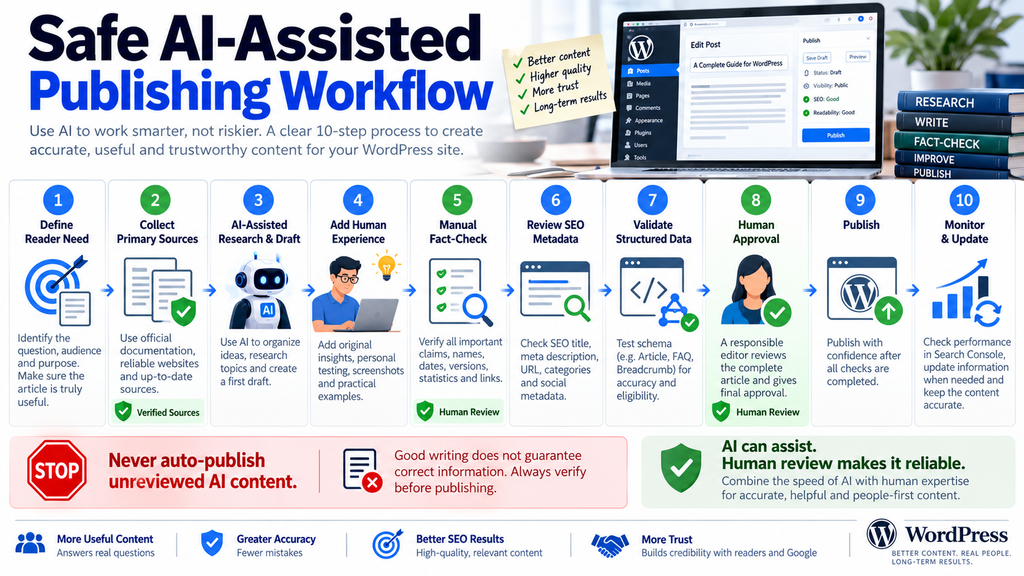
Step 1: Begin With a Real Reader Need
Before asking an AI tool to generate anything, define the purpose of the article.
What question will it answer?
Who needs the information?
Why should this page exist instead of another keyword variation?
What can your site contribute that is not already available everywhere else?
This stage protects against scaled content problems before they begin. If the only justification for an article is that a keyword has search volume, reconsider the idea.
Search demand can help identify reader needs, but it should not become the entire reason for publication.
Step 2: Gather Reliable Sources First
Collect the most authoritative references before generating a final draft.
For an article about Google Search, begin with Google Search Central. For WordPress core, start with official WordPress resources. For software security, use the relevant developer documentation and reputable vulnerability databases or security advisories.
AI can help identify areas requiring research, but do not assume that every source it mentions exists.
Open the documents yourself.
Check publication dates.
Confirm that the source actually supports the statement you intend to make.
A source list created before drafting also reduces the temptation to search for citations merely to justify claims that have already been written.
Step 3: Use AI as an Assistant
AI can now help organize the material.
It may suggest a structure, identify missing reader questions, simplify technical explanations, create alternative headings, summarize notes, or prepare a first draft.
This is where generative AI can save substantial editorial time.
However, maintain a distinction between source material and generated interpretation. If the model says Google requires something, return to the Google source and verify the wording.
- Do not:
- let the model cite itself.
- treat confidence as evidence.
- assume a detailed answer is accurate merely because it contains technical terminology.
Step 4: Add Human Experience and Original Value
Now improve the draft with information that comes from your own work.
For a WordPress tutorial, install the software and reproduce the steps. Capture original screenshots. Record what happens when a setting changes. Mention unexpected behavior that readers may encounter.
For SEO news, compare the new documentation with the earlier guidance when possible and explain the practical consequence without exaggerating it.
For performance testing, publish your actual testing environment and methodology.
Original contribution does not always require groundbreaking research. A carefully tested explanation can be far more useful than another generic summary.
Step 5: Fact-Check Every Verifiable Claim
Perform a dedicated factual review after editing.
Do not combine it casually with proofreading.
Check names, dates, versions, quotations, numbers, policy statements, technical requirements, compatibility claims, and links.
Ask whether each important factual statement has an appropriate source.
If the source does not support the claim, change the claim rather than stretching the interpretation of the source.
Also look for omissions. A technically correct statement can still mislead readers if crucial context is missing.
Step 6: Review the SEO Layer
Open your SEO plugin before publishing.
Check the SEO title.
Read the meta description.
Verify the canonical URL.
Check indexation settings.
Inspect social metadata if applicable.
Review breadcrumbs.
Confirm author and date information.
Look at structured data generated by your theme or SEO plugin.
Then review image alt text and captions.
This step is particularly important when any of those fields were generated automatically.
Step 7: Validate Structured Data
Use appropriate validation tools after the schema is generated.
For eligible Google Search features, Google’s Rich Results Test can help identify markup problems. Search Console can later provide information about indexing and supported enhancements.
Remember that passing a validator does not prove that the information is true.
A schema object can be technically perfect while containing a false author, incorrect date, misleading headline, or unrelated image.
Technical validation and editorial validation solve different problems. A responsible workflow needs both.
Step 8: Require Human Approval
The final WordPress publication action should belong to an accountable person whenever AI has substantially generated editorial material.
That reviewer should be able to answer three questions:
Is this accurate?
Does it genuinely help the intended reader?
Would I be comfortable putting my name or publication behind it?
If the answer to any question is uncertain, keep the article in draft.
The cost of delaying one article is usually far smaller than the cost of building a website full of unreliable pages.
Step 9: Monitor the Published Page
Publication is not the end of editorial responsibility.
Links break. Software changes. Google documentation evolves. Product features disappear. Statistics become outdated. WordPress plugins release new versions.
Review important evergreen pages periodically and update them when meaningful information changes.
Search Console can help identify pages receiving impressions and clicks, but traffic should not be the only reason for maintenance. Pages that receive modest traffic can still deserve correction when their information becomes inaccurate.
Step 10: Keep an Editorial Trail
WordPress revisions already provide useful history. Editorial teams can go further by recording sources, reviewer names, testing notes, and significant updates.
A simple custom field or internal editorial note can record:
Research completed.
Primary sources checked.
Technical procedure tested.
Metadata reviewed.
Schema validated.
Human reviewer approved.
This information does not necessarily need to appear publicly. Its purpose is to create accountability inside the publishing process.
If a factual question appears months later, the team can see how the article was originally verified.
A Practical Pre-Publish Checklist for WordPress Editors
Before publishing an AI-assisted article, read the complete page once as a reader rather than as its creator. Confirm that the article answers the question promised by the title and that the reader does not need another search merely because important information is missing. Look for repetitive paragraphs, vague claims, generic filler, contradictory instructions, and statements that sound authoritative without providing evidence.
Next, switch into fact-checking mode. Confirm important claims against the original sources. Open every external reference. Check names, dates, software versions, statistics, quotations, and technical details. For tutorials, reproduce important procedures whenever practical. For current news, confirm that no significant update appeared between drafting and publication.
Finally, review the WordPress SEO layer. Inspect the title, slug, meta description, canonical URL, author information, featured image, alt text, structured data, categories, internal links, and indexation settings. Preview the article on desktop and mobile. Only after these checks should the post move from Draft or Pending Review to Published.
A useful internal checklist can contain the following questions: Does the article serve a real reader need? Are important facts verified? Are primary sources used where available? Did a human review the complete article? Is the headline accurate rather than sensational? Does the metadata accurately describe the page? Does the structured data match visible content? Are authorship details genuine? Are images and alt text relevant? Does the page contain original editorial value? If automation played a substantial role, would readers reasonably benefit from knowing how it was used?
This process may slow publishing slightly, but that is not necessarily a disadvantage. AI has dramatically reduced the time required to produce text. The saved time can be reinvested in verification, testing, original screenshots, source checking, and editorial improvements. That is a much more sustainable use of automation than simply increasing the number of pages published each day.
Frequently Asked Questions
Does Google Allow AI-Generated Content?
Yes. Google’s guidance does not establish a blanket prohibition on AI-generated or AI-assisted content. Google has repeatedly focused on the usefulness, originality, quality, trustworthiness, and purpose of content rather than banning a particular production technology. Using automation primarily to manipulate search rankings, however, can violate Google’s spam policies.
Did Google Ban AI Content on October 1, 2026?
No. The October 1 change was an update to Google Search Central documentation about using generative AI content. Google said it incorporated information from the Search Quality Rater Guidelines and aligned the documentation with presentations used at developer events. The update emphasizes manual fact-checking and review rather than announcing a blanket AI-content ban.
Does Every AI-Generated Article Need Human Review?
Google’s October 2026 guidance says it is critical to manually fact-check and review AI-generated content for accuracy and trustworthiness before publication. For publishers using AI to substantially generate articles, human verification should therefore be a standard part of the workflow.
Can AI Content Cause a Google Penalty?
The use of AI alone is not what Google’s scaled content abuse policy defines as the problem. Google targets practices where many pages are generated primarily to manipulate search rankings rather than help users, often producing unoriginal material with little or no added value. Policy violations can affect visibility in Search.
What Is Scaled Content Abuse?
Google describes scaled content abuse as generating many pages primarily to manipulate search rankings rather than help users. Examples can include generating many pages with AI without adding value, combining existing content without meaningful additions, or creating numerous keyword-focused pages with little usefulness.
Should WordPress Sites Automatically Publish AI Articles?
A safer editorial workflow keeps AI-generated material in Draft or Pending Review until a human verifies it. Automatic generation can improve productivity, but connecting generation directly to publication removes an important opportunity to catch hallucinations, outdated information, misleading metadata, duplicate ideas, and technical errors.
Should I Disclose That AI Helped Create an Article?
Google says information about how content was produced can give readers useful context and suggests considering AI or automation disclosures when readers would reasonably expect them. The appropriate disclosure depends on how substantially automation contributed. Minor grammar assistance is different from having AI generate most of an article.
Should AI Be Listed as the Article Author?
Google has previously indicated that listing AI as the author is probably not the best way to explain its involvement. A responsible human author, editor, or organization should normally remain accountable for the publication, while meaningful AI assistance can be described separately where appropriate.
Do AI-Generated Meta Descriptions Need Human Review?
Yes, they should be reviewed. Google’s updated guidance specifically extends manual review to metadata, including title elements and meta descriptions. An automated description can contain exaggerations, outdated details, or claims that are not supported by the article.
Does Structured Data Need to Be Checked Too?
Yes. Google’s guidance explicitly includes structured data in the review process. Publishers should confirm that schema accurately represents visible page content and follows the guidelines for the relevant Search feature. Technical validation should accompany editorial verification.
From AI Draft to Responsible Publication
Google’s October 1, 2026 update does not signal the end of AI-assisted publishing. It makes the responsibilities surrounding that workflow much clearer.
Generative AI can accelerate research, organization, drafting, rewriting, and routine editorial work. WordPress can automate many of the technical steps around publication. Neither capability removes the publisher’s responsibility for the finished page.
The strongest workflow combines the speed of automation with the judgment of a human editor.
Start with a genuine reader need. Research reliable sources. Use AI where it provides useful assistance. Add original knowledge and practical experience. Manually verify factual claims. Review titles, descriptions, image text, authorship, and structured data. Validate the technical output. Then require human approval before publication.
This model also offers a better definition of AI-assisted SEO. The objective is not to generate the largest possible number of keyword-targeted pages. It is to reduce repetitive work so editors can spend more time improving accuracy, usefulness, originality, and trust.
Google’s guidance makes another point clear: polished language should never be confused with verified information. Generative systems can produce confident sentences that are incorrect. Publishers therefore need processes that challenge generated material rather than automatically accepting it.
For WordPress site owners, the safest long-term strategy is consequently neither “never use AI” nor “automate everything.” Use AI as a capable editorial assistant while keeping research standards, human verification, transparency, and final responsibility firmly in human hands.
⚠️ Disclaimer and Source Hygiene
This article is provided for educational and informational purposes and should not be interpreted as a guarantee of Google Search rankings, indexing, traffic, advertising performance, or eligibility for Search features. Google can update its systems, policies, documentation, and Search features over time.
The article is based primarily on current Google Search Central documentation available on October 2, 2026. Important SEO, legal, financial, medical, or security decisions should be checked against the latest authoritative documentation and, when appropriate, discussed with a qualified professional.
References to practical WordPress workflows are editorial recommendations designed to help publishers apply Google’s public guidance. They should not be interpreted as additional requirements announced by Google unless specifically identified as such.
🔔 For more tutorials like this, consider subscribing to our blog.
📩 Do you have questions or suggestions? Leave a comment or contact us!
🏷️ Tags: Google AI content guidelines, AI-generated content, Google SEO, WordPress SEO, generative AI SEO, AI content policy, scaled content abuse, WordPress publishing, human fact-checking, Google Search Central
📢 Hashtags: #GoogleSEO, #AIContent, #WordPressSEO, #GenerativeAI, #SEO, #GoogleSearch, #WordPress, #ContentStrategy, #AIPublishing, #SearchCentral
Sources and References
Google Search Central – Guidance on Generative AI Content
Google’s official guidance states that generative AI can be useful for research and structuring original content. It also warns that generating many pages without adding user value may violate the scaled content abuse policy. The October 1, 2026 revision emphasizes manual fact-checking and explicitly extends review to titles, meta descriptions, structured data, and image alt text.
Google Search Central – Documentation Updates
Google’s official Search documentation changelog records the October 1, 2026 update as “Updated guidance on using generative AI content.” Google says information from the Search Quality Rater Guidelines was incorporated and that the documentation was updated to align with presentations used at developer events.
Google Search Central – Spam Policies
Google’s spam policies define scaled content abuse as generating many pages primarily to manipulate search rankings rather than help users. The policy explicitly lists using generative AI to create many pages without adding value as one possible example.
Google Search Central – Creating Helpful, Reliable, People-First Content
Google’s people-first guidance discusses authorship, editorial effort, originality, accuracy, trust, and the “Who, How, and Why” framework. It also explains that information about automation or AI assistance can provide useful context when readers would reasonably expect it.
Google Search Central – Structured Data Guidelines
Google’s structured data documentation explains that markup must follow general and feature-specific guidelines. WordPress publishers using automatically generated schema should validate the markup and ensure the information accurately represents the visible page.
Google Search Central – Article Structured Data
Google’s Article documentation describes properties such as headline, image, author, publication date, and modification date. These fields should correspond with the real article and should not be populated with misleading information.
Secondary Sources and Testimonials
Search Engine Roundtable
Search Engine Roundtable reported on October 1, 2026 that Google had strengthened its AI-content documentation by explicitly emphasizing manual fact-checking and review. Its coverage highlighted the newly added explanation concerning generative-model inaccuracies and hallucinations.
Search Engine Watch
Search Engine Watch reported on October 2, 2026 that Google’s revised guidance reminds publishers to manually check AI-generated content before publication. Its coverage similarly emphasized accuracy, trustworthiness, and the limitations of generative models.
Secondary reporting is useful for industry context, but publishers should rely on the current Google Search Central documentation when determining what Google officially says about AI-generated web content.