
Table of Contents
A vulnerability in Frontend Post Submission Manager Lite can expose WordPress sites using guest submission forms to stored DOM-based XSS. Learn how CVE-2026-96649 works, which installations are affected, why previously submitted posts deserve review, and how administrators can safely update and audit their websites.
Guest posting can be one of the most useful features on a WordPress website. News sites, community blogs, magazines, directories, and niche publications often allow visitors to submit content without receiving access to the WordPress dashboard. That workflow is convenient, but it also creates an important security boundary. Content arriving from an anonymous visitor must always be treated as untrusted until it has been properly validated, sanitized, reviewed, and safely rendered.
A security issue identified as CVE-2026-96649 demonstrates why this boundary matters. The vulnerability affects Frontend Post Submission Manager Lite versions up to and including 1.3.4 under the relevant guest-submission configuration. It has been described as an unauthenticated stored DOM-based cross-site scripting vulnerability associated with submitted post content and an unsafe DOM sink.
The important detail is that simply installing the plugin does not necessarily mean a site can be exploited through this path. The documented attack scenario requires guest post submission to be enabled through the plugin’s [fpsm] shortcode. When that configuration is publicly accessible, an anonymous visitor may reach the submission workflow without having a normal WordPress account.
For administrators, updating the plugin is therefore the first step, but it should not automatically be the last. If the vulnerable guest submission workflow was previously available, content submitted before the update may deserve inspection. A security patch can close the vulnerable path for new submissions while previously stored content remains in the WordPress database.
This guide explains the Frontend Post Submission Manager vulnerability from a defensive perspective. It focuses on identifying exposed sites, understanding how untrusted content can reach browser-side processing, installing version 1.3.5 or newer, and reviewing pending or recently submitted posts for suspicious content.
What Is CVE-2026-96649
CVE-2026-96649 is a security vulnerability affecting Frontend Post Submission Manager Lite for WordPress. Public vulnerability information describes the issue as unauthenticated stored DOM-based cross-site scripting, commonly shortened to stored DOM XSS. Affected releases include versions up to and including 1.3.4.
The vulnerability is associated with insufficient sanitization and escaping of user-controlled content. In the documented scenario, information supplied through post_content could eventually interact with a browser-side DOM operation in an unsafe way. The problem becomes particularly important when the submission form is available to visitors who do not need a WordPress account.
Cross-site scripting is classified under CWE-79, which covers situations where software fails to neutralize untrusted input correctly before that information becomes part of web content. Stored XSS deserves special attention because the unwanted content is not necessarily limited to the original request. It may be saved and encountered later.
CVE-2026-96649 has been assigned a CVSS 3.1 score of 7.2, categorized as High under that scoring system. The published vector describes a network-accessible issue requiring no privileges and low attack complexity. However, administrators should interpret that score together with the documented prerequisites rather than assuming every installation has identical exposure.
The relevant condition is guest submission. Public vulnerability information states that exploitation requires the site operator to have enabled guest post submission using the [fpsm] shortcode. A page containing that form makes the associated frontend submission functionality available to visitors.
This distinction is important for responsible vulnerability reporting. Saying that every website running the plugin is immediately vulnerable would oversimplify the situation. A more useful assessment asks three questions: which plugin version is installed, whether a guest submission form is publicly accessible, and whether untrusted submissions were accepted while an affected version was active.
Why Stored DOM XSS Deserves Attention
A reflected XSS problem often depends on a specially constructed request being opened at a particular moment. Stored XSS introduces another dimension because untrusted information can persist. The dangerous content may enter the application during one request and become relevant much later when somebody views or processes the stored material.
That delayed behavior matters on editorial websites. A contributor might submit an article today, while an editor reviews it tomorrow. The original visitor may no longer be connected to the site when the unsafe content reaches a browser.
DOM-based behavior adds another layer. Modern WordPress plugins frequently use JavaScript to update interfaces, display messages, manage uploads, create previews, and manipulate page elements. When untrusted data reaches an unsafe DOM operation without the appropriate protections, the browser can interpret information differently from what the developer intended.
The defensive lesson extends beyond one plugin. Every frontend submission system creates a trust transition. Information moves from an unknown or partially trusted visitor into WordPress, then potentially into an administrative or editorial context. Each transition needs appropriate validation, sanitization, escaping, permissions, and output handling.
Which WordPress Sites Are Exposed
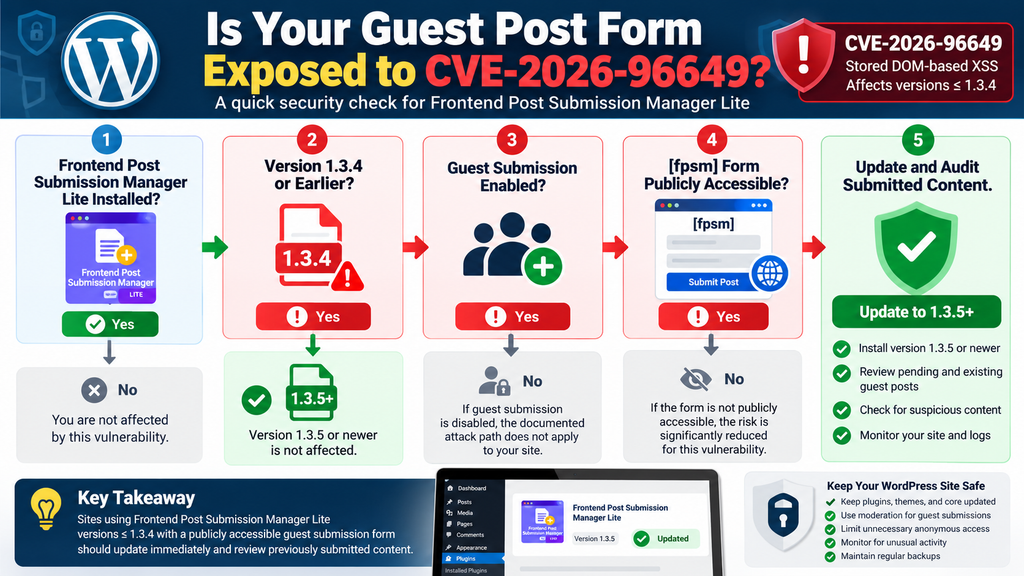
The first question administrators should ask is not simply, “Do I have Frontend Post Submission Manager Lite installed?” The better question is, “Was my site running an affected version while anonymous guest submission was publicly available?”
According to the published vulnerability information, versions 1.3.4 and earlier are affected. WordPress.org currently lists version 1.3.5, whose changelog specifically describes security changes addressing stored DOM-based XSS involving uploader labels and messages while blocking uploader markers in submitted HTML.
Sites still using version 1.3.4 or an earlier release should update promptly. Administrators should also determine whether they have a page containing the [fpsm] shortcode and whether the form allows visitors to submit posts without authentication.
The plugin itself supports both guest and login-required frontend forms. That functionality is useful because a publisher can choose the workflow that matches its community. From a security perspective, however, anonymous submission naturally creates a wider trust boundary than a form restricted to authenticated contributors.
A site that never enabled the affected guest workflow does not have the same documented exposure as a site that openly accepted anonymous articles. Likewise, an administrator who installed the plugin but never published a frontend submission page should not assume the presence of the plugin alone proves compromise.
Identifying Your Exposure Window
Administrators should establish a simple timeline. Determine when the plugin was installed, which versions were active, when the guest submission page became public, and when version 1.3.5 or a later release was installed.
That period represents the site’s potential exposure window for this specific vulnerability. For example, if guest submissions were enabled for several months while version 1.3.4 was active, reviewing only posts received after the public disclosure would be unnecessarily narrow.
Security audits should consider when the vulnerable functionality was accessible, not only when the vulnerability became widely known. Disclosure dates tell administrators when information became public. They do not prove when suspicious input might first have reached a particular website.
Look through WordPress Pages for submission pages, inspect reusable blocks or templates where appropriate, and search for instances of [fpsm]. If the form was removed previously, backups, revision history, analytics, or server logs may help establish whether it had been publicly reachable.
Administrators managing several WordPress installations should repeat the process for every site. A plugin may be inactive on one domain but actively collecting guest posts on another.
Guest Forms Change the Trust Model
A normal WordPress author usually has an account, assigned capabilities, and an identifiable user record. Guest submission deliberately removes part of that relationship. A visitor can contribute information without becoming a conventional WordPress user.
That does not make guest posting inherently unsafe. It means the application must assume that every submitted field can contain unexpected input. Titles, article bodies, custom fields, filenames, labels, URLs, and other values should be considered untrusted until the application handles them safely.
CAPTCHA systems can reduce automated spam, but they should not be treated as substitutes for secure input and output handling. A CAPTCHA answers a different question: whether a submission appears to come from a legitimate human or passes an anti-bot challenge. It does not make the submitted HTML inherently trustworthy.
The safest editorial workflow therefore combines updated software with moderation. Anonymous submissions should normally enter a controlled review state rather than becoming automatically trusted simply because they passed a form validation or anti-spam check.
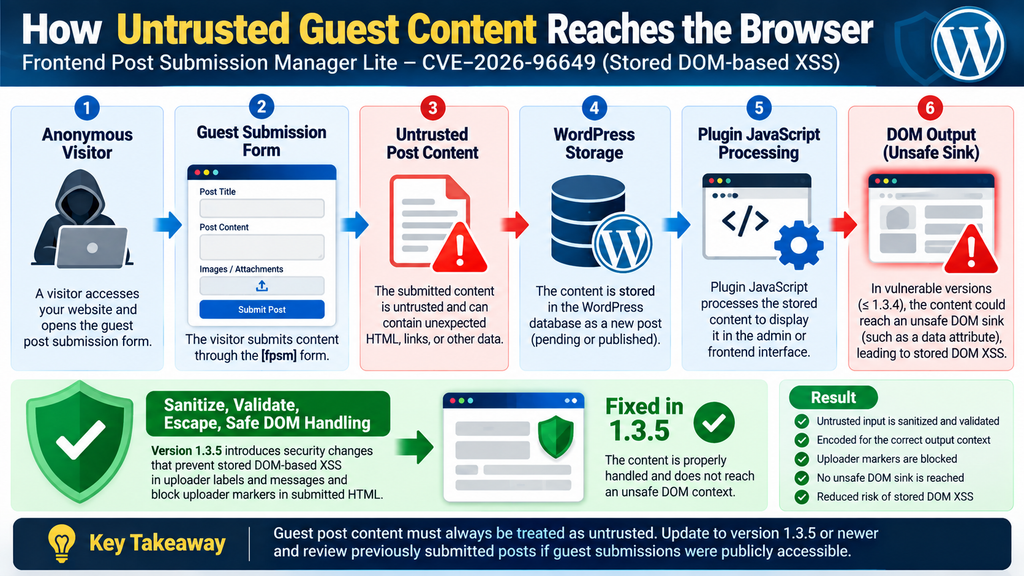
How Guest Content Reaches an Unsafe DOM Sink
Understanding CVE-2026-96649 does not require reproducing an exploit. From a defensive perspective, the important concept is the journey taken by untrusted information.
A visitor starts at a publicly available guest submission form. The visitor supplies content intended to become part of a WordPress post. The plugin processes that information and stores or otherwise makes it available for later use. JavaScript associated with the plugin can then interact with values derived from that submitted information.
A DOM sink is essentially a browser-side destination where data is inserted, interpreted, or otherwise used to modify the Document Object Model. Some DOM operations are safe for plain text when used correctly. Others can become dangerous when attacker-controlled information reaches them without suitable encoding or sanitization.
The vulnerability description specifically associates CVE-2026-96649 with the post_content parameter and a data-label DOM sink. The security problem was therefore not merely that anonymous users could submit text. Guest posting requires that capability by design. The problem involved how untrusted information could travel through the application and later reach a browser-side context.
This distinction matters because blocking ordinary HTML tags at one point does not automatically secure every later context. Security controls must match the destination where information will eventually be used.
Source, Storage, and Sink
A useful way to understand DOM-based vulnerabilities is to think in terms of three stages: source, storage, and sink.
The source is the untrusted information entering the system. In this case, the relevant workflow involves frontend post submission. Storage means that information can persist inside WordPress or become associated with a submitted post. The sink is the browser-side operation where the stored information is later processed in a security-sensitive context.
A secure application interrupts dangerous data flow before untrusted information can become executable browser content. Developers typically accomplish that through context-aware validation, sanitization, encoding, escaping, safe DOM APIs, and restrictions on what submitted markup is permitted.
WordPress also provides numerous security APIs and conventions for handling user-generated content. However, plugin developers must apply the correct protection at the correct stage. A value safe for one output context may not automatically be safe inside another HTML attribute, JavaScript operation, URL, or DOM manipulation.
Version 1.3.5 addresses the issue at the plugin level. Its WordPress.org changelog states that the release prevents stored DOM-based cross-site scripting in uploader labels and messages and blocks uploader markers in submitted HTML.
Why a Nonce Is Not a Sanitizer
The documented vulnerable workflow involves a publicly accessible AJAX handler protected by a nonce available on pages containing the shortcode. This can sometimes cause confusion because WordPress administrators may associate a nonce with complete request security.
A WordPress nonce is primarily designed to help verify that a request originated from an expected application context. It is not a general-purpose permission system, malware scanner, HTML sanitizer, or guarantee that user-provided content is safe.
When a feature intentionally supports anonymous visitors, the application may legitimately expose information necessary for those visitors to submit the form. Consequently, the presence of a nonce does not transform guest input into trusted content.
This principle is useful far beyond CVE-2026-96649. WordPress developers and administrators should avoid treating any single security mechanism as universal protection. Nonces, capabilities, sanitization, escaping, CAPTCHA, moderation, and access controls solve different problems.
What Happens When an Administrator Opens the Post
Stored XSS becomes particularly concerning because submission and execution can occur at different times. An anonymous visitor can provide the initial content, while another person later encounters the stored information.
On a publishing website, that second person could be an editor, author, moderator, or administrator reviewing incoming submissions. Depending on the vulnerable code path and where the stored content is rendered, other visitors accessing an affected page could also potentially encounter the unsafe browser-side behavior described by the vulnerability.
This separation can make stored XSS less obvious during routine moderation. An editor may believe they are simply opening an article waiting for approval. From the editor’s perspective, the content already exists inside WordPress and therefore may appear more trustworthy than information arriving directly through a public form.
That assumption is dangerous. Database storage does not automatically convert untrusted input into safe content. If unsafe information enters the database, it remains untrusted until the application handles it correctly at output.
The same principle explains why administrators should audit existing submissions after patching. Version 1.3.5 protects the vulnerable plugin workflow going forward, but updating software should not be confused with proving that every historical database record is clean.
Administrative Sessions Raise the Stakes
WordPress administrators typically operate with extensive permissions. Their authenticated browser session may allow plugin installation, user management, content editing, theme changes, configuration updates, and many other privileged actions.
Cross-site scripting inside a privileged application context can therefore be more consequential than a visual annoyance. Depending on the exact circumstances, malicious browser-side code can potentially interact with information or functionality available to the affected session.
That does not mean every XSS vulnerability automatically results in complete WordPress takeover. Impact depends on the vulnerable context, browser protections, WordPress security controls, available privileges, and what the injected code can actually access.
Administrators should nevertheless treat stored XSS seriously because it crosses an important trust boundary. Content supplied by an anonymous visitor should never gain the ability to behave like trusted application code.
For the same reason, moderators should avoid investigating suspicious submissions casually on a production site before remediation. Update the affected plugin first. If there are strong indicators that a particular post contains hostile content, use a controlled incident-response workflow rather than repeatedly opening it in privileged browser sessions.
Updating Does Not Rewrite History
Imagine that a website accepted guest posts while version 1.3.4 was installed. The administrator later upgrades to 1.3.5. New submissions now pass through the patched implementation, but dozens or hundreds of older submissions may remain in the database.
The update does not necessarily mean every historical record was automatically inspected and cleaned. Unless the vendor explicitly documents a migration that sanitizes existing content, administrators should not assume such a cleanup occurred.
This is why vulnerability remediation has two sides. The first is prospective protection: close the vulnerable path so new malicious content cannot enter through it. The second is retrospective investigation: determine whether potentially unsafe content entered before the path was fixed.
For a small blog, that review may involve only a handful of pending guest articles. A large community site may need to examine a much broader submission history and correlate it with logs, publication dates, contributor information, and security alerts.
Updating to Version 1.3.5

Administrators running Frontend Post Submission Manager Lite 1.3.4 or earlier should upgrade to version 1.3.5 or a newer patched release. WordPress.org lists version 1.3.5 and identifies the stored DOM-based XSS fix directly in the plugin changelog.
Before making changes on an important production site, create a current backup of the database and relevant WordPress files. A security update should normally be applied quickly, but having a recoverable snapshot remains good operational practice.
Next, open WordPress Dashboard → Plugins → Installed Plugins and locate Frontend Post Submission Manager Lite. Confirm the installed version instead of relying on memory or assuming automatic updates already completed.
If WordPress offers version 1.3.5 or newer, perform the update. Sites using deployment pipelines, managed hosting, Composer-based workflows, or centralized WordPress management should follow their normal controlled update process while avoiding unnecessary delay.
After installation, verify the displayed plugin version again. Then clear relevant application, page, object, CDN, and browser caches where appropriate. Cache clearing does not fix the vulnerability itself, but it helps ensure that old frontend assets are not being served unnecessarily after an update.
Verify the Guest Submission Workflow
A successful update should be followed by functional testing. Open the legitimate guest submission page and verify that the form still loads correctly. Submit harmless test content and confirm that it arrives with the expected post status.
Check notification emails, moderation behavior, redirects, required fields, CAPTCHA or Turnstile integration, and any custom styling connected to the submission form. Security patches occasionally modify assumptions that custom themes or integrations relied upon.
Do not test the production site with XSS payloads. There is no operational benefit in attempting to reproduce exploitation against a live website simply to confirm that the update works.
Instead, verify the installed version, review the vendor changelog, confirm normal functionality, and conduct any deeper security testing only inside an isolated environment where you have explicit authorization.
If the site cannot be updated immediately, disabling public guest submissions is a sensible temporary exposure-reduction measure. Removing public access to the vulnerable workflow is preferable to leaving an affected anonymous submission form online while waiting for maintenance.
Review Related Security Controls
Once the immediate update is complete, examine how the guest posting workflow is configured. Ask whether anonymous submission is actually necessary. Some communities genuinely need it. Others can require registration without meaningfully reducing participation.
Check the default status assigned to submitted posts. Guest articles should generally enter a moderation workflow rather than becoming automatically published. Review which fields accept rich content and whether every field is genuinely needed.
Enable appropriate anti-spam controls, but remember that CAPTCHA does not replace application security. Consider rate limiting where appropriate and monitor unusual submission volume.
Administrators can also review WordPress roles and privileges. Editors who only need to moderate content should not automatically receive administrator permissions. Least privilege reduces the consequences of many unrelated security failures and remains one of the strongest general security practices.
Auditing Pending and Recently Submitted Posts
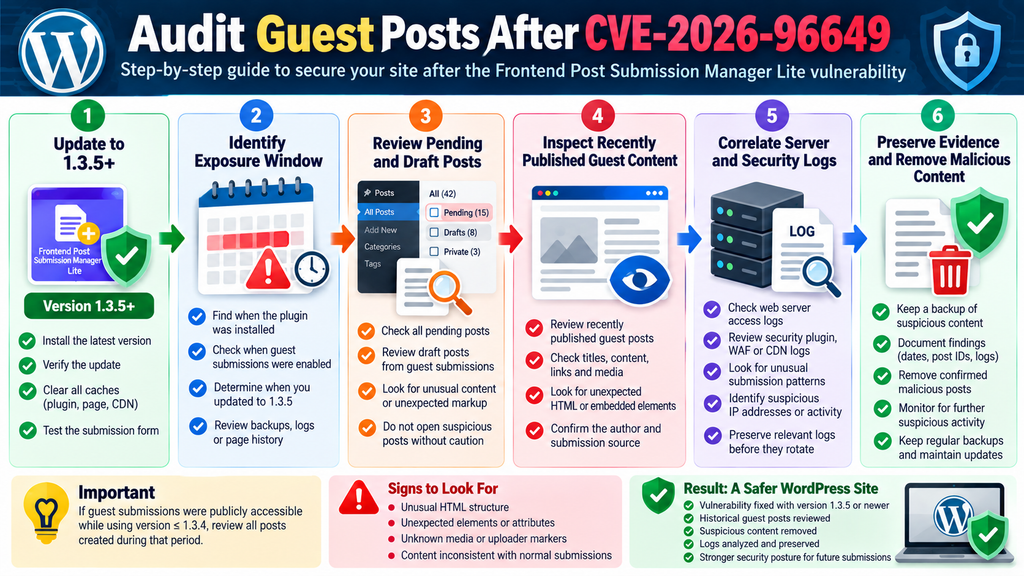
The most important task after installing version 1.3.5 is determining whether potentially hostile content was already submitted while the vulnerable configuration was active.
Start by identifying the exposure window. Find the earliest date when the vulnerable guest submission form was publicly available and the date when the plugin was upgraded to 1.3.5 or guest posting was disabled.
Next, review posts created through that workflow during the relevant period. Give priority to Pending, Draft, Private, and recently published posts originating from guest submissions.
Do not limit the investigation to obvious spam titles. A malicious submission does not need an alarming title or visible warning. Suspicious content may deliberately appear like an ordinary article because the attacker’s goal could be to convince an editor to open it.
Look for unexpected markup, unusual attributes, unexplained embedded elements, strange uploader-related markers, content inconsistent with what the form normally generates, or structural HTML that does not match legitimate submissions.
The goal is not to become an exploit analyst. Administrators should identify anomalies and preserve evidence rather than experimenting with suspicious material.
Review More Than Published Posts
Editorial teams often focus on public content because published pages receive traffic. For this vulnerability, unpublished content can be equally relevant.
Pending submissions are particularly important because administrators and editors are precisely the people likely to open them. Drafts created by a guest submission workflow may also contain stored information even though search engines and ordinary visitors cannot see them.
Trash should not automatically be ignored either. Depending on how a suspicious submission was handled, a moderator may have moved it there without realizing why it looked unusual.
If your site keeps revisions, those records can provide additional context. An article that now looks normal might have been edited after submission. Revision history can help determine what the original guest supplied and what an editor later changed.
Large websites should consider exporting a controlled list of relevant post IDs, creation dates, statuses, authors, and submission sources. This makes the investigation easier to document without repeatedly browsing questionable content.
Correlate Posts With Server Logs
Content review becomes more useful when combined with logs. Web server access logs may help establish when submission endpoints received requests and which addresses or user agents were involved.
Security plugins, web application firewalls, CDN services, reverse proxies, and hosting dashboards may provide additional evidence. Search for unusual request bursts around the creation time of suspicious guest posts.
Do not rely on IP addresses as proof of identity. Shared networks, VPNs, proxies, mobile connections, and compromised systems make attribution difficult. The purpose of log analysis is primarily to understand activity and scope.
Repeated submission attempts, unusual request patterns, or multiple suspicious posts arriving within a short period can help prioritize further investigation.
Keep in mind that log retention varies significantly. Some hosting providers retain access logs for only a limited period. If CVE-2026-96649 affects an important production environment, preserving available logs before they rotate can be worthwhile.
Search the Database Carefully
Experienced administrators may choose to inspect WordPress database records directly, particularly when hundreds or thousands of submissions require review. However, database investigation should be performed carefully and preferably against a backup or read-only copy.
The wp_posts table normally contains post content, titles, statuses, publication dates, and related information. The actual table prefix may differ from wp_, so administrators should not assume a default configuration.
Searches should focus on identifying abnormal content patterns rather than attempting to execute or reproduce anything found in the database. If suspicious material appears, preserve the relevant record and associated metadata for investigation.
Avoid mass search-and-replace operations until you understand the scope. An overly broad cleanup query can damage legitimate articles, Gutenberg markup, embeds, shortcodes, or custom content.
When the site is business-critical or evidence suggests exploitation, consider involving an experienced WordPress security professional. Preserving evidence before destructive cleanup can make later incident analysis significantly easier.
Building a Safer Guest Submission Workflow
CVE-2026-96649 provides a useful reminder that guest posting is not simply an editorial feature. It is also an input interface exposed to people outside the site’s normal trust boundary.
A safer workflow starts with moderation. Anonymous submissions should generally become pending content. Editors can then review titles, article bodies, links, images, and other fields before publication.
Keep WordPress core, themes, and plugins updated. Security updates are most effective when administrators install them promptly rather than allowing vulnerable versions to remain online for months.
Remove plugins that are no longer needed. An inactive workflow may still create maintenance overhead, and abandoned components are easy to forget during routine patching.
Restrict administrator accounts to people who genuinely need administrator capabilities. Writers, moderators, and editors should receive roles aligned with their responsibilities.
Finally, maintain dependable backups and test restoration periodically. A backup that has never been restored is only an assumption. Reliable recovery procedures give administrators more options when security incidents or failed updates occur.
Treat User-Generated Content as Untrusted
The central principle is simple: user-generated content remains untrusted even after it enters the WordPress database.
Storage is not validation. A database is simply a persistence layer. If unsafe information enters it, that information remains potentially unsafe until the application handles it correctly for the context where it will appear.
This principle applies to comments, reviews, contact forms, support tickets, directory listings, event submissions, marketplace descriptions, profile fields, filenames, and many other WordPress features.
Developers should validate what users are allowed to provide, sanitize incoming data where appropriate, and escape output according to its destination. JavaScript should use safe DOM manipulation methods whenever possible.
Administrators cannot control every line of third-party plugin code. They can, however, reduce exposure by maintaining updates, limiting unnecessary anonymous functionality, monitoring security advisories, and reviewing workflows that accept untrusted content.
Frequently Asked Questions
What is the Frontend Post Submission Manager vulnerability?
CVE-2026-96649 is a stored DOM-based cross-site scripting vulnerability affecting Frontend Post Submission Manager Lite versions up to and including 1.3.4. The documented issue involves untrusted submitted post content reaching an unsafe browser-side DOM context.
Which version of Frontend Post Submission Manager Lite is vulnerable?
Public vulnerability information identifies versions up to and including 1.3.4 as affected. WordPress.org lists 1.3.5 with a security fix addressing stored DOM-based XSS behavior.
Is version 1.3.5 safe from CVE-2026-96649?
Version 1.3.5 contains the vendor’s documented fix for this vulnerability. Administrators should install 1.3.5 or a newer maintained release rather than remaining on 1.3.4 or earlier.
Does every website with the plugin installed have the same exposure?
No. The documented exploitation scenario requires guest post submission to be enabled through the [fpsm] shortcode. Administrators should check both the installed version and their actual frontend submission configuration.
Does an attacker need a WordPress account?
The vulnerability has been documented as unauthenticated under the affected guest-submission configuration. That is one reason sites accepting anonymous content deserve particular attention.
Does updating the plugin automatically clean old guest posts?
Administrators should not assume that installing the security update proves all previously stored submissions are clean. Sites that accepted guest content while an affected version was active should review relevant historical submissions.
Which posts should I inspect first?
Prioritize pending, draft, private, trashed, and recently published content created through the guest submission workflow during the potential exposure period. Review unusual markup and unexpected structures carefully.
Should I test an XSS payload against my production site?
No. Production systems should not be used for unnecessary exploit testing. Verify the patched version and normal application behavior. Deeper testing belongs in an isolated environment where you have authorization and appropriate safeguards.
Is CAPTCHA enough to protect a guest post form?
No. CAPTCHA can help reduce automated spam, but it does not replace secure sanitization, output escaping, permissions, moderation, safe DOM handling, or timely software updates.
Should I disable guest posting completely?
That depends on the site’s publishing model. Guest posting can be a legitimate feature. If anonymous submissions are unnecessary, requiring authentication reduces exposure. If they are necessary, keep the plugin updated and combine guest submission with moderation and appropriate security controls.
The Important Lesson for WordPress Publishers
CVE-2026-96649 is more than another plugin update notification. It illustrates an important security principle for every website accepting content from visitors: the trust boundary does not disappear when information reaches the database.
Frontend Post Submission Manager Lite versions through 1.3.4 are affected by the documented stored DOM-based XSS issue under the relevant guest-submission configuration. Version 1.3.5 introduces the security correction, making an immediate update the obvious first remediation step.
However, administrators who previously operated a public guest submission form should go further. Establish the site’s exposure window, review pending and historical guest posts, preserve useful logs, investigate anomalies, and confirm that no suspicious content remains.
A secure WordPress publishing workflow combines patched software with sensible moderation, limited privileges, reliable backups, careful handling of user-generated content, and ongoing maintenance.
Guest posting itself is not the problem. The risk appears when untrusted content crosses application boundaries without the protections appropriate to its final context. Keeping those boundaries visible is one of the most effective ways to run a safer WordPress site.
⚠️ Disclaimer and Source Hygiene
This article is provided for educational, defensive cybersecurity, and WordPress administration purposes. It does not provide instructions for exploiting CVE-2026-96649 and intentionally omits executable XSS payloads and offensive testing procedures.
Technical details were cross-checked against current public vulnerability information and the official WordPress.org plugin listing available at the time of writing. Vulnerability records, plugin versions, and remediation guidance can change after publication. Administrators should therefore verify the latest plugin release and current vendor information before making production decisions.
For high-value, compromised, or business-critical websites, consider consulting a qualified WordPress security professional before deleting evidence or making extensive database changes.
🔔 For more tutorials like this, consider subscribing to our blog.
📩 Do you have questions or suggestions? Leave a comment or contact us!
🏷️ Tags: Frontend Post Submission Manager vulnerability, CVE-2026-96649, WordPress vulnerability, stored DOM XSS, WordPress security, guest post security, Frontend Post Submission Manager Lite, WordPress guest posts, XSS vulnerability, WordPress plugin security
📢 Hashtags: #WordPressSecurity, #WordPress, #CVE202696649, #CyberSecurity, #StoredXSS, #DOMXSS, #PluginSecurity, #WebsiteSecurity, #WordPressTips, #GuestPosting
Sources and References
WordPress.org Plugin Directory – Frontend Post Submission Manager Lite: Official plugin information, supported guest and authenticated submission workflows, current version information, and the version 1.3.5 security changelog.
CVE-2026-96649 vulnerability record: Documents the stored DOM-based cross-site scripting issue, affected versions through 1.3.4, the post_content data flow, guest-submission prerequisite, CWE-79 classification, and CVSS 3.1 score of 7.2.
SANS Internet Storm Center vulnerability information: Independent vulnerability record describing the affected version range and the guest submission configuration required by the documented attack path.
Patchstack vulnerability information: Secondary vulnerability tracking identifying Frontend Post Submission Manager Lite through version 1.3.4 as affected by unauthenticated stored DOM-based XSS.
Secondary Sources and Testimonials
Independent security databases published on September 30, 2026 consistently identify the affected range as Frontend Post Submission Manager Lite 1.3.4 and earlier and describe the issue as stored DOM-based cross-site scripting associated with anonymous guest submissions.
The most important remediation detail comes directly from the WordPress.org plugin changelog. Version 1.3.5 explicitly introduces security changes intended to prevent stored DOM-based XSS in uploader labels and messages and to block uploader markers in submitted HTML.
Administrators should prioritize the official plugin release information when determining which version to install, while using vulnerability databases as supporting sources for understanding exposure, severity, and the affected attack surface.