
Table of Contents
Two critical The Events Calendar vulnerabilities can expose WordPress websites to unauthenticated remote code execution. Site owners should update directly to version 6.17.4.1, understand why comment moderation may not provide protection, and carefully audit event comments, files, administrator accounts, and server activity.
The Events Calendar Vulnerability Requires Immediate Attention
The Events Calendar is one of the best-known event management plugins in the WordPress ecosystem. That popularity makes security problems affecting it especially important. Two newly disclosed vulnerabilities, CVE-2026-78006 and CVE-2026-78159, deserve immediate attention because both can potentially lead to remote code execution under vulnerable configurations. The weaknesses affect the way The Events Calendar processes certain widget-related data and event-page content. More importantly, exploitation does not necessarily require an attacker to obtain a WordPress account first. Both vulnerabilities have received critical CVSS scores of 9.8, and patched versions are available. CVE-2026-78159 affects versions through 6.17.3, while CVE-2026-78006 extends the affected range through version 6.17.4.
That version distinction is extremely important. A website administrator who sees that version 6.17.3.1 addressed earlier widget validation problems could reasonably assume the immediate danger has passed. Likewise, someone running 6.17.4 might believe the plugin is current enough. Neither assumption is safe for the newly disclosed second vulnerability. The official WordPress.org changelog shows that version 6.17.4.1 was released on September 10, 2026, with strengthened validation of copied widget instances. WordPress.org currently lists 6.17.4.1 as the stable version. Therefore, administrators responding to these vulnerabilities should verify that the installed version is 6.17.4.1 or newer, rather than stopping at one of the intermediate releases.
The most unusual part of this security issue involves WordPress comments on event pages. Normally, administrators think of comment moderation as a barrier. A suspicious comment enters the moderation queue, remains unpublished, and waits for an administrator to approve or delete it. CVE-2026-78006 demonstrates why that mental model is not sufficient here. The vulnerability description states that an unauthenticated commenter can receive a moderation-hash URL that lets the commenter view their own pending comment. On affected event pages, that content can reach the vulnerable processing path before an administrator approves it. Consequently, “all comments require approval” should not be treated as a substitute for updating the plugin.
Security Status at a Glance
The practical response is straightforward. If The Events Calendar is installed, check its version immediately. Versions through 6.17.4 require attention because CVE-2026-78006 was patched in 6.17.4.1. Older installations may additionally remain exposed to CVE-2026-78159 and other previously corrected security issues. Updating is the primary fix. Disabling comments on event content can reduce exposure to the documented comment-dependent attack path, but administrators should view that measure only as temporary risk reduction. It does not replace the security update, and it cannot establish whether an older vulnerable installation was previously targeted.
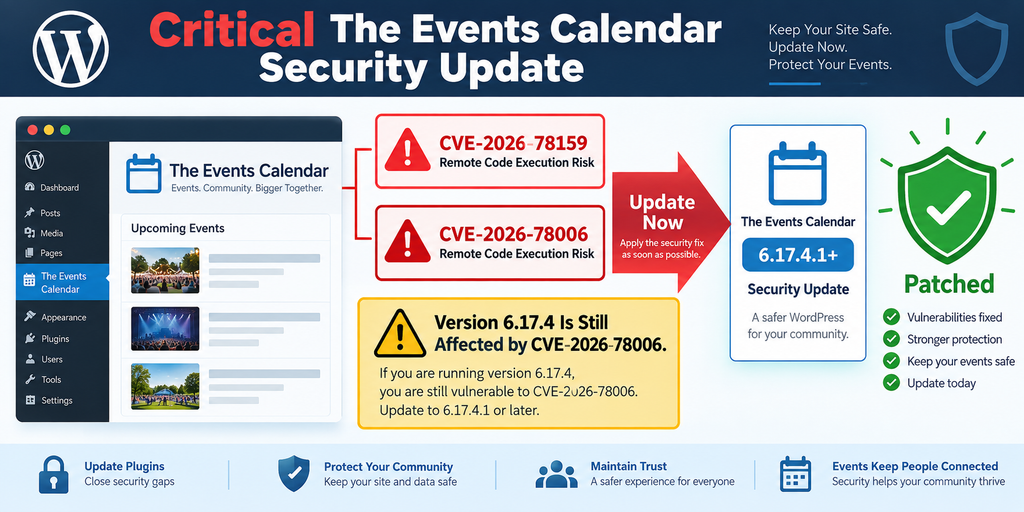
What Are CVE-2026-78006 and CVE-2026-78159
CVE-2026-78159 is a critical remote code execution vulnerability affecting The Events Calendar through version 6.17.3. According to the published vulnerability information, insufficient validation in the processing of a widget “classes” map could allow specially constructed data to reach a callable processing path. In practical terms, data that should have been rejected could pass through the plugin’s validation logic and reach functionality capable of producing a much more serious result. The vulnerability is classified as remote code execution, carries a CVSS score of 9.8, requires no authenticated WordPress privileges in the documented scenario, and was corrected beginning with version 6.17.3.1.
CVE-2026-78006 is particularly important because it reaches one release further. It affects The Events Calendar through version 6.17.4 and is described as an unauthenticated PHP object injection issue that can lead to remote code execution. Published technical information attributes the weakness to insufficient protection around the plugin’s widget-instance validation and subsequent handling of serialized data. The security issue is classified under CWE-502, Deserialization of Untrusted Data. Patchstack lists version 6.17.4.1 as the patched release and assigns the vulnerability a critical CVSS score of 9.8.
These are not simply two names for the same vulnerability. Their affected version ranges and underlying processing paths differ. CVE-2026-78159 is reported as affecting versions through 6.17.3 and was addressed in 6.17.3.1. CVE-2026-78006 remained applicable through 6.17.4 and required the subsequent 6.17.4.1 security release. That sequence explains why administrators should avoid looking only at whether they installed an earlier security update. The relevant question today is whether the website has reached the latest patched version that closes the newer attack path as well.
Why a 9.8 CVSS Rating Matters
A CVSS score does not prove that a website has been attacked. It measures characteristics of a vulnerability and its potential security impact. In these cases, the published scoring reflects a network-accessible attack vector, low attack complexity, no required privileges, no required user interaction, and potentially high impacts to confidentiality, integrity, and availability. Those characteristics justify treating the update as an urgent security task even without confirmed evidence of widespread exploitation.
Remote code execution sits near the top of the risk hierarchy for a WordPress installation because application-level compromise can become server-level compromise. Depending on hosting configuration and permissions, successful code execution could potentially allow an attacker to alter WordPress files, create persistence, access information available to the PHP process, modify database content, redirect visitors, inject unwanted scripts, create administrator accounts, or use the compromised website for additional malicious activity. The exact consequences vary from one environment to another, so administrators should avoid assuming that a successful exploit would leave only an obvious visual sign.
Why The Events Calendar Installations Deserve Attention
The Events Calendar has a large WordPress footprint. WordPress.org currently reports more than 600,000 active installations. A security problem in a plugin with that reach deserves rapid attention because many installations may remain on older releases for compatibility, maintenance, or operational reasons. The plugin also sits in a public-facing role on many websites because event pages are designed to be visited by unauthenticated users.
The existence of a vulnerability does not mean every installation is equally exploitable. The documented attack paths involve particular functionality, including comments being enabled and visible on event content. However, administrators should not use configuration uncertainty as a reason to delay patching. Checking every template, comment setting, integration, theme override, and historical configuration can take longer than applying the official update. When a patched release exists and the vulnerability carries critical severity, moving to the secure version is generally the cleaner defensive action.
Why Event Comments Make Exploitation Possible
Comments appear unrelated to calendar functionality at first glance. WordPress normally treats them as content attached to posts or custom post types. The Events Calendar, however, uses its own event presentation layer while still interacting with WordPress content processing. The vulnerability descriptions indicate that the V2 single-event template can process buffered page content using WordPress block rendering. When event comments become part of that content, specially constructed block markup can reach processing routines that were never intended to receive attacker-controlled structures.
This interaction is what makes the vulnerabilities more interesting than a conventional comment-security problem. The concern is not simply that an attacker might publish spam, JavaScript, or an unwanted link. Instead, comment content can become an input to a deeper rendering process. In affected versions, widget-related data embedded in that processing chain may pass insufficient validation. The resulting risk moves beyond content abuse and into server-side execution. That is why normal anti-spam thinking does not fully address this vulnerability.
Comments must be enabled in the relevant event context for the documented chains. This requirement reduces exposure for websites that completely disable comments on events. However, many WordPress administrators do not know whether their event post type accepts comments. A theme, plugin, migration, imported event, custom snippet, or old configuration may have changed those settings. Administrators should verify the actual configuration rather than assuming that comments are unavailable simply because a comment form is not obvious on the front end.
Event Pages Are Public Attack Surfaces
An event page often needs to remain publicly accessible. Organizations use these pages for schedules, conferences, concerts, community activities, webinars, classes, meetings, and ticket information. Public access is therefore expected. That creates a very different security model from an administrative feature hidden behind wp-admin authentication. If an event page also accepts unauthenticated comments, outside users gain a legitimate input channel connected to public event rendering.
Secure software should safely handle hostile input regardless of where it originates. Nevertheless, public input channels deserve special attention because attackers do not need stolen credentials to reach them. A vulnerable comment-processing chain can therefore turn a feature designed for visitor participation into a security boundary. The critical point is not that WordPress comments are inherently dangerous. They are not. The issue comes from how affected versions of The Events Calendar processed specific data after that content entered the event rendering workflow.
Why Simply Hiding the Comment Form Is Not Enough
A website owner might remove the visible comment form with CSS or a theme template and assume comments are disabled. That approach is not equivalent to disabling comment functionality. CSS changes presentation in the browser; it does not necessarily close the underlying WordPress comment endpoint or change whether a post type accepts comments. Similarly, removing a template component may hide the user interface while leaving server-side behavior available.
Administrators should therefore check WordPress comment settings and individual event behavior directly. Existing events deserve attention as well. WordPress can preserve comment status at the post level, so changing a general setting does not always produce the historical state an administrator expects. If event comments are unnecessary, disabling them properly reduces the available attack surface. Yet the correct long-term response remains updating The Events Calendar to 6.17.4.1 or later.
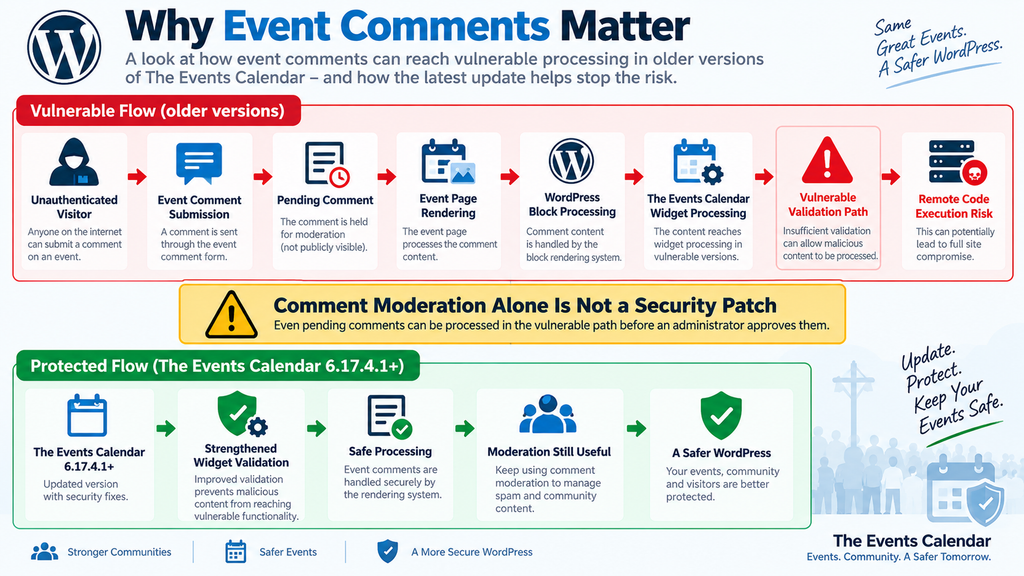
How a Pending Comment Can Trigger Remote Code Execution
The most important lesson from CVE-2026-78006 is that “pending” does not necessarily mean “never processed.” WordPress moderation is primarily a publication and visibility control. When an administrator enables manual approval, a new comment can remain pending instead of becoming publicly visible to ordinary visitors. That is useful for spam control and community management. However, a security boundary must consider every way the application can process or display the pending data, not only whether the general public sees it.
The published CVE description explains an important WordPress behavior in this chain. After an unauthenticated visitor submits a comment that requires moderation, WordPress can provide a moderation-hash URL that allows the commenter to see their own pending comment. The Events Calendar’s affected V2 single-event rendering process can then process the page content containing that comment. Therefore, the attacker does not necessarily need an administrator to click “Approve.” The attacker’s own post-submission view can be enough to bring controlled content into the vulnerable rendering path.
This distinction explains why comment moderation cannot be considered a complete mitigation. The security problem occurs before the moderation workflow provides the protection administrators may expect. From the attacker’s perspective, approval is unnecessary if the application already processes the content in a dangerous context while it remains pending. The weakness is therefore architectural rather than a simple failure to sanitize publicly displayed comments.
Moderation Controls Visibility, Not Every Processing Path
WordPress administrators commonly use settings such as “Comment must be manually approved” to control what visitors see. That remains a useful moderation feature. It should simply not be confused with a security sandbox. WordPress still needs to store, retrieve, preview, notify about, and otherwise work with pending comments. Plugins and themes can also interact with comment data during rendering.
CVE-2026-78006 illustrates what can happen when another component performs powerful processing on that content. A pending comment can remain unpublished while still becoming part of an application workflow. If a vulnerable parser interprets attacker-controlled structures rather than treating them strictly as inert content, moderation status cannot neutralize the underlying flaw.
This point matters beyond The Events Calendar. WordPress security often depends on understanding the difference between authorization, sanitization, escaping, validation, and content status. Each mechanism solves a different problem. A pending status answers whether content should be publicly published. It does not automatically guarantee that every plugin processing the content will handle it safely.
Why Administrator Approval Is Not Required
CVE-2026-78006 is classified as requiring no privileges and no user interaction in its CVSS assessment. That means the documented vulnerability does not rely on an administrator deliberately approving the malicious content or performing another required action. The vulnerable application itself provides the processing opportunity.
This is a major reason administrators should not postpone the update while watching the moderation queue. Deleting suspicious comments is useful during incident review, but it addresses individual inputs rather than the vulnerable code. Another malicious submission could arrive while the plugin remains outdated. Likewise, a spam plugin may reduce the number of unwanted comments but cannot be assumed to recognize a security payload designed for a different parser.
A web application firewall can provide valuable additional protection when appropriate rules exist. Patchstack, for example, states that it has issued a mitigation rule for the vulnerability. Even so, security filtering should serve as defense in depth. The vendor’s patched plugin version removes reliance on an external layer recognizing every possible malicious request.
Do Not Test the Vulnerability on a Production Website
Administrators do not need to reproduce the exploit to determine whether action is required. Checking the installed plugin version and relevant configuration provides the necessary first step. Attempting to construct malicious comments or serialized objects on a production website introduces unnecessary risk. A mistake could damage the installation, trigger security systems, create unwanted artifacts, or complicate later incident analysis.
The safer approach is defensive. Preserve useful logs if compromise is suspected. Back up the current site when doing so will not overwrite the only clean recovery point. Update the plugin from an official source. Then review comments, accounts, files, scheduled tasks, plugins, themes, uploads, logs, and other persistence locations for unexpected changes. A vulnerability report should help administrators reduce risk, not encourage them to recreate an attack.
Evidence of Active Exploitation

At the time of this article’s preparation on September 13, 2026, the public sources reviewed confirm the vulnerabilities, their critical severity, affected versions, and available patches. However, reliable evidence of widespread in-the-wild exploitation could not be independently confirmed. Some security aggregation pages use urgent language around the flaws, but current vulnerability tracking sources also state that no known exploitation or public exploit has been recorded for CVE-2026-78006. Therefore, administrators should avoid interpreting the absence of confirmed exploitation as proof that vulnerable sites are safe.
This distinction matters for accurate security reporting. “Exploitable” and “actively exploited” do not mean the same thing. A vulnerability can be technically exploitable and severe without researchers having confirmed attacks against real websites. Conversely, exploitation can sometimes begin before public monitoring systems document it. The responsible response is to report what is known, identify uncertainty clearly, and still patch rapidly when the potential impact is remote code execution.
The Events Calendar vulnerabilities warrant that approach. Both have a CVSS score of 9.8, involve unauthenticated attack paths under documented conditions, and already have fixes available. Waiting for confirmed attack telemetry offers little practical benefit to a website owner. Once a critical vulnerability is publicly documented, defenders should assume that technical details may attract additional research and scanning.
Why Public Disclosure Changes the Risk
Before a vulnerability becomes public, knowledge of the weakness may be limited to researchers, developers, and other parties involved in coordinated disclosure. After publication, the situation changes. Vulnerability databases identify affected software, version ranges, security classifications, and remediation information. Researchers and security teams study patches, while automated systems begin identifying potentially vulnerable installations.
Defenders can use the same information to respond quickly. In this case, the required destination is clear: The Events Calendar 6.17.4.1 or later. Patchstack identifies 6.17.4.1 as the patched version for CVE-2026-78006, while WordPress.org confirms that 6.17.4.1 is an official security release that strengthens copied-widget validation.
This is why administrators should not wait for an attack campaign to appear in headlines. The cost of applying a normal plugin update and testing the site is generally far lower than the cost of investigating a server after suspected remote code execution.
What Suspicious Activity Could Look Like
A compromised WordPress site does not always display an obvious warning. Attackers who obtain code execution may prefer persistence and stealth. Administrators should therefore look for unexpected changes rather than relying on a single indicator. Newly created administrator accounts, unexplained password or email changes, unknown PHP files, altered plugin files, modified theme code, unusual scheduled tasks, unfamiliar plugins, unexpected redirects, injected JavaScript, strange outbound connections, and unexplained changes to configuration can all justify further investigation.
Server and security logs may also reveal unusual requests around event pages and comment submission. A sudden concentration of requests against event URLs, abnormal comment activity, or unexpected application errors can provide useful context. However, administrators should avoid assuming that the absence of a recognizable log pattern proves that exploitation did not occur. Log retention varies widely, and successful attacks do not always generate an obvious signature.
The comment database deserves particular attention because the documented attack chain involves event comments. Review pending, spammed, trashed, and approved comments associated with event content. Do not focus only on comments visible publicly. A malicious submission could remain pending or have already been moved into another moderation state.
Updating The Events Calendar to Version 6.17.4.1
The safest immediate action is to update The Events Calendar directly to version 6.17.4.1 or a later official release. CVE-2026-78159 was fixed earlier, in 6.17.3.1, but CVE-2026-78006 remained applicable through 6.17.4. Patchstack explicitly identifies 6.17.4.1 as the patched version for the latter vulnerability. WordPress.org’s changelog for 6.17.4.1 states that the release strengthened validation of copied widget instances.
Administrators running 6.17.3 or older should not intentionally update only to 6.17.3.1 and stop. Likewise, version 6.17.4 should not be considered the final security destination. The appropriate target for this disclosure sequence is 6.17.4.1 or newer. If a newer stable version has become available by the time you read this article, consult the official changelog and use the currently supported secure release unless compatibility requirements dictate a different vendor-supported approach.
Before updating a production website, make sure a usable backup exists. A proper backup should cover both the WordPress database and site files. Critical security updates should be applied quickly, but urgency does not eliminate the value of recovery planning. A backup provides a route back if the update exposes an unrelated compatibility problem involving a theme, custom code, caching layer, ticketing integration, or another extension.
A Practical Update Sequence
Start by opening the WordPress Plugins screen and checking the installed version of The Events Calendar. If the version is 6.17.4 or lower, treat the installation as requiring the current security update. Obtain updates through the normal WordPress update mechanism or another trusted official deployment process. Avoid downloading replacement packages from unofficial mirrors or unknown websites.
After the update finishes, verify the version again. Do not assume that clicking the update button guarantees success. File-permission problems, interrupted requests, deployment systems, managed-hosting policies, or caching can occasionally create confusing results. The plugin should report 6.17.4.1 or a later secure version.
Next, clear relevant application and page caches. If the website uses persistent object caching, a reverse proxy, server-side full-page caching, or a CDN, clear the appropriate layers according to the site’s normal maintenance process. Then visit several event pages and verify that calendar views, individual events, navigation, event metadata, forms, tickets, and other connected functionality still behave correctly.
Why 6.17.3.1 Is Not the Final Destination
Version 6.17.3.1 is important because it addressed security issues in copied widget-instance handling and is listed as the fix for CVE-2026-78159. However, CVE-2026-78006 covers versions through 6.17.4. Therefore, stopping at 6.17.3.1 would still leave the site inside the affected range of the later vulnerability.
This sequence is a useful reminder that security releases can evolve quickly. A first patch may close one path while additional research reveals another path or a related weakness. Administrators should always evaluate the latest advisory rather than relying on the memory that “I already installed the security update.”
The same principle applies to version 6.17.4. It was released on September 3, 2026, primarily with fixes unrelated to the final September 10 security release. Version 6.17.4.1 followed with strengthened validation of copied widget instances. The small version-number difference can make the update look minor, but from a security perspective the final “.1” matters considerably.
What to Test After Updating
Open the main calendar archive and several individual events. Test different calendar views that your website actively uses. Confirm event dates, organizers, venues, navigation, recurring events where applicable, widgets, shortcodes, and block-based layouts. Websites using Event Tickets or other extensions should also verify the connected visitor workflow.
Check both logged-in and logged-out views because caching and permissions can make the front end behave differently. If comments are intentionally enabled for events, test a harmless normal comment after the security update. Confirm that moderation works as expected without trying to reproduce the vulnerability.
Finally, review the WordPress Site Health screen and PHP error logs for new warnings or fatal errors. A successful update should not be judged only by whether the homepage loads. Event functionality can involve custom database tables, caching, templates, widgets, REST endpoints, and integrations that may not appear on the homepage.
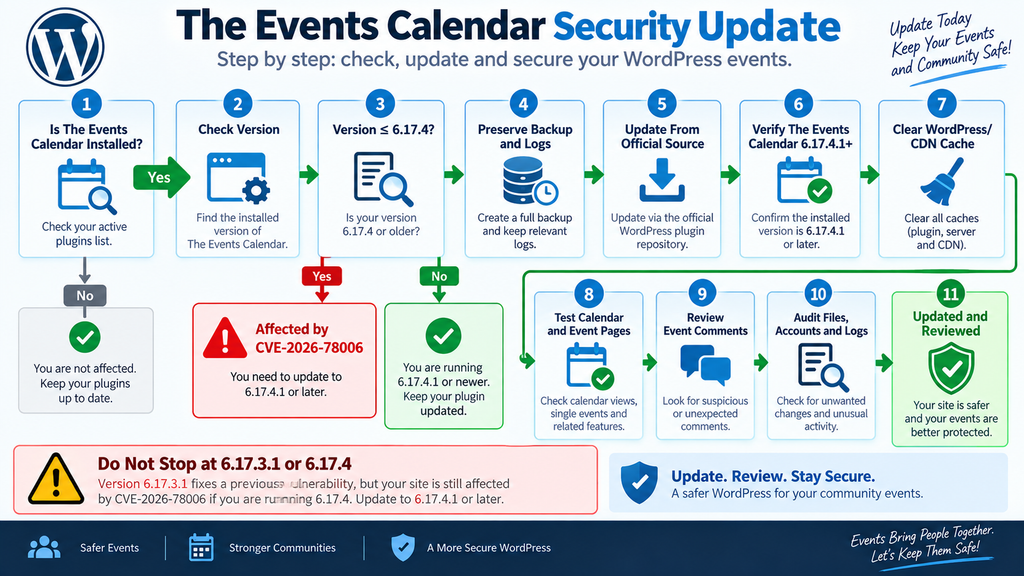
Auditing WordPress for Malicious Comments and Backdoors
Updating closes the known vulnerable path, but an update cannot automatically prove that a previously vulnerable website was never compromised. This distinction becomes especially important with remote code execution vulnerabilities. If there is credible evidence that exploitation occurred before the update, administrators should treat the situation as an incident rather than a routine maintenance task.
Begin with comments attached to event content. Review every moderation state available in WordPress, including pending, approved, spam, and trash. Look for unexpected submissions, unusual formatting, comments unrelated to the event, or content containing structures that do not resemble normal visitor messages. Because the attack descriptions involve specially constructed block-related content, strange markup in an event comment deserves attention. Avoid manually executing, rendering, or experimenting with suspicious material.
Record useful details before permanently deleting evidence if you genuinely suspect compromise. Timestamps, comment IDs, associated event IDs, server log entries, security alerts, and relevant backups can help reconstruct what happened. For a business-critical website, preserving evidence may be more valuable than immediately cleaning every suspicious item without documentation.
Review WordPress Administrator Accounts
Open the Users screen and examine administrator accounts. Every administrator should have a known purpose and owner. Pay attention to newly created users, unfamiliar display names, unexpected email changes, accounts with unusual creation timing, or existing accounts that suddenly gained elevated privileges.
Removing an unknown administrator is important, but it may not be enough after suspected remote code execution. An attacker with server-side execution may have several persistence options. Therefore, account review should be one part of a broader investigation.
If compromise is confirmed or strongly suspected, rotate relevant credentials after securing the environment. That can include WordPress administrator passwords, hosting credentials, database credentials where appropriate, deployment credentials, application secrets, and third-party integration keys. Coordinate credential rotation carefully on production systems because changing a database password or API credential without updating dependent configuration can cause downtime.
Verify WordPress Core, Plugins, and Themes
WordPress core files should match the official distribution for the installed version. Unexpected modifications deserve investigation. The same principle applies to plugins and themes obtained from known sources. Security scanners and integrity tools can make comparison easier, although custom themes and internally modified plugins require additional care because legitimate local changes may exist.
Look especially closely at executable PHP files in locations where your website normally does not create them. Attackers often seek persistence that survives the original vulnerability being patched. A compromised site can therefore remain compromised even after The Events Calendar reaches version 6.17.4.1.
Unknown plugins are another warning sign. Review both active and inactive plugins. Also inspect must-use plugins if the installation uses the mu-plugins directory. An unfamiliar file in that location can be significant because must-use plugins load automatically and do not behave exactly like normal plugins in the WordPress Plugins screen.
Examine the Uploads Directory
WordPress normally stores media files beneath its uploads directory. In a standard configuration, arbitrary PHP execution from uploads should not be necessary for normal media operation. Unexpected executable files in upload folders can therefore deserve investigation.
Do not delete files based solely on unfamiliar names. Backup plugins, optimization tools, form systems, importers, and other legitimate extensions may create their own directories and temporary files. Establish what created a file, compare timestamps, and consult the relevant plugin documentation where necessary.
A professional incident investigation focuses on evidence and context rather than guessing from filenames. File modification times can help build a timeline, but they are not perfect evidence because timestamps can be changed or affected by migrations and deployments.
Inspect Scheduled Tasks and Persistence Mechanisms
WordPress uses WP-Cron for legitimate scheduled work. Plugins may create jobs for cleanup, email delivery, imports, backups, event synchronization, and other maintenance. Review scheduled tasks for unfamiliar hooks when compromise is suspected.
Server-level scheduled tasks also matter on VPS, dedicated, and hosting environments where the site owner has access to them. A malicious scheduled task can restore a removed file or periodically execute unwanted commands. Again, not every unfamiliar job is malicious. Hosting platforms and management software often create legitimate cron entries.
Persistence can also appear in theme files, configuration files, auto-loaded database options, custom plugins, startup scripts, or other application components. This is why severe remote code execution incidents sometimes require assistance from a qualified WordPress security professional or hosting security team.
Review Web Server and Security Logs
Logs can provide context that the WordPress dashboard cannot. Examine requests around event pages, comment submission endpoints, unusual POST activity, repeated requests from the same sources, application errors, and requests immediately followed by unexpected file changes or administrative actions.
If your hosting provider offers security logs, malware scanning, WAF events, or file-change monitoring, include those sources in the review. Compare timestamps across systems whenever possible. A comment submission at one time followed by an unusual PHP file creation shortly afterward would deserve closer investigation, although correlation alone does not prove causation.
Log retention can be short on some hosting plans. If you suspect an incident, preserve available logs before automated rotation removes them. Organizations with regulatory or contractual obligations should follow their established incident-response and evidence-retention procedures.
Updating and Auditing Solve Different Problems
The security update answers the question, “How do I close the known vulnerability?” Auditing answers a different question: “What happened while my website was vulnerable?” Administrators need to understand that difference.
A clean audit cannot guarantee that no attack ever occurred, particularly when logging is incomplete. However, reviewing the highest-value indicators provides greater confidence than simply updating and forgetting the issue. Conversely, finding suspicious activity does not automatically prove that these particular CVEs caused it. WordPress installations contain many components, and compromise can originate from stolen credentials, another vulnerable plugin, insecure hosting, malicious extensions, or other weaknesses.
The correct goal is evidence-based investigation. Update first to stop continued exposure, preserve relevant information when possible, and then determine whether the website shows signs that justify deeper incident response.
Frequently Asked Questions
What is The Events Calendar vulnerability?
The current security concern involves two critical vulnerabilities, CVE-2026-78159 and CVE-2026-78006, affecting vulnerable versions of The Events Calendar for WordPress. Under documented conditions, they can allow unauthenticated remote code execution. CVE-2026-78006 affects versions through 6.17.4 and is patched in 6.17.4.1.
Is The Events Calendar 6.17.4 vulnerable?
Yes. CVE-2026-78006 affects The Events Calendar versions up to and including 6.17.4. Patchstack identifies version 6.17.4.1 as the patched release. Therefore, a website still running exactly 6.17.4 should update.
Is version 6.17.3.1 safe from both vulnerabilities?
No. Version 6.17.3.1 addresses CVE-2026-78159, but the later CVE-2026-78006 affects versions through 6.17.4. Administrators should move to 6.17.4.1 or a newer secure release rather than stopping at 6.17.3.1.
Why does comment moderation not completely protect the website?
The documented CVE-2026-78006 chain can involve a pending comment being displayed back to its unauthenticated author through WordPress’s moderation-hash mechanism. The vulnerable event rendering path may process that content before an administrator approves it. Therefore, manual approval should not be treated as a security patch.
Are comments required for the documented attack chain?
Published descriptions indicate that comments must be enabled and visible on event content for the documented exploitation scenario. Disabling unnecessary event comments can therefore reduce exposure. However, updating the plugin remains the recommended fix.
Are these vulnerabilities being actively exploited?
As of September 13, 2026, the sources reviewed for this article confirm critical vulnerabilities and available patches, but reliable public confirmation of active in-the-wild exploitation could not be established. Some tracking sources explicitly report no known exploitation. Because patches exist and the potential impact is remote code execution, administrators should update without waiting for confirmed attacks.
Should I delete The Events Calendar?
Not necessarily. The plugin’s developers have released version 6.17.4.1 with strengthened validation, and vulnerability databases identify that release as the fix for CVE-2026-78006. Keeping a maintained plugin updated is generally preferable to making an unnecessary emergency migration when an official patch exists.
Is updating enough if my website was already compromised?
No. Updating closes the known vulnerable code path but does not automatically remove files, accounts, scheduled tasks, database modifications, or other persistence that an attacker may already have created. A site showing credible compromise indicators needs a broader incident investigation.
Should I disable comments after updating?
If your organization does not need comments on event pages, disabling unnecessary functionality can reduce attack surface. If event discussions are useful, the security update is the key requirement. Normal moderation, anti-spam controls, WAF protection, backups, monitoring, and timely updates can then provide additional layers of defense.
Where should I obtain The Events Calendar update?
Use the official WordPress plugin update system or another trusted deployment channel that obtains the official plugin package. WordPress.org currently lists version 6.17.4.1 as the stable release and documents its September 10, 2026 security change.
The Security Priority Is Clear
The Events Calendar vulnerability disclosure is a strong example of why WordPress security cannot rely on a single protective assumption. Comment moderation sounds like a barrier because a pending comment is not normally visible to the public. In this case, however, the documented processing chain means a pending comment can reach vulnerable application logic without first receiving administrator approval. That makes patching much more important than relying on moderation status.
CVE-2026-78159 and CVE-2026-78006 both carry critical severity and can lead to remote code execution under vulnerable conditions. The second vulnerability is the reason administrators must pay close attention to the exact version number. Version 6.17.3.1 fixed the earlier issue, but CVE-2026-78006 remained relevant through 6.17.4. The correct destination is therefore The Events Calendar 6.17.4.1 or later.
Administrators should also separate patching from incident investigation. Updating protects the site against the known vulnerability going forward. Auditing comments, files, administrator accounts, plugins, themes, scheduled tasks, and logs helps determine whether anything suspicious happened before the patch was installed. For a critical remote code execution vulnerability, doing both is a reasonable security response.
⚠️ Disclaimer and Source Hygiene
This article is provided for defensive cybersecurity education and WordPress administration. It does not provide exploit payloads or instructions for attacking websites. Vulnerability information can change as vendors, CVE authorities, and security researchers publish additional findings. Always verify the latest official plugin release and current security advisories before making production decisions.
The technical information in this article was cross-checked against the official WordPress.org plugin listing and changelog, published Patchstack vulnerability records, CVE information attributed to Wordfence, and additional vulnerability tracking sources. At publication time, these sources confirm the critical vulnerabilities and the 6.17.4.1 remediation path. Claims of active exploitation should be independently verified before being reported as established fact.
For business-critical, compromised, regulated, or high-traffic WordPress installations, consider consulting a qualified WordPress security professional, your hosting provider’s security team, or an experienced incident-response specialist.
🔔 For more tutorials like this, consider subscribing to our blog.
📩 Do you have questions or suggestions? Leave a comment or contact us!
🏷️ Tags: The Events Calendar vulnerability, CVE-2026-78006, CVE-2026-78159, The Events Calendar security, WordPress vulnerability, WordPress security, remote code execution, WordPress comments security, The Events Calendar 6.17.4.1, WordPress plugin security
📢 Hashtags: #TheEventsCalendar, #WordPressSecurity, #WordPress, #CVE202678006, #CVE202678159, #CyberSecurity, #WordPressVulnerability, #PluginSecurity, #WebsiteSecurity, #RemoteCodeExecution
Sources and References
WordPress.org – The Events Calendar
The official WordPress.org plugin directory currently identifies The Events Calendar 6.17.4.1 as the stable release. Its changelog records version 6.17.4.1 on September 10, 2026 and describes the release as strengthening validation of copied widget instances. The official listing also provides earlier security changes in versions 6.17.3 and 6.17.3.1.
Official The Events Calendar plugin page on WordPress.org
Patchstack – CVE-2026-78006
Patchstack identifies CVE-2026-78006 as an unauthenticated PHP object injection vulnerability capable of leading to remote code execution. It lists versions through 6.17.4 as vulnerable, version 6.17.4.1 as patched, and a CVSS score of 9.8.
Patchstack advisory for CVE-2026-78006
Patchstack – CVE-2026-78159
Patchstack identifies CVE-2026-78159 as an unauthenticated remote code execution vulnerability affecting The Events Calendar through 6.17.3. It lists 6.17.3.1 as the first patched version for this particular vulnerability and assigns a CVSS score of 9.8.
Patchstack advisory for CVE-2026-78159
Published CVE Information
Published CVE information for CVE-2026-78006 describes the interaction between event comments, the V2 single-event template, block processing, the WordPress moderation-hash mechanism, and the vulnerable widget-instance processing path. This information explains why an unauthenticated commenter may not need administrator approval before controlled content reaches the vulnerable processing chain.
Secondary Sources and Testimonials
Secondary vulnerability databases were used to cross-check affected versions, severity, vulnerability classifications, and the distinction between technical exploitability and confirmed exploitation in the wild. Where secondary sources differed in interpretation, this article relied primarily on the official WordPress.org release information and vulnerability records tied to the reporting security researchers.
No anonymous testimonials, invented administrator experiences, fabricated attack statistics, or unsupported compromise claims were used. At publication time, the available evidence supports urgent patching because of critical remote code execution risk, while public confirmation of widespread active exploitation remains insufficient to state that attacks are already occurring as an established fact.
1 thought on “Critical The Events Calendar Vulnerabilities Demand Action”