
Table of Contents
A critical WooCommerce registration vulnerability can allow unauthenticated visitors to create accounts with Administrator privileges during checkout. CVE-2026-15369 affects vulnerable versions of Custom User Registration Fields for WooCommerce when role selection is enabled. Store owners should update immediately and audit recently created accounts.
Critical WooCommerce Registration Vulnerability Demands Immediate Attention
WooCommerce stores often depend on extensions to add features that are not included in the default checkout experience. Custom registration fields are a common example. They can collect business information, customer preferences, tax details, or other data while an account is created. Some extensions also allow customers to select an appropriate user role during registration. That flexibility can be useful for stores serving wholesalers, retailers, professionals, or other customer groups. However, user roles are also a critical part of WordPress security.
A newly disclosed vulnerability demonstrates what can happen when user-controlled role information is not validated correctly. CVE-2026-15369 affects Custom User Registration Fields for WooCommerce, an extension developed by Addify. Versions up to and including 2.2.3 are affected. The security issue can allow an unauthenticated visitor to obtain elevated WordPress privileges during account creation when a particular role-selection feature is enabled. The vulnerability has received a CVSS 3.1 score of 9.8 out of 10, placing it firmly in the Critical category.
The most serious potential result is the creation of a WordPress account with the Administrator role. An administrator normally has extensive control over a WordPress installation. Depending on the site’s configuration, that can include managing users, installing or modifying plugins, changing themes, altering settings, and accessing sensitive administrative functions. For a WooCommerce store, administrative access may also expose business information, customer records, order information, and configuration data.
This issue should not be confused with a vulnerability in WooCommerce core itself. The affected component is the third-party Custom User Registration Fields for WooCommerce extension. That distinction matters because a store running WooCommerce does not automatically become vulnerable simply because WooCommerce is installed.
The practical response is straightforward. Store administrators should determine whether the affected extension is installed, check its version, verify whether the User Role Selection functionality is enabled, and update to version 2.2.4 or newer. Administrators should also inspect recently created WordPress accounts rather than assuming that installing the security update automatically proves that the site was never abused.
Why Account Privilege Escalation Is Especially Serious
WordPress separates users through roles and capabilities. A normal WooCommerce customer receives very limited permissions. That customer can usually manage their own account information and interact with orders, but they cannot administer the website. An Administrator sits at the opposite end of the permission model and can perform highly privileged actions.
This separation creates an important security boundary. Registration forms should never allow an external visitor to cross that boundary simply by changing information submitted during registration. Even when a website intentionally allows customers to choose between several roles, the server must independently decide which roles are acceptable.
CVE-2026-15369 is important because the vulnerable workflow could trust role information originating from the checkout process without sufficiently restricting it to the roles configured by the store administrator. In other words, the problem was not merely that a role-selection feature existed. The security problem involved insufficient server-side enforcement of which role values were actually permitted.
For store owners, the lesson extends beyond this individual extension. Anything that influences WordPress permissions must be treated as security-sensitive input. Browser forms, REST requests, checkout fields, hidden inputs, JavaScript controls, and API parameters should never be considered trustworthy simply because the normal interface only displays safe choices.
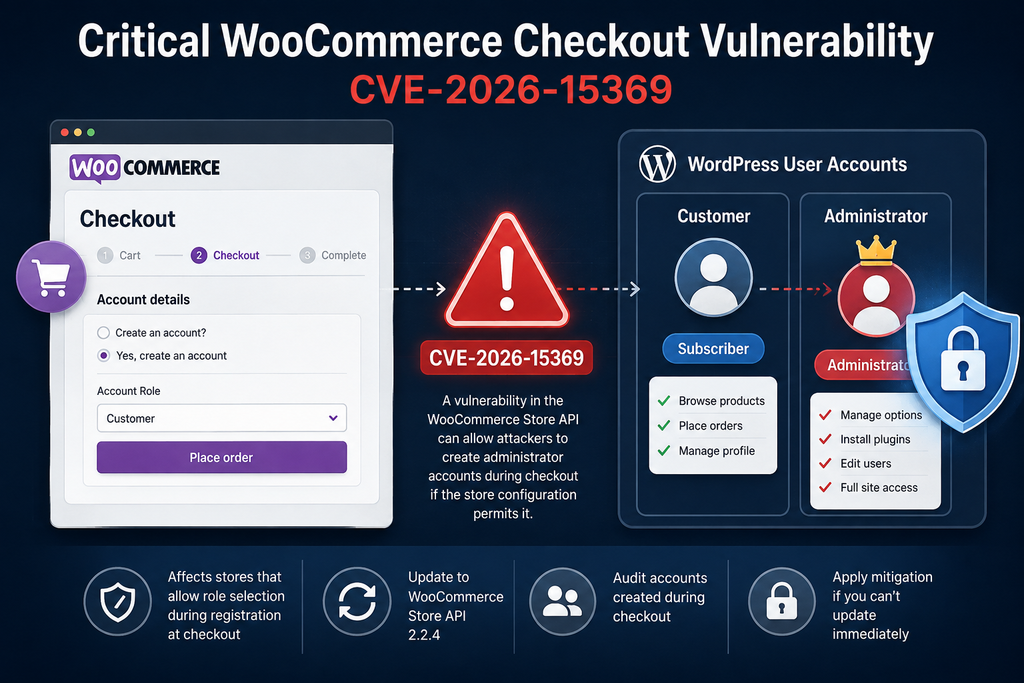
What Is CVE-2026-15369
CVE-2026-15369 is an unauthenticated privilege-escalation vulnerability affecting Custom User Registration Fields for WooCommerce. According to the published CVE information, versions through 2.2.3 are affected. The issue was publicly disclosed in August 2026 and is categorized as CWE-269: Improper Privilege Management.
The CVSS 3.1 base score is 9.8, with a Critical severity rating. The published vector indicates that the vulnerable path is remotely reachable, requires low attack complexity, does not require an existing authenticated account, and does not require interaction from another legitimate user. Those characteristics explain why administrators should treat the issue as an urgent security update rather than an ordinary maintenance release.
The vulnerability was credited to security researcher 0xd4rk5id3. Public CVE information identifies Wordfence as the assigning organization. The affected product is Addify’s Custom User Registration Fields for WooCommerce extension, not the WooCommerce plugin itself.
Affected and Patched Versions
The important version boundary is simple:
Affected: Custom User Registration Fields for WooCommerce 2.2.3 and earlier
Patched: Custom User Registration Fields for WooCommerce 2.2.4 and later
A site should not rely solely on the fact that automatic updates are enabled. Administrators should confirm the version actually installed on the production website.
WordPress can postpone or fail an update for several reasons. Licensing problems, filesystem permissions, failed scheduled tasks, maintenance errors, disabled update mechanisms, custom deployment workflows, or server restrictions can all leave a plugin on an older release.
Open WordPress Dashboard → Plugins and locate Custom User Registration Fields for WooCommerce. Verify the installed version directly. If the extension is managed through a separate WooCommerce or vendor licensing system, administrators should also verify that the security release is available through their normal update channel.
Why CVSS 9.8 Matters
A CVSS score does not automatically tell an administrator whether a particular website has already been compromised. It describes characteristics and potential impact of the vulnerability. Nevertheless, a score of 9.8 represents an extremely serious security issue.
The published CVSS vector for CVE-2026-15369 reflects network accessibility, low attack complexity, no required privileges, and no required user interaction. Successful privilege escalation can potentially affect confidentiality, integrity, and availability.
For a WooCommerce store, those three areas matter greatly. Confidentiality includes protecting customer and business information. Integrity involves preventing unauthorized changes to products, orders, users, plugins, configuration, and content. Availability means keeping the store functioning and accessible.
Administrative privileges can potentially affect all three areas.
That is why this WooCommerce registration vulnerability deserves immediate attention even if a store has never experienced an obvious security incident.
The Required Configuration Condition
There is an important condition that store owners should understand. Published vulnerability information states that exploitation requires the extension’s User Role Selection setting to be enabled.
That means not every installation of an affected plugin version necessarily exposes the vulnerable registration path in the same way.
However, administrators should not use this condition as a reason to postpone the update. Configuration changes over time. A feature might have been enabled previously and later disabled. Another administrator may have changed settings. Staging and production configurations may also differ.
Updating remains the correct long-term solution.
How the WooCommerce Store API Accepts an Administrator Role
Modern WooCommerce checkout functionality can communicate with the server through the WooCommerce Store API. This architecture allows checkout blocks and other front-end components to exchange structured information with WooCommerce while an order is being created.
Extensions can integrate with that process by reading additional checkout information. Custom User Registration Fields for WooCommerce uses this mechanism to support extra registration functionality. The security issue occurred because a user-role value originating from the checkout process could eventually influence the WordPress role assigned to a newly created user.
Published technical information identifies the affected Store API checkout route as /wc/store/v1/checkout. It also identifies the extension’s role-selection field as afreg_select_user_role. These identifiers are useful for defensive log review and incident investigation. Store owners do not need to reproduce or test a malicious request against a production website.
The core security problem is easier to understand conceptually than through exploit code.
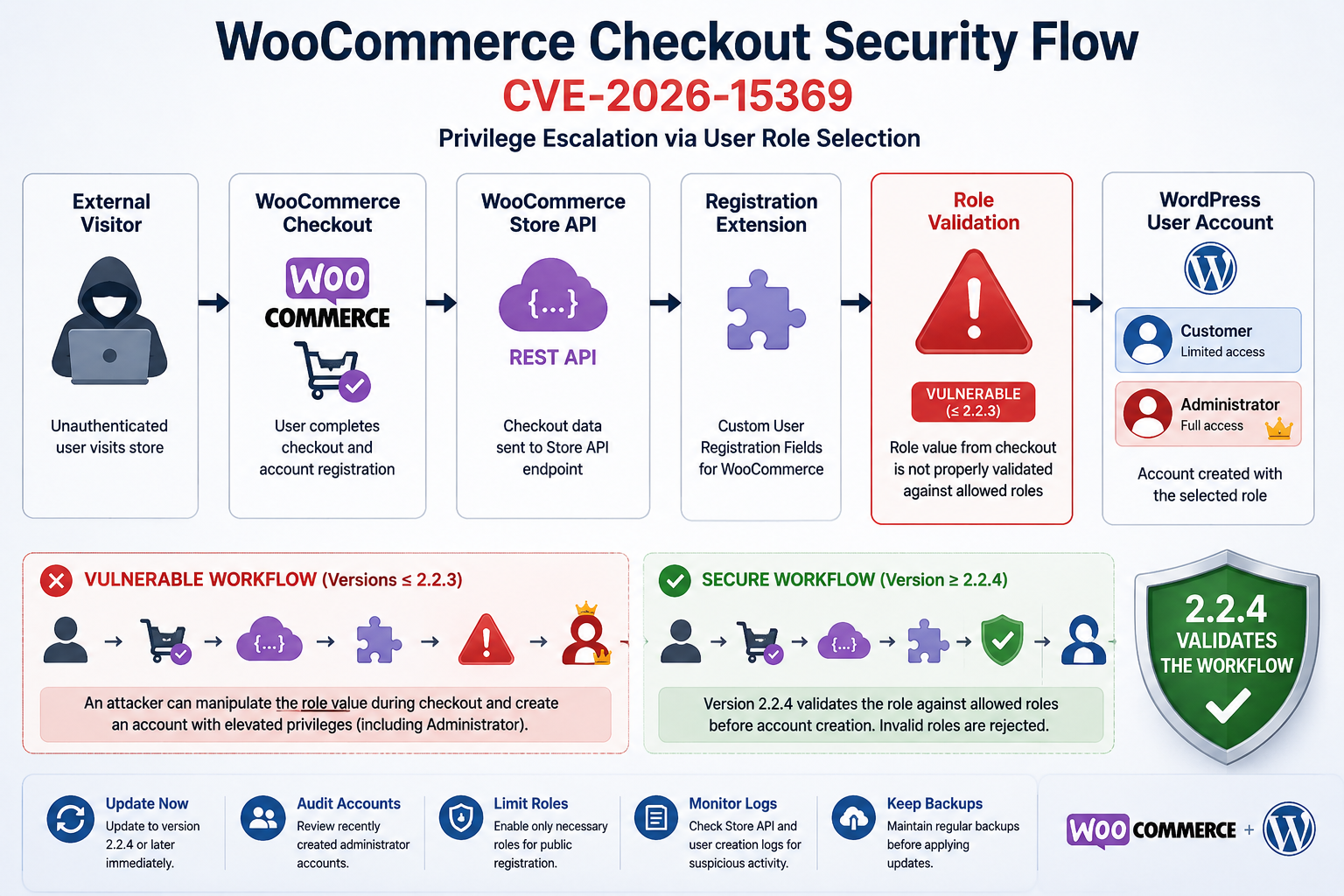
A visitor reaches checkout. The checkout process includes account-registration information. The affected extension receives role-selection information. That information is stored as order metadata. Later in order processing, the extension uses the stored value when assigning a WordPress role to the newly created account.
In affected versions, the server-side workflow did not adequately enforce the administrator-configured list of roles before applying the requested role.
Why the Visible Checkout Form Is Not a Security Boundary
A common misconception is that a value is safe because visitors cannot select it through the visible interface.
For example, imagine a registration interface offering only two choices:
Customer
Wholesale Customer
The browser may display only those two roles. However, that interface alone does not provide meaningful security. Requests sent from a visitor’s browser can potentially be modified before reaching the server.
For that reason, the server must independently validate every security-sensitive value.
The secure logic should effectively ask:
Is role selection enabled?
Is the submitted role recognized?
Is that role explicitly permitted by the store administrator?
Is the role appropriate for public registration?
Only after those checks succeed should the account receive that role.
A server must never assume that a value is safe simply because the normal front-end interface did not display dangerous alternatives.
How the Vulnerable Data Flow Worked
According to the published CVE description, the affected workflow involved two plugin functions.
The first was af_reg_checkout_data_to_order_meta_data_block(). It handled role information associated with Store API checkout data and persisted the selected value in order metadata.
A later function, af_reg_custom_order_processing_function(), operated during order processing through the woocommerce_thankyou workflow.
Published analysis states that the stored role could then be supplied to WordPress role assignment through WP_User::add_role() without first validating it against the plugin’s administrator-configured allowed role list.
This missing validation created the privilege-escalation condition.
The danger is not the WordPress add_role() functionality itself. WordPress needs legitimate mechanisms for assigning roles. The security problem arises when untrusted external input can reach a privileged role-assignment operation without sufficient authorization and validation.
Why Storing the Value First Does Not Make It Trusted
Another useful security lesson appears in the intermediate storage step.
Information submitted by a visitor does not become trustworthy simply because the application stores it in a database before using it.
This distinction is important.
Developers sometimes treat database values as internal information because they are retrieved from the application’s own tables. However, if the original source was an unauthenticated request, that information remains untrusted unless it was validated before storage or validated again before security-sensitive use.
CVE-2026-15369 illustrates this principle clearly.
Checkout input moved into order metadata and was later used during another processing stage. The time and location changed, but the security origin of the data did not.
Administrator Is the Worst-Case Role
WordPress role names are not merely cosmetic labels. They correspond to collections of capabilities.
A Customer account should have minimal privileges. A Shop Manager has significantly more WooCommerce-related access. An Administrator generally has extensive control across WordPress.
Allowing a public registration workflow to assign Administrator therefore represents a severe privilege boundary failure.
Once an unauthorized administrator account exists, the security problem is no longer limited to registration. The account may potentially interact with many other parts of WordPress according to the capabilities available on that particular installation.
That is why the vulnerability is classified as privilege escalation rather than simply improper registration validation.
Which Store Configuration Is Vulnerable
The first requirement is the presence of Custom User Registration Fields for WooCommerce.
A WooCommerce store that does not have this extension installed is not affected by CVE-2026-15369 simply because it runs WooCommerce.
The second important factor is version.
Sites running version 2.2.3 or earlier should be considered affected from a software-version perspective. Version 2.2.4 contains the security fix according to the published vulnerability information.
The third condition is configuration. The User Role Selection functionality must be enabled for the vulnerable path described in the advisory.
This combination provides administrators with a practical exposure checklist.
Condition One: WooCommerce Is Installed
The extension is designed to add registration functionality to WooCommerce. Therefore, the affected workflow exists in the context of a WooCommerce-powered website.
However, WooCommerce core is not identified as the vulnerable software.
Store owners should communicate that distinction clearly, especially when discussing the incident with customers, developers, hosting companies, or management.
Saying “WooCommerce has a critical vulnerability” can incorrectly imply that every WooCommerce installation is vulnerable.
A more accurate statement is that a critical vulnerability affects Custom User Registration Fields for WooCommerce, an extension that integrates with WooCommerce registration and checkout.
Condition Two: The Addify Extension Is Installed
Administrators should search the Plugins screen for the extension.
Do not assume that you know every plugin currently installed. Large WooCommerce stores often accumulate extensions over several years. Some may have been installed by former developers, agencies, freelancers, or previous administrators.
An inactive copy can also remain in the filesystem.
The reported attack path depends on the extension’s functionality being active, but outdated inactive software should still be removed when it is no longer required. Keeping unused plugins increases maintenance burden and can create unnecessary future security exposure.
Condition Three: Version 2.2.3 or Earlier Is Running
Version identification is essential.
If the store is already running 2.2.4 or a newer secure release, the specific vulnerable behavior described by CVE-2026-15369 has been addressed according to current published information.
If the store runs 2.2.3 or older, update it.
Do not postpone the update merely because the vulnerable setting appears disabled today. The software itself remains an outdated security-sensitive component.
Condition Four: User Role Selection Is Enabled
Published vulnerability information specifically notes that User Role Selection must be enabled.
Stores may use this feature for legitimate reasons.
A wholesale business might allow customers to identify themselves as retail or wholesale buyers. A membership store might use different registration categories. A B2B website might distinguish dealers, distributors, or corporate customers.
The business requirement is understandable. The problem occurs when the server fails to restrict submitted values to the roles that the administrator intended to make available.
Store owners using role selection should therefore treat the update with particularly high priority.
What About Stores That Disabled Role Selection?
If the User Role Selection feature has always been disabled, the documented exploitation condition is not present.
Nevertheless, administrators should still install the patched version.
There are several reasons.
First, it can be difficult to prove that a setting was never enabled at any point in the past.
Second, settings can change accidentally during troubleshooting, migrations, imports, staging synchronization, or administrator testing.
Third, leaving a known critical vulnerability installed creates unnecessary future risk.
Finally, security updates should become part of normal maintenance rather than depend entirely on whether administrators believe a particular vulnerable branch is currently reachable.
Classic Checkout Versus Block-Based Checkout
The published description specifically involves the WooCommerce Store API checkout workflow. Administrators should therefore pay attention to how their checkout implementation works.
Modern WooCommerce installations increasingly use block-based functionality that communicates through Store API endpoints. Older stores may use classic checkout templates, custom themes, page builders, or heavily modified checkout implementations.
However, administrators should avoid attempting to prove safety merely by visually inspecting the checkout page.
A reliable response begins with the extension version and its configuration.
If the affected plugin is running an outdated release, update it.
Staging Sites Also Matter
Security reviews often focus only on the production store.
That can be a mistake.
A publicly reachable staging environment may contain a copy of the production database, customer accounts, plugin configuration, API integrations, or administrator credentials. It may also have weaker access controls than the main store.
Check staging, development, demo, and temporary migration copies for the vulnerable extension.
If a staging site does not need public access, protect it with authentication, IP restrictions, a private network, or another appropriate access-control mechanism.
An old staging copy should not become the forgotten route into a broader infrastructure environment.
Updating the Extension to Version 2.2.4

Updating is the primary remediation for CVE-2026-15369.
Store owners should install Custom User Registration Fields for WooCommerce 2.2.4 or newer as soon as practical. Because the vulnerability can affect account privileges, this update should receive a higher priority than routine cosmetic or compatibility updates.
Before updating a production WooCommerce store, create a reliable backup. The backup should include both WordPress files and the database.
WooCommerce stores are dynamic systems. Orders, customer accounts, product information, stock values, settings, coupons, and other information can change frequently. A database backup is therefore particularly important.
Step 1: Confirm the Installed Version
Open:
WordPress Dashboard → Plugins
Locate Custom User Registration Fields for WooCommerce and record the installed version.
If it is 2.2.3 or older, treat the installation as affected.
If the plugin version cannot be determined through the dashboard, inspect the extension through your normal deployment or package-management workflow.
Administrators managing multiple WooCommerce stores should inventory all installations rather than checking only the most important domain.
Step 2: Create a Current Backup
Take a backup immediately before making changes.
A useful WooCommerce backup should cover:
- WordPress database
wp-contentfiles- Active theme and child theme
- Plugins
- Uploads
- Important configuration files
- Any custom code used by checkout or registration
The goal is not to delay the security update. The goal is to ensure that an unexpected compatibility problem can be recovered quickly.
Step 3: Update to 2.2.4 or Later
Install version 2.2.4 or a newer vendor-provided release.
After the update completes, refresh the Plugins screen and verify the version again.
Do not assume that seeing an “Update completed” message proves the new files are active. Caching, deployment systems, filesystem permissions, or failed extraction can occasionally create confusing results.
Verify the installed version directly.
Step 4: Clear Relevant Caches
WooCommerce checkout should generally avoid inappropriate full-page caching, but stores often use several caching layers.
These may include:
- WordPress caching plugins
- Object caching
- Redis
- Server-side page caching
- Reverse proxies
- CDN services
- Browser caching
- PHP OPcache
Clearing relevant application caches after an important extension update helps prevent stale behavior from complicating verification.
Be careful with aggressive cache purging on busy stores. Follow the procedures appropriate for your hosting environment.
Step 5: Test Normal Registration
After installing the update, perform a legitimate checkout or registration test.
Verify that an ordinary customer can still create an account successfully.
If your store intentionally allows role selection, test each approved role through the normal interface.
Confirm that accounts receive only the expected permissions.
Do not test privilege escalation against a live production store by constructing malicious API requests. Defensive verification should focus on correct normal behavior, installed version, configuration, logs, and account auditing.
Step 6: Verify WooCommerce Checkout
Security updates can affect workflows that interact with checkout.
Test:
- Product addition to cart
- Cart updates
- Checkout loading
- Customer login
- New account registration
- Shipping selection
- Payment gateway initialization
- Order creation
- Order confirmation
- Transactional email delivery
- Approved custom registration fields
- Approved user-role workflows
A successful security update should leave normal customer operations functioning.
Step 7: Keep the Extension Updated
Version 2.2.4 addresses the disclosed issue, but it should not become the permanent target version.
If Addify publishes a newer stable version after 2.2.4, administrators should evaluate and install it according to normal change-management procedures.
Security maintenance is continuous.
The safest long-term target is generally the latest supported version that is compatible with the store, not the minimum version that fixes one known CVE.
Auditing Accounts Created During Checkout
Updating closes the known vulnerable behavior, but it does not answer an equally important question:
Was the vulnerability abused before the update?
That question requires investigation.
A store that ran an affected version while User Role Selection was enabled should inspect WordPress accounts created during the relevant exposure period.
Start with:
WordPress Dashboard → Users → All Users
Filter or review accounts with the Administrator role.
Every administrator should have a clear business reason to exist.
Establish a Known Administrator List
Create a list of administrators that you recognize.
Typical legitimate accounts may belong to:
- The site owner
- Current developers
- A maintenance agency
- Internal IT staff
- A trusted e-commerce manager
- A hosting or support account intentionally created for administration
- Compare this expected list against WordPress.
An administrator account should never be accepted as legitimate simply because its username looks familiar.
Verify ownership through internal records where possible.
Look for Recently Created Administrators
Pay particular attention to administrator accounts created while the vulnerable extension version was active.
WordPress itself does not always make account creation timestamps prominent in the standard Users interface. Security plugins, audit logs, database records, hosting logs, email records, and other monitoring systems may provide additional context.
Review any available registration notifications.
If WordPress sent an email when an account was created or changed, those messages can help establish a timeline.
WooCommerce order records may also help correlate account creation with checkout activity.
Correlate Users With Orders
Because the documented vulnerability involves checkout and order processing, order history becomes particularly useful.
Look for unusual relationships between:
- New user accounts
- Checkout timestamps
- Orders
- User-role changes
- Unexpected administrator accounts
- Registration metadata
- IP addresses where lawfully logged
- Security alerts
- Server access logs
The objective is not to search for a single magical indicator. Instead, reconstruct whether an unfamiliar privileged account appeared alongside unusual checkout activity.
Review Administrator Email Addresses
An unfamiliar administrator email address deserves immediate attention.
However, attackers do not always use obviously suspicious addresses. A malicious account could potentially use a name designed to resemble a developer, support account, employee, or automated system.
Look for subtle inconsistencies.
Examples include unexpected email domains, slight spelling changes, unfamiliar usernames, newly created accounts resembling existing administrators, or accounts with no documented operational purpose.
Review Role Changes
Do not limit the investigation to accounts that currently have Administrator status.
If sufficient logging exists, look for historical role changes.
An unauthorized account could have received elevated privileges temporarily and later been modified or removed.
Audit plugins can be particularly valuable here because they may preserve information that the current WordPress database state no longer exposes clearly.
Inspect Security and Server Logs
Search available logs around suspicious account and checkout timestamps.
Useful sources may include:
- Web server access logs
- WordPress security logs
- Web application firewall events
- CDN security events
- WooCommerce logs
- Hosting control-panel logs
- Authentication logs
- Administrator activity logs
- Database audit information
The published vulnerability information identifies the WooCommerce Store API checkout route as relevant to the affected workflow. Repeated or unusual checkout API activity around unexpected account creation can therefore deserve additional investigation.
However, Store API traffic is not automatically malicious. Legitimate block-based WooCommerce checkout functionality uses Store API requests as part of normal operation.
Context matters.
Check for Unexpected Plugin Installation
If an unauthorized administrator account existed, investigate actions that could have occurred after account creation.
Review installed plugins.
Look for:
- Recently installed plugins you do not recognize
- Unexpected inactive plugins
- Modified plugin files
- Plugins with misleading names
- Unexpected must-use plugins
- Unexplained PHP files
- Recently modified theme files
- Changes to security plugins
- Disabled logging or monitoring tools
A suspicious administrator account should trigger a broader incident review rather than a simple account deletion.
Review Administrator Sessions
Force logout of unknown or unnecessary accounts.
For confirmed incidents, consider invalidating existing WordPress authentication sessions more broadly.
Changing passwords alone may not invalidate every active session under every scenario. WordPress authentication salts can be rotated as part of an incident-response process, but doing so logs users out and should be coordinated carefully on a production store.
Reset Credentials After Confirmed Compromise
If you find evidence that an unauthorized administrator existed, treat the situation as a potential full-site compromise.
Relevant credentials may include:
- WordPress administrator passwords
- Hosting credentials
- SFTP or SSH credentials
- Database credentials
- API credentials
- Payment integration keys
- SMTP credentials
- CDN credentials
- Backup-system credentials
- Third-party service tokens
Do not rotate everything blindly without understanding dependencies. Create an incident plan so that replacing one credential does not unexpectedly break checkout, email, shipping, backups, or payment processing.
Payment-provider credentials deserve special care. Follow the provider’s documented security and key-rotation procedures.
Check WordPress Core Integrity
A privileged intruder could potentially modify files.
Compare WordPress core against official checksums using trusted administrative tools or WP-CLI where appropriate.
Core verification is only one part of an investigation. WordPress core might remain completely clean while malicious changes exist in plugins, themes, uploads, must-use plugins, cron jobs, or database content.
Inspect Scheduled Tasks
WordPress uses WP-Cron for legitimate scheduled operations.
WooCommerce and many plugins also use Action Scheduler.
Review unexpected scheduled events if compromise is suspected.
Do not delete unfamiliar jobs indiscriminately. WooCommerce relies on background tasks for legitimate store operations.
Instead, identify the plugin or component responsible for each suspicious event.
Check the Database Carefully
An unauthorized administrator can potentially affect database-backed settings and content.
Review important configuration changes, administrator records, plugin options, and other unusual modifications.
Database investigation should be performed carefully on a production WooCommerce site.
Orders and customer activity may continue while the investigation is underway. Preserve evidence before making destructive changes whenever a serious compromise is suspected.
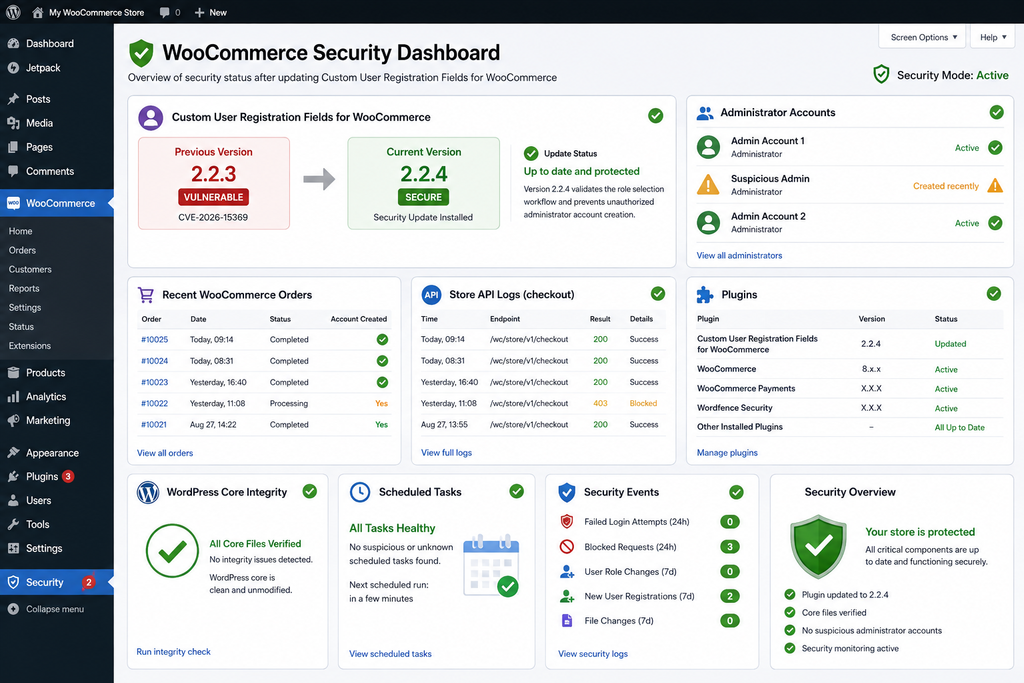
Emergency Mitigation Without an Immediate Update
Updating to version 2.2.4 or newer is the recommended remediation. Emergency mitigations should not become permanent substitutes for installing the security fix.
Nevertheless, there are situations where an immediate plugin update may be temporarily impossible.
A store might depend on custom modifications. A deployment freeze may be active. The update might conflict with another business-critical component. An administrator may need approval before changing production software.
In those circumstances, reducing exposure while preparing the update is better than leaving the vulnerable configuration unchanged.
Disable User Role Selection
Because published vulnerability information states that exploitation requires User Role Selection to be enabled, disabling this functionality is the most directly relevant temporary mitigation.
Open the extension settings and disable public role selection if your business can operate without it temporarily.
After changing the setting, test registration and checkout.
Do not assume the configuration changed successfully simply because the administration interface saved without an error.
Disable Public Account Creation if Operationally Possible
Some stores do not require customers to create accounts.
If guest checkout fits the business model, temporarily restricting unnecessary account-registration functionality may reduce exposure while the plugin update is being prepared.
This option will not suit every store.
Membership sites, wholesale businesses, subscription stores, and customer portals may depend heavily on accounts.
Security controls must balance risk and operational requirements.
Temporarily Disable the Affected Extension
If Custom User Registration Fields for WooCommerce is not essential to checkout, consider temporarily deactivating it.
Test the store immediately afterward.
Removing a checkout-related extension can affect fields, validation, customer metadata, account creation, integrations, and order processing.
Never deactivate a production checkout component without verifying that customers can still complete legitimate purchases.
Use Maintenance or Access Restrictions for High-Risk Situations
If a vulnerable store cannot be patched and the role-selection functionality cannot be disabled safely, administrators should evaluate whether temporarily restricting affected functionality is appropriate.
For a very short maintenance period, temporarily limiting checkout access may be safer than leaving a known critical privilege-escalation path publicly reachable.
This is a business decision as well as a technical one.
The potential cost of interrupted sales must be weighed against the potential cost of unauthorized administrative access.
Do Not Depend Exclusively on a Web Application Firewall
A WAF can provide valuable additional protection, especially when a hosting company or security vendor deploys a rule specifically designed for a known vulnerability.
However, firewall protection should complement the vendor’s security update rather than replace it.
Application-level vulnerabilities can have multiple request variations. Firewall configurations also differ between environments.
Patch the vulnerable software.
Monitor New Administrator Accounts
Until the update is completed, monitor the WordPress Users list closely.
Any unexpected administrator account should be investigated immediately.
Stores with audit logging can configure alerts for:
- New user creation
- Administrator creation
- Role changes
- Plugin installation
- Plugin activation
- Theme modification
- New administrator login
- Security-setting changes
Rapid detection can significantly reduce the time an unauthorized privileged account remains unnoticed.
Keep an Incident Timeline
If you suspect exposure, document important times.
Record:
- When the affected plugin version was installed
- When User Role Selection was enabled
- When the vulnerability became known to your team
- When mitigation was applied
- When version 2.2.4 was installed
- When account auditing began
- Any suspicious events discovered
A timeline becomes extremely useful if multiple administrators, hosting providers, developers, security specialists, or legal teams become involved.
Why WooCommerce Store Owners Should Treat User Roles as Security-Critical Data
CVE-2026-15369 provides a broader lesson about WordPress extension design.
User roles should never be treated like ordinary profile metadata.
A person’s favorite color can usually be accepted and stored without significant authorization concerns. A user-role value can determine what that person is allowed to do throughout WordPress.
That makes role assignment an authorization decision.
The server must control authorization decisions.
Validation Must Happen Server-Side
Client-side restrictions improve usability, but they do not establish trust.
JavaScript can hide options.
HTML can limit dropdown choices.
A checkout block can display only approved roles.
None of these controls prevents a determined external client from sending different data to the server.
Therefore, server-side validation must verify that the requested role is allowed.
This principle applies far beyond WooCommerce.
It also matters for:
- Membership plugins
- Learning-management systems
- Community websites
- Forums
- Affiliate platforms
- Multi-vendor marketplaces
- Customer portals
- B2B systems
- Custom REST APIs
- Mobile applications connected to WordPress
Any system that creates or modifies WordPress users should treat roles and capabilities as privileged data.
Allowlisting Is Better Than Trusting Submitted Values
When a visitor can select from several legitimate roles, the application should compare the submitted role against a strict server-side allowlist.
For example, a store might intentionally allow only Customer and Wholesale Customer.
The server should accept only those explicitly permitted choices.
Everything else should be rejected or replaced with a safe default.
This design is safer than attempting to maintain a list of dangerous roles because WordPress sites can contain custom roles created by other plugins.
The safest question is not:
“Is this role known to be dangerous?”
The safer question is:
“Is this exact role explicitly approved for public registration?”
Least Privilege Protects WooCommerce Stores
The principle of least privilege states that users should receive only the permissions they need.
WooCommerce already follows this concept by giving customers restricted accounts.
Store employees should also receive appropriate roles rather than Administrator access by default.
A worker who only manages orders may not need complete site administration.
A content editor may not need WooCommerce configuration access.
A support employee may not need plugin installation capabilities.
Reducing unnecessary Administrator accounts makes security auditing easier and limits damage if credentials are compromised.
How to Strengthen WooCommerce Registration After the Update
Installing version 2.2.4 addresses the known vulnerability, but administrators can use the event as an opportunity to improve registration security more broadly.
Start by reviewing whether public role selection is actually necessary.
Features often remain enabled long after their original business requirement disappears.
If every new customer receives the same role, disable role selection entirely.
Review Every Publicly Selectable Role
If role selection remains necessary, inspect every available role.
Ask what capabilities each role contains.
Custom roles can accumulate unexpected permissions over time as plugins are installed, removed, or reconfigured.
A role with an innocent name may have more capabilities than expected.
Document which roles are intentionally available through public registration.
Minimize Administrator Accounts
Review the Administrator list regularly.
Remove accounts belonging to former employees, expired contractors, previous agencies, or abandoned support relationships.
Where possible, give service providers temporary access rather than permanent administrator credentials.
Every privileged account creates another credential that must be protected.
Enable Multi-Factor Authentication
Multi-factor authentication can significantly strengthen administrator login security.
It does not fix a privilege-escalation vulnerability such as CVE-2026-15369 because the vulnerability concerns account creation and role assignment rather than stealing an existing administrator password.
However, MFA remains an important defense against credential theft, password reuse, phishing, and brute-force attacks.
Use it for privileged WordPress accounts whenever practical.
Maintain Security Logging
A security event becomes much easier to investigate when reliable logs already exist.
Useful logging can include:
- User creation
- Role changes
- Administrator login
- Failed login attempts
- Plugin installation
- Plugin activation
- Theme changes
- WordPress updates
- WooCommerce configuration changes
- Important option changes
- Security alerts
Logs should be protected from unauthorized modification and retained long enough to support investigations.
Monitor Extension Vulnerabilities
WooCommerce stores frequently run many extensions.
Each extension becomes part of the application’s security surface.
Maintain an inventory that includes:
- Plugin name
- Vendor
- Installed version
- Update source
- License status
- Business purpose
- Responsible administrator
- Last review date
- This simple practice makes vulnerability response much faster.
When a critical CVE appears, you can immediately determine whether the affected component exists in your environment.
Frequently Asked Questions
What is the WooCommerce registration vulnerability CVE-2026-15369?
CVE-2026-15369 is a critical privilege-escalation vulnerability in Addify’s Custom User Registration Fields for WooCommerce extension. Affected versions can improperly process user-role information during Store API checkout when User Role Selection is enabled. Under the vulnerable conditions, an unauthenticated visitor could potentially create an account with elevated WordPress privileges, including Administrator.
Is WooCommerce itself vulnerable to CVE-2026-15369?
No. Current published information identifies Custom User Registration Fields for WooCommerce as the affected product. WooCommerce core is involved in the checkout workflow, but CVE-2026-15369 is assigned to the third-party registration extension. A WooCommerce installation without the affected extension is not vulnerable to this CVE simply because it uses WooCommerce.
Which versions are affected?
Versions of Custom User Registration Fields for WooCommerce up to and including 2.2.3 are affected according to the published CVE record. Version 2.2.4 contains the security fix. Administrators should use 2.2.4 or a newer supported release and should verify the installed version directly after updating.
Does an attacker need a WordPress account first?
No. The published vulnerability is classified as unauthenticated privilege escalation. An attacker does not need an existing WordPress account to reach the documented vulnerable workflow. This lack of required privileges contributes to the vulnerability’s Critical CVSS 9.8 severity rating.
Does User Role Selection need to be enabled?
Yes. Published vulnerability information specifically states that exploitation requires the User Role Selection setting to be enabled. However, sites running an affected plugin version should still update even if the setting is currently disabled. Updating removes dependence on configuration as the primary protection against a known critical issue.
Can the vulnerability create an Administrator account?
The published CVE description states that the vulnerable role-handling workflow can allow an unauthenticated attacker to create an account during checkout and assign an arbitrary role, including Administrator. That potential outcome makes the vulnerability particularly serious because Administrator accounts normally have extensive WordPress permissions.
Is disabling User Role Selection enough?
Disabling User Role Selection can serve as an emergency mitigation because the published attack condition requires that feature. However, it should not replace the security update. Install version 2.2.4 or newer as soon as possible and verify that the patched version is active.
How do I know whether my WooCommerce store was compromised?
There is no single check that can prove a site is clean. Review Administrator accounts, recent account creation, WooCommerce orders, security logs, Store API activity, plugin changes, theme changes, scheduled tasks, authentication events, and other available evidence. If you find an unexplained Administrator account, consider a broader incident investigation.
Should I delete a suspicious Administrator account immediately?
Preventing unauthorized access is important, but preserve evidence when possible. Record the account details, timestamps, associated activity, logs, and relevant order information before removing access. If the account is confirmed unauthorized, disable or remove it and investigate what actions occurred while administrative privileges were available.
Should I restore the entire website from backup?
Not automatically. A backup can be valuable when compromise is confirmed, but restoring an arbitrary older backup may reintroduce the vulnerable plugin or remove legitimate WooCommerce orders created after the backup. Incident recovery should identify the likely compromise period and preserve recent business data while eliminating unauthorized changes.
A Small Registration Setting Can Become a Major Security Boundary
CVE-2026-15369 shows how a seemingly ordinary WooCommerce feature can become security-critical when it influences WordPress permissions.
Custom registration fields are useful. User-role selection can also support legitimate B2B, wholesale, membership, and customer-segmentation workflows. The danger appears when information controlled by an external visitor reaches a privileged account-management operation without strict server-side validation.
For affected WooCommerce stores, the immediate priority is clear: identify Custom User Registration Fields for WooCommerce, check its version, update from 2.2.3 or earlier to 2.2.4 or newer, and verify whether User Role Selection has been enabled.
The work should not stop after clicking Update.
Administrators should review recently created accounts, verify every Administrator, correlate suspicious accounts with WooCommerce orders, inspect available logs, and investigate unexpected plugin or configuration changes. A successful privilege escalation could potentially provide much broader access than the original checkout vulnerability suggests.
Stores unable to update immediately should disable User Role Selection or the affected extension when operationally possible, monitor account creation carefully, and deploy the official security update as quickly as their change process allows.
The broader lesson is valuable for every WordPress administrator: user roles are authorization data. They must always be validated on the server, restricted through explicit allowlists, and assigned according to the principle of least privilege.
Keeping WooCommerce secure requires more than protecting the payment page. Registration, APIs, extensions, account permissions, background processes, and administrative workflows are all part of the same security boundary.
⚠️ Disclaimer and Source Hygiene
This article is intended for defensive security awareness, WordPress administration, and WooCommerce maintenance. It does not provide a functional exploitation payload or instructions for attacking websites. Technical identifiers are included only where they help administrators understand the vulnerability, review logs, identify affected components, and protect systems they are authorized to manage.
Security information can change as vendors, researchers, CVE authorities, and infrastructure providers publish additional findings. Verify current extension versions and security guidance before making production changes. Businesses handling sensitive customer or payment-related information should consult qualified WordPress security professionals, hosting providers, legal advisers, or incident-response specialists when compromise is suspected.
The vulnerability details in this article were cross-checked against the published CVE record and independent vulnerability reporting available at the time of writing.
🔔 For more tutorials like this, consider subscribing to our blog.
📩 Do you have questions or suggestions? Leave a comment or contact us!
🏷️ Tags: WooCommerce registration vulnerability, CVE-2026-15369, WooCommerce security, WordPress security, WooCommerce vulnerability, privilege escalation, Custom User Registration Fields, WooCommerce checkout security, WordPress Administrator security, WooCommerce Store API
📢 Hashtags: #WooCommerce, #WordPress, #WordPressSecurity, #WooCommerceSecurity, #CVE202615369, #CyberSecurity, #WebsiteSecurity, #EcommerceSecurity, #WordPressVulnerability, #WooCommerceUpdate
WooCommerce Store Protected
For more tutorials like this, consider subscribing to our blog.
Security vulnerabilities can move quickly from disclosure to widespread awareness. Keeping WordPress core, WooCommerce, themes, and extensions updated remains one of the most effective ways to reduce unnecessary exposure.
Do you have questions or suggestions? Leave a comment or contact us!
If you manage multiple WooCommerce stores, consider checking each installation separately. Plugin versions and role-selection settings can differ between production, staging, development, and older store environments.
Sources and References
CVE and Vulnerability Information
CVE-2026-15369 – Published CVE information: The vulnerability affects Addify Custom User Registration Fields for WooCommerce through version 2.2.3 and is categorized as CWE-269 Improper Privilege Management. The published CVSS 3.1 score is 9.8 Critical.
Wordfence vulnerability intelligence: Wordfence is identified as the CVE assigning organization. The disclosure describes unauthenticated privilege escalation through the Store API checkout workflow when User Role Selection is enabled.
WooCommerce / Addify product information: Product documentation and vendor information should be consulted when installing updates and verifying current supported versions.
Recommended Authoritative References
CVE-2026-15369 vulnerability record and technical summary.
Wordfence Threat Intelligence vulnerability database.
WooCommerce marketplace information for Custom User Registration Fields for WooCommerce.
WordPress documentation for roles and capabilities.
WooCommerce documentation for account, checkout, and Store API functionality.
Secondary Sources and Testimonials
Independent security databases can provide useful secondary confirmation of affected versions, CVSS information, disclosure dates, and remediation status. They should complement rather than replace information from the CVE authority, security researcher, vendor, and official WooCommerce or WordPress documentation.
At the time of writing, multiple vulnerability tracking sources independently identify versions through 2.2.3 as affected and version 2.2.4 as the patched release. Administrators should continue checking current vendor information because newer extension versions may become available after publication.
No anonymous testimonials, invented administrator experiences, or unverified compromise claims have been included in this article. Evidence-based vulnerability reporting is more useful to store owners than unsupported claims about attacks or infection rates.
Sign in with a Subscriber account to vote.