
Table of Contents
A high-severity PPWP vulnerability affects older versions of the WordPress password protection plugin. CVE-2026-0551 allows authenticated Contributors to inject PHP objects, but successful code execution depends on another installed component providing a usable POP chain.
What Is CVE-2026-0551
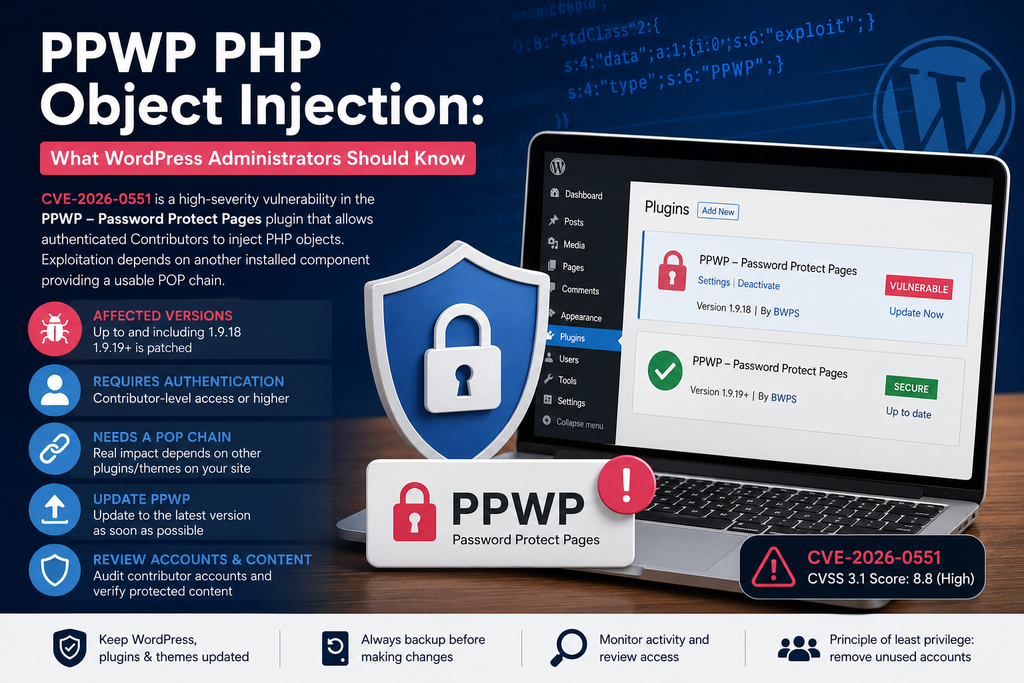
CVE-2026-0551 is a PHP Object Injection vulnerability discovered in the PPWP – Password Protect Pages plugin for WordPress. The issue involves unsafe deserialization of attacker-controlled data supplied through the post_protection_roles parameter. An authenticated attacker with Contributor-level privileges or higher may inject a PHP object into the application. The vulnerability has been assigned a CVSS 3.1 score of 8.8 (High) and is classified as CWE-502: Deserialization of Untrusted Data. However, administrators should understand an important distinction: PHP Object Injection does not automatically mean that an attacker can immediately execute arbitrary PHP code. The practical impact depends heavily on the other PHP classes available on the affected WordPress installation.
Which PPWP Versions Are Affected
The PPWP vulnerability affects versions up to and including 1.9.18, while version 1.9.19 contains the security fix. Exploitation also requires an authenticated WordPress account with at least Contributor privileges, which substantially changes the real-world attack surface compared with an unauthenticated vulnerability. Sites that do not allow public account creation or do not maintain Contributor accounts face fewer potential attack paths, but they should still update immediately. Administrators can check the installed version from WordPress Dashboard → Plugins → Installed Plugins and should install the newest available PPWP release rather than stopping specifically at 1.9.19. PPWP has also received fixes for other security issues, making regular updates especially important for sites relying on it to restrict sensitive or private content.
How PHP Object Injection Works
PHP applications sometimes serialize complex data so it can be stored or transferred and reconstructed later. Problems arise when an application passes attacker-controlled serialized information into PHP’s deserialization functionality without adequate validation. An attacker may then create serialized data representing an object belonging to a PHP class already available to the application. When PHP reconstructs that object, certain methods associated with the class can potentially perform unintended actions. CVE-2026-0551 exposes this type of behavior through PPWP’s post_protection_roles handling. The important point is that object injection itself provides the attacker with an object inside the PHP environment; what that object can actually accomplish depends on the classes and methods loaded by WordPress, its plugins, and the active theme.
Why a POP Chain Is Required
The PPWP vulnerability becomes considerably more dangerous when the affected website contains a usable Property-Oriented Programming (POP) chain. According to the published vulnerability analysis, PPWP itself does not provide a known POP chain that turns the injection directly into destructive operations or arbitrary code execution. Consequently, the vulnerability may have limited practical impact when considered entirely on its own. The situation changes if another installed plugin or theme provides classes that can be chained together during deserialization. Depending on that POP chain, exploitation could potentially result in sensitive information exposure, arbitrary file deletion, or code execution. This is why administrators should not interpret the absence of a PPWP-native POP chain as proof that their site is safe. WordPress installations frequently contain many plugins, themes, and third-party PHP libraries, so the complete software environment determines the actual risk.
How to Update PPWP

Administrators running PPWP 1.9.18 or earlier should update without waiting to determine whether their particular website contains an exploitable POP chain. Create or verify a recent backup first, then open Dashboard → Plugins → Installed Plugins, locate PPWP – Password Protect Pages, and install the latest available release. Version 1.9.19 patched CVE-2026-0551, but using the newest stable version is preferable because later releases may contain additional security and compatibility fixes. After updating, clear page caches, object caches, CDN caches, and PHP opcode caches where applicable. Test several protected pages while logged out to confirm that passwords and access restrictions continue working correctly. PPWP’s WordPress.org documentation also warns administrators to handle protected passwords carefully when deactivating the plugin because previously protected content can otherwise become accessible.
Reviewing Contributor Accounts and Protected Content
Because CVE-2026-0551 requires Contributor-level access or higher, administrators should review WordPress accounts instead of treating the plugin update as the only remediation step. Check Users → All Users for Contributors, Authors, Editors, Administrators, or other privileged accounts that are no longer required. Remove unused accounts, reset credentials for suspicious users, and investigate unexpected role changes or recently created accounts. Administrators should also manually test important PPWP-protected posts and pages to confirm that restricted material remains inaccessible without authorization. Review security logs, authentication records, file modifications, and unusual administrative activity if an affected PPWP version was installed while untrusted Contributor accounts existed. Updating closes the known vulnerable path, while reviewing accounts and protected content helps determine whether there was a realistic opportunity for exploitation before the patch was installed.
A High-Severity Flaw That Needs Context
CVE-2026-0551 deserves prompt attention because unsafe PHP deserialization can become extremely powerful when combined with suitable PHP classes. At the same time, describing every affected PPWP installation as immediately vulnerable to remote code execution would exaggerate the evidence. Exploitation requires an authenticated Contributor-level account, and more serious consequences depend on a usable POP chain supplied by another component. The safest response is therefore straightforward: update PPWP to the latest release, remove unnecessary privileged accounts, audit protected content, and keep every plugin and theme updated. This approach addresses the confirmed vulnerability without assuming exploitation capabilities that may not exist on every WordPress installation.
Frequently Asked Questions
What is the PPWP vulnerability CVE-2026-0551?
CVE-2026-0551 is a PHP Object Injection vulnerability affecting the PPWP – Password Protect Pages WordPress plugin. It can allow an authenticated user with Contributor-level privileges or higher to inject PHP objects through improperly handled serialized data.
Which PPWP versions are vulnerable?
PPWP versions up to and including 1.9.18 are affected by CVE-2026-0551. The vulnerability was addressed in version 1.9.19. Administrators should install the latest stable PPWP version available rather than relying on an older release.
Can an unauthenticated attacker exploit the PPWP vulnerability?
The reported vulnerability requires authentication. An attacker needs at least Contributor-level access to reach the vulnerable functionality. This makes reviewing existing WordPress user accounts an important part of the security response.
Does CVE-2026-0551 automatically allow remote code execution?
No. PHP Object Injection does not automatically equal remote code execution. More serious exploitation depends on whether the WordPress environment contains suitable PHP classes that an attacker can use to construct a working POP chain.
What is a POP chain?
A Property-Oriented Programming (POP) chain combines methods from PHP classes already available to an application. During unsafe deserialization, a suitable chain may allow an attacker to trigger unintended operations. The available plugins, themes, and PHP libraries can therefore influence the real-world impact of an object injection vulnerability.
How serious is the PPWP vulnerability?
CVE-2026-0551 has been classified as a high-severity vulnerability with a CVSS 3.1 score of 8.8. However, the actual risk varies between websites because exploitation requires authentication and more damaging outcomes depend on the availability of a usable POP chain.
How do I protect my WordPress website?
Update PPWP to the latest stable version immediately. You should also keep WordPress Core, themes, and other plugins updated. Remove unnecessary Contributor and higher-privileged accounts, use strong authentication, maintain current backups, and monitor the website for suspicious activity.
Should I delete PPWP from WordPress?
Removing PPWP is not normally necessary if you still need its functionality and are running a secure, supported version. Updating is the primary response. If you decide to deactivate or remove it, verify what happens to previously protected content so private pages do not accidentally become publicly accessible.
What should I check after updating PPWP?
Test important password-protected pages while logged out and confirm that access restrictions still work. Administrators should also review Contributor, Author, Editor, and Administrator accounts, inspect recent account changes, and investigate unusual activity if a vulnerable PPWP version was previously exposed to untrusted users.
Was my website hacked just because it used PPWP 1.9.18?
No. Running an affected version means the vulnerability was present, but it does not prove that the site was exploited. Successful exploitation requires the necessary access and conditions. If suspicious accounts, unexpected file changes, unfamiliar administrators, or other warning signs appear, perform a more detailed security investigation.
⚠️ Disclaimer and Source Hygiene
This article is provided for educational and WordPress security awareness purposes. Vulnerability information can change as researchers, vendors, and security databases publish additional findings. Administrators responsible for sensitive or business-critical websites should consult qualified security professionals when compromise is suspected. Technical details in this article were cross-checked against current vulnerability records and WordPress-related security sources.
🔔 For more tutorials like this, consider subscribing to our blog.
📩 Do you have questions or suggestions? Leave a comment or contact us!
🏷️ Tags: PPWP vulnerability, CVE-2026-0551, PPWP, PHP Object Injection, WordPress security, WordPress vulnerability, POP chain, plugin security, WordPress administrator, Password Protect Pages
📢 Hashtags: #WordPress, #WordPressSecurity, #PPWP, #CVE20260551, #CyberSecurity, #PHP, #PluginSecurity, #WordPressVulnerability, #WebsiteSecurity, #SecurityUpdate
Sources and References
The vulnerability record for CVE-2026-0551 identifies PPWP versions through 1.9.18 as affected, describes the post_protection_roles PHP Object Injection vector, assigns a CVSS 8.8 High rating, and identifies 1.9.19 as the patched release.
Secondary Sources and Testimonials
Independent vulnerability databases similarly identify the issue as authenticated PHP Object Injection affecting PPWP through version 1.9.18 and emphasize that exploitation requires Contributor-level privileges or higher. They also reinforce the crucial technical limitation: meaningful follow-on actions depend on an available POP chain elsewhere in the WordPress environment.
Sign in with a Subscriber account to vote.
2 thoughts on “PPWP PHP Object Injection: What WordPress Admins Should Know”