
Table of Contents
A high-severity Formidable Charts vulnerability can allow unauthenticated attackers to read sensitive server files on certain WordPress installations. CVE-2026-15990 affects Formidable Charts through version 2.0.1, but exploitation depends on several specific components and conditions being present at the same time.
What Is CVE-2026-15990
CVE-2026-15990 is a high-severity security vulnerability affecting the Formidable Charts add-on for WordPress. The vulnerability was publicly disclosed on August 26, 2026 and is classified as a directory traversal, or path traversal, weakness. It has been assigned CWE-22, which covers failures to properly restrict file paths to an intended directory. The issue affects Formidable Charts versions up to and including 2.0.1.
The vulnerability carries a CVSS 3.1 score of 7.5 out of 10, placing it in the High severity category. Its CVSS vector is CVSS:3.1/AV:N/AC:L/PR:N/UI:N/S:U/C:H/I:N/A:N. In practical terms, the vulnerability can be attacked remotely, requires low attack complexity, does not require an authenticated WordPress account, and does not require a victim to click a link or perform another action. The primary security impact is loss of confidentiality rather than direct modification or deletion of data.
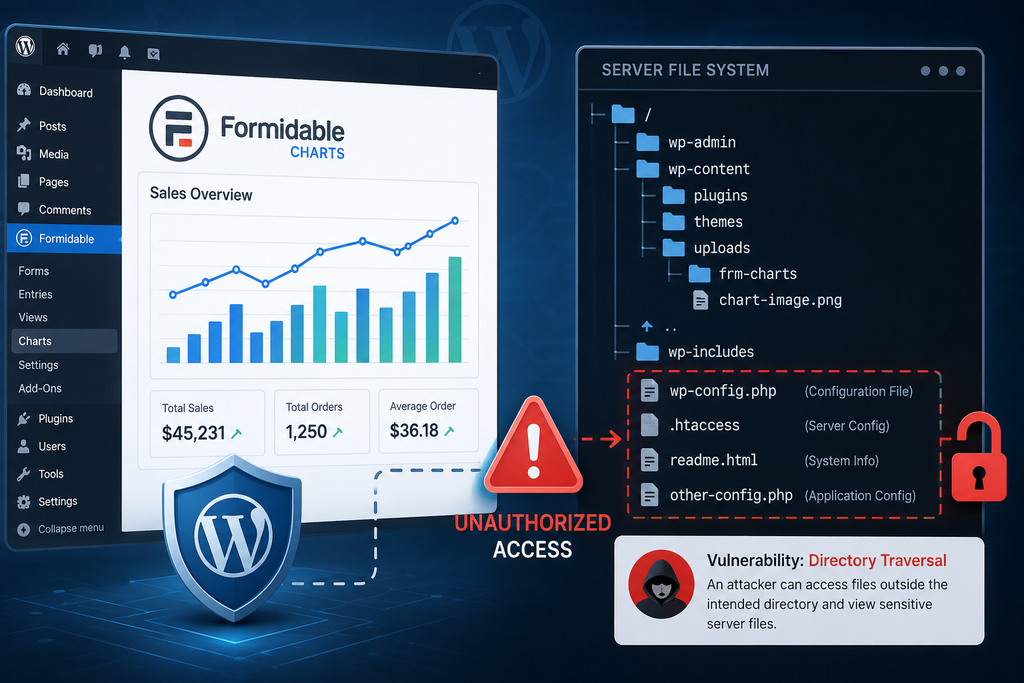
The vulnerable input is associated with the frm_graph parameter. Under the required conditions, an attacker may manipulate the path handled through this parameter so that Formidable Charts accesses a file outside the directory where chart files are supposed to reside. Instead of being limited to legitimate chart resources, the request can potentially reach files elsewhere on the server.
That distinction matters. CVE-2026-15990 is described as an arbitrary file-read vulnerability, not an arbitrary file-write or remote-code-execution vulnerability. Successful exploitation could nevertheless expose configuration files, credentials, database information, application secrets, or other information readable by the web server process. Such information could then potentially support a separate attack.
CVE-2026-15990 at a Glance
CVE: CVE-2026-15990
Affected software: Formidable Charts
Affected versions: 2.0.1 and earlier
Patched release: 2.0.2
Weakness: CWE-22 Path Traversal
CVSS score: 7.5 – High
Authentication required: No
User interaction required: No
Primary impact: Unauthorized disclosure of server files
Vulnerable parameter: frm_graph
Researcher credited: Rafie Muhammad
Public disclosure: August 26, 2026
Which Formidable Components Must Be Active
One of the most important details about the Formidable Charts vulnerability is that simply having Formidable Forms installed does not automatically mean a website is exploitable.
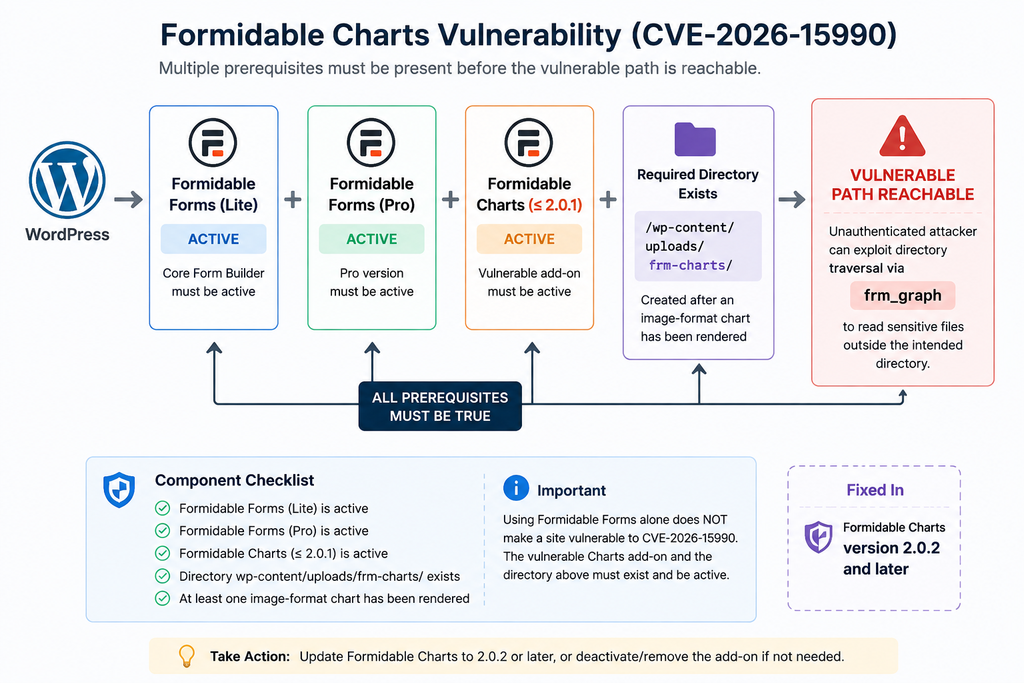
The official CVE record lists several prerequisites for successful exploitation. According to the CNA data assigned by Wordfence, Formidable Forms Lite, Formidable Forms Pro, and the vulnerable Formidable Charts add-on must be active, and the wp-content/uploads/frm-charts/ directory must exist. That directory is normally created after an image-format chart has been rendered.
This is important because WordPress administrators may see a security alert containing the Formidable name and assume every site using Formidable Forms faces the same exposure. That interpretation is too broad. The vulnerable component identified by CVE-2026-15990 is Formidable Charts, not Formidable Forms generally.
A website that only uses ordinary Formidable Forms functionality should therefore not be treated as automatically vulnerable to this specific CVE. Administrators need to inspect the actual plugin configuration.
Formidable Forms and Formidable Charts Are Not the Same Thing
Formidable Forms provides the main form-building functionality. Formidable Charts extends that environment by providing chart and graph capabilities.
The distinction matters from a security perspective because the vulnerable frm_graph functionality belongs to the Charts component. A website may have Formidable Forms installed for contact forms, surveys, registrations, calculators, or other workflows without necessarily using the vulnerable Charts add-on.
Consequently, an administrator investigating CVE-2026-15990 should not stop after seeing “Formidable” in the WordPress Plugins screen. Check exactly which components are installed, activated, and in use.
The published CVE conditions are unusually specific. Administrators should verify:
- Whether Formidable Charts is installed.
- Whether Formidable Charts is active.
- Which Formidable Charts version is running.
- Whether the other Formidable components required by the published CVE configuration are active.
- Whether
wp-content/uploads/frm-charts/exists. - Whether image-format charts have previously been rendered.
The combination of these checks provides a much more accurate risk assessment than checking for Formidable Forms alone.
Why the frm-charts Directory Matters
The directory requirement is especially noteworthy.
Published vulnerability information states that successful exploitation requires:
wp-content/uploads/frm-charts/
to exist. This directory normally appears after the website has rendered a chart in an image format.
Therefore, two WordPress sites running similar Formidable plugins may not have exactly the same exposure. One site may have used image charts and created the required directory, while another installation may never have generated the directory.
However, administrators should not use the absence of the directory as an excuse to leave an affected version installed indefinitely. Plugin configuration can change. A chart may be generated later, another administrator may enable functionality, or an update to the site’s content could change the conditions.
Updating remains the appropriate long-term remediation.
How Directory Traversal Exposes Server Files
Directory traversal vulnerabilities occur when an application accepts file or directory information from external input but fails to ensure that the resolved path remains inside an approved location.
A simplified example helps explain the concept. Imagine that an application is supposed to retrieve files only from:
/wp-content/uploads/frm-charts/
If the application takes a user-controlled path and does not correctly normalize and validate it, specially constructed path information may cause the application to resolve a file outside that folder.
CVE-2026-15990 involves this general class of weakness through the frm_graph parameter. The weakness is formally classified as CWE-22: Improper Limitation of a Pathname to a Restricted Directory.
This article intentionally does not provide a working exploitation payload. WordPress administrators do not need a weaponized request to understand or remediate the problem.
Why Arbitrary File Read Is Dangerous
A file-read vulnerability may initially sound less serious than remote code execution because the attacker cannot directly execute commands through the reported flaw.
However, servers contain files that can reveal extremely valuable information.
For a typical WordPress installation, the most obvious concern is wp-config.php. This file normally contains the database name, database username, database password, database host, WordPress authentication keys and salts, table prefix, and potentially additional custom configuration.
Other server files may reveal environment details, internal paths, credentials, logs, backup locations, application settings, or information belonging to another service.
The exact files accessible depend on server configuration and operating-system permissions. An arbitrary file-read vulnerability does not automatically mean every file on the physical server can be retrieved. The web server process must have sufficient permission to read the requested file.
Nevertheless, WordPress files are frequently readable by PHP because WordPress needs access to them during normal operation.
Confidentiality Is the Primary CVSS Impact
The CVSS assessment helps explain the nature of the vulnerability.
CVE-2026-15990 has High confidentiality impact, while the published CVSS vector assigns no direct integrity or availability impact. In other words, the documented vulnerability concerns reading information rather than changing files or taking the website offline.
That does not mean administrators should dismiss the vulnerability.
Information disclosure can become the first stage of a larger compromise. A stolen database credential, secret key, API credential, or internal configuration value may give an attacker another route into the infrastructure.
Security teams should therefore distinguish between the immediate capability of CVE-2026-15990 and possible consequences that may follow from information obtained through it.
File Read Does Not Automatically Mean WordPress Takeover
It is equally important not to exaggerate the vulnerability.
CVE-2026-15990 does not, by itself, establish that an attacker can upload PHP files, modify plugins, create an administrator account, execute commands, or directly take control of WordPress.
The reported capability is arbitrary file reading under the documented prerequisites.
However, credentials or secrets obtained from a sensitive file could potentially enable additional attacks. Whether that escalation is possible depends on what was exposed and how the surrounding server environment is configured.
This distinction produces a more accurate security assessment than simply describing every serious WordPress vulnerability as a “site takeover.”
Which WordPress Sites Are Vulnerable
Determining whether a WordPress website is affected requires more than searching the Plugins page for “Formidable.”
Start with the Formidable Charts version.
According to the CVE record, all Formidable Charts releases through version 2.0.1 are affected. Version 2.0.2 is identified by security tracking sources as the patched release.
Next, evaluate the prerequisites described in the CVE.
Sites Requiring Immediate Attention
A site deserves immediate investigation when it has an affected Formidable Charts release active and also satisfies the other documented prerequisites.
Administrators should pay particular attention when image-format charts have previously been rendered because this normally causes the required frm-charts uploads directory to exist.
Because exploitation is unauthenticated, an attacker does not need to register as a subscriber, steal a password, or compromise an administrator account first. The CVSS vector also specifies no required user interaction.
Public-facing WordPress installations meeting all prerequisites therefore deserve prompt remediation.
Sites Using Only Formidable Forms
A site using Formidable Forms should not automatically be labelled vulnerable to CVE-2026-15990.
The CVE specifically identifies the Formidable Charts plugin as the affected product. If Formidable Charts is not installed or active, the vulnerable Charts functionality described by this advisory is not present in the same way.
This is one of the most important points for administrators managing many WordPress websites.
Security scanners frequently generate alerts based on product names, installed packages, or detected versions. Those warnings are useful, but administrators still need to verify whether the vulnerable component and its prerequisites actually exist.
Installed but Inactive Components
An inactive Formidable Charts installation does not expose the active vulnerable code path in the same manner as an activated plugin. Nevertheless, keeping old and unused plugins installed is poor WordPress maintenance.
If you do not need Formidable Charts, remove it rather than leaving an outdated copy sitting in wp-content/plugins.
Reducing unused software lowers the attack surface, simplifies vulnerability management, and makes future security alerts easier to evaluate.
A Practical Exposure Checklist
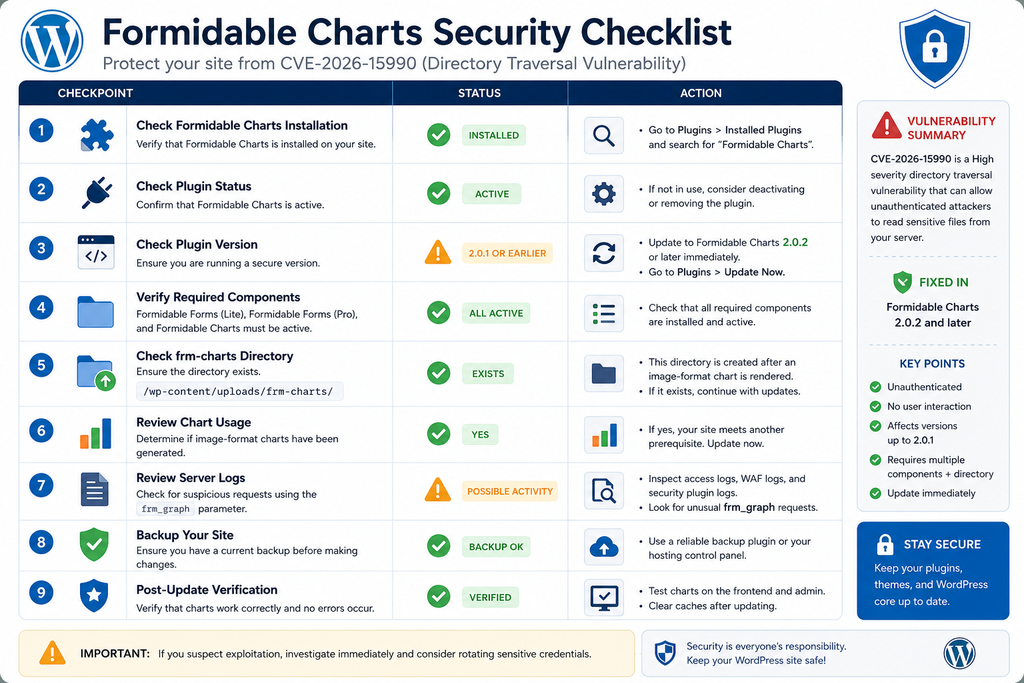
WordPress administrators can use the following defensive checklist:
- Confirm whether Formidable Charts is installed.
- Confirm whether the plugin is active.
- Check the exact installed version.
- Treat version 2.0.1 or earlier as affected software.
- Verify the accompanying Formidable components against the prerequisites in the CVE record.
- Check whether
wp-content/uploads/frm-charts/exists. - Determine whether image-format charts were previously generated.
- Update Formidable Charts to 2.0.2 or a later secure release.
- Review web-server and security logs for suspicious requests involving
frm_graph. - Investigate potential credential exposure if evidence of exploitation is discovered.
Updating Formidable Charts to Version 2.0.2

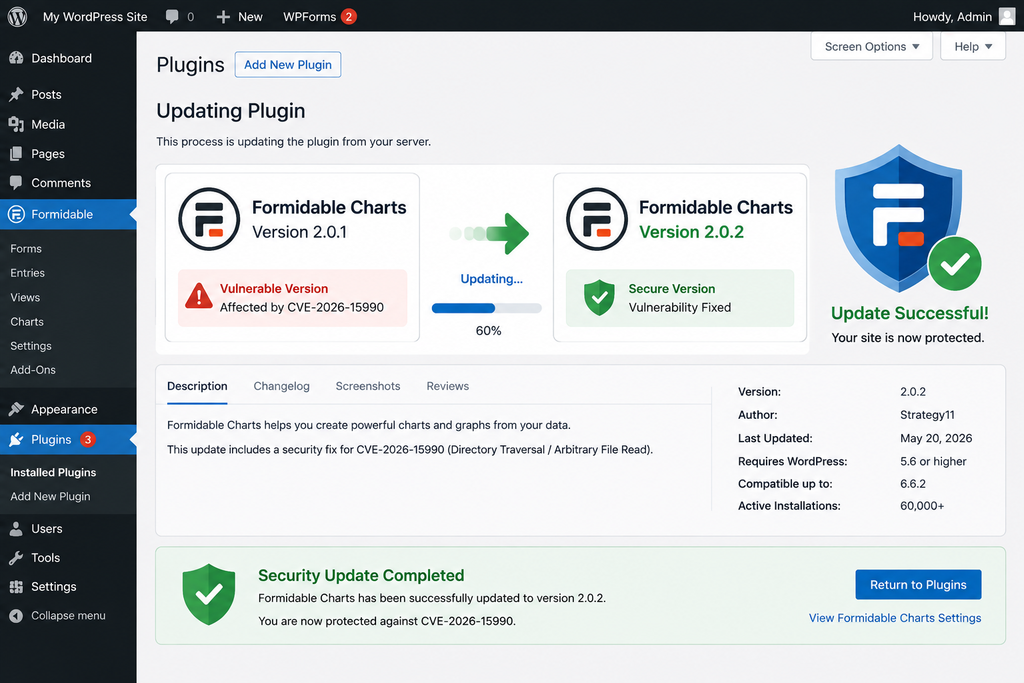
The most important remediation is straightforward: update Formidable Charts from version 2.0.1 or earlier to version 2.0.2 or a newer patched version.
Security tracking information identifies 2.0.2 as the version containing the fix for CVE-2026-15990.
Before updating a production WordPress website, create a current backup. A proper backup should include both the WordPress database and site files. Administrators managing business-critical sites may also prefer to test the update in staging before applying it to production.
Afterward, open the WordPress dashboard and inspect the installed Formidable components. Confirm that the Charts add-on reports version 2.0.2 or newer.
Do not assume that updating the main Formidable Forms plugin automatically updates every premium add-on. WordPress installations can maintain separate plugin packages with independent version numbers.
What to Do If You Cannot Update Immediately
If an affected installation cannot be patched immediately, consider deactivating Formidable Charts until the update can be completed.
This approach is particularly appropriate when the chart functionality is not essential to the website.
Temporary mitigations should not replace the vendor patch. A web application firewall may detect common path traversal patterns, and restrictive filesystem permissions can limit damage, but neither provides the same assurance as removing the vulnerable code path.
Once Formidable Charts has been updated, clear relevant caches and verify that charts still operate correctly.
Remove Formidable Charts If You Do Not Use It
Some WordPress websites accumulate plugins over many years. An administrator may discover Formidable Charts installed even though no current page uses it.
In that situation, removal can be preferable to maintaining unnecessary code.
Before deleting the plugin, confirm that existing reports, dashboards, frontend pages, or administrative workflows do not depend on it. Make a backup, deactivate the add-on, test the site, and remove it if it is genuinely unnecessary.
Maintaining fewer plugins reduces both operational complexity and the number of future security updates that administrators must track.
Updating Does Not Investigate Past Exposure
Installing version 2.0.2 fixes the vulnerable software, but it does not answer another important question:
Was the site exploited before it was updated?
That requires a separate investigation.
If the vulnerable configuration was publicly accessible for a meaningful period, administrators should review logs rather than assuming that installing the patch erases previous activity.
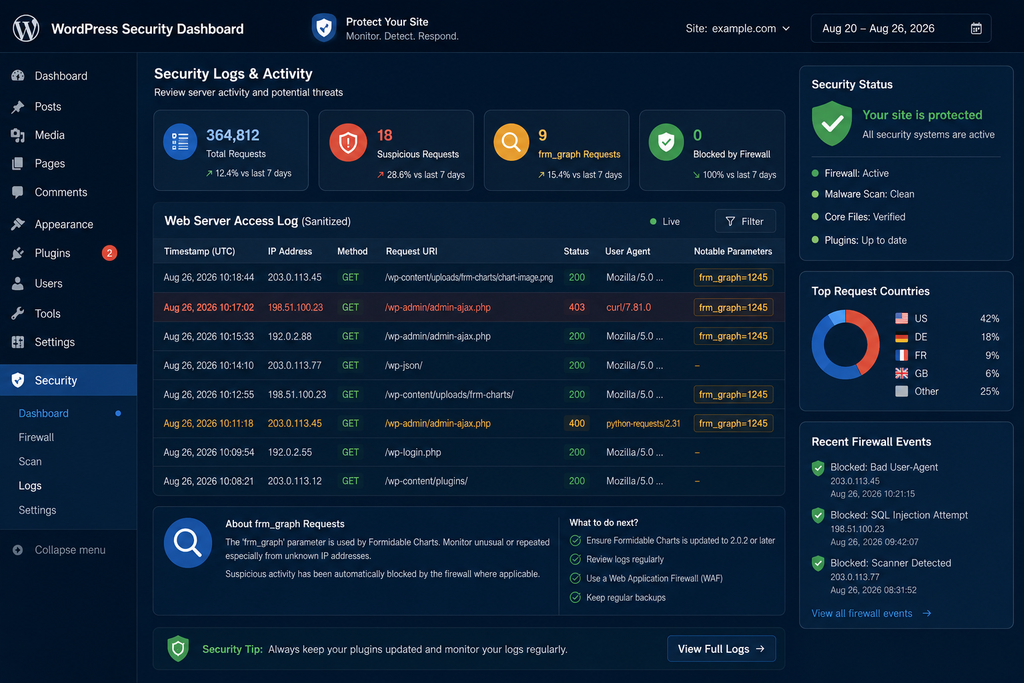
Reviewing Logs for Exploitation Attempts
Updating should be followed by a basic compromise assessment, especially on installations that satisfied all of the documented exploitation prerequisites.
The first useful source is usually the web server access log.
Depending on the hosting environment, administrators may have access to Apache logs, Nginx logs, hosting-panel analytics, CDN logs, web application firewall events, or security-plugin records.
Search historical requests for unexpected references to:
frm_graph
A request containing that parameter is not automatically malicious because legitimate plugin functionality may use it. The goal is to identify unusual requests, abnormal paths, encoded path information, repeated probes, unexpected source addresses, or requests that appear designed to escape the expected charts directory.
What Suspicious Activity May Look Like
Rather than focusing on one exact exploit string, look for behavioral indicators.
Repeated requests targeting the same parameter from unfamiliar addresses deserve attention. Requests containing suspicious path manipulation, encoded directory-navigation patterns, references to configuration files, or unusual file locations can also justify deeper investigation.
Security teams should preserve relevant logs before rotating or deleting them.
When possible, correlate web-server activity with firewall events, CDN records, PHP error logs, authentication logs, WordPress administrator activity, file modification times, and hosting control-panel logs.
A single suspicious request proves an attempt, but it does not necessarily prove successful file disclosure. Conversely, an HTTP success response alone may not establish what information was returned.
Review Sensitive Credentials After Confirmed Exploitation
If investigation provides credible evidence that sensitive configuration files were successfully retrieved, updating the plugin is only part of the response.
Treat potentially exposed secrets as compromised.
Depending on what may have been accessible, remediation could include changing WordPress database credentials, rotating application secrets and API keys, replacing WordPress salts, reviewing hosting credentials, auditing administrator accounts, checking database activity, and examining other applications that share the same server.
Credential rotation should be performed carefully because changing a database password without updating wp-config.php, for example, can immediately break the WordPress site.
Check for Secondary Compromise
CVE-2026-15990 is an information-disclosure vulnerability. Therefore, discovering an exploitation attempt does not automatically mean WordPress files were modified.
Still, a successful attacker may use stolen information later.
Review administrator accounts for unexpected additions. Check recently modified PHP files. Inspect scheduled tasks and cron jobs. Examine installed plugins and themes for unknown additions. Review authentication events and database activity when logs are available.
A reputable integrity scanner can help identify modified WordPress core files, although administrators should manually investigate unexpected changes instead of assuming every modification is malicious.
Shared Hosting Requires Extra Context
On shared or multi-site servers, filesystem permissions become especially important.
The practical scope of an arbitrary file-read flaw depends on which files the PHP or web-server process can access. Proper account isolation can reduce exposure between hosting accounts, while weak permissions may increase the amount of information accessible after a vulnerability is exploited.
Administrators who do not control the server should contact their hosting provider if evidence suggests files outside the WordPress installation may have been exposed.
Frequently Asked Questions
What is the Formidable Charts vulnerability?
The Formidable Charts vulnerability, tracked as CVE-2026-15990, is a directory traversal flaw that can allow an unauthenticated attacker to read arbitrary server files under specific conditions. It affects Formidable Charts versions through 2.0.1.
Is Formidable Forms itself vulnerable to CVE-2026-15990?
The affected product identified in the CVE is Formidable Charts. Merely using Formidable Forms should not be interpreted as proof that a site is exploitable through this specific vulnerability.
Which versions of Formidable Charts are vulnerable?
All versions through and including 2.0.1 are listed as affected. Administrators should update to 2.0.2 or a newer secure release.
Does an attacker need a WordPress account?
No. The vulnerability is classified as unauthenticated. The CVSS vector specifies that no privileges and no user interaction are required.
Does every site with Formidable Charts 2.0.1 have the same exposure?
No. The published CVE record specifies additional prerequisites, including the required Formidable components being active and the wp-content/uploads/frm-charts/ directory existing.
When is the frm-charts directory normally created?
The published vulnerability description says the directory normally exists after an image-format chart has been rendered.
Can CVE-2026-15990 execute PHP code?
The documented vulnerability provides arbitrary file-read capability. It is not classified as remote code execution. However, information obtained from sensitive files could potentially facilitate additional attacks.
Could wp-config.php be exposed?
Sensitive WordPress configuration files are a concern with arbitrary file-read vulnerabilities when filesystem permissions allow the web-server process to read them. Actual exposure depends on the environment and successful exploitation.
Is deactivating Formidable Charts enough?
Deactivation can serve as a temporary defensive measure when an immediate update is impossible. Updating to a patched release or removing an unused add-on is preferable for long-term security.
Should I rotate passwords after updating?
Not automatically. However, if logs or other evidence indicate that sensitive files were successfully retrieved, potentially exposed credentials and secrets should be treated as compromised and rotated appropriately.
The Key Security Takeaway
CVE-2026-15990 deserves attention because an attacker does not need a WordPress account or victim interaction to target the vulnerable functionality. At the same time, administrators should avoid assuming that every website using Formidable Forms is automatically exploitable.
The affected component is Formidable Charts through version 2.0.1, and the published CVE record describes specific prerequisites for successful exploitation, including the required Formidable components and the presence of the wp-content/uploads/frm-charts/ directory.
Administrators should identify the exact plugins installed, verify versions and activation status, check whether the charts directory exists, update Formidable Charts to 2.0.2 or later, and inspect historical server logs when the vulnerable configuration was exposed publicly.
This approach addresses the vulnerability without overstating its scope. More importantly, it separates two different questions every WordPress administrator should ask after a security disclosure: “Do I have the affected software?” and “Does my configuration meet the conditions required for exploitation?”
⚠️ Disclaimer and Source Hygiene
This article is provided for educational, defensive security, and WordPress administration purposes. Vulnerability information can change as vendors, CVE authorities, researchers, and security providers publish new findings. Always verify the latest plugin release and vendor guidance before making production changes. The technical information in this article is based on published CVE/CNA data and independent security references available at the time of writing. No functional exploit payload is provided. If you believe a production website has been compromised or sensitive server files have been exposed, consider consulting your hosting provider or a qualified cybersecurity professional.
🔔 For more tutorials like this, consider subscribing to our blog.
📩 Do you have questions or suggestions? Leave a comment or contact us!
🏷️ Tags: Formidable Charts vulnerability, CVE-2026-15990, Formidable Charts, Formidable Forms, WordPress vulnerability, WordPress security, directory traversal, arbitrary file read, WordPress plugin security, server file exposure
📢 Hashtags: #FormidableCharts, #FormidableForms, #CVE202615990, #WordPressSecurity, #WordPress, #CyberSecurity, #PluginSecurity, #DirectoryTraversal, #WebsiteSecurity, #WordPressVulnerability
📚 Sources and References
CVE/CNA record – CVE-2026-15990: The published record identifies Formidable Charts versions through 2.0.1 as affected, describes the frm_graph directory traversal issue, lists the exploitation prerequisites, assigns CWE-22, and gives the vulnerability a CVSS 3.1 score of 7.5.
Formidable Charts 2.0.2: The Formidable Charts 2.0.2 changelog is referenced by the CVE record as the upstream vendor resource associated with the corrected release.
Independent vulnerability verification: Additional vulnerability tracking confirms the affected range, unauthenticated attack characteristics, confidentiality impact, and patched 2.0.2 release.
🕊️ Secondary Sources and Testimonials
Independent vulnerability databases consistently classify CVE-2026-15990 as a high-severity path traversal/arbitrary file-read vulnerability affecting Formidable Charts through version 2.0.1. These sources are useful for cross-checking CVSS information and affected versions, while the CVE/CNA record should remain the primary reference for the exact published exploitation prerequisites.
Sign in with a Subscriber account to vote.
1 thought on “Formidable Charts Vulnerability Exposes Server Files”