
Table of Contents
A critical WPMU DEV Dashboard vulnerability can let unauthenticated attackers gain WordPress administrator access when Hub SSO is enabled. Learn how CVE-2026-76581 differs from the earlier WPMU DEV flaw, which sites are exposed, why version 5.0.2 matters, and what administrators should check after updating.
Critical WPMU DEV Dashboard Vulnerability: What Site Owners Need to Know
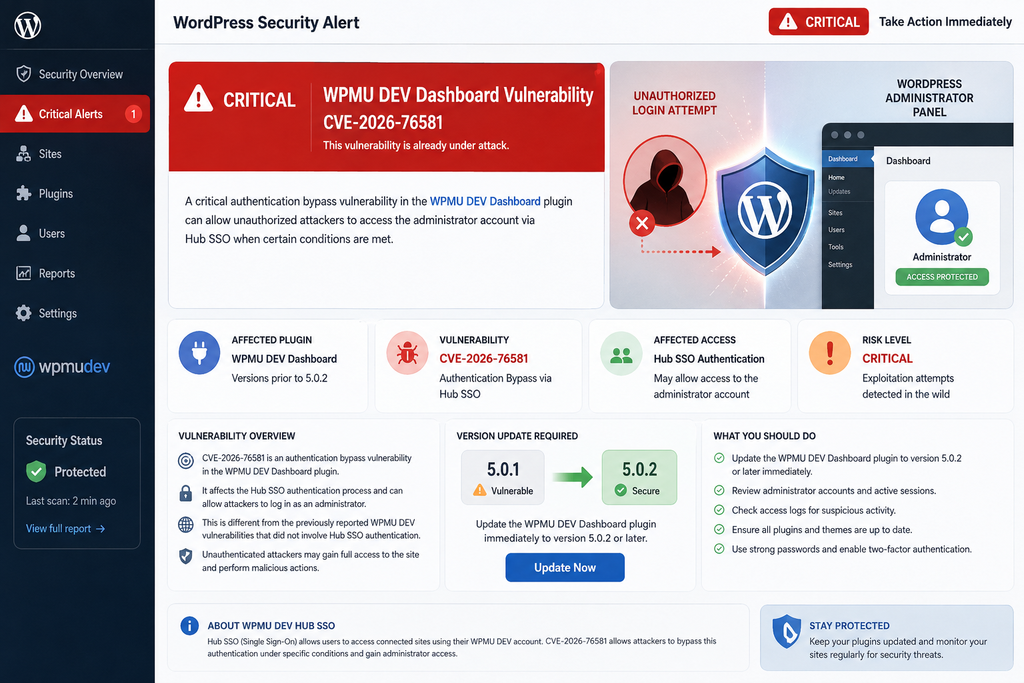
WordPress administrators using WPMU DEV Dashboard have another important security update to deal with. A newly disclosed authentication bypass, tracked as CVE-2026-76581, affects WPMU DEV Dashboard versions up to and including 5.0.1. The vulnerability carries a CVSS score of 9.8, placing it in the Critical severity category. More importantly, successful exploitation can give an unauthenticated attacker a valid WordPress administrator session under specific configuration conditions.
This is not simply another description of the WPMU DEV Dashboard security problem disclosed earlier in August 2026. The distinction matters. The earlier vulnerability, CVE-2026-15459, primarily exposed WPMU DEV Dashboard installations that had not yet been connected to the WPMU DEV Hub. CVE-2026-76581 essentially changes the configuration administrators need to worry about. The new issue concerns sites that are connected to WPMU DEV, have Hub Single Sign-On enabled, and map SSO access to a WordPress administrator account.
That difference means administrators who updated to version 5.0.1 after the previous security alert should check their sites again. Version 5.0.1 addressed the earlier authentication problem, but it remains affected by CVE-2026-76581. WPMU DEV released version 5.0.2 on August 24, 2026, following coordinated disclosure and patch review. WordPress administrators should therefore treat 5.0.2 as the minimum safe version for the newly disclosed SSO authentication issue.
There is also an important distinction around reports of active attacks. The earlier CVE-2026-15459 was reported as being targeted after disclosure, and security providers documented attack attempts against vulnerable installations. At the time of writing on August 28, 2026, public reporting confirms defensive firewall rules against known exploitation techniques for CVE-2026-76581, but administrators should avoid automatically attributing every earlier WPMU DEV attack to this newly disclosed CVE. The two vulnerabilities involve different authentication paths and different vulnerable configurations.
For practical purposes, however, the response is straightforward. If WPMU DEV Dashboard is installed, check the version immediately. If it is 5.0.1 or earlier, update to 5.0.2 or newer. If updating cannot be completed immediately, disable Hub SSO until the patched release is installed. After updating, perform a focused administrator-level security audit rather than assuming that installing the patch alone proves the site was never accessed.
What Is CVE-2026-76581
CVE-2026-76581 is a critical authentication bypass vulnerability affecting the WPMU DEV Dashboard WordPress plugin through version 5.0.1. The issue exists in the Hub Single Sign-On authentication process. Under the vulnerable configuration, an attacker who does not have a WordPress username, password, subscriber account, or other authenticated access can manipulate the SSO exchange and potentially receive an authenticated session belonging to the WordPress user associated with Hub SSO.
The vulnerability received a CVSS 3.1 score of 9.8 out of 10. Its vector reflects why administrators should treat it seriously: the attack can be performed remotely, requires low attack complexity, needs no prior privileges, and does not require interaction from an administrator or visitor. Confidentiality, integrity, and availability can all be affected once administrator access has been obtained.
The immediate result of successful exploitation is not necessarily arbitrary operating-system command execution. Instead, the attacker obtains a legitimate authenticated WordPress session for the account mapped to Hub SSO. If that account is an administrator, however, the distinction quickly becomes academic from a site owner’s perspective. A WordPress administrator can normally install plugins, change themes, create users, alter content, modify configuration through available interfaces, and perform many other privileged operations.
Depending on the site’s configuration, administrator access can also become a route toward arbitrary PHP execution. For example, an attacker who can install a malicious plugin could potentially execute PHP through that plugin. Sites where WordPress file editing remains enabled may expose additional code-modification opportunities. Hosting controls, filesystem permissions, security plugins, application firewalls, and WordPress configuration can limit some of these actions, but administrators should never depend on those secondary controls instead of installing the security update.
Security researcher Alex Thomas discovered the issue during Wordfence research assisted by Wordfence Argus on August 19, 2026. According to the published disclosure timeline, the vulnerability was reported to WPMU DEV that same day. The developer acknowledged the issue and supplied a pre-release patch on August 21. The patch was reviewed, and WPMU DEV released Dashboard version 5.0.2 on August 24, 2026.
That relatively short disclosure-to-patch period is good news for site owners because a corrected version was available before full public technical disclosure. Nevertheless, the presence of a patch does not automatically protect installations. WordPress sites that disable automatic plugin updates, rely on manual maintenance schedules, use staging-first deployment procedures, or have inactive copies of the plugin can remain on an affected release.
Why the 9.8 CVSS Rating Matters
A CVSS score should never be treated as a perfect measurement of real-world risk, but the 9.8 rating helps explain the urgency surrounding CVE-2026-76581. An attacker does not need an existing WordPress account. No administrator has to click a malicious link. The vulnerable SSO actions are part of a process that must begin before the visitor is authenticated to WordPress, making unauthenticated accessibility part of the legitimate feature design.
The security failure occurs because the authentication mechanism did not bind the information exchanged between the two SSO stages strongly enough. Cryptographic authentication is only useful when both sides agree precisely about what data has been authenticated. Ambiguity around field construction can create situations where a valid signature for one interpretation of data is accepted for another interpretation.
This principle extends well beyond WordPress. When several values are simply joined together without unambiguous separators, length information, or structured serialization, different combinations of fields can sometimes produce the same underlying sequence of bytes. CVE-2026-76581 demonstrates why authentication protocols must protect both the data itself and the structure that gives each value its intended meaning.
The practical takeaway does not require WordPress administrators to understand cryptography. Do not attempt to reproduce the vulnerability on a production site. The safe response is to update the plugin, review SSO configuration, and inspect the site for evidence of unauthorized administrative activity.
How the Hub SSO Authentication Bypass Works
WPMU DEV provides Hub Single Sign-On so administrators can move from the centralized WPMU DEV Hub into the WordPress administration area without entering the site’s WordPress password every time. This can be especially useful for agencies and administrators responsible for many WordPress installations.
According to WPMU DEV documentation, SSO uses the site’s WPMU DEV integration rather than storing the administrator’s normal WordPress password. When SSO is enabled, an authorized Hub user can select the site’s WordPress administration option and enter wp-admin through the SSO process. WPMU DEV also allows SSO to be enabled or disabled individually for connected sites.
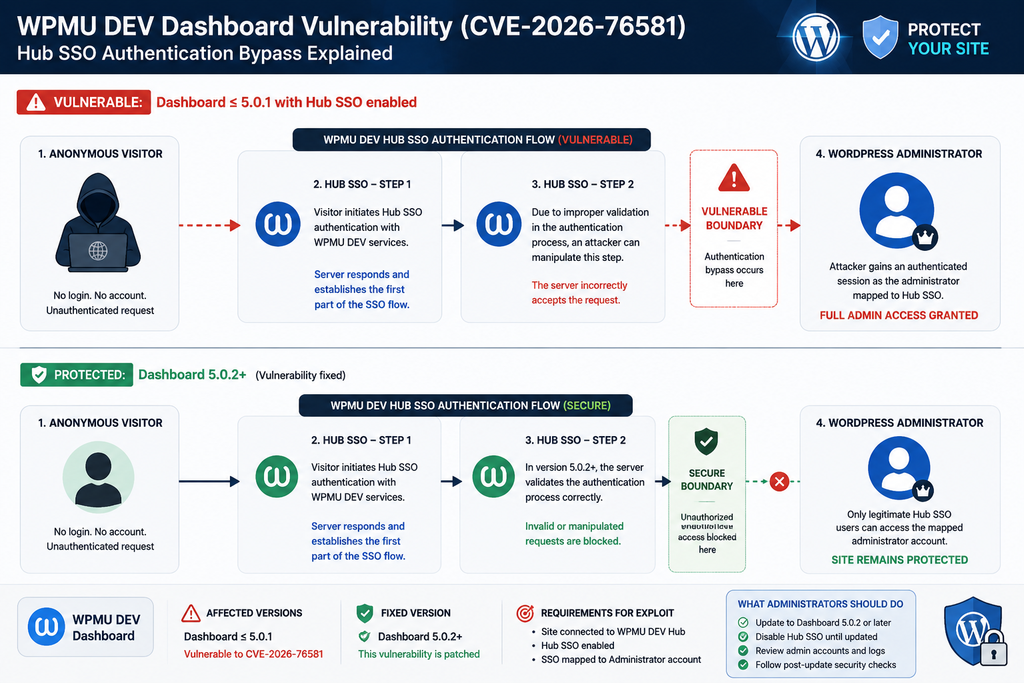
CVE-2026-76581 exists inside this authentication exchange. The SSO implementation uses two AJAX actions involved in different stages of authentication. Both actions must be available before WordPress considers the visitor logged in because their purpose is to establish that authenticated session.
That architecture is not inherently insecure. Many legitimate authentication systems expose pre-authentication endpoints. The security requirement is that those endpoints must verify cryptographic evidence correctly before converting an anonymous request into an authenticated session.
In the affected WPMU DEV Dashboard releases, the two SSO steps did not construct the HMAC-protected information consistently. One stage incorporated several values into the signed data, including information related to the token, state, redirect destination, and domain. Another stage verified a differently constructed combination.
The critical problem was ambiguity in how those values were combined. The construction did not sufficiently separate the fields in a way that guaranteed the verifier would interpret the signed bytes with exactly the same boundaries and meaning as the signer.
An attacker could therefore interact with the first legitimate SSO stage and obtain authentication material generated by the server. The weakness allowed that legitimate material to be reused in a manipulated second-stage request. The attacker did not need to discover the secret WPMU DEV API key. Instead, the vulnerable workflow itself could provide what security researchers describe conceptually as a signing oracle.
The attacker could then make the second stage interpret the authenticated information differently while preserving the underlying signed byte sequence. Because the cryptographic value remained valid for those bytes, the verification process could accept the request even though the fields no longer represented the legitimate SSO operation intended by the server.
Once the checks succeeded, the plugin could establish a WordPress authentication session for the user configured for Hub SSO. If that mapped user had the Administrator role, the attacker effectively crossed directly from being an anonymous internet visitor to holding administrator privileges.
Why SSO Must Be Enabled for This Attack
One of the most important facts about CVE-2026-76581 is that merely having WordPress installed does not create exposure. Even having WPMU DEV Dashboard 5.0.1 installed is not, by itself, enough to satisfy every condition required for this specific authentication path.
The site must be connected to WPMU DEV, Hub SSO must be enabled, and the SSO workflow must map to a WordPress account with the privileges the attacker hopes to obtain. The most serious scenario occurs when that account is an administrator.
WPMU DEV documentation states that SSO is optional and can be managed on a per-site basis. It can be controlled through the Dashboard plugin or through The Hub. This creates a useful temporary mitigation for administrators who cannot deploy version 5.0.2 immediately: disable Hub SSO until the update is complete.
That mitigation should not become an excuse for leaving the plugin outdated. A disabled feature reduces exposure to this specific path, but future configuration changes, team members, migrations, cloning procedures, or other operational changes could enable it again. Installing the fixed version removes dependence on everyone remembering the temporary workaround.
Why an Administrator Mapping Makes the Impact Critical
WordPress roles matter. A Subscriber session does not normally provide the same capabilities as an Administrator session. CVE-2026-76581 becomes particularly dangerous when Hub SSO is mapped to an Administrator because the successful authentication bypass inherits the privileges of that mapped account.
Administrator privileges generally include plugin management, user management, theme management, content modification, settings changes, and access to sensitive areas of wp-admin. On a typical single-site WordPress installation, an administrator effectively controls the application.
An attacker could potentially create another administrator account to preserve access even after the original SSO issue is patched. They might install an unfamiliar plugin, modify an existing plugin, change redirect behavior, insert unwanted JavaScript, manipulate SEO content, alter advertising code, or create scheduled persistence mechanisms.
For that reason, updating a potentially exposed site should be followed by an audit. A successful attacker would have little incentive to leave the vulnerable SSO path as the only way back into the website. Persistence is often more valuable than repeatedly exploiting the original vulnerability.
Which WPMU DEV Sites Are Vulnerable
The affected-version rule is simple: WPMU DEV Dashboard versions up to and including 5.0.1 are vulnerable to CVE-2026-76581. Version 5.0.2 contains the security fix.
Configuration determines whether the vulnerable code can be turned into administrator access. Security reporting identifies three important conditions: the WordPress site is connected to WPMU DEV, Hub Single Sign-On is enabled, and the SSO configuration maps authentication to a WordPress administrator account.
Administrators should therefore check both the plugin version and configuration rather than looking only for the plugin’s presence.
A site running WPMU DEV Dashboard 5.0.1 with SSO disabled does not present the same exploitable SSO condition described in CVE-2026-76581. Similarly, a site that is not connected to the Hub falls outside the configuration described for this new vulnerability.
However, this is exactly where the comparison with the previous WPMU DEV vulnerability becomes essential.
CVE-2026-76581 Versus CVE-2026-15459
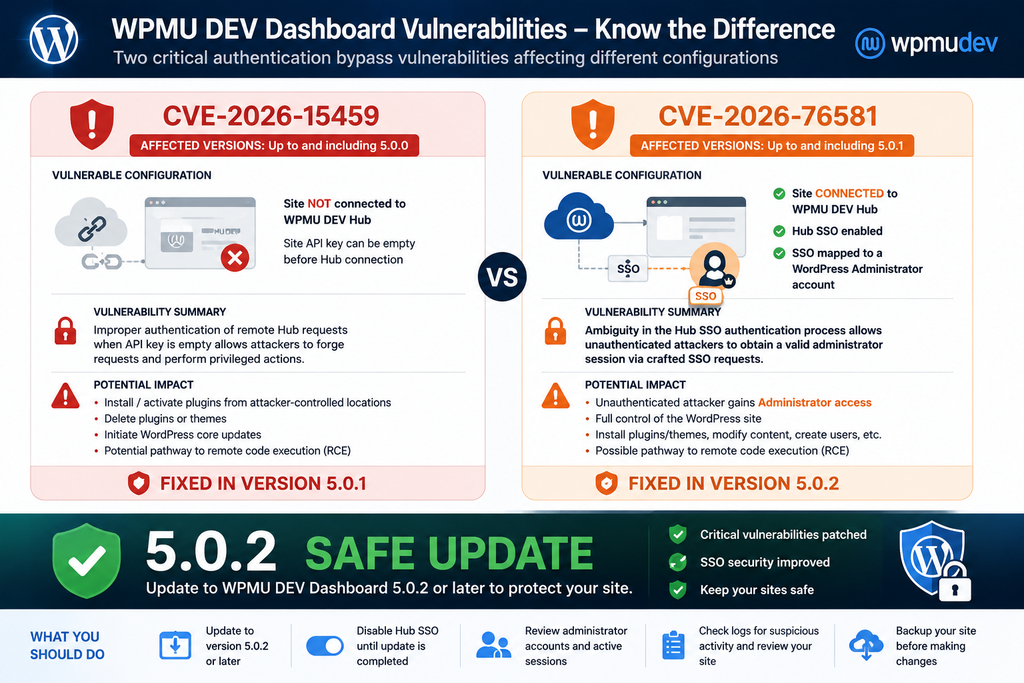
Earlier in August 2026, administrators were warned about CVE-2026-15459, another authentication bypass affecting WPMU DEV Dashboard. That vulnerability affected versions up to and including 5.0.0 and involved the remote Hub request authentication mechanism.
On installations that had not yet been connected to a WPMU DEV account, the site API key used for request-signature validation could be empty. That condition weakened authentication in a way that allowed attackers to forge requests and trigger privileged Hub functionality.
The potential actions were extremely serious. Published vulnerability information described the possibility of installing and activating a plugin from an attacker-controlled location, deleting plugins or themes, initiating WordPress core updates, or using SSO-related functionality to obtain administrative access. Installing attacker-controlled PHP through plugin functionality could ultimately lead to remote code execution.
Importantly, sites already connected to WPMU DEV with a valid non-empty API key were not affected by that particular empty-key condition.
Version 5.0.1 addressed the earlier vulnerability.
CVE-2026-76581 turns the situation around in an important way. The new issue remains present in 5.0.1, and the relevant target configuration is a site that is connected to WPMU DEV and uses Hub SSO.
Therefore, administrators should not reason that connecting a site to WPMU DEV makes every WPMU DEV Dashboard authentication vulnerability irrelevant. That was a meaningful distinction for CVE-2026-15459. It is not a solution for CVE-2026-76581.
Likewise, an administrator who updated from 5.0.0 to 5.0.1 during the earlier incident completed the correct mitigation at that time, but must update again now.
Quick Vulnerability Comparison
| Security issue | CVE-2026-15459 | CVE-2026-76581 |
|---|---|---|
| Affected versions | Up to 5.0.0 | Up to 5.0.1 |
| Primary condition | Site not connected to Hub | Site connected to Hub |
| SSO required | Not the defining requirement | Yes |
| Administrator SSO mapping | Not required for primary remote-action path | Critical to admin takeover scenario |
| Main weakness | Remote request authentication with empty API-key condition | Ambiguous SSO HMAC construction |
| Potential impact | Privileged Hub actions and possible RCE | Administrator authentication bypass and possible site takeover |
| Initial patched version | 5.0.1 | 5.0.2 |
| Recommended version now | 5.0.2 or newer | 5.0.2 or newer |
This comparison also explains why simply reading an older security advisory can create confusion. A site administrator may remember being told that connected sites were protected from the previous flaw. That statement applied to the earlier CVE’s specific mechanism. The new vulnerability concerns a different path.
What About Sites Where the Plugin Is Inactive?
If an affected plugin is installed but inactive, the immediate attack surface can differ because WordPress does not normally execute an inactive plugin’s PHP during ordinary requests. However, obsolete security-sensitive plugins should not be stored indefinitely on production sites.
If WPMU DEV Dashboard is no longer needed, remove it rather than leaving an outdated copy installed. If it is required, update it before reactivation.
The same principle applies to staging sites, development clones, forgotten subdomains, and archived WordPress installations. Attackers do not care whether a site appears important to its owner. Automated scanning can discover neglected installations just as easily as production websites.
Evidence of Active Exploitation Attempts

The phrase “under attack” requires careful interpretation because two serious WPMU DEV Dashboard vulnerabilities have appeared within the same month.
For the earlier CVE-2026-15459, public security reporting documented active exploitation attempts. Patchstack classified that earlier vulnerability as known to be exploited, while other reports described substantial numbers of blocked requests targeting the vulnerable WPMU DEV Hub mechanism.
That history is highly relevant because it demonstrates that attackers are actively interested in privileged WPMU DEV Dashboard functionality. A management plugin capable of installing software or creating administrative sessions is naturally attractive to attackers because compromising it can bypass ordinary login defenses.
However, site owners should distinguish those observations from confirmed exploitation of CVE-2026-76581 itself.
At the time of writing on August 28, 2026, Wordfence’s disclosure states that Premium, Care, and Response customers received a firewall rule on August 25 protecting against known exploitation techniques for CVE-2026-76581. Wordfence Free users are scheduled to receive the corresponding rule on September 24, 2026.
The availability of a firewall rule shows that practical exploitation techniques are understood and can be detected or blocked. It does not, by itself, prove that every attack previously observed against WPMU DEV Dashboard used CVE-2026-76581.
This distinction matters for accurate security reporting.
Site administrators should therefore interpret the situation as high-risk and immediately patchable, without incorrectly combining statistics from CVE-2026-15459 with CVE-2026-76581.
Why Attackers May Move Quickly
WordPress vulnerabilities can become attractive targets shortly after public technical information becomes available. Attackers can automate discovery and send requests to large numbers of sites without knowing which organizations operate them.
CVE-2026-76581 is especially interesting from an attacker’s perspective because the reward can be an administrator session rather than a minor information leak or limited low-privilege action.
Once authenticated as an administrator, a malicious actor can attempt to establish persistence through mechanisms unrelated to the original vulnerability. This means that patching after compromise may close the original door while leaving another door created by the attacker.
Administrators should therefore treat the period between public disclosure and successful patch deployment as a security exposure window worth investigating.
What Should You Look for in Logs?
Avoid relying on a single indicator. A sophisticated or successful compromise may produce several kinds of evidence, while routine SSO activity can also generate legitimate requests.
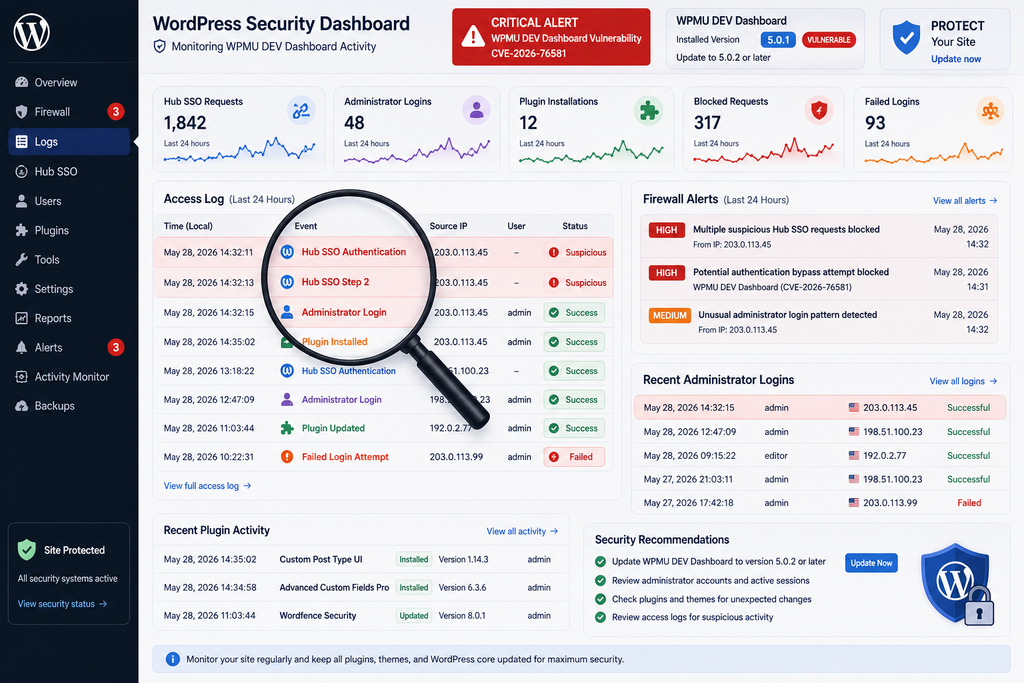
Start with your web server, reverse proxy, CDN, and security-plugin logs. Look for unusual access to WordPress AJAX endpoints associated with WPMU DEV SSO, especially repeated sequences from unfamiliar networks or bursts that do not correspond with administrator activity.
Next, correlate suspicious requests with WordPress authentication activity. An unusual administrator login immediately after unexpected SSO traffic deserves investigation.
Also inspect administrative actions performed during the same period. Plugin installation, theme modification, user creation, option changes, scheduled-task creation, and file changes can reveal what happened after authentication.
The goal is not simply to identify a strange HTTP request. You want to establish a timeline:
request → authentication → administrator activity → filesystem or database changes.
That sequence provides much stronger evidence than an isolated log entry.
Do Not Ignore Failed Attempts
Failed exploitation attempts can still provide useful information. They may demonstrate that scanners have discovered the site, identified WordPress, or are testing generic attack paths.
A WAF blocking a malicious request is reassuring, but it does not mean the underlying vulnerable software should remain installed. Firewall rules are a secondary defensive layer. The vendor’s corrected plugin version addresses the root vulnerability.
Similarly, administrators using Wordfence Premium, Care, or Response should still update to 5.0.2 despite having the relevant firewall protection. Defense in depth works best when the vulnerable application code is patched and the firewall remains available to catch unexpected variations or unrelated attacks.
Updating WPMU DEV Dashboard to Version 5.0.2
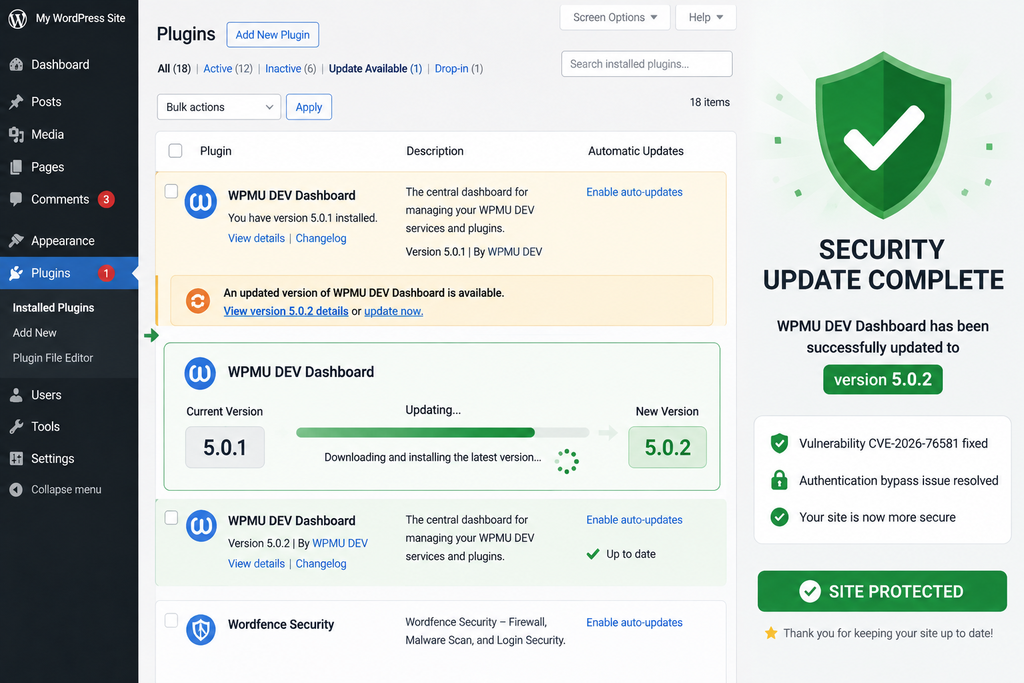
The most important action is to install WPMU DEV Dashboard 5.0.2 or a later secure release.
Start by logging into WordPress and opening the Plugins area. Locate WPMU DEV Dashboard and check the installed version. Do not assume the plugin updated automatically simply because WordPress automatic updates are enabled globally. Verify the actual version number.
If version 5.0.1 or earlier is installed, update immediately.
Before updating a business-critical production site, create or verify a recent backup. A backup should include the WordPress database and site files. The backup is primarily protection against operational update problems; it should not be treated as proof that the existing site is clean.
After the update completes, verify the installed version again.
A successful “Update completed” message is useful, but the version displayed by WordPress provides a clearer confirmation that the new plugin code is actually present.
Recommended Update Procedure
- Confirm that WPMU DEV Dashboard is installed.
- Record the currently installed version.
- Verify that a recent usable backup exists.
- Update WPMU DEV Dashboard to version 5.0.2 or newer.
- Confirm the installed version after the update.
- Clear relevant application or opcode caches if your hosting environment requires it.
- Test wp-admin access.
- Test normal WPMU DEV Hub connectivity.
- Verify SSO behavior only after the secure version is active.
- Begin the post-update security review.
Sites managed through deployment pipelines should update the plugin in the authoritative code source rather than modifying production only and allowing the next deployment to restore an older vulnerable package.
What If You Cannot Update Immediately?
Disable Hub Single Sign-On until the patched plugin can be installed.
WPMU DEV documentation allows SSO to be enabled or disabled for individual sites. Administrators can manage the setting through WPMU DEV Dashboard or The Hub.
Because SSO is the prerequisite that exposes the CVE-2026-76581 authentication path, disabling it is a meaningful temporary mitigation.
Still, temporary means temporary.
Schedule the plugin update as soon as possible rather than leaving the site dependent on a configuration workaround.
Should You Disable SSO Permanently?
That depends on how your organization manages WordPress.
SSO provides real convenience, especially for agencies and teams managing many sites through WPMU DEV Hub. Removing useful functionality permanently is not necessary when the underlying vulnerability has been corrected.
However, the principle of reducing attack surface still applies.
If nobody uses Hub SSO, leaving it disabled removes functionality you do not need. If your workflow depends on SSO, keep the plugin updated and review which WordPress account receives SSO access.
Avoid mapping convenience features to more privileges than necessary. Where administrator privileges are genuinely required, protect the surrounding account and management infrastructure carefully.
Post-Update Administrator Security Checks
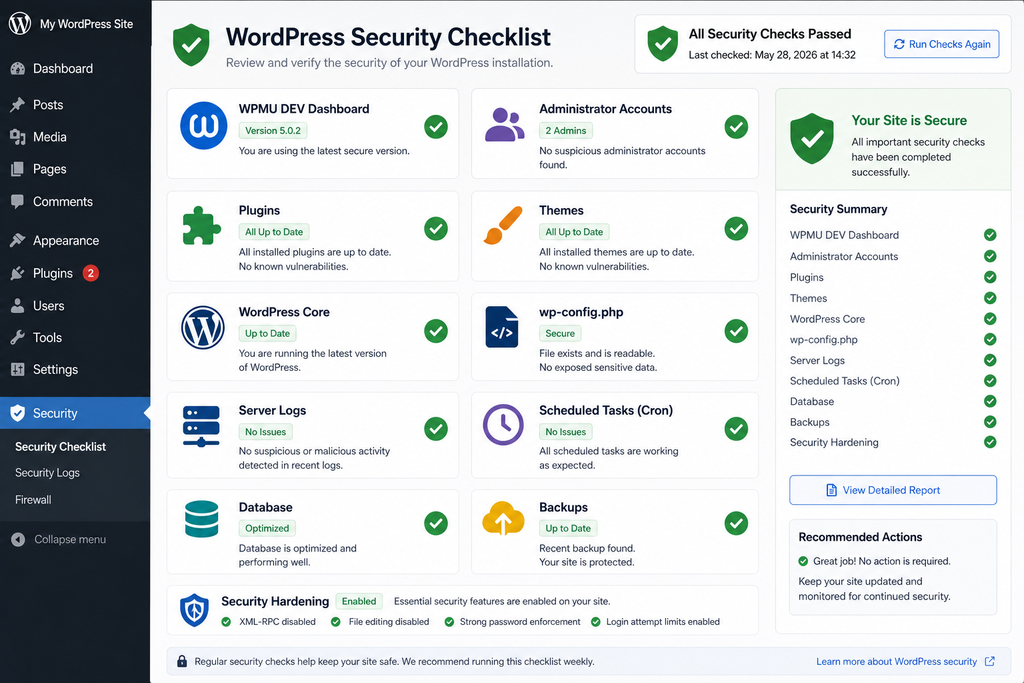
Updating to version 5.0.2 prevents the known CVE-2026-76581 technique, but an administrator responsible for an exposed site should perform several checks afterward.
The purpose of these checks is simple: determine whether anyone gained access before the update and whether unauthorized persistence remains.
Begin with WordPress users.
Open Users → All Users and review every account with Administrator privileges. Look for accounts you do not recognize, recently created administrators, unexpected email-address changes, unfamiliar usernames, or legitimate accounts that suddenly possess more privileges than expected.
Do not delete suspicious evidence immediately if the site appears genuinely compromised and forensic investigation may be required. Record relevant information first.
Review Administrator Accounts
Administrator accounts are the first place to inspect because an attacker who briefly gains admin access can create another administrator and stop depending on the vulnerable SSO path.
Check:
- Administrator usernames
- Account email addresses
- Registration dates where available
- Recent role changes
- Unexpected password-reset activity
- Unknown application passwords
- Unexpected account metadata
- Users who should no longer have access
If an administrator account appears suspicious, investigate activity associated with it before removing access.
Rotate Important Credentials When Compromise Is Suspected
If evidence suggests unauthorized administrator access, changing only one WordPress password is not enough.
Consider rotating WordPress administrator passwords, hosting credentials, SFTP or SSH credentials, database credentials where appropriate, API tokens, deployment credentials, and other secrets accessible through the compromised environment.
WPMU DEV also documents the ability to reset the account API key. However, administrators should understand the operational consequences before doing so because resetting it can disconnect sites from the Hub and require reconnection.
Credential rotation should therefore be planned according to the evidence and architecture rather than performed randomly.
Check Installed Plugins
Review Plugins → Installed Plugins carefully.
Look for plugins you did not install, unexpected recent additions, unfamiliar names, disabled plugins that appeared recently, and plugins whose files have been modified unexpectedly.
Attackers sometimes use names that appear harmless or resemble legitimate WordPress components. A familiar-looking name alone is not proof that a plugin is legitimate.
Compare questionable software against your deployment records, backups, version-control repository, management documentation, or known-good staging environment.
Inspect Themes
Repeat the process for themes.
Confirm that every installed theme belongs on the site. Check active and inactive themes for unexpected modifications, particularly if administrators can edit theme files through WordPress.
Removing unused themes reduces future attack surface, although retaining one current default WordPress theme can sometimes be useful for troubleshooting.
Verify WordPress Core Integrity
If you have WP-CLI access, WordPress provides useful integrity checks for core files. You can also reinstall the same WordPress core release through trusted administrative mechanisms if integrity is uncertain.
Core integrity checking does not verify every plugin, theme, upload, configuration file, or database entry. Treat it as one component of a broader investigation.
Unexpected modifications to core PHP files are a significant warning sign.
Examine wp-config.php
The wp-config.php file contains sensitive configuration and executes during WordPress initialization. Review it for unfamiliar PHP code, unexpected includes, suspicious external references, unusual constants, or changes that are not part of your normal configuration.
Compare it with a known-good copy when possible.
Do not publish the contents of wp-config.php publicly while asking for support because it may contain database credentials, authentication configuration, salts, API-related values, or environment information.
Review .htaccess and Server Configuration
Apache installations commonly use .htaccess, while Nginx configurations normally live elsewhere at the server level.
Unexpected rewrite rules can redirect traffic, conceal malicious files, manipulate search-engine behavior, or interfere with security controls.
Compare current rules against known-good configuration.
Inspect wp-content/uploads
The uploads directory normally stores media and other uploaded assets. Executable PHP files appearing there can deserve investigation, although some legitimate plugins create unusual file structures.
Do not assume every PHP file proves compromise. Instead, identify which plugin or process created it and whether that behavior is documented.
Recently modified executable files that cannot be linked to legitimate software should receive immediate attention.
Review Scheduled Tasks
Persistence does not have to live in an administrator account.
Inspect WordPress cron events and server-level scheduled jobs where you have access. Look for unfamiliar recurring actions, unexpected PHP scripts, strange URLs, or commands that appeared during the suspected compromise window.
A malicious scheduled task can restore deleted files or recreate unwanted access after the original vulnerability has been patched.
Examine Recent File Changes
File modification timestamps can help narrow an investigation.
Focus on PHP and JavaScript files changed around suspicious administrator sessions or SSO requests. Compare those files against clean vendor packages where possible.
Timestamps are not perfect forensic evidence because they can be altered or legitimately changed during updates. Nevertheless, they can provide useful leads.
Review Security and WAF Logs
If the site uses Wordfence, Cloudflare, Patchstack, hosting security controls, or another web application firewall, preserve and review relevant logs.
Look for events around the time the vulnerable plugin version was active.
Correlating WAF events with WordPress actions is much more useful than looking at either source alone.
For example, a suspicious SSO request followed seconds later by an administrator login and then a new plugin installation is far more meaningful than a generic scan that returned an error.
Check Backups Before Restoring
If compromise is confirmed, restoring from backup can be appropriate, but select the backup carefully.
A backup created after compromise may contain the attacker’s persistence mechanism. Determine approximately when unauthorized activity began and choose a known-good recovery point.
After restoration, immediately apply all security updates before exposing the restored site normally.
Also rotate compromised credentials because restoring files does not invalidate credentials that an attacker may already know.
Why This Vulnerability Deserves Immediate Attention
The most dangerous WordPress vulnerabilities are not always the ones involving the most complicated code. They are often vulnerabilities that break an important security boundary.
CVE-2026-76581 breaks the boundary between an unauthenticated internet visitor and an authenticated WordPress administrator under the affected SSO configuration.
That makes the vulnerability operationally serious.
A successful attacker does not need to guess a strong administrator password. They do not need to defeat WordPress two-factor authentication through ordinary login. They do not need a Subscriber account first. The vulnerable authentication workflow itself can establish the administrator session.
This is why administrators should prioritize the plugin update even on sites protected by strong passwords.
Security controls still matter, but they protect different boundaries.
The Lesson for WordPress Management Plugins
Management plugins deserve the same security attention as ecommerce, membership, form, backup, and page-builder plugins.
In some cases, they deserve even more.
A centralized management plugin may have legitimate capabilities to install extensions, update WordPress, connect external services, perform backups, or create remote administrative sessions.
Those capabilities are extremely useful to administrators. They are equally valuable to an attacker if authentication fails.
For agencies managing dozens or hundreds of WordPress sites, one maintenance workflow can also become a shared operational dependency. That makes fast inventory and version management essential.
- Know which sites have WPMU DEV Dashboard installed.
- Know their versions.
- Know whether they are connected to Hub.
- Know whether SSO is enabled.
- Know which user receives SSO access.
Without that inventory, vulnerability announcements become much harder to act on quickly.
Frequently Asked Questions
What is the WPMU DEV Dashboard vulnerability CVE-2026-76581?
CVE-2026-76581 is a critical authentication bypass affecting WPMU DEV Dashboard versions up to and including 5.0.1. Under the vulnerable configuration, an unauthenticated attacker may abuse the Hub SSO authentication workflow and obtain the WordPress session associated with SSO. If SSO maps to an administrator, successful exploitation can provide administrator access.
Which WPMU DEV Dashboard version fixes CVE-2026-76581?
WPMU DEV Dashboard 5.0.2 contains the fix for CVE-2026-76581. Administrators should install version 5.0.2 or any newer secure release available from WPMU DEV.
Is WPMU DEV Dashboard 5.0.1 safe?
Not against CVE-2026-76581. Version 5.0.1 addressed the earlier CVE-2026-15459 vulnerability, but the newly disclosed SSO authentication bypass affects versions through 5.0.1. Sites should update again to version 5.0.2 or newer.
Does CVE-2026-76581 affect every WordPress site?
No. The vulnerability concerns WPMU DEV Dashboard installations using the affected versions and specific Hub SSO configuration. The high-risk scenario requires the site to be connected to WPMU DEV, Hub SSO to be enabled, and SSO to map to an administrator account.
What is the difference between CVE-2026-76581 and CVE-2026-15459?
CVE-2026-15459 primarily involved WPMU DEV Dashboard installations that were not connected to the Hub and therefore had an empty API key involved in remote-request authentication. CVE-2026-76581 concerns connected sites using Hub SSO and results from ambiguity in the SSO authentication process. Version 5.0.1 fixed the earlier issue, while version 5.0.2 fixes the new one.
Can CVE-2026-76581 lead to remote code execution?
The immediate vulnerability can result in an authenticated WordPress session for the account mapped to Hub SSO. When that account is an administrator, the attacker may have access to functionality capable of modifying or installing executable WordPress code. Depending on site configuration, this can provide a route to remote code execution and complete compromise.
What should I do if I cannot install version 5.0.2 immediately?
Disable Hub Single Sign-On until you can update. This reduces exposure to the SSO path involved in CVE-2026-76581. It should be treated as a temporary mitigation rather than a replacement for installing the corrected plugin version.
Should I change my administrator password after updating?
A password change is sensible if you find evidence of compromise, but changing the password alone does not address every possible persistence mechanism. Review administrator users, plugins, themes, application passwords, scheduled tasks, files, logs, API credentials, and other privileged access.
How can I determine whether my WordPress site was compromised?
Correlate web server and firewall logs with administrator login events, new users, plugin installations, file changes, scheduled tasks, and other privileged actions. No single indicator proves compromise in every case. If strong evidence exists, preserve logs and consider professional incident-response assistance.
Is disabling Hub SSO enough permanently?
Disabling SSO removes the specific prerequisite for this attack path, but updating remains the preferred remediation. If your organization does not need Hub SSO, leaving it disabled can also reduce unnecessary attack surface. Sites that require SSO should use it only with the patched plugin version.
The Security Priority Is Clear: Patch First, Then Verify
The newest WPMU DEV Dashboard vulnerability is important not only because of its 9.8 CVSS rating but because it affects a trusted authentication workflow designed to provide convenient administrative access.
CVE-2026-76581 affects WPMU DEV Dashboard through version 5.0.1. A vulnerable site connected to WPMU DEV with Hub SSO enabled and mapped to an administrator can expose a path from an unauthenticated request to an authenticated administrator session.
The distinction from CVE-2026-15459 should remain clear. The earlier vulnerability focused on unconnected installations and was fixed in version 5.0.1. The new vulnerability involves a different authentication path, affects connected SSO-enabled installations, and requires version 5.0.2.
Administrators who already updated during the earlier WPMU DEV security incident should therefore check again.
The safest response is straightforward: update WPMU DEV Dashboard to 5.0.2 or newer, temporarily disable Hub SSO if an immediate update is impossible, and perform a post-update security audit.
Do not stop after seeing the green “updated” message.
Review administrator accounts, plugins, themes, important configuration files, logs, scheduled tasks, and recent filesystem changes. If evidence suggests that administrator access occurred unexpectedly, treat the event as a potential compromise and investigate accordingly.
WordPress security works best as a layered process. Software updates close known vulnerabilities. Firewalls can block malicious requests. Strong access controls reduce account risk. Backups provide recovery options. Logging provides visibility. Regular integrity checks help identify unexpected changes.
Used together, those layers make a WordPress installation considerably harder to compromise and much easier to recover when something does go wrong.
⚠️ Disclaimer and Source Hygiene
This article is provided for educational, defensive, and WordPress administration purposes. It does not provide exploit instructions and should not be used to test systems without authorization. Vulnerability information can change as vendors, researchers, CVE authorities, and security providers publish new findings. Technical details in this article were cross-checked against WPMU DEV documentation, vulnerability records, security research disclosures, and current reporting available on August 28, 2026. Site owners managing sensitive, commercial, regulated, or already compromised systems should consider consulting a qualified WordPress security or incident-response professional. Always verify the latest WPMU DEV Dashboard version and vendor security information before making production decisions.
🔔 For more tutorials like this, consider subscribing to our blog.
📩 Do you have questions or suggestions? Leave a comment or contact us!
🏷️ Tags: WPMU DEV Dashboard vulnerability, CVE-2026-76581, WPMU DEV Dashboard, WordPress security, WordPress vulnerability, Hub SSO vulnerability, authentication bypass, WordPress administrator security, WPMU DEV 5.0.2, WordPress security update
📢 Hashtags: #WPMUDEV, #WordPressSecurity, #CVE202676581, #WordPress, #CyberSecurity, #WordPressVulnerability, #AuthenticationBypass, #WebsiteSecurity, #WPAdmin, #SecurityUpdate
📚 Sources and References
WPMU DEV Documentation
WPMU DEV’s official documentation explains how Secure One-Click Login works, how Hub SSO can be enabled or disabled for individual sites, and how administrators can manage SSO from either the WPMU DEV Dashboard plugin or The Hub.
The official WPMU DEV Dashboard documentation also explains plugin management, Dashboard permissions, automatic updates, API connectivity, support access, and SSO configuration.
The WPMU DEV Dashboard product changelog provides release history for the plugin and should be checked for the newest available version before publishing or applying security guidance.
Wordfence Security Research
Wordfence security research published on August 28, 2026 describes CVE-2026-76581 as an authentication bypass affecting WPMU DEV Dashboard through version 5.0.1. The research identifies Hub SSO as the vulnerable workflow, documents the coordinated disclosure timeline, and identifies version 5.0.2 as the patched release.
The disclosure also distinguishes CVE-2026-76581 from the earlier WPMU DEV Dashboard authentication bypass affecting versions through 5.0.0.
NVD and Earlier WPMU DEV Vulnerability Information
The National Vulnerability Database record for CVE-2026-15459 documents the earlier WPMU DEV Dashboard authentication bypass. That record is useful for understanding why the two vulnerabilities should not be conflated.
CVE-2026-15459 concerned installations where the WPMU DEV site API key could be empty before Hub connection. CVE-2026-76581 concerns a separate SSO authentication problem affecting connected sites with the appropriate Hub SSO configuration.
WPMU DEV – Secure One-click Logins (SSO) documentation
WPMU DEV Dashboard official documentation
WPMU DEV Dashboard official plugin page and changelog
NVD – earlier CVE-2026-15459 vulnerability
Wordfence research on CVE-2026-76581
SecAlerts – CVE-2026-76581 record
🕊️ Secondary Sources and Testimonials
Secondary security reporting confirms the critical 9.8 severity rating for CVE-2026-76581, the affected range through WPMU DEV Dashboard 5.0.1, and the availability of version 5.0.2 as the security update.
Reports concerning active attacks against WPMU DEV Dashboard should be interpreted carefully. Documented exploitation statistics from earlier August reporting largely concern CVE-2026-15459 and should not automatically be presented as exploitation statistics for CVE-2026-76581.
This distinction helps maintain accurate vulnerability reporting while still emphasizing the practical security message: administrators running WPMU DEV Dashboard 5.0.1 or earlier should update immediately and investigate potentially exposed installations.
Sign in with a Subscriber account to vote.