
Table of Contents
A serious Solace Extra vulnerability can allow unauthenticated attackers to permanently delete WordPress content imported through Starter Templates. Administrators running version 1.5.3 or earlier should update immediately, inspect important pages, Elementor templates, menus, products, and media, and confirm that a recent working backup is available.
Solace Extra Vulnerability Requires Immediate Attention
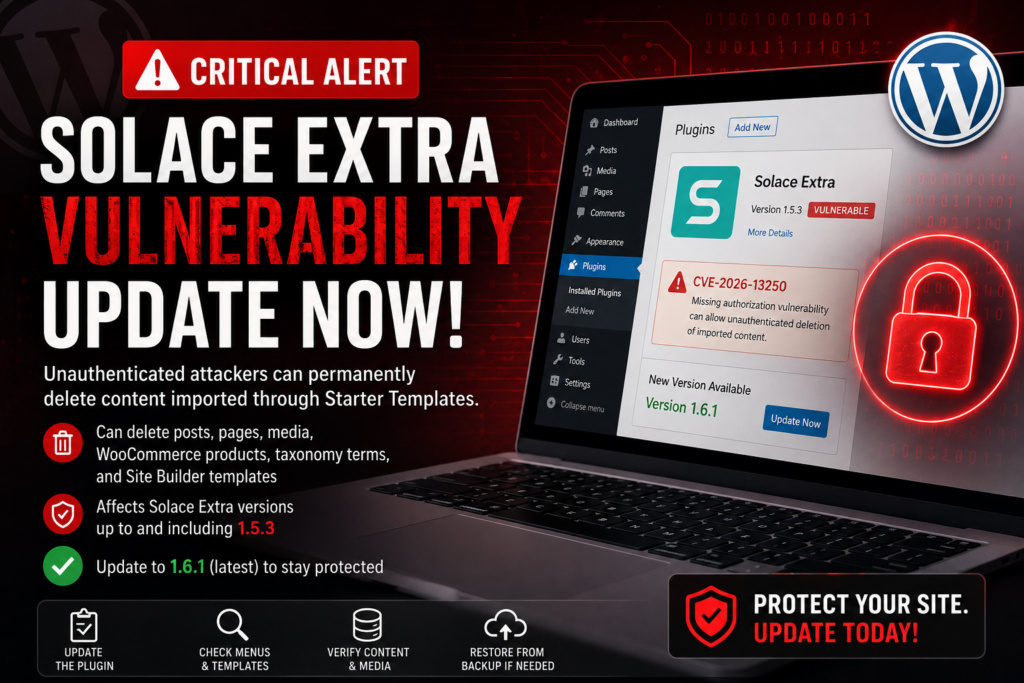
WordPress administrators using Solace Extra should check their installations immediately. A security vulnerability tracked as CVE-2026-13250 affects Solace Extra versions up to and including 1.5.3. The vulnerability involves missing authorization checks and can allow an unauthenticated attacker to trigger deletion of content previously imported through the plugin’s Starter Template functionality. The official CVE description includes posts, pages, media attachments, WooCommerce products, taxonomy terms, and Site Builder templates among the content potentially exposed to deletion. Unlike many WordPress vulnerabilities that focus on stealing information, this flaw primarily threatens the integrity of the website itself.
The warning is particularly relevant because Solace Extra has more than 10,000 active installations according to its WordPress.org listing. The plugin supports the Solace theme and helps administrators select and import pre-designed Elementor templates. In other words, some sites may depend heavily on content originally created through its importer. WordPress.org currently lists Solace Extra 1.6.1, released on July 30, 2026, and its changelog documents additional security improvements, including restrictions on privileged AJAX operations and stronger nonce and capability checks.
What Is CVE-2026-13250?
CVE-2026-13250 is classified as a missing authorization, or CWE-862, vulnerability. In simple terms, a sensitive Solace Extra operation did not correctly establish whether the person requesting it had permission to perform it. The affected functionality involves the delete_previously_imported AJAX action. The NVD description also notes that the handler was registered through an unauthenticated AJAX route, making the vulnerable functionality reachable without normal administrator privileges. The CVSS 3.1 score is 5.3, officially placing the issue in the Medium category. However, administrators should not interpret that score as meaning the potential consequences for an individual website are insignificant.
The practical danger is easy to understand. Imagine importing a complete starter website and then spending several months replacing its demo content with your own text, photographs, products, categories, and designs. Those objects may now represent the real production website, even though they originally came from an importer. A malicious deletion could therefore affect far more than disposable demo data. The server might remain operational and WordPress could still accept administrator logins, while visitors encounter missing pages, broken navigation, absent products, damaged layouts, or missing media. This makes rapid updating and reliable backups especially important.
Affected Solace Extra Versions
The confirmed vulnerable range includes all Solace Extra versions up to and including 1.5.3. Administrators using 1.5.3, 1.5.2, 1.5.1, or an older release should consider the site exposed until the plugin is updated. You can check your installed version by opening WordPress Dashboard → Plugins → Installed Plugins and locating Solace Extra. Do not assume the plugin is current simply because WordPress itself is updated. Plugin updates operate independently, and automatic updates may be disabled, delayed, blocked by filesystem permissions, or prevented by custom hosting configurations.
The official WordPress.org changelog shows that version 1.6.0, released July 2, included a fix for the delete_previously_imported issue. Version 1.6.1, released July 30, added further security hardening, including restricting privileged AJAX actions to authorized administrators and enforcing nonce and capability checks for other sensitive operations. Rather than deliberately stopping at an intermediate version, administrators should normally install the latest stable release compatible with their environment. At the time of writing, WordPress.org lists version 1.6.1.
What Can an Attacker Delete?
The potential damage goes beyond changing a plugin option. According to the CVE description, an unauthenticated attacker may be able to permanently delete content previously imported through the Starter Template feature. The documented list includes posts, pages, media attachments, WooCommerce products, taxonomy terms, and Site Builder templates. The actual impact therefore depends heavily on how the website was originally created. A site where Solace Extra was installed briefly but never used for substantial imports may face a smaller content-loss risk than a production site built almost entirely from an imported starter design.
WooCommerce installations deserve additional attention. Sample products imported with a starter site may later have been transformed into genuine products by changing their titles, descriptions, images, prices, categories, and other settings. Similarly, an imported About or Contact page may have been completely rewritten while remaining the same underlying WordPress object. Administrators should therefore avoid assuming that “imported content” means irrelevant demonstration content. On a mature site, an originally imported object may now contain months or years of valuable customization.
Why Content Deletion Can Be So Disruptive

A destructive vulnerability can create a different recovery challenge from malware. If malicious code is inserted into a plugin or theme, administrators can sometimes remove the infected files and replace them with clean copies. Deleted WordPress content is different because much of it resides in the database and may contain unique information that cannot simply be downloaded again. A custom Elementor page, manually configured product, navigation structure, or Site Builder template may represent hours of work. Once permanently removed, a known-good backup may become the fastest reliable recovery option.
The consequences can also spread through relationships between WordPress objects. Deleting a page can leave a menu pointing toward a URL that no longer exists. Removing a media attachment can leave an Elementor section without its expected image. Missing taxonomy terms may disrupt archives, while deleted WooCommerce products can create dead links from category pages or external search results. Therefore, the security response should not end when the plugin update reports “Update successful.” Administrators should perform a short integrity check afterward.
How to Update the Solace Extra Plugin
Before updating, create a complete backup of the WordPress database and website files. This precaution is not necessary because the official update is expected to cause data loss; rather, it provides a recovery point if the site already has problems or the update exposes an unrelated compatibility issue. Once the backup has completed, open Dashboard → Plugins → Installed Plugins, find Solace Extra, and select Update now. Alternatively, use Dashboard → Updates and install the available Solace Extra update from there. Wait until WordPress confirms that the operation has finished before leaving the page.
Return to Installed Plugins afterward and verify the displayed version manually. For CVE-2026-13250, you should no longer be running 1.5.3 or earlier. The recommended approach is to use the latest stable version available from the official WordPress repository, provided your WordPress and PHP environment meets its requirements. WordPress.org currently lists Solace Extra 1.6.1 and states that the plugin requires WordPress 6.2 or newer and PHP 7.4 or newer.
What to Do After the Update
Once the update is installed, clear the caches used by your website. That may include a WordPress page cache, hosting cache, CDN cache, browser cache, or persistent object cache. Elementor users may also need to regenerate CSS and data if pages appear visually incorrect after updating. Do not assume every layout problem after an update represents deleted content. Cached CSS, stale CDN resources, or generated Elementor files can occasionally make a healthy page appear broken even though its database content remains intact.
Open the website in a private browser window after clearing the relevant caches. Check the homepage first, followed by several important internal pages. Look for missing images, unusual blank sections, 404 errors, broken navigation, missing products, or unexpected changes to headers and footers. If everything appears normal, continue with the more detailed checks below. A five-minute inspection can reveal problems that might otherwise remain unnoticed until a visitor reports them.
How to Check WordPress Menus
Open Appearance → Menus if your site uses the traditional WordPress menu system. Sites using block-based navigation should inspect their navigation through the Site Editor instead. Review the primary menu, footer menu, and any additional menus used on mobile devices or special landing pages. Pay particular attention to links leading to pages that originally came from a Solace starter template. A menu item may remain visible even after its target page has disappeared, which means simply seeing the navigation labels is not enough.
Test important links from the frontend. Click Home, About, Services, Contact, Blog, Shop, and other major destinations used by your website. Watch for 404 responses, unexpected redirects, blank Elementor pages, or links that still reference a demonstration domain. Solace Extra 1.6.0 also included an import-related improvement that normalizes custom menu URLs from the demo domain to the local website. Testing the actual visitor experience is therefore more reliable than inspecting menu labels alone.
How to Check Elementor Templates
Solace Extra is designed to facilitate importing pre-designed Elementor templates, so Elementor should be an important part of your post-update inspection. Open the template or Site Builder management areas available on your installation and verify that important headers, footers, archives, single-post layouts, and WooCommerce templates still exist. The exact menu names may differ depending on your Elementor edition and Solace configuration. Do not rebuild a missing-looking template immediately. First determine whether it has actually disappeared or whether a display condition, cache, or generated stylesheet is causing the visible problem.
Next, inspect several different types of frontend content. Open the homepage, a normal page, one blog post, an archive page, and the Contact page. WooCommerce sites should additionally test the Shop page, one product, the cart, and checkout. This broader inspection matters because one reusable template can control hundreds of URLs. A homepage may look completely normal while a missing single-post or product template causes problems throughout another part of the website.
Check Pages, Posts, Products, and Media
Go to Pages → All Pages and make sure your most important pages remain present. Repeat the process under Posts → All Posts. If you know approximately how many pages or posts the website normally contains, unexpected changes in the totals can provide a useful warning. Check the Trash as well, although you should not depend on it as a recovery method because the CVE specifically describes permanent deletion. A recent database backup remains much more dependable for restoring content that no longer exists in WordPress.
WooCommerce administrators should open Products → All Products and check their important products, categories, images, and storefront links. Visit Media → Library as well and look for unexpected missing images. Finally, review categories, tags, product categories, and any custom taxonomies your website depends on. The goal is not to audit every database record manually. Instead, verify representative pieces of important content so you can quickly detect whether the website appears consistent with its expected state.
How to Determine Whether Content Was Already Deleted
Updating Solace Extra closes the known vulnerable path in affected releases, but an update cannot automatically recreate content that disappeared before the patch was installed. If something appears missing, compare the current website with a recent backup, sitemap, analytics records, staging copy, or other known-good reference. Search for unexpected 404 errors and check whether pages indexed by search engines still exist. Hosting access logs can sometimes provide additional evidence, although interpreting them correctly may require technical knowledge.
Avoid immediately assuming that every missing page proves exploitation of CVE-2026-13250. Content can disappear for many reasons, including administrator mistakes, failed imports, staging-to-production synchronization, database problems, cleanup tools, or another plugin. Record what is missing and when you first noticed the problem. If possible, preserve the current state before performing a major restoration. That snapshot can help with later investigation and may contain newer content that is absent from an older backup.
How to Restore the Site From a Backup
Start by identifying the newest known-good backup created before the content disappeared. The newest backup is not automatically the correct backup because it may already contain the damaged state. For a relatively static blog or business website, restoring both the database and files from a known-good snapshot may be the simplest option. After restoration, update Solace Extra immediately before returning the site to normal operation. Then clear caches and repeat your page, menu, template, media, and navigation checks.
Recovery becomes more complicated on WooCommerce stores, membership sites, forums, and other websites receiving continuous user activity. Restoring an older database can overwrite legitimate orders, registrations, comments, form submissions, or other data created after the backup. In those cases, consider a selective recovery or ask your hosting provider or WordPress professional for assistance. Always make another backup of the current state before overwriting it, even if that current state is damaged. It may contain recent information that needs to be preserved.
A Practical Solace Extra Security Checklist
After addressing the vulnerability, administrators should confirm a few basic points. Solace Extra should be updated beyond the affected 1.5.3 release, preferably to the current stable version. WordPress Core, Elementor, the Solace theme, WooCommerce, and other installed plugins should also be reviewed for pending security updates. A complete off-site backup should exist and, ideally, its restoration process should have been tested. Backups stored only on the same server offer limited protection if the server itself later becomes inaccessible.
Finally, check administrator accounts and remove accounts that are no longer needed. Use strong unique passwords and enable two-factor authentication where practical. Review website monitoring for unusual 404 errors or sudden content changes. These measures do not replace patching CVE-2026-13250, but they strengthen the site’s overall security posture. WordPress security works best as several overlapping layers: timely updates reduce exposure, access controls reduce opportunities, monitoring helps identify problems, and backups provide the final recovery layer when prevention fails.
Frequently Asked Questions
Is Solace Extra 1.5.3 vulnerable?
Yes. The NVD record for CVE-2026-13250 states that all versions up to and including 1.5.3 are affected. Administrators using that version or an older release should update as soon as possible.
What is the safe version of Solace Extra?
The official WordPress.org repository currently lists Solace Extra 1.6.1. Version 1.6.0 included a fix related to delete_previously_imported, while 1.6.1 introduced additional security hardening for privileged AJAX operations.
Can an attacker exploit the vulnerability without logging in?
Yes. The CVE describes the vulnerable handler as being reachable through an unauthenticated AJAX route. The issue is therefore particularly important because normal administrator access is not required for the documented attack scenario.
Can the vulnerability delete Elementor content?
The vulnerability specifically affects content previously imported through the Starter Template feature and includes Site Builder templates among the documented targets. Because Solace Extra supports importing Elementor templates, administrators should inspect Elementor and Site Builder content after updating.
Can WooCommerce products be deleted?
Yes. WooCommerce products imported through the affected Starter Template functionality are explicitly included in the CVE description. Stores using Solace Extra should therefore check their product catalog after installing the patched version.
Does updating restore deleted content?
No. Updating removes exposure to the known vulnerability but does not automatically reconstruct content that was already permanently deleted. Missing content may need to be restored from a known-good backup.
Should I restore the entire database?
Not necessarily. A complete database restoration can be appropriate for a relatively static website, but it may overwrite newer orders, registrations, comments, or other activity. Dynamic websites should evaluate selective recovery first.
Should I deactivate Solace Extra after updating?
There is no general requirement to deactivate a fully updated plugin simply because an older version had a vulnerability. If your site no longer needs Solace Extra, however, removing unused plugins is sensible security hygiene.
How can I check my installed Solace Extra version?
Open WordPress Dashboard → Plugins → Installed Plugins and find Solace Extra. WordPress displays the installed version alongside the plugin information.
How many sites use Solace Extra?
The official WordPress.org listing currently reports 10,000+ active installations, making timely patching relevant to a substantial number of WordPress websites.
Update First, Investigate Second, Recover Carefully
CVE-2026-13250 demonstrates why WordPress security is not only about preventing stolen passwords or malicious code. A vulnerability capable of deleting valuable site content can cause serious operational damage even when the attacker never gains full administrator control. Solace Extra sites running version 1.5.3 or earlier should therefore be treated as requiring immediate maintenance. Back up the site, install the latest stable version, clear relevant caches, and verify that the website still contains the expected content.
The most important lesson extends beyond Solace Extra. Keep WordPress components updated and maintain backups that can actually be restored. A security patch protects the website going forward, while a reliable backup protects the work already invested in it. For sites built heavily with imported starter content, checking Elementor templates, menus, media, WooCommerce products, and key pages after this update provides an additional layer of confidence.
⚠️ Disclaimer and Source Hygiene
This article is provided for educational and informational purposes and should not be considered professional cybersecurity, legal, or incident-response advice. Vulnerability information can change as researchers, vendors, and security organizations publish new findings. Administrators managing business-critical or compromised websites should consider consulting their hosting provider or a qualified WordPress security professional before performing complex restoration procedures.
Technical claims in this article were checked against the National Vulnerability Database and the official WordPress.org Solace Extra plugin information available at the time of publication. Readers should verify current plugin versions and security advisories before making decisions, particularly if reading this article at a later date.
🔔 For more tutorials like this, consider subscribing to our blog.
📩 Do you have questions or suggestions? Leave a comment or contact us!
🏷️ Tags: Solace Extra vulnerability, CVE-2026-13250, WordPress security, Solace Extra, WordPress vulnerability, Elementor security, WordPress backup, Starter Templates, WordPress plugin security, WooCommerce security
📢 Hashtags: #WordPress, #WordPressSecurity, #SolaceExtra, #CVE202613250, #CyberSecurity, #Elementor, #WordPressPlugins, #WooCommerce, #WebsiteSecurity, #WordPressBackup
Sources and References
National Vulnerability Database – CVE-2026-13250: The primary vulnerability record identifies the affected versions, missing-authorization weakness, attack conditions, and categories of content that can be permanently deleted.
WordPress.org – Solace Extra: The official plugin listing provides the current release information, active installation count, requirements, plugin purpose, and changelog documenting the relevant import fix and subsequent security hardening.
National Vulnerability Database: CVE-2026-13250
Official Solace Extra WordPress Plugin Page
Secondary Sources and Testimonials
Independent vulnerability databases also reproduce the CVE information and classify the flaw as a missing-authorization vulnerability. These secondary references are useful for cross-checking, but the NVD record and official WordPress.org plugin repository should take priority when verifying affected releases and the currently available plugin version.
No individual user testimonials are presented as evidence in this article. Security recommendations are based on documented vulnerability information and official plugin release data rather than anecdotal reports.
Sign in with a Subscriber account to vote.
1 thought on “Critical Solace Extra Vulnerability: Update Now”