
Table of Contents
The PhastPress vulnerability shows how trusting a simple HTTP header can expose services beyond a public WordPress website. Learn how this SSRF issue works, why cloud hosting deserves extra attention, how to update responsibly, and what to review in server logs after a possible incident.
What Is CVE-2026-3712?
A WordPress performance plugin usually works quietly behind the scenes. It processes resources, changes how assets load, and helps visitors reach useful content faster. However, any feature that asks the server to retrieve a resource also creates a security responsibility: the software must decide which destinations it can trust. The PhastPress vulnerability illustrates what happens when that decision depends on information supplied by the person making the request. A website can become an unintended bridge to destinations that visitors cannot normally reach directly.
CVE-2026-3712 describes unauthenticated server-side request forgery, or SSRF, affecting PhastPress versions up to and including 3.10. The published record identifies the scripts service and its src parameter. It explains that the destination allowlist depends on the incoming HTTP Host header, allowing a manipulated header to undermine destination checks. The record assigns a High severity rating of 7.3 out of 10. An attacker does not need a WordPress account to attempt the reported issue. cve.org
Those facts deserve attention, but they do not establish that every affected website has suffered a breach. Exposure depends on several conditions, including request routing, network access, and the security of nearby services. This article explains the mechanism through harmless examples and provides a practical response workflow. It also separates confirmed advisory details from broader security implications. That distinction matters because a responsible article should help website owners make decisions without turning possible consequences into claims of proven compromise.
SSRF Explained Through an Everyday Example
Imagine a visitor arriving at a company reception desk. The visitor cannot enter a restricted office, but the receptionist can contact people inside. Normally, the receptionist follows an approved directory and forwards only legitimate requests. Now imagine the visitor can change that directory before asking the receptionist to make a call. The visitor has gained influence over a trusted intermediary. SSRF follows a similar pattern: an application makes a network request that an outside person has improperly influenced.
For a WordPress website, the intermediary is the server running PHP and the plugin. A visitor might be unable to open an internal reporting page from their own computer. However, the website server might have a network route to that page. If a vulnerable feature retrieves it on the visitor’s behalf, the request arrives from a different position of trust. Whether useful information returns depends on the destination, its authentication requirements, and the application’s handling of the response.
This is why SSRF investigations look beyond WordPress user accounts and modified posts. A site can display its normal homepage while an abused feature makes unexpected outbound connections. Think of a small business blog sharing infrastructure with an internal status service. The public site may appear healthy, yet its server may have contacted a destination unrelated to publishing. The important question becomes: what could the website server reach, and what evidence shows that it actually reached it?
How the Allowed URL List Is Built
An allowlist is a set of destinations that software has permission to contact. For example, a resource-processing feature might need access to the website’s approved asset domain. A well-designed rule should describe that permission clearly enough to reject unrelated destinations. The exact requirements vary between applications. A simple blog, a multisite network, and a site using a content delivery network may all need different approved origins. Nevertheless, the security decision should come from configuration that an ordinary visitor cannot redefine.
Consider a fictional website called example.com. Its administrator might approve assets from static.example.com because that domain serves the site’s scripts. The application should have an independent reason to trust that destination. Merely encountering a domain in a request does not provide that reason. This difference can feel subtle because legitimate browsers usually send expected values. Security checks, however, must remain reliable when a client sends unusual or deliberately misleading information.
In the reported PhastPress issue, the allowlist’s relationship with the incoming Host header is the central concern. The header helps identify the requested host, but it originates in the request path. It cannot safely serve as independent proof that a later destination deserves permission. The conceptual mistake is circular: information supplied by a requester helps define the rule used to approve that requester’s chosen destination. Understanding that trust relationship is more useful than memorizing a particular endpoint.
Why “Same Host” Needs a Trusted Reference
“Only retrieve resources from the same host” sounds like a sensible restriction. However, the phrase leaves an important question unanswered: the same host as what? It could mean the administrator’s configured website address, a vetted list of mapped domains, or a value from the current request. Those references have different security properties. A comparison can be technically accurate while still relying on an untrustworthy starting point. Matching two attacker-influenced values does not establish that either value is safe.
A useful analogy is checking a delivery address against an approved customer record. If the customer record comes from a protected business database, the comparison has meaning. If the person requesting delivery can rewrite that record moments beforehand, a successful match proves very little. The same reasoning applies to destination checks. Software needs a stable source of authority before it can decide whether two hosts match an approved relationship.
For administrators, this translates into a practical review question: ask how the application determines its approved public domains. A multisite installation may legitimately serve several names. A reverse proxy may also change what the application sees. Those arrangements require deliberate configuration and testing. They do not justify accepting every incoming hostname as trusted. When requesting support, describe your actual domain layout so the developer or hosting provider can assess the intended behavior accurately.
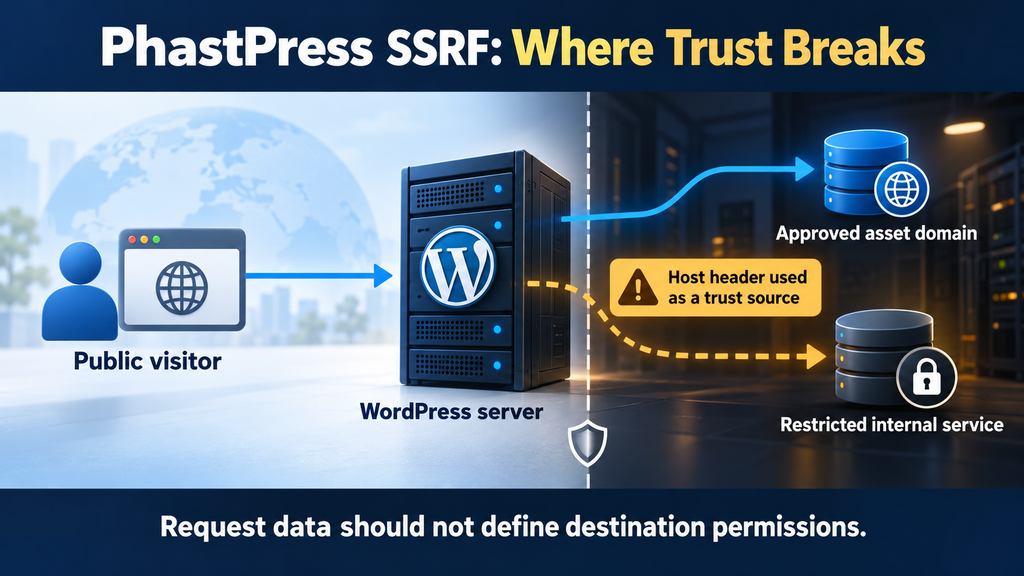
How Host Header Spoofing Bypasses Protection
The HTTP Host header identifies the host requested by an HTTP client. On infrastructure serving several websites, that information helps the server decide which site should handle a request. A normal browser generally supplies the expected hostname automatically, so website owners rarely notice it. However, a header is still part of an incoming message. Applications and infrastructure must decide how to handle unexpected values instead of assuming every request resembles a normal visit.
The reported weakness arises when a manipulated host value influences which outbound destination the scripts service considers acceptable. At a conceptual level, an attacker tries to make the requested destination agree with a trust rule derived from the same request. If the application accepts that relationship, the allowlist stops providing an independent boundary. The server may then retrieve a resource that the feature should have rejected. This explanation describes the trust failure without providing a working exploitation request.
There are still separate gates along the way. The request must reach the relevant application behavior. The server must be able to establish the outbound connection. The destination must respond in a usable way, and its own protections still apply. An authentication requirement does not disappear merely because a request comes from WordPress. These distinctions help explain why two sites using the same affected plugin version may face different practical consequences.
Why HTTPS and a CDN Do Not Answer Every Question
HTTPS protects communications between endpoints, but it does not establish that every application-level value deserves trust. A securely transported request can still contain misleading input. Likewise, a legitimate certificate does not make a plugin’s outbound destination policy correct. Website owners should therefore avoid treating the padlock symbol as evidence that this class of issue cannot occur. Transport protection and application authorization solve different problems, and a secure hosting arrangement needs both.
A CDN or reverse proxy can influence exposure by rejecting unexpected hostnames or restricting access to the origin. However, the result depends on the complete deployment. An origin reachable through another route might receive requests that never pass through the expected edge controls. Alternatively, a correctly configured hosting platform may reject those requests before PHP runs. Neither outcome should be assumed from the presence of a CDN logo in the hosting dashboard.
Ask the provider to describe the actual path from the internet to your WordPress installation. Does the origin accept only approved domains? Can clients reach it directly? Which proxy-supplied headers does the application trust? Record the answers in plain language. For example, “Only the approved proxy may reach the origin, and unknown hostnames are rejected” is more useful than “We use cloud protection.” The first statement describes controls that someone can verify.
Which Internal Services Could Become Reachable?
Internal services are applications or interfaces intended for a limited audience. A business might keep an operational dashboard, a monitoring page, or a maintenance API away from public access. Sometimes these services rely partly on network location for protection. That arrangement creates concern when a public application can initiate requests from inside the same environment. The services do not suddenly become public websites; rather, a vulnerable intermediary may provide an unexpected route toward them.
For this PhastPress vulnerability, the published description concerns HTTP requests to internal or external destinations and the return of response content. It does not demonstrate unrestricted access to every local service or every network protocol. A database using its native protocol, for example, is not automatically readable through an HTTP retrieval feature. Similarly, a private address does not guarantee that a service exists there, accepts the connection, or reveals sensitive information. cve.org
A practical exposure review should therefore begin with an inventory, not speculation. Ask which HTTP services are reachable from the WordPress workload. Then identify which require authentication, which expose only public information, and which provide administrative capabilities. An internal status page showing a generic health message presents a different concern from an unauthenticated control panel. Both deserve appropriate protection, but their possible business impact differs considerably.
Local Services, Private APIs, and Shared Infrastructure
A service can be internal because it listens only on the same machine, because it belongs to a private network, or because a firewall restricts its audience. These arrangements are not interchangeable. A website running in an isolated container may see a very different environment from a website running directly on a multipurpose server. Before assessing consequences, establish where PHP actually runs and what network boundaries surround that process.
Consider a fictional company that hosts its public blog and an internal document preview service within the same private network. The preview service accepts requests from approved application servers but has no separate user login. If the blog can contact that service, the company should examine whether the network-based trust remains appropriate. This example illustrates an architectural concern; it does not claim that PhastPress provides access to a specific document system.
Shared hosting introduces another important distinction. Sharing a provider does not automatically mean one customer can access another customer’s applications. Proper isolation can separate accounts, processes, files, and networks. Conversely, a private VPS does not become secure simply because only one customer rents it. The useful assessment follows actual boundaries and permissions. Ask your provider about isolation and reachable services rather than making conclusions from the hosting product’s name.
Why Cloud Hosting Requires an Additional Review
Cloud workloads may have access to infrastructure information and identities that ordinary internet visitors do not possess. This makes it important to review the relationship between the public website and its surrounding cloud environment. The concern is not that cloud hosting inherently creates a breach. It is that an application’s network position and assigned permissions may increase the consequences of a separate software flaw. An ordinary blog rarely needs broad authority over storage, infrastructure, or other workloads.
On Amazon EC2, the instance metadata service supports a session-based mechanism called IMDSv2. Its token-based requirements change what an application request must accomplish to retrieve metadata. A simple URL-fetching capability should not be described as automatically defeating those requirements. Administrators should review whether metadata access is needed, how the service is configured, and which identity permissions the workload holds. These are deployment questions that require checking the actual instance configuration. Amazon Elastic Compute Cloud
Azure’s instance metadata service also has request requirements, including a metadata header. Whether a particular SSRF weakness can interact successfully with such a service depends on the request capabilities available and the surrounding configuration. Do not turn “the server runs in Azure” into “credentials were stolen.” The defensible approach is to identify the environment, review provider-specific protections, and investigate evidence before making an incident claim. Microsoft Learn
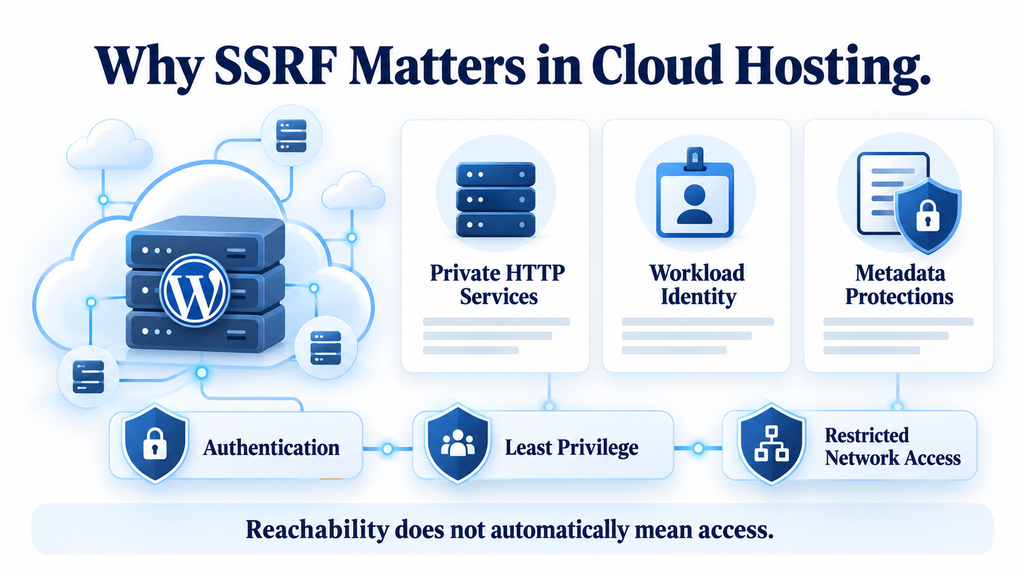
Updating PhastPress to Version 3.12

At the time of this review, the official WordPress plugin directory lists PhastPress 3.12. There is an important qualification: its public changelog describes a WordPress compatibility update. The preceding 3.11 entry mentions script compatibility improvements involving multisite installations, CDNs, and service proxies. Those notes do not explicitly identify CVE-2026-3712 as fixed. Consequently, this article recommends updating while avoiding the unsupported claim that the 3.12 changelog, by itself, proves complete remediation. WordPress.org
If your site runs 3.10 or earlier, treat the update as a priority maintenance task. Start by recording the installed version and checking that you have a recent, restorable backup. Choose a quieter traffic period where practical, especially for a store or membership site. A backup should include the database and relevant website files, with a recovery method you understand. Simply seeing “backup completed” is less useful if nobody knows how to restore it.
Next, open Plugins → Installed Plugins in WordPress, locate PhastPress, and use the available update action. Afterward, confirm the displayed version rather than assuming the operation succeeded. If your dashboard offers a newer official release than 3.12, review that release instead of deliberately installing an older target. Keep a short maintenance record with the date, previous version, new version, and the person who performed the update. This gives future reviews a reliable starting point.
Test the Website After the Update
Performance plugins can affect how visible page features behave. After updating, open the website as a logged-out visitor and test representative pages. Check the homepage, a recent article, a category archive, and any page with interactive elements. On a store, include the product page and checkout flow using an appropriate test method. On a membership site, verify the login and account screens. The aim is to confirm that everyday tasks still work.
Review the browser console and network panel if you are comfortable using developer tools. Look for resources that consistently fail and scripts associated with broken functions. A failed third-party request is not automatically evidence of the vulnerability or an update problem. Compare the symptom with what you observed before maintenance. For example, a mobile menu that worked previously and now refuses to open deserves investigation, while a blocked advertising request may reflect the browser’s privacy settings.
Cache handling should follow the tools actually installed on your website. If visitors still receive an older page version, refresh the relevant page or CDN cache through its normal interface. Preserve potentially useful evidence before clearing caches during an active incident investigation. Most importantly, separate functional testing from security validation. A working homepage confirms that the site renders; it does not establish that an unsafe outbound request would be rejected.
What to Do When the Fix Status Remains Unclear
Contact the plugin maintainer or hosting security team with a precise question: “Which release and code change address CVE-2026-3712, and how can you verify the deployed mitigation?” Include your current version and relevant hosting details. If the site uses multisite, mapped domains, or a reverse proxy, mention them. This avoids a vague exchange in which someone confirms only that your installation is current, without addressing the reported security behavior.
While awaiting confirmation, assess whether the affected service needs a temporary access restriction. If no reliable mitigation can be established, discuss disabling or removing the plugin through the normal maintenance process. Do not assume that switching off a dashboard feature necessarily makes every bundled PHP entry point unreachable. The hosting team should verify the relevant server-side behavior. This matters especially when a plugin includes service files that can receive requests outside ordinary page rendering.
Any temporary measure should have an owner and a review date. For example, document that a hosting engineer restricted the relevant service pending confirmation from the maintainer, then schedule a follow-up after the next release. Avoid leaving undocumented emergency rules indefinitely. They can later cause confusing performance problems or be removed by someone who does not understand their purpose. A small written record helps preserve both security and operational clarity.
Auditing Server Logs and Outbound Connections
Start the investigation by preserving what already exists. Access logs, error logs, proxy records, and cloud audit data may have limited retention periods. Record the time you learned about the issue and the time you changed the configuration. Then make protected copies of relevant records through your provider’s normal process. If the situation may involve customer information or a business incident, involve the appropriate technical and organizational contacts before making changes that could remove evidence.
The most useful review connects incoming activity with subsequent server behavior. A suspicious request is one piece of evidence. An unexpected outbound connection at the same time adds context. A matching response from an internal service may add more. Keep these stages separate in your notes. “A request attempted to use an unusual hostname” is a narrower finding than “the server returned private information,” and the distinction affects the response.
Choose an investigation window based on the installation history and available records. The disclosure date is not automatically the first possible date of exposure. If you can establish when the affected version was installed, use that information to guide the review. If older logs no longer exist, record the limitation plainly. Missing historical evidence should neither be presented as proof of compromise nor used to claim that nothing happened.
Review Incoming Requests With Enough Context
Ask which hostname fields your infrastructure actually records. A typical access log may show the client address, path, timestamp, status, and response size while omitting the original host value. If so, the most relevant input may be absent from that file. Check whether the CDN, reverse proxy, or load balancer retains it elsewhere. When several components use different time zones, normalize timestamps before comparing events.
Look for requests associated with the affected service that differ from the site’s ordinary resource traffic. Unexpected hostnames, unusual source values, repeated variations, and abrupt changes in volume can provide investigative leads. However, context remains essential. A legitimate CDN configuration or mapped domain may explain a value that initially looks unfamiliar. Have someone who understands the site’s normal asset delivery review the findings before classifying them.
Status codes and response sizes require careful interpretation. A 200 response only indicates that a layer returned a successful HTTP status; it does not identify the sensitivity of the content. A 403 may show that a protective layer rejected the request, but you should establish which layer produced it. Even a failed request can reveal useful timing information. Preserve the surrounding records so later analysis does not depend on a single isolated line.
Review Outbound Activity Without Overstating Visibility
Ask your provider whether it retains network flow records, outbound proxy logs, DNS query records, or application-level request telemetry. These sources answer different questions. A flow record may show that the website workload connected to an address, while an HTTP proxy may provide destination and request details. DNS data may reveal a queried name without proving that a connection succeeded. The available evidence will depend on the hosting design.
Compare destinations against a reasonable baseline. A WordPress website may legitimately contact update services, payment providers, image services, and approved APIs. An unfamiliar destination deserves review, but unfamiliarity alone does not establish abuse. Involve the person responsible for integrations. For example, a new newsletter service may explain a recent connection that the hosting engineer does not recognize. Document that explanation so the same destination does not trigger repeated uncertainty.
If you introduce new monitoring, be clear about its starting point. Enabling logging today cannot recreate requests from last week. Similarly, a live connection snapshot can help with an ongoing event but says little about a completed historical request. Keep monitoring proportionate and protect its contents. URLs and application records may include personal data or sensitive tokens, so evidence should remain in a restricted location rather than a public support thread.
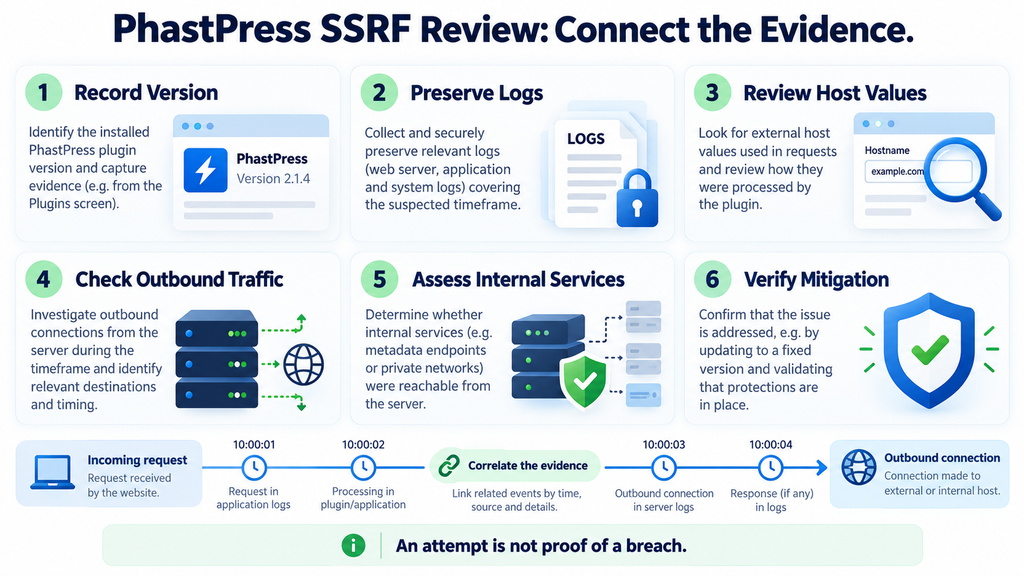
Responding to Suspicious Findings
A useful response starts by separating observations from interpretations. Suppose the logs show repeated requests with hostnames unrelated to your website. That is an observation. Calling those requests an attempted exploit is an interpretation supported by their content and context. Claiming that private information escaped requires additional evidence. This disciplined approach helps technical teams communicate clearly and avoids alarming customers or management with conclusions that the records do not support.
Contain the relevant exposure while preserving the evidence you need. The appropriate action might involve restricting the affected service, removing an unnecessary plugin, or limiting the workload’s network access. Have the responsible administrator verify the result from the relevant request path. If an existing protection blocked an attempt, retain the evidence of that block and review whether other paths remain open. A narrow finding should lead to a focused investigation rather than an assumption that the entire server is lost.
When evidence suggests access to sensitive information, expand the response according to what may have been exposed. This could involve reviewing identity usage, invalidating affected sessions, rotating a specific credential, or investigating an internal application. Choose actions based on the information involved. Replacing an administrator password may be sensible in some incidents, but it does not automatically address a leaked service credential or an overly permissive cloud role.
Build a Timeline That Another Person Can Follow
Create a simple incident timeline using consistent timestamps. Include the first relevant request found, associated outbound activity, any internal service response, and each containment action. Add references to the evidence location without copying secrets into the timeline. For example, write “See protected proxy record A17” rather than pasting a complete URL containing a token. This makes the document easier to share with the right people.
Record known facts, reasonable hypotheses, and unresolved questions separately. A useful note might say that the server contacted an internal HTTP service, but that response contents were not logged. Another might state that an edge rule rejected the request before it reached the origin. Those findings support different conclusions. Keeping them precise reduces the chance that a preliminary hypothesis becomes an accepted fact through repetition.
The timeline also helps evaluate whether containment worked. Compare the period before and after the change, accounting for changes in logging and traffic. If suspicious requests continue but the relevant behavior is demonstrably blocked, that may show attempted activity against an effective control. If visibility remains incomplete, state that limitation. A defensible report can contain uncertainty while still providing a clear account of the actions taken.
Reducing Future SSRF Exposure
Once the immediate concern is addressed, review how much network access the website actually needs. A small publishing site may require outbound access to a handful of business services, but it probably has no reason to reach unrelated administrative interfaces. Start with a list of necessary integrations and their owners. Then ask the hosting team which unnecessary routes can be restricted without breaking updates, forms, payments, or other required functions.
For developers, the broader design principles include validating destinations against trusted configuration and enforcing network restrictions that complement application checks. OWASP’s SSRF guidance discusses application-level validation and network-layer protections, as well as the complications introduced by redirects and destination resolution. These principles apply beyond PhastPress to importers, preview generators, webhook tools, and other features that retrieve remote resources. OWASP Cheat Sheet Series
For website owners, a valuable habit is asking what each plugin can do on the server. A feature may look like a simple convenience in the dashboard while introducing file processing or network requests behind the scenes. This does not make the feature inherently unsafe. It does make updates, access controls, and clear ownership important. Keep the plugin inventory short enough that someone can explain why each component remains installed.
Put Ownership Behind Every Security Control
A security setting is easier to maintain when someone owns it. Decide who handles plugin updates, who manages the origin firewall, and who reviews cloud permissions. On a small site, one person may cover all three roles. On a business website, those responsibilities may sit with different providers. Write them down alongside contact details and expected response times so a future advisory does not begin with a search for the right person.
Give temporary controls an explicit maintenance process. A restriction added during an incident can become a source of confusion months later. Document why it exists, which functionality it affects, and what evidence would justify changing it. For example, a hosting rule might remain in place until a verified application update makes it unnecessary. That is a clearer arrangement than an unexplained rule that nobody feels comfortable touching.
Finally, retain a small set of repeatable checks. Confirm versions after maintenance, verify normal website functions, review unexpected outbound behavior, and periodically revisit unnecessary permissions. These activities should fit the scale of the site. A personal blog does not need a complicated enterprise program, but it benefits from consistent habits. The goal is to make the next security decision easier because the important information is already available.
Frequently Asked Questions
Does the PhastPress vulnerability require a WordPress account?
The published record describes an unauthenticated issue, so an attacker does not need a WordPress account to attempt it. That does not remove the other conditions involved in exploitation. The request still needs to reach the relevant service behavior, and the server must be able to contact the destination. Administrators should assess exposure even when public registration is disabled.
Does SSRF mean someone has uploaded malware?
No. SSRF concerns improperly influenced server-side requests. It does not, by itself, establish that someone uploaded a malicious file, changed a plugin, or installed persistent access. Those outcomes would require additional evidence or another weakness. Review the reported behavior directly instead of using a malware scan as the sole test for whether an SSRF incident occurred.
Is PhastPress 3.12 definitely the first fixed version?
The reviewed public materials do not establish that statement. Version 3.12 is available, while the advisory identifies versions through 3.10 as affected. Its public changelog does not explicitly name this CVE. Update to the appropriate current release, then seek maintainer confirmation or technical verification of the relevant security change before describing a specific release as conclusively fixed.
Can this issue affect a website on a normal VPS?
Potentially, yes. The issue is not limited to a particular cloud product. A VPS can host local HTTP services or have access to private network applications. Its actual risk depends on the deployed software, request handling, network routes, and destination protections. Assess the server’s real environment rather than assuming that a conventional VPS has no internal services.
Does a firewall automatically stop SSRF?
A firewall’s effect depends on where it operates and what it restricts. Blocking unsolicited inbound traffic does not necessarily stop an allowed website process from initiating an outbound request. Ask which controls govern connections from the WordPress workload. A useful answer identifies the relevant rule and verifies its effect, instead of merely confirming that a firewall is enabled.
Will a normal WordPress security scan detect past exploitation?
Not necessarily. A scan may identify outdated software or suspicious files, but historical SSRF activity may leave evidence mainly in request records, network telemetry, or the contacted service. A clean file scan therefore answers a different question. Combine appropriate scanning with log review and hosting analysis when investigating a possible network-request incident.
Should I change every password immediately?
Base credential changes on the evidence and the information that could have been exposed. If a particular service credential may have leaked, revoke or rotate it and review its usage. Changing only the WordPress password would not resolve that situation. For an uncertain incident, ask the security team to identify the affected identities before planning proportionate recovery actions.
Can I test the issue safely on my own website?
Use an authorized testing plan agreed with your hosting provider or security professional. Define the environment, expected behavior, and evidence needed before testing. A staging copy can help with application checks, but it may have different network access from production. Avoid probing unrelated internal systems simply because the website server might be able to contact them.
What should I do if old logs are missing?
Preserve the records still available and ask the provider whether other sources exist. Proxy logs, internal service records, or cloud audit data may provide partial context. Record any gaps honestly. Then verify containment and improve future visibility. Missing logs limit confidence about the past, but they do not prevent you from reducing the current exposure.
Does this vulnerability affect AdSense approval directly?
An advisory alone does not determine advertising approval. For a publisher, the practical priority is maintaining a secure, functional website and accurate editorial content. Avoid unsupported claims about breaches or guaranteed fixes. Keep advertising integrations within your normal testing process after plugin maintenance, while following the advertising platform’s applicable requirements.
A Faster Website Still Needs Clear Trust Boundaries
The most useful lesson from the PhastPress vulnerability is straightforward: a request should not define the rule that makes its own destination trustworthy. Once a server retrieves resources on someone else’s behalf, the application must keep that decision under reliable control. The surrounding infrastructure matters too. Internal authentication, restricted network access, and appropriately limited identities can influence how far an application flaw reaches.
For website owners, the practical path is to confirm the installed version, update responsibly, verify the mitigation, and review evidence proportionate to the exposure. Cloud-hosted sites should also examine workload identity and metadata protections. Keep possible consequences separate from observed events. This produces a clearer response and a more trustworthy account for anyone who depends on the website.
⚠️ Disclaimer and Source Hygiene
This article provides general educational guidance for website owners and administrators. It does not replace an assessment of your hosting configuration or a professional incident investigation. Consult your hosting provider, plugin maintainer, or a qualified security professional when confirming remediation or responding to suspected access to sensitive information. Legal or notification obligations require advice appropriate to your organization and jurisdiction.
Research was checked on October 17, 2026, using the published CVE record, the official PhastPress directory and changelog, and authoritative security and cloud documentation. Hypothetical examples illustrate possible architectural risks; they are not reports of verified exploitation. Release information can change. Recheck the current advisory and maintainer guidance before publishing or making operational decisions.
Sources and References
- CVE.org: CVE-2026-3712 – Published vulnerability description, affected range, and severity.
- PhastPress on WordPress.org – Official plugin information, available version, and public changelog.
- OWASP SSRF Prevention Cheat Sheet – General defensive guidance for applications that retrieve remote resources.
- Amazon EC2: Instance Metadata Service – Provider documentation explaining metadata access and IMDSv2.
- Microsoft Learn: Azure Instance Metadata Service – Provider documentation explaining Azure metadata requests and requirements.
Secondary Sources and Testimonials
Secondary summaries can help readers discover an advisory, but remediation decisions should return to primary records and verified deployment details. No customer testimonials or unverified breach accounts are used in this article.
Sign in with a Subscriber account to vote.