
Table of Contents
Learn how WPZone UTM Links adds campaign parameters to external WordPress article links without rewriting your posts. This practical guide explains installation, configuration, exclusions, caching, and testing, with clear examples to help you label outgoing referrals while understanding what the plugin can and cannot measure.
Give Your External WordPress Links a Clear Source
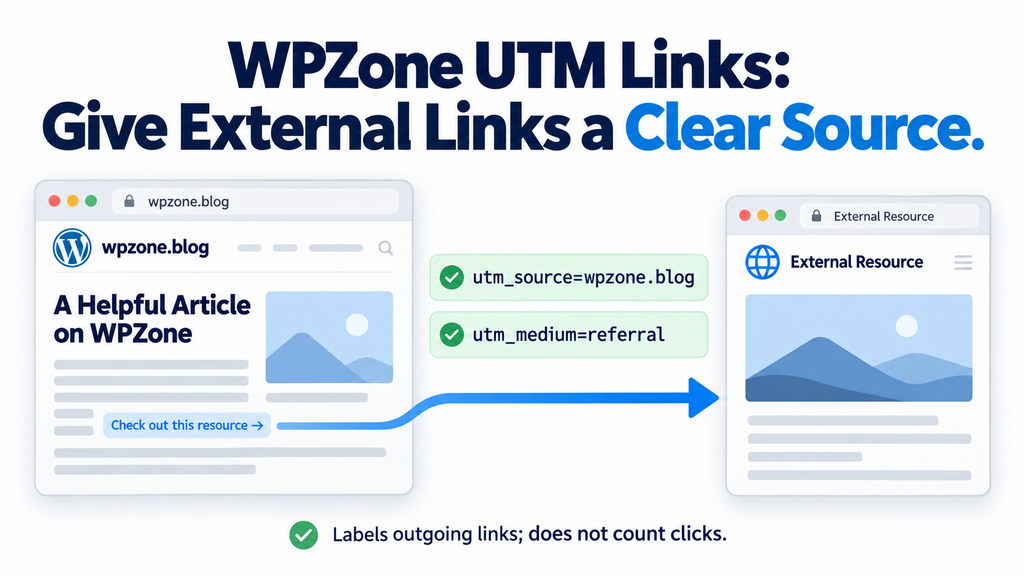
When you write a WordPress tutorial, you often recommend useful resources. You might link to official documentation, a public tool, or another article that explains a difficult subject. Those recommendations help readers continue learning. However, the destination website may receive visitors without a clear campaign label identifying your publication. WPZone UTM Links addresses that specific task. It adds recognizable UTM parameters to eligible external links inside your published articles. You choose the source and medium in the settings, and the plugin applies those values when WordPress renders supported content.
For a website such as wpzone.blog, an ordinary external recommendation can carry utm_source=wpzone.blog and utm_medium=referral. These labels describe where the visitor came from and the type of referral. You do not need to open hundreds of articles and manually change every eligible destination. Nevertheless, automatic labeling needs clear boundaries. Some URLs already contain campaign information, while others depend on exact query values. This guide explains how WPZone UTM Links version 1.0.0 handles those situations, how to configure its exclusions, and how to verify the published results.
What UTM Parameters Actually Do
UTM parameters are named values added to a destination URL. They provide campaign information that compatible analytics systems can interpret when someone follows the link. For example, a source can identify your blog, a medium can describe an editorial referral, and a campaign can identify a broader publishing initiative. Google documents this approach for labeling campaign and referral destinations. However, the receiving website must have suitable analytics collection for those values to appear in its reports. Adding parameters to a URL does not create a reporting system by itself. support.google.com
Consider a simple destination such as https://example.com/tutorial/. With the plugin’s basic configuration, an eligible link becomes https://example.com/tutorial/?utm_source=wpzone.blog&utm_medium=referral. The destination path remains the same, while the query supplies additional context. Whether the destination records that context depends on its own setup. A redirect might remove the parameters, or analytics might not collect the visit. The tagged address therefore confirms that labeling occurred. It does not independently prove that a session appeared in another website’s reports or that the recommendation generated a conversion.
Source, Medium, and Campaign Have Different Purposes
The source should identify the publication sending visitors. For wpzone.blog, the domain provides a straightforward and recognizable label. The medium should describe the referral consistently, which explains the plugin’s default value of referral. The campaign field is optional and starts empty. If you enter wordpress-guides, eligible links also receive utm_campaign=wordpress-guides. Version 1.0.0 uses one configured campaign across its supported content. It does not create a different campaign for each article, category, or button. Choose a label broad enough to describe that coverage, or leave the campaign empty when it adds little useful information.
Write a short naming convention before you start making changes. For example, you could use lowercase domains for sources, retain referral as the medium, and separate campaign words with hyphens. This is a practical editorial convention rather than a WordPress requirement. It gives everyone maintaining the website a predictable approach. A campaign such as wordpress-resource-library is easier to understand than a collection of inconsistent names. Avoid inserting reader names, email addresses, or private account information into campaign values. Those labels travel inside URLs and should describe the publishing activity rather than identify the visitor.
What WPZone UTM Links Changes on Your Website
WPZone UTM Links modifies eligible anchor destinations while WordPress renders supported content. It does not open every article and permanently replace the links stored in the database. Your original post content remains intact, including the addresses entered in the editor. This distinction explains why the editor may display a plain URL while the public article contains additional parameters. The plugin applies a transformation to the rendered output. It also means that older articles can receive the same labeling without being individually edited and saved again.
By default, processing applies to individual standard WordPress posts. A separate checkbox extends it to standard pages. The implementation skips administration requests, feeds, REST requests, and AJAX contexts. Archives and unsupported content types also fall outside its selected scope. Menus, widgets, and theme elements do not automatically become covered because they appear beside an article. The important question is whether the anchor exists inside the content passing through the plugin’s filter. For unusual layouts or custom integrations, inspect the final published link rather than assuming every visible destination receives parameters.
The Plugin Labels Links but Does Not Measure Clicks
Version 1.0.0 does not create a click history, analytics dashboard, conversion report, or first-touch attribution record. It does not add a tracking cookie or a browser tracking script. Its link-processing code also makes no outgoing requests to a remote analytics service. The plugin stores its configuration, not a visitor activity log. These boundaries make its purpose easy to explain: it labels outgoing destinations. If someone follows a processed link, the receiving website may interpret those labels through its own analytics. Your WordPress dashboard does not receive click statistics from this plugin.
Imagine that an article contains five external resources. Three public documentation links receive parameters, while a protected payment link and a download remain unchanged. You can copy those addresses and verify the output. However, you cannot use WPZone UTM Links to discover which resource attracted the most clicks. That requires a separate measurement system. Keeping the distinction clear prevents unnecessary troubleshooting. A tagged destination can be correct even when no report is available to you. The plugin’s transformation happens on your website, while campaign interpretation happens wherever the destination collects compatible analytics information.
Download WPZone UTM Links Version 1.0.0
WPZone UTM Links version 1.0.0 is distributed as an installable WordPress ZIP package. Its declared minimum requirements are WordPress 6.2 and PHP 7.4. These numbers describe the compatibility floor listed in the plugin, rather than a recommendation to keep older software running. Use a maintained hosting environment and follow your normal WordPress update routine. The package contains the main plugin file, a readme, and an uninstall file. It does not include a separate analytics service, license activation system, or JavaScript tracking package.
Download WPZone UTM Links v1.0.0.
Prepare a Small Test Before Using the Main Site
A staging installation gives you a convenient place to inspect the behavior before applying it to your main publication. Create one ordinary test article with a plain external link, an internal link, and an external destination that already contains a UTM parameter. Add a public PDF link and a manually excluded anchor if you want broader coverage. These examples make the results easier to interpret. An article containing only downloads or protected destinations may correctly show no changes. Without a clearly eligible reference, you might mistakenly believe that the plugin is inactive.
Keep a current backup according to your normal maintenance routine, and identify existing code that modifies outgoing URLs. Check your standard plugins, must-use plugins, and any snippet manager you use. Focus on overlapping behavior rather than disabling unrelated features. If an older snippet already appends UTM parameters, disable that specific outbound modification before testing the new plugin. Also inspect the source on staging. Its default comes from the installation’s configured home hostname, which may differ from the public publication name. Enter the intended source deliberately when you want consistent labeling between staging and production.
Install the Plugin Through the WordPress Dashboard

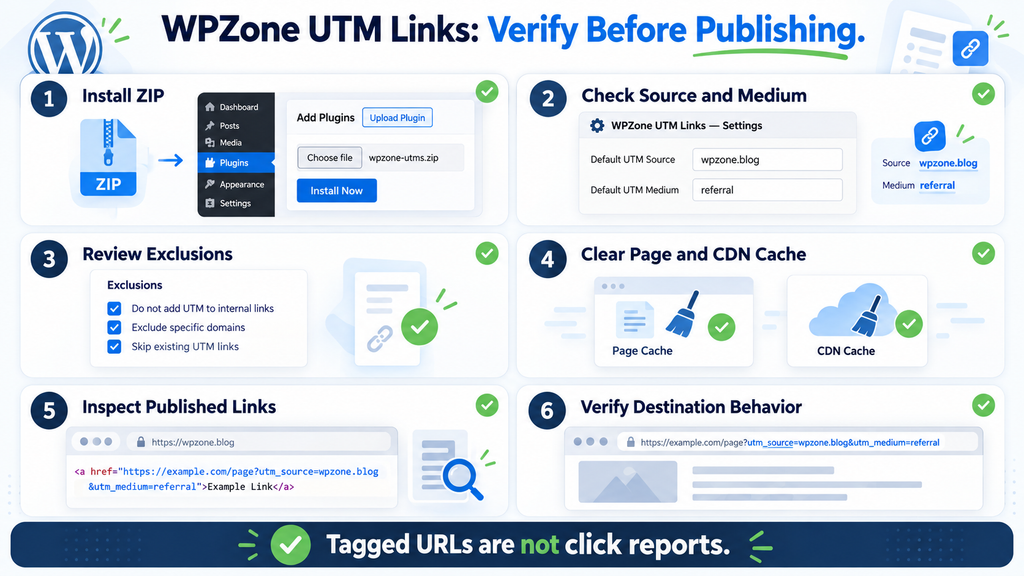
Sign in with an account that has permission to install plugins. Open the Plugins area, choose Add New Plugin or the equivalent Add New control, and select Upload Plugin. Choose the ZIP package without extracting it first, then click Install Now. WordPress should recognize the package and present an activation option after successful installation. Read the result shown by your own website rather than assuming that selecting a file completed the installation. This is the standard dashboard route for plugins distributed as ZIP archives. wordpress.org
Activate WPZone UTM Links and confirm that it appears in your installed plugins list. Next, open Settings → WPZone UTM Links. You can also use the plugin’s Settings action link from the Plugins screen. If the required WordPress HTML-processing class is unavailable, the settings screen displays a warning and content processing remains inactive. Resolve that compatibility issue through your normal update process. Changing campaign labels cannot compensate for a missing platform capability. Installation, activation, and supported processing are separate checks, so confirm each one before examining the public output.
Read the Settings Screen Before Making Changes
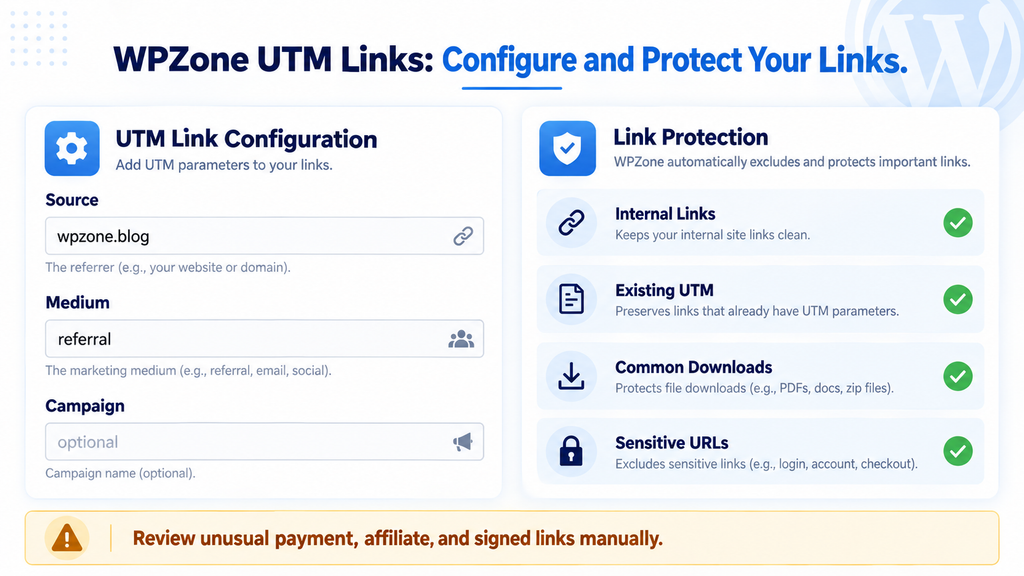
The settings screen contains the Enable checkbox, UTM source, UTM medium, optional UTM campaign, and the Pages checkbox. It also provides excluded domains and excluded path prefixes. A preview displays an example destination using the configured values. That preview helps you check formatting, but it does not crawl your website or test every link. It also does not simulate your theme, page cache, or a destination’s redirects. Treat it as a convenient example while continuing to inspect a real published article independently.
For the first test on wpzone.blog, confirm that the source is wpzone.blog, retain referral as the medium, and leave the campaign blank. Keep Pages disabled until you have verified ordinary posts. Save the configuration, clear the relevant page cache, and inspect the test article. This simple starting point gives you a clear baseline. Making several changes between inspections makes it harder to identify which setting produced an unexpected result. Once the basic transformation works as intended, you can introduce a campaign, add exclusions, or extend processing to selected pages.
Choose a Source That Accurately Identifies Your Blog
The default source comes from the hostname in WordPress’s home URL. On a website configured as https://wpzone.blog/, that normally produces wpzone.blog. The plugin does not apply that brand to every installation. Another website receives a default based on its own configured hostname. This is useful when you install the same package on several publications, but it also makes a settings review important. A staging installation might otherwise use a staging hostname. If you want a stable public label, enter the intended source rather than relying on an environment-specific default.
For example, your publication might use wpzone.blog consistently even when you test it on another hostname. A different blog should use its own appropriate label. Avoid changing the source to google, facebook, or another service merely because those names look familiar in analytics reports. They would misdescribe an editorial referral coming from your website. The source should help a destination owner understand the real origin of the visit. Clear, accurate labels are more useful than impressive-looking values that confuse the relationship between your publication and the receiving website.
Keep the Medium Consistent With the Type of Link
The default medium, referral, fits an ordinary recommendation inside an article. It tells the destination that the visit came through a referring publication. Do not change it to cpc just because you hope the link will generate valuable traffic. That value describes a different marketing context. Similarly, using email for a link displayed in a blog article would create a misleading label. Choose the medium according to the channel you are actually describing, and remember that version 1.0.0 applies the same configured medium to all eligible links within its supported scope.
Consistency also matters over time. If you use referral today and several unrelated variations next month, the destination may receive a less coherent set of labels. Before changing the value, ask what information the new label would communicate. If there is no clear improvement, the default may already be sufficient. Google notes that campaign parameter values are case sensitive, so Referral and referral should not be treated as interchangeable naming choices. Keeping the same spelling and capitalization helps avoid unnecessary variation in campaign labels. support.google.com
Use the Optional Campaign Field With a Clear Purpose
A campaign can be useful when you publish a coordinated collection of resources. For example, wordpress-resource-library could identify a broad initiative that includes several tutorials. With that value configured, an eligible destination becomes https://example.com/tutorial/?utm_source=wpzone.blog&utm_medium=referral&utm_campaign=wordpress-resource-library. The plugin adds the campaign parameter only when the field contains a value. Leaving it empty creates a shorter destination with source and medium alone. Both approaches are supported by the supplied implementation. Choose the one that communicates useful context without adding a label solely for the sake of having another field filled.
Version 1.0.0 uses one global campaign setting, so consider how that affects older content. If you change the campaign tomorrow, newly generated eligible links in existing articles use the updated value too. Cached pages may continue showing the previous label until refreshed. The plugin does not save a permanent campaign record for each article, and it does not build campaign values from titles or publication dates. If you need a specific link to retain a dedicated campaign, you can tag it manually. The automatic rules preserve existing UTM queries instead of replacing them with the global configuration.
Avoid Treating Campaign Names as Visitor Information
A campaign should identify a publishing or marketing activity. It should not identify the individual who follows a link. A value such as wordpress-guides describes a collection of content. A reader’s email address, customer number, or private account reference does something different and should not be inserted into these labels. URLs can appear in browser histories, copied messages, server logs, and destination analytics. Keep the campaign public and descriptive. You can explain the purpose of the label without exposing information about a particular visitor.
If several people maintain the website, document the chosen values in a short internal note. Record the source, medium, campaign purpose, and when a change would be justified. For example, you might state that the campaign remains empty unless the publication launches a broad resource initiative. This avoids having one editor invent a campaign for a single article while another assumes the setting describes the whole site. Because the plugin uses global values, small administrative changes can affect many generated links. A clear convention helps everyone understand that scope before making adjustments.
Decide Whether Standard WordPress Pages Need Processing
Posts are the default scope, which suits a publication containing many editorial references. The Pages checkbox extends processing to standard WordPress pages. This can help when you maintain a resource directory, an educational guide, or a Tools page containing public recommendations. However, pages also commonly contain contact details, membership entry points, and transaction-related links. Enable this setting because you have a specific use case and have reviewed the destinations involved. Wider coverage is useful only when it matches your publishing needs and the exclusions you have configured.
Suppose your Tools page links to public documentation and ordinary product information. Those destinations may be suitable for labeling. A membership page might contain special service links that require additional protection. Before enabling Pages, inspect both types of page and add any necessary exclusions. After saving the setting and refreshing caches, compare the generated destinations. The checkbox does not add support for products, custom post types, archive listings, or every component produced by a page builder. Its implementation selects standard posts and pages, which remains narrower than a universal site-wide link modifier.
Why Archives, Feeds, and Editor Views Can Look Different
An archive presents a collection of posts rather than one singular article. The plugin’s scope condition keeps archive output outside the supported transformation. Feeds and REST responses are also deliberately skipped. The editor shows saved content rather than a permanently rewritten version. These differences can be expected rather than evidence of a fault. When checking whether the plugin works, use a public individual post as your primary reference. Comparing that article with an RSS feed or administration screen mixes different processing contexts and can lead to an incorrect diagnosis.
Theme elements need similar care. A GeneratePress element that prints a link independently from article content is not automatically covered. A shortcode that produces an anchor inside content before the plugin runs may provide an eligible link. An anchor inserted later by another filter or browser JavaScript may be missed. The reliable approach is to inspect the final output of the specific component. Do not assume that every link visually positioned inside an article layout passed through the same WordPress content filter at the same time.
Internal Links Stay Outside Automatic UTM Labeling
WPZone UTM Links skips hosts matching the configured home and site domain families. The rule also includes their subdomains. On a site using wpzone.blog as its home domain, a link to docs.wpzone.blog is treated as internal by that matching logic. Ordinary relative URLs remain unchanged too, because the processor considers absolute HTTP, HTTPS, and protocol-relative destinations. A link such as /contact/ therefore keeps its stored form. This behavior allows you to label outgoing references without adding campaign values throughout your own normal navigation.
The internal-domain rule does not represent every domain you own. If you operate two publications with unrelated domain names, links between them can still be considered external. Add the second hostname to excluded domains if you want those destinations left untouched. Conversely, a separately measured service on one of your own subdomains remains within the internal domain family and is skipped. These are URL-matching rules based on WordPress configuration, not a complete model of your ownership or analytics architecture. Review the actual hostnames when your publishing setup spans several websites.
Existing UTM Parameters Are Preserved as a Complete URL
The plugin checks query parameter names and skips the destination when it finds a name beginning with utm_. This applies to both complete campaigns and partial manual tagging. For example, https://example.com/offer/?utm_campaign=partner-launch remains unchanged. The plugin does not add its source and medium to complete that address. This avoids silently combining an editor’s campaign with global settings. It also means that incomplete manual campaigns remain your responsibility. If a manually tagged link needs a complete set of values, edit that original destination deliberately.
This protection also explains why running the same transformation again does not ordinarily append duplicate UTM values. After the first pass, the destination already contains a UTM query, so another pass skips it. However, that behavior belongs to this implementation. A different plugin or snippet might overwrite values, rebuild the query, or run after WPZone UTM Links. When several modifiers are active, inspect their combined output. Using one deliberate outbound labeling method makes it easier to understand which component produced the final address and reduces avoidable conflicts.
Understand the Built-In Protections for Sensitive Links
Some destinations should remain exact because their query values participate in authentication, access control, or transaction handling. Version 1.0.0 includes exclusions for several common providers, including paypal.com, paypal.me, stripe.com, accounts.google.com, and login.microsoftonline.com. Their subdomains are excluded too. The implementation also skips common path segments associated with login, checkout, payment, OAuth, authorization, and downloads. These protections are useful, but they cannot identify every service. A custom payment gateway using a different domain and unfamiliar path may still require an explicit exclusion.
The query checks recognize several names associated with signed or sensitive URLs. Examples include signature, sig, token, access_token, api_key, _wpnonce, and expires. Parameter names beginning with x-amz- or x-goog- also cause the destination to be skipped. The processor additionally preserves URLs containing gclid, fbclid, or msclkid. When one of these rules matches, it leaves the full address unchanged. An unfamiliar system may use another structure, so do not rely entirely on automatic recognition. Explicitly protect links that grant access or depend on exact URL values.
Common File Downloads Receive Conservative Treatment
The plugin skips paths ending in several common file extensions. The list includes ZIP archives, PDF documents, Office files, images, media files, CSV, XML, JSON, and PHP. A destination ending in .php therefore remains unchanged even when it represents an ordinary public page. This is a conservative choice within the supplied code. The file check concerns the path rather than the complete visible address. Adding a public query string after a recognized filename does not make it eligible for automatic tagging. For example, a PDF destination with an additional query remains a skipped file URL.
An anchor containing a download attribute is skipped as well. Still, not every download uses a recognizable filename or path. A resource service might deliver a file through /get-resource/ with an unfamiliar query. In that situation, use an explicit exclusion when the original address must remain intact. Review unusual file distribution links, especially those connected to temporary access or authentication. The built-in rules provide a useful starting point, but they are not a universal detector of every download system. Your knowledge of the destination remains important.
Add Domain Exclusions for Destinations That Must Remain Exact
The excluded domains field accepts one hostname per line. If all links to a provider should remain unchanged, enter its hostname as a separate entry. For example, partner.example protects that domain and its subdomains, such as checkout.partner.example. Do not enter several domains in a comma-separated line and expect them to become separate rules. Use distinct lines so the configuration remains clear and the sanitizer can recognize the entries. Although the implementation can extract hostnames from HTTP or HTTPS addresses, entering the hostname alone makes the intended scope easier to read.
Domain exclusions are particularly helpful for affiliate systems, transaction providers, or services whose requirements are unfamiliar. They protect eligible links to that hostname without depending on a particular path or recognized query key. Before excluding a whole domain, consider whether that broad coverage matches your intention. A provider might host both public documentation and sensitive workflows. If every address should remain exact, a domain rule is simple. If only one reference needs protection, an individual anchor exclusion may be more precise and avoid removing useful labeling from unrelated public resources.
Use Path Prefixes When the URL Structure Provides a Clear Boundary
Excluded path prefixes offer another option. Enter a path such as /special-offer on its own line. The processor checks the beginning of the decoded path, and the rule applies across external domains. This means it is broader than one exact page. Both /special-offer/annual and /special-offer-extra can match the same prefix. Choose the text deliberately and test similar-looking destinations. A prefix is not automatically limited to one provider or one exact URL. If that broad behavior would create confusion, use a domain exclusion or protect the specific anchor instead.
For example, you might want all external paths beginning with /private-resource/ left unchanged. Add that prefix, save the settings, clear the relevant cache, and inspect a matching link. Then test an ordinary external article path to confirm that unrelated references still receive parameters. Avoid adding a very broad prefix unless you intend its full effect. A rule beginning near the root of many paths can skip more destinations than expected. The best exclusion is one whose scope you can explain clearly and verify with representative examples.
Exclude One Link With the Data-No-UTM Attribute
Sometimes one destination needs special treatment while other references on the same domain can receive labels. In that case, add data-no-utm="1" to the HTML anchor. A practical example is <a href="https://example.com/special-resource/" data-no-utm="1">Open the original resource</a>. The plugin sees the attribute and leaves that anchor unchanged. This gives you a local exception without excluding the entire domain. It is useful when an article contains a mixture of ordinary references and one address that should retain its exact original form.
The supplied implementation checks whether the attribute exists, rather than interpreting its value as an on-and-off switch. An attribute with the value 0 still causes the anchor to be skipped. To restore automatic processing later, remove the attribute completely. This detail matters when you revisit an older exception. Changing 1 to 0 may look like disabling the exclusion, but it does not produce that behavior in version 1.0.0. Keep the visible link text natural and helpful. Readers need to understand the destination, while the exclusion remains a technical instruction inside the markup.
Add the Exception Through a Suitable Editing Workflow
In the block editor, a Custom HTML block gives you direct control over the anchor and its attribute. Enter the markup, preview the block, and confirm that the link displays correctly. Save the article, refresh the relevant cache, and copy the destination from the published page. That final check matters because some editors or third-party components can rewrite custom attributes. Do not assume that the exact markup survived simply because it looked correct before saving. Verify the final anchor rather than relying only on the editor’s temporary preview.
If you regularly use individual exceptions, keep a small note explaining why each one exists. For example, record that a particular provider requires an unchanged destination or that a manually supplied campaign should remain intact. This is especially helpful when another administrator maintains the article later. Without context, someone may remove the attribute while cleaning markup and accidentally change the link behavior. The note does not need private tokens or full sensitive URLs. A general explanation of the provider requirement is enough to preserve the editorial decision.
Clear Page and CDN Caches After Configuration Changes
A page cache can retain HTML generated before your latest settings change. If that stored copy contains plain destinations, activating the plugin may not immediately change what logged-out visitors see. The reverse can happen after deactivation: a cached article may retain previously generated UTM values. The plugin’s readme therefore instructs users to clear page and CDN caches after activation, deactivation, or configuration changes. Use the normal controls for your existing caching setup. If your website runs WP Fastest Cache, refresh the relevant cached pages through its usual administrative tools.
Different cache layers can preserve different parts of the response. Object caching and full-page caching are not interchangeable. A CDN may also serve another public copy after the origin page cache has been refreshed. Start with the affected article when your tools support a targeted purge. Use a broader refresh when a global source or campaign change applies throughout the publication. Then inspect the page in an incognito window. The purpose is straightforward: public visitors should receive HTML generated under your current configuration rather than an older stored version.
Inspect the Copied Destination Before Following the Link
Right-click an eligible external reference and use the browser’s copy-link-address option. Paste the result into a plain text editor so you can inspect the destination without navigating away. For a basic example, expect https://example.com/article/?utm_source=wpzone.blog&utm_medium=referral. This confirms what your website is presenting to the browser. You can then follow the link and observe whether the receiving service preserves the parameters or redirects to another address. Keeping those checks separate helps identify whether an unexpected change happens before the click or after the destination receives it.
An ordinary existing query should remain present, and fragments should stay at the end. For example, https://example.com/article/?language=en#setup becomes https://example.com/article/?language=en&utm_source=wpzone.blog&utm_medium=referral#setup when eligible. The plugin appends its values rather than rebuilding the original query. In HTML source, ampersands may appear as &, which is normal attribute escaping. That does not mean the browser received a different campaign value. Compare the copied browser address with the intended URL, and inspect raw markup only when you need to investigate the rendering details.
Test Several Link Types Before Relying on the Plugin
A useful verification article should contain several clearly different destinations. Include a plain public external link, an internal absolute link, a relative internal link, an already tagged external URL, and a common download. Add one anchor with data-no-utm="1" and one eligible URL with an ordinary query and fragment. The plain external references should receive the configured parameters. The protected examples should remain unchanged for their respective reasons. This focused test is more informative than scanning dozens of random articles without knowing which links qualify for processing.
Record the copied destinations before and after activation in a small working note. You do not need visitor information or analytics reports to complete this check. When testing a domain exclusion, include one of its subdomains. When testing a path prefix, include a similar path that begins with the same text. These examples reveal the actual matching behavior and help you identify rules that are broader than intended. After the basic test passes, inspect several real articles with typical references. Include an older post so you can confirm that display-time processing works without individually resaving its content.
Troubleshoot Plain Links in a Logical Order
If an ordinary external article reference remains untagged, first confirm that the plugin is active and its Enable checkbox is selected. Next, check that you are viewing an individual standard post. Archives, feeds, administration screens, and unsupported content types are not equivalent testing locations. Copy the original destination and inspect its hostname, path, and query for an exclusion trigger. A URL containing only fbclid, for example, is enough for this implementation to preserve the destination. Finally, refresh the relevant caches and inspect the article while logged out.
If the wrong source appears, read the saved source field rather than assuming that the plugin always uses wpzone.blog. If conflicting parameters appear, identify another active modifier. Version 1.0.0 can warn about certain recognized older implementations, but it cannot discover every custom snippet. Disable the overlapping outbound behavior you identify, then regenerate the page. For links created later by browser JavaScript, the explanation is different: they did not exist during server-side processing. Repeated cache purges cannot extend the plugin’s scope to anchors introduced only after the page loads.
Understand What Destination Analytics Can and Cannot Tell You
The destination website controls what happens after a visitor arrives. It may record compatible analytics, remove the query, redirect elsewhere, or ignore the campaign information. WPZone UTM Links does not contact that website to verify its reporting configuration. If you own both websites, you can examine the receiving site independently. If a partner owns the destination, interpreting its reports requires that partner’s access and cooperation. A copied tagged URL is sufficient evidence of the labeling output on your publication. It is not a measurement of visitor totals, conversions, or commercial value.
This distinction is especially important when discussing results. You can accurately say that the plugin added your publication’s source to eligible external links. You cannot claim that it increased traffic by a particular percentage without separate evidence. Likewise, the absence of a report available to you does not establish that the link was incorrectly generated. The transformation and the reporting belong to different systems. Keep any later performance analysis grounded in real data from the appropriate collection method, and avoid presenting the plugin’s configuration as proof of outcomes that it does not measure.
Keep URL Labels Free of Personal Information
Use source and campaign values that describe public publishing activity. Google cautions against sending personally identifiable information through URLs and URL parameters collected by Analytics. A domain and a general campaign label can provide the intended context without including an individual reader’s details. Do not place names, email addresses, or private account information into these settings. The plugin does not need those values to perform its function, and including them would create unnecessary exposure through the destination URL. support.google.com
The absence of tracking cookies in this plugin does not describe the entire website. Other analytics, advertising, or membership components may have different behavior. The receiving website may also run its own services after the visit. Review your overall privacy setup separately and consult a qualified professional when you need advice about applicable requirements. Do not describe the plugin’s limited data handling as a blanket legal conclusion. Its specific behavior is clear: it labels eligible links without creating its own visitor tracking history. Your broader website configuration remains a separate matter.
Present the Download Clearly on an AdSense Website
A useful download area should identify the plugin, version, and action in plain language. Visitors should immediately understand which control downloads the ZIP and which links open documentation or other resources. Avoid arranging advertisements so they resemble the download button. Google’s AdSense guidance addresses accidental clicks and the need to keep advertising distinguishable from interactive controls. A straightforward technical tutorial can include a plugin download without confusing readers about what they are selecting. Clear presentation supports the article’s educational purpose and makes the page easier to use. support.google.com
UTM parameters do not certify a website for AdSense or guarantee approval. Publishers must follow the applicable Google policies, and the decision involves more than one article or plugin. This guide provides practical educational content, but no wording can guarantee acceptance or increased earnings. Link labeling also does not automatically create backlinks, improve indexing, or raise search rankings. Focus on accurate explanations, useful destinations, transparent downloads, and a comfortable reading experience. Those choices help readers understand the tool without relying on exaggerated claims about advertising or SEO results. support.google.com
Keep Affiliate Destinations and Editorial References Under Review
Affiliate links can use different attribution systems, including ordinary-looking URLs without obvious tokens. The plugin’s built-in protections do not guarantee recognition of every affiliate destination. If your partner requires an exact address, add a domain exclusion or protect the individual anchor. Do not assume that the lack of a sensitive-looking query means modification is approved by the provider. Check the destination’s instructions and preserve the original structure when required. This review is about maintaining a working link and clear attribution, rather than increasing the number of URLs receiving UTM labels.
Editorial references deserve attention too. A destination that worked normally last month might later introduce a redirect or change how it handles additional query values. Periodically inspect important resources during your existing content maintenance routine. Check whether the link still reaches the intended page and whether the recommendation remains useful. WPZone UTM Links does not validate destination availability or evaluate the quality of the resource. Its automation reduces repetitive labeling work, but the editorial responsibility for accurate, helpful references stays with the person maintaining the article.
Evaluate Performance and Compatibility From Actual Behavior
The implementation uses WordPress’s WP_HTML_Tag_Processor to locate anchors and update their href attributes. WordPress documents this class as a tool for modifying HTML attributes. The plugin does not add a front-end script, contact a remote service, or build a visitor logging system while processing links. Those choices keep the feature focused. However, scanning article HTML still involves server work. Large posts and complex rendering pipelines should be tested on the actual installation rather than described as having zero overhead. developer.wordpress.org
With full-page caching, the transformation normally takes place when WordPress generates the HTML that becomes cached. Later visitors may receive that completed output without running the same rendering path again. This is an expectation based on the design, not a benchmark for every hosting configuration. If performance matters to your decision, compare the same article under similar conditions using your normal testing workflow. Do not draw conclusions from one fluctuating load time. The package’s limited responsibilities are useful context, but they do not establish a numeric performance guarantee.
Avoid Overlapping Outbound Link Modifiers
Several plugins or snippets can attempt to modify the same destination. One might append campaign values, another might rebuild the query, and a third might replace the URL entirely. Their execution order can affect the final result. Before enabling WPZone UTM Links, identify existing outbound modification and decide which component should own that function. You do not necessarily need to remove a broader analytics plugin if its outgoing-link rewriting can be disabled independently. The goal is a configuration you understand, with a clear explanation for how each final destination is produced.
After resolving overlap, inspect the published output again. Confirm that parameters appear once, use the intended values, and remain absent from protected links. Also check attributes managed by other tools, such as rel or target, when those attributes matter to your workflow. WPZone UTM Links changes eligible href values; it does not provide a complete link management policy. A successful integration depends on the combined behavior of your site. Testing the final anchor is more useful than judging compatibility from plugin names alone.
Deactivate or Uninstall the Plugin Cleanly
To stop new transformations, deactivate WPZone UTM Links through the Plugins screen. Then refresh the relevant page and CDN caches. Open a supported article while logged out and inspect a destination that you know was originally plain. Because the plugin did not rewrite saved post content, that link should return to its stored form once the previous rendered copy is gone. A manually tagged URL remains manually tagged. Deactivation does not remove UTM values that an editor already included in the original article.
The supplied uninstall routine deletes the plugin’s saved options. It does not remove articles, rewrite post content, or delete visitor histories, because the plugin does not create those histories. Before uninstalling, record your configuration if you may want to reinstall later. Note the source, medium, optional campaign, and custom exclusions. Deactivation leaves the settings available while stopping processing; uninstalling removes that configuration. Knowing the difference helps you choose the appropriate action when temporarily testing another solution or permanently removing the feature from your website.
Verify the Result After Removal
A stale page can make deactivation or removal look incomplete. If a cached article still contains UTM parameters, the browser may continue displaying them even though the plugin no longer runs. Refresh the relevant caches and compare a previously plain link again. Avoid choosing a manually tagged destination for this check, since it would remain tagged correctly. Use an example whose original content you know. That gives you a clear comparison between stored links and former display-time transformations.
If parameters remain after a confirmed cache refresh, inspect the stored article and look for another active modifier. A previous snippet, must-use plugin, or manually entered campaign may explain the result. Work through those possibilities before assuming that uninstalling changed the database incorrectly. The supplied uninstall behavior removes options rather than editing content. A clean diagnosis separates saved destinations, current filters, and cached HTML. Once you identify which layer still contains the parameters, you can make the appropriate change without rewriting unrelated posts.
Frequently Asked Questions
Does WPZone UTM Links Count Outgoing Clicks?
No. Version 1.0.0 adds parameters to eligible destinations but does not record visitor actions. It has no click dashboard, conversion report, or first-touch attribution history. You can inspect a generated URL to confirm its labels, but that does not reveal how many readers followed it. If the destination records campaign information, those reports belong to its analytics system. Measuring outbound interactions on your own website requires a separate solution and should be evaluated independently from this plugin’s labeling function.
Will It Add UTM Parameters to Internal Links?
Internal hosts matching the configured home and site domain families are skipped, including their subdomains. Ordinary relative addresses remain unchanged as well. However, a separate domain you own is not automatically internal. Add that hostname to excluded domains if you want it left untouched. This distinction matters when you operate several publications. The plugin applies URL-matching rules available from WordPress configuration; it does not know every domain associated with your business or personal projects.
Can I Use It With GeneratePress and Gutenberg?
The plugin works through WordPress’s content filter rather than a theme-specific setting. Ordinary server-rendered article links are its intended input. Nevertheless, a GeneratePress element printed independently from article content is not automatically covered. The Gutenberg editor can also show original links while the public article displays transformed destinations. Inspect a published post and verify any unusual blocks, shortcodes, or theme elements separately. The supplied implementation does not establish tested compatibility with every possible component.
Why Does the Editor Still Show the Original URL?
The editor displays saved content. WPZone UTM Links changes eligible destinations during rendering, so a plain address can remain correctly visible in the editor. You do not need to replace it manually to make the public output use the plugin’s settings. Open the published individual article, refresh the relevant cache, and copy the destination from the browser. That is the appropriate place to inspect the transformation. Manually adding UTM values to the saved link causes the plugin to preserve that already tagged address.
What Happens When a Link Has Only One UTM Parameter?
The plugin skips the entire destination. A single parameter beginning with utm_ is sufficient, even if the URL lacks a source or medium. For example, an address containing only utm_campaign=launch remains unchanged. This prevents the global configuration from being mixed into an existing campaign. It also means that the plugin does not repair incomplete manual tagging. If that link needs additional values, edit its original campaign deliberately and inspect the complete resulting address.
Are Payment and Affiliate Links Always Protected?
The built-in rules recognize several providers, sensitive paths, and query names, but they cannot guarantee detection of every service. An affiliate destination or custom payment system may use an unfamiliar structure. Add an explicit domain exclusion or use data-no-utm="1" when a destination must remain exact. Check the provider’s requirements before allowing changes. Automatic protection is a useful starting point, while unusual transaction and attribution links still require a deliberate review.
Can Each Article Have a Different Automatic Campaign?
Version 1.0.0 provides one global optional campaign field. It does not generate campaign names from article titles, categories, dates, or button positions. A configured campaign applies to eligible links within the supported scope. You can manually tag a specific destination with its own campaign, and the plugin will preserve it because it already contains a UTM parameter. However, there is no per-post campaign editor or campaign reporting dashboard in this release.
Do I Need to Resave Older Posts?
No. The transformation happens when supported content is rendered, so older articles can receive parameters without being individually resaved. Cached copies still need attention. After activation, refresh the affected caches and inspect several older individual posts while logged out. Include an ordinary eligible external reference. A post containing only internal links, common downloads, or existing campaigns may correctly show no changes. That does not mean that older posts require manual updating.
Does It Process Feeds, Menus, and JavaScript Links?
Feeds are expressly skipped. Menus and independently rendered widgets are not automatically part of the supported article content. Links introduced later by browser JavaScript are also outside the server-side processing path. An anchor generated inside filtered content may be eligible depending on when it appears, so inspect the final HTML. If your requirement is universal tagging across every website component, version 1.0.0 does not provide that coverage.
What Happens When I Remove the Plugin?
New transformations stop, and original plain links return once the site serves content without the filter or an older cached copy. Manually tagged destinations remain tagged because their parameters are stored in the article. Uninstalling removes the saved plugin settings rather than rewriting posts. For a clear verification, inspect a link that was plain before activation. That separates the plugin’s former output from manual campaigns or another active modifier.
Also read: How to Enable Website Compression in cPanel
Build a Link Workflow You Can Understand and Maintain
WPZone UTM Links is useful when you want consistent source labels on ordinary external article references. Start with an accurate source, retain a suitable medium, and add a campaign only when its global scope makes sense. Review unusual destinations before extending coverage. Then refresh the caches and inspect the published output. These actions turn a small automation feature into a practical publishing routine. You gain consistent labeling without rewriting every saved article, while keeping control over domains, paths, and individual anchors that should remain untouched.
The strongest reason to use this plugin is its clearly defined purpose. It labels outgoing referrals and leaves measurement to a separate system. If that matches your needs, version 1.0.0 provides straightforward settings and conservative protection rules. If you require per-link statistics, article-specific campaigns, or universal site coverage, document those requirements before selecting additional tools. A well-maintained WordPress website benefits from features you can explain and verify. Base your decision on the destinations readers actually use, the exclusions your publication needs, and the results you observe on your own installation.
⚠️ Disclaimer and Source Hygiene
This article provides educational guidance for WPZone UTM Links version 1.0.0. Plugin-specific descriptions are based on its PHP implementation, readme, and uninstall routine. They are not an independent production benchmark or a certification covering every theme and hosting configuration. Your caching layers, rendering workflow, and other plugins can influence the final output. Verify the behavior on your own installation before relying on it for important workflows. Consult a qualified professional when you need help with complex development, analytics, privacy, or advertising requirements.
General explanations were checked against official WordPress and Google documentation. Those sources describe their own platforms and policies; they do not endorse this custom plugin. This article does not guarantee AdSense approval, legal compliance, protection of every unfamiliar sensitive URL, or measurable business results. No user counts, performance percentages, or testimonials have been invented. If a later release changes the settings or processing rules, review that release’s actual files before assuming this guide describes it accurately.
📚 Sources and References
Plugin implementation: WPZone UTM Links version 1.0.0, including wpzone-utm-links.php, readme.txt, and uninstall.php. These files provide the evidence for the release-specific settings, exclusions, processing scope, and removal behavior.
Google Analytics campaign documentation: URL builders: Collect campaign data with custom URLs.
WordPress installation documentation: Manage Plugins.
WordPress HTML-processing documentation: WP_HTML_Tag_Processor reference.
Google Analytics privacy guidance: Best practices to avoid sending personally identifiable information.
Google AdSense policy documentation: AdSense Program policies.
Google AdSense presentation guidance: AdSense policies: A beginner’s guide.
🕊️ Secondary Sources and Testimonials
No secondary testimonials or user performance claims were used in this guide. The situations described are illustrative examples. Plugin behavior comes from the version 1.0.0 implementation, while general platform information comes from official documentation. Future reader experiences can add useful context, but they should be identified as individual experiences and kept separate from documented functionality.
Sign in with a Subscriber account to vote.